What's inside
- Key Takeaways
- Quick Picks
- How Did We Choose These Picks?
- What Makes an HTPC Case Different from a Small Tower?
- Which HTPC Case Fits Your Shelf and Your Build?
- How Do the Six Cases Compare Side by Side?
- What Should You Measure and Plan Before Ordering an HTPC Case?
- How Do You Keep an HTPC Quiet for Years, Not Just for Week One?
- What Mistakes End Most HTPC Projects Early?
- How Does the Sofa Actually Control the Machine?
- Do Discs Still Belong in a Home Theater PC?
- How Do You Upgrade an HTPC Without Rebuilding It?
- What Does a Good HTPC Sound Like at Midnight?
- How Does an HTPC Fit a Whole-House Setup?
- Final Recommendation
- Frequently Asked Questions
- Related Guides
As an Amazon Associate I earn from qualifying purchases. This post may contain affiliate links at no extra cost to you.
gizmoverdict.com is reader-supported. When you buy through links on our site, we may earn an affiliate commission.
Where to buy: Every case here links to its own Amazon listing, and the features discussed — front-panel design, radiator support, locking doors, form factor — come from what each listing title states. An HTPC lives or dies by details like those, so we do not decorate them with invented ones.
The best home theater pc cases solve a problem no other case category has: the computer must disappear into a room designed for watching, while remaining a fully capable PC. A tower beside a television looks like an apology. An HTPC case looks like it belongs to the same family as the amplifier and the disc player — horizontal, low, finished in brushed metal rather than gamer angles, with its lights dimmed and its fans beneath notice. When the film starts, the machine’s job is to be forgotten; everything about these cases serves that vanishing act.
That brief creates real engineering tensions. Horizontal cases live in media cabinets and on AV shelves, where width is generous — hi-fi components set the shelf’s expectations — but height and depth are rationed, and ventilation arrives from directions a tower designer never considers. The components inside still generate a gaming PC’s heat if you let them, yet the room demands near-silence at the exact moments a film goes quiet. And the build must accept the odd, specific hardware of the genre: a large storage array for a media library, a capture or tuner card in some homes, an optical drive in many, and a remote-friendly front that does not glow like a spaceship through a dark scene.
Silverstone dominates this list for the honest reason that it never abandoned the category: five of the six picks are theirs, spanning the affordable Milo line, the mainstream Grandia GD series, and the premium Crown flagship, while Fractal Design’s Node 804 represents the cube-shaped alternative for builders whose media PC doubles as the household’s storage server. Between them, the list covers the slim shelf unit, the full-ATX living-room machine, the lockable family-proof box, and the no-compromise statement piece. Read for your shelf first and your components second — in this category, the room is a specification.
Key Takeaways
- HTPC cases are horizontal because the AV shelf is: measure your cabinet’s height, depth and ventilation before falling for any design.
- The Silverstone Grandia 11 states 240mm radiator support in its title — rare liquid-cooling headroom in a compact ATX HTPC case.
- The GD10B’s lockable front panel is a family feature, protecting settings and discs from small hands.
- The Fractal Node 804 trades the hi-fi silhouette for cube-shaped storage depth — the media-server builder’s pick.
- Silence is the category’s currency: every design here is judged by what it sounds like during a film’s quietest scene.
Quick Picks
| Pick | Badge | Why it earns its place |
|---|---|---|
| Silverstone Technology GD09 | Best mainstream HTPC | The Grandia formula in its classic form: faux aluminium AV styling in a full home-theater chassis. |
| Silverstone Technology Grandia 11 | Best for powerful builds | Compact ATX HTPC case whose title states 240mm radiator support for serious, quiet cooling. |
| Silverstone Technology GD10B | Best for families | Lockable front panel keeps the build’s controls and drive safe in a shared living room. |
| Silverstone Technology Crown 04 | Premium statement | The flagship Crown line’s premium HTPC case for a media room that treats the PC as furniture. |
| Fractal Design Node 804 | Best for storage-heavy builds | A cube that hides a serious drive count behind a calm, windowless face. |
| Silverstone Technology ML03B | Best slim budget option | Milo-series aluminium and steel micro-ATX case with a low profile for tight shelves. |
How Did We Choose These Picks?
The first filter was silhouette honesty: a pick had to be designed for the AV shelf, not merely small. That meant horizontal layouts or the Node’s cube — shapes that sit among amplifiers without apology — and front panels whose design language comes from hi-fi rather than from gaming. The GD09’s faux aluminium face, the Crown’s premium brief and the Milo’s slim steel all pass that test in different price bands.
The second filter was the living room’s practical demands, taken from the listing titles where they state them: the Grandia 11’s radiator support for builders who want a powerful machine kept quiet by liquid; the GD10B’s lockable panel for households where the PC shares a room with children; the Node 804’s storage-oriented cube for the media-library crowd. Each pick leads a recognisable scenario rather than duplicating a neighbour. The third filter was platform sense — the list spans micro-ATX slim builds through full ATX machines, because an HTPC can be anything from a streaming front-end to the most powerful computer in the house wearing a disguise.
What Makes an HTPC Case Different from a Small Tower?
Orientation changes everything downstream. Lying the motherboard flat redistributes the build’s problems: the graphics card’s weight hangs differently, tall tower coolers are excluded by the shelf-height ceiling, and the airflow path runs front-to-back along the shelf rather than bottom-to-top through a tower. In exchange, the machine gains the AV rack’s natural advantages — components stacked in the visual grammar of hi-fi, a front panel at the same height as the receiver’s, and a remote control’s infrared eye line that actually makes sense.
There is a historical comfort in the category, too. The HTPC is older than the streaming stick, older than the smart television — it descends from the era when a PC with a TV tuner was the only way to time-shift a broadcast — and its cases carry that maturity in their proportions. They were refined across decades of living rooms rather than designed for a product cycle, which is why the Grandia formula changes slowly and why a case bought today will not look dated beside next year’s amplifier. In a technology landscape that redecorates itself annually, the HTPC shelf is a rare pocket of continuity: the same width, the same calm face, the same quiet job, done by better components each generation.
The psychological difference matters as much. A tower announces “computer” and invites computer expectations: visible cables, status lights, a fan voice. An HTPC case is judged like a disc player — it should present a calm face, a single discreet indicator, and silence. That is why this category obsesses over front-panel materials and door design, why a lockable panel is a feature rather than a curiosity, and why the premium Crown exists at all. The room is the user interface. The case is the part of the PC the room experiences, and in a home theater that experience is the product.
It is also why the category rewards honest self-assessment. A builder whose “home theater” is a desk with a large monitor needs none of this and should buy a good small tower instead. These six cases earn their premiums in one specific theatre of operations: the darkened room, the shared shelf, the film about to start. If that is your room, read on — the differences below are the differences you will live with nightly.
Which HTPC Case Fits Your Shelf and Your Build?

Silverstone Technology GD09 — Best mainstream HTPC
The GD09 is the Grandia line’s classic statement: a home theater PC case with a faux aluminium front design, built to sit in an equipment stack and be mistaken — politely, at a glance — for a piece of audio gear. That front panel is the whole argument. Where a tower’s face speaks of ports and power buttons, the GD09’s speaks of the receiver beside it, and a living room that has absorbed a full PC without visual protest is a living room that will keep it.
Beneath the manners, the GD series has always been the working HTPC’s choice: room for a real build rather than a streaming stick’s worth of hardware, laid out for the horizontal reality of shelf cooling. It suits the builder whose media PC is also the household’s gaming machine, file host and disc player — the one-box entertainment centre that the category was invented to describe. If your HTPC brief reads “a proper PC, in the living room, without the living room noticing,” the GD09 is the reference design for that sentence.
One practical note belongs to the GD09’s kind of build in particular: the front face that makes it welcome in the stack also makes it the machine guests will touch, mistaking it for the amplifier or the player. That is a compliment with consequences — fingerprints on the finish, the wrong button pressed by a helpful visitor hunting for volume. A small household convention solves it: the receiver’s remote is the only remote, the PC wakes and sleeps with the television, and the case’s own controls are for its owner alone. Set the machine up to be operated entirely through the control layer, and the GD09’s face can stay what it was designed to be — scenery, in the best sense, for the room’s real performance.
Its compromises are the category’s own. Horizontal ATX-class cases ask for shelf width and depth that compact cabinets may not have, and the classic Grandia formula prioritises the calm face over the showpiece interior — nobody will admire your cable work through it, which in this room is precisely the point. Measure the shelf, plan for front-to-back airflow, and the GD09 will do the genre’s central trick: making a capable computer socially invisible.
- Form factor: Home theater PC (HTPC) chassis
- Front design stated in title: Faux aluminium
- Design family: Silverstone Grandia GD series
- Intended role: Mainstream living-room PC
- Colour: As listed
Strengths
- Hi-fi front styling lets a full PC sit in an AV stack without visual argument.
- The Grandia layout is a proven, working HTPC formula rather than an experiment.
- Suits a one-box entertainment PC that games, streams and hosts files.
Trade-offs
- Needs genuine shelf width and depth — measure the cabinet before ordering.
- The calm, closed face offers no view of the interior for showcase-minded builders.
- Horizontal cooling needs deliberate front-to-back airflow planning in an enclosed cabinet.
Best for: a mainstream living-room build that wants a proper PC disguised as audio equipment. Not suited for: a narrow media cabinet, because the full-size horizontal chassis needs the shelf width and depth of the AV components it imitates.
Silverstone Technology Grandia 11 — Best for powerful builds
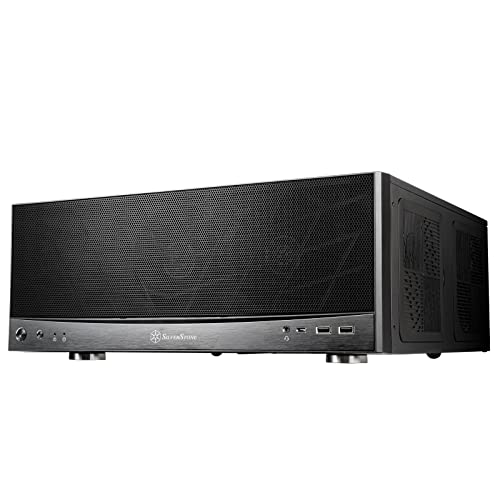
The Grandia 11’s listing title contains the most consequential phrase in this guide: a compact ATX home theater case with 240mm radiator support. Liquid cooling in an HTPC is not about overclocking bravado; it is about moving heat out of a shelf-bound box with large, slow fans instead of small, fast ones. A 240mm radiator gives a powerful processor the cooling surface to stay quiet during a film’s silent passages — the exact moment an air-cooled shelf PC is most likely to betray itself.
“Compact ATX” is the second half of the proposition. Full ATX boards bring the expansion and connectivity that a serious media machine wants — capture, storage controllers, a substantial graphics card — and the Grandia 11 keeps that platform while trimming the case to HTPC manners. The result is the pick for the builder whose home theater PC is secretly the house’s most powerful computer: a gaming-capable, library-hosting machine that enters the room dressed as a component, not as a tower that lost its way.
The discipline it asks in return is planning. A radiator, a pump and a reservoir share a compact horizontal interior with everything else, so the build is drawn before it is assembled — tube runs short, airflow path singular, storage placed where the radiator’s exhaust does not cook it. Builders who plan get the genre’s best trick: flagship performance at a murmur. Builders who improvise get a warm shelf and a lesson.
- Form factor: Compact ATX HTPC case
- Radiator support stated in title: 240mm
- Design family: Silverstone Grandia 11
- Intended role: Powerful, quiet living-room builds
- Colour: As listed
Strengths
- Stated 240mm radiator support enables genuinely quiet cooling for strong hardware.
- Full ATX platform keeps expansion open for capture, storage and graphics.
- Compact HTPC silhouette keeps the powerful build shelf-appropriate.
Trade-offs
- A liquid loop in a compact horizontal case must be planned, not improvised.
- Radiator exhaust needs a cabinet ventilation path or the shelf becomes an oven.
- Its capabilities are wasted on a light streaming-only build, which the Milo serves cheaper.
Best for: a powerful ATX media and gaming build that must stay quiet in a darkened room. Not suited for: a sealed, unventilated cabinet, because a 240mm radiator’s heat still has to leave the furniture even when the case handles it beautifully.

Silverstone Technology GD10B — Best for families
One feature defines the GD10B, and its listing title states it plainly: a lockable front panel. To a builder without children it sounds like a footnote. To anyone who has found a toddler’s finger in a disc tray, a power button pressed mid-recording, or front ports used as a shape-sorting toy, it is the entire product. The GD10B is an HTPC case designed by people who understood that the living room is a shared, unpredictable environment, and that the machine’s controls sometimes need a door with a key.
Behind that door lives the Grandia formula — a proper home theater chassis in black, sized for a real build, with the panel’s calm face preserving the AV stack’s looks. The lock changes the household politics of the machine: the PC can stay in the room, at child height, in daily use, without its owner running a nightly risk assessment. Media libraries, recording schedules and game saves all benefit from a front panel that only opens on purpose.
There is a subtler benefit to the locked door that owners mention after a year: it changes what the machine is allowed to be. An HTPC that doubles as the household’s recording and download station runs schedules at all hours, and a front panel that cannot be casually opened or switched makes those schedules trustworthy in a busy house — no well-meaning tidying turns it off, no small explorer ejects the disc it was writing. Reliability in a family room is a social feature as much as a technical one, and the GD10B is the only pick here that was designed with that understanding built into its face.
The trade-offs are minor and honest. A locked panel adds a step to every disc swap and port access — the feature working as intended — and the key becomes a small household object to keep track of. For a child-free home, the GD09’s simpler face makes more sense. For the family room the GD10B was drawn for, it is the most thoughtful case in this guide, because it solves the problem that actually ends HTPC projects: not heat, not noise, but a small hand and a blinking light.
- Form factor: Home theater computer case (HTPC)
- Front panel stated in title: Lockable
- Colour: Black (GD10B)
- Design family: Silverstone Grandia GD series
- Intended role: Shared family living rooms
Strengths
- Lockable front panel protects controls, ports and discs from curious small hands.
- Full Grandia-class build room behind the door — no capability sacrificed for the lock.
- Calm black face keeps the family PC invisible in the AV stack.
Trade-offs
- Every disc swap and front-port use goes through the locked door.
- The key is one more small object a household must keep findable.
- Child-free rooms pay for a feature they will never engage.
Best for: a family living room where the HTPC sits within reach of small children. Not suited for: a dedicated cinema room with controlled access, where the lockable panel adds a daily step and solves a problem the room does not have.

Silverstone Technology Crown 04 — Premium statement
The Crown line is Silverstone’s flagship HTPC family, and the Crown 04 — model SST-CW04TB — is its premium expression: a home theater case built for media rooms where the equipment is chosen the way furniture is chosen, and where a plastic-feeling front panel would be noticed every single day. Where the Grandia cases imitate hi-fi convincingly, the Crown aims to belong beside genuinely high-end audio components without the “for a PC” asterisk.
That positioning serves a specific and real buyer: the dedicated cinema room, the professionally finished media wall, the household where the AV rack is a point of pride rather than a cupboard of compromises. In those rooms, the case is looked at for a decade, and the premium is amortised across thousands of film nights. The Crown 04’s brief — stated in its title with unusual directness as a premium HTPC case — is to be the PC that a serious room does not have to excuse.
Rooms like that also reveal why the Crown’s premium is not merely cosmetic. In a dedicated cinema space, every object is inside the audience’s peripheral vision for hours, lit by the screen’s own glow; a case whose panel gaps wander or whose finish reads as imitation under that light becomes a standing distraction, the one wrong note in an expensive chord. The Crown exists so that the PC — usually the least prestigious object in such a rack — stops being the note everyone politely ignores. It is bought with the same reasoning as the seating and the screen: the room is the experience, and everything in it is part of the ticket.
The honest cautions are about value, not quality. A premium case does not cool better by virtue of its finish, and a modest streaming build inside a Crown is a jewel box holding a pebble; pair it with hardware that justifies the room it sits in. Shelf dimensions at this end of the market also deserve respect — flagship HTPC cases are full-width citizens of the rack. Measured, matched and given a room that appreciates it, the Crown 04 is the category’s summit: the HTPC as heirloom furniture.
- Form factor: Premium HTPC case
- Model: SST-CW04TB
- Design family: Silverstone Crown flagship line
- Intended role: Dedicated media rooms and cinema builds
- Colour: As listed (TB finish)
Strengths
- Flagship fit and finish that sits beside high-end audio components without apology.
- Built for a decade of daily visibility in a finished media room.
- Carries the Crown line’s premium HTPC engineering and presence.
Trade-offs
- Premium pricing buys finish and presence, not extra cooling by itself.
- Full-width flagship dimensions demand a proper AV rack or shelf.
- A light-duty build inside it wastes the case’s entire premise.
Best for: a dedicated cinema or media room where the PC is permanent furniture. Not suited for: a budget streaming build, because the Crown’s premium finish deserves hardware and a room of matching ambition.

Fractal Design Node 804 — Best for storage-heavy builds
The Node 804 breaks this list’s pattern deliberately. It is not a horizontal hi-fi silhouette at all — Fractal Design’s Node is a cube, a windowless, soft-edged box that looks at home on a shelf, inside a cabinet or beside a television precisely because it refuses to look like either a PC or an amplifier. What the cube buys is the thing horizontal cases ration: interior volume organised for storage. The Node line’s reputation rests on swallowing hard drives in numbers that make it a media server first and a video player second.
A vault earns trust slowly and loses it once, so the Node’s ownership rhythm deserves a sentence: keep the library backed up or parity-protected according to its value to you, let the drives report their health to something you actually read, and treat the cube’s quiet as a system to be maintained rather than a trait it was born with. A media server’s silence and reliability are the same project — both are what remains when heat, dust and neglect have been managed on a schedule instead of in a panic.
That makes the Node 804 the pick for the household whose HTPC is really the library. Films, recordings and music live on its drives; the television is merely where they are watched. A cube in a ventilated cabinet, quietly holding the family’s entire media collection and serving it to every screen in the house, is a different and entirely honourable interpretation of “home theater PC” — the vault rather than the player. Fractal’s Scandinavian restraint in the design keeps the vault presentable anywhere in the home.
Its compromises follow from the same shape. A cube does not slide into a standard AV component stack; it wants its own shelf or cabinet bay, and its cooling and layout serve the storage-first layout rather than a showcase or a slim profile. Builders whose theater PC is a front-end that streams from elsewhere should take a Grandia or the Milo. Builders whose theater PC is the elsewhere — the source every other screen depends on — should start here.
- Form factor: Cube (Node series)
- Design language: Fractal Design minimalist, windowless
- Intended role: Media server and storage-heavy HTPC
- Colour: As listed
- Layout focus: Drive capacity and quiet operation
Strengths
- Cube volume organised for the largest media library on this list.
- Windowless, calm design sits anywhere in the home without visual fuss.
- Doubles as the household’s always-on media server, not just a player.
Trade-offs
- The cube does not fit a standard AV component stack’s silhouette.
- Storage-first layout is wasted on a streaming front-end with no local library.
- Needs a ventilated cabinet bay or shelf of its own rather than a rack slot.
Best for: a media-library build whose PC is the household’s storage vault and server. Not suited for: a slim AV rack slot, because the cube’s dimensions answer to storage volume rather than to hi-fi component width and height.
Silverstone Technology ML03B — Best slim budget option
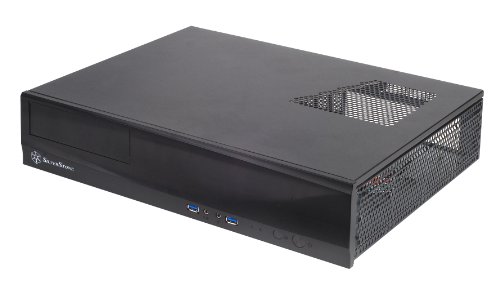
The ML03B is the Milo line’s argument that an HTPC need not be a project: a micro-ATX media centre case in aluminium and steel, low and slim, designed to slide into the shelf space a departed disc player left behind. Its listing title says “media center” without embarrassment, and that is the correct framing — this is the case for the PC whose jobs are playback, streaming and light duties, executed quietly and without ceremony.
Micro-ATX keeps the whole build honest. The boards are affordable, the components modest, and the ML03B’s slim profile disciplines the rest of the shopping list in a healthy way: low-profile expansion cards, a cooler chosen for height, storage sized to need. For a bedroom television, a kitchen screen, a guest-room setup or a first HTPC assembled from parts already owned, that discipline is the difference between a finished weekend project and a half-built intention.
The ML03B also teaches the category’s most transferable lesson: a home theater PC’s success is measured in evenings, not benchmarks. Nobody’s film night was improved by a faster menu render; everybody’s has been ruined by a fan, a glow, a crash or a remote that would not wake the machine. A slim, modest, utterly reliable box that plays everything it is asked to play, at a volume the room cannot hear, is not the budget compromise of this list. Judged by evenings delivered, it is one of its most successful designs — and the right first HTPC for anyone unsure whether the category suits their home, because it answers that question for the least money and the least furniture negotiation.
Its limits are the slim format’s own, and they should be read as specifications rather than flaws. Full-height cards and tall coolers do not belong here; a gaming-grade graphics card with a big cooler belongs in the Grandia 11. Power users will feel the ceiling quickly. But within its brief — slim, quiet, affordable, shelf-shaped — the ML03B is the most sensible object in this guide, and the one most likely to still be in daily service, unremarked and unbothered, five years from now.
- Form factor: Micro-ATX media centre case
- Construction stated in title: Aluminium and steel
- Profile: Slim, low-height (Milo series)
- Colour: Black (ML03B)
- Intended role: Playback and streaming front-ends
Strengths
- Slim profile fits shelves and cabinets that exclude every other pick here.
- Aluminium-and-steel construction keeps the hi-fi look at a budget position.
- Micro-ATX platform keeps the total build cost and complexity low.
Trade-offs
- Slim height excludes tall coolers and full-height expansion cards.
- Not a home for a powerful gaming graphics card or a large drive array.
- Modest internal room makes cable tidiness a planning task, not an afterthought.
Best for: a slim playback and streaming front-end on a tight shelf and a sensible budget. Not suited for: a high-power gaming HTPC, because the low-profile Milo chassis cannot house the tall coolers and full-height cards such a build requires.
How Do the Six Cases Compare Side by Side?
| Case | Shape | Stated highlight | Natural home |
|---|---|---|---|
| Silverstone GD09 | Horizontal HTPC | Faux aluminium front | Mainstream AV stack |
| Silverstone Grandia 11 | Compact ATX HTPC | 240mm radiator support | Powerful quiet build |
| Silverstone GD10B | Horizontal HTPC | Lockable front panel | Family living room |
| Silverstone Crown 04 | Premium HTPC | Flagship Crown line | Dedicated cinema room |
| Fractal Design Node 804 | Cube | Storage-first interior | Media server cabinet |
| Silverstone ML03B | Slim micro-ATX | Aluminium/steel, low profile | Tight shelves, second rooms |
Notice how little overlap there really is. Silverstone’s own four horizontal cases divide by power (Grandia 11), by household (GD10B), by budget and size (ML03B, in micro-ATX form), and by finish (Crown 04) — with the GD09 holding the mainstream centre. The Node 804 stands outside the silhouette contest entirely, selling volume. The right choice is made by identifying your constraint first: shelf height, children, library size, hardware ambition, or the room’s finish standard. The constraint picks the case; the case then picks the build.
What Should You Measure and Plan Before Ordering an HTPC Case?
Measure the furniture before the components — this category’s golden rule. Cabinet height decides whether a case fits at all and how much air gap remains above it; depth decides whether cables can bend behind the machine without crushing against the cabinet back; and the cabinet’s own ventilation decides whether any of the cooling plans in this guide survive contact with a closed door. A case that fits with no air gap is a case installed in an oven. Leave room above and behind, or choose a cabinet with a mesh or open back, or accept the Node-in-a-ventilated-bay approach — but decide with a tape measure, not with optimism.
Plan the noise budget next, in the room’s own terms. Sit where you will watch, at night, and notice the room’s floor of sound — a refrigerator’s hum through a doorway, traffic, the amplifier’s own fan if it has one. The HTPC must live beneath that floor during quiet scenes. That target shapes component choice more than case choice: modest processors, large slow fans, the Grandia 11’s radiator route for strong hardware, and storage that spins down or solid-state where the budget allows. The case’s job is to not add its own voice — no rattling panels, no fan mounted hard against thin steel — and every pick here was chosen with that restraint in mind.
Plan the control scheme while the build is still a list. An HTPC is operated from a sofa, so decide between a media remote, a small wireless keyboard, a game controller, or a phone app — and confirm the case’s front and your chosen receiver placement cooperate, especially behind the GD10B’s locked door or inside a closed cabinet where an infrared eye needs a repeater. The best HTPC builds feel appliance-simple from the sofa because someone spent ten minutes on this layer before ordering, rather than troubleshooting it from the floor with a torch after the film was supposed to start.
How Do You Keep an HTPC Quiet for Years, Not Just for Week One?
Dust is the long enemy of quiet. A shelf PC breathes cabinet air, and cabinets accumulate dust that coats fans and heatsinks until the same cooling job needs faster — louder — fans. A twice-yearly blow-out, scheduled like a smoke-alarm battery, preserves the silence you paid for. Where the cabinet allows, a washable filter or a mesh panel in the airflow path slows the accumulation; where it does not, the calendar is the filter.
Storage discipline is the second keeper of quiet. A media library that grows onto a stack of spinning drives adds a chorus of small sounds and a vibration the shelf can amplify; consolidating onto fewer, larger drives, letting idle drives sleep, and isolating the case’s feet from a resonant shelf all keep the vault silent. The Node 804’s server role makes this its owner’s standing homework, while the slim Milo build — a drive or two, mostly streaming — barely thinks about it. Match the maintenance to the machine you actually built, and the machine will keep its side of the bargain: present, capable, and beneath notice while the film does the talking.
What Mistakes End Most HTPC Projects Early?
The first is building a gaming tower’s worth of heat into a shelf and discovering the cabinet’s thermodynamics in July. The second is forgetting the sofa: a machine that needs a keyboard-and-mouse expedition for every task will be abandoned for the streaming stick within a month, however beautiful its case. The third is light discipline — a case or component whose indicator LEDs paint the room during dark scenes will be taped over, unplugged, or resented, so choose and configure for a dark room from the start.
The fourth mistake is the GD10B’s reason to exist: underestimating the household. Children, pets, cleaners and guests all interact with a living-room PC in ways no desk machine ever meets, and the projects that survive are the ones whose owners designed for the room as it is. Buy for your actual shelf, your actual family and your actual library, and an HTPC stops being a project at all — it becomes the room’s quietest appliance.
How Does the Sofa Actually Control the Machine?
The control layer decides whether an HTPC feels like an appliance or like homework, and it deserves the same deliberation as the case. The classic answer is the media remote — a single handset that wakes the machine, navigates a ten-foot interface and puts it back to sleep — and it remains the benchmark every other scheme is judged against, because a guest can use it without instruction. The case’s contribution is small but real: a front that does not block the receiver’s eye, a power button findable in the dark, and, in the GD10B’s case, a door whose lock still lets the remote run the evening while the panel stays closed to fingers.
The wireless mini-keyboard is the second philosophy: less elegant, more capable. Search boxes, streaming-service logins and the occasional file-management chore are miserable on a remote and trivial on a keyboard the size of a paperback, which is why many households end up with both — the remote for the evening, the keyboard living in a drawer for the exceptions. A game controller becomes the third input in the Grandia 11 class of build, where the HTPC doubles as the room’s gaming machine and the sofa is the cockpit. None of these choices is visible in the case’s specification, yet all of them are felt nightly, and planning them before the build is what separates the HTPC that gets used from the HTPC that gets admired.
Software completes the layer. A ten-foot interface — the kind navigable by arrow keys from three metres — turns the PC’s library into something that feels like a service rather than a file system, and the household’s existing streaming apps sit beside it. Set the machine to wake and sleep cleanly, to open into that interface rather than onto a desktop, and to update itself at hours when nobody is watching. Do those three things and the case’s calm face stops being a disguise: the machine genuinely behaves like the disc player it resembles, which was the point of choosing its shape in the first place.
Do Discs Still Belong in a Home Theater PC?
For a large share of this category’s buyers, the disc is the reason the PC exists. A shelf of Blu-rays and DVDs represents picture and sound quality that streaming licenses can revoke, edits that streaming versions sometimes alter, and extras that rarely migrate — and an HTPC with an optical drive plays that library through the same interface as everything else, with the case’s front presenting the drive as naturally as a standalone player would. The Grandia-class cases were designed in that tradition, their fronts treating the drive bay as a citizen rather than an embarrassment.
The drive decision interacts with the household questions this guide keeps returning to. Behind the GD10B’s locked panel, a disc drive is safe from being used as a toast rack by a helpful toddler. In the slim ML03B, the drive question competes for the case’s rationed internal room and may honestly lose to storage or a low-profile card, with an external drive as the household’s occasional-use answer. And in the Node 804’s vault pattern, the drive often lives in the front-end machine instead, ripping the library onto the vault’s drives — the two-case household again, each machine doing the half of the job its shape suits.
What matters is deciding the disc’s role before choosing the case, because it is one of the few decisions that cannot be revised later: a case whose front and interior were not drawn around a drive will not accept one gracefully in year two. If the library matters, say so at the start, let it vote for the Grandia class, and the machine will still be playing those discs — calmly, from the shelf, in the dark — long after the streaming catalogue has turned over twice.
How Do You Upgrade an HTPC Without Rebuilding It?
The upgrade that matters most in this category is usually storage, and it arrives on the library’s schedule rather than the technology’s. Plan for it at build time: a case and board with a spare bay and port, a power supply with a connector in reserve, and a library organised so a new drive joins without a weekend of file archaeology. The Node 804’s owners feel this least — volume is their case’s whole argument — while slim-case owners feel it most, which is why the ML03B build should be honest about whether it is a front-end (upgrade path: none needed, the vault is elsewhere) or a library in itself (upgrade path: buy the bigger case now).
The second upgrade is the graphics path, as display standards and the household’s ambitions evolve. Here the horizontal cases divide cleanly: the full-size Grandia models accept a successor card as a normal PC would, the Grandia 11 adds liquid-cooling headroom for a hotter generation kept quiet, and the slim Milo’s low-profile ceiling means its card upgrades stay within the low-profile family — a real but narrower road. Knowing which road you are on, before the first card is bought, is the entire trick; the cases are honest about their ceilings, and the disappointments in this category are almost always ceiling-related surprises that a tape measure and a title page would have prevented.
Everything else — memory, a faster boot drive, a new remote — upgrades without the case’s opinion being consulted, which is as it should be. A good HTPC case is a decade-long constant in a room, outliving two or three generations of the components inside it. Choose it for the shelf, the household and the library you actually have, keep its filters and fans on their quiet schedule, and the upgrades become the pleasant kind of project: an evening’s work, a film to test it with, and a machine that disappears into the room again by the opening credits.
What Does a Good HTPC Sound Like at Midnight?
Nothing — and achieving nothing is an engineering discipline with three layers. The first is source control: components chosen so their heat can be shed slowly, which in practice means resisting the temptation to install a flagship processor in a shelf build “because it was on offer,” and letting the Grandia 11’s radiator route carry the load when strong hardware is genuinely the brief. Every watt installed is a watt the room’s quiet must dispose of, and the cheapest silence in the whole build is the heat you never generate.
The second layer is transmission: keeping the sound that exists from reaching the sofa. Fans mounted without rattling contact, panels that fit as the maker intended, hard drives isolated from a shelf that would happily act as a sounding board, and the case’s feet treated as part of the acoustic design rather than as packing material. This is unglamorous work, done with the machine off and a screwdriver in hand, and it is worth more decibels than any premium component swap — a truth the Crown’s buyers, paying for fit and finish, are really purchasing in factory-completed form.
The third layer is the room itself. A cabinet with a closed door and no ventilation makes every case louder, because hotter air means faster fans; a cabinet with a quiet exhaust path, or an open-backed console, lets the same machine idle beneath notice. If the room fights you, fix the room’s airflow before blaming the build. The goal state is specific and achievable: during the quietest passage of a familiar film, from the watching seat, the machine contributes nothing you can name. Every pick in this guide can reach that state in a cooperative room — and none of them can in a sealed one, which is why this guide began with a tape measure and ends, here, with the furniture once more.
How Does an HTPC Fit a Whole-House Setup?
Few HTPCs live alone anymore. The modern pattern is a small constellation: a machine in the main viewing room, lighter front-ends or smart screens in other rooms, and a library that all of them draw on. The cases in this guide map onto that constellation more neatly than their shelf-bound image suggests. The Node 804 is the constellation’s centre — the always-on vault, placed wherever its hum bothers nobody. A Grandia-class machine anchors the cinema room, where its power is wanted. An ML03B serves the bedroom or kitchen, where the brief is a screen, a remote and silence. Each case is a role, and a household that grows into the pattern buys the roles in whatever order its rooms demand.
The constellation also forgives. A first HTPC in a do-everything Grandia can later become the front-end when a Node arrives to take over the library; the slim machine that started in the living room retires gracefully to a second room when the Crown takes its shelf. Cases in this category have long second lives because their job — being a calm, shelf-shaped computer — exists in every room with a screen. That longevity is worth remembering at purchase time: the case you buy for this year’s room may be serving a different room, and a different generation of your household, before it is done.
Final Recommendation
Start with the GD09 for the classic answer — a proper PC in hi-fi clothing for an ordinary AV stack. Take the Grandia 11 when the build is powerful and the room is serious about silence, the GD10B when small hands share the room, and the Crown 04 when the room itself is the flagship. The Node 804 serves the library-first household whose PC is a vault, and the ML03B serves everyone whose shelf and budget vote slim. Measure the furniture, respect the quiet, and the machine you choose will do the genre’s finest trick — when the lights go down and the opening scene fills the screen, nobody in the room will think about the computer at all.
Frequently Asked Questions
Can an HTPC case hold a gaming graphics card?
Some can — the full-size Grandia models are built for real PCs, and the Grandia 11 pairs an ATX platform with radiator support for exactly that class of build. Slim cases like the ML03B are limited to low-profile cards. Check the specific case’s card clearance against your card’s length and height before ordering.
Why are most of these cases Silverstone models?
Because Silverstone kept designing for the category while most makers left it. The Grandia, Milo and Crown lines span budget to flagship HTPC briefs, so an honest list of current HTPC cases is naturally heavy with them; the Fractal Node 804 earns its place as the storage-first alternative.
Does an HTPC need liquid cooling?
No — modest playback builds stay quiet on air inside any pick here. Liquid earns its complexity when strong hardware must stay silent in a shelf, which is the Grandia 11’s stated 240mm radiator territory. Match the cooling to the heat, not to the hobby’s fashion.
Where should the HTPC sit if I have no AV cabinet?
On a low media console or shelf beside the television, with air space behind and above it. The Node 804’s cube also sits happily as a standalone piece. Avoid sealed cabinets for anything beyond the lightest builds, and never stack other components directly on top of the case.
Is the lockable GD10B only about children?
Children are the headline case, but the lock also protects a recording or server setup from casual button presses by guests and cleaners, and keeps front ports from becoming the household’s default charging station. Any shared room benefits; a controlled cinema room simply benefits less.
How much space should I leave around an HTPC in a cabinet?
Enough for air to enter, cross the machine and leave without immediately re-entering — in practice, a visible gap above the case, room behind it for cables to bend gently, and a cabinet that is open-backed, vented or actively exhausted. If the cabinet door must close during films, test the arrangement with a long, demanding playback session before declaring victory; temperatures that behave for twenty minutes can still climb across a three-hour epic.
Can I stand one of these horizontal cases on its side like a tower?
It is generally a poor idea even where it physically balances: the airflow path, drive orientation assumptions and front-panel design all presume the horizontal shelf position, and the hi-fi face that justified the purchase ends up aimed at a wall. If the only space available is vertical, buy a small tower designed for it instead — the category’s benefits are inseparable from its orientation.
Which pick works as an always-on media server?
The Node 804. Its storage-first cube is designed to hold the library itself and serve it around the house, while the horizontal cases are happier as the powerful front-end in the viewing room. Many households eventually run both patterns — a vault and a player.
Related Guides
Round out the room with our guides to quiet cooling for living-room PCs, building a home media server and low-profile graphics cards for slim cases, all written to the same measure-the-room-first standard, because a home theater is a system in which the screen, the sound, the seating and the computer either cooperate into an evening that disappears into the film, or compete until somebody notices the fan during the quiet scene and the spell is broken for everyone.


