What's inside
- Key Takeaways
- Quick Picks: The Best LGA 1700 CPU Coolers at a Glance
- How Did We Choose These Picks?
- What Is Different About Cooling on LGA 1700?
- How Do You Verify a Cooler Really Fits Your LGA 1700 Build?
- Which LGA 1700 Coolers Deserve a Place on Your Shortlist?
- How Do the Six Compare Side by Side?
- What Mistakes Do LGA 1700 Builders Make With Cooling?
- How Do You Fit a Cooler on LGA 1700 Correctly?
- Final Recommendation
- What Is the Story With Contact Frames on This Socket?
- Why Do Motherboard Power Settings Decide Your Cooler’s Job?
- Which Pick Matches Which LGA 1700 Build?
- How Much Difference Does Thermal Paste Make on a Large Heat Spreader?
- When Is Upgrading From the Cooler You Have Worth It?
- How Should You Set a Fan Curve for Intel’s Boost Behaviour?
- What Should You Watch for When Buying Older Stock or Second-Hand?
- Frequently Asked Questions
- Related Guides
As an Amazon Associate I earn from qualifying purchases. This post may contain affiliate links at no extra cost to you.
gizmoverdict.com is reader-supported. When you buy through links on our site, we may earn an affiliate commission.
Where to buy: Every cooler below was matched to a checked listing in this site’s product pool, and the links point at those listings. Specifications in the boxes come from the listing titles — heat-pipe counts, fan arrangements, TDP figures and socket statements exactly as the titles give them.
Intel’s LGA 1700 socket has hosted several processor generations, and it asks something specific of a cooler: correct mounting, with the right bracket and even pressure, on a socket whose retention mechanism is famously firm. Shoppers searching for the best lga 1700 cpu coolers are usually in one of three situations — building a new Intel system and choosing cooling once, upgrading the cooler on an existing LGA 1700 machine that runs hotter or louder than it should, or rescuing a build whose first cooler turned out to be a mismatch for a processor that boosts hard and draws real power.
The six picks here span the socket’s whole range of answers. At the top stand two be quiet! flagships — the Dark Rock Elite, whose title leads with RAM and VRM compatibility, and the Dark Rock Pro 6, which prints its credentials in full: seven heat pipes, two PWM fans, a 300W TDP rating. Thermalright answers with the Phantom Spirit 120 EVO, seven 6mm heat pipes and dual PWM fans in the maker’s value-flagship style, and the Assassin Spirit 120 V2 Plus, a four-pipe tower with double PWM quiet fans for the mainstream. And because not every LGA 1700 build is a tower build, the list closes with two low-profile, Intel-only designs: Cooler Master’s i70C ARGB, whose title states LGA 1700/1851 support outright, and Thermaltake’s Gravity i3, a 95W-class cooler for compact and office machines.
What this guide will keep returning to is fit in the fullest sense — socket fit, mounting fit, case fit, and the fit between a cooler’s capacity and the specific processor under it. LGA 1700 covers chips from modest office parts to flagships that draw several hundred watts at unlocked limits, and no single cooler is right for all of them. The picks are ordered by ambition; your processor’s appetite should choose among them.
Key Takeaways
- The Dark Rock Pro 6 states the strongest credentials in its title: 7 heat pipes, 2 PWM fans, 300W TDP — the flagship end of this list.
- Thermalright’s Phantom Spirit 120 EVO counters with 7×6mm heat pipes and dual PWM fans at the maker’s value-leaning position.
- The Dark Rock Elite leads on compatibility — its title promises high RAM and VRM clearance, the practical concern in crowded Intel builds.
- Two picks are low-profile and Intel-specific: the Cooler Master i70C ARGB (LGA 1700/1851 per its title) and the 95W-class Thermaltake Gravity i3.
- Correct LGA 1700 mounting hardware and even pressure matter as much as the cooler itself on this socket.
- Match capacity to the actual processor: LGA 1700 spans office chips to flagships, and the right pick differs by hundreds of watts of appetite.
Quick Picks: The Best LGA 1700 CPU Coolers at a Glance
| Pick | Badge | Why it earns its place |
|---|---|---|
| be quiet! Dark Rock Elite | Compatibility flagship | A premium tower shaped to clear tall memory and large VRM heatsinks. |
| be quiet! Dark Rock Pro 6 | Maximum capacity | Seven heat pipes, two PWM fans and a stated 300W TDP for the socket’s hungriest chips. |
| Thermalright Phantom Spirit 120 EVO | Value flagship | Seven 6mm heat pipes and dual PWM fans in Thermalright’s performance-per-money style. |
| Thermalright Assassin Spirit 120 V2 Plus | Mainstream tower | Four heat pipes and double PWM quiet fans for the processors most LGA 1700 builds run. |
| Cooler Master i70C ARGB | Low-profile Intel fit | A 120mm PWM low-profile cooler whose title states LGA 1700/1851 support. |
| Thermaltake Gravity i3 | Compact 95W class | A small Intel LGA 1700 cooler for office and compact builds at the socket’s modest end. |
How Did We Choose These Picks?
The first filter was the socket itself, verified rather than assumed: every pick is an LGA 1700 cooler by design or by its listing’s own statement. Two of them say it in so many words — the i70C’s title names LGA 1700/1851, the Gravity i3’s names the LGA 1700 socket — and the four towers are current-generation designs whose mounting systems cover the socket as a primary platform, not as an afterthought kit. On a socket where mounting correctness decides temperatures, that distinction is the whole game.
The second filter was spread across the socket’s appetite range. LGA 1700 is unusual in how wide its processor range runs, from low-power office chips to flagships with power limits that embarrass small coolers. A guide that recommended only flagships would fail the office build; one that recommended only budget towers would fail the flagship. So the six run from a stated 300W TDP at the top to a stated 95W at the bottom, with the middle — where most gaming and home builds live — covered by two Thermalrights of different ambition.
Third, we weighed the LGA 1700-specific practicalities: mounting systems that achieve even pressure without drama, clearance around a socket that Intel’s board partners surround with serious VRM hardware, and fan behaviour on the spiky boost patterns these processors produce. The picks that remain are the ones we would hand to a builder with a straight face for each segment of the socket’s range.
And the standing rule of this batch applies: specifications come from the checked listing titles. Where a title prints a TDP, the box prints it as the maker’s figure. Where it does not, the box does not invent one.
What Is Different About Cooling on LGA 1700?
Start with the socket’s physical character. LGA 1700 is a larger socket than its predecessor, with a retention mechanism — the independent loading mechanism that clamps the processor — applying its pressure at the centre of the chip. It became widely known among builders that this arrangement can let the processor’s heat spreader sit very slightly unevenly against a cooler’s base, and that mounting pressure and cooler base shape therefore matter more on this platform than on the ones before it. The practical takeaways are unglamorous and effective: use the cooler’s correct LGA 1700 bracket, tighten in a cross pattern gradually, and do not mix hardware between cooler generations because the standoff heights are platform-specific.
Then there is the processors’ behaviour. Intel’s recent generations boost aggressively and, on many motherboards, ship with power limits effectively raised by default, so a chip’s real sustained draw in heavy work can run far beyond the figure a casual buyer expects from its class. A cooler chosen by the box’s modest number meets the motherboard’s immodest settings and loses. This is why this guide keeps steering buyers to measure or look up their processor’s actual behaviour under their board’s settings, and why the flagship picks print TDP figures with headroom to spare.
Finally, the neighbourhood. LGA 1700 boards — particularly the performance boards these processors deserve — carry substantial VRM heatsinks and sit in cases with tall memory as the fashion. The Dark Rock Elite’s title, leading with RAM and VRM compatibility, is a direct answer to a socket whose surroundings are as much of the fitting problem as the socket itself.
It is also a socket with a long tail. LGA 1700 systems will be upgraded, repaired and re-cooled for years after its successor takes the headlines, which makes the mounting-kit question a durable one: a cooler bought today with complete, kept hardware remains useful across every processor the socket will ever host. Keep the box’s full kit — including the parts for other sockets you do not currently own — because a cooler’s second life often begins on a different desk, under a different chip, and the bracket in the bin is the one that life needed.
How Do You Verify a Cooler Really Fits Your LGA 1700 Build?
Three checks, in order. First, the mounting kit: confirm the cooler’s current retail box includes LGA 1700 hardware, on the maker’s product page for the exact model. Coolers that predate the socket may need a kit; current production of every pick here is built for the platform era, but “current production” is a claim to verify, not to assume, especially with old stock in the channel.
Second, the clearances, with the same discipline as this site’s other cooling guides: cooler height against case limit, fin and fan overhang against your memory’s height, and the heatsink’s footprint against your board’s VRM hardware and first expansion slot. The towers in this list are substantial objects; the two low-profile picks exist for builds where that substance does not fit.
Third, the capacity match. Find your processor’s realistic sustained power draw — from independent reviews of the chip, run at the settings your motherboard will actually use — and choose a cooler whose class sits comfortably above it. The stated figures in this guide help: 300W at the flagship end, 95W at the compact end. A cooler matched exactly to a chip’s draw will be loud; a cooler with headroom will be quiet, cooler and longer-lived, because its fans live in the easy middle of their range.
Write the three checks down with their answers, the way this site’s other cooling guides keep advising, because an LGA 1700 build is rarely finished in one session. Processors get swapped within the socket’s long life, cases get inherited, and the note that says “Pro 6 fits, front fan raised 4mm, memory is the limiting part” is worth an evening to the builder you will be in three years. Cooling decisions compound; notes are how they compound in your favour instead of against you.
Which LGA 1700 Coolers Deserve a Place on Your Shortlist?

be quiet! Dark Rock Elite — Compatibility flagship
The Dark Rock Elite leads this list because its title names the problem most LGA 1700 builders actually have: “High RAM and VRM Compatibility”. The flagship Intel boards surround the socket with voltage-regulator heatsinks built like fortifications, and the memory slots beside them carry tall, lit modules that performance coolers historically collide with. The Elite is be quiet!’s flagship-class tower designed around that reality — its front fan rides on rails that let it adjust for memory, and its heatsink shaping respects the board’s furniture, so the cooling arrives without the usual negotiation with the rest of the build.
Performance expectations belong to its class: this is one of the two premium towers in the guide, from the maker whose brand is a promise about noise, and it serves the socket’s high-end processors with the composed, low-speed fan behaviour that is the house style. In a gaming build it disappears; in a workstation it holds sustained loads without turning the room into a server cupboard. The Elite’s argument against its own sibling, the Pro 6 below, is emphasis: where the Pro prints raw capacity figures, the Elite prints fit — and in real builds, fit is the specification that decides whether flagship cooling happens at all.
Choose it with your board in view. If your memory is tall and your VRM heatsinks are proud, the Elite is the flagship that was designed for your photograph of the socket area. If your board is sparse and your case is a wind tunnel, the Pro’s extra stated capacity may serve you better. Either way you are buying be quiet!’s mounting polish and fan quality, and on LGA 1700 — where the mount is half the result — that polish is not a luxury.
- Format: flagship single-tower-class air cooler
- Listing highlight: high RAM and VRM compatibility
- Maker: be quiet!, Dark Rock Elite line
Strengths
- Designed around tall memory and large VRM heatsinks.
- Flagship cooling with the brand’s quiet-first fan tuning.
- Adjustable front-fan positioning eases the classic LGA 1700 fit conflicts.
Trade-offs
- Premium pricing, as befits the top of a range.
- A large tower still demands a case with the height for it.
- Its compatibility emphasis is wasted on a sparse board with short memory.
Best for: high-end LGA 1700 builds on fully-dressed motherboards with tall memory. Not suited for: compact cases whose cooler-height limit excludes full-size flagship towers outright.
be quiet! Dark Rock Pro 6 — Maximum capacity
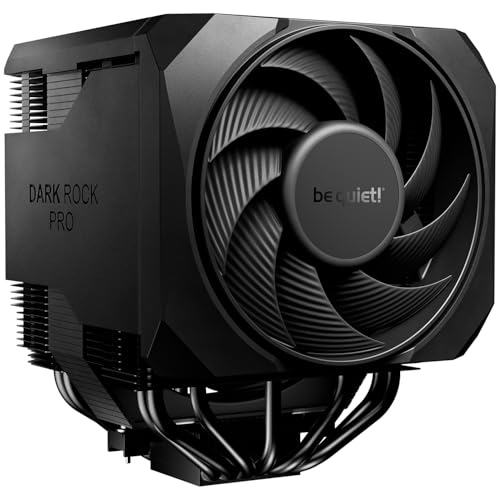
The Dark Rock Pro 6’s title reads like a specification sheet and that is its charm: “7 Heatpipes, 2 PWM Fans, 300W TDP”. Seven heat pipes is the most this guide lists, the dual PWM fans are the dual-tower arrangement the Pro line is known for, and the 300W figure is be quiet!’s own statement of the territory the cooler claims — the top of the LGA 1700 appetite range, where flagship processors run at the settings their buyers actually bought them for. If your chip is one of those, this is the pick whose numbers were written for it.
Dual towers earn their keep on this socket in a particular way. Intel’s flagships load unevenly — a few cores at maximum boost, the rest busy — and the heat arrives in a concentrated patch. A wide cold plate fed by seven pipes into two fin stacks spreads that patch across the largest surface in this guide, and two fans turning slowly move the air. The result the owner experiences is undramatic temperatures and a fan curve with nothing to do, which on a flagship build is the entire luxury being purchased.
Respect the physical terms. A dual tower of this class is the largest object in the build after the graphics card; memory clearance, case height and installation patience are all genuinely required, and the Elite’s compatibility shaping exists because not every board welcomes this much metal. But where it fits, the Pro 6 is the end of the LGA 1700 cooling conversation: capacity stated in the title, delivered by the design, at noise levels that embarrass smaller coolers working harder.
- Heat pipes: 7, per the listing title
- Fans: 2 PWM fans, per the listing title
- Maker’s rating in the title: 300W TDP
Strengths
- The strongest stated credentials of any pick here.
- Dual-tower surface area suits flagship boost behaviour.
- be quiet! fan quality keeps the capacity quiet.
Trade-offs
- The largest footprint in the guide — case and memory checks are mandatory.
- Flagship price for flagship capacity mainstream chips never use.
- Installation is a deliberate, two-handed job.
Best for: flagship LGA 1700 processors run at full settings in spacious cases. Not suited for: builds whose memory and case clearances cannot host a full dual tower, whatever the processor wants.

Thermalright Phantom Spirit 120 EVO — Value flagship
The Phantom Spirit 120 EVO is Thermalright’s entry in the flagship argument, and its title matches the Pro 6 pipe for pipe: “7×6mm Heat Pipes CPU Air Cooler, Dual PWM Fans. Seven pipes of 6mm, two fin stacks, dual PWM fans — the full dual-tower recipe — delivered with the pricing philosophy that made this maker the scourge of the premium brands. The EVO designation marks the dressed-up generation of the Phantom Spirit design, with a finished top and a presentation aimed at windowed builds rather than the parts-bin aesthetic of the earliest Thermalrights.
For an LGA 1700 gaming build with a high-end processor, this is where the smart money in this guide goes. The cooling formula is the flagships’ formula; the differences live in fan refinement at the very lowest speeds and in the small polish of mounting and finish, and they are differences measured in nuances rather than degrees. Owners who set a sensible curve and close the case will struggle to name what the extra money elsewhere would have bought them, which is precisely Thermalright’s business model and precisely why the premium brands keep glancing over their shoulders.
The checks are the dual-tower checks: case height, memory clearance with the front fan’s position in mind, and the LGA 1700 bracket confirmed in the box. Do them, and the Phantom Spirit gives an LGA 1700 build flagship-class cooling with budget left for the components that render frames. In a guide that contains a stated 300W flagship, the EVO’s presence is the reminder that capacity and price stopped being the same conversation some years ago.
- Heat pipes: 7 × 6mm, per the listing title
- Fans: dual PWM, per the listing title
- Format: dual-tower air cooler, EVO generation
Strengths
- Seven pipes and dual stacks at a value-leaning price.
- EVO finish suits windowed builds.
- Flagship-class capacity for high-end Intel gaming chips.
Trade-offs
- Full dual-tower dimensions with the usual clearance homework.
- Fan refinement at crawl speeds trails the be quiet! flagships.
- No TDP figure in the title — judge it by its class and design.
Best for: high-end LGA 1700 gaming builds that want flagship cooling without flagship pricing. Not suited for: narrow cases or boards where a dual tower’s width crowds the first expansion slot.

Thermalright Assassin Spirit 120 V2 Plus — Mainstream tower
Most LGA 1700 processors sold are not flagships, and the Assassin Spirit 120 V2 Plus is the pick built for the majority. Its title states “4 Heat Pipes, Double PWM Quiet Fans — four pipes, a single tower, and two fans in a push-pull arrangement, with the word “Quiet” doing deliberate work. The second fan is the design’s signature: on a mainstream tower, a pull fan behind the stack evens the airflow through the fins and buys real cooling at lower speeds than a single fan manages, which is why this mid-priced design punches at the weight of larger single-fan rivals.
On the socket’s mainstream gaming and home processors — the chips in most desks — this cooler is not a compromise at all. It holds boost behaviour through gaming sessions, its fans live in their quiet middle range, and its price leaves the build’s budget where it belongs, in the graphics card and storage. The V2 Plus is a revision of a proven design, which in this market means the mounting and fan pairing have already survived contact with thousands of owners and come back improved.
Its ceiling is a class below the dual towers, and a flagship Intel chip at raised power limits will find it, audibly, in sustained work. That is not a defect; it is the product’s stated shape. The builder’s task is the honest matching this guide keeps prescribing: mainstream processor, mainstream tower, money saved, silence kept. LGA 1700 builds that follow that arithmetic are the ones their owners describe as “just working”, usually for years at a time.
- Heat pipes: 4, per the listing title
- Fans: double PWM quiet fans, per the listing title
- Format: single-tower air cooler, V2 Plus revision
Strengths
- Push-pull fan pair buys quiet cooling at a mainstream price.
- Right-sized for the processors most LGA 1700 builds actually run.
- Revised design with a proven installed base.
Trade-offs
- A class below the dual towers for flagship chips at raised limits.
- Two fans to keep dust-free instead of one.
- Less thermal mass for absorbing long all-core loads.
Best for: mainstream LGA 1700 gaming and home builds. Not suited for: flagship processors with power limits raised — its four-pipe single tower is out of its depth there.

Cooler Master i70C ARGB — Low-profile Intel fit
The i70C ARGB is the list’s change of shape: a “Low Profile CPU Air Cooler for Intel LGA 1700/1851 Only – 120mm PWM fan design, per its title. Two facts in that title matter. The first is the socket statement itself — this cooler is made for Intel’s current sockets and says so, which removes the mounting guesswork entirely for an LGA 1700 build. The second is the fan size: a 120mm fan on a low-profile cooler is a generous aperture, moving air across the downdraft stack at lower speeds than the small fans compact coolers usually carry, and the ARGB ring gives a compact build a lit centrepiece instead of an apologetic puck.
Its home is the small or slim LGA 1700 machine: the home-theatre PC, the compact office box that games on weekends, the small-form-factor build whose case offers a fan’s worth of height and no more. On the socket’s efficient and mainstream processors it does the low-profile job properly — full behaviour, civilised noise, and the downdraft bonus of air washing over the board’s VRM and memory, which in a compact case is real cooling for components that otherwise get none.
Do not ask it to be a tower. A low-profile cooler’s fin volume is what it is, and the socket’s performance processors will lean on it hard in a small case. But judged inside its brief — Intel-only, low-profile, honestly sized — the i70C is the most precisely specified pick in this guide, the rare cooler whose title answers the buyer’s first three questions before the product page even loads.
- Format: low-profile air cooler
- Socket support in the title: Intel LGA 1700/1851 only
- Fan: 120mm PWM, per the listing title; ARGB lighting
Strengths
- Socket support stated outright in the title — no mounting ambiguity.
- A 120mm fan is a generous, quiet aperture for a low-profile design.
- Downdraft airflow cools the board around the socket as a bonus.
Trade-offs
- Intel-only by design; it will never migrate to an AMD build.
- Low-profile capacity caps out well below the towers here.
- ARGB assumes a header or controller to make it sing.
Best for: compact and slim LGA 1700 builds on efficient or mainstream processors. Not suited for: the socket’s high-power performance processors, whose heat output overwhelms a low-profile stack.

Thermaltake Gravity i3 — Compact 95W class
The Gravity i3 closes the list at the socket’s modest end, and its title is a model of honest labelling: “Intel LGA 1700 Cocket, 95W CPU Cooler” — the listing’s own spelling of socket aside, the meaning is unmistakable. This is a compact cooler rated by its maker at the 95W class, designed for the LGA 1700 processors that live in office machines, home servers, point-of-sale boxes and the family PC — chips whose cooling requirement is real but small, and whose owners value a cooler that is inexpensive, compact and fit-and-forget.
There is a temptation in guides to apologise for products like this, and it should be resisted. A 95W-class cooler on a 65W-class processor is not an under-cooled build; it is a correctly specified one, with headroom, running its fan slowly in a small case that a tower could not enter. Thermaltake’s Gravity line exists for the enormous, unglamorous fleet of machines that run the world’s desks, and the i3’s job — replace the bundled cooler class with something a touch better, in bulk, without drama — is a job worth a place in any honest socket guide.
The boundary is printed in its own title: 95W. A processor whose real draw runs past that class — which includes the socket’s performance chips at their default settings, let alone raised ones — does not belong under this cooler, and no fan curve will negotiate the difference. Within the boundary, the Gravity i3 is the rational end of the LGA 1700 range: proof that the socket’s cooling story runs from a stated 300W flagship down to a cooler like this, and that “best” means matched, not maximal.
- Socket: Intel LGA 1700, per the listing title
- Maker’s rating in the title: 95W class
- Format: compact low-profile cooler, Gravity line
Strengths
- Honestly rated and priced for the socket’s modest processors.
- Compact form suits office and small cases the towers cannot enter.
- Fit-and-forget simplicity for fleet and family machines.
Trade-offs
- The 95W class is a hard ceiling — performance processors are excluded.
- No headroom for later processor upgrades within the same build.
- Basic presentation, as its role intends.
Best for: office, home-server and family PCs on LGA 1700’s efficient processors. Not suited for: any processor whose sustained draw exceeds its stated 95W class.
How Do the Six Compare Side by Side?
| Cooler | Format | Stated in title | Segment |
|---|---|---|---|
| be quiet! Dark Rock Elite | Flagship tower | High RAM and VRM compatibility | High-end, crowded boards |
| be quiet! Dark Rock Pro 6 | Dual tower | 7 heat pipes, 2 PWM fans, 300W TDP | Flagship processors |
| Thermalright Phantom Spirit 120 EVO | Dual tower | 7×6mm heat pipes, dual PWM fans | High-end value |
| Thermalright Assassin Spirit 120 V2 Plus | Single tower | 4 heat pipes, double PWM quiet fans | Mainstream |
| Cooler Master i70C ARGB | Low profile | LGA 1700/1851 only, 120mm PWM | Compact Intel builds |
| Thermaltake Gravity i3 | Compact | LGA 1700, 95W class | Office and modest builds |
What Mistakes Do LGA 1700 Builders Make With Cooling?
The first is choosing by the processor’s headline number instead of its behaviour on their motherboard. Boards that raise power limits by default turn a modest-looking chip into a flagship’s appetite, and the cooler bought for the headline spends its life at full fan. The second is mounting: wrong-generation brackets, one screw run fully home before the others are started, a cooler seated with uneven pressure on the one modern socket where even pressure is a known storyline. The third is the clearance surprise — flagship tower, tall memory, closed case, discovered in that order.
Fourth is ignoring the next socket. LGA 1700’s successor uses a different mounting pattern, and one pick here — the i70C — prints 1851 support in its title, a small line with real consequences for a cooler meant to be carried forward. Fifth is overbuying for an office chip or underbuying for a gaming flagship out of a vague sense that cooling is cooling. On this socket, of all sockets, the range is too wide for vagueness: the guide’s own list runs from 95W to a stated 300W, and both ends are correct answers to different questions.
How Do You Fit a Cooler on LGA 1700 Correctly?
Begin with the board out of the case if the build allows it. Identify the LGA 1700 parts in the cooler’s box — backplate and standoffs are platform-specific — and discard any temptation to reuse the previous socket’s hardware because it looks similar. Seat the processor, close the retention mechanism, and clean the heat spreader’s surface. Apply paste in a single modest amount at the centre; this socket’s spreader is large, and the mounting pressure will do the spreading if you let it.
Lower the cooler straight down and start all fasteners by hand before any of them is tightened. Then work in a cross pattern, a little at a time, until the mount is evenly firm — the goal is a cold plate sitting flat under balanced pressure, which on LGA 1700 is not pedantry but performance. Route the fan cable before the graphics card goes in, set the fan curve around your processor’s real gaming temperatures rather than its idle, and after the first long session, confirm the temperatures match the class of cooler you bought. If a flagship tower performs like a budget one, the mount — not the metal — is the first suspect, and a patient remount is the cheapest upgrade in this entire guide.
Final Recommendation
Match the cooler to the processor you own and the board it sits in. Flagship LGA 1700 chips belong under the Dark Rock Pro 6, whose stated 300W rating was written for them, or the Phantom Spirit 120 EVO, which delivers the same seven-pipe dual-tower formula for less money; crowded, tall-memory boards argue for the Dark Rock Elite and its compatibility-first design. The socket’s mainstream — most builders, most of the time — is the Assassin Spirit 120 V2 Plus’s home ground. Compact Intel builds should take the i70C and its unambiguous socket statement, and the socket’s modest office processors are honestly served by the Gravity i3 at its stated 95W class. Fit whichever you choose with the cross-pattern patience this socket rewards, and an LGA 1700 machine stops running hot and loud for the oldest reason in computing: it was cooled by a guess instead of by a match.
Keep the mounting kit, the receipt and a note of the fan curve that worked, all together in the motherboard box where they belong. An LGA 1700 system will outlive several of its components, and the cooler — chosen by match rather than by guess — is the one most likely to still be there, doing its quiet work, when the rest of the build has been replaced around it.
What Is the Story With Contact Frames on This Socket?
No LGA 1700 cooling guide is complete without addressing the aftermarket contact frame, because a large share of the socket’s owners have heard of one. The background is the retention mechanism described earlier: the stock loading mechanism presses at the processor’s centre, and over time and heat cycles the board and chip can settle into a very slight bow that reduces contact at the cooler’s base. A contact frame replaces the stock mechanism’s frame with a rigid aftermarket one that distributes the clamping evenly around the socket, aiming to keep the processor flatter against the cooler.
Our position is measured, because the honest answer is measured. For most builders, a good cooler mounted carefully — the cross-pattern patience this guide prescribes — achieves temperatures entirely in line with the cooler’s class, and a frame is an optimisation, not a rescue. The gains reported for frames are real but modest, and they matter most at the flagship end, where a few degrees at full load are the difference between fan speeds. There are also costs: fitting one means working around an exposed socket with the processor’s retention removed, a job that voids nothing but forgives nothing either, and a mistake there is a motherboard, not a redo.
So: fit your cooler properly first, measure honestly, and let the temperatures argue. If a flagship chip under a flagship cooler still runs warmer than its class promises and the mount has been redone carefully, a frame from a reputable maker is a legitimate next step for a confident builder. If the mount has never been redone, the frame is a purchase made to avoid a free fix — and this guide’s loyalty is to the free fix, every time.
Why Do Motherboard Power Settings Decide Your Cooler’s Job?
Because the same processor is two different heat sources depending on the board beneath it. Intel specifies power limits for its chips; motherboard makers, competing on benchmark charts, have a long tradition of shipping performance boards with those limits raised or effectively removed in their default performance profiles. The chip obeys the board. A processor a buyer chose for its modest specification can therefore draw flagship power in sustained work, entirely legally, while its owner blames the cooler for the noise that follows.
The practical skill is reading your own board’s behaviour. Enter the BIOS and find the power limit settings — they travel under names involving PL1, PL2, turbo duration and “multi-core enhancement” — and compare them with the processor maker’s specification for your chip. If the board’s defaults are the generous ones, you have a choice that is genuinely yours: keep the performance and buy cooling for the draw you have enabled, or restore the specified limits and let a smaller, quieter cooler suffice. In games, the second choice usually costs little or nothing measurable, because games rarely sustain the all-core loads the limits govern. In rendering and compiling, it costs real time, and the flagship coolers in this guide are how you pay to keep it.
Either way, make the choice as a choice, with the cooler bought to match it. The saddest LGA 1700 builds are the accidental ones — flagship power enabled by a default nobody read, cooled by a mainstream tower nobody matched — where every component is blameless and the system is loud. Ten minutes in the BIOS and an honest cooler are the whole difference between that build and a good one.
Which Pick Matches Which LGA 1700 Build?
The gaming flagship — top-tier processor, performance board, windowed case, long sessions — is the Pro 6’s and the Phantom Spirit’s shared home, split by budget and by how much the owner values the last degree of fan refinement. The same build on a board dressed with tall memory and fortress VRM heatsinks is the Dark Rock Elite’s specific brief; it exists because flagship cooling that does not fit is not flagship cooling.
The mainstream gaming and family build — the socket’s volume sellers, in a mid-tower, expected to run for five years without commentary — belongs to the Assassin Spirit 120 V2 Plus so completely that the others are footnotes. The compact Intel machine, whether a living-room box or a small office case with style, takes the i70C and its printed socket promise. And the fleet machine, the home server, the parent’s PC, the till — the Gravity i3’s 95W honesty is the correct engineering for all of them, and buying more cooler for those builds is not prudence, it is waste wearing prudence’s coat.
Notice the shape of the whole list: it is the socket’s own shape, wide at the top and wide at the bottom, and the guide’s only real demand is that you locate your build on it honestly. Every disappointment in this category is a build located hopefully instead.
How Much Difference Does Thermal Paste Make on a Large Heat Spreader?
LGA 1700’s heat spreader is physically larger than its predecessor’s, and that changes paste from a ritual into a variable. A small central dot that would spread perfectly under a compact chip can leave the corners of a large spreader dry under a cooler whose pressure is centred — and dry corners are surface area the cooler paid for and cannot use. The reliable methods for this socket are a modest pea at the centre with mounting pressure trusted to spread it, or a thin, even pre-spread across the spreader for builders who prefer certainty to elegance. Both work; what fails is stinginess.
The paste itself matters less than its application and far less than the mount. Any reputable modern paste sits within a narrow band of performance, and the difference between the best and the ordinary is smaller than the difference between a careful mount and a hurried one. Where paste genuinely earns attention is age: a cooler removed after years should always go back on fresh paste, because the old layer has dried, pumped out at the edges through heat cycles, and will not reseal to its former standard. Builders troubleshooting a five-year-old LGA 1700 machine that has grown warmer should suspect the paste and the dust before they suspect the cooler — the metal does not tire, but everything touching it does.
When Is Upgrading From the Cooler You Have Worth It?
Three symptoms justify the purchase, and they are worth distinguishing because each points at a different pick. Heat that throttles — a processor failing to hold its boost in your longest workloads — is a capacity problem, answered by stepping up a class: mainstream tower to dual tower, compact cooler to the i70C’s betters or a tower the case can host. Noise at acceptable temperatures is a fan-quality and headroom problem, answered by the quiet-tuned picks: the Assassin Spirit’s double quiet fans at the mainstream, the be quiet! flagships above. And fit — a cooler that crowds memory, blocks slots or prevents a case closing — is answered by the Elite’s compatibility shaping or the low-profile pair, depending on which direction the space ran out.
The symptom that does not justify an upgrade is a temperature number read once, in a benchmark, without context. Processors are designed to run warm under synthetic loads, and a chip sitting at a high but safe temperature with fans you cannot hear is a system working as designed. Upgrade when the machine throttles, sings, or does not fit — and let the diagnosis, not the advertisement, choose which of the six doors you walk through.
How Should You Set a Fan Curve for Intel’s Boost Behaviour?
LGA 1700 processors change temperature faster than the chips older builders learned on. A single-threaded burst can spike one core’s reading in a second, and a fan curve keyed naively to that reading will hunt — surging at every window opened, every game menu loaded — while the processor itself is perfectly comfortable. The heatsink cannot warm that fast, and it does not need to: the spike is a sprint the metal absorbs. Your curve’s job is to respond to the temperature of the sustained load, not to narrate every burst.
The tools are a response delay, a smoothed curve shape, and honest load temperatures. Set the delay — most board software offers one — to several seconds, so only loads that persist earn a fan response. Shape the curve as a long, gentle ramp through the temperatures your real workloads produce, with full speed reserved for a temperature your processor should never sustain. Then verify in the workload that matters: a gaming session’s settled fan speed is the number you are tuning, and if it sits in the quiet middle of the fans’ range while the processor holds its boost, the curve is finished and further fiddling is a hobby, not a necessity.
One platform note: many boards let the curve follow a choice of sensors. The processor’s own sensor is the honest one for the CPU fan, jumpiness and all — the delay exists to civilise it. Keying the CPU cooler to a slow motherboard sensor instead can leave the fans asleep during exactly the sustained loads they exist for. Use the processor sensor, add the delay, and let the heatsink’s mass do the smoothing it was bought for.
What Should You Watch for When Buying Older Stock or Second-Hand?
LGA 1700 arrived partway through several cooler models’ production lives, which creates a trap this socket’s buyers meet more than most: the same model name on a box printed before the socket existed, containing mounting hardware for the sockets of its day. Old stock and second-hand units are not bad purchases — a heatsink does not wear out, and the towers in this guide are exactly the sort of hardware that survives to be resold — but the mounting kit is the purchase. Before buying any cooler for this socket through those channels, confirm the LGA 1700 bracket and backplate are in the box, by photograph or by the seller’s explicit word, or confirm the maker sells the kit separately and price it into the deal.
Check the fan by hand if you can: a bearing that feels gritty or sounds dry in a spin is a fan negotiating its retirement, and while replacement fans for these standard sizes are easy, the price should know about it. Check the cold plate for the deep scratches that come from sliding a cooler across a spreader, and the fin stacks for bent corners that speak of drops. None of these is fatal; all of them are information. A used flagship bought knowingly, with its kit complete, is one of the best-value objects in PC building — and a used flagship bought hopefully, missing its bracket, is a paperweight with excellent fins.
Frequently Asked Questions
Do all LGA 1700 coolers fit all LGA 1700 processors?
Physically, the mounting is common across the socket — but fitting and suiting are different things. A 95W-class compact cooler mounts on the same socket as a flagship chip and would be overwhelmed by it. Choose by the processor’s real power draw and your case, using the socket match as the entry ticket rather than the whole decision. If you are between classes, buy the cooler for the processor you might upgrade to within the socket’s life; LGA 1700’s range makes that upgrade path unusually plausible, and a cooler with headroom survives it while a matched-exactly cooler becomes the next purchase.
Why does mounting pressure get so much attention on this socket?
Because LGA 1700’s retention design centres its clamping force, and builders learned early that cooler base contact and even mounting pressure visibly affect temperatures on this platform. The fix is free: correct bracket, cross-pattern tightening, patience. It is the highest-value two minutes in an Intel build. If you take one habit from this guide, take that one — it costs nothing, it applies to every pick here from the Gravity i3 to the Dark Rock Pro 6, and it is the difference between a cooler performing as its class promises and a cooler being blamed for its installer’s hurry.
Is a 300W TDP rating necessary for a gaming processor?
For the socket’s flagships at the settings many motherboards apply by default, headroom in that region is genuinely useful — not because the chip draws 300W in games, but because a cooler rated far above the real load runs slowly and quietly. For mainstream gaming chips it is over-specification, and the Assassin Spirit class is the honest match. The useful habit is to ask what your board’s default profile actually allows the processor to draw, and to buy the cooler for that number rather than for the one on the processor’s box.
Will my LGA 1700 cooler work on the next Intel socket?
Generally not without new mounting hardware, since the successor socket changes the pattern — which is why the i70C’s title, stating LGA 1700/1851 support, stands out in this list. For the towers, check the maker’s site when the time comes; brands with good support habits often release kits, but do not count a future kit into today’s purchase price. Buy the cooler for the socket you own, keep every bracket it ships with, and treat any future compatibility as a windfall rather than a plan.
Can a low-profile cooler handle an LGA 1700 gaming build?
On the socket’s efficient and mainstream processors, yes — the i70C’s 120mm downdraft design is built for exactly that in compact cases. On performance processors with high sustained draw, no low-profile cooler is the right tool; that is what the towers in this guide are for, and choosing between them by processor appetite is the guide’s whole argument. The honest test is your processor’s sustained draw in your games, measured or looked up, against the cooler’s class — a five-minute check that has saved more small builds than any product in this list.
Should I replace the stock cooler on an LGA 1700 office PC?
If it is audible or the machine runs warm in a small case, a compact pick like the Gravity i3 is an inexpensive, correctly-sized improvement. If the stock cooler is quiet and temperatures are comfortable, there is no problem to solve — this guide’s enthusiasm is for matching, and sometimes the match is the cooler already fitted. Keep the receipt either way: office machines live long lives, and the day a fan tires in year six, the record of what is fitted is the difference between a ten-minute swap and an archaeology project.
My temperatures are fine but one core reads much hotter than the others. Is the cooler at fault?
Usually not. Intel’s performance cores boost unevenly by design, and a single favourite core running hotter under bursty loads is the architecture expressing a preference, not a mounting failure. Judge the cooler by sustained, all-core temperatures at settled fan speeds. If those are in class and the fans are calm, the spread between cores is the processor’s business, and it is good at it. Only when the whole package runs hot under sustained load — every core, together, at fans working hard — should the mount and the cooler come under suspicion, in that order.
Related Guides
For the broader cooling picture, our guide to quiet air coolers for gaming PCs covers the flagship towers in depth, while builders with small cases should read our low-profile ITX cooler roundup. If your Intel build is headed for liquid instead, our guide to easy-maintenance water coolers covers the serviceable end of that market.


