What's inside
- Key Takeaways
- Quick Picks
- How Did We Choose These Picks?
- Why Can’t a Listing Title Tell You the Connector Configuration?
- The Candidate Field at a Glance
- How Do You Verify a Card’s Power Connectors From the Maker’s Documentation?
- What If the Verified Configuration Is Not Dual Six-Pin?
- What Mistakes Do Buyers Make in This Category?
- Why Do So Many Cards of This Era Cluster Around Six-Pin Power?
- How Do You Inventory Your Own Power Supply’s Leads?
- Why Do Four Boards With the Same Vega 56 Chip Deserve Separate Sections?
- What Should You Do on the Day the Card Arrives?
- Final Recommendation
- Frequently Asked Questions
- Related Guides
As an Amazon Associate I earn from qualifying purchases. This post may contain affiliate links at no extra cost to you.
gizmoverdict.com is reader-supported. When you buy through links on our site, we may earn an affiliate commission.
Where to buy: Every card below comes out of this site’s verified product pool and links to its listing. Read the verification guidance in this guide before ordering any of them — with this particular search, the checking is not a footnote but the main event.
The search for the best dual 6 pin graphics cards comes with a trap built into it, and this guide is going to disarm the trap before it recommends anything. A card’s power connector configuration — whether it takes one six-pin lead, two six-pin leads, an eight-pin, or some combination — is a physical fact about a specific board, decided by its maker, and printed in that maker’s documentation. It is not reliably stated in marketplace listing titles. In fact, in the verified pool behind this guide, not one of the six listing titles states its card’s power connector configuration at all. A guide that responded to this search by confidently declaring “these six cards take dual six-pin power” would be inventing the very fact its readers came to verify, and some of those readers would discover the invention with a card in one hand and the wrong cables in the other.
So this article does the honest version of the job, in two parts. First, it presents the six cards that buyers hunting this configuration actually shop among — the performance class where dual-six-pin-era designs live: a GeForce GTX 1070 Ti and a field of Radeon RX Vega 56 and RX 5700 XT boards, all 8GB cards from the generations when high-performance boards and six-pin power leads were constant companions. For each one, the spec box states plainly that the connector configuration is not stated in the listing title, and names the maker’s documentation as the place to verify it. Second, the guide teaches the verification itself, thoroughly: how to read a manufacturer’s specification page, how to read the card’s own photographs and PCB, how to confirm your power supply can feed what you find, and what to do when the answer turns out to be eight-pin instead. The reader who finishes this article will be able to verify any card, not just these six — which is the only version of this search that was ever really answerable.
There is a second, quieter population behind this search that deserves naming: the keepers of good older machines. A well-built PC from this cards’ era — a quality supply with two six-pin leads, a capable processor, a case with honest airflow — is not obsolete equipment awaiting replacement; it is a machine one card away from several more years of service. For its owner, the dual-six-pin question is really a stewardship question: which card respects what this machine already is? This guide was written for that owner as much as for the bargain hunter, and its verification discipline is the same either way, because a machine worth keeping is a machine worth feeding correctly. Usually because their power supply offers exactly that: two six-pin PCIe leads, common on older quality supplies and on many prebuilt-adjacent units, without the eight-pin or 6+2 leads newer cards assume. Matching the card to the leads in the machine is legitimate, practical shopping. The mistake is only in believing a listing title can confirm the match. Treat this guide as the map of where the confirmation lives, and the six cards below as the well-chosen candidates to carry into that confirmation.
Key Takeaways
- No listing title in this guide’s verified pool states its card’s power connector configuration — so no honest guide can confirm “dual 6-pin” from a title, including this one.
- Every pick’s spec box therefore reads “Not stated in the listing title — verify with the maker’s documentation”, and the verification takes minutes when you know where to look.
- The six candidates are the class where this configuration is commonly hunted: GTX 1070 Ti, RX Vega 56 and RX 5700 XT boards, all with 8GB of memory.
- The manufacturer’s specification page for the exact model — suffixes included — is the authority, backed by photographs of the card’s power edge.
- Confirm your power supply’s leads and wattage against the verified requirement before the card is ordered, not after it arrives.
- If verification shows a different configuration, adapt with the correct leads or a suitable supply — never with improvised adapters on a high-power card.
Quick Picks
| Pick | Badge | Why it is here |
|---|---|---|
| EVGA GeForce GTX 1070 Ti SC Gaming ACX 3.0 Black Edition | The NVIDIA candidate | EVGA’s 8GB GDDR5 SC Gaming card with the ACX 3.0 cooler — verify its connector configuration in EVGA’s documentation. |
| ASRock Challenger Radeon RX 5700 XT | The newer architecture | ASRock’s Challenger treatment of the 5700 XT, the most modern chip in this candidate class. |
| Sapphire Pulse RX Vega 56 | The Sapphire candidate | Sapphire’s Pulse board with 8GB HBM2 and HDMI plus triple DisplayPort outputs per its title. |
| XFX Radeon RX Vega 56 | The XFX candidate | XFX’s Vega 56 with 8GB and three DisplayPorts plus HDMI per its title. |
| PowerColor Red Dragon Vega 56 | The PowerColor candidate | The Red Dragon edition of Vega 56 with 8GB HBM2, factory overclocked per its model code. |
| MSI Radeon RX Vega 56 Air Boost 8G OC | The blower candidate | MSI’s Air Boost blower design, the format that exhausts heat out of the case entirely. |
How Did We Choose These Picks?
We chose the candidate class first and the brands second. Buyers searching for dual six-pin cards are, in practice, shopping the generations where that search makes sense: the GTX 10-series and the Radeon RX Vega and RX 5000 eras, when performance boards in the 8GB class were designed around the power delivery of their time. The pool reflects that reality — one NVIDIA card and five Radeons, four of them Vega 56 boards from different makers. That spread is useful rather than repetitive, because the lesson of this category is that the same chip in different boards is exactly where connector configurations and requirements must be verified model by model. Sapphire’s Vega 56 and MSI’s Vega 56 are cousins, not twins, and their documentation — not their shared chip — is where each one’s power story is written.
We also chose to keep every pick’s uncertainty visible rather than laundering it into false precision. Each spec box below carries the same honest line about the listing title, because it is true of all six, and the sections concentrate on what can be said truthfully: the chip, the memory, the outputs the titles do state, the cooler designs, and the kind of system each card suits. A reader who verifies one fact — the connector configuration, from the maker’s own page — completes the picture with better information than any marketplace summary could give them.
Why Can’t a Listing Title Tell You the Connector Configuration?
Because titles are written to identify and to sell, not to specify. A marketplace title strings together the brand, the chip, the memory and the features a searcher might type; power connectors rarely make the cut, and in this guide’s entire verified pool they never do. Even when a photograph shows the card’s top edge, the angle may hide the sockets, a shroud may cover them, or the image may be a manufacturer’s render of a sibling model. The connector configuration lives in exactly three trustworthy places: the maker’s specification page for the exact model, the maker’s manual for that model, and the physical card itself. Everything else — titles, marketplace Q&A answers, reviews of a different board with the same chip — is hearsay of varying quality.
It is worth pausing on why the titles fail in this particular way, because it explains half the confusion in the category. A listing title is assembled for search: it must contain the words a buyer types, in the order the marketplace’s algorithm rewards, inside a character budget. “Dual 6 pin” is a phrase buyers type, which is why it appears in the search — but the title of any given card is written by a seller describing stock, and the connector configuration competes for those characters against the chip, the memory, the cooler and the brand, and loses. The information was never in the title because the title was never the document of record. Specifications live in specifications; the sooner a buyer makes peace with that division of labour, the sooner their purchases stop containing surprises. A product line like Vega 56 shipped in many boards across many makers, and even within one maker’s range, editions differ. The specification to read is the one for the full model name on the listing — the Pulse, the Red Dragon, the Air Boost, the Challenger, the SC Gaming — because the document for the plain chip, or for a differently suffixed board, describes a different piece of hardware that happens to share a GPU. Five careful minutes on the correct page outperforms an hour of forum archaeology, and the how-to section below walks the route step by step.
There is a deeper reason this guide insists on the point, beyond one purchase going wrong. Power delivery is a safety-relevant specification. A card fed through improvised adapters or through fewer leads than its design requires can behave badly in ways that range from shutdowns under load to genuinely damaged hardware. The verification habit this article teaches — maker’s document, exact model, physical confirmation — is the same habit that keeps every future upgrade safe, which is why it is taught here in full rather than waved at.
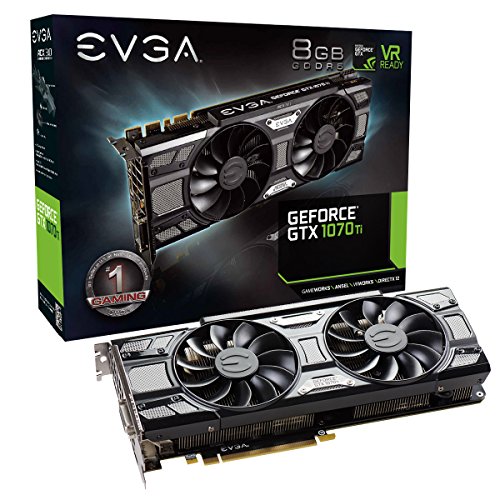
EVGA GeForce GTX 1070 Ti SC Gaming ACX 3.0 Black Edition — The NVIDIA candidate
The GTX 1070 Ti was NVIDIA’s precision strike of its generation — a card placed deliberately close to the GTX 1080, with 8GB of GDDR5 memory — and EVGA’s SC Gaming edition with the ACX 3.0 cooler was among its most respected forms. EVGA’s reputation in that era rested on exactly the virtues this category cares about: clear documentation, honest specifications, and support that answered questions. As the sole NVIDIA candidate in this candidate class, it is the pick for the buyer whose dual-six-pin hunt is attached to a preference for NVIDIA’s drivers and ecosystem of that generation, and whose games or applications of the period run best on the green team’s silicon.
Performance expectations, set honestly for a card of its years: this remains a thoroughly capable 1080p and light-1440p gaming card, with the efficiency its generation was praised for, and the ACX 3.0 cooler keeps it composed in ordinary cases. What it asks of the buyer is the guide’s universal exercise, in its most tractable form: EVGA published thorough specification pages for its boards, and this exact model’s page — SC Gaming, ACX 3.0, Black Edition — is where its power requirements and connector configuration are stated. Verify there, match the stated requirement to your supply’s leads and wattage, and the card’s considerable virtues can be bought with confidence rather than with crossed fingers.
- Chip: NVIDIA GeForce GTX 1070 Ti
- Memory: 8GB GDDR5, per the listing title
- Cooling: EVGA ACX 3.0, SC Gaming Black Edition, per the listing title
- Power connectors: Not stated in the listing title — verify with EVGA documentation
- Role: the NVIDIA candidate in the dual-six-pin hunting class
Strengths
- A well-regarded board from a maker whose documentation practices suit verification.
- Capable, efficient 1080p and light-1440p gaming from a mature, stable driver era.
- ACX 3.0 cooling gives it good manners in ordinary cases.
Trade-offs
- A card of its generation; the newest features and codecs belong to newer picks elsewhere.
- Connector configuration must be verified in EVGA’s documentation before purchase, as with all six.
- Availability of this era’s boards varies, and condition deserves attention when buying.
Best for: a buyer set on NVIDIA silicon of this class whose supply offers six-pin leads, after verifying the exact model’s requirement in EVGA’s documentation. Not suited for: any purchase made without the verification step — no card in this category, whose entire premise is a physical connector, can be responsibly recommended unverified.

ASRock Challenger Radeon RX 5700 XT — The newer architecture
The RX 5700 XT is the most modern chip in this candidate class — the card that introduced AMD’s RDNA architecture and reset expectations for 1440p value in its day — and ASRock’s Challenger line is its straightforward, working-clothes form. For the buyer whose six-pin hunt coexists with wanting the newest architecture the class offers, this is the natural first verification target: a card with strong 1440p raster performance, 8GB of memory in this class’s pattern, and a maker whose specification pages state their boards’ requirements plainly.
Its position in the guide is instructive as well as practical. The 5700 XT generation is exactly where casual assumptions about connectors go to die, because boards of this era were designed in several power configurations across makers and editions — which is a long way of saying that the Challenger’s own documentation is not a formality but the substance of the purchase. Read ASRock’s specification for the Challenger model, confirm the connector configuration and the recommended supply capacity, and you will know more about this card’s power story than any listing on the internet will tell you. The performance, once the power is right, is the strongest in this candidate set at 1440p, and the Challenger delivers it without flagship ceremony.
- Chip: AMD Radeon RX 5700 XT
- Series: ASRock Challenger
- Architecture: AMD RDNA, the newest in this candidate class
- Power connectors: Not stated in the listing title — verify with ASRock documentation
- Role: strongest 1440p performer among the candidates
Strengths
- The most modern architecture and strongest 1440p pace in this candidate class.
- Challenger design keeps the proposition focused on the chip rather than ceremony.
- ASRock publishes clear per-model specifications for the verification this category requires.
Trade-offs
- Its era used varied power configurations across boards — verification is essential, not optional.
- Ray tracing is not this architecture’s story; raster performance is.
- Heat and power appetite are of its performance class, so case airflow matters.
Best for: a buyer who wants the newest architecture in this class and will verify the Challenger’s exact requirement in ASRock’s documentation before ordering. Not suited for: a supply that cannot meet the verified requirement once read — the documentation’s answer outranks the buyer’s hope, every time.

Sapphire Pulse RX Vega 56 — The Sapphire candidate
Sapphire’s Pulse line is the maker’s value-conscious flagship logic applied to Vega 56: the title describes a card with 8GB of HBM2 memory and an output set of HDMI plus triple DisplayPort, which already tells a useful truth — this is a board aimed at real gaming desks, with the multi-monitor outputs to prove it. Vega 56 in its day was the thinking buyer’s performance card, and Sapphire, as AMD’s most dedicated board partner, produced the versions that reviewers reached for. The Pulse brings that pedigree to this candidate class with the cooling and build that Sapphire’s reputation rests on.
Vega’s character should be understood by its buyer: HBM2 memory on a wide bus gives it a distinctive performance profile that holds up interestingly in memory-sensitive work, and the architecture rewards an owner willing to tune it, as its era’s enthusiasts famously did. None of that changes the purchase ritual. Sapphire’s specification page for the Pulse RX Vega 56 — the full model designation, not the chip’s generic page — states the card’s power requirements and connector configuration, and that page is where this candidate either matches your supply’s two six-pin leads or honestly does not. Sapphire documents its boards well; use the document.
- Chip: AMD Radeon RX Vega 56
- Memory: 8GB HBM2, per the listing title
- Outputs: HDMI plus triple DisplayPort, per the listing title
- Series: Sapphire Pulse (Sapphire Technology)
- Power connectors: Not stated in the listing title — verify with Sapphire documentation
Strengths
- Sapphire’s board quality and cooling on the era’s thinking buyer’s chip.
- Four display outputs suit the multi-monitor desks of its period and beyond.
- HBM2 memory gives Vega a distinctive, still-interesting performance profile.
Trade-offs
- Vega rewards tuning; owners who never open a settings panel leave some character unused.
- Power configuration must come from Sapphire’s page for this exact Pulse model.
- Its appetite and heat are of the performance class, so ventilation is part of the deal.
Best for: a multi-monitor gaming desk of this class that values Sapphire’s board craft, after verification in Sapphire’s documentation. Not suited for: a small, poorly ventilated case, where Vega-class heat has nowhere respectable to go.

XFX Radeon RX Vega 56 — The XFX candidate
XFX built its name on Radeon boards with a certain muscular directness, and its Vega 56 — the title states 8GB of memory with three DisplayPorts and HDMI — is the straightforward performance candidate of the Vega field here. Four outputs, the full Vega 56 proposition, and a maker whose model pages carry the specifications this category lives by. Buyers comparing the four Vega 56 boards in this guide should notice that this is precisely the comparison the category demands: same chip, four makers, four documents — and the connector configuration of each is a fact about that board, to be read in that maker’s specification, not inferred from its cousins.
In the machine, expect Vega 56 behaviour as Sapphire’s section describes it — strong raster performance of its era, HBM2 character, an appetite that wants a real power supply and a ventilated case — delivered in XFX’s house style. The verification path is XFX’s own: find the exact model’s specification, read the power requirement section, and compare it honestly against the supply in your machine, leads and wattage together. XFX’s model naming includes edition suffixes that matter; the page for your exact card is the only page that counts, and this guide’s refrain applies to it undiminished.
- Chip: AMD Radeon RX Vega 56
- Memory: 8GB, per the listing title
- Outputs: 3x DisplayPort plus HDMI, per the listing title
- Maker: XFX
- Power connectors: Not stated in the listing title — verify with XFX documentation
Strengths
- Full Vega 56 performance with a generous four-output arrangement.
- XFX’s direct, specification-led presentation suits the verification this category needs.
- A strong candidate where Sapphire’s board is unavailable or priced oddly.
Trade-offs
- Edition suffixes in XFX’s range make exact-model verification doubly important.
- Vega-class power and heat demand a capable supply and a ventilated case.
- Its documentation, not the other Vega boards’, is the authority for this card.
Best for: a buyer who wants Vega 56 performance and four outputs, verified against XFX’s own specification for the exact model. Not suited for: a build planned on the assumption that this board matches another maker’s Vega 56 power design — the assumption this entire guide exists to retire.

PowerColor Red Dragon Vega 56 — The PowerColor candidate
PowerColor’s Red Dragon line is the maker’s performance tier below its Red Devil flagships, and applied to Vega 56 — 8GB of HBM2, with the model code in the title carrying the factory overclock designation — it produces the enthusiast-leaning candidate of the Vega field. Red Dragon boards of the era were bought by owners who intended to use their cards hard: gaming at the top of the chip’s envelope, in cases with the airflow to match. That character makes the verification conversation for this card especially pointed, because a factory-overclocked performance board is exactly where a maker’s power design deserves to be read rather than guessed.
PowerColor’s specification for the Red Dragon Vega 56, under its full AXRX model designation, is the document that settles its connector configuration and its recommended supply capacity. Read both numbers — the configuration and the capacity — because this category’s second failure mode is a card whose connectors match the leads available while its total appetite exceeds what the supply should be asked to give. Verified and fed properly, the Red Dragon is the Vega field’s keen driver’s choice: the same charismatic chip, in the board that asks the most of it, for the owner who enjoys that arrangement.
- Chip: AMD Radeon RX Vega 56
- Memory: 8GB HBM2, per the listing title
- Series: PowerColor Red Dragon, factory overclock model per its designation
- Model designation: AXRX Vega 56 8GBHBM2-2D2HD/OC, per the listing title
- Power connectors: Not stated in the listing title — verify with PowerColor documentation
Strengths
- The enthusiast-leaning Vega board, factory overclocked for the chip’s full envelope.
- Red Dragon cooling and build suit sustained, hard gaming use.
- PowerColor’s full model designation makes its specification unambiguous to find.
Trade-offs
- A performance board’s appetite makes the supply-capacity half of verification essential.
- Connector configuration comes only from PowerColor’s page for this designation.
- Its character suits keen owners; set-and-forget buyers have calmer candidates above.
Best for: an enthusiast whose case and supply are verified against PowerColor’s stated requirement for this exact Red Dragon model. Not suited for: a marginal power supply, where a factory-overclocked Vega board is the wrong card to feed hopefully.
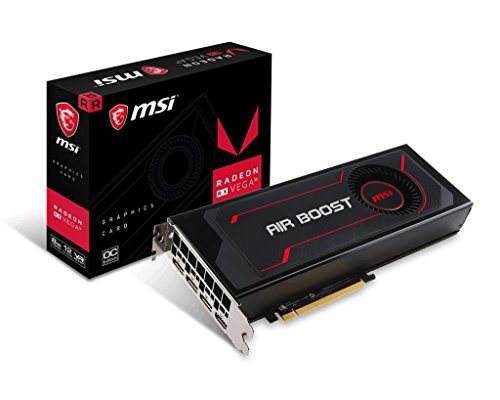
MSI Radeon RX Vega 56 Air Boost 8G OC — The blower candidate
The Air Boost is the Vega field’s different answer to a physical question: where does the heat go? MSI’s design is a blower card — a single fan drawing air in and exhausting it out of the rear bracket, outside the case entirely. In a compact or airflow-poor enclosure, or in a machine where the card’s heat would otherwise wash over every other component, that exhaust discipline is a genuine virtue, and blower cards of this era were the standard specification for workstations and tight builds for exactly that reason. The trade is acoustic: a blower works harder to move its air, and it will be heard doing it under load in a way the open-air coolers above will not.
As an OC edition with 8GB, per its title, the Air Boost otherwise presents the Vega 56 proposition in MSI’s house form, and its verification path runs through MSI’s specification for the Air Boost 8G OC model specifically. Blower editions and open-air editions of the same chip are different boards with different designs, and their documentation must not be borrowed from one another — the final application, in this guide, of the principle the whole category rests on. Verify MSI’s stated configuration and capacity, house the card where its exhaust logic helps rather than fights the case, and the Air Boost rewards its owner with the tidiest thermal story in the Vega field.
- Chip: AMD Radeon RX Vega 56
- Memory: 8GB (8G), per the listing title
- Cooling: Air Boost blower design, exhausting out of the case
- Edition: factory overclocked OC model
- Power connectors: Not stated in the listing title — verify with MSI documentation
Strengths
- Blower exhaust keeps the card’s heat out of the case — ideal for compact or crowded builds.
- A single-slot-width exhaust format suits workstation-style layouts.
- MSI’s specification for the exact model makes verification straightforward.
Trade-offs
- Blower coolers are audibly busier under load than the open-air designs here.
- Its thermal virtue is wasted in a large, well-ventilated case built for open-air cards.
- Do not borrow documentation from MSI’s other Vega 56 editions; this board has its own.
Best for: a compact or airflow-limited build that benefits from rear-exhaust cooling, after verification in MSI’s documentation for this model. Not suited for: a silence-first living-room machine, where the blower’s working voice will be part of every session.
The Candidate Field at a Glance
| Pick | Chip | Memory | Power connectors |
|---|---|---|---|
| EVGA GTX 1070 Ti SC Gaming | GeForce GTX 1070 Ti | 8GB GDDR5 | Not stated in the listing title — verify with EVGA documentation |
| ASRock Challenger RX 5700 XT | Radeon RX 5700 XT | 8GB class | Not stated in the listing title — verify with ASRock documentation |
| Sapphire Pulse RX Vega 56 | Radeon RX Vega 56 | 8GB HBM2 | Not stated in the listing title — verify with Sapphire documentation |
| XFX RX Vega 56 | Radeon RX Vega 56 | 8GB | Not stated in the listing title — verify with XFX documentation |
| PowerColor Red Dragon Vega 56 | Radeon RX Vega 56 | 8GB HBM2 | Not stated in the listing title — verify with PowerColor documentation |
| MSI RX Vega 56 Air Boost | Radeon RX Vega 56 | 8GB | Not stated in the listing title — verify with MSI documentation |
The comparison table is this guide’s thesis in grid form. Every column can be filled honestly from the pool’s titles except one — and that column is the one the search was about. The correct response to that empty column is not embarrassment; it is a link to six manufacturers’ specification pages and the knowledge of how to read them, which the next section provides in full.
How Do You Verify a Card’s Power Connectors From the Maker’s Documentation?
Work this sequence for any card in this guide, in this order, and you will finish with certainty instead of an opinion. Step one: copy the full model name from the listing, including every suffix and edition word — Pulse, Red Dragon, Air Boost, Challenger, SC Gaming — because that string is the key to the correct document. Step two: go to the maker’s own website and find that exact model’s product page; do not accept a retailer’s specification tab as a substitute, since retailers copy data between sibling models with cheerful inaccuracy. Step three: on the product page, open the specifications and find the power section. Makers state the connector configuration there in plain terms — the number and type of PCIe power connectors the board carries — alongside a recommended power supply capacity. Write both down.
A worked example makes the sequence concrete. Suppose the Sapphire Pulse Vega 56 is your candidate. The listing gives you the brand, the Pulse name and the chip — enough to find Sapphire’s product page for the Pulse RX Vega 56 and nothing like enough to wire the card by. On that page, the specifications carry the power section; the manual linked from the same page draws the board’s edge; Sapphire’s gallery shows the physical card. Three sources, one maker, one model — and at the end of perhaps ten minutes you hold the configuration and the recommended capacity as published facts, ready to set against the inventory of your own supply that the previous section had you write down. Every other card in this guide submits to the identical treatment, which is precisely why the treatment is worth learning once, properly. Step four: corroborate with the manual — the product page usually links a downloadable manual or quick-installation guide whose diagrams show the card’s power edge and the connectors drawn on it; a diagram that matches the specification’s words closes the question. Step five: corroborate with photographs of the actual board — the maker’s gallery images of that model, showing the top or rear edge where the sockets live. A six-pin socket and an eight-pin socket are visually distinct, and two sockets are not one; count what the exact board shows. If any two of these three sources disagree, stop and contact the maker’s support with the full model name — disagreement between a maker’s own documents is rare, and support answers this exact question routinely.
Step six: audit your own machine against the verified answer. Count the PCIe power leads your supply actually provides — physically, with the case open, not from memory of its box — and note their types. Compare the supply’s wattage against the maker’s recommended capacity with honest margin. Only now is the card “compatible with your system” in a sense worth money. The whole sequence takes ten to fifteen minutes, most of it on one web page, and it converts the riskiest purchase in this category into the most thoroughly documented one in your build.
What If the Verified Configuration Is Not Dual Six-Pin?
Then you have learned the thing the verification existed to teach, before money moved — which is a success, not a failure. Your options are orderly. If the card requires an eight-pin or a 6+2 arrangement and your supply offers a 6+2 lead — a six-pin with a detachable two-pin companion, extremely common on quality supplies — the requirement may already be met; check the physical leads before concluding anything. If the supply lacks the leads but meets the wattage with margin, the correct move is a suitable replacement supply, not an adapter: improvised splitting and converting adapters on high-power cards are the one shortcut this guide forbids outright, because they ask connectors and cables to carry loads they were not designed around.
If neither the leads nor the wattage serve, the candidate list reopens, and that is fine — the other five cards in this guide each carry their own documentation and their own answer, and the class is wide. What never reopens is the principle: the configuration is a fact to be read, not a hope to be shopped by. Buyers who internalise that will find this the easiest category in PC building to get right, because its one essential fact is published, precisely, by every maker in this list.
What Mistakes Do Buyers Make in This Category?
The first and defining mistake is treating the chip as the specification: assuming that because one Vega 56 board takes a certain configuration, all Vega 56 boards do. This guide contains four Vega 56 boards from four makers as a standing refutation. The second mistake is trusting a marketplace specification tab or an answered question under a listing, both of which are routinely copied from sibling models. The third is counting leads from the power supply’s marketing name rather than from the cables in the case — supplies are swapped, leads are modular and get lost, and the machine in front of you is the only authority on what it offers.
The fourth mistake is verifying the configuration and skipping the capacity: a card can match your leads exactly while its recommended supply wattage exceeds your unit’s honest output, and the result is a machine that shuts down in the third minute of the game it was bought for. The fifth is the adapter shortcut, already forbidden above and worth forbidding twice. And the sixth is buying the card first and performing this guide’s ten-minute verification with the parcel already on the desk — the sequence exists to be run in the other order, and its entire value lies there.
Underneath all six mistakes sits one assumption worth retiring explicitly: that a seller, a marketplace or a guide owes the buyer a configuration it never actually published. Nobody in the chain is hiding the fact — the makers print it prominently, in the document built for the purpose. The buyer’s task is simply to consult the document of record instead of the documents of convenience, and every mistake above is a variation on consulting the convenient one. Read the specification, and this category’s reputation for treachery evaporates; it was never treacherous, only misfiled.
Why Do So Many Cards of This Era Cluster Around Six-Pin Power?
A short history explains the candidate class’s shape. The six-pin PCIe power connector arrived as the original supplement to slot power: the slot provides a base allowance, and each additional lead adds a defined increment on top of it. Through the generations these six cards come from, board makers balanced their designs against the leads the installed base of power supplies actually offered — and for years, that installed base spoke six-pin fluently. Performance cards were designed to combinations of the slot, six-pin and later eight-pin leads that the supplies of their day could feed, which is why an entire era of strong 8GB cards lives in the neighbourhood this search explores.
The eight-pin lead gradually took over the high end as cards grew hungrier, and modern flagships have moved further still. That progression is why the dual-six-pin search is inherently a search among slightly older hardware — not because the configuration vanished, but because the frontier moved past it. Buyers should hold that fact comfortably rather than apologetically: the cards in this guide were the performance mainstream of their years, their drivers are mature, and for 1080p and 1440p gaming of their class they remain entirely serviceable. The search is not a compromise hunt; it is a match between a good supply’s leads and the generation that was designed to drink from them.
How Do You Inventory Your Own Power Supply’s Leads?
The supply side of the match deserves the same rigour as the card side, and it is entirely physical. Open the case — power off, plug out — and find the PCIe power leads among the supply’s cables. On a modular supply they are the cables labelled for graphics or PCIe use, and some may be in a drawer rather than in the machine, which is why the inventory includes the drawer. Identify each lead’s connector: a plain six-pin, a 6+2 with its detachable pair, or an eight-pin. Count them. Two separate leads matter more than one lead with two heads for the hungriest cards, and the maker’s documentation sometimes speaks to that distinction as well.
Then read the supply’s label for its wattage and, just as honestly, its age and provenance. A quality supply of this cards’ era that has run cool and clean is a fine foundation; an anonymous unit of unknown history is a variable no verification of the card can cancel out. Write the inventory down — leads, types, wattage — and keep it with the machine’s records. The next upgrade, whatever it is, begins from that piece of paper, and the owner who has it skips the archaeology that everyone else performs with a torch between their teeth.
Why Do Four Boards With the Same Vega 56 Chip Deserve Separate Sections?
Because a graphics card is not a chip. It is a chip, a power delivery design, a cooler, an output set and a document trail, and of those five things only the first is shared between the Sapphire, XFX, PowerColor and MSI boards in this guide. Their power designs were drawn by four engineering teams answering the same brief with different judgements; their coolers move heat by different philosophies, as the Air Boost’s blower makes vivid; their outputs differ, as the titles themselves state. Treating them as one card with four labels is the exact cognitive error this category punishes.
There is a constructive side to the same fact: four boards mean four chances for one of them to match your machine precisely — your leads, your case’s airflow, your monitor count, your noise tolerance. The buyer who verifies all four documents has not wasted three verifications; they have run a proper selection process across the full field of one chip, which is what buying a board, rather than a chip, actually means. That is the habit this guide would most like to leave behind, because it generalises to every graphics purchase its reader will ever make.
What Should You Do on the Day the Card Arrives?
Arrival day has its own short ritual, and it closes the verification loop this guide opened. Before the case is opened, look at the card itself: find the power sockets on its edge and confirm they are the configuration the documentation promised. This is the physical confirmation step, and it takes twenty seconds — if the physical card ever disagreed with its documents, this is the moment to discover it, while the purchase is still easily reversible and the machine is still in one piece. Then fit the card, seat the verified leads fully until their latches engage, and route them without sharp bends or contact with fan blades.
First boot is a test, not a celebration: reach the desktop, install the correct driver for the card’s family, and then put the machine under a genuine gaming load for fifteen minutes while listening and watching. A correctly fed card of this class settles into its work without drama — no shutdowns, no driver resets, no fan behaviour that suggests distress. If something does misbehave, the documentation you gathered is the troubleshooting map: re-check the leads’ seating first, the supply’s capacity second, and the driver third, in that order, because in this category the physical layer is guilty more often than the digital one. A rig that passes its first quarter-hour under load, fed exactly as its maker specified, will ordinarily pass the next several years the same way.
Final Recommendation
Choose your candidate by chip and character — the EVGA 1070 Ti for the NVIDIA route, the ASRock Challenger for the newest architecture, Sapphire’s Pulse for board craft and outputs, XFX’s card for directness, PowerColor’s Red Dragon for enthusiasm, MSI’s Air Boost for tight cases — and then do the thing this whole article exists to make habitual: open that maker’s specification for that exact model, read its power connectors and its recommended capacity, and match them against the leads and wattage physically present in your machine. The best dual 6 pin graphics card is not a model name anyone can hand you from a title; it is the card whose documentation you have read — and the buyer who reads it will never have to guess at a connector again. That may sound like a smaller promise than the one the search seemed to ask for, but it is the larger one in disguise: six well-chosen candidates, six published specifications, one ten-minute habit, and a machine fed exactly as its makers intended, humming away on the leads it already had. Keep the inventory of those leads with the machine, keep the maker’s page bookmarked with the build’s records, and the next time a connector question arises — for this card’s successor, or for a friend’s build entirely — the answer will take you minutes, because you will be one of the people who know where answers of this kind actually live. And that, in the end, is the only “best” this category can honestly certify — not a pin count printed on faith, but a card, a document and a power supply that agree with one another, verified by the one person whose machine it is. Everything else in this guide — the six candidates, their coolers, their outputs, their eras — is commentary around that single act of reading, and the act takes less time than the delivery will. Do it once, do it in the order this guide set out, and the parcel that arrives at your door will be a confirmation of something you already know, rather than a question you still have to answer. There are worse definitions of a good purchase, in this category or any other, than knowing — on paper, from the maker, before the box is opened — that everything is going to fit, connect, and draw exactly the power the machine on your desk was built to give it, no more, no less, and with nothing left to luck on the day the parcel arrives at your door, which is how every upgrade ought to feel and so few, in practice, actually do.
Frequently Asked Questions
Why won’t this guide simply say which of these cards take dual 6-pin power?
Because the verified source material — the listings’ own titles — does not state any of the six configurations, and printing an unverified configuration as fact is how buyers end up with the wrong card for their power supply. The makers’ specification pages do state it, precisely, for each exact model. This guide’s refusal is not coyness; it is the difference between a rumour and a specification, and on a safety-relevant detail the specification is the only acceptable currency.
Where exactly in the maker’s documentation is the connector configuration?
On the model’s product page, in the specifications section, under the power entries — makers list the required PCIe power connectors alongside the recommended power supply capacity. The downloadable manual or installation guide for the same model corroborates it with diagrams of the card’s power edge. Use the full model name with all suffixes when searching the maker’s site, because the page for a sibling edition describes a different board.
Can I use an adapter to turn my leads into the configuration a card needs?
This guide’s answer is no for high-power cards of this class. Adapters that split or convert power leads ask cables and connectors to carry loads outside their design, on precisely the components where that matters most. If the verified requirement does not match your supply’s native leads and capacity, the correct purchase is a suitable power supply — or a different candidate card whose verified requirement does match. Both are cheaper than the failure the shortcut risks.
My power supply has 6+2 pin leads. Does that help?
Very often, yes. A 6+2 lead is a six-pin connector with a detachable two-pin section, designed to serve as either a six-pin or an eight-pin connection as the card requires. Many supplies in this cards’ era shipped with them. The verification sequence still applies in full — read the card’s stated configuration and recommended capacity, then inventory your supply’s actual leads — but a 6+2-equipped supply covers more of this candidate class than its owner sometimes realises.
How do I recognise the sockets in photographs of a card?
Look along the top edge and the rear end of the board, where power sockets live. They are rectangular receptacles, visually distinct from everything else on a graphics card, and their pin count is their identity: a six-pin socket is narrower than an eight-pin, and two separate sockets are plainly two. Count them in the maker’s own gallery images of the exact model, and treat any image of a differently suffixed board as a picture of a different card — because it is.
Does the power supply’s wattage matter if the connectors match?
Yes, independently and equally. Connectors describe the shape of the delivery; wattage describes its size. Makers publish a recommended supply capacity for each board, and a supply below it can shut the machine down under gaming load even with every lead correctly seated. Verify both halves — configuration from the specification, capacity against your supply’s label — and the card’s power story is fully told before it is bought.
The listing’s photo seems to show the connectors. Can I rely on it?
Use it as corroboration, never as the foundation. Marketplace listings sometimes carry a maker’s gallery, sometimes a render, and occasionally an image of a sibling model uploaded in good faith. If the photograph of the exact board agrees with the maker’s specification, your confidence is complete; if it appears to disagree, the specification and the manual win, and the discrepancy is a question for the maker’s support before it is a purchase. The physical card, when it arrives, is the final court — check its edge before the machine is opened, while a return is still a simple thing.
Is a dual six-pin card automatically weaker than an eight-pin card?
No — the connector configuration describes how a board is fed, not a league table of performance. Boards are designed to their power delivery, and a well-designed card of this class delivers everything its chip promises through the arrangement its maker chose. Performance comparisons belong to the chips and the coolers, which is how this guide’s sections treat them. The configuration matters for exactly one decision — whether your supply can feed the card as designed — and for that decision it matters completely.
Related Guides
Power questions connect to several of our other roundups: the guide to graphics cards that do not require an external PSU covers the opposite end of the power spectrum, our Ryzen 7 5800X pairings discuss supply checks for a modern build, and the mini-ITX graphics card roundup treats power and space together for small cases.


