What's inside
- Key Takeaways
- Quick Picks
- How Did We Choose These Drives for Pro Tools Rooms?
- What Does Each of These Drives Actually Do Well in a Session?
- How Do the Six Compare Side by Side?
- What Should a Studio Check Before Spending on Session Storage?
- How Do You Set Up a New Studio Drive Without Inviting Trouble?
- Which Mistakes Cost Studios Their Sessions?
- Final Recommendation
- What Changes After a Month of Daily Sessions on These Drives?
- How Should a Studio Think About Noise, Heat and Drive Placement?
- How Do You Migrate an Existing Session Library Without Breaking Anything?
- Which of These Drives Fits Which Kind of Studio?
- What Does a Full Recording Week Look Like on Each Storage Layout?
- How Long Will a Studio Drive Last, and How Do You Know When to Retire One?
- Frequently Asked Questions
- Related Guides
As an Amazon Associate I earn from qualifying purchases. This post may contain affiliate links at no extra cost to you.
gizmoverdict.com is reader-supported. When you buy through links on our site, we may earn an affiliate commission.
Where to buy: All six drives below link to listings checked against this site’s verified product pool, so the capacity and interface printed here are the capacity and interface on the listing you land on. This guide prints no prices and no star ratings, because neither tells you whether a session will open at 9 a.m. on delivery day.
The best hard drives for music studio pro tools work are not the drives with the biggest number on the box. They are the drives that keep a session playing without a beachball, survive being written to for twelve hours straight, and give you a second copy of the only take that mattered before you have finished your coffee. A Pro Tools session is an unusual workload: dozens or hundreds of audio files streamed at once, a constant drip of small writes as you punch in and comp, and project folders that swell by gigabytes every time a client asks for one more pass. This guide separates the drives that suit that rhythm from the drives that merely store files.
Three of the six picks are Glyph desktop units built for media work, because Glyph keeps appearing in studio equipment lists for a reason: the enclosures are metal, the support staff answer questions about audio, and two of the three offer hardware RAID, which lets one enclosure hold a mirrored copy of your session as you record it. One pick is a SanDisk Professional desktop drive for engineers who want a single large, quiet volume. The last two are internal 3.5-inch drives for studios that run a tower or a drive bay and would rather build storage into the machine than stack boxes on the desk.
Key Takeaways
- Streaming audio is a sustained-read job, not a burst job: the Glyph Blackbox PRO RAID’s 550 MB/s ceiling matters less than the fact that a RAID enclosure keeps delivering while tracks stack up past a hundred.
- Two of these picks mirror your data inside a single box. That is not a backup, but it does mean a dead drive on a session day becomes an inconvenience instead of a cancelled booking.
- The internal picks — the Toshiba X300 PRO and the WD Black — only make sense if your studio computer has a free 3.5-inch bay and a spare SATA port; laptop-based studios should stay with the four desktop units.
- Capacity planning for audio is about session count, not file size: 32TB holds years of stereo work but disappears quickly once every project keeps full multitrack folders and video references.
- Whatever you buy, the session drive and the archive drive should be different physical devices, and at least one copy of finished work should leave the building.
Quick Picks
| Pick | Badge | Why it earns its place |
|---|---|---|
| Glyph Blackbox PRO RAID 32TB | Fastest enclosure here | A 550 MB/s USB-C RAID box with room for enormous track counts and a mirrored mode for session-day insurance. |
| Glyph StudioRAID 32TB | The studio veteran | The long-running StudioRAID line in its largest dress, aimed at rooms that track all day and mix all night. |
| Glyph Blackbox PRO 24TB | Enterprise drives inside | A single-volume desktop unit built around enterprise-class disks for engineers who archive as hard as they record. |
| SanDisk Professional 18TB G-Drive | Quiet single volume | An enterprise-class desktop drive without RAID menus or modes — plug it in, name it, and get back to the mix. |
| Toshiba X300 PRO 14TB | Internal workhorse | A high-workload 3.5-inch internal drive rated by its maker for creative-professional duty inside a tower. |
| WD Black 8TB Performance HDD | Bay-friendly all-rounder | Western Digital’s performance line in a size that suits a session drive you also keep sample libraries on. |
How Did We Choose These Drives for Pro Tools Rooms?
We started from the shape of a real session rather than a benchmark chart. A tracking date writes continuously for hours. A mix session reads continuously, often from several folders at once once playlists, elastic audio renders and video files join the timeline. An edit-heavy day does thousands of tiny writes. Any drive on this list had to be plausible at all three jobs, which is why you will not find a bargain archive disk here: drives built to sit idle and wake up occasionally behave badly when a DAW leans on them for a full working day.
Second, we favoured drives whose makers publish a workload intention. “Enterprise class” and “high workload” in a listing title are not marketing confetti; they signal a drive family designed and warranted for sustained duty rather than desktop bursts. Third, we kept the interfaces honest: everything external here is USB-C, which is what current studio laptops and desktops offer, and everything internal is a standard 3.5-inch SATA drive that drops into a tower bay or a Thunderbolt enclosure you already own.
Finally, we weighted failure behaviour. In a studio, the question is never whether a drive will die; it is what happens to the booking when it does. RAID mirroring, enterprise mechanisms and boring, well-documented product lines all scored because they turn a hardware death into a rescheduled afternoon rather than a lost album.
What Does Each of These Drives Actually Do Well in a Session?
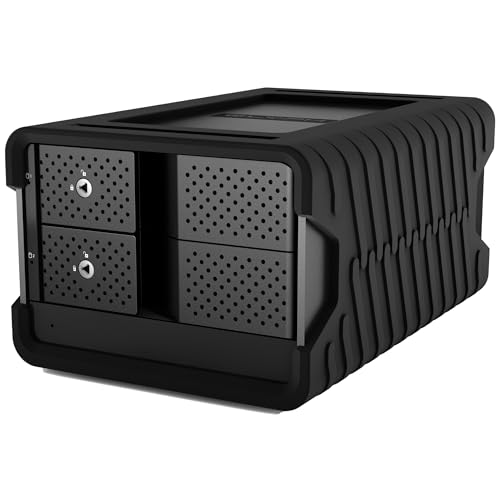
Glyph Blackbox PRO RAID 32TB — Fastest enclosure here
Put the Blackbox PRO RAID on the desk of a room that tracks bands, and its two headline numbers explain themselves. The 32TB capacity is what you get across the enclosure in its striped configuration, and the 550 MB/s figure in the listing is the fastest transfer ceiling of any pick in this guide. Striped, this is the drive for the engineer who runs 150-track sessions with a video window open and still wants headroom when the drummer asks to hear the last take back instantly. Playback in Pro Tools is a chorus of small reads arriving together; a striped pair answers that chorus with two mechanisms working in parallel, and the difference shows up as sessions that simply stop making you wait.
Flip the enclosure to its mirrored mode and the same box becomes a different tool: capacity halves, and every take you record exists twice before you have stood up from the chair. Many tracking engineers run exactly this way during album sessions, accepting the smaller volume in exchange for the knowledge that a mechanism dying mid-week costs them nothing but a replacement disk. The metal enclosure suits that life. It travels between rooms without feeling fragile, it sits flat and quiet under a monitor bridge, and USB-C means one cable to the machine whether the studio runs a laptop rig or a desktop tower.
- Capacity: 32TB (striped) as listed
- Transfer ceiling: 550 MB/s as listed
- Interface: USB-C
- Configuration: desktop RAID enclosure
Strengths
- Highest listed transfer speed in this guide, which suits very large track counts and fast session loads.
- RAID choice lets the same hardware serve as a speed volume or a mirrored session vault.
- Glyph’s support culture is media-first; the people answering know what a DAW is.
Trade-offs
- Mirrored mode halves usable space, so the 32TB on the box is not the number you plan around if you mirror.
- Striped mode doubles the blast radius of a single disk failure — never run it without a separate backup.
- It is a desktop-only solution; there is no bus-powered portability for location recording.
Best for: tracking rooms running high track counts that want one enclosure able to switch between speed and mirroring. Not suited for: location recordists who need a drive that runs from a laptop battery, because this enclosure needs its own power and a desk to sit on.

Glyph StudioRAID 32TB — The studio veteran
The StudioRAID line has been sitting in project studios since before USB-C existed, and this 32TB version is the same idea at modern scale: a desktop RAID enclosure rated at 360 MB/s in its listing, built for rooms where the drive is part of the furniture. That speed figure sits below the Blackbox PRO RAID, and in exchange the StudioRAID asks less of your wallet’s courage while still offering the striped-or-mirrored choice that defines this class. For a mix room, where sessions open once and then stream steadily for hours, 360 MB/s of sustained delivery is comfortably beyond what audio asks; the bottleneck in a mix is almost never the disk once you are past the first minute.
Where this enclosure earns loyalty is temperament. StudioRAIDs have a reputation for being set up once and forgotten, which is precisely the personality a storage device should have in a room that charges by the hour. The fans and mechanisms in a 32TB mirrored pair will be audible in a silent control room if the box sits beside your head, so plan its home under the desk or in the machine alcove, as you would with any spinning RAID. Treated that way, it becomes the room’s library: current album on the fast half of your workflow, finished projects parked until the archive run on Friday.
- Capacity: 32TB as listed
- Transfer ceiling: 360 MB/s as listed
- Interface: USB-C
- Configuration: desktop RAID enclosure
Strengths
- A proven enclosure family with a long service record in audio rooms specifically.
- Full 32TB class capacity with the same stripe-or-mirror flexibility as its faster sibling.
- Steady sustained delivery suits mix work, where sessions stream for hours without drama.
Trade-offs
- Its listed ceiling is a step below the Blackbox PRO RAID, noticeable on huge session loads.
- Two spinning mechanisms plus cooling make it a poor neighbour for a microphone in the same small room.
- Like every RAID, it protects against a dead disk, not against deletion, theft or a spilled drink.
Best for: established project studios that want a set-and-forget RAID library for current and recent work. Not suited for: one-room setups where the drive must sit within arm’s reach of an open vocal microphone, because a twin-disk enclosure is never the quietest object in a room.

Glyph Blackbox PRO 24TB — Enterprise drives inside
The single-volume Blackbox PRO takes a different bet from its RAID siblings. Inside the same style of metal desktop enclosure sits a 24TB enterprise-class drive, listed at 280 MB/s over USB-C. There is no striping to configure and no mirror to manage; the engineering effort went into the mechanism itself, which belongs to a drive class built for data-centre duty cycles — long hours, constant access, and a workload rating that assumes the disk works for a living. For a studio, that translates to a drive you can leave mounted all day, every day, as the house session volume without treating it like a delicate instrument.
Twenty-four terabytes as one volume is a genuinely useful shape for audio. A busy freelance engineer can keep two or three years of client projects online and searchable, with no spanning across disks and no guessing which enclosure holds the 2023 masters. The 280 MB/s ceiling is honest spinning-disk pace: big sessions take a breath while they open, then run without complaint. If your work involves shuttling between rooms, the single mechanism also means one less failure mode than a striped pair — when this drive has a bad day, it has it alone, and your backup routine, not a RAID controller, decides how bad the day gets.
- Capacity: 24TB as listed
- Transfer ceiling: 280 MB/s as listed
- Interface: USB-C
- Drive class: enterprise-class desktop hard drive
Strengths
- Enterprise-class mechanism chosen for sustained daily duty rather than occasional desktop use.
- One large, simple volume — no RAID modes to document or misconfigure.
- Glyph’s metal enclosure and media-focused support carry over from the RAID models.
Trade-offs
- No internal redundancy; a failure means restoring from backup, full stop.
- Slower listed ceiling than both RAID picks, felt most when copying whole project folders.
- 24TB of sessions on one mechanism concentrates risk, so backup discipline is not optional.
Best for: freelance engineers and producers who want one big, always-mounted house volume with enterprise internals. Not suited for: studios that need mirror-on-record protection during irreplaceable tracking dates, because a single mechanism cannot copy a take as it lands.

SanDisk Professional 18TB G-Drive — Quiet single volume
SanDisk Professional’s G-Drive line grew out of the old G-Technology studio staple, and this 18TB enterprise-class desktop model continues the family habit: a handsome aluminium enclosure, a serious mechanism inside, and no interest in being anything other than a dependable volume on a creative’s desk. The listing describes an enterprise-class external desktop hard drive, and that class matters for the same reason it matters in the Glyph single-volume pick — the mechanism is drawn from a line intended for heavy, sustained workloads, not for a home office that wakes it twice a week.
In practice this is the drive for the engineer who has been burned by clever storage and wants none of it. There are no RAID modes to choose, no companion software demanding attention, no decisions beyond a name for the volume. You format it, point Pro Tools at it, and it becomes the place sessions live. Eighteen terabytes lands in a sweet spot for a one-room operation: large enough that deleting old projects stops being a monthly chore, small enough that a full backup copy to a second drive remains a realistic overnight job rather than a weekend project. Studios already invested in the SanDisk Professional ecosystem — card readers, shuttle drives, the rest — will also appreciate that this unit speaks the same design language and stacks neatly with its cousins.
- Capacity: 18TB as listed
- Drive class: enterprise-class, per the listing
- Form: external desktop hard drive
- Brand line: SanDisk Professional G-Drive
Strengths
- Deliberately simple: one volume, no modes, nothing to misconfigure before a session.
- Enterprise-class mechanism suits the leave-it-mounted-all-week studio routine.
- Enclosure design fits control-room desks where ugly hardware genuinely bothers people.
Trade-offs
- Smallest capacity of the four desktop picks, so heavy multitrack archives fill it sooner.
- No mirroring option inside the box; redundancy has to come from your backup schedule.
- The listing states no transfer ceiling, so plan on ordinary single-disk pace rather than RAID speed.
Best for: one-room studios and mix engineers who want an enterprise-grade house drive with zero ceremony. Not suited for: rooms that keep every client’s full multitrack history online indefinitely, because 18TB runs out faster than the RAID-sized picks when nothing is ever archived off.

Toshiba X300 PRO 14TB — Internal workhorse
The X300 PRO is the first pick that lives inside the computer rather than on the desk. Toshiba positions this 3.5-inch internal drive, in its own listing language, as a high-workload performer for creative professionals, and that positioning is the whole argument: this is a mechanism specified for long days of sustained access, dropped into a studio tower where it becomes the session volume the machine itself owns. Fourteen terabytes internally has a particular charm — no power brick, no cable to knock loose mid-take, no enclosure fan adding its voice to the room.
An internal session drive also changes the failure conversation. It shares the computer’s power supply and cooling, it is trivially cloned to an external drive by your backup software, and when the studio eventually retires the tower, the drive pulls out and becomes an archive in a labelled anti-static bag. The cautions are equally concrete. Your case needs a free 3.5-inch bay with airflow, your motherboard needs a spare SATA port, and a laptop-based studio cannot use this pick at all without adding an enclosure of its own. For a tower-based room, though, the X300 PRO is the most invisible storage on this list: it disappears into the machine and lets the desk stay clear for the hardware that makes sound.
- Capacity: 14TB as listed
- Form factor: 3.5-inch internal
- Positioning: high workload, for creative professionals, per the listing
- Installation: requires a free bay and SATA connection
Strengths
- Workload intent is stated by the maker, aimed squarely at professional creative duty.
- Internal mounting removes cables, bricks and enclosure fans from the session-day equation.
- Generous capacity for a house session volume that also holds current sample libraries.
Trade-offs
- Useless to a laptop-only studio unless you buy and house an enclosure separately.
- It inherits the host machine’s risks — a dead power supply takes both down together.
- Swapping it between rooms means opening a case, not unplugging a cable.
Best for: tower-based studios that want the session drive inside the machine with a professional workload rating. Not suited for: mobile or laptop-centred rigs, because a bare 3.5-inch mechanism has no way to connect or power itself outside a case or dock.

WD Black 8TB Performance Internal Hard Drive — Bay-friendly all-rounder
Western Digital’s Black line is the company’s performance shelf, and this 8TB internal hard drive is the pick for the studio machine that does a bit of everything: tracks in the morning, hosts the sample library at noon, and renders stems in the evening. Eight terabytes is the smallest capacity in this guide, and that is a deliberate inclusion rather than an apology. Not every room needs a five-year archive spinning under the desk. A project studio that archives finished work to separate drives — as every studio should — can run its entire active life inside 8TB and enjoy a drive that is quicker to back up, quicker to replace, and quicker to clone than any of the giants above it.
The WD Black also suits the second-bay role beautifully. Pair it with one of the large desktop units and you have a natural division of labour: the internal Black holds the session you are actually working on, close to the processor and away from cable trouble, while the big external holds the library of everything else. When the project ships, its folder migrates outward and the Black starts clean. That rhythm — small fast working volume, large quiet library — is how many experienced engineers organise their rooms, and this drive is priced and sized by its maker for exactly the working half of that arrangement.
- Capacity: 8TB as listed
- Line: WD Black performance internal hard drive
- Form: internal HDD for a desktop bay
- Role in this guide: active-session and library drive
Strengths
- Performance-line positioning suits the mixed read-write rhythm of an active session drive.
- Moderate capacity keeps full backups and clones fast enough to actually happen.
- Internal fitting keeps the desk clear and the connection immune to knocked cables.
Trade-offs
- The 8TB ceiling fills quickly if you try to make it both session drive and archive.
- Needs a tower with a free bay; it offers nothing to an all-laptop room on its own.
- No redundancy of any kind — it relies entirely on your external backup routine.
Best for: project studios running a tower, especially as the active-session half of a two-drive system. Not suited for: engineers who keep years of multitrack archives mounted and searchable, because 8TB is a working volume, not a library.
How Do the Six Compare Side by Side?
| Drive | Capacity | Shape | Defining trait |
|---|---|---|---|
| Glyph Blackbox PRO RAID | 32TB | Desktop RAID, USB-C | 550 MB/s listed ceiling; stripe or mirror |
| Glyph StudioRAID | 32TB | Desktop RAID, USB-C | 360 MB/s listed ceiling; proven studio line |
| Glyph Blackbox PRO | 24TB | Desktop single, USB-C | Enterprise-class mechanism, 280 MB/s listed |
| SanDisk Professional G-Drive | 18TB | Desktop single | Enterprise-class, deliberately simple |
| Toshiba X300 PRO | 14TB | Internal 3.5-inch | High-workload positioning for creative work |
| WD Black | 8TB | Internal | Performance line; active-session specialist |
Read the table as two decisions, not six. First, desk or bay: the four desktop units serve any computer, while the two internal drives serve only towers. Second, within the desktop group, decide whether mirroring inside the box matters to you. If it does, the two Glyph RAID enclosures are your shortlist and the choice between them is speed against price of entry. If it does not — because your backup routine is genuinely disciplined — the single-volume Glyph and SanDisk compete on capacity and temperament, and either will run a studio’s daily life without complaint.
What Should a Studio Check Before Spending on Session Storage?
Start with your session folder sizes, not with the capacities on this page. Open your projects drive, sort by size, and look at what a finished album actually occupies once bounces, playlists and video references are counted. Multiply by the number of projects you keep live at once, then double it — that doubled figure is your honest shopping capacity, because a drive that lives above eighty percent full is a drive whose performance and your temper both deteriorate. Engineers are routinely surprised in both directions: a singer-songwriter’s whole year fits in a corner of the smallest pick here, while a film-adjacent composer can burn through the largest in two productions.
Next, count your tracks at the worst moment, not the average. A drive streams happily through a forty-track mix and then meets the session where the producer stacked six background-vocal playlists across a full band arrangement. Sustained delivery is what you are buying, and it is why this guide favours workload-rated mechanisms over consumer desktop disks that are engineered for documents and photo libraries. If your sessions regularly pass a hundred tracks, lean toward the RAID picks or keep the internal drive for active work; if you live under sixty tracks, every pick here will stream without drama.
Finally, plan the second copy before the first purchase. Decide tonight where tonight’s session gets copied — an archive drive, a NAS in another room, a cloud bucket for finished work — and buy accordingly. A mirrored RAID is a lovely convenience, but it shares a power supply, a desk and a postcode with the original. The studios that never lose work are not the ones with the most expensive enclosures; they are the ones whose copy routine runs whether or not anyone remembered to start it.
How Do You Set Up a New Studio Drive Without Inviting Trouble?
Format the drive before its first session, not during one. Use the filesystem your studio standardises on — and if your room swaps drives with other studios, decide that standard as a house rule and write it on the drive label. Give the volume a name that will still make sense in three years: the project or the role, plus the year, beats “New Volume” every time you are hunting a session at midnight. Then create your folder skeleton in advance — Sessions, Samples, Exports, Archive — so that files land in predictable places from day one instead of forming an archaeological dig.
In Pro Tools, point the session’s disk allocation at the new drive deliberately and confirm the first test recording actually wrote there; more than one engineer has tracked a beautiful take onto a nearly full system drive because the DAW quietly kept its old habits. Record a throwaway pass, play it back, and check the session folder’s location with your own eyes. After that, set your backup software to watch the new volume and run one manual copy before the drive earns real work. A backup that has never been tested is a hope, not a backup — restore one file from it, once, so you know the path works.
Keep the drive’s daily life boring. Leave it mounted during working hours rather than power-cycling it for every task, keep its vents clear of the interface boxes and coffee cups that colonise studio desks, and let it spin down on the operating system’s schedule rather than yanking cables. Spinning drives die from heat, knocks and surprise power loss far more often than from honest work.
Which Mistakes Cost Studios Their Sessions?
The classic error is treating a RAID mirror as a backup. Mirroring protects you from exactly one event — a mechanism failing — and cheerfully duplicates your accidental deletion, your corrupted session file and your ransomware onto both disks in perfect synchrony. The second error is the single-copy shuttle: tracking to a portable drive, carrying it home, and letting the only copy of a week’s work ride in a jacket pocket. The third is buying capacity instead of workload rating, choosing the cheapest huge disk and discovering during the album’s biggest session that a drive built for occasional file storage resents being streamed from for ten hours.
Two quieter mistakes deserve mention. Studios forget that the session drive also holds the undo history of their business — invoices, mix notes and masters often live in the same folders — so its backup priority should match its creative value. And engineers postpone the archive decision until the drive is full, at which point copying 20TB becomes a two-day event scheduled against a deadline. Archive continuously, in small unglamorous increments, and the big copy never has to happen.
Final Recommendation
For most Pro Tools rooms, the Glyph Blackbox PRO RAID is the centre of the system: run it mirrored while tracking anything irreplaceable, striped when a huge session needs the speed, and back it up like any other single box. Studios that would rather skip RAID decisions should take the SanDisk Professional G-Drive or the single-volume Glyph and put the saved complexity into a stricter backup routine. Tower owners should not overlook the internal route — an X300 PRO or a WD Black as the working drive, paired with any desktop pick as the library, is the arrangement many quiet, efficient rooms actually run. Buy the workload rating first and the capacity second; the take you cannot recreate will never ask how many terabytes were on the shelf, only whether a copy of it still exists somewhere.
What Changes After a Month of Daily Sessions on These Drives?
Day one tells you almost nothing about a studio drive. The truth arrives around week four, when the volume holds a dozen projects in different states of undress and the drive has survived a hundred mounts, three deadlines and one power cut. The Blackbox PRO RAID, run mirrored, settles into the background of a tracking room in a way striped volumes never quite do: nobody thinks about it, because nobody has had to. Its month-four personality is administrative — you notice the enclosure only when you check the mirror’s health during a Friday archive run, and the check is boring, which is the highest praise storage earns.
The StudioRAID’s long game is similar, with one difference in texture: because its ceiling is lower, the moments when you do notice it are the big session loads on Monday morning, when a 90-track project takes its time appearing. By month two most rooms stop perceiving this as slowness and start perceiving it as the session arriving; the work itself, hours of streaming, never stutters. Rooms that came from consumer desktop drives describe the change as the disappearance of a low-level anxiety they had stopped noticing they had.
The single-volume Blackbox PRO 24TB reveals its enterprise roots over time rather than on day one. It is the drive that gets left mounted through weekends, that absorbs the render farm’s overnight bounces, that holds the “temporary” exports which become permanent. Enterprise mechanisms are built assuming exactly this abuse pattern — constant availability rather than polite office hours — and the month-four experience is a drive that has simply never given anyone a reason to discuss it in a meeting.
The SanDisk G-Drive’s month is the quietest of the four desktop picks, partly because 18TB imposes its own discipline: you archive finished work off it regularly, so the volume stays lean, the directory stays browsable, and the drive never reaches the sluggish, over-full state that makes engineers blame hardware for a housekeeping problem. Several habits in a studio are really capacity policies in disguise, and this pick enforces a good one.
Inside a tower, the X300 PRO’s month is defined by absence — no cable incidents, no enclosure to knock, no brick to unplug when the vacuum cleaner needs the socket. Its presence is felt only in the machine’s general competence. The WD Black, in the second-bay role, develops the opposite personality: it is the drive you interact with most, because it holds the current obsession, and its smaller capacity forces the healthy ritual of migrating finished projects outward. Studios often discover that the drive they think about most is the small one, and that this is a feature.
How Should a Studio Think About Noise, Heat and Drive Placement?
Every spinning drive in this guide makes sound, and in a studio sound is not a comfort issue but a product issue: a microphone does not care that the whine it captured came from a very reliable enclosure. The two RAID picks contain two mechanisms and active cooling, so they belong in a machine room, a ventilated alcove or at worst under a desk behind a baffle — never on the meter bridge beside the nearfields if you record in the same space. The single-volume desktop picks are gentler but not silent; a 24TB mechanism seeking across a busy session is audible in a treated room at night, which is why experienced engineers run long cables and keep all spinning storage on the other side of the wall from the vocal booth.
Heat is the slower enemy. An enclosure that feels merely warm on a spring afternoon can run genuinely hot in August with the studio door closed and four people in it, and sustained heat is what ages mechanisms. Give every desktop pick in this guide clear air on all sides, keep them out of direct sun through the control-room window, and resist stacking them into a totem pole of warm aluminium, however tidy it looks in photographs. Internal drives depend on the case’s airflow entirely; a tower that suffocates its GPU will suffocate its drive bays too, so the X300 PRO and the WD Black inherit whatever cooling discipline your machine already has — one more reason the internal route suits well-built towers and not bargain cases with a single tired fan.
Power deserves the same planning. A drive that loses power mid-write can lose the file it was writing and, in the worst case, the directory around it. Put the studio’s storage on the same battery backup as the computer, sized to let everything shut down gracefully, and let the UPS — not the wall — absorb the building’s electrical moods. It is the least glamorous purchase in any studio and the one that quietly explains why some rooms never lose sessions.
How Do You Migrate an Existing Session Library Without Breaking Anything?
Moving a studio library is the moment good intentions meet file paths. Pro Tools sessions reference their audio by location, and a careless copy — dragging folders while sessions are open, renaming the destination volume, letting the copy utility skip files it cannot read — produces the dreaded missing-files dialogue on the next open. The safe method is dull and absolute: close every session, copy with a utility that verifies as it goes, and keep the old drive untouched and mounted under a different name until every active project has been opened from its new home at least once.
Sequence matters more than speed. Migrate the archive first — the finished projects nobody will open this month — because it proves the copy process on material that cannot hurt you. Then move the library content: samples, loops, impulse responses. Move active sessions last, one project at a time, opening each from the new drive and playing it head to tail before the next migration starts. A session that opens and plays from the new volume is migrated; a folder that merely exists on the new volume is a rumour. Engineers who skip the play-through step are the ones discovering, mid-client-session, that one vocal playlist lives on a drive that is now in a drawer.
Resist the urge to reorganise during the move. The temptation to finally tidy five years of folder chaos while everything is in transit is strong and must be refused: change the location or change the organisation, never both in the same operation, because when something cannot be found you need to know which change lost it. Reorganise next month, from inside the DAW, project by project, saving each session so its references update as you go. Finally, keep the old drive, wiped of nothing, for one full project cycle after the migration. Storage is cheap; the session you deleted in a tidy-up is not.
Which of These Drives Fits Which Kind of Studio?
Consider the commercial tracking room first: multiple engineers, clients in the building, dates booked back to back. Its storage sin is downtime, so the Blackbox PRO RAID in mirrored mode is the natural house drive, with the StudioRAID as the library it graduates finished albums to. The pairing gives the room continuity during the week and capacity across the year, and either enclosure failing degrades the schedule rather than cancelling it.
The producer’s home studio is a different animal. One person, one tower, projects that arrive by file transfer and leave the same way. Here the internal picks shine: an X300 PRO if the library is large, a WD Black if the work is fast-turnaround and the archive lives elsewhere. The desk stays clean, the machine room is the machine, and the money saved on enclosures goes toward the backup drive that this kind of studio most often forgets to buy.
The mix engineer who receives sessions from many rooms needs the diplomat’s drive: a single, capacious, uncomplaining volume that mounts anywhere and offends no one. That is the SanDisk G-Drive’s brief, or the 24TB Blackbox PRO if the incoming projects are film-scale. And the composer working to picture — enormous sample libraries, video files everywhere, deadlines set by broadcasters — should read the RAID picks’ striped modes with real interest, because in that workflow the load time of a template is a daily tax that speed genuinely reduces. Match the drive to the room’s actual pain: continuity, tidiness, diplomacy or speed. The wrong pain solved beautifully is still the wrong purchase.
What Does a Full Recording Week Look Like on Each Storage Layout?
Monday begins with a template. In a room running the mirrored Blackbox PRO RAID, the engineer opens last week’s session shell, saves it under the new song’s name, and the enclosure starts doing its quiet double-writing from the first take. Nobody watches it happen. The day’s real storage event is invisible: forty or fifty takes of drums, bass and guide tracks accumulate, each one already existing twice. When the bassist’s DI track turns out to be the performance of the year, its safety is not a task on someone’s list; it is a property of where it landed.
Tuesday is overdubs, and the StudioRAID-as-library layout shows its manners. The engineer pulls the rough mixes and reference material from the library volume while the session drive handles the day’s writing, so the reads of yesterday and the writes of today never queue behind each other on the same mechanism. This separation — one device reading history, another writing the present — is the unglamorous reason multi-drive rooms feel calm. A single drive doing both jobs can do them; it simply does them with more seeking, more waiting, and more of the tiny delays that accumulate into an engineer’s end-of-day fatigue.
Wednesday the composer across town opens a template of a different kind: hundreds of sample instruments streaming from the internal X300 PRO while the session itself records to the same tower. Spinning drives and sample streaming have a long history together, and a workload-rated internal mechanism handles the pattern — long sequential reads punctuated by session writes — without the thermal drama of an enclosure sitting in the sun on a desk. By evening the project bounces to the external archive, and the internal drive’s week continues: always present, never handled, noticed only in the machine’s general feeling of having room to breathe.
Thursday belongs to the mix engineer with the SanDisk on the desk. Three clients’ sessions arrive on three different shuttle drives during the week; each is copied to the G-Drive, worked on, and copied back. The G-Drive’s virtue in this rhythm is that it asks nothing: no mode to check, no configuration to inherit from the last project, just a large, honest volume that is either the fastest or slowest part of nobody’s day. The copying itself — tens of gigabytes in, tens out — is where its single-mechanism pace shows, and the engineer schedules those copies over lunch, which is to say the drive’s limitation is absorbed by the oldest scheduling tool in the industry: food.
Friday is archive day in every well-run room, and it is the day the week’s storage choices are audited. The mirrored RAID gets its health checked. The week’s sessions copy to the archive volume and, in serious rooms, to a second destination that is not in the building. The WD Black in the project studio gets its finished project migrated outward, restoring it to the clean working volume Monday deserves. None of this is exciting, and that is precisely the point the whole week has been making: the best storage week is the one where storage never became the story. Every pick in this guide is capable of delivering that week. The differences between them are differences of emphasis — continuity, capacity, tidiness, speed — and the room that knows its own emphasis will choose correctly among them the first time.
How Long Will a Studio Drive Last, and How Do You Know When to Retire One?
Honest answer: somewhere between three years and a decade, and the drive will not send you a calendar invitation before it goes. Mechanisms die in two styles. Some decline audibly — new clicks, a spin-up that retries, a volume that occasionally mounts late — and give a watchful engineer weeks of warning. Others pass every health check on Friday and are furniture on Monday. This unpredictability is not a defect of the picks in this guide; it is the physics of spinning storage, and it is why every recommendation here assumes a second copy exists somewhere else. The workload-rated and enterprise mechanisms earn their place by making the slow-decline style more common and the sudden style rarer, not by abolishing either.
Retirement should therefore be a policy, not a reaction. Many commercial rooms retire session drives by age and hours rather than by symptoms: a drive that has tracked daily for four or five years graduates to archive duty — written once, verified, and shelved — while a fresh mechanism takes the daily work. Archive duty is a dignified second career for an ageing drive precisely because it removes the two things that finish old mechanisms off: constant seeking and daily power cycles. Label the drive with its birth date and its career history when it retires; the engineer who inherits your room in six years will bless you for it.
Watch the health data your operating system can show you, but read it as weather, not prophecy. A rising count of reallocated sectors is a genuine storm warning and should trigger an immediate, verified copy and a replacement order. A clean report, by contrast, guarantees nothing about next week. The studios that sleep well treat monitoring as a prompt for the routine they already have, not as a substitute for having one. When a drive does die — and across a career, several will — the obituary should be a shrug and a restore, never a phone call to a client that begins with an apology.
One last discipline ties the whole system together: name an owner for storage in your room, even if the room is only you. Drives fail on the schedule physics chooses, backups run on the schedule a person chooses, and the gap between those two schedules is exactly where sessions get lost. Whoever owns the Friday archive run, the quarterly restore test and the retirement list owns the studio’s memory — treat that job as part of the craft, not as housekeeping beneath it.
Frequently Asked Questions
Can a spinning hard drive really keep up with a large Pro Tools session?
Yes, provided the drive is built for sustained work. Audio streaming is demanding in aggregate but modest per track, and every pick here is either a RAID enclosure or a mechanism rated by its maker for professional or enterprise duty. The failures people blame on “hard drives being slow” usually trace to consumer archive disks, nearly full volumes, or a session scattered across a drive that was never intended for DAW work.
Should I record to the same drive that holds my sample libraries?
You can, and the WD Black pick is sized for exactly that combined role in a project studio. Just watch the total: samples are read-heavy and sessions are write-heavy, and a volume past eighty percent full serves both jobs worse. Larger rooms usually split the roles — samples on the internal drive, sessions on an external — so a failure or a full disk never stops both at once.
Is a mirrored RAID enough protection for client work?
No. Mirroring survives a dead mechanism and nothing else. It does not survive deletion, corruption, fire, theft or a controller fault, all of which take both copies together. Keep the mirror for session-day continuity, and keep a separate backup — ideally with one copy outside the building — for actual protection.
How much capacity does a working studio actually need?
Measure your own finished projects and multiply. A stereo-focused songwriter may live happily inside the 8TB internal pick for a year; a room tracking full bands with video references can fill 18TB in a season. The right answer is your last ten projects, doubled, plus whatever you refuse to archive.
Do these drives work for other DAWs, or only Pro Tools?
Nothing here is Pro Tools-specific. The workload reasoning — sustained streaming, workload-rated mechanisms, a real second copy — applies identically to Logic, Cubase, Studio One or any other DAW. Pro Tools is simply the context this guide was written around.
Should my session drive be formatted differently from my archive drive?
They can share a filesystem, and in a one-person studio they usually should, because consistency beats cleverness when you are your own IT department. What should differ is behaviour, not format: the session drive is written constantly and reorganised rarely, while the archive is written in verified batches and then left alone. If your room exchanges drives with other studios, standardise both on the filesystem those rooms can read natively, and write that standard on the drive labels. The one formatting decision that truly matters is doing it before the first real session, on an empty drive, rather than discovering mid-project that a volume needs to change.
Related Guides
Storage is one leg of a reliable studio computer. For the machine itself, see our guide to the best desktop computers for music production, and for the drives that travel with you, our roundup of portable drives for location recording. If your sessions live on a network instead, our NAS guide for creative studios covers the shared-storage route.


