What's inside
- Key Takeaways
- Quick Picks
- What did we look for in a tablet that has to survive the school week?
- How much protection does a school tablet need compared with a home one?
- Why does the keyboard question decide this category before anything else?
- So which machine matches the student in your house?
- What about printing, scanning and the paper that refuses to die?
- What changes when homework includes live video lessons and group projects?
- How should a student organise files, tabs and deadlines on a homework tablet?
- What should parents check with the school before any of these is ordered?
- How long should a homework tablet be expected to serve?
- How do you keep a homework tablet from becoming a distraction machine with a keyboard?
- What screen size actually suits homework, subject by subject?
- At a glance: how do the six homework tablets divide the school week?
- What mistakes turn a good homework tablet into a nightly argument?
- Final Recommendation
- Frequently Asked Questions
- Related Guides
As an Amazon Associate I earn from qualifying purchases. This post may contain affiliate links at no extra cost to you.
gizmoverdict.com is reader-supported. When you buy through links on our site, we may earn an affiliate commission.
Where to buy: The six machines below all link to their Amazon listings. Homework hardware lives or dies by what is in the box — a keyboard, a pen, neither — so read the listing’s contents line against our review before ordering, because the same model name can hide different bundles.
The best tablets for doing homework are not really tablets at all in the way their owners use them. They are small, patient laptops that happen to have touchscreens: they open the school platform, hold a document beside a browser, survive a bag, and type at the speed of a student who has left everything to the evening before it is due. Homework makes specific demands that entertainment never does — a real keyboard or a credible path to one, a screen that shows a worksheet and a reference page without a squint, a webcam for the class call, and storage that tolerates a year of downloaded PDFs. This guide judges six machines against the school week, not the sofa.
The list leans heavily toward Lenovo’s Chromebook Duet family, and that lean is the honest shape of the market: a detachable keyboard in the box and Chrome OS’s school-friendly simplicity is the combination homework actually asks for, and Lenovo sells three generations of it at three sizes of ambition. A Samsung Android tablet argues the other ecosystem’s case, an Amazon kids tablet covers the younger student whose homework is lighter and whose drops are heavier, and an older OLED Chromebook convertible makes the value play. Each is reviewed for the student it fits, because a homework machine bought for the wrong age is wrong at any specification.
One more expectation to set early: a homework tablet is a five-evenings-a-week tool, and its success is measured in uneventful evenings, not in specifications admired on delivery day. The machines that win this category are the ones still being opened without complaint in the third term, their keyboards attached, their folders tidy, their batteries in a routine. Everything in the reviews below is aimed at that third term.
Honesty notes before the reviews: several listings describe their storage as a combination of internal memory and an included SD card, and we report those figures exactly as printed rather than tidying them into a single number — a student filling a drive deserves to know where the space physically lives. Where a keyboard or pen is in the title, we say so; where it is not, we say that instead, because the difference between a tablet with a keyboard and a tablet that merely accepts one is the difference between homework tonight and homework after another delivery.
Key Takeaways
- A keyboard in the box is the single biggest homework feature; three of the six picks are Lenovo Duet convertibles built around exactly that.
- The two Gen 9 Duets differ mainly in memory and storage — 4GB and 128GB against 8GB and 256GB — and in the USI Pen 2 included with the larger configuration.
- Chrome OS dominates this list because school platforms, document editing and class calls are its home ground.
- The Samsung Tab A9+ is the Android alternative, but its keyboard is a separate purchase, so budget for the pair.
- The Amazon Kids Tablet 11 serves the youngest students, where durability and addable school apps matter more than typing speed.
Quick Picks
| Pick | Badge | The case for it in one line |
|---|---|---|
| Lenovo Chromebook Duet Gen 9 11″ Tablet, 2-in-1 Laptop, 4GB RAM, 128GB | Best straightforward homework machine | Detachable keyboard included, FHD+ touchscreen and an 8MP webcam in the classic Duet formula. |
| Lenovo Chromebook Duet Gen 9 11″ Tablet, 2-in-1 Laptop, 8GB RAM, 256GB | Best for heavier school loads | Double the memory and storage of its sibling, plus the USI Pen 2 for notes and diagrams. |
| Lenovo Chromebook Duet | Best compact convertible | The 2025 Duet in a 10.95-inch WUXGA form for students whose bag is already full. |
| Samsung Galaxy Tab A9+ Plus (128GB, 8GB) 11.0″ Android Wi-Fi Tablet, All Day Battery, Snapdragon 695 (6nm), 4-Speakers, International Model X210 (w/Fast Charger, Navy) | Best Android route | 8GB of memory and a Snapdragon 695 for students whose school life runs through Android apps. |
| Amazon Kids Tablet 11 (newest model), Ages 6-12, Includes books, apps and videos for STEM and hobbies; add popular school apps to support homework; with Aquatic slim hard case | Best for younger students | A hard case and addable school apps on the tablet a 6-12-year-old is least likely to break. |
| Lenovo 82QS0000US, IdeaPad Duet 5 Chromebook, OLED 13.3″ FHD Touch Display, Snapdragon SC7180, 4GB RAM, 64GB Storage, Qualcomm Adreno Graphics, Chrome OS, Abyss Blue | Best big-screen value | A 13.3-inch OLED convertible for students who read and write on one generous screen. |
What did we look for in a tablet that has to survive the school week?
Typing came first, because homework is typed. A detachable keyboard in the box — as on both Gen 9 Duets — turns a tablet into a homework machine the moment it is unboxed, while a tablet without one begins its life as a promise and a second purchase. We credited included keyboards heavily, treated pen support as the second input that matters — diagrams, maths working, annotated readings — and read every title twice to be sure which inputs were actually bundled rather than merely compatible.
The platform came second. Chrome OS carries this list because schools run on browsers: the classroom platform, the document suite, the research, the submission portal are web citizens, and a Chromebook is a browser with a keyboard and a school-friendly update model. Android’s case rests on apps — some schools and many tutoring services live there — and the Samsung represents it honourably. The Amazon kids tablet is the exception that proves the framework: for a younger child, the homework is lighter, the drops are heavier, and the platform question bows to the case.
Then the unglamorous trio: webcam, storage and stamina. An 8MP webcam appears in both Gen 9 titles because class calls and recorded presentations are homework now. Storage we read literally, including the SD-card components, because a student who runs out of room in March has a real problem regardless of how the gigabytes were arranged. And battery we treat as a school-day question — the machine must reach the evening homework session after a day of classes without living on a charger, a test all six are built to pass in their different ways.
How much protection does a school tablet need compared with a home one?
A homework tablet’s natural predator is not the drop but the bag: books, bottles, sports kit and the daily crush of a commute. The convertibles here travel as laptops, closed and comparatively armoured by their own keyboards, which is one more reason the Duet form suits school life. The slate-style picks — the Samsung and especially the Amazon kids tablet with its hard case — answer the same journey differently, and the Amazon’s case is precisely why it represents the younger years in this guide. Whatever the pick, a sleeve or a padded compartment is not an accessory but a continuation of the machine, and a tablet that travels naked in a school bag is being tested in a way its maker never promised to pass.
Water deserves its sentence: a leaking bottle is the school bag’s classic accident, and none of these six listings claims water resistance. A sealed pouch inside the bag is the entire solution, and it costs less than any repair. School durability is mostly logistics, and logistics is cheap.
Why does the keyboard question decide this category before anything else?
Because homework output is measured in words and worksheets, and glass keyboards tax both. A student typing an essay on a touchscreen types slower, corrects more, and avoids the longer answer — the tool quietly edits the work. A physical keyboard restores the student’s real speed, and a detachable one preserves the tablet’s other life: slate for reading and video, laptop for the essay, stand for the class call. The Duet formula’s dominance in this guide is simply that insight, manufactured three times.
The pen is the keyboard’s quieter partner. Maths working, science diagrams, annotating a PDF the teacher returned — these are pen tasks, and the Gen 9’s larger configuration includes the USI Pen 2 in its title, which is why it sits where it does for older students. Younger students draw more than they annotate, and for them the pen is a pleasure rather than a requirement. Judge the input bundle against the actual homework of the actual student: essays want keys, diagrams want a pen, and the lucky students whose work is mostly reading can spend their budget on the screen instead.
There is a posture dividend to the detachable design that deserves naming. A convertible on a desk puts the screen at a height and distance that suits an hour of work, while a slate propped on a case slumps toward the table and takes the student’s neck with it. Homework is a nightly posture repeated for years, and the machines that stand properly are quietly kinder to the students who use them longest. The Samsung and the Amazon kids tablet are not failed homework machines; they are homework machines for lighter loads — research, reading, app-based assignments, short answers — with the option of adding a Bluetooth keyboard when the essays arrive. The mistake is not buying them. The mistake is buying them for an essay-heavy student while pretending the keyboard question away.
So which machine matches the student in your house?
The reviews are ordered by how completely each machine answers the homework brief out of the box. One pattern will emerge as you read: the differences that matter are rarely the processors, which are all adequate for school platforms, and almost always the inputs, the memory and the honesty of the storage figures — the things a student touches every evening rather than the numbers on a benchmark chart. Read them against your student’s age and subjects, not against each other in the abstract.

Lenovo Chromebook Duet Gen 9 11″ Tablet, 2-in-1 Laptop, 4GB RAM, 128GB — Best straightforward homework machine
The Gen 9 Duet in its 4GB configuration is the homework brief answered without decoration: an 11-inch FHD+ touchscreen, a detachable keyboard in the box, an 8MP webcam for the class call, and Chrome OS doing its quiet, school-shaped work. The MediaTek Kompanio 838’s eight cores handle the browser-based reality of modern homework — classroom platform, documents, research tabs, a video call — without drama, and the whole machine converts between laptop, stand and slate as the evening’s tasks rotate.
The storage figure deserves the honest reading promised in the introduction: 128GB as listed, composed of 64GB of internal eMMC and a 64GB SD card. For documents, downloads and school media that arrangement is perfectly serviceable, with the caveat that the card half is removable media — fine for files, less ideal for anything the system needs constantly. The 4GB of memory is the configuration’s real ceiling: a student running a class call, a document and a thicket of research tabs will occasionally watch a tab reload. For the middle-school load this machine is aimed at, that is an acceptable economy, honestly labelled.
What makes it the first pick is completeness at the point of purchase. Nothing else needs to arrive before homework can start — no keyboard order, no case hunt, no pen decision — and for families buying in the rush of a new term, a machine that is finished on day one beats a marginally better machine assembled by Friday. This is the Duet formula doing exactly what made it famous.
There is a family-logistics virtue here too: this is the configuration to buy when two students need machines, or when the homework tablet is a first device whose loss would sting rather than devastate. It covers the brief completely at the list’s most attainable Chromebook position, and a household can standardise on it — same charger routine, same keyboard feel, same everything — which quietly simplifies every support question a parent will ever be asked.
- Display: 11-inch FHD+ touchscreen
- Processor: MediaTek Kompanio 838, 8-core
- Memory and storage: 4GB RAM, 128GB (64GB eMMC + 64GB SD card) as listed
- Keyboard: Detachable keyboard included
- Camera: 8MP webcam
Strengths
- Keyboard included, so homework starts the day it arrives.
- Chrome OS matches how schools actually assign and collect work.
- Webcam and convertible form suit class calls and presentations.
Trade-offs
- 4GB of memory shows under heavy tab loads.
- Half the listed storage lives on an SD card.
- No pen is named in this configuration’s listing.
Best for: middle-school students whose homework is documents, research and class calls.
Not suited for: older students running many heavy tabs and long projects at once.
Families buying for the new term can check price on Amazon for this 128GB Gen 9 configuration, keyboard in the box as reviewed.

Lenovo Chromebook Duet Gen 9 11″ Tablet, 2-in-1 Laptop, 8GB RAM, 256GB — Best for heavier school loads
Everything the previous review said, with the ceilings raised: this Gen 9 configuration doubles the memory to 8GB, doubles the listed storage to 256GB — again composed honestly in the title, 128GB of eMMC plus a 128GB SD card — and adds the USI Pen 2 to the detachable keyboard. The result is the Duet for the student whose homework has grown teeth: longer projects, more simultaneous sources, annotated readings, diagrams that need a pen rather than a fingertip and a prayer.
The memory doubling is the upgrade that matters most in daily life. Eight gigabytes lets the class call, the essay and the research tabs coexist without the reload shuffle, and that smoothness compounds across a school year of evenings. The pen earns its place in the subjects students least expect — maths working photographed and submitted, a science diagram drawn rather than described, a teacher’s PDF annotated in the margin where the comment actually belongs. Same screen, same keyboard, same Kompanio 838: this is not a different machine, it is the same machine with its two most felt limits lifted.
Choose between the siblings by load, not by hope. A younger student with document homework will never find the smaller configuration’s edges; an older student with projects and pen work will find them by October. The price difference, whatever it is on the day, buys years of headroom — check both listings before deciding, because the gap moves.
It is also the configuration that survives a change of school stage. A machine bought for a twelve-year-old’s documents must still serve the fifteen-year-old’s projects, and memory is where that future is decided. Families tired of replacing devices at every school transition should read this pick as the buy-once answer in the Duet line — the pen and the headroom are not indulgences, they are the difference between a three-year machine and a five-year one.
- Display: 11-inch FHD+ touchscreen
- Processor: MediaTek Kompanio 838, 8-core
- Memory and storage: 8GB RAM, 256GB (128GB eMMC + 128GB SD card) as listed
- Inputs: Detachable keyboard and USI Pen 2 included
- Camera: 8MP webcam
Strengths
- 8GB of memory keeps calls, documents and tabs alive together.
- Pen included for maths, diagrams and annotation.
- 256GB of listed storage swallows a full school year.
Trade-offs
- Half the storage still lives on an SD card.
- The same processor as its sibling, so raw speed is unchanged.
- More machine than a light homework load will ever use.
Best for: older students with projects, pen work and heavy multitasking.
Not suited for: younger students whose homework is reading and short answers.
Heavier-load households should check price on Amazon for the 8GB Gen 9 with the USI Pen 2, and compare it against its sibling’s listing the same day.

Lenovo Chromebook Duet — Best compact convertible
The 2025 Chromebook Duet is the family’s compact branch: a 10.95-inch WUXGA IPS touch display in a convertible Luna Grey body, 4GB of memory, 64GB of storage and the same MediaTek Kompanio 838. The title calls it a convertible laptop running ChromeOS, and that is the right mental model — this is the Duet idea at its most portable, for the student whose bag already carries a day’s worth of books and whose homework happens in varied places: kitchen table, library, the back seat on the way to somewhere.
The compromises are written in its numbers. Sixty-four gigabytes is the tightest storage on this list, adequate for a browser-and-documents life — Chrome OS is designed to live partly in the cloud — but a student who downloads media heavily will manage space actively. The 4GB of memory carries the same tab ceiling as the smaller Gen 9. And the listing title does not itemise a keyboard the way the Gen 9 titles do, so confirm the bundle on the product page before assuming the detachable keyboard is in the box; the convertible description promises the form, and the page will confirm the contents.
Its virtue is the one specifications understate: it will be there. A homework machine that fits the bag gets carried, and a carried machine gets used for the ten-minute gaps where revision actually happens. For the mobile student, presence beats headroom.
Students in shared bedrooms and small homes may value one more of its traits: it is a personal-sized machine that does not colonise a table. Homework done on a lap desk, a bed or the end of a kitchen counter is still homework, and the compact Duet’s willingness to work in those places, then vanish into a bag, is a genuine educational feature disguised as a dimension.
- Display: 10.95-inch WUXGA IPS touch
- Processor: MediaTek Kompanio 838
- Memory and storage: 4GB, 64GB
- Form: Convertible laptop, ChromeOS
- Colour: Luna Grey
Strengths
- The most portable convertible in this guide.
- WUXGA resolution keeps text crisp at a small size.
- ChromeOS suits a cloud-based school workflow.
Trade-offs
- 64GB is the least storage here.
- Keyboard contents should be confirmed on the listing page.
- 4GB of memory caps heavy multitasking.
Best for: students who do homework in many places and carry everything daily.
Not suited for: download-heavy students or those wanting the pen bundle.
Mobile students can check price on Amazon for the Luna Grey Duet, reading the box-contents line carefully before ordering.

Samsung Galaxy Tab A9+ Plus (128GB, 8GB) 11.0″ Android Wi-Fi Tablet, All Day Battery, Snapdragon 695 (6nm), 4-Speakers, International Model X210 (w/Fast Charger, Navy) — Best Android route
The Samsung is the dissenting voice in a Chromebook choir, and its case is real: some homework lives in Android apps — tutoring platforms, language tools, the school’s chosen app rather than its website — and for those students an Android tablet with 8GB of memory and a Snapdragon 695 is not a compromise but the correct tool. The 11-inch screen, all-day battery claim and four speakers make it a fine media machine after hours, and the fast charger in the listing is a small mercy on school mornings.
The homework caveats are structural. No keyboard is included, so the essay-writing version of this tablet is a two-part purchase, and a decent keyboard case should be budgeted from the start rather than discovered in October. This is also the international X210 model, so warranty handling can differ from a domestic version — read that line of the listing with care. And Android’s document workflow, while perfectly capable, is the second language of most schools rather than the first; a student whose teachers live in browser-based platforms will feel the translation occasionally.
None of that diminishes the machine for its actual audience. If the school’s ecosystem is app-first, or the tablet doubles as the household’s Android media screen, the A9+ Plus is a strong, memory-rich answer — just buy the keyboard in the same order and call the pair the product.
The after-hours dimension should not be undersold either. A homework tablet that doubles as the student’s video and reading screen will be charged, carried and cared for in a way a school-only device never is, and the A9+ Plus’s speakers and screen make that double life genuinely pleasant. Devices students love get maintained; devices they tolerate get lost in bags with flat batteries. Affection is a homework feature too.
- Display: 11.0 inches
- Processor: Snapdragon 695
- Memory and storage: 8GB, 128GB
- Battery: All-day battery as listed, fast charger included
- Version: International Model X210, Navy
Strengths
- 8GB of memory leads this list alongside the larger Duet.
- The right platform for app-based school and tutoring work.
- Four speakers make it the best after-hours media machine here.
Trade-offs
- No keyboard included; essays require a second purchase.
- International model, so check warranty terms.
- Android is most schools’ second platform, not their first.
Best for: students whose homework runs through Android apps and tutoring platforms.
Not suited for: essay-heavy students unless a keyboard joins the order.
Android households should check price on Amazon for the Navy X210 and price a keyboard case alongside it, since homework needs the pair.

Amazon Kids Tablet 11 (newest model), Ages 6-12, Includes books, apps and videos for STEM and hobbies; add popular school apps to support homework; with Aquatic slim hard case — Best for younger students
For the youngest students in this guide’s range, the homework equation inverts: the assignments are shorter, the research is guided, and the dominant risk is not a slow processor but a dropped tablet. This Amazon Kids Tablet 11 answers that reality — an 11-inch screen for reading and video, the Aquatic slim hard case against the school-bag life, a content bundle of books, apps and videos around STEM and hobbies, and a listing that states plainly that popular school apps can be added to support homework. That sentence is the bridge between a children’s tablet and a homework tablet, and it is printed, not assumed.
Its limits are the limits of its design brief. There is no keyboard, and typing of any length will wait for an added Bluetooth keyboard or an older student’s machine. The content pitch is a children’s ecosystem, which suits a seven-year-old and would chafe a twelve-year-old at the top of its band. And we will repeat what our durability guide says about its siblings: the listing prints no drop rating, so the case is a sensible physical system, not a guarantee.
Within its band, though, it solves the actual problem. A younger child’s homework tablet must survive first and compute second, must offer school apps without opening the whole internet’s toolbox at once, and must be replaceable without tears if the worst happens. On those terms this is not the weakest pick in the list — it is the only one designed for its student.
Parents should also hear the quiet benefit: this is the one pick whose content world arrives pre-fenced for its age band, with school apps added deliberately rather than the whole store standing open. For a first homework device, that managed openness is worth more than raw power, and it can be relaxed as the child grows — a gentler on-ramp than a general-purpose tablet handed over with a lecture.
- Age band: 6-12
- Screen: 11 inches
- Case: Aquatic slim hard case
- Content: Books, apps and videos for STEM and hobbies
- Homework support: School apps can be added, as the listing states
Strengths
- Hard case matched to a young student’s transport life.
- School apps addable, as the listing states.
- Big screen for reading, video and guided research.
Trade-offs
- No keyboard for longer written work.
- Children’s ecosystem will age out at the top of the band.
- No drop rating is printed in the listing.
Best for: primary-school students whose homework is reading, apps and short tasks.
Not suited for: older students with essays and projects due weekly.
Parents of younger students can check price on Amazon for this Aquatic hard-case version, which is the configuration the homework listing describes.
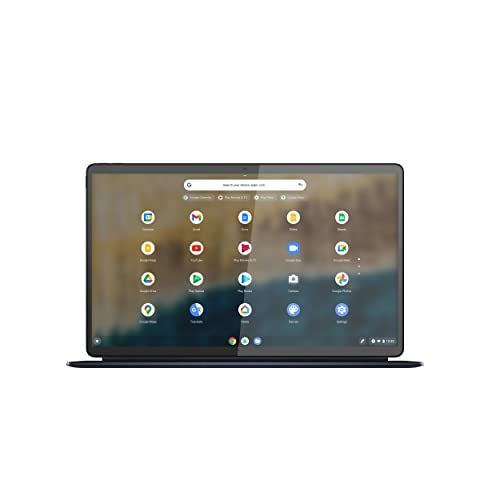
Lenovo 82QS0000US, IdeaPad Duet 5 Chromebook, OLED 13.3″ FHD Touch Display, Snapdragon SC7180, 4GB RAM, 64GB Storage, Qualcomm Adreno Graphics, Chrome OS, Abyss Blue — Best big-screen value
The Duet 5 is the elder statesman here: a 13.3-inch OLED FHD touch display on a Chromebook convertible, driven by a Snapdragon SC7180 with 4GB of memory and 64GB of storage. The screen is its argument and it is a strong one — OLED contrast makes text sit crisply on the page, long reading sessions look calm, and 13.3 inches shows a worksheet and a reference side by side without the window-shuffling that smaller tablets impose. For a student whose homework is reading-heavy — set texts, sources, long articles — the display is not a luxury but the work surface itself.
The age of the design shows in the supporting numbers. The SC7180 is a steadier, older chip than the Kompanio 838 in the Gen 9 machines; the 4GB of memory and 64GB of storage repeat the compact Duet’s ceilings at a larger size. And as with the 2025 Duet, confirm the box contents on the listing page, since the title emphasises the convertible form and display rather than itemising the keyboard. None of this disqualifies it — Chrome OS homework is browser work, and browsers are patient — but it assigns the Duet 5 to the reading-and-writing student rather than the heavy multitasker.
Its value logic is generational: an older flagship screen at a later-day position in the range. Students who will feel a beautiful display every evening and rarely feel a memory ceiling are exactly its audience, and there are more of those students than the benchmark charts admit.
There is a study-habit argument for its size as well. A student working at a proper desk with the Duet 5 open is a student in a posture that suits an hour of work — screen at reading distance, document and sources in view, none of the hunch that a small tablet on a lap imposes. Homework is partly ergonomics repeated nightly, and the largest screen here is the kindest to the student who uses it longest.
- Display: 13.3-inch FHD OLED touch
- Processor: Snapdragon SC7180, Qualcomm Adreno graphics
- Memory and storage: 4GB RAM, 64GB
- Form: Chromebook convertible, Chrome OS
- Colour: Abyss Blue
Strengths
- OLED screen is the finest reading surface in this guide.
- 13.3 inches suits side-by-side worksheet and reference work.
- Convertible Chromebook form covers laptop and slate duties.
Trade-offs
- Older processor and 4GB of memory cap heavy multitasking.
- 64GB of storage asks for cloud-based habits.
- Confirm the keyboard bundle on the listing page.
Best for: reading-heavy students who want one large, calm screen.
Not suited for: students juggling many heavy tabs and large local files.
Reading-first households should check price on Amazon for the Abyss Blue Duet 5 and verify the box contents before ordering.
What about printing, scanning and the paper that refuses to die?
Homework remains stubbornly half-paper: worksheets arrive on paper, leave as photographs, and occasionally need printing the night before. All six machines handle the modern version of this loop — photograph the page with the tablet’s camera, tidy it in a scanning app or the platform’s own tools, submit the file — and the convertibles earn a quiet advantage because the same device that received the worksheet stands open beside the paper copy while the student works. Printing from Chrome OS and Android to a home network printer is routine for current models, though the household printer’s own temperament, as ever, is outside any tablet’s control.
The habit worth teaching is naming: a photographed worksheet saved as the subject and date is findable in June; one saved under a camera’s default filename is archaeology. Combined with the folder system from the next section, the paper loop stops being a nightly emergency and becomes what it should be — a five-minute administrative act between the student and the actual work.
What changes when homework includes live video lessons and group projects?
The webcam stops being a specification and becomes a classroom window. Both Gen 9 Duets list an 8MP webcam, and in practice the convertible form is the real feature: the machine stands itself at a sensible angle on a desk, the student sits back like a person rather than a silhouette, and the keyboard stays available for the shared document the group is editing during the call. Group projects are where the memory question returns wearing a new costume — call, document, chat and research at once — and where the 8GB configurations justify themselves in a single evening.
Sound matters more than students expect. A tablet’s speakers carry the teacher’s voice for hours, and its microphone carries the student’s questions back; quiet rooms forgive everything, but a kitchen-table lesson during dinner preparation tests both. The Samsung’s four speakers flatter this scenario, while the Chromebooks answer with simplicity and a stand. Whichever machine is chosen, a pair of ordinary earphones transforms call quality more than any specification on this page, and they belong in the school bag beside the charger.
How should a student organise files, tabs and deadlines on a homework tablet?
One folder per subject, named the way the timetable names it, and a ruthless rule that downloads land in their subject folder the day they arrive — a homework tablet’s storage fills with orphaned PDFs otherwise, and the night-before search for a worksheet is a rite no student needs. Keep the browser equally honest: a bookmark folder per subject, the school platform pinned, and a weekly tab amnesty where everything open gets bookmarked or closed. The machines in this guide reward tidiness, because their memory ceilings are real; the 8GB picks forgive clutter longer, but no tablet forgives it forever.
Add one more small system: the Sunday ten minutes. Once a week, the student clears the downloads folder into subjects, checks the coming week’s deadlines against the calendar, and confirms the machine’s storage has room for the week ahead. Ten minutes on a Sunday prevents the three classic homework-tablet crises — the missing file, the forgotten deadline and the full drive — more reliably than any upgrade on this page, and it costs less than all of them. A single calendar holding every due date, checked at the start of the homework session rather than the end, turns the tablet from a distraction machine into a planning one. And charge the machine where homework happens, overnight, so the school day and the evening session both start full — a homework tablet discovered flat at 7pm has failed at its only unforgivable task.
What should parents check with the school before any of these is ordered?
Three questions, each answerable in minutes, decide more than any review can. First: which platform does the school use — a browser-based classroom system, a specific app, or both? That answer alone sorts this list into Chromebooks and the Samsung. Second: are there device rules — must the machine join the school’s management, is a webcam required for remote days, are personal devices allowed at all? A school with a managed-device policy can change the correct purchase entirely. Third: what does the heaviest homework actually look like this year — essays, worksheets, app-based practice, long reading? The subjects vote on keyboard, pen and screen in that order.
None of this diminishes the machines; it aims them. The Duets are superb answers to a browser-platform school with typed homework, the Samsung to an app-first school, the Amazon tablet to a young child’s guided assignments, and the Duet 5 to a reading-heavy timetable. A household that asks the school first will find that one of the six stops being a recommendation and becomes an obvious fit, which is what buying school equipment is supposed to feel like.
How long should a homework tablet be expected to serve?
Plan by school stages rather than calendar years. A device bought at the start of secondary school should ideally reach the examination years, and the specifications that decide that journey are memory and update support, not processor bragging. Chrome OS machines publish their update horizons, and checking that date on the listing is a five-minute act of financial prudence — a Chromebook near the end of its update window is a bargain with an expiry date, fine if priced as one, poor if not.
The physical life is usually longer than the software life, which is why the hand-me-down exists: a Duet retired from an older student’s projects becomes a younger sibling’s reading and homework machine without missing a beat. Buy the memory for the oldest student, the case for the youngest environment, and the platform for the school — and the tablet will serve twice, which is the real value hiding in this category.
How do you keep a homework tablet from becoming a distraction machine with a keyboard?
Honestly, and at the level of arrangement rather than willpower. The same device holds the essay and the entire internet, and no student of any age out-disciplines that asymmetry by character alone. What works is friction in the right places: school accounts signed in and personal ones a deliberate step away, notifications silenced by a focus schedule during homework hours, the entertainment apps living on a second screen of the launcher rather than the dock, and the machine charging overnight outside the bedroom where possible. Chrome OS’s simplicity helps here — it is a platform with fewer carnival rides built in — and the Amazon kids model takes the logic furthest for the youngest students, arriving pre-fenced by design.
Parents should also hear the counterpoint: a homework tablet that is only a homework tablet gets resented and neglected, while one allowed a second life — reading, video, music after the work — gets charged, updated and cared for. The goal is a machine whose pleasures start after the homework does, arranged so the order is easy to keep. Every pick in this guide can live that double life; the setup decides whether it does.
What screen size actually suits homework, subject by subject?
The 11-inch machines dominate this list because 11 inches is where a document and a source first fit side by side without either becoming a rumour. Essays, worksheets and web research all live comfortably at that size, and the bag barely notices the machine. The 10.95-inch compact Duet trades a whisker of that room for portability, a trade mobile students win. The 13.3-inch Duet 5 is the reading specialist: set texts, long articles and detailed diagrams open up on it, and split-screen work stops feeling like a compromise — at the cost of a bigger footprint in the bag and on the desk.
Subject by subject, then: languages and essays are keyboard questions before they are screen questions; mathematics wants the pen and enough room to show working, which points at the larger Gen 9; sciences split between diagrams and long reading, served by the pen configuration and the Duet 5 respectively; and the youngest students’ app-based work cares least about size and most about survival, which is the Amazon tablet’s entire argument. There is no universal best size here — there is a timetable, and it knows the answer.
At a glance: how do the six homework tablets divide the school week?
| Tablet | Platform | Memory / Storage | Keyboard | Homework signature |
|---|---|---|---|---|
| Lenovo Chromebook Duet Gen 9 (4GB) | Chrome OS | 4GB / 128GB as listed | Detachable, included | Complete day-one homework machine |
| Lenovo Chromebook Duet Gen 9 (8GB) | Chrome OS | 8GB / 256GB as listed | Detachable, included, plus USI Pen 2 | Heavier loads and pen work |
| Lenovo Chromebook Duet (2025) | ChromeOS | 4GB / 64GB | Confirm on listing | Compact convertible for mobile students |
| Samsung Galaxy Tab A9+ Plus | Android | 8GB / 128GB | Separate purchase | App-based school life |
| Amazon Kids Tablet 11 | Amazon kids ecosystem | Not stated in title | None included | Younger students, durability first |
| Lenovo IdeaPad Duet 5 | Chrome OS | 4GB / 64GB | Confirm on listing | Big OLED reading surface |
What mistakes turn a good homework tablet into a nightly argument?
Buying the tablet and forgetting the inputs is the classic. Its cousin is buying the inputs and forgetting the bag — a convertible, its keyboard, a pen and a charger add up to a small ecosystem that needs a home in the student’s bag, or the pen will be in a drawer by half-term and the charger in another county. A slate without its keyboard is a homework machine missing its main tool, and the weeks spent waiting for the second delivery are weeks of touchscreen essays. If the pick needs a keyboard, order them together and judge the pair’s price, not the tablet’s alone. Second is ignoring the school’s own platform: a household that buys Android for a browser-platform school, or a Chromebook for an app-first school, has bought friction that no specification can polish away. Ten minutes on the school’s website answers the platform question definitively.
There is also the matter of buying for the student you hope for rather than the one enrolled. A household that purchases a pen-first machine for a child whose subjects are essays and languages has decorated the wrong requirement, just as a household that buys the lightest slate for a student with nightly video lessons has optimised the wrong evening. The timetable is the specification sheet that matters; read it before the listings, and let it cross-examine every pick. The Gen 9 listings are honest about their split storage, but a family that reads 256GB as one fast internal drive will be surprised by where files live. It is a workable arrangement — documents and media sit happily on a card — as long as it is chosen knowingly. Fourth, and most human: handing the machine over without the folder system, the calendar and the charging spot from the section above. Homework tablets fail socially before they fail technically, and the setup evening is the cheapest success available in this whole category.
Final Recommendation
For most students, buy the Gen 9 Duet — the 4GB version for document-and-research loads, the 8GB version with its pen the moment projects, diagrams or heavy tab use enter the picture. Choose the compact 2025 Duet when the bag decides, the Duet 5 when reading dominates and a big OLED screen will be felt nightly, and the Samsung when the school’s life is genuinely app-based, with a keyboard in the same order. For the youngest students, the Amazon kids tablet’s case and addable school apps answer the real brief. Match the machine to the student’s actual homework — and the Sunday-night essay will still be left late, but it will no longer be the tablet’s fault.
Frequently Asked Questions
Is a Chromebook really enough for schoolwork, or do students need a full laptop?
For the way most schools now assign work — browser platforms, cloud documents, web research, video calls — a Chromebook is not a compromise but a match. There is a household dividend as well: when the school day happens in a browser, the same work is reachable from any other computer in the house, so a forgotten tablet is an inconvenience rather than a catastrophe, and a parent can open the very document the student is describing over the phone. The exceptions are specific: a course demanding installed desktop software, heavy media editing, or offline work in places without connectivity. Check the school’s own requirements page; where it names a browser and a keyboard, every Chromebook in this guide qualifies.
How much memory does a homework tablet honestly need?
Four gigabytes handles documents, a classroom platform and a modest set of research tabs, with occasional reloads as the tax. Think of the reload as the machine asking the student to work in chapters rather than in a sprawl — tolerable for most, maddening for the student mid-project with twelve sources open, which is why that student is pointed at the 8GB configurations throughout this guide. Eight gigabytes — the larger Gen 9 and the Samsung — removes most of that tax and suits older students running calls, documents and sources together. Memory is the specification students feel daily without knowing its name, so buy it for the oldest year the tablet must serve, not the current one.
Does the split storage on the Gen 9 Duets cause problems?
Rarely, if it is understood. One practical tip follows: teach the student to save the working documents — the essay in progress, the project file — to the internal side or the school cloud rather than the card, and let the card carry the library of finished work, downloads and media. That single habit makes the split invisible in daily use, because the files a student touches hourly live in the fast neighbourhood while the archive rides in the cabinet. The internal portion carries the system and the apps; the SD card portion is well suited to documents, downloads and media, which is most of a student’s data. Problems arise only when a family expects one unified fast drive. Treat the card as the filing cabinet and the internal storage as the desk, and the arrangement works exactly as Lenovo describes it.
Can a younger child really do homework on a kids tablet?
Yes, within the shape of younger homework: reading, app-based practice, guided research and short tasks, with the listing for the Amazon model stating that popular school apps can be added for homework support. Parents should set the device up before the first assignment — school apps installed, the home screen arranged, the charging spot chosen — because a young student’s homework routine is built by the household around the tablet, not by the tablet itself. What it will not do is type long essays comfortably, which is a problem for a later school year and a different machine. Buy for the homework the child actually has this year.
Should the homework tablet also be the entertainment tablet?
In most households it will be, whatever the intention at purchase, so plan for the double life rather than policing a fiction. The machines here all handle video, reading and music happily after hours; the work is in the arrangement — school account prominent, entertainment present but not in the dock, focus hours set once. A tablet that is loved after homework gets charged before it, and that single habit is worth more than any restriction.
Is a pen worth it for homework, or is it a toy?
It depends entirely on subjects. There is also a handwriting-retention argument teachers make that deserves a fair hearing: students who work problems and draft plans by hand often remember the shape of the work better than students who only type, and a pen-equipped tablet is the one machine that lets a student handwrite into a digital workflow — photographing nothing, losing nothing, submitting the page as it was written. For maths working, science diagrams, annotated readings and anything a teacher marks in a margin, the USI Pen 2 in the larger Gen 9 configuration is a working tool that changes what a student can submit. For essay-and-research subjects it will rest in its loop. Let the timetable, not the brochure, decide.
Related Guides
Homework is one chapter of a student’s tablet life. Younger children may be better served by starting from the durability-first guide before they graduate to a Duet, and students who read set texts for hours should compare the reading-and-browsing roundup, where screen comfort leads. Begin with the toughest tablets designed for children, then look at tablets balanced for ereading and internet work, and if handwriting is becoming central to the schoolwork, finish with our guide to tablets with handwriting recognition.


