What's inside
- Key Takeaways
- Quick Picks: Six Cameras for the Teaching Desk
- How Did We Choose These Six Teaching Cameras?
- What Does a Course Audience Actually Notice About Your Picture?
- Why Does Autofocus Style Matter More Than Resolution for Lessons?
- How Should You Light a Teaching Corner Without a Studio?
- Which Field of View Suits a Whiteboard, a Desk Demo, or a Talking Head?
- How Do You Build a Repeatable Recording Routine Around Any of These Cameras?
- What Should You Record First: The Course, the Channel, or the Short Clips?
- The Six Webcams for YouTube and Online Courses, Reviewed One by One
- Which Settings Should You Lock Before Lesson One?
- Side-by-Side: How Do the Six Teaching Cameras Compare?
- How Should You Test a New Teaching Camera During Its First Week?
- What Mistakes Do New Course Creators Make With a New Camera?
- Final Recommendation
- Frequently Asked Questions
- Related Guides
As an Amazon Associate I earn from qualifying purchases. This post may contain affiliate links at no extra cost to you.
gizmoverdict.com is reader-supported. When you buy through links on our site, we may earn an affiliate commission.
Where you can pick one up: each camera below links straight to its Amazon listing, which is the place to confirm the exact remote, cable and mount packed in the box and to check price on Amazon before ordering; webcam bundles shift between sellers, so read the listing title itself rather than trusting a thumbnail.
Finding the best webcams for youtube and online courses sounds like a resolution contest, yet the creators who publish week after week rarely complain about pixel counts. They complain about focus that drifts while they lean toward a whiteboard, about faces that turn waxy under a ceiling light, about a microphone that makes a carefully scripted lesson sound as though it were recorded inside a wardrobe. The six cameras in this guide were picked for the working reality of filming tutorials, course modules and channel videos from a desk, a spare room or a corner of a classroom, where one person is presenter, camera operator and editor all at once.
Teaching on camera imposes a particular rhythm. You talk to the lens for ten unbroken minutes, glance down at notes, hold a book or a component up close, then sit back and summarise. A camera suited to that rhythm needs autofocus that behaves like a patient colleague rather than a startled animal, a field of view wide enough for gestures but not so wide that your shelves become the subject, and controls you can reach without breaking eye contact mid-sentence. Frame rate matters as well: smooth 60-frame motion reads as confident and modern on a course platform, while choppy movement quietly taxes the attention of students who paid to learn, not to squint.
There is also the question of what happens after recording. Course platforms compress uploads aggressively, and a clean, well-exposed 1080p feed survives that compression far better than a noisy 4K feed shot in poor light. That is why this guide weighs sensor size, focus behaviour and lighting help alongside headline resolution, and why one deliberately simple 4K model with a physical privacy cover earns a place next to a dual-camera flagship with a remote control. Read the picks as tools for different teaching styles, not as a ladder where the top rung suits everyone.
Key Takeaways
- Dual-camera design is the headline act here: the EMEET C60E pairs a wide view with a telephoto view, letting a teacher cut between face and close-up without standing up to refocus anything.
- Phase-detection autofocus recurs across the EMEET picks and locks noticeably faster than contrast-based systems when you raise a prop toward the lens.
- Only the Logitech StreamCam in this set was designed from the start around vertical-friendly streaming work, and its listing leans on platform breadth rather than raw resolution.
- Built-in light appears twice in different forms: RGB lighting on the C60E and a four-mode light with a control dial on the S600L, two distinct answers to the same dim-room problem.
- Two picks still deliver 1080p at 60 frames per second from a 4K pipeline, which is the combination course platforms actually reward after compression.
- A physical privacy cover shows up on four of the six listings, a small detail that matters when the recording corner doubles as family space.
Quick Picks: Six Cameras for the Teaching Desk
| Pick | Badge | Why it made the cut |
|---|---|---|
| EMEET C60E Dual-Camera 4K Webcam | Two lenses, one desk | Wide-angle and telephoto cameras in a single body with a remote, so a presenter can punch in on a detail shot without leaving the chair. |
| EMEET S600 4K Webcam | Sensor-first choice | A named Sony sensor, phase-detection focusing and a privacy cover, aimed squarely at streamers who record talking-head lessons daily. |
| Logitech StreamCam | The platform diplomat | Full HD at 60 frames with a listing that stresses Teams, Meet, Zoom and even a games console chat mode, for teachers who also take meetings. |
| AOC 4K Webcam | Plug-and-play minimalist | 4K capture, an 80-degree view and a USB adapter in the box, with no software ceremony between unboxing and a first recording session. |
| EMEET S600L 4K Webcam (with light) | Built-in glow | A four-mode light wrapped around a large sensor and a physical dial, for presenters filming after dark in rooms they cannot rewire. |
| EMEET C950 4K Webcam | The value anchor | The pool note calls it the value pick of this class: 4K branding, phase-detection focus and a cover, traded against a fixed mount with no tripod hole. |
How Did We Choose These Six Teaching Cameras?
We began with the lesson, not the launch page. A candidate had to hold a face in focus through the three movements every teacher makes: leaning in to emphasise a point, sitting back to think, and lifting an object toward the lens. Listings that named their focusing system earned scrutiny first, because phase-detection systems measure distance directly and settle quickly, while older contrast systems hunt visibly on camera. Four of the six picks state PDAF in their titles, and that is no accident.
Sensor claims came next. A larger sensor gathers more light per pixel, which translates into cleaner shadows and less of the smeared, watercolour look that compression then amplifies. Two picks name their sensor size in the listing itself, and we treated unnamed sensors as an unknown rather than a flaw, judging those cameras instead on frame rate, field of view and the honesty of the rest of the title. Anything the title did not state, the spec boxes below refuse to invent.
Finally we weighed the teaching-specific extras. A remote control sounds like a luxury until you have recorded forty takes alone and walked to the keyboard before every one of them. A built-in light matters when your only recording hour is after the children sleep. A privacy cover matters when the desk sits in a bedroom. Each pick below won its place by serving one of those real constraints especially well, and each trade-off section names the constraint it serves poorly, so you can match the camera to your own timetable instead of to a ranking.
What Does a Course Audience Actually Notice About Your Picture?
Students notice effort before they notice equipment. A steady, well-lit face at a comfortable size signals that the instructor prepared; a face that swims in and out of focus signals the opposite, however unfair that inference may be. Research into lecture viewing aside, plain experience from any video call tells the same story: viewers forgive a modest resolution delivered consistently, and they abandon videos where the image keeps changing its mind. That is why focus stability outranks almost everything else in this category, and why a camera that locks onto your face and stays there will serve a course better than a sharper camera that breathes and hunts.
Framing is the second signal. A head-and-shoulders shot with a little space above the head reads as a lecture; a wide shot that shows the whole desk reads as a demonstration. Teachers who alternate between talking and showing benefit from either a zoom that can reframe without quality loss or, in the C60E’s case, a second lens built for the tighter shot. If your course is entirely talking-head, save the complexity: a fixed, sensible framing you never touch again is a feature, because consistency across forty lessons builds a visual identity students recognise in thumbnails.
Sound is the third signal, and the cruelest, because viewers will watch a soft picture with clear audio far longer than a crisp picture with echoing audio. Every pick here carries built-in microphones, several with noise reduction named in the listing, and for a quiet room at a normal sitting distance they are adequate for lessons. If your room echoes, if a road runs outside the window, or if you record while family life continues downstairs, budget mentally for a separate USB microphone later; the camera choice and the microphone choice solve different problems, and no webcam in this guide pretends otherwise.
Why Does Autofocus Style Matter More Than Resolution for Lessons?
Phase-detection autofocus, the PDAF named in four listings here, splits incoming light and compares the two halves to calculate exactly how far the lens must move. The result is a single decisive movement to sharpness. Contrast-detection systems, by comparison, rack the focus back and forth searching for the sharpest point, and that search is visible in the recording as a soft pulse. When you hold a circuit board, a paintbrush or a page of equations up to the camera, the difference between the two systems is the difference between a clean cutaway and an apologetic blur while you wait.
Resolution interacts with focus in a way marketing rarely explains. A 4K sensor that is slightly out of focus produces a large, expensive blur; a 1080p sensor nailed in focus produces a modest, honest sharpness that platforms then preserve. Several picks here resolve the tension by recording their headline resolution while also offering 1080p at 60 frames per second, and for course delivery that smoother mode is frequently the wiser default: motion looks natural, gestures read clearly, and the file sizes stay friendly for editing on an ordinary laptop.
Face priority is the quiet third factor. Cameras tuned for streaming bias their focus and exposure toward a detected face, which protects your skin tones when a bright window or a white slide enters the frame behind you. When you read the reviews below, notice which listings talk about streaming and live commerce in their titles; that vocabulary signals where the tuning effort went, and it aligns closely with the talking-head work of online teaching.
How Should You Light a Teaching Corner Without a Studio?
Start with the window. Sit facing it, or at forty-five degrees to it, and daylight will do most of the work for free; sit with it behind you and every camera in this guide will silhouette your face while it exposes for the glass. If your recording hours are dark ones, a single soft light placed just above the camera and angled slightly down flatters a face more than any ceiling fixture, which carves shadows into eye sockets and makes even an expensive sensor look tired.
Two picks here fold the light into the camera itself. The C60E carries RGB lighting, useful for creators whose channel aesthetic includes a coloured backdrop wash, while the S600L offers four light modes with a dial on the body, so brightness becomes a physical twist rather than a software excursion mid-recording. Built-in lights sit close to the lens, which fills shadows evenly but can flatten features if run at full strength; the working technique is to raise the light only until the shadows soften, then stop, leaving some modelling on the face so you still look like a person rather than a passport photograph.
Whatever light you choose, lock the routine down. Same chair position, same lamp setting, same background arrangement for every lesson in a module. Students binge course videos in sequence, and visible jumps in lighting between lesson three and lesson four read as carelessness even when the content is strong. The cameras below all remember nothing for you; the consistency has to come from a small ritual before you press record, and the remote control on the C60E exists precisely to make that ritual less disruptive.
Which Field of View Suits a Whiteboard, a Desk Demo, or a Talking Head?
The listings here cluster around the low seventies and eighty degrees, and that cluster is not a coincidence. Around seventy degrees frames a seated presenter with modest context: shoulders, a hint of the room, nothing embarrassing. Push toward eighty and the frame admits a desk surface, hand gestures over a notebook, a second person sliding into shot for an interview segment. Neither is better in the abstract; the question is what your lessons physically contain.
Whiteboard teaching breaks the pattern, because the board needs width and the writing needs legibility, two demands that fight each other in a single fixed lens. The dual-camera C60E answers with its telephoto side and hybrid zoom, letting the wide lens carry the room while the tighter lens isolates the board or the page. A single-lens camera answers by placement instead: mount it further back, accept a smaller face in frame, and let the 4K resolution carry the crop when you zoom digitally in editing. Both routes work; the first costs hardware complexity, the second costs setup discipline.
Desk demonstrations, the overhead-adjacent shots of hands assembling, drawing or annotating, are honestly served better by a dedicated document camera, and our related guides below cover that category in its own right. A webcam on a small tripod angled down can improvise the shot for occasional use, and the C950’s missing tripod hole, stated plainly in its listing, is exactly the sort of detail that decides whether that improvisation is even possible with a given model. Read the spec boxes with your actual shooting positions in mind.
How Do You Build a Repeatable Recording Routine Around Any of These Cameras?
A course is not one video but a manufacturing process, and the camera is only one station on the line. The routine that separates calm creators from frantic ones starts the evening before: charge nothing, because these are wired cameras, but check the three things that silently ruin mornings — the mount’s grip on the monitor, the cable’s freedom to reach the computer without tension, and the lens’s cleanliness, since a fingerprint filmed at 4K becomes a permanent soft halo that no sharpening filter will remove. Wipe the lens with a microfibre cloth as a ritual, the way a musician wipes strings, and your future self will stop wondering why Tuesday’s lesson looked dreamier than Monday’s.
Next comes the framing bookmark. Once you find the chair position, zoom level and background arrangement that flatter you, make the setup findable again: a strip of tape on the floor for the chair legs, a notebook entry recording the camera’s zoom setting and light mode, a photograph of the correct desk state on your phone. Creators lose more quality to drift than to equipment. The mount creeps a degree a week, the chair migrates, a new bookshelf appears behind one shoulder, and by lesson twenty the visual identity of the course has quietly dissolved. Bookmarks turn setup from an act of memory into an act of matching, which is why professionals in every visual trade swear by them.
Sound checks deserve the same discipline. Record fifteen seconds of your actual opening line at your actual teaching energy — people speak more quietly to an empty room than they think — then listen on headphones and on a phone speaker, because your students will use both. Check for the refrigerator hum, the computer fan that spins up under recording load, the chair creak that lands on the same word every time. Each camera in this guide handles a decent room gracefully; the check exists to confirm that your room is, in fact, decent, and to catch the day it stops being so because a neighbour began renovations.
Finally, build the file habit before the catalogue grows teeth. Name recordings by module and take, back them up before editing rather than after, and keep the camera’s settings out of the filename and in the notebook instead. None of this glamour appears in a listing title, yet it decides whether a six-camera shortlist becomes a finished course or a folder of almost-lessons. The best webcam for your teaching is the one whose quirks your routine has already absorbed.
What Should You Record First: The Course, the Channel, or the Short Clips?
The keyword that brought you here joins two jobs — YouTube videos and online courses — and they pull a camera in slightly different directions. A channel video competes in a feed, where the first ten seconds decide its fate and a presenter’s energy, framing tightness and backdrop identity carry commercial weight. A course lesson competes against the student’s fatigue in lesson thirty, where consistency, legibility and calm delivery matter more than punch. A camera serving both masters should therefore be judged on whether its look can be tightened for the channel and settled for the course without changing hardware.
That is the practical argument for the zoom headroom scattered through this guide. The C60E reframes optically with its second lens, the 4K models reframe digitally with pixels to spare, and even the S600L’s light can be warmed down for a course’s sober tone after serving a brighter channel aesthetic. The StreamCam, fixed at 1080p, reframes least — which is precisely why its review steers it toward live teaching, where reframing never happens anyway. Choose by deciding which job pays you first, then let the other job inherit the camera, rather than buying a compromise that serves neither master well.
Short vertical clips deserve a sentence of their own, because they now recruit students as effectively as trailers once did. Filming them with the course camera keeps the face, the light and the voice identical across formats, and a 4K frame gives an editor the vertical slice without a quality collapse. If shorts are central to your recruitment, weight the 4K picks upward; if your students arrive through an institution or a marketplace, the shorts argument fades and the consistency argument takes its place.
The Six Webcams for YouTube and Online Courses, Reviewed One by One
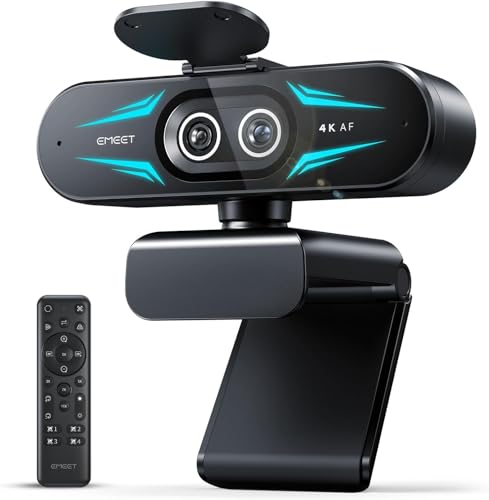
EMEET C60E Dual-Camera 4K Webcam — Two lenses, one desk
Most webcams ask you to choose a framing and live with it. The C60E refuses that bargain by carrying two cameras in one housing: a wide-angle lens for the presenter shot and a telephoto lens for the close view, with hybrid zoom rated up to eleven times in the listing and a remote control to run the show from your chair. For a teacher, that pairing maps neatly onto the grammar of a lesson. Wide for the introduction and the summary, tight for the worked example, the diagram, the page of the book you are annotating. The cut between the two feels like an edit, except it happens live, in a single take, with nobody standing up.
The supporting cast is aimed at solo creators. Phase-detection autofocus keeps whichever lens is active honest when you lean or lift a prop, twin microphones cover narration from a normal sitting distance, and the RGB lighting lets a channel with a coloured backdrop identity keep that identity without a separate lamp purchase. Record a week of lessons with it and the remote becomes the feature you mention first: starting, stopping and reframing from the presenter’s chair removes the little walk-to-the-desk ritual that breaks concentration and eats the first seconds of every take. If your course style is demonstrative — cooking steps, craft techniques, hardware teardowns, worked mathematics — this is the pick built around your habits; verify the current bundle and remote details on the Amazon listing for the EMEET C60E before you commit.
- Camera arrangement: dual-camera design pairing a wide-angle lens with a telephoto lens, per the listing
- Zoom: hybrid zoom up to 11X, per the listing
- Focus system: PDAF autofocus, per the listing
- Control: remote control included in the concept of the listing
- Lighting: RGB lighting built in, per the listing
- Audio: 2 microphones, per the listing
Strengths
- Two genuine framings from one mount, so close-ups stop costing you a refocus and a reshoot.
- The remote respects the solo teacher’s workflow, keeping takes self-contained from the chair.
- PDAF focusing keeps prop shots decisive instead of pulsing while a page settles into legibility.
Trade-offs
- Two lenses and a remote add setup decisions that a pure talking-head lecturer will simply never use.
- RGB lighting serves backdrop colour more than facial modelling, so a plain room gains less from it.
- The listing emphasises streaming scenarios; long-form course recorders should confirm their capture software workflow first.
Best for: demonstrators and course creators whose lessons alternate between face and close detail. Not suited for: a lecturer who records seated talking-head modules and wants the simplest possible rig. Check the price on Amazon for the C60E dual-camera model when you are ready to compare bundles.

EMEET S600 4K Webcam — Sensor-first choice
The S600 makes its argument in the sensor line of its own title: a Sony sensor of a stated size, behind phase-detection autofocus, in a body with a built-in privacy cover. That combination speaks to the daily grind of course production, where the same face is recorded under the same imperfect light for months and small advantages in cleanliness compound across a catalogue. Footage from a larger sensor tolerates the exposure compromises of a real room — a bright doorway to one side, a dim corner behind — with less of the grain that platform compression then exaggerates into mud.
Its delivery modes suit the teaching split personality. The listing promises 1080p at sixty frames per second alongside the 4K headline, so a creator can record smooth, natural motion for the course platform and still have the higher-resolution mode for a tightly cropped vertical clip or a thumbnail grab. The field of view sits at seventy-three degrees, a presenter-friendly width that keeps the room’s clutter mostly out of the story, and the twin noise-reduction microphones address the fan-and-keyboard soundtrack of home recording. When the S600 is the camera you forget about — because focus, exposure and framing simply behave — it has done its job; confirm the current listing details on Amazon for the EMEET S600 if that forgettability appeals.
- Sensor: Sony 1/2.55-inch sensor, as named in the listing
- Focus system: PDAF autofocus, per the listing
- Frame rate: 1080P at 60FPS alongside 4K capture, per the listing
- Field of view: 73 degrees, per the listing
- Audio: 2 noise reduction microphones, per the listing
- Privacy: built-in privacy cover, per the listing
Strengths
- A named, generously sized sensor gives shadows and skin tones a cleaner starting point.
- The 60-frame mode matches how course platforms reward smooth, natural presenter motion.
- A physical cover closes the lens at the end of a recording day in a shared room.
Trade-offs
- No built-in light, so evening recorders must solve illumination separately.
- The 73-degree frame is presenter-tight; whiteboard work will feel cramped.
- Live commerce and beauty streaming language in the title hints at tuning that favours faces over objects.
Best for: talking-head instructors recording long catalogues under ordinary room light. Not suited for: presenters whose lessons roam across a board or a workbench. See the S600 listing on Amazon to check the current price and the exact cover design.

Logitech StreamCam — The platform diplomat
Logitech built the StreamCam for creators before hybrid teaching was a phrase, and its listing reads like a treaty between worlds: full HD at sixty frames per second, explicit work with Teams, Meet and Zoom, and even a mention of a games console chat mode. That breadth suits a particular modern teacher — the tutor or corporate trainer whose week mixes recorded lessons, live seminars and ordinary meetings, and who wants one camera that behaves politely in every room it enters. The picture tops out at 1080p, and the design accepts that ceiling in exchange for polish everywhere else.
In practice the StreamCam’s virtue is maturity. The mount, the cable discipline, the companion software conventions and the general absence of surprises reflect a product line that has been refined through years of creator feedback. Sixty-frame delivery keeps gestures and lip movement natural in live seminars, where students read enthusiasm from motion as much as from words. For recorded courses, the honest question is whether your platform and your editing style exploit 4K headroom; if your lessons are published at 1080p and framed as shot, the StreamCam gives up little that your audience will ever see, and gains a calm, compatible temperament. Teachers embedded in meeting-heavy institutions should look closely here, and can confirm platform wording on the Amazon listing for the Logitech StreamCam.
- Video: Full HD 1080p at 60 fps, per the listing
- Stated platforms: Microsoft Teams, Google Meet and Zoom, per the listing
- Console note: works with Nintendo Switch 2’s new GameChat mode, per the listing
- Computers: PC and Mac, per the listing
- Sensor size: Not stated in the listing title — verify with the maker’s documentation
- Privacy cover: Not stated in the listing title — verify with the maker’s documentation
Strengths
- Platform breadth in the listing matches a week split between lessons, seminars and meetings.
- Sixty-frame motion keeps live teaching expressive and easy to watch.
- A mature product ecosystem reduces the odd behaviours that plague newer rivals.
Trade-offs
- The 1080p ceiling removes the crop-in-editing freedom the 4K picks enjoy.
- No sensor or focus-system claims in the title, so imaging pedigree must be taken on reputation.
- Creators chasing a sharp 4K master file for future re-edits will outgrow it.
Best for: tutors and trainers who teach live as much as they record. Not suited for: archivists who want every lesson mastered at 4K for future crops. Open the StreamCam page on Amazon to check its current price and mounting options.

AOC 4K Webcam — Plug-and-play minimalist
AOC’s entry strips the category back to a promise: 4K capture, a noise-cancelling microphone, an eighty-degree view, a privacy cover, and plug-and-play manners with a USB C-to-A adapter included for the laptop that needs it. There is no remote, no light ring, no second lens, and that restraint is the review. A teacher in a school IT ecosystem, or a subject expert recording a one-off course without building a permanent studio, often needs a camera that a department can order, unbox and trust by Friday, and the AOC is shaped exactly like that need.
The wider eighty-degree frame earns its keep in classroom-flavoured recording, where a presenter stands, gestures broadly or shares the shot with a demonstration table. The listing’s compatibility roll call — Zoom, Skype, FaceTime, Mac, laptop and even a games console — underlines the generalist intent. What the title does not give you is a named focus system or sensor, so expectations should be set accordingly: this is the dependable generalist, not the imaging specialist, and its autofocus behaviour on close props should be tested in your first session rather than assumed. For a department equipping several occasional presenters, that trade is rational, and the adapter in the box quietly removes the most common first-day failure. Current bundle details sit on the Amazon listing for the AOC 4K webcam.
- Video: 4K capture for PC streaming, per the listing
- Field of view: 80 degrees, per the listing
- Audio: noise-canceling microphone built in, per the listing
- Privacy: privacy cover included, per the listing
- Connection: plug and play, with USB C-A adapter included, per the listing
- Focus system: Not stated in the listing title — verify with the maker’s documentation
Strengths
- An adapter in the box defuses the connector mismatch that ruins first sessions.
- The 80-degree frame suits standing presenters and two-person segments.
- Nothing in the concept requires software tuition before a first recording.
Trade-offs
- Unnamed focus hardware means close-up prop work is a test-first proposition.
- A single microphone gives up the noise-reduction sophistication of twin-mic rivals.
- No lighting help is built in for after-hours recording.
Best for: departments and occasional presenters who need a camera working the day it arrives. Not suited for: prop-heavy demonstrators who lean on fast close-focus daily. Check the AOC webcam’s current price on Amazon before equipping a whole team.

EMEET S600L 4K Webcam (with light) — Built-in glow
The S600L starts from its sibling’s sensor-led recipe — a large sensor, very fast phase-detection focusing quoted at two-tenths of a second in the listing — and then wraps a light around the lens: four modes, a rainbow effect for backdrop colour, and a dial on the body to control it. That dial deserves more respect than it usually gets. Mid-lesson, when cloud cover steals your daylight or an evening session deepens, brightness becomes a twist of the fingers rather than a dive through software menus while your train of thought evaporates.
For the night-owl instructor, the combination is coherent. The sensor handles the shadows the light cannot reach, the light lifts the face the sensor must expose, and the familiar 1080p-at-sixty mode keeps motion natural under artificial illumination, where lower frame rates can flicker against mains lighting. Twin microphones and a privacy cover carry over the family virtues. The honest caution is aesthetic: light mounted at the lens flatters evenly but can flatten, so the craft lies in using the lower modes as fill rather than running the ring at full blaze. Run it gently and the S600L is the most self-sufficient low-light package in this guide; its current configuration can be confirmed on the Amazon listing for the EMEET S600L.
- Sensor: 1/2-inch sensor, per the listing
- Lighting: 4 light modes with a rainbow effect, controlled by a dial, per the listing
- Focus system: PDAF quoted at 0.2s in the listing
- Frame rate: 1080P at 60FPS alongside 4K capture, per the listing
- Audio: 2 microphones, per the listing
- Privacy: built-in privacy cover, per the listing
Strengths
- A physical dial makes brightness a mid-lesson adjustment instead of a software expedition.
- Sensor size and light together cover both ends of the dim-room problem.
- Four modes let the light act as gentle fill rather than a single harsh setting.
Trade-offs
- Lens-mounted light flattens features when pushed hard, demanding a lighter touch.
- The rainbow effect serves backdrop styling that a formal course may never want.
- Presenters with a proper lamp already own part of what this model charges its complexity for.
Best for: evening and winter recorders whose teaching corner cannot gain a separate lamp. Not suited for: studio owners already lit by a considered two-light setup. Look at the S600L on Amazon to check the current price and its dial layout.
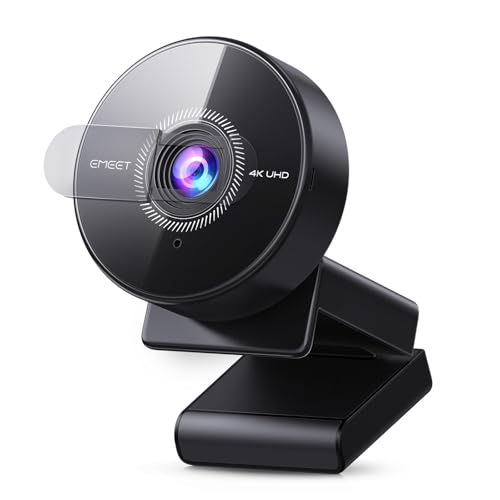
EMEET C950 4K Webcam — The value anchor
Every category needs its honest baseline, and the pool note for this batch names the C950 exactly that: the value pick. The listing’s recipe is the category’s essentials without garnish — 4K branding with phase-detection autofocus, a microphone, a physical privacy cover, the 1080p-at-sixty mode, USB 2.0 plug-and-play connection and a seventy-degree view. Then, admirably, the title confesses its own limitation in plain words: no tripod hole. That single honest clause tells a buyer more about fit than a page of adjectives, because it rules the camera in or out for anyone whose desk needs a stand-mounted, angled or overhead-adjacent shot.
Mounted on a monitor in the conventional way, the C950 covers the standard lecture format completely. The seventy-degree frame is the classic presenter width, the PDAF keeps a seated teacher sharp through normal movement, and the cover restores privacy in a shared room at the end of the day. Where it asks for compromise is placement freedom: without a tripod thread, creative angles depend on the monitor mount’s own tilt, and teachers who film standing segments or desk demonstrations should look at the C60E instead. As the first camera for a new channel or a pilot course, though, its priorities are correctly ordered — focus and privacy before furniture. Confirm the mount arrangement suits your desk via the Amazon listing for the EMEET C950.
- Video: 4K capture with 1080P at 60FPS mode, per the listing
- Focus system: PDAF autofocus, per the listing
- Field of view: 70 degrees, per the listing
- Privacy: physical privacy cover, per the listing
- Connection: USB 2.0 plug and play, per the listing
- Mounting note: no tripod hole, stated in the listing itself
Strengths
- Phase-detection focus at the value end of the pool protects the one feature lessons cannot fake.
- A physical cover keeps a bedroom-desk camera honest after hours.
- The listing states its mounting limit openly, making the buying decision unusually clean.
Trade-offs
- No tripod hole closes off stand-mounted and angled shooting positions.
- The 70-degree frame is the narrowest here, with little room for a second person.
- USB 2.0 connection reflects the model’s keep-it-simple engineering brief.
Best for: a first course or new channel filmed from a fixed monitor mount. Not suited for: presenters who reposition the camera between standing and desk-level shots. See the current price for the C950 on Amazon when the pilot-course budget is being set.
Which Settings Should You Lock Before Lesson One?
Automatic everything is a fine way to meet a camera and a poor way to run a course. Once your tests identify the framing and light you like, fix what can be fixed: choose the delivery resolution deliberately rather than defaulting to the headline number, set the field of view or zoom once and leave it, and decide whether the 60-frame mode or the maximum-resolution mode owns your record button, because switching between modules is visible to students. Exposure and white balance may stay automatic if your room’s light is stable across a session; if clouds patrol your window, even those deserve a manual anchor found during the day-one test.
Write the chosen configuration in the same notebook that holds your framing bookmarks, with the date. Software updates and helpful relatives both reset settings, and the notebook converts a mysterious quality drop into a five-minute restoration. This unglamorous page of handwriting, more than any single specification in the listings above, is what keeps lesson forty visually identical to lesson one.
Side-by-Side: How Do the Six Teaching Cameras Compare?
| Pick | Imaging headline from the listing | Focus | Frame character | Distinctive extra |
|---|---|---|---|---|
| EMEET C60E | Dual-camera 4K with wide and telephoto lenses | PDAF | Two framings in one body | Remote control and RGB lighting |
| EMEET S600 | 4K from a named Sony 1/2.55-inch sensor | PDAF | 73 degrees, presenter-tight | Built-in privacy cover |
| Logitech StreamCam | Full HD 1080p at 60 fps | Not named in the listing title | Single streaming framing | Teams, Meet, Zoom and GameChat wording |
| AOC 4K | 4K capture, generalist tuning | Not named in the listing title | 80 degrees, the widest here | USB C-A adapter in the box |
| EMEET S600L | 4K from a 1/2-inch sensor | PDAF quoted at 0.2s | Presenter framing with light at the lens | Four light modes on a body dial |
| EMEET C950 | 4K with a 1080p 60-frame mode | PDAF | 70 degrees, the narrowest here | Physical cover; no tripod hole |
Read the table as a map of intentions. The C60E spends its complexity on reframing, the S600L on illumination, the S600 on sensor cleanliness, the StreamCam on platform peace, the AOC on arrival-day simplicity and the C950 on the essentials at the gentlest commitment. None of those intentions is a defect; a mismatch between the intention and your timetable is the only real defect available here.
How Should You Test a New Teaching Camera During Its First Week?
Day one belongs to the face test. Record the same two-minute script at three times of day — morning window light, midday overhead light and evening lamplight — without changing anything else. Watch the three clips in sequence and you will learn your room’s temperament and the camera’s exposure taste in a single sitting: which hours flatter you, which hours demand the light modes or a lamp, and whether skin tones stay honest or drift orange under your ceiling fixture. Every pick in this guide will pass some of those hours and struggle in others; the test tells you which hours to schedule, which is more valuable than a verdict about which camera is best in the abstract.
Day two belongs to the prop test, because courses are remembered by their demonstrations. Hold your most-used teaching object — a textbook, a calculator, a knitted sample, a guitar chord shape — at the distance you naturally present it, hold it still for a count of five, then move it slowly across the frame. Note how quickly focus settles, whether it settles on the object or clings to your face, and whether fine print survives platform-style compression when you export at delivery settings. Phase-detection models should snap; if yours hunts, the remedy is usually distance and patience rather than a return, because every system has a closest comfortable range and finding yours is the test’s entire purpose.
Day three belongs to the endurance test: record a full-length lesson, start to finish, at your real teaching pace. Short demos hide thermal drift, software hiccups and the slow mount sag that only gravity and forty minutes can reveal. They also hide your own behaviour — whether you lean out of the framed zone when you think, whether your gestures leave the shot at moments of emphasis, whether your voice drops at the ends of long explanations. A camera for courses is a long-form instrument, and only a long-form test can introduce you to it properly.
Keep the three test files forever, labelled and untouched. When a future lesson looks wrong, re-recording thirty seconds of the day-one script and comparing it against the original isolates the variable — light, position, settings or hardware — in minutes. Creators who keep baselines debug their image the way engineers debug a system; creators who delete them argue with their own memory. The shortlist above gives you six credible instruments, and the first week’s tests turn whichever you choose into your instrument, tuned to your room and your subject.
What Mistakes Do New Course Creators Make With a New Camera?
The first mistake is recording the whole course in the first week. Every camera here has a temperament — how its exposure reacts to your window, how its focus treats your favourite prop — and three short test lessons will teach you more than any review, including this one. Publish the tests privately, watch them on a phone and a television, and only then commit the catalogue.
The second mistake is chasing resolution while neglecting placement. A camera perched below eye level, looking up at a presenter against a bright window, will make a flagship look incompetent, while a modest camera at eye level facing soft light looks professional. Raise the lens to eye height, turn your chair toward the light source, and clear the metre of background directly behind your head before spending anything on an upgrade.
The third mistake is letting the background improvise. Students stare at your shelves for hours across a course; a laundry basket or a flickering hallway becomes part of the curriculum. Choose a plain, deliberate backdrop, keep it identical across modules, and let built-in lighting serve your face rather than asking it to rescue a chaotic room.
The fourth mistake is forgetting the audio chain while admiring the picture. Built-in microphones are tuned for a seated presenter in a reasonably quiet room. Record one lesson with a window open, a fan running or a household awake, and listen honestly; if the room defeats the microphones, the next purchase is acoustic — curtains, distance from noise, or a separate microphone — not a different camera.
One last calibration concerns the students on the other side of the glass. Many will watch on phones held in bright kitchens, on laptops older than your course outline, on connections that throttle without warning. Master your lessons a touch brighter and a touch more contrast-rich than your own monitor suggests is elegant, frame faces a little larger than your taste prefers, and the teaching survives those hostile screens intact. Cameras cannot make that judgement for you; it belongs to the export settings and to a final watch-through on the humblest device you own. Build that watch-through into the routine and the hardware shortlisted above will never be the weakest link in the chain between your knowledge and a stranger’s screen.
Final Recommendation
Match the camera to the lesson shape. Demonstrators who cut between face and detail should start with the C60E and its two lenses; talking-head lecturers recording long catalogues will live happiest with the S600’s sensor and manners; night recorders should take the S600L’s dial-controlled light seriously; meeting-heavy tutors are served by the StreamCam’s diplomacy; departments equipping occasional presenters can order the AOC without a training session; and a pilot course on a fixed desk is honestly covered by the C950. Whichever you choose, shoot three private test lessons before the real recording begins, because the camera you understand beats the camera you merely own. A course is a promise kept forty times in a row, and the right webcam is simply the one still framing you kindly on the fortieth.
Frequently Asked Questions
Do I need 4K for a course that platforms deliver at 1080p?
Not for delivery, but possibly for production. A 4K master lets you crop tighter in editing, rescue a badly framed take and extract stills for thumbnails, while the published lesson still streams at a lower resolution. If you frame carefully and publish as shot, a good 1080p camera like the StreamCam loses little that students will perceive.
Which of these suits a whiteboard lesson best?
The C60E, because its telephoto side and hybrid zoom isolate the board without moving the camera. A single-lens alternative is to mount a 4K model further back and crop in editing, accepting a smaller presenter image in exchange for board legibility.
Can a webcam microphone handle a full course?
In a quiet, soft-furnished room at a normal sitting distance, yes, and several picks here add noise reduction for exactly that scenario. Echoing rooms, open windows and household noise defeat any built-in microphone eventually; treat a separate microphone as a room upgrade you add when a test recording tells you to.
Why do two picks carry lights, and do I need one?
The C60E’s RGB lighting serves backdrop colour and channel identity, while the S600L’s four-mode light is a facial fill with a dial. You need built-in light only if your recording hours or room layout rule out a separate lamp; a window-facing desk in daylight needs neither.
What does the C950’s missing tripod hole actually prevent?
It prevents mounting the camera on a standard tripod or stand, which rules out most angled, standing-height and improvised overhead positions. On a monitor mount at a seated desk, the limitation never appears, which is why the model still anchors the value end of this guide.
How wide should my framing be for a talking-head course?
The seventy to seventy-three degree framings in this guide are the conventional answer: head, shoulders and a modest slice of room. Wider views earn their place when gestures, a desk surface or a second person carry part of the lesson.
Related Guides
Teaching from above the desk is a different discipline with its own hardware, covered in best webcams for overhead filming. If your room’s problem is darkness rather than framing, best ring light webcams gathers the cameras that carry their illumination with them. And for meetings rather than lessons, best conference webcams ranks the models tuned for the boardroom instead of the recording corner.
Creators get hired to film celebrations too, and the instant-print half of that work lives in our guide to the best polaroid cameras for wedding guest books.


