What's inside
- Where to buy
- Key Takeaways
- Quick Picks
- How We Chose These Picks
- Why Do Gamers Want Eight Wired Ports in the First Place?
- What Is the Real Difference Between Gigabit, 2.5G and 10G Ports?
- Should You Just Add a Switch Instead of Hunting for Ports?
- How Do You Wire a Gaming Setup So the Ports Earn Their Keep?
- The Six Picks in Detail
- How Do the Six Picks Compare at a Glance?
- Common Mistakes
- Final Recommendation
- What Should Your Cable Plan Look Like on Day One?
- How Long Should an Eight-Port Router Last You?
- How Do You Test Whether Your Wired Setup Actually Helped?
- Which Devices Should Stay Wireless Even With Eight Ports Free?
- What Does a Sensible Upgrade Path Look Like From Here?
- Frequently Asked Questions
- Related Guides
As an Amazon Associate I earn from qualifying purchases. This post may contain affiliate links at no extra cost to you.
gizmoverdict.com is reader-supported. When you buy through links on our site, we may earn an affiliate commission.
Our Top Picks
Where to buy
Finding the best gaming routers with 8 lan ports starts with a small act of honesty: very few gaming routers actually carry eight LAN sockets, and the ones that do reach that number in different ways. One pick in this guide states eight gigabit LAN ports outright in its listing title. Another reaches eight wired sockets by stacking 2.5-gigabit ports. A third lists ten wired ports in total once its 10-gigabit, 2.5-gigabit and gigabit sockets are added together, while two further picks offer rich multi-gig port layouts that fall short of eight and one is a capable tri-band gaming router whose title never states a LAN count at all. This guide reads each listing title literally, tells you exactly what each box promises, and explains the switch trick that makes the whole category less fragile than it first looks.
A wired port matters to a gamer for a plain reason: a cable does not negotiate. Wireless links share airtime with every phone, tablet and neighbour’s router in range, and they retransmit when interference bites, which is where jitter — the uneven arrival of packets — creeps into a match. An Ethernet run from router to PC or console removes the air from the equation entirely. Latency over a short cable is effectively the latency of the router’s own processing, and it stays flat at 8 p.m. when the whole street is streaming. That is why competitive players, streamers running a separate capture PC, and households with a gaming desk plus two consoles keep asking for port counts that mainstream routers stopped offering years ago.
The modern complication is speed tiers. A gigabit port is plenty for a console or a gaming PC, because game traffic itself is tiny — the big flows are downloads, and even those rarely sustain more than a gigabit from public servers. Multi-gig ports earn their keep elsewhere: feeding a NAS that holds a shared game library, linking a second router or switch in another room, or carrying a 2.5-gigabit internet plan that a gigabit WAN socket would silently cap. So the right question is rarely ‘eight ports or nothing’. It is ‘how many devices must be wired, at what speed, and which of them sit close enough to the router to share its sockets before a switch enters the picture’.
Every pick below was chosen from listings verified for this guide, and the spec box under each review repeats only what that listing title states. Where a title is silent about port count, the spec box says so in plain words rather than guessing — and the review explains what that silence means for an eight-port shopping list. Read the port arithmetic carefully, because in this category the headline number and the usable number are often cousins rather than twins.
Key Takeaways
- Only one pick states eight gigabit LAN ports word-for-word in its title: the TP-Link Archer AX10000. A second, the ASUS ROG Strix GS-BE12000, states eight 2.5-gigabit ports.
- The ASUS RT-BE88U lists ten wired sockets across three speed tiers — two 10G, four 2.5G and four 1G — the deepest wired bench in this guide.
- A small unmanaged switch is a legitimate finish line, not a defeat: one router port plus a switch serves a desk cluster with identical in-game latency.
- Game traffic is tiny; multi-gig ports matter for downloads, NAS access and fast internet plans, not for lower ping by themselves.
- Two picks here do not state a LAN port count in their titles at all — treat them as wireless-first routers and verify the rear panel before ordering.
Quick Picks
| Pick | Role in this guide | Headline detail from the listing title |
|---|---|---|
| TP-Link Archer AX10000 | The literal eight-port answer | 8 Gigabit LAN Ports and a 2.5G WAN, stated outright |
| ASUS RT-BE88U | Ten wired sockets across three tiers | 2× 10G, 4× 2.5G and 4× 1G ports enumerated in the title |
| ASUS ROG Strix GS-BE12000 | Eight ports, all at 2.5G | 2.5G Port x8 with tri-band WiFi 7 at 12Gbps |
| TP-Link Archer BE800 | Six fast ports plus flagship wireless | 2×10G + 4×2.5G ports; BE19000 tri-band WiFi 7 |
| GL.iNet Flint 3e | Wireless-first WiFi 7 with VPN focus | BE6500 up to 6.5 Gbps with MLO and 4K-QAM; LAN count not stated |
| MSI Radix AXE6600 | WiFi 6E gaming router, ports unstated | Tri-band WiFi 6E with AI QoS; title says gigabit wireless, no LAN count |
How We Chose These Picks
We began with a strict rule: a pick could only claim the ports its own listing title names. That rule shaped the whole shortlist. The TP-Link Archer AX10000 title states 8 Gigabit LAN Ports directly, so it anchors the guide. The ASUS ROG Strix GS-BE12000 title states 2.5G Port x8, which is eight wired sockets at the faster tier. The ASUS RT-BE88U title enumerates its sockets tier by tier — a 10G SFP+ port, four 2.5G ports and four 1G ports alongside a second 10G port — so its total is arithmetic from the title, not marketing. The TP-Link Archer BE800 title states 2×10G + 4×2.5G Ports: six named wired sockets, short of eight, included because its two 10-gigabit ports open switch and NAS layouts the eight-port boxes cannot match.
The GL.iNet Flint 3e and the MSI Radix AXE6600 earned their places under a warning label. Neither title states a LAN port count. The Flint 3e is here for its Wi-Fi 7 radio with MLO and 4K-QAM and its VPN positioning, for households whose wired count is genuinely small. The Radix is here as a Wi-Fi 6E tri-band gaming router with AI QoS, for a desk where one or two cables suffice. Both reviews say clearly that an eight-socket requirement disqualifies them on the evidence of their titles alone.
We also weighed what surrounds the ports: WAN speed, because a 2.5G WAN socket decides whether a fast fibre plan reaches the LAN at full tilt; mesh compatibility, because a wired backhaul between nodes consumes ports at both ends; and the security and parental-control bundles, because a router that anchors a whole house should not charge rent for basic protection. Port count opened the door — the rest of the title decided the ranking inside it.
Why Do Gamers Want Eight Wired Ports in the First Place?
Count a realistic gaming household’s cables and eight stops sounding extravagant. There is the main gaming PC. There is a console — often two, once a second machine arrives for the living room or a child’s bedroom. There is a streaming or capture PC in a two-machine setup, a network-attached storage box holding recorded footage and a shared Steam library, a smart TV or streaming stick that behaves far better wired, a work laptop docked at the same desk during the day, and increasingly a mesh satellite that performs best on a wired backhaul. That is seven or eight sockets before anything exotic appears, and every one of them competes for the four LAN ports a typical router offers.
The alternative — wiring the two or three most latency-sensitive devices and leaving the rest on Wi-Fi — works better than pride admits. A television streaming video does not care about jitter; a NAS cares about throughput, which a single multi-gig port serves better than four gigabit ones. The honest case for eight ports is a desk cluster: several machines within cable reach of one spot, all of them active at once, in a home where running a switch means one more power brick, one more box to dust, and one more thing flashing in a bedroom at night. If that description fits, a high-port router is a tidy single-box answer. If your wired devices are scattered across rooms, no router’s rear panel solves the geography — access points and switches placed near the devices do.
There is also a failure-domain argument. Every device wired to the router keeps working when the wireless side is having a bad evening: a neighbour’s new router stomping your channel, a firmware quirk, a crowded 2.4 GHz band full of smart bulbs. Wired devices simply do not participate in any of that. Households that work and play on the same connection tend to discover this during one bad week and then start counting ports with new seriousness.
What Is the Real Difference Between Gigabit, 2.5G and 10G Ports?
For the traffic of an actual game, almost nothing. A competitive title moves well under a megabit per second while you play; a gigabit port is a motorway under a bicycle. Downloads change the picture: a modern game install can exceed a hundred gigabytes, and a gigabit socket caps near 940 megabits per second in practice, so a 2.5G port fed by a fast connection and a fast server can cut a long download meaningfully. The catch is the chain — the internet plan, the WAN port, the LAN port, the device’s own network card and the server at the far end must all agree to run faster, and the slowest link sets the speed. A 2.5G LAN port behind a gigabit WAN socket is a sports car behind a toll booth.
Ten-gigabit ports live in a different conversation: moving footage between a capture PC and a NAS, feeding a switch that fans out to a whole studio, or carrying a multi-gig fibre plan. The ASUS RT-BE88U’s pair of 10G ports and the Archer BE800’s two 10G ports are aimed at that world. Note also the RT-BE88U’s 10G SFP+ socket: SFP+ takes fibre or DAC cables and modular transceivers rather than ordinary Ethernet patch leads, which is flexible and professional, and also one more standard to buy for. None of this speed changes ping. Latency is set by your connection type, your distance to the game server and congestion — a 10G port on a congested line loses to a gigabit port on a quiet one every time.
For an eight-port shopper the practical reading is this: eight gigabit ports serve eight ordinary devices perfectly; eight 2.5G ports serve the same eight devices and leave headroom for the two or three that can use it; a mixed bench of ten sockets across tiers lets you match each device to the cheapest adequate speed and keep the fast ports free for the machines that justify them.
Should You Just Add a Switch Instead of Hunting for Ports?
Often, yes — and this guide would be dishonest not to say so plainly. An unmanaged gigabit switch is a simple, silent, fanless box: plug one cable from any LAN port on the router into it, and it multiplies that socket into five or eight more, with no configuration, no firmware updates and no measurable latency cost for gaming. A router with four LAN ports plus a small switch delivers the same wired desk as a router with eight, usually for less money, and it lets you place the extra sockets at the desk rather than behind the television where the router lives. The eight-port router’s genuine advantages are tidiness, one less power adapter, and a single point of management — real benefits, but comforts rather than performance.
The switch route has its own arithmetic to respect. Everything behind a switch shares the single uplink cable back to the router, so a NAS and a PC that mostly talk to each other belong on the same switch, while a NAS feeding the whole house may deserve its own router port or a 2.5G uplink. Daisy-chaining switches on switches works until it doesn’t, usually at the worst moment; keep the tree shallow. And if your wired ambitions include several multi-gig devices, the switch itself needs multi-gig ports and a multi-gig uplink, at which point the price gap against a port-rich router like the RT-BE88U or the GS-BE12000 narrows fast.
Our working rule: if your wired devices number five or six and sit together, buy the router you like and add a switch without a second thought. If they number eight or more, span two rooms, or include multi-gig machines, the port-rich routers in this guide stop being a luxury and start being the simpler engineering.
How Do You Wire a Gaming Setup So the Ports Earn Their Keep?
Start by ranking devices, not by counting them. Anything where a human competes in real time — the gaming PC, the console used for ranked play — gets a cable first. Next come the machines that move bulk: the NAS, the capture PC, the media server. Last, wire whatever is simply near a socket: the TV, the printer, the dock. Use decent patch cables, keep runs away from tight kinks and cheap splitters, and never route a cable through a power-line adapter or a wireless bridge and still call the setup wired — those middle hops reintroduce exactly the variability the cable was meant to remove.
Then look at the router’s settings with the same ranking in mind. If the router offers a gaming QoS mode, point it at the wired gaming machines rather than at everything; prioritising all traffic prioritises none. Where a router supports a dedicated gaming port — a socket that receives automatic priority — the console or PC that suffers most from household congestion belongs on it. Turn off bandwidth-hungry background habits during match hours: cloud photo syncs, console standby downloads and operating-system updates have ruined more ranked evenings than any opponent.
Finally, test like an engineer rather than a hopeful. Run a wired speed and latency check at a quiet hour and again at the household’s busiest hour, and compare. If wired ping stays flat while wireless ping wobbles, your ports are doing their job and any remaining problem lives outside the house, on the line or the route to the server — a problem no router purchase can fix, and worth knowing before you spend as though it could.
The Six Picks in Detail
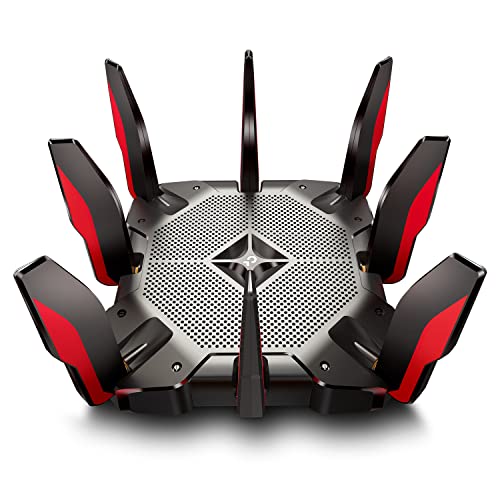
TP-Link WiFi 6 Gaming Router (8 Gigabit LAN)
The Archer AX10000 is the one pick in this guide that answers the search query word for word: its listing title states 8 Gigabit LAN Ports, alongside a 2.5G WAN socket and tri-band Wi-Fi 6. For a desk cluster of PCs and consoles that all speak gigabit — which is to say, almost every gaming device ever sold — this is the tidiest single box here. Eight sockets means the gaming PC, two consoles, a capture machine, a NAS, a docked laptop, a television and a spare for whatever arrives next can all be wired without a switch, a second power brick or a cable swap when friends come over.
The 2.5G WAN port is the quiet headline. A growing number of fibre plans exceed a gigabit, and a router with a gigabit WAN socket silently shaves such a plan down to size before the LAN ever sees it. Here the fast WAN feeds the eight gigabit sockets honestly: no single device can exceed its gigabit port, but several can pull hard at once. The title also promises a wireless smart VPN and positioning for a large home, which matches the likely buyer — this is a whole-house anchor that happens to be port-rich, not a niche esports appliance.
What the listing title states
- LAN ports: 8 Gigabit LAN Ports, as stated in the title
- WAN: 2.5G WAN port, as stated in the title
- Wireless: WiFi 6, tri-band, as stated in the title
- VPN: wireless smart VPN, as stated in the title
- LAN port speed beyond gigabit: Not stated in the listing title — verify with the maker’s documentation
Strengths
- The only title here that states eight gigabit LAN ports in so many words
- A 2.5G WAN socket keeps faster-than-gigabit fibre plans from being capped at the door
- Tri-band Wi-Fi 6 gives wireless devices a separate lane from the wired desk
Trade-offs
- Every LAN socket is gigabit, so a 2.5G-capable NAS or PC cannot stretch its legs on this box
- Wi-Fi 6 rather than 6E or 7 leaves the wireless side a generation behind two rivals here
- Eight wired devices at one desk still means eight cables to manage behind it
Best for: a gaming household whose wired fleet is all gigabit — PC, consoles, capture rig, NAS — and who wants those eight sockets in one box with no switch on the shelf.
Not suited for: a studio built around 2.5G or 10G transfers between machines, where every LAN socket here would be the bottleneck.
If the literal eight gigabit sockets are what you came for, check the current price of the Archer AX10000 on Amazon and count your cables once more before it arrives.

ASUS RT-BE88U WiFi 7 (dual 10G)
Read the RT-BE88U’s title as a parts list and it becomes the deepest wired bench in this guide: two 10G ports — one of them an SFP+ socket — plus four 2.5G ports and four 1G ports. That is ten wired sockets, more than the eight this guide is named for, arranged as a ladder. Consoles and televisions take the gigabit rungs, gaming PCs and a fast NAS take the 2.5G rungs, and the 10G pair handles a multi-gig internet feed, a switch uplink or a workstation-to-NAS link that actually moves footage at speed. Few consumer routers let you tier a whole desk this deliberately.
Around the ports sits Wi-Fi 7 rated up to 7.2 Gbps in the title, mesh compatibility for a wired-backhaul satellite — remembering that backhaul spends a port at each end — and a detail that deserves emphasis: subscription-free network security and parental controls. Several brands now rent those features back monthly; ASUS states them included without a subscription here, which matters over a router’s five-year life. VPN support rounds out a package aimed squarely at the technically confident household that wires first and asks wireless to cover the remainder.
What the listing title states
- Wired ports stated: 10G Port x2, 10G SFP+ Port x1, 2.5G Port x4, 1G Port x4
- Wireless: WiFi 7, up to 7.2 Gbps, as stated in the title
- Mesh: mesh compatible, as stated in the title
- Security and parental controls: subscription-free, included, as stated in the title
- Dedicated gaming LAN port: Not stated in the listing title — verify with the maker’s documentation
Strengths
- Ten wired sockets beat the eight-port brief, with a speed tier for every class of device
- Twin 10G ports open NAS and switch layouts the gigabit boxes cannot attempt
- Security and parental controls carry no subscription, stated plainly in the title
Trade-offs
- One 10G socket is SFP+, which needs fibre, a DAC cable or a transceiver rather than a plain patch lead
- The tiered layout rewards planning; plug devices in carelessly and the fast ports get wasted on a printer
- Wi-Fi 7 clients are still the minority in most homes, so the wireless headline matures slowly
Best for: a mixed-speed household — consoles on gigabit, PCs and NAS on 2.5G, a 10G link for the heavy lifting — that wants one router to tier them all.
Not suited for: a simple eight-identical-sockets desk, where the SFP+ socket and speed tiers add cost and head-scratching without paying rent.
For the deepest port bench here, look up the RT-BE88U’s current Amazon price and sketch your tier plan on paper before ordering.

ASUS ROG Strix GS-BE12000 (2.5G x8)
The GS-BE12000 takes the eight-port brief and raises the speed of every seat: its title states 2.5G Port x8, eight wired sockets each running at two and a half gigabits. That uniformity is the point. There is no wrong socket to plug into, no tier plan to draw — the NAS, the gaming PC, the second PC, the consoles and the dock all get the fast lane by default, and devices that only speak gigabit simply run at their own pace on the same generous ports. For a desk where several machines are already multi-gig capable, this is the most straightforwardly future-proof wired layout in the guide.
The wireless side is tri-band Wi-Fi 7 rated at 12Gbps in the title, with coverage stated up to 3,300 square feet and mesh support, so a wired satellite can extend the house while spending one of those eight ports on backhaul. Game Boost is named for low-latency gaming and streaming, and VPN support is stated as well.
What the listing title states
- Wired ports stated: 2.5G Port x8
- Wireless: WiFi 7, tri-band, 12Gbps, as stated in the title
- Coverage: up to 3,300 sq. ft., as stated in the title
- Gaming feature: Game Boost for low latency gaming and streaming, as stated in the title
- 10G ports: Not stated in the listing title — verify with the maker’s documentation
Strengths
- Eight identical 2.5G sockets remove every port-tier decision from setup day
- Tri-band Wi-Fi 7 at a stated 12Gbps gives wireless its own serious capacity
- Mesh support plus stated 3,300 sq. ft. coverage suits a larger house with a wired core
Trade-offs
- No 10G socket at all, so the fastest NAS or switch link tops out at 2.5G
- Eight multi-gig ports are wasted money if every wired device you own is gigabit-only
- Game Boost helps under congestion; it cannot shorten the road to a distant server
Best for: a multi-gig desk — several 2.5G-capable PCs, a fast NAS, a quick fibre plan — that wants eight equally fast sockets and strong Wi-Fi 7 behind them.
Not suited for: an apartment with two wired devices and gigabit everything, where a far simpler router plus a switch covers the need.
If eight fast sockets with no wrong choice among them sounds right, check today’s Amazon price for the GS-BE12000.

TP-Link Archer BE800 WiFi 7
The BE800 states 2×10G + 4×2.5G Ports — six wired sockets, two short of this guide’s headline number, and we include it with that shortfall printed rather than hidden. What those six sockets offer instead is altitude: two 10-gigabit ports that can carry a multi-gig internet feed and a NAS or switch uplink simultaneously, with four 2.5G ports beneath them. Add an inexpensive switch to one 10G socket and the port count stops mattering entirely, because the uplink feeding the switch is four times faster than the gigabit uplinks most desks live with. Judged as a wired hub it is six ports; judged as the root of a wired tree it is the strongest root here.
The rest of the title is flagship theatre with some substance: tri-band BE19000 Wi-Fi 7 at a stated 19 Gbps across 12 streams, eight high-performance antennas, an LED screen, Easy Mesh, HomeShield and a Private IoT network for quarantining smart-home gadgets. The wireless numbers are aggregate marketing arithmetic, as all such numbers are, but the underlying hardware class is genuinely the top of TP-Link’s consumer line. Buy it for the 10G pair and the wireless muscle, and treat the two missing sockets as a switch-shaped errand rather than a flaw.
What the listing title states
- Wired ports stated: 2×10G + 4×2.5G Ports
- Wireless: tri-band BE19000 WiFi 7, 12-stream, 19 Gbps, as stated in the title
- Antennas: 8 high-performance antennas, as stated in the title
- Extras stated: LED screen, VPN, Easy Mesh, HomeShield, Private IoT
- Gigabit LAN ports beyond those stated: Not stated in the listing title — verify with the maker’s documentation
Strengths
- Twin 10G ports make it the best switch-and-NAS root in this guide
- Four 2.5G ports still cover the fast desk devices directly
- BE19000 tri-band Wi-Fi 7 is the largest wireless headline here
Trade-offs
- Six wired sockets fall two short of the eight-port brief on their own
- The LED screen is decoration that some desks will love and others will tape over
- Flagship wireless capacity is surplus in a home that wires everything important
Best for: a high-end setup where a 10G NAS link and a multi-gig internet plan matter more than raw socket count, with a switch welcome to join later.
Not suited for: a buyer counting exactly eight devices and refusing any second box, since this router alone leaves two of them wireless.
Weigh the BE800’s current Amazon price against the cost of the small switch that completes its port count, then decide with both numbers in view.

GL.iNet Flint 3e GL-BE6500 WiFi 7
The Flint 3e’s title is entirely about radio and VPN: Wi-Fi 7 BE6500 up to 6.5 Gbps, MLO — the Wi-Fi 7 feature that lets a client use multiple bands at once for steadier throughput — and 4K-QAM for denser modulation near the router. What the title never mentions is LAN ports, not a count, not a speed. In a guide organised around eight wired sockets, that silence is the review’s headline: on the evidence of its own listing title, this is a wireless-first router for home and gaming, with VPN built into its identity, and anyone whose brief begins with eight cables should verify the rear panel from the maker’s documentation before considering it further.
Taken on its own terms, the proposition is coherent. GL.iNet built its reputation on travel routers and VPN-friendly firmware, and the Flint line carries that DNA into a home flagship: households that route traffic through a VPN for privacy, work or region reasons get that behaviour at the router, covering every device including the ones with no VPN app of their own. If your wired fleet is a PC and a console and everything else lives happily on a modern radio, the Flint 3e’s priorities may match yours precisely. It is in this guide as the honest counterpoint — proof that port count is a means, and some households’ ends lie elsewhere.
What the listing title states
- Wireless: Wi-Fi 7 BE6500, up to 6.5 Gbps, with MLO and 4K-QAM, as stated in the title
- Positioning: router with VPN for home and gaming, as stated in the title
- LAN port count: Not stated in the listing title — verify with the maker’s documentation
- LAN port speed: Not stated in the listing title — verify with the maker’s documentation
Strengths
- MLO is the Wi-Fi 7 feature that most improves real wireless steadiness, and it leads this title
- Router-level VPN covers every device in the house, including app-less gadgets
- A home-and-gaming brief from a maker known for VPN-friendly routers
Trade-offs
- The title states no LAN port count, so an eight-port shopper has nothing to count here
- BE6500 wireless is a tier below the BE800 and GS-BE12000 headlines
- VPN throughput depends on protocol and plan details the title does not state
Best for: a VPN-centred household with a short wired list — a PC, a console — that values router-level VPN coverage and Wi-Fi 7 steadiness over socket count.
Not suited for: the eight-cable desk this guide is named for, since the listing title offers no port count to plan around.
If your priorities run VPN-first and wireless-first, check the Flint 3e’s Amazon price — and confirm its rear panel in the maker’s documentation before ordering.

MSI Radix AXE6600 WiFi 6E
The Radix AXE6600 arrives from a PC-hardware maker with a gaming accent: Wi-Fi 6E tri-band — which adds the 6 GHz band that Wi-Fi 6 devices cannot use — AI QoS, an 1.8GHz quad-core processor, MU-MIMO, 8-stream design and RGB lighting, all stated in its title. What the title calls gigabit is the wireless: ‘Tri Band Gigabit Wireless’. No LAN port count appears anywhere in it. Like the Flint 3e, this pick is labelled honestly in an eight-port guide: its wired offering cannot be verified from the listing title, and a shopper who needs eight sockets should treat that absence as disqualifying until the maker’s documentation says otherwise.
Within its own lane, the Radix makes sense for a one-desk gamer. Wi-Fi 6E’s 6 GHz band is still relatively empty airspace in most neighbourhoods, so a gaming PC or console near the router can enjoy a clean, fast wireless link that behaves almost like a cable at short range — almost being the load-bearing word, since a cable remains a cable. AI QoS aims to keep game traffic ahead of the household’s downloads. If your setup is one battlestation, one console and a phone, the Radix covers it with flair. If your setup is a wired village, look back up this list.
What the listing title states
- Wireless: WiFi 6E tri-band, 8-stream, MU-MIMO, as stated in the title
- Processor: 1.8GHz quad-core, as stated in the title
- QoS: AI QoS, as stated in the title
- LAN port count: Not stated in the listing title — verify with the maker’s documentation
- LAN port speed: Not stated in the listing title — verify with the maker’s documentation
Strengths
- The 6 GHz band gives nearby gaming devices unusually clean wireless airspace
- AI QoS is aimed precisely at keeping game traffic ahead of household bulk traffic
- A quad-core processor at a stated 1.8GHz is real headroom for a busy home
Trade-offs
- No LAN count in the title means the eight-port brief cannot be checked off here
- RGB lighting divides opinion and adds nothing to a packet’s journey
- Wi-Fi 6E’s 6 GHz band fades through walls faster than the 5 GHz band does
Best for: a single-desk gamer whose PC and console sit near the router and who wants Wi-Fi 6E’s clean band plus gaming QoS, with only a cable or two in play.
Not suited for: a wired household counting sockets, because the listing title never states how many LAN ports the Radix carries.
Desk-of-one gamers can check the Radix AXE6600’s current Amazon price; port-count shoppers should confirm the rear panel from MSI’s documentation first.
How Do the Six Picks Compare at a Glance?
| Pick | Wired ports stated in the title | Fastest wired tier stated | Wireless stated in the title |
|---|---|---|---|
| TP-Link Archer AX10000 | 8 Gigabit LAN Ports (stated) | 2.5G WAN (stated) | WiFi 6 tri-band (stated) |
| ASUS RT-BE88U | 2× 10G + 4× 2.5G + 4× 1G (stated) | 10G-class ports present (stated) | WiFi 7 up to 7.2 Gbps (stated) |
| ASUS ROG Strix GS-BE12000 | 2.5G Port x8 (stated) | No 10G port stated | WiFi 7 tri-band, 12Gbps (stated) |
| TP-Link Archer BE800 | 2×10G + 4×2.5G (stated) | 2× 10G ports (stated) | WiFi 7 tri-band BE19000, 19 Gbps (stated) |
| GL.iNet Flint 3e | Not stated in the listing title | Not stated in the listing title | WiFi 7 BE6500, MLO, 4K-QAM (stated) |
| MSI Radix AXE6600 | Not stated in the listing title | Not stated in the listing title | WiFi 6E tri-band, 8-stream (stated) |
Two patterns emerge from the table. The first is that the eight-port brief is genuinely met by only two listings as written — the Archer AX10000 with eight gigabit sockets and the GS-BE12000 with eight 2.5G sockets — while the RT-BE88U exceeds it by count with ten tiered sockets. The second pattern is that port altitude and port count trade against each other: the BE800’s six sockets include the joint-fastest pair here, and the two wireless-first picks remind you that a famous gaming badge guarantees nothing about a rear panel. Decide which currency your desk spends — count, speed, or a switch-assisted mix — before deciding which row of this table is yours.
Common Mistakes
Counting the WAN port as a LAN port
Marketing photographs show a row of shiny sockets, and it is easy to count every hole as a place to plug a PC. One of them is the WAN port, reserved for the internet feed, and on multi-gig routers a second may be configurable either way. Count only the sockets the title or documentation assigns to the LAN, and remember that a mesh satellite on wired backhaul or a switch uplink spends one of them immediately.
Expecting faster ports to lower ping
A 10G port cannot shorten the route to a game server, un-congest a neighbourhood node at peak hour, or fix a bufferbloat problem on a slow uplink. Port speed buys download time and local transfer speed. Latency problems are solved by wiring at all, by QoS that keeps bulk traffic out of the game’s way, and by an internet connection whose own latency is healthy — diagnose which problem you actually have before buying hardware for a different one.
Wiring everything except the device that matters
We meet setups with the television, printer and NAS beautifully cabled while the gaming PC plays over Wi-Fi through two walls, because the PC sits far from the router and the cable run felt like a chore. The priority order runs the other way: the interactive machines first, even if it means moving the router, running one flat cable under a rug, or relocating the desk. Ports serve the ranking; they do not replace it.
Forgetting that cables and cards are part of the chain
A 2.5G port feeding a PC whose network card is gigabit delivers gigabit. A kinked, ancient patch lead can quietly drag a fast link down or make it flap. When you budget for a multi-gig router, budget for the network cards and the handful of fresh cables that let the ports perform, and test each wired device at its own socket rather than assuming the headline speed arrived.
Final Recommendation
For the brief exactly as written — eight LAN ports for gaming — the Archer AX10000 is the answer that needs no footnotes: eight gigabit LAN ports stated in its title, a 2.5G WAN to feed them, and tri-band Wi-Fi 6 for everything else. If your wired devices have begun arriving with multi-gig cards, the GS-BE12000’s eight 2.5G sockets are the same idea grown up, and the RT-BE88U is the connoisseur’s version, ten tiered sockets deep. The BE800 plus a small switch remains the engineer’s workaround, and the Flint 3e and Radix stand as reminders to read rear panels, not reputations.
Wire the machine you compete on first, count only the ports a title actually promises, and let a humble switch carry any overflow without shame — a flat, boring, cable-fed connection is the whole prize, and whichever route above gets your desk there is the right one.
What Should Your Cable Plan Look Like on Day One?
Before the router arrives, walk the desk with a notebook. List every device you intend to wire, the socket tier it deserves, and the cable length to reach it — then add one spare socket and one spare cable to the plan, because a friend’s PC, a new console or a work laptop always materialises within the year. Label both ends of each cable with tape and a marker. It takes ten minutes and saves the peculiar misery of tracing an anonymous cable by wiggling it while someone shouts from the other room. Keep one known-good spare cable in the drawer; half of all ‘router problems’ reported at midnight are a single failed patch lead, and the spare is how you prove it in ninety seconds.
Power deserves a line in the plan too. A port-rich router, a switch and a NAS on one strip is fine; the same strip sharing a circuit with a kettle and a space heater invites mysterious reboots. If your gaming hours are precious, a small uninterruptible power supply under the desk keeps the router and modem alive through the flickers that would otherwise drop a match, a download and a video call in the same blink. None of this is glamorous. All of it is the difference between a wired setup that merely exists and one that quietly never lets you down.
How Long Should an Eight-Port Router Last You?
A router bought for its rear panel ages more gracefully than one bought for its radio. Port standards change slowly — gigabit Ethernet has been adequate for two decades — while wireless generations arrive every few years and mostly benefit new clients. That is an argument for buying the wired layout you need generously once: the household that wires eight sockets today will still find them useful when the Wi-Fi badge on the box sounds antique, and mesh satellites or a newer access point can refresh the wireless side later without touching the wired core.
It is also an argument for the unglamorous features: firmware that still receives security updates, a maker with a track record of supporting older models, and settings you can export before a factory reset. The routers in this guide come from brands with long support tails, but check the support page for your exact model before ordering, and register the warranty the week the box arrives. A wired network is infrastructure. Treat the purchase like infrastructure — bought once, documented once, and then forgotten for years — and it will repay you in the only currency that matters here: evenings when nobody in the house thinks about the network at all.
How Do You Test Whether Your Wired Setup Actually Helped?
Feelings lie about networks; measurements argue honestly. Before the new router goes in, record three numbers from your gaming machine at the household’s busiest hour: a speed test, a latency test to a stable nearby server, and — most revealing of all — a jitter or ping-stability reading over a few minutes rather than a single heroic sample. Then repeat the same three tests wired into the new setup at the same hour on a similar day. The comparison that matters is not the best number but the worst: gaming pain lives in the spikes, and a wired setup that earns its money shows up as a flat line where the wireless line used to saw up and down.
Keep the numbers. A note in your phone with the date, the setup and the three readings becomes the baseline every future complaint gets judged against. Networks degrade for reasons that range from a dying cable to an internet provider quietly re-routing a neighbourhood, and the household that can say ‘this changed in March’ troubleshoots in hours what other households argue about for months.
Which Devices Should Stay Wireless Even With Eight Ports Free?
A full row of sockets invites a completist urge — wire everything, because you can — but some devices are genuinely better citizens of the air. Phones and tablets have no ethernet port worth the adapter tangle, and their traffic is patient. Smart speakers, bulbs and plugs sip data and forgive latency entirely; wiring them is impossible for most models anyway. The games console in the guest room that plays party titles twice a month will live happily on a strong wireless signal, and the cable saved is better spent on the machine that plays ranked matches nightly.
The subtler case is the device that sits near the router but moves: the laptop that works at the desk by day and the sofa by night. Dock it wired at the desk, where its calls and transfers are heavy, and let it roam wirelessly after hours. Modern operating systems handle the handover gracefully, and the household gains the wired benefit exactly where the work is. Ports, like everything else in a network, should be allocated by need rather than by proximity alone.
There is also a security texture to the choice. Wired devices are invisible to the casual wireless snooper and immune to a weak Wi-Fi password’s consequences, which is one more reason the work machine and the NAS belong on copper. The smart television’s viewing habits, by contrast, risk nothing on the air. Eight ports spent with that ranking in mind — interactive first, bulk second, sensitive third, patient last — is the mature version of the instinct that started this search.
What Does a Sensible Upgrade Path Look Like From Here?
A wired core bought well should not need replacing when the household’s ambitions grow; it should need extending, and the difference is planned now. If a second room develops its own desk cluster next year, the clean move is a single cable run to that room and a small switch at its end — or a mesh satellite on wired backhaul if the room also needs wireless — rather than a second router competing for authority. The port-rich routers in this guide all leave a sensible socket free for exactly that run, provided you resist filling every port on day one. Spare capacity is not waste in a network; it is the future arriving without a forklift.
Internet upgrades follow the same logic. When the provider offers a faster tier, the questions are whether the WAN port accepts it — the 2.5G and 10G WAN-class sockets in this guide exist for that letter — and whether the wired devices’ own cards can use it. A household that bought multi-gig headroom once upgrades by changing a plan; a household that bought exactly today’s speeds upgrades by changing hardware. Neither is automatically right: headroom costs money that may never be used. But in a guide about buying ports generously, the consistent philosophy is to buy the ceiling you can foresee, because the cost of the second purchase dwarfs the cost of the headroom.
Keep the old router when you do upgrade, reset and repurposed as a switch or an access point in the room that needs it, where its platform allows. Hardware that served a household’s gaming for years usually has a second career in it, and the wired habits this guide teaches — rank the devices, cable the important ones, measure rather than guess — transfer intact to whatever topology comes next.
Frequently Asked Questions
How many of these routers truly have eight LAN ports?
Two state eight wired LAN sockets directly in their listing titles: the TP-Link Archer AX10000 with 8 Gigabit LAN Ports, and the ASUS ROG Strix GS-BE12000 with 2.5G Port x8. The ASUS RT-BE88U goes further, enumerating ten wired ports across 10G, 2.5G and 1G tiers. The Archer BE800 states six wired ports, and the Flint 3e and Radix titles state no LAN count at all.
Will a 2.5G or 10G port make my games less laggy?
No. In-game latency depends on your internet connection, the route to the server and congestion, not on LAN port speed, because game traffic is far below even a gigabit port’s capacity. Faster ports shorten downloads and local transfers — valuable, but a different prize.
Is adding a switch worse than buying an eight-port router?
For gaming latency, no: an unmanaged switch adds no meaningful delay, and devices behind it play identically to devices on the router’s own ports. The eight-port router wins on tidiness and single-box simplicity; the switch wins on price and on placing sockets where the devices actually are.
What does the RT-BE88U’s SFP+ port mean for my cables?
SFP+ is a modular socket that accepts fibre modules, direct-attach copper cables or transceivers rather than a standard Ethernet patch lead. It is common in professional gear and flexible, but budget for the module or DAC cable that matches what you intend to connect.
My internet plan is gigabit. Do I need a 2.5G WAN port?
Not for today’s plan. A 2.5G WAN matters when your plan exceeds a gigabit, or when you want headroom for an upgrade without replacing the router. The Archer AX10000’s 2.5G WAN is future-proofing; its eight gigabit LAN ports are the present-day benefit.
Why are routers with unstated port counts in this guide at all?
Because shoppers meet the Flint 3e and the Radix on the same search results page, under gaming badges, and deserve a clear note that their listing titles state no LAN port count. If your brief is eight wired sockets, that silence — verified against the maker’s documentation — is the deciding fact.
Related Guides
- Best dual WAN routers for a backup connection that never drops a match
- Best mesh routers for large homes with wired backhaul
- Best gaming routers for streaming and multiple devices
Ports that power access points instead of consoles are the business mirror of this guide, and our roundup of the best poe routers for samll business wires that side.
Port count is the hardware half of router freedom; our guide to the best flash routers with dd wrt already installed covers the firmware half.
A wired backbone matters as much to the projector booth as to the gaming desk, and our guide to the best led projectors for auditorium covers the display half of the venue.


