What's inside
- Quick Picks
- How We Chose
- Do You Actually Need a Dedicated Pigment Printer?
- What Does Print Width Really Buy a Photographer?
- How Should You Judge a Fine Art Print Once It Comes Off the Machine?
- What Paper Should a First Fine Art Printer Buy?
- How Do You Build a Printing Habit That Justifies the Machine?
- Comparison Table
- Common Mistakes
- Final Recommendation
- FAQ
- Related Guides
As an Amazon Associate I earn from qualifying purchases. This post may contain affiliate links at no extra cost to you.
gizmoverdict.com is reader-supported. When you buy through links on our site, we may earn an affiliate commission.
Where to buy: all six printers below are listed on Amazon, and the listings vary enormously in how much they tell you — one arrives as a bundle with cables and a cloth, another states almost nothing beyond its width — so the spec boxes in this guide quote each title exactly and mark the gaps rather than filling them. Photographers shopping for the best printers for fine art photography are buying something more specific than photo printing. They are buying tonal control: the shadow that holds detail instead of blocking up, the skin tone that stays skin, the black-and-white print whose greys step so gradually that the eye reads them as continuous. That quality lives in dedicated pigment-ink photo printers, and this guide’s first four picks are exactly those machines, in 17-inch and 24-inch widths, from the two makers who define the class.
Below them sits an honest second tier. The last two picks are wide-format photo all-in-ones — six-colour consumer machines that print to 13 x 19 inches, scan and copy as well, and cost a fraction of a dedicated pigment printer’s commitment. They are not failed versions of the top tier; they are the correct answer for photographers whose printing is occasional, whose walls are smaller, or whose budget is being spent on lenses this year. What this guide will not do is blur the tiers together. The split between a professional photo printer and a photo-capable all-in-one is the single most important fact in this category, and every section below keeps it visible.
A note on evidence before the picks. The professional machines’ listings are strikingly terse — widths, model names, and in one case a bundle — because their makers sell them through specialist channels where the buyer already knows the class. This guide therefore judges the top tier on class, width and maker lineage, states plainly where a title is silent, and refuses to decorate any spec box with ink counts or media claims the listing itself does not make. The consumer tier, by contrast, states its speeds and sizes outright, and is judged on those stated terms.
Key Takeaways
- Two tiers, honestly separated: four dedicated professional photo printers at 17 and 24 inches, and two wide-format photo all-in-ones beneath them.
- The Epson SureColor P900 and P800 are the 17-inch Epson pair — the current flagship and its proven predecessor.
- Canon’s imagePROGRAF PRO-1100 answers at 17 inches, and the PRO-2100 stretches the class to 24 inches for gallery-scale work.
- The Epson Expression Photo HD XP-15000 and XP-980 bring six-colour wide-format printing to 13 x 19 inches at consumer commitment levels.
- Professional listings state little beyond width and model; every unstated figure in this guide is marked as such, never borrowed from another source.
- Choose the tier by how you print — editioned, frequent, large — before choosing the machine within it.
Quick Picks
| Pick | Badge | Why it earns its place |
|---|---|---|
| Epson SureColor P900 17″ | The current Epson flagship | Epson’s 17-inch SureColor photo printer, sold here as a bundle with Ethernet and USB cables and a fibre cloth. |
| Epson SureColor P800 17″ | The proven predecessor | The 17-inch SureColor generation that built the class’s reputation, still listed for photographers who value the known machine. |
| Canon imagePROGRAF PRO-1100 17″ | The Canon 17-inch answer | Canon’s professional wireless inkjet photo printer at 17 inches, from the imagePROGRAF PRO line. |
| Canon imagePROGRAF PRO-2100 24″ | The gallery width | A 24-inch wide-format fine art printer for prints that leave the portfolio and take over the wall. |
| Epson Expression Photo HD XP-15000 | The wide consumer tier | Six-colour wide-format photo printing to 13 x 19 inches with auto two-sided printing, for photographers and home studios. |
| Epson Expression Photo XP-980 | The all-in-one tier | Six-colour wide-format print with scan and copy aboard, for creative projects that mix printing with digitising. |
How We Chose
Tier came before everything. The six machines were divided into dedicated professional photo printers and photo all-in-ones before any other comparison was allowed, because comparing across that line produces nonsense in both directions: the all-in-ones look deficient in ink pedigree they never claimed, and the professional machines look absurdly expensive for features a spec sheet cannot show. Within the professional tier, width was the first sort — 17 inches serves the portfolio, the club competition and the modest wall; 24 inches serves the gallery, the client commission and the exhibition. Within the consumer tier, the stated figures did the sorting: both Epsons claim six colours and 13 x 19 inches, and they divide on rated speed and on the XP-980’s scan-and-copy completeness.
Evidence discipline mattered more in this guide than in most. Professional photo printers are surrounded by a fog of inherited knowledge — every experienced photographer “knows” things about these lines — and a buying guide that repeats the fog as specification betrays its reader the moment a listing changes. So each spec box below contains only what the machine’s own Amazon title states, plus the agreed marker where the title is silent. Where this review discusses the class — pigment printing’s archival reputation, the professional lines’ media handling traditions — it speaks of the class as a class, in prose, and never converts that discussion into a per-model claim in a box.
Maker lineage was the third axis, and it is a legitimate one in this category. Epson’s SureColor P-series and Canon’s imagePROGRAF PRO-series are the two professional ecosystems a fine art photographer can build a decade of work on — papers profiled, inks consistent, knowledge shared across a community of printers who exhibit and sell. Choosing between them is partly choosing a community and a colour character, and the reviews below treat that choice with the respect it deserves rather than pretending a single number settles it.
Finally, honesty about the buyer’s calendar. A dedicated photo printer is a commitment device: it rewards frequent printing, sulks through neglect, and justifies itself across years of editions. The all-in-one tier asks almost nothing. The guide therefore weighs, for each pick, not only what the machine can do but what ownership rhythm it presumes — because the best printer for a photographer’s actual life beats the best printer for the life they describe in the camera shop.
Readers should also know what this guide did not weigh, and why. Laboratory measurements of gamut volume, third-party archival ratings and forum folklore about individual ink sets were all set aside, not because they are worthless but because none of them appears in the listings these picks are sold under, and a guide that grades machines by evidence the seller never offered teaches its readers to shop by rumour. The class-level judgements here — tier, width, lineage, ownership rhythm — are the ones a buyer can verify from the listing, the maker’s documentation and their own diary, which is exactly the evidence a purchase this size deserves.
Do You Actually Need a Dedicated Pigment Printer?
The honest test is a printing diary, not a wish. If you print weekly, edition your work, sell prints, or enter exhibitions where the object itself is judged, a dedicated professional machine is not an indulgence — it is your darkroom, and its cost amortises across every print that leaves the studio with your name on it. If you print monthly, mostly for your own walls, and your largest size is the occasional 13 x 19, the consumer tier will satisfy you so completely that the professional machines’ virtues become theoretical. The photographers who regret purchases in this category are almost never the ones who bought too little printer for their diary; they are the ones who bought a flagship for a diary that turned out to be four prints a year, and then watched a precision instrument gather the particular sadness of unused equipment.
There is a middle path worth naming: print small at home, print large by exception. Many photographers run an XP-15000-class machine for proofs, portfolios and home walls, and send the rare exhibition piece to a trusted lab or a colleague’s 24-inch machine. That is not a compromise born of poverty; it is a rational allocation, and the existence of the PRO-2100 in this guide does not oblige anyone to house 24 inches of printer for three prints a year. Buy the machine your calendar justifies, and let the exceptions be exceptions.
One more consideration, often whispered and rarely printed: dedicated photo printers dislike idleness. Ink systems are happiest exercised, and a machine that prints monthly may spend a share of its ink on maintenance rather than photographs. The all-in-ones forgive irregular use more gracefully. A photographer whose printing comes in bursts — a project printed furiously, then silence — should weigh that temperament honestly, because the total cost of the flagship includes the ink it drinks while waiting for you.
What Does Print Width Really Buy a Photographer?
Width buys presence, and presence is not vanity. A photograph printed at 17 inches wide commands a wall differently from the same file at 13: detail that was texture becomes landscape, and viewers step back instead of leaning in — a different kind of looking, which some bodies of work are composed for. Width also buys the portfolio page that needs no apology and the client print that arrives ready to frame at the sizes galleries actually hang. What width does not buy is quality per inch: the XP-15000’s 13 x 19 output is not a lesser photograph, only a smaller one, and plenty of exhibition work lives happily at that scale.
The costs of width are physical before they are financial. A 24-inch printer is furniture with opinions about doorways, and its paper — rolls or large sheets — needs storage that keeps it flat, dry and dust-free. Its prints need a table to trim on, sleeves or tubes to store in, and a wall budget to justify. Photographers stepping up should walk the whole chain in their imagination before ordering: machine, media, handling, storage, display. The chain always costs more than the machine, and the photographers who thrive at 24 inches are the ones who budgeted the chain, not just the printer.
There is also a creative discipline hidden in width. Printing large exposes everything — focus discipline, noise, the corners of the frame the photographer never truly looked at. Many photographers report that their first month with a wide machine improved their shooting more than a year of camera upgrades, because the print became an honest critic. If that criticism sounds like a gift rather than a threat, you are the reader the PRO-2100 was built for.
How Should You Judge a Fine Art Print Once It Comes Off the Machine?
Not under the light you printed it by, and not in the first minute. Prints dry and settle — inkjet output in particular shifts subtly as it cures, a behaviour printers call dry-down — so the working rule is to let a serious print rest, then judge it under the light it will live in. A print destined for a warm-lit living room and a print destined for a gallery’s neutral wash are, in the only sense that matters, different prints, and the photographer who proofs under destination lighting stops having the argument about why the wall version looks wrong.
Judge in a sequence. First the blacks: do the deepest shadows hold separation, or have they merged into a single tar? Then the highlights: does the brightest skin or sky retain its whisper of tone, or has it blown to paper white a stop too early? Then the mid-tones where faces live, and finally colour relationships rather than colour absolutes — the question is rarely whether a red matches a number, but whether the red and the green in this frame still argue the way they argued on the day. A printer earns the words “fine art” by surviving this sequence on your hardest files, not on the test image the maker chose.
Keep the evidence. The fine art habit that separates printers from dabblers is the proof archive: the same reference file, printed on each new paper, each new profile, each new machine, labelled and dated. Your archive becomes the ground truth against which every claim — a new paper’s promise, a profile’s improvement, a machine’s consistency across a year — can be checked in thirty seconds. It is also, not incidentally, how you will know whether a P900 or a PRO-1100 renders your particular shadows the way your eye demands, which no review, including this one, can decide for you.
What Paper Should a First Fine Art Printer Buy?
Paper is a consumable, never a pick in this guide — but it is half the print, and a first purchase deserves guidance. Begin with the maker’s own papers in a smooth matte and a lustre finish, because the profiles a printer ships are tuned to its own media first and best; learn the machine on the surfaces it knows natively before wandering into the wide world of third-party cotton rags and barytas. The two finishes teach different lessons: matte shows you the ink’s tonal manners without reflections arguing back, while lustre shows you the depth of black your machine can honestly produce.
Then expand by question, not by catalogue. Buy a new paper when a body of work asks for it — the portrait series that wants a warmer base, the architectural set that wants a harder surface — and proof the reference file on it before committing a single edition. Papers are not ranked in the abstract; they are matched to images, and the fine art printers whose work you admire mostly print on fewer papers than you would guess, known to the fibre. Depth of knowledge on two surfaces beats shallow acquaintance with twelve, in paper as in most crafts.
How Do You Build a Printing Habit That Justifies the Machine?
The photographers who get their money’s worth from a dedicated printer share a habit so simple it sounds like a trick: they print on a schedule, not on inspiration. A standing weekly session — proofs on Tuesday, finals on Friday, the rhythm adjusted to the studio’s life — keeps ink moving, keeps the eye calibrated, and converts printing from a project into a practice. The machine rewards the rhythm physically, since ink systems prefer exercise, and the photographer rewards it artistically, because a weekly confrontation with your own work in object form is the fastest honest education photography offers.
Structure the session around the proof archive. Open by printing the reference file if anything has changed — new paper, new profile, a cartridge swapped — and compare it against the archive before a single real print is risked. Then proof the week’s work small and cheap, live with the proofs on the wall for a day if the work allows it, and print finals only of what survives the wall. This sequence sounds slow and is actually the fastest route to prints that satisfy, because it concentrates expensive paper on decisions already made. The all-in-one tier forgives a looser version of the same habit; the professional tier positively blooms under it.
Finally, keep a printing log — date, file, paper, profile, verdict — in whatever form you will actually maintain. Six months of log entries will tell you your real cost per finished print, your real favourite papers, and your real diary, and those three facts together are worth more at upgrade time than every review ever written about your next machine. The log is also where the tier question answers itself for the next purchase: a photographer whose log shows forty finals a month has outgrown the consumer tier by evidence, not by envy.

Epson SureColor P900 17″ — The current Epson flagship
The P900 sits at the top of Epson’s desktop fine art line, and this listing presents it the way professional equipment is often sold: as a bundle. The title names the printer — the SureColor P900, 17 inch — and then lists the box’s companions: an Ethernet cable, a USB cable and a fibre cloth. Those cables tell a small story of their own. A machine expected to join a studio network or a dedicated print workstation arrives with both connections in hand, and the cloth acknowledges what every print studio knows, that fine art paper and dust are enemies and the printer’s surfaces are part of the workflow.
What the P900 represents, within its class, is the current statement of Epson’s desktop pigment printing: the machine a photographer buys when the decision has narrowed to “the best 17-inch Epson, now”. Its predecessor below built the reputation; this model inherits the audience of exhibition printers, portfolio perfectionists and black-and-white specialists who measure a printer by its greys. A review disciplined by evidence will not recite ink configurations the listing does not state — they belong to Epson’s documentation, where a serious buyer should confirm them — but the class position is not in doubt, and class position is what this pick is bought on.
Ownership of a flagship is a rhythm as much as a purchase. It presumes a photographer printing regularly, proofing honestly, and treating the machine as the studio’s final instrument — the place where files become objects. Photographers in that rhythm will find the P900 the natural centre of their practice. Photographers still discovering whether they print at all should read the XP-15000’s review first and let the diary, not the ambition, arbitrate.
One practical observation about bundles deserves a place here, because buyers misread them in both directions. The cables and cloth in this box are not the printer’s value — nobody should choose a flagship for its accessories — but they do remove the small frictions of installation day, when a missing network cable can stall a studio’s enthusiasm at the exact moment it should be printing its first proof. Judge the P900 on its class and its output, by all means; just let the bundle be what it is, a sign that the seller expects the machine to be installed and working the day it arrives, and has packed accordingly.
- Maximum width: 17 inches, as listed
- Class: SureColor professional photo printer, as listed
- Bundled items: Ethernet cable, USB cable, fibre cloth, as listed
- Ink configuration: Not stated in the listing title — verify with the maker’s documentation
- Media handling detail: Not stated in the listing title — verify with the maker’s documentation
- Connectivity beyond bundled cables: Not stated in the listing title — verify with the maker’s documentation
Strengths
- The current flagship of the defining desktop fine art line
- Bundle arrives studio-ready with both network and direct cables
- 17-inch width covers portfolio, competition and serious wall work
Trade-offs
- Listing states almost nothing; every figure must be confirmed in Epson’s documentation
- Flagship ownership presumes a regular printing rhythm to justify itself
- Desktop in name, but a serious footprint in any real studio
Best for: exhibiting photographers and print-sellers whose weekly output demands the current best of Epson’s 17-inch class.
Not suited for: occasional printers whose yearly output could be counted on two hands and a borrowed thumb.
Studios ready for Epson’s flagship should confirm its full specification from the maker’s documentation, then check the bundle’s price on Amazon.
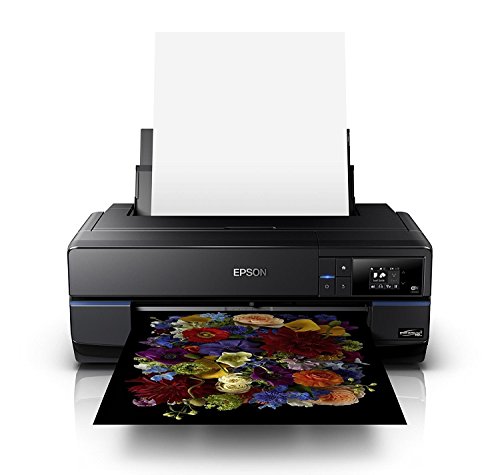
Epson SureColor P800 17″ — The proven predecessor
The P800’s listing is the tersest in this guide — a name, a width, the words inkjet colour printer — and yet the machine carries one of the strongest reputations in desktop fine art printing. This is the generation that taught a decade of photographers what a pigment printer at home could be, and its continued presence on sale is itself a datum: equipment with a deep installed base, a mountain of community knowledge, and profiles for seemingly every paper ever milled does not vanish quickly, because working photographers keep recommending it to each other.
The case for the P800 today is the case for the known instrument. Its behaviour is documented by years of other people’s printing; its quirks have names and remedies; a photographer adopting one joins the largest conversation in the class. Against that stands the obvious fact of succession: the P900 exists, and a buyer choosing the predecessor should do so for the predecessor’s virtues — value as listings fluctuate, familiarity, a studio already built around its habits — rather than by accident or by failing to notice the newer machine two reviews away.
Nothing else in the title can be honestly elaborated, and this review will not pretend otherwise. What can be said is that the P800 remains a 17-inch SureColor — a professional-class machine whose output has hung in more exhibitions than most printers ever see — offered to photographers who prize the proven over the newest. In a category where consistency is a creed, that is a respectable position, and for studios already fluent in its ways it may be the wisest money in this guide.
- Maximum width: 17 inches, as listed
- Class: SureColor inkjet colour photo printer, as listed
- Ink configuration: Not stated in the listing title — verify with the maker’s documentation
- Connectivity: Not stated in the listing title — verify with the maker’s documentation
- Media handling detail: Not stated in the listing title — verify with the maker’s documentation
- Bundled items: Not stated in the listing title — verify with the maker’s documentation
Strengths
- A decade of community knowledge, profiles and remedies behind it
- Professional 17-inch class at what is often a predecessor’s value
- The known instrument for studios already fluent in its habits
Trade-offs
- Superseded by the P900; the newest refinements live elsewhere
- The listing states nothing beyond name, width and class
- Long-term parts and ink horizon shortens with each passing year
Best for: photographers who value a deeply documented machine, and studios already running P800 workflows they see no reason to disturb.
Not suited for: first-time flagship shoppers chasing the longest possible support runway from day one.
Known instruments hold their value for a reason — see the P800’s current Amazon price and weigh it against its successor with your own diary open.

Canon imagePROGRAF PRO-1100 17″ — The Canon 17-inch answer
Canon’s entry in the 17-inch professional class carries the imagePROGRAF PRO name, and its listing adds one word Epson’s pair never mention: wireless. A professional wireless inkjet photo printer, says the title, and in a modern studio that is more than a convenience bullet — the print machine increasingly sits where the light and the table are right, not where a cable dictates, and a flagship that joins the network without a wire respects the studio as it is actually arranged. Photographers whose desks are laptops and whose studios are reconfigured per project will feel the point immediately.
The deeper story is the existence of the choice itself. Fine art printing has two great houses, and their colour characters, paper ecosystems and community wisdoms differ in ways photographers develop genuine allegiances to — the way film photographers once swore by one emulsion over another. The PRO-1100 is the current Canon statement at this width, the machine around which a Canon-loyal studio organises its printing, and its presence in this guide is a reminder that “which 17-inch professional printer” is really two questions: which house, then which model.
As with its Epson rivals, the listing withholds the figures — ink configuration, media detail — that spec-box culture craves, and the box below records the withholding honestly. What the title does establish is class, width and wireless, and for the photographer already decided on Canon’s house, those three facts plus the maker’s documentation are the whole decision. For the undecided, the proof archive advice elsewhere in this guide applies with full force: print your hardest file on both houses’ machines before your money chooses a side.
Wireless, the one specification Canon chose to print, also hints at how this machine expects to be driven: from the photographer’s main machine, wherever that is, in a studio where the printer is a network citizen rather than a tethered peripheral. That arrangement pairs naturally with a proofing workflow — soft-proof on the calibrated screen, send the final, walk to the machine as the print emerges — and it removes the small but real friction of dedicating a workstation to the printer’s side. Studios built around a single laptop will feel the benefit daily; studios with a fixed print desk will shrug at it, which is fine, because the PRO-1100’s core case never depended on the wire it does not need.
- Maximum width: 17 inches, as listed
- Class: imagePROGRAF PRO professional inkjet photo printer, as listed
- Connectivity: wireless, as listed
- Ink configuration: Not stated in the listing title — verify with the maker’s documentation
- Media handling detail: Not stated in the listing title — verify with the maker’s documentation
- Bundled items: Not stated in the listing title — verify with the maker’s documentation
Strengths
- Canon’s current professional statement at the portfolio width
- Wireless stated in the title — rare candour among the professional listings here
- Anchors a Canon-house studio’s whole paper and profile ecosystem
Trade-offs
- Ink and media figures must be chased into Canon’s documentation
- House allegiance cuts both ways; switching ecosystems later is real work
- Professional class presumes professional printing frequency
Best for: Canon-committed photographers building an exhibiting or selling practice at 17 inches.
Not suited for: the undecided, until a proof of their hardest file on both houses’ machines has spoken.
Canon loyalists can start at the PRO-1100’s Amazon listing — check its price on Amazon — and then read the maker’s documentation for the figures the title leaves out.
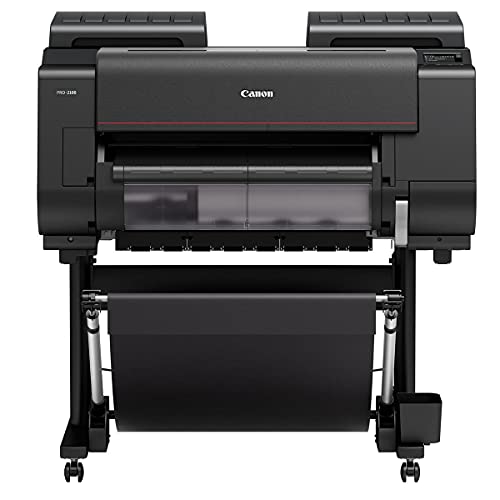
Canon imagePROGRAF PRO-2100 24″ — The gallery width
The PRO-2100’s listing shouts a little — capital letters, the words WIDE and FORMAT and FINE ART — and for once the shouting matches the machine. Twenty-four inches is the width at which a photograph stops being a page and becomes a presence, and this Canon is the only pick in the guide that works there. Its buyers are identifiable: photographers printing for exhibition walls, for clients who commission at scale, for the portfolio that is carried into a gallery meeting and opened to a size that ends arguments. Everyone else is browsing, and the machine is patient with browsers, but its review should be written for its buyers.
At this width the practicalities multiply, and this guide’s earlier width section becomes a checklist rather than a meditation: the room, the doorway, the media storage, the trimming table, the transport of finished prints. A 24-inch fine art printer also changes a studio’s economics — the ability to produce the large work in-house, on your paper, to your proof, rather than surrendering the biggest prints to a lab’s queue and a lab’s interpretation. For photographers whose reputations hang at this size, that control is not a luxury; it is the difference between signing a print and merely approving one.
The listing states nothing beyond the machine’s class and width, and the spec box honours that. What can be said from the guide’s own discipline is this: the PRO-2100 is a commitment in the shape of a printer, justified by a diary of large work and unjustifiable without one. Photographers with that diary already know who they are. This pick exists so that the guide serves them as honestly as it serves the home studio two tiers below.
There is a psychological shift at 24 inches that experienced printmakers warn about and this review should pass on: the work changes. Photographers compose differently when the frame’s destination is a wall rather than a portfolio — edges get braver, quiet passages get room to breathe, and some images reveal they were always meant to be large while others, loved at portfolio size, dissolve. Owning the wide machine is therefore also owning a new critic, the most demanding one in the studio. The photographers who flourish with a PRO-2100 are those who wanted exactly that criticism and built their practice to answer it week after week.
- Maximum width: 24 inches, as listed
- Class: wide-format fine art printer, imagePROGRAF PRO line, as listed
- Ink configuration: Not stated in the listing title — verify with the maker’s documentation
- Connectivity: Not stated in the listing title — verify with the maker’s documentation
- Media handling detail: Not stated in the listing title — verify with the maker’s documentation
- Stand and footprint detail: Not stated in the listing title — verify with the maker’s documentation
Strengths
- The only 24-inch option here — gallery scale without a lab’s queue
- In-house control over the prints a reputation is signed on
- Canon’s professional PRO ecosystem at exhibition width
Trade-offs
- Room, doorway, storage and handling chain all scale up with it
- Unjustifiable without a regular diary of large work
- Listing offers class and width only; all else is documentation homework
Best for: exhibiting photographers and commissioned printmakers whose work is composed for walls, not pages.
Not suited for: studios whose largest regular print fits the 17-inch machines with room to spare.
Gallery-scale work starts with a tape measure as much as a printer — once the room agrees, review the PRO-2100 on Amazon and check its price.

Epson Expression Photo HD XP-15000 — The wide consumer tier
Drop a tier and the listings suddenly start talking. The XP-15000’s title states its case in full: six-colour wide-format photo printing, up to 9.2 ppm, 13 x 19 inches, auto two-sided printing, aimed at photographers and home studios. That candour is the consumer tier’s charm — what you read is what is claimed — and the claim itself is substantial. Six colours at 13 x 19 inches covers the great majority of real photographic printing: the portfolio, the club night, the family wall, the proof before a lab print, all on a machine that also behaves as a household printer when asked.
The “HD” in its name and the six-colour set place it at the top of the consumer photo class, and its honest positioning matters: Epson sells this as a photographer’s wide printer, not as a SureColor in disguise. Its colour is genuinely photographic — the six-colour arrangement exists for the gradients and skin tones that office four-colour printing coarsens — while its ownership demands stay domestic. No editioning ritual, no archival promises made or implied by this guide, just very good prints at a useful size from a machine that forgives a quiet month.
Auto two-sided printing, a mundane bullet, deserves its sentence: the same machine that prints the portfolio also prints the booklet, the zine, the contact-sheet document, and the household’s ordinary paper traffic, which is precisely why this tier gets used weekly while a dedicated machine waits for occasions. Frequency of use is a quality in itself. For most photographers who ask the question this guide answers, the XP-15000 is where the honest answer lands.
Consider its role as the proofing engine of a more ambitious workflow, because many of its owners use it exactly that way. A photographer preparing a lab-printed exhibition proofs compositions, crops and tonal decisions at 13 x 19 on this machine — large enough to judge, cheap enough to iterate — and sends only the settled files out for the flagship treatment. In that arrangement the XP-15000 is not the poor relation of the professional tier but its scout, absorbing the experiments and the failures at household prices. Studios that later buy a P900 often keep the Epson beside it for precisely this duty, which says more about the machine’s real worth than any specification could.
- Ink system: 6-colour wide-format photo printing, as listed
- Maximum sheet: 13 x 19 inches, as listed
- Rated speed: up to 9.2 ppm, as listed
- Duplex: auto 2-sided printing, as listed
- Intended use stated by maker: photographers and home studios
- Scan and copy functions: Not stated in the listing title — verify with the maker’s documentation
Strengths
- Six-colour photographic output at a genuinely useful 13 x 19 inches
- States its figures openly — the most informative listing in this guide
- Doubles as the household printer, so it stays exercised and familiar
Trade-offs
- Consumer tier: not the pigment flagship class the top four picks inhabit
- 13 x 19 ceiling ends the conversation for gallery-scale work
- Print-only listing; digitising artwork needs a separate scanner
Best for: serious hobbyists and home studios printing portfolios and wall pieces up to 13 x 19, often and without ceremony.
Not suited for: editioned exhibition printing where the dedicated pigment class is the entry requirement.
For most photographic printing as it is actually lived, start here — look at the XP-15000’s price on Amazon and measure your largest real print against its sheet.

Epson Expression Photo XP-980 — The all-in-one tier
The XP-980 completes the consumer tier by adding the functions the XP-15000’s listing leaves out. Its title states six-colour wide-format printing with scan and copy, up to 8.5 ppm, USB and memory card support, aimed at creative projects. That last phrase is the tell: where its sibling speaks to photographers and home studios, the XP-980 speaks to the creative household in full — the family that prints photographs, scans the children’s artwork, copies the sheet music and produces the school project board, all on wide-format-capable hardware.
Memory card support sounds like a legacy bullet until you watch a household use it: the camera card walks straight from camera to printer, no computer mediating, and a photograph becomes an object while the day it records is still the same day. For the creative-projects brief, that immediacy is a feature with real emotional mechanics. The scan function closes the other loop — artwork, film-era prints and documents enter the digital world through the same machine that sends new prints back out of it.
Its trade against the XP-15000 is a shade of speed and a difference of emphasis rather than a defect: photographic printing is one of its talents rather than its headline. A photographer choosing between the two Epsons is really choosing a household shape — the studio that prints, or the home that creates in every direction. Both are honourable shapes; the XP-980 is simply the one that invites everyone in.
There is a gateway effect worth recording in this machine’s favour. Households that print photographs casually, on a machine that also scans the archive and copies the documents, tend to print more photographs over time — the friction is low, the machine is already warm in the family’s habits, and the step from phone snapshot to framed print shrinks to an impulse. Some of those households discover, a year in, that someone in them has become a photographer, and the upgrade conversation begins from evidence. The XP-980 cannot take that photographer all the way, and does not claim to; but as the machine that starts the story, it has a claim on this guide’s respect that pure spec-sheet logic would miss.
- Ink system: 6-colour wide-format printing, as listed
- Functions: print, scan, copy, as listed
- Rated speed: up to 8.5 ppm, as listed
- Inputs: USB and memory card support, as listed
- Intended use stated by maker: creative projects
- Maximum sheet size: described as wide-format in the title; exact inches Not stated in the listing title — verify with the maker’s documentation
Strengths
- Scan and copy complete the creative loop the print-only sibling leaves open
- Memory card printing turns camera output into objects without a computer
- Six-colour wide-format output serves the whole household’s projects
Trade-offs
- A shade slower than the XP-15000 on the makers’ own ratings
- Exact maximum sheet size is not stated in inches in the title
- Generalist emphasis; the dedicated photo buyer may prefer the sibling’s focus
Best for: creative households that print photographs, scan artwork and copy documents in roughly equal measure.
Not suited for: a photographer’s dedicated print desk, where scan and copy hardware would sit unused for years.
Households that create in every direction should weigh the XP-980’s completeness — open its Amazon listing to check the price and confirm the wide-format dimensions.
Comparison Table
| Printer | Tier | Max width (as listed) | Colour (as listed) | Functions (as listed) |
|---|---|---|---|---|
| Epson SureColor P900 | Dedicated professional | 17 inches | Not stated in the listing title | Print (bundle: Ethernet + USB cables, fibre cloth) |
| Epson SureColor P800 | Dedicated professional | 17 inches | Inkjet colour printer | |
| Canon imagePROGRAF PRO-1100 | Dedicated professional | 17 inches | Not stated in the listing title | Print, wireless |
| Canon imagePROGRAF PRO-2100 | Dedicated professional | 24 inches | Not stated in the listing title | Print, wide-format fine art |
| Epson Expression Photo HD XP-15000 | Wide-format all-in-one tier | 13 x 19 inches | 6-colour | Print, auto 2-sided; up to 9.2 ppm |
| Epson Expression Photo XP-980 | Wide-format all-in-one tier | Wide-format (inches not stated in title) | 6-colour | Print, scan, copy; up to 8.5 ppm |
Common Mistakes
The expensive mistake is tier confusion in either direction. Buying a flagship for a four-prints-a-year diary wastes money and, worse, wastes a machine that deteriorates in idleness; buying a consumer all-in-one for editioned exhibition work wastes the editions, which are worth more than the printer. The diary test in this guide’s first section exists to prevent both, and it only works if the diary is honest. Count last year’s prints — the actual sheets, not the intentions — before the tier chooses you.
Second, photographers judge a new printer by its first print, straight off the machine, under studio light, and render a verdict the print has not finished earning. Dry-down is real, destination lighting is decisive, and the proof archive described earlier is the discipline that replaces first impressions with evidence. Third, the paper budget gets forgotten in the machine budget: fine art media costs real money per sheet, a flagship fed nothing but the cheapest stock is a racehorse on gravel, and the true first-year cost of any pick here is machine plus the papers it deserves.
Fourth, specification shopping by fog — repeating inherited claims about a model that its current listing does not make. This guide’s spec boxes model the alternative: what the title states, what it does not, and the maker’s documentation as the court of appeal. A buyer who adopts that habit will never be surprised by a delivery. And fifth, the quietest mistake: printing only test images for a month and never the work itself. A fine art printer justifies itself in finished, framed, hung prints; the photographers who love their machines are the ones who put work through them in the first week.
A sixth mistake belongs to the social side of the craft: treating the two great houses as a sports rivalry. Epson and Canon allegiance makes for lively club nights, but the photographers whose prints keep improving are the ones who chose a house for their own files’ behaviour — how their shadows, their skin tones, their favourite papers behave — and then stopped relitigating the choice with every new release. Pick a house by proof, commit, and spend the saved argument on printing. The machines in this guide will all out-print the photographer who spends the year shopping instead of working.
Final Recommendation
Let the diary decide the tier and the house decide the rest. Regular, editioned, wall-bound printing belongs to the professional four: the P900 as Epson’s current 17-inch statement, the P800 as its documented predecessor, the PRO-1100 for the Canon house at the same width, and the PRO-2100 alone at gallery scale. Everything else — and for most photographers, most printing is everything else — belongs to the two Epsons below them, the XP-15000 for the photo-led studio and the XP-980 for the creative household whole. A fine art print is the moment a photograph stops being a file and starts being an object someone can stand in front of; choose the machine your calendar will keep honest, and your walls will fill with the evidence. Then do the one thing that separates owners from shoppers: in the first week, print the photograph you care about most, at the largest size your machine allows, and hang it where you will see it every day. That print will teach you more about your new machine — and about your own standards — than a month of test charts, and it sets the term of the whole relationship: this equipment exists to make objects, and it should be making them from the start.
FAQ
What makes a printer “fine art” rather than just a photo printer?
Intent and control. The dedicated class — the SureColor P-series and imagePROGRAF PRO machines above — is built for photographers who proof, edition and sell, with the tonal control and media discipline that work demands. The all-in-one tier prints photographs very well but is designed for breadth of household use. Neither is a fraud; they are answers to different levels of commitment.
Why do the professional listings state so few specifications?
Because those machines are sold substantially through specialist channels where the class is understood, and the Amazon titles reflect that — a name, a width, sometimes a bundle. This guide marks every unstated figure rather than importing one, and the makers’ documentation is where a serious buyer confirms ink configuration and media handling before ordering.
Is 17 inches enough, or should I go straight to 24?
Seventeen inches covers portfolios, competitions and most domestic walls, and it is where the class’s value concentrates. Twenty-four inches is for work composed for galleries and large commissions. The deciding evidence is your own last year of printing: if nothing you made strained at 17 inches, the PRO-2100’s width would be an expensive hypothesis.
P900 or P800 — current flagship or proven predecessor?
The P900 is the current statement and the natural choice for a new studio with a long horizon. The P800’s case is its depth of community knowledge and whatever value its listing offers on the day. Photographers already fluent in the P800’s ways may rationally stay; everyone else should start with the successor and make the predecessor argue its way in.
Can the XP-15000 or XP-980 produce prints I can sell?
They can produce prints of genuine photographic quality at up to 13 x 19 inches, and plenty of photographers sell work from this tier, particularly early in a selling practice. What they do not offer is the dedicated class’s positioning — the pigment-printer pedigree that galleries and edition collectors look for. Sell the work your tier supports, and let sales, not shame, fund the step up.
How much should I budget beyond the printer itself?
Enough for the papers the machine deserves, a starter archive of proofing stock, and the storage — sleeves, tubes, flat space — that finished prints require. Fine art printing’s hidden budget is media and handling, and the photographers who plan for it spend their first year printing instead of apologising.
How should I handle a fresh fine art print in its first days?
Let it rest flat, face up and uncovered, in the room where it was printed, away from direct sunlight and from any draught that carries dust across the sheet. Do not stack fresh prints, sleeve them or frame them on the same evening they emerge: a pigment surface is still settling as it dries, and early contact is how otherwise perfect sheets pick up scuffs, offsets and faint gloss differences that only reveal themselves later under gallery lighting. Once the surface feels completely dry, test it with a clean, dry knuckle at the margin rather than a fingertip on the image, then move each sheet into its own sleeve or between clean interleaving boards. Record the edition details in pencil on the reverse margin while the session is still fresh in your mind, and store the finished stack flat rather than upright, so no sheet carries another’s weight at an angle. That unglamorous pause protects the tonal work the machine has just done, and it turns signing and numbering, a day or two later, into a calm final inspection instead of a rescue operation.


