What's inside
- Key Takeaways
- Quick Picks
- How did we choose these picks?
- How do the six cards stack up against each other?
- Why does the D7200 buffer make card choice feel so personal?
- How should the second slot be configured for different kinds of days?
- When does it make sense to buy UHS-II media for a UHS-I camera?
- Which errors do D7200 owners repeat with cards?
- Final Recommendation
- How do you test a new card in the D7200 before a real shoot?
- What card kit suits the way D7200 owners actually shoot?
- How do file settings change the card equation on this body?
- What does a D7200 shooting day feel like with the wrong card, and with the right one?
- How do D7200 cards behave across seasons and years of ownership?
- How should you organise files and folders across the two slots?
- What do professional habits look like when the camera is an enthusiast body?
- How does video on the D7200 change across a card’s lifetime?
- What belongs on the checklist taped inside the bag?
- Why do D7200 owners stay loyal, and what does that mean for media?
- A final word on patience with an ageing classic
- Frequently Asked Questions
- Related Guides
As an Amazon Associate I earn from qualifying purchases. This post may contain affiliate links at no extra cost to you.
gizmoverdict.com is reader-supported. When you buy through links on our site, we may earn an affiliate commission.
Where to buy: Every card below is a full-size SD model from this site’s verified pool, sized for the D7200’s twin slots with no adapters or microSD compromises in the chain.
Finding the best sd cards fof nikon d7200 — the search phrase carries its own small typo, but the question underneath it is a good one — begins with the same honest disclosure that governs this whole category. The D7200 gives you two SD slots, which feels generous, yet both slots speak only UHS-I. Slide a UHS-II card into either slot and the camera accepts it happily, then runs it at UHS-I pace, because the second row of contacts that makes UHS-II fast finds no partner inside this body. No setting changes that, no firmware unlocks it, and no brand of card negotiates its way around a hardware fact.
That fact should steer your money rather than disappoint you. The D7200 is a 24-megapixel enthusiast DSLR with a six-frame-per-second burst and a famously modest buffer, especially in RAW, so what its owners actually feel is the buffer clearing between sequences: the pause while the green light blinks and the action, unhelpfully, continues. A card with a strong sustained write figure shortens that pause about as much as the UHS-I bus allows, and beyond that ceiling there is nothing more to buy. Chasing UHS-II speed for this camera alone is paying for a motorway your car cannot enter.
So this guide is arranged as a ladder of honesty. It opens with two UHS-I cards tuned to what the D7200 can genuinely use, continues through an older budget Ultra that still serves gentle shooting, and then presents three UHS-II Lexar cards for the many D7200 owners who also run newer bodies or fast readers, with the UHS-I ceiling stated again beside each one. Pick according to the kit you own today, not the specification you wish Nikon had fitted in 2015.
Key Takeaways
- Both SD slots in the D7200 are UHS-I, so UHS-II media runs at UHS-I pace in this body.
- The D7200’s small RAW buffer makes sustained write speed the figure that shapes your day.
- Slot two mirrors, overflows or separates JPEGs, but it never adds bus speed.
- A V30 UHS-I card is the performance sweet spot for this camera as it stands.
- UHS-II cards make sense here only with a second body or a fast reader in the picture.
- Two matched mid-size cards suit this dual-slot body better than one giant card.
Quick Picks
| Pick | Badge | Why it sits in this list |
|---|---|---|
| SANDISK 128GB Ultra SD Memory Card, Up to 195MB/s Read Speeds, UHS-I | Everyday value leader | Fast UHS-I reads and honest pricing for the slot the camera actually has. |
| Lexar 128GB SILVER SD Memory Card, 225MB/s Read, 4K, V30, U3, UHS-I | Performance pick for bursts | A V30 UHS-I card with the strongest all-round manners in this body. |
| SanDisk Ultra 64GB Class 10 SDXC UHS-I Memory Card up to 80MB/s (SDSDUNC-064G-GN6IN) | Gentle-shooting budget card | An older Ultra that still suits deliberate, low-volume photography. |
| Lexar Professional 128GB 1000x Speed SDXC UHS-II Memory Card | Legacy UHS-II option | An early UHS-II design that only justifies itself across a mixed kit. |
| Lexar 128GB Professional 1800x UHS-II SDXC Memory Card (Gold Series) | Quickest shared-kit card | High UHS-II read speed for owners splitting time with newer bodies. |
| Lexar 64GB Professional 1667x SD Card, UHS-II, C10, U3, V60, Full HD, 4K, Up To 250MB/s Re | Smaller UHS-II spare | The 64GB route into V60 media for a second slot or second camera. |
How did we choose these picks?
The first filter was the bus. Since the D7200 cannot exceed UHS-I, cards were judged primarily on sustained write behaviour within that limit, on the credibility of their ratings, and on capacities that suit a 24-megapixel sensor whose RAW files are noticeably larger than the previous generation’s. Anything whose appeal depended entirely on UHS-II throughput had to argue for a life outside this camera before it could stay on the list.
We also considered how the two slots get used in the real world. Many D7200 owners shoot backup mode at weddings and family events that cannot be repeated, others run overflow during travel, and a vocal group separates RAW and JPEG so the JPEG card can be handed off or imported quickly. The six picks map onto those patterns: matched UHS-I pairs for backup discipline, one big-feeling 128GB tier for overflow, and UHS-II cards whose second job lives in a newer body or a fast reader on the desk at home.

SANDISK 128GB Ultra SD Memory Card, Up to 195MB/s Read Speeds, UHS-I — Everyday value leader
The SanDisk Ultra has been the default recommendation for mid-range cameras for years, and this current 128GB UHS-I version shows why the line endures. Its listing promises read speeds up to 195MB/s, which flatters the import stage, while in the D7200 its job is simpler: accept a steady flow of 24-megapixel files without becoming the bottleneck in ordinary shooting. For the landscape, travel and family photography that fills most D7200 memory cards, it does that job invisibly, which is precisely what most owners want from a card.
Be clear about its tier, though. The Ultra line is rated U1 rather than U3, so its guaranteed sustained floor is the modest one, and a long RAW burst will expose that when the buffer fills and the camera waits on the card. Occasional bursts are fine; a lifestyle of burst shooting is not what this card is for. As a second-slot backup card, or as the main card of a deliberate shooter who composes rather than sprays, it is excellent value, and its 128GB capacity swallows a holiday’s worth of mixed RAW and JPEG shooting with room to spare.
- Format: full-size SDXC, UHS-I bus
- Rating: U1, Class 10 as listed
- Capacity offered here: 128GB
- Quoted read speed: up to 195MB/s as printed on the listing
- Job in this camera: main card for steady shooting, or backup-slot duty
Strengths
- Generous capacity at the friendliest price in this guide
- Quick reads keep holiday imports painless
- Perfectly matched to the camera’s UHS-I ceiling
Trade-offs
- U1 floor shows itself during sustained RAW bursts
- Not the card for sports sequences shot all afternoon
- Newer V30 media costs little more when promotions align
Best for: a D7200 owner whose shooting is travel, landscape and family life rather than burst-driven action
Not suited for: a wildlife shooter living in continuous high drive, where this card’s floor becomes the day’s rhythm

Lexar 128GB SILVER SD Memory Card, 225MB/s Read, 4K, V30, U3, UHS-I — Performance pick for bursts
If one card in this guide deserves the word recommended without qualification for the D7200 itself, it is this Lexar SILVER. It is a UHS-I card, so nothing it offers is locked behind a bus the camera lacks, and its V30, U3 ratings promise the sustained write floor that the D7200’s small buffer craves. In practice that means the pause between RAW sequences shrinks to close to the best this body can manage, and the camera feels as responsive at frame two hundred as the hardware permits it to feel.
The listing’s 225MB/s read figure is the other half of its appeal, realised through a good reader when the day’s files come home. At 128GB it also hits the capacity that suits this sensor: a long wedding, a full day at the coast with changing light, or a weekend of sport all fit without the anxiety of a mid-event swap. Owners running backup mode should simply buy two, because matched cards in both slots keep the mirror writing predictable and remove the temptation to pair a fast main card with a forgotten slow one from a drawer.
- Format: full-size SDXC, UHS-I bus
- Rating: U3 with a V30 video class
- Capacity offered here: 128GB
- Quoted read speed: up to 225MB/s as printed on the listing
- Job in this camera: primary card, ideally bought as a matched pair
Strengths
- V30 floor is exactly the medicine for the small RAW buffer
- Nothing wasted: every rating is usable by this camera
- Strong read speed shortens the evening import
Trade-offs
- Costs more than the Ultra tier it outperforms
- A single card still leaves slot two to be planned
- Sports shooters may still outshoot any UHS-I card in bursts
Best for: a D7200 photographer who shoots bursts often enough to feel the buffer, and wants the best response UHS-I allows
Not suited for: an owner who only ever shoots single frames on holiday, where the cheaper Ultra already feels identical

SanDisk Ultra 64GB Class 10 SDXC UHS-I Memory Card up to 80MB/s (SDSDUNC-064G-GN6IN) — Gentle-shooting budget card
This older SanDisk Ultra generation, rated for reads up to 80MB/s, is the elder statesman of the line-up and the easiest card here to misunderstand. It is not a performance pick and makes no claim to be one. It is a Class 10, UHS-I card from the era when the D7200 itself was new, and for the gentlest uses of this camera — landscapes on a tripod, portraits at single-frame pace, a grandchild’s birthday shot deliberately — it remains entirely serviceable, which is why it survives in so many camera bags.
Its honest role in 2026 is narrower: the spare that lives in the bag, the card for the second slot when slot one holds something faster, or the dedicated card for a low-stakes outing where replacing it would cost little sleep. What it should not be asked to do is sustain RAW bursts or anchor an unrepeatable event as the only copy. At 64GB it fills sooner than the 128GB cards around it, and its write pace will remind you of its age the first time you hold the shutter down. Judged as cheap insurance rather than as a main card, it earns its keep.
- Format: full-size SDXC, UHS-I bus
- Rating: Class 10, older Ultra generation
- Capacity offered here: 64GB
- Quoted read speed: up to 80MB/s in the listing title
- Job in this camera: spare, second-slot or gentle-duty main card
Strengths
- The lowest-cost way into dependable branded media here
- Perfectly adequate for tripod and single-frame work
- A sensible permanent spare for the camera bag
Trade-offs
- Write pace betrays its generation under burst load
- 64GB fills quickly with 24-megapixel RAW files
- Better value exists if buying a main card from scratch
Best for: an owner wanting a trustworthy spare or a card for slow, deliberate outings
Not suited for: anyone buying a primary card today for regular D7200 use, where newer media costs little extra

Lexar Professional 128GB 1000x Speed SDXC UHS-II Memory Card — Legacy UHS-II option
Now the guide crosses into UHS-II territory, and the ceiling must be restated without softening: this Lexar Professional 1000x card, fitted to a D7200, performs as a UHS-I card. Its extra contacts meet empty space, its higher bus never engages, and a burst clears at the pace the camera allows rather than the pace the card could sustain elsewhere. Anyone who buys it expecting the D7200 to feel transformed has been misled by the packet, and this guide refuses to participate in that misunderstanding.
What, then, is it doing here? The 1000x generation was among the first credible UHS-II lines, and plenty of photographers own readers and newer bodies that can use it properly. If your D7200 shares a bag with a modern mirrorless camera, a single pool of UHS-II media simplifies life: cards rotate freely, the new body gets its speed, and the Nikon gets perfectly good UHS-I service. Outside that shared-kit story, though, this card has no advantage over the Lexar SILVER above in the Nikon, and it usually costs more for the privilege, so its place here is conditional and labelled as such.
- Format: full-size SDXC, UHS-II bus, backward compatible
- Rating: UHS-II generation card, U3 class
- Capacity offered here: 128GB
- Listing family: Professional 1000x line
- Job in this camera: UHS-I pace in-body, UHS-II pace in newer gear
Strengths
- Works across both an older DSLR and a modern body pool
- 128GB suits overflow or backup duty in the Nikon
- A known quantity from the first UHS-II generation
Trade-offs
- No speed benefit whatsoever inside the D7200
- Newer UHS-II designs read faster for similar money
- Hard to justify for a Nikon-only kit
Best for: a photographer running one shared card pool across the D7200 and a newer UHS-II body
Not suited for: a Nikon-only owner, for whom the UHS-I Lexar SILVER does the same job for less
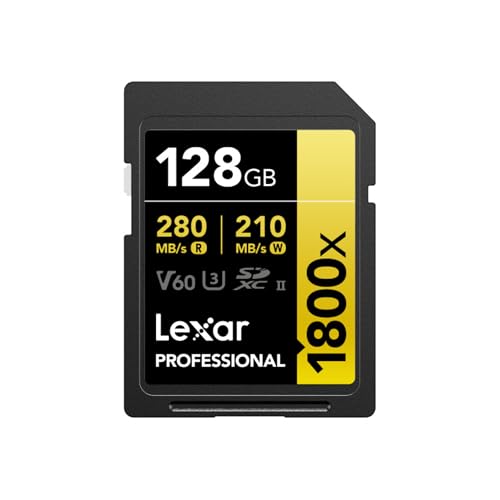
Lexar 128GB Professional 1800x UHS-II SDXC Memory Card (Gold Series) — Quickest shared-kit card
The Lexar Professional 1800x Gold is the strongest UHS-II card in this guide, quoting a 280MB/s read speed and a V60 rating, and it receives the same unvarnished treatment as its stablemates: inside the D7200 it is a UHS-I card. Its burst clearing, its video writing and its general manners in this body will feel like good UHS-I media, because that is the only language the slots speak. The premium buys capability that lives elsewhere, and the elsewhere has to be real in your kit for the purchase to make sense.
Where it does make sense, it makes a lot of it. Through a UHS-II reader, a full card of wedding files imports at a pace that changes an evening’s work, and inside a current mirrorless body the V60 guarantee records demanding 4K video without the anxiety that follows lesser cards. D7200 owners are often exactly the people mid-journey between systems, keeping the Nikon for its optical viewfinder and lens collection while a newer body handles video. For that photographer, this is the card that serves both masters honestly, as long as nobody pretends the Nikon is getting the Gold treatment.
- Format: full-size SDXC, UHS-II bus, backward compatible
- Rating: V60 video class
- Capacity offered here: 128GB
- Quoted read speed: up to 280MB/s with UHS-II hardware
- Job in this camera: dependable UHS-I service, flagship pace elsewhere
Strengths
- Fastest offload in this line-up through a proper reader
- V60 rating covers serious video in a newer body
- One card pool can serve a two-system kit
Trade-offs
- The D7200 sees none of its headline performance
- Premium price is wasted on a single-system Nikon kit
- Requires UHS-II reader hardware to show its best side
Best for: a two-system photographer whose newer body and reader can actually spend this card’s speed
Not suited for: a loyal single-body D7200 kit, where the same money buys two excellent UHS-I cards instead

Lexar 64GB Professional 1667x SD Card, UHS-II, C10, U3, V60, Full HD, 4K, Up To 250MB/s Re — Smaller UHS-II spare
The 64GB Lexar 1667x closes the guide as the compact route into the same shared-kit idea. It is a UHS-II, V60 card rated for reads up to 250MB/s under the right conditions, and in the D7200 it too settles into UHS-I service, filling the second slot or standing by as a spare while its faster life happens in other hardware. Its smaller capacity, a weakness for a main card, is less of an issue in the roles it is actually bought for: a mirror-slot partner, a video card for a second body, or the card that lives in the reader-ready pouch for short assignments.
There is a budgeting elegance to it as well. Photographers curious about UHS-II media often hesitate at flagship capacities and prices; this size lets a kit acquire the interface and the V60 floor at the gentler end of the range, then grow if the newer body becomes the main tool. Just keep the hierarchy straight in the Nikon: slot one should hold your best UHS-I card for the D7200’s own sake, and this Lexar should be bought with its second life already planned, not discovered hopefully after the fact.
- Format: full-size SDXC, UHS-II bus, backward compatible
- Rating: V60 video class, U3, Class 10
- Capacity offered here: 64GB
- Quoted read speed: up to 250MB/s with UHS-II hardware
- Job in this camera: second slot, spare, or shared-kit rotation
Strengths
- Gentlest capacity at which to enter V60 UHS-II media
- Ideal size for a mirror slot or short second-body assignments
- Reads swiftly when paired with a UHS-II reader
Trade-offs
- 64GB is tight for a full RAW day on this sensor
- Still only UHS-I pace inside the Nikon
- Main-card buyers should take the 128GB tier instead
Best for: an owner adding a first UHS-II card for a growing two-body kit, in spare or second-slot duty
Not suited for: a photographer needing one large main card for the D7200 alone
How do the six cards stack up against each other?
The pattern to notice below is the split between cards designed for this camera’s actual bus and cards designed for a wider kit; both groups are useful, but only the first group shows its full character inside the Nikon.
| Card | What you get | Speed promise | Best job in this line-up |
|---|---|---|---|
| SanDisk Ultra 128GB | 128GB full-size SDXC, UHS-I | U1, Class 10 | Steady everyday shooting and backup duty |
| Lexar SILVER 128GB | 128GB full-size SDXC, UHS-I | V30, U3 | Primary card for burst-aware shooting |
| SanDisk Ultra 64GB older generation | 64GB full-size SDXC, UHS-I | Class 10 | Bag spare and gentle single-frame work |
| Lexar Professional 1000x 128GB | 128GB full-size SDXC, UHS-II | U3 era UHS-II | Shared pool with a newer body |
| Lexar Professional 1800x Gold 128GB | 128GB full-size SDXC, UHS-II | V60 | Fastest offload and video in a second body |
| Lexar Professional 1667x 64GB | 64GB full-size SDXC, UHS-II | V60, U3 | Compact spare for a two-system kit |
Why does the D7200 buffer make card choice feel so personal?
Few specification sheets prepare you for the D7200’s buffer. Shooting lossless compressed RAW, the camera holds a burst in the teens of frames before the rate must slow to whatever the card can absorb, and in uncompressed or 14-bit modes the welcome is shorter still. That design was a known compromise of an otherwise superb enthusiast body, and it means the card is not a passive bucket but an active participant in every sequence you shoot: the buffer is the sprinter, the card is the road it runs onto.
This is why two D7200 owners can disagree about the same card. The landscape photographer never meets the buffer at all and finds the budget Ultra indistinguishable from anything else. The bird photographer lives inside the buffer’s limits and feels every difference in sustained write speed as missed or captured frames. Honest buying therefore starts with your own drive-mode habits. If continuous shooting is rare, save the money. If the buffer’s blinking light is the soundtrack of your weekends, the V30 UHS-I tier is not an indulgence but the closest thing to a hardware upgrade this camera accepts through its slots.
How should the second slot be configured for different kinds of days?
Nikon’s menu offers three personalities for slot two, and choosing deliberately beats leaving the factory default forever. Backup mode writes every file to both cards, which suits weddings, christenings and any day that cannot be restaged; the cost is that the slower card governs the pair, so backup mode rewards matched cards. Overflow mode treats the second card as a continuation, best for travel days when changing cards in wind or crowds is its own risk. The third arrangement sends RAW to one slot and JPEG to the other, beloved by sports and event shooters who need quick JPEGs for immediate use while the RAW archive accumulates separately.
Whichever personality you choose, label your cards and keep the roles stable through the day. Photographers get into trouble when a card migrates between slots and devices mid-assignment, because file numbering, folders and your own memory of what lives where all blur at once. A small ritual helps: format both cards in the camera at the start, shoot, offload both that evening, and only then let the cards change jobs. The D7200’s dual slots are a genuine professional feature hiding in an enthusiast body, and a little ceremony is what turns the feature into reliability.
When does it make sense to buy UHS-II media for a UHS-I camera?
The honest answer is: when the card’s working life is bigger than this one camera. A UHS-II purchase for a D7200 kit is really a purchase for the reader on your desk, the mirrorless body in your bag, or the upgrade you have genuinely scheduled. In those lives the card pays rent every week, through imports that finish while the kettle boils or video that a V60 floor makes uneventful. Bought that way, UHS-II media is not a mistake at all; it is infrastructure that happens to also serve the Nikon at the Nikon’s own pace.
The purchase becomes a mistake only when it is made in ignorance, expecting the DSLR to reward it. Retail packaging will never warn you, because the card really can do everything printed on it, just not inside this body. So apply a simple test before paying the UHS-II premium: name the device, other than the D7200, that will use the speed, and how often. If you can answer crisply, proceed with confidence. If the answer is a vague someday, buy the excellent UHS-I card now, bank the difference, and let someday make its own case when it arrives with a camera attached.
Which errors do D7200 owners repeat with cards?
The most expensive D7200 mistake is the hopeful UHS-II upgrade bought to cure buffer frustration. The buffer is limited by the camera and its UHS-I bus together, so the cure that actually exists is the strongest sustained UHS-I card, shorter bursts, or lossless compressed RAW settings that ask less of the pipeline per frame. Diagnose before spending.
A quieter mistake is pairing mismatched cards in backup mode: a swift new card in slot one and a pensioner in slot two. Backup writing proceeds at the slower card’s pace, so the pairing silently downgrades the whole system. Matched pairs, or at least cards of similar sustained behaviour, keep dual-slot writing predictable.
Third, owners often leave a card in the camera for months, topping it up shoot after shoot. Cards are happiest, and files are safest, on a rhythm of offload, verify, format in camera, and shoot again. The format step is not superstition; it rebuilds the file structure cleanly and surfaces a failing card early, during a calm moment rather than during a ceremony.
Finally, beware the too-good listing. Counterfeit SD media targets exactly the famous names in this guide, and a fake card typically passes casual tests before corrupting data under sustained writes. Buy through reputable sellers, run a full-capacity write and verify test on any new card before real work, and keep receipts until a card has survived a few honest assignments.
Final Recommendation
For the D7200 as Nikon built it, the shortlist shortens itself. The Lexar SILVER 128GB is the card this guide would hand to most owners: UHS-I to its core, V30 where it counts, sized for the sensor, and duplicated happily for backup mode. The SanDisk Ultra 128GB stands beside it for steadier shooting lives, and the older 64GB Ultra remains the bag spare that costs little and asks less.
Let the three UHS-II Lexar cards tempt you only when your kit, not your hope, gives them work to do in a newer body or a fast reader. That discipline is the whole lesson of this camera: the D7200 rewards owners who spend on what its slots can actually spend, and it will repay a well-matched UHS-I pair with years of unglamorous, dependable service long after flashier specifications have been forgotten.
How do you test a new card in the D7200 before a real shoot?
The D7200 makes an unusually honest test bench, because its small buffer exposes a card’s sustained manners within seconds. Format the card in the camera, set lossless compressed RAW and continuous high drive, and fire a full burst while counting frames until the rate falters and timing how long the write lamp glows afterwards. Write those two observations on the card’s case insert or in a notes file, because they become your reference: any future card, or the same card ageing, can be measured against the day it was new and known to be healthy.
Then give the card the gentler examinations that bursts cannot provide. Fill it past halfway with a long video or an interval sequence, import the whole contents, and open files from the start, middle and end of the card to confirm nothing degrades as the card fills and warms. Many weak cards are sprinters that fade; the D7200’s typical day of mixed shooting, bursts scattered through hours of single frames, asks for a card that is merely consistent everywhere, and consistency is what this slower test reveals.
Build the test into your ownership rhythm rather than treating it as a one-time ceremony. Run the burst portion whenever a card returns from another device or from months of disuse, and after any occasion when the camera reported a card error, however politely it recovered. The D7200 will happily keep shooting on a declining card until the decline chooses its moment, and the moment it chooses is statistically certain to be the christening, the cup final or the kingfisher’s one patient visit of the spring.
What card kit suits the way D7200 owners actually shoot?
Most D7200 kits settle happily around a simple centre: two matched 128GB V30 UHS-I cards, one in each slot, configured to backup for important days and to overflow for travel. That centre covers the camera’s whole personality, from deliberate landscapes to grandchildren’s sports days, and it costs less than a single flagship UHS-II card while serving this body better. The Lexar SILVER in this guide is the natural citizen of that centre, and buying the pair together from the same source keeps their behaviour as twins rather than as cousins.
Around that centre, add by evidence. The older 64GB Ultra earns its place as the permanent bag spare, the card that rescues the day a main card is left in a reader at home, an accident every photographer eventually schedules. A third matched card joins the kit when multi-day trips make nightly offloads uncertain. UHS-II media joins only when a second body or a fast reader gives it honest work, at which point the Lexar Gold becomes the shared-pool card and the Nikon’s own pair stays exactly as it was, because a system that works should be extended, not disturbed.
Label everything. A strip of tape and a number on each card, a matching note of purchase date and test results, and a case that holds cards in a fixed order will prevent more losses than any specification in this guide. The D7200 generation of owners tends to keep cameras for many years, and card kits kept that long become small archives of their own; the owners who can still say which card shot which wedding are the ones who labelled them when labelling felt unnecessary.
How do file settings change the card equation on this body?
The D7200 lets you negotiate with its buffer through the menu, and wise owners use the negotiation before blaming their cards. Lossless compressed RAW is the standing recommendation: files shrink substantially, bursts stretch further, cards drain sooner, and the quality cost is invisible in ordinary editing. Dropping to 12-bit depth for action work trims files again, and DX shooters who can accept the crop modes gain still more buffer room, because the camera writes fewer pixels per frame. Each of these settings is, in effect, a free card upgrade administered by firmware.
JPEG shooters live in a different economy altogether. A fine-quality JPEG from this sensor is a modest file, and even the gentlest card in this guide can absorb JPEG bursts at a pace that embarrasses the buffer less than RAW ever will. That is why the separating arrangement, RAW to one slot and JPEG to the other, flatters this camera so well: the JPEG card can be a calm Ultra while the RAW card carries the V30 rating, and each file type pays only for the speed it actually consumes.
Video asks the steadiest, least dramatic question of all. The D7200’s Full HD recording writes a continuous, moderate stream that any honest UHS-I card in this guide sustains without warming up, so video should never drive a D7200 card purchase on its own. Let stills, bursts and your slot strategy choose the card, and let video simply enjoy the result, which on this body it always will.
What does a D7200 shooting day feel like with the wrong card, and with the right one?
The wrong card announces itself socially before it announces itself technically. You are at the side of a school pitch or the edge of a family celebration, the action gathers itself into the moment you have been waiting for, and your burst ends not when the moment ends but when the buffer says so. The camera continues at its rationed crawl while the play resolves without you, the write lamp burns through the celebration’s next small moment, and by the time the body is ready again your hands have learned a hesitation that changes how you shoot for the rest of the day, metering your enthusiasm against an invisible tank.
With a well-matched V30 UHS-I card the same day has a different texture, and the difference is not speed in the heroic sense but the absence of interruption. Sequences end because the action ended. The lamp clears while you are still lowering the camera and reviewing with your eyes rather than with the screen. You stop rationing, which means you shoot the tentative frames and the follow-through frames that so often turn out to be the keepers, and the camera returns to being what an enthusiast DSLR should be: a tool whose limits you meet at the level of your own anticipation rather than at the level of its plumbing.
Neither day involves a broken camera or a fraudulent card, and that is the point worth carrying into every purchase in this guide. Card choice on the D7200 is not about unlocking hidden performance; the body’s ceiling is fixed and honestly known. It is about deciding how often the ceiling enters your consciousness. Owners who rarely shoot sequences will never meet it on any card here. Owners who live in continuous drive meet it on every outing, and for them the right card is not an accessory but the difference between a camera that interrupts and a camera that accompanies.
How do D7200 cards behave across seasons and years of ownership?
A card bought with this camera often serves for a remarkable span, because D7200 owners keep their bodies, and the card’s life divides into seasons of its own. In its youth it passes every test trivially and asks for nothing. In its middle years it accumulates the small insults of ownership: insertions counted in thousands, summers in a hot car between shoots, winters in an outside pocket, a few drops onto hard floors inside its case. None of these insults appears on a specification sheet, and all of them together decide whether the card reaches old age gracefully or begins, one autumn, to ask the camera for a second format.
The seasonal rhythm of photography stresses cards in patterns worth respecting. Summer heat eases write pace in a working camera and punishes cards left in parked cars. Winter cold slows everything slightly and tempts owners to swap media with gloves on, over ground that swallows small objects. The travelling seasons add airport trays, hotel-room formats and the particular fatigue in which a card gets left in a reader in another country. A kit that survives years of this is not the kit with the fastest cards; it is the kit with labelled cards, a case with a fixed order, and an owner whose rituals do not depend on being rested and at home.
Plan for graceful replacement rather than sudden bereavement. When a card begins its decline, demote it to the gentlest duties in the house — the spare in the bag, the card for the compact camera, the medium for a photo frame — and promote a tested newcomer into the Nikon’s first slot. Keep one season’s overlap between generations, so the new card proves itself across real assignments while the veteran still covers for it. Owners who manage this small succession find that a decade passes without a single lost frame, which is the only statistic about cards that ultimately matters.
How should you organise files and folders across the two slots?
Dual slots create a filing decision that quietly shapes every import for years. The camera can write both slots into parallel folder structures, continue file numbering across cards, or restart numbering per card, and each choice trades tidiness against safety. Continuous numbering across both slots produces one clean chronological river of files when the cards are imported together, which suits backup mode and the photographer who always offloads both cards the same evening. It punishes the photographer who imports one card and formats it while the other still holds its half, because the river arrives in fragments that software must be taught to merge.
Restarting numbering per card keeps each card self-describing: a card pulled from either slot imports as a complete, coherent set, which suits overflow shooting, travel with partial offloads, and the RAW-plus-JPEG separation where the two cards live genuinely different lives. Its cost is duplicate filenames across cards, harmless inside dated folders on a computer and confusing only to owners who pour every card into one flat directory. Choose the scheme that matches your offload religion, set it once, and resist changing it mid-trip, because consistency is what makes any scheme work when you are tired.
On the computer, honour the structure the camera began. Import into folders named by date and event, keep the two slots’ contents in sibling subfolders until the edit is finished and backed up, and only then merge selects into your library. The D7200’s generation of owners often keeps decade-deep archives, and the archives that remain searchable are the ones whose folder discipline was set in the camera menu years earlier. A card choice takes an afternoon; a filing choice, made well, quietly organises ten thousand evenings of photographs.
What do professional habits look like when the camera is an enthusiast body?
The D7200 sits in the interesting territory where its owners shoot events with professional stakes — family weddings, club finals, christenings — on a body the market files under enthusiasm. The card habits that protect those stakes are borrowed wholesale from professional practice and cost almost nothing to adopt. Two matched cards in backup mode for anything unrepeatable. A formatted spare in the bag whose presence is checked the night before, not discovered during. An offload before the celebration’s own evening ends, because memory cards and wedding cake should never be the only copies of a day by the time everyone sleeps.
Professionals also label and log with a dullness that amateurs find excessive until their first retrieval emergency. A card number, a date, and a line in a notebook or a notes app — which card, which event, copied where — turns a shoebox of media into an archive that can answer questions years later. The D7200’s long ownership spans make that archive valuable: the body bought for a child’s birth ends up shooting that child’s graduation, and the owner who can still find the first day’s card, or at least its verified copies, is the owner who kept the log when it felt like ceremony.
The final professional habit is the rehearsal. Before the unrepeatable day, shoot an ordinary day on the exact cards and settings the event will use, offload it the way the event’s evening will go, and confirm the whole chain works while failure is still funny. Bodies, cards and rituals that have rehearsed together rarely improvise disasters. The D7200 rewards that seriousness out of proportion to its price, which is why so many of its owners, offered newer cameras, keep it in the bag as the body that has never once let them down.
How does video on the D7200 change across a card’s lifetime?
Video is the gentlest demand this camera makes, and for that reason it is the last place a declining card confesses. A card can record the D7200’s Full HD streams happily for months after it has begun to struggle with RAW bursts, because the video river is shallower than the burst flood. Owners who shoot mostly video should therefore not take smooth recording as a certificate of a card’s whole health; the burst test in this guide remains the honest examination, and a card intended to serve both duties should be judged by the harder one.
The pattern reverses for the card bought only for video. A dedicated video card in a D7200 — the card that lives in the body for school concerts, family messages and the occasional documentary impulse — can be the gentlest honest media in this guide, because the stream it must sustain is modest and un unbroken. Even there, the disciplines of the category apply unchanged: format in the camera, offload and verify, and do not let the card become the only home of a recording that matters, because gentleness of duty does not repeal the mortality of media.
Across a card’s lifetime, the wise owner watches the relationship rather than the specification. The D7200 and a good UHS-I card age together gracefully when the rituals hold, and the first sign that the partnership needs renewal is rarely dramatic: a format that takes a breath longer, a file the computer hesitates over, a lamp that burns a moment past its old rhythm. Noticed early, those signs cost a card. Noticed late, they cost a recording. The whole craft of card ownership on this body is learning to notice early, and it is a craft of attention rather than of money.
What belongs on the checklist taped inside the bag?
For this body the distilled routine reads as follows. Before the day: a matched, tested pair in the two slots, the slot-two personality chosen for the day’s purpose rather than inherited from the last one, a formatted spare in the bag, and file settings — compression, bit depth, numbering — confirmed against the shooting you actually expect. During the day: bursts fired with the buffer’s rhythm in mind, cards left in their assigned slots, and no formatting, swapping or lending of media mid-assignment for any reason short of genuine emergency. After the day: both cards offloaded before either is formatted, a sample verified from each, copies resting in two places before the cards return to the case.
The checklist’s brevity is its point, because everything else in this guide exists to explain why those few lines work. The V30 pair works because backup mode obeys the slower card. The spare works because the commonest card emergency is a card left in a reader at home. The slot discipline works because dual-slot cameras reward owners who decide roles in advance. Keep the routine and the D7200 will do what it has done for a decade of owners: disappear into the day, leaving only the photographs and the mild surprise that a camera of its age still feels, on the right media, entirely modern.
Why do D7200 owners stay loyal, and what does that mean for media?
Ask long-term D7200 owners why the body remains in the bag and the answers converge on trust earned across years: the viewfinder, the controls that fall under the fingers without thought, the lens collection that spans decades, and a sensor whose files still print beautifully at the sizes family and club photography actually demand. A camera kept that long changes the economics of its accessories, because a card bought for it is not a stopgap before an upgrade but a long-service component in a settled system, and it should be bought with the same horizon as the body itself.
That horizon argues for the honest middle of this guide over both its extremes. The flagship UHS-II cards promise a future this body will never collect, while the pensioner media at the bottom asks a loyal camera to spend its second decade waiting on its cards. The matched V30 UHS-I pair is the purchase sized to the relationship: media that will serve the body’s full remaining life at the body’s full pace, duplicated for safety, labelled for the archive, and replaced on behaviour rather than on fashion. Loyalty, in a card kit as in a camera bag, is mostly the discipline of buying once, buying correctly, and then paying attention for years.
A final word on patience with an ageing classic
The D7200 has outlived several generations of camera fashion, and its media should be bought with the same long view its owners apply to lenses. A card chosen well this year will still be serving when today’s flagship bodies feel dated, because the Nikon’s requirements were fixed honestly at its birth and will never inflate. That stability is a gift to the buyer: no moving targets, no mode envy, no suspicion that next season’s card announcement will strand your purchase. Buy the matched pair, keep the rituals, and let the rest of the industry chase its ceilings while this camera, on media it can fully use, quietly continues to make the photographs its owners actually keep.
Frequently Asked Questions
Why does my UHS-II card feel no faster than my old card in this camera?
Because both slots are UHS-I, the camera negotiates the older interface and the card’s extra speed stays dormant. The same card will show its pace in a UHS-II reader or newer body, which is the only place the difference can appear.
What card setup suits weddings on the D7200?
Two matched V30 UHS-I cards in backup mode, so every frame exists twice from the moment it is taken. Matched sustained speeds matter because the slower card sets the pace for the pair, and 128GB per slot covers a long day of 24-megapixel files comfortably.
Should I shoot compressed RAW to help the buffer?
Lossless compressed RAW is the sweet setting for most owners: files shrink meaningfully, the buffer lasts longer and the card drains sooner, with no visible penalty in ordinary editing. It is the cheapest performance improvement available on this body, costing nothing at all.
How many cards should a travelling owner carry?
Three is the comfortable number for this dual-slot body: a matched pair in the camera and one formatted spare in the bag. Rotate the spare in each day so no single card carries the whole trip, and offload every evening whenever a laptop or drive is available.
Is the second slot slower than the first?
No, both slots share the same UHS-I specification, so a card performs identically in either. Differences owners perceive between slots almost always trace back to the cards themselves being different models with different sustained write behaviour.
Does using two cards at once slow the camera down?
In backup mode the camera writes every file twice, so the slower card sets the pace and burst recovery follows it; matched cards keep that cost predictable and modest. In overflow mode there is no cost at all until the first card fills, because the second card is simply waiting its turn.
Are the big UHS-II cards at least more future-proof for this camera?
They are future-proof for your kit, not for this body. The D7200 will treat them as UHS-I media for its entire life, so their value depends wholly on other devices you own or genuinely plan to buy. Future-proofing that never meets its future is just expense wearing a sensible coat.
Related Guides
Best SD cards for Canon 7D Mark II compared Setting up backup mode on dual-slot Nikon bodies Understanding UHS-I and UHS-II before you buy


