What's inside
- Key Takeaways
- Quick Picks
- How Did We Judge Portable Drives Beyond Their Headline Speeds?
- Best USBC SSDs in Detail: The Six Picks Examined Closely
- Gen 2, Gen 2×2 and Thunderbolt: Which USB Speeds Can Your Ports Actually Use?
- How Do You Set Up a Portable SSD for Phones, Laptops and Field Backups?
- How Fast Is Fast Enough? Matching a Portable Drive to Real Jobs
- How Do You Keep a Portable Drive Alive for Years?
- Which of These Drives Belongs in Which Bag?
- How Do You Choose Between One Big Drive and Two Smaller Ones?
- What Accessories and Habits Complete a Portable Drive Setup?
- What to Do When a Portable Drive Misbehaves
- How Do These Six Portable USB-C SSDs Differ in Speed, Size and Ruggedness?
- Which Portable SSD Mistakes Waste the Most Money?
- Final Recommendation
- Frequently Asked Questions
- Related Guides
As an Amazon Associate I earn from qualifying purchases. This post may contain affiliate links at no extra cost to you.
gizmoverdict.com is reader-supported. When you buy through links on our site, we may earn an affiliate commission.
Where to buy: every drive below is an Amazon listing linked from the Quick Picks table. Portable drives often include both USB-C and USB-A cables or adapters in the box, but check the listing’s contents for the exact model, since a pocket drive without the right cable is a paperweight with potential.
The best usbc ssds have quietly become the default way files move between machines, because they combine the three things the job needs: speed that embarrasses the spinning portables they replaced, a connector that now appears on laptops, tablets, phones and cameras alike, and sizes that vanish into a jacket pocket. A modern USB-C portable can hold a terabyte of working life, transfer a project folder in the time a kettle takes to boil, and survive the bag it travels in — which is why the category rewards careful choosing rather than grabbing the first small rectangle on sale.
The six picks divide by pace and purpose. Two Samsung and Crucial flagships and a Kingston chase the 2,000 MB/s class over USB 3.2 Gen 2×2, a connection some computers support and many — including every Mac — do not, which this article will keep repeating because it decides real-world speed more than any drive does. The other picks live in the 1,050 MB/s class over the more universal Gen 2 connection, trading headline pace for compatibility that works at full speed almost everywhere. Knowing which class your ports support is the first and most valuable step in the whole purchase.
Beyond speed, the differences that matter are the ones felt in the hand and the bag: build toughness, cable arrangements, encryption for the drive that will inevitably be left somewhere, and behaviour with phones that record video straight to external storage. The picks below were chosen to span those needs honestly, from a creator’s flagship to a budget-friendly traveller, with no drive pretending to be what it is not.
Key Takeaways
- Port support decides real speed: USB 3.2 Gen 2×2 drives reach their 2,000 MB/s class only on hosts that support that standard.
- Every Mac and many laptops cap USB at the Gen 2 rate, where the 1,050 MB/s class drives already run at full pace.
- The Samsung T9 and Crucial X10 Pro lead the fast class; the Kingston XS2000 matches their pace in the smallest body here.
- The Crucial X9 and SSK cover the universal class, with the X9’s broad device compatibility its standout trait.
- SanDisk’s Extreme Portable adds IP65 sealing and hardware encryption to the fast class for field work.
- Cables, cases and phone-recording needs separate these drives in daily life more than benchmarks do.
Quick Picks
| Pick | Badge | Why it made the list |
|---|---|---|
| Samsung T9 2TB | Fast-class flagship, roomy | Samsung’s 2TB portable flagship in the 2,000 MB/s class, with the capacity to be a whole working library. |
| Crucial X10 Pro 1TB | Fast-class creator pick | Crucial’s creator flagship quoting up to 2,100MB/s reads and 2,000MB/s writes, built for professional field workflows. |
| Crucial X9 1TB | Universal-class all-rounder | The X10’s Gen 2 sibling at up to 1050MB/s, compatible with Windows, Mac and Android at full pace almost everywhere. |
| SanDisk Extreme Portable 1TB (new model) | Fast class with sealing and encryption | SanDisk’s new-model Extreme at up to 2000MB/s, adding IP65 resistance and 256-bit AES encryption to the fast class. |
| Kingston XS2000 1TB | Smallest fast-class drive | A pocket-sized Gen 2×2 drive quoting up to 2000MB/s, with a removable sleeve, for travellers who count grams. |
| SSK Portable SSD 1TB | Value traveller with both cables | A 1TB aluminium portable at up to 1050MB/s with USB-A and USB-C cables in the box and phone OTG support in its listing. |
How Did We Judge Portable Drives Beyond Their Headline Speeds?
We began with the honesty test this category demands: what speed will the drive actually deliver on the computers people own? A Gen 2×2 drive is a superb purchase for a desktop with that port and a capped one for a Mac, so each pick’s class is stated in its spec box and the buying guide explains the standards in plain terms. A recommendation that hides the host’s role in the result would be a benchmark, not advice.
Build and travel manners came next. These drives live in bags, pockets and camera kits, so enclosure toughness, drop and water resistance where the listing states it, size in the hand, and whether the cable arrangement suits a phone as well as a laptop all carried real weight. A drive that needs a dongle to reach an iPhone loses to a slightly slower drive that simply plugs in, every working day of the year.
Finally we checked the working features: hardware encryption for drives carrying client material, sustained pace for the long copies that field backups involve, and compatibility breadth — Windows, Mac, Android, iPhone ProRes recording — because a portable drive’s whole promise is that it works wherever it lands. Price was weighed last, as value per honest capability rather than per printed megabyte-per-second.
Best USBC SSDs in Detail: The Six Picks Examined Closely
The fast Gen 2×2 class comes first, then the universal Gen 2 class, so you can shortlist by the ports you own before falling for any particular drive. Each spec box states the connection class in plain words.

Samsung T9 2TB — Fast-class flagship, roomy
The T9 is Samsung’s statement of what the fast class should feel like: a compact, rubber-armoured drive in the 2,000 MB/s class over USB 3.2 Gen 2×2, here in a 2TB size that turns it from a transfer tool into a travelling library. On a host with a Gen 2×2 port — mostly Windows desktops and some laptops — it moves footage, virtual machines and game libraries at speeds that make the copy progress bar feel decorative. Samsung’s software adds password protection for the drive’s contents, and the build shrugs off the drops and knocks of a working bag with the confidence its T-series predecessors established.
The honest asterisk, stated as plainly here as in the guide below, is that Macs and many laptops will run it at Gen 2 pace, where it remains quick but no longer singular. Owners of such machines should weigh whether the 2TB capacity and Samsung’s polish justify the fast-class price for speed they cannot unlock today — for a library drive that may meet a Gen 2×2 desktop later, it can. For a pure transfer shuttle between two capped laptops, the universal class below delivers the same lived experience for less, and this article would rather tell you that than sell you a headline.
The T9’s software deserves a sentence of its own, because Samsung’s portable application is where its password protection and firmware updates live, and Samsung actually maintains it — a drive bought today will still be receiving attention when its warranty matures. That maintenance is part of what the flagship premium purchases, invisible in benchmarks and obvious in year three. The 2TB size also changes how the drive ages: with room to spare, its controller keeps the free-space headroom that sustains pace and spreads wear, so a T9 bought as a library tends to feel as quick in its third year as its first. For the owner with a Gen 2×2 desktop at the centre of their setup and a bag that travels, it remains the most complete expression of the fast class in this list.
- Capacity: 2TB in this listing, model MU-PG2T0B/AM, black
- Connection class: USB 3.2 Gen 2×2, up to 2,000 MB/s per the listing title
- Host note: full pace needs a Gen 2×2 port; Macs run it at Gen 2 speeds
- Extras: Samsung portable software with password protection
- Build: compact armoured enclosure for travel duty
Strengths
- Two terabytes in the fastest class makes it a true library drive
- Samsung software and support polish the ownership experience
- Armoured build suits a life spent in working bags
Trade-offs
- Fast-class pace is locked behind Gen 2×2 hosts
- Pays a flagship premium over universal-class drives
- Rubberised shell picks up dust and pocket lint
Best for: a Gen 2×2 desktop owner whose portable drive is a working library
Not suited for: a Mac-only setup that would never unlock its headline speed
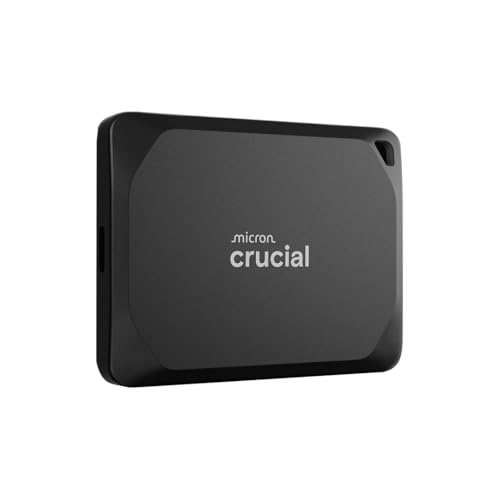
Crucial X10 Pro 1TB — Fast-class creator pick
The X10 Pro is Crucial aiming directly at people who earn money with cameras. Its listing quotes up to 2,100MB/s reads and 2,000MB/s writes over USB-C — the Gen 2×2 fast class again, with the same host caveat that follows every drive in this tier — and the pitch to creators is sustained, dependable transfers when a card’s worth of originals needs to become two copies before dinner. The anodised aluminium body feels like equipment rather than packaging, sized for a pocket or a pouch in a camera bag, and Crucial positions it for direct work with the phones and cameras that now record to external storage.
In the field its virtues compound: fast offloads shorten the worst hour of a shoot day, the metal shell tolerates being tossed onto a tailgate, and a terabyte holds a serious day’s capture from most cameras. Professionals should still run the two-copy discipline — this drive plus a laptop or a second drive — because no single device is a backup strategy, however professional its finish. As the fast class’s creator-focused entry, it competes with the Samsung on polish and beats it on quoted write pace, which is the direction field work actually cares about.
Fieldcraft separates the X10 Pro’s real users from its spec-sheet admirers, so here is the routine its design assumes: offload the card to the X10 Pro and to a second location before the card is formatted, keep the drive in its own pouch so its whereabouts are never a guess, and let its metal shell take the knocks that a plastic drive would remember. Crucial’s creator focus also means the drive behaves predictably with the direct-recording workflows of modern cameras and phones, holding its pace through the long single writes that video produces rather than shining only in bursts. Judged by the standards of a working kit bag — speed when it counts, manners under pressure, no surprises at midnight — the X10 Pro earns its flagship billing in the class it competes in.
- Capacity: 1TB in this listing
- Connection class: USB-C Gen 2×2 fast class, up to 2,100MB/s reads per the listing
- Writes: up to 2,000MB/s quoted in the listing title
- Host note: full pace needs a Gen 2×2 port on the computer
- Build: anodised aluminium portable enclosure for creators
Strengths
- Quoted write pace leads the fast class for offload work
- Metal build feels and survives like field equipment
- Creator positioning includes phone and camera workflows
Trade-offs
- Gen 2×2 caveat applies in full on Macs and many laptops
- Terabyte is a day’s capture, not an archive
- Premium pricing over the X9 sibling below
Best for: photographers and videographers offloading cards in the field
Not suited for: archive duty where capacity matters more than offload pace

Crucial X9 1TB — Universal-class all-rounder
The X9 is the drive this article would hand to the widest range of people, precisely because it refuses the fast class’s asterisk. Its up to 1050MB/s over USB 3.2 Gen 2 is a pace that Macs, laptops, tablets and phones can essentially all actually deliver, so the number on the box is the number in your life. Crucial’s listing leans on that breadth — Windows, Mac and Android named outright — and the drive’s small, light body with a lanyard-friendly corner suits the student bag, the work tote and the travel pouch equally.
Daily use is where its argument completes itself. Game libraries move between machines without an overnight wait, phone backups finish while coffee brews, and a terabyte of documents, photos and installers lives in a coat pocket. It lacks the flagship armour and encryption headlines of pricier picks, so a drive carrying sensitive client work should look at the SanDisk below, but for the universal job — my files, with me, fast, everywhere — the X9’s combination of honest pace, broad compatibility and sensible pricing is the centre of this category, and the pick most readers should start from.
A small X9 habit worth adopting is to treat it as the household’s universal adapter for storage problems: the drive that rescues files from a dying laptop, carries the presentation when the venue’s Wi-Fi cannot be trusted, and holds the photo library during a house move between computers. Its breadth of compatibility means it is the one drive that never needs a footnote when lent to a relative, and its price means lending it does not require a speech. Owners should still label it and keep its cable with it, because a universal drive’s only real enemy is being left, unlabelled, in someone else’s drawer. Within its class it sets the standard the others are measured against, and most households would be served by owning this one first and specialising later.
- Capacity: 1TB in this listing, model CT1000X9SSD902
- Connection class: USB 3.2 Gen 2, up to 1050MB/s per the listing title
- Compatibility in listing: Windows, Mac and Android named
- Host note: Gen 2 pace is achievable on essentially all USB-C hosts
- Build: compact lightweight portable enclosure
Strengths
- Full rated pace on virtually every USB-C computer and phone
- Broad stated compatibility across the major platforms
- Sensible pricing for a terabyte of honest speed
Trade-offs
- Half the headline pace of the Gen 2×2 class on equipped hosts
- No ruggedness or encryption headline features
- Plain design that disappears in a bag — label it
Best for: students, travellers and mixed-device households wanting one drive for everything
Not suited for: field professionals needing sealing or encryption by default

SanDisk Extreme Portable 1TB (new model) — Fast class with sealing and encryption
SanDisk’s Extreme line built its reputation outdoors, and this new-model 1TB entry keeps the formula while joining the fast class: up to 2000MB/s over USB-C 3.2 Gen 2 — note the listing’s own wording, which places its connection generation carefully — with IP65 water and dust resistance, drop protection up to three metres, and 256-bit AES hardware encryption, all stated in the listing title itself. That combination is rare: most fast drives are unsealed, and most sealed drives are slow, so a drive that survives a trail, a building site or a festival while still offloading at flagship pace occupies a niche with few rivals.
The encryption deserves its sentence, because a drive this portable is a drive that will someday be left in a rental car, and hardware AES with a password means that day costs you hardware rather than data. The carabiner loop and compact shape suit clipping inside a bag rather than loose in a pocket. As ever in this category, verify the speed your host can feed it before valuing the headline, and treat the sealing as insurance rather than an invitation to swim with it. For field workers whose drives live hard lives, this is the fast class wearing proper boots.
The SanDisk’s encryption setup is the one task its owners must not postpone, because a sealed, drop-proof drive that is lost unencrypted has protected its data against everything except the person who picks it up. Spend the five minutes with the included security software on day one, choose a password that is recorded somewhere safe, and the drive’s physical toughness and its digital toughness finally match. Its shape also rewards a word: the flattened profile with its loop rides against the inside of a bag without printing through or snagging, a small ergonomic victory that owners notice daily. For the outdoor, festival, site and travel workloads it was designed around, no other pick here combines its three virtues — pace, sealing and locking — in one shell.
- Capacity: 1TB in this listing, new model
- Connection: USB-C 3.2 Gen 2 with up to 2000MB/s transfers per the listing title
- Sealing in listing: IP65 water and dust resistance, up to 3M drop protection
- Encryption in listing: 256-bit AES hardware encryption
- Build: compact enclosure with attachment loop for bags
Strengths
- Sealing and drop protection rare in the fast class
- Hardware encryption guards the inevitable lost-drive day
- Attachment loop suits clipping inside working bags
Trade-offs
- Confirm your host can feed its headline pace before paying for it
- Sealed shell makes it slightly bulkier than slick rivals
- Encryption setup is one more routine to actually complete
Best for: field and travel work where the drive takes weather and knocks
Not suited for: a desk-bound shuttle that never leaves the office

Kingston XS2000 1TB — Smallest fast-class drive
The XS2000’s party trick is proportion: Kingston packs the Gen 2×2 fast class — up to 2000MB/s in the listing — into a body closer to a chunky USB stick than a portable drive, then adds a removable rubber sleeve for the knocks of travel. For the ultralight kit, the laptop sleeve with no spare room, or the phone shooter who wants a terabyte riding in a jeans pocket, that size is not a gimmick but the entire point. iPhone and Android creators recording high-resolution video to external storage will find its shape especially cooperative, hanging off a short cable without dragging a brick behind the phone.
The compromises are the honest ones of miniaturisation. A tiny metal body has little surface to shed heat during a terabyte-long copy, the sleeve that protects it also insulates it, and the fast class’s host caveat applies here with full force — a Gen 2×2 port is required for the headline, and Macs will run it at half pace. None of that dents its purpose. Judged as the drive that is actually with you — in the pocket, on the phone, in the smallest bag — the XS2000 makes the strongest case in this list that the best storage is the storage you did not leave at home.
Heat management is the XS2000 owner’s one real skill, and it is easily learned: for a very long copy, slip the sleeve off and let the metal breathe, set the drive on a surface that is not a warm laptop lid, and let it rest a moment between terabyte-scale jobs. In exchange, the drive delivers the fast class’s pace from a body that genuinely disappears — clipped inside a sling, riding in a coin pocket, hanging off a phone rig without announcing itself. Kingston includes the sleeve because the drive’s natural habitat is other people’s pockets and bags, and that self-knowledge is charming in a product. For travellers who have ever left a larger drive behind because it was one item too many, the XS2000’s argument is complete the moment it is held.
- Capacity: 1TB in this listing, model SXS2000/1000G
- Connection class: USB 3.2 Gen 2×2, up to 2000MB/s per the listing title
- Build: pocket-sized body with removable protective sleeve
- Host note: full pace needs Gen 2×2; capped hosts run it at Gen 2 speeds
- Role: ultralight travel and phone-recording companion
Strengths
- Fast-class pace in by far the smallest body here
- Sleeve adds knock protection without permanent bulk
- Ideal shape for phone video recording workflows
Trade-offs
- Small body sheds heat poorly on very long copies
- Gen 2×2 caveat applies in full
- Sleeve is easy to lose, being removable
Best for: ultralight travellers and phone creators who count every gram
Not suited for: all-day copy stations where a larger shell runs cooler

SSK Portable SSD 1TB — Value traveller with both cables
SSK is the value name in this list, and its portable makes the value case in practical rather than corner-cut terms: an aluminium enclosure, up to 1050MB/s over USB 3.2 Gen 2, and — the detail owners end up loving — both A and C cables in the box, so the drive plugs into the ancient desktop and the newest phone without a dongle hunt. The listing also names SMART and TRIM support and OTG phone compatibility including ProRes recording on recent Pro iPhones, which places this budget drive inside workflows that used to require flagship money.
Expectations should be set by its class rather than its price tag’s ambition. The Gen 2 pace is the universal, honest kind — full speed on essentially any modern host — and the aluminium shell handles bag life well, while the brand’s support operation is smaller than Samsung’s or Crucial’s and long-copy thermals are adequate rather than exceptional. For a second drive, a student’s everything drive, or the backup that lives in a glovebox, those trade-offs are correctly priced. It closes the list as proof that the universal class, done completely, needs no apology at any budget.
The SSK’s LED indicator and honest feature list hint at its maker’s philosophy: the things owners actually check — is it working, is it recognised, does it support the phone in my hand — are answered on the box and on the drive. Its aluminium shell also makes it the natural glovebox and second-bag drive, the copy that travels separately from the main kit so that a single lost bag cannot take both. Value drives earn suspicion in categories where quality hides, but portable storage at Gen 2 speeds is a mature technology, and the SSK demonstrates the maturity: correct pace, correct cables, correct features, no theatre. Buy it as the second drive in a two-drive discipline and it may quietly become the most useful storage you own.
- Capacity: 1TB in this listing
- Connection class: USB 3.2 Gen 2 up to 1050MB/s per the listing title
- In the box per listing: USB A and C cables, aluminium enclosure
- Features in listing: SMART, TRIM, LED indicator, OTG phone support
- Role: value all-rounder and second-drive duty
Strengths
- Both cable types included — plugs into anything immediately
- Phone recording and OTG support at a value price
- Aluminium shell feels above its price class
Trade-offs
- Smaller brand support operation than the majors
- Gen 2 pace only, by design
- Thermals on marathon copies are merely adequate
Best for: a value all-rounder, second drive or student everything drive
Not suited for: professionals who lean on vendor support contracts
Gen 2, Gen 2×2 and Thunderbolt: Which USB Speeds Can Your Ports Actually Use?
USB naming is a swamp, so here is the map that matters for these drives. USB 3.2 Gen 2, the connection behind the X9 and SSK above, moves data at up to ten gigabits per second, which becomes roughly 1,050 MB/s in the real world, and it is supported by essentially every USB-C computer, tablet and phone of the last several years — including every Mac. When a Gen 2 drive promises its pace, your machine can almost certainly deliver it, which is why this article calls that class the universal one.
USB 3.2 Gen 2×2 doubles the lanes to twenty gigabits, enabling the 2,000 MB/s class of the T9, X10 Pro and XS2000 — but host support is patchy, concentrated in Windows desktops and some laptops, and absent from all Macs and most phones. Plug a Gen 2×2 drive into a Gen 2 port and it works perfectly at Gen 2 pace, which is either a fine outcome or a wasted premium depending on whether a faster host waits in your future. Check your exact machine’s port specification before paying for the fast class; the drive cannot outrun the socket.
Thunderbolt and USB4 ports, common on newer Macs and premium laptops, accept all of these USB drives happily, again at the USB speeds the drive itself supports. A USB-C connector’s shape guarantees nothing about its speed — the same oval socket hides standards spanning a forty-fold range — so the specification sheet of the computer, not the look of the port, is the document that decides. Five minutes with that sheet is the highest-value research in this entire category.
Cables deserve the final word, because the wrong one quietly halves everything. Use the cable supplied with the drive where possible, keep runs short, and be suspicious of long, thin bargain cables whose ratings are printed nowhere. Many ‘slow drive’ stories are cable stories wearing a disguise, and swapping back to the supplied lead is the first diagnostic any owner should try before blaming the drive, the port or this article.
How Do You Set Up a Portable SSD for Phones, Laptops and Field Backups?
Decide the file system before the first copy, because it decides where the drive can work. exFAT is the traveller’s default, readable and writable by Windows, Mac, Android and iPhones alike, with no practical file-size limit for video work. Owners living entirely inside one ecosystem can choose that system’s native format for its journaling and permissions, but a drive that must land anywhere should stay exFAT, and any reformat must happen before real data moves in, since formatting erases everything on the drive.
Set up the phone workflow deliberately if you record video externally. Use the shortest quality cable that reaches comfortably, confirm the phone sees the drive and reports its free space, and record a test clip at your highest setting before the moment matters. Keep the drive’s battery burden in mind — the phone powers it — and stop treating a nearly full drive as a recording target, because a capture that hits a full disk fails at the worst possible second. Offload and clear the drive as part of the same ritual, every time.
For field backups, adopt the two-copy rule in its simplest form: originals stay on the card until they exist in two other places, one of which can absolutely be a drive from this list. Label each drive with its contents and the date, keep the pair in different bags, and verify a random file from the copy before formatting anything. The drives above are fast enough that this discipline costs minutes; the one time it saves a shoot, it pays for every minute forever.
How Fast Is Fast Enough? Matching a Portable Drive to Real Jobs
Translate the classes into the jobs people actually wait on. A twenty-gigabyte project folder crosses a Gen 2 drive in well under a minute and a Gen 2×2 drive in roughly half that; a full terabyte backup takes the better part of half an hour on the universal class and meaningfully less on the fast class, assuming the computer and cable cooperate. For daily shuttling — documents, photos, a project at a time — both classes feel instant, and the difference lives only in the jobs measured in hundreds of gigabytes: full-drive clones, a day of cinema footage, a virtual-machine library on the move.
That arithmetic should steer the budget. Owners whose largest regular transfer is a photo card will never feel the fast class working, and their money buys more happiness as capacity or as a second drive for the two-copy discipline. Owners whose week contains three full-card offloads and a workstation clone feel the fast class every single day, provided — the eternal proviso — their ports support it. The honest question is never which drive is fastest, but which waiting you actually do, and how often you do it.
There is one more job where pace hides: working directly from the drive. Editing photos, scrubbing a timeline or running a virtual machine from a portable SSD stresses small, random reads rather than the big sequential copies the boxes advertise, and every drive in this list handles that work comfortably at either class. If your portable is a working drive rather than a transfer shuttle, judge it by capacity, build and compatibility first — the benchmark gap between these six narrows to nearly nothing at the desk where the work happens.
How Do You Keep a Portable Drive Alive for Years?
Portable drives die of their lifestyle, not their electronics: the drop onto concrete, the cable yanked sideways, the bag left in a hot car, the unplug mid-write that corrupts the one folder that mattered. The countermeasures are correspondingly physical. Keep the drive in a pouch or clipped inside the bag rather than loose among keys, use the supplied cable and replace it when it frays rather than when it fails, and eject properly every time — the two-second habit that prevents the commonest data loss in the entire category.
Heat and fullness are the slow poisons. A drive stored in a warm place ages faster than one kept cool, and a drive kept brim-full slows and wears as its controller shuffles data for room, so archive finished work to larger storage and let the portable stay a traveller rather than becoming a warehouse. Periodically — twice a year is plenty — plug it in, let it sit powered for a while so its controller can refresh its housekeeping, and glance at a few files to confirm they open. Flash storage appreciates being visited.
Finally, remember what a portable drive is for in a sound storage life: it is the fast copy, the travelling copy, the convenient copy — never the only copy. The owners who lose data to portable drives are almost never the ones whose drive failed; they are the ones whose single copy was in the bag that did not come home. Pair any pick in this article with a stay-at-home backup and the whole category becomes what it should be: pure convenience, carrying no risk at all.
Which of These Drives Belongs in Which Bag?
The photographer’s bag answers first: the X10 Pro for the offload ritual at the end of the shoot, when its quoted write pace shortens the worst hour of the day, or the SanDisk when the shoot happens outdoors in weather and the drive must be sealed against the same sky as the camera. Either way the card is not formatted until two copies exist, and the drive that holds one of them should be the one built for the environment it travels through. Photography made these drives professional tools; the least the profession can do is use them professionally.
The student’s and traveller’s bag answers differently: the X9, because its pace works at full tilt on every machine a campus or a continent can offer, and its price leaves budget for the second drive that the backup rule demands. The SSK plays the same role where money is tightest, with its two cables quietly solving the hostel-desktop problem nobody anticipates. For these owners the fast class is a luxury their ports mostly cannot feed, and the universal class is not a compromise but the correct engineering answer to the machines they actually own.
The phone creator’s pocket answers with the XS2000, the drive shaped for the job of hanging off a recording phone without changing how the phone is held, while the desk-bound professional’s bag — if it travels at all — carries the T9, whose capacity makes it a library rather than a shuttle. Notice that every answer began with the bag, not the benchmark: portable storage succeeds by being present, compatible and quick enough, in that order, and the six picks here divide those virtues so that some honest combination exists for every kind of carrying.
How Do You Choose Between One Big Drive and Two Smaller Ones?
The two-drive answer wins more often than the specification sheets suggest. Two 1TB drives — one working, one mirroring it in a different bag — cost little more than a single 2TB flagship, deliver the same total capacity, and convert the category’s worst day, the lost or dead drive, from a catastrophe into an errand. For travellers, creators and anyone whose files earn money, that redundancy is worth more than any speed class, because the fast class can be rented back with money while last Tuesday’s shoot cannot be re-photographed at any price.
The single big drive wins in its own honest territory: the working library that must be whole. A video editor whose current project spans 1.6TB cannot split it across a pair of smaller drives without turning every session into a filing exercise, and a virtual-machine library likewise wants one contiguous home. Where the workload is indivisible, buy the single capacious drive — the T9’s 2TB configuration exists for exactly this shape of work — and achieve redundancy at the desk instead, with a stay-at-home backup that mirrors the traveller whenever it returns.
Many owners end with the hybrid, and it is probably the mature end-state of the category: one large, fast library drive for the work itself, and one modest universal drive as the travelling mirror and universal spare. The pair in this list that embodies it most naturally is the T9 with an X9 alongside — flagship and all-rounder, each covering the other’s weaknesses, together costing less than the regret of owning either one alone with no copy of anything.
What Accessories and Habits Complete a Portable Drive Setup?
The kit around the drive decides more days than the drive does. A short, quality cable for phone work and the full-length supplied cable for the desk; a pouch that keeps the drive findable and its cable with it; a label with the drive’s name, contents class and a return number; and, for the drives with encryption, the password recorded in a password manager rather than in memory. None of this costs meaningful money, and all of it together is the difference between a storage system and a small rectangle that is sometimes in the bag and sometimes not.
Two habits complete the setup. The first is the offload ritual, identical every time: copy, verify one file opens from the copy, and only then consider the source for formatting — a sequence so cheap that skipping it should feel physically uncomfortable. The second is the homecoming ritual: when the drive returns to base, it gets mirrored to the stay-at-home backup before it is cleared for the next trip, so the travelling copy and the home copy are never simultaneously stale. Rituals sound dull until the day they are the reason a disaster is a story instead of a loss.
Review the setup twice a year with the same glance you give the drive’s health. Cables fray, pouches migrate, labels fade and the password manager entry written in a hurry turns out to be missing its hint. Fifteen minutes of maintenance keeps the whole arrangement honest, which is the recurring bargain of this entire category: a little structure, applied consistently, in exchange for never thinking about storage at the moments when storage is all that matters.
What to Do When a Portable Drive Misbehaves
Start with the cable, because the cable is guilty more often than the drive. Swap in the supplied lead, seat it firmly at both ends, and try a second port before concluding anything; a pocket drive’s connector also collects lint, which a wooden toothpick and patience can clear while a metal tool should never attempt. Most ‘dead drive’ stories end at this paragraph, with the drive blinking back to life and the owner quietly reordering their suspicions for next time — cable first, port second, computer third, drive last.
If the drive appears but its contents do not, resist the urge to accept the operating system’s first offer to format it. That prompt means the file system is confused, not that the data is gone, and formatting converts a recoverable confusion into an actual loss. Connect the drive to a machine of the other ecosystem if one is available, since a volume unreadable on one side is sometimes merely formatted for the other, and use recovery software on a copy of the drive rather than the original wherever the data matters. The two-copy discipline exists precisely so that this paragraph remains a formality.
A drive that runs hot and slow on long copies is usually reporting its environment rather than its death: give it air, remove the sleeve, shorten the session, and watch the pace recover. A drive that disconnects under its own power draw on a phone may simply need a fuller battery or a powered hub at the desk. Portable storage lives at the end of a cable in the physical world, and the physical world — lint, heat, tired cables, hungry phones — explains nearly all of its mysteries before the electronics need to be suspected at all.
When a drive genuinely fails, the failure should be an errand: the mirror copy takes over the travelling role, the warranty conversation begins with the receipt you kept, and no file is mourned because no file lived in only one place. That calm outcome is not luck; it is the system this article has been assembling piece by piece — honest class, right format, two copies, small rituals — finally doing its job on the one day it was all for.
How Do These Six Portable USB-C SSDs Differ in Speed, Size and Ruggedness?
| Pick | Form and interface | Standout trait | Watch out for |
|---|---|---|---|
| Samsung T9 2TB | Portable USB-C, 2TB | Gen 2×2 fast class, armoured | Capped on Macs and many laptops |
| Crucial X10 Pro 1TB | Portable USB-C, 1TB | Gen 2×2, quoted writes lead class | Host support decides real pace |
| Crucial X9 1TB | Portable USB-C, 1TB | Gen 2 universal pace, broad fit | No rugged or encryption extras |
| SanDisk Extreme Portable 1TB (new model) | Portable USB-C, 1TB | IP65 sealing plus AES encryption | Verify host pace before valuing speed |
| Kingston XS2000 1TB | Portable USB-C, 1TB | Gen 2×2 pace, stick-like size | Heat on marathon copies |
| SSK Portable SSD 1TB | Portable USB-C, 1TB | Gen 2 pace, both cables included | Smaller support operation |
The table’s second column is the one to shop by, because connection class predicts your real speed more faithfully than any headline. Match the class to your ports first, then let size, sealing and encryption settle the choice among the survivors.
Which Portable SSD Mistakes Waste the Most Money?
Paying for the Gen 2×2 class to use with a Mac is the category’s signature waste, repeated daily by shoppers who read the drive’s box and not their computer’s specification. The drive will work beautifully at half its headline pace, which makes the mistake painless enough to go unnoticed and expensive enough to matter. The universal class exists precisely for those machines, at lower prices, with nothing lost in lived experience.
Buying a single drive and calling it a backup is the second error, and the cruellest, because it feels responsible. A portable drive is the most losable, droppable and leavable object in the entire storage world; the files that matter deserve to exist in two places, ideally with one of them not travelling. Let these drives be the fast, convenient copy — never the only copy.
The third mistake is ignoring the cable and the format until the airport. A drive formatted for one ecosystem, with the wrong cable in the bag, discovered at a departure gate, is a small tragedy of preparation. Set the format for your real device mix, keep the supplied cables with the drive, and test the whole chain at home, where the stakes are a shrug instead of a missed recording.
Final Recommendation
Match the class to your ports and the rest resolves itself: Gen 2×2 hosts should take the T9 for library capacity, the X10 Pro for field offloads or the XS2000 for the smallest bag, while everyone else — which is most people — should start with the X9’s universal honesty, step up to the SanDisk when sealing and encryption join the brief, or save with the SSK when both cables and a sensible price matter most. Every drive here will feel miraculously fast beside the spinning portables they replace.
Buy the class your computer can feed, format it for the devices you actually own, and keep a second copy of anything irreplaceable — then the little drive in your pocket becomes what this category promised all along: your whole working life, carried lightly, at the speed of thought.
Frequently Asked Questions
Why is my 2,000 MB/s drive only reaching about 1,050 MB/s on my Mac?
Because Macs do not support USB 3.2 Gen 2×2, so the drive negotiates the fastest standard both sides share, which is Gen 2 at roughly that pace. Nothing is faulty — the drive will reach its class speeds on a Gen 2×2 equipped Windows machine. This is the single most common surprise in the category, and it is why this article separates the picks into fast and universal classes from the start.
Can I record iPhone video directly to one of these drives?
Yes, on the Pro iPhone models that support external recording, provided the drive is formatted exFAT, connected with a suitable short cable and has ample free space. The SSK listing names ProRes compatibility explicitly, and the fast, compact drives such as the XS2000 suit the workflow physically. Always record a test clip at your highest setting before relying on the setup for a real moment.
Which file system should I choose for a drive shared between Windows and Mac?
exFAT is the practical answer: both systems read and write it natively, phones handle it well, and it carries the large files video work produces. Owners entirely inside one ecosystem can use its native format for extra features, but a shared drive in exFAT avoids the read-only surprises that greet the unprepared. Decide before loading data, since changing later means erasing the drive.
Do portable SSDs need to be ejected before unplugging?
They should be, every time. A portable SSD may still be finishing writes when its activity light looks calm, and yanking the cable mid-write is how file systems corrupt. Use the eject command, wait the extra two seconds, and unplug. Owners who build the habit keep their drives boring for years; owners who skip it eventually meet the repair message at the worst moment.
How much free space should I leave on a portable SSD?
Aim to keep at least fifteen percent free in regular use, and far more when recording video, where a capture must never meet a full disk. A nearly full SSD also slows and wears faster, as its controller shuffles data to find room. When a portable fills, archive its finished contents to larger storage and let the drive return to being a fast, roomy traveller.
Are these drives fast enough to run applications or games from?
Yes — every drive here is far quicker than the spinning portables that people used to run libraries from, and games, photo catalogues and documents all work happily from them. Large game installs on some consoles and computers have their own rules about external storage, so check your platform’s policy for playing from USB rather than merely storing. For ordinary applications and media work, running from these drives is a normal, supported way to live, not a workaround.
Can one of these drives replace my cloud storage?
It can replace the parts of the cloud you use as a fast shuttle and a working library, and for large video or photo collections it will feel dramatically quicker than any upload. What it cannot replace is the cloud’s geography: a copy in another building, immune to the fire, flood or theft that takes the desk and the bag together. The mature setup uses both for what they are — the portable drive for speed and daily work, the cloud or an off-site copy for the disaster tier — and owners who frame it that way stop paying for cloud capacity they never open while keeping the one protection no pocket drive can offer.
Related Guides
Keep exploring with these portable storage guides: best portable ssds for iphone video best external ssds for mac best rugged drives for travel


