What's inside
- Key Takeaways
- Quick Picks
- How Did We Separate Real Hardware Encryption From Marketing?
- Best SSDs With Hardware Encryption in Detail: The Six Picks Examined Closely
- What Should You Check Before Trusting a Drive With Sensitive Files?
- How Do You Set Up an Encrypted Drive on Its First Day?
- What Happens on the Day an Encrypted Drive Is Lost?
- How Should an Organisation Issue and Manage These Drives?
- PIN Pad, Physical Key or Password: Which Lock Suits Your Life?
- How Do Encrypted Drives Fit Alongside Encrypted Computers?
- What Should a Buyer Verify in the First Week of Ownership?
- How to Talk About These Drives With Clients and Auditors
- How Do These Six Hardware-Encrypted SSDs Compare on Security, Speed and Unlock Method?
- Which Encrypted-Drive Mistakes Undo All the Protection?
- Final Recommendation
- Frequently Asked Questions
- Related Guides
As an Amazon Associate I earn from qualifying purchases. This post may contain affiliate links at no extra cost to you.
gizmoverdict.com is reader-supported. When you buy through links on our site, we may earn an affiliate commission.
Where to buy: all six drives are listed on Amazon, and the Quick Picks table links each name to its listing. Encrypted drives come in several capacities under near-identical names, so confirm the capacity and the exact model code on the listing before ordering, especially on the Apricorn and iStorage lines.
The best ssds with hardware encryption solve a problem that software alone handles awkwardly: the drive itself refuses to reveal its contents until the correct secret is presented, and it does so before any operating system loads. Unplug one of these drives, hand it to a stranger, plug it into a different computer — the data stays scrambled, because the key never lived in Windows or macOS in the first place. For medical records, client files, legal work and plain personal archives, that independence from the host machine is the entire point.
This roundup deliberately contains two different species, and the distinction matters more than any speed figure. The first five picks are fortress drives: PIN pads or physical keys on the enclosure, encryption engines validated under the FIPS 140-2 programme where the listing states it, and designs meant to satisfy compliance officers as much as owners. The sixth pick, Samsung’s T7 Shield, belongs to the lighter second species — a fast, rugged portable drive whose hardware encryption unlocks through a password in Samsung’s software. It is genuinely useful protection against casual loss, but it is not the same class of device, and this article will not pretend otherwise.
Read the picks with your threat in mind. If the fear is a laptop bag left in a taxi, almost everything here suffices. If the fear is an auditor asking how patient data travels between offices, only the validated keypad and key drives answer the question. And if the fear is a determined forensic lab, be honest that no consumer product ends that conversation — these drives raise the cost of attack enormously, they do not repeal mathematics or law.
Key Takeaways
- Five picks here lock with a PIN pad or a physical key on the drive itself, independent of any computer or software.
- Only listings that state FIPS 140-2 validation are described as validated in this article; check each pick’s exact wording.
- The Samsung T7 Shield is a different, lighter class: hardware encryption unlocked by a software password, covered last on purpose.
- Keypad drives work with any host — Windows, Mac, Linux, even a photocopier — because unlocking happens on the device.
- Capacity and PIN discipline decide real-world security more than the encryption algorithm, which is strong across the board.
- A lost PIN on the fortress drives means a wiped drive by design, so the recovery plan matters as much as the purchase.
Quick Picks
| Pick | Badge | Why it made the list |
|---|---|---|
| iStorage diskAshur2 SSD 512GB | Keypad fortress, compact capacity | A PIN-pad SSD in black, with hardware encryption and a dust and water resistant shell for carrying sensitive files. |
| iStorage diskAshur2 SSD 2TB | Keypad fortress, full-size archive | The same PIN-pad security model as its smaller sibling, opened out to 2TB for imaging, video and full project archives. |
| Apricorn Aegis Padlock SSD 480GB | FIPS 140-2 Level 2 validated | A ruggedised keypad SSD whose listing states FIPS 140-2 Level 2 validation and 256-bit encryption, in a 480GB size. |
| Apricorn Aegis Padlock SSD 1TB | FIPS validated, roomier | The same validated Aegis Padlock platform at 1TB, for issued drives that must carry a full working archive. |
| BUSlink CipherShield 2TB | Physical-key encryption | A slim bus-powered drive unlocked by a physical key, with 256-bit AES hardware encryption and FIPS 140-2 named in its listing. |
| Samsung T7 Shield 1TB | Fast rugged drive, software unlock | A quick, IP65-rugged portable whose hardware encryption opens with a password in Samsung’s software — a lighter class, stated plainly. |
How Did We Separate Real Hardware Encryption From Marketing?
Our first filter was where the secret lives. In a true hardware-encrypted drive the key is entered on the device — a keypad, a key token — and the drive’s own controller performs the unlocking, so the host computer only ever sees an already-unlocked volume. Drives that merely bundle encryption software, where the password is typed into an app and the key lives in the operating system, were treated as a lesser category; only one appears here, clearly labelled, because its speed and ruggedness serve a different reader.
Certification claims were checked word by word against each listing title. Where a title states FIPS 140-2 Level 2 validation, we say so; where it states FIPS 140-2 without a level, we repeat exactly that; where a listing makes no FIPS claim at all, as with the iStorage drives and the Samsung, we claim none for it, however strong its underlying AES encryption may be. That discipline matters because compliance buyers purchase the certificate, not the algorithm.
We also weighed the human factors that decide whether encryption survives contact with real life: whether an administrator can set policies, whether the drive resists brute-force guessing by wiping itself after a set number of failed attempts, whether it works without drivers on locked-down office machines, and whether the enclosure survives the bag it will actually travel in. A theoretically perfect drive that staff refuse to carry protects nothing.
Best SSDs With Hardware Encryption in Detail: The Six Picks Examined Closely
The order below runs from keypad drives through the physical-key design to the software-unlocked Samsung, so the security model hardens and then deliberately softens as you read — choose by the class you need, not by position alone.
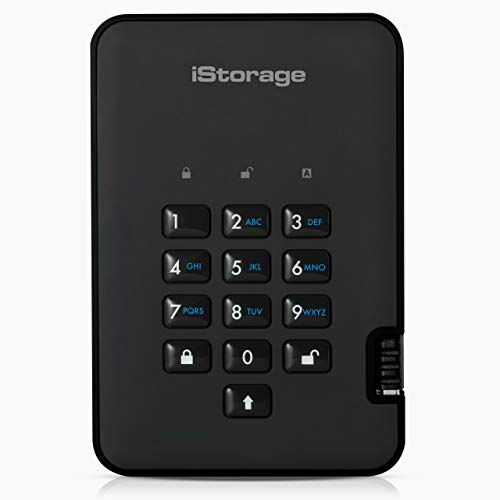
iStorage diskAshur2 SSD 512GB — Keypad fortress, compact capacity
The diskAshur2 puts its security on the outside where it belongs: a wear-resistant keypad on the enclosure takes a seven to fifteen digit PIN, and until that PIN is entered the drive presents itself to any computer as unreadable noise. Because the unlocking happens inside the drive, it works identically with a Windows workstation, a Mac, a Linux box or the USB port on a hospital cart computer that forbids installing software. The 512GB capacity in this listing suits a defined travelling set — a case file, an imaging archive, a season of accounts — rather than a whole library, and that focus is arguably a virtue for a device whose job is custody.
Daily life with the diskAshur2 revolves around PIN discipline. An administrator PIN can exist alongside a user PIN, which lets an office issue the drive without handing over the master secret, and the drive defends itself against guessing by design. The shell shrugs off dust and water exposure that would worry lesser portables, and the solid-state inside has no platters to fear from drops. Owners should rehearse the unlock until it is muscle memory and store the PIN somewhere that is not a sticky note on the drive itself, because the security model assumes the human half is handled with equal care.
A detail that separates the diskAshur2 in daily service is how it handles being shared. The administrator can reset a forgotten user PIN without destroying the data, provided the admin credential survives — a small mercy that has saved many issued drives from the wipe their security model otherwise mandates. The keypad’s buttons are arranged for gloved or hurried use, and the drive announces its locked and unlocked states clearly, which matters in a busy clinic corridor more than any benchmark. It also draws its power from the USB connection, so there is no battery to die in a drawer between uses; a drive pulled out after six months in storage simply works. For equipment pools and peripatetic professionals, those operational graces are the difference between a security policy that survives contact with Monday morning and one that staff quietly route around by Friday.
- Capacity: 512GB in this listing, black finish
- Unlock method: on-device PIN pad, seven to fifteen digits
- Encryption: hardware encryption as stated in the listing title
- Shell: dust and water resistant portable enclosure
- Host needs: none — unlocking is independent of the computer
Strengths
- Works with any host because the PIN is entered on the drive
- Admin and user PIN structure suits issued equipment in offices
- Resistant shell matches the travel the drive is built for
Trade-offs
- 512GB fills fast once imaging or video files move in
- No FIPS validation is claimed in this listing title
- A forgotten PIN means the data is gone by design
Best for: professionals carrying a defined set of sensitive files between sites
Not suited for: archiving a whole media library that needs terabytes of room
iStorage diskAshur2 SSD 2TB — Keypad fortress, full-size archive
Everything said about the smaller diskAshur2 applies here, with one change that alters the job description: 2TB of room turns the drive from a courier of selected files into a travelling archive. A radiology practice can carry a serious imaging history, a solicitor can move an entire matter rather than its highlights, and a video producer can hand a client a locked copy of a full project with its media, not a compressed shadow of it. The PIN pad, the hardware encryption and the dust and water resistant construction carry over unchanged, because iStorage sensibly treats capacity as the variable and the security model as the constant.
The larger size also raises the stakes of the routines around the drive. A 2TB encrypted archive deserves a labelled place in the backup plan, a PIN held by two named people rather than one, and a habit of verifying the copy before the source is wiped. None of that is difficult, but the drive’s very competence tempts owners to treat it as the only copy, which no single device should ever be. Bought as one leg of a considered storage plan, this is the most capacious of the keypad fortresses here and the natural pick when the files themselves are large.
With 2TB under lock, the larger diskAshur2 invites one extra discipline: contents governance. Schedule a quarterly review of what the archive actually holds, remove what retention rules say should be destroyed, and record what remains in the asset log — an encrypted drive full of forgotten files is a liability wearing armour. The drive’s physical robustness supports that long-service role, and its PIN model scales from a sole practitioner to a small team with an admin holder. Treat it as a piece of institutional memory rather than a gadget, and it will serve like one: quietly, for years, asking only that the PIN be remembered and the backup copy — held separately, under the same discipline — be refreshed whenever the archive changes materially.
- Capacity: 2TB in this listing
- Unlock method: on-device PIN pad, independent of host software
- Encryption: hardware encryption as stated in the listing title
- Shell: dust and water resistant portable enclosure
- Role: travelling archive for large sensitive collections
Strengths
- Full archive capacity inside the same proven keypad model
- Host-independent unlocking suits mixed office equipment
- Resistant enclosure for a drive that will genuinely travel
Trade-offs
- Highest responsibility in the list if treated as a sole copy
- No FIPS validation is claimed in this listing title
- Costs reflect both the capacity and the security hardware
Best for: practices and producers moving complete, large archives under lock
Not suited for: light document duty where the smaller keypad model already covers the need
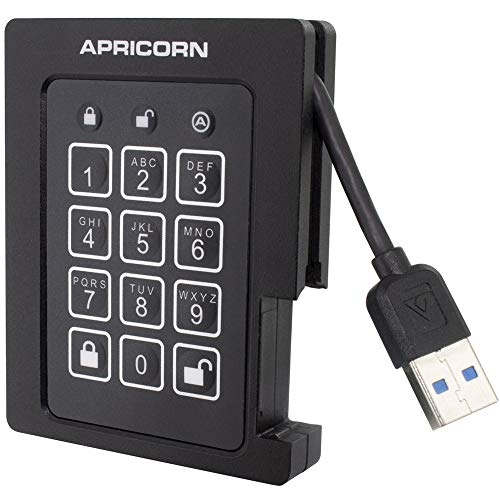
Apricorn Aegis Padlock SSD 480GB — FIPS 140-2 Level 2 validated
The Aegis Padlock SSD is the pick that compliance conversations are built around, because its listing states the words auditors look for: FIPS 140-2 Level 2 validated, with 256-bit hardware encryption behind an onboard keypad. Apricorn designs for government and healthcare buyers, and the details reflect that audience — the keypad is epoxy-coated so the most-used digits do not wear into a visible confession, the enclosure is ruggedised for field work, and the drive operates with no software or drivers on the host, which keeps it usable on the locked-down machines that dominate regulated workplaces.
At 480GB this smaller Padlock suits a role-based workload: the drive that carries this week’s site assessments, the clinician’s travelling records, the inspector’s evidence set. Its self-defence against repeated wrong PINs and its administrator controls make it issuable equipment rather than a personal gadget, and the solid-state internals tolerate the knocks of a working bag better than the spinning drives these replaced. If your organisation’s policy names a validation level, start here and check the exact certificate scope against your policy before ordering in quantity — that verification step is normal procurement, not a flaw in the drive.
Apricorn’s heritage shows in the Padlock’s administrative depth. Policies such as read-only mode for evidence handling, programmable brute-force thresholds and unattended auto-lock timing can be set on the drive itself, which means the protection travels with the device rather than depending on each workstation’s configuration. For an inspector collecting material on borrowed computers, that self-containment is the product. The 480GB capacity disciplines the workflow in a healthy direction too: the drive carries the current matter, closed matters move to the archive system, and the device returns to the pool wiped and reissued. Organisations that run that cycle formally will find the Padlock feels designed by people who have watched it run — because it was.
- Capacity: 480GB in this listing, model ASSD-3PL256-480F
- Validation: FIPS 140-2 Level 2 as stated in the listing title
- Encryption: 256-bit hardware encryption behind an onboard keypad
- Connection: USB 3.0 ruggedised portable enclosure
- Host needs: no software or drivers required to unlock
Strengths
- Stated FIPS 140-2 Level 2 validation answers audit questions directly
- Wear-resistant keypad avoids telling tales about the PIN
- Driverless operation fits locked-down regulated workplaces
Trade-offs
- 480GB is a working set, not an archive
- USB 3.0 pace is modest beside modern USB-C drives
- Procurement should confirm certificate scope against internal policy
Best for: regulated teams whose policies name FIPS 140-2 Level 2 by name
Not suited for: home archiving where validation paperwork carries no weight
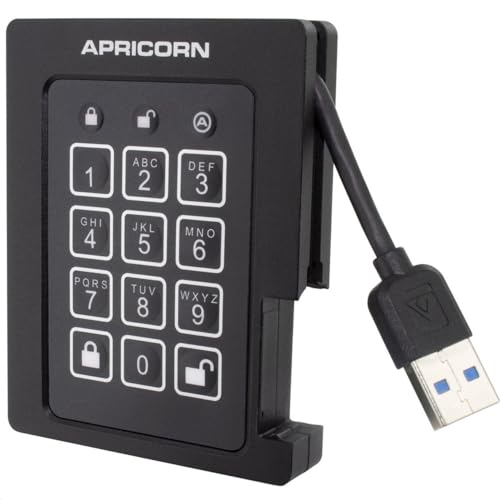
Apricorn Aegis Padlock SSD 1TB — FIPS validated, roomier
Doubling the Padlock to 1TB changes who can standardise on it. A 480GB issued drive forces triage; a terabyte lets a field engineer carry the complete documentation set, an investigator keep a full case with its exhibits, or a clinic move a department’s records in one locked device instead of a procession of smaller ones. The security story is unchanged and remains the headline: 256-bit hardware encryption, an onboard keypad, ruggedised construction, and FIPS 140-2 Level 2 validation stated plainly in the listing title for the organisations whose policies require exactly that wording.
Living with the larger Padlock is the same disciplined routine as its sibling — PIN on the pad, no host software, administrator oversight where an organisation issues it — with the added comfort that capacity stops being the reason staff quietly copy files to an unencrypted stick ‘just for today’. That temptation, more than any technical attack, is how encrypted-drive programmes fail, and Apricorn’s roomier model removes it for most document-and-data workloads. Video-heavy archives may still outgrow it, but for the regulated mainstream this is the Padlock in its most usable size.
The terabyte Padlock also changes the mathematics of consolidation. Departments often discover they own a drawer of assorted encrypted sticks, each with its own PIN, its own owner and its own quiet risk; one 1TB Padlock per worker replaces the drawer with a single auditable device whose credential is on record. The migration is a small project — gather, verify, copy, wipe the sticks properly — and the security posture afterwards is visibly better in a way an auditor can literally be shown. That demonstrability has value beyond the technical: when a client asks how their files travel, ‘on a validated drive, one per person, PINs on record’ is an answer that ends the meeting well.
- Capacity: 1TB in this listing, model ASSD-3PL256-1TBF
- Validation: FIPS 140-2 Level 2 as stated in the listing title
- Encryption: 256-bit hardware encryption, onboard keypad unlock
- Connection: USB 3.0 ruggedised portable enclosure
- Host needs: no software or drivers required to unlock
Strengths
- Validated platform with room for complete working sets
- Removes the capacity excuse for using unencrypted sticks
- Admin-friendly design suits issued fleets in regulated offices
Trade-offs
- Still a USB 3.0 drive in a USB-C world
- Terabyte may still pinch for raw video archives
- Costs more than unvalidated drives of the same size
Best for: regulated organisations issuing one drive per field worker
Not suited for: casual home use where a software-unlocked drive is honestly enough

BUSlink CipherShield 2TB — Physical-key encryption
The CipherShield takes the oldest security idea in the world — a key you hold — and applies it to a modern SSD. Instead of a PIN, this slim drive requires its physical key token to authenticate, which suits environments where PINs get shared, shoulder-surfed or written down, and where handing over the key is a deliberate, visible act. The listing states 256-bit AES hardware encryption and names FIPS 140-2 alongside compliance references including HIPAA, HITECH, FERPA and TAA, which positions it for American institutional purchasers working against those frameworks; note the listing names the standard without the level wording the Apricorn titles carry, and careful buyers should confirm the detail their policy requires.
In the hand, the CipherShield is the slimmest fortress here, bus-powered over USB 3.0 with no brick to carry, and at 2TB it matches the big diskAshur2 for archive room. The key model cuts both ways, of course: custody of the token becomes the whole game, so the drive belongs with a key-management habit — a designated holder, a stored spare under separate control, and a rule that the key never travels taped to the drive. Organisations that already think in keys, from evidence rooms to examination boards, will find the model natural; individuals who lose umbrellas weekly should choose a PIN instead.
Key custody deserves one more paragraph, because the CipherShield’s model succeeds or fails entirely on it. The workable pattern is boring and specific: the key lives on the custodian’s person during transit, sleeps in a designated safe place rather than a desk drawer, and its spare sits sealed with a second named holder whose identity is written in the asset register. The drive itself should be labelled with a return number and nothing else — no project name, no department, certainly no hint of what the key beside it unlocks. Organisations that already run physical key control for cabinets and vehicles will recognise the rhythm immediately, and that familiarity is precisely the CipherShield’s quiet advantage: it plugs into a discipline that exists, instead of demanding a new one be invented around a PIN.
- Capacity: 2TB in this listing, model DSE-2TSDG1K1, Mode 0 single-key configuration
- Unlock method: physical key token, no PIN pad
- Encryption: 256-bit AES hardware encryption, FIPS 140-2 named in the listing
- Power and connection: bus-powered over USB 3.0, slim enclosure
- Compliance references in listing: HIPAA, HITECH, FERPA, TAA
Strengths
- Physical key removes PIN sharing and shoulder-surfing worries
- Slim, bus-powered 2TB design travels without a power brick
- Institutional compliance framing suits American public-sector buyers
Trade-offs
- Losing the key means losing access, so custody discipline is essential
- Listing names FIPS 140-2 without the level wording rivals state
- A single-key configuration concentrates responsibility on its holder
Best for: institutions that prefer a held key and a named custodian
Not suited for: anyone whose keys, cards and umbrellas routinely go missing
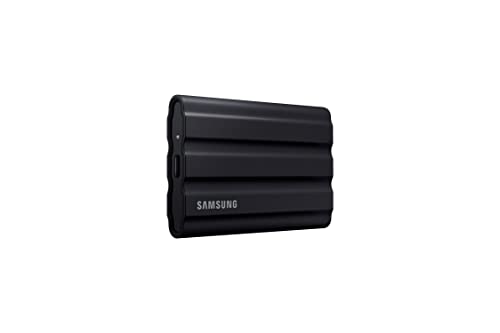
Samsung T7 Shield 1TB — Fast rugged drive, software unlock
The T7 Shield closes this list as the honest exception, and it earns its place by being excellent at a different job. Samsung’s drive is fast — up to 1,050 MB/s in the listing — small, and wrapped in a rubberised shell with IP65 water and dust resistance that shrugs off location work. Its encryption is real hardware AES, but the password is entered through Samsung’s software on the host rather than on the device, which changes the security model: the host must be trusted, the software must be installed, and no FIPS validation is claimed for it in the listing. Against a lost bag or a stolen backpack, that protection is still vastly better than nothing, and for photographers and creators it may be exactly the right trade.
What the T7 Shield should never be sold as is a compliance device. If an auditor, a policy or a client contract specifies validated hardware encryption with on-device authentication, the five drives above are the answer and this one is not, whatever a salesperson suggests. Judged on its own terms — a creator’s travelling drive that also locks — it is superb: quick enough to edit from, tough enough to live in a camera bag, and simple enough that the password prompt becomes routine rather than a chore. Choose it with eyes open about its class and it will not disappoint.
One more honest boundary for the T7 Shield: its password protection, while genuinely hardware-backed at the encryption layer, depends on Samsung’s software being present and trusted on the host, so a machine already compromised by malware is outside its promise — a caveat that applies to every software-unlocked drive and no keypad drive in this list. Within its boundary, though, its virtues are the ones creators actually feel: it is the drive that lives on the camera bag, edits straight from the timeline, and asks for a password with the same friction as a phone unlock. Security that people enjoy using gets used, and an encrypted drive in daily service protects more real data than a fortress left in a drawer because its routine annoyed everyone.
- Capacity: 1TB in this listing, black, model MU-PE1T0S/AM
- Unlock method: password entered in Samsung software on the host
- Encryption: hardware AES encryption, no FIPS claim in the listing
- Speed and shell: up to 1,050 MB/s over USB 3.2 Gen 2, IP65 rugged body
- Role: fast creator drive with locking, not a validated compliance device
Strengths
- Fastest and most pocketable drive in this roundup by a distance
- IP65 shell suits location photography and field production
- Password routine is simple enough that people actually use it
Trade-offs
- Software unlock means the host computer must be trusted
- No FIPS validation is claimed, so policies may reject it
- Rubber shell attracts pocket lint and looks utilitarian
Best for: creators who need speed and toughness with honest loss protection
Not suited for: any workload governed by a validated-encryption policy
What Should You Check Before Trusting a Drive With Sensitive Files?
Start with the authentication, because it decides everything downstream. On-device entry — a keypad or a key — means the drive protects itself even against a compromised computer, while a software prompt means the computer joins the trust chain. Neither is automatically wrong, but they answer different threats, and the price difference between the classes mostly buys that independence. If a listing cannot say clearly where the password is entered, treat the drive as software-class until proven otherwise.
Certification language deserves a slow read. FIPS 140-2 Level 2, as the Apricorn titles state, describes a validated cryptographic module with tamper evidence and role-based authentication. A listing that names the standard without a level, like the BUSlink title, is making a narrower claim, and a listing that says only ‘256-bit AES’ is describing an algorithm, not a validation — AES itself is excellent, but the certificate is what an auditor accepts. Match the wording on the box to the wording in your policy, character for character.
Then think about failure, because encrypted drives fail closed. Every fortress pick here will, after enough wrong attempts or a lost credential, protect the data by destroying access to it — that is the feature working, and it means the backup copy and the credential custody plan are part of the security system, not admin trivia. Before any encrypted drive enters service, write down who holds the PIN or key, where the second copy of the data lives, and what happens on the day the holder is on holiday and the drive is needed.
Capacity planning has a security dimension too. A drive that is always full pushes staff toward spare sticks and personal cloud accounts, and the most elegant encryption in the world cannot protect files that were copied elsewhere for convenience. Buy a size above the current need, review what is carried every few months, and delete what no longer needs to travel. The safest file on a portable drive is the one that was never put on it.
How Do You Set Up an Encrypted Drive on Its First Day?
Begin before any real file touches the drive. Connect it, change the factory default PIN or enrol the key exactly as the manual describes, and set an administrator credential where the model supports one. Defaults are published knowledge, so a drive still carrying its factory PIN is an unlocked drive wearing a costume. Make the new PIN genuinely hard to guess — no birthdays, no site addresses, no sequence — and long enough to use the digits the pad allows, because length beats cleverness.
Record the credential the grown-up way: in the organisation’s password manager or sealed in the safe, with a named second holder for business drives. Then rehearse a full unlock, copy a small test folder, disconnect, reconnect and unlock again on a different computer if the drive will travel between machines. That second-computer test proves the host-independence you paid for and catches any workstation policy that blocks the device while there is still nothing important at stake.
Only then load the real data, and load it as a copy, keeping the original in place until the encrypted drive has survived a week of normal use. Label the drive with a return phone number and an asset code, never with a description of its contents. Finally, schedule the boring reviews: a quarterly check that the PIN holders are current, the backup copy is fresh, and the drive’s contents still deserve to travel at all.
What Happens on the Day an Encrypted Drive Is Lost?
Walk the scenario before it happens. The drive is gone — taxi, train, conference room — and the first question is what the finder holds. With the fortress picks here, the answer is an encrypted brick that resists guessing by design and yields nothing without the credential, which converts a potential data breach into a hardware loss and, in many regulatory frameworks, into a non-event that does not even require notification, provided the encryption was active and the credential was not attached to the device. That last clause is why the sticky note matters more than the cipher.
The second question is operational: can the work continue? This is where the backup copy earns its existence, because the encrypted drive’s contents should be reproducible from the system it mirrors within the hour. Organisations that rehearse this — actually restore from the backup once, on a calm day — discover their gaps while the stakes are theoretical. The lost drive then becomes a purchase order and a log entry, which is the entire emotional goal of buying hardware encryption in the first place.
The third step is credential hygiene after the loss. If there is any chance the PIN or key travelled with the drive or was observed, the replacement drive gets a fresh credential and the register is updated the same day. Treat the incident as closed only when the new device is in service, the backup is verified and the paperwork reflects reality. None of this requires heroics; it requires that the plan existed before the taxi door closed.
How Should an Organisation Issue and Manage These Drives?
Start with a register, even if it is a single spreadsheet: device, serial, holder, credential holder, issue date, contents class. The register is what transforms a drawer of secure drives into a managed fleet, and it takes an afternoon to create and minutes a month to maintain. Issue drives against a name, never to a department in the abstract, because accountability attaches to people and evaporates from groups. When a holder changes roles, the drive returns, is wiped on the device, and is reissued with a fresh credential — the full cycle, every time, without the shortcut of handing it across a desk.
Set the PIN or key policy in writing and keep it short enough to be followed: minimum length, no shared credentials across devices, administrator codes held by two named officers, spares sealed and logged. Then train the one behaviour that defeats most real-world attacks, which is simply never storing the credential with the device — not in the same bag pocket, not in the same laptop case, not in the same photograph of the desk. Auditors ask about exactly this, because it is exactly where programmes fail.
Finally, review the fleet quarterly against the register: which drives still exist, which still need to, which contents have outlived their retention. Drives that no longer travel should be recalled and wiped; data that no longer needs to move should come off portable storage entirely. The cheapest encrypted drive to protect is the one that was never issued, and the safest file is the one that stayed home.
PIN Pad, Physical Key or Password: Which Lock Suits Your Life?
Choose the PIN pad when the drive must work everywhere and answer to a policy. Keypad models unlock before any computer is involved, which makes them indifferent to operating systems, hostile IT lockdowns and borrowed machines, and their administrators can govern them like issued equipment. The cost of that independence is the routine: a code to remember, a pad to shield from curious eyes, and the discipline of the register. For regulated work and professional travel, that routine is not overhead — it is the visible evidence that the organisation takes custody seriously, and auditors respond to it accordingly.
Choose the physical key when the human risk is the PIN itself: shared codes, observed entries, sticky notes in laptop bags. A key converts access into an object that can be held, counted, sealed and handed over in a witnessed act, which suits evidence handling, examination materials and any setting where custody must be demonstrable rather than merely true. The corresponding duty is absolute: the key’s whereabouts are the security, so the role belongs to organisations and individuals who already run their physical keys with care, and emphatically not to the cheerfully disorganised.
Choose the software-unlocked drive when the threat is loss rather than scrutiny and the work values pace. A creator’s T7 Shield, locked by password, protects a stolen bag’s contents from casual reading while remaining the fastest, toughest tool in the camera kit — a rational trade wherever no policy names a validation level. The mistake is not choosing this class; the mistake is choosing it while telling yourself, or a client, that it is the other class. Match the lock to the life honestly and every pick in this article is the right answer somewhere.
How Do Encrypted Drives Fit Alongside Encrypted Computers?
A fair question follows all of this: if a laptop already encrypts its internal drive, why carry an encrypted portable at all? Because the protections guard different moments. The laptop’s encryption protects the laptop; the moment files are copied to a portable drive for travel, hand-off or archive, they leave that protection behind and inherit whatever the portable offers — which, for an ordinary drive, is nothing. The encrypted portable extends the chain of custody across the gap between machines, and in regulated work that gap is precisely where auditors look, because it is where data is most often lost and least often governed.
There is also the matter of the receiving end. Files handed to a client, a colleague or another department on a fortress drive arrive with their protection attached and their access controlled by a credential you issued, rather than depending on the recipient’s machine being encrypted, patched and honest. When the engagement ends, the drive returns and is wiped on the device, closing the loop in a way an emailed archive or a borrowed stick never can. The encrypted portable is not a duplicate of the laptop’s encryption; it is the same policy, extended across the distance the laptop cannot cover.
The two layers also fail independently, which is a virtue. A compromised laptop password does not expose the portable’s contents, whose key never touched the machine; a lost portable does not endanger the laptop. Security built from independent layers degrades gracefully, one failure at a time, instead of collapsing as a single wall. That architecture — not any single cipher — is what the five fortress picks in this article are really selling, and it is worth the routines they demand.
What Should a Buyer Verify in the First Week of Ownership?
Verify the security model itself before trusting it with anything real. Change the default credential, lock the drive, attach it to a second computer, and confirm that the second machine sees nothing usable until the credential is entered on the device. That single test proves the host-independence you paid for, on the fortress models, and catches the occasional workstation policy or faulty unit while the drive still holds only test files. Then deliberately enter wrong PINs a few times — short of the wipe threshold — to learn how the drive communicates its warnings before a colleague discovers them under pressure.
Verify the paperwork in the same week. If your purchase rests on a certification claim, locate the exact model on the relevant validated-products listing and file the reference with the asset register, because ‘the box said so’ is not the evidence an auditor accepts and the time to discover a scope mismatch is before the fleet order, not after it. Record the serial, the holder, the credential holders and the backup location in the register while the details are in your hands rather than in your memory.
Finally, verify the recovery path by walking it once: restore one folder from the backup copy to a spare machine, using only the written procedure, as if the drive were already lost. Every gap in the procedure will announce itself politely during this rehearsal and rudely during a real loss. A week-one afternoon spent on these three verifications converts an expensive purchase into a working system, which is the difference between owning encryption and merely owning an encrypted drive.
How to Talk About These Drives With Clients and Auditors
Professionals who carry other people’s data eventually have to describe their arrangements out loud, and the conversation goes better with specifics than with adjectives. Name the device class, the authentication method and the certification exactly as the listing states it — FIPS 140-2 Level 2 validated for the Apricorn pair, FIPS 140-2 named for the BUSlink, hardware encryption with on-device PIN for the iStorage pair — and be ready to say what happens when the drive is lost, who holds the credential, and where the backup copy lives. Those four answers, given calmly, are what trust sounds like in this field.
Resist the temptation to upgrade the language beyond the evidence. Calling a software-unlocked drive ‘military grade’ in a client email creates a liability that the drive’s genuine virtues do not need, and the one time the claim is examined will be the worst time. The honest sentence — this drive is hardware-encrypted and password-protected; that drive is validated to a named standard — protects the professional as surely as the cipher protects the files. Precision is a security control too, and it is the only one that works in a meeting room.
Put the arrangement in writing wherever the relationship is formal: the engagement letter, the data-handling note, the practice’s policy folder. A short paragraph naming the device class, the credential custody and the loss procedure converts a good habit into a demonstrable system, and demonstrable systems are what insurers, regulators and clients are actually buying when they ask about security. The drives in this article were chosen to make that paragraph easy to write truthfully.
And when the honest answer is that a lighter drive fits the work — the creator’s T7 Shield, the consultant’s password-protected portable — write that down too, with the reasoning. A documented decision to match protection to risk is professional; an undocumented drift into whatever was in the drawer is not. The goal was never the heaviest lock available. The goal is a chain of custody you can describe, defend and repeat, built from devices whose claims survive being read slowly.
How Do These Six Hardware-Encrypted SSDs Compare on Security, Speed and Unlock Method?
| Pick | Form and interface | Standout trait | Watch out for |
|---|---|---|---|
| iStorage diskAshur2 SSD 512GB | Portable PIN-pad SSD, 512GB | On-device unlock, resistant shell | No FIPS claim in listing |
| iStorage diskAshur2 SSD 2TB | Portable PIN-pad SSD, 2TB | Archive capacity, on-device unlock | No FIPS claim in listing |
| Apricorn Aegis Padlock SSD 480GB | Portable PIN-pad SSD, 480GB | FIPS 140-2 Level 2 stated in listing | Modest capacity and USB 3.0 pace |
| Apricorn Aegis Padlock SSD 1TB | Portable PIN-pad SSD, 1TB | FIPS 140-2 Level 2 stated in listing | USB 3.0 pace, premium price |
| BUSlink CipherShield 2TB | Slim key-token SSD, 2TB | Physical key unlock, bus-powered | Key custody is the whole game |
| Samsung T7 Shield 1TB | Portable USB-C SSD, 1TB | Fastest here, IP65 rugged | Software unlock, no FIPS claim |
The comparison table compresses each drive to its authentication style and its honest limitation, because those two facts predict satisfaction better than any transfer figure. Notice that the fastest drive in the table carries the softest security model — that tension is the whole category in one glance.
Which Encrypted-Drive Mistakes Undo All the Protection?
Leaving the factory PIN in place is the champion error, and it happens constantly because the drive works perfectly out of the box and changing the code feels like homework. It is the homework. A default PIN is printed in manuals across the internet, so the encryption behind it is theatre until the code is changed on day one and the change is verified by locking and unlocking the drive.
The second mistake is credential chaos: PINs on sticky notes, one key shared by a whole department, an administrator code known only to someone who left in March. Every one of those quietly converts a certified device into an anecdote. Treat the credential like the key to the building — issued, recorded, and recovered when people change roles.
Third comes the sole-copy trap, where the encrypted drive becomes the only place a file exists because it feels so safe. Encryption protects confidentiality, not existence; the drive can still be lost, drowned or run over, and its own anti-guessing defences will happily wipe it. Keep the second copy somewhere else, and let the fortress do the one job it was bought for: making sure that if it is ever lost, the finder gets a brick instead of your data.
Final Recommendation
For regulated work, the Aegis Padlock pair are the straightforward recommendations, with the 1TB model the more livable of the two, because their listings state the FIPS 140-2 Level 2 validation that policies ask for. The diskAshur2 drives serve travellers who value host-independent PIN entry in two sensible capacities, the CipherShield fits institutions that think in physical keys, and the T7 Shield — chosen knowingly, for speed and toughness with honest loss protection — is a fine creator’s drive that should never be invoiced as a compliance device.
Whichever class you choose, the purchase is only half the work: change the default credential before the first real file lands, record who holds it, and keep a second copy of everything somewhere else entirely. Do that, and a lost drive becomes an insurance line and an inconvenience — not the worst week of your professional year.
Frequently Asked Questions
What does hardware encryption actually do that software encryption does not?
The drive’s own controller scrambles every byte with a key that never leaves the device, and on keypad or key models the unlocking happens on the drive itself. Software encryption depends on the computer and its operating system, so a compromised or merely incompatible machine weakens the arrangement. Hardware models also tend to shrug off the performance cost, since a dedicated engine does the work instead of the main processor.
Is FIPS 140-2 validation necessary for a small business?
Only if a rule that governs you says so — a client contract, an insurer, a regulator or an internal policy. The validation certifies that the cryptographic module was tested as a unit, which is why auditors ask for it by name. If no rule applies, a well-made non-validated drive such as the diskAshur2 still protects strongly against loss and theft; buy the certificate when someone with authority over you requires it.
What happens if the PIN is entered wrongly too many times?
Fortress drives defend themselves, typically by destroying the encryption key after a set number of failed attempts, which renders the data permanently unreadable even though the hardware still works and can be reused after a reset. That behaviour is deliberate and is exactly why the credential must be recorded safely and the data backed up elsewhere. Check your model’s manual for its specific threshold before issuing it.
Can these drives be used with both Windows and Mac computers?
The keypad and key models can, because unlocking happens on the device and the computer simply sees a standard USB drive afterwards; formatting choices then decide cross-platform file handling. The T7 Shield’s password feature depends on Samsung’s software being available for the host, which is another practical difference between the classes. Test your exact machines during the first week, not during the first emergency.
Does encryption slow these drives down?
On the fortress models the encryption engine works at line speed for their USB generation, so the practical limit is the connection, not the cipher. The T7 Shield shows the modern picture clearly, reaching its headline pace with encryption enabled. Older USB 3.0 keypad drives feel slower than USB-C drives because of the port, and blaming the encryption for that difference misreads the spec sheet.
Can I use one of these drives with a phone or tablet?
The keypad and key models present themselves as ordinary USB storage once unlocked, so hosts that support USB drives can generally use them, though phone power output and file-system choices can complicate matters. The T7 Shield’s password feature depends on Samsung’s app availability for the platform. For any phone-based workflow, test the exact combination at home first, because a drive that unlocks beautifully on a workstation and refuses a tablet in the field is a lesson best learned at a desk.
Should the encrypted drive also be my backup drive?
It can hold a backup copy, and for travelling professionals an encrypted backup is often exactly right, but it should not be the only backup, for the same reason no portable should be: it travels, and travelling things get lost. The sound arrangement is a backup at base — a larger drive or network storage that never leaves the building — plus the encrypted portable carrying the working copy or a second backup when it journeys. If the portable is lost, the base copy restores the work and the encryption ensures the loss stays a hardware story. Two copies, two places, one of them locked: that is the complete sentence. Roughly two hundred words of procedure, and worth every one of them on the single day it is needed.
Related Guides
For more storage guidance, browse these companion guides: best portable ssds for travel best ssds for business laptops best external drives for backup


