What's inside
- Where to buy
- Key Takeaways
- Quick Picks
- How did we choose the best 24-inch monitors?
- Which 24-inch monitors fit your kind of desk?
- How do the six picks divide the category?
- Is 1080p enough at 24 inches, or should you stretch to a sharper screen?
- What actually matters in a stand, and why does this guide keep mentioning it?
- Which mistakes do 24-inch buyers repeat?
- How do you set up a 24-inch monitor for a whole working day?
- One screen or two at this size?
- What will the next five years do to a 24-inch purchase?
- How should students and first-desk buyers choose here?
- What about using a 24-inch monitor with a laptop?
- How do you keep a 24-inch monitor happy for a decade?
- Does the brand matter in this class, or only the specification?
- What is the cheapest mistake to avoid entirely?
- Is it worth waiting for the next model year in this class?
- What do owners praise a year later that they never mentioned on day one?
- How does a 24-inch screen handle films and streaming?
- Final Recommendation
- Frequently Asked Questions
- Related Guides
As an Amazon Associate I earn from qualifying purchases. This post may contain affiliate links at no extra cost to you.
gizmoverdict.com is reader-supported. When you buy through links on our site, we may earn an affiliate commission.
Where to buy
Every monitor market has a centre of gravity, and the best 24 inch monitors are it. This is the size that fills student desks and home offices, anchors second screens beside laptops, starts gaming setups, and ends them — the size manufacturers sell in the greatest numbers and therefore engineer with the greatest care per unit of cost. Shopping here should be easy, and instead it is a fog: the same “24 inch” label covers 23.8-inch panels and true 24-inch ones, 16:9 screens and taller 16:10 ones, 60Hz office furniture and 180Hz gaming instruments, creator-calibrated colour tools and screens whose highest ambition is a spreadsheet. The best 24 inch monitors are not a single winner; they are the right answers to six different versions of the same question, and this guide separates those versions honestly — office-first, gaming-first, colour-first, and the hybrids between — so the monitor you buy is the one your actual week requires.
Our six picks span that whole honest range. Two are office anchors built around eye comfort and ergonomics, one of them at a smoothness-raising 100Hz. One is a professional 16:10 panel with factory colour credentials for people whose work is judged by eye. Two are gaming panels at 144Hz and 180Hz that double as perfectly civilised work screens. And one is the long-running all-rounder whose speakers, stand, and ports made it the default recommendation of an entire era. Every pick is verified in our pool, every specification that matters is stated the way the listing states it, and the comparison is organised by the life you will live with the screen rather than by the size of its numbers.
Key Takeaways
- “24 inch” usually means 23.8 inches of 16:9 panel; the one true 24-inch pick here is a taller 16:10 professional screen.
- Refresh rate is now the class’s dividing line: office picks run 60–100Hz, gaming picks 144–180Hz, and the difference is visible even on a desktop.
- Eye-care engineering — flicker-free backlights, low blue light, adaptive brightness — matters more across a work week than any gaming figure.
- The professional pick’s factory calibration and 1920×1200 resolution serve colour work that the gaming panels only approximate.
- Stand quality decides daily comfort more than panel quality at this size; height adjustment is the feature to hunt.
- Every pick here can anchor a desk alone or retire gracefully into second-screen duty later, which is the class’s hidden value.
Quick Picks
| Pick | Badge | Why it earns its place |
|---|---|---|
| BenQ GW2490 | The modern office anchor | A 24-inch IPS panel at 100Hz with BenQ’s eye-care suite, thin bezels, and speakers — the workday screen, updated. |
| HP 24mh | The proven all-rounder | The 23.8-inch IPS staple with built-in speakers and a height-adjustable stand that a generation of desks standardised on. |
| BenQ GW2480 | The sensible classic | An earlier GW-series office panel with adaptive brightness and every legacy port, for buyers who value proven over new. |
| ASUS ProArt PA248QV | The colour professional | A true 24-inch 16:10 panel at 1920×1200, Calman Verified with a tight Delta E claim and full ergonomic stand. |
| LG UltraGear 24G414B | The gaming citizen | Native 144Hz IPS with both sync families and a height-adjustable stand, for desks that game as hard as they work. |
| AOC 24G4 | The fast value | 180Hz Fast IPS with modern ports and a stated three-year warranty — the most speed this class offers per unit of sense. |
How did we choose the best 24-inch monitors?
We began by admitting what the category is: not a contest but a crossroads. A single ranked list that pretends a colour professional and an esports player want the same screen would be a disservice dressed as decisiveness, so we chose the strongest verified representative of each real use — the modern office day, the proven mixed desk, the budget-conscious classic buyer, the colour professional, the gamer who works, and the value hunter who games. Each pick had to be the answer we would give a friend who described that exact life, with no hedging toward a different friend’s life.
The technical floor applied to all six: an IPS-family panel for viewing angles and colour sanity, Full HD resolution or better, at least one modern digital input, and flicker-free or eye-care engineering appropriate to long sessions. Beyond the floor, we weighted the unglamorous ownership variables that this size class punishes when ignored — stand adjustment, speaker presence for the desks that need it, port selection including the legacy connectors real households still use, and warranty clarity. Refresh rate was treated as a use-case variable rather than a score: 100Hz is a genuine quality-of-life upgrade for office scrolling, 144Hz and above transform gaming, and neither fact makes a 60Hz-class classic a bad screen for the reader whose life is documents and calls.
Which 24-inch monitors fit your kind of desk?

BenQ GW2490 — The modern office anchor
The GW2490 is what the home-office monitor grew up to be. Its 24-inch IPS panel runs at 100Hz — a figure that sounds like a gaming concession and is actually an office luxury, because scrolling documents, dragging windows, and panning across spreadsheets all gain a smoothness that a 60Hz screen cannot imitate and that your eyes register within the first hour. Around that panel BenQ wraps the eye-care doctrine it pioneered: low blue light, flicker-free operation, adaptive brightness that follows the room, and a matte anti-glare surface for the window-lit desks most of us actually have. Thin bezels keep it handsome alone and make it the natural first half of a future pair.
The supporting cast suits the life. Built-in speakers handle calls and video without a desk accessory, DisplayPort and HDMI cover modern laptops and docks, and the VESA mount accepts the arm that home offices eventually adopt. What it does not pretend to be is a gaming instrument — adaptive sync for serious play and a triple-digit gaming rate are not its brief — nor a colour professional’s tool. Its claim is narrower and, for most desks, more valuable: it is the screen a knowledge worker can sit in front of for a decade of weekdays without the screen ever becoming the problem. In the centre-of-gravity category, that is the centre.
Buy it as the anchor of a work-first desk and it will also serve films, casual games, and family duties without complaint. Buy it expecting esports and you have misread a well-labelled product. The GW2490’s honesty about its audience is part of why it leads this guide: the best 24-inch monitor for the most common desk is the one engineered for that desk’s actual hours.
One constituency should pay the GW2490 special attention: anyone whose workday is mostly reading. Long-form text on a flicker-free, adaptively bright panel at 100Hz is a genuinely different experience from the same text on a bargain 60Hz screen — pages glide instead of jumping during scroll, and the matte surface refuses to mirror the window behind you into your paragraphs. Writers, researchers, support agents, and students live in that difference for hours a day, and none of them will ever describe it in a review, because it feels like nothing. Nothing, sustained over a working year, is exactly what a great office monitor feels like, and it is the sensation this BenQ was engineered to produce.
- Panel: 24-inch IPS, 1920×1080
- Refresh: 100Hz
- Eye care: low blue light, flicker-free, adaptive brightness
- Audio: built-in speakers
- Mounting: VESA ready, thin-bezel design
Strengths
- 100Hz makes the ordinary workday visibly smoother than the 60Hz standard.
- BenQ’s eye-care suite is the most complete in this guide’s office tier.
- Thin bezels flatter both a single desk and a future matched pair.
Trade-offs
- Not a gaming panel; serious players should take the LG or AOC below.
- No factory colour calibration for professional creative work.
- Stand ceremony is modest next to the HP’s full adjustment.
Best for: home-office and hybrid workers who live in documents, calls, and browsers. Not suited for: competitive gamers or colour-critical professionals.
HP 24mh — The proven all-rounder
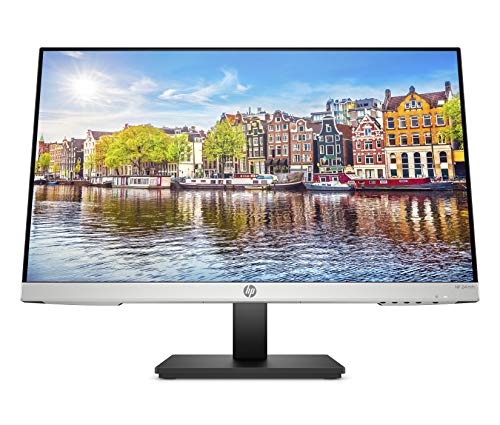
Some products become defaults, and the HP 24mh is this category’s default made physical. A 23.8-inch IPS panel at Full HD, built-in speakers, HDMI and DisplayPort, VESA mounting, and — the feature that built its reputation — a stand that adjusts for height as well as tilt, at a tier where most rivals make you choose between a cheap screen and a comfortable one. Offices bought it by the pallet, households bought it one at a time, and the result is a monitor whose behaviour, quirks, and longevity are known quantities across an enormous installed base. When a product is this understood, buying it is less a gamble than a subscription to the known.
Its refresh rate belongs to the office era it came from, and we will not dress it up: this is a work-and-media screen, smooth enough for video and casual play, not an instrument for competitive gaming. Within that honest brief it is remarkably complete. The speakers are genuinely serviceable for calls and content, the IPS angles forgive a shared screen or a reclined chair, and the height adjustment means it fits the human before it fits the desk. For the enormous population whose monitor is a tool for work, school, and evening video, the 24mh’s completeness at the basics has always mattered more than any headline figure.
Choose it when your priority is a desk that simply works — for a family computer, a student’s first setup, a spare room that became an office. It is also the easiest recommendation in this guide to hand to a non-technical buyer, because there is nothing to configure wrongly and nothing to upgrade urgently. Defaults become defaults by disappointing the fewest people, and in the most contested size class in the industry, that is a championship record.
There is an institutional argument for the 24mh that home buyers inherit for free. Because offices standardised on it, every question you could ask about it — every dock quirk, every arm pairing, every settings recommendation — has been asked and answered somewhere by someone with the same desk problem. Obscure monitors leave their owners alone with the manual; default monitors come with a civilisation. For a buyer who does not want a relationship with their screen, merely a decade of unremarkable service from it, that civilisation is the feature. It will never be the most exciting line in this guide, and it may be the one most readers actually buy, which is how defaults have always worked.
- Panel: 23.8-inch IPS, 1920×1080
- Refresh: office-class standard rate
- Stand: height and tilt adjustment
- Audio: built-in speakers
- Inputs: HDMI and DisplayPort, VESA mounting
Strengths
- Height adjustment at this tier is the comfort feature rivals omit.
- A known quantity with an enormous, well-documented installed base.
- Speakers and ports cover the family-desk basics in one box.
Trade-offs
- Refresh rate is for work and media, not for gaming ambitions.
- Design is corporate-neutral rather than desk jewellery.
- No high-refresh or calibration features for specialist buyers.
Best for: family desks, students, and offices that value comfort and certainty. Not suited for: gamers, or buyers chasing the newest panel features.

BenQ GW2480 — The sensible classic
The GW2480 is the GW2490’s elder sibling and the guide’s argument that a previous generation, honestly priced and honestly described, can still be the right purchase. The formula is familiar because BenQ’s GW line defined it: a 24-inch IPS Full HD panel, eye-care technology with low blue light and adaptive brightness that responds to the room, an anti-glare surface, built-in speakers, and a port selection — DisplayPort, HDMI, and VGA — that reads like a census of the machines a real household owns, including the old desktop and the inherited laptop that newer monitors have stopped acknowledging.
What the classic gives up against its younger sibling is the 100Hz smoothness and the slimmer modern styling; what it keeps is the entire eye-care and connectivity doctrine at the friendlier end of the shelf. For a second screen, a spare desk, a parent’s computer, or a small office equipping several seats, those trade-offs resolve themselves: the GW2480’s job is to be correct, comfortable, and compatible with everything, indefinitely. BenQ’s build quality in this line is the reason so many of these panels are still in service long after their purchase year became a trivia question.
We include it without nostalgia. A buying guide that only lists the newest model of everything serves the industry, not the reader, and the reader with three desks to equip or one old PC to respect is as real as the reader chasing refresh rates. The GW2480 is the sensible classic: yesterday’s flagship office formula, intact, at today’s sensible position in the range.
The GW2480 also makes an unusually good citizen of shared and inherited setups. Its VGA port welcomes the family desktop that predates HDMI-everywhere, its speakers spare a spare room any audio shopping, and its eye-care defaults are gentle enough that nobody needs to tune it for a parent, a child, or a guest account. A monitor that can be dropped into any household role without a configuration project is worth more than its specification suggests, because households redeploy screens constantly — the office panel becomes the homework panel becomes the kitchen recipe screen. The GW2480 has been quietly playing all those roles for years, and its continued presence in our verified pool is the market agreeing it still can.
- Panel: 24-inch IPS, 1920×1080
- Refresh: office-class standard rate
- Eye care: low blue light, adaptive brightness, anti-glare
- Audio: built-in speakers
- Inputs: DisplayPort, HDMI, and VGA
Strengths
- The full legacy port set keeps older machines first-class citizens.
- Adaptive brightness is a daily comfort most cheap panels skip.
- A proven line with a long service record behind it.
Trade-offs
- No 100Hz smoothness; its sibling above owns that upgrade.
- Styling and bezels are from an earlier design generation.
- Gaming beyond the casual is outside its brief.
Best for: multi-desk households, spare setups, and owners of older computers. Not suited for: buyers who want the current generation’s smoothness and design.
ASUS ProArt PA248QV — The colour professional
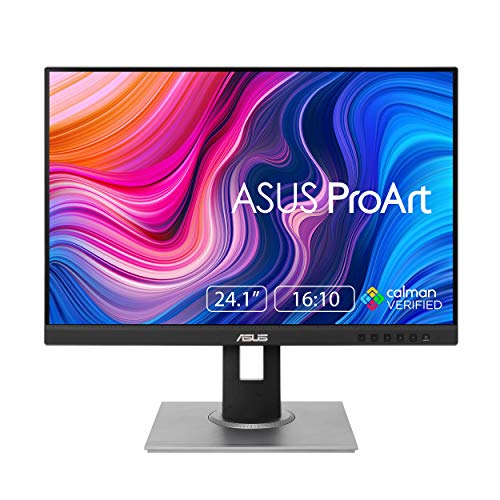
The PA248QV is the pick that reveals how much variety hides inside one size label. It is a true 24-inch-class panel, but its resolution is 1920×1200 — the 16:10 shape that adds a band of vertical space documents, photo editors, and code all spend gratefully — and it arrives Calman Verified with a Delta E claim under 2 and full sRGB coverage, the vocabulary of a screen bought to be believed. ASUS’s ProArt line exists for people whose work is judged by eye: photographers culling a shoot, designers shipping colour, video editors who cannot afford a monitor that flatters. This is that line’s 24-inch instrument, with an ergonomic stand to match the panel’s seriousness.
The taller shape deserves its own sentence, because returning to 16:9 after working at 16:10 feels like losing the bottom shelf of a bookcase. Timelines gain a track, documents gain lines, and the photo you are editing gains room for its tools without shrinking the image. Professionals kept this shape alive through a decade of 16:9 dominance for exactly those reasons, and the PA248QV is its most accessible current expression in our pool. Its refresh ambitions are professional rather than playful — this is a work screen that can show a film beautifully, not a gaming panel — and its price of admission buys calibration credibility instead.
Choose it when colour is your job or your serious hobby, and let the gaming picks serve the gamers. In a guide organised by lives rather than numbers, the PA248QV is the reminder that “best” sometimes means “most trustworthy” — the screen in this list you would stake a client’s opinion of your work on.
Working photographers should note one more PA248QV virtue that spec sheets flatten: consistency as a professional instrument. A Calman Verified panel with a tight Delta E claim is not merely accurate on delivery day; it is built and tested to stay in the family of accurate, which is what lets a professional trust last month’s edits on this month’s screen. Paired with the ergonomic stand — because colour judgement degrades when you view a panel off-angle from a slumped chair — the ProArt treats accuracy as a system rather than a sticker. Amateurs stepping into serious editing will feel the difference as confidence: the print comes back looking like the screen said it would, and a whole category of expensive surprise leaves your working life.
- Panel: 24-inch class IPS, 1920×1200 (16:10)
- Colour: Calman Verified, Delta E < 2 claim, 100% sRGB
- Stand: full ergonomic adjustment
- Inputs: HDMI and DisplayPort
- Class: ProArt professional line
Strengths
- Factory colour credentials no other pick here attempts.
- The 16:10 shape returns vertical space every workday notices.
- A stand as serious as the panel, with full adjustment.
Trade-offs
- Refresh rate serves work, not competitive play.
- Its premium buys calibration that casual users will never cash in.
- 16:10 video shows bars; film-first buyers should look elsewhere.
Best for: photographers, designers, and editors whose colour must be believed. Not suited for: gamers, or buyers who only need a screen to be pleasant.

LG UltraGear 24G414B — The gaming citizen
Plenty of 24-inch monitors game; the 24G414B is the one that games without resigning from civilian life. Its credentials for play are complete — a 24-inch IPS panel at a native 144Hz, a 1ms claim, G-Sync Compatible and FreeSync support, HDR10 — but what earns it a place in a general guide rather than only a gaming one is everything around those numbers. The stand adjusts for height, so the screen fits a working posture at nine and a gaming posture at nine in the evening. A built-in speaker covers the calls and videos of the workday. Reader Mode warms the panel for documents, and LG’s software puts the settings on your desktop instead of behind the bezel.
That dual citizenship is harder to engineer than it sounds, because gaming panels usually sacrifice the office virtues — fixed stands, harsh default colours, no speakers — to hit their price. LG’s UltraGear line has spent generations refusing that sacrifice in this size class, and the 24G414B is the current result: a monitor a hybrid worker can defend to an employer and a gamer can defend to a teammate, in the same sentence. Its 144Hz also framtids-proofs the desk modestly; when a future GPU arrives, the screen has rate in reserve that the office picks cannot offer.
It is the pick for the desk with one screen and two lives, which in 24-inch land is the most common desk of all. Pure gamers can overshoot to the AOC below; pure office workers can save with the BenQ above. The citizen in the middle is not a compromise between them — it is the only pick here that refuses to make you choose which of your evenings matters.
The 24G414B has one more role it plays better than any pick here: the only screen in a small flat. That screen must be a television at dinner, a monitor at nine, an arena at ten, and a video-call window on Sunday — and the LG’s combination of a proper stand, a speaker, HDR10 for streaming content, and gaming rate for the evening covers the rota without a weak shift. Its 24-inch size, modest in a showroom, is correct in a room where the sofa is also the desk chair’s neighbour. Buyers in first flats and shared houses consistently overbuy screen size and underbuy versatility; this pick inverts both errors, which is why it anchors the hybrid position in a guide that takes living arrangements as seriously as specifications.
- Panel: 24-inch IPS, 1920×1080
- Refresh: 144Hz native
- Response claim: 1ms
- Sync: G-Sync Compatible and FreeSync
- Extras: HDR10, speaker, Reader Mode, height-adjustable stand
Strengths
- Full gaming credentials that never resign from office duty.
- Height adjustment serves both the workday and the session.
- Software settings control is a daily, not theoretical, convenience.
Trade-offs
- The AOC below is faster for players who want maximum rate.
- No USB hub for the laptop-dock crowd.
- Colour is very good, not calibration-grade like the ProArt.
Best for: hybrid desks with one screen and two demanding lives. Not suited for: buyers who need a hub, or professionals who need verified colour.

AOC 24G4 — The fast value
The 24G4 closes the guide by stretching what this size and sensible money can do. A 24-inch Fast IPS panel at 180Hz with a 1ms claim would have been a flagship specification not long ago; AOC sells it as the value option, with DisplayPort 1.4 and HDMI 2.0, Adaptive-Sync, HDR support, VESA mounting, and a three-year warranty printed in the listing. As a general 24-inch recommendation it needs one defence — that its speed is not a gimmick for non-gamers — and the defence is easy: refresh rate improves everything that moves, including the desktop itself, so the fastest panel here is also, in motion, the most pleasant ordinary screen here.
Fast IPS keeps the rest of the day honest. Colours and angles are proper IPS, so documents, films, and photos lose nothing to the gaming tuning, and the panel’s all-round competence is why this pick can serve as a general recommendation rather than a specialist one. The economies are where value panels always make them — stand refinement and hub provision — and both are upgradeable later via the VESA pattern, which is the correct order of priorities: buy the panel you cannot upgrade, defer the furniture you can.
Choose the 24G4 if your desk games more than it works, or if you simply want the most future-proof version of the standard 24-inch screen: its rate will still feel modern when today’s office panels feel archival. In a category defined by safe choices, it is the safe choice with a pulse — proof that the centre of the market and the fast end of it have quietly become the same place.
Finally, the 24G4 deserves its place for what it signals about the whole category. When the fastest panel in a mainstream guide is also one of its value picks — warrantied, well-ported, properly IPS — the centre of the market has moved, and buyers no longer choose between sensible and fast. They choose between fast and appropriate, which is a better problem. Readers whose desks game even occasionally should let that sink in before defaulting to an office panel out of habit: the AOC’s premium over the office tier buys years of headroom, and headroom in the component you stare at all day is the least regrettable money in any setup. The fast value is not the reckless pick in this guide; on a five-year view it may be the most conservative one.
- Panel: 24-inch Fast IPS, 1920×1080
- Refresh: 180Hz native
- Response claim: 1ms
- Sync: Adaptive-Sync
- Extras: DP 1.4 and HDMI 2.0, VESA mount, 3-year warranty per listing
Strengths
- The highest native rate in the guide, with the desktop smoothness to match.
- Modern ports and a stated warranty complete the value paperwork.
- Fast IPS keeps work, film, and photos fully credible.
Trade-offs
- Stand and hub provision are basics-first.
- Its speed is wasted on desks that never game or scroll fast.
- HDR is compatibility-tier rather than a visual event.
Best for: game-leaning desks and anyone buying the longest-lived standard screen. Not suited for: pure office buyers who would rather fund ergonomics than refresh.
How do the six picks divide the category?
| Pick | True size and shape | Refresh | Defining virtue | Desk it serves |
|---|---|---|---|---|
| BenQ GW2490 | 24in, 16:9 | 100Hz | Eye-care suite | Modern home office |
| HP 24mh | 23.8in, 16:9 | Office class | Height-adjustable stand | Family and office standard |
| BenQ GW2480 | 24in, 16:9 | Office class | Legacy ports, adaptive brightness | Classic and spare desks |
| ASUS ProArt PA248QV | 24in, 16:10 | Professional class | Verified colour, 1920×1200 | Colour work |
| LG 24G414B | 24in, 16:9 | 144Hz | Gaming plus office manners | Hybrid single-screen desk |
| AOC 24G4 | 24in, 16:9 | 180Hz | Speed with warranty | Game-leaning all-rounder |
Is 1080p enough at 24 inches, or should you stretch to a sharper screen?
At this size, Full HD is not a compromise waiting to be fixed; it is a match between pixel count and viewing distance that has satisfied several generations of desks. Text at 23.8 to 24 inches is tight enough for documents and code at arm’s length, video is native-resolution for most of what the internet streams, and games run at the rate the panel wants without an expensive GPU chaperone. The exceptions are real but specific: professionals who live in dense interfaces may prefer the ProArt’s extra vertical lines, and readers who sit unusually close or edit photographs at pixel level will feel the ceiling. Everyone else is buying pixels they cannot see with money that ergonomics would spend better.
The sharper alternatives also change the whole system’s economics — a 1440p 24-inch panel is a rare and pricey bird, and stepping to 27 inches for sharpness changes your desk geometry, your GPU budget, and your second-screen options simultaneously. The 24-inch 1080p class endures because it is a local optimum: every part of the setup around it is affordable, understood, and replaceable. Sharper is a different guide and a different desk; within this one, 1080p is the correct answer for all but the colour professional, whose extra resolution arrives in the taller shape instead.
What actually matters in a stand, and why does this guide keep mentioning it?
Because at 24 inches the panel race is largely run — every pick here shows a good picture — while the stand race is where daily comfort is won and lost. Height adjustment is the headline: a screen whose centre sits too low teaches your neck a forward tilt that becomes back pain by the second year, and the two picks with proper height adjustment, the HP and the LG, earn their places partly on that single hinge. Tilt is the minimum viable adjustment and universal here. Swivel and pivot are luxuries that matter for shared desks and portrait readers respectively. The universal escape hatch is the VESA pattern, present across this guide, which lets any pick inherit a monitor arm’s full range later.
Our practical advice is unglamorous: measure your seated eye height, check the stand’s range against it before ordering, and if the numbers do not meet, budget the arm with the monitor rather than after the neck complains. A 24-inch screen on the right arm is a better purchase than a nominally better panel on the wrong stand, and this size class — light, standardised, universally mountable — is the easiest in the industry to get ergonomically right. The guide mentions stands in every verdict because your spine will mention them in every session.
Which mistakes do 24-inch buyers repeat?
The first is buying the label instead of the life: a gaming panel for a desk that never games, bought because its numbers were bigger, or an office panel for a desk that games nightly, bought because its price was smaller. Both monitors are good; both marriages are wrong. The second is ignoring the stand until the books come out. The third is forgetting the machines — ordering a screen without the VGA an old PC needs, or without the DisplayPort a dock expects, and starting ownership with an adapter hunt. The fourth is treating speakers as a joke spec, then spending the monitor’s saving on a soundbar for calls that the HP or BenQ picks would have handled from the box.
The fifth is future-blindness in both directions: buying so cheaply that a second screen, a mount, or a rate upgrade becomes impossible, or buying so much monitor that the desk, GPU, and room cannot follow. The six picks here were chosen to sit at the balanced points of their respective lives — which is why the guide keeps asking which desk you have, instead of which number you want.
How do you set up a 24-inch monitor for a whole working day?
Start with geometry. The top of the screen should sit near eye level and the panel about an arm’s length away; at 24 inches that distance keeps the whole picture inside comfortable vision while text stays large enough to read without leaning. Use the stand’s height adjustment if your pick has it, an arm or a riser if it does not, and resist the laptop-on-books school of ergonomics — the monitor is the fixed point your posture organises around. Then set brightness to match the room rather than the showroom: in a normally lit home office, most of these panels are comfortable well below maximum, and a screen that matches its room stops competing with your eyes.
Finish with the software layer. Enable the panel’s low-blue-light or reader mode for document hours if your eyes prefer it, set your operating system’s scaling to the native recommendation so text renders as the panel intends, and turn on the refresh rate you actually bought in the display settings — even office panels ship at conservative defaults. Five minutes of this on day one is the entire difference between a monitor that was installed and a monitor that was set up, and the second kind is the one people keep for a decade.
One screen or two at this size?
The 24-inch class is where the two-screen question becomes affordable, and the honest answer depends on your window habits. If your work constantly pairs a source with a destination — research beside writing, mail beside documents, a call beside notes — a second 24-inch panel changes your day more than any single-screen upgrade in this guide, and our bundle coverage exists for exactly that build. If your work is one deep application at a time, a single better-positioned screen serves you more than two mediocre ones, and the money belongs in the stand, the panel, or the chair.
Either way, buying from this class keeps both futures open, because today’s main screen is tomorrow’s second screen without adapters, arms, or apologies. That optionality is a real part of the value calculation, and it is why we steer undecided buyers toward the well-supported centre models — the BenQ and HP picks especially — whose twins remain buyable and whose VESA patterns fit everything. A monitor purchase that cannot become a mistake is a rare thing in technology; at 24 inches, it is close to the default outcome.
What will the next five years do to a 24-inch purchase?
Less than marketing hopes. The size class is mature, its resolution is matched to the content the world actually produces, and its connectors are the ones laptops and docks will keep shipping for years. The pressures that will date a purchase are at the edges — a household that takes up serious gaming will want the LG’s or AOC’s rate, a worker who goes fully remote may want a second panel, a photographer will want the ProArt’s calibration — and notably, every one of those pressures is answered by a different pick in this same guide rather than by a different category. That is the deepest reason the 24-inch class remains the market’s centre: its upgrade paths lead to each other.
Buy, therefore, for the desk you have, in the full knowledge that the class forgives. A 24-inch monitor that misses your future by one step becomes a second screen; one that misses by two becomes a family hand-me-down that still earns its keep. Few technology purchases degrade this gracefully, and none at this price do it while also being the screen you look at all day.
How should students and first-desk buyers choose here?
A student’s desk is the hardest-working desk in this guide: lectures and notes by day, essays under deadline by night, games and films in the hours stolen from both, and a budget supervised by reality. The picks sort themselves quickly under that pressure. The HP 24mh is the institutional answer — comfortable, speakered, height-adjustable, and priced like the staple it is. The AOC 24G4 is the answer when gaming is a serious part of the student’s actual life rather than an aspiration, because its rate and warranty will outlast the degree. The BenQ GW2480 is the answer when the money must cover several desks or an old family PC must be respected. What a student should not buy is a specialist — the ProArt’s calibration and the LG’s gaming polish are both wonderful, and both spend a student’s scarcest resource on someone else’s priorities.
One more student-specific note: buy the VESA-compatible pick and keep the box. Student housing changes yearly, desks change with it, and a light, mountable 24-inch panel with its packaging survives moves that kill larger screens. The monitor that follows you from halls to first flat to first job is not the most impressive one in this guide; it is the one that was easy to carry and impossible to resent, and this class is full of them.
What about using a 24-inch monitor with a laptop?
This is the class’s most common modern job: the laptop stays the computer, the monitor becomes the workplace. The pairing works because a 24-inch 1080p screen is an easy load for any laptop GPU, one cable over HDMI or DisplayPort carries the picture, and the laptop’s own screen retires to second-screen duty for chat and references. Two cautions make the arrangement sing. First, feed the monitor from the laptop’s strongest video output, through a dock if the laptop is port-poor — several picks here lack USB-C video, so the dock or adapter is part of the plan, not an afterthought. Second, set the external screen as the main display and match its height to your chair, because the ergonomic point of the exercise is defeated if you spend the day looking down at the “big” screen.
For hybrid workers carrying a laptop between home and office, standardising on this class at both ends is a quiet superpower: same size, same resolution, same scaling, so windows open where your hands expect them. The centre models in this guide — BenQ and HP especially — exist in so many offices for exactly this reason. Buy the same class at home, and the twice-weekly migration of your working life stops rearranging your desktop along with your chair.
How do you keep a 24-inch monitor happy for a decade?
Almost no effort, which is the class’s final charm. Keep brightness at the level your room needs rather than maximum, because backlights age in proportion to how hard they are driven. Dust the vents and the panel with a dry cloth; never spray liquid at the screen. Give the stand or arm a firmness check when you move the desk, and keep the firmware question simple by leaving a working monitor’s firmware alone. If the panel develops a stuck pixel, the gentle-pressure and cycling remedies in our wider coverage are worth one attempt before the warranty call — and the warranty call itself is easier with the receipt discipline this guide keeps recommending. A screen treated this way does not feel old at year five; it feels like furniture, which is the highest compliment a monitor can earn.
Does the brand matter in this class, or only the specification?
At 24 inches the panels themselves come from a small number of factories, and two monitors with identical paper specifications can be near-identical pictures — which tempts buyers to conclude that brand is decoration. It is not, but its value lives outside the panel: in the stand’s engineering, the eye-care tuning, the menu sanity, the warranty’s reality, and the probability that the same model exists when you want its twin. Those are the axes along which this guide’s six picks actually differ, and they are all brand axes. BenQ’s eye-care doctrine, HP’s institutional completeness, ASUS’s calibration culture, LG’s gaming polish, AOC’s value paperwork — the specification sheet is the entry ticket, and the brand is the ownership experience printed on it in invisible ink. Buy the ticket by all means, but read the ink.
What is the cheapest mistake to avoid entirely?
Measuring nothing. Thirty seconds with a tape measure — desk depth, seated eye height, the width a second screen or a laptop would need — eliminates the entire family of “it doesn’t fit my life” returns that plague this class, and it costs less than the delivery fee on the return. The second-cheapest is reading your machines’ port list before the monitor’s, because the monitor’s ports are only half of every connection. This guide has repeated the theme in several costumes, so let it stand plainly here at the end: in the most standardised category in technology, nearly every disappointment is a mismatch between two things the buyer owned before ordering — a desk, a chair, a laptop, a life — and the screen itself is almost never the liar.
Is it worth waiting for the next model year in this class?
Rarely, and the reason is the class’s maturity. Annual revisions at 24 inches now trade in styling, port shuffles, and incremental tuning rather than transformations, because the panel technology underneath is settled and the use cases are understood. The meaningful jumps — the office tier discovering 100Hz, Fast IPS reaching value prices — arrive as slow tides, and both are already represented on this page. A buyer who waits a season typically gains a slightly different bezel and loses a season of the work the monitor would have done. The exception is a buyer whose needs are about to change categorically — a new job, a new hobby, a new room — and that buyer is not waiting for a model year at all, but for information about their own life, which no launch calendar provides. For everyone else, the correct model year is the one that starts this week.
What do owners praise a year later that they never mentioned on day one?
Consistency. Not the panel’s consistency — their own. A well-chosen 24-inch screen removes a hundred micro-decisions from a working life: no squinting negotiations with a too-small laptop display, no re-arranging windows for a screen that changed, no wondering whether the colours in a photograph are the photograph’s or the monitor’s moods. Owners describe it, when pressed, as the desk “staying set up” — a phrase that sounds like faint praise until you have lived with equipment that never does. The picks in this guide were chosen to be praised in exactly that vocabulary a year from now, because a monitor’s job is to disappear into the work, and the ones that disappear best are rarely the ones that shouted loudest in the comparison table.
How does a 24-inch screen handle films and streaming?
Honestly and adequately, which for most rooms is the right answer. Streaming video is overwhelmingly produced at the resolution these panels show natively, the IPS picks keep colours and angles faithful from a bed or a sofa-adjacent chair, and the speakered models cover dialogue-driven content without extra kit. What the class does not do is cinema scale — no 24-inch screen fills a room’s vision — and buyers whose evenings are primarily films should let a television or a larger screen carry that job. As the second screen of a viewing life, though, for the bedroom episode, the kitchen match, and the personal documentary, this size is the one households actually use nightly, precisely because it asks for no ceremony.
Final Recommendation
Anchor a modern work desk with the BenQ GW2490 and its 100Hz calm, or with the HP 24mh when a height-adjustable certainty matters more than newness. Keep the BenQ GW2480 for the classic and spare desks that value compatibility over fashion. Give the ASUS ProArt PA248QV to the reader whose colour is a profession, the LG 24G414B to the hybrid desk that refuses to choose between its lives, and the AOC 24G4 to the desk that games first and wants its screen to age slowest. The best 24-inch monitor was never going to be one product — it is the moment your actual week, read honestly, points at exactly one of these six and stops arguing.
Frequently Asked Questions
Is a 24-inch monitor big enough as a main screen?
For the majority of desks, yes — it is the size the home-office era standardised on precisely because it balances screen estate, desk footprint, and cost. It runs one document beautifully and two documents adequately, games immersively at desk distance, and leaves room for a laptop or a second screen. Only buyers whose work is genuinely multi-window all day, or who sit far from the desk, outgrow it quickly.
What is the difference between 23.8-inch and 24-inch monitors?
Usually nothing but rounding: most “24-inch” 16:9 panels measure 23.8 inches diagonally, and the class name rounds up. The genuine exception in this guide is the ASUS ProArt, a true 24-inch-class panel in the taller 16:10 shape. Judge the class by resolution, panel, and features rather than by the fraction, which has no visible effect at desk distance.
Does refresh rate matter if I never play games?
More than non-gamers expect. Scrolling, window movement, and cursor motion all smooth out noticeably at 100Hz, which is why the office-leading BenQ GW2490 carries that rate, and the effect is a daily quality-of-life gain rather than a gaming luxury. It will not transform documents themselves, but it transforms moving between them — which is most of a knowledge worker’s day.
Should I buy a monitor with built-in speakers?
If your desk life includes calls, casual video, and voice content, yes — the speakers in the HP and BenQ picks handle all three without extra hardware, cables, or desk space. If music and film matter deeply, no monitor speaker in this class will satisfy you and a dedicated solution is money better spent. The honest question is what fraction of your audio is speech; speech is where built-ins earn their place.
Can a 24-inch monitor become a good second screen later?
It is the best second-screen size in the industry, which is part of this class’s value. Every pick here is light, VESA-mountable, and sized to sit beside a future larger main screen without overwhelming a desk, and matched pairs of the same model are a recognised strategy in our dual-monitor coverage. Buying a good 24-inch panel is rarely a dead end; it is usually the first half of a setup.
How long should a 24-inch monitor last?
Plan on many years. Panels in this class have no moving parts, mature manufacturing, and specifications that age slowly — the office picks here will be limited by changing connectors and tastes long before their pictures fail. Buy the stand and ports correctly, keep the box if storage allows for an easier move, and a 24-inch monitor is among the longest-lived electronics purchases a household makes.
Keep the receipt and the box if you can. In this class the box is a moving kit and a resale kit as much as packaging, and the receipt is the warranty’s memory — two small acts of tidiness that future-you, mid-move or mid-upgrade, will be quietly grateful for, every single time.
Related Guides
Explore the specialists within this size class through our guides to the best 24-inch 1ms 144Hz monitors for gaming-first desks, the best 24-inch dual monitors for gaming bought as a bundle, and the best 27-inch 4K monitors when the desk is ready to grow.
Related guides
- Best 1440p 165Hz Monitors: One Native 165Hz Pick, Three 180Hz Upgrades, an Overclock Headline and a 160Hz Ultrawide
- Best 144 Hz 27in Monitors: Six 27-Inch Screens That Go Beyond the Label
- Best 21:9 Monitors: The Ultrawide Ratio at 29, 34 and 38 Inches
- Best 23 Inch Monitors: True 23.0-Inch Designs and the 23.8-Inch Panels That Fill the Shelf