What's inside
- Key Takeaways
- Quick Picks
- How Did We Judge Tablets for Counter Duty?
- Which Till Setup Matches Your Counter, Queue by Queue?
- How Do You Build the Rest of the Till Around the Tablet?
- What Does a Sensible Day at the Till Look Like?
- How Should a Business Choose Between iPadOS and Android for Its Till?
- What Security Habits Does a Counter Tablet Deserve?
- How Does the Right Till Differ From a Bakery to a Bike Shop?
- What Happens When the Internet Goes Down Mid-Service?
- How Do You Train Casual Staff on a Tablet Till Without Tears?
- When Does a Second Tablet Beat a Better Tablet?
- What Should the Receipt and the Record Show?
- Which Till Mistakes Cost Small Businesses the Most?
- Final Recommendation
- Frequently Asked Questions
- Related Guides
As an Amazon Associate I earn from qualifying purchases. This post may contain affiliate links at no extra cost to you.
gizmoverdict.com is reader-supported. When you buy through links on our site, we may earn an affiliate commission.
Start with the premise, because it decides everything else in this guide: PayPal selling runs through PayPal’s own point-of-sale app on ordinary tablets. There is no special PayPal tablet to hunt for. The tablet is the host, the app is the till software, and a compatible card reader completes the setup, so the best tablets for point of sale with PayPal are simply good, reliable tablets judged by counter criteria: a screen staff can read at a glance, a battery or a charging spot that survives the trading day, an operating system the app supports, and a price of ownership that makes sense when a unit gets knocked off a market stall. Verify current app availability on each platform’s store before relying on it, since app support is the one link in this chain that can change without the hardware changing at all.
Where to buy: the five linked tablets below are sold on Amazon, with each listing showing its current price alongside the storage configurations to compare before choosing. Stands, cash drawers, receipt printers and register bundles crowd the search results for this topic, and several are genuinely useful, but they are accessories that serve a tablet rather than alternatives to one, so none of them appears as a pick. The one deliberate exception in the list is the SumUp POS Lite, included as a prose-only entry because it represents the other road entirely: a dedicated terminal running its own payment processing rather than a tablet hosting PayPal. It earns discussion, not a link, and it is clearly labelled wherever it appears.
Counter work punishes the weaknesses that living-room reviews forgive. A screen that looks fine on a sofa washes out under a shop’s downlights or a food truck’s open hatch. A battery rated for a day of browsing may not survive a day of waking every ninety seconds to take a payment. Staff hands are wet, floured, greasy or gloved depending on the trade, and the tablet gets touched by all of them, hundreds of times, by people who did not buy it and will not baby it. The reviews below therefore read like a rota manager wrote them: uptime first, legibility second, everything else after.
The platform question deserves honesty up front. PayPal’s point-of-sale app has lived on both major tablet platforms, and the five linked picks span iPadOS and Android, with Amazon’s Fire OS represented by the Fire HD 10 as the budget counter option whose app route runs through Amazon’s own store. That spread is deliberate. A business already running its bookings, stock sheets and music on one ecosystem should stay there, because the till tablet succeeds when it disappears into routines staff already know. Switching platforms to save a little on hardware and then retraining every Saturday hire is the most expensive bargain in small retail.
Key Takeaways
- PayPal’s point-of-sale app turns an ordinary tablet into the till; the tablet hosts, the app sells, and a card reader completes the setup.
- Counter priorities run uptime, glanceable screen size and painless charging ahead of raw processor speed.
- The iPad and the two Samsung tablets are the low-drama choices for shops that cannot afford till surprises on a Saturday.
- The Fire HD 10 is the budget route, with the caveat that its app catalogue comes through Amazon’s store rather than Google’s.
- The SumUp POS Lite is the dedicated-terminal alternative with its own processing, included prose-only because it is not a PayPal host.
- Stands, drawers and printers are accessories to budget after the tablet, never substitutes for choosing the tablet well.
Quick Picks
| Pick | Badge | Why it earns the counter spot |
|---|---|---|
| Apple iPad 11-inch A16 | Safest till choice | The reference point for point-of-sale apps, with a bright 11-inch screen and an accessory world built around it. |
| Samsung Galaxy Tab A9+ 128GB | Android value anchor | An 11-inch screen, quad speakers and 128GB of storage give a small shop a till that doubles as its back-office screen. |
| Amazon Fire HD 10 | Budget counter pick | The low-cost way to put a dedicated 10.1-inch till on a second counter, a market stall or a delivery round. |
| Samsung Galaxy Tab A11+ | Long-support choice | A newer Samsung with a listed two-year warranty and expandable storage for businesses that keep hardware for years. |
| Lenovo Idea Tab 11-inch | Sharp-screen option | A 2.5K 90Hz display plus a bundled pen and folio case suit appointment-led businesses that show the screen to clients. |
| SumUp POS Lite | Dedicated terminal route | An all-in-one terminal with its own payment processing for sellers who would rather not run PayPal on a tablet at all. |
How Did We Judge Tablets for Counter Duty?
The first test was the app premise itself. A pick had to be a plausible, current host for PayPal’s point-of-sale app through its platform’s official store, because a till that cannot install its till software is furniture. That sounds obvious, yet it removes a long tail of obscure tablets whose stores and update policies cannot be trusted with a payment workflow. Every linked pick here comes from a maker whose app store, update cadence and support channels a small business can actually reach on a weekday.
Screen criteria came second, and they are counter-specific. Ten inches is the practical floor for a product grid that staff tap without looking down for long, and eleven inches is noticeably kinder during a queue. Brightness and viewing angles matter more than resolution trophies, because the screen is read from standing height, at an angle, often with a customer reading it from the other side to confirm a total. The Lenovo’s sharper panel earns its place for client-facing desks; the Fire’s ordinary panel earns its place by costing little enough to dedicate entirely to the till.
Endurance was judged as a system rather than a battery figure. A tablet that lives on a powered stand only needs to survive the walk to a pop-up table; a tablet on a market stall needs a full day untethered and a charging habit overnight. We favoured machines with mainstream charging, widely available cables and cases, and none of the proprietary fragility that turns a dropped charger into a closed shop. Storage mattered modestly, since till apps are small, but the Samsung pair’s roomier configurations leave space for the stock photos, menus and documents that real counters accumulate.
Finally, we priced the whole station in our heads for every pick: tablet, stand, reader, case, and the drawer or printer only if the trade truly needs them. A business comparing setups across categories, from tills to field kit, may also want our guide to best 4g lte tablets for business, where connectivity away from shop Wi-Fi takes the lead role.

Apple iPad 11-inch A16 — Safest till choice
There is a reason the iPad became the default silhouette of the modern small-shop counter. This 11-inch model, built around Apple’s A16 chip with a Liquid Retina display, 128GB of storage and Touch ID, per its listing, runs point-of-sale software with the uneventful smoothness that busy Saturdays demand. Product grids scroll without stutter, the reader connection is a solved problem across the accessory market, and when something does confuse a staff member, the odds that someone in the building has used an iPad before approach certainty. Familiarity is a genuine operational feature in businesses with rotating casual staff.
Touch ID deserves specific praise at a till. Manager approvals, refunds and end-of-day functions sit behind authentication, and a fingerprint is faster and more shoulder-surf-proof than a PIN typed in front of a queue. The 12MP front and back cameras listed for this model handle the unglamorous extras: photographing a damaged delivery, scanning a document for the accountant, joining a supplier video call from the stockroom. Wi-Fi 6 keeps the connection brisk on modern shop routers, which matters when the till, the music, the card terminal and three staff phones share one network.
The iPad’s compromises are ecosystem-shaped. Storage is fixed at purchase, so the 128GB configuration should be chosen with the business’s photo and document habits in mind, and the accessory world, while enormous, charges Apple-adjacent prices for its nicer stands and cases. A business deep in Android bookkeeping apps may also prefer to keep one platform. None of that dents the core verdict for a PayPal till: this is the pick with the fewest unknowns, and unknowns are what a queue of customers punishes. Shops standardising on one till across several sites will find the uniformity alone worth money.
- Screen: 11-inch Liquid Retina display as listed
- Chip: Apple A16 as listed
- Storage: 128GB, fixed at purchase
- Security: Touch ID fingerprint sign-in
- Cameras: 12MP front and 12MP rear as listed
- Wireless: Wi-Fi 6 as listed
Strengths
- Point-of-sale apps run with the fewest surprises of any pick here
- Touch ID speeds manager approvals without exposing a PIN to the queue
- The stand, case and reader accessory market for iPad is the deepest available
Trade-offs
- Storage cannot be expanded later, so the configuration choice is permanent
- Quality stands and cases in the Apple ecosystem cost more
- Businesses standardised on Android apps face a platform switch
Best for: cafés, salons, boutiques and clinics that want the till to be the least interesting problem in the building.
Not suited for: Android-standardised businesses or buyers who need expandable storage for large media libraries.

Samsung Galaxy Tab A9+ 128GB — Android value anchor
The Galaxy Tab A9+ is where Android counters usually start, and this 128GB configuration in Graphite is the sensible specification of it. The 11-inch screen gives the product grid the same breathing room as the iPad’s, the listed quad speakers are loud enough for a training video in a noisy stockroom, and Samsung’s multi-window display lets the till share the screen with a stock sheet or the day’s appointment list during quiet stretches. For a one-tablet business, that double life matters: the machine that takes payments at noon reconciles the day at six.
Samsung describes this model with an upgraded chipset and a slim, durable build, and in counter terms the durability claim is the one to care about. The A9+ feels like a tablet that tolerates being wiped down, passed hand to hand and docked and undocked a hundred times a week. The 128GB of storage in this listing doubles the headroom of the entry configuration, which is the right call for businesses whose counters accumulate menu photography, supplier PDFs and a music library alongside the till app.
Where the A9+ asks for thought is longevity of software support relative to Samsung’s pricier lines, and the general Android till discipline of keeping the device dedicated. Load it with games and personal accounts and it will still work, but the shops that get years from an Android till treat it as an appliance: one job, a managed home screen, updates applied on a quiet morning rather than mid-service. Configured that way, the A9+ delivers the iPad’s counter calm at an Android price, and it anchors the value end of this guide without feeling like a compromise purchase.
- Screen: 11-inch display as listed
- Storage: 128GB in this configuration
- Audio: quad speakers as listed
- Software feature: multi-window display as listed
- Build: slim, light, durable design as listed
- Release: US version, 2024, as listed
Strengths
- Eleven inches of grid space keeps peak-hour tapping accurate
- Multi-window view pairs the till with stock or appointments
- Roomy storage suits one-tablet businesses that do everything on it
Trade-offs
- Software support horizon is shorter than flagship Samsung models
- Needs appliance discipline to stay fast across years of service
- No fingerprint reader headline feature for manager approvals
Best for: independent shops and cafés that want one Android tablet to run the till and the back office together.
Not suited for: businesses needing the longest possible update runway or biometric approvals at the till.
Amazon Fire HD 10 — Budget counter pick
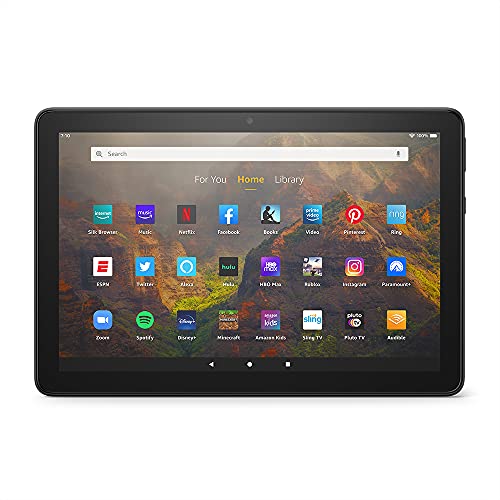
Every multi-counter business eventually faces the second-till question: the main register is fine, but the garden centre door, the market stall, the seasonal kiosk or the delivery round needs something that takes payments without justifying a flagship purchase. The Fire HD 10, with its 10.1-inch 1080p Full HD screen and 64GB of storage in this 2021-release listing, is the standard answer. It is inexpensive enough to dedicate, large enough to run a product grid honestly, and simple enough that its app limitations rarely bite a single-purpose till.
Those limitations should be stated plainly rather than discovered. Fire OS draws its apps from Amazon’s store, not Google’s, so before choosing this route, confirm that the exact point-of-sale app your business depends on is available and current there. That single check, done once, decides whether the Fire is a bargain or a paperweight for your stack. Businesses whose selling flow is confirmed on Fire OS get a remarkable deal: a till that costs little enough to keep a charged spare in a drawer, which is an uptime strategy no single expensive tablet can match.
As hardware, the Fire HD 10 is unpretentious and that is its charm at a counter. The screen is bright enough indoors, the body shrugs off the wipe-downs that retail hygiene demands, and the interface can be locked down to a simple launcher that casual staff cannot wander away from. It will not reconcile your accounts with the Samsung’s elegance or join the iPad’s accessory parade, and its 2021 vintage means software horizons should be planned in years, not decades. For a seasonal business, a market trader or a second station, those are the right trade-offs, made knowingly.
- Screen: 10.1-inch 1080p Full HD as listed
- Storage: 64GB in this configuration
- Platform: Fire OS with Amazon’s app store
- Release: 2021 model as listed
- Role: dedicated single-purpose till
- Colour: Black as listed
Strengths
- Low cost makes a charged spare drawer unit a real uptime strategy
- Screen size still runs an honest product grid
- Simple interface locks down well for casual and seasonal staff
Trade-offs
- App availability must be confirmed in Amazon’s store before buying
- 2021 vintage shortens the software planning horizon
- Accessory and stand selection is thinner than iPad or Samsung
Best for: market traders, seasonal kiosks, second counters and delivery rounds needing a dedicated, inexpensive till.
Not suited for: businesses whose required apps are absent from Amazon’s store or who want one premium do-everything tablet.

Samsung Galaxy Tab A11+ — Long-support choice
The Galaxy Tab A11+ speaks to a different kind of buyer from the bargain hunter: the owner who keeps a till for years and wants the paperwork to prove the machine was built for that. Samsung lists this model with 6GB of RAM, 128GB of storage with expansion available, Dolby Atmos speakers and, unusually welcome at this level, a two-year warranty. Warranty length is a till feature. A counter tablet that fails in month fourteen without cover is not a saving; it is an unplanned closure with a card reader attached.
On the counter, the A11+ behaves like the newer, calmer sibling of the A9+ above. The large display keeps the selling grid legible, the performance is described by Samsung as optimised for the long haul, and expandable storage means the photo library of products, the scanned supplier invoices and the training videos never force a deletion ritual during service. AI assist features in the listing are neither here nor there for till work, but the underlying message of a recent platform with years of updates ahead is exactly what a business standardising across two or three sites wants to hear.
Choosing between the two Samsungs in this guide is mostly a question of horizon. The A9+ configuration listed here is the proven value anchor; the A11+ is the fresher platform with the warranty headline and the longer runway. A business buying one till for one shop can happily take either. A business buying four tills for four sites, intending to forget about them until the next refit, should lean toward the A11+ and its support story, then apply the same appliance discipline described for its sibling: dedicated job, managed home screen, updates on quiet mornings.
- Storage: 128GB with expandable storage as listed
- Memory: 6GB RAM as listed
- Audio: Dolby Atmos speakers as listed
- Warranty: two years as listed
- Display: large display, size class of the A-series line
- Platform: current Android with Samsung update support
Strengths
- Two-year warranty treats till failure as a covered event, not a crisis
- Expandable storage removes the deletion ritual from busy counters
- Newer platform stretches the update runway for multi-site rollouts
Trade-offs
- Costs more than the Fire route for the same basic till job
- AI-branded features add little to point-of-sale work specifically
- Still needs a stand, case and reader budgeted on top
Best for: multi-site businesses and long-keepers who value warranty cover and update runway over the lowest ticket.
Not suited for: seasonal sellers who replace hardware yearly and would rather spend less per unit.
Lenovo Idea Tab 11-inch — Sharp-screen option
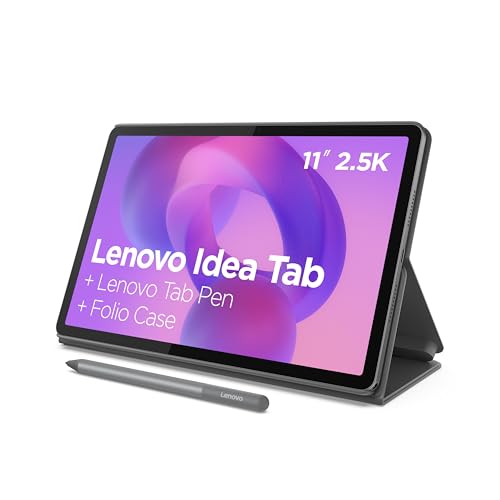
Some counters sell by showing. A jeweller confirming a repair, a salon walking a client through a treatment plan, a kitchen studio pricing a design on the spot: these businesses turn the till screen toward the customer, and for them the Lenovo Idea Tab’s 11-inch 2.5K IPS touchscreen at 90Hz, as listed, changes the conversation. Product photographs look like the products. Fine print in a service agreement stays readable. The included Tab Pen and folio case in the listing complete a presentation kit straight out of the box, with the pen ready for a signature on an estimate or a quick sketch of a layout.
Underneath the presentation layer sits credible till hardware: a MediaTek Dimensity 6300 processor, 8GB of memory and a generous 256GB of storage per the listing, which swallows years of client photos and documents without negotiation. Lenovo positions this model toward students, but the specification translates directly to appointment-led small businesses whose till doubles as their portfolio. The 90Hz refresh makes scrolling a long service menu feel composed rather than frantic, a small polish that clients register even if they never name it.
The cautions are about ecosystem rather than quality. Lenovo’s tablet accessory world is smaller than Samsung’s or Apple’s, so stand hunting takes more care, and the brand’s point-of-sale mindshare among till-app support desks is lower, which can matter the first time a peripheral misbehaves and a support script asks what tablet you own. For a solo practitioner or a boutique whose screen faces the client as often as the staff, the trade is worth it: this is the pick that treats the counter as a stage for the business, not just a place to tap totals. Owners comparing Android tills more widely will find our guide to best affordable android tablets a useful second pass.
- Screen: 11-inch 2.5K IPS touchscreen, 90Hz, as listed
- Processor: MediaTek Dimensity 6300 as listed
- Memory and storage: 8GB and 256GB as listed
- Included: Tab Pen and folio case in the listing
- Graphics: integrated Arm Mali-G57 MC2 as listed
- Role: client-facing presentation plus till duty
Strengths
- Sharpest screen here for showing products and documents to clients
- Bundled pen and case start the presentation kit without extra orders
- 256GB storage holds years of client photography and paperwork
Trade-offs
- Stand and accessory hunting takes more effort than Samsung or Apple
- Till-app support desks know the brand less instinctively
- Presentation polish is wasted on a back-room-only till
Best for: appointment-led and client-facing businesses that show the screen as part of the sale.
Not suited for: high-volume tap-and-go counters where screen beauty never reaches the customer.
SumUp POS Lite — Dedicated terminal route
Every guide to tablet tills should include the honest alternative, and this is it. The SumUp POS Lite is not a tablet that hosts PayPal; it is a dedicated point-of-sale terminal that runs SumUp’s own payment processing on hardware built for that single purpose. It appears here prose-only, without a link, precisely because it answers a different question. Some sellers do not want an app ecosystem, a general-purpose screen or a choice of platforms. They want a machine that takes payments, prints or sends receipts, and asks nothing else of them.
The appeal is real and worth respecting. A dedicated terminal removes whole categories of till anxiety: no unrelated apps, no personal accounts signed in beside the card data, no staff member’s well-meant software experiment the night before a market day. The trade-offs are equally real. Choosing this route means choosing SumUp’s processing rather than PayPal’s, with that provider’s rates, payout rhythm and feature set, and the hardware will never double as a stock checker, a music player or a back-office screen, because it was never meant to.
Place it in the decision this way. If PayPal is where your money already lives, if your invoices, online sales and refunds already run through it, then the tablet route above keeps the counter inside that world, and the SumUp is a detour. If you are starting from zero, hold no loyalty to any processor, and value a sealed, single-purpose machine over flexibility, the dedicated route deserves its quote alongside the tablet setups. What it should never be is an accidental purchase by someone who believed they were buying a PayPal tablet, which is why this guide labels it at every mention.
- Type: dedicated point-of-sale terminal, not a general tablet
- Processing: runs its own provider’s payment processing
- PayPal role: none; it is the alternative route, not a host
- Included here: prose-only discussion, no purchase link
- Flexibility: single-purpose by design
- Best context: new sellers with no existing processor ties
Strengths
- Single-purpose design removes app and account clutter from the till
- No general tablet management, updates or lockdown to think about
- Purpose-built hardware suits sellers who want payments only
Trade-offs
- Locks selling into its own processing instead of PayPal
- Cannot double as a stock, music or back-office screen
- Switching processors later means replacing the hardware concept entirely
Best for: brand-new sellers with no processor loyalty who want a sealed, payments-only machine.
Not suited for: any business committed to PayPal, which is the premise of the rest of this guide.
Which Till Setup Matches Your Counter, Queue by Queue?
| Pick | Platform | Screen | Deciding trait |
|---|---|---|---|
| Apple iPad 11-inch A16 | iPadOS | 11-inch Liquid Retina | Fewest unknowns, Touch ID approvals, deepest accessory market |
| Samsung Galaxy Tab A9+ | Android | 11-inch | Value anchor that doubles as the back-office screen |
| Amazon Fire HD 10 | Fire OS | 10.1-inch Full HD | Cheapest dedicated till, with an app-store check first |
| Samsung Galaxy Tab A11+ | Android | Large A-series display | Two-year warranty and expandable storage for long keepers |
| Lenovo Idea Tab | Android | 11-inch 2.5K, 90Hz | Client-facing sharpness with pen and case included |
| SumUp POS Lite | Dedicated terminal | Built-in terminal screen | Own processing, no PayPal, no tablet duties |
Choose by failure tolerance. A single-site café that cannot take cards for one Saturday hour loses more than a tablet costs, which pushes toward the iPad or the warranted Samsung and a charged spare of anything. A market trader with three stalls and thin margins should price the Fire route per stall and keep the savings for stock. A client-facing studio should let the Lenovo’s screen audition in person, because its advantage only exists when a customer is looking at it.
How Do You Build the Rest of the Till Around the Tablet?
The tablet is the brain, but customers meet the whole station. A stand should hold the screen at standing eye height, tilt for the customer’s confirmation view, and either swivel or stay deliberately fixed; wobbling stands slow every transaction by a second that queues multiply. The card reader pairs once and should then be forgotten, so place it where customers naturally reach, cabled or docked so its own battery never becomes a morning surprise. Cash, where the trade still takes it, lives in a drawer that the till app can pop automatically, because a drawer that needs a key hunt during a rush teaches staff to leave it open.
Receipts split businesses by habit. Many small sellers now default to email or text receipts and keep a printer only for the customers and the accountants who want paper. If your trade prints constantly, gift-shop volume or takeaway tickets, buy the printer as part of the station design rather than as an apology later, and confirm it speaks to your chosen tablet platform before money moves. Connectivity is the invisible member of the station: put the router where the till can see it, give the till priority on a tidy network, and know, before the first outage, whether your app keeps selling offline and reconciles later. Test that mode on a quiet Tuesday, not during a Saturday failure.
What Does a Sensible Day at the Till Look Like?
Open with a two-minute ritual. Wake the tablet, confirm the reader is connected, run one tiny test transaction if the platform allows it, and check the float. During service, the till stays the till: no personal browsing, no software updates, no experiments, because every mid-service change is a debt the queue collects. Breaks in trading are when the tablet earns its second salary, checking deliveries against orders, photographing the new display for social posts, reviewing which lines actually sold yesterday.
Close with the mirror ritual. Reconcile the app’s day against the drawer and the reader totals while the discrepancies are still explainable, export or sync the reports your bookkeeping depends on, and put the tablet on charge in its dock so tomorrow starts at full. Weekly, pick the quietest morning to apply system and app updates, then run a test sale before the doors open. Monthly, wipe the screen and case properly, inspect cables for the fray that always starts at the connector, and confirm the spare charger still exists where everyone believes it does. None of this is glamorous, and all of it is the difference between a till and a hope. Businesses that take the show on the road should also read our thoughts on best rugged android tablets, where the counter becomes a tailgate or a site cabin.
How Should a Business Choose Between iPadOS and Android for Its Till?
Start with the software you already pay for. If bookings, invoicing or stock already live in apps with a clear platform preference, the till follows them, because one ecosystem means one set of passwords, one update rhythm and one support number in a crisis. Continue with the staff you actually employ. A team of confident Android users will fly on the Samsungs and stall on an iPad’s gestures for a week; a student workforce raised on iPhones reverses the equation. Training time is a real cost, and it recurs with every hire.
Then consider the shape of your estate. One shop, one till: either platform delights, so let screen and warranty decide between the picks above. Several sites or plans to grow: standardise ruthlessly on one model, one case, one stand and one charger, because the second year of a multi-site business is a logistics exercise disguised as retail. Spare units should be identical and preconfigured, so a failure at any site is a swap, not a project. The platform badge on the box matters less than this discipline, and both ecosystems in this guide can support it fully.
Cost the decision across three years rather than across the checkout page. Include stands, cases, readers, a spare, the warranty position and the staff time of the platform switch if there is one. Run honestly, that arithmetic often promotes the mid-priced pick with the longer support story over the cheapest hardware, and just as often acquits the Fire for a genuinely seasonal pitch. What it never supports is the unexamined default, bought because a search result listed it first.
What Security Habits Does a Counter Tablet Deserve?
A till tablet holds the keys to the day’s money, so treat its lock screen like the shop’s front door. A strong device passcode, biometric unlock where the model offers it, and automatic locking within a minute of idleness are the baseline. Manager functions inside the selling app, refunds, voids, discounts beyond a threshold, deserve their own PINs, held by named people rather than shared on a sticky note whose audience grows every month. When a staff member leaves, their codes leave with them; changing them is a five-minute task that businesses postpone for five months at their own risk.
Accounts deserve the same tidiness. The tablet should sign in with a business account created for the shop, not with the owner’s personal identity that also holds family photographs and private mail. App installations stay limited to the selling stack and its genuine helpers, which keeps both performance and exposure small. Find-my-device services should be switched on and tested, because a tablet that walks away from a market stall is a data incident as well as a hardware loss, and remote lock or wipe is the difference between the two.
Customers form part of the security picture too. Angle the screen so totals are visible to the person paying and card details are visible to nobody else, keep the reader within the customer’s sight throughout a transaction, and never let the rhythm of a queue rush a cardholder into abandoning a receipt they wanted. Trust at a counter is built from these small visible courtesies, and it compounds quietly in exactly the way a single careless incident destroys it loudly.
How Does the Right Till Differ From a Bakery to a Bike Shop?
Trades load a tablet differently, and naming your own pattern honestly sharpens the pick. A bakery opens with a queue already formed, sells small totals at high speed, and coats everything it owns in a fine dusting of flour. Its till needs big grid buttons, a screen that reads through a wipe-down at arm’s length, and a case that seals reasonably against dust. Speed of waking matters more than beauty, which favours the iPad or a Samsung kept in appliance mode over any machine that greets the morning rush with an update prompt.
A bike shop sells slowly and largely. Consultations last twenty minutes, the ticket includes parts and labour, and the tablet travels from counter to workshop bench to the customer’s side for an estimate approval. Portability, a pen for sketching a repair, and storage for photographs of serial numbers and damage all matter, which is the Lenovo’s natural habitat and the A9+’s second job. A market trader, by contrast, sells outdoors in weather, on battery, with connectivity that comes and goes; the Fire’s replaceability and a tested offline routine outweigh every specification elegance.
Salons and clinics add privacy to the pattern. The screen shows names, appointments and sometimes payment details within sight of a waiting area, so viewing angles become a courtesy feature and automatic locking becomes a professional obligation. Food trucks add heat, vibration and a serving hatch’s worth of sunlight, which punishes dim screens and rewards the brightest panel the budget allows, mounted where the lunch sun does not strike it directly. None of these trades needs a different app; all of them need the host chosen with their own day in mind rather than a generic one.
What Happens When the Internet Goes Down Mid-Service?
It will, usually at the least convenient moment, so the businesses that cope are the ones that rehearsed. First, know your app’s offline behaviour precisely: whether it queues card payments for later processing, which payment types it refuses offline, and what limits apply. Those answers live in the provider’s current documentation, and they change often enough that this guide deliberately describes the questions rather than freezing answers that may age. Read them before the outage, and summarise them on the failure card.
Second, separate the failures. Shop broadband dying is an inconvenience if the tablet can fall back to a phone hotspot in thirty seconds; practise that switch until any staff member can do it. A full local power cut is a different event, where battery endurance and a till that was docked and charged overnight become the whole business for an hour. A reader failure is a third event, answered by the spare reader or the charged spare tablet from the drawer. Each failure has a cheap rehearsal and an expensive improvisation, and the only difference between shops that shrug and shops that close is which one they chose in advance.
Third, communicate like a business that expected this. A small sign, a calm sentence to the queue, and an honest estimate convert most customers from frustrated to patient, because people forgive weather and resent chaos. When service returns, reconcile the queued transactions before anything else, while memories are fresh and the paperwork still matches the day. Then write down what actually happened on the failure card, because the second outage should always be handled better than the first.
How Do You Train Casual Staff on a Tablet Till Without Tears?
Teach the five transactions that make up ninety percent of a trading day, in order, on the actual hardware, during a quiet hour: a simple sale, a sale with a discount the business actually offers, a refund, a void of the last item, and the end-of-day reconciliation. Everything else can be learned later or escalated to a manager, and pretending otherwise during training produces staff who know a little about everything and hesitate at the till during the rush, which is the one place hesitation costs money.
Write the house rules where the till lives. Which discounts need a manager code, what happens when a card declines twice, when to offer a paper receipt, and who to call when the screen shows something nobody recognises: four short answers on one laminated card outperform a training manual nobody opens. Pair new starters with an experienced hand for their first busy shift rather than their first shift, because the till is learned at queue speed or not at all, and a calm Saturday with a mentor teaches more than a silent Tuesday alone.
Protect the training investment with the appliance discipline mentioned throughout this guide. A locked-down home screen with the selling app centred, updates scheduled rather than spontaneous, and personal accounts kept off the device mean the machine a new starter meets is the same machine the last starter learned on. Consistency is a training tool. Businesses with high seasonal turnover feel this most, and they are exactly the businesses tempted to skip it, which is why the Fire’s simple lockdown and the Samsungs’ managed modes earn their keep in this guide.
When Does a Second Tablet Beat a Better Tablet?
Earlier than most owners expect. The moment a queue regularly forms behind a single till while another staff member stands idle, the business does not have a hardware quality problem; it has a station count problem. A second, modest tablet on a second stand shortens the queue, covers the first unit’s failure without drama, and lets one screen serve a browsing customer while the other takes money. This is the arithmetic that makes the Fire HD 10 strategically interesting beyond its price: two adequate stations routinely outsell one excellent station, and they fail one at a time.
The second unit also unlocks roles the main till cannot leave its post to perform. It checks stock in the aisle, takes the order at the table, runs the click-and-collect handover at the door, or travels to the Saturday market while the shop unit stays home. Businesses that buy the second tablet as an identical twin of the first gain the spare-parts and training benefits described earlier; businesses that buy it cheaper, as a deliberate lieutenant, gain flexibility. Either logic works. The mistake is the middle path: a second unit so different and so rarely configured that nobody trusts it during the rush it was bought to relieve.
Plan the second station’s furniture with the same care as the first. A till that lives on a wobbly café table beside the condiments will be knocked, splashed and quietly resented. Give it a fixed home, its own charger, and a named owner among the staff for its morning checks. Hardware multiplies happily; responsibility must be assigned deliberately, or every unit becomes nobody’s unit by the second month.
What Should the Receipt and the Record Show?
A till is also a record-keeping machine, and its paperwork habits deserve a decision rather than a default. Digital receipts save paper and build a customer list with consent; paper receipts serve customers who budget on paper and trades where a physical ticket moves through a kitchen or a workshop. Most of the businesses in this guide’s audience end up hybrid, printing on request and sending digitally by default, which keeps costs and clutter down without stranding the paper loyalists.
Behind the receipt sits the day’s data, and the tablet’s job is to make it boringly exportable. Before committing to a setup, confirm the reports your bookkeeping actually consumes can leave the app in a form your spreadsheet or accountant accepts. The finest counter experience in the world curdles at month-end if the numbers need retyping. This unglamorous check, like the app availability check that opens this guide, belongs before the hardware purchase, and it is one more reason the established platforms in the picks list earn their places.
Which Till Mistakes Cost Small Businesses the Most?
Buying the tablet before confirming the app is the founding error of this category. The premise of this guide is that PayPal’s app on an ordinary tablet is the till, so the app check comes first, on the exact platform and store you intend to use, every time. The second error is furnishing the counter backwards: a premium tablet perched on a flimsy stand with a reader wandering loose on a cable, when a mid-priced tablet on a solid stand would serve customers faster and fail less. The station is the product; the tablet is one component.
The third error is letting the till become the shop’s general computer. Every extra account, game and personal login competes with the selling app for storage, battery and attention, and the bill arrives during the lunch rush. Keep the till boring. The fourth error is having no failure plan: no spare, no offline-mode test, no idea what the business does when the broadband dies at noon. A plan written on one card, taped inside a cupboard, converts those events from closures into anecdotes. Finally, businesses neglect the human till: staff who were never shown the refund flow will improvise one in front of a customer, and improvisation at a till is how money and trust leak together.
Final Recommendation
Most PayPal sellers should start with the iPad if their business already leans Apple, or the Galaxy Tab A11+ if it leans Android and keeps hardware for years, because those two minimise the two till risks that matter: app surprises and unsupported old age. The A9+ remains the value anchor for a one-tablet shop, the Fire HD 10 equips second counters and seasonal pitches at a price that permits spares, and the Lenovo Idea Tab serves businesses whose screen performs for clients. The SumUp POS Lite stays in the guide as the honest fork in the road for sellers with no PayPal commitment at all. Choose the host carefully, furnish the station properly, and keep the till boring. Do that, and the technology will vanish into the working day, leaving your staff free to do the part of selling no tablet can: noticing the regular, remembering the order, and making the queue feel shorter than it is.
One habit ties the whole station together: the weekly ten-minute till review. Once a week, in the quietest trading hour, the owner or manager stands at the counter and simply watches the system work. Are cables creeping loose? Is the reader’s charge lasting the day it used to? Has a well-meant shortcut crept into the refund flow? Is the spare still in its drawer, charged, with its sign-in still working? Ten minutes of watching catches the slow drifts that no single failure announces, and it keeps the failure card honest, because a plan describing equipment that has quietly changed is worse than no plan at all.
Treat the tablet’s replacement as a scheduled event rather than a surprise. Note the purchase date, the warranty expiry and the platform’s expected support horizon in the same bookkeeping file that holds the reader’s details, and review it at the same time as the insurance. A till replaced calmly in a quiet month, migrated over a weekend and tested before the old unit retires, costs a fraction of the same replacement forced by a Friday failure. The picks above were chosen with that calendar in mind, favouring makers whose support stories a small business can plan around for years.
Accessibility at the counter is the last detail and the one customers remember longest. Mount the screen where a seated customer or a customer of shorter stature can still read the total and reach the reader without stretching across the counter. Keep the confirmation step unhurried in your staff training, because a customer who needs more time to read the amount is owed exactly that time, and a queue behind them can wait the extra seconds. Where the selling app offers larger text or high-contrast display settings, set them once and leave them set; the staff will adapt in a day, and a portion of your customers will silently be grateful every single visit.
Sound plays a part as well. The confirmation beep that tells a busy shopkeeper a payment landed should be audible over the room’s ordinary noise, which is where the Samsung models’ speaker claims stop being entertainment trivia and start being till features. In a quiet boutique the same logic inverts: soften the alerts, let the screen carry the confirmation, and keep the atmosphere the business is selling. Matching these small signals to the room is the kind of polish that separates a counter that merely functions from one that feels considered.
Finally, photograph your finished station. One picture of the counter as customers see it and one of the cable runs as only staff see them will save real time the day something is unplugged by a cleaner, a delivery or a well-meaning rearrangement, because restoring a photographed setup takes minutes while reconstructing a remembered one takes the whole morning. File the photographs with the failure card, and the station’s documentation is complete, ready for the next pair of hands that ever has to rebuild it on a busy morning under pressure with a queue already forming at the door and the first customers of the day waiting to be served well by people who deserve tools that simply work every day.
Frequently Asked Questions
Do I need a special tablet to sell with PayPal in person?
No. The premise of this guide is that PayPal’s own point-of-sale app runs on ordinary tablets, with the tablet as host and a compatible card reader completing the till. Check current app availability in your platform’s store before buying hardware around it.
Are stands and cash drawers included with any of these picks?
No. Stands, drawers, printers and register bundles are accessories that serve the tablet, so they are budgeted separately and never counted as picks. Only the Lenovo listing bundles a pen and folio case with the tablet itself.
Can the Fire HD 10 really work as a till?
Yes, provided the exact selling app your business needs is available and current in Amazon’s app store, which you should confirm before purchase. Its low cost makes it especially good as a second till or a charged spare.
Why is the SumUp POS Lite not linked like the others?
Because it is not a PayPal host tablet. It is a dedicated terminal running its own payment processing, included prose-only as the alternative route for sellers who are not committed to PayPal.
Which pick should a multi-site business standardise on?
The iPad for Apple-leaning estates or the Galaxy Tab A11+ for Android ones, bought as identical preconfigured units with spares, because uniformity and support runway matter more than small specification differences.
What should I do before my first day trading on a new till?
Install and sign in to the selling app, pair the reader, run a small test transaction and a test refund, confirm offline behaviour if your app offers it, and write the failure plan on a card where staff can find it.
Related Guides
For the wider counter-and-beyond picture, continue with our guide to best sheet music tablets if your venue doubles as a performance space, and the business-connectivity roundup already linked above when the trading day leaves the building.


