What's inside
- Key Takeaways
- Quick Picks
- How Did We Judge Privacy Claims We Cannot Inspect?
- What Does a Closed Link Actually Protect, and What Does It Not?
- What Questions Should You Ask of Any Monitor’s Privacy Story?
- How Do FHSS and DECT-Style Links Actually Work?
- How the Six Private Links Compare
- How Do You Set Up a Nursery Camera Safely, Step by Step?
- Which Everyday Features Actually Earn Their Keep?
- Which Nursery Monitor Mistakes Should You Avoid?
- How Do a Monitor’s Duties Change From Newborn to Toddler?
- How Does the Monitor Fit Grandparents, Sitters and Shared Care?
- When Is the Right Time to Buy, and What About a Second Child?
- What Should You Do on the Night the Monitor Misbehaves?
- Final Recommendation
- Frequently Asked Questions
- Related Guides
As an Amazon Associate I earn from qualifying purchases. This post may contain affiliate links at no extra cost to you.
gizmoverdict.com is reader-supported. When you buy through links on our site, we may earn an affiliate commission.
Where to buy: the six monitors in this guide to the best encrypted baby cameras are each sold through their own Amazon listing, linked in the quick picks and again in every detailed review, and the listing page is the place to confirm screen size, camera count and today’s terms before you check price on Amazon.
Start with the premise this whole category is built on, stated plainly because listings rarely state it at all: almost no baby monitor documents an encryption protocol you can inspect. You will search product pages in vain for the cipher, the key exchange, the audit. What the private class of monitors actually offers is something more architectural than cryptographic — a closed, dedicated link between camera and parent unit that never touches your home WiFi network, never asks for a cloud account, and never puts a feed on a server you do not control. The signal hops frequencies in the FHSS style or uses a DECT-like dedicated link, camera paired to screen at the factory, and the nursery’s pictures travel a private road rather than the public internet. That architecture, not a named cipher, is what privacy means in this roundup — and no monitor in it, or anywhere, should ever be described as impossible to compromise. What a closed link does is remove the common attack routes: no password to phish, no account to breach, no app collecting a feed.
The exception that proves the rule sits in the list: the eufy Baby Monitor E21, which offers both WiFi and a local no-WiFi mode. On WiFi it behaves like a modern app monitor, with recording through the app; in its local mode it becomes a member of this guide’s private class, camera talking to its bundled screen without the network. The local mode is the private route, and its review below treats the two modes as the two different products they effectively are.
Two safety framings govern everything that follows, and they outrank every feature discussed. First, placement: a nursery camera belongs mounted or set well outside the crib, with its cord routed completely out of a child’s reach — cords near cribs are a strangulation hazard, full stop, and every setup section in this guide assumes the camera watches from a wall or a shelf, never from the crib rail. Second, purpose: a monitor is an aid to a caregiver, never a safeguard in itself. It extends your eyes and ears; it does not replace safe sleep practice — a clear, flat sleep surface, baby on their back, nothing soft in the crib — and it does not replace checking on your child. Buy the most private link you can, mount it like the cord matters, and let it do its one job: keeping you connected while you are in the next room making tea.
Within those framings, the six picks divide by screen, stamina and temperament. The HelloBaby HB6550 is the beloved default — big screen, marathon battery, a private no-WiFi link. The Babysense PRO adds a second camera and a nursery-comfort machine’s worth of extras. The VTech is the compact, honest traveller. The GoodBaby brings the biggest screen and the longest stated battery claim here. The Momcozy layers smart detection onto a big, sharp screen. And the eufy E21 is the hybrid for families who want app features with an escape hatch into local privacy. All six were judged first on the closedness of their link, then on the ordinary virtues of a monitor you will use half-asleep at 3 a.m.
A note on vocabulary before the reviews, because this category’s marketing borrows words it has not earned. Secure, in a listing, is a mood; in this guide it is a checklist — no network, no account, paired devices, local processing. Private is a structure, not a promise. And any monitor, anywhere, described with words suggesting it cannot be compromised is being described dishonestly; the honest claim, and it is a strong one, is that a closed link gives an intruder almost nothing to aim at. Read every review below in that vocabulary and the differences between the six picks will stay in their true proportions.
Key Takeaways
- Listings almost never document an encryption protocol; the real privacy here is architectural — a closed, factory-paired link that never joins your WiFi or a cloud account.
- Five of the six picks are no-WiFi by design; the eufy E21 is the hybrid, and its local no-WiFi mode is the private way to run it.
- No monitor is immune to compromise, and none is claimed to be here — a closed link removes the common routes (accounts, passwords, servers), it does not repeal physics or proximity.
- Safe setup is non-negotiable: camera outside the crib, every cord far out of reach, and the monitor understood as an aid to caregivers, never a safeguard by itself.
- Battery claims in this group are generous — 19 to 48 stated hours depending on model and mode — and VOX-style wake-on-sound is what makes the long figures reachable in real nurseries.
- Range figures such as 1000ft and 1640ft are open-air numbers; walls, floors and neighbouring networks shrink them, so judge by your home’s layout, not the headline.
Quick Picks
| Pick | Badge | Why it earns its place |
|---|---|---|
| HelloBaby HB6550 (single camera) | Best private default | A 5-inch screen, 30-hour stated battery and a private no-WiFi link in the monitor millions of families already trust. |
| Babysense PRO | Best two-camera private system | Split-screen viewing of two rooms on a closed non-WiFi link, plus a night light and sound machine built in. |
| VTech Video Baby Monitor | Best compact secure pick | A 2.8-inch screen, secure no-WiFi transmission and 19-hour stated battery from a household name in baby gear. |
| GoodBaby 6-inch Video Monitor | Biggest screen, longest claim | A 6-inch display and a 48-hour stated battery headline a no-WiFi monitor with motion detection and a thermal sensor. |
| Momcozy Video Baby Monitor | Best smart detection, no WiFi | A 5.5-inch 1080P screen with cry detection and a virtual safe fence, still on a closed no-WiFi link. |
| eufy Baby Monitor E21 | Best hybrid with a local mode | A 4K camera and app recording when you want them, and a no-WiFi local mode when privacy comes first. |
How Did We Judge Privacy Claims We Cannot Inspect?
By architecture, not by adjectives. Since listings do not publish protocols, this guide scores what can be verified from the outside: does the system require WiFi? Does it require an account or an app? Does any part of the feed’s path leave the house? A monitor that answers no three times — the HelloBaby, the Babysense PRO, the VTech, the GoodBaby and the Momcozy — belongs to the closed class by construction. Its camera and screen are paired at the factory, its signal is a dedicated short-range link, and the nursery’s video exists in exactly two places: the camera’s lens and your hand. There is no server to breach because there is no server.
The eufy E21 answers those questions with a both/and, which is why it is handled as a special case throughout: its WiFi mode offers app access and round-the-clock app recording, and its local mode cuts the network out. Families choosing it should decide which mode is the household default and treat the other as the exception, because a hybrid’s privacy is a setting, not a structure. Beyond architecture, we weighed the unglamorous evidence of maturity — established brands, stated ranges, battery figures that survive contact with VOX modes — and the safety-relevant details: temperature sensing, two-way talk, night vision, and how the whole system behaves at 3 a.m. in the hands of an exhausted adult. Readers comparing the wider nursery field will find the two-camera special case in our guide to the best baby monitor with 2 cameras, and the indoor-camera alternatives in the best affordable indoor cameras roundup.
What Does a Closed Link Actually Protect, and What Does It Not?
A closed link protects the feed’s journey. The picture of your nursery never crosses the internet, never rests on a company’s server, never waits behind a password someone can guess, reuse or lose in a breach. The account-based failure stories that periodically attach to connected cameras — credential stuffing, mis-set sharing, a feed visible to a stranger — have no surface to attach to here. That is a large, real protection, and it is the reason privacy-minded families choose this class even though it gives up phone viewing from the office.
A closed link does not protect against everything, and honesty requires the list. Its range is the house and garden, so its signal exists in your immediate neighbourhood, where a determined, proximate, well-equipped eavesdropper is a theoretical rather than practical concern for nearly every family — but the word theoretical is doing work there, and this guide will not pretend otherwise. It does not protect a monitor left paired to a stranger’s screen, which is why second-hand units should be reset and re-paired. And it does not make the camera itself safe in the physical sense: that is placement, cords and mounts, the unglamorous disciplines the setup section below treats as law. Privacy, in a nursery, is a system — architecture, habits and placement together — and the monitor is only its most expensive component.

HelloBaby HB6550 (single camera) — Best private default
The HB6550 is the monitor this category revolves around: a 5-inch screen, a camera that pans, tilts and zooms under your thumb, a battery stated at 30 hours, and a private no-WiFi link with a stated range of 1000 feet. Its listing notes it is trusted by millions of families, and while such claims are marketing, the underlying reality is visible in the design’s maturity — everything is where a tired hand expects it, the night vision engages without drama, VOX wakes the screen when the baby makes a sound and lets it sleep when the room is quiet, and two-way talk is a button, not a menu expedition.
In a privacy-first nursery the HB6550’s virtue is what it refuses to do. It will not join your network, will not ask for an email address, will not offer to store your child’s first year on a server. The camera pairs to its screen and minds its business, and that business includes the safety disciplines: mount the camera on the wall or a high shelf, outside the crib entirely, with the cord dressed away where no small hand will ever find it. Set up that way, the single-camera HB6550 is the default recommendation of this guide for a first nursery — and its two-camera sibling is handled separately in the companion roundup, because that is a different box with a different job.
- Link: private no-WiFi, factory paired
- Screen: 5-inch video display
- Battery: 30 hours as stated
- Camera: pan, tilt and zoom, night vision
- Range: 1000ft as stated, open-air
- Extras: two-way talk, VOX wake-on-sound
Strengths
- The closed link is total: no network, no account, no app, no feed leaving the house.
- A big screen and a 30-hour stated battery suit real, interrupted parental sleep.
- PTZ control reframes the shot from the sofa as the baby grows and moves.
Trade-offs
- No phone viewing exists, at home or away — the screen is the only window.
- One camera covers one room; twins or siblings mean the two-camera route.
- Range in a dense, multi-storey house will be far below the open-air figure.
Best for: first nurseries wanting maximum privacy with minimum fuss. Not suited for: parents who need to peek in from work or while travelling.

Babysense PRO — Best two-camera private system
The Babysense PRO is the maximalist of the closed class: a 5.5-inch Full HD split screen watching two cameras at once, a closed non-WiFi connection, a 20-hour stated battery, and a nursery-comfort suite built into the system — a six-colour night light and a white-noise and sound machine, the apparatus of the modern bedtime routine folded into the monitor itself. For a household with a baby and a toddler in separate rooms, the proposition is complete in one box: both children on one screen, both rooms on a private link, and the soothing hardware already where it needs to be.
Split-screen viewing deserves its privacy footnote: two cameras on a closed link are still a closed link, and the PRO’s architecture keeps both feeds inside the house exactly as a single camera would. The extra camera doubles the placement discipline, though — two cords to route beyond reach, two cameras mounted outside their cribs, two angles to check as furniture moves and children grow more capable. Families who hold that discipline get the most complete private system in this guide; the detailed two-camera comparison, including how split-screen differs from auto-scan, lives in the companion article on monitors sold with two cameras, while the PRO’s place here is as the privacy class’s flagship of abundance.
- Link: closed non-WiFi secure connection
- Screen: 5.5-inch Full HD split screen
- Cameras: two in the box
- Battery: 20 hours as stated
- Comfort suite: 6-colour night light, white noise and sound machine
- Viewing: both rooms simultaneously
Strengths
- Two rooms, one screen, one private link — the complete two-child answer.
- Night light and sound machine remove two separate gadgets from the nursery.
- A large, sharp split screen keeps both children legible at a glance.
Trade-offs
- The richest feature set here is also the most to set up and learn.
- Twenty stated hours is the shortest span in this roundup’s top tier.
- Two cameras double the cord-routing and mounting discipline required.
Best for: two-room families wanting one private system with comforts built in. Not suited for: single-room minimalists who would never use the second camera or the extras.

VTech Video Baby Monitor — Best compact secure pick
VTech has made nursery electronics since before monitors had screens, and the VM923 shows the value of that lineage in miniature: a 2.8-inch screen, a secure no-WiFi transmission, a stated 19-hour battery, pan, tilt and zoom, night vision, a temperature sensor and two-way talk, at a size that suits a bedside table, a grandparent’s house or a travel bag. Its privacy architecture is the same closed class as the leaders — no network, no account — delivered without ceremony by a brand your own parents may have bought.
The small screen is a choice, not a failure. On a nightstand at arm’s length, 2.8 inches is entirely legible; across a living room it is not, and the review’s verdict below says so plainly. What the compact format buys is portability and simplicity: this is the monitor that goes to the grandparents for the weekend and works there without a network to join or an app to install, the one that covers a hotel room or a caravan with the same private link it uses at home. For safety, the same law applies in miniature — camera on a dresser or shelf outside the crib, cord routed away — and VTech’s temperature sensing adds the quiet reassurance that the room itself, not just the picture, is being watched.
- Link: no-WiFi secure transmission
- Screen: 2.8-inch display
- Battery: 19 hours as stated
- Camera: pan, tilt, zoom, night vision
- Range: 1000ft as stated, open-air
- Sensing: room temperature, two-way talk
Strengths
- A trusted nursery brand’s closed link in a genuinely portable package.
- Temperature sensing and two-way talk survive the compact format intact.
- Travels beautifully: no network to join at grandparents’ houses or hotels.
Trade-offs
- The 2.8-inch screen is a nightstand device, not an across-the-room one.
- Nineteen stated hours is the shortest battery claim in this group.
- One camera, one room, in this configuration.
Best for: travel, grandparents and compact nightstands. Not suited for: parents who read the monitor from across a large room.

GoodBaby 6-inch Video Monitor — Biggest screen, longest claim
GoodBaby’s pitch is scale: the largest screen in this roundup at 6 inches and a stated battery figure of 48 hours that towers over the field — a figure to read as the maker’s claim under its most frugal mode, as all such figures should be read, but an indication of intent even so. Around those headlines sits a full no-WiFi specification: remote pan, tilt and zoom, motion detection, a thermal sensor watching the room’s temperature, night vision, white noise, and a stated 1000-foot range. The link is the closed class this guide exists to celebrate; the screen is what you will actually live with, and six inches of nursery is a genuinely different experience at 3 a.m. — the baby’s face, the blanket’s position, the small hand outside the sleep sack, all legible without lifting the unit to your face.
Motion detection on a closed system deserves a clarifying word: the intelligence lives inside the monitor, not in a cloud, so alerts about movement arrive without the feed ever leaving the house. That is the pattern privacy buyers should look for across this category — local processing, local storage of nothing, a link with no exits. The GoodBaby’s size makes it the least portable pick here and the most at-home, a kitchen-counter and nightstand anchor; and its mounting discipline is the familiar one, camera high and outside the crib, cord vanished along the wall where curiosity cannot follow.
- Link: no-WiFi, closed class
- Screen: 6-inch display
- Battery: 48 hours as stated, mode-dependent
- Camera: remote pan-tilt-zoom, night vision
- Detection: motion detection processed locally
- Sensing: thermal room-temperature sensor, white noise included
Strengths
- The biggest screen here makes overnight checks effortless at a glance.
- A class-leading stated battery figure, even discounted for real-world modes.
- Local motion detection keeps alerts private — nothing leaves the house.
Trade-offs
- The 48-hour figure belongs to the frugal modes; video-heavy use will halve such claims.
- A 6-inch parent unit is furniture, not a pocket companion.
- Rich features mean a longer first-evening setup than the VTech’s simplicity.
Best for: home-based parents who want the clearest overnight picture. Not suited for: frequent travellers needing a bag-friendly monitor.
Momcozy Video Baby Monitor — Best smart detection, no WiFi
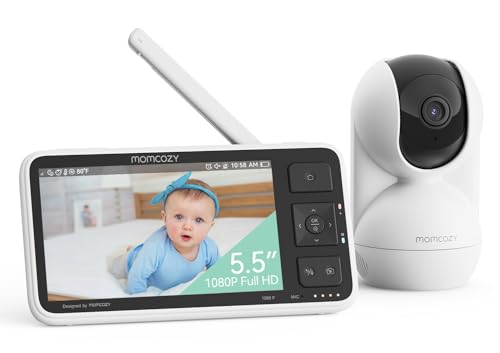
Momcozy asks an interesting question: how much of the smart-monitor experience can live entirely inside a closed link? Its answer, the BM03, pairs a 5.5-inch 1080P Full HD screen with cry, cough and sound detection, smart notifications, and an electric safe fence — a virtual boundary that alerts you if the picture’s subject crosses it — all on a no-WiFi connection with a stated range of 1640 feet, the longest figure in this guide and, as always, an open-air number that your walls will negotiate down. The 5800mAh battery, two-way audio and VOX complete a specification that reads like an app monitor’s, minus the app.
The safe fence and the detection suite are processed on the device, which is the privacy point worth teaching: intelligence does not require a cloud, it requires a chip, and the nursery’s sounds and movements can be analysed where they happen and nowhere else. Used with the standing safety framing — detection is an aid that summons a caregiver, not a safeguard that replaces one, and a fence alert is a prompt to go and look, not a guarantee about anything — the Momcozy is the pick for parents who want a monitor that notices things, on a link that tells nobody. Mount it outside the crib, route the cord to invisibility, and let the fence watch the picture while you watch the child.
- Link: no WiFi, closed class
- Screen: 5.5-inch 1080P Full HD
- Battery: 5800mAh unit battery
- Range: 1640ft as stated, open-air
- Detection: cry, cough and sound detection; electric safe fence
- Audio: two-way, with VOX
Strengths
- The smartest local brain here: cry and cough detection without any cloud.
- A sharp 1080P screen and the longest stated range in the roundup.
- The safe-fence alert adds a layer of notice for mobile toddlers.
Trade-offs
- Detection features need tuning to your baby, or alerts will cry wolf.
- The longest range claim is the one walls will discount most.
- Richest menus here alongside the Babysense; simplicity seekers should look elsewhere.
Best for: parents who want smart noticing on a private link. Not suited for: anyone who wants a monitor with nothing to configure.
eufy Baby Monitor E21 — Best hybrid with a local mode
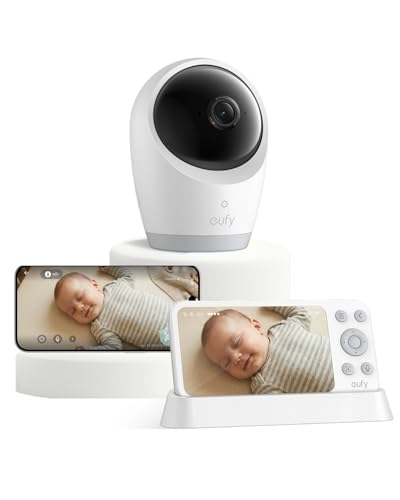
The E21 is this guide’s deliberate exception, included because its duality is honest and increasingly common: a 4K UHD camera feeding a 5-inch screen, with both WiFi and no-WiFi operation, app recording around the clock when connected, 8x zoom, active noise reduction, a built-in battery in the camera, and no subscription fee. Run it on WiFi and it is a modern connected monitor with phone access and recordings. Run it in its local mode and it joins this guide’s class: camera and screen in direct conversation, network uninvolved. The private route is the local mode, and families buying the E21 for privacy should set that mode as the household default from the first evening.
That discipline is the whole review, in a sense. A hybrid’s privacy is chosen daily, in settings, and the honest buyer weighs whether the app features will tempt the household into leaving the connected mode on by default — in which case the closed-class picks above, which offer no such temptation, may be the truer privacy purchase. For families who genuinely want both — local privacy as the rule, app access for the specific evening a babysitter sits — the E21 is uniquely capable, and its camera quality leads this field. The safety framing is unchanged by the extra technology: camera mounted outside the crib, cord out of reach, and the monitor — however sharp its 4K eye — an aid to your care, never a substitute for it. Shoppers weighing connected indoor cameras generally may also consult the best 2pack indoor cameras survey.
- Link: dual — WiFi app mode and local no-WiFi mode
- Camera: 4K UHD, 8x zoom
- Screen: 5-inch, 720p
- Recording: app recording in connected mode; no subscription fee
- Audio: active noise reduction, two-way talk
- Camera power: built-in battery in the camera unit
Strengths
- The sharpest camera here, with app recording when the household wants it.
- A genuine local mode offers the closed-class route in the same box.
- No subscription fee keeps the connected features free of rent.
Trade-offs
- Privacy is a setting to maintain, not a structure you cannot leave.
- Connected mode reintroduces accounts and servers into the nursery’s story.
- The screen is 720p — the camera’s 4K detail is best seen in the app.
Best for: families who want app features with a disciplined local default. Not suited for: households that know the connected mode would quietly become the only mode.
What Questions Should You Ask of Any Monitor’s Privacy Story?
Carry five questions into any nursery-camera purchase, including the connected models outside this guide’s class, and the answers will sort the field faster than any feature list. Does it need my WiFi? Does it need an account? Where does the feed travel, and where, if anywhere, is it stored? Who else can be given access, and how is access revoked? And what happens to the camera if the company behind it disappears — does it keep working in my house, or does it phone a home that no longer answers? The six monitors in this roundup answer those questions with a simplicity that amounts to a philosophy: no network, no account, a feed that travels metres, storage nowhere, access by physical possession of the parent unit, and a dependence on no company’s survival whatsoever.
Ask the same questions about the nursery’s other connected objects while you are in the mood — the smart speaker, the connected toy, the camera in the hallway — because a household’s privacy is set by its leakiest device, not its tightest. The monitor class in this guide is often the first purchase where new parents confront those questions at all, and there is a case for letting its answers set the household’s standard: local where possible, accounts where necessary, and a clear-eyed inventory of what leaves the house and why. A child’s digital footprint begins before they can object to it; the closed link is one of the few nursery technologies that lets parents keep that footprint, for a while, at exactly zero.
How Do FHSS and DECT-Style Links Actually Work?
The two radio traditions behind this class deserve a plain explanation, because they are the substance behind the privacy claim. Frequency-hopping spread spectrum — FHSS — does not send the nursery’s signal on one channel; it hops the conversation across many channels in a rapid pattern that the paired camera and screen share. A casual receiver hears fragments; only the partner following the pattern assembles the picture. DECT-style links, borrowed from cordless telephony, dedicate a protected slice of spectrum to a paired handset-and-base conversation with its own established pairing discipline. Baby monitors implement these ideas in proprietary variations, and the variations are exactly why listings speak of secure transmission without publishing a protocol you could audit.
What matters for a buyer is the shared shape: pairing is physical and exclusive, the link is short-range by design, and there is no doorway from the link to the internet because no component in the chain speaks internet. Compare that with a WiFi camera’s journey — lens to router, router to a company’s server, server to an app on a phone anywhere on Earth — and the privacy difference stops being a slogan and becomes a diagram. Every hop in the second journey is a place where accounts, passwords, updates and breaches live. The first journey has one hop, inside your walls, between two devices that know only each other.
Range is the price of that purity, and it is worth paying knowingly. The same short-range design that keeps the feed local means the feed stays local: no checking the nursery from a restaurant, no grandparent viewing from another city. Families consistently report that the trade feels different after a month than it did in the shop — the phone-peek turns out to be a novelty, while the closed link’s silence, its freedom from accounts and alerts about anything except the baby, becomes the daily texture of the thing. Buy the architecture your household will still be glad of in month six.
How the Six Private Links Compare
| Monitor | Link | Screen | Stated battery | Cameras | Defining extra |
|---|---|---|---|---|---|
| HelloBaby HB6550 | Closed no-WiFi | 5 in | 30 hours | One | PTZ with VOX, the default choice |
| Babysense PRO | Closed non-WiFi | 5.5 in Full HD | 20 hours | Two | Night light and sound machine |
| VTech VM923 | Closed no-WiFi | 2.8 in | 19 hours | One | Compact travel format |
| GoodBaby 6-inch | Closed no-WiFi | 6 in | 48 hours | One | Local motion detection, thermal sensor |
| Momcozy BM03 | Closed no-WiFi | 5.5 in 1080P | 5800mAh unit | One | Cry detection and safe fence |
| eufy E21 | WiFi plus local mode | 5 in | Built-in camera battery | One | 4K camera, app recording |
How Do You Set Up a Nursery Camera Safely, Step by Step?
Begin with the sleep space, not the camera. The crib itself stays bare and safe — flat mattress, fitted sheet, baby on their back, nothing soft or loose — and the camera’s job is to watch that space from outside it. Choose the mounting point before you unbox anything else: a wall position or a high shelf with a clear view of the whole crib, far enough that no cord, however routed, can reach the crib’s interior, and never, under any circumstances, a mount on the crib rail itself. Cords are the nursery’s one serious equipment hazard; route the camera’s power lead down the wall, behind furniture, secured where small hands and growing climbers cannot find purchase on it, and re-check the routing every time the room changes — because rooms with growing children always change.
Pair and test before the first night. Set the camera and screen talking, walk the parent unit through the rooms where you will actually use it — kitchen, sofa, your bedside — and note where the signal thins; a closed link’s range inside a real house is a fact to learn on a calm afternoon, not during a 2 a.m. cry. Set VOX sensitivity so the screen wakes for your baby and not for the radiator’s tick. Agree, if there are two caregivers, on the monitor’s overnight home and the charging routine: a parent unit that dies at 4 a.m. because it never met its charger is a failure of routine, not of hardware. Finally, brief anyone who will use the system — grandparents, sitters — on the same disciplines: the screen is an aid, the baby is checked in person, and the camera never moves closer for a better view. The families in our wider guide to the best doorbell cameras no subscription apply the same no-account thinking at the front door, for readers extending the principle house-wide.
Which Everyday Features Actually Earn Their Keep?
VOX is the unsung hero of this entire category. A screen that stays dark and silent while the nursery is quiet, then wakes at the baby’s sound, is a screen a parent can sleep beside — and its sensitivity setting is the most important calibration you will make. Too eager, and the heating system’s clicks keep you awake; too dull, and the first whimpers go unheard. Every pick here offers some form of it, and the monitors’ long stated battery figures quietly assume it: a screen asleep most of the night sips what a screen awake all night gulps. Set VOX on the first evening, adjust it on the third, and the monitor’s stamina claims start to resemble your life.
Temperature sensing earns its place for a different reason: it answers the question parents actually ask at 2 a.m., which is rarely is the baby moving and usually is the room all right. The VTech and GoodBaby state their sensors plainly; a room drifting cold under a failed radiator or hot under a summer heatwave is information a picture alone gives badly. Two-way talk, by contrast, should be valued honestly: it soothes some babies beautifully, startles others, and becomes genuinely useful in the toddler years, when a voice from the monitor can negotiate a return to bed that would otherwise need a full parental visit. Night vision is table stakes — all six have it — but its quality at the crib’s distance, neither washed out nor murky, is one of the things the larger screens in this group show off best.
Lullabies, white noise and night lights — the Babysense PRO’s suite, the GoodBaby’s white noise — belong to the nursery’s comfort economy rather than its surveillance one, and there is no shame in valuing them: a gadget removed from the room is a cord removed from the room, and cords are the enemy this guide keeps naming. Judge the extras as room design, keep the link closed and the crib clear, and the monitor becomes what it should be — the nursery’s quietest, most private appliance.
Which Nursery Monitor Mistakes Should You Avoid?
The gravest is placement by convenience: camera clipped to the crib, cord draped where a standing toddler will one day haul on it. It is the mistake this guide has repeated its framing against, because repetition is what the topic deserves — outside the crib, cord out of reach, every time, for every model, at every age. The second mistake is treating any monitor, however smart its detection, as a safeguard: monitors notice and summon; they do not protect. Safe sleep is a practice, not a product, and no feature in this roundup changes that by one degree.
The third mistake is privacy complacency in the opposite direction — assuming a connected camera’s defaults are fine, or buying the hybrid and never engaging its local mode, or reusing a weak account password on an app-linked system elsewhere in the house. The fourth is range fantasy: siting the nursery at the far end of a large house from the parents’ room and discovering the link’s real limits during the first illness. Test early, while the stakes are low. Fifth is second-hand carelessness: a used monitor should be reset, re-paired and inspected for cord damage before it ever watches a child, and its history should be treated as unknown until you have made it yours.
How Do a Monitor’s Duties Change From Newborn to Toddler?
In the newborn weeks the monitor is mostly a reassurance instrument for the adults. The baby sleeps where put, the picture barely changes, and the screen’s real work is letting a parent shower, cook or close their own eyes without hovering at the nursery door. Night vision quality and VOX sensitivity dominate this phase, and the big screens — GoodBaby’s six inches, the HelloBaby’s five — earn their keep by making a sleeping newborn’s rise and fall legible at a glance from across the room.
Rolling, sitting and standing rewrite the job. Now the picture moves, the placement discipline tightens — a camera that was safely distant from a swaddled newborn must be re-audited against a baby who pulls to stand and reaches — and pan-tilt-zoom stops being a luxury, because the subject migrates around the crib and eventually out of it. This is the phase where the Momcozy’s fence and detection, used as prompts to look rather than as guarantees, find their honest role, and where two-way talk begins its second career as a soothing channel. The toddler phase completes the arc: the monitor watches a small person who gets up, and its job becomes the logistics of freedom — knowing when the nap ended, when the door needs opening, when the voice from the speaker can still negotiate one more chapter of sleep. A monitor bought for a newborn should be chosen with the toddler in mind, because the hardware will meet both children in the same small person, about eighteen months apart.
How Does the Monitor Fit Grandparents, Sitters and Shared Care?
A closed-link monitor has a social virtue nobody advertises: it is legible to every caregiver. There is no app to install on a grandparent’s phone, no account to share, no password to text to the sitter. You hand over the parent unit, show three buttons, state the disciplines — check in person, camera stays where it is mounted, unit goes back on its charger — and the nursery’s privacy survives the evening intact, because access was a physical object that comes home with you. Families who have tried to revoke a sitter’s app access after a falling-out will feel the force of that simplicity.
Shared overnight care between two homes — the baby’s week split between parents, or long stays with grandparents — argues for the portable members of this class. The VTech was practically designed for the overnight bag, and the HelloBaby travels nearly as easily; both establish their private link in a strange house in a minute, with no network to join and no permissions to beg. Buy a second power adapter for the bag and the system becomes a small ritual of continuity: same screen, same sounds, same watchful eye, in whichever house the crib stands. In a childhood that may span several roofs, that continuity is worth more than any single specification in this guide.
When Is the Right Time to Buy, and What About a Second Child?
Buy before the baby, if life allows the planning: a monitor installed, paired, range-tested and VOX-calibrated in a quiet house is a monitor that works on the first exhausted night, whereas a monitor unboxed at midnight in week one joins the long list of things new parents assemble while crying a little. The setup section of this guide is an afternoon’s calm work in the third trimester and a heroic feat in the fourth week. If the monitor is a gift, givers should resist the connected flagship with the dazzling app and consider the closed class’s gift-friendliness — no accounts in the parents’ names, no subscriptions trailing the present, a box that simply works when opened.
The second-child question divides households into the two honest strategies. Strategy one: expand the private system — the Babysense PRO’s two cameras exist precisely for the baby-plus-toddler household, and families who start there never face the expansion question at all. Strategy two: hand down and renew — the first child’s monitor graduates to the playroom or the grandparents’ house, and the new nursery gets the current pick. Either way, audit the inherited hardware as you would a second-hand purchase: cords inspected, pairings reset, batteries honest. Children arrive on their own schedules and rearrange every plan, but a household whose monitoring is private by architecture never has to re-litigate the privacy decision at 3 a.m. with a new baby in its arms — and that, in the end, is what this class of monitor is really selling.
What Should You Do on the Night the Monitor Misbehaves?
Every monitor, however private and however loved, will one night freeze, drop its link or wake you with a false alarm — and the household that has rehearsed that night handles it in ninety seconds. First, the standing rule: go to the baby. A dark screen is information about the monitor, not about the child, and the in-person check is always the first diagnostic. Second, the boring fixes solve nearly everything: parent unit on its charger, camera’s power connection reseated, the pair power-cycled in the calm knowledge that a factory-paired link re-finds itself without accounts, passwords or apps — one of the closed class’s quiet mercies at 3 a.m. Third, know your link’s geography: if the unit lost the signal in a new spot — the garden office, the far bedroom — the house has taught you its real range map, and the answer is a new overnight home for the screen, not a new monitor.
Keep the household’s fallback humble: ears. Houses raised children for millennia on the original wireless link, and a night with the nursery door ajar and the monitor charging is a night well within the tradition. What the fallback should never be is a rushed midnight purchase of a connected camera installed in haste with its defaults unexamined — the privacy decision this guide exists to protect deserves daylight. Fix the routine in the morning, replace what has genuinely failed, and let one bad night remain what it is: a reminder that the aid is an aid, and the caregivers were the safeguard all along.
Final Recommendation
For the classic private nursery, buy the HelloBaby HB6550 and stop deliberating: its closed link, big screen and long battery are the class in its most mature form. Step up to the Babysense PRO when two rooms and built-in soothing justify it, to the GoodBaby when screen size and stamina lead your list, or to the Momcozy when you want a monitor that notices cries and crossings on its own private initiative. Take the VTech for travel and grandparents, and the eufy E21 only with a household agreement that local mode is the default and the app the exception. Above every feature stands the framing this guide opened with: mount it outside the crib, vanish the cord, and remember the screen shows you a room so that you can go to it — the technology’s whole purpose is the moment you set it down and walk toward your child, and a monitor that keeps that purpose clear has earned its place in the nursery.
It is worth pausing on how unusual this category’s virtues are in modern consumer electronics. Almost everything else in a connected home grows more capable by sending more of your life elsewhere; these monitors grow more trustworthy by refusing to. Their manufacturers compete on screens, batteries, detection and range — the honest axes — because the architecture forecloses the other competition, the one conducted in data. When you choose among the six, then, you are not choosing how much privacy to buy; the class has settled that. You are choosing the shape of your nights for the next few years: the size of the window, the length of the tether, the voice that talks back. Choose the shape that fits your family’s actual nights, and the privacy will already be there, silent and structural, doing its work by never needing to be thought about again.
Frequently Asked Questions
Are no-WiFi baby monitors really encrypted?
Listings rarely document a specific encryption protocol, so this guide does not claim one. What these monitors offer is a closed, factory-paired radio link — FHSS-style or DECT-like — that never joins your network or sends a feed to a server. The privacy is architectural: the common remote attack routes, accounts and cloud storage simply do not exist in the system.
Can a no-WiFi monitor be viewed on my phone?
No, and that is the point of the class. The parent unit is the only screen. The eufy E21 is the exception in this roundup: its WiFi mode offers app viewing and recording, while its local mode behaves like the closed-class monitors. Choose per household, and set the default deliberately.
Where exactly should the camera go?
On a wall or a high shelf with a clear view of the crib, mounted or placed outside the crib itself, with the power cord routed completely out of the child’s reach and re-checked as the child grows. Never on the crib rail, never with a cord within grabbing distance — at any age, but especially once babies pull to stand.
Does a monitor make my baby safer?
A monitor is an aid that keeps you informed; it is not a safeguard and does not change safe-sleep practice — flat, clear sleep surface, baby on their back, nothing soft in the crib, and in-person checks. Detection features summon a caregiver sooner. That is valuable, and it is all any honest monitor claims to do.
How far will the signal really reach in my house?
Well short of the stated open-air figures — 1000ft and 1640ft are measured without walls. Floors, brick, foil-backed insulation and distance all tax the link. Test the parent unit in every room you will use it in, during the first calm week, and site the nursery or a routine around the truth you find.
What should I do with a second-hand monitor?
Reset it to factory settings, re-pair the camera and screen so no previous pairing survives, inspect every cord for damage, and replace anything doubtful. Then set it up with the same placement discipline as a new unit. A monitor’s privacy and safety are only as good as its current owner’s routine.
One last encouragement for the overwhelmed: the perfect privacy decision does not exist, but the good one is sitting in this guide at several sizes and temperaments, and it can be made today, calmly, and then not thought about again for years — which is the highest compliment a nursery technology can earn. Choose the closed link, mount it high and far, vanish the cord, and go and sleep when the baby sleeps, in a house where the nursery’s pictures belong to the nursery.
And a word to the reader who arrived here anxious, because nursery privacy writing often trades in fear: the closed class is not a bunker and you are not behind. The families using these six monitors are ordinary households making one architectural choice — keep the feed in the house — and then getting on with the joyful, exhausting business the feed exists to support. Make the choice, set the disciplines, and let the topic close behind you; there is a baby coming, and the baby, not the threat model, is the point of every word in this guide.
Set the charger by your own bed where the cable cannot wander, the screen where your eye falls first on waking in the grey small hours, and the camera high on the wall where it can watch the whole crib without ever being reached — three small placements that, between them, are ninety percent of living well with any monitor in this guide, and the difference between a gadget that reassures and one that merely occupies a shelf in the corner of a room it was bought to serve, unused, uncharged and quietly resented by everyone who trips over its abandoned box in the hallway at night on the way to answer a cry the monitor should have carried to them first, softly and in good time.
Related Guides
Parents extending the private-link principle should read the best garden wildlife cameras for the outdoor, account-free equivalent, and the best airbnb security cameras guide for watching a property you lend to others.
Households that wire what they can and encrypt what they cannot will appreciate our guide to the best wired headsets for switch for the same instinct in gaming audio.
Related guides
- Best 1080p IP Cameras: PoE Domes, Turrets, Bullets and a PTZ That Earn Their Cable
- Best 43 1080p TVs: Why 43 Inches Went 4K — and Where True Full HD Survives
- Best Doorbell Cameras No Subscription: Local Storage Picks, and the Ring/Blink Truth
- Best AC Powered Wireless Security Cameras: Wi-Fi Data, Mains Power, Zero Sleep


