Our Top Picks
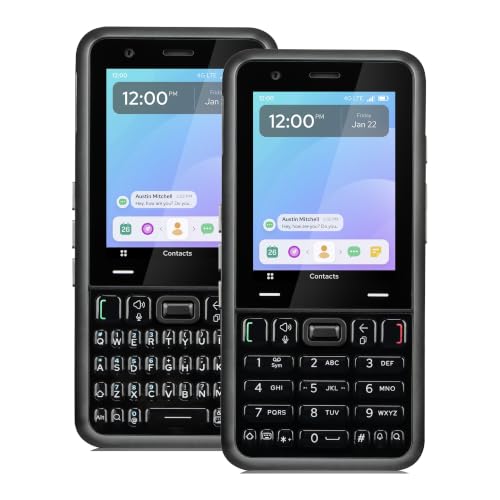 Keyphone Hybrid 4G LTE Unlocked Phone with Physical5.1 × 2.4 × 0.5 in7 x 4 x 3 inches0.35 poundsCheck on Amazon
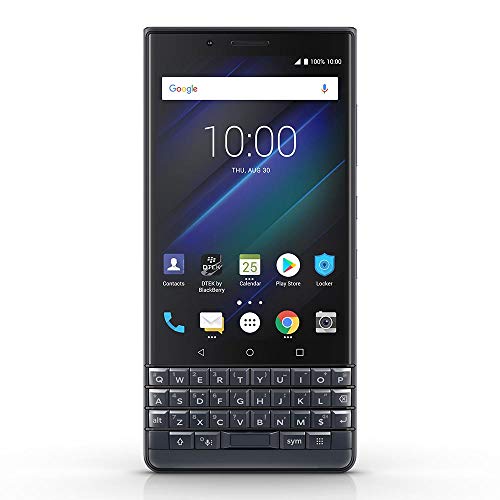 BlackBerry KEY2 LE GSM Unlocked Android Smartphone5.91 x 0.32 x 2.82 inches0.34 poundsCheck on Amazon
 BlackBerry KEY2 Silver Unlocked Android Smartphone5.69 x 0.33 x 2.82 inches0.4 poundsCheck on Amazon
What's inside
- The BlackBerry inheritance and the Key2
- Unihertz Titan: the keyboard goes rugged
- F(x)tec Pro1 and the slider idea
- Who still needs physical keys
- The honest trade-offs
- Buying used: warnings that protect you
- A short history of how we lost the keys
- Daily life with keys: a week in the pocket
- Keeping a niche phone alive
- How to choose among the survivors
- Workflows where keys quietly outperform glass
- Myths that follow keyboard phones around
- If no keyboard phone fits: neighbouring options
- A buyer’s final checklist for this strange little market
- Check prices on Amazon
- Frequently asked questions
As an Amazon Associate I earn from qualifying purchases. This post may contain affiliate links at no extra cost to you.
There is a particular sound a good physical keyboard makes, a soft mechanical certainty under the thumbs that no vibration motor has ever convincingly imitated. People who learned to type on one can still write a paragraph without looking down, punctuation and all, while walking through an airport or sitting in a darkened lecture hall. The best android phones with keypad exist for those people, and for a surprising number of others who discovered later that glass keyboards, however clever their prediction engines became, never gave them the same trust in their own words.
Full disclosure before nostalgia carries us away: a few links here may return a small commission on qualifying purchases to support this site, and that arrangement never decides which ageing keyboard phones we celebrate, which we caution against, or which we suggest leaving in a drawer. Honesty matters doubly in a niche like this one, because the market is small, the remaining devices are imperfect, and enthusiasm can easily outrun the practical warnings a buyer deserves. Every model below is real, every compromise is stated, and the romance is kept on a short leash.
Understand first how tiny this category has become. Mainstream Android is a sea of identical glass slabs, and physical keyboards survive only at its edges: a rugged specialist line from Unihertz, a slider from a small British company, the lingering second-hand stock of BlackBerry’s final designs, and occasional crowd-funded experiments that flare and fade. You will not find a current Samsung Galaxy or Google Pixel with keys, and no carrier shop will line these devices along its main wall. Buying one is a deliberate act, closer to choosing a fountain pen than to upgrading a handset, and it should be approached with a collector’s eyes and an accountant’s caution.
That deliberateness is also the joy of it. A keyboard phone announces that its owner values one interaction above all others and accepts visible trade-offs to protect it. The screen may be smaller, the camera ordinary, the software a generation behind, yet the words flow in a way that makes those sacrifices feel, to the right person, entirely rational. This guide maps the surviving hardware, explains who genuinely benefits, confronts the update and support problems honestly, and helps you decide whether a second-hand Key2, a Titan, or a Pro1 belongs in your pocket or merely in your affectionate memory.
The BlackBerry inheritance and the Key2
Any history of keyboard Android begins with BlackBerry, the company that turned thumb typing into a business culture. Long before its Android chapter, BlackBerry had refined the sculpted key, the fretted row, and the shortcut-driven workflow into something executives defended like a professional identity. When the company moved to Android with the Priv slider in 2015, then licensed its brand to TCL for the KeyOne and Key2, the keyboard survived the operating system change with remarkable fidelity. Those devices remain the reference points against which every later attempt is measured, fairly or not.
The BlackBerry Key2, released in 2018, is the high-water mark of the candybar keyboard phone. Its keys grew compared with its predecessor, the matte finish improved grip and accuracy, and a Speed Key let owners launch shortcuts from anywhere without returning to a home screen. The keyboard doubled as a trackpad, scrolling pages and moving a cursor with a swipe across its surface, a trick that still feels like magic to newcomers. Paired with a Snapdragon 660 processor and a modest display by modern standards, it was never a flagship in the conventional sense, yet for writers it outperformed flagships where it mattered: sentences per hour, error rate, and confidence.
The Key2 LE trimmed the formula, with a lighter build, less memory in some variants, and a keyboard lacking the capacitive gestures of its sibling. It remains a gentler entry point for the curious, though its lower specifications show their age sooner. Earlier still, the KeyOne paired excellent battery life with a smaller, glossier keyboard and performance that felt stretched even in its own era. Shoppers comparing these generations should understand they are buying into a descending ladder of age and support, where each step down saves money and spends future usability at an accelerating rate.
Software support is the shadow across every BlackBerry paragraph in this guide, so let us state it early and plainly. These phones no longer receive meaningful system updates, and their security patches ended years ago. Banking applications, corporate tools, and two-factor systems increasingly refuse older Android versions or flag unpatched devices, and no keyboard, however beloved, can argue with a compliance server. A Key2 bought today should be bought as a writing instrument and secondary device, or by an informed enthusiast who understands exactly which modern services may decline to run. Later sections return to safe ways of living with that reality.
Unihertz Titan: the keyboard goes rugged
Where BlackBerry pursued the boardroom, Unihertz aimed its Titan line at people whose work happens outdoors, in workshops, warehouses, and weather. The original Titan, launched through crowdfunding around 2019, is a broad, heavy, unapologetically chunky handset with a square-ish display above a full keyboard, wrapped in a ruggedised body with substantial water and dust resistance. It looks like a BlackBerry Passport that joined a construction crew, and that description is a compliment within its intended world. The keyboard is roomy, the battery is enormous by mainstream standards, and the whole device feels engineered to survive being dropped onto the very surfaces its owners work above.
The Titan Pocket answered the obvious criticism by shrinking the concept. It kept the physical keyboard and rugged attitude while reducing size and weight toward something a smaller hand or a tighter pocket could accept. Its display is modest and its performance sits in the lower middle of the market, but as a communication tool it has a clarity of purpose many expensive phones lack. The Titan Slim then moved the design toward a more conventional tall silhouette, resembling the Key2’s proportions with Unihertz’s own styling, trading some of the original’s eccentric charm for everyday familiarity.
Across the Titan family, certain patterns repeat and buyers should weigh them honestly. Cameras are functional rather than delightful. Software arrives on the maker’s own schedule, which historically means fewer major version upgrades than mainstream brands promise, though Unihertz has kept its niche devices usable and has communicated with its community more directly than large manufacturers typically do. Displays favour legibility over spectacle. Readers who also browse best 5g phones should note that keyboard phones have been slow to adopt the newest radios, and some Titan variants and regions differ in band support, so checking compatibility with your carrier is not a formality but a genuine step.
Who the Titan suits best
Field workers who type notes with gloves nearby, gloves off for the keyboard itself, appreciate keys they can find by touch in bright sunlight where screens wash out. Site inspectors, surveyors, delivery coordinators, and agricultural workers form the natural audience, especially those tired of replacing cracked slabs. The rugged body removes the usual need for a bulky case, which keeps the keyboard instantly accessible rather than buried behind a flip cover. If your phone shares a bag with tools and your messages are long, factual, and frequent, the Titan’s compromises align with your life in a way a camera flagship’s compromises never will.
F(x)tec Pro1 and the slider idea
Sliders solve the keyboard phone’s oldest dilemma: keys and screen compete for the same face. The F(x)tec Pro1, from a London-based company founded by enthusiasts, hides a full landscape keyboard beneath a tilting display, so the phone presents as an ordinary slab until the mechanism opens and the screen rises at an angle like a tiny laptop. Typing on it is a two-thumb, wide-grip experience closer to the handheld computers of the two thousands than to a BlackBerry, and for long documents that width is a genuine ergonomic gift. The Pro1 X revision adjusted internals and storage while keeping the concept intact.
The slider’s virtues and vices both flow from its mechanism. Moving parts invite questions about longevity, dust, and repair that a sealed slab never faces, and the Pro1 line is thicker and heavier than the screen size suggests. Yet the payoff is a keyboard that never shrinks the visible display while typing, something candybar designs cannot offer. Landscape keys also suit gaming emulators, terminal work, and remote desktop sessions, where on-screen controls would otherwise cover the very content you came to see. For developers and system administrators, a physical keyboard paired with a terminal application turns a phone into a credible emergency workstation.
Availability defines the Pro1 story as much as engineering does. Small production runs, crowdfunding heritage, and periodic stock shortages mean buying one requires patience and a tolerance for checking the maker’s store and community channels. Software support has leaned partly on community enthusiasm, including interest from alternative Android distributions, which delights tinkerers and should give cautious mainstream buyers pause. This is a device for people who enjoy participating in a product’s ecosystem, reporting quirks, and reading forums, not for someone who expects a carrier shop to solve problems on a Saturday afternoon.
Other names in the margins
The category’s margins hold instructive ghosts. The Priv introduced BlackBerry’s Android era with a curved screen sliding over its keyboard, beautiful and mechanically ambitious, though heat and performance limited its legacy. Planet Computers pursued keyboard handhelds with the Gemini and Cosmo Communicator, clamshell devices owing more to the Psion organisers of the nineteen nineties than to phones, beloved by a devoted few. Motorola’s Droid line, sold as Milestone in some markets, carried sliders into early Android history before touchscreens swept the design away. Remembering them matters because each proved real demand existed, and each warned how quickly support can evaporate when a niche maker stumbles.
Newer experiments continue to surface through crowdfunding campaigns and small-batch announcements, some promising keyboards as attachable cases rather than built-in hardware. Clicks-style keyboard cases for mainstream phones deserve mention here as a neighbouring idea: they add physical keys below a standard handset, lengthening it considerably, and suit people unwilling to abandon modern software support. A case is not a true keyboard phone, since the keys are smaller and the balance differs, but for many curious buyers it is the safest first experiment, reversible in a way that importing a niche handset never is.
Who still needs physical keys
Long-form writers are the obvious constituency, and their case is stronger than nostalgia. Journalists filing from trains, novelists drafting on walks, students writing essays between lectures, and professionals whose work lives in email all share one need: producing accurate text quickly without watching their hands. Tactile keys give each letter a location the thumbs learn spatially, so attention stays on the sentence rather than the surface. Autocorrect on glass constantly interrupts that flow by substituting plausible wrong words, while a physical board’s errors are usually honest typos you notice and fix in rhythm.
Accessibility gives the argument a second, deeper root. Some users with low vision find a memorised physical layout far easier than hunting for letters on a featureless pane, especially combined with key shortcuts that open applications without visual searching. Users with tremors or reduced fine motor control sometimes fare better with distinct keys that require a definite press and provide clear confirmation, rather than a glass surface where a resting finger becomes an accidental input. Readers exploring best 4 inch screen android phones for compact, manageable devices often share this preference for hardware that can be operated by feel, and a keyboard phone extends that philosophy to the entire act of writing.
A third group surprises people: those deliberately reducing their screen time. A keyboard phone is usually a worse entertainment device, with a smaller or unusually shaped display that makes endless video and social feeds feel cramped, and that is precisely the attraction. Owners describe a handset that serves communication and then goes back into a pocket, rather than one that continually invites grazing. The keyboard reframes the phone as a writing and messaging tool, closer to a pager-era discipline, while still running the maps, banking, and travel applications modern life requires. It is a digital minimalism you can hold, bought as hardware rather than promised by an application.
Multilingual and specialist typing
Physical layouts also serve people who type in several languages or in specialised vocabularies where prediction engines struggle. Technical terms, place names, code fragments, and mixed-language conversation confuse dictionary-based keyboards into constant correction battles, while a physical board simply records the keys pressed. Some keyboard phones allow remapping and custom shortcuts, letting a user assign symbols or whole phrases to combinations that suit their work. For translators, field researchers transcribing interviews, and anyone whose messages mix languages mid-sentence, that dumb fidelity is a feature no learning algorithm has yet replaced convincingly.
There is a privacy-adjacent comfort here too, rarely discussed. Typing on hardware keys sends no keystroke data to a cloud prediction service, and many keyboard phone owners pair their devices with simple, offline-friendly writing applications. That does not make an old phone secure in itself, an important distinction the support sections below underline, but it does mean the act of composition can remain local and unobserved by design. Writers drafting sensitive notes, clinicians recording observations, and lawyers composing client messages may value that separation even while keeping confidential material on properly supported systems.
The honest trade-offs
Performance sits at the top of the compromise list. Keyboard phones have historically shipped with midrange processors and modest memory, because their makers spend the budget on keyboards, hinges, and small production runs instead of silicon. A Titan or a Pro1 handles messaging, documents, navigation, and browsing comfortably, yet neither chases the gaming frame rates or computational photography of a flagship. Readers comparing against best 3gb ram android phones will understand the territory: enough capacity for focused tasks, little patience for heavy multitasking, and real rewards for keeping the application load lean and deliberate.
Cameras follow the same philosophy of adequacy. Expect photographs that document a scene clearly in daylight and soften under indoor light, with none of the multi-lens versatility or night processing that modern slabs advertise. For inspectors photographing a serial plate or writers capturing a whiteboard, adequacy genuinely suffices. For parents hoping a keyboard phone will also be the family camera, it will not, and pretending otherwise sets up a return or a resentful drawer. Many owners solve this honestly by carrying a capable camera phone on occasions that demand one, treating the keyboard device as their daily correspondent rather than their everything machine.
Displays involve geometry as much as quality. Candybar keyboard phones squeeze screens into the space above the keys, producing shorter, sometimes squarer panels where video letterboxes heavily and some applications assume a taller canvas than they find. Most software adapts, but occasional layout quirks appear, especially in games and in forms designed carelessly. Sliders escape that squeeze while closed, then reveal their cost in thickness. Either way, the screen serves the keyboard’s mission rather than leading the design, and buyers who secretly want a cinema in their pocket should admit it before ordering.
Updates, longevity, and the small-maker question
Software support is where romance meets its sternest examiner. Large manufacturers now promise many years of updates for mainstream models, a standard no keyboard phone matches. Unihertz and F(x)tec are small companies supporting small fleets, and their update cadence reflects that scale. BlackBerry’s Android devices sit beyond support entirely. Before buying any of these, ask what Android version the device runs today, when its last security patch arrived, and what the maker has publicly committed to next. Vague answers are answers, and they should lower the price you are willing to pay and the sensitivity of the work you plan to do on the device.
Longevity has a physical side as well. Keyboards wear: legends fade, membranes soften, and a heavily used space bar or letter key can develop inconsistency long after a glass slab would still look new. Slider mechanisms accumulate play. Batteries inside sealed niche devices may be difficult to source in five years, and independent repair shops rarely stock parts for low-volume models. None of this condemns the category, but it reframes the purchase as a relationship with a finite lifespan. Owners who accept that from the start, and who keep backups of everything the device holds, enjoy these phones far more than those expecting a decade of invisible service.
Buying used: warnings that protect you
The second-hand market is where most Key2 handsets now change hands, and it rewards forensic shopping. Begin with the battery, because an ageing cell in a sealed phone defines daily life more than any processor figure. Ask about overnight drain, swelling, and whether the back panel sits perfectly flush, since a bulging battery can lift a keyboard phone’s body subtly before it becomes obvious. Check every key in a typing test if buying in person, pressing each one for consistent travel and response, and inspect the space bar and symbol keys that absorb the heaviest use.
Carrier and variant confusion has trapped many buyers of older keyboard phones. Models sold for one market may lack the bands another network requires, enterprise variants may carry management policies, and some units remain locked despite cheerful listing descriptions. Readers familiar with best 2 year old android phones will know that age alone is not the risk; mismatched variants and undocumented histories are. Confirm the exact model number, test your own SIM before completing a purchase where possible, and treat a price that seems miraculous as information rather than luck, because in a thin market, bargains usually have biographies.
Security rules for an unsupported phone
If you adopt an end-of-support device, adopt a discipline with it. Keep sensitive banking and primary email on a supported handset, and let the keyboard phone handle drafting, messaging within applications that still function, and offline writing. Browse carefully, install applications only from reputable sources, and remove anything you no longer use, since every installed program is a door you must watch. Use strong account passwords and hardware-backed two-factor methods managed from your main device. This compartmentalised life sounds burdensome in summary, yet many owners find it clarifying: the old phone becomes a typewriter with benefits, and typewriters were never asked to guard a bank vault.
Also plan the exit before you enter. Know how your notes and messages will be exported, keep them synchronised or backed up in formats other devices can read, and avoid building a workflow that only one ageing handset can perform. The day a Key2 keyboard fails or an application withdraws support, your writing life should move house in an afternoon, not collapse. Enthusiasts who treat these devices as replaceable vessels for portable data enjoy them longest, because affection stays attached to the habit of typing rather than to a single fragile piece of hardware.
A short history of how we lost the keys
To understand why these phones feel like survivors, remember how normal they once were. In the late two thousands, a serious messaging phone almost by definition carried keys: BlackBerry ruled corporate corridors, Nokia sold QWERTY models by the million, and early Android arrived on the T-Mobile G1 with a slide-out board because nobody yet trusted a touchscreen alone. The first Android buyers typed on hardware while learning a new operating system, and for several years manufacturers hedged their bets, offering glass for media and keys for words in the same product line, sometimes in the same device.
The turn came from economics and fashion together. A single sheet of glass is cheaper to produce than a precision keyboard assembly, scales across languages without retooling key legends, and lets a manufacturer sell the same hardware everywhere with only software localisation. Large screens also became the shop-window feature, and every millimetre given to keys was a millimetre taken from the display a customer compared in store. One by one the sliders vanished from flagship lines, then from midrange ones, until BlackBerry’s licensed devices and a handful of independents were carrying a design language the giants had abandoned for sound commercial reasons.
Something genuine was lost in that rationalisation, and it was not merely sentiment. Hardware keyboards distribute the work of typing across distinct physical targets, giving the brain a spatial map it can navigate blind. Touch typing took office workers years to learn on full-size boards, and the thumb-sized version follows the same principle at smaller scale. When the industry standardised on glass, it standardised on looking at your hands while writing, a compromise so universal that most people stopped noticing it. Keyboard phone owners are simply the minority who kept noticing, and eventually went looking for the remaining doors back.
Daily life with keys: a week in the pocket
Monday morning on a crowded train shows the first dividend. Standing passengers type one-handed on a candybar board, thumb anchored by the texture of real keys, finishing a message without the balancing act a glass phone demands from someone holding a rail. Notifications get answered in complete sentences rather than the terse fragments that cramped, jostled typing usually produces. Colleagues notice replies arriving with punctuation and capital letters intact, small signals of care that quietly shape how a person’s written voice is judged across a working year.
By midweek the shortcuts begin paying rent. A researcher drafting field notes opens her notebook application with a key combination, stamps the date from another, and never once wakes the screen to hunt through a grid of icons. A delivery coordinator answers the same five customer questions with assigned phrases, edited on the fly because the keys make editing feel trivial rather than surgical. These are not dramatic scenes, and that is the point: the keyboard’s value accumulates in dozens of unremarkable moments where friction quietly disappears and the message simply gets written.
The weekend reveals the other side of the bargain. Photographs of a family hike look serviceable rather than stunning, and a video call in a dim restaurant exposes a front camera designed in a more forgiving era. Yet the same owner writes a long, thoughtful message to a friend from a campsite, by touch, in the dark, while everyone else’s glass screens blaze and hunt. Ask which device served the weekend better and the answer depends on whether the weekend was primarily for recording or for communicating, a question most phone marketing never thinks to pose.
The learning curve, honestly timed
New owners should budget a fortnight of mild frustration. Thumbs trained by glass reach for keys that sit slightly differently, shortcuts refuse to stick, and the temptation to declare the experiment a failure peaks around day four. Then spatial memory quietly takes over, common words begin completing themselves beneath your fingers, and the first message typed while watching a conversation partner instead of a screen feels like a small promotion. Former BlackBerry owners typically readjust within days, while lifelong glass typists need the full two weeks, but nearly everyone who persists past that threshold reports the same surprise at how completely the skill returns or arrives.
Speed measurements during that period mislead if read too early. Time yourself in the first week and glass wins; time the same paragraphs in the third week and the gap narrows or reverses, with the keyboard’s error count usually falling first. Accuracy, not velocity, is the leading indicator that the board suits you. If your mistakes are shrinking and your messages are growing longer and more relaxed, the experiment is working even before the stopwatch agrees. If errors stay stubborn and your hands ache, the particular model’s key size or spacing may simply not fit you, which is useful knowledge rather than defeat.
Keeping a niche phone alive
Maintenance begins with the keyboard itself. Crumbs, pocket lint, and workshop dust migrate beneath keycaps and membranes, so a soft brush and occasional careful blasts of dry air belong in the owner’s routine. Avoid liquids near the board, resist the urge to prise at a stiff key without guidance, and learn from community documentation how your specific model is assembled before attempting anything braver. A key that begins double-firing sometimes responds to cleaning alone, because the fault is debris rather than wear, and catching that distinction early can save a handset from an unnecessary retirement.
Battery stewardship matters doubly when replacements are scarce. Avoid leaving the phone on charge in hot cars, top up during the day rather than cooking the cell overnight where your model allows sensible control, and store a spare device at partial charge if it will sit unused for months. Owners of removable-battery Titans hold a genuine advantage here, since a fresh cell can be fitted in moments when stock exists. For sealed models, a reputable technician and a quality cell, sourced while the model still has community attention, are worth arranging before the original battery becomes an emergency.
The community is part of the product
Small phones survive on shared knowledge. Forums dedicated to the Titan line, the Pro1, and the old BlackBerry Android devices hold hard-won answers about band quirks, battery sources, keyboard cleaning, application compatibility, and which system settings tame ageing hardware. Lurk before buying and you will learn a model’s real reputation, including faults its maker never advertised and fixes its reviewers never discovered. Contribute afterward and you become part of the reason the next buyer can still choose this path. In the mainstream market support is a department; in this one it is a neighbourhood, with all the warmth and occasional noise that implies.
Accessories follow the same community logic. Cases for niche models come from small sellers and sometimes from owners who commission small production runs, while screen protectors may need to be cut or ordered from specialists who keep templates for forgotten devices. Order spares while they exist rather than when you need them, particularly protectors and charging cables in any proprietary fitting your model uses. A modest drawer of consumables, bought during the phone’s supported years, is the cheapest insurance a niche owner can hold, and it transforms future breakages from crises into errands.
How to choose among the survivors
Start by choosing your keyboard’s shape, because that decision outlasts every specification. Candybar designs from the Key2 and Titan families put keys instantly under your thumbs with no mechanism to open, ideal for short, frequent messages written one-handed in queues and corridors. Sliders like the Pro1 ask for two hands and a moment of ceremony, then repay you with width and a full-size screen for documents. Neither is superior in the abstract. Your message length, your hand size, and the places you write will pick the winner if you describe them honestly before reading any further comparisons.
Next, rank your tolerance for old software. A buyer comfortable running a secondary device beside a modern phone can embrace a Key2 and its limitations with open eyes. A buyer needing one device that does everything, including banking and work accounts with compliance requirements, should look at the newest Titan variant available, verify its patch status, or reconsider the category entirely until a better-supported option appears. There is no shame in concluding that the timing is wrong; keyboards have returned from extinction more than once, and the community keeping them alive will still be there when support improves.
Then test the typing itself, physically if at all possible. Keyboards are as personal as shoes: key size, spacing, sculpting, travel, and the resistance curve of each press either disappear beneath your thumbs or nag at every sentence. Community meetups, enthusiast forums with local members, and sellers offering returns all help. If a physical test is impossible, read owner reports from people with similar hand sizes and typing styles, and be wary of reviews written after a single afternoon, because keyboard mastery develops across a fortnight and first impressions often reverse themselves completely by the second week.
Setting up a keyboard phone for real work
Learn the shortcuts before judging the speed. BlackBerry’s keyboard shortcuts, Titan’s programmable keys, and the Pro1’s landscape combinations exist to keep your thumbs on the board while applications open, text is selected, and cursor movements happen without reaching for the screen. Spend an evening mapping the actions you perform hourly, assign them deliberately, and practise until the sequences become reflex. Owners who skip this apprenticeship often conclude the keyboard is merely pleasant, while those who invest it discover the device’s true velocity, which lives in the shortcuts as much as in the keys themselves.
Choose your applications with the hardware in mind. Plain-text editors, email clients with strong keyboard navigation, and messaging tools that respect external and built-in keyboards turn the device into a writing studio. Applications that assume a tall touch canvas and hide essential controls behind gestures will fight you daily. Keep the home screen sparse, organised around communication rather than entertainment, and let the phone’s constraints curate your habits. That curation, chosen consciously, is the difference between a compromised smartphone and a specialised instrument that happens to run Android.
Workflows where keys quietly outperform glass
Consider the support agent, the community manager, or the small business owner whose day is a river of written replies. Their bottleneck is rarely thinking; it is transcription, the physical conversion of ready sentences into text dozens of times an hour. A keyboard phone attacks exactly that bottleneck, and its programmable shortcuts turn repeated phrases, addresses, and instructions into single gestures. Across a month, minutes saved per day become hours, and the reduction in thumb fatigue is a benefit occupational health rarely measures but owners describe with feeling. Tools should be judged by the work they repeat, not the features they advertise.
Field reporting offers another clear case. A journalist covering a public meeting types quotes while watching speakers, preserving eye contact and catching the gesture that accompanied the sentence. A building inspector narrates findings room by room without breaking stride to aim at a screen. A researcher interviewing a farmer records answers in the pauses of conversation rather than asking the subject to wait while a glass keyboard is wrestled into accuracy. In each scene the keyboard disappears into the task, which is the highest compliment any interface can earn, and the resulting notes arrive fuller because capturing them cost less attention.
Travel writing and travel administration both benefit in less obvious ways. Booking references, passport details for a companion, hotel addresses in unfamiliar scripts, and the long messages home that trains and airport delays invite all reward patient, accurate keys. Offline drafting matters too: a keyboard phone with a good plain-text editor becomes a travel journal that works in airplane mode, in bright plazas, and in the last hour of battery anxiety when a traveller is rationing screen time but not thoughts. The device earns its luggage space by serving the journey’s words, not merely its photographs.
Voice input is not a full answer
Sceptics reasonably ask why dictation has not settled the argument. Voice input is excellent for a first draft in a quiet room and genuinely transformative for many users, yet it falters in open offices, shared trains, clinics, and anywhere privacy or background noise intrudes. It also produces text that needs editing, and editing dictated prose on glass, hunting misheard names and punctuation, can consume the time dictation saved. Keyboard owners typically use both tools as complements: voice for the rough shape of an idea captured while walking, keys for the precise version that another person will actually read and act upon.
Myths that follow keyboard phones around
The first myth claims these devices are pure nostalgia, bought the way people buy vinyl or mechanical watches. Some buyers certainly enjoy the heritage, but the working owners interviewed across enthusiast communities describe relentlessly practical motives: fewer errors, less fatigue, better focus, accessibility that suits their hands or eyes. Dismissing those reasons as sentiment is a way of not hearing them. A design does not become a costume merely because the majority moved on, especially when the minority can articulate, in measurable terms, what the old design still does better for their particular work.
The second myth swings the other way, insisting that anyone serious about writing should abandon glass entirely. That overclaim collapses on contact with reality: modern slabs offer supported software, superb cameras, and displays that make reviewing documents easier, and plenty of professional writers produce books on them happily. The keyboard case is a fit argument, not a universal one. It says that a identifiable group of people, with identifiable tasks and bodies, are better served by keys, and that the market’s failure to serve them is a gap rather than a verdict on their competence or modernity.
A third myth promises that an old flagship keyboard phone is a bargain flagship in disguise. It is not, and believing so leads buyers to expect camera miracles and software longevity that were never part of the deal even at launch. The Key2 was a midrange-powered specialist when new; age has not promoted it. Price these devices as specialised instruments with finite support, compare them against other writing tools rather than against camera phones, and the value calculation becomes honest. Buyers who do that arithmetic rarely feel cheated, because the product they imagined is the product that actually arrives.
If no keyboard phone fits: neighbouring options
Some readers will conclude, correctly for their circumstances, that support requirements rule the category out for now. Their needs can still be partly met elsewhere. A modern slab paired with a compact Bluetooth keyboard serves long writing sessions at desks and cafes, though it surrenders the spontaneous, standing-in-a-queue typing that defines the true keyboard phone. Keyboard cases restore some of that spontaneity for selected popular models while keeping a supported handset underneath. Even a well-chosen swipe or prediction setup, tuned patiently and stripped of gimmicks, closes part of the accuracy gap for people willing to train it.
Others split the difference with a two-device life, and it deserves respect rather than the ridicule gadget culture usually reserves for carrying two phones. One supported handset handles accounts, payments, photography, and travel; one keyboard device handles words. The combined weight can still undercut a single large flagship with a battery case, and each tool is chosen for excellence at its own job instead of adequacy at everything. Many owners in this pattern began it as a temporary experiment with a used Key2 and kept it because the division of labour made both devices feel calmer.
Whatever route you take, let the experiment be honest and time-boxed. Borrow, buy used with a return window, or start with a case, then write real work on the thing for a fortnight before judging. Keep notes on error rates, message lengths, and how your hands feel at the end of heavy days, because those observations, not launch reviews or forum arguments, describe your fit. The category survives precisely because individual fit matters more here than market averages, and your own fortnight of evidence outranks every generalisation in this guide, including the enthusiastic ones.
A buyer’s final checklist for this strange little market
Write your requirements down before browsing listings, because scarcity distorts judgement and a rare device in stock can bully a shopper into forgetting why they came. Note your carrier, the applications you cannot live without, the longest messages you typically write, and whether the phone must serve as your only device. That single page of honesty becomes a filter: models failing a requirement leave the shortlist no matter how charming their keyboards look in photographs. In a market this small, discipline is the difference between a deliberate purchase and an expensive souvenir.
Verify software facts from at least two sources, ideally the maker’s own pages and an active owner community, and record the Android version and most recent patch month in your notes. Verify network facts against the exact model number with your carrier. Verify physical facts with questions to the seller about keys, battery, ports, and account locks, and keep the answers in writing. Three small verifications, none taking more than an evening, remove the great majority of disappointments reported by new owners, which cluster overwhelmingly around surprises that a single question would have prevented.
Plan the first week as deliberately as the purchase. Schedule the shortcut-learning evening, install a lean set of applications rather than restoring an entire old backup, and give the keyboard your real work instead of test sentences, because only genuine messages reveal whether the layout fits your vocabulary and rhythm. Keep your previous phone active during the trial so a failure costs nothing, and decide the verdict date in advance. Owners who structure the experiment this way either commit with confidence or walk away with useful knowledge, while improvised trials tend to end in a drawer and an unresolved opinion.
Finally, think about what success looks like a year from now. It is not the phone still being fashionable, a contest it was never entering. Success is a body of writing produced comfortably, a messaging life that feels deliberate, a device whose limitations you predicted and priced in, and data that lives in portable formats ready for whatever comes next. If the model in front of you can plausibly deliver that year, its age and oddity stop mattering. If it cannot, the bravest and cheapest decision in this entire niche is to wait, watch the small makers, and let the next experiment come to you.
One more consideration: sound, feel, and the people around you
Physical keys make a faint noise, and in quiet carriages, libraries, and late-night rooms that small percussion becomes part of your social footprint. Most owners learn to type softly without thinking about it, and the sound sits far below a mechanical keyboard’s announcement, yet it is worth acknowledging for people who work in hushed environments. The feel cuts the other way as a benefit: the subtle click through the fingertip confirms each letter in a way that lets writers keep a rhythm even when a conversation or a landscape deserves their eyes, and that confirmation, repeated thousands of times a week, is the quiet engine behind the loyalty these devices inspire in the people who use them daily.
There is also a courtesy dimension to typing without staring downward. Meetings, interviews, and family dinners all change when the person taking notes can maintain eye contact, nod at the right moments, and signal attention while still capturing what matters. Hosts and speakers read faces, not screens, for evidence that they are being heard, and a keyboard phone quietly returns that evidence to the room. Several owners cite this social repair, unexpected and unadvertised, as the benefit they would surrender last, ahead even of speed, because it improves not only what they write but how present they appear while writing it in company.
Keep one small courtesy for your future self as well: photograph your keyboard layout settings, shortcut assignments, and application list once the phone is configured to your liking, and store those images with your backups. Rebuilding a carefully tuned writing tool from memory after a reset or a repair wastes an evening and inevitably loses the small customisations that made it yours. A few screenshots turn reconstruction into a calm half hour, and they double as a record of how your workflow evolved, which writers tend to enjoy revisiting long after the device itself has retired gracefully.
Check prices on Amazon
Live listings for the shortlist in this guide are pulled from Amazon below, so prices and availability are always current at the moment you look.


Frequently asked questions
Are any keyboard phones still made new?
Yes, though the choice is narrow and availability comes in waves. Unihertz continues to sell Titan-family devices through its own channels, and small makers periodically release or restock slider designs such as the Pro1 line. Stock levels, regional shipping, and band variants change faster than in the mainstream market, so confirm a specific model’s availability and network compatibility directly with the maker before planning around it. What you will not find is a new BlackBerry, since that brand’s Android chapter has closed, however healthy its second-hand market remains.
Can a Key2 still work as an only phone?
For a shrinking minority of light users, cautiously, but we do not recommend planning on it. Its messaging, calls, and basic browsing still function, yet unsupported software increasingly collides with banking requirements, workplace policies, and applications that drop older Android versions. The safer pattern pairs a Key2 with a supported device that carries your accounts and sensitive services, letting the keyboard phone do the job it remains brilliant at. Anyone ignoring that advice should at least test every essential application before depending on the handset for travel or work.
Do keyboard phones support modern networks well?
It depends entirely on the model and variant, which is why this guide keeps repeating the band check. Some Titan variants include broad LTE support suited to many carriers, while 5G has arrived slowly and unevenly in this niche, and older BlackBerry units predate current network changes in several countries, including shutdowns of legacy services that once carried their voice calls. Ask your carrier about a specific model number, not a marketing name, and verify before importing, because returns across borders turn a small disappointment into an expensive education.
Is typing on keys genuinely faster than on glass?
For most practised owners, the advantage is accuracy and endurance more than raw bursts of speed. Skilled glass typists with strong prediction can post impressive short-message times, yet error correction eats their advantage as messages lengthen, and looking down remains compulsory. Physical typists maintain a steadier pace across long texts, write comfortably without watching their hands, and report less fatigue during extended sessions. The honest summary is that keyboards win marathons and glass wins some sprints, and your own writing life decides which race you are actually running.
What should I check first on a used keyboard phone?
The keyboard itself, key by key, followed immediately by battery behaviour. A single dead or double-firing key undermines the entire reason for buying the device, and a swollen or exhausted battery can make an otherwise sound handset unusable within months. After those two, verify the model variant against your carrier, test the charging port and speakers, and confirm the device has been reset with no previous owner’s accounts attached. Photographs in a listing can hide all of these faults while showing the phone’s best angle, so questions and tests are your real product description.
The keyboard phone endures because a need endures: people think through their thumbs, and for them a sentence typed with certainty is worth a thicker pocket, an older processor, and a camera that merely tells the truth. Choose a Titan for rugged daily work, a Pro1 for wide landscape drafting, or a carefully vetted Key2 as a companion writer beside a modern handset, and you will understand within a week whether this small, stubborn category has been waiting for you. If it has, no slab will ever quite satisfy you again, and somewhere between the first shortcut you memorise and the first long message you write without looking down, the keys will stop feeling old-fashioned and start feeling like the future you personally preferred all along.


