What's inside
- When Is a Tablet Actually a Laptop Wearing a Thinner Coat?
- Key Takeaways
- Quick Picks
- How Did We Decide What Counts as Functioning Like a Laptop?
- What Does the Keyboard Cost You, in Money and in Truth?
- What Battery Life Should You Honestly Expect?
- Lap, Sofa, Tray Table: Where Does the Laptop Act Break Down?
- How Long Will a Tablet-Laptop Serve Before It Feels Old?
- How Do the Six Laptop-Style Tablets Compare?
- Files, Windows and Calls: The Working Day in Three Ecosystems
- Creative Work: Where Do the Pens Stop Being a Bonus?
- How Do You Turn One of These Into a Real Desk Setup?
- Sign-In, Security and the Employer Question
- What Does the Full Travel Kit Weigh, Really?
- Which Mistakes Do Laptop-Replacement Buyers Make?
- Final Recommendation
- Frequently Asked Questions
- Related Guides
As an Amazon Associate I earn from qualifying purchases. This post may contain affiliate links at no extra cost to you.
gizmoverdict.com is reader-supported. When you buy through links on our site, we may earn an affiliate commission.
When Is a Tablet Actually a Laptop Wearing a Thinner Coat?
The promise behind the best tablets that function like laptops is seductive: one device that is a slate on the sofa at nine and a workstation at the desk at nine-oh-five, with a keyboard snapping on to close the gap. Some machines in this guide honour that promise almost completely. Others honour it in a specific accent — superb for documents and calls, helpless before a particular desktop program — and the difference between those outcomes is never visible in a product photograph. It lives in the operating system, the processor architecture, and the small print about which accessories the box actually contains.
That small print deserves its headline early. On four of the most famous names here, the keyboard that makes the transformation is a separate purchase: both Microsoft Surface Pro models, the iPad Pro and Samsung’s Galaxy Tab S11 Ultra all ask you to add their keyboard case before the word laptop can be spoken honestly, and this guide says so inside every affected pick rather than in a footnote. One pick, Lenovo’s Yoga Tab AI, includes its keyboard in the listing itself. And one pick cheats gloriously: the ASUS ROG Flow Z13 is a full Windows gaming laptop engineered into a tablet’s body, keyboard and all, which makes it the control group against which the others’ laptop claims can be measured.
Three operating systems divide the field, and the division decides more than any specification. Windows on the Surface pair and the ROG Flow runs the desktop software world entire, with the Surface’s Snapdragon silicon trading some legacy compatibility for silence and battery life. iPadOS on the iPad Pro is the most polished tablet system ever made and still, deliberately, not macOS — it laptops brilliantly inside its own rules. Android on the Samsung and Lenovo becomes laptop-like through DeX-style desktop modes and sheer screen size, excelling at browser-and-document work. None of these is the wrong answer; each is the wrong answer for somebody, and the pick sections name that somebody every time.
One more framing helps before the picks begin: think of the purchase as renting two devices on one payment plan. The tablet half will be judged by your evenings, the laptop half by your deadlines, and a machine can pass one judgement while failing the other without being a bad product. The reviews below therefore grade both halves separately wherever they diverge, because a combined score would hide exactly the information your decision needs.
Judge this category by your heaviest weekly task, not your lightest. Every machine here writes emails and streams video beautifully. The separation happens at the spreadsheet with macros, the design file with forty layers, the development environment, the game library, the second monitor on the desk. Read with that task in mind and the six below sort themselves quickly into your personal shortlist of two.
Key Takeaways
- Keyboards are sold separately for the Surface Pro 11, the Surface Pro (2026), the iPad Pro and the Galaxy Tab S11 Ultra — budget them into every comparison.
- The ROG Flow Z13 is a genuine Windows laptop in tablet form, the only pick whose laptop claim needs no asterisk at all.
- The Lenovo Yoga Tab AI is the only pick whose listing includes the keyboard, alongside its Pro Pen.
- Windows picks run desktop software outright; iPadOS and Android picks laptop through their own polished but bounded ecosystems.
- Screen size is the comfort divide: the 14.6-inch Tab S11 Ultra and 13-inch class machines sustain full working days better than smaller slates.
- Every pick doubles as a pen tablet, so note-taking and mark-up ride along with the laptop act for free.
Quick Picks
| Pick | Badge | Why it earns its place |
|---|---|---|
| Microsoft Surface Pro 11 | Best Windows all-rounder | Snapdragon X Plus efficiency, a 120Hz 13-inch screen and full Windows 11 Pro make this the balanced detachable for office work anywhere. |
| Microsoft Surface Pro (2026) | Best future-proof Surface | The Snapdragon X2 Plus generation of the same formula, aimed at buyers who keep a machine for many years and want the newest silicon. |
| Apple iPad Pro 13-inch (M5) | Best tablet-first laptop alternative | The M5 and the Ultra Retina XDR display produce the finest tablet hardware here, with laptop manners inside iPadOS’s elegant borders. |
| Samsung Galaxy Tab S11 Ultra | Best giant-screen DeX machine | A 14.6-inch AMOLED canvas and desktop-style multitasking turn this into the closest Android gets to a laptop desk. |
| ASUS ROG Flow Z13 (2025) | Best true laptop in tablet form | Ryzen AI MAX power, 32GB of memory and a 180Hz screen make this a gaming laptop that merely happens to detach. |
| Lenovo Yoga Tab AI | Best complete-box bundle | Keyboard and Pro Pen ride in the listing, the 11-inch 3K screen refreshes at 144Hz, and the whole kit travels light. |
How Did We Decide What Counts as Functioning Like a Laptop?
Four tests separated the true detachables from the tablets with delusions. The first was software completeness: can the machine run the buyer’s actual work programs, in their actual formats, without a web workaround? Windows passes outright, iPadOS passes within its app ecosystem, and Android passes for the browser-and-office majority — three different passes, honestly labelled. The second test was the keyboard story: a real typing surface with a trackpad, available for the machine, with its separate cost declared wherever the box excludes it.
The third test was endurance of posture: could a person work a full day on this screen without their eyes filing a complaint? That is why this list lives at 11 inches and above, with the serious machines at 13 and 14.6. The fourth test was the desk test — external monitor support, file management that behaves like a computer’s, and multitasking windows that stay where they are put. Samsung’s desktop mode, Windows’ entire existence and iPadOS’s evolving window management each answer that test in their own dialect, and the pick sections translate.
Pen input, interestingly, was not a test but a dividend. Every machine here writes as well as it types, which means the laptop replacement also replaces the notebook, the marking pen and the sketchpad in the same bag. Buyers comparing these against a conventional laptop should count that dividend honestly: the clamshell is cheaper for pure typing, and incapable of everything on the other side of the hinge.
What Does the Keyboard Cost You, in Money and in Truth?
There is no figure in this section, deliberately, because accessory pricing moves and this guide does not print static prices. But the structure of the cost is permanent, and it is this: for the Surface Pro 11, the Surface Pro (2026), the iPad Pro and the Tab S11 Ultra, the advertised tablet price buys half a laptop. The keyboard case that completes it is a first-party accessory with a first-party margin, and any honest comparison against a clamshell laptop adds that accessory before declaring a winner. Buyers who skip the arithmetic feel the sting at checkout; buyers who do it early sometimes discover the Lenovo’s included keyboard, or the ROG Flow’s built-in one, quietly winning the whole comparison.
There is also a resale truth tucked inside the accessory question. A tablet sold later with its keyboard and pen included reads as a complete workstation to the next buyer and commands the attention complete kits always command, while a bare slate competes with every other bare slate on the shelf. Owners who keep the boxes and buy the official accessories are, without intending anything so mercenary, protecting the machine’s second life. Owners who skip the keyboard entirely and type on glass for two years have made the opposite trade knowingly, and this guide respects it — provided it was knowingly, which is the entire point of printing the fact six times.
The truth cost runs parallel. A tablet plus keyboard case is not mechanically a laptop: the hinge is a kickstand or a magnetic fold, the balance point sits behind the screen, and lap typing on a train is a learned skill rather than a given. Surface’s kickstand design is the most practised answer to that geometry, the iPad’s Magic Keyboard the most elegant, Samsung’s book-cover approach the most conventional. All three work on desks beautifully. On actual laps, all three ask for a knee arrangement that clamshell owners never think about, and frequent train typists should weigh that honestly against the tablet joys waiting at the destination.

Microsoft Surface Pro 11 — Best Windows all-rounder
The Surface Pro 11 is the detachable perfected as a mainstream instrument. Its 13-inch touchscreen runs at 120Hz with a 2880×1920 resolution that keeps text crisp at document distances, the ten-core Snapdragon X Plus delivers the quiet, cool, long-battery behaviour that Intel-era Surfaces promised and rarely kept, and 16GB of memory with a 512GB SSD covers the office workloads this machine exists for. Windows 11 Pro is the full desktop system, so the software question that haunts other picks simply never arises: your programs install, your files behave, your peripherals plug in.
Two declarations belong in this pick’s centre. First, the keyboard: the Type Cover that turns this slate into a laptop is sold separately, and the pen is likewise an accessory decision, so the true working price is the tablet plus the parts your workflow needs. Second, the Snapdragon caveat: Windows on Arm runs the mainstream catalogue natively or through mature emulation, but exotic legacy software, some VPN and driver-dependent tools, and certain games can still object. Office workers live entirely inside the safe zone; specialists should check their one weird essential program by name before committing.
As a tablet it remains genuinely good rather than apologetic — the kickstand works on desks and laps better than any rival hinge trick, the Copilot+ AI features ride along for summarising and recall tricks, and the Sapphire finish of the verified configuration looks like it belongs in the meetings it will attend. For the buyer who wants one Windows machine that travels like a tablet, this is the centre of the category’s gravity.
- Display: 13-inch 2880×1920 touchscreen, 120Hz, per the listing title
- Processor: 10-core Snapdragon X Plus, per the listing title
- Memory and storage: 16GB RAM, 512GB SSD
- System: Windows 11 Pro, Copilot+ PC
- Keyboard: sold separately — not included with the tablet
Strengths
- Full desktop Windows removes the software-compatibility question entirely for mainstream work.
- Snapdragon efficiency delivers the quiet, cool, all-day behaviour detachables always promised.
- The kickstand remains the most versatile support in the category, desk or lap.
Trade-offs
- The keyboard and pen are separate purchases on top of the tablet.
- Windows on Arm still trips over certain legacy and driver-dependent software.
- Tablet-mode Windows is serviceable rather than delightful beside iPadOS.
Best for: an office professional who wants one Windows machine for desk, commute and couch.
Not suited for: a specialist whose workflow hangs on one old Windows program with Arm objections.

Microsoft Surface Pro (2026) — Best future-proof Surface
The 2026 Surface Pro is the same argument, refreshed: a 13-inch premium 2-in-1 built around Qualcomm’s Snapdragon X2 Plus, 16GB of memory and a 512GB SSD, running Windows 11 as a Copilot+ PC. Buyers choosing between this and the Pro 11 are really choosing a ownership horizon. The newer silicon promises a longer runway of performance headroom and software support, which matters to the keep-it-six-years buyer far more than to the upgrade-every-cycle one, and the black finish of the verified configuration keeps the boardroom camouflage intact.
Everything structural carries over, including the two declarations. The keyboard is again sold separately — the transformation into a laptop remains an accessory away — and the Windows on Arm compatibility story is again excellent for the mainstream and worth a name-check for the exotic. What the newer generation buys is time: more years before the processor feels its age, more headroom as Windows’ AI features grow heavier, and a resale value that decays from a higher ledge.
Positioned honestly, this is the Surface for the deliberate buyer who configures once and amortises for years, not the bargain hunter’s Surface — that role belongs to the Pro 11 whenever the older model is the shrewder buy. Both machines share stands, keyboards and pens across the ecosystem’s logic, so the decision can be made on silicon and horizon alone, which is exactly how a mature product line should let you decide.
- Display: 13-inch touchscreen, per the listing title
- Processor: Snapdragon X2 Plus, per the listing title
- Memory and storage: 16GB RAM, 512GB SSD
- System: Windows 11, Copilot+ PC built for AI
- Keyboard: sold separately — not included with the tablet
Strengths
- The newest Snapdragon generation buys the longest performance runway in the Surface line.
- Full Windows with Copilot+ features covers office work without translation layers.
- Shares the mature Surface accessory and support ecosystem.
Trade-offs
- The keyboard remains an extra purchase before the laptop act begins.
- Early-generation pricing logic applies; value hunters should cross-check the Pro 11.
- Arm compatibility still asks specialists to verify their essential software by name.
Best for: a long-horizon buyer who configures once and keeps a machine for years.
Not suited for: a bargain-first shopper happy to take last year’s silicon at a friendlier tier.

Apple iPad Pro 13-inch (M5) — Best tablet-first laptop alternative
As hardware, the iPad Pro is the finest object in this guide and it is not close: the M5 chip brings laptop-class power that most laptops cannot match, the Ultra Retina XDR display is the screen every other pick is quietly compared against, and the supporting cast — Wi-Fi 7, Face ID, a landscape camera finally placed for video calls, LiDAR, all-day battery claims — reads like a specification written by people with nothing left to prove. In Space Black at 13 inches, it is the tablet that makes clamshell owners glance at their hinges.
The laptop question, though, is answered by iPadOS, and iPadOS has a philosophy: this is a tablet that does laptop work its own way. Documents, mail, calls, research, media creation and an ocean of superb apps — all fluent. The boundaries appear at the edges of professional habit: certain desktop-class programs exist only in adapted form, file management follows Apple’s logic rather than a desktop’s, and multi-window work, though vastly improved across recent versions, still asks the user to learn its grammar. Buyers whose work lives in apps will never touch the fence. Buyers whose work lives in one specific desktop program will find it in an afternoon.
The keyboard declaration applies here with emphasis: the Magic Keyboard that completes the laptop transformation is sold separately, as is the Apple Pencil for the pen half of the story, so the full working configuration is a sum of three considered purchases. Totalled honestly, it competes with good laptops on price while beating them on screen, silence and tablet joy. That is either the best bargain in this guide or an extravagance, depending entirely on whether your working life fits inside the App Store’s very large walls.
- Display: 13-inch Ultra Retina XDR, per the listing title
- Processor: Apple M5, per the listing title
- Storage: 256GB in the verified configuration
- Features: Wi-Fi 7 with Apple N1, Face ID, LiDAR scanner, 12MP front and back cameras
- Keyboard: sold separately — Magic Keyboard not included with the tablet
Strengths
- The M5 and XDR display outclass every rival here as raw hardware.
- iPadOS polish, app quality and battery behaviour set the category’s standard.
- The landscape front camera finally suits the video-call working day.
Trade-offs
- Keyboard and Pencil are separate purchases; the complete kit totals like a laptop.
- iPadOS is not macOS, and desktop-program loyalists will meet its borders.
- Storage starts at 256GB in this configuration, tight for large media libraries.
Best for: an app-centred professional who wants the finest tablet that also laptops.
Not suited for: a worker whose day depends on one desktop-only program with no iPad edition.
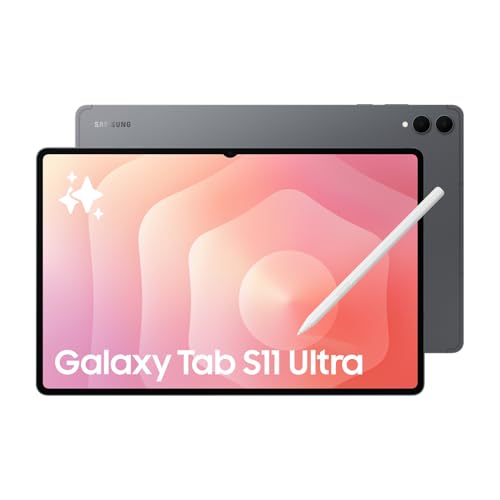
Samsung Galaxy Tab S11 Ultra — Best giant-screen DeX machine
Fourteen point six inches of AMOLED rewrites what a tablet at a desk feels like. The Tab S11 Ultra’s screen is larger than many laptops’, and Samsung’s desktop-style mode spreads windows across it with a taskbar’s logic, so documents, browser research and a video call coexist without the shuffle that smaller tablets impose. The S Pen is included for the mark-up half of the working day, 12GB of memory and 256GB of storage anchor the verified configuration, and Android 16 runs the show. For the browser-and-documents professional, this is Android’s most convincing laptop impersonation, performed at a scale nobody else attempts.
Declarations, as promised. The keyboard that completes the laptop transformation is sold separately; the S Pen in the box does not change that arithmetic. The verified listing is also an international model, which buyers should register calmly: check the warranty and support arrangements for your region before ordering, because that detail matters more over a four-year ownership than any benchmark. Wi-Fi 6E connectivity, meanwhile, is thoroughly modern, and the bundled fast charger in this configuration is a small mercy more makers should copy.
Size is the final truth of this pick. At 14.6 inches it is a desk and sofa-end-table machine that visits laps rather than living on them, and its tablet mode is a two-handed affair. Owners who wanted a laptop that occasionally becomes a media slate will be delighted; owners who wanted a featherweight travel companion that occasionally types will feel every inch. Samsung built the biggest stage in the category — the play you stage on it should be a big one too.
- Display: 14.6-inch AMOLED, per the listing title
- Pen: S Pen included, per the listing title
- Memory and storage: 12GB RAM, 256GB storage in the verified configuration
- Connectivity: Wi-Fi 6E; Wi-Fi only model
- Keyboard: sold separately — not included with the tablet
- Note: international model (X930) per the listing title — verify regional warranty
Strengths
- The largest screen here makes desktop-mode multitasking genuinely comfortable.
- S Pen included covers annotation and notes from the first day.
- AMOLED quality flatters both documents by day and films by night.
Trade-offs
- The keyboard case is an additional purchase before laptop duty starts.
- International-model status asks buyers to confirm regional warranty cover.
- Its scale suits desks and sofas far better than laps and tray tables.
Best for: a browser-and-documents professional who wants a near-laptop-sized canvas.
Not suited for: a weekly flyer who types on tray tables and counts every gram.

ASUS ROG Flow Z13 (2025) — Best true laptop in tablet form
Every other pick negotiates with the word laptop. The ROG Flow Z13 simply is one: a Windows 11 gaming laptop whose body happens to be a 13-inch tablet with a detachable keyboard. The specification refuses all compromise — an AMD Ryzen AI MAX 390 processor with RDNA 3.5 graphics, 32GB of LPDDR5X memory, a 1TB PCIe Gen 4 SSD, Wi-Fi 7, and a 2.5K ROG Nebula display running at 180Hz with a 3ms response. Games, creative suites, development environments and virtual workloads that make other picks apologise are this machine’s home address.
That power reframes the whole comparison. Where the Surface pair trades muscle for silence and battery grace, the Flow spends its thermal and weight budget on frames and compile times, and accepts the consequences: it is the heaviest, warmest and least tablet-like object here when the work stops, and its battery serves a gaming laptop’s schedule rather than a slate’s. The detachable keyboard is part of the machine rather than an accessory ambush, which makes its headline price the honest one — a rarity in this category worth applauding out loud.
Buy it as what it is. A creator or gamer who wants a single Windows machine that docks at a desk, detaches for the sofa and never once says the words compatibility layer will find nothing else in this guide remotely similar. A commuter who wanted a silent, cool, all-day document machine will find it magnificent and wrong, like commuting in a rally car. Both reactions are correct; the machine is gloriously specific about its person.
- Display: 13-inch 2.5K ROG Nebula, 180Hz and 3ms, per the listing title
- Processor: AMD Ryzen AI MAX 390 with RDNA 3.5 graphics
- Memory and storage: 32GB LPDDR5X, 1TB PCIe Gen 4 SSD
- System: Windows 11 Home, per the listing title
- Keyboard: part of the 2-in-1 design — not an accessory ambush
Strengths
- Genuine gaming and workstation power with no compatibility asterisks.
- Double the memory and quadruple the storage of the mainstream picks.
- The 180Hz Nebula screen serves games and fast creative work equally.
Trade-offs
- Weight, warmth and battery behaviour are a gaming laptop’s, not a slate’s.
- Windows 11 Home rather than Pro in this configuration.
- Overkill, in the nicest way, for a documents-and-email working life.
Best for: a gamer or creator who wants one uncompromised Windows machine that detaches.
Not suited for: a silent-office commuter measuring purchases in grams and decibels.

Lenovo Yoga Tab AI — Best complete-box bundle
The Yoga Tab AI’s listing does something radical in this category: it names a keyboard and a Pro Pen as part of the product. No accessory arithmetic, no second order, no transformation sold separately — the 11-inch tablet, its pen and its keyboard arrive as one working kit, wrapped around a 3K display refreshing at 144Hz and bright enough, at a claimed 800 nits, to hold its own in lit rooms. For buyers exhausted by the category’s small print, that completeness is a feature with real emotional wattage.
The rest of the specification supports the bundle’s ambition within Android’s borders: a Snapdragon 8 processor, 12GB of memory, storage arranged as 256GB internal plus a 256GB SD card in this configuration, and a claimed twelve-hour battery. Android’s laptop manners — split screens, floating windows, an external display if your workflow uses one — cover the documents-and-browser working day capably, and the pen makes this the best note-taker of the six for students whose lectures alternate between typing and handwriting minute by minute.
Eleven inches is the honest boundary. It is a brilliant travel size and a tight full-time desk size, and Android, for all its polish, will not run the Windows catalogue or pretend to. The Yoga Tab AI is therefore the pick for the mobile worker and student whose software lives in apps and browsers, and who would rather have the whole kit in one box than the biggest canvas in three purchases. Judged on that brief, nothing else here is as tidy.
- Display: 11-inch 3K, 144Hz, 800-nit claimed brightness
- Pen and keyboard: Pro Pen and keyboard included, per the listing title
- Processor: Snapdragon 8, per the listing title
- Memory and storage: 12GB RAM; 256GB UFS plus 256GB SD card in this configuration
- Battery: up to 12-hour life claimed in the listing title
Strengths
- Keyboard and pen included — the only complete laptop kit in one listing here.
- A fast, bright 3K screen at the most portable size in the guide.
- Pen-plus-keyboard versatility suits lecture halls and seminar tables perfectly.
Trade-offs
- Eleven inches cramps full-time desk work compared with the 13-inch class.
- Android’s software borders apply, whatever the bundle’s generosity.
- Storage split between internal and card asks for a little file housekeeping.
Best for: a student or mobile worker who wants the entire kit in a single box.
Not suited for: a desk-bound professional replacing a 15-inch laptop outright.
What Battery Life Should You Honestly Expect?
Maker battery claims describe a gentle day: moderate brightness, documents and browsing, radios behaving. Real laptop-replacement days are ruder — video calls with the camera lit, a bright screen against office glass, cloud sync chewing in the background, a second display hanging off the port. Expect the efficient machines here, the Surface pair and the iPad Pro, to absorb that rudeness with the most grace, because their silicon was designed around sipping. Expect the ROG Flow Z13 to live a gaming laptop’s truth instead: magnificent plugged in, mortal on battery, and happiest within reach of its charger. The Android pair sit between those poles, with the Tab S11 Ultra’s giant AMOLED spending charge on the very acreage that makes it glorious.
Brightness is the dial that governs all of it, and it is worth learning your own number. Most owners discover their screen sits two notches brighter than the room requires, burning a fifth of the day’s charge on glare nobody asked for. Set brightness for the room you are actually in, let the ambient sensor work if you trust it, and the endurance differences between these six machines shrink to their honest proportions — the efficient stay efficient, the powerful stay thirsty, and nobody’s meeting ends with a black screen and an apology.
The practical translation is a habit rather than a number. Carry the charger in the bag for the first month with any of these machines and learn your own day’s consumption before deciding it can stay home. Keep a cable at the desk dock so arrival means charging without thought. And remember that downloaded media, local documents and pen work are the battery’s friends, while hotspotted streaming on a train is its enemy — the same offline discipline that rescues parents in another guide in this batch rescues commuters here, because physics does not care which guide you read it in.
Lap, Sofa, Tray Table: Where Does the Laptop Act Break Down?
Every detachable passes the desk test and improvises everywhere else, so the honest buyer rehearses the improvisation. On a lap, a kickstand design like the Surface plants its foot on your thighs and types with surprising dignity once the angle is learned; the iPad’s Magic Keyboard creates a small rigid cantilever that works on laps better than physics suggests and worse than a clamshell; Samsung’s cover keyboards prefer a surface and say so by flexing. None of these is a defect. They are geometries, and geometries can be matched to lives: desk-and-sofa workers will never notice, train commuters will notice weekly, and standing-desk nomads will wonder what the fuss was ever about.
Children, partners and cats will also vote on the geometry, because a detachable at home is a shared object in a way a work laptop never is. The keyboard comes off and the machine becomes the household’s recipe screen, homework slate and video-call window, then clicks back into employment the next morning. Households that embrace that double life extract remarkable value from a single purchase; households with strict work-device boundaries should factor the sharing friction into the same honest ledger as the keyboard price.
The sofa deserves its own paragraph because it is where these machines earn their premium over clamshells. Keyboard off, pen in hand or simply a screen propped by its stand, the tablet becomes the evening device — reading, annotating, sketching, streaming — without the clamshell’s hinge dictating the relationship. That transformation, twice a day, is the actual product being bought in this category. A buyer whose evenings are already spoken for by a television and a phone may be purchasing a transformation they will perform monthly, and should price it accordingly; a buyer whose work and reading genuinely alternate will perform it daily and wonder how a hinge ever sufficed.
How Long Will a Tablet-Laptop Serve Before It Feels Old?
Longevity in this category is set by three clocks running at different speeds. The silicon clock ticks slowest in the newest machines — the M5 iPad Pro and the Snapdragon X2 Surface have years of headroom for office work — and fastest where gaming ambition lives, because the ROG Flow’s owner measures age in frame rates rather than in document openings. The battery clock ticks by chemistry in all six: expect graceful decline, plan on the machine spending more of its later life near the dock, and treat a mid-life battery service as maintenance rather than betrayal. The software clock is the one buyers forget: operating system support windows decide when a machine stops receiving the updates that keep it safe at work, and Apple’s and Microsoft’s long support habits are a genuine, unglamorous argument for their premiums.
Storage runs on a fifth clock, and it only ticks in one direction. A 256GB machine that feels generous in the first spring feels negotiated by the third, as offline libraries, project archives and application caches compound silently. Cloud discipline delays the reckoning; the larger configurations postpone it further; nothing abolishes it. Buyers between two storage tiers, planning a long ownership, should hear the future knocking and choose the larger one while the choosing is cheap — the single most repeated regret in this category’s owner forums is not processor envy but the storage ceiling met a year too early.
Accessories run on a fourth clock worth checking before purchase. A keyboard case that fits only one generation becomes e-waste at upgrade time, while ecosystems that carry accessories across generations — a Surface habit more often than an iPad one — soften the next purchase considerably. None of this should paralyse a decision. It should simply add one question to the shortlist stage: not only what does this machine do this year, but what will it still be doing, safely and supported, in the year you plan to replace it?
How Do the Six Laptop-Style Tablets Compare?
| Machine | System | Screen | Keyboard story | Laptop claim |
|---|---|---|---|---|
| Surface Pro 11 | Windows 11 Pro | 13-inch, 120Hz | Sold separately | Full laptop, Arm caveats |
| Surface Pro (2026) | Windows 11 | 13-inch | Sold separately | Full laptop, longest runway |
| iPad Pro 13 (M5) | iPadOS | 13-inch XDR | Sold separately | Superb inside its ecosystem |
| Galaxy Tab S11 Ultra | Android 16 | 14.6-inch AMOLED | Sold separately | Desktop mode at giant scale |
| ROG Flow Z13 | Windows 11 Home | 13-inch, 180Hz | Part of the machine | Actually a laptop |
| Lenovo Yoga Tab AI | Android | 11-inch 3K, 144Hz | Included with Pro Pen | Complete mobile kit |
The table’s lesson is that system beats specification. Choose the operating system your work already lives in, then choose the size your posture can sustain, then total the accessories honestly. Buyers who run that order buy once; buyers who start with screen inches buy twice.
Files, Windows and Calls: The Working Day in Three Ecosystems
A working day is mostly files arriving, windows arranging themselves, and calls interrupting both, and each ecosystem here has a temperament across those three verbs. Windows treats files as citizens: folders behave, external drives mount without ceremony, and a document dragged from a stick to a desktop lands where a decade of habit expects. Its windowing is the ancestral kind, free-form and forgetful of nothing. Its call experience is a laptop’s, which is to say the camera and microphones are good and the framing is your problem. Professionals raised on desktops feel no translation cost at all, which is the Surface pair’s deepest selling point and the ROG Flow’s birthright.
iPadOS treats files as guests in apps’ houses — tidier, safer, and occasionally unwilling to visit each other without an invitation. Modern versions have loosened that philosophy considerably, and cloud drives smooth most of what remains, but the worker whose day is a blizzard of attachments from strangers will still feel the difference by Friday. Against that, its call experience is the best here: the landscape camera, the microphones and the sheer polish of its video apps make the iPad Pro the machine colleagues look best on, which is a superficial virtue right up until a client meeting makes it a commercial one.
Android, in Samsung’s desktop mode especially, splits the difference with a pragmatist’s shrug: files behave much as they do on a desktop, windows tile and float with familiar logic, and the whole arrangement runs on an app catalogue that is enormous for communication and thinner for specialised production. Lenovo’s Yoga Tab offers the same philosophy in a lighter travel register. The worker whose stack is Google’s or Microsoft’s cloud suites will find Android’s laptop act entirely convincing; the worker with one beloved desktop program will find it entirely beside the point. Temperament, again, is destiny in this category.
Creative Work: Where Do the Pens Stop Being a Bonus?
For illustrators, designers and photo editors, the detachable stops being a laptop with a pen and becomes a studio that folds. The iPad Pro’s display and Pencil ecosystem anchor the professional creative apps on tablets; the Surface pair run the full desktop creative suites with pen input where the software supports it; the ROG Flow adds the graphics power to make heavy files feel light; Samsung’s S Pen machines carry a credible Android creative shelf. The honest separators are colour behaviour, app depth and file exchange with the studio’s main machines, in that order, and they are personal enough that creatives should audition their single heaviest file on the shortlisted machine before money moves.
Photography workflows deserve their sentence too, because detachables have quietly become the field editor’s favourite second screen. Tethered review, culling on a large bright display, and pen-marked selects sent back to the studio all suit the iPad Pro and the Tab S11 Ultra particularly, while the Windows pair run the full desktop editing suites without translation. A photographer choosing among these six should weigh screen quality and card-reader logistics through a dock above processor bragging, because the bottleneck in a culling session is rarely the chip.
Video and audio work redraw the map again. Timeline editing at hobby scale is pleasant on the iPad Pro and the ROG Flow, serviceable on the Surfaces, and an act of optimism on the Android pair. Music production remains the most ecosystem-bound of the creative trades, with each platform’s app shelf telling a different story. None of this diminishes the category; it simply reminds creative buyers that functioning like a laptop is a claim about their laptop, with their files, and the audition is the only review that counts.
How Do You Turn One of These Into a Real Desk Setup?
Dock it properly. A USB-C dock or hub turns any of these machines into a desk computer with an external monitor, a full-size keyboard for long documents, and wired peripherals that never need pairing. The Windows pair and the ROG Flow take to this life natively; the iPad Pro drives an external display with its own window logic; the Android pair extend or mirror depending on mode. One cable on arrival, one cable on departure, and the tablet-laptop stops being a compromise and becomes a commute strategy.
Sound belongs in the desk audit as well, because these machines chair meetings. Built-in speakers across the six range from adequate to genuinely impressive, and the larger bodies — the Tab S11 Ultra above all — fill a small room without help. Microphones matter more and advertise less; run one test call to a patient colleague before the first client depends on it, and keep a pair of earbuds in the bag as the universal backup. A workstation is a promise that other people can hear you clearly, and keeping that promise is cheaper than apologising for breaking it.
Then set the software desk before the physical one. Cloud storage or a disciplined sync folder means the file you annotated on the sofa is the file you present at the desk, identical and current. Password management, two-factor apps and your organisation’s device policies should be configured in the first evening, not discovered at the first client site. Finally, decide the pen’s home and the keyboard’s travel arrangement while the kit is new: a sleeve that fits tablet plus keyboard, a charger that lives in the bag, and a spare cable at the desk. Laptop replacements fail on logistics far more often than on processors.
Sign-In, Security and the Employer Question
A laptop replacement that travels is a security object whether its owner thinks of it that way or not, and the six here are well armed by modern standards: face or fingerprint sign-in across the range — Face ID on the iPad Pro, Windows Hello on the Surfaces and the ROG Flow, biometrics on the Android pair — plus encrypted storage and remote-locate services in every ecosystem. The practical advice is to switch all of it on during the first evening’s setup, while motivation is high, rather than after the first scare. A machine that can be wiped remotely is an inconvenience when lost; a machine that cannot is a disclosure.
Employer policies add a second layer that buyers ignore at their peril. Many organisations manage Windows devices natively, admit iPads through mature management programmes, and treat Android tablets as guests with limited access to internal systems. If the tablet will touch work resources beyond email in a browser, a five-minute conversation with whoever runs your workplace technology saves the most expensive mismatch in this guide — a beautiful machine that the VPN politely refuses. Bring-your-own-device friendliness is a specification, even if no listing prints it.
What Does the Full Travel Kit Weigh, Really?
Tablet weights in listings describe the slate alone, in its lightest configuration, photographed from its best angle. The travelling reality adds the keyboard case, the pen, a charger with its cable, and the sleeve that keeps the ensemble from scuffing itself in the bag. Totalled honestly, the 11-inch Yoga Tab kit travels like a small hardback novel, the 13-inch machines travel like a serious paperback with ambitions, and the Tab S11 Ultra with its keyboard travels like the laptop it is impersonating. None of these totals is unreasonable. All of them are larger than the number that sold the dream, and shoulder bags keep the true ledger regardless of what marketing entered into it.
The weight audit has a cheerful side: even the heaviest full kit here undercuts the gaming-laptop-plus-brick combinations many travellers used to accept, and the charger-sharing habits of USB-C mean one adapter can serve tablet, phone and headphones on most of these setups. Weigh the actual bag before the first trip, redistribute once, and the category’s promise — one device, both postures — survives contact with the airport.
Which Mistakes Do Laptop-Replacement Buyers Make?
The classic mistake is comparing a bare tablet’s price against a complete laptop’s price, then feeling ambushed by a keyboard. This guide has repeated the separate-keyboard fact in every affected pick because it is the category’s number one source of buyer’s remorse, and it is entirely avoidable with one addition sum before ordering. The second mistake is the mirror image: buying the keyboard, pen, dock, sleeve and spare charger for a machine whose operating system cannot run the one program the job requires. Software first, accessories second, always.
The third mistake is expecting lap equality. Kickstands and magnetic keyboards have improved enormously, and on desks they are beyond reproach, but a clamshell’s rigid hinge still wins on trains, sofas and knees. Frequent lap typists should either accept the learning curve cheerfully or buy the clamshell and a cheap tablet for the sofa, a combination this guide blesses without irony. The fourth mistake is storage optimism: 256GB fills with offline media and project files faster than laptop veterans expect, because tablets invite hoarding. Buy the larger configuration or adopt the cloud discipline on day one.
A quieter mistake is ignoring the pen for a year. Every machine here writes beautifully, and the owners who build a note habit — meeting mark-up, lecture notes, contract annotations — extract a second device’s worth of value from the same purchase. The pen is not a bonus feature in this category; it is half the reason the category exists, and the buyers who forget it have simply bought an expensive, slightly awkward laptop.
Final Recommendation
For the mainstream professional, the Surface Pro 11 is the balanced answer: full Windows, civilised battery behaviour, a screen that sustains a working day, and a keyboard to add with eyes open. Choose the 2026 Surface when your ownership horizon is long, the iPad Pro when your working life lives happily in apps and you want the finest hardware of the six, and the Tab S11 Ultra when screen acreage is your productivity. The ROG Flow Z13 is the power answer that needs no qualifiers, and the Yoga Tab AI is the tidy, complete kit for students and travellers. Whichever name wins your desk, total its keyboard before you total its virtues — because the best tablet that functions like a laptop is the one whose full price you already knew, and whose software you already checked, on the day it arrived.
Frequently Asked Questions
Can these tablets really replace a laptop for office work?
For documents, spreadsheets, presentations, mail, calls and browser-based tools, yes — all six handle that day comfortably, the Windows pair without any qualification at all. The replacement fails at specific software: a desktop-only program, a macro-heavy workflow, a development stack with platform demands. Name your three essential programs, verify each against the operating system you are considering, and the answer for your desk will be unambiguous.
Why are so many keyboards sold separately?
Because makers price the tablet as the headline and treat the keyboard as an accessory line, and because some buyers genuinely never type on theirs. The honest response is arithmetic, not outrage: add the keyboard — and the pen, if you will use one — to every candidate before comparing with a clamshell laptop. The Lenovo Yoga Tab AI and the ROG Flow Z13 escape the pattern entirely, one by bundling, the other by being a laptop.
Is Windows on the Surface’s Snapdragon chip compatible with my apps?
The mainstream catalogue — office suites, browsers, communication tools, most creative software — runs natively or through emulation that has matured considerably. The risk zone is narrow but real: specialised drivers, some security and VPN tools, older peripherals and certain games. Microsoft maintains compatibility information, and a five-minute check of your single most exotic essential program is the cheapest insurance in this entire guide.
Which pick is best for a student?
The Lenovo Yoga Tab AI suits students best as a complete kit: keyboard and pen included, a size that disappears into a bag, and enough power for lectures, essays and research. Students in Windows-dependent courses should take the Surface Pro 11 instead, and those already deep in Apple’s ecosystem will find the iPad Pro the natural, if pricier, companion. Match the machine to the course’s software list before matching it to taste.
Can I connect a second monitor to these tablets?
Yes, in each ecosystem’s own dialect. The Windows machines treat an external display as a ordinary second desktop. The iPad Pro extends its workspace with its windowing system. The Android pair offer desktop-style or mirrored output depending on mode and settings. A USB-C dock simplifies all of it into one cable, and for anyone working full days at a desk, that dock is the accessory that turns a clever tablet into a calm workstation.
Can I game on a tablet that functions like a laptop?
On the ROG Flow Z13, unreservedly — it is a gaming laptop, with the graphics hardware and the 180Hz screen to prove it. The iPad Pro plays its own superb catalogue of tablet games and streams the rest happily. The Surface pair handle lighter and cloud-streamed gaming gracefully, while their Arm architecture still excludes parts of the Windows games library. The Android pair are cloud-and-mobile gaming machines. Match the expectation to the silicon and none of them disappoints.
Should I buy the pen if I mostly type?
Yes, if your work involves reading other people’s documents, attending meetings, or thinking on paper even occasionally — which is to say, for most knowledge workers, yes. The pen turns review work from a chore performed at arm’s length into annotation at reading distance, and every machine here was designed with that second input in mind. Pure typists in pure production roles are the honest exception, and they already know who they are.
What about the international model note on the Samsung pick?
The verified listing for the Tab S11 Ultra describes an international model, which can affect warranty handling and support routes depending on where you live. It does not change the hardware’s abilities, but prudent buyers confirm the seller’s warranty terms for their region before ordering any international-model electronics, and keep the paperwork somewhere findable for the machine’s working life.
Related Guides
Shoppers circling the same decision from other directions may also find best tablets when you already have a laptop useful for the companion-device argument, best android tablets that support active pen for the pen-first view of two of these ecosystems, and best learning tablets for individuals with special needs for durable, controllable tablets chosen for very different households.


