What's inside
- Key Takeaways
- Quick Picks
- How We Chose These Picks
- The Six Picks in Detail
- What Actually Matters in a Streaming Microphone?
- How Should You Set Up a Streaming Headset for Your First Broadcast?
- Wireless, Wired, and What Latency Means When You Are Live
- Where Does a Headset Sit in a Growing Channel’s Budget?
- Comparison Table
- Which of These Six Fits the Channel You Actually Run?
- Comfort Across a Streaming Week: What Wears Out First?
- What Are the Most Common Mistakes When Buying a Streaming Headset?
- Final Recommendation
- Frequently Asked Questions
- Related Guides
As an Amazon Associate I earn from qualifying purchases. This post may contain affiliate links at no extra cost to you.
gizmoverdict.com is reader-supported. When you buy through links on our site, we may earn an affiliate commission.
Where to buy: The six headsets below are all listed on Amazon, and the links in the Quick Picks table and under each review lead to the exact model and colour variant the text discusses — wireless headsets in this class often share a name with wired or older-generation versions, so the link matters as much as the name.
The best streaming headsets under 200 — the under-200 class, to use the phrase this guide will stick to — sit at the most contested tier in gaming audio, and streaming changes what “best” means inside it. A headset for private gaming only has to please one pair of ears. A streaming headset has a second audience: everyone listening to your voice on the other side of the broadcast. Microphone quality, which a solo player can treat as an afterthought, becomes half the product. Comfort doubles in importance too, because a four-hour stream is a four-hour wear test with a camera watching your face the whole time. And the headset is on screen — its silhouette is part of your channel’s visual identity whether you planned that or not.
This guide therefore judges the under-200 class by streaming’s real priorities. Voice first: how the microphone renders you to an audience, how it rejects the keyboard and the room, and whether the software behind it helps or hinders. Endurance second: battery life measured against a streaming schedule, and comfort measured in hours rather than minutes. Game audio third, and with a standing honesty rule — where a pick offers spatial processing such as DTS Headphone:X or Dolby Audio, the text calls it what it is: virtual processing of a stereo signal, enjoyable and switchable, never physical surround channels in the cups. Five of the six picks are wireless, because streamers move, gesture and occasionally rage-stand; the sixth is a wired USB model whose microphone alone justifies its cable.
There is one more streaming reality the class has to respect: growth. A headset bought for a channel of fifty viewers will still be on your head at five thousand, because audio gear is replaced on failure, not on milestones. That argues for buying the pick that fits the channel you are building rather than the one you have — the talk show you plan to launch, the console content you intend to add, the marathon events on next year’s calendar. The six picks below were chosen with that trajectory in mind: each is a headset a growing channel can keep for years, not a starter product designed to be outgrown by spring.
A note on the class boundary: “under 200” is the keyword’s budget frame, and this guide treats it as a class rather than a promise about any individual listing’s price on any given day. Prices in this tier move constantly with promotions and generations. What defines the class is positioning — these are the models the makers themselves aim at streamers who have outgrown a starter headset and are not yet shopping in flagship territory.
Key Takeaways
- For streaming, the microphone is half the product — four of these six picks compete primarily on how your voice reaches the audience.
- The HyperX Cloud Alpha Wireless claims a 300-hour battery in its listing, which changes charging from a routine into a rare event.
- The Corsair HS80 RGB USB is the wired exception: a broadcast-quality microphone is its entire argument, and for desk-bound streamers it is a strong one.
- Spatial audio in this class is virtual — DTS Headphone:X on the HyperX and Dolby Audio on the Corsair are processing, not extra drivers or channels.
- The Razer Barracuda X and Turtle Beach Stealth 600 Gen 3 are the multi-platform picks, following a streamer from PC to console to phone.
- The Logitech G733 trades raw specification for the lightest, most camera-friendly wear in the group.
Quick Picks
| Pick | Badge | Why it is here |
|---|---|---|
| HyperX Cloud Alpha Wireless | Best battery in the class | A 300-hour battery claim, dual-chamber drivers and DTS Headphone:X spatial audio. |
| SteelSeries Arctis Nova 5 | Best all-platform streamer pick | 2.4GHz or Bluetooth, a ClearCast Gen 2.X mic and genuine multi-system reach. |
| Razer Barracuda X | Best for hybrid streamers | One headset for the desk, the couch and the commute, with a detachable mic. |
| Logitech G733 LIGHTSPEED | Best on-camera comfort | A suspension headband and a featherweight frame for long, visible sessions. |
| Corsair HS80 RGB USB | Best microphone, wired | Broadcast-quality voice over a plug-and-play USB connection, with Dolby Audio processing. |
| Turtle Beach Stealth 600 Gen 3 | Best for console streamers | Xbox, PlayStation, PC and mobile coverage with an 80-hour battery and flip-to-mute mic. |
How We Chose These Picks
We built the shortlist around the streaming week rather than the spec sheet. A candidate had to offer a microphone a streamer could broadcast with unembarrassed — not necessarily studio-grade, but clear, present and resistant to the mechanical keyboard sharing the desk. It had to survive the schedule: either a battery measured in days of streaming rather than hours, or, in the wired case, a connection simple enough to forget. And it had to be wearable on camera for hours without the streamer adjusting it every few minutes, because every adjustment is visible to the audience and reads as discomfort.
We also weighted how a headset behaves on its worst day, not its best. A battery that dies mid-stream, a mute control that hides when needed, a boom that drifts away from the mouth across a long session — these are the failures an audience actually witnesses, and they shaped the ranking as much as any audio quality. Several capable gaming headsets in this price class were passed over because their muting or monitoring arrangements would fight a broadcaster weekly. The six survivors are the ones whose bad days stay private.
Platform honesty mattered as well. Streamers increasingly broadcast from more than one machine — PC for the main channel, console for exclusives, phone for IRL segments — so multi-system headsets earned real credit, while PC-only picks had to justify their focus with a clearly better desk experience. Finally, we separated connection types cleanly: 2.4GHz wireless for low-latency game audio, Bluetooth for phones and convenience, and wired USB for the one pick whose microphone argues for a cable. Where a listing title does not state a specification, the spec boxes below say so instead of filling the gap with a guess.
The Six Picks in Detail

HyperX Cloud Alpha Wireless — Best battery in the class
Start with the number in the listing that rearranges your habits: 300-hour battery life. Even treated with the scepticism every battery claim deserves, a figure in that territory converts charging from a weekly ritual into something closer to a monthly one, and for a streamer it removes the single most embarrassing wireless failure — the headset dying audibly, mid-broadcast, in front of an audience. Streamers structure their prep around checklists; the Cloud Alpha Wireless quietly deletes an item from the list. That is a bigger quality-of-life change than most audio upgrades in this class can offer.
The audio side rests on HyperX’s dual-chamber drivers, a design that separates bass from the mid and high ranges so explosions stop smearing dialogue — in streaming terms, so your game’s loudest moments stop trampling your own commentary in your ears and your ability to judge your mix. The DTS Headphone:X spatial audio is virtual processing, and the guide treats it as such: a switchable widening of the soundstage that some players love for immersion and others disable for competitive clarity. The noise-canceling microphone is detachable-class competent rather than broadcast-grade; your audience will hear you clearly, with the processing doing honest work against room noise, but the HS80 below still owns the voice crown in this group. The durable aluminium frame and memory foam complete a package aimed squarely at the streamer who streams daily and maintains equipment rarely.
Who should think twice? Streamers who broadcast from console as often as PC should check their platform fit carefully — this is a PC-first headset — and anyone whose channel’s sound is their brand may end up pairing it with a standalone microphone anyway, at which point the Nova 5’s platform reach becomes the smarter spend. But as a single purchase for a PC streamer who wants to stop thinking about their headset for months at a time, the Cloud Alpha Wireless makes the strongest endurance argument in the under-200 class.
There is also a marathon-stream argument that rarely gets made for endurance headsets. Charity streams and launch-day marathons run twelve hours and beyond, and in that territory the headset’s comfort system and its battery are the same feature: a streamer who has to swap or charge mid-marathon breaks the event’s rhythm at its most fatiguing point. The Cloud Alpha Wireless’s memory foam and aluminium frame were designed for exactly this kind of duration, and its battery claim means the marathon ends when the streamer decides, not when a low-battery warning starts chiming in their ears. For channels that build tent-pole events around endurance, that reliability is a production feature, not a convenience.
- Connection: 2.4GHz wireless (PC-first)
- Battery: 300-hour life as stated in the listing
- Drivers: dual-chamber design per listing
- Spatial audio: DTS Headphone:X (virtual processing)
- Microphone: noise-canceling, per listing
- Build: aluminium frame, memory foam cushions
Strengths
- The battery claim rewrites the charging routine for a daily streamer.
- Dual-chamber drivers keep game chaos from masking dialogue and your own voice monitoring.
- Aluminium frame and memory foam suit a headset that lives on a desk hook for years.
Trade-offs
- PC-first platform focus; console-heavy streamers should look at the Nova 5 or Stealth 600.
- The microphone is good rather than class-leading — voice-first channels may still go standalone.
- Spatial audio is virtual processing, and purists will simply switch it off.
Best for: PC streamers who broadcast daily and want charging to become a non-event. Not suited for: console-first streamers or voice-led channels that need the best microphone above all else.

SteelSeries Arctis Nova 5 — Best all-platform streamer pick
The Arctis Nova 5’s listing reads like a streamer’s actual device list: PC, PS5, PS4, Switch, mobile. Its wireless runs on 2.4GHz or Bluetooth, and that “or” is the working streamer’s favourite word — low-latency 2.4GHz for the game on the main screen, Bluetooth for the phone buzzing with stream alerts or the handheld on the couch afterwards. A creator whose content crosses platforms normally solves this with two headsets or a cable drawer; the Nova 5 collapses it into one product that lives on one hook.
SteelSeries voices the Nova line through neodymium magnetic drivers, and the ClearCast Gen 2.X microphone is the streaming-relevant half of the package: a retractable-class design philosophy aimed at keeping your voice forward and the room behind you quiet. In practice, the Nova 5’s pitch to streamers is balance. Its 60-hour battery will not trouble the HyperX’s endurance claim, but it covers a heavy streaming week between charges with room to spare, and the headset’s understated black design sits on camera without shouting — a real consideration for facecam streamers whose headset is effectively part of their set design. SteelSeries also leans hard into app-based sound presets for specific games, which streamers who rotate titles will use more than they expect.
The honest limits: at this tier the microphone, while strong, does not dethrone a dedicated broadcast mic or the HS80’s voice-first design, and the plastic-forward build of the Nova line prioritises low weight over the tank-like feel of the HyperX’s aluminium. Neither matters much against the Nova 5’s central achievement, which is coverage. If your streaming life spans a desk PC, a console and a phone, this is the pick that follows you through all of it without a second purchase.
One more streaming-specific strength deserves attention: the quick-switch habit the Nova 5 enables between its two wireless modes. A creator filming a PC stream in the afternoon and a handheld segment in the evening normally re-pairs something, swaps something or charges something in between. With 2.4GHz anchored to the desk setup and Bluetooth paired to the mobile devices, the Nova 5 turns that transition into a mode toggle. Multiplied across a content calendar, those saved minutes and removed friction points are the difference between a second daily video happening and not happening — which is to say, the Nova 5’s real competitor is not another headset but the creator’s own schedule.
- Connection: 2.4GHz wireless or Bluetooth
- Platforms: PC, PS5, PS4, Switch, mobile — as listed
- Battery: 60 hours, per the listing
- Drivers: neodymium magnetic drivers per listing
- Microphone: ClearCast Gen 2.X per listing
- Colour: black, per listing
Strengths
- Genuine multi-system reach in a single headset — the hybrid creator’s problem, solved.
- Bluetooth alongside 2.4GHz covers the phone without a second headset.
- Understated looks and a week-scale battery suit daily on-camera work.
Trade-offs
- Battery life is strong but nowhere near the Cloud Alpha Wireless’s claim.
- Voice-first streamers will still find the HS80’s microphone a step ahead.
- The lightweight build trades away the premium heft some buyers equate with durability.
Best for: creators streaming across PC, console and mobile who want one headset for all of it. Not suited for: single-platform PC streamers who would rather spend the same money on maximum battery or microphone.

Razer Barracuda X — Best for hybrid streamers
The Barracuda X is built around a lifestyle rather than a desk. Razer’s listing calls it a wireless gaming and mobile headset in one breath, and the detachable microphone is the tell: with the mic attached at your setup it is a streaming headset; with the mic removed it becomes a pair of lightweight wireless headphones you can wear on a train without looking like an air-traffic controller. For the growing class of streamers who also make short-form content out in the world, that dual identity is not a gimmick — it is the product.
Technically it covers the bases a hybrid creator needs: 2.4GHz wireless for latency-sensitive play at the desk, Bluetooth for the phone, 40mm drivers that deliver a balanced, speech-friendly tuning, and a 50-hour battery that fits a weekly charging rhythm. The detachable mic is the streaming component to judge hardest, and it acquits itself respectably — clear for live commentary and calls, though like most detachable designs it concedes ultimate voice quality to the fixed broadcast-style microphones. The lightweight build is the other deliberate trade: hours of wear without neck strain, at the cost of the planted, substantial feel some gamers prefer.
Position it honestly in the group and the Barracuda X is the flexibility pick rather than the performance pick. The HyperX outlasts it, the HS80 out-voices it, the Nova 5 matches its platform reach with a more streaming-focused microphone. But no other pick here disappears into daily life the way this one does, and for a creator whose channel includes leaving the house, that is the feature that gets used every single day.
The Barracuda X also earns a mention for a use case streamers stumble into rather than plan: travel streaming. Conventions, tournaments and collaboration trips put creators in hotel rooms with a laptop and whatever fits in a carry-on, and a headset that is simultaneously the flight headphones and the stream headset halves the audio kit in the bag. The detachable mic travels in a pocket, the frame is light enough to forget in a backpack, and the same tuning you know from home is the tuning you broadcast with in the hotel — consistency your regular audience hears even if they cannot name it.
- Connection: 2.4GHz wireless plus Bluetooth
- Battery: 50 hours, as the listing states
- Drivers: 40mm per listing
- Microphone: detachable, per listing
- Design aim: lightweight gaming and mobile use
- Colour: black, per listing
Strengths
- Detachable mic converts it from stream headset to street headphones in seconds.
- Both wireless standards onboard, so desk and phone are covered equally.
- Lightweight frame suits creators who wear a headset across the whole working day.
Trade-offs
- The detachable microphone is versatile rather than broadcast-grade.
- Battery life is mid-pack against this group’s endurance specialists.
- Sound tuning favours balance over the bass weight some game genres flatter.
Best for: hybrid creators who stream at a desk and create on the move. Not suited for: desk-bound streamers who never leave their setup and should buy microphone or battery instead.

Logitech G733 LIGHTSPEED — Best on-camera comfort
The G733 understands something the spec-sheet picks miss: a streamer’s headset is a costume piece. It appears in every frame of every broadcast, and Logitech designed accordingly — a suspension headband that floats the headset on a fabric strap, a strikingly light frame, and colour-accented styling that streamers either love as part of their on-screen identity or avoid entirely. There is no neutral opinion about how the G733 looks, and for a medium built on personality, that is arguably correct design.
Comfort is where the styling pays rent. The suspension strap distributes weight so effectively that the G733 is the pick long-session streamers praise for disappearing — no crown hotspot at hour three, no clamp ache during a marathon charity stream. The microphone carries Logitech’s Blue VO!CE technology, software processing borrowed from the Blue microphone stable that lets you shape your broadcast voice with filters and presets; for a streamer without a standalone mic setup, that processing is a genuine production tool, lifting a headset mic closer to a produced sound. PRO-G drivers handle the game side with Logitech’s characteristically clean tuning.
The trade-offs are the honest costs of the concept. The light build feels less substantial than the metal-framed picks, battery life is the modest end of this group (the listing emphasises the LIGHTSPEED wireless rather than an endurance figure, so check the maker’s documentation for the current number), and the look that delights one channel’s audience will clash with another’s aesthetic. But for the streamer whose broadcast is long, visible and personality-led, the G733 is the pick designed around the actual job.
The G733’s colour story deserves one practical note for facecam streamers: your headset occupies a large, bright area of the frame, close to your face, in every shot. Streamers with a considered visual identity — matching lighting, backdrop and overlay colours — can treat the G733 as a deliberate part of that identity in a way the black tactical designs cannot match. Streamers still finding their identity should know the reverse also holds: a visually loud headset commits the frame around it. Neither is a flaw. It is simply the one pick in this guide where the buying decision is partly an art-direction decision, and it should be made with your stream overlay open on the second monitor.
- Connection: LIGHTSPEED wireless per listing
- Headband: suspension design per listing
- Microphone: Blue VO!CE processing per listing
- Drivers: PRO-G audio per listing
- Platforms: PC, PS5, PS4, Switch compatible per listing
- Battery figure: the listing title omits it — see the maker’s documentation
Strengths
- Suspension headband delivers the group’s most forgiving long-session comfort.
- Blue VO!CE processing gives your broadcast voice production tools in software.
- A deliberate on-camera look that becomes part of a channel’s identity.
Trade-offs
- The styling is divisive — it will not disappear into a minimalist setup.
- Lightweight construction feels less rugged than the aluminium-framed picks.
- No headline battery figure in the listing; endurance shoppers should look at the HyperX first.
Best for: facecam streamers running long sessions who want comfort and a look with personality. Not suited for: buyers who want their headset visually invisible or their battery measured in weeks.
Corsair HS80 RGB USB — Best microphone, wired
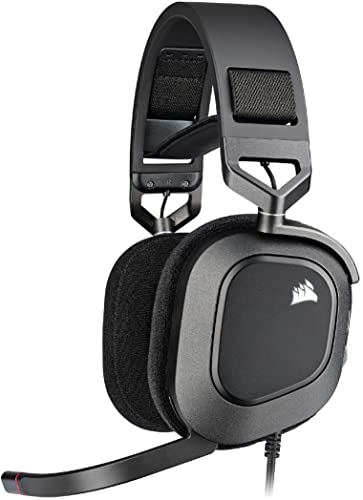
Every group needs a pick that refuses the group’s premise, and the HS80 RGB USB refuses wireless. It is a wired USB headset — the listing says so in its name — and it makes that choice for one reason: the microphone. Corsair describes it as broadcast quality, and in this class that claim is the product. If your channel is your voice — commentary, talk-format streams, podcasts recorded live, any format where the audience stays for what you say — then the HS80’s microphone is not a feature among many. It is the reason the headset exists, and it outperforms the detachable and retractable mics of its wireless rivals in the only comparison your audience can actually hear.
The wired USB connection brings quieter advantages that streamers underrate. Plug-and-play means no pairing ritual, no dongle to lose, no battery to die in hour six of a charity marathon, and a digital connection that feeds Corsair’s Dolby Audio 7.1 processing — virtual surround, as always in this guide, but well-implemented processing on top of a sound foundation that stands up with the processing switched off. Memory foam earpads and on-ear controls complete a desk-bound package that asks only one thing of you: stay at the desk. For a streamer, whose entire job happens within arm’s reach of a boom arm’s worth of desk, that is a smaller ask than it sounds.
Be clear about the exchange, though. You are giving up the freedom to pace, to grab a drink mid-stream without taking the headset off, to use the same headset on the couch. Console streaming is off the table; this is a PC headset by design. The HS80 RGB USB is the specialist’s pick — the one that looked at the streaming job, decided the voice mattered most, and spent its entire budget there. Channels built on personality and talk should take it very seriously.
Podcasters and talk-format hosts reading this guide should note that the HS80’s argument strengthens further off-camera. A wired USB headset with a broadcast-grade capsule is effectively a two-device purchase — headset and respectable microphone in one box — and for a creator whose content is voice-led across several formats, that consolidation simplifies the whole audio chain: one input to set levels for, one device to troubleshoot, one sound for the audience to learn. The streamers who eventually outgrow it usually do so by moving to a full standalone microphone and interface, at which point the HS80 retires gracefully to the second PC or the guest seat. Few headsets in this class have so clear a second life.
- Connection: wired USB, plug-and-play per listing
- Microphone: broadcast quality, as described in the listing
- Surround: Dolby Audio 7.1 (virtual processing)
- Earpads: memory foam per listing
- Controls: on-ear, per listing
- Platform focus: PC
Strengths
- The microphone is the class benchmark for a headset at this tier — your audience hears the difference.
- Wired USB deletes batteries, pairing and dropouts from the streaming checklist entirely.
- Dolby processing is available when wanted and bypassable when not.
Trade-offs
- The cable tethers you to the desk — no pacing, no couch, no exceptions.
- PC-only focus rules it out for console streamers.
- RGB lighting and a gaming silhouette will not suit every channel’s aesthetic.
Best for: talk-led PC streamers whose voice is the channel’s main instrument. Not suited for: console streamers or anyone whose streaming style involves moving around the room.
Turtle Beach Stealth 600 Gen 3 — Best for console streamers
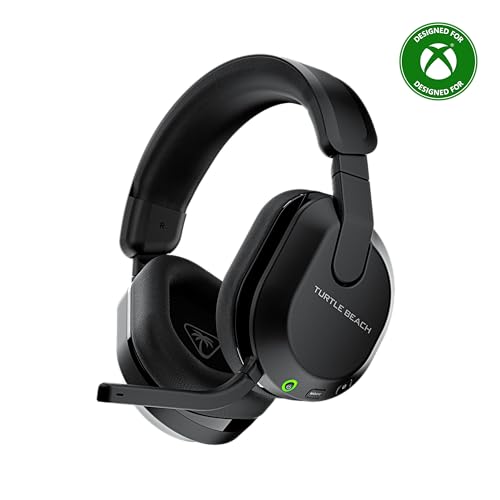
Console streamers are the underserved constituency of headset guides, which tend to assume a PC and treat console support as a footnote. The Stealth 600 Gen 3 inverts that: its listing leads with Xbox — Series X|S and One — alongside PlayStation, PS4, PC and mobile, which is the full map of where console-first creators actually broadcast from. If your channel runs on a console with a capture setup, or you stream natively from the console itself, this is the pick designed around your workflow rather than adapted to it.
The working details suit broadcast life. The flip-to-mute microphone is the most streamer-friendly muting mechanism ever fitted to a headset: flip it up and you are muted, with a physical gesture you can perform mid-sentence without finding a button — invaluable for the cough, the doorbell, the household interruption that every home streamer knows. The 80-hour battery covers a heavy week of streams between charges, Bluetooth runs alongside the primary wireless for phone duties, and 50mm drivers give the sound a fullness that action-heavy console titles flatter. Turtle Beach has iterated this line for years, and the Gen 3 shows the benefit of that iteration in small, practised touches.
Against the group, the Stealth 600 concedes the extreme ends: the HyperX’s battery claim dwarfs its (very good) 80 hours, and the HS80’s microphone serves talk-led channels better. What it offers instead is the most complete console-streaming package in the class, from a brand whose entire history is console audio. For the creator whose audience lives on console content, that specialisation is worth more than any single headline specification.
Native console streaming — broadcasting directly from the Xbox or PlayStation without a capture PC — is where the Stealth 600’s design brief pays off most visibly. In that setup the headset is the entire audio department: game sound, your voice, party chat and stream mix all pass through it, and controls that live on the headset itself stop being conveniences and become the mixing desk. A flip-to-mute boom and earcup controls are precisely the tools that workflow demands. PC streamers with a software mixer may never feel the difference; console-native streamers feel it in the first broadcast.
- Connection: wireless plus Bluetooth, per listing
- Platforms: Xbox Series X|S, Xbox One, PlayStation, PS4, PC, mobile — as listed
- Battery: listed figure of 80 hours
- Drivers: 50mm per listing
- Microphone: flip-to-mute per listing
- Generation: third generation of the Stealth 600 line
Strengths
- Console coverage leads the listing — Xbox and PlayStation are the point, not a footnote.
- Flip-to-mute is the fastest, most reliable muting gesture in the group.
- 80-hour battery and Bluetooth make it a complete one-headset solution.
Trade-offs
- Voice-led talk channels will still prefer the HS80’s broadcast microphone.
- The gaming aesthetic is pronounced; it reads as a gaming headset on camera.
- PC streamers gain little from its console specialisation and may prefer the Nova 5.
Best for: console-first streamers broadcasting from Xbox or PlayStation. Not suited for: talk-format PC streamers whose priority is microphone quality above platform reach.
What Actually Matters in a Streaming Microphone?
Your audience forgives average game audio instantly and a mediocre microphone never, because the microphone carries you. Three qualities decide how a headset mic performs on a real broadcast. Proximity and placement come first: a boom that sits consistently near the corner of your mouth produces a fuller, steadier voice than any processing applied to a distant one, which is why the fixed-boom designs tend to out-broadcast retractable and detachable ones. Noise rejection comes second — a streamer shares a room with a keyboard, a PC’s fans and a household, and a microphone that focuses on the voice and shrugs off the rest saves hours of gate-and-filter fiddling in software. Processing comes third, and it is genuinely useful: Logitech’s Blue VO!CE on the G733 and the tuning behind the HS80’s broadcast claim both show how far sensible processing can lift a small capsule.
Sidetone — hearing your own voice in your ears as you speak — is the microphone feature streamers discover latest and miss most when it is absent. Without it, you shout over the game without realising, because sealed cups muffle your own voice and your brain compensates by raising it. With a touch of sidetone, your broadcast level stays natural across a long session, and your post-stream voice thanks you. Not every headset exposes the control in the same place, and listing titles rarely mention it at all, so treat sidetone as a first-week settings hunt in your pick’s software: find it, set it low, and leave it there.
The practical test costs nothing. Before committing to a pick, record yourself through it — thirty seconds of normal commentary, thirty seconds while typing — and listen back on the device your audience uses, which is usually a phone. That recording tells you more than any specification in this guide, and it is the same test your viewers apply unconsciously in the first minute of every stream.
Finally, judge the microphone in the company it will keep. A voice that sounds rich alone in a quiet room can vanish under game audio, alerts and a co-host, so the last test is a mixed one: play your loudest game, trigger your loudest alert, and speak at your normal level over both. The headsets that keep the voice intelligible through that pile-up — through capsule placement, rejection pattern or processing — are the ones this guide ranked as streaming picks rather than gaming picks with a mic attached. That distinction is the entire ballgame in this category, and it cannot be read off a box.
How Should You Set Up a Streaming Headset for Your First Broadcast?
Begin with the unglamorous layer: charge the headset fully or, for the HS80, confirm the USB connection is direct to the PC rather than through an unpowered hub. Set the headset as both the default output and the default input in your system and in your streaming software, because mismatched defaults are the source of the classic first-stream silence. Position the microphone boom near the corner of your mouth, slightly off-axis so breath does not strike it directly, and set your input level so normal speech peaks comfortably below clipping — you can always raise a quiet recording; a clipped one is ruined.
Do the same preparation for your recording and video-on-demand workflow, because a stream does not end when the broadcast does. Clips, highlights and uploads inherit the live audio exactly as it went out, including every level mistake and every keyboard clatter the microphone admitted. A headset whose voice you have tested in local recordings protects the afterlife of your content as well as the live hour — and for many growing channels, the clips reach more people than the stream itself ever will.
Then rehearse the failures. Practise muting — the Stealth 600’s flip, the on-ear controls of the HS80 — until it is muscle memory. Run a local recording and listen for the keyboard, the fan, the room echo, and fix the worst offender with placement before reaching for software filters. Finally, decide your spatial-audio stance before you go live: DTS Headphone:X and Dolby processing change how the game sounds to you, not to your audience, and mid-stream is the wrong time to discover you prefer the game unprocessed. Ten quiet minutes of setup buys a first broadcast that sounds like a tenth one.
Wireless, Wired, and What Latency Means When You Are Live
Streamers sometimes worry that wireless audio will lag behind the picture, so it is worth separating the two wireless systems in this guide. The 2.4GHz connections used by the HyperX, SteelSeries, Razer and Turtle Beach picks are purpose-built for gaming: their latency is low enough that lip-sync and gameplay feel are unaffected, and they are the correct default for live play. Bluetooth, which several picks carry as a second mode, is the convenience layer — perfect for the phone, for media, for a handheld on the couch — but it carries more delay, and competitive players can feel it in fast games. The working rule is simple: broadcast over 2.4GHz, relax over Bluetooth.
Interference deserves its paragraph, because streaming desks are hostile radio environments: a PC, a router, a phone, a wireless keyboard and mouse all competing in the same few cubic metres. The 2.4GHz systems in these picks are designed for exactly that crowd and generally hold their connection through it, but placement still matters — a dongle buried behind a metal case at floor level is a self-inflicted wound, and the simple act of putting the receiver on a short extension at desk height cures most dropouts streamers blame on the headset. Bluetooth pairings, meanwhile, should be pruned occasionally; a headset trying to be loyal to three old phones is a headset that connects to the wrong device at showtime.
The wired HS80 sidesteps the question entirely, which is part of its appeal to talk-led streamers: a USB connection has no latency discussion, no pairing state, no interference from the neighbour’s router. What it cannot do is follow you. The honest summary for the class is that connection choice is lifestyle choice — the technology in every pick here is adequate for streaming, and the differences that will actually shape your broadcasts are the microphone, the battery discipline and whether the headset stays comfortable and presentable for the length of your show.
Where Does a Headset Sit in a Growing Channel’s Budget?
New streamers often ask whether the headset should come before or after the other upgrades — camera, lighting, a better GPU. The working answer from this guide’s priorities: audio before video, always, because audiences tolerate a soft picture far longer than harsh or distant sound, and because a headset in this class is a complete audio department in one purchase — headphones, microphone and monitor path together. The camera can wait a season; the voice your first hundred subscribers learn should be the voice your thousandth hears, and that consistency is cheapest to buy early.
The second budget question is replacement rhythm. A streaming headset is a wear item in a way a GPU is not: cushions compress, headbands loosen, batteries age. The picks here divide by how gracefully they handle that rhythm — replaceable-feeling builds and huge battery reserves stretch the interval, while the wired HS80 removes the battery from the ageing equation entirely. Whichever you choose, treat the purchase as a two-to-three-year working tool rather than a permanent fixture, and the under-200 class pricing makes that rhythm painless in a way flagship tiers do not.
Comparison Table
| Pick | Connection | Battery (as listed) | Standout trait |
|---|---|---|---|
| HyperX Cloud Alpha Wireless | 2.4GHz wireless | 300-hour claim | Endurance that deletes charging from the routine |
| SteelSeries Arctis Nova 5 | 2.4GHz or Bluetooth | 60 hours | PC, console, Switch and mobile in one headset |
| Razer Barracuda X | 2.4GHz plus Bluetooth | 50 hours | Detachable mic, street-ready second life |
| Logitech G733 LIGHTSPEED | LIGHTSPEED wireless | See maker documentation | Suspension comfort and Blue VO!CE processing |
| Corsair HS80 RGB USB | Wired USB | None — mains-free of batteries by design | Broadcast-quality microphone |
| Turtle Beach Stealth 600 Gen 3 | Wireless plus Bluetooth | 80 hours | Console-first coverage, flip-to-mute mic |
Which of These Six Fits the Channel You Actually Run?
Match the pick to the programme and the choice narrows quickly. The daily PC variety streamer — games rotating, sessions long, setup static — is the Cloud Alpha Wireless’s home ground, where its battery erases the charging chore and its drivers keep chaotic games intelligible. The multi-platform creator, whose week spans a PC launch stream, a console exclusive and phone clips, should take the Arctis Nova 5 and stop carrying two headsets between rooms. The console-first channel, broadcasting from an Xbox or PlayStation with party chat in the mix, belongs to the Stealth 600 Gen 3, whose entire design assumes exactly that desk.
The talk-led formats split two ways. If the show is seated, scheduled and voice-driven — commentary, interviews, live podcasts — the HS80 RGB USB is the professional choice in this class, microphone first and everything else second. If the show is a performance, long and physical and camera-forward, the G733’s suspension comfort and Blue VO!CE processing fit the performer better. And the creator whose channel includes the outside world — events, travel, collaborations — is the Barracuda X’s natural owner, trading a measure of desk performance for a headset that works everywhere the content goes. None of these is a consolation assignment; each pick leads the class at the job it was matched to.
Comfort Across a Streaming Week: What Wears Out First?
Comfort in a store is a five-minute judgement; comfort in streaming is a weekly accumulation, and the failure modes are specific. Clamp force that feels secure on day one becomes a headache pattern by the fifth consecutive session, which is why the G733’s suspension strap and the lighter frames of the Barracuda X earn their keep over a schedule rather than a demo. Cushion material is the second variable: memory foam, fitted to the HyperX and the HS80, distributes pressure evenly and seals consistently, but it also holds heat, and streamers in warm rooms under lighting should expect to lift a cup during breaks — a habit every long-session streamer develops regardless of brand.
Glasses wearers should run their own version of this audit, because spectacle arms break the cushion seal that both comfort and bass response depend on. The softer memory-foam cushions in this group forgive arms better than stiff ones, and the suspension-strap G733 avoids the temple pressure that makes glasses ache by hour two. If you stream in glasses, your comfort ranking of these six will differ from a contact-lens wearer’s — trust your own long-session test over any reviewer’s, including this one.
The component that actually wears out first is almost always the cushion itself, flattening over a year or two of daily use and changing both comfort and sound as the seal degrades. Headsets in this class treat cushions as replaceable on some models and fixed on others, and the listing titles do not always say which — check the maker’s documentation for your pick before the cushions become the problem, and order spares while your exact model is current. A streamer whose headset is also their on-camera signature should think of fresh cushions the way a presenter thinks of a fresh shirt: maintenance of the broadcast, not vanity.
What Are the Most Common Mistakes When Buying a Streaming Headset?
The first is buying for the game audio and forgetting the audience: a headset can sound wonderful to you and still make your voice thin and distant to everyone listening. The second is chasing a battery figure without checking your actual schedule — a streamer who broadcasts twice a week gains little from the largest battery in this guide and might value the Nova 5’s platform reach more. The third is ignoring the camera: a headset that looks wrong on your stream, or that you adjust every few minutes, taxes every broadcast. The fourth is treating virtual surround as a hardware feature and paying for it twice — it is processing, available in software, and should never be the deciding line in a comparison. The last is forgetting the mute: discover how your headset mutes before the first live cough, not during it.
A quieter mistake is neglecting the firmware and software layer after purchase. Headsets in this class receive updates that fix pairing quirks, adjust microphone behaviour and occasionally add features, yet many streamers never open the companion app after the first week. Put a quarterly reminder in the same calendar that holds your stream schedule; ten minutes of maintenance a season is the cheapest reliability a broadcaster can buy.
Final Recommendation
Choose by the shape of your channel. PC streamers who broadcast daily should start with the Cloud Alpha Wireless and its schedule-erasing battery; creators spread across PC, console and phone should take the Arctis Nova 5; console-first channels belong with the Stealth 600 Gen 3. If your voice is the programme, the wired HS80 RGB USB and its broadcast microphone outrank every wireless convenience in this guide. The Barracuda X serves the creator whose work leaves the desk, and the G733 serves the performer whose streams are long, visible and personality-led. The under-200 class is strong enough that the wrong choice is rarely a bad headset — it is a good headset matched to somebody else’s channel.
Buy once, set it up properly in the first week, and then let the headset become invisible — that invisibility, the total absence of audio friction between you and the people watching, is what this class at its best is actually selling, and every pick above can deliver it for the channel it was matched to.
Frequently Asked Questions
Do I still need a standalone microphone if I buy one of these?
Not to start. Every pick here can carry a broadcast, and the HS80’s microphone in particular holds up as a long-term solution for talk-led channels. Many streamers add a standalone mic later for production reasons; treat that as an upgrade path, not an entry requirement.
Is virtual surround worth using on stream?
It affects only what you hear, not what your audience hears. DTS Headphone:X on the Cloud Alpha Wireless and Dolby Audio on the HS80 are processing layers you can toggle — try both states in a local recording session of your own gameplay and keep whichever helps your own awareness and enjoyment.
Why is there a wired headset in a list of mostly wireless picks?
Because the HS80 RGB USB trades mobility for the best microphone in the class and the total reliability of a plug-and-play connection. For a desk-bound, voice-led streamer, that trade is rational — no battery has ever died in the middle of their broadcast.
Which pick works if I stream from both a console and a PC?
The Arctis Nova 5 and the Stealth 600 Gen 3 both list broad console and PC support. Choose the Nova 5 if Switch and mobile matter to your content; choose the Stealth 600 if Xbox and PlayStation are the centre of the channel.
How long a battery does a streamer actually need?
Enough to cover your longest streaming week without a mid-week charge is the practical bar — for most schedules that is the 50-to-80-hour territory of the Barracuda X, Nova 5 and Stealth 600. The Cloud Alpha Wireless’s 300-hour claim exists for streamers who never want to think about the question again.
Can I use one of these headsets for streaming and for my remote day job?
Yes, and many people do — the same qualities serve both: a clear microphone, all-day comfort and reliable wireless. The Nova 5’s Bluetooth makes it the easiest double-duty pick for laptop calls, while the HS80’s broadcast microphone flatters meeting audio as much as stream audio. Just check your employer’s platform requirements if certified devices matter to your IT department.
Does a bigger battery claim mean a better headset?
It means a longer interval between charges, nothing more — the Cloud Alpha Wireless pairs its 300-hour claim with genuinely good audio, but battery size says nothing about microphone quality or comfort. Match the battery to your schedule, as the earlier FAQ explains, and judge the rest of the headset on the rest of this guide.
What should I check in the first week with a new streaming headset?
Record test clips and listen on a phone, wear it for one full-length session to judge comfort honestly, practise the mute until it is automatic, and confirm your streaming software uses the headset — not a webcam or monitor microphone — as its input. Those four checks catch nearly every problem new streamers blame on the headset itself.
Related Guides
A streaming setup is a chain, and the headset is one link — often the link your audience notices first and forgives least when it fails. When you are ready to work on the neighbouring links, start with our guide to gaming headsets with standout microphones, compare your options in our roundup of wireless headsets for multi-platform players, and then read our guide to headsets for conference calls and remote work if the same desk hosts your day job.


