What's inside
- Where to buy
- Key Takeaways
- Quick Picks
- How We Chose These Picks
- What Does Café WiFi Actually Have to Do All Day?
- Which Router Fits Your Café’s Shape and Rush?
- How Do You Survive the Lunch Rush Without New Hardware?
- What About the Café’s Own Connected Clutter?
- Captive Portal or Guest SSID: How Deep Does the Difference Run?
- How Do the Six Picks Compare at a Glance?
- How Do You Set Up Café WiFi That Protects the Till?
- How Do You Keep the Network Alive When Staff Turn Over?
- What Should You Check Before Buying for a Café?
- What Mistakes Do Café Owners Make With WiFi?
- Final Recommendation
- Frequently Asked Questions
- Related Guides
As an Amazon Associate I earn from qualifying purchases. This post may contain affiliate links at no extra cost to you.
gizmoverdict.com is reader-supported. When you buy through links on our site, we may earn an affiliate commission.
Where to buy
All six picks are listed on Amazon’s US store. Café hardware lives a harder life than home hardware — heat, flour dust, fourteen-hour days — so whichever pick you choose, buy it somewhere with a painless returns process and register the purchase the day it arrives, not the day it fails during the Saturday rush.
The best routers for cafes solve a problem home routers never meet: a room full of strangers. Your customers want WiFi that is effortless — ideally one tap, no password dictation over the espresso machine’s roar. Your till, your card terminal, your back-office laptop and your smart thermostat want the opposite: a network those strangers cannot touch, see or slow down. A café router is therefore two products wearing one box. It is a hospitality product on the surface, generous and simple, and a small business security product underneath, keeping the guest crowd in a fenced paddock away from the machines that take money.
That dual nature organises this whole guide. Five of the six picks are capable home-and-small-business routers whose guest-network features do the fencing; we will describe that mechanism honestly as a guest SSID, because that is what it is. One pick — the WAVER ODY — is a purpose-built captive portal gateway, the only product here whose listing actually promises the branded login page, guest management and hospitality workflow that café owners picture when they say “café WiFi”. Conflating the two categories is the most common buying error in this space, so the distinction runs through every section: know whether you are buying a fence or a front door, because a busy café eventually wants both, and only one pick here is the front door.
The other café realities are operational. Peak load arrives in bursts — the 8 a.m. queue, the lunchtime laptop crowd, the evening study session — and a router that handles forty browsing customers gracefully matters more than one that streams heroically to three. Staff turnover means the network must be reboot-and-forget: no settings that live in one departed barista’s phone, no password taped under the counter that has not changed since the previous owner. And uptime is revenue; a router that needs weekly manual restarts is a cost, not a saving, however cheap its listing looks.
Key Takeaways
- Guest isolation is the non-negotiable: customer devices must never share a network with the till, the card terminal or the back office.
- Only the WAVER ODY in this guide is a true captive portal product — the other five fence guests with a guest SSID, which is a different and simpler mechanism.
- The TP-Link Archer BE400 is the heavyweight home-router route, with a stated 90-device capacity and dual 2.5-gigabit ports for a busy room.
- The Cudy WR1200’s five ports are 100-megabit class — fine behind a modest café connection, a ceiling to know about before you buy.
- Judge café routers by peak-hour behaviour with dozens of idle phones, not by a single laptop’s speed test at midnight.
- Reboot-and-forget operation beats features: the best café network is the one the Saturday staff never have to think about.
Quick Picks
| Pick | Badge | Why it earns its place |
|---|---|---|
| TP-Link Archer AX73 WiFi 6 Router | Room-filling workhorse | An AX5400-class WiFi 6 router with gigabit ports and long-range intent, sized for a dining room that fills every seat at peak. |
| TP-Link Archer BE400 WiFi 7 Router | Peak-hour heavyweight | A WiFi 7 router stating 90 devices and 2,400 square feet, with dual 2.5-gigabit ports and a private IoT network for the café’s own gadgets. |
| NETGEAR Nighthawk R6700AX WiFi 6 | Small-room steady hand | An AX1800 router stating coverage to 1,500 square feet and 20 devices — honest proportions for a compact café or coffee cart corner. |
| TP-Link Archer BE220 WiFi 7 Router | Mesh-ready middleweight | A WiFi 7 router with full gigabit ports, EasyMesh growth and a private IoT network, for cafés that may expand into a second room. |
| Cudy WR1200 Dual-Band Router | Budget fence-builder | An AC1200 router with WPA3 and a separate-client pitch at a price that suits a tiny café or a dedicated guest-only second box. |
| WAVER ODY Captive Portal Router | The real captive portal | A purpose-built hotspot gateway for cafés and restaurants, stating up to 200 active guests and no monthly fees — the front door the others are not. |
How We Chose These Picks
We judged candidates against a Saturday, not a spec sheet. The scenario: thirty to sixty customer devices, most of them idle phones sipping background data, a handful of laptops doing real work, a card terminal that must never blink, a staff tablet running the till app, and a queue forming. Routers earned their places by covering that scenario’s four demands — a guest network with client isolation, enough client-handling headroom for peak bursts, ports and speed class matched to a typical café internet line, and management simple enough to survive staff turnover. Marketing aimed at gamers and streamers was discounted heavily; a café’s traffic is breadth, not depth.
The captive portal question was handled with deliberate strictness. A portal — the branded page where guests tap to accept terms and join — is a specific feature, and only one listing in this pool states it. Rather than letting the other five borrow the term, we framed them accurately: they offer guest SSIDs, which fence customers away from the business network without any login page at all. For many small cafés that is genuinely sufficient, and arguably smoother. For cafés that want the terms-acceptance record, the branding moment or time-limited sessions, the portal is a product category of its own, and the WAVER ODY represents it here. Cafés that are really small offices with a coffee machine will find the overlap explored in our guide to the best home small business routers; this guide assumes the public is coming through the door.
We also weighed the unglamorous evidence of listings themselves: port speeds printed or conspicuously absent, device figures stated or ducked, security generations named. A café router is a five-year appliance bought from a web page, and the page’s precision about its own limits turned out to be a fair predictor of how the product behaves under a crowd. The two picks that print modest numbers plainly — the Nighthawk’s twenty devices, the Cudy’s hundred-megabit ports — earned trust precisely by declining to flatter themselves, and the sections below extend them the courtesy of being believed.
Device and coverage numbers appear only where listings state them, and they are quoted as the makers’ claims. A stated figure earned in a test environment will shrink in a room with a brick pizza oven and a wall of refrigerators, which is why the sections below talk as much about placement and architecture as about any number.
What Does Café WiFi Actually Have to Do All Day?
Follow the traffic. From opening, the network carries the business’s own heartbeat: the till syncing its catalogue, the card terminal authorising payments, perhaps a kitchen display, a music service, a security camera or two, the owner’s phone. None of it is heavy; all of it is vital, and most of it is intolerant of interruption in a way a customer’s browsing is not. Layered over that from the first customer is the guest load — dozens of devices associating, requesting addresses, background-syncing photo libraries over your connection while their owners order. Each individual guest is trivial. The crowd is not, because routers manage crowds with finite resources: address pools, client tables, airtime on crowded 2.4 GHz channels in a street full of neighbouring networks.
Two failure shapes follow. The first is the slow Saturday sag, where everything works at 9 a.m. and nothing works by noon, because the client table and address pool filled with the morning’s devices and never released the departed. The second is the isolation failure, invisible until it matters: a guest network misconfigured so customer devices can see the till’s network segment, which is both a security exposure and, for card payments, a compliance headache. A good café setup defends against both shapes at once — generous client handling for the crowd, hard separation for the business — and it does so with settings a manager can verify in the app in one minute, standing at the counter, between customers. The gadget side of the business network deserves the same thinking a smart home gets; cafés run more connected devices than they realise, from thermostats to smart plugs on the drinks fridge, and our guide to the best routers for iot devices covers the patience those devices demand.
There is a third shape, commercial rather than technical: the guest network as an accidental product. Cafés that sell all-day workspace to laptop customers are, in effect, renting bandwidth and a chair. A router that cannot shape sessions or cap a single greedy client forces the café to police that product socially, which staff hate. This is the pressure that eventually pushes workspace cafés toward the portal category or toward routers with credible per-client controls — and it is better recognised at purchase time, in this guide, than at the third awkward conversation with a regular who has been uploading video since breakfast.
Which Router Fits Your Café’s Shape and Rush?
Read the picks as a ladder of room sizes and ambitions. The Nighthawk and the Cudy serve small rooms honestly. The two TP-Link WiFi 7 boxes serve growing rooms with headroom. The AX73 is the WiFi 6 workhorse between them. And the WAVER ODY stands apart — not a rung on the ladder but the doorway product you add when guest management itself becomes the job.

TP-Link Archer AX73 WiFi 6 Router — Room-filling workhorse
The Archer AX73 is the conventional answer done properly: an AX5400-class dual-band WiFi 6 router with gigabit ports, marketed for streaming and long-range coverage. Translate that consumer pitch into café terms and it reads well — the speed class gives a crowded room airtime discipline when twenty laptops join the morning rush, the gigabit ports wire the till and a back-office machine without compromise, and TP-Link’s management app provides the guest network that does this guide’s essential fencing. Set the guest SSID apart, enable client isolation where the app offers it, and the AX73 runs the classic two-network café from a single box on a shelf behind the counter.
Its honest boundary is the one this guide repeats: the AX73 offers a guest network, not a captive portal. Guests join with a password — which staff will dictate, write on the chalkboard, and eventually print on the loyalty cards — rather than tapping through a branded terms page. Many cafés prefer exactly that; the password on the receipt is a hospitality ritual of its own, and rotating it monthly is a perfectly good crowd-control tool. What the AX73 will not give you is per-guest session management or a terms-acceptance log. If your café’s needs stop at fast, fenced and simple, this is the proportionate buy, and its WiFi 6 generation will age more gracefully than the WiFi 5 budget pick below.
Placement advice for this class of router is unglamorous and decisive. The AX73’s radios want height and air — a shelf above the counter’s end, not the cupboard with the syrup stock. In a long, narrow room, mounting it two-thirds toward the seating end, with the till wired back to it, serves both populations better than centring it over the machine that makes the noise. Owners consistently underestimate how much of a router’s real-world performance is this single decision, and overestimate how much of it is the model number.
- Standard: WiFi 6, dual-band, AX5400 class per the title
- Ethernet: gigabit ports, per the title
- Guest fencing: guest SSID via TP-Link’s app and settings
- Pitch: streaming and long-range coverage, per the title
- Role: single-box café network for a mid-size room
Strengths
- AX5400-class airtime handles the lunchtime laptop crowd without drama.
- Gigabit ports keep the till and office machines fully wired and quick.
- TP-Link’s app keeps guest-network settings checkable in a minute.
Trade-offs
- No captive portal — guests join by password, not a branded login page.
- A single box covers one room’s geography; a second space needs more kit.
- HomeShield-style extras on TP-Link lines deserve a terms check before reliance.
Best for: mid-size cafés wanting one capable router, a fenced guest network and no portal ambitions. Not suited for: venues needing terms-acceptance records or per-guest session control.

TP-Link Archer BE400 WiFi 7 Router — Peak-hour heavyweight
The BE400 is the biggest home-router hammer in this guide: a dual-band WiFi 7 unit in the BE6500 class whose listing states coverage up to 2,400 square feet and support for 90 devices, with dual 2.5-gigabit ports, USB 3.0, a quad-core processor and TP-Link’s HomeShield and Private IoT features. The stated device figure is the café-relevant headline — ninety is a number that covers a genuinely busy room’s peak, quoted here as the maker’s claim — and the Private IoT network is the second: a dedicated enclave for the café’s own gadgets, separating the smart thermostat and the drinks-fridge plug from both guests and the till in one move.
WiFi 7 itself is the least café-specific part of the package; your customers’ phones span every generation, and the benefit arrives as aggregate smoothness rather than any single device’s speed. The dual 2.5-gigabit ports matter more concretely if the café’s internet line is fast or a wired back-office server enters the picture. Judged coldly, the BE400 is the pick for the café that has already outgrown a basic router once and refuses to repeat the lesson — the busy brunch room, the study-café with forty seated laptops, the venue whose WiFi is part of why people come. It remains, like every home router here, a guest-SSID product rather than a portal product, and its security suite’s finer features deserve the same current-terms check we advise throughout.
Heat is the BE400’s unlisted working condition, as it is for any router in a working café. A quad-core box doing inspection and crowd management all day wants airflow, not the top of the espresso machine or a sealed cupboard with the cleaning chemicals. Give it the same ventilated shelf you would give a small amplifier, and its stated capacities become plausible; cook it slowly in its own warmth and no device figure in any listing will save the Saturday shift. Placement, again, is a specification — the cheapest one a café controls completely.
- Standard: WiFi 7, dual-band, BE6500 class per the title
- Devices: 90 stated in the title
- Coverage: up to 2,400 sq. ft. stated in the title
- Ethernet: dual 2.5-gigabit ports, per the title
- Extras: USB 3.0, quad-core CPU, HomeShield, Private IoT network, per the title
Strengths
- The stated 90-device capacity matches a real peak-hour crowd.
- Private IoT network fences the café’s own gadgets as a bonus enclave.
- 2.5-gigabit ports leave headroom for fast lines and wired office gear.
Trade-offs
- WiFi 7’s benefits mostly serve newer devices; older phones see less of it.
- Still a guest-SSID router — no captive portal page for guests.
- The feature suite’s premium tier terms need reading before you depend on them.
Best for: busy, larger cafés whose guest WiFi is part of the product and whose peak crowds are real. Not suited for: tiny rooms paying for capacity they will never seat.

NETGEAR Nighthawk R6700AX WiFi 6 — Small-room steady hand
NETGEAR’s R6700AX states its proportions plainly in its listing: WiFi 6 in the AX1800 class at up to 1.8 Gbps, coverage up to 1,500 square feet, around 20 devices, four gigabit ports. For a compact café — a dozen tables, a coffee cart in a shared space, a bakery with a small seating corner — those numbers are not limitations but a correct fit, and there is a particular honesty in a listing that says twenty devices in a category where rivals imply infinity. Twenty covers the till, the terminal, staff phones and a roomful of customers at a small venue’s genuine peak.
The Nighthawk line’s app-based setup and guest network cover the café essentials without ceremony, and four gigabit ports wire everything a small business owns with a port to spare. Where this pick asks for judgement is growth: a café that adds a terrace, a second room or a study-hour crowd will outgrow its stated envelope, and NETGEAR’s mesh answers live in a different product family, so expansion means replacement rather than addition. Buy it as the right-sized tool for the room you have — with eyes open about the room you might add — and it is the steadiest small-café choice here. Pair it with disciplined placement, high and central rather than under the counter in a metal nest of cables, and its modest numbers will feel generous in practice.
Brand depth is the quiet argument for this pick. NETGEAR’s documentation, firmware history and support channels are the deepest in this guide, and a café whose owner is also its IT department feels that depth the first time a setting needs explaining at 7 a.m. with a queue forming. The R6700AX will not out-spec the WiFi 7 pair on any axis, but it represents the mature end of the market: known behaviour, known app, known answers. For a small room, maturity is a feature.
- Standard: WiFi 6, dual-band, AX1800 class per the title
- Speed class: up to 1.8 Gbps stated in the title
- Coverage: up to 1,500 sq. ft. stated in the title
- Devices: 20 stated in the title
- Ethernet: four gigabit ports, per the title
Strengths
- Stated figures match a small café’s real peak instead of inflating it.
- Four gigabit ports wire till, terminal and office with room to spare.
- NETGEAR’s setup flow is survivable by non-specialist staff.
Trade-offs
- The 20-device envelope caps growth into bigger or busier rooms.
- No mesh family path — expansion means a new system, not a node.
- Guest networking is the SSID mechanism; no portal features.
Best for: compact cafés and coffee corners wanting a reputable, right-sized single router. Not suited for: venues planning terraces, second rooms or study-hall crowds.

TP-Link Archer BE220 WiFi 7 Router — Mesh-ready middleweight
The BE220 sits a rung below its BE400 sibling and compensates with flexibility. Its listing describes a dual-band WiFi 7 router in the BE3600 class with full gigabit ports, USB 3.0, four external antennas, VPN client and server support, EasyMesh compatibility, HomeShield and a Private IoT network. The EasyMesh line is the café-relevant gem: it means this router can grow into a mesh with compatible units when the café knocks through to a second room or adds a terrace, rather than being replaced — the exact growth path the Nighthawk above lacks.
The VPN support earns a café-specific mention too. A router that can act as a VPN server lets the owner reach the back-office network from home securely — checking the till system’s reports at midnight without exposing it — while the client side can route the whole café through a tunnel if a particular service demands it. Combined with the Private IoT enclave for the venue’s gadgets, the BE220 sketches the most complete small-business feature set in this guide at a middleweight tier. It shares the family caveats: guest access is by SSID rather than portal, and the security suite’s deeper features sit under TP-Link’s current service terms, which deserve a read before the café depends on them for anything compliance-flavoured.
USB 3.0, easy to skim past in the listing, has a modest café use worth naming: a drive on the router becomes simple shared storage for the office machine’s backups or the menu-design files both partners edit. It will not replace a real server, and it should never hold the only copy of anything, but as a convenience on a box already running all day it rounds out the BE220’s small-business character. This is a router that expects to be a venue’s only networking purchase for years, and its listing reads like it knows.
- Standard: WiFi 7, dual-band, BE3600 class per the title
- Ethernet: full gigabit ports, per the title
- Growth: EasyMesh compatible, per the title
- Extras: USB 3.0, VPN client and server, HomeShield, Private IoT, per the title
- Antennas: four external, per the title
Strengths
- EasyMesh turns next year’s expansion into an addition, not a replacement.
- VPN server support gives the owner secure reach into the office network.
- Private IoT network separates the venue’s gadgets from guests and till.
Trade-offs
- BE3600 class trails the BE400 for the very largest single-room crowds.
- Guest access remains password-and-SSID, with no portal page.
- Antenna-farm styling needs a shelf where customers forgive the look.
Best for: cafés likely to grow a room, wanting WiFi 7 and a mesh path without flagship pricing. Not suited for: single-room venues certain never to expand — the Nighthawk is simpler.
Cudy WR1200 Dual-Band Router — Budget fence-builder
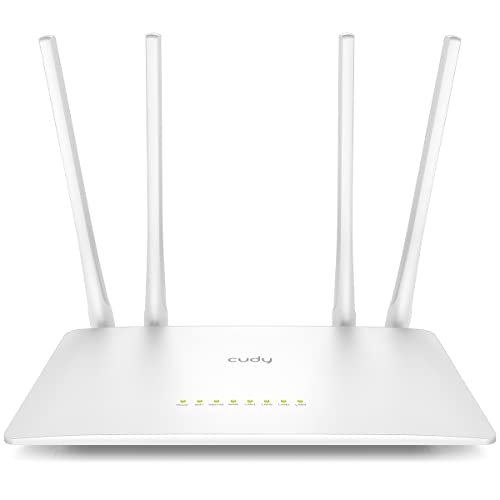
The Cudy WR1200 asks to be judged as a tool for a specific job. Its listing describes an AC1200 dual-band WiFi 5 router — 867 plus 300 Mbps in the maker’s split — with five Ethernet ports of the 100-megabit class, WPA3 security, coverage stated at 1,100 square feet and 40 devices, MU-MIMO and beamforming, five operating modes and a separate-client emphasis that speaks directly to guest isolation. The 100-megabit ports are the headline caveat: behind a café internet line faster than that class, the Cudy would cap the whole business, and no honest guide can wave that through. Behind a modest line — and many small cafés run on one — the cap never binds, and the stated 40-device figure covers a small room’s crowd.
Its cleverest café role mirrors the gadget-wing trick from our IoT guide: as a second, dedicated guest box. Let an existing router run the business, cable the Cudy in as the guest-facing network with its own SSID and isolation, and the café gains a fence for the price of a round of drinks — with WPA3, a current security generation that many pricier older routers lack. The five-in-one modes make that deployment flexible, and if the experiment fails, the box retires to a stockroom shelf without grief. What it must not be is the invisible ceiling on a growing café’s connection, so check your line speed first and let that single fact decide its role.
There is a second budget role where the little Cudy makes sense: the seasonal or part-time venue. A market-stall café, a beach kiosk open four months a year, a community-hall coffee morning — these need a fenced guest network a few hours at a time and cannot justify flagship hardware sweating in a cupboard all winter. The WR1200’s proportions, one small room and a few dozen devices, describe exactly that working life, and its price class means a spilled-latte accident is an annoyance rather than an insurance claim.
- Standard: WiFi 5, dual-band, AC1200 class per the title
- Ethernet: five 100-megabit ports, per the title
- Coverage: 1,100 sq. ft. stated in the title
- Devices: 40 stated in the title
- Security: WPA3 stated in the title
- Modes: five-in-one, per the title
Strengths
- WPA3 and client-separation intent at a genuinely small price class.
- Stated 40 devices fit a small room’s crowd with headroom.
- Multiple modes suit the dedicated guest-box deployment neatly.
Trade-offs
- 100-megabit ports cap any faster internet line at the router.
- WiFi 5 radios are the oldest generation among these six picks.
- Coverage statement suits one small room, not a sprawling venue.
Best for: tiny cafés on modest lines, or any café adding a cheap dedicated guest network beside its business router. Not suited for: venues with fast fibre lines, where its ports become the bottleneck.

WAVER ODY Captive Portal Router — The real captive portal
The WAVER ODY is the only pick in this guide built for the hospitality job itself. Its listing describes a captive portal router and hotspot gateway for guest WiFi in hotels, cafés and restaurants, supporting up to 200 active guests, at a 100 Mbps class, dual-band, with no monthly fees. Each element of that sentence earns analysis. Captive portal means the branded join page — your logo, your terms, a tap to connect — which is simultaneously a marketing surface, a terms-acceptance record and a way to offer time-shaped access without staff dictating passwords. Two hundred active guests, the maker’s stated figure, is hotel-lobby arithmetic that no café in this guide will reach, which is precisely the point: the ceiling is not your problem. No monthly fees matters because portal services are often rented by the month, and a one-time hardware purchase changes the café’s cost shape entirely.
The 100 Mbps class is the honest trade: this gateway’s throughput ceiling suits cafés whose internet line and guest expectations live in the browsing-and-messages world, and a venue selling all-day laptop hospitality on a fast line should notice the cap before buying. Architecturally, the ODY typically fronts the guest experience while a conventional router — several above would serve — runs the business side, or it can anchor a small venue outright. Either way it is a different species from the other five picks, and that is its value: when the requirement is genuinely “a portal”, this is the only honest answer on the page, bought with clear eyes about its speed class and its specialist nature.
Consider also what the portal does to the café’s rhythm. A password on the receipt requires no thought from anyone; a portal page asks each guest for one tap and gives the café a moment of brand and a terms record in return. For a neighbourhood café whose regulars join daily, that tap can become a small friction worth weighing — some portal setups remember returning devices, and the listing’s current documentation is where to confirm how the ODY handles it. The portal is a hospitality decision as much as a network one, and the cafés happiest with theirs chose it for the welcome, not from fear.
- Role: captive portal router and hotspot gateway, per the title
- Guests: up to 200 active guests stated in the title
- Throughput class: 100 Mbps, per the title
- Wireless: dual-band WiFi, per the title
- Fees: no monthly fees, per the title
- Audience: hotels, cafés and restaurants, per the title
Strengths
- A genuine branded portal with terms acceptance — the category’s defining feature.
- Stated guest capacity dwarfs any café’s realistic peak.
- No monthly fees in a category usually rented by subscription.
Trade-offs
- 100 Mbps class caps guest throughput on faster lines.
- Specialist product — support and documentation are hospitality-niche.
- Most cafés will still want a conventional router for the business network.
Best for: cafés and restaurants that specifically want a branded guest portal, terms acceptance and session-shaped access. Not suited for: venues whose priority is raw guest speed on a fast line.
How Do You Survive the Lunch Rush Without New Hardware?
Before spending anything, four settings rescue more café networks than any purchase. Shorten the guest network’s address lease. Home routers often hand out addresses for a day; a café’s guests stay ninety minutes, and a lease of two to four hours returns departed customers’ addresses to the pool in time for the next wave instead of letting the morning’s crowd squat in the table until closing. Second, split the bands deliberately. Give the business network the 5 GHz band’s cleaner air where devices support it, and let the guest crowd spread across both bands rather than herding every phone onto whichever the router’s steering prefers — in a room full of near-idle devices, balance beats brilliance.
Third, schedule the reboot you keep forgetting. Most routers here can restart themselves on a timer; set it for the smallest hour of the week, and the stale-client cobwebs clear themselves on schedule instead of during service. Fourth, cap the guests gently if your router offers bandwidth controls: no single customer needs the whole line, and a per-client ceiling converts one guest’s cloud backup from a room-wide incident into a private disappointment. None of these settings appears on a box, all of them are free, and together they are the difference between a router that is coping and a router that is merely on.
If the rush still wins after all four, the diagnosis has changed: the room has outgrown the hardware’s crowd envelope, and the picks above — particularly the stated-capacity TP-Link pair — become the honest next step rather than another month of settings archaeology.
What About the Café’s Own Connected Clutter?
Walk a modern café with a network eye and the business’s own gadget count surprises: the music streamer, the smart thermostat, the camera over the till, the plug cycling the drinks fridge, the tablet that lives on the counter, the owner’s watch. These devices belong neither with the guests nor, ideally, shoulder-to-shoulder with the card terminal. This is where the Private IoT enclave on the two TP-Link WiFi 7 picks stops being a bullet point and becomes architecture — a third neighbourhood, between the money and the crowd, where the café’s gadgets can be sleepy, chatty and occasionally dubious without touching either.
Cafés running three neighbourhoods should name them like staff roles, so any manager can describe the setup to a support line without a diagram: one network for money, one for the house’s gadgets, one for guests. That naming discipline, written on the recovery card from the setup section, is what turns a router purchase into a system the business owns rather than a box one ex-employee understood. The gadget layer’s deeper logic — patience, isolation, addressing headroom — is the whole subject of the IoT guide linked earlier, and café owners who master it stop having network problems that anyone can remember.
Captive Portal or Guest SSID: How Deep Does the Difference Run?
Owners conflate these because both end with a customer online, but they differ in what the café knows and controls. A guest SSID is a door with a shared key: anyone holding the password walks in, the network records nothing about who they are, and the only levers afterwards are rotating the password and switching the network off. A captive portal replaces the key with a reception desk. Each guest arrives at a page the café owns — its name, its terms, perhaps a time shape for the session — and the act of tapping through creates the session deliberately, one device at a time. That difference is why a portal can end one guest’s session without disturbing the room, why a terms record exists at all, and why regulars experience the portal as a small daily ritual while the password café experiences none.
The practical middle ground deserves naming: a guest SSID on a capable router, password printed on receipts and rotated monthly, plus an acceptable-use notice on the wall. That borrows the portal’s honesty without its machinery. Choose the portal itself when the record, the branding moment or per-guest session shaping is a business requirement; choose the well-run guest SSID when the requirement is simply a fenced, welcoming network.
How Do the Six Picks Compare at a Glance?
| Pick | Guest mechanism | Stated crowd | Watch out for |
|---|---|---|---|
| TP-Link Archer AX73 | Guest SSID with isolation | Not stated in the title | No portal page |
| TP-Link Archer BE400 | Guest SSID plus Private IoT enclave | 90 devices | Suite terms on premium features |
| NETGEAR Nighthawk R6700AX | Guest SSID | 20 devices | Growth means replacement |
| TP-Link Archer BE220 | Guest SSID plus Private IoT enclave | Not stated in the title | Mid-tier crowd headroom |
| Cudy WR1200 | Separate-client guest network | 40 devices | 100-megabit ports |
| WAVER ODY | True captive portal | 200 active guests | 100 Mbps throughput class |
Two columns decide the purchase. If the guest mechanism you need is a portal, the table has one row. If a fenced guest SSID suffices — and for most cafés it does — the crowd column and the caveat column arbitrate between the remaining five, with your line speed as the tiebreaker.
How Do You Set Up Café WiFi That Protects the Till?
Build in this order, ideally on a quiet weekday morning. First, wire the business: till, card terminal and any office machine go on Ethernet wherever physically possible, because every device on a cable is a device the wireless crowd cannot disturb. Second, create the business network with a strong password known to as few people as a café can manage, and put the business devices on it. Third, create the guest network as a separate SSID with client isolation enabled — the setting that stops guest devices from seeing each other and, critically, from reaching the business network at all. Give it a welcoming name and a password you are happy to print on receipts, because you will.
Fourth, set the housekeeping rules while you are in the settings anyway: a generous address pool so the Saturday crowd never exhausts it, automatic firmware updates enabled, and the admin password changed from its default and stored in the café’s password manager rather than under the counter. Fifth, test like an adversary: join the guest network on your own phone and try to find the till, the office machine and another guest’s device. You should find nothing but the internet. That five-minute test, repeated after any settings change, is the café’s entire security audit in miniature. Sixth, write the one-page recovery card — where the router lives, how to power-cycle it, who to call — and tape it inside the office door. Networks fail at the worst moments, and the recovery card is what makes the failure a two-minute incident instead of a closed till. Venues where children study for hours inherit a few of the questions in our guide to the best wifi routers parental controls, particularly around content filtering on the guest side.
Isolating the back office deserves its own pass once the basics stand. Give the office machine and any network printer fixed addresses where the router allows reservations, so the till always finds the printer at the same place, and review the client list monthly against a written inventory of what the business actually owns; anything nobody can identify gets removed and watched for. Then prove the isolation from the office side too: from the back-office machine, confirm it cannot browse the guest network’s devices either, because a fence tested from one direction only is a fence assumed, not verified.
How Do You Keep the Network Alive When Staff Turn Over?
Cafés churn people; networks must not churn with them. The failure pattern is familiar to anyone who has bought a going concern: the router’s app lives on a departed manager’s phone, the admin password is a mystery, the guest password is known to forty ex-employees, and the first real outage becomes an archaeological dig. Preventing it costs one disciplined hour at setup. Register the router to a business account the café owns — a role email address, not a person — and store the credentials in the business’s password manager alongside the banking and the supplier logins, because that is the drawer this key belongs in.
Then write the network’s one-page biography and keep it with the recovery card: which box, which networks exist and what each is for, where the line enters the building, when passwords rotate and who holds the password manager. When a manager leaves, the rotation ritual is short and fixed — admin password, business WiFi password, and a glance at which devices the app shows as administrators. None of this is technical; all of it is the difference between a café that owns its network and a café that rents its network from the memory of its staff. The picks in this guide were chosen partly for how survivable their apps make this handover: mainstream platforms with account recovery beat clever boxes bound to one person’s phone, every single time the roster changes.
What Should You Check Before Buying for a Café?
Start with your internet line’s real speed, because it silently vetoes two picks: a line faster than the 100-megabit class makes the Cudy and the WAVER ODY ceilings rather than bargains, unless the ODY fronts guests only while a stronger router runs the business. Next, count seats and multiply honestly — every seated customer is one device, every standing regular’s pocket is another, and staff phones, the till, the terminal and the café’s own gadgets ride on top. Compare that peak against the stated device figures in this guide, remembering they are makers’ claims earned in kinder rooms than yours.
Then walk the room as a radio wave. Refrigeration walls, brick ovens, mirrored panels and aquarium features all eat signal; the router’s home should be high, central and out of the kitchen’s steam. If the room is long or split, plan for the mesh path — the BE220’s EasyMesh — or a second wired access point from the start rather than discovering the dead corner from customer reviews. Finally, decide the portal question on business grounds, not feature envy: do you need a terms record, a branding moment, time-shaped sessions? If yes, the ODY category is your purchase. If the honest answer is “a password on the receipt has always worked”, save the money and buy the fence instead.
One more pre-purchase check is a phone call, not a measurement: ask your card-terminal provider and your till vendor what they require of the network their machines live on. Most ask for nothing exotic — a separate, password-protected network segment is the common ask — but hearing it from them converts this guide’s advice into your venue’s compliance fact, and it occasionally surfaces a requirement, like a wired-only rule for a specific terminal, that reshapes the whole plan for the price of a conversation.
What Mistakes Do Café Owners Make With WiFi?
The gravest is the single shared network — till, terminal and three hundred strangers on one SSID because that is how the router shipped. It is a security exposure and a card-compliance problem wearing an apron of convenience. Second is password theatre in the wrong direction: a guest password so complicated that staff give out the business network’s password instead, which quietly dissolves the entire fence. The guest password should be easy to say, printed freely and rotated on a schedule; its job is crowd management, not secrecy.
Third is buying by home logic — the fastest router for one laptop — when the café’s problem is sixty idle phones and an address pool sized for a family. Fourth is the router’s placement biography: installed low behind the counter inside a thicket of power supplies and a metal till, then blamed for the dead corner by the window. Fifth is letting the network’s knowledge walk out with departing staff, admin app and all; when a manager leaves, the admin password changes the same week. And sixth is neglecting the guest experience’s smallest detail — the network name. A clear, café-branded SSID reassures customers they found the right network in a street listing nine; a default manufacturer name invites them onto a neighbour’s by mistake.
A seventh mistake is quieter and increasingly common: bolting customer-facing extras onto the business network because it was nearer. The smart speaker for music, the tablet for the loyalty app, the camera a contractor installed — each one parked on the money network for convenience, each one a small door in the fence. The three-neighbourhood discipline described earlier exists precisely to give these devices a proper home that is not the till’s. Convenience is how fences dissolve; the café that audits its business network’s client list monthly, and evicts anything that is not money, keeps the fence real.
Final Recommendation
Most cafés should build the classic arrangement from one strong box: the Archer AX73 for a mid-size room that wants WiFi 6 competence without flagship pricing, the BE400 when the room is big, the crowd is the product and the stated 90-device envelope will genuinely be tested, or the BE220 when expansion looms and a mesh path protects the purchase. Small rooms are served with unusual honesty by the Nighthawk’s stated proportions, and the Cudy earns its keep either as a tiny café’s budget router on a modest line or as the dedicated guest fence beside a business router. Add the WAVER ODY when — and only when — the portal itself is the requirement: the branded page, the terms tap, the session-shaped welcome. A café’s WiFi is part of its hospitality and part of its security at once, and the owners who sleep best are the ones who chose the fence deliberately, tested it like a stranger, and wrote the recovery card before the Saturday they needed it.
Frequently Asked Questions
Does my café legally need a captive portal?
Requirements vary by place and by what you want the record for, and this guide is not legal advice. What a portal gives you practically is a terms-acceptance moment and a session log; what it does not do by itself is make an unfenced network safe. Many small cafés operate lawfully and sensibly with a guest SSID and a printed notice. If your insurer, franchisor or card processor asks for specifics, their answer outranks any router listing.
Can one router really run both the till and the guests?
Yes, provided the guest network is genuinely separate with client isolation on, which every home-router pick here supports as its fencing mechanism. The till side should still be wired where possible and the whole arrangement tested from the guest side, as the setup section describes. Larger venues often split the jobs across two boxes for resilience rather than capability.
How many devices will my café actually have online?
Count seats, add standing regulars, staff and your own equipment, then add a margin for the laptop crowd that stays four hours. A thirty-seat café can plausibly see fifty concurrent devices at peak. Stated figures in listings are makers’ claims, so buy headroom above your arithmetic rather than exactly at it.
Should café WiFi be free and open with no password?
A password you print everywhere is functionally open to customers while still keeping the network’s name and access under your control — and it enables painless rotation when the crowd needs managing. Truly open networks remove even that lever. Most cafés in this guide’s audience land on the printed-password model, with portal venues using the tap-to-join page instead.
Why does the WiFi die every Saturday at noon?
Usually arithmetic, not breakage: the address pool or client table fills with the morning’s devices and departed guests linger as stale entries. A router with a generous pool, current firmware and a scheduled weekly reboot in the small hours prevents most cases. If the pattern survives those fixes, the room has outgrown the router’s stated crowd envelope.
What happens to guest WiFi when the internet line itself fails?
Everything stops, and no router in this guide changes that — they distribute a connection, they do not create one. What good setup buys you is a smaller blast radius: the till on a system that can queue transactions offline, a recovery card that tells staff how to check whether the fault is the line or the router in two minutes, and a mobile-data fallback plan decided in advance rather than improvised in front of a queue. Treat line failure as a business-continuity question, not a router feature.
Can I extend café WiFi to a terrace with an extender?
You can, and our guide to the best affordable wifi extenders covers the budget mechanics — but a mesh node or a wired access point usually serves a terrace better, because extenders that rebroadcast under a second name make devices cling to the indoor signal. Whatever reaches the terrace must carry the guest network only, never the business side.
Should the staff network be separate from the till network?
Staff phones can live on the business network in most cafés, but the cleaner arrangement as a venue grows is three-way: money devices wired and private, staff devices on the business WiFi, guests fenced outside both. Several picks here can carry that extra network without new hardware.
Can I put a time limit on guest sessions without a portal?
Only crudely. Rotating the printed password daily approximates a session limit, and some routers offer scheduled hours for the guest network itself, which suits cafés that want WiFi to end at closing time. True per-guest session shaping — this device, this long, then the welcome page again — is portal territory, and it is one of the clearest reasons a venue graduates to the WAVER ODY’s category.
Related Guides
Keep reading with our guide to the best home small business routers for the office side of the counter, the best routers for iot devices for the café’s own growing gadget population, and the best routers for large homes and heavy users whose crowd-handling lessons translate directly to a packed dining room.
Rural cafés that cannot get wired broadband at all face the version of this problem covered in our roundup of the best starlink routers.


