What's inside
- Key Takeaways
- Quick Picks
- How Did We Choose These Headsets?
- Why Is the Professional Podcast Standard Still Wired?
- What Should You Check Before Going Wireless?
- What Actually Happens to Your Voice Over Bluetooth?
- How Do You Record a Guest Well on a Headset Setup?
- The Picks in Detail
- How Do the Five Picks Compare Side by Side?
- Which Matters More for a Podcast: the Microphone or the Headphones?
- How Do You Set Up a Podcast Headset for a Clean Recording?
- What Should a Two-Headset Home Studio Buy First?
- Which Mistakes Ruin Otherwise Good Podcast Recordings?
- Which Pick Fits Your Show’s Actual Format?
- How Do You Keep a Podcast Headset Sounding Right for Years?
- What Changes When You Record Away From Your Desk?
- Final Recommendation
- Frequently Asked Questions
- Related Guides
As an Amazon Associate I earn from qualifying purchases. This post may contain affiliate links at no extra cost to you.
gizmoverdict.com is reader-supported. When you buy through links on our site, we may earn an affiliate commission.
Where to buy: every headset in this guide is sold through Amazon, and the linked picks below take you straight to the listing we verified. Check the listing title carefully before ordering, because several of these models are sold in wired and wireless variants that look nearly identical in thumbnail photos.
Here is the honest starting point for anyone shopping for the best headsets for podcasting wireless: the professional podcast and broadcast standard is still a wired headset. The Audio-Technica BPHS1, our anchor pick below, has been the reference point in radio booths and serious podcast studios for years precisely because a cable removes every variable that wireless introduces. Bluetooth adds latency between your mouth and your ears, compresses your voice through codecs designed for phone calls rather than recording, and hands your session a battery that can die mid-interview. None of that makes wireless wrong. It makes wireless a trade, and this guide treats it as one: freedom to stand, gesture, walk to a whiteboard or record away from a desk, paid for with some fidelity and some monitoring precision. If you record seated interviews at a desk, the wired picks here will serve you better and cost you less grief. If you host standing, record video podcasts where a cable ruins the shot, or take calls between segments, the two wireless work headsets earn their place. What we refused to do is pretend the trade does not exist.
Key Takeaways
- A wired broadcast headset remains the fidelity benchmark for podcasting; wireless buys movement and pays for it in latency and codec compression.
- Bluetooth monitoring delay makes live self-monitoring uncomfortable for many hosts, so wireless picks suit recording styles where you do not ride your own voice tightly.
- The BPHS1 is the pick when the recording matters more than the convenience; the dongle-equipped wireless headset is the pick when the desk has to disappear.
- Single-ear designs like the VOLUBLES suit producers and call-in shows who must hear the room as well as the feed.
- Detachable boom microphones, as on the talomen, let one headset cover recording days and plain listening days.
Quick Picks
| Pick | Badge | Why it is here |
|---|---|---|
| Audio-Technica BPHS1 Broadcast Headset | The wired standard | The broadcast-booth benchmark: a dynamic cardioid boom mic and closed-back cups that keep your recorded voice consistent from session to session. |
| talomen Studio Headphones with Boom Mic | Best wired value route | Studio monitor headphones with a detachable boom, so the same unit records on weekdays and just plays music when the mic comes off. |
| VOLUBLES Podcasting Headset | Best for producers | A single-ear gooseneck design with inline mute and volume, built for people who run the show while talking on it. |
| Wireless Work Headset with Dongle | Best true wireless | A USB dongle for a stable computer link, a charging base that ends battery guesswork, and a physical mute button for live moments. |
| Wireless Work Headset 65H | Best for long recording days | The listing leads with a 65-hour working-time claim, aimed at hosts who record in long blocks and hate charging cables. |
How Did We Choose These Headsets?
We started from the recording, not the marketing. A podcast headset has one job that a meeting headset does not: the microphone is not carrying your voice to a colleague who will forgive compression, it is capturing the product your audience actually consumes. So our first filter was microphone architecture. Dynamic cardioid boom microphones, like the one on the BPHS1, reject room noise by design and forgive imperfect rooms, which describes most home studios. Detachable booms and gooseneck arms came next, because mic placement relative to the corner of your mouth decides whether your plosives and breathing end up on the recording.
Our second filter was monitoring honesty. Podcasters listen to themselves while they speak, and any delay between speaking and hearing scrambles delivery. Wired headsets monitor with effectively no delay. Wireless headsets, however good, insert processing and radio time into that loop, so we only included wireless models whose design acknowledges work use: a USB dongle option for a cleaner computer link, a physical mute control, and a charging arrangement that makes the battery a routine instead of a gamble. Headsets that were really standalone microphones or mic kits in disguise were excluded entirely, because a headset guide should contain headsets. Finally, we weighted comfort over long sessions and the practical question of what happens when something breaks: a detachable cable or boom is a repair, while a sealed unit is a replacement.
Why Is the Professional Podcast Standard Still Wired?
Walk into a broadcast studio and count the cables. The BPHS1 pattern — closed-back headphones, a dynamic boom microphone on a flexible arm, separate connectors for the mic and the phones — persists because it solves the recording problem completely. A dynamic microphone does not need phantom power, shrugs off the hum and hiss that budget interfaces can introduce, and its cardioid pattern hears your voice while largely ignoring the computer fan behind you. The signal travels down a wire with no codec deciding which parts of your voice matter. When a guest says something surprising, your reaction is captured at full quality, every time, with no battery negotiation.
Wireless, by contrast, was engineered for intelligibility, not fidelity. The Bluetooth profiles used for two-way audio were designed so a caller can be understood in a car, and they allocate their limited bandwidth accordingly. Modern implementations sound far better than early ones, and for spoken-word content many listeners will never notice. But the podcaster editing the episode will notice: the slight thinness on sibilants, the way a codec handles a laugh, the guest whose voice turns watery when the connection strains. Latency compounds the issue for hosts who monitor themselves. Even a fraction of a second of echo in your own ears changes how you speak; you slow down, you over-enunciate, you tire faster. This is why so many wireless podcasters record with monitoring off and simply trust the setup, a workable style, but a real concession.
None of this means you should not buy wireless. It means you should buy it for a reason. Video podcasters who stand and move, hosts who record while walking a room for a workshop-style show, producers who duck between a desk and a guest chair: these are real reasons. If your show is two people at a table talking, the cable is not your enemy, and the wired picks in this guide will give you a better recording for the same money. Readers building a broader streaming setup may also want our guide to the best headsets microphone dictation for how boom placement affects speech capture, though dictation and podcasting weight their priorities differently.
What Should You Check Before Going Wireless?
First, decide how you will monitor. If your interface or software lets you record the wireless feed while monitoring a wired backup, you get freedom without the echo problem. If you plan to monitor the Bluetooth return directly, spend a test session speaking at your normal pace before committing to a season of episodes. Second, prefer a dongle connection for a computer. A USB dongle gives the headset a dedicated radio partner and usually a more stable link than a laptop’s built-in Bluetooth juggling a mouse, a keyboard and a phone. Third, treat battery claims as scheduling information rather than truth: whatever figure a listing leads with, build a charging habit around your recording days, ideally a base the headset returns to, so a flat battery never cancels a guest.
Fourth, think about the room you will actually record in while mobile. The whole point of wireless is leaving the treated corner of your studio, and untreated rooms punish every microphone. A wireless headset recorded in a kitchen will sound like a kitchen. If your format genuinely roams, record test clips in each location and listen for echo before you publish anything. Fifth, check what the headset falls back to when the battery does die: some models work over a cable, others become furniture until charged. For a working podcast, the fallback matters more than most headline features.
What Actually Happens to Your Voice Over Bluetooth?
It helps to understand the journey. When you speak into a wired headset, the microphone’s electrical signal travels to your interface or sound card and is converted to digital audio at the full quality your recorder requests. When you speak into a Bluetooth headset, the voice is first compressed by a codec inside the headset, squeezed through a radio link that shares spectrum with your Wi-Fi and your neighbour’s, then decompressed by the computer. The codecs used for two-way audio were shaped by telephony, where the goal is a voice that is easy to understand at very low data rates. Understanding survives that process beautifully. Character survives it less well: the warmth in a low voice, the texture of a laugh, the difference between a thoughtful pause and dead air all live in details that aggressive compression treats as expendable.
There is a second, quieter issue: the profile switch. Headphones listening to music use a one-way, higher-quality profile. The moment a microphone joins, the connection renegotiates into the two-way headset profile, and the audio you hear changes character too — your guest’s voice and any music beds arrive through the same narrow pipe. Podcasters who edit on the same headset they record with sometimes blame their editing ears for a dullness that is really the connection profile. Knowing this shapes a sensible workflow: record on the headset, then do fine editing on a wired listening setup or with the headset in a listening-only mode, so you judge the episode the way your audience will hear it.
Latency deserves its own honest paragraph because it is the effect hosts feel most. Radio transmission, codec processing and software buffering each add a slice of delay, and the slices stack. Speaking while hearing yourself a beat later is a known performance disruptor; broadcasters train around tiny delays, but a Bluetooth round trip is not tiny. Some hosts adapt within a session. Others never do, and there is no shame in discovering you are in the second group during a test recording rather than during a sponsored interview. This is also why the dongle models in this guide matter: a managed link does not repeal physics, but it removes the extra variability of a crowded built-in radio, and predictable delay is far easier to live with than wandering delay.
How Do You Record a Guest Well on a Headset Setup?
Most podcasts are conversations, and the guest’s audio decides the episode’s floor. If your guest joins remotely, your headset choice affects them twice: once through what you hear, and once through what leaks. Closed-back headphones, like the BPHS1’s, keep the guest’s voice out of your microphone; open or single-ear arrangements demand lower monitoring volume to achieve the same cleanliness. Set your monitor level by speaking over the guest at your loudest, not by listening quietly, because leakage happens at peaks.
If your guest is in the room with you, the headset discipline doubles. Two boom microphones in one room will each capture both voices to some degree, and dynamic booms with tight placement minimise that bleed better than any other headset type, which is another quiet reason the broadcast pattern persists. Give the guest the same two-finger placement briefing you gave yourself, record thirty seconds of overlapping laughter — the hardest test — and listen before you begin. Wireless headsets in a two-person room add one more variable: two radio links in close quarters, each hunting for clean spectrum. It usually works. Test it anyway, with both headsets live, at recording distance, before the day it has to work.
One more guest variable hides in plain sight: their environment, not yours. A guest recording from a tiled kitchen will sound like a tiled kitchen through any headset you own, so send a two-line brief with the invitation — soft room, close microphone, headphones on. Guests almost always comply when asked early and specifically, and the episode benefits more from their cushions and curtains than from any upgrade on your side of the call.
Finally, brief your guest about the mute button, whichever pick you own. Guests cough, sip, type and receive deliveries. A hardware mute they can find by touch, like the buttons on the wireless picks or the inline control on the VOLUBLES, protects the recording without interrupting the conversation’s flow. Tell them where it is before you press record, not after the first keyboard solo has already printed on the track.
The Picks in Detail

Audio-Technica BPHS1 Broadcast Headset — The wired standard
The BPHS1 is the headset this entire category is measured against, and it earns that position by refusing to be clever. The microphone is a dynamic cardioid element on a boom that swings to either side and bends to sit at the corner of your mouth, which is exactly where a broadcast mic belongs. Dynamic elements are the forgiving choice for home studios: they pick up less of the room, they handle loud laughter and emphatic moments without distorting, and they plug into any interface with a standard microphone input without needing phantom power. If your podcast involves guests who lean in, lean back and gesture, this microphone’s consistency will save you hours of level-riding in the edit.
The headphone side is a closed-back design that keeps your monitoring in your ears and out of the microphone, which matters when you record with the monitors loud enough to hear a guest clearly. The build is unglamorous black hardware that tolerates being dropped in a gear bag, and the cable arrangement, with separate leads for microphone and headphones, means a damaged cable is a cable problem rather than a dead headset. It is not light, it is not wireless, and it makes no attempt to be a lifestyle product. It is the pick for people whose show is the product and who would rather buy the right tool once. Podcasters who also take the headset into meeting-heavy work weeks can compare its philosophy with our best work from home headsets with mic roundup, where convenience features carry more weight than they do here.
One more working detail deserves mention: the BPHS1 pattern rewards a small amount of technique. Because the element is dynamic, it wants you close; drifting back in your chair audibly thins your voice, which is why experienced broadcasters treat the boom as a seatbelt that keeps them honest. Podcasters moving up from a USB desktop microphone often find this discipline surprising for a week and then never want to give it back, because episodes start sounding consistent without any effort in post-production. If your show’s sound has been drifting from episode to episode despite identical settings, inconsistent distance is the usual culprit, and a boom fixed to your head removes the variable entirely.
- Microphone: dynamic cardioid boom microphone, adjustable arm
- Headphones: closed-back stereo, broadcast-style isolation
- Connection: wired, separate microphone and headphone leads
- Fit: circumaural cushions, adjustable headband
- Intended use: studio and field broadcast recording
Strengths
- Recorded voice stays consistent across sessions because the boom returns to the same position every time you put it on.
- Dynamic element forgives untreated rooms better than the condenser microphones in most consumer headsets.
- Separate leads mean one failed cable does not retire the whole unit.
Trade-offs
- The cable defines your working radius; standing formats and video shots with movement are awkward.
- It needs an interface or mixer input for the microphone, so it is not a plug-into-anything USB device.
- The utilitarian build and clamp are tuned for work sessions, not for all-day casual listening comfort.
Best for: seated interview and solo podcasts recorded at a desk or in a studio corner, especially in rooms without acoustic treatment. Not suited for: hosts who record standing, walking or on camera where a visible cable spoils the format.
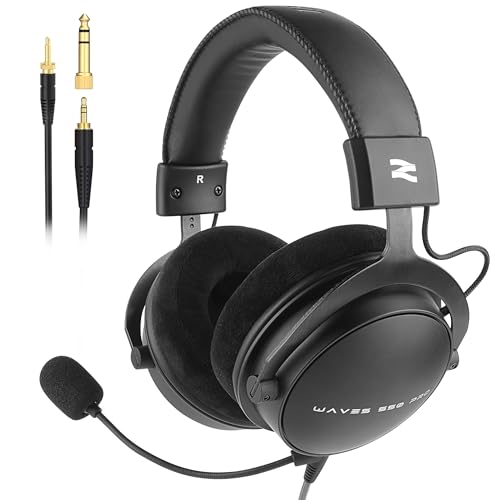
talomen Studio Headphones with Boom Mic — Best wired value route
The talomen takes a different route to the same wired honesty: start with studio monitor headphones, the kind of flat, hear-it-as-it-is listening tool used for mixing, and add a detachable boom microphone for recording days. That detachable boom is the design decision that matters. On a recording day you have a proper boom positioned at your mouth instead of a microphone dangling on a cable at your chest, picking up shirt rustle and room echo. On every other day the boom comes off and you own plain studio headphones for editing, which is when a monitor-style tuning earns its keep: you hear the edit you are actually making, including the hum you need to remove and the sibilance you need to tame.
As a recording microphone, a detachable boom on a value headset will not match the BPHS1’s broadcast element, and we will not pretend otherwise. What it offers is placement, and placement is half of podcast sound. A boom held a finger’s width from the corner of your mouth, slightly off-axis, captures a close, dry voice that needs little rescue work. For solo creators, streamers who also podcast, and anyone equipping a first real setup without broadcast money, that combination of honest monitoring and a real boom is the sensible place to start. It also sidesteps every wireless compromise in this guide: no codec, no battery, no monitoring delay, just a cable and a learning curve.
There is also a growth argument for starting here. Skills learned on a wired boom — placement, gain staging, monitoring discipline — transfer unchanged when you later step up to broadcast gear, because the fundamentals are identical. Skills learned on a wireless headset include workarounds you will have to unlearn. Creators who expect their show to grow should think of the talomen as the training instrument that stays useful as a spare and an editing headphone long after a flagship arrives, which is more than can be said for most first purchases in any hobby.
- Microphone: detachable boom microphone
- Headphones: over-ear studio monitor design
- Connection: wired
- Fit: over-ear cushions, headband fit
- Intended use: recording, streaming and mixing at a desk
Strengths
- One purchase covers recording and editing because the boom detaches for plain headphone use.
- Monitor-style listening exposes flaws in your own recordings that bass-heavy headphones would hide.
- Wired connection keeps monitoring delay at zero while you record.
Trade-offs
- The boom microphone is a step below a dedicated broadcast dynamic element on difficult voices and loud rooms.
- Detachable parts are losable parts; the boom will spend time in a drawer when you need it on the headphones.
- Studio tuning sounds plain to listeners used to consumer bass emphasis when you use it for music.
Best for: first serious setups, solo shows, and creators who edit their own audio and want one tool for both halves of the job. Not suited for: multi-guest studios standardising on broadcast gear, or anyone who has already decided to record standing.

VOLUBLES Podcasting Headset — Best for producers
The VOLUBLES looks like the odd one out — a single ear, a gooseneck microphone arm, connections for everything — until you picture the person it is for. That person is running the show: cueing segments, watching levels, talking to a guest while keeping one ear on the room, a co-producer, or a doorbell. A single-ear headset leaves the other ear in the physical world, and for live-recorded shows, call-in formats and producer-hosts, that awareness is worth more than stereo immersion. The gooseneck arm holds whatever bend you give it, so the microphone stays where you put it through a long recording.
The connection story is the other half of its appeal. The listing states 3.5mm and USB-A connectivity with an adapter in the box and inline mute and volume controls, which makes this the headset that plugs into the recorder, the laptop, the phone or the mixer without a negotiation. Inline controls matter during a live take: muting a cough or a keyboard clatter from the cable is faster and quieter than reaching for software. No, a single-ear headset will not give you the lush monitoring of the BPHS1, and stereo cues in an edit will pass you by. That is not its job. Its job is control, awareness and compatibility, and for the growing number of podcasts recorded live with an audience in the room, that is the correct set of priorities.
- Microphone: gooseneck boom arm, adjustable
- Headphones: single-ear design
- Connection: 3.5mm and USB-A, adapter included per listing
- Controls: inline mute and volume
- Intended use: live recording, calls and production work across devices
Strengths
- One ear stays open to the room, which suits producers and live-format hosts.
- Dual connection options end the hunt for the right plug before a session.
- Inline mute sits under your thumb during a take, not buried in a settings window.
Trade-offs
- Single-ear monitoring cannot judge a stereo mix or music beds accurately.
- The gooseneck needs occasional re-bending to hold position as it ages.
- It is a working tool, not an editing headphone; you will want a second pair for post-production.
Best for: producer-hosts, call-in shows, live recordings and anyone who switches between a recorder, a laptop and a phone in one session. Not suited for: solo creators who monitor their own performance closely and edit music-heavy shows.

Wireless Work Headset with Dongle — Best true wireless
If you have read the honesty section above and your format still says wireless, this is the shape of wireless to buy. The design centres on three work features rather than lifestyle ones: a USB dongle, a charging base, and a physical mute button. The dongle matters most. Pairing to a laptop’s built-in Bluetooth means sharing a radio with everything else the machine is doing; a dedicated dongle gives the headset its own managed link, which in practice means fewer dropouts mid-sentence and a connection that is simply there when you open your recording software. For a podcaster, that reliability is the difference between a tool and a toy.
The charging base solves the other wireless failure mode, which is not audio quality but the dead battery discovered four minutes before a guest joins. A headset that lives on its base between sessions starts every recording charged, and the habit requires no thought. The mute button earns its place during live-to-tape recording: a cough, a sip of water, a notification you forgot to silence — a thumb press handles each without a mouse hunt. Understand what you are still trading away. Your voice reaches the computer through a wireless codec, so it will carry a little less body than the BPHS1’s wired dynamic capture, and self-monitoring through the wireless return will lag enough that most hosts should record with sidetone low or off. Within those limits, this is the wireless pick we would hand to a working host.
- Microphone: boom microphone with noise-cancelling design
- Connection: Bluetooth with USB dongle for computer use
- Charging: charging base included per listing
- Controls: physical mute button
- Intended use: computer-based recording, calls and remote work
Strengths
- The dongle gives a computer a dedicated, stable link instead of a shared Bluetooth queue.
- A base it returns to makes a charged headset the default state, not a lucky one.
- The hardware mute button handles live moments silently and instantly.
Trade-offs
- Codec compression trims some vocal richness compared with the wired picks.
- Monitoring your own voice through the wireless return carries noticeable delay.
- The base claims desk space and ties your charging routine to one spot.
Best for: standing and video podcast formats, hosts who move around a home studio, and anyone whose recording software lives on one main computer. Not suited for: fidelity-first interview shows recorded seated, where the BPHS1 simply records a better voice.

Wireless Work Headset 65H — Best for long recording days
This second wireless work headset is a near relation of the dongle model above — the white-label family resemblance is strong — and the honest way to separate them is by what their listings actually emphasise. This one’s headline is endurance: the listing leads with a 65-hour working-time figure. Treat that number the way you should treat every battery claim, as a best-case figure measured under the seller’s conditions rather than a promise about your Tuesdays. Even discounted generously, a headset built and marketed around multi-day endurance suits a particular podcaster: the one who records in long, irregular blocks, batch-records a week of episodes, or shares a studio space where charging routines get forgotten.
Where the dongle model sells stability and a charging ritual, this one sells not thinking about power at all. The rest of the formula is familiar work-headset equipment: a noise-cancelling microphone aimed at keeping keyboard and household noise out of your voice, a mute button for live control, and Bluetooth pairing for computer and phone. That makes it a reasonable second-workstation or travel-bag headset as well as a main one. The cautions from the top of this guide apply unchanged: your recorded voice passes through a wireless codec, monitoring yourself will lag, and the absence of a charging base in the pitch means the endurance claim is doing the organisational work a base would otherwise do. If your recording life is measured in long days rather than tidy desk sessions, that trade will make sense.
- Microphone: boom microphone with noise-cancelling design
- Connection: Bluetooth for computer, laptop and phone
- Battery: 65-hour working time as claimed in the listing title
- Controls: mute button
- Intended use: long work and recording days across devices
Strengths
- Endurance-first design suits batch recording and irregular schedules.
- Pairs across computer and phone, so one headset covers recording and calls between sessions.
- Noise-cancelling microphone positioning keeps the focus on your voice in a lived-in room.
Trade-offs
- The headline battery figure is a seller claim; your real interval between charges will be shorter.
- No charging base is highlighted, so the charging habit is yours to maintain.
- It shares the codec and monitoring-delay limits of every Bluetooth headset here.
Best for: batch recorders, long-session hosts and shared studio spaces where a headset gets grabbed rather than scheduled. Not suited for: hosts who want the managed, always-docked routine of the dongle model, or anyone recording critical interviews where wired fidelity wins.
How Do the Five Picks Compare Side by Side?
| Headset | Connection | Microphone style | Monitoring feel | Choose it when |
|---|---|---|---|---|
| Audio-Technica BPHS1 | Wired, separate leads | Dynamic cardioid boom | Instant, full-range | The recording itself is the priority |
| talomen Studio Headphones | Wired | Detachable boom | Instant, monitor-flat | You record and edit with one tool |
| VOLUBLES Podcasting Headset | 3.5mm and USB-A | Gooseneck arm | Single ear, room-aware | You produce while you host |
| Wireless Work Headset with Dongle | Bluetooth plus USB dongle | Noise-cancelling boom | Delayed wireless return | Your format needs movement at one desk |
| Wireless Work Headset 65H | Bluetooth | Noise-cancelling boom | Delayed wireless return | Recording days are long and unscheduled |
Read the monitoring column as the real dividing line in this guide. Everything above it is preference; that column is physics. If your hosting style depends on hearing yourself, stay in the first three rows. If your format depends on your feet, accept the last two rows and record a test episode before your guest does.
Which Matters More for a Podcast: the Microphone or the Headphones?
New podcasters usually shop the headphones and tolerate the microphone. Reverse that instinct. Your audience hears the microphone’s work on every second of every episode, while the headphones serve only you. A mediocre headphone paired with a well-placed boom produces a good show; superb headphones paired with a distant, echoing microphone produce a polished window onto a bad recording. This is why the BPHS1’s reputation rests on its dynamic element rather than its cups, and why the talomen’s detachable boom matters more than its monitor tuning. When a budget forces a compromise, compromise on the listening side.
There is one exception, and it is editing. If you record and edit with the same headset, the headphone side shapes every decision you make: how much noise reduction you apply, whether a guest sounds harsh or merely bright, whether the music bed sits under the voices or fights them. Monitor-style headphones, tuned to reveal rather than flatter, protect you from publishing an episode that sounded fine on bass-heavy consumer gear and falls apart on a listener’s earbuds. The practical settlement for most podcasters is a headset whose microphone is the star for recording, plus the honesty to check each finished episode on a phone speaker and a car stereo before it ships. Those two playback systems are where your audience actually lives.
Comfort sits underneath both questions, quietly deciding whether any of this equipment gets used well. A headset that hurts at minute forty changes how you speak at minute forty-one: you shift it, you lean away from the boom, you rush the segment. Weight, clamp and cushion material are not lifestyle details on a recording tool; they are consistency features. If you record long interviews, favour the pick you can forget you are wearing, and be suspicious of any headset whose comfort depends on a headband position you must rediscover each session.
How Do You Set Up a Podcast Headset for a Clean Recording?
Start with the microphone, not the software. Position the boom so the microphone sits at the corner of your mouth, roughly two fingers away, slightly below or beside the airstream rather than directly in front of it. That one adjustment removes most plosive thumps and breath noise before any processing. On the BPHS1, bend the boom and then leave it alone; consistency between sessions is what makes your episodes sound like one show. On gooseneck and detachable booms, check the position at the start of every session, because these arms drift and get knocked in drawers.
Next, set your recording level with headroom. Speak at your loudest natural laugh, not your reading voice, and set the input so that peak stays comfortably below clipping. Headsets with close booms produce strong signals, and a clipped laugh cannot be repaired in editing. Then record sixty seconds of test audio in the actual room, at the actual time of day, and listen on the headphones you will edit with. You are listening for the room: fan noise, echo off a bare wall, a fridge hum. A dynamic boom forgives much of this; a room that defeats it needs a blanket on the wall, not a more expensive headset.
For wireless sessions, add three habits. Charge or dock the headset the night before, not the hour before. Connect through the dongle if your model has one, and close other Bluetooth audio devices competing for the computer. Finally, record a local backup: most recording platforms can capture a separate local track, and a wireless dropout in a live feed stops being a disaster when the backup exists. Hosts who also appear on team calls between recordings may find the etiquette in our best headsets for teams and zoom guide useful, though a meeting headset and a recording headset remain different tools.
What Should a Two-Headset Home Studio Buy First?
Two hosts at one table is the classic home podcast, and it has a classic purchasing error: buying one excellent headset and one afterthought, then wondering why the show sounds lopsided. Voices are compared directly in conversation, so the weaker chain defines the listener’s impression. Buy two headsets of the same class before you buy one flagship. Two talomen-class wired sets, or a BPHS1 for each host when the budget allows, will sound more professional than one broadcast headset arguing with a laptop microphone across the table.
The second purchase is not a headset at all: it is the interface or recorder with enough inputs to give each microphone its own channel. Separate channels let you rescue a quiet host or tame a loud one in the edit without touching the other voice. The third purchase, counter-intuitively, is soft furnishing for the room — a rug, curtains, anything that stops voices bouncing between bare walls. Headsets with close dynamic booms already reject much of a room, but two voices in a live room will still print a sense of place on the recording. Decide whether that place sounds like a studio or a kitchen, and spend accordingly.
Wireless has a narrower role in the two-host room than solo creators expect. One wireless host and one wired host is a workable hybrid when one chair genuinely moves — a host who stands to demonstrate, gesture or present to a camera. Two wireless hosts double the radio variables for a benefit a seated conversation does not use. Keep the table wired, and let wireless earn its place only where the format leaves the chair.
Which Mistakes Ruin Otherwise Good Podcast Recordings?
The first mistake is buying wireless for a seated show because it felt modern, then spending a season fighting monitoring delay and codec thinness that a cable would have avoided entirely. Match the tool to the format you actually record, not the format you might record someday. The second mistake is microphone placement by guesswork. A boom left pointing at a cheek or dangling below a chin captures a distant, echoing voice that no equaliser fully rescues; thirty seconds of positioning beats an hour of processing. The third mistake is monitoring too loud through closed-back cups until your own voice leaks into the microphone and prints a faint echo on every episode.
Fourth, hosts trust a battery claim instead of a routine, and discover the difference with a guest already on the line. Fifth, they record their first real episode as their first test: always record a throwaway episode with your full chain — headset, interface or connection, software, room — and listen to all of it before a guest gives you their time. Sixth, they buy a standalone microphone later and keep using the headset for monitoring without checking that the two devices agree in their software settings, producing drift and confusion. A headset-based setup, kept simple and consistent, beats a sprawling one you do not understand.
Which Pick Fits Your Show’s Actual Format?
Format decides faster than features do, so walk the formats honestly. A solo show recorded at a desk, where you are narrator, host and editor, wants monitoring honesty above all: the BPHS1 if the budget stretches, the talomen if it does not, and in both cases the money saved on wireless should go into the room. An interview show with remote guests wants the same wired discipline on your side, because your voice is the constant your audience bonds with while guests vary. Your guest’s chain is out of your control; yours must not be.
A co-hosted show recorded around a table wants matching wired sets and an interface with separate channels, as covered above, and should treat wireless as a solution shopping for a problem. A video-first show, where the recording is also a performance for cameras, is where the calculus flips: a visible cable across every shot is a real aesthetic cost, movement is part of the product, and the dongle wireless model becomes the rational main pick rather than a compromise. Accept the codec, monitor carefully in tests, and keep a wired set in the building for the day the radio environment betrays you — a neighbour’s new router has ended more recording sessions than any battery.
Live and call-in formats belong to the VOLUBLES logic: awareness of the room, fast muting, connections for whatever the guest or the station hands you. Batch-produced shows, recorded in long irregular sessions at home or in a borrowed space, map to the endurance wireless model, provided the fidelity trade suits the content — a casual conversation show can carry it, while an audio-drama or music-analysis show, where the recording is judged as sound, should stay wired and accept the chair. The pattern across all five formats is the same: name the constraint your show actually has, and the pick names itself.
How Do You Keep a Podcast Headset Sounding Right for Years?
Headsets rarely die dramatically; they drift. Cushions compress until the seal changes and the low end of your monitoring thins. Boom arms loosen until the microphone sits a centimetre farther away than it did in your best-sounding season, and your voice loses closeness so gradually that you blame the room, the interface, yourself. The maintenance habit that prevents all of this is a reference recording: keep thirty seconds of your voice from a day when everything sounded right, and compare a fresh test against it every few months. Differences you can hear are differences you can fix — a repositioned boom, a replaced cushion, a cable swapped before it fails on air.
Cables deserve their own sentence in any wired setup, because they are the moving part. Coil them loosely, never wrap them around the headset, and keep the connector ends out from under chair wheels. On the BPHS1’s separate-lead arrangement, label which lead is the microphone the day you set up; troubleshooting a silent channel at showtime is no moment to learn your own wiring. For wireless models, battery care is the equivalent discipline: a headset that lives on its base or gets a regular charging night ages gracefully, while one that is repeatedly run flat and fast-charged in a panic will hold less charge each season. Neither of our wireless picks asks for exotic care — they ask for a routine, which is the same thing every pick in this guide asks for.
Finally, keep the loser of your purchase decision in mind when something breaks mid-season. Podcasters who standardise on one model for every host can swap units, share cushions and cannibalise a cable in an emergency. A studio built from three unrelated headsets has three separate failure modes and no spares that fit. Consistency is a sound decision and a logistics decision at once, and it is why working studios look boring in photographs.
What Changes When You Record Away From Your Desk?
Field recording — conferences, site visits, interviews in someone’s workshop or kitchen — rewrites the priority list. Portability and connection flexibility climb; ultimate fidelity, within reason, can spare a little. This is the environment where the VOLUBLES quietly shines for a travelling producer, because it connects to a handheld recorder, a phone or a laptop without adapters you forgot to pack, and its single ear keeps you aware of a room you do not control. It is also where a wireless work headset earns admiration it never quite gets at a desk: interviewing a guest while walking their garden or their factory floor produces tape no seated setup can capture, and the codec trade is invisible against the value of the location sound.
Two field habits matter more than gear. Record a minute of the room before the interview and listen to it on the spot; wind, refrigeration hum and traffic announce themselves immediately and are all easier to escape by moving two metres than by editing for two hours. And carry the wired fallback. A cable and a simple wired headset in the bag weigh little and convert every wireless failure — interference, a forgotten charge, a pairing tantrum with an unfamiliar laptop — from a lost interview into a thirty-second swap. Field recording rewards the prepared far more than the well-equipped.
Final Recommendation
Buy the BPHS1
if your podcast is recorded sitting down and you want the voice your audience hears to be the best your room can produce; it is the standard because it removes every excuse. Buy the talomen if you are building a first serious setup and need one wired tool that records and then helps you edit. Choose the VOLUBLES when you run the show while appearing on it. Go wireless with the dongle model when your format genuinely moves, and pick the endurance-focused model when your recording days refuse to follow a schedule. Whatever you choose, record a full test episode before the real one. A podcast audience forgives an imperfect room far sooner than a host who sounds like they are phoning in from inside a tin can, so spend your effort on the microphone at your mouth and let the rest of the chain stay boring.
Frequently Asked Questions
Is wireless really worse for podcasting, or is that snobbery?
It is engineering, not snobbery. Two-way Bluetooth audio was designed for intelligible phone calls, so it compresses your voice and adds delay to monitoring. Many listeners will not notice on a casual show, which is why wireless is a legitimate choice for mobile formats. But a wired dynamic headset captures more of your voice with none of the delay, and that gap is real even when it is not decisive.
Can I monitor myself while recording on a Bluetooth headset?
You can, but most hosts dislike it. The wireless return arrives late enough that your own voice echoes against your speech, which tires you and changes your delivery. Common workarounds are monitoring at very low volume, turning sidetone off and trusting a test recording, or monitoring a wired path while the wireless headset handles the call. Try a full test session before deciding your style cannot adapt.
Why does the BPHS1 use separate plugs for the microphone and headphones?
Because it was built for broadcast chains, where the microphone feeds a mixer or interface and the headphones are fed from a monitoring output. Separate leads let each side connect to the right equipment, and let you replace one cable without replacing the headset. For a simple computer setup you may need an interface or adapter, which is the honest cost of broadcast design.
Do I need an audio interface with these headsets?
The BPHS1’s microphone expects one, since it is a professional dynamic element with a broadcast connector. The USB and 3.5mm picks connect directly to a computer or phone. The wireless picks need nothing beyond the computer’s Bluetooth or their dongle. If you plan to add guests on separate microphones later, an interface bought now saves a second purchase.
What makes a single-ear headset worth considering for a podcast?
Awareness. Producers, call-in hosts and anyone recording in a room with other people in it benefit from hearing the room directly. A single-ear design like the VOLUBLES also tends to offer flexible wired connections and fast inline muting. The cost is stereo monitoring, so it suits production roles better than hosts judging a finished mix.
Should co-hosts in different cities use matching headsets?
Matching models help more than matching prices. Two hosts on similar boom headsets produce voices with similar closeness and room rejection, which makes the conversation sound like one show recorded in one place. When one host uses a broadcast boom and the other uses a laptop microphone across a room, no editor can fully reconcile them. If budgets differ, spend first on whichever host currently sounds worse; the gap closes fastest from the bottom.
Can I use one of these headsets for streaming as well as podcasting?
Yes, and the priorities overlap heavily: a close boom, zero monitoring delay for wired models, and comfort across long sessions. Streamers who appear on camera should weigh the visible cable question the same way video podcasters do. The talomen’s detachable boom and the dongle wireless model both cross over well, while the BPHS1 remains the choice when recorded quality outranks appearance.
Is a headset or a separate microphone and headphones better for podcasting?
A separate microphone on a stand or arm, paired with headphones, can out-record any headset here, and studios built around one host often end up there. The headset wins on consistency and simplicity: the microphone distance never changes when you turn your head to a second screen, there is no desk footprint, and guests cannot knock the setup out of alignment. For interview-driven shows and multi-host tables, that repeatability is worth more than the last increment of studio fidelity. Choose the separate rig when your show is a solo performance recorded in one treated place; choose the headset when conversation and reliability lead.
How should I treat the battery figure on a wireless headset listing?
As the seller’s best case, not your schedule. Use it to compare endurance intent between models, then build a charging routine that does not depend on the number being true. A dock or a fixed charging night before recording days protects you regardless of what any listing claims.
Related Guides
For the competitive end of headset priorities, where latency figures are measured rather than managed, read our guide to the best headsets for esports. If your ears share headsets with spectacle frames all day, the comfort analysis in our guide to the best headsets to wear with glasses applies directly to long recording sessions too.
Microphone discipline travels well: best headsets for ham radio applies it to contest and repeater work.


