What's inside
- Where to buy
- Key Takeaways
- Quick Picks
- How Did We Assess Printers for Heavy Stock?
- Why Does the Paper Path Matter More Than the Paper Weight?
- What Do Card Stock Weights and Finishes Actually Mean at the Printer?
- How Heavy Is Too Heavy? Reading Weights, Caliper and Grain Before You Buy Stock
- Rear Tray, Front Cassette or Manual Slot — Which Route Should Each Job Take?
- How Do You Set Up a Card Stock Job So the First Sheet Is Right?
- Where Do the Six Machines Stand on Format, Feed and Temperament?
- Which Card Stock Mistakes Ruin Otherwise Good Printers’ Reputations?
- How Do You Keep a Long Card Run Clean From the First Sheet to the Last?
- Final Recommendation
- Frequently Asked Questions
- Related Guides
As an Amazon Associate I earn from qualifying purchases. This post may contain affiliate links at no extra cost to you.
gizmoverdict.com is reader-supported. When you buy through links on our site, we may earn an affiliate commission.
Where to buy
The best card stock professional printers are not found by asking which printer accepts thick paper — almost every printer claims that in a brochure — but by asking how the paper travels. Card stock fails in the bend: a heavy sheet forced around a tight U-turn inside a compact printer will jam, scuff, or emerge with its surface marked, no matter what the specification sheet promised. The machines in this guide earn their places through their feed architecture — rear and manual feed paths that give thick sheets a flatter journey, trays and slots documented for specialty media, and formats wide enough for the invitations, greeting cards, craft sheets and presentation covers that card stock work actually consists of.
Professional in this category does not mean a print-shop press. It means output a business or a serious crafter can hand to a client: wedding stationers printing invitation suites, Etsy sellers producing greeting cards by the hundred, offices turning out certificate and cover stock, photographers mounting portfolio pages. The six picks divide by temperament — wide-format Epsons with rear specialty feeds, Canons built for business and for crafting respectively, a Brother all-in-one with ledger-size ambitions — and the reviews below judge each on the questions thick media actually asks: what path does the sheet take, what does the maker document about specialty stock, and how does the ink behave when it lands on a coated, textured or very heavy surface.
Key Takeaways
- Feed path is destiny for card stock: rear and manual feeds that flatten the sheet’s journey matter more than any headline paper-weight figure.
- The Canon PIXMA TS9521Ca is the crafting specialist here, a machine whose whole design conversation revolves around cardstock, scrapbook formats and creative media.
- Three picks print up to 13 x 19 or ledger class — the Epson XP-15000, WorkForce Pro WF-7840 and WF-7310, plus the Brother with its 11 x 17 capability — giving card stock room to become posters, covers and multi-up layouts.
- Automatic two-sided printing is a thin-paper privilege on most machines; thick stock usually travels one side at a time through the manual path, so plan duplex card work accordingly.
- Ink drying changes on coated and heavy stocks — smudge discipline, not print speed, is the professional habit that separates saleable cards from seconds.
Quick Picks
| Pick | Badge | Why it earns its place |
|---|---|---|
| Epson Expression Photo HD XP-15000 | The rear-feed wide-format route | A specialty rear feed for single heavy sheets alongside 13 x 19 output, in a machine at home with craft and photo stock alike. |
| Canon PIXMA iX6820 | The business wide-format veteran | Canon’s long-running single-function wide printer, a bench staple for covers, cards and presentation stock. |
| Epson WorkForce Pro WF-7840 | The wide all-in-one with specialty tray | Print, scan, copy and fax at wide format, with a rear multipurpose path for the odd thick job between office runs. |
| Canon PIXMA TS9521Ca | The crafter’s purpose-built machine | Designed around cardstock and creative formats, including the square sheets scrapbookers actually buy. |
| Brother INKvestment 6960 | The ledger-capable office tank | An 11 x 17 all-in-one with INKvestment cartridge economics and a manual path for heavier sheets. |
| Epson WorkForce Pro WF-7310 | The print-only production bench | A wide-format single-function WorkForce built for volume, with specialty feeding for card and cover work. |
How Did We Assess Printers for Heavy Stock?
The first filter was the paper path, read from each model’s documented design rather than from marketplace enthusiasm: does the machine offer a rear or manual feed where a thick sheet can travel flatter, and does the maker’s own documentation discuss specialty or thick media for that path? Claims were kept to what the model’s design supports — where a listing is silent about a feed detail, the reviews say so and tell you where to verify it, because a card stock purchase made on an assumed feed path is a jam purchased in advance.
The second filter was format. Card stock work sprawls: a greeting card is small, but the sheet it is printed on, the invitation suite’s backing card, the certificate, the 12-inch craft page and the presentation cover are not, so wide-format capability earned real weight. The third filter was ink behaviour — pigment-based office inks that sit crisply on matte stock, dye-based photo inks that soak into coated papers, and the drying discipline each demands. Finally, each machine was read against a working week of stock jobs rather than a single heroic sheet, because professional means the fiftieth card looks like the first.
Why Does the Paper Path Matter More Than the Paper Weight?
Paper weight figures — the grams per square metre on the packet — describe the sheet, not the journey. A printer moves stock with rollers along a path, and every curve in that path asks the sheet to flex. Thin paper flexes gladly; a heavy cover stock flexes like a credit card, which is to say barely, and a path with a tight reversal will defeat it regardless of what the tray’s weight limit says. Rear and manual feeds exist to shorten and straighten that journey: the sheet enters at the back, travels through with one gentle curve or none, and exits without being asked to double back on itself. That is why experienced card printers shop for feed architecture first and treat tray specifications as the supporting detail.
Surface protection rides on the same geometry. A straight-ish path means fewer roller contacts on the printed face, and fewer chances for a coated or textured surface to pick up the shiny scuff lines that ruin a matte black invitation back. When a review below praises a feed path, it is praising the condition your fiftieth sheet arrives in, not a diagram in a manual.
The path also decides which stocks are even candidates. A machine whose only route curls a sheet tightly can post an impressive maximum weight for its tray and still fail on a lighter but stiffer board, because stiffness — the sheet’s refusal to bend — is what the path actually negotiates with. Conversely, a flexible heavy sheet, a long-fibred cotton card for example, may travel a gentle rear path beautifully at a weight that defeats a brittle sheet of the same grams. This is why the reviews below talk about journeys rather than limits wherever the documentation allows, and why a single test sheet through the intended feed is worth more than an afternoon spent comparing maximum-weight figures between brands, each measured on that maker’s own chosen stock.
What Do Card Stock Weights and Finishes Actually Mean at the Printer?
Stock is sold in a confusion of pounds and grams that hides a simple reality: what the printer experiences is thickness and stiffness. A lightweight card that bends easily will travel paths a rigid board of similar weight refuses, which is why test-feeding your exact stock — not a similar one — is the only specification that never lies. Finishes divide the work further. Matte uncoated stocks drink ink and reward pigment with crisp, glare-free text. Coated and glossy stocks hold ink on their surface, producing richer colour and a longer, smudge-prone drying minute. Textured stocks — linen, felt, laid — print beautifully in the valleys’ spite and terribly if the design demands fine type to survive the terrain; bold graphics and generous type sizes are the textured-stock dialect.
Keep a stock library: one labelled sheet of every stock you have tamed, annotated with the feed used, the paper-type setting and the result. That folder, built over a month, becomes the real manual for card stock work on your machine — more valuable than any compatibility chart, because it records what your printer did with your stock in your room.

Epson Expression Photo HD XP-15000 — The rear-feed wide-format route
Judged purely as a card stock machine, the XP-15000’s most important feature is at its back: a rear specialty feed that takes single sheets along a flatter path than the front cassette offers, which is exactly the journey heavy and awkward media wants. Stationers use that path for the one-off thick invitation sheet, the textured cover, the pre-scored card blank that must not be asked to bend around the cassette’s curve — feed it singly from behind, print, and let it exit with its surface unmarked. Paired with output up to 13 x 19, the same machine prints the backing boards, table signage and oversized craft sheets that accompany card work in a real studio.
The discipline it asks is the rear feed’s usual one: sheets go in one at a time, guided by hand, so it is a path for quality rather than for unattended volume. Its six-colour ink set — built for photo work — lays rich colour into coated card stocks and behaves well on the matte photo papers many greeting-card sellers standardise on, while very heavy uncoated board should be test-fed and judged by result, as with every machine here. For a studio whose card stock jobs arrive as varied singles and short runs rather than as a single endless stack, the XP-15000’s combination of wide format and a genuine specialty path makes it the most flexible starting point in this guide.
Card stock exposes a side of this Epson that photo buyers rarely test: how it treats a sheet that must stay flat and unmarked rather than merely colourful. Pre-scored greeting-card blanks are the revealing case. A scored blank fed from the rear arrives at the print zone without first being curled by cassette rollers, so the score line stays crisp and the fold, made afterwards, closes evenly instead of wandering. Grain direction becomes a decision you can actually exploit here — load the blank so its grain runs along the fold and the finished card opens with a clean hinge; load it across the grain and even this gentle path cannot rescue a crackly fold, because that fault is in the sheet, not the machine. Borderless printing at the smaller card sizes turns the same feed into an edge-to-edge invitation press for singles and proofs, while a run of identical cards is better printed with borders and trimmed, since borderless modes slow the pass and waste ink past the sheet’s edge.
Drying behaviour deserves its own paragraph because the XP-15000’s dye-based photo colour behaves differently across the card shelf. On a coated greeting-card stock the colour sits up bright and needs a patient minute before stacking; on an uncoated matte card the same image settles quieter and dries almost at once, which is why experienced sellers pick one stock per product line and tune the design to it, rather than chasing identical colour across two surfaces no ink can make equal. Treat the rear feed as the studio’s precision lane — singles, proofs, textured pieces, the client’s one irreplaceable sheet — and let the cassette carry the plain and photo papers it was shaped for.
- Format: up to 13 x 19 inches, per the listing
- Specialty path: rear feed for single heavy sheets
- Ink set: 6-colour, per the listing
- Everyday path: front cassette for plain and photo papers
- Position: flexible studio machine for varied stock work
Strengths
- A rear specialty feed gives thick singles the flat journey they need.
- Wide format covers backing boards and oversized card projects.
- Photo-grade colour flatters coated greeting and invitation stocks.
Trade-offs
- Rear feeding is one sheet at a time — a quality path, not a volume path.
- Extremely rigid board remains a test-and-judge proposition.
- Cartridge running costs follow photo-printer logic on long runs.
Best for: a studio printing varied card stock singles and short runs at up to 13 x 19. Not suited for: unattended hundred-sheet card production through the specialty path.

Canon PIXMA iX6820 — The business wide-format veteran
The iX6820 has spent years as the quiet answer to a specific office question: what prints our covers, cards and wide documents without taking over the desk or the budget? It is a single-function wide-format Canon — no scanner lid, no fax ancestry — and that focus shows in its role as a bench machine for presentation stock, report covers, tent cards and the card-weight handouts that make a small business look deliberate. Its rear tray feeding is the working route for heavier sheets, letting stock travel a shorter, flatter path than a front cassette would impose.
Age is part of its review and should be read plainly: this is a mature design whose virtues are proven behaviour and a vast base of owner knowledge, and whose connectivity and interface belong to its era. For card stock purposes the maturity is mostly good news — the machine’s appetite for common business stocks is documented by years of use rather than by a launch brochure. Confirm the exact stock weights against Canon’s documentation for the heaviest board you plan to run, keep the rear path for those jobs, and the iX6820 will do what it has always done: turn a stack of card into a finished job without a meeting about it.
The card jobs this Canon quietly specialises in are the unglamorous ones a business repeats monthly: tent cards for a meeting room, place cards for a training day, card-weight price and information cards for a counter, report covers that make a stapled document feel issued rather than assembled. Those jobs share a shape — short runs, standard business stocks, a deadline measured in hours — and the iX6820 fits it because nothing about the machine needs configuring into a special personality first. Load the rear tray with the cover stock, choose the media type that matches the finish, and the printer does the one job it owns. Its listing also names AirPrint and cloud compatibility, and for card work that convenience is practical rather than decorative: the person who designed the tent card on a tablet can send the proof themselves instead of emailing files toward whoever sits nearest the printer.
Where a buyer should pause is thickness ambition. Business cover stock and presentation card sit comfortably inside what a mature PIXMA business design was built around; the very heavy, rigid boards that crafters experiment with belong to a test-first conversation with Canon’s stated media limits, not to an assumption borrowed from the machine’s wide format. Width is not strength — a printer can accept a broad sheet and still object to a stiff one — and the iX6820 rewards owners who respect that distinction with years of uneventful service. Run it as the office’s wide card-and-cover bench, inside its documented envelope, and its age reads as evidence rather than apology.
- Format: wide-format business printing
- Feed: rear tray route for heavier sheets
- Functions: print only — single-function design
- Maker: Canon PIXMA business line
- Position: proven bench machine for covers and cards
Strengths
- A long-proven design with deep owner knowledge behind it.
- Single-function focus keeps it compact and uncomplicated.
- Rear feeding serves the card and cover work it is bought for.
Trade-offs
- Interface and connectivity reflect its generation.
- No scanning or copying — it is one tool, deliberately.
- The heaviest boards still require verification against Canon’s stated limits.
Best for: an office or studio needing a dedicated wide printer for covers and card jobs. Not suited for: a buyer wanting a modern all-in-one with app-driven conveniences.

Epson WorkForce Pro WF-7840 — The wide all-in-one with specialty tray
The WF-7840 is the office citizen of this guide: a wide-format all-in-one — print, scan, copy, fax — whose listing states a 500-sheet capacity and speeds up to 25 pages per minute for the document work that pays its rent. Its card stock relevance lives in its rear multipurpose tray, the Epson WorkForce arrangement that accepts specialty media — envelopes, labels and heavier sheets — along a path separate from the main cassettes. In practice that makes the WF-7840 the machine for an office whose thick jobs are real but intermittent: certificates on a Friday, cover stock for a proposal, a run of card-weight signage, all fed through the rear while the cassettes handle the week’s ordinary paper.
Its pigment WorkForce inks suit matte card stocks particularly well, sitting crisply on uncoated surfaces where office documents and certificates live, and its automatic two-sided printing serves the thin-paper majority of office life — with the standing caution that thick stock and duplex mechanisms are strangers, so card work travels single-sided through the rear path. Buy it as an office all-in-one that can genuinely handle card stock days, not as a dedicated card press, and it will not disappoint; ask it to be a stationer’s main machine and the rear tray’s one-job-at-a-time nature will set the argument.
An office card workflow on the WF-7840 usually begins at its scanner, not its trays: a signed certificate is scanned for the file, a proof of the cover is copied and marked up by hand, and only then does the run start. That loop — scan, proof, print — is the all-in-one’s real card-stock argument, because thick-media mistakes are cheapest on the proof sheet. The rear multipurpose path then takes the approved stock while the main cassettes stay loaded with the office’s ordinary paper, so a certificate run never evicts the invoice paper or forces a colleague’s print job onto card. In a shared office that separation matters more than raw speed; the machine can be printing a proposal’s cover stock from the rear while its trays remain an untouched, predictable resource for everyone else.
Two habits keep its thick work clean. First, treat the rear path as a prepared station — stock conditioned flat beside the machine, driver preset saved for the certificate or cover stock in use — rather than as an improvisation performed while a meeting waits. Second, remember that its wide scanner and copier make it the office’s digitising desk as well, so schedule the long card runs for the gaps in that traffic. Offices that organise those two things find the WF-7840’s card capability entirely sufficient; offices that needed a dedicated press usually discover the distinction during their first hundred-sheet invitation run, which is a rear-path, single-sheet lesson no all-in-one can repeal.
- Format: wide-format all-in-one, per the listing
- Specialty path: rear multipurpose tray for specialty media
- Capacity: 500 sheets stated in the listing, across its trays
- Functions: print, scan, copy and fax
- Position: office all-rounder with real card capability
Strengths
- A dedicated specialty tray keeps thick jobs out of the main cassettes.
- Pigment office inks sit crisply on matte card and certificate stock.
- Full office versatility around the card work.
Trade-offs
- Card stock runs through the rear path at specialty pace, not cassette pace.
- Thick stock and automatic duplexing do not combine — plan single-sided card work.
- It is an office machine first; craft stocks are guests, not residents.
Best for: an office with regular document volume and genuine intermittent card stock jobs. Not suited for: a dedicated stationery business printing card all day.

Canon PIXMA TS9521Ca — The crafter’s purpose-built machine
Card stock is one job among many for the rest of the shortlist; the TS9521Ca was designed around it. Canon built this model for the crafting market — its format support embraces the square 12 x 12 sheets that scrapbookers buy by the stack, its media conversation centres on cardstock and creative papers, and its all-in-one body assumes a craft room rather than an accounts department. For greeting-card sellers, invitation hobbyists-turned-professionals and paper crafters, that focus translates into a machine whose paper handling, borderless ambitions and template culture all point the same direction: decorative stock, printed well, in the sizes craft actually uses.
The professional edge of a crafting machine is consistency across a product line — fifty cards with the same fold, the same border, the same colour — and the TS9521Ca’s design brief serves exactly that, with its rear feed handling the heavier craft sheets and its software ecosystem leaning toward templates and creative layouts. Its limits are the mirror of its focus: it is not a document engine, not a ledger machine, and its ink economics follow consumer cartridge logic that volume sellers should cost honestly. Within the craft room’s borders, though, it is the only pick here that never has to apologise for what it is.
The square sheet explains this Canon better than any specification. Scrapbook and craft papers are sold in 12 x 12 stacks because crafters design in squares — album pages, layered card fronts, die-cut bases — and a printer that treats that size as a native format rather than a custom-size negotiation removes a small friction from every single project. For a card seller, the same native thinking shows up in the way the machine expects decorative media as its default diet: cardstock is not the exception the driver warns you about, it is the assumption the product was designed around. That shows in the workflow around the print, too — scanning a hand-lettered original, printing it onto card, and repeating it across a product line is a one-desk loop on an all-in-one shaped for craft tables rather than office fleets.
Its honest ceiling is throughput economics. A crafter printing twenty cards for a market stall will never feel its consumer cartridge logic; a seller printing four hundred for a seasonal launch should cost the run before committing the product line to this machine, and should also weigh the rear feed’s sheet-by-sheet rhythm against the deadline. None of that diminishes the design — it locates it. The TS9521Ca is the pick for the maker whose card stock work is creative, varied and moderate in volume, and whose worst day is a misregistered square sheet, not a pallet of unprinted board.
- Positioning: crafting all-in-one, per the listing family
- Formats: creative sizes including 12 x 12 craft sheets
- Feed: rear path for heavier craft stock
- Functions: print, scan and copy for craft workflows
- Position: purpose-built card and craft machine
Strengths
- Designed for cardstock rather than merely compatible with it.
- Craft formats, including square sheets, are native citizens.
- Template-friendly ecosystem suits repeatable product lines.
Trade-offs
- Not a document or ledger production machine.
- Consumer cartridge economics need costing at volume.
- Office features take a back seat to creative ones.
Best for: greeting-card sellers, stationers and crafters whose stock is the product. Not suited for: an office needing wide document throughput with card as a sideline.
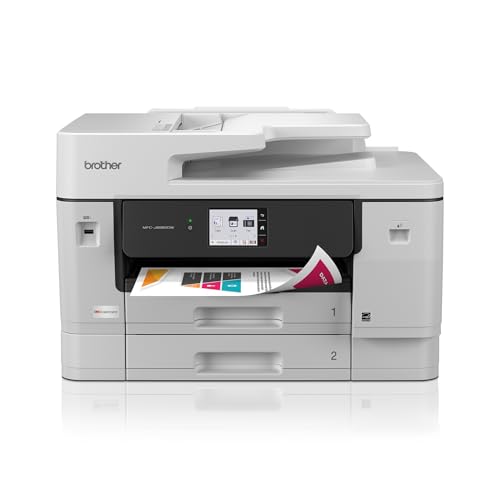
Brother INKvestment 6960 — The ledger-capable office tank
Brother’s entry is the MFC-J6960DW, an INKvestment all-in-one whose listing states 11 x 17 capability and a 3.5-inch colour touchscreen. INKvestment is Brother’s cartridge architecture — high-capacity cartridges paired with an internal ink reservoir — and its relevance to card stock work is economic rather than mechanical: card and cover jobs consume ink generously, and a machine designed to stretch its cartridges changes the per-job maths for an office that prints presentation stock weekly. The manual feed arrangement at the rear is where heavier sheets travel, one at a time, along the flatter path thick media prefers.
Read it as the WF-7840’s cross-town rival with a different accent: Brother’s office manners, a ledger-size ceiling rather than 13 x 19, and a Refresh subscription trial mentioned in its listing that buyers should understand before it starts — subscription ink is a convenience some offices love and others decline, and the machine works either way, but the trial’s terms deserve a read on day one rather than day thirty. For an office whose wide work is ledger-shaped — spreadsheets, covers, certificates, card-weight handouts at 11 x 17 — the 6960 is a coherent, economical citizen.
Ledger-size card work has its own catalogue of jobs that neither letter-size craft machines nor full 13 x 19 studios quite own: restaurant menus printed in-house and reprinted when prices move, counter display cards, folded ledger sheets that become four-panel brochures on card, certificates and charts big enough to read across a desk. The 6960 addresses that catalogue with an office’s priorities — a touchscreen an occasional user can navigate without a manual, all-in-one functions for the copying and scanning that surround menu and display work, and ink economics designed for machines that print heavily pigmented pages often. Card and cover pages drink more ink than text documents, and a system built around high-capacity cartridges softens exactly that cost.
The manual feed’s role in that catalogue is the special-occasion lane: the heavier display board, the textured certificate sheet, the single replacement menu on stock too stiff for a cassette. Expect to hand-feed those one at a time and to budget the minutes accordingly; expect, too, to verify the heaviest stock against Brother’s documented media range before a job depends on it, because ledger width says nothing by itself about thickness tolerance. Judged as an economical ledger office machine that also gives thick sheets a proper route, the 6960 is coherent. Judged as a craft press, it would be a category error — and this guide’s other picks exist precisely for buyers whose work leans that way.
- Model: MFC-J6960DW, per the listing
- Format: up to 11 x 17, per the listing
- Ink system: INKvestment cartridges, with a Refresh trial noted in the listing
- Specialty path: manual rear feed for heavier sheets
- Position: economical ledger all-in-one
Strengths
- INKvestment economics suit ink-hungry cover and card work.
- Ledger format covers the office’s wide jobs in one machine.
- A manual feed gives thick sheets their flatter route.
Trade-offs
- Ledger is its ceiling — 13 x 19 work belongs to the Epsons here.
- The subscription trial’s terms need reading before it activates.
- Manual feeding is single-sheet work, as on all its rivals.
Best for: an office printing ledger documents and regular card-weight covers economically. Not suited for: a studio whose signature jobs run at 13 x 19.

Epson WorkForce Pro WF-7310 — The print-only production bench
The WF-7310 takes the WorkForce Pro formula and removes everything that is not printing: no scanner, no fax, just a wide-format single-function machine whose listing states output up to 13 x 19, speeds up to 25 pages per minute and a 500-sheet capacity for the production benches that feed it. For card stock work that profile matters in a specific way — this is the pick for a small production setup where card and cover jobs arrive in runs, where the rear specialty path handles the thick work between long cassette-driven stretches, and where nobody needs the machine to also be the office copier.
Its pigment inks and matte-stock manners mirror its all-in-one sibling’s, with the same standing cautions: thick stock travels the rear path one sheet at a time and prints single-sided, whatever the duplex specification says about plain paper. What the 7310 adds over the 7840 is focus and fleet logic — print shops and studios often pair a machine like this with a separate scanner precisely so the printer never queues behind someone’s copying. If your card stock work has a schedule and a volume, that focus is the feature; if it has neither, the all-in-ones above will serve the same sheets with more everyday usefulness.
Run-based card work changes what good printer behaviour means. In a run, the enemy is drift: the twentieth sheet feeding slightly skewed where the first sat square, a rear-path routine that depends on one operator’s memory, a stock that behaves in the morning’s cool room and curls by afternoon. The WF-7310 suits run discipline because its whole design is repetition — deep paper capacity for the cassette-driven bulk, a specialty rear route for the thick portion of the schedule, and no scanner lid inviting interruptions mid-batch. A small studio can build a genuine routine around it: presets saved per stock, sheets fanned and conditioned before loading, output stacked in offset piles with drying space between jobs, and a first-sheet check ritual that the schedule protects instead of resents.
It also pairs well in a two-machine bench, a pattern production card work often grows into: the 7310 owns the scheduled wide and cover runs while a smaller all-in-one elsewhere absorbs proofs, scans and one-off singles. That division keeps the production machine’s queue clean and its settings stable, which is where consistency actually comes from. Buyers with a single weekly card job will find that discipline more than they need; buyers whose card output is promised to customers, on dates, will recognise the machine’s plain, print-only focus as the professional feature it is.
- Format: wide-format up to 13 x 19, per the listing
- Functions: print only — production single-function
- Capacity: 500 sheets stated in the listing
- Specialty path: rear feed for thick and specialty media
- Position: run-based card and cover production
Strengths
- Single-function focus suits scheduled production runs.
- Wide format and deep capacity keep long jobs fed.
- Pigment output sits crisply on matte card and cover stock.
Trade-offs
- No scanning or copying — a deliberate one-tool machine.
- Thick stock still travels singly through the rear path.
- Its production virtues are wasted on occasional single sheets.
Best for: a studio or print bench running card and cover jobs to a schedule. Not suited for: a home office wanting one machine to do everything.
How Heavy Is Too Heavy? Reading Weights, Caliper and Grain Before You Buy Stock
Card stock is labelled in two dialects that refuse to translate cleanly. Grams per square metre measures mass honestly but says nothing directly about thickness, because a dense sheet and a bulky sheet can weigh the same. The pound ratings inherited from paper mills are worse: the number depends on the size of the uncut parent sheet for that paper class, so a cover stock and a text stock wearing the same pound figure are different animals entirely. What the printer experiences is caliper — the sheet’s thickness in thousandths of an inch or in points — together with stiffness. When a maker’s documentation states a media range, compare your stock’s caliper against it first and its weight second, and when only weight is stated, buy a small trial pack rather than a ream, because the trial pack is the translation service the labelling refuses to provide.
Grain is the third variable, and the one card makers feel in their hands. Paper fibres align during manufacture, giving the sheet a direction in which it folds willingly and a direction in which it resists and cracks. A greeting card folded against its grain shows a rough, whitened crease that no printer setting can repair, because the damage happens at the fold, after printing. Buy scored blanks whose score sits on the grain, feed sheets so the fold line ends up parallel to the grain, and when a new stock arrives, fold one unprinted sheet both ways before printing anything — the sheet itself will tell you its direction in five seconds, more reliably than its packaging does.
Finally, match ambition to format. The wide machines in this guide earn their keep when the card project is really a sheet project: four invitations imposed on one large sheet and trimmed, a backing board behind a mounted print, a cover that wraps a document. Imposition — printing several pieces on one big sheet — cuts handling, keeps colour consistent across the pieces, and turns the rear feed’s one-sheet rhythm from a limitation into a reasonable exchange, since one journey through the path yields four finished cards. Buyers whose work is genuinely one small card at a time should weigh that against the craft-focused TS9521Ca, whose native sizes meet small work where it lives.
Rear Tray, Front Cassette or Manual Slot — Which Route Should Each Job Take?
Give the cassette the work it was shaped for: plain paper, light photo paper, the everyday sheets whose flexibility makes the curved path harmless. The moment a sheet’s stiffness is the point of it — cover stock, invitation card, certificate board, a pre-scored blank — the job belongs to the rear or manual route, even when the cassette would physically accept the sheet. Accepting and handling well are different promises. The rear route also protects surfaces: a sheet that travels flatter meets fewer rollers on its printed face, which is why the matte black back of an invitation survives the rear path and scuffs in the cassette.
One more routing habit separates tidy benches from chaotic ones: dedicate the rear route by job ticket, not by mood. When a job is quoted, note the feed on the ticket beside the stock’s name, so whoever runs it — including a future, forgetful you — loads the machine the way the test sheet proved, instead of re-deciding under deadline pressure. Consistency in card work is mostly the absence of fresh decisions.
There is a middle category worth naming: heavy photo papers and satin card stocks that sit between flexible and rigid. Test these through both routes on a sacrificial sheet, examine the result under a raking light for roller marks, and then record the winning route in your stock library so the decision is made once, not rediscovered per job. And keep one rule absolute — whichever route a thick job takes, it travels alone. Mixing card stock into a cassette of plain paper invites the mechanism to treat the stiff sheet like the flexible ones around it, which is the first sentence of most jam stories.
How Do You Set Up a Card Stock Job So the First Sheet Is Right?
Professional card work is won in the setup dialog. Start with the paper-type setting, because it governs how much ink the machine lays down and how it handles the sheet: a matte card setting on a glossy stock floods it, a photo setting on uncoated card starves it, and both errors look like printer faults until someone reads the dialog. Set the thickness or quality lever your driver offers for heavy media, choose the rear or manual feed explicitly rather than letting the machine guess, and confirm the page size matches the blank — a greeting card blank is not the nearest standard size, it is its own size, entered once and saved as a preset with the stock’s name.
Then print one, and judge it like a customer: surface scuffs under a raking light, ink rub with a dry thumb after a proper drying rest, fold behaviour if the card folds — a printed sheet that cracks along its score was printed across the grain or on stock too heavy for its fold, lessons cheaper learned on sheet one. Only when sheet one passes does the run begin, and the run begins at a pace the drying allows: stack printed card loosely, offset, and let air do the work the schedule wants to skip.
Make that first sheet a formal test print rather than a hopeful one. Include in the test file the elements that fail first: a block of your deepest solid colour, the smallest type the design uses, a photograph if the job has one, and a hairline border if the layout depends on one. Print it on the exact stock, through the exact feed, at the exact settings the run will use — a test on lighter paper proves only that the printer works, which was never the question. Mark the test sheet with the date, the stock’s name and the preset used, and file it in the stock library whether it passes or fails. A failed test sheet kept on file is a map of a cliff edge; the next time a similar stock or a similar design appears, the map tells you where the edge is before the deadline does. Studios that keep these sheets stop repeating experiments, and their setup time per new job falls month by month — the quiet compound interest of card stock work.
Where Do the Six Machines Stand on Format, Feed and Temperament?
| Pick | Widest format | Thick-stock route | Temperament | Best first job |
|---|---|---|---|---|
| Epson XP-15000 | 13 x 19 | Rear specialty feed, single sheets | Flexible studio all-rounder | Textured invitation singles |
| Canon iX6820 | Wide format | Rear tray feeding | Proven business bench | Report covers and tent cards |
| Epson WF-7840 | Wide format | Rear multipurpose tray | Office all-in-one | Certificates between office runs |
| Canon TS9521Ca | Craft formats incl. 12 x 12 | Rear feed for craft stock | Purpose-built crafter | A greeting-card product line |
| Brother 6960 | 11 x 17 | Manual rear feed | Economical ledger office | Ledger covers and handouts |
| Epson WF-7310 | 13 x 19 | Rear specialty feed | Print-only production | Scheduled cover-stock runs |
The pattern across the table is the guide’s thesis in miniature: every machine here can print card stock, and they divide by the shape of the work — singles versus runs, craft versus office, wide versus ledger. Choose the shape first and the machine follows; choose the machine first and the work spends a year arguing with it.
Which Card Stock Mistakes Ruin Otherwise Good Printers’ Reputations?
Feeding heavy stock through the cassette because it fits is the original sin — it fits, until the bend, and the resulting jam gets blamed on the machine rather than the path. Second is duplexing thick sheets because the brochure mentioned two-sided printing, a feature specified for plain paper and quietly withdrawn by physics for board. Third is stacking fresh prints face-to-face while the ink is still deciding, which offsets the design onto its neighbour. Fourth is skipping the paper-type setting, then reviewing the printer harshly for the flood or famine the dialog caused. Fifth is buying stock by weight alone, without a test sheet through the actual feed — the one experiment that would have answered everything, skipped to save an afternoon and repaid in a ruined run before a deadline.
Sixth is changing two variables at once when a job misbehaves — a new stock and a new setting in the same test — which leaves the operator knowing the result changed but not why, and turns troubleshooting into roulette. Change one thing, print one sheet, judge it, record it. Seventh is storing card stock badly between jobs: a ream left open beside a kettle or in a cold garage arrives at the printer curled and moisture-laden, and the feed path takes the blame for the storage cupboard’s work. Keep stock flat, sealed in its wrapper until the day of the job, in the room where it will print. Eighth — and the one that costs sellers money rather than time — is pricing a card product before printing a full test run of it, counting only the stock and ink that survive. The spoiled sheets, the setup tests and the drying-time labour are part of the product’s real cost, and the printers in this guide cannot save a business from arithmetic it refused to do.
How Do You Keep a Long Card Run Clean From the First Sheet to the Last?
Begin before the printer does. Condition the stock in the room where it will print — a stack brought in from a cold store or a humid delivery van carries curl and moisture that the feed path will be blamed for. Fan the sheets to separate them, tap the stack square, and let it rest flat, weighted if it wants to curl, while you prepare the file. Check the file with a printer’s eye rather than a screen’s: heavy solid areas near a fold will crack however good the stock is, fine reversed-out type on a textured surface will fill in, and borders placed too close to the edge punish the small registration wander every sheet-fed machine has. Design margins are cheaper than reprinted runs.
During the run, work in drying-aware batches. Print a modest stack, move it to a drying surface where sheets rest singly or loosely offset, and only then print the next batch — fresh inkjet ink on coated card is a surface film for its first minutes, and a tall, tight output stack presses each sheet’s wet face into its neighbour’s back. Watch the third and fourth sheets as carefully as the first: early sheets reveal setup errors, later sheets reveal drift, dust on the feed rollers and the slow skew that ruins registration on two-sided work. A soft, dry cloth on the accessible feed rollers between long runs, used as the maker’s maintenance guidance allows, removes the paper dust that card stock sheds more generously than plain paper.
When a jam does happen — and with thick media, treat it as a when, not an if — stop, open the path the manual describes, and draw the sheet out along its direction of travel rather than dragging it backwards against the rollers. A torn corner left inside becomes the next three jams and a service call. Note the sheet, the route and the setting in the stock library before you reprint; a jam recorded is data, a jam forgotten is a subscription. The operators whose card work looks effortless are not using different printers — they are running this unglamorous loop of conditioning, batching, watching and recording until it disappears into habit.
Final Recommendation
Let your commonest thick job choose. Varied singles and textured one-offs point to the XP-15000’s rear feed; a craft product line points to the TS9521Ca, the one machine here designed for nothing else; office environments with card days among document weeks split between the WF-7840’s versatility, the Brother 6960’s ledger economics and the iX6820’s proven simplicity; and scheduled wide runs belong to the WF-7310. Whichever machine takes the bench, build the stock library, save a preset per stock, and give every new sheet a single test journey through the rear path before it earns a run — the printers in this guide will repay that discipline with the only compliment card stock work ever really wants, which is a fiftieth sheet indistinguishable from the first, handed to a client who never thinks about paper at all.
Frequently Asked Questions
Can these printers print on any card stock?
No printer prints on every stock, and honesty here saves money: each machine has documented limits for thickness and media type, and the feed path matters as much as the figures. Test-feed your exact stock through the rear or manual path, check the maker’s documentation for its stated range, and treat unusually rigid or textured board as a trial, not an assumption.
Why does my card stock keep jamming?
Almost always the path: heavy sheets fed from a front cassette must bend further than they can. Move the job to the rear or manual feed, set the driver’s thick-media options, feed singly, and make sure the stock is flat and conditioned to the room — curled or damp card jams in machines that handle the same stock happily when it is flat and dry.
Can I print both sides of a thick card?
Usually by hand rather than by duplex mechanism: print side one through the manual path, let it dry fully, and feed it again for side two, with registration checked on a test sheet. Automatic duplexing is specified for plain paper weights on these machines, and asking it to flip board is how sheets — and occasionally printers — get hurt.
What is the best stock for greeting cards?
A mid-weight matte or lightly coated card made for inkjet, heavy enough to feel substantial in the hand and scored for a clean fold, printed through the rear path with a matte-card setting. Beyond that, the best stock is the one you have test-printed, folded, written in and posted to yourself — the full journey, survived once, before a customer takes it.
Should every thick sheet use the rear feed, or only the heaviest?
Route by stiffness, not by the number on the packet. A flexible mid-weight card that travels the cassette without marks can stay there for convenience, but any sheet you would describe as board, any pre-scored blank, and anything whose printed face must arrive unmarked belongs on the rear or manual path from the first test sheet. When in doubt, the rear route is the conservative default: it costs seconds per sheet and insures against the bend-related jams and scuffs that cost whole runs.
Do pigment or dye inks work better on card stock?
Each has its surface: pigment sits crisply on matte and uncoated stocks and resists water once dry, which suits office and certificate work; dye soaks into coated photo-card stocks for richer photographic colour, which suits greeting and photo cards. Match the ink to the finish rather than declaring a winner — the machines in this guide divide along exactly that line.
Related Guides
Card work rarely travels alone, so keep best b&w photograph printers in mind for the portfolio prints that share the studio, best color product label printers for packaging the finished cards, and best dual sided card printers when the project moves from paper stock to plastic cards.


