What's inside
- Where to buy
- Key Takeaways
- Quick Picks
- How did we choose these picks?
- How should you mount and set up an action camera for 1080p?
- How do the six stack up for a day of filming?
- What actually decides good 1080p footage?
- Which of these cameras fits your sport?
- Which mistakes do new action camera owners make first?
- Final Recommendation
- Frequently Asked Questions
- What happens to 1080p action footage after the session?
- When is the 4K headroom on these cameras worth using?
- Related Guides
As an Amazon Associate I earn from qualifying purchases. This post may contain affiliate links at no extra cost to you.
gizmoverdict.com is reader-supported. When you buy through links on our site, we may earn an affiliate commission.
Where to buy
All six cameras below are sold on Amazon’s US store at the linked listings. Several are budget models that ship in many small variations — with or without a second battery, with different accessory bundles — so the review sections note what matters in each box, and it is worth thirty seconds on the listing page confirming the bundle in front of you matches the one described here.
The best 1080p action cameras are bought for a resolution the spec sheets treat as a footnote. Every camera in this guide also shoots 4K, and the manufacturers would love you to compare them on that number. Resist. If your footage is published at 1080p — to social platforms, to team highlight reels, to family archives watched on televisions that upscale everything anyway — then what decides your results is how the camera behaves at 1080p: which frame rates it offers there, how hard its stabilisation works, how long the battery lasts, and how clean the image stays when the light drops at the end of the day. A camera that treats 1080p as its home format will beat a camera that treats it as an afterthought, even when the second camera’s 4K badge is shinier.
That framing also explains the price spread in this guide. At one end sit three AKASO models and a Hiicam that cost less than a single spare battery for a flagship mirrorless camera; at the other sit DJI’s Osmo Action 4, with the largest sensor in the class, and GoPro’s LIT Hero, which hides a light inside the smallest body here. The 4K modes on the premium cameras are real and useful — they are headroom: room to crop a horizon level, to stabilise harder in software, to reframe a moment you framed badly at speed. But headroom is a bonus, not the brief. The brief is 1080p that looks good, lasts the session and survives the sport, and the six cameras below are ranked by exactly that.
Key Takeaways
- The DJI Osmo Action 4 is the best 1080p action camera here outright — its big sensor keeps dusk footage clean and its stabilisation is the steadiest of the six.
- AKASO’s EK7000 is the budget benchmark: honest 1080p, a waterproof case in the box and a remote control, for riders who would rather replace a cheap camera than insure a dear one.
- The EK7000 Pro adds the touchscreen the original lacks, which matters more than any spec bump when you are changing settings with wet gloves.
- AKASO’s Brave 4 suits buyers who want adjustable field of view and a slightly more complete accessory kit without leaving budget territory.
- GoPro’s LIT Hero is the night rider’s pick — a built-in light in a featherweight body, aimed at commutes, caves and evening sessions.
- The Hiicam undercuts everyone on price with dual touchscreens, and asks you to accept budget-class image processing as the exchange.
Quick Picks
| Pick | Badge | Why it is here |
|---|---|---|
| AKASO EK7000 | Best budget all-rounder | The long-running value benchmark: capable 1080p, case and remote included, cheap enough to mount anywhere without flinching. |
| AKASO Brave 4 | Best for field-of-view control | Adjustable viewing angles and a fuller kit make it the AKASO for riders who frame deliberately rather than point and pray. |
| AKASO EK7000 Pro | Best budget touchscreen | The EK7000 formula with a rear touch display and improved stabilisation, for users who change settings mid-session. |
| DJI Osmo Action 4 | Best overall | A 1/1.3-inch sensor, class-leading stabilisation and native waterproofing — the 1080p footage benchmark in this guide. |
| GoPro LIT Hero | Best for low light and night rides | A built-in light and the smallest body here, built for the hours when other action cameras go home. |
| Hiicam 4K Action Camera | Best rock-bottom price | Dual touchscreens and a full accessory pile at the lowest cost in the guide — with budget image quality to match. |
Check price on Amazon from the links above; bundle contents on the budget listings change often, sometimes between one week and the next, and the details below tell you which inclusions actually matter when you are comparing two listings that look nearly identical at a glance.
How did we choose these picks?
We judged every camera at 1080p first, because that is the format in the title. The questions were practical. How many frame rates does the camera offer at 1080p, and does it reach the high frame rates that slow motion for sports analysis and highlight reels requires? How effective is the electronic stabilisation at that resolution — action cameras live or die on whether a mountain-bike descent looks like a descent or like an earthquake — and how much field of view does the stabilisation crop away to do its work? How long does a battery genuinely last at 1080p with stabilisation running, since that is the mode owners actually use?
Waterproofing method split the field cleanly, so we scored it explicitly. Cameras that are waterproof as bare bodies can be rinsed, mounted in the rain and used in surf without a housing muffling their microphones. Cameras that rely on a case gain deeper dive ratings and physical protection, but add a step between you and every setting change, and their audio through the case is a compromise. Neither approach is wrong; they suit different sports, and each review below states plainly which camp its camera is in.
Finally, we weighed the ecosystem each camera drops you into: the mount standard it uses, the app that moves footage to your phone, the price of spare batteries, and whether the brand will still be selling those batteries in three years. A cheap camera with orphan accessories is not cheap for long. The six below survived because each one is the right answer for a recognisable rider, diver, parent or commuter — not because they filled price slots.
One more filter deserves stating. Several cameras in this class advertise interpolated resolutions and stabilisation figures that dissolve under scrutiny. We credited only native recording modes and treated headline numbers that depend on in-camera upscaling as marketing, not specification. Where a budget model’s real capability is narrower than its box suggests, the review says so in plain terms — that honesty is worth more to a buyer than another bullet point.

AKASO EK7000 — Best budget all-rounder
The EK7000 has been the default answer to “I want an action camera but not action-camera prices” for so long that its design is practically a genre. At 1080p it records up to 60 frames per second, which covers the two jobs most owners actually have: smooth everyday footage at 30fps, and half-speed slow motion at 60fps for the jump, the trick or the toddler’s first solo ride. Electronic image stabilisation smooths the worst of the shake, the 170-degree lens swallows a wide scene, and the included waterproof case takes the camera to depths no pool or snorkel trip will challenge. The wrist remote is the detail owners end up loving most — starting a recording from the handlebars or a ski pole, without fishing for a button through gloves, is the difference between capturing the moment and narrating it afterwards.
Its compromises are the honest kind, visible and priced in. The stabilisation is a generation behind the best here: it tames vibration but cannot iron out a rough trail the way the DJI does, and it crops the frame to do its work. Low-light footage softens and grains quickly once the sun goes, because the sensor is small and the processing is budget-class. The camera itself is not waterproof without its case, and the case muffles audio, so surf and swim footage sounds like it was recorded from inside a pocket — because, acoustically, it was. Battery life at 1080p is respectable rather than generous, and the two-battery bundles are the ones to buy. Judged as what it is — a complete, replaceable, genuinely capable 1080p kit for the price of a nice dinner — the EK7000 remains very hard to argue with.
- Video: 1080p up to 60fps; 4K30 available as headroom
- Stabilisation: electronic image stabilisation
- Waterproofing: via included case, rated to 131ft
- Extras in the box: wrist remote control, accessory kit
- Photos: 20MP stills, burst and time-lapse modes
Strengths
- The accessory bundle is genuinely complete — mounts, case and remote mean the camera works on day one without a second order.
- Replaceable batteries are cheap and everywhere, so a full day’s shooting costs little to power.
- At this price, mounting it somewhere risky is a decision, not a financial event.
Trade-offs
- Stabilisation smooths vibration but leaves rough-trail footage visibly busy beside the DJI.
- Evening and indoor footage loses detail fast as the small sensor reaches its limits.
- Audio through the waterproof case is muffled enough that voices need the case off to be usable.
Best for: first-time action camera owners, kayakers, skiers and parents filming kids’ sports on a budget. Not suited for: night riding, professional delivery, or anyone whose footage must stay smooth at a dead run.
Check price on Amazon.

AKASO Brave 4 — Best for field-of-view control
The Brave 4 is the AKASO for the rider who thinks about framing. Its distinguishing feature is an adjustable field of view: the lens can be stepped between wide, middle and narrow angles, which at 1080p is more useful than it sounds. A full 170-degree view is glorious on a coastline and faintly ridiculous in a skate park, where the subject shrinks into the middle distance and the edges bend like a funhouse mirror. Dialling the angle in lets a chest-mounted camera shoot a natural-looking trail video, lets a dash-mounted unit read as a driving record rather than a fisheye experiment, and reduces the edge distortion you would otherwise crop away in the edit — keeping more of the resolution you paid for.
Around that feature sits the familiar, sensible Brave formula: 1080p recording up to 60fps, 4K30 as headroom, electronic stabilisation, a waterproof case rated for proper submersion, Wi-Fi for app control and preview, and a 5X digital zoom that is best treated as a framing aid rather than a quality mode, since digital zoom at 1080p spends resolution you cannot spare. The two-inch screen is clear, the menus are simple, and the accessory kits bundled with this model tend to be the most complete in AKASO’s range. What it does not fix is the family ceiling: low light remains modest, stabilisation remains a step behind the premium class, and the bare body still needs its case before it meets water. Buyers choosing between this and the EK7000 are really choosing between the remote-first simplicity of the EK7000 and the framing control of the Brave 4 — and for riders who mount once and shoot all day, framing usually wins.
- Video: 1080p up to 60fps; 4K30 headroom mode
- Lens: adjustable field of view, up to 170 degrees
- Stabilisation: electronic image stabilisation
- Waterproofing: via included case, rated to 131ft
- Connectivity: Wi-Fi app control and preview
Strengths
- Adjustable viewing angle is a real creative tool at 1080p, reducing distortion before it reaches the edit.
- Accessory bundles for this model are typically the most complete in the budget class.
- Simple menus and a clear screen make it friendly for younger riders and first-time owners.
Trade-offs
- The 5X zoom is digital; at 1080p it visibly softens footage beyond its mildest settings.
- Low-light performance stays in the budget class despite the friendlier feature list.
- Case-dependent waterproofing still taxes audio quality in and around water.
Best for: trail riders, drivers wanting a dual-purpose camera, and framers who dislike fisheye edges. Not suited for: divers who need bare-body waterproofing, or low-light commuters.
Check price on Amazon.

AKASO EK7000 Pro — Best budget touchscreen
Every owner of the original EK7000 knows the ritual: stop, remove gloves, press a sequence of buttons to scroll a menu designed when touchscreens were exotic, change one setting, restart. The EK7000 Pro exists to end that ritual. Its rear touchscreen turns settings into taps, makes reviewing a clip on the spot a normal act instead of a phone-transfer ceremony, and shortens the learning curve for new owners to minutes. That sounds like a convenience feature. On a wet kayak deck or a cold chairlift it is the feature that decides whether you adjust the camera or just live with the wrong mode — and living with the wrong mode is how 1080p cameras end up recording a day’s adventure at photo-burst settings.
The rest of the Pro is a careful evolution rather than a reinvention. Recording runs to 4K30 with 1080p up to 60fps beneath it, the electronic stabilisation is a newer generation that holds a steadier frame than the original’s, and the waterproof case, remote control and accessory pile all carry over. Battery behaviour at 1080p is in the same practical band as its sibling — plan on a swap during a long day, and note the touchscreen draws a little more power when it is used constantly. The ceiling is unchanged in kind: this is still a small-sensor budget camera, still soft after dark, still dependent on its case underwater. But usability is a specification too, and for the owner who interacts with their camera constantly — vloggers on bikes, instructors filming students, travellers switching modes at every stop — the Pro is the AKASO that respects their time.
- Video: 1080p up to 60fps; 4K30 headroom mode
- Display: rear touchscreen for settings and playback
- Stabilisation: updated electronic image stabilisation
- Waterproofing: via included case, rated to 131ft
- Extras: remote control and mounting accessories included
Strengths
- The touchscreen transforms mid-activity adjustments from a chore into a tap.
- On-camera playback makes checking a clip instant — no phone pairing required at the trailhead.
- Stabilisation is a visible step steadier than the original EK7000’s.
Trade-offs
- Touch controls and wet screens are uneasy partners; the physical buttons remain the fallback in rain.
- Image quality after sunset stays budget-class, touchscreen or not.
- Frequent screen use trims battery endurance compared with button-only operation.
Best for: active users who change settings often, instructors, and travellers who review footage as they go. Not suited for: divers wanting tool-free underwater control, or buyers chasing the steadiest footage possible.
Check price on Amazon.

DJI Osmo Action 4 — Best overall
The Osmo Action 4 is built around the one component budget cameras cannot fake: sensor area. Its 1/1.3-inch sensor is dramatically larger than the chips in the AKASO and Hiicam bodies here, and at 1080p that size pays out in the two places action footage usually dies — dusk and shade. Where budget cameras smear a forest trail at golden hour into green noise, the Action 4 holds texture and colour; where they clip a bright sky against a dark rider, its dynamic range keeps both. Its 1080p modes run to high frame rates for genuine slow motion, its 4K reaches 120fps as headroom, and the 10-bit D-Log M colour profile gives editors a flat, gradeable file that no other camera in this guide offers.
The engineering around the sensor is just as considered. The body is waterproof to 18 metres with no case, so the microphones stay uncovered and the audio stays usable in the rain. DJI’s RockSteady stabilisation is the benchmark in this guide — trail footage that would need a gimbal from the budget cameras comes out of the Action 4 looking gimballed, and the wider HorizonSteady mode keeps the horizon level through banked turns. The magnetic quick-release mount system, shared with DJI’s wider accessory family, makes swapping between a helmet, a chest strap and a handlebar a one-second click, and the front screen lets vloggers frame themselves without guessing. Battery endurance at 1080p is the strongest here, and the cold-weather performance is a quiet specialty — this is the camera skiers buy after a rival dies at altitude. Its costs are money, plainly: it is several times the price of the AKASOs, and its accessory ecosystem, while excellent, is priced to match. For footage that matters, it is not close.
- Sensor: 1/1.3-inch CMOS — the largest in this guide
- Video: 1080p at high frame rates for slow motion; 4K up to 120fps
- Colour: 10-bit D-Log M flat profile available
- Waterproofing: 18m as a bare body, no case required
- Mounting: magnetic quick-release system, front and rear touchscreens
Strengths
- Low-light and dynamic-range performance are in a different league from the budget picks.
- Stabilisation quality removes the gimbal from most riders’ packing lists.
- Bare-body waterproofing keeps audio clear and setup instant around water.
Trade-offs
- It costs several times the budget picks; losing one hurts accordingly.
- The best accessories live in DJI’s ecosystem at DJI prices.
- Its advantages are wasted on buyers who only film bright, static scenes.
Best for: mountain bikers, skiers, divers, creators and anyone whose footage is the point of the trip. Not suited for: buyers who need a camera cheap enough to treat as disposable.
Check price on Amazon.

GoPro LIT Hero — Best for low light and night rides
Most action cameras surrender at sunset. The LIT Hero was designed by people who apparently commute in the dark: it builds an LED light into one of the smallest, lightest bodies in the class, so the camera brings its own illumination to night rides, evening runs, cave tours, campsite footage and the general gloom where life also happens. At 1080p it records the smooth everyday frame rates, climbs to 4K60 when you want the headroom, and keeps the GoPro virtues that built the category — simple controls, a rugged waterproof body that needs no case for rain and shallow water, and an app ecosystem that moves clips to a phone without a fight.
The light deserves a clear-eyed paragraph. It is not a cinema lamp; it will not turn midnight into noon, and like any on-camera light it flattens what it touches at close range. What it does is rescue the near field — the trail immediately ahead, the face across the campfire, the map, the tent interior — and that near field is exactly what night footage is usually about. Combined with the camera’s low-light processing, it produces evening footage that is recognisably better than a bare budget camera’s, while the body’s tiny size makes it the easiest camera here to helmet-mount and forget. The trade-offs follow from the concept: the light draws the battery down when it runs constantly, the small body means a small screen, and GoPro’s accessory and subscription world is an ecosystem you join rather than a box you open. For the night-shift rider it was drawn for, none of that outweighs arriving home with the footage.
- Video: 1080p everyday frame rates; 4K up to 60fps headroom
- Lighting: built-in LED light for low-light scenes
- Body: among the smallest and lightest in this guide
- Waterproofing: rugged body, waterproof without a case for typical depths
- Photos: 12MP stills
Strengths
- The integrated light makes it the only pick designed for after-dark action.
- Featherweight body disappears on a helmet or chest strap.
- GoPro’s app and mounting ecosystem are the most mature in the category.
Trade-offs
- Running the light shortens battery life noticeably on long night sessions.
- The small body means a small rear screen for reviewing footage.
- Daylight image quality does not match the DJI’s larger sensor.
Best for: night commuters, evening riders, campers and anyone filming after dark on a small frame. Not suited for: divers needing deep ratings, or purists who want the cleanest daylight image above all.
Check price on Amazon.
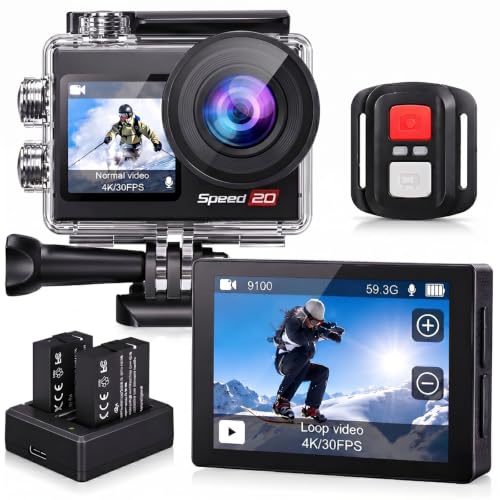
Hiicam 4K Action Camera — Best rock-bottom price
The Hiicam plays the value game at its most aggressive: dual touchscreens — front and rear — a 170-degree lens, electronic stabilisation, Wi-Fi, a remote control and a waterproof case, at the lowest price in this guide. The dual screens are its headline and they are genuinely useful for self-filming: a rider framing a piece to camera, or a parent setting up a shot of themselves with the kids, can see the framing without a phone. At 1080p it records the standard frame rates and produces footage that, in bright daylight, will satisfy the family-archive and social-post purposes most buyers at this price actually have.
The honesty paragraph matters more here than anywhere else in the guide. The image processing is budget-class in the visible ways: colours run less accurate, dynamic range clips sooner between bright sky and shaded ground, stabilisation corrects the big movements while leaving fine vibration in the frame, and low-light footage is the weakest of the six. The “4K” on the box should be read the way this guide reads all such claims — the camera’s honest home is 1080p, where its files are most convincing. Build and accessory quality are serviceable rather than confidence-inspiring, and long-term battery availability is a question mark buyers should solve by purchasing spares early. None of this makes it a bad purchase. It makes it a correctly understood one: a camera for the glovebox, the kids, the borrowed-gear bag and the risky mount, bought with eyes open about the class it competes in.
- Video: 1080p standard frame rates; 4K mode offered as headroom
- Displays: dual touchscreens, front and rear
- Lens: 170-degree wide angle, 5X digital zoom
- Waterproofing: via included case, rated to 131ft
- Extras: remote control and accessory kit included
Strengths
- Front screen makes self-framing easy without a phone — rare at any price, remarkable at this one.
- The complete kit costs less than a single accessory for the premium picks.
- Bright-daylight 1080p is perfectly serviceable for family and social use.
Trade-offs
- Weakest low-light and dynamic-range performance in the guide.
- Stabilisation leaves fine vibration that the DJI and AKASO models remove.
- Long-term support and spare availability are the least certain here.
Best for: bargain hunters, kids’ first action camera, glovebox spares and risky mounts. Not suited for: creators publishing polished footage, or anyone filming regularly at dusk.
Check price on Amazon.
How should you mount and set up an action camera for 1080p?
Mounting is where action footage is won, and it starts with a decision most owners never make consciously: whose eyes is the viewer borrowing? A helmet mount shows what the rider saw, including every head check and glance, which makes it the honest viewpoint and sometimes a seasick one. A chest mount sits lower and steadier, frames the bars, board or paddle naturally, and conveys speed better than any other position because the ground rushes closer to the lens. A mount on the vehicle itself — bars, mast, roll cage — shows the machine’s movement and the rider’s inputs, at the price of vibration that tests the stabilisation hardest. Professional-looking results usually cut between two of these, which is an argument for owning two cheap cameras over one dear one, and the budget picks in this guide make that arithmetic genuinely tempting.
Settings deserve the same deliberateness. Lock the frame rate for the session — 60fps for sport in good light, 30fps when the light fades — rather than letting the camera wander. Set the field of view with the stabilisation crop in mind: wide when the stabilisation works hard, narrower when the ground is smooth and you want a natural look. Turn on wind reduction or fit a foam cover before you need it, because audio fixes in post are apologies, not solutions. And format the card in the camera, not the computer, at the start of each day: in-camera formatting is the cheapest insurance in this entire hobby against the corrupted-file story every action camera owner eventually tells.
Power planning is the third leg. At 1080p the budget cameras run through a battery in roughly the span of a long session; the DJI lasts meaningfully longer, and the LIT Hero’s endurance depends on how much its light works. The working rule is a battery per major session segment, kept warm in an inside pocket in winter — cold batteries lie about their charge and die early, a fact the Action 4’s cold-weather design mitigates but does not repeal for anyone. A small power bank in the pack covers the phone you are also draining with the camera app, because the day ends when either battery does.
Finally, protect the lens and the data with the same seriousness. A smear of sunscreen or a single water drop on the lens ruins more action footage than any sensor limitation in this guide; carry a microfibre cloth somewhere reachable, and lick-and-wipe discipline — the surfer’s trick of a quick lick to sheet water off the port — is genuinely standard practice around water. Offload each evening, even on holiday, to a phone, a tablet or a laptop, and let the cards start each day empty. The footage you lose is never the footage you meant to delete.
One setup habit separates experienced owners from frustrated ones: a pre-session checklist that takes twenty seconds. Battery seated and charged, card formatted in-camera, lens wiped, mount tightened by hand and then checked with a tug, case seal inspected if the camera wears one, frame rate confirmed for the light you have rather than the light you hope for. It reads like fussiness until the first time it saves a day — after which it reads like professionalism, because that is what it is. The cameras in this guide are all capable of a full day’s good work; the checklist is how the day survives contact with the sport.
How do the six stack up for a day of filming?
| Camera | 1080p character | Stabilisation | Waterproofing | Battery strategy |
|---|---|---|---|---|
| AKASO EK7000 | Up to 60fps, honest budget image | Electronic, vibration-taming | Case, 131ft | Cheap spares; buy the two-battery bundle |
| AKASO Brave 4 | Up to 60fps, adjustable field of view | Electronic, similar class | Case, 131ft | Cheap spares widely available |
| AKASO EK7000 Pro | Up to 60fps, touchscreen control | Electronic, improved generation | Case, 131ft | Screen use trims endurance; carry a spare |
| DJI Osmo Action 4 | High frame rates, 10-bit colour option | RockSteady / HorizonSteady, best here | Bare body, 18m | Strongest endurance; fast charging |
| GoPro LIT Hero | Everyday rates plus built-in light | Electronic, GoPro-smooth | Bare body, typical depths | Light use shortens sessions; plan swaps |
| Hiicam 4K | Standard rates, bright-light camera | Electronic, fine vibration remains | Case, 131ft | Buy spares early while available |
The pattern the table exposes is simple: you are choosing where your compromise lives. The budget cameras compromise the image after dark and the smoothness on rough ground. The premium cameras compromise your wallet. The LIT Hero compromises battery for light. There is no row without a compromise — there is only the row whose compromise your sport never notices.
What actually decides good 1080p footage?
Stabilisation, first and by a distance. The difference between unwatchable and shareable action footage is rarely resolution; it is whether the frame holds still enough for a viewer to read the scene. Electronic stabilisation works by cropping into the image and counter-moving the frame, which is why it interacts with everything else in this guide: it spends field of view, it can struggle in low light when shutter speeds lengthen, and its quality is a software achievement as much as a hardware one. DJI’s lead in this guide is mostly a software lead. When you compare test footage, compare it on the roughest ground you will actually ride — a smooth promenade flatters every camera ever made.
Frame rate is the second decider, and it is a creative choice disguised as a number. Thirty frames per second looks natural and honest. Sixty buys you half-speed slow motion that still plays smoothly, and it also reduces motion blur on fast pans. The high frame rates on the DJI buy real slow motion — the splash, the landing, the expression — at the cost of light, because faster shutters gather less of it. A practical rule for 1080p action work: film the session at 60fps if the light allows, slow the moments that deserve it, and let the rest play at normal speed. You will use the flexibility on every single trip.
Light is the third decider, and the one buyers most often misjudge from spec sheets. Small sensors gather little light; that is physics, not a brand flaw. The cameras cope differently — bigger pixels on the DJI, an actual lamp on the GoPro, or nothing at all on the budget models — but the coping has limits, and the honest test of any action camera is the last hour of the day, not the first. If your sport lives at dusk, weight low-light performance as heavily as this guide weights the Action 4 and the LIT Hero, and forgive the budget cameras their darkness: they were priced for noon.
Audio is the quiet fourth. Wind is the enemy, and the weapons are foam covers, case-off recording when the weather allows, and mounting the camera out of the direct airflow. Case-based cameras pay an audio tax in the water that bare-body cameras do not, which is why surfers and sailors should read the waterproofing rows of the comparison table as audio rows too. Narration recorded later covers a multitude of sins, but the cheer at the finish line only happens once.
Durability is the fifth decider, and the least testable from a listing page. Action cameras earn their name by being dropped, frozen, soaked and sat on, and the differences between brands show up in year two: lens covers that scratch or replace, doors that seal or weep, mounts that hold or creep. The replaceable lens protector on the premium models is a small feature with an outsized effect on lifespan, because the lens is where action cameras go to die. Budget cameras answer with price — a scratched EK7000 is a sad afternoon, not a financial wound — and both philosophies are coherent. What is not coherent is paying premium money and then babying the camera; whichever you buy, use it the way the sport demands, because footage forgives and shelves do not.
Which of these cameras fits your sport?
Water sports divide first on the waterproofing question. Surfers, paddleboarders and snorkellers who live at the surface will value the bare-body cameras — rinse and go, clear audio, no case to fog — while scuba divers heading for real depth need the case-based cameras’ ratings and should budget for anti-fog inserts and a red filter habit for colour at depth. Kayakers sit between the camps: spray is constant but submersion is rare, and the remote control on the AKASO models earns its keep on a deck where reaching the camera means shipping the paddle.
Wheeled sports divide on stabilisation and light. Mountain biking on rough trails is the stabilisation championship, and it belongs to the DJI by a clear margin; road cycling is gentler, and any pick here will serve, with the LIT Hero taking over when the commute home runs past sunset. Motorsport and track days add heat and vibration of a different frequency — hard mounts, short clips and the sturdiest case you own matter more than frame rates. Skiing and snowboarding add the cold variable: batteries sag, touchscreens meet gloves, and the cameras with strong cold performance and physical-button control — the DJI and the remote-driven AKASOs — pull ahead of touchscreen-dependent rivals.
Family and travel filming divides on forgiveness. The camera that gets used is the one that is charged, mounted and simple, which is why the touchscreen AKASO Pro and the Hiicam’s dual screens punch above their image quality for parents: framing the shot of yourself with your children is the feature, and the footage exists at all because the camera made it easy. Creators publishing on a schedule should skip to the DJI without passing through the budget tier — the stabilisation, the colour profile and the low-light reach are the difference between footage that grows a channel and footage that apologises for itself.
Which mistakes do new action camera owners make first?
The classic is filming everything at the maximum resolution and frame rate, then discovering that the files are enormous, the battery is half what they expected, and their laptop edits the footage at the pace of continental drift. For a 1080p delivery, shooting 1080p is not settling — it is matching the tool to the job, with longer battery life and faster uploads as the reward. The second mistake is trusting the waterproof case’s rating without testing the seals: close the case empty, submerge it in a sink, and check for moisture before the camera ever goes in. Cases fail at latches and grit on seals, not at their printed depth numbers.
The third mistake is mounting once and never experimenting. The same descent filmed from a helmet, a chest strap and a handlebar are three different videos — chest mounts convey speed and hands, helmets convey viewpoint, bars convey vibration whether you want it or not. The fourth is forgetting that stabilisation crops: frame wider than feels natural, especially with the electronic stabilisation working hard, or your subject’s head will exit the top of the frame on the first climb. And the fifth is buying the camera and no spare batteries, no second card, no floaty for the water — the accessories that cost the least are the ones whose absence ends filming days.
Final Recommendation
A word on buying order, because it saves money in this category more reliably than any discount: camera first, then the mounts your sport actually uses, then batteries, then everything else. The accessory piles bundled with the budget picks cover the first season for most riders, and the premium ecosystems will happily sell you a beautiful case for a camera that needed a second battery instead. Spend where the filming day feels it.
Buy the DJI Osmo Action 4 if the footage matters — it is the best 1080p action camera in this guide by a margin you can see in the first dusk clip. Buy the LIT Hero if your life happens after dark and your frame is small. Among the budget three, choose by interaction: the EK7000 for remote-first simplicity, the Brave 4 for framing control, the EK7000 Pro for the touchscreen, and the Hiicam when the budget is the whole conversation. Whatever you choose, spend the difference you saved on batteries and mounts — a season from now, nobody remembers which camera filmed the day the light turned gold over the ridge and the whole group made the descent clean; they remember that somebody was rolling.
If you are still torn between two rows of the table, decide by the worst light you film in, not the best. Daylight forgives every camera in this guide; dusk sorts them without mercy. Buy for the hour your sport actually ends, and the rest of the day takes care of itself — that single rule, applied honestly, lands nearly every reader on the right camera in this list, whether that turns out to be the flagship with the big sensor or the budget box that costs less than the lift ticket it will film.
Frequently Asked Questions
If these cameras shoot 4K, why buy one for 1080p?
Because 1080p is where their value concentrates for most owners: longer battery life, smaller files, faster editing and sharing, and — on the better models — higher frame rates and stronger stabilisation than their 4K modes allow. The 4K mode is headroom for cropping and reframing, which is a genuine bonus, but the daily performance of these cameras is a 1080p story.
Is electronic stabilisation enough, or do I need a gimbal?
For the DJI, almost always enough — its stabilisation is the reason many riders retired their gimbals. For the budget cameras, electronic stabilisation handles vibration and moderate movement well, but a gimbal still wins for walking footage and smooth cinematic pans. Match the tool to the movement: the rougher the sport, the more the camera’s own stabilisation earns its keep.
Can I use an action camera as a dashcam or webcam?
Most of these models offer webcam and USB modes, and loop recording on several makes them serviceable dashcams. Dedicated dash cameras handle heat, parking modes and automatic overwriting more gracefully, so treat the action camera as a capable stand-in rather than a permanent installation.
How deep can I actually dive with the case-based cameras?
Their cases are rated to 131 feet, which covers recreational diving limits. The rating assumes clean seals and a correctly latched case — rinse the case after salt water, inspect the seal before every dive day, and remember the bare camera inside is not waterproof if the case floods.
What memory card should I buy?
A reputable microSD card rated for sustained video writing — look for the speed classes the camera’s manual specifies, and buy from a trustworthy listing, because counterfeit cards are the leading cause of “camera faults” in this class. Size for your format: 1080p is forgiving, and a day of it fits comfortably on cards that 4K shooters would fill by lunch.
How long does a battery really last at 1080p?
Plan around roughly an hour to an hour and a half of recording per battery on the budget cameras with stabilisation on, and meaningfully longer on the DJI, whose endurance is a genuine selling point. Cold, high frame rates, heavy screen use and the LIT Hero’s lamp all shorten those figures. Nobody regrets owning one more spare battery than the day seemed to need.
Is a cheap action camera worth it for a one-off trip?
Often, yes — that is the EK7000’s home turf. A budget camera bought for a single snorkelling holiday or ski week costs less than renting a premium model, records the trip perfectly well in daylight, and stays in the drawer afterwards as the household’s risk-taker. The calculus changes when trips become a habit: three budget cameras in three years costs more than one DJI, and the footage gap compounds with every season.
Do I need the app, or can I use the camera alone?
Every camera here works standalone — record, review on the rear screen, pull the card. The apps add remote framing, quick transfers and firmware updates, and they are worth installing for updates alone. The EK7000 Pro and Hiicam’s touchscreens make phone-free operation the most comfortable on the budget side.
What happens to 1080p action footage after the session?
The edit is where 1080p quietly rewards you. Files are small enough that a modest laptop or even a phone handles them without proxy workflows, which means the highlight reel exists the same evening, while the day still feels like news. Every app in this class — DJI’s, GoPro’s and the generic apps the budget cameras use — will auto-cut a shareable edit from a day’s clips, and those auto-edits have become genuinely decent at finding faces, splashes and landings. Treat them as a first draft rather than a verdict: the auto-edit finds the loud moments, and you add the quiet one — the nervous laugh at the top, the fist-bump at the bottom — that makes the video yours.
Colour is the second post-session story. Most action footage is published as recorded, and the standard colour profiles on all six cameras are tuned for exactly that: bright, punchy, forgiving. The exception is the DJI’s flat D-Log M profile, which trades instant punch for grading room — worth using if you already colour other footage and want the action clips to match, and worth avoiding if you do not, because ungraded flat footage simply looks grey. Mixed fleets deserve a warning: cutting AKASO, GoPro and DJI footage into one timeline will show three colour personalities, and a light correction pass per source, saved as presets, is the working fix.
Sharing settings are the last mile. Platforms recompress uploads, and 1080p uploads at a healthy bitrate survive that process better than starved ones — export at a generous bitrate rather than the minimum your editor suggests, and upload the master file rather than a copy of a copy from a messaging app. Vertical crops for short-form platforms are painless from a wide action frame, which is one more reason to frame wide in the field: the horizontal video for the television and the vertical cut for the phone can both live inside the same take.
Archiving closes the loop. Action footage accumulates faster than any other kind because nobody deletes a whole session at the camera. A ruthless same-week cull — keep the best fifth, delete the rest without ceremony — keeps an archive browsable and backed up instead of becoming a drawer of cards nobody dares format. Name folders by date and place, keep two copies of what survives, and the camera you bought for a season becomes a record of years.
When is the 4K headroom on these cameras worth using?
Headroom is a tool with three specific jobs, and naming them keeps it from becoming a habit that costs you battery and storage for nothing. The first job is reframing: a 4K frame delivered at 1080p lets you crop to a quarter of the image and still publish at full resolution, which rescues the shot where the action drifted to the edge, and lets a single static camera produce a wide shot and a close-up from the same take. Coaches filming a whole pitch and parents filming a whole stage both live on this trick.
The second job is stabilisation beyond the camera’s own. Software stabilisation in an editor crops and counter-moves the frame with more processing power and more patience than the camera has, and starting from 4K means the cropped result still lands at a clean 1080p instead of an upscaled compromise. If a descent mattered and the in-camera stabilisation left it shaky, the 4K original is the difference between a rescue and a write-off. This is also why the DJI’s combination — strong in-camera stabilisation plus 4K120 plus a 10-bit colour option — compounds: each layer of headroom multiplies the others.
The third job is the future. Archives appreciate resolution; the family footage shot at 1080p today will be watched on screens that make today’s televisions look quaint, and the 4K masters will age more gracefully. Against these three jobs, weigh the standing costs honestly: roughly four times the storage, faster battery drain, hotter cameras, slower uploads and an editing load that older machines feel immediately. The working compromise most experienced owners settle on is deliberate — 1080p for the session, 4K for the moments: the set piece, the ceremony, the one descent of the day. Headroom used on purpose is a feature. Headroom used by default is a tax.
One more headroom nuance separates the picks. On the premium cameras the 4K image is natively resolved and genuinely detailed; on the cheapest models the 4K mode is closer to a container for a softer image, and cropping into it spends detail that was never recorded. If reframing is central to your plans, that difference alone justifies stepping up the range — test any camera’s 4K with a detailed scene, crop it to a quarter in your editor, and let your own eyes grade the claim on the box.
Related Guides
More from the camera desk: best 1080p cameras for stills-and-video bodies beyond the action class, best 20 megapixel cameras when stills resolution leads, and best 1080p vlogging cameras with flip out screens for creator-first alternatives with proper screens, microphones and room to grow beyond the trail, the pool deck and the handlebars this season.


