What's inside
- Where to buy
- Key Takeaways
- Quick Picks
- How did we choose these barcode printers?
- What actually separates direct thermal from thermal transfer?
- How do label size, core and stock change what you should buy?
- What should you know about label software and drivers before spending?
- Which mistakes do buyers keep making with barcode printers?
- Side by side: how do the six barcode printers stack up?
- How do you keep a barcode printer printing cleanly for years?
- How do you set up a barcode printer so the first labels scan cleanly?
- Which barcode types will you actually print, and why does it matter?
- Wax, wax-resin or resin: how do you choose a ribbon?
- Final Recommendation
- Frequently Asked Questions
- Related Guides
As an Amazon Associate I earn from qualifying purchases. This post may contain affiliate links at no extra cost to you.
gizmoverdict.com is reader-supported. When you buy through links on our site, we may earn an affiliate commission.
Where to buy
Every linked model in this guide is sold through Amazon’s US store under the exact listing we verified, and that detail matters more with printers than with most hardware, because a single model name can hide several different machines. Where a listing specifies a print method, a resolution or a port set, we name that configuration in the pick’s heading and spec box, and the recommendation applies to that configuration only. If you land on a variant page offering a different resolution or a wireless module instead, you are looking at a sibling machine, and the notes below may only partly apply.
The best barcode printers divide along one honest line, and it is not brand, speed or price. It is how the image gets onto the label. Direct thermal printers heat a coated label until it darkens, which makes them simple, quiet and free of ribbons, but the print fades with heat, sunlight and time. Thermal transfer printers melt ink from a ribbon onto the label face, which costs you a consumable and a little setup patience, and in exchange produces barcodes that survive warehouses, freezers, sunlight and years on a shelf. Almost every buying mistake in this category comes from ignoring that split, so this guide is organised around it: two thermal transfer machines for labels that must last, three direct thermal machines for labels that must merely arrive, and one closed-system desktop printer whose convenience comes with a label lock-in we describe without softening it.
One more boundary before the picks. The search results for this category are crowded with label rolls, ribbon cartridges and replacement printheads. Those are supplies, not printers, and none of them appears as a pick here. A roll of labels cannot print anything, however good its reviews are, and a guide that pads its list with consumables has stopped answering the question it was asked. What follows is six actual printers, each checked against a verified listing, each suited to a recognisably different desk, bench or warehouse corner.
Key Takeaways
- Labels that must stay scannable for years belong on a thermal transfer machine with a ribbon; labels that ship this week and get scanned on arrival are direct thermal’s home ground.
- The Zebra ZD421 in its 300 dpi thermal transfer configuration is the sharpest tool here for small, dense codes on little labels.
- The Zebra ZT230 is the only true industrial build in the six, with a metal frame, an LCD and Ethernet for shared warehouse duty.
- The DYMO LabelWriter 550 prints only DYMO-branded labels its recognition system accepts, so its running costs are a closed shop by design.
- The iDPRT SP310 covers the widest label-width range of the desktop picks, from one inch up to 3.35 inches, at a brisk 80 pages-per-minute class pace.
- Ports decide shared use: USB-only machines belong to one computer, while Ethernet models can serve a whole packing bench.
Quick Picks
| Pick | Badge | Why it is here |
|---|---|---|
| Zebra ZD421 Thermal Transfer 300dpi | Sharpest small labels | Its 300 dpi thermal transfer engine keeps tiny, dense barcodes crisp on labels too small for coarser printheads to render honestly. |
| Zebra ZT230 Thermal Industrial Printer | Warehouse workhorse | A metal-framed industrial machine with Ethernet and an LCD, built for shared benches where a desktop shell would age fast. |
| Zebra GK420d | Proven shipping desk | A long-serving direct thermal desktop with USB, serial and parallel ports, for shipping labels that need to scan on arrival, not forever. |
| Zebra GX420D | Networked desktop | Direct thermal printing at six inches per second with USB, serial and Ethernet, so one printer can serve several packing stations. |
| DYMO LabelWriter 550 | Simplest office labels | Automatic label recognition removes setup guesswork, at the cost of printing only DYMO-branded labels the machine accepts. |
| iDPRT SP310 | Widest label range | A fast desktop unit handling labels from one inch to 3.35 inches wide, aimed at shipping and inventory work in small operations. |
How did we choose these barcode printers?
We started from verified listings rather than from brand reputation, because this category’s model names are a thicket. Zebra alone sells near-identical desktop shells in direct thermal and thermal transfer versions, at two resolutions, with half a dozen port combinations, and a recommendation that does not pin down which one it means is not worth much. So each pick below is tied to one listing, one print method and one stated port set, and where a family spans variants we say exactly which member earned the place. The ZD421 here, for instance, is the 300 dpi thermal transfer USB model, not its 203 dpi or direct thermal relatives.
Print method came first in our sorting, because it decides what a label can survive. We wanted the list to contain genuine thermal transfer options for asset tags, component labels and anything stored outdoors or in heat, alongside direct thermal machines for the shipping and receiving work where labels live for days rather than years. Resolution came second: 203 dpi is entirely adequate for a four-inch shipping label, while small labels carrying dense codes genuinely benefit from 300 dpi, and pretending otherwise in either direction misleads somebody. Third came connectivity, because a barcode printer is usually shared infrastructure. A USB-only printer is a one-desk appliance. An Ethernet printer is a department resource. Both are legitimate; they are not interchangeable.
We also weighed the unglamorous facts that decide whether a printer is still loved in month six: how media loads, whether the software story is mature, whether the manufacturer’s label ecosystem is open or closed, and how the machine behaves at volume. The DYMO’s closed label system is the clearest example. It is not a hidden flaw we discovered; it is the product’s stated design, and for some offices the trade is worth it. Our job is to make the trade visible before money moves, not to make the decision for you. Finally, we excluded every consumable and accessory that search results tried to promote into a pick, and we excluded a renewed industrial listing where a clean listing of the same class existed, because condition should never be a surprise delivered by a courier.
What actually separates direct thermal from thermal transfer?
A direct thermal printhead presses heating elements against a chemically coated label, and the coating darkens where it is heated. There is no ink and no ribbon, so the machine is mechanically simple and the only consumable is the label itself. The weakness is baked into the chemistry: the same coating that reacts to the printhead also reacts, slowly, to sunlight, heat, friction and some plastics. A shipping label does not care, because it needs to survive a truck ride and a doorstep scan. An asset tag on a rooftop unit cares very much, because a barcode that fades into grey mush in its second summer is worse than no label at all, since nobody notices it failing until an audit does.
Thermal transfer moves the chemistry into a ribbon. The printhead melts ink from a ribbon onto the label surface, and the resulting image is only as fragile as the label stock and ribbon resin you choose. Paper labels with wax ribbon suit indoor shelving. Synthetic labels with resin ribbon shrug off water, chemicals and ultraviolet light. That flexibility is why transfer machines dominate asset management, laboratories, electronics and outdoor equipment marking. The costs are real but modest: ribbons to stock, a slightly fussier loading path, and the discipline of matching ribbon width to label width so the printhead is not dragging across bare platen. Every pick section below states plainly which side of this line the machine sits on, because it is the single most consequential fact about it.

Zebra ZD421 Thermal Transfer 300dpi — Sharpest small labels
The ZD421 earned the opening slot by being the most precise instrument in this group, and precision is a specific virtue rather than a general compliment. In the configuration verified here — thermal transfer, 300 dpi, four-inch print width, USB — it is built for labels where the information is dense and the real estate is small: component bins, jewellery and eyewear tags, laboratory vials, cable markers, electronics serials. At 203 dpi a small DataMatrix or a tightly packed Code 128 can render with edges soft enough to make scanners hesitate. At 300 dpi the same code gets the extra dots it needs to stay square, dark and decisive. That is the entire argument for this machine, and for the work it targets, the argument is conclusive.
Because it is a thermal transfer printer, it also asks something of you that the direct thermal desktops below do not: a ribbon, correctly chosen and correctly loaded. Budget a few minutes for the first ribbon change rather than the few seconds a label roll swap takes, and keep ribbon matched to your label stock — wax for paper shelving labels, a resin blend when the labels face handling, moisture or chemicals. In return the printed image stops being the weak point of the label. A transfer-printed synthetic asset tag from this machine can outlast the equipment it identifies, which is precisely the job description in asset management. Buyers who only ever print shipping labels should read on instead; they would be paying for durability and resolution their work never uses.
The desktop footprint suits a bench or a back-office desk rather than a warehouse floor, and the USB connection in this listing frames it as a one-workstation printer. That is a fair description of its natural home: a technician’s bench, a lab counter, a small manufacturer’s packing table where one person owns the labelling workflow. Zebra’s broader software and driver ecosystem is the mature one in this industry, so getting the ZD421 recognised by label design software and inventory systems is rarely the adventure it can be with lesser-known brands. Treat the listing’s exact configuration as the pick, though. The ZD421 badge covers a family, and relatives with lower resolution or no ribbon mechanism are different tools wearing the same name.
- Print method: thermal transfer, ribbon required for use
- Resolution: 300 dpi
- Print width: 4 inches
- Connection in this listing: USB
- Form: desktop
Strengths
- Fine 300 dpi output keeps small, dense codes scannable on labels where 203 dpi edges start to soften.
- Ribbon printing produces durable images that suit asset tags, lab samples and component marking.
- Zebra’s driver and label-software support is the deepest in the business, easing setup in managed workplaces.
Trade-offs
- Ribbons are a second consumable to buy, stock and load, which pure shipping desks may never benefit from.
- This listing is USB-connected, so sharing it across several workstations takes extra arrangement.
- Its precision is wasted on large shipping labels, where cheaper direct thermal machines produce identical scan results.
Best for: benches and labs printing small, dense, long-lived labels that must scan first time, every time, for years. Not suited for: high-volume shipping stations that want ribbon-free simplicity and burn through labels by the thousand.

Zebra ZT230 Thermal Industrial Printer — Warehouse workhorse
Step from a desktop shell to the ZT230 and the change you feel first is structural. This is an industrial printer, built around a metal frame for environments where a printer is infrastructure rather than an accessory: distribution benches, manufacturing cells, third-party logistics stations, anywhere labels come off the machine in long runs and the machine itself gets knocked, dusted and run warm. Its thermal transfer mechanism serves the durable-label world described above, and its port set — USB, serial and Ethernet, per the verified listing — reflects the shared, networked reality of that world. The LCD screen sounds like a small thing until you have watched a warehouse associate troubleshoot a media error through a single blinking light on a lesser machine; a screen that names the problem shortens every interruption.
The listing states a one-year warranty, and we note it because industrial buyers plan around support horizons in a way home users never need to. What the ZT230 asks in return is space, a permanent home and a workflow that justifies it. It is not the printer for a spare-room seller printing twenty labels on a Saturday. It is the printer for the operation that has already worn out a desktop unit, or can see that day coming on its volume charts. Its 203 dpi resolution, stated in the listing, is the warehouse standard rather than a limitation: at four-inch label widths it produces entirely scannable shipping, pallet and compliance labels, and the money in an industrial machine goes into the frame, the duty cycle and the media handling rather than into resolution most freight labels never use.
A housekeeping note that matters for this exact model: more than one ZT230 listing circulates, including a renewed one. The pick here is the clean listing we verified, with the port set and warranty described above, and the two should never be treated as the same offer. If your procurement process is comparing this recommendation against a marketplace page, match the listing details rather than the model name alone. Set up on a bench with its Ethernet port in use, the ZT230 becomes the label source for a whole area of the building, driven by whatever warehouse or inventory system the operation already runs, and that quiet centrality is what industrial money actually buys.
- Print method: thermal transfer, no ink required
- Resolution: 203 dpi, per listing
- Print width: 4 inches
- Connections in this listing: USB, serial, Ethernet
- Display: LCD screen
- Warranty stated in listing: 1 year
Strengths
- Metal industrial construction tolerates dust, knocks and long daily runs that age plastic desktop shells quickly.
- Ethernet connectivity lets a whole warehouse area share one properly placed machine.
- The LCD turns media and ribbon faults into readable messages instead of guesswork at a busy bench.
Trade-offs
- It needs a permanent bench position and more room than any desktop pick in this guide.
- Small operations will pay for duty cycle and build they may never call upon.
- Ribbon handling remains part of daily life, as with any thermal transfer machine.
Best for: warehouses, manufacturers and logistics benches printing durable labels at real volume on a shared network. Not suited for: occasional sellers or home offices whose weekly label count fits in one hand.
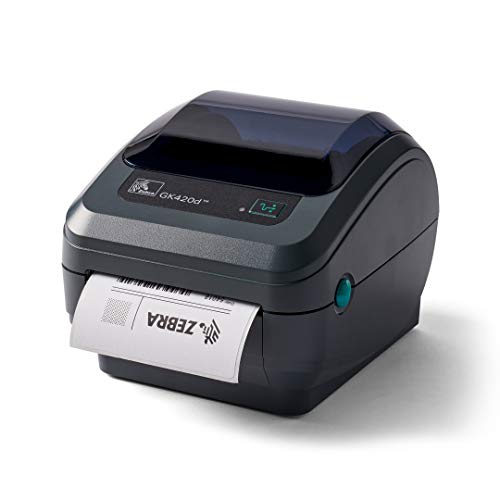
Zebra GK420d — Proven shipping desk
The GK420d is the elder of this group, and its age is its credential. This direct thermal desktop has been the default shipping-desk printer in small warehouses and e-commerce back rooms for years, which means two practical things for a buyer today. First, its behaviour is a known quantity: it prints four-inch shipping labels without ribbons, ink or fuss, and it keeps doing so. Second, the world around it — drivers, label software, marketplace and carrier platform integrations, replacement knowledge — has had years to grow up, so when something needs configuring, an answer exists. In a category where a printer failure on a dispatch day is a genuine business problem, that maturity is a feature no specification table captures.
Its port set tells the story of its era in a useful way: USB for the modern packing PC, serial and parallel connections for the older systems that still run plenty of dispatch operations. If your shipping workflow lives on legacy software or an ageing terminal, that parallel port is not nostalgia; it is the difference between a printer that drops into the existing setup and a small IT project. The direct thermal mechanism defines its limits as clearly as its strengths. Labels from a GK420d are meant to travel, be scanned and be discarded. Leave them in a hot van, a sunny storeroom or a freezer for months and the print will fade, because the chemistry always intended them as short-lived documents.
Position it honestly and it is hard to fault: a four-inch-wide direct thermal machine for shipping, receiving and short-life inventory labels, attached to one workstation, doing the highest-volume simple job in small logistics. Buyers who need labels to survive storage should step up to the transfer machines above. Buyers who need the whole office to print to one device should look at the networked GX420D below. Buyers whose dispatch desk simply needs to stop feeding shipping labels through a sheet-fed office printer, one peel-and-stick at a time, have found the classic answer to exactly that problem.
- Print method: direct thermal, no ribbon
- Print width: 4 inches
- Connections in this listing: USB, serial, parallel
- Output colour: monochrome
- Form: desktop
Strengths
- A long track record means mature drivers and ready answers for every common shipping platform.
- Legacy serial and parallel ports let it join older dispatch systems without adapters or replacement software.
- Ribbon-free printing keeps the consumable list down to labels alone.
Trade-offs
- Direct thermal labels fade under heat, sunlight and long storage, ruling it out for asset marking.
- No Ethernet in this listing, so it serves one workstation rather than a shared bench.
- Its design generation is older, without the screens and refinements of newer desktops.
Best for: shipping and receiving desks, including legacy setups, that print four-inch labels destined to be scanned within days. Not suited for: labelling anything that must remain readable through seasons of storage or weather.

Zebra GX420D — Networked desktop
Read the GX420D as the GK420d’s idea carried onto the network. It remains a direct thermal desktop — the listing describes it as a label, receipt and barcode printer — but the verified configuration pairs USB and serial with Ethernet, and that single addition changes who the printer belongs to. Wired into the office or warehouse network, it stops being one PC’s peripheral and becomes a shared labelling point that several stations can send to: the packing bench, the returns desk, the stockroom corner. For a growing operation whose labelling needs have spread beyond a single desk but whose volumes do not yet justify an industrial frame, that is a genuinely useful middle position.
The listing quotes six inches per second at 203 dpi, and those two numbers together describe its temperament. The speed is brisk for desktop work — shipping labels emerge at a pace that keeps a dispatch queue moving — and the resolution is the standard for four-inch freight and inventory labels, where codes are large and scanners are forgiving. It also handles 4×6 labels, the shipping format that dominates parcel work, so marketplace and carrier labels print natively rather than being scaled or coaxed. As a direct thermal machine it shares the family limit without exception: its labels are working documents with a short intended life, and no setting on the printer changes the chemistry of the label stock.
Where the GK420d suits a single established workstation, the GX420D suits a small team. Put it on the network, give it a fixed place near the label stock and the scales, and the whole packing area gains a printer without gaining a tangle of shared-PC arrangements. Buyers should still check the exact listing configuration when ordering, since desktop Zebra families branch into many variants; the recommendation here is the USB, serial and Ethernet direct thermal model described in the verified listing. Within those bounds, it is the most flexible desktop in this guide, and flexibility, for a business mid-growth, is often the specification that matters most.
- Print method: direct thermal
- Speed stated in listing: 6 inches per second at 203 dpi
- Label fit noted in listing: 4×6 labels
- Connections in this listing: USB, serial, Ethernet
- Form: desktop
Strengths
- Ethernet sharing lets several stations print to one well-placed machine.
- Six-inches-per-second output keeps parcel dispatch queues moving at busy times.
- Handles the standard 4×6 shipping label natively, suiting marketplace and carrier workflows.
Trade-offs
- Output still fades like all direct thermal print, so long-life labelling belongs to the transfer picks.
- Network setup asks a little more of the installer than a plain USB connection.
- Teams that outgrow desktop duty cycles will still eventually step up to an industrial frame.
Best for: small teams and growing sellers who need one shared desktop printer for shipping and inventory labels. Not suited for: durable asset labelling, or single-desk users paying for networking they will never switch on.

DYMO LabelWriter 550 — Simplest office labels
The LabelWriter 550 is the friendliest machine in this guide and the most restrictive, and those two facts are the same fact. DYMO built this direct thermal desktop around automatic label recognition: the printer reads the label roll you load, knows its size and type, and sets itself up accordingly. For an office manager who prints address labels, file labels, name badges and the occasional barcode without wanting to learn printer administration, that removes the most common source of desktop label frustration, which is a machine and a computer disagreeing about what is loaded. The listing describes the result as low-waste, optimised direct thermal printing, and the everyday experience it promises is genuinely simple.
Now the restriction, stated as plainly as the listing itself states it: the 550 works with DYMO-branded labels, and its recognition system is the gatekeeper. Third-party label rolls that fit the spindle of older LabelWriters are not accepted by this machine’s system. That is not a defect we are reporting; it is the product’s design, visible on its own listing, and it converts your label supply into a single-brand relationship for the life of the printer. Some buyers will shrug — official labels are easy to order, and the recognition feature is what they were buying. Others, particularly anyone printing at volume who has priced generic rolls, will find the arithmetic changes completely over a year of use. Decide which buyer you are before ordering, because the decision cannot be revisited afterwards.
Within its walls, the 550 does its intended job well. It is an office printer rather than a warehouse one: address and filing work, visitor badges, barcode labels for internal tracking, the steady drip of small labelling tasks that keep an organised office organised. It is not built around the four-inch shipping label trade the way the Zebras above are, and high-volume dispatch would be a misuse of it. But for a professional office, a clinic front desk, a school office or a small business that values walk-up simplicity over consumable freedom, it offers the lowest-friction route from a blank roll to a correct label of any pick here — provided the house brand of that roll is acceptable to you.
- Print method: direct thermal
- Label system: DYMO-branded labels with automatic recognition
- Setup trait: printer identifies loaded label size and type
- Form: desktop, office-oriented
Strengths
- Automatic label recognition removes the size-and-type setup errors that plague office label printing.
- Walk-up simplicity suits shared offices where nobody wants to administer a printer.
- Direct thermal mechanism keeps operation clean, with labels as the only consumable.
Trade-offs
- Only DYMO-branded labels are accepted, closing the door on cheaper third-party rolls permanently.
- It is aimed at office label sizes and tasks rather than the four-inch shipping-label mainstream.
- Direct thermal fading applies here too, so archival labelling is outside its brief.
Best for: offices that want the simplest possible address, filing and badge printing and accept a single-brand label supply. Not suited for: volume shippers, or any buyer whose label budget depends on generic rolls.

iDPRT SP310 — Widest label range
The SP310 closes the list by covering the most varied work. Its verified listing describes a desktop direct thermal printer handling label widths from one inch to 3.35 inches, at a speed the listing expresses as 80 pages per minute, and aimed squarely at shipping, barcodes and inventory. That width range is the interesting part. A small operation rarely prints only one label: there are parcel labels, yes, but also shelf-edge labels, product stickers, jar and box labels, bin markers and barcode tags in assorted widths, and a machine whose guides adjust across that span can absorb all of it without a second printer joining the desk. For a growing small business whose labelling is diversifying faster than its budget, one flexible machine is worth more than a specialist it outgrows by spring.
As a direct thermal printer it keeps the family’s virtues and limits in their usual places. No ribbon, no ink, labels as the only consumable, and output intended for the working life of a parcel or a stockroom shelf rather than for archival permanence. Inventory labels that rotate with stock are a natural fit. Product labels on goods that will be sold and used within the season are a natural fit. An asset register meant to be read in five years is not, and the transfer machines earlier in this guide exist for that register. The SP310’s pitch is breadth and pace for the everyday churn of small-business labelling, and judged on that pitch it is coherent.
Buyers coming from the Zebra sections should calibrate expectations about ecosystem rather than output. iDPRT is a smaller presence in this industry, so the surrounding world of third-party guidance and workplace standardisation is thinner, and a business planning to deploy identical printers across many sites may value Zebra’s uniformity more than this machine’s flexibility. A single-site operation, though — the Etsy-scale seller moving into real volume, the small warehouse, the retailer labelling its own shelves — gets a fast, width-flexible desktop that asks little and covers much. Check the listing’s stated width range against your widest label before ordering, since that measurement, not the speed figure, is the one your workflow will test daily.
- Print method: direct thermal, inkless
- Speed stated in listing: 80 ppm class
- Label width range in listing: 1 inch to 3.35 inches
- Aimed at: shipping, barcodes, inventory
- Form: desktop
Strengths
- The adjustable one-to-3.35-inch width range lets one machine cover parcel, product and shelf labels alike.
- Fast output suits small operations whose labelling arrives in bursts at dispatch time.
- Direct thermal running keeps supplies simple for a business without IT support.
Trade-offs
- Its widest label still falls short of the four-inch shipping standard the Zebra desktops centre on.
- The maker’s support ecosystem is smaller than Zebra’s, which matters for multi-site standardisation.
- Short-life direct thermal output rules it out for durable asset and outdoor labels.
Best for: small businesses printing many label sizes for shipping, stock and shelves from one desktop machine. Not suited for: operations standardised on 4×6 shipping labels, or anyone labelling for the long term.
How do label size, core and stock change what you should buy?
Buyers tend to shop for the printer first and the label second, which is backwards, because the label stock you intend to run quietly dictates half the specification. Start with width. The four-inch class dominates shipping because carrier labels standardised there, and three of the six picks in this guide are built around it. If your work is shelf edges, product stickers and bin tags in narrower formats, a machine like the SP310, whose guides travel down to one inch, covers that territory without adapters or improvisation. Width is not a number to round: a printer whose maximum is 3.35 inches will never print a 4×6 carrier label, and no software setting stretches a printhead.
Then consider how the labels arrive. Desktop machines take rolls that sit inside the body, which keeps the footprint tidy but caps roll diameter, so heavy users reload more often. Industrial machines like the ZT230 accept larger rolls and fanfold stock, stretching the interval between reloads during long runs. Core diameter matters when reordering: a roll wound on the wrong core will not mount, however perfect its labels are. None of this is glamorous, and all of it is the difference between a printer that disappears into the workflow and one that interrupts it twice a shift. Before ordering any machine here, write down the three label sizes you print most, check each against the pick’s stated width range, and confirm the roll format your supplier sells actually fits the spindle you are buying.
Stock material deserves the same forethought. Paper labels are the default for a reason — they take print beautifully and suit indoor life — but they tear, soak and scuff. Synthetic stocks cost more and ask thermal transfer printing to reach their potential, rewarding you with labels that survive freezers, washdowns, chemical splashes and outdoor seasons. Adhesive is the third leg: permanent adhesive on a library asset is a virtue, while the same adhesive on a reusable tote becomes a scraping chore, and removable stocks exist precisely for the middle cases. The printer cannot fix a stock mistake. It can only print crisply onto the label you chose, which is why the strongest labelling setups are designed label-first and printer-second.
What should you know about label software and drivers before spending?
A barcode printer is only half a system; the other half is whatever software designs the label and sends it. For shipping, that software is usually the carrier or marketplace platform itself, and the practical requirement is a printer those platforms recognise without wrestling — one reason Zebra’s long-serving desktops remain the default recommendation for dispatch desks. For inventory, asset and product labelling, you will likely use dedicated label design software, and the questions change: does it support the barcode symbologies you need, can it pull serial numbers or product data from a spreadsheet or database, and does it save templates so a new starter prints the right label rather than designing a fresh interpretation of it?
Drivers are the unglamorous hinge. A manufacturer-supplied driver that exposes the true label size, darkness and speed settings will save hours over a generic driver that treats the machine like a tiny sheet printer. Install the proper driver first, set the stock size in it, and then set the same size in your application; most crooked, clipped or half-blank barcodes trace back to those two settings disagreeing. Networked picks add one more consideration: give an Ethernet printer a fixed place in your network addressing, arranged with whoever manages it, so workstations keep finding it after routers restart. None of this requires an IT department. It requires an unhurried first hour, after which a good barcode printer becomes the most boring appliance in the building — and boring, in labelling, is the highest praise available.
Finally, think about who else will use the machine. A printer operated by one careful owner tolerates complexity that a printer shared by seasonal staff does not. Shared machines reward the DYMO’s automatic recognition and the ZT230’s explanatory screen, because both reduce what a new user must know. Solo machines reward raw capability, like the ZD421’s resolution. Matching the interface to the least experienced person who will load it on a busy day is a buying criterion as real as any in the spec box, and it is the one most often skipped.
Which mistakes do buyers keep making with barcode printers?
The most expensive mistake is choosing the print method by the printer’s price instead of the label’s lifespan. A direct thermal machine is cheaper to buy and cheaper to run, and none of that matters when the asset labels it printed fade during their first summer and a stocktake turns into archaeology. Work backwards from the label: how long must this stay scannable, and in what conditions? Heat, sunlight, freezing, abrasion and chemicals all vote for thermal transfer. A label that will be scanned within a fortnight votes the other way. Buyers who answer that question honestly rarely regret the machine they end up with.
The second mistake is reading a model name as a specification. Zebra’s desktop families in particular branch into print methods, resolutions and port sets that share a badge and little else, and more than one buyer has ordered the name they researched and received the variant they did not. Match the listing’s stated method, resolution and connections to your requirement line by line. The third mistake is ignoring the consumable ecosystem until after purchase. The DYMO in this guide makes the issue impossible to miss, but ribbon widths, label core sizes and house-brand requirements deserve the same scrutiny on any machine. Finally, buyers routinely forget the scanner’s perspective: print quality settings, label stock quality and correct ribbon pairing decide scan rates far more than the printer’s headline resolution, so test your actual labels with your actual scanners during the first week, not after the first failed audit.
Side by side: how do the six barcode printers stack up?
| Printer | Method | Resolution / speed | Connections | Natural home |
|---|---|---|---|---|
| Zebra ZD421 (this listing) | Thermal transfer | 300 dpi | USB | Benches and labs with small, dense labels |
| Zebra ZT230 | Thermal transfer | 203 dpi | USB, serial, Ethernet | Warehouses printing at shared volume |
| Zebra GK420d | Direct thermal | Desktop standard | USB, serial, parallel | Established single shipping desks |
| Zebra GX420D | Direct thermal | 6 in/sec at 203 dpi | USB, serial, Ethernet | Small teams sharing one desktop |
| DYMO LabelWriter 550 | Direct thermal | Office pace | Desktop connection | Offices wanting automatic setup |
| iDPRT SP310 | Direct thermal | 80 ppm class | Desktop connection | Small businesses with many label widths |
Read the table by columns rather than rows and the shape of the category appears. The method column splits the six into two camps with almost nothing in common: transfer machines whose labels are meant to outlast their surroundings, and direct thermal machines whose labels are meant to be scanned and thrown away. The connections column splits them again, this time by ownership — single-desk USB machines against network citizens like the ZT230 and GX420D. A buyer who knows which camp and which ownership model they need has effectively chosen their printer; the remaining differences are refinements. Resolution, the number novices fixate on, matters in exactly one common scenario here, the small dense label, and that scenario has a clear champion in the ZD421’s 300 dpi configuration.
The DYMO is the table’s deliberate outlier. It competes on neither method nor network reach but on the removal of decisions, and its price for that service is charged in label rolls rather than at the till. The SP310 is the other outlier, competing on width flexibility rather than on the four-inch standard. Neither outlier is a compromise version of a Zebra; each is a different answer to a different question, which is why this guide resists declaring a single overall winner. Barcode printing is infrastructure, and infrastructure is bought against a workload, not against a league table.
How do you keep a barcode printer printing cleanly for years?
The printhead is the wear part and the heart of the machine, and its enemies are dust, grit and dried adhesive. Wipe it with the cleaning method your manual specifies whenever print starts to streak, and treat a faint vertical line running down every label as the printhead’s way of asking for attention — a dead or dirty element prints that line faithfully on every label until it is cleaned or, eventually, replaced. Keep label stock in its packaging until loading, because a roll stored loose on a warehouse shelf collects the abrasive dust that shortens head life. On transfer machines, keep ribbon and label widths sensibly matched and the ribbon path smooth; a wrinkled ribbon prints wrinkled, unreadable codes with complete reliability.
Volume discipline matters as much as cleaning. Every printer has a duty rhythm it was built for, and running a light desktop at industrial pace does not break it dramatically — it ages it quickly, in worn platens, tired motors and rising error rates. If your label count has grown past the machine’s class, the honest fix is the step up this guide maps, from desktop to the ZT230’s industrial frame, rather than another identical desktop to sacrifice. Keep one spare roll, one spare ribbon where relevant and the working configuration recorded, and a barcode printer will repay you the way the best infrastructure always does: by being forgotten about, entirely, for years at a time.
How do you set up a barcode printer so the first labels scan cleanly?
Begin with the media, because most first-day failures live there. Load the label roll so it feeds squarely through the guides, set the guides snug against the stock without pinching it, and run the printer’s calibration routine so it learns where each label begins and ends. On a thermal transfer machine, load the ribbon with the ink side facing the label — the manual for your model shows the path, and a ribbon loaded backwards produces impressively blank labels. Then install the manufacturer’s driver before connecting anything else, since operating systems love to guess at printer drivers and guess wrong for label machines. Set the label size in the driver to match the physical stock exactly; a driver that believes the label is four inches long when it is six will misplace every barcode it prints.
Next, print a small test batch and scan every label with the actual scanner model your operation uses, under your actual lighting. Adjust darkness in small steps: too light and bars print grey and hesitant, too heavy and narrow bars bleed into their gaps, which scanners dislike just as much. If you print from label software or a marketplace platform, confirm the template size matches the stock and the driver in both places, because a mismatch between the application’s page size and the driver’s label size is the classic cause of barcodes drifting off the label’s edge. Save the working configuration once it scans cleanly, and write the ribbon and label pairing on a note kept with the spares. That small discipline — calibrate, test with real scanners, record the pairing — is the entire difference between a printer that is a utility and one that is a recurring argument.
Which barcode types will you actually print, and why does it matter?
Not all barcodes ask the same of a printer. The long, one-dimensional codes of retail and logistics — the UPC on a product, the Code 128 on a carton — are undemanding: wide bars, generous tolerances, scanners built to read them at arm’s length. Any machine in this guide prints them well. The codes that separate printers are the dense ones. A small Code 128 compressed onto a one-inch label, a DataMatrix carrying a serial number on a circuit board, a QR code shrunk onto a jewellery tag — these pack their information into fine structures where a coarse printhead’s dots begin to round corners and merge gaps. That is the ZD421’s home ground and the reason 300 dpi exists in a desktop at all.
Two-dimensional codes also forgive differently. A QR or DataMatrix carries error correction, so a partly scuffed code may still scan where a damaged linear barcode fails outright — one more argument for transfer printing on labels that will be handled hard, since the durable image plus the forgiving symbology stack the odds together. When you design labels, leave the code its quiet zone, the blank margin the standard requires around it; printers are regularly blamed for codes that were simply printed too close to a label’s edge or a line of text. And print a proof at final size before committing a roll: a code that looks magnificent on a zoomed monitor can be marginal at eight millimetres wide, and the scanner, not the screen, is the judge whose verdict counts.
Wax, wax-resin or resin: how do you choose a ribbon?
Transfer buyers meet one more decision the direct thermal crowd never faces, and it repays a minute’s thought. Wax ribbons are the everyday choice: they print dark, crisp images onto paper labels at modest cost and suit shelving, cartons and indoor assets. Their weakness is rub and moisture — a wax image can smudge under friction in a way that matters on a label handled daily. Wax-resin blends harden the image considerably, standing up to handling, light chemicals and the scuffs of warehouse life, and they pair well with both paper and many synthetic stocks; for most transfer users this middle ribbon is where the value settles. Full resin is the specialist: it bonds to synthetic labels and resists solvents, heat and outdoor exposure that defeat the other two, at the highest ribbon cost and with the least forgiving setup.
The practical rule is to match the ribbon to the label stock and the label’s working life, then test the pair with your scanner after a deliberate scuff with a thumb. If a firm rub clouds the code, step up a ribbon class before stepping up the printer. Ribbon choice is also why two identical ZD421s can produce labels of wildly different durability in different buildings — the machine is constant, the pairing is the variable. Order ribbon and labels from the same conversation with your supplier, state the environment the labels will live in, and keep the winning combination written down with the spares, because the day a substitute ribbon arrives mid-contract is the day print quality quietly becomes somebody else’s problem to discover.
Final Recommendation
Match the machine to the label’s lifespan and the desk’s reality, and this category becomes simple. Small, dense, long-lived labels point to the ZD421 in its 300 dpi transfer configuration. Shared warehouse volume points to the ZT230. A classic single shipping desk points to the GK420d, a growing team’s shared desk to the GX420D, a simplicity-first office to the LabelWriter 550 with its closed label supply understood and accepted, and a many-sizes small business to the SP310. Of all the wrong reasons to choose among these six, the worst would be forgetting that a barcode earns its keep at the moment a scanner reads it — so choose the printer whose labels will still be answering, clearly and first time, on the day your operation actually needs them to.
Frequently Asked Questions
Can a direct thermal label really fade that fast?
It depends entirely on exposure. Kept in a drawer, a direct thermal label can stay readable for a long while. Fixed to equipment in sunlight, stored in a hot warehouse or handled constantly, the same label can grey out within a season. The chemistry reacts to heat and light by design, which is why this guide steers anything with a multi-year job toward ribbon printing.
Do I need 300 dpi for shipping labels?
No. Parcel carriers’ labels use large codes designed for forgiving scanning, and 203 dpi prints them cleanly. The higher resolution earns its place on small labels carrying dense codes — vials, components, jewellery — where the code’s fine structure needs the extra dots to stay distinct.
Will the DYMO LabelWriter 550 work with the generic rolls I already own?
Per its own listing, the 550 is built around DYMO-branded label compatibility with automatic recognition, and that system is the gatekeeper for what it prints. Treat existing third-party rolls as incompatible with this machine and factor a single-brand label supply into its running costs.
What does Ethernet on a label printer actually change?
It changes ownership. A USB printer belongs to the computer it is plugged into, and everyone else queues through that machine. An Ethernet printer sits on the network as its own device, so any authorised workstation can print to it directly — the natural arrangement for shared packing benches and warehouse areas.
Are label rolls ever a sensible thing to compare in a printer guide?
Rolls matter as running costs, never as picks. A printer guide should tell you which roll sizes and types a machine accepts — and, in the DYMO’s case, which brand — but the roll itself prints nothing and belongs in a supplies list, not a printer ranking.
How do I know which ZD421 variant I am looking at?
Ignore the badge and read the listing’s stated print method, resolution and ports. The pick in this guide is the thermal transfer, 300 dpi, USB configuration. A listing that says direct thermal, or 203 dpi, is describing a different member of the same family with a different job description.
Can one printer handle both shipping labels and asset tags?
Only a thermal transfer machine can honestly attempt both, printing durable asset labels with a ribbon fitted and shipping labels from the same mechanism, though many owners keep ribbon loaded permanently and simply run their parcel labels through it too. A direct thermal printer handles the shipping half well and the asset half only if the assets live short, gentle indoor lives. If both jobs matter, buy the transfer machine and accept the ribbon as the price of the double life it leads across your whole building, every single working week of the year.
Related Guides
Keep exploring the printers shelf with best bank check printers, compare the wide-format end of the room in best banner printers, and see what changes when labels need colour in best color label printers.
Paper of a stricter kind is handled in best bank check printers, where MICR toner changes the rules.
Related guides
- Best 1440p 165Hz Monitors: One Native 165Hz Pick, Three 180Hz Upgrades, an Overclock Headline and a 160Hz Ultrawide
- Best 13×19 Professional Printers
- Best 3rd Party MacBook Chargers: 96W-Class Alternatives, the 100W Cable Rule, and the Apple Benchmark
- Best Built PC: Six Prebuilt Gaming PCs Judged on Parts, Power and Upgrades


