What's inside
- Where to buy
- Key Takeaways
- Quick Picks
- What Qualified a Machine as a Detachable for This Guide?
- Why Does the Keyboard Matter More Than the Tablet?
- Where Does the ThinkPad X12 Detachable Fit Into This Picture?
- How Should You Read a Renewed Detachable Listing?
- Detachable, Convertible or Tablet-Plus-Laptop: Which Split Suits You?
- What Is the Pen Experience Like Across These Machines?
- How Do Detachables Behave in Real Workplaces?
- What Should You Check in the First Fortnight of Ownership?
- Five Detachables and One Refurbished Route: How Do They Line Up?
- What Does the Whole Detachable System Really Cost to Own?
- What Goes Wrong Most Often When People Buy a Detachable?
- How Do You Set Up a Detachable for Both Desk and Travel?
- How Do the Screens Differ When the Work Is Reading?
- What Battery Behaviour Should You Realistically Expect?
- Does Detachable Size Change the Kind of Work You Do?
- Final Recommendation
- Frequently Asked Questions
- Related Guides
As an Amazon Associate I earn from qualifying purchases. This post may contain affiliate links at no extra cost to you.
gizmoverdict.com is reader-supported. When you buy through links on our site, we may earn an affiliate commission.
Where to buy
The best detachable windows tablets share one defining trick: the computer lives in the screen, and the keyboard is a guest that can be left behind. That sounds like a styling detail until you live with it — reading in an armchair with no keyboard flapping, presenting from a tablet held in one hand, then clipping the keys back on and writing the follow-up email on the same machine. This guide rounds up the detachables worth that flexibility, and it begins with a piece of honesty the category usually hides.
Here is the truth about the wider market. Beyond Microsoft’s Surface line and a pair of ASUS machines, the Windows detachable class on Amazon is largely renewed business stock — Dell Latitude detachables and Lenovo ThinkPad X12 units that began life in corporate fleets and now circulate through refurbishers. Some of those machines are excellent value. None of them are linked in this guide, because our linked picks are new listings we could verify, and presenting renewed stock as ordinary retail would be a disservice. The Dell Latitude 7350 Detachable appears below as a clearly labelled prose-only pick, and the ThinkPad X12 Detachable gets its own discussion in the guide sections, so the full landscape is on the table — with its labels facing outward.
What remains as linked, new hardware is still a rich field: two Surface Pro 11 configurations separated by their screens, the newest 12-inch Surface Pro in a colour that is not black or platinum, a gaming detachable from ASUS with a 180Hz display, and the small Surface Go 4 for people whose detachable needs to disappear into a coat pocket’s worth of bag. Each is reviewed in its own terms below, and the renewed route is covered honestly alongside them.
Key Takeaways
- Five linked picks are new, verified listings; the sixth pick, Dell’s Latitude 7350 Detachable, is prose-only because every verified Amazon listing for it is renewed stock.
- Surface Pro 11 splits into OLED and LCD personalities — the screen, not the chip, is the real decision between them.
- The ASUS ROG Flow Z13 is the detachable for players: a 180Hz panel and a Ryzen AI MAX processor in a tablet body.
- Surface Go 4 trades power for genuine smallness; it is the only pick here that feels like a paperback rather than a portfolio.
- ThinkPad X12 Detachable and Latitude machines form a renewed shadow market — potentially smart buys, bought with different expectations.
Quick Picks
| Pick | Badge | Why it earns its place |
|---|---|---|
| Microsoft Surface Pro 11 OLED Snapdragon X Elite | Flagship detachable, keyboard bundled | The OLED Pro 11 with a terabyte of storage and its keyboard in the bundle — the complete Surface idea in one order. |
| ASUS ROG Flow Z13 (2025) Ryzen AI MAX 390 | Gaming detachable | A 180Hz Nebula display and serious integrated graphics make this the detachable that games without an apology. |
| Microsoft Surface Pro 12-inch 512GB Violet | Compact current-generation Surface | The Snapdragon X2 Plus platform in the smaller body, with the larger 512GB storage tier and a violet finish. |
| Microsoft Surface Go 4 128GB | Small and genuinely portable | A 10.5-inch Windows 11 Pro detachable for notes, rounds and travel days when the big machines stay home. |
| Microsoft Surface Pro 11 LCD Snapdragon X Plus | The sensible Pro 11 | The 120Hz LCD configuration of the Pro 11 — the same detachable idea with a screen tuned for documents and value. |
| Dell Latitude 7350 Detachable (prose-only) | Business detachable, renewed route | The corporate favourite that Amazon sells as renewed stock; bought through Dell or a refurbisher, it is a different and legitimate path. |
What Qualified a Machine as a Detachable for This Guide?
The test was physical, not marketing. A qualifying machine’s keyboard must separate completely, leaving a self-contained tablet that keeps working — not a 360-degree hinge folding backwards, however tablet-like the result feels. By that test every pick here qualifies, and a crowd of excellent convertibles does not; they are fine machines that belong in a hybrid-laptop guide rather than this one. We also required full Windows 11 rather than a restricted edition, and a touchscreen designed for pen and finger alike.
The second filter was listing integrity. Each linked pick traces to a new listing verified for this guide, with its configuration taken from the listing itself. That filter is what pushed the Latitude 7350 Detachable and the ThinkPad X12 Detachable into prose: the machines are real and respected, but the Amazon listings attached to them are renewed, and a guide that quietly linked them alongside new Surfaces would be comparing unlike purchases. You will find the renewed discussion in full below the linked reviews, because for some readers it is the smartest money in the whole article.
Balance was the final consideration. A detachable guide that listed five Surfaces and nothing else would be a catalogue, not a guide, so the ASUS gaming machine holds its place on merit — nothing else in the class plays like it — and the Go 4 holds the small end against the temptation to equate bigger with better. The result spans 10.5 to 13 inches and three distinct ideas of what a detachable is for.
Why Does the Keyboard Matter More Than the Tablet?
Ask detachable owners what wore out, surprised them or delighted them, and the keyboard dominates the answers. The tablet half is a sealed slab with few moving stories to tell; the keyboard is where typing feel, trackpad quality, backlighting, flex and hinge behaviour live. A good detachable keyboard — and the current Surface Pro keyboards are genuinely good — makes the machine disappear into the work. A poor one reminds you at every paragraph that you are typing on an accessory.
Test three things when yours arrives. First, flex: type firmly on a desk and notice whether the deck bounces or stays planted; some bounce is inherent to the format, a trampoline is not. Second, the lap test, because a kickstand plus a flexing keyboard is the format’s weakest posture and you should discover your tolerance for it inside the return window. Third, the trackpad: detachable keyboards carry smaller pads than laptops do, and if you work trackpad-first, its size and click feel will shape your opinion of the whole machine more than any processor benchmark.
There is also a replacement economics angle that cuts in the detachable’s favour. On a conventional laptop, a failed keyboard is a repair bill and a service visit. On a detachable, it is a new accessory — annoying, but an afternoon’s errand rather than a week without a computer. Road warriors who have lived both failures tend to mention this unprompted, and it belongs in any honest account of why the format survives its compromises.
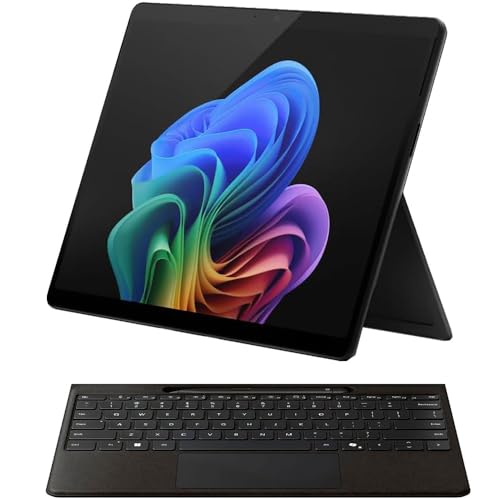
Microsoft Surface Pro 11 OLED Snapdragon X Elite — Flagship detachable, keyboard bundled
If the detachable idea has a flagship expression, this is it. The Surface Pro 11 in its OLED configuration pairs the Snapdragon X Elite with sixteen gigabytes of memory and a terabyte-class drive, and this particular listing bundles the Surface Pro Keyboard with it — the accessory that turns the tablet into the laptop replacement the format promises. Buying the bundle is not merely convenient; it removes the most common detachable mistake, which is owning the tablet for a month before admitting the keyboard was never optional.
The OLED screen justifies its position at the top of the range every evening. Films gain the deep blacks that make a small screen feel cinematic, photographs hold their shadow detail, and the dark interfaces of modern Windows look designed rather than rendered. By day the same panel handles documents without fuss, though its talents are wasted on spreadsheets alone. Underneath, the X Elite brings the Copilot+ feature set and the instant-wake, long-standby temperament that suits a machine constantly picked up and put down. The standing condition applies: mainstream software flies, elderly or exotic Intel-only software needs checking, and drivers for old peripherals are the usual cliff edge.
Storage is where this configuration quietly outthinks its siblings. A terabyte means the local photo library, the offline media for a long trip and a serious application set coexist without the weekly eviction ritual that 256GB owners know too well. For a machine bought to be a primary computer, that headroom is not indulgence; it is the difference between a tablet that happens to run Windows and a computer that happens to detach.
- Panel: 13-inch OLED touchscreen
- Chip: Snapdragon X Elite
- RAM / SSD: 16GB / 1TB
- System: Windows 11, Copilot+ PC
- Bundle: Surface Pro Keyboard included
Strengths
- The complete detachable system in one purchase — no accessory limbo in the first month.
- OLED panel and terabyte storage make it credible as a sole, primary computer.
- Snapdragon efficiency suits the pick-up-and-go rhythm the format was invented for.
Trade-offs
- Flagship configuration means flagship money, especially against the LCD Pro 11 below.
- ARM compatibility homework remains the buyer’s responsibility for older software.
- Its screen talents are underused by a purely documents-and-email workload.
Best for: a primary-computer workload run entirely on the detachable — OLED panel, terabyte storage and the keyboard bundled in the same order. Not suited for: a value hunter, or anyone whose essential software refuses to run on ARM Windows.

ASUS ROG Flow Z13 (2025) Ryzen AI MAX 390 — Gaming detachable
The Flow Z13 is the detachable that wandered in from a different party. Where every Surface here is a productivity machine that can play, the Z13 is a gaming machine that can work: a 13-inch ROG Nebula display running at 180Hz with a 2.5K resolution, an AMD Ryzen AI MAX 390 processor with RDNA 3.5 integrated graphics, 32GB of fast LPDDR5X memory and a terabyte of PCIe Gen 4 storage. On paper those are gaming-laptop numbers. In person they arrive in a tablet with a detachable keyboard, which remains a slightly startling sentence to write.
The point of all that power in this shape is flexibility of venue. The same machine plays on a desk with a controller, travels in a bag at a weight no gaming laptop matches, and props itself on its kickstand for a film in a hotel room. Integrated graphics have become genuinely capable, and the Ryzen AI MAX platform is the current proof — modern games at sensible settings are this machine’s home territory, not a stretch goal. Heat and fan noise under full gaming load are the physics tax; a tablet chassis dissipates enthusiasm as readily as heat, and long sessions belong on a desk where air can move.
As a work machine it is quietly formidable — 32GB of memory is the most in this guide, and Windows 11 Home covers the mainstream software world. It is simply an expensive way to buy a word processor. Buy it because the games matter, and let the productivity come as a dividend.
- Panel: 13-inch ROG Nebula 2.5K, 180Hz, 3ms
- Chip: AMD Ryzen AI MAX 390, RDNA 3.5 graphics
- RAM / SSD: 32GB LPDDR5X / 1TB PCIe Gen 4
- System: Windows 11 Home
- Connectivity: Wi-Fi 7
Strengths
- Real gaming performance in a detachable body — a combination nothing else in this guide attempts.
- The 180Hz display flatters fast games and makes even desktop motion feel unusually fluid.
- Memory and storage are specified like a gaming laptop, not trimmed like a tablet.
Trade-offs
- Gaming loads bring fan noise and heat that slim productivity detachables never produce.
- Battery life under play is measured in a session, not a working day.
- Windows Home rather than Pro may matter to business buyers needing Pro features.
Best for: a player who travels and wants one machine that games properly and still attends meetings. Not suited for: a silent-office devotee, or a buyer whose heaviest load is a spreadsheet.

Microsoft Surface Pro 12-inch 512GB Violet — Compact current-generation Surface
This is the configuration readers ask about after handling both sizes in a shop: the smaller Surface Pro, but without the small storage. The 12-inch body carries the Snapdragon X2 Plus platform — the newest Surface silicon generation — with 16GB of memory and 512GB of storage, and this listing finishes the machine in Violet, a colour that signals the machine is a personal computer rather than issued equipment. The size difference from the 13-inch models reads trivially in a specification table and feels decisive in a handbag, a seat-back pocket or a crowded lecture bench.
What the smaller body does not surrender is the working experience. The keyboard is full-width enough for real writing, the screen is large enough for a document beside a browser, and the platform’s efficiency means the charger can stay in the hotel room on day trips. The 512GB tier is the detail that makes this configuration the grown-up one: the entry storage tier of the 12-inch line assumes a cloud life, while this machine keeps a local library happily. If your files live with you rather than above you, this is the small Surface to buy.
Its compromises are the family’s compromises — ARM software checking for older programs, accessories priced separately, a kickstand posture that loves desks more than laps. Within those, it is arguably the most balanced detachable Microsoft currently makes: newest platform, portable body, honest storage.
- Panel: 12-inch touchscreen
- Chip: Snapdragon X2 Plus
- RAM / SSD: 16GB / 512GB
- System: Windows 11, Copilot+ PC
- Finish: Violet
Strengths
- Newest-generation platform in the most carry-friendly Surface body.
- The 512GB configuration removes the cloud-only assumption of the entry model.
- A colour finish with actual personality, rare in a category of black and platinum.
Trade-offs
- Keyboard and pen remain separate purchases on top of the tablet.
- Side-by-side document work is tighter than on the 13-inch Pro models.
- The Snapdragon platform still asks for a legacy-software check before buying.
Best for: a mobile professional who wants the current Surface generation in the smaller body, with storage that does not demand cloud faith. Not suited for: a big-screen multitasker, or a buyer counting on Intel-only legacy tools.

Microsoft Surface Go 4 128GB — Small and genuinely portable
The Go 4 is the detachable for the hours when a 13-inch machine is simply too much object. At 10.5 inches it is the size of a trade paperback with ambitions, and it runs in this configuration with 8GB of memory, 128GB of storage and Windows 11 Pro — a business-grade system in a body that fits the bags people actually carry on trains, ward rounds, site visits and school runs. It is not a small laptop replacement so much as a Windows computer for the gaps in the day.
Judge it by gap-sized work and it shines: notes in a meeting with the pen, a rounds list updated at a bedside, a boarding pass and a film, a till or a checklist at a market stall, homework at a kitchen table. Judge it by desk-sized work — a day of spreadsheets, a video edit, twenty browser tabs of research — and its modest memory and storage announce themselves. That is not a flaw in the machine; it is the machine’s definition. The Go line exists because Microsoft’s own customers kept asking for the Surface idea at the size of the original tablet idea.
The Pro edition of Windows in a device this small is a quiet gift for managed environments: schools and clinics can deploy it with the same tools as their larger Surfaces. For a household, the same build simply means the fuller feature set is present. Either way, this 128GB configuration is the sensible Go — the smaller storage tier asks too much faith of its owner.
- Panel: 10.5-inch touchscreen
- Memory: 8GB RAM
- Storage: 128GB
- System: Windows 11 Pro
- Finish: Platinum
Strengths
- Genuine smallness — the only pick that disappears into small bags and big coat pockets’ worth of space.
- Windows 11 Pro makes it deployable in schools, clinics and businesses, not just living rooms.
- The detachable format at its most tablet-like, with pen notes as a natural use.
Trade-offs
- Memory and storage suit light work; heavy multitasking will find the ceiling quickly.
- The small screen punishes long document sessions and side-by-side layouts.
- Its keyboard, sold separately, is snug for large hands and long manuscripts.
Best for: note-takers, field staff, students and travellers whose computing happens in short, mobile bursts. Not suited for: anyone shopping for a sole, desk-bound primary computer.

Microsoft Surface Pro 11 LCD Snapdragon X Plus — The sensible Pro 11
Every flagship range has a configuration that reviewers call the smart money, and in the Pro 11 line it is this one. The screen is a 13-inch LCD at 2880 by 1920 with a 120Hz refresh rate — fluid, sharp and colour-honest — while the processor steps from the Elite to the ten-core Snapdragon X Plus, with 16GB of memory and 512GB of storage beneath Windows 11 Pro. Nothing in that sentence is a compromise a working day would notice; it is the OLED panel and the top chip tier that have been declined, and both are luxuries rather than necessities for document-centred work.
The LCD panel even holds one advantage beyond price logic: for buyers sensitive to the characteristics of OLED at low brightness, or who simply prefer the familiar look of a good LCD for text, this is the more comfortable screen. The 120Hz refresh keeps pen strokes and scrolling feeling immediate, which matters more to daily satisfaction than panel technology arguments conducted in showrooms.
Choose it when the work is writing, research, administration and calls — which is to say, most professional work — and let the OLED bundle above tempt only those whose evenings are films and photographs. The money difference buys the keyboard, the pen and a hub with room to spare, which is a trade this guide endorses openly.
- Panel: 13-inch LCD touchscreen, 2880 x 1920, 120Hz
- Chip: Snapdragon X Plus, 10-core
- RAM / SSD: 16GB / 512GB
- System: Windows 11 Pro
- Finish: Black
Strengths
- The Pro 11 experience with the two most expensive luxuries removed and nothing essential lost.
- A high-refresh LCD that suits text work and long reading days comfortably.
- Windows 11 Pro included, suiting professional and managed use out of the box.
Trade-offs
- Films and photographs lack the OLED model’s contrast drama.
- The X Plus trails the Elite in heavy bursts, though everyday work rarely shows it.
- Still a Snapdragon machine — the legacy software inventory comes first.
Best for: a professional whose detachable life is documents, calls and research, bought with a whole-system budget in mind. Not suited for: a photo-first buyer, or someone who simply wants the flagship because it is the flagship.
Dell Latitude 7350 Detachable (prose-only) — Business detachable, renewed route
The Latitude 7350 Detachable is the machine corporate IT departments bought when their staff asked for a Surface that behaved like a Dell fleet asset — Intel-based, manageable, serviceable, with a detachable keyboard and a businessman’s indifference to glamour. On the merits it belongs in any detachable conversation. It appears here without a link for one specific reason that deserves no varnish: every Amazon listing we verified for it is renewed stock. The machines on sale are former fleet units, refurbished and resold, and that is a different purchase from the new Surfaces above — different warranty, different battery history, different expectations.
None of that makes it a bad buy; it makes it a buy with homework. A renewed Latitude from a refurbisher who grades honestly, warrants the battery and accepts returns can be the smartest money in this entire guide — Intel compatibility, business build and detachable convenience at a fraction of fleet prices. Bought carelessly from a listing that hides its renewed nature in fine print, it can equally be a disappointment with a worn battery and a keyboard photographed more flatteringly than it types. The checklist in the guide section below exists for exactly this purchase.
Our recommendation is structural rather than enthusiastic or dismissive: if the Latitude’s business virtues are what you need, buy it through Dell’s own channels or a refurbisher you can interrogate, and treat marketplace listings as renewed from the first glance — because, on the evidence of the listings themselves, they are.
- Format: Intel business detachable with detachable keyboard
- Channel: Dell direct or refurbisher — Amazon listings verified as renewed
- System: Windows 11 Pro class business build
- Buyer homework: battery warranty, grading, returns policy
- Link status: prose-only, deliberately unlinked
Strengths
- Fleet-grade manageability and Intel compatibility in a true detachable body.
- The renewed market prices it far below comparable new business hardware.
- A serviceability mindset rare among sealed consumer tablets.
Trade-offs
- Renewed means a previous life — battery wear and cosmetic grading vary by unit.
- Warranty depth depends entirely on the refurbisher you choose.
- No verified new Amazon listing exists to link, so the buying route takes more effort.
Best for: a confident value buyer who reads refurbishment terms carefully and wants Intel business hardware cheaply. Not suited for: a gift purchase, or any order that must arrive as sealed new stock under a full manufacturer’s warranty.
Where Does the ThinkPad X12 Detachable Fit Into This Picture?
Lenovo’s ThinkPad X12 Detachable occupies the same honest footnote as the Latitude. ThinkPad loyalists love it for the keyboard lineage and the business build, and Gen 2 machines circulate through corporate channels — but on Amazon it stands on the same renewed-or-absent footing as Dell’s detachable: no clean new machine listing for us to link, and Gen 1 units offered as renewed stock. It is therefore a guide-text mention rather than a pick, named so that ThinkPad readers know their machine was considered and understand exactly why it is not linked.
The pattern generalises into a rule of thumb for this category. Consumer detachables — Surface, the ASUS machines — are sold new through ordinary retail. Business detachables are sold new through manufacturers and corporate resellers, and reach marketplaces mainly when fleets retire them. A shopper who understands that map stops being confused by it: the renewed Latitude and X12 listings are not scams or bargains by nature, they are fleet exits, and they should be priced and interrogated as such.
How Should You Read a Renewed Detachable Listing?
Start with the refurbisher’s identity and the warranty’s fine print, in that order. A named refurbisher with a stated warranty period, a battery commitment and a returns window is selling a product; an anonymous listing with a stock photograph is selling a lottery ticket. Battery language deserves particular attention, because a detachable’s battery is sealed inside the tablet half and a tired one cannot be swapped at a kitchen table — look for an explicit capacity or health guarantee rather than the phrase “tested working”, which promises only that the machine switched on.
Then read the cosmetic grading against the reality that a tablet is all screen. A grade that permits scratches you would forgive on a laptop lid may describe marks across your entire working view on a detachable. Ask what the grade means on the display specifically. Check the keyboard’s inclusion twice — fleet detachables are often separated from their keyboards in resale, and a listing photographed with keys may still ship without them. Finally, confirm the charger is the correct wattage; underpowered substitute chargers are the quiet tax of the renewed market, slowing charging and sometimes throttling the machine they feed.
Detachable, Convertible or Tablet-Plus-Laptop: Which Split Suits You?
The detachable’s rivals are not other detachables but other answers to the same problem. A convertible laptop keeps its keyboard permanently, gains lap stability and ports, and pays for them with weight in tablet mode and a hinge that never truly disappears. Carrying two devices — a light tablet for reading and media, a laptop for work — buys the best of both at the price of syncing, charging and insuring two things. The detachable’s pitch is that one machine, honestly compromised in both directions, beats two machines or one heavier one for people whose days genuinely alternate between reading posture and writing posture.
The deciding evidence is your calendar. Count last week’s hours: if most computing happened at one desk, a convertible or a laptop serves you better and this guide is a pleasant detour. If your computing scattered across trains, sofas, sites and meeting rooms, with reading and annotating rivalling typing, the detachable’s compromises are the ones shaped like your life. Formats do not fail people in the abstract; they fail on Tuesdays, in specific chairs, and the honest buyer shops for Tuesdays.
What Is the Pen Experience Like Across These Machines?
Pen support is the detachable’s second language, and fluency varies more than the specification sheets admit. On the Surface models the pen story is mature: the slim pen charges in its keyboard cradle or its own dock depending on configuration, handwriting recognition is woven through Windows itself, and applications from OneNote to professional illustration tools assume the hardware. The experience that sells people is mundane — circling a figure in a PDF during a call, signing a contract without printing it, sketching a diagram that would take ten sentences to describe. Those small acts, repeated daily, are where the pen earns its price.
The Go 4 makes the same argument at pocket scale, and for pure note-taking its smaller canvas is barely a limitation; lecture notes and meeting scribbles do not need thirteen inches. The Flow Z13 supports pen input too, though its audience reaches for a controller more often, and the renewed Latitude’s pen support depends on the unit and the bundle it retired with — one more line for the renewed buyer’s checklist, since a fleet machine separated from its pen arrives as a finger-only tablet.
Honesty requires the counterweight: a meaningful minority of detachable owners never unclip the pen after the first month. Handwriting is a habit, not a feature, and if your notes have been typed for a decade they will probably stay typed. The pen decision should follow evidence — if you annotate documents, mark up drawings, sign forms or think on paper, budget for it gladly; if you are buying it for an aspirational sketching practice, borrow the discipline of waiting a month and see whether the wish survives.
How Do Detachables Behave in Real Workplaces?
Watch a ward round, a building inspection or a warehouse audit and the detachable’s logic becomes visible. The tablet half walks; the keyboard waits. Forms are tapped and signed at the point of work, photographs attach themselves to records on the spot, and the machine that returns to the desk at noon is carrying the morning already documented rather than awaiting transcription. The Go 4 was practically designed in those corridors, and the larger Surfaces serve the same rounds for staff who also write reports between them.
In offices the pattern inverts. The detachable lives docked or keyboard-attached through the day, and its tablet nature emerges in meetings — passed across a table, carried to a whiteboard, annotated live. That meeting behaviour is the reason many professionals tolerate the format’s desk compromises: a laptop creates a barrier and a typing soundtrack in a meeting, while a flat tablet on the table reads as a notebook rather than a barricade. Managers notice the difference even when they cannot name it.
Classrooms split the difference. Teachers value a machine that demonstrates from anywhere in the room and then becomes the register, the planner and the marking desk; students value the reading posture for texts and the writing posture for essays in a single bag-weight. The renewed business machines find second lives here too, since a school buying thirty Latitude detachables through a refurbisher is making a budget decision that deserves respect rather than pity — provided the batteries are warranted, because a classroom of tired batteries is a timetable problem by October.
What Should You Check in the First Fortnight of Ownership?
Use the return window as a testing programme rather than a countdown. In week one, deliberately work in each posture you bought the machine for: a full desk day, a sofa evening, a train or café session, a meeting with the tablet flat. Kickstand wobble, keyboard flex and screen size all reveal themselves under real work and hide under showroom handling. Test the pen on your actual documents, charge the machine from your actual travel charger, and plug in your actual printer or dock — detachables are systems, and systems fail at their joints.
Week two belongs to the software inventory. Install and genuinely use the oldest and strangest programs in your working life, on Snapdragon machines especially; a title that opens is not necessarily a title that prints, exports or syncs. Check sleep behaviour across a weekend, because a detachable that wakes hot and half-drained in a bag on Monday has a configuration problem worth solving while support is attentive. None of this is pessimism — it is how a format with more moving parts than a laptop gets the fair trial it deserves.
Five Detachables and One Refurbished Route: How Do They Line Up?
| Pick | Screen | Platform | RAM / Storage | Character |
|---|---|---|---|---|
| Surface Pro 11 OLED bundle | 13-inch OLED | Snapdragon X Elite | 16GB / 1TB | Flagship, keyboard included |
| ASUS ROG Flow Z13 (2025) | 13-inch 2.5K 180Hz | Ryzen AI MAX 390 | 32GB / 1TB | Gaming first, work second |
| Surface Pro 12-inch Violet | 12-inch | Snapdragon X2 Plus | 16GB / 512GB | Compact, current generation |
| Surface Go 4 128GB | 10.5-inch | Intel, Windows 11 Pro | 8GB / 128GB | Smallest, lightest duty |
| Surface Pro 11 LCD | 13-inch LCD 120Hz | Snapdragon X Plus | 16GB / 512GB | Sensible flagship alternative |
| Dell Latitude 7350 Detachable (prose-only) | Business detachable class | Intel | Varies by renewed unit | Fleet route, renewed only |
The table’s most honest row is the last one: varies. Renewed hardware cannot be specced like new hardware because each unit carries its own history, and any comparison that pretended otherwise would be fiction. Compare the five new machines by platform and screen; compare the renewed route by refurbisher and warranty.
What Does the Whole Detachable System Really Cost to Own?
The sticker on the tablet is the down payment, not the price. A working detachable system includes the keyboard, usually the pen, a hub or dock, a case or sleeve and — across a long ownership — possibly a replacement keyboard when the first one’s keys shine and its hinge loosens. Tallying that system honestly is the single most useful exercise in this guide, because it rearranges the apparent ranking: a bundled Pro 11 that looked expensive can undercut a cheaper tablet once the rival’s accessories are added at retail, and the LCD Pro 11’s savings become real only if they are actually banked rather than spent twice.
Ownership costs also hide in the renewed column, in the opposite direction. The renewed Latitude’s low entry price must carry a contingency: a replacement battery service in year two, a keyboard bought separately if the unit arrives without one, perhaps a fresh charger. None of these are reasons to avoid the route — the total usually still undercuts new business hardware handsomely — but a buyer who budgets the contingency owns the machine calmly, while a buyer who spent to the last penny on the unit itself meets each small cost as a grievance.
Resale belongs in the ledger too. Surfaces hold their value in a way smaller-brand detachables do not, because the accessory ecosystem and the name keep second-hand demand warm; a well-kept Pro with its keyboard is an easy sale at upgrade time. The gaming Z13 has its own enthusiastic second-hand market. None of this should decide a purchase by itself, but across a four-year ownership the machine that costs more and resells for more can be the cheaper companion — arithmetic worth doing before, not after.
What Goes Wrong Most Often When People Buy a Detachable?
Expecting laptop lap-ability is the classic first-week disappointment. A kickstand needs a surface of roughly its own depth, and on knees, duvets and narrow train tables the detachable wobbles where a clamshell sits calmly. Owners adapt — a book or a lap desk appears — but buyers who know in advance adapt happier. The second error is keyboard deferral: the tablet arrives, the keyboard is postponed, and within a fortnight the owner is shopping in frustration for the accessory that should have shipped with the machine. Bundle, or budget, but decide.
Third comes renewed blindness in both directions — buyers who never noticed a listing was renewed, and buyers who dismiss the entire renewed route and overpay for light duties a refurbished Latitude would handle for years. Fourth is pen theatre: buying the pen for an imagined sketching life that never arrives, while the annotating and signing uses that would have justified it go unconsidered. Buy accessories for the week you actually live. Finally, gamers should note the Flow Z13’s exception honestly — it is a wonderful machine whose battery under play is a gaming laptop’s battery, and planning a long flight around it requires a socket strategy.
How Do You Set Up a Detachable for Both Desk and Travel?
Give the desk a dock and the bag a hub, and let the tablet commute between two prepared environments. At the desk, a single USB-C dock connection delivers charge, a monitor and your peripherals together, so sitting down to work takes seconds. In the bag, a compact hub, the charger and a sleeve form the travel kit; the keyboard travels attached, the pen travels clipped or not at all depending on the day’s agenda.
Software setup mirrors the hardware split. Pin the applications for each posture — reading and annotation apps on the tablet home screen, the heavy document tools a click deeper — and configure the machine to behave differently with the keyboard attached and detached where Windows allows it. Owners who make these small arrangements in week one report the format feeling like two well-run devices; owners who never do often describe one device that is always slightly in the wrong mode. The detachable rewards a little stage management more than any other computer shape.
How Do the Screens Differ When the Work Is Reading?
Detachables are read from more than they are typed at, which makes their screens a working tool rather than a display case. The OLED Pro 11 renders text beautifully against true-black backgrounds in dark interfaces, and its contrast flatters long evening reading. The LCD Pro 11 answers with a 120Hz panel whose scrolling smoothness reduces the micro-fatigue of paging through long documents — a benefit readers feel without being able to name, in the way a good chair is felt. Neither is the wrong answer; they are optimised for different halves of the day.
The Flow Z13’s screen pursues motion above all — its 180Hz refresh is wasted on a static page and glorious in a game or a fast scroll through a drawing. The Go 4’s smaller panel asks a different question: not how rich the image is, but whether the text is at a comfortable size in the posture you are actually in. A 10.5-inch screen held at reading distance resolves that question surprisingly well, which is why small tablets persist in a market that keeps predicting their death. Judge screens at your reading distance, in your lighting, with your documents — showroom loops of tropical fish have never yet predicted a Tuesday with a spreadsheet.
What Battery Behaviour Should You Realistically Expect?
Detachable batteries live harder lives than laptop batteries, because the same cell powers the reading evening and the working day. The Snapdragon Surfaces have shifted expectations here — their standby behaviour means the machine sips rather than gulps when asleep, so a tablet put down on Friday is alive on Monday. Working endurance under documents, calls and browsing is a comfortable day for the Pro models; under the Flow Z13’s gaming loads, endurance contracts to session length, as it does on every gaming machine ever made.
The renewed route resets the question entirely. A refurbished Latitude’s battery is a component with a past, and its remaining health — not the model’s original specification — decides your day. That is why the renewed checklist in this guide treats the battery warranty as the headline term: a refurbisher who guarantees capacity is guaranteeing the machine’s usefulness, while one who will not discuss batteries is telling you something. Whatever you buy, the habits that preserve a sealed battery are unglamorous and effective: avoid living permanently at full charge on a dock, keep the machine out of hot cars, and let the battery work through its middle range on travel days.
Does Detachable Size Change the Kind of Work You Do?
Spend a month with each size class and a pattern emerges that no specification table captures: the machine’s size quietly edits your behaviour. The Go 4 gets carried to the garden, the site cabin and the child’s bedside story because carrying it is thoughtless; work that would have waited for a desk happens in the moment, in smaller pieces. The 13-inch machines get planned around — they are taken deliberately, set up deliberately, and used in longer, deeper sessions. Neither rhythm is superior, but they produce different working lives from identical software.
The 12-inch Pro sits at the hinge of that pattern, which explains its growing following. It is small enough to be taken on speculation — brought to a meeting that might not need it — and large enough that the meeting’s follow-up can be written on it without resentment. Buyers torn between the Go’s lightness and the big Pros’ authority are usually describing a 12-inch life without knowing the model exists. When in doubt, that middle size is the detachable category’s safest answer, and the one its owners most often describe, a year on, as the purchase they would repeat unchanged.
Final Recommendation
Start with the LCD Surface Pro 11 if your work is the ordinary professional mixture, because it is the detachable idea with the luxuries priced out and nothing important missing; step up to the OLED bundle when films, photographs or the simple wish for the flagship carry the argument. Take the smaller 12-inch Pro when luggage space outranks screen space, drop to the Go 4 if your computing genuinely comes in pocket-sized bursts, and let the Flow Z13 seduce you only if games are a real line in your week. Keep the Latitude 7350 in mind as the thinking person’s detour — renewed, Intel-honest and cheap through the right refurbisher. The detachable format rewards buyers who know their own posture habits; choose the machine that matches the chairs you actually sit in, and it will feel less like a compromise than like a custom fit. One last discipline is worth the whole guide in miniature: whichever name you choose, order the keyboard with the tablet rather than after it, because the detachable you test in the first fortnight should be the complete system you intend to keep — half a system can only ever give you half a verdict.
Frequently Asked Questions
Are detachable keyboards as good as laptop keyboards for long writing?
The best of them — the current Surface Pro keyboards — come close enough that most writers stop noticing within a week, helped by the fact that the keys themselves are full-sized. The differences live at the edges: a little more flex, a smaller trackpad, and the kickstand’s demands on your surface. For desk writing the gap is small; for sofa writing the laptop still wins.
Is renewed business hardware a safe buy?
It can be, from the right seller. A refurbisher who states a warranty, guarantees battery health, grades the screen honestly and accepts returns is running a real business, and fleet machines like the Latitude detachables were built to be serviced and to last. What is not safe is an anonymous listing with a stock photo and no battery language — the machine’s history is the product, so buy the seller first.
Can the Flow Z13 replace a gaming laptop entirely?
For a large library of modern games at sensible settings, yes — its integrated graphics are in a different league from ordinary tablet silicon, and the 180Hz screen is a genuine gaming display. The qualifications are thermal and electrical: long sessions want a desk and airflow, and battery-powered play is a short story. As a travelling gaming machine it has no real rival in this format.
Why is there no new Dell or Lenovo detachable to buy here?
Because the business detachable market does not sell that way. Dell and Lenovo move those machines new through their own stores and corporate resellers; what reaches Amazon is overwhelmingly the retired fleet stock, sold renewed. This guide links only verified new listings, so those machines appear as clearly labelled prose instead — with the buying route explained rather than hidden.
Does the Surface Go 4 make sense as a student’s only computer?
For a student whose course is reading, notes, essays and browsing, it is a charming and capable answer, especially with its keyboard attached and a pen for annotation. For coursework involving heavy software — engineering tools, large datasets, media production — its memory and storage will chafe by the second year. Match it to the syllabus, not the showroom. Parents buying for younger students should also weigh the renewed business route with care: a warranted Latitude detachable can be a sensible school machine, but only when the refurbisher’s battery promise is written down, because a school day is exactly the wrong place to discover a tired cell.
Can a detachable handle an external monitor and a full desk setup?
Comfortably, with the right hub. Every linked pick here can drive an external display over USB-C, and a hub with power pass-through turns arrival at a desk into a one-cable ritual: charge, screen, keyboard peripherals and storage together. The experience will not match a desktop for sustained heavy workloads, and multi-monitor arrangements vary by model, but for the documents-calls-browsing centre of professional life a docked detachable is a complete desk computer that happens to leave with you at six o’clock.
Who should not buy a detachable at all?
Anyone whose computing life is anchored to one desk, one chair and one large monitor gains nothing from a screen that separates, and pays for the privilege in lap stability and ports. The same goes for writers who work mainly on sofas and trains without tray tables, and for buyers who know they will never detach the keyboard — a convertible or a slim laptop serves that life better and usually cheaper. The detachable is a format for movers; stillness has better options.
Do detachable tablets hold up over years of daily attaching and detaching?
The connector systems on the Surface line are designed for exactly that rhythm, and fleet experience with business detachables suggests the mechanism outlasts the battery in most ownership stories. The parts that age visibly are the keyboard’s keycaps and hinge fabric, the kickstand’s tension, and the battery — in roughly that order. Treat the keyboard as a consumable with a long life rather than a permanent fixture, and the format’s durability stops being a worry. The kickstand hinge deserves a mention of its own: it is the hardest-worked joint on the machine, opened and closed many times a day, and the current designs have proven themselves across enough fleet years that a stiff, precise hinge at purchase is a reasonable promise of a stiff, precise hinge at year three.
Related Guides
For the broader Microsoft landscape, our guide to the best Microsoft Windows tablets covers the full Surface family and its rivals, while readers shopping the middle of the market should see the mid range Windows tablets we recommend. If the detachable shortlist has a budget-shaped hole in it, our inexpensive Windows tablets round-up shows what the lower tier does well.


