What's inside
- Where to buy
- Key Takeaways
- Quick Picks
- How We Chose These Picks
- Why Does the Ink System Matter More Than the Printer at College?
- How Many Pages Does a Student Actually Print in a Semester?
- What Should a Student Do in the First Week the Printer Arrives?
- How Do You Print Less Without Studying Worse?
- Why Does Paper Deserve a Paragraph in a Guide About Ink?
- What Happens to a Student Printer Over the Holidays and Summers?
- How Does the Choice Change for Postgraduates and Final-Year Students?
- A Semester of Printing, Priced in Ink Rather Than Hardware
- How Do You Set Up a Dorm Printer Without Becoming the Floor’s Print Shop?
- Which College Printing Mistakes Cost Students the Most?
- Final Recommendation
- Frequently Asked Questions
- Related Guides
As an Amazon Associate I earn from qualifying purchases. This post may contain affiliate links at no extra cost to you.
gizmoverdict.com is reader-supported. When you buy through links on our site, we may earn an affiliate commission.
Where to buy
Every machine in this guide is sold through a verified US Amazon listing, and a student reading those listings should perform one specific act of self-defence: scroll past the printer’s price — which this guide deliberately never quotes — and read the ink story instead, because the ink is where a college printer’s real cost lives. Check whether the machine drinks from bottles, toner or cartridges, check what the listing says about yields and subscriptions, and remember that the cheapest box in the aisle is very often the most expensive printer in the dorm by spring.
The best printers for college low ink are chosen on a single axis that this guide refuses to dilute: what a page costs, qualitatively, across four years of essays, readings, problem sets and the occasional desperate 2 a.m. syllabus. No figures are quoted anywhere in this article — prices swing with sales and semesters, and cost-per-page numbers depend on coverage habits no two students share — but the ranking of technologies does not swing at all. Refillable tanks are the cheapest pages in the business. A monochrome laser is next, with an asterisk for colour. Cartridge machines are the dearest pages here, and two of them are included anyway, honestly labelled, because their purchase price and their features genuinely suit the lightest printers in the student population.
The line-up, then: two Epson EcoTanks and a Canon MegaTank carry the tank argument at three sizes of commitment. A Brother monochrome laser carries the essay-factory argument. An HP DeskJet and a Canon PIXMA with a document feeder carry the cartridge confession — inexpensive to buy, expensive per page if you print like you mean it — and each is framed for the student whose printing is truly occasional. Read your own page count honestly before you read another word; this is the one guide where the buyer, not the machines, determines the right answer.
Key Takeaways
- Epson’s EcoTank ET-2803 is the default student answer: bottled ink, colour printing, scanning and copying in a dorm-sized all-in-one.
- Canon’s PIXMA G3270 MegaTank makes the same tank argument in Canon’s idiom, compact enough for a shared desk.
- Brother’s HL-L2460DW is a print-only monochrome laser — no scanner, no colour — and for essay-heavy courses its pages are nearly free and its text is impeccable.
- The EcoTank ET-2980 is the faster, longer-legged tank option, with automatic two-sided printing for students whose page counts run high.
- HP’s DeskJet 2855e is cheap to buy and honest to own only at very light volumes; its cartridges punish a heavy printing habit.
- Canon’s PIXMA TR4720 adds a document feeder and fax to the cartridge class — convenient, and still a cartridge machine underneath.
Quick Picks
| Pick | Badge | Why it is here |
|---|---|---|
| Epson EcoTank ET-2803 | Best Overall | Tank ink, colour, scan and copy — the complete dorm answer. |
| Canon PIXMA G3270 MegaTank | Best Tank Value | Canon’s refillable route in a compact, desk-friendly body. |
| Brother HL-L2460DW | Best Monochrome Laser | Print-only, black-and-white, and all the better at essays for it. |
| Epson EcoTank ET-2980 | Best With Long Ink Supply | A faster tank machine with two-sided printing for heavy semesters. |
| HP DeskJet 2855e | Best for Very Light Use | The lowest-commitment way to own colour printing at all. |
| Canon PIXMA TR4720 | Best With Document Feeder | Cartridge convenience plus a feeder for multi-page handouts. |
How We Chose These Picks
Ink economics led, and were judged qualitatively but rigorously: the technology’s cost character — bottle, toner or cartridge — weighed against a realistic student page count across a degree, not across a honeymoon month. Machines were then tested against dorm reality. Footprint matters where the desk is also the dining table. Wireless printing from a phone matters because half of student printing starts on a phone at midnight. A scanner matters because coursework still arrives on paper — handouts, signed forms, marked-up drafts — and the campus library’s scanner queue at deadline time is a tax no student should pay weekly. Duplex printing matters because readings are long and paper is a cost too.
Honesty rules were applied strictly in both directions. Cartridge machines were not excluded for their economics, because a student printing twenty pages a semester genuinely may never feel them; they were instead labelled with their true character, in their reviews, in plain language. The laser was not allowed to borrow a scanner it does not have. And no prices or per-page figures appear anywhere, because a number printed in a guide would be stale before the semester it describes had ended — the technologies’ ranking is the durable information, and it is given in full.
Why Does the Ink System Matter More Than the Printer at College?
Because college printing is a four-year subscription you choose once, disguised as a hardware purchase. The machine’s price is paid on one afternoon in August; the ink is paid in small, resentful instalments across eight semesters, usually at the worst possible moment — the night before a deadline, in the semester when the budget is thinnest. A tank printer inverts the emotional economics entirely: the ink arrives in bottles, in quantity, at a cost per page so low that printing a full reading stops being a decision. Students with tank machines print more, earlier, and with less stress, and those are studying advantages disguised as printer specifications.
The laser’s version of the same argument is durability of attention: a toner cartridge lasts a student so long that ink simply leaves the list of college anxieties, which is worth a great deal in a life with enough anxieties already enrolled. The cartridge machines argue the opposite case with a straight face — the lowest possible commitment today — and their argument is valid exactly as long as the printing stays light. Past a few hundred pages a year, the arithmetic quietly reverses, and the student who bought the cheapest box discovers they have been renting their printer from the ink aisle all along.
There is a behavioural footnote worth more than any specification: students print at the standard of their machine’s marginal cost. Tank and laser owners print drafts, annotate them, and print again — the single most effective study habit printing enables. Cartridge owners ration, read on screens, and submit first drafts of their thinking. Choose the machine whose marginal page you can afford to waste, because wasted pages are where the learning is.
How Many Pages Does a Student Actually Print in a Semester?
Fewer than first-years fear and more than final-years remember, and the distribution matters more than the average. The essay courses print in bursts — nothing for three weeks, then sixty pages in a night when drafts, readings and the final submission collide. The sciences print steadily: problem sets, lab protocols, lecture slides annotated by hand because the lecturer’s handwriting is a second textbook. The honest self-audit takes five minutes: count last semester’s printouts if any exist, ask an older student on your course, and then double the number for the deadline weeks, because printing demand is spiky and a machine must be sized for the spike’s ink supply even if its speed only needs to serve the average.
Two hidden page sources surprise every new printer owner. The first is other people: a dorm printer is a social resource, and flatmates’ essays will pass through it with or without a policy, so decide the policy — pages for pizza is the traditional exchange rate — before the first midnight request. The second is the course that suddenly requires a printed portfolio, a poster, a bound report; every degree has one, usually in the final year, usually discovered late. A tank or laser machine absorbs both surprises without a budget event. A cartridge machine turns both into negotiations, which is precisely the framing its review below gives it.
A third source hides in plain sight: the reprint. The page printed at the wrong size, the reading printed single-sided by a forgotten default, the essay printed before the last paragraph was pasted back in — student printing wastes a measurable fraction of itself to pure process error, and the waste is priced by the ink system like everything else. On a tank, a reprint is a shrug. On a cartridge machine at deadline time, it is a small financial event with a swear word attached. Low-ink ownership is therefore also error-tolerance ownership, and error tolerance, in a life run at midnight, is a study skill.

Epson EcoTank ET-2803 — Best Overall
The ET-2803 is the machine this guide would hand to the median student with no further questions, because it answers the college brief in full sentences. Cartridge-free supertank printing means the ink conversation happens once, at setup, with bottles — and then essentially stops for the kind of page counts a degree involves. Colour printing covers the diagrams, posters and presentation handouts that monochrome cannot. Print, copy and scan in one body covers the handout-digitising and form-returning chores of coursework. Wireless and mobile printing, including voice-activated options from its listing, cover the phone-first reality of student life. Speeds up to 10 pages per minute and a small colour display complete a specification with no dorm-relevant hole in it.
The deeper virtue is behavioural, and it was described in the guide above: a student whose marginal page costs nearly nothing prints drafts. The ET-2803’s owner annotates readings on paper, prints the essay at draft two instead of submitting draft one, and treats the printer as a study tool rather than a vending machine. Against that, the machine’s compromises are modest and known: no automatic two-sided printing, so long readings are flipped by hand or printed single-sided at paper cost; a pace that serves a student rather than a print shop; and an upfront price above the cartridge machines’, which is the entire economic point — the money is paid once, visibly, instead of forever, invisibly.
For shared housing it scales gracefully, too: the tanks make flatmate printing a trivial generosity rather than a metered utility, and the scanner turns one person’s purchase into the house’s document station. If a single recommendation must survive every major and every budget conversation with a parent, this is the one that does.
Longevity across the degree deserves the final word in its favour. A tank machine bought in the first autumn is not a consumable-chasing appliance by the final spring; its bottles are still the same bottles’ grandchildren, its scanner still digitises the dissertation’s appendix, and its owner has spent four years printing like a person for whom paper is a thinking tool. Students rarely remember what their printer cost. They remember, vividly, the night an ink cartridge ended a deadline — and ET-2803 owners simply have fewer of those memories to store.
- Type: supertank colour all-in-one — print, copy and scan
- Print speeds up to 10 ISO ppm
- 1.44-inch colour LCD
- Wireless, mobile and voice-activated printing
- Bottled ink, filled at setup
Strengths
- Ink stops being a recurring budget item almost immediately.
- Colour, scanning and copying cover the whole coursework brief.
- Dorm-sized footprint with phone-first wireless manners.
Trade-offs
- Manual two-sided printing only.
- Upfront cost sits above the cartridge machines, by design.
- Pace serves a student, not a society’s whole print run.
Best for: the median student, in any major, printing steadily for four years.
Not suited for: anyone whose total degree printing fits in a shoebox, who would never feel the tank’s advantage.

Canon PIXMA G3270 MegaTank — Best Tank Value
Canon’s MegaTank entry makes the same economic argument as the Epson in a slightly different accent, and students choosing between the two are choosing ecosystems rather than outcomes. The G3270 is a wireless all-in-one — print, copy, scan — with a refillable tank system, a compact desktop design aimed at home and small-office spaces, and Canon’s colour character, which generations of students have found pleasing for the diagrams, covers and occasional photographs that punctuate a degree. The tanks fill from bottles, the reservoirs show their levels, and the per-page economics settle into the same nearly-free territory as its rival’s.
Where it earns its own badge rather than a shared one is the combination of compactness and completeness for the price tier it inhabits — qualitatively the value end of the tank class, the machine for the student who has understood the ink argument but whose budget must also survive textbooks. It prints, scans and copies without asking the desk for much territory, and its wireless setup follows the modern pattern of app-guided painlessness. The compromises echo the class: no automatic duplex, a pace for personal rather than communal volume, and photo quality that serves coursework rather than portfolios.
Students already inside Canon’s world — a Canon camera, a family Canon at home whose ink logic is familiar — will find the G3270 the natural citizen. Students with no allegiance should simply note that the tank class has two excellent citizens and choose by desk, deal and disposition; the economics that matter are identical in spirit, and the degree will be graded on essays, not on which bottle filled the tank.
One constituency should lean Canon deliberately: the student in a shared programme house or society where a sibling Canon already lives, because shared knowledge — which bottle, which setting, which quirk — is a real feature in communal living, and the G3270 benefits from every scrap of it. Machines in student housing are maintained by folklore as much as by manuals, and joining the house’s existing folklore is worth more than a spec-sheet decimal.
- Type: MegaTank colour all-in-one — print, copy, scan
- MegaTank bottled ink system
- Compact desktop design for dorms and shared rooms
- Wireless printing from phones and laptops
- Front-visible ink levels
Strengths
- Tank economics at the class’s most approachable commitment.
- Compact body respects the dorm desk’s other jobs.
- Canon’s colour pleases in coursework and casual photos alike.
Trade-offs
- No automatic two-sided printing.
- Personal-volume pace, like its Epson rival.
- Photo output serves documents first, portfolios second.
Best for: budget-conscious students sold on the tank argument.
Not suited for: high-volume societies or duplex-dependent reading loads.

Brother HL-L2460DW — Best Monochrome Laser
Two disclosures shape this pick, and both are stated the way the machine would want them. It prints only in black and white. And it only prints — there is no scanner, no copier, nothing but a laser engine, a paper tray and duplex output in a compact box. For the right student, those two limitations are not compromises but clarity: the essay-heavy humanities student, the law or social-science reader, the anyone whose degree is made of text — that student’s printing life is monochrome prose at volume, and this Brother produces it with laser permanence, crisp type that survives highlighters and coffee, two-sided printing as standard, and toner economics that make a five-hundred-page semester a non-event.
The ownership experience is the laser class’s famous dullness, which students should read as praise. Toner lasts so long that ink leaves the worry list; the machine wakes and prints without the cleaning rituals inkjets perform; wireless and mobile printing cover the dorm’s devices; and the compact body fits the shelf that exists because the desk is full of books. The scanning gap is real and must be planned around — a phone’s scanning app handles the occasional handout honestly well, and the library exists for the rest — but it should be chosen knowingly, not discovered in week three when a signed form needs returning.
Against the tanks, the Brother trades colour and scanning for the lowest-effort text printing in the guide. Against the cartridges, it trades everything except printing for an ink bill that essentially never arrives. Students whose courses are colour-critical — design, architecture, the visual sciences — should pass it by with respect. Students whose courses are text should recognise it as the machine that was designed, with unusual precision, for them.
There is a graduation argument, too. The Brother is the machine most likely to follow its owner into the first job and the first flat, because text printing is the one printing need adult life guarantees, and a laser bought at nineteen can plausibly still be printing rental agreements at twenty-nine on its third cartridge of toner. The tanks share some of that longevity; the cartridge machines, bought for a semester’s lightness, rarely survive contact with a career. Cost per page is this guide’s axis, but cost per decade is the Brother’s closing argument, and it is a strong one.
- Type: monochrome laser printer, print only
- Black-and-white output only — stated plainly
- Automatic two-sided printing
- Wireless and mobile printing
- Compact body for dorm shelves
Strengths
- Text pages at toner economics, with professional crispness.
- Duplex as standard halves paper use on long readings.
- Laser indifference to idle weeks suits the academic calendar.
Trade-offs
- No colour, of any kind, ever.
- No scanner or copier — phone apps must cover the gap.
- Photographs and colour coursework are simply outside its world.
Best for: text-heavy majors printing essays and readings at real volume.
Not suited for: colour coursework, or anyone needing to scan from the same box.

Epson EcoTank ET-2980 — Best With Long Ink Supply
If the ET-2803 is the tank argument at its most accessible, the ET-2980 is the same argument with the volume turned up: a supertank all-in-one printing at up to 15 pages per minute, with automatic two-sided printing, borderless photo capability and the bottled-ink economics that define the family. It is the pick for the student whose page count is not median — the one printing the society’s posters, the shared house’s everything, the dissertation-year flood of drafts and readings — and who wants the ink supply and the pace to match that life without leaving the tank class’s forgiving economics.
The duplex addition deserves emphasis, because at student volumes paper is a real cost and a real weight: readings printed two-sided halve the paper bill, halve the bag weight, and halve the desk’s archaeology of loose sheets. Combined with the faster engine, the ET-2980 is the machine in this guide most comfortable being a small community’s printer — the flat, the society office, the study group’s corner — while remaining, at heart, a personal all-in-one with scanning and copying for the coursework chores. Its upfront commitment is the tank class’s higher step, and its size is a touch more present than its sibling’s; both are the honest price of the headroom.
Students deciding between the two Epsons should decide by trajectory, not by today. A first-year with unknown habits belongs on the 2803’s accessibility. A student who already knows their printing is heavy — because last year proved it, or because the course’s reading list is measured in reams — should buy the headroom once and enjoy four years of never thinking about it again.
Final-year students deserve a direct address here, because the dissertation semester is where printer choices are audited by reality. Drafts multiply, supervisors annotate on paper, the bibliography alone achieves novella length, and the binding deadline converts printing from a habit into a production. An ET-2980 in the house turns that semester’s printing into a logistics footnote. The same semester on a cartridge machine becomes a second dissertation, written in receipts — which is why this guide keeps steering volume toward tanks with the persistence of a tutor who has watched the alternative too many times.
- Type: supertank colour all-in-one — print, scan and copy
- Pace: up to 15 ppm on documents
- Automatic two-sided printing built in
- Borderless photo output for projects
- Ink: bottled, in large front reservoirs
Strengths
- Tank economics with the pace and duplex heavier printing demands.
- Two-sided readings halve paper costs and bag weight.
- Scales from personal printer to shared-house workhorse.
Trade-offs
- The tank class’s higher upfront step.
- Slightly larger presence on a small desk.
- Headroom a light printer will simply never use.
Best for: heavy-printing students and shared houses with real page volume.
Not suited for: light, occasional printing, where the smaller tank sibling suffices.
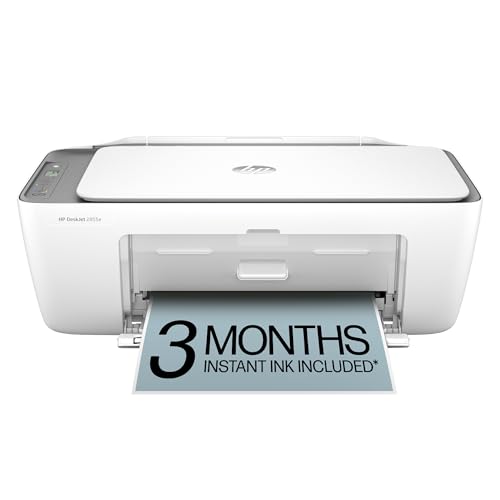
HP DeskJet 2855e — Best for Very Light Use
This review exists to make one honest distinction, and it will make it in the first paragraph so no student can miss it: the DeskJet 2855e is inexpensive to buy and expensive to feed. It is a cartridge all-in-one — print, scan and copy, wireless, app-friendly, genuinely pleasant to live with — whose ink arrives in cartridges that cost more per page than anything else in this guide by a wide margin. For the student who prints a boarding pass, a form and two essays a semester, that arithmetic never matters, and the DeskJet is the rational minimum purchase: colour available, scanning included, almost no commitment. For the student who prints readings weekly, it is a trap with good marketing, and this guide would rather say so than sell it.
Within its honest territory, the machine is likeable. Setup through HP’s app is the class’s friendliest, the body is small enough for any dorm corner, mobile printing behaves, and the scan-and-copy functions cover the coursework chores that a print-only laser cannot. HP’s subscription ink framing hovers over the model as an option — predictable deliveries for predictable light use — and students considering it should model their true page count first, because subscriptions reward honesty about volume in either direction. The DeskJet’s real specification is a question: how little do you actually print? Answered truthfully with a small number, it is a perfectly good answer. Answered hopefully, it becomes the most expensive machine on this page by Christmas.
Parents buying for a first-year should read this review twice, because the DeskJet is the machine most likely to be bought for them by a well-meaning relative seduced by the shelf price. If the student’s course is text-heavy, redirect the gift up the page to the tanks or the laser and perform a genuine act of financial kindness disguised as a printer upgrade.
There is one more honest niche to record before leaving it: the student whose accommodation forbids or frowns on personal printers in rooms — some halls do — and who therefore prints truly rarely, in a friend’s room or a society office, needing only a home base for the odd form and scan. Even there, the DeskJet’s lightness is its logic: a machine bought for twelve pages a year should cost like it. The guide’s objection was never to the DeskJet’s existence; it is to its mis-selling as a workhorse, and inside its true borders it works perfectly well.
- Type: cartridge colour all-in-one, print, scan and copy
- Wireless with app-guided setup
- Mobile printing for phones and laptops
- Compact body for any dorm corner
- Ink: cartridges — the guide’s dearest pages, stated plainly
Strengths
- The lowest-commitment route to owning colour printing and scanning.
- Setup and app experience are the friendliest here.
- Perfectly rational at genuinely tiny page counts.
Trade-offs
- Cartridge cost per page punishes any real printing habit.
- Small cartridges empty at deadline speed when volume spikes.
- No automatic two-sided printing.
Best for: very light printers — a handful of pages in a typical month.
Not suited for: readings, drafts and any course with a weekly print load.

Canon PIXMA TR4720 — Best With Document Feeder
The TR4720 is the cartridge class’s most complete citizen, and its review carries the same duty of honesty as the DeskJet’s: underneath the features, this is a cartridge machine, and its pages cost what cartridge pages cost. What the features add is genuine, though — an automatic document feeder on a compact all-in-one, with built-in fax for the one institution per degree that still demands it, mobile printing, and Canon’s friendly colour for the documents and occasional images of student life. The feeder is the headline: multi-page handouts, a chapter to digitise, a form stack to return — the chores that a flatbed turns into an evening, the TR4720 turns into a loading-and-leaving.
For the student whose printing is light but whose scanning is real — the one digitising society paperwork, returning signed documents for a placement, archiving a coursework portfolio — that combination has no rival at its commitment level in this guide. The tanks scan only from flatbeds at this tier; the laser does not scan at all; the DeskJet lacks the feeder. The TR4720 occupies the exact niche where convenience features matter more than page economics, and it occupies it completely. Its ink warning is the family’s: two-cartridge-era economics in spirit, where a heavy colour habit will make itself known at the checkout, so the student who prints readings daily should still graduate to the tank class and let this machine serve the feeder-led life it was built for.
Judge it, then, as a scanning-led convenience purchase with printing attached, priced in cartridges. Students who need the feeder weekly and the printer monthly will find it the most precisely aimed machine in the guide. Students who need the printer weekly should read its badge as a warning label wearing a feature’s clothes, and choose accordingly.
Placement and society officers, teaching assistants in training, the student who runs the club’s paperwork — these are the TR4720’s true constituency, and there are more of them on a campus than the printer industry seems to know. For them the feeder is not a luxury line on a box; it is the difference between an evening of page-turning at a flatbed and a stack loaded, scanned and filed before the meeting starts. If that sentence describes your semester, the cartridge warning above should be weighed, respected — and then, legitimately, set aside in favour of the machine that does the job your calendar actually contains.
- Type: cartridge colour all-in-one with fax
- Document feeder for hands-off multi-page scanning
- Wireless and mobile printing
- Print, scan and copy in a compact body
- Ink: cartridges — page costs sit in the guide’s highest class
Strengths
- The only feeder in this guide’s cartridge class.
- Scanning chores become load-and-leave rather than page-by-page.
- Compact, complete and easy to live with.
Trade-offs
- Cartridge economics cap its printing ambitions honestly.
- Heavy colour printing empties cartridges at pace.
- Fax will be a museum feature for most students.
Best for: light printers with real scanning chores — placements, societies, portfolios.
Not suited for: daily printing, where tank economics should already have won.
What Should a Student Do in the First Week the Printer Arrives?
Set it up before the first deadline does, because a printer configured in a calm week behaves in a frantic one, and a printer unboxed at midnight before a submission behaves like a midnight decision. Fill the tanks or load the cartridge, run the alignment the setup asks for, connect every device you own — laptop, phone, the tablet if it exists — and print one real page from each, so the first failure happens in peacetime. Print the course’s most standard artefact next: one reading, duplexed if the machine allows, at the settings you intend to live with, and save those settings as the default rather than rediscovering them per job.
Then perform the two acts of social setup. Tell the flat the machine exists and what the house rule is, while the rule can still be a friendly announcement instead of a grievance. And write the ink situation on a note inside the cupboard — what it drinks, where the spare bottle or cartridge lives, what to do when a colour runs low — because the person who needs that note in November may be a flatmate printing your essay while you are in the library, and the machine should be operable by the household it serves. Settled into the room’s routines that carefully, a student printer fades into invisible infrastructure by week four, which is the highest compliment student technology can earn.
How Do You Print Less Without Studying Worse?
Low-ink ownership is partly a machine choice and partly a set of habits, and the habits are worth printing on the inside of the cupboard door. Read on screen what you will only skim — announcements, drafts of other people’s work, the reading you are sampling to decide whether it matters — and reserve paper for the texts you will annotate, because annotation is where paper earns its ink. Print readings two pages to a sheet when the type allows it, and duplex whenever the machine offers it; a reading carried in a bag is half the weight and twice as likely to actually be carried. Use draft mode for everything that is not a submission, since a draft’s job is to be argued with in pencil, not to be framed.
The counter-habit matters just as much, and this guide will defend it against false economy: print the important drafts. The student who saves ink by never printing an essay is optimising the wrong budget, because the errors a screen hides — the repeated paragraph, the argument that circles, the conclusion that never arrives — announce themselves on paper in a way no scrolling matches. Tank and laser owners can afford this honesty by design. Cartridge owners should budget for it deliberately, the way they budget for books: a small, planned ink spend on the three drafts that matter each semester is the cheapest tuition in the degree.
Finally, share the library’s burden intelligently. Campus printing exists, costs money per page, and queues at deadlines — but for the one enormous job each year, the bound course reader or the poster run, it can still be the rational spillway that keeps a dorm machine in its comfort zone. Knowing which jobs to send out is the last low-ink skill, and it is learned the first time a student watches a hundred-page job crawl out of a home printer at midnight.
Why Does Paper Deserve a Paragraph in a Guide About Ink?
Because at tank and toner prices, paper quietly becomes the larger consumable, and students who optimised only the ink discover the ream is now the budget line that moves. The habits are simple and compound across a degree. Duplex everything that is not a submission — the ET-2980 and the Brother do it automatically, the others reward a manual flip for long readings. Buy paper by the ream in the boring multipacks rather than by the desperate hundred-sheet packet at the corner shop during deadline week, when paper is priced like a taxi in the rain. Keep the ream sealed and flat; dorm rooms are humid in the wrong seasons, and curled paper is jam-prone paper whatever the machine.
Quality discrimination saves the rest. One good sheet for the submission copy, ordinary stock for everything else, and draft mode’s lighter ink laydown for the pages destined for pencil and the bin. Students who run this two-tier paper system on a tank machine reach a state the cartridge world cannot imagine: a full semester’s printing, paper included, that costs less than the course’s set texts by an order of magnitude — which is the destination this entire guide has been steering toward.
What Happens to a Student Printer Over the Holidays and Summers?
The academic calendar is a printer’s harshest environment, because it alternates flood with drought: eight weeks of deadline printing, then eight weeks of silence in a vacated room. Inkjet heads dislike the drought — ink dries where it sits, and the first print of a new term can emerge striped until cleaning cycles spend ink restoring order. The defence is embarrassingly small: print one page before you leave, one page the week you return, and, if the room will be occupied by anyone at all over the break, leave the machine plugged in and awake rather than switched off at the wall, since idle printers perform quiet self-maintenance that unplugged ones cannot. Lasers, characteristically, shrug at the whole question — toner is a dry powder with no interest in the calendar — which is one more line in the Brother’s long argument for text-only lives.
Summer storage has its own etiquette. A machine going into a cupboard or a parents’ garage should travel upright, with tanks as the maker instructs and paper removed from the tray, because a ream left loaded all summer emerges curled and faintly damp-smelling, ready to jam the first reading of autumn. Students who treat the printer as term-time infrastructure rather than as furniture find it behaves as infrastructure: present, primed, and boring in September, exactly when boring is worth the most.
How Does the Choice Change for Postgraduates and Final-Year Students?
Volume and consequence both rise at the end of a degree, and the printer should be re-audited the way every other study tool is. The final-year student’s printing is dominated by drafts of one enormous document and the readings that feed it — a pattern that rewards duplex, pace and ink headroom, which is to say the ET-2980’s exact brief, or the Brother’s if the document is prose. The postgraduate’s printing adds teaching: handouts for seminars, marked work returned on paper, conference posters in draft. Teaching loads are communal loads, and a machine bought for one person’s essays will be quietly conscripted; postgraduates should buy for the conscription in advance and let the department’s printers carry only the overflow.
There is also a handover decision waiting at graduation that students rarely plan: the printer is one of the few possessions whose value to a successor is obvious and immediate. A tank machine with bottles remaining is a gift a younger student will remember; a cartridge machine with an empty colour is a liability wearing a power cable. Buyers choosing between near-equals in the first year might let that final act of generosity cast the deciding vote — the machine you would be proud to hand down is usually the machine that was right all along.
A Semester of Printing, Priced in Ink Rather Than Hardware
| Pick | Ink system | Colour | Scans | Page-cost character |
|---|---|---|---|---|
| Epson EcoTank ET-2803 | Bottled tank | Yes | Yes | Lowest class — print freely |
| Canon PIXMA G3270 MegaTank | Bottled tank | Yes | Yes | Lowest class — print freely |
| Brother HL-L2460DW | Toner cartridge | No — mono only | No | Lowest class for text pages |
| Epson EcoTank ET-2980 | Bottled tank | Yes | Yes | Lowest class, with headroom |
| HP DeskJet 2855e | Ink cartridges | Yes | Yes | Highest class — light use only |
| Canon PIXMA TR4720 | Ink cartridges | Yes | Yes, with feeder | Highest class — features justify it |
The page-cost column is the whole guide in one glance, and it divides the six into two civilisations. In the first, the marginal page is so cheap that printing behaviour can be governed by studying rather than by budget. In the second, the marginal page is a small purchase, and the machines earn their place only where the purchase stays rare or the features — a feeder, the lowest possible commitment — are what is really being bought. No row is a mistake; rows are only mismatched to readers, which is why this guide insists on the page-count self-audit before any of them.
How Do You Set Up a Dorm Printer Without Becoming the Floor’s Print Shop?
Connect it to the network the way the manual suggests, then immediately make three decisions the manual will not make for you. Decide who may print: an open dorm printer accumulates strangers’ essays and empties itself in other people’s deadlines, so use the printer’s own access controls or keep it on your room’s network habits rather than the building’s. Decide where the paper lives and whose it is, because paper is the consumable flatmates actually steal, innocently, at midnight. And decide the house rule for guests’ printing before the first request, while it is still a policy and not a precedent.
Placement is the second half of the setup. A printer on the desk is a printer that vibrates through your essay at 1 a.m. when a flatmate’s job lands; a printer on a shelf across the room is furniture that occasionally produces pages. Keep it away from the kettle’s steam and the window’s damp, feed it one full ream the day it arrives, and run the alignment and test pages before the first real deadline discovers them for you. Finally, save the course’s standard settings — duplex where the machine has it, draft mode for throwaway drafts, best quality reserved for submissions — as the defaults, so the machine’s everyday behaviour is already the behaviour your budget would have chosen.
Which College Printing Mistakes Cost Students the Most?
Buying the cheapest box in the shop is the champion, and this guide has spent six reviews explaining why: the shelf price is the smallest payment a cartridge printer ever collects. Second is printing slides six-to-a-page in colour at full quality, a habit that converts a lecture series into an ink event; the draft modes and handout layouts exist precisely for material you will annotate and discard. Third is discovering the scanner’s absence — or the colour’s absence — at the moment a placement form or a design critique demands it, which is why the Brother’s review states its limits in its first breath and why every buyer should rehearse their course’s actual demands before, not after, the purchase.
The quietest mistake is subscription drift: an ink subscription begun for a heavy first semester, silently continuing through a light year abroad, or cancelled in a huff the week before the dissertation prints. Subscriptions are tools for predictable volumes, and student volumes are the least predictable in the world. Review the arrangement each semester, alongside the module choices, and let it earn its renewal the way everything else in a student budget must.
And a word for the mistake nobody confesses in September: buying for the student you intend to become. The cartridge machine bought by a future light printer who turns out to be a readings annotator, the laser bought by a future essayist who switches to a design course in October — intentions are not data. Where the course is genuinely undecided, the tank all-in-ones are the insurance policy, because they are the only class here with no failure mode: colour present, scanner present, pages cheap, whatever the degree turns out to be.
Final Recommendation
For most students, buy the tank and stop thinking about printers for four years: the Epson EcoTank ET-2803 is the complete, colour, scan-and-copy answer, the Canon PIXMA G3270 is its value-flavoured twin in Canon’s accent, and the EcoTank ET-2980 is the same peace of mind with pace and duplex for the genuinely heavy printer. Text-only students should take the Brother HL-L2460DW and its toner-fuelled serenity, accepting its missing scanner with open eyes and a phone app in reserve. The two cartridge machines are recommended narrowly and proudly: the DeskJet 2855e for the student who truly prints almost nothing, the PIXMA TR4720 for the light printer whose scanning chores deserve a feeder — both honest machines, both expensive per page, both correct only inside their stated borders. A degree contains enough unavoidable expenses; the printer should be the one that was solved, properly and permanently, in the first week of the first year.
Solve it, and a small miracle of student life follows: the printer disappears. It stops being a topic, a cost, a midnight risk, and becomes what the kettle and the desk lamp already are — equipment whose existence is noticed only in the week it is lent to a friend and the flat discovers how much of its paperwork had quietly been flowing through it. That invisibility, sustained across four years of deadlines, library queues avoided, flatmates rescued and drafts actually printed, is the true low-ink achievement, and every machine at the top of this guide was chosen because it can deliver it — quietly, cheaply, reliably, and on the nights when nothing else about student life is cooperating.
Frequently Asked Questions
Why does this guide quote no prices or cost-per-page figures?
Because both move — with sales, seasons and ink coverage habits — faster than a guide can stay honest. What does not move is the technologies’ ranking: bottled tank ink and toner produce the cheapest pages, cartridges the dearest. Judge machines by that durable ranking and check the day’s listings for the numbers themselves.
Tank or laser for an essay-based degree?
Both serve text beautifully. The laser prints nothing but text, perfectly and at toner cost, with no scanner attached. The tanks add colour and scanning at the same class of page cost. Essay students who also scan handouts belong on a tank; essay students who only ever print prose can take the Brother and its simplicity.
Is a cheap cartridge printer ever the right buy?
Yes — when the printing is genuinely rare. A student whose degree lives on a laptop and who prints a form a month will never print enough for cartridge economics to bite, and the DeskJet’s low commitment is then rational. The error is not buying one; it is buying one for a reading-heavy course.
Do I need a scanner at college?
More often than first-years expect: handouts, signed forms, marked drafts, placement paperwork and society documents all arrive on paper. A phone scanning app covers the occasional page honestly; students facing regular multi-page scanning should want a real scanner, and the feeder-equipped TR4720 or any tank all-in-one earns its shelf that way. The student who has never needed one by the final year has simply been lucky in their paperwork, and luck is not a specification to buy for four years on.
Can I share one printer between a whole flat?
Yes, and the tank machines and the Brother laser are built for exactly that truce — their page costs make generosity painless. Agree the paper and ink etiquette in week one, place the machine in shared territory, and the flat gains a document station instead of a recurring negotiation. One practical addition: keep a small shared fund or a rotating paper-buying duty, because the consumable a flat shares worst is not ink but the last of the paper, discovered empty at midnight by whoever did not finish it.
What about printing photographs for a portfolio course?
None of these six is a portfolio printer, and the guide will not pretend otherwise: they serve coursework, where colour means diagrams and covers. Visual-arts students should budget separately for the campus print service or a photo-class machine, and buy from this guide only for the everyday pages around the portfolio. That division is not a failure of these machines; it is the same specialisation logic that keeps a racing bike out of a guide to commuting, and respecting it saves the portfolio student from discovering at assessment week that coursework colour and portfolio colour were never the same discipline.
Related Guides
Student budgets meet paper in other rooms too: our guide to printers for home scanning and family archives covers the household these students will return to, the comparison of photo and sticker printers for creative projects serves the society poster and the dorm wall, and the comparison of printers for running a small craft business awaits the graduate whose side project becomes a shop.



[…] of photo printers for pictures and sticker projects for the smaller formats, and our round-up of printers for Cricut-based craft work if the practice extends into cut […]