What's inside
- Key Takeaways
- Quick Picks
- How Did We Choose These Picks?
- Why Do Trail Cameras Stop at 32GB?
- Why Is Formatting in the Camera the Golden Rule?
- How Much Card Does a Deployment Actually Use?
- Do Cellular Trail Cameras Change the Card’s Job?
- Does Card Speed Affect Trigger Speed or Photo Quality?
- How Do Batteries and Cards Fail Together?
- How Should You Protect Cards From Weather, Theft and Loss?
- How Do You Organise a Season of Images Without Losing the Story?
- How Do the Six SDHC Cards Compare Pack by Pack?
- How Should You Run the Card Swap in the Field?
- What Mistakes Do Trail-Cam Owners Keep Making?
- Should Your Deployment Choose 16GB or 32GB?
- What Reader or Viewer Should Carry the Images Home?
- How Do You Troubleshoot a Card Problem at the Tree?
- What Changes When the Camera Watches Property Instead of Game?
- Final Recommendation
- Frequently Asked Questions
- Related Guides
As an Amazon Associate I earn from qualifying purchases. This post may contain affiliate links at no extra cost to you.
gizmoverdict.com is reader-supported. When you buy through links on our site, we may earn an affiliate commission.
Where to buy: Each pick below links to its Amazon listing, where you can confirm the pack count and capacity in the variant selected, because several of these products are sold in multiple pack sizes under one listing. Check the card size in the title carefully: this category lives on full-size SDHC cards, and a microSD listing wearing similar artwork is a different product that your camera may not accept natively.
The search for the best trail cam sd cards breaks the first rule shoppers bring from every other camera category: bigger is not better here, and faster is barely relevant. Most trail cameras were designed around the SDHC standard and accept cards up to 32GB; many reject SDXC media outright, either refusing to recognise a 64GB or larger card or behaving erratically with one. Inside that ceiling, the winning card is not the quickest or the cleverest. It is the card that formats cleanly in the camera, survives months strapped to a tree, and can be swapped in cold, gloved hands without a thought, which is why every pick in this guide is a modest full-size SDHC card and why half of them arrive in multi-packs.
Trail cameras also live a life no other camera tolerates. They sit outdoors through rain, frost, heat and insects, waking for seconds at a time to write a burst of photographs or a short video to the card, then sleeping again. Their owners visit rarely, sometimes monthly, and the visit’s whole purpose is the card swap: out with the full card, in with a fresh one, home to a computer to learn what the woods have been doing. A card in this service is simultaneously storage, transport and evidence, and it gets lost, dropped in leaf litter and carried in pockets accordingly. Cheap, plentiful and dependable beats exotic in every dimension of that job.
So this guide is organised differently from a speed-led roundup. The six picks divide into 32GB cards for cameras that take the maximum, 16GB cards for older or thriftier setups, single-brand staples and honest multi-packs. Speed classes are uniformly modest, Class 10 and U1 territory, because a trail camera’s writing demands are modest too, and the sections below explain the one technical rule that outranks everything else here: format the card in the camera that will use it, every time, without exception.
Key Takeaways
- Most trail cameras cap at 32GB SDHC and some reject SDXC cards entirely, so the correct card is a full-size 32GB or 16GB SDHC, not the largest card in the shop.
- Format every card in the camera itself before deployment; in-camera formatting prevents the majority of trail-cam card mysteries, from unrecognised media to missing images.
- Multi-packs exist for a field reason: cards are swapped at the tree, carried home as the footage itself, and occasionally lost, so spares are part of the system.
- Trail cameras write gently, short bursts and brief clips, so Class 10 and U1 cards are entirely sufficient and premium speed classes buy nothing in the woods.
- Label cards by camera and location, rotate them evenly, and treat any card that glitches once as retired from field duty.
Quick Picks
| Card | Badge | Why it earns its place |
|---|---|---|
| INLAND 32GB SDHC 2-Pack | Best straightforward pair | Two full-size 32GB cards at the format’s ceiling, the simplest possible start for a one-camera setup. |
| SanDisk Ultra 32GB SDHC | Best single trusted card | The familiar Ultra line at exactly the right size, with the widest retail support in the field. |
| GIGASTONE 32GB SDHC 5-Pack | Best multi-camera value | Five 32GB cards for owners running several cameras who swap media at every visit. |
| PNY Elite 32GB SDHC 5-Pack | Best branded bulk pack | PNY’s Elite line in a five-pack, with up to 100MB/s reads that shorten the evening sort at the computer. |
| STEALTH CAM 16GB SDHC | Best camera-maker card | A 16GB card sold by a trail-camera brand for its own ecosystem, sized for photo-focused setups. |
| HME 16GB SDHC 2-Pack | Best small-card pair | Two 16GB cards from a hunting-accessory maker, for older cameras and short deployments. |
How Did We Choose These Picks?
The first filter was compatibility, applied without mercy: full-size SD, SDHC rather than SDXC, capacities at or below the 32GB ceiling that the installed base of trail cameras understands. That filter excludes almost the entire modern card market, which is precisely the point. A trail-cam guide that recommends a superb 128GB SDXC card has failed its readers before the first photograph, because the camera on the tree will not speak to it.
The second filter was the buying unit. Trail-cam media is bought the way batteries are bought, in quantities matched to the number of cameras and the visiting rhythm, so the pool deliberately mixes singles, pairs and five-packs, and the notes judge each pack as a system rather than as a lone card. A five-pack that looks excessive for one camera is the correct purchase for four cameras and a monthly round, and this guide says which is which instead of pretending pack size is a detail.
Verification closed the process. Every linked product was checked against its live listing for format, capacity and pack contents, and the specifications repeated here are the listings’ own conservative figures: classes, headline read speeds attributed to their makers, and nothing invented about write performance the listings do not state. In a category where unbranded media floods marketplaces, that restraint is the difference between a recommendation and a rumour.
Why Do Trail Cameras Stop at 32GB?
The boundary is a standards artefact with practical teeth. SDHC, the second generation of the SD standard, tops out at 32GB and uses a file system every trail camera’s modest firmware understands. SDXC raised the ceiling enormously and changed the expected file system, and camera makers, building low-power devices around simple chipsets, have been slow and uneven in adopting it. Some recent models accept larger cards; many in the field do not, and the failure mode is rarely a polite error message. Owners report cameras that show no card, record nothing, or fill a large card with unreadable data, discovered a month later at the swap.
Given that risk profile, the rational default is to feed every trail camera a 32GB SDHC card unless its manual explicitly blesses SDXC. The cost of obedience is low, because a trail camera’s appetite is genuinely small: photographs are a few megabytes each, and even a busy camera on a game trail takes weeks to fill 32GB at sensible settings. The owners who truly strain 32GB are those running long video clips at high resolution with short delays, and even they usually solve the problem with visiting frequency rather than forbidden media.
Check your own camera’s specification before ordering anything in this guide, and check the actual unit rather than the product line, since manufacturers have shipped the same model name with different card ceilings across years. The manual’s memory line is one sentence long and decides this entire purchase; everything else here is refinement.
Why Is Formatting in the Camera the Golden Rule?
A trail camera expects its card to carry a particular file system, folder layout and naming scheme, and the only formatter guaranteed to produce exactly that arrangement is the camera itself. Cards formatted on a computer, borrowed from another camera brand, or used previously in a different device carry foreign structures that a simple trail-cam firmware may tolerate, misread or trip over weeks into a deployment. The failures are maddening precisely because they are intermittent: a card can work for a fortnight, then lose a night of images to a structure the camera half-understood.
In-camera formatting takes under a minute through the menu, erases the card completely, and lays down the camera’s own structure on a clean foundation. Do it when a card is new, when it arrives from another camera, and at the start of any deployment you care about. Never do it until the previous deployment’s images exist safely on a computer, because formatting is total; build the sequence into the swap ritual, offload first, format at the next deployment, and the rule can never hurt you.
The rule has one corollary owners learn the hard way: resist tidying a card on the computer mid-deployment. Deleting a few files from a reader seems harmless, yet it leaves the foreign fingerprints, stray folders and changed structures that simple firmware dislikes. Let the card alone between deployment and offload. The camera is the card’s only manager while it is in the field, and divided management is where the mysteries breed.
How Much Card Does a Deployment Actually Use?
Less than newcomers fear, and the variables are knowable. A photograph at typical trail-camera resolutions occupies a few megabytes, so even a thousand-trigger week, a busy feeder or a trail junction in the rut, consumes a modest slice of 32GB. Video is the appetite multiplier: a camera set to record a minute of high-resolution video per trigger can fill the same card in days on a busy site, while the same camera on ten-second clips lasts the season. Delay settings matter as much as resolution, since a one-second delay on a herd animal generates a photo series where a one-minute delay generates a portrait.
Plan capacity from the settings you actually run. Photo-only cameras on monthly rounds are comfortably served even by the 16GB picks here. Mixed photo-and-video cameras belong on 32GB. Video-heavy cameras on active sites need either 32GB with a shorter visiting rhythm or a settings compromise, longer delays and shorter clips, chosen deliberately rather than discovered. The card cannot solve a settings problem, but the arithmetic, done once at the kitchen table, prevents the full-card silence that ruins a month.
Leave margin for the event you deployed for. A card that fills during the season’s peak movement has failed at the exact moment of maximum value, so treat three-quarters full at collection as the signal to shorten the round or trim the video settings, not as a success story. In this category, headroom is not waste; it is the difference between a camera that watches and a camera that watched until Tuesday.
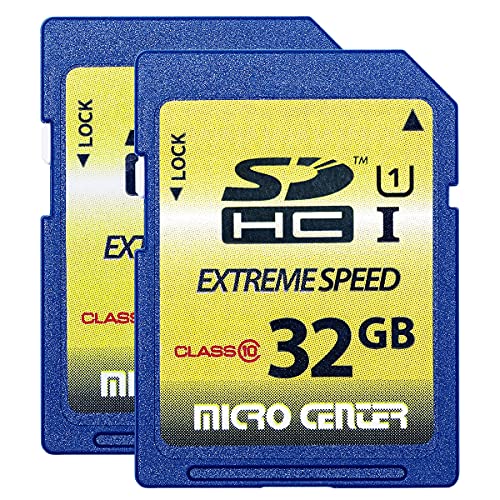
INLAND 32GB SDHC 2-Pack — Best straightforward pair
Inland’s pair of 32GB cards is the uncomplicated centre of this category: full-size SDHC at the ceiling size, Class 10 and U1 credentials with quoted speeds of 60MB/s reading and 10MB/s writing, sold as a two-pack that maps perfectly onto how a trail camera is actually serviced. One card lives in the camera; its twin lives in your pocket on the round, and the swap at the tree takes seconds because the replacement is already in your hand. No adapters, no exotic claims, no decisions left for the field.
As a house brand, Inland asks the usual question about support, and the honest answer is that at this level of card, the duties are so gentle that the specification matters more than the badge. A trail camera cannot tell a modest card from a famous one; it asks for clean formatting, honest capacity and contacts that survive the weather, and this pair is specified for exactly that. For a first camera or a small setup, it is the purchase that lets you spend your attention on placement and settings, where the photographs actually come from.
- Format: full-size SDHC, UHS-I
- Classes: Class 10, U1
- Capacity: 32GB per card, 2 cards per pack
- Quoted speeds: 60MB/s read, 10MB/s write per the maker’s listing
- Buying unit: twin pack for swap-at-the-tree servicing
- Suited to: single-camera setups and new trail-cam owners
Strengths
- The pair structure matches the swap ritual exactly, with no extra purchase needed.
- Full 32GB size gives photo and mixed deployments their maximum headroom.
- Specification is honestly matched to what trail cameras can use.
Trade-offs
- House-brand support runs through the retailer rather than a global maker network.
- Two cards will not sustain a multi-camera property without further packs.
- Quoted write speed is the category’s modest norm, fine for trails, useless for a mirrorless camera.
Best for: one or two cameras serviced on regular rounds, where the pair covers the swap completely. Not suited for: a large camera fleet, which should start with the five-packs below.

SanDisk Ultra 32GB SDHC — Best single trusted card
The SanDisk Ultra is the card many owners buy because it is the card they have heard of, and in this one category that instinct is harmless. At 32GB SDHC it sits exactly on the trail-cam ceiling, its listing quotes read speeds up to 100MB/s that make the evening offload brisk, and its maker’s distribution means a replacement can be found in almost any town with a camera shelf. SanDisk describes the design as water-resistant and impact-resistant, qualities that read as marketing in a studio camera and as job requirements on a tree in November.
Its role here is the dependable single: the card for the camera watching the garden, the feeder behind the barn, the one deployment you check on foot every fortnight. Owners building a fleet will drift to the multi-packs for economics, but a single Ultra in a single camera is the lowest-drama configuration in this guide, and its familiarity has a genuine operational value: when a neighbour or a family member services the camera in your absence, this is the card they will handle without questions.
- Format: full-size SDHC
- Capacity: 32GB
- Headline read speed: up to 100MB/s
- Build notes: water-resistant and impact-resistant design (brand-stated)
- Buying unit: single card
- Suited to: one important camera, garden and feeder duty
Strengths
- The most widely stocked and recognised card in this category.
- Fast quoted reads shorten the sort through a month of triggers.
- Exactly the ceiling size, so no compatibility arithmetic is required.
Trade-offs
- Sold singly, so building a swap system means buying several at single-card pricing.
- Its fame makes it a counterfeiting target; buy from reputable sellers.
- Premium-brand pricing buys support and availability rather than field performance.
Best for: a single camera you care about, serviced by whoever is nearest. Not suited for: equipping many cameras at once, where the five-packs are the rational route.

GIGASTONE 32GB SDHC 5-Pack — Best multi-camera value
Five cameras need five cards in them and five more in the swapping pocket, and that arithmetic is the entire reason this pack exists. Gigastone’s five 32GB SDHC cards carry UHS-I, U1 and Class 10 credentials with quoted reads up to 80MB/s, aimed at Full HD video and ordinary photographic duty, which is a precise description of trail-cam work. Bought as a bundle, the per-card cost drops to the level where losing one in the leaf litter is an annoyance rather than an incident, and in the field that psychological difference changes behaviour for the better: cards get swapped decisively, spares get carried, and nobody rations media.
The pack also enforces a useful uniformity. A fleet running one card type formats the same way, behaves the same way and fails, when it eventually does, in familiar ways. Gigastone’s support is its own rather than a giant’s, and a buyer should expect marketplace-grade service, but at this duty level the specification and the count are the product. For the property running a camera on every trail junction, this is the default restock.
- Format: full-size SDHC, UHS-I
- Classes: U1, Class 10
- Capacity: 32GB per card, 5 cards per pack
- Headline read speed: up to 80MB/s as the brand lists it
- Stated scope: Full HD video and trail-camera duty
- Suited to: multi-camera properties and group setups
Strengths
- Five ceiling-size cards in one purchase equips a small fleet immediately.
- Per-card cost makes field losses tolerable and spares automatic.
- Uniform media across cameras simplifies formatting and troubleshooting.
Trade-offs
- Five identical cards demand disciplined labelling to keep locations straight.
- Support and replacement run through the brand’s marketplace channels.
- Owners of one camera will take years to need the fourth and fifth cards.
Best for: anyone running three or more cameras, or a hunting group pooling media. Not suited for: a single garden camera, where a pair is the proportionate purchase.

PNY Elite 32GB SDHC 5-Pack — Best branded bulk pack
PNY’s entry mirrors the Gigastone’s logic with a different badge: five 32GB Elite SDHC cards, UHS-I with Class 10, U1 and V10 marks, and quoted read speeds up to 100MB/s that lead this category on paper. That read figure earns its keep at the computer rather than the tree, where a month of triggers from five cameras becomes an evening of copying; the faster the offload, the sooner the cards are verified, wiped and ready for the next round. PNY is a long-established memory brand, which for some buyers settles the support question that house and value brands leave open.
Choosing between this and the Gigastone five-pack is a matter of availability and brand comfort rather than field behaviour, since a trail camera will treat them identically. That equivalence is worth stating plainly, because bulk media is where marketing most wants you to imagine differences a sleeping camera cannot perceive. Buy the pack you can reorder identically next season, label them on arrival, and let the sameness be the feature.
- Format: full-size SDHC, UHS-I
- Classes: Class 10, U1, V10
- Capacity: 32GB per card, 5 cards per pack
- Headline read speed: up to 100MB/s
- Line: Elite
- Suited to: fleets whose owners value offload speed at the desk
Strengths
- Quickest quoted reads in this roundup, felt during multi-card offloads.
- Established brand behind a genuinely useful bulk format.
- Full credential set for the photo and video modes trail cameras offer.
Trade-offs
- In the field it performs like every correct SDHC card here, no better.
- Five-packs tempt owners to skip labelling, which the woods punish later.
- Desk read speed depends on your reader reaching it.
Best for: multi-camera owners who offload in batches and prefer a household-name brand. Not suited for: buyers expecting the read figure to change anything at the camera itself.

STEALTH CAM 16GB SDHC — Best camera-maker card
Stealth Cam sells cameras first and media second, and this 16GB SDHC card exists to be the safe, same-brand choice inside its own ecosystem. Sixteen gigabytes is half the ceiling, and for a large class of deployments it is simply enough: photo-focused cameras, moderate trigger rates, fortnightly visits. The card’s appeal is the absence of doubt. A buyer pairing it with the maker’s camera never has to wonder whether the media was contemplated by the people who wrote the firmware, because it was sold to live in exactly that slot.
The size deserves neither apology nor exaggeration. On a video-hungry setup 16GB will fill early, and owners should do the settings arithmetic in this guide honestly before choosing it. On a photographic setup it can run for months, and its smaller pool of images even has a workflow charm: the evening sort is shorter, the temptation to leave images unexamined lower. Buy it as the camera maker’s own media for photo-led deployments, not as a universal answer.
- Format: full-size SDHC
- Capacity: 16GB
- Maker: Stealth Cam, a trail-camera brand
- Positioning: media for game, trail and scouting cameras
- Buying unit: single card
- Suited to: photo-focused deployments with regular visits
Strengths
- Same-brand pairing removes compatibility guesswork entirely.
- Adequate size for the photo-led setups most scouting cameras run.
- Sold through hunting channels where trail-cam owners already shop.
Trade-offs
- Half the ceiling capacity, so video settings can outrun it.
- Single-card packaging makes building a swap pair a second purchase.
- Owners of other camera brands gain nothing from the badge.
Best for: Stealth Cam owners running photographs and short clips on a regular round. Not suited for: long-video configurations or month-long deployments on busy sites.

HME 16GB SDHC 2-Pack — Best small-card pair
HME comes at the category from the hunting-accessory side, and its twin pack of 16GB SDHC cards is built for the way scouting cameras multiply across a property: one in the camera on the ridge, one in the camera at the crossing, each with its spare riding along at the swap. Sixteen gigabytes per card suits the photo-led, moderate-trigger reality of most scouting, and the pair format keeps the swap ritual intact at the smaller size, which the single-card 16GB options cannot do alone.
Think of this pack as the budget architecture for a growing setup. Two cameras can be equipped and serviced properly for the price of equipping one carelessly, and when a third camera arrives, the system extends by another identical pack rather than by improvisation. The cards’ job is unglamorous, to be present, formatted and forgettable, and a hunting-accessory maker understands that job in its bones: this is equipment for people whose attention belongs on sign, wind and season, not on storage media.
- Format: full-size SDHC
- Capacity: 16GB per card, 2 cards per pack
- Maker: HME, hunting and scouting accessories
- Positioning: compact, durable cards for SDHC-slot devices
- Buying unit: twin pack
- Suited to: photo-led scouting with several modest cameras
Strengths
- Pair format preserves the swap system at the smaller capacity.
- Sized honestly for photographic scouting rather than video excess.
- Lets a multi-camera property standardise cheaply from the start.
Trade-offs
- Video-heavy settings will fill 16GB well before a monthly round ends.
- Accessory-brand support is narrower than the big memory makers’.
- No path to 32GB within the pack if a camera’s appetite grows.
Best for: scouting setups running stills on several cameras with regular visits. Not suited for: a single camera recording long video at a busy site, which belongs on 32GB.
Do Cellular Trail Cameras Change the Card’s Job?
Cellular cameras transmit thumbnails or clips to your phone as events happen, and it is tempting to conclude that the card inside them has been demoted to a formality. The opposite is closer to the truth. The transmitted image is usually a reduced copy; the full-resolution original lives on the card, and it is the original you will want when a photograph actually matters. Coverage also fails in exactly the places trail cameras love, deep valleys and thick timber, and during every silent gap the card is the only witness the camera has.
So the cellular era leaves this guide’s rules untouched and adds one of its own: visit on the card’s schedule, not the app’s. An owner lulled by daily thumbnails can forget that the card is filling at the camera’s full rate, and a full card in a cellular camera stops the originals while the thumbnails, drawn from the last successful writes, may not immediately confess the problem. The swap round remains the heartbeat; the phone feed is merely a preview of what the card will tell you properly at home.
There is also a budgeting consequence. Cellular deployments tend to run richer settings, since the owner sees results daily and grows ambitious, and richer settings spend the 32GB ceiling faster. If your cellular camera’s card keeps arriving home full, the answer is the same arithmetic as everywhere in this category: shorten the round, trim clip length, or lengthen the delay, because the SDXC door stays closed no matter how modern the camera’s radio is.
Does Card Speed Affect Trigger Speed or Photo Quality?
Two persistent myths deserve a clean burial. The first is that a faster card makes a trail camera trigger faster. Trigger speed is a property of the sensor and the camera’s wake-up electronics; by the time the card is involved, the animal has already been detected and the image captured to the camera’s buffer. A card that is too slow can delay the next shot in a rapid burst, which is a real but second-order effect, and the Class 10 and U1 media here clear it comfortably. Buying premium speed to fix a slow-triggering camera buys nothing but disappointment in a nicer packet.
The second myth is that a better card improves image quality. The card stores the file the camera hands it, bit for bit; it does not grade, sharpen or rescue exposure. Where media genuinely touches quality is at the extremes of failure, a corrupted file, a truncated clip, and the defence against those is the compatibility and formatting discipline this guide repeats, not a speed tier. Spend the difference on the things that do change photographs: placement, height, angle, and the patience to move a camera that is watching the wrong six feet of forest.
Understanding what the card cannot do is liberating for the budget. Once trigger speed and image quality are returned to the camera and the photographer, the card’s brief shrinks to its true size: fit the slot, hold the ceiling capacity, survive the season, and be there, formatted and honest, at every swap. Every pick here meets that brief, which is why this category can be shopped calmly at prices that would be alarming in any other camera aisle.
How Do Batteries and Cards Fail Together?
A trail camera’s two consumables conspire in ways owners misdiagnose. As batteries fade, the camera’s behaviour degrades unevenly: night range shortens first, then video clips truncate, then triggers are missed, and a card collected from a starving camera can look guilty of gaps that were really power failures. Conversely, a failing card can keep a camera awake and retrying, draining a healthy battery set in days. When a deployment disappoints, change one variable at a time, or you will retire good cards and pardon bad batteries in the same afternoon.
The swap round is the natural moment to audit both. Note the battery level the camera reports at collection, and log it beside the card’s fullness; two rounds of that log will teach you your camera’s true service interval more reliably than any specification sheet, because it is measured in your woods, your temperatures and your trigger traffic. Many owners discover their real limit is neither card nor battery but the interaction, a video setting that spends both at rates the brochure never modelled.
Lithium cells extend the power side of the partnership in cold weather, and a longer-lived camera simply moves the bottleneck to the card, which is one more argument for the 32GB size and for visiting on the card’s evidence rather than the calendar’s habit. Consumables should be replaced as a system, on data, before either one can improvise an ending to the deployment.
How Should You Protect Cards From Weather, Theft and Loss?
The card inside the camera inherits the camera’s shelter, which is adequate for rain and frost in any modern housing, but the swap exposes it to the day’s worst moment: cold fingers, wet leaves, a slope. Work over the open camera case or a hat held as a tray, keep the fresh card cased until the slot is open, and put the recorded card straight into its own case rather than a pocket. Most lost trail-cam cards are not lost in the woods at large; they are lost in the six inches between slot and pocket, into leaf litter that swallows black plastic without a sound.
Theft is a camera problem that becomes a card problem. A stolen camera takes its card and a month of images with it, which argues for shorter rounds on cameras in exposed places and for the lock boxes and cables many owners already use. It also argues, quietly, for the cellular cameras discussed above where coverage allows, since a transmitted thumbnail survives the theft of everything physical. Where theft is a genuine risk, treat the card as already gone and design the system, visit frequency, camera security, transmission, so that its loss is a nuisance rather than a season.
At home, the recorded card deserves one careful hour. Copy it fully before browsing, keep the copy and a second copy in different places if the images matter, and do not lend the original card back to the fresh pool until the copies are verified. More deployments have been lost to a premature reformat at the kitchen table than to every bear and thunderstorm combined, because the woods are honest about their dangers and the kitchen table is not.
How Do You Organise a Season of Images Without Losing the Story?
The card swap delivers raw material; the archive decides whether it becomes knowledge. A workable system is plain: one folder per camera per round, named with the camera’s location and the collection date, the card’s contents copied whole before any culling. Culling inside a working copy keeps the originals intact for the day a blurry frame at the edge of a photograph turns out to hold the animal you were actually waiting for, which happens often enough in this hobby to be a law.
Tag sparingly but consistently. A season’s value usually reduces to a handful of questions, which bucks used which trail, when the feeder peaked, whether the predator pattern changed, and a light folder discipline by month answers all of them without database software. The owners who drown are the ones who keep everything in one folder sorted by nothing, then abandon the archive and, with it, the multi-season comparisons that make trail cameras more than entertainment.
Close the season by retiring what the season used up. Cards that served through winter get inspected, dated and either demoted or replaced before spring; images get their second copy; settings notes get written while the lessons are still legible. The whole closing ritual takes an evening, and it is the reason some owners’ systems run for a decade while others restart from confusion every year.
How Do the Six SDHC Cards Compare Pack by Pack?
| Card | Capacity | Pack | Classes | Natural habitat |
|---|---|---|---|---|
| INLAND SDHC | 32GB | 2-pack | Class 10, U1 | The one-camera swap system |
| SanDisk Ultra | 32GB | Single | SDHC staple | One trusted camera, widest support |
| GIGASTONE SDHC | 32GB | 5-pack | U1, Class 10 | Multi-camera value fleets |
| PNY Elite | 32GB | 5-pack | Class 10, U1, V10 | Fleets with fast desk offloads |
| STEALTH CAM SDHC | 16GB | Single | Camera-maker media | Same-brand photo setups |
| HME SDHC | 16GB | 2-pack | SDHC scouting media | Small-card pairs for scouting |
Two decisions organise the table. First, size: 32GB unless your deployment is provably photographic and frequently visited, in which case 16GB is a legitimate economy. Second, count: enough cards that every camera has one installed and one travelling with you, because a trail-cam system without a swap card is a system that goes blind at every service visit.
How Should You Run the Card Swap in the Field?
Arrive with the fresh cards already formatted in their target cameras where your setup allows, or format each fresh card in its camera immediately after installation, before you walk away. Carry the cards in a hard case, not loose in a pocket with a knife and keys, and keep the recorded cards physically separate from the fresh ones from the moment of the swap; a zip pocket for full cards and the case for fresh ones is a system a tired person can run in the dark.
Label before you leave home, not at the tree. A fine marker on the card’s label edge, camera number and month, turns the evening sort from archaeology into filing. At the computer, copy each card into a folder named for its camera and date before viewing a single image, verify the copy, and only then release the card back to the fresh pool. Owners who view first and file later eventually own a downloads folder of ten thousand images named by a camera, in which the one photograph that mattered is technically present and practically lost.
Finish the round by reviewing settings against what the cards told you. A card collected nearly full argues for shorter clips or a shorter round; a card collected nearly empty on a camera that should be busy argues for placement, batteries or sensitivity, and is itself valuable intelligence. The swap is the heartbeat of the whole system, and the information it brings home is only partly photographic.
What Mistakes Do Trail-Cam Owners Keep Making?
The signature mistake is the oversized card: a 64GB or 128GB SDXC bought in good faith, installed in a camera that cannot use it, discovered empty or corrupted a month later. It is followed closely by the borrowed card, media taken from a mirrorless camera or a computer-formatted drawer and pressed into service without an in-camera format, which accounts for a remarkable share of the category’s ghost stories. Both mistakes are free to avoid and expensive to learn, which is why this guide repeats its two rules like a refrain.
The third mistake is the adapter shortcut: microSD media in a full-size adapter, rattling in an outdoor camera through storms and freezes. Adapters add a contact joint that weather and vibration exploit, and full-size SDHC cards are so inexpensive in this category that the shortcut saves almost nothing. The fourth is neglect of labelling, which converts a five-camera property into a monthly guessing game and eventually into images attributed to the wrong ridge, the wrong feeder, the wrong story entirely.
Finally, owners retire cards too late or not at all. A card that has survived three seasons of freezes and thaws has earned rest, and a card that produces one unexplained gap should never carry another deployment. In a category where the media costs less than the fuel to reach the camera, sentimentality about a card is the most expensive emotion available.
Should Your Deployment Choose 16GB or 32GB?
Decide by naming the deployment honestly. A scouting camera moved fortnightly as sign shifts, shooting stills with a sensible delay, lives well inside 16GB, and the smaller cards in this guide exist because thousands of such cameras prove it every season. A fixed camera on a feeder, a water source or a property boundary, visited monthly and expected to miss nothing, belongs on 32GB even in photo mode, because its trigger count is set by the location’s traffic rather than by your intentions, and a popular feeder in a hard winter writes its own schedule.
Video collapses the debate. Any deployment where clips longer than a few seconds are the point should start at 32GB and manage its appetite through settings and visiting rhythm, because video at trail-camera resolutions consumes the smaller size with an ease that surprises every first-time owner. If a 16GB card is what you own, video is still available to you, but as a garnish: short clips, longer delays, and a round short enough to match, chosen at the kitchen table rather than negotiated with a full card at the tree.
Mixed properties should standardise upward. Running 32GB everywhere, even where 16GB would do, costs a little more per card and buys a priceless operational simplicity: any card fits any camera on any round, no mental ledger of which slot tolerates which size, no deployment ruined by grabbing the small card for the hungry camera. Fleets forgive many economies, but media uniformity is the one economy that pays in reliability every single round.
What Reader or Viewer Should Carry the Images Home?
The journey from card to computer deserves the same plain competence as everything else here. A basic USB card reader that takes full-size SD directly, without nesting the card in adapters, is the reliable home station, and it will outlive several generations of cameras. Phone adapters and pocket viewers tempt owners toward field-checking, and they have their place for a quick confirmation that a camera is alive and aimed, but the full review belongs at home, where copies can be made properly and the card can complete its swap without a long, battery-spending exhibition at the tree.
Whatever you read with, adopt the copy-first rule as a reflex: the entire card is duplicated before a single image is opened, renamed or deleted. Readers and computers are where trail-cam images go to be lost by helpful software offering to tidy, import selectively or free up space, and the whole-card copy, verified before the card returns to the pool, is immune to all of it. Your future self, searching for the frame beside the famous one, will be grateful for the completeness you were too disciplined to edit.
How Do You Troubleshoot a Card Problem at the Tree?
Field troubleshooting should be short, because the tree is a bad workshop. If a camera reports no card, reseat the card once, checking it is fully home and the right way round; more trail-cam faults are a card sitting a millimetre proud than any electronic failure. If the message persists, swap in the spare card you carried for exactly this moment. A camera that accepts the spare has indicted the first card, which goes home in the suspect pocket for computer testing, not back into another camera on the same round.
If the camera accepts a card but the previous deployment produced corrupt or missing images, resist formatting anything in the field. The suspect card may still yield most of its contents to patient copying or recovery tools at home, and formatting would end that hope tidily and forever. Install the spare, note the camera and date on the suspect’s case, and let the desk sort it out. Nearly every other field symptom, short clips, early shutdowns, odd counts, belongs to the battery-and-settings conversation at home rather than to improvisation in the rain.
Keep the whole protocol to those two moves, reseat once, then swap, and you will resolve or safely defer every card problem the woods can present. The owners who lose deployments are rarely the ones with the worst luck; they are the ones who carried no spare and tried to negotiate with a failing card at the tree, in the dark, while the camera watched nothing at all.
What Changes When the Camera Watches Property Instead of Game?
A growing share of trail cameras never see a deer; they watch gates, barns, fuel tanks, holiday cabins and the far end of long driveways, where their independence from power and wiring is the entire point. The card’s job shifts subtly in that service. Images become evidence rather than entertainment, which raises the value of the copy-first discipline and argues for shorter rounds, since evidence discovered a month late has lost most of its use. It also argues for the 32GB size regardless of expected traffic, because the one night the camera exists for will generate more triggers than a quiet month.
Property deployments also run longer between human visits in calendar terms, holiday homes especially, and a card can sit through a whole season of weather before collection. Choose fresh, dated media for those posts rather than the fleet’s oldest cards, and let the scouting cameras inherit the veterans. The hierarchy costs nothing, since the cards are interchangeable in size, and it puts your most trustworthy media under the camera you will visit least, which is where trustworthiness is worth the most.
One small accessory completes every system in this guide: the card case itself. Choose a hard, brightly coloured case that holds the full fleet, because a case that can be seen in leaf litter and counted at a glance prevents both losses and the sinking moment of reaching a distant camera with the spares left at home. Keep it in the same pocket of the same pack on every round. Trail-cam success is a chain of small, boring consistencies, and the case, like the format ritual and the label, is one of the links that quietly never breaks.
Notice, finally, how little of this guide was about the cards’ electronics and how much was about the habits around them. That is the honest shape of the subject. Trail cameras forgive modest media and punish sloppy systems, so the owner who formats in-camera, labels faithfully, carries spares and copies everything at home will outperform the owner with premium cards and none of those habits, in every season, on every property, without exception worth discussing.
Final Recommendation
Start with the INLAND pair if you run one camera, the Gigastone or PNY five-packs if you run several, and the SanDisk Ultra when a single trusted card from the most familiar name suits the deployment. Let the 16GB Stealth Cam and HME cards serve photo-led scouting where their size is an economy rather than a limit. Above every brand decision sit the two rules that decide whether any of them work: never exceed the 32GB SDHC ceiling your camera understands, and format in the camera, every time, so that the card you collect next month is a story about the animals and not about the storage.
Frequently Asked Questions
Can I use a 64GB card if my camera seems to accept it?
Seeming is the operative word. Some cameras appear to work with SDXC media and then misbehave at capacities or file counts they were never tested for, mid-deployment and far from help. Unless the manual for your exact model explicitly supports SDXC, the 32GB SDHC ceiling is the safe and sufficient choice, and this guide’s picks are built around it.
Why did my camera record nothing on a brand-new card?
The commonest cause is a card that was never formatted in the camera, followed by a card formatted in a computer or borrowed from another device with an incompatible structure. Format the card through the camera’s own menu and test it with a short deployment near home before trusting it with a month on a distant tree.
Are Class 10 cards fast enough for trail-cam video?
Yes. Trail cameras record short clips at modest bitrates compared with dedicated video cameras, and Class 10 with U1 covers those modes comfortably. The binding constraints in this category are compatibility and capacity discipline, not speed, which is why no premium speed class appears in this guide’s picks.
How many cards should I own per camera?
Two at minimum: one in the camera and one travelling with you for the swap. Three is more comfortable, adding a spare against loss in the field, and fleets should hold a further reserve at home. The packs in this guide are sized around exactly that arithmetic.
Can I check images in the field instead of swapping?
Many owners carry a viewer or use the camera’s own screen, and it works, but it spends battery, time and stealth at the tree, and it leaves the card in place to keep filling. The swap remains the better system for most setups: seconds at the camera, the full story reviewed at home, and a fresh card already watching while you sort.
How long should a trail-cam card stay in service?
Retire a card after a few hard seasons outdoors or at its first unexplained failure, whichever arrives sooner. Mark purchase dates on your labels so age is a fact rather than a feeling, and remember that in this category the replacement costs less than the journey to install it. A retired card can still serve a weather station, a photo frame or a child’s camera at home, where a quiet failure costs nothing and the card’s remaining life is spent somewhere warm, dry and forgiving, which is a decent ending for anything that has wintered on a tree.
Related Guides
Drivers face the same small-card discipline under far harsher rewriting in our guide to the best dash camera sd cards and the endurance ratings that matter there. Camera owners with native slots and heavier modes should compare which sd cards 4k mirrorless cameras actually need, and action shooters can check the micro format in how to choose micro sd cards 4k cameras and drones can trust.


