What's inside
- Where to buy
- Key Takeaways
- Quick Picks
- How did we judge projectors for ceiling duty?
- What actually makes a projector good at living on a ceiling?
- What does the full installation actually involve?
- How far back should the mount go?
- How does a ceiling projector change the room around it?
- Which rooms should not take a ceiling projector?
- The six ceiling projectors, reviewed one by one
- How do the six compare side by side?
- Can a ceiling projector handle games and live sport?
- How do you align a ceiling projector once it is hanging?
- What mistakes do ceiling installers keep making?
- What does a ceiling installation really cost across a decade?
- Final Recommendation
- Frequently Asked Questions
- Related Guides
As an Amazon Associate I earn from qualifying purchases. This post may contain affiliate links at no extra cost to you.
gizmoverdict.com is reader-supported. When you buy through links on our site, we may earn an affiliate commission.
Where to buy
Mounting a projector overhead is the moment a media room stops being an arrangement of furniture and becomes an installation, and the best ceiling mounted projectors are the ones designed to reward that commitment for years without asking to come down. The six models below are all sold through Amazon in the United States, with listing links in the Quick Picks table and inside each review. One clarification belongs at the very top, because search results blur it constantly: the ceiling mount itself is a separate accessory, bought apart from any projector, matched to the projector’s weight and mounting pattern, and it is never one of our picks. What this guide chooses is the projector — the machine whose lens, weight, throw and service life decide whether ceiling life will be serene or a recurring date with a ladder.
Why does ceiling duty deserve its own shortlist instead of borrowing the general one? Because the ceiling changes the selection criteria in ways a table never reveals. A projector overhead must throw the right image size from a fixed point you choose once, so zoom range and lens shift stop being conveniences and become the difference between a squared picture and a compromised one. It must invert its image, hold its focus while hanging upside down, and ideally go years without needing physical attention, because every lamp change and filter clean happens at height. Its cables must arrive from somewhere — a long HDMI run and a power outlet at ceiling level are part of the real installation, and households that plan them before the mount goes up finish in a weekend, while households that improvise them finish in a month of small resentments.
Resolution language follows the pattern this cluster of guides has used throughout. Epson’s 4K PRO-UHD models build their 4K image by pixel-shifting, and Epson’s own listing for the 5050UB says advanced pixel-shift processing in plain words; BenQ’s HT5550 advertises true 4K UHD, built on the DLP approach to the same destination. Both routes produce a genuine 4K-class picture for films, and the reviews judge each machine on its colour, placement tools and ownership manners rather than on loyalty to one shifting mechanism.
Key Takeaways
- The mount is an accessory, not a pick: budget for a quality mount, a long HDMI run and a ceiling-level power outlet alongside whichever projector you choose.
- Lens shift is the ceiling feature that matters most, because it squares the image optically after the mount is fixed, instead of taxing the picture with keystone correction.
- The Epson Home Cinema LS11000 brings motorised lens shift and focus to the ceiling brief, so adjustments happen from the remote, on the sofa, not from a ladder.
- BenQ’s W4100i pairs a four-way lens shift with factory calibration and a three-year warranty stated in its listing — an installer’s shortlist in one box.
- Laser models such as the LS11000 and the Optoma UHZ36 suit ceiling life especially well, because the lamp-change ladder visit simply leaves the calendar.
- Throw distance is chosen once and forever: measure the room, place the mount inside the projector’s zoom range, and only then drill anything.
Quick Picks
| Pick | Badge | Why it earns its place |
|---|---|---|
| Epson Home Cinema 3800 | Ceiling Value from the 3LCD Camp | A 4K PRO-UHD three-chip design with HDR that brings Epson colour to a fixed installation without flagship money. |
| Epson Home Cinema LS11000 | Motorised Laser Installation | Laser light, HDR10+, 120Hz support and motorised lens shift and focus — the ceiling projector you adjust from the sofa. |
| BenQ W4100i | Calibrated Colour with Four-Way Shift | Factory-calibrated colour, full DCI-P3 claims, smart streaming inside and a lens shift that forgives imperfect mount placement. |
| BenQ HT5550 | True 4K Film Room Choice | A cinema-first DLP with HDR-PRO tone work and full claimed coverage of both home colour standards for dedicated rooms. |
| Epson Home Cinema 5050UB | Established Dark-Room Favourite | The long-running 4K PRO-UHD benchmark for blacked-out rooms, with 2,600 lumens of colour and white brightness in its listing. |
| Optoma UHZ36 | Laser Simplicity Overhead | A 4K UHD laser HDR brief with no lamp to change at height, for ceilings that should be visited as rarely as possible. |
How did we judge projectors for ceiling duty?
We began with the mount’s-eye view. A ceiling projector is chosen from a fixed point in space, so the first questions were optical: does the lens offer enough zoom range to size the image from a sensible mounting position, and does it offer lens shift — the ability to move the image without moving the projector — so the inevitable few centimetres of installation error can be corrected by glass rather than by software? Models with generous shift earned their places on evidence in their listings; the Epson flagships and the BenQ W4100i, with its four-way shift, speak that language fluently. Throw distance was the companion test: each pick had to suit the span of a typical living room or dedicated theater from a rear or mid-room mount.
The second lens was service life. Ceiling mounting converts every maintenance task into a small expedition, so light-source longevity weighed heavily: the two laser models promise years without a lamp errand, while the lamp-based picks earned their inclusion through colour performance and value, with the honest caveat, stated in their reviews, that a lamp change at height belongs in their ownership story. Weight mattered in the same practical register — a ceiling mount and its fixings must be chosen for the projector’s mass with margin to spare, and lighter machines widen the choice of safe mounting positions, particularly on ceilings that cannot take fixings just anywhere.
Finally we checked the unglamorous confirmations: an inverted-image ceiling mode is universal in this class, but we favoured projectors whose listings document the installation-friendly extras — motorised optics, stated warranties, HDR formats that match modern sources — because a ceiling projector is bought for a decade and its paperwork should read like it. Smart platforms counted for less here than in other guides, since fixed theaters usually own their sources, except where, as with the W4100i, the platform genuinely simplifies a living-room installation.
What actually makes a projector good at living on a ceiling?
Lens shift deserves first place in any honest answer, because it is the feature whose absence is felt on installation day and never again forgiven. When a projector hangs from a mount, its position is fixed by joists, by the mount’s own geometry and by where the ceiling happens to be flat. The screen, meanwhile, hangs where the room wants it. Those two certainties rarely align perfectly, and lens shift is the mechanism that reconciles them: the lens assembly moves, the image glides sideways or vertically into its frame, and every pixel survives the journey. Keystone correction, the software alternative, reconciles them by resampling the image into a trapezoid’s correction — effective, and visibly costly to fine detail when used heavily. A ceiling projector with real shift is a projector that can be installed well; one without it must be installed perfectly, which is a different and more expensive promise.
Zoom range runs a close second. The mount’s position along the room is constrained by structure and by where the cables can run, while the screen size is chosen by taste; zoom is the variable that lets those two decisions coexist. A generous zoom range means the mount can live where the ceiling is strong and the image can still be sized exactly to the screen’s borders. Motorised zoom, shift and focus — the LS11000’s party piece — convert the whole alignment into a remote-control exercise performed from the best seat in the room, which is where alignment judgements belong. Manual equivalents on the other picks work perfectly well; they simply ask for a ladder, a helper reading the screen, and a little patience on the one afternoon that decides the next several years.
The third quality is thermal and mechanical manners. A ceiling projector hangs in the warmest air in the room, since heat rises to meet it, so its cooling design works harder than the same machine’s would on a table — one more argument for leaving generous clearance around the vents and for choosing the picture mode your room actually needs rather than the brightest available. It also hangs upside down, which quality designs anticipate in their mounting points and their image-flip modes. None of this is exotic. It is simply the set of traits that separates a projector that tolerates the ceiling from one that was, in every meaningful sense, designed for it.
What does the full installation actually involve?
Honest planning starts with a list that is longer than the projector. There is the mount, chosen for the projector’s weight with margin, and fixed into structure — a joist or proper blocking — never into plasterboard alone. There is power: a ceiling-level outlet installed by an electrician where local rules require one, because a projector’s power lead trailed down a wall to a floor socket is both ugly and a trip hazard in the making. There is the signal run: a long HDMI cable, ideally routed through conduit or accessible trunking so that a future cable standard can replace it without opening the ceiling, and tested at full bandwidth with your actual sources before the mount is finalised. And there is the screen, whose position should be decided first of all, since the mount’s location is derived from it.
The sequence matters as much as the shopping. Fix the screen position on paper. Calculate the throw from the projector’s zoom range, and mark the mount position that lands mid-range. Run power and signal to that mark. Mount, hang, and align using lens shift before keystone. Focus at operating temperature. Only then hide the cables and make good the ceiling. Households that reverse the sequence — mount first, measure later — discover the projector’s throw limits with holes already drilled, which is the single most common story in ceiling-installation regret. Renters should read this section as a polite warning: a ceiling installation is a landlord conversation, and the short throw and ultra short throw alternatives in this cluster of guides exist precisely for rooms where that conversation ends in no.
One more planning item separates smooth installations from fraught ones: the order of trades. If an electrician is moving power, that visit belongs before the mount is hung and ideally before the screen is finalised, because outlet positions sometimes migrate for reasons of joist and cable run, and everything downstream — mount point, throw calculation, seating — prefers to know where the power truly is. Booking the trades in the wrong order does not doom the project, but it converts a weekend into a relay race of waiting, and the projector, sitting in its box through all of it, becomes a very expensive paperweight with excellent colour credentials.
Safety deserves its own plain sentences. A projector overhead is a heavy object suspended above the people you love most, installed by whoever the household’s most confident DIYer is. Use the mount maker’s rated fixings, use every mounting point the projector offers, add a safety tether where the mount provides for one, and re-check the fixings after the first month, when materials have settled. None of the six projectors in this guide is unusually heavy for its class, but class norms still describe several kilograms of glass and electronics, and the ceiling is the one place in home cinema where approximately right is not right at all.
How far back should the mount go?
The truthful answer is that the projector decides, and your job is to listen before drilling. Each model here has a throw range — a band of distances within which its zoom can fill your chosen screen size — and the mount belongs inside that band, ideally near its middle. Too close and even minimum zoom overfills the screen; too far and maximum zoom leaves a small, overly bright image marooned in the frame’s centre. The calculation uses your screen’s width, not its diagonal, and every maker’s listing or manual publishes the relationship; an hour with those figures and a tape measure is the cheapest insurance in the entire project.
Room realities then negotiate with the arithmetic. The mount wants a joist. The seating wants the projector behind it, or at least far enough back that fan noise sits outside the audience’s near field. The screen wants the projector’s lens centred on it horizontally, because off-centre mounting consumes lens shift that vertical correction may also need. When the negotiation produces a position outside the throw band, the correct response is to change the screen size or the projector model — not to plan on keystone heroics. The picks in this guide were chosen partly for the breadth of their placement envelopes: the motorised Epson and the four-way-shift BenQ forgive the most, while the simpler Optoma asks for the most careful measuring and rewards it with the least maintenance afterwards.
How does a ceiling projector change the room around it?
The first change is liberation of the floor plan. A table projector owns a piece of furniture forever and dictates where people may walk; a ceiling projector owns nothing but air. Coffee tables return to holding coffee, children regain the run of the room, and the beam passes over every head because it begins above all of them. Seating can finally be arranged for the screen and the speakers rather than around a projector’s throw, which in small rooms is often the difference between a sofa that fits the wall and a sofa that fits the room. This is the benefit nobody photographs and everybody lives with: the installation disappears, and only the picture remains in the household’s awareness.
Sound reorganises itself around the new geometry. With the projector overhead and behind, its fan joins the room from above, which most listeners localise poorly — a small acoustic mercy, provided the mount does not couple vibration into the ceiling structure and turn the whole surface into a sounding board. Speakers, meanwhile, are freed from competing with a projector table for the front wall, so the centre channel can sit exactly where dialogue wants it: centred under the screen, at the listeners’ ear height. Households upgrading from a table setup often report that the ceiling move improved their sound more than their picture, simply because every other component could finally occupy its proper place.
There is a subtler liberation, too, which households mention only after living with the arrangement: the screen wall becomes honest. With no projector table beneath it and no beam crossing the room, the wall holds only the screen, the speakers and whatever art the household chooses, and the room reads as a room rather than as equipment storage. Interior-minded partners who resisted the projector for years often become its defenders at exactly this point, because the ceiling version of home cinema is the first one that does not ask the living space to apologise for existing.
The third change is social. A permanent installation invites permanent habits: the room becomes the cinema rather than borrowing the title on Fridays, and households with ceiling projectors consistently describe using them more, for sport, for series, for photographs at family gatherings, because the friction of setup has been abolished. That increased use is the honest argument for spending more on the machine itself — a ceiling projector’s cost is divided by far more evenings than a portable’s — and it is also the argument for the laser models’ stamina, since an installation used daily consumes lamp life at a pace that makes the lamp calendar a real presence in the household.
Which rooms should not take a ceiling projector?
Honesty requires a section for the rooms this guide cannot help. Ceilings that cannot take structural fixings — some suspended ceilings, some ornate or listed surfaces, most rented ones — exclude the entire concept, and no projector choice repairs that. Very high ceilings create their own problems: the mount becomes a long drop pole, the projector hangs in the room’s warmest stratum, and every service visit becomes a scaffold conversation; a long-throw projector on a rear shelf often serves those rooms better. Rooms that rearrange themselves seasonally — the playroom that becomes a guest room, the lounge that hosts a Christmas tree in the projector’s only sensible seat — fight a permanent installation’s permanence.
There is also the household that simply does not want a building project. A ceiling installation done properly involves an electrician’s visit, cable routing, making good, and a weekend of the room in pieces. For some households that weekend is a pleasure; for others it is a veto, and the veto is legitimate. The ultra short throw models in this cluster of guides exist for exactly those rooms, delivering a wall-sized picture from a cabinet with nothing overhead at all. Choosing not to ceiling mount is not a failure of ambition. It is a correct reading of a particular house, and the projector market finally offers enough geometries that no household has to force the wrong one.
The six ceiling projectors, reviewed one by one

Epson Home Cinema 3800 — Ceiling Value from the 3LCD Camp
The Home Cinema 3800 is the entry point into Epson’s serious home range, and its listing keeps the description tight: a 4K PRO-UHD projector on a three-chip 3LCD engine with HDR technology. Translated through this guide’s standing vocabulary lesson, PRO-UHD means the 4K image is built by pixel-shifting — Epson’s own wording across the family — delivered through three separate LCD panels, one per colour. For ceiling duty, the architecture brings a practical blessing: there is no colour wheel to wear, and the image has the calm, artefact-free character that makes three-chip designs the default recommendation for viewers who notice rainbows on single-chip rivals. Mounted overhead and fed by a proper source, the 3800 settles into the role of the room’s quiet infrastructure.
As the value seat in a line-up containing two Epson flagships, the 3800 asks its buyer one honest question: how much of the flagships’ installation luxury do you actually need? Its placement tools are the manual kind, so installation day involves the ladder-and-helper choreography rather than the LS11000’s remote-controlled glide — a cost paid once, on one afternoon, in exchange for a meaningfully gentler purchase. Its lamp-based light source likewise schedules a future lamp change at height. Households building a first dedicated room, where the screen, the seating and the sound are all competing for the same budget, will find the 3800’s allocation of money entirely sane. Households that have already finished the room and want the projector to be the final, finest piece should keep reading down this page.
- Engine as listed: 3-chip 3LCD
- Format as listed: 4K PRO-UHD (pixel-shifted 4K) with HDR
- Light source: lamp-based (replacement lamp is part of ownership)
- Installation style: manual optics, ladder-assisted alignment
- Role in this set: the Epson colour route at the gentlest price position
Strengths
- Three-chip colour with no rainbow artefacts, from the maker that defines the approach.
- PRO-UHD image quality that satisfies film nights at a fraction of flagship cost.
- A proven model with a deep pool of mounts, lamps and owner knowledge around it.
Trade-offs
- Lamp changes happen at ceiling height; keep the ladder and the spare-lamp note handy.
- Manual alignment makes installation day slower than the motorised flagship’s.
- No smart platform is advertised, so sources must arrive by cable, as theaters prefer anyway.
Best for: first dedicated rooms and Epson loyalists mounting on a sensible budget. Not suited for: buyers who want laser permanence or remote-controlled installation.

Epson Home Cinema LS11000 — Motorised Laser Installation
If the ceiling has a flagship in this guide, the LS11000 is wearing the crown. Its listing describes a 4K PRO-UHD laser projector with HDR10+, built on Epson’s three-chip 3LCD engine, quoted at 2,500 lumens of both colour and white brightness, with a dynamic contrast figure of 1.2 million to one, motorised lens shift and focus, and a 120Hz refresh capability. Read the specification as an installer reads it and every line answers a ceiling-specific anxiety. Laser light abolishes the lamp-change visit. Motorised optics abolish the ladder-and-helper alignment ritual — shift and focus are adjusted from the remote while you sit in the seat the picture is being aligned for. Equal colour and white brightness figures promise that the image will not thin out when a scene saturates.
HDR10+ support adds the dynamic-metadata refinement to HDR10’s static approach, letting compatible content guide tone mapping scene by scene — a meaningful advantage for a projector, whose brightness headroom is finite and must be spent intelligently. The 120Hz support serves sport and high-refresh sources with the smoothness the ceiling’s permanence deserves; this is a machine bought for a decade, and its connectivity and refresh manners are specified for sources that have not been announced yet as much as for today’s. The honest costs are the flagship’s usual ones: the purchase itself, and the discipline of installing a precision instrument properly the first time. For a finished theater room, the LS11000 is less a product recommendation than a description of where the category’s ceiling — in every sense — currently sits.
- Engine as listed: 3-chip 3LCD with laser light
- Brightness as listed: 2,500 lumens colour and white
- Contrast as listed: 1.2 million to one dynamic
- Optics as listed: motorised lens shift and focus
- Formats as listed: HDR10+, with 120Hz support
Strengths
- Motorised shift and focus turn ceiling alignment into a sofa-based, remote-controlled task.
- Laser light removes lamp changes from the entire life of the installation.
- Three-chip colour honesty, with equal colour and white brightness figures quoted.
Trade-offs
- Flagship pricing within this set, before the mount, cabling and screen are counted.
- Its brightness figure suits dark and dim rooms better than bright multi-purpose spaces.
- PRO-UHD is pixel-shifted 4K, as with all Epson models here — a class norm, stated plainly.
Best for: finished theater rooms making a decade-long ceiling commitment. Not suited for: first-projector budgets or bright open-plan spaces.

BenQ W4100i — Calibrated Colour with Four-Way Shift
The W4100i’s listing is the most installer-literate document in this guide. It describes a 4K HDR smart home theater projector rated at a maker-quoted 3,200 lumens, with full Rec. 709 coverage, a 100% DCI-P3 colour claim, HDR10+, factory calibration, Netflix on Android TV, four-way lens shift, a three-year warranty and 3D support. Factory calibration is the phrase to linger on: it means the colour performance is not merely specified but measured and set before the projector leaves the factory, which for a ceiling installation — where post-install tweaking happens at ladder height — is a genuine quality-of-life feature disguised as a colour feature. The four-way lens shift, able to move the image horizontally as well as vertically, gives the mount placer the widest forgiveness in this set after the motorised Epson.
The smart platform earns its keep in the living-room version of ceiling mounting, where the projector may be the room’s only screen and a separate source stack feels like clutter; Netflix on Android TV inside the machine keeps that room honest and minimal. The 3,200-lumen maker figure is healthy headroom for rooms that dim rather than black out, and the colour claims aim the machine squarely at film work, where DCI-P3 coverage describes the palette modern cinema masters are graded in. The three-year warranty, stated in the listing, rounds out an ownership story with very few loose threads. If the LS11000 is the ceiling’s flagship, the W4100i is its best-argued alternative: nearly the same installation manners, colour credentials in writing, and a platform inside for the rooms that want one.
- Brightness as listed: 3,200 lumens, maker figure
- Colour as listed: Rec. 709, 100% DCI-P3 claim, factory calibrated
- Optics as listed: four-way lens shift
- Platform as listed: Android TV with Netflix
- Formats as listed: HDR10+, 3D support
- Warranty as listed: three years
Strengths
- Four-way lens shift forgives the mount placements that real ceilings impose.
- Factory calibration delivers its colour claims measured, not merely promised.
- A three-year warranty and built-in Netflix round out a low-friction ownership story.
Trade-offs
- Lamp-era servicing still applies beneath the smart features; plan the eventual lamp change.
- Smart-platform projectors inherit software updates and account housekeeping.
- Its colour-first tuning serves film rooms better than ultra-bright sports bars.
Best for: living-room ceilings and film-first installs that want calibration and shift without flagship money. Not suited for: buyers avoiding smart platforms or lamp servicing entirely.

BenQ HT5550 — True 4K Film Room Choice
The HT5550 comes from BenQ’s cinephile line, and its listing wastes no words on lifestyle: a true 4K UHD home theater projector with HDR-PRO, claiming 100% coverage of both DCI-P3 and Rec. 709, with frame interpolation for fluid picture. True 4K in BenQ’s DLP vocabulary is built by rapid pixel-shifting on a high-resolution DLP chip — the industry-standard route to a 4K-addressed image — and the dual colour-standard claim describes a machine graded for the two palettes that matter, the broadcast standard your television content uses and the cinema standard your films were mastered in. HDR-PRO is BenQ’s name for its tone-mapping work, the quiet software that decides how HDR’s wide range compresses into a projector’s narrower one, and it is where projectors of this tier quietly earn their reputations.
Frame interpolation deserves a consumer warning disguised as a feature note. The technology inserts calculated frames to smooth motion, which some viewers love for sport and most film lovers switch off on sight, because it lends cinema the glossy fluidity of a soap opera. Its presence is a choice, not an obligation, and the HT5550’s film-first tuning suggests its maker expects you to make that choice per content type. As a ceiling citizen, the HT5550 is a traditionalist: manual installation discipline, a lamp in its future, and in exchange a picture philosophy aimed at dark rooms and serious film libraries. In a blacked-out theater with a good screen, it remains the connoisseur’s argument in this six — the machine for the household that can name its colour standards and means it.
- Format as listed: true 4K UHD with HDR-PRO
- Colour as listed: 100% DCI-P3 and 100% Rec. 709 claims
- Motion as listed: frame interpolation, switchable per taste
- Light source: lamp-based design
- Role in this set: the film purist’s ceiling mount
Strengths
- Colour claims covering both the cinema and broadcast standards, in writing.
- HDR-PRO tone mapping aimed at film content in dark rooms.
- A dedicated cinephile tuning philosophy rather than a living-room compromise.
Trade-offs
- Dark-room specialisation means bright multi-purpose spaces should look elsewhere in this six.
- Lamp servicing at height is part of the ownership agreement.
- Frame interpolation will be switched off by film purists and loved by sports fans — know your camp.
Best for: blacked-out film rooms and colour-standard connoisseurs. Not suited for: bright family rooms or lamp-free ownership hopes.
Epson Home Cinema 5050UB — Established Dark-Room Favourite
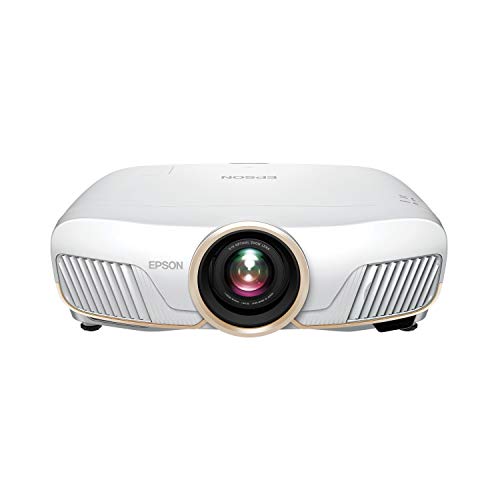
Few projectors in home cinema carry a reputation as settled as the 5050UB’s. Its listing describes a 4K PRO-UHD three-chip 3LCD projector with HDR, quoted at 2,600 lumens of colour and white brightness, with advanced pixel-shift processing named openly in the title — a small honesty this guide appreciates every time it meets it. The UB in the name has long signalled Epson’s ultra-black ambitions for the line, and the model’s following among dark-room owners rests on the combination that the spec sheet sketches: three-chip colour without rainbow artefacts, brightness figures quoted equally for colour and white, and contrast behaviour tuned for rooms that can actually go dark.
On a ceiling, the 5050UB behaves like the mature product it is. The installation is manual — this generation predates the motorised-everything flagship above it in Epson’s own range — and the lamp will want changing on a schedule measured in years of evening viewing. What it returns for those courtesies is the picture that made it the default recommendation of an era: deep, calm, filmic, and notably free of the processing nervousness that cheaper projectors show in dark scenes. Buyers choosing between it and the LS11000 are really choosing between two ownership philosophies at two price positions — lamp-based maturity with a following, or laser-based permanence with motorised manners. Both are defensible. The room’s darkness, which the 5050UB exploits better than any lamp rival here, should cast the deciding vote.
- Engine as listed: 3-chip 3LCD
- Format as listed: 4K PRO-UHD with advanced pixel-shift processing, HDR
- Brightness as listed: 2,600 lumens colour and white
- Light source: lamp-based, with a mature replacement ecosystem
- Role in this set: the dark-room benchmark of its generation
Strengths
- A long-established dark-room reputation earned on contrast and colour calm.
- Equal colour and white brightness figures, quoted the honest Epson way.
- Three-chip imaging keeps rainbow-sensitive viewers comfortable indefinitely.
Trade-offs
- Manual installation and lamp changes belong to its ownership story at ceiling height.
- No smart platform is advertised; the theater’s sources do the streaming.
- Its talents peak in genuinely dark rooms and merely serve in bright ones.
Best for: dedicated dark rooms that prize contrast and colour over installation luxury. Not suited for: bright rooms, or buyers who want the projector to stream by itself.
Optoma UHZ36 — Laser Simplicity Overhead
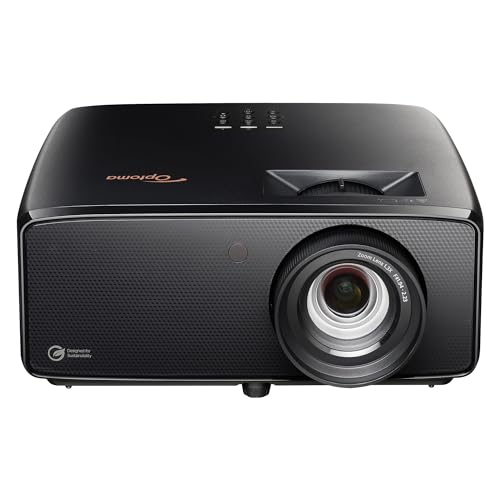
Considered purely as a ceiling citizen, the UHZ36’s famously brief listing — a 4K UHD laser HDR home theater projector — reads differently than it did among the streaming flagships. Overhead, the absence of garnish becomes a maintenance philosophy. The laser engine is the headline that matters up a ladder: no lamp to schedule, no gradual dimming to compensate for, no filter-and-lamp afternoon booked into the household calendar. The projector goes up, gets aligned once, and its light source simply stops being a topic. For ceilings that are awkward to reach — high, stairwell-adjacent, above furniture that must be moved for ladder access — that silence is worth more than any smart feature.
The DLP imaging path brings single-chip sharpness and clean motion to film and sport, and HDR support means modern sources tone-map through it as expected. What the ceiling buyer must supply is the diligence the listing declines to perform: confirm the throw range against your room’s dimensions from the full specification, confirm the weight against your chosen mount’s rating, and plan the cable run with the same care this guide’s installation section demands, because a minimalist projector does not excuse a maximalist tangle above the ceiling line. Sensitive viewers should also remember the single-chip caveat — a minority perceive rainbow artefacts on DLP designs, and a ceiling makes returns logistically annoying, so audition the technology at ground level first if you have never lived with it. Clear those three checks and the UHZ36 is the set-and-forget ceiling pick of this six.
- Format as listed: 4K UHD
- Light source as listed: laser — the ceiling-relevant headline
- HDR: supported, per the listing
- Installation style: align once, visit rarely
- Pre-purchase duty: verify throw and weight from the full specification
Strengths
- Laser light abolishes the lamp-change ladder visit for the life of the install.
- A format-first brief without paying for platforms a theater already owns.
- DLP sharpness and motion clarity suit film and sport from a fixed mount.
Trade-offs
- The terse listing makes throw and weight verification the buyer’s homework.
- Single-chip DLP rainbows affect a minority of viewers; audition before mounting.
- No built-in streaming is advertised, so the rack below supplies every source.
Best for: hard-to-reach ceilings and set-and-forget installations. Not suited for: buyers who want published figures for everything before they commit.
How do the six compare side by side?
| Projector | Light source | Alignment tools | Colour claim to note | Ceiling personality |
|---|---|---|---|---|
| Epson Home Cinema 3800 | Lamp | Manual optics | 3LCD colour, HDR | The value route into three-chip ceiling life |
| Epson Home Cinema LS11000 | Laser | Motorised shift and focus | Equal colour and white brightness figures | The flagship: adjust everything from the sofa |
| BenQ W4100i | Lamp-era design | Four-way lens shift | 100% DCI-P3 claim, factory calibrated | The installer’s favourite specification sheet |
| BenQ HT5550 | Lamp | Manual, film-room discipline | 100% DCI-P3 and Rec. 709 claims | The dark-room purist’s mount |
| Epson Home Cinema 5050UB | Lamp | Manual optics | 2,600 lumens colour and white | The established contrast benchmark |
| Optoma UHZ36 | Laser | Verify throw from full spec | 4K UHD with HDR support | The fewest ladder visits in the set |
Two columns do the deciding. Alignment tools predict installation day: motorised optics and four-way shift convert imperfect ceilings into squared pictures, while the manual models demand — and reward — careful measuring. Light source predicts the decade: the laser pair remove lamp logistics from a position where logistics are genuinely annoying, while the lamp models repay their occasional ladder visits with colour performance and gentler purchase prices. Read those two columns against your own ceiling’s height and your own patience, and the table usually narrows itself to a finalist without any further help from us.
Can a ceiling projector handle games and live sport?
A fixed installation changes the gaming equation in one delightful way: the picture is always there, aligned and focused, so the console session that a portable owner would skip for the setup friction simply happens. On capability, this set splits by refresh manners. The LS11000’s listing advertises 120Hz support, which serves both smoother sport broadcasts where available and high-refresh console play at the resolutions sources provide. The other five make no gaming headlines in their listings, and the honest reading is that they are film-and-television machines that play games perfectly enjoyably at standard rates — the way most living-room gaming actually occurs — rather than esports instruments. A household whose ceiling room doubles as a serious gaming den should weight the Epson flagship’s refresh support heavily, and should also run a second HDMI in the original cable plan, because adding one after the ceiling is closed is the definition of a preventable sorrow.
Sport deserves its own sentences because it is the ceiling room’s most social content and its most revealing. Brightness matters more than for film — matches are watched with company, food and some lights up — which flatters the W4100i’s maker-quoted output and the 3800’s living-room manners over the dark-room specialists. Motion handling matters next: the HT5550’s frame interpolation, divisive for cinema, comes into its own on a football pitch, where its smoothing reads as clarity rather than soap opera. Sound, finally, is where ceiling rooms quietly win — with the front wall freed, a proper speaker layout can be installed once and permanently, and sport through real speakers at permanent alignment is the experience that converts visiting sceptics to the ceiling cause more reliably than any film demo.
How do you align a ceiling projector once it is hanging?
Alignment begins with the projector level and the screen plumb, because every later adjustment assumes those two truths. Hang the machine, power it, and project a plain bright image or the built-in test pattern. Resist touching keystone. First, roll and pitch the mount itself until the image’s edges run parallel to the screen’s edges as nearly as the hardware allows — mount adjustments are coarse, physical and free of any cost to the picture. Second, use zoom to size the image a fraction larger than the screen’s border, then settle it precisely onto the frame. Third, use lens shift to walk the image into its final position; on the LS11000 this is a remote-control pleasure, on the manual models it is a ladder task best done with a helper calling directions from the main seat.
Focus comes fourth, and it comes warm. Run the projector for twenty minutes so the lens reaches operating temperature, then focus on fine detail at the centre of the image — a menu’s smallest text serves well — and check the corners afterwards. Slight corner softness at the extremes of shift or zoom is normal optics, not a defect; if the centre is crisp and the corners are close, the installation is right. Keystone enters only now, only if a residual trapezoid survives every physical correction, and only in the smallest dose that finishes the job. Save the settings, photograph them, and write the mount position measurements in the manual’s margin. A well-aligned ceiling projector should then hold its geometry for years, disturbed only by the house itself settling — which is what the one-month fixings check is for. Mark the date in the same phone note that holds your picture settings, and the installation’s entire future maintenance becomes two short appointments a year at most — a rhythm closer to servicing a boiler than babysitting a gadget, which is exactly the register a ceiling installation should live in.
What mistakes do ceiling installers keep making?
Drilling before measuring leads the list by a distance so large it should embarrass the category. Throw range is arithmetic, not opinion, and a mount placed outside it cannot be rescued by optimism. Second comes fixing into plasterboard without structure, a shortcut that gambles several kilograms of projector against the holding power of gypsum; find the joist, or install blocking, every time. Third is forgetting power until the projector is hanging, which produces the classic tail of cables down the wall that the whole installation was meant to abolish. Fourth is buying the mount by price alone, ignoring the weight rating and the mounting pattern, and discovering the mismatch with the projector already out of its box.
The quieter mistakes concern the picture rather than the hardware. Installers reach for keystone because the image is off-centre, when lens shift — present on most of this six — would have corrected it without touching a pixel. They align in a cold room at noon and never re-check focus after the projector and the room have warmed through a film. They choose the brightest picture mode for installation and leave it there for years, wondering why films look harsh. And they skip the one-month re-check of the mount fixings, the five-minute task that separates an installation from an anecdote. Every one of these errors is avoidable with the same instrument: a written plan made before the drill comes out.
What does a ceiling installation really cost across a decade?
The projector’s price is the loudest number in this purchase and rarely the largest influence on the total. Around it gather the mount, the electrician’s visit for ceiling power, the long HDMI run and its conduit, the screen, and the making-good of whatever the installation disturbed. In a room built from scratch those companions can rival the cost of a mid-range projector; in a room already wired for a previous projector, they shrink to the mount alone. Buyers comparing the six models here should therefore compare totals, not projectors — the gap between the Home Cinema 3800 and the LS11000 narrows considerably once both are standing on the same installed foundation, which is one reason flagships make more sense in finished rooms than their sticker shock suggests.
Running costs then divide the set along the light-source line this guide keeps returning to. Lamp models spend money in instalments: a replacement lamp every few years of heavy use, each purchase small, each accompanied by the ladder ritual and a small recalibration as brightness resets. Laser models prepaid that entire stream at purchase and spend nothing on light thereafter, asking only for electricity and the occasional filter clean. Neither pattern is irrational. Households that prefer small recurring costs and state-of-the-art colour at a gentler entry point will defend the lamp column; households that regard every maintenance event at ceiling height as a personal insult will defend the laser column, and both are describing their real preferences accurately.
The decade view adds one more quiet line: the screen outlives everything. Projectors will be replaced when connections, resolutions or light engines move on, but a well-chosen screen, flat and neutral, can serve two or three generations of ceiling projector without complaint. That longevity argues for buying the screen at the quality tier of the best projector you might own during its life, not merely the one in today’s basket — the opposite of the usual accessory logic, and the reason experienced installers spend screen money early and projector money carefully. A ceiling installation is a small building, and like a building it rewards the owner who funds the foundations properly and treats the replaceable machinery as exactly that.
Final Recommendation
For a finished theater room making a long commitment, the Epson Home Cinema LS11000 is the ceiling projector this guide would install in its own home: motorised alignment, laser permanence and three-chip colour honesty in one machine. The BenQ W4100i runs it close for living-room ceilings, adding factory calibration, four-way shift and a platform inside. Film purists in dark rooms should audition the HT5550 and the 5050UB against each other and let contrast decide, while first-room builders will find the Home Cinema 3800 the sane allocation of a stretched budget. The Optoma UHZ36 owns the awkward ceilings, the ones nobody wants to visit twice. A ceiling projector is the only screen in the house you install like a building rather than buy like a gadget, so choose the machine whose servicing you can imagine happily never doing, and your ceiling will repay the compliment by disappearing from your thoughts for years at a time.
Frequently Asked Questions
Do I need a special mount for these projectors?
You need a mount rated comfortably above your projector’s weight, with a mounting pattern that matches its fixing points, fixed into ceiling structure rather than plasterboard alone. The mount is a separate accessory for every pick in this guide; no projector here is sold as a mount, and no mount appears among the picks.
How do I get power and HDMI to a ceiling projector?
Plan both before mounting. Power usually means a ceiling-level outlet, installed by an electrician where regulations require. Signal means a long HDMI run — route it through conduit or accessible trunking so a future standard can replace it, and test it at full bandwidth with your real sources before the ceiling is closed up.
What is lens shift, and why does it matter more on a ceiling?
Lens shift moves the projected image by moving the lens, so the picture can be centred on the screen without tilting the projector or resampling pixels. On a table you can simply nudge the projector; on a ceiling the mount is fixed, so shift becomes the tool that reconciles a real ceiling with a perfectly squared image.
Can I ceiling mount a projector in a rented home?
Only with the landlord’s genuine agreement, since the installation involves structural fixings, power work and making good afterwards. Renters are usually better served by the short throw and ultra short throw designs covered elsewhere in this cluster of guides, which deliver the big picture with no holes at all.
How often will I need to go up the ladder?
With the laser models, ideally only for an occasional filter clean and a fixings check. With the lamp models, add a lamp change when brightness fades after years of use — the task is simple, but it happens at height, which is why this guide treats light-source choice as a ceiling-specific decision rather than a generic one.
Should I run spare cables while the ceiling is open?
Yes — this is the cheapest foresight in the entire installation. A second HDMI lead costs little, weighs nothing and waits silently for the console, the second source or the day the first cable fails. Some installers also run a length of conduit with a draw cord, which converts every future cable standard from a building project into an afternoon’s pull-through. Whatever else the budget trims, let it not trim the spare run: nobody has ever regretted the cable they did not need, and the opposite regret is a genre of home-theater story in its own right.
Does the projector hang upside down, and does that harm it?
Yes, ceiling projectors mount inverted, and every model in this class is designed for it, with an image-flip ceiling mode in the menus and mounting points engineered for the orientation. Harm comes from blocked vents and inadequate mounts, not from the inversion itself — leave the clearances the manual specifies and the machine will not notice the difference.
Related Guides
Not every room can or should take a ceiling installation. If drilling is off the table, Best Home Theater Projectors Short Throw shows how a table and a wall can do the same job, and the light-source thinking behind two of these picks is developed in Best Laser Home Theater Projectors. For rooms where daylight is the real opponent, Best Bright Projectors is the next read. At the opposite install extreme sit the best mini bluetooth projectors, which ask for nothing but a wall.
Related guides
- Best 43 1080p TVs: Why 43 Inches Went 4K — and Where True Full HD Survives
- Best Doorbell Cameras No Subscription: Local Storage Picks, and the Ring/Blink Truth
- Best 4K HDR Projectors: Tone Mapping, Color and the Rooms They Deserve
- Best TVs for Viewing Sports: Motion, Daylight Brightness and Broadcast Upscaling


