What's inside
- Where to buy
- Key Takeaways
- Quick Picks
- How did a category this small still need a selection process?
- Why does 5120×2880 matter so much to Mac users in particular?
- Six routes to a sharper desk, laid side by side
- How do you connect and configure a 5K monitor correctly the first time?
- What mistakes do 5K buyers make most?
- What will you actually do with all those pixels?
- How does a 5K screen change a working day, hour by hour?
- What should you buy alongside a 5K monitor?
- Why did 5K survive when so many resolutions did not?
- The density audit — three documents that will tell you the truth
- Final Recommendation
- Frequently Asked Questions
- Related Guides
As an Amazon Associate I earn from qualifying purchases. This post may contain affiliate links at no extra cost to you.
gizmoverdict.com is reader-supported. When you buy through links on our site, we may earn an affiliate commission.
Where to buy
Honesty about availability belongs at the top of this particular guide. Readers searching for the best 5k monitors will find the four linked picks below in stock through their verified listings; the two prose-only names that complete the six are sold through other channels, and we say exactly where, in their reviews, rather than dressing them in links we could not verify. True 5K desktop monitors are a short list by nature — this is a niche the industry serves reluctantly — so if a linked model shows the configuration you want, do not assume it will still be sitting there next month.
Let us define the term before it defines us. A true 5K monitor resolves 5120×2880 pixels. At 27 inches that yields about 218 pixels per inch, the density Apple targeted with its Retina 5K iMac, and it is the density at which macOS renders its interface at a perfect pixel-doubled sharpness — every interface point mapped to exactly four physical pixels, no fractional scaling, no faint softness in text. That mathematical neatness is the entire reason the category exists. Windows users benefit too, with crisp scaling at 150%, but the 5K panel’s spiritual home is the Mac desk, and this guide will not pretend otherwise.
The short list, stated plainly: LG’s UltraFine 5K has been the default Mac external display for years; Samsung’s ViewFinity S8 brings 5K to a more Windows-friendly, matte-finished design; Apple’s own Studio Display is the benchmark both are judged against but sells through Apple’s store rather than the listings we verify; and ASUS’s ProArt PA27JCV is the colour-professional’s 5K that likewise had no clean listing in our check. Because a guide limited to strict 5K would strand readers who simply want more, two 6K screens — LG’s UltraFine 6K and ASUS’s ProArt PA32QCV — are included and labelled, in every mention, as step-ups beyond 5K rather than members of it.
So this is a guide of four linked picks and two prose-only benchmarks, arranged honestly. If you came for a tidy list of ten identical-spec screens, the category itself refuses to provide one; what it provides instead is a small set of genuinely different answers to the question of how sharp a desk display should be.
Key Takeaways
- True 5K means 5120×2880: at 27 inches it is the pixel-perfect Retina density macOS was designed around.
- LG’s UltraFine 5K 27MD5KL-B is the Mac default: Thunderbolt integration and years of iMac-panel heritage.
- Samsung’s ViewFinity S8 is the Windows-friendlier 5K: matte finish, HDR10 and a design that does not assume a Mac.
- Apple’s Studio Display is prose-only here: no verified listing in our check; it is sold through Apple’s own store.
- ASUS’s ProArt PA27JCV is also prose-only: the colour-pro 5K exists, but had no clean listing in this check — look to ASUS resellers.
- Two 6K step-ups close the guide: LG’s UltraFine 6K and ASUS’s ProArt PA32QCV, framed as upgrades beyond 5K, never as 5K.
Quick Picks
| Pick | Badge | Why it earns its place |
|---|---|---|
| LG UltraFine 5K 27MD5KL-B | Best overall | The original Mac 5K external display — Thunderbolt one-cable life with the iMac’s beloved panel density. |
| Samsung ViewFinity S8 5K | Best Windows-friendly 5K | 5120×2880 with a matte finish and HDR10, in a design that treats Windows desks as first-class. |
| LG UltraFine 6K 32U990A | 6K step-up | 6144×3456 on 32 inches with Thunderbolt 5 and daisy chaining — more canvas at the same Retina logic. |
| ASUS ProArt PA32QCV 6K | 6K step-up for colour work | Calman Verified 6K with Mac colour matching and an anti-glare layer built for grading rooms. |
| Apple Studio Display | Prose-only benchmark | The reference 5K all-in-one experience — sold through Apple’s store, so no verified listing link here. |
| ASUS ProArt PA27JCV | Prose-only colour pick | The professional 5K ProArt; no clean listing in our check, so seek it through ASUS resellers. |
How did a category this small still need a selection process?
Scarcity did not exempt us from verification — it made verification the story. Every candidate in the 5K space was checked through our product pool, and the results sorted the category into three honest piles: models with clean, current listings, which became linked picks; models that plainly exist and matter but had no clean listing in this check — Apple’s Studio Display and ASUS’s PA27JCV — which became prose-only entries with their buying routes stated; and the 6K pair, included as explicitly labelled step-ups because readers cross-shopping density inevitably meet them. Anything that fit none of those piles was left out entirely.
Within the linked four, roles were assigned by ecosystem and intent rather than by spec-sheet combat, because at this density the spec sheets are cousins. The LG 5K and Samsung 5K divide by operating-system temperament. The two 6K models divide by profession: LG’s is the generalist’s bigger canvas with the newest connection standards, ASUS’s is the colour specialist’s instrument with calibration credentials. Read the guide that way — as a map of four temperaments and two benchmarks — and the small category stops feeling sparse and starts feeling curated.
Why does 5120×2880 matter so much to Mac users in particular?
macOS renders its interface in points, then multiplies by a scaling factor to reach physical pixels. At the ideal factor of two, every point becomes a crisp two-by-two block of pixels and text edges land exactly on pixel boundaries. A 27-inch 4K panel cannot do this at a comfortable interface size: run it at a looks-like-1440p setting and the Mac renders at 5120×2880 internally, then downsamples — sharp, but with a faint softness and a constant GPU tax. A true 5K panel at the same setting renders one-to-one. No resampling, no tax, and text that looks engraved rather than printed.
Windows handles the same panel differently but still kindly: 150% scaling on 5120×2880 produces a spacious, sharp desktop, and modern Windows applications scale cleanly. Where Windows users should pause is legacy software with crude scaling, which can look small or slightly soft — a shrinking problem year by year, but worth naming. The other cross-platform consideration is bandwidth and ports: 5K at 60Hz needs Thunderbolt or DisplayPort bandwidth delivered properly, and the cable in the box matters more than the cable drawer most of us keep. Every pick in this guide was chosen with its connection story in mind, because a 5K panel fed badly is just an expensive 4K panel with regrets.
Finally, the refresh honesty: this entire category runs at 60Hz-class speeds. These are density instruments for people who read, design, edit and code — not gaming panels. If your evenings are competitive play, the OLED and Mini-LED guides on this site serve you better, and no amount of pixel density will substitute for the frames you are missing here.

LG UltraFine 5K 27MD5KL-B — Best overall
The 27MD5KL-B is the monitor that defined external 5K for the Mac, built by LG in close partnership with the era of the 5K iMac, and its proposition has not changed: a 27-inch IPS panel at the full 5120×2880, connected over Thunderbolt, carrying the laptop’s charge, peripherals and picture down one cable. For a MacBook desk it remains the most frictionless object in this guide — plug in, and the notebook becomes a desktop with a Retina-class canvas, a webcam-and-speakers class of convenience layered into the display, and nothing else on the desk to manage.
Its character is integration over spectacle. The panel’s colour and brightness were tuned for the Mac ecosystem it serves, the design is deliberately neutral, and the whole product assumes you value a clean desk and correct scaling more than gaming features it pointedly does not offer. Windows users can drive it, but they should know its soul is elsewhere: the controls, the brightness integration and the intended workflow all speak macOS first. Longevity is its quiet credential — this model has been the default answer for so long that buying it is less a decision than a tradition, and traditions in hardware usually mean the thing simply works.
- Panel: 27-inch IPS LCD, 5K 5120×2880
- Density: roughly 218 pixels per inch
- Connection: Thunderbolt, designed for Apple Mac
- Role: one-cable Mac desktop conversion
- Refresh class: 60Hz productivity panel
- Design: neutral all-in-one desk styling
Strengths
- Pixel-perfect macOS scaling with zero configuration — the Retina external display in its original form.
- Single-cable Thunderbolt desk life: picture, power and peripherals in one motion.
- A proven, long-running model with a deep base of Mac workflow knowledge behind it.
Trade-offs
- Mac-first design means Windows desks get the panel but not the polish.
- 60Hz-class motion; players should stop reading here and open the gaming guides.
- The design has not chased modern minimal-bezel fashion, and looks its generation.
Best for: MacBook owners who want the definitive one-cable Retina desk. Not suited for: gaming rigs of any description, or Windows-first offices seeking platform neutrality.
There is a ritual every Mac owner performs with this monitor, usually within the first hour: they open the document they know best — the manuscript, the codebase, the spreadsheet with the tiny footnotes — and simply look at it. Text that rendered perfectly well on their previous screen suddenly has edges with intent, and the gap between reading on a display and reading on paper narrows to something they stop thinking about by the second day. That is the entire 5K proposition, and the LG delivers it with the least ceremony in the category: one cable, correct scaling, and a panel whose behaviour Mac software has been tuned against for the better part of a decade.

Samsung ViewFinity S8 5K — Best Windows-friendly 5K
Samsung’s ViewFinity S8 — the S80HF series in the listing — is the 5K for everyone the LG politely ignores. It resolves the same 5120×2880 on a 27-inch panel, adds HDR10, an Eye Saver mode and a matte-leaning finish that behaves in real offices, and connects over USB-C in a way that treats a Windows laptop as a first-class citizen rather than a guest. Samsung even ships its Display Manager software thinking about window layouts, which tells you the intended customer: someone whose 5K is a productivity instrument first and a Mac accessory never.
The matte finish deserves emphasis because it is the practical difference shoppers feel daily. Glossy 5K panels — the LG and the Apple benchmark especially — deliver richer perceived contrast in dim rooms but mirror your windows back at you in bright ones. The ViewFinity’s surface trades a whisper of that drama for the ability to work through a sunny afternoon without rearranging the office. Pair that with the same pixel-perfect density for Mac guests — it will still scale beautifully when a MacBook visits — and the S8 becomes the diplomat of the category: the 5K most likely to satisfy a mixed household or a small studio with both platforms on the bench.
- Panel: 27-inch, 5K 5120×2880
- HDR: HDR10 support
- Comfort: Eye Saver Mode
- Connection: USB-C port
- Software: Samsung Display Manager window tools
- Model: LS27H800EFAXZA, ViewFinity S8 (S80HF) series
Strengths
- Matte practicality for bright offices where glossy 5K panels become mirrors.
- Platform-neutral manners — equally at home under Windows and macOS.
- Full 5K density with HDR10 for photo and video review work.
Trade-offs
- Loses a shade of the glossy panels’ perceived contrast in dark rooms.
- Samsung’s monitor software story is younger than its television one.
- Still a 60Hz-class productivity panel; no gaming ambitions are hiding in it.
Best for: Windows professionals, mixed-platform studios and bright-room workers. Not suited for: home-cinema corners chasing the deepest glossy blacks at night.
The ViewFinity earns a particular gratitude from photo editors working in shared spaces. Its matte surface means a colleague can stand beside you and read the same tones you are judging, without the glossy panels’ negotiation about where to stand so the window reflection moves off the subject’s face. Add the Display Manager’s window discipline — a 5K canvas invites sprawl, and Samsung’s layout tools impose a gentle order on it — and the S8 reveals its design brief: not the most dramatic 5K, but the one a working studio can standardise on without a lighting renovation.
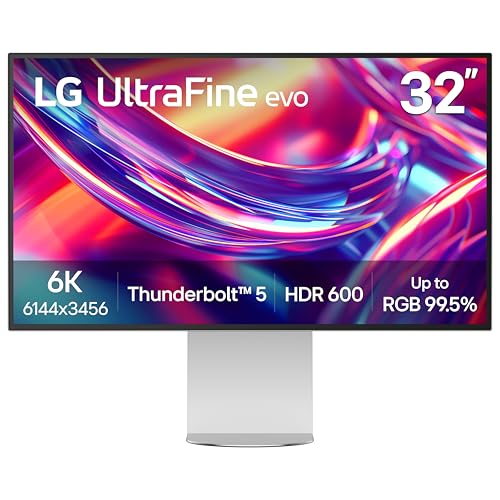
LG UltraFine 6K 32U990A — 6K step-up
Label first, because this guide insists on it: the 32U990A is a 6K monitor, 6144×3456, included as a step-up for readers whose real desire is more canvas at Retina logic rather than 5K exactly. On a 32-inch Nano IPS Black panel, that resolution holds roughly the same pixels-per-inch discipline as the 27-inch 5K models while adding about a fifth more width and height of working room — the difference between a timeline that fits and a timeline that scrolls. Around the panel, LG has fitted the newest connection story in this guide: Thunderbolt 5, HDMI 2.1, DisplayPort 2.1, built-in speakers and daisy chaining for a second display downstream.
The daisy chain and Thunderbolt 5 pairing point at this monitor’s intended desk: a high-end laptop workstation where one cable arrives, the 6K lights up, and a second screen hangs off the first without a dock farm. Nano IPS Black’s improved contrast gives it a more serious dark-room character than older IPS panels, and DisplayHDR 600 support makes it credible for HDR review work short of grading. It is, in short, the future-facing option — the pick for buyers who keep displays for two laptop generations and want the ports to still be current when the next machine arrives.
- Panel: 32-inch Nano IPS Black, 6K 6144×3456
- Colour: DCI-P3 98% typical per the listing
- HDR: DisplayHDR 600
- Ports: Thunderbolt 5, HDMI 2.1, DisplayPort 2.1, USB-C
- Extras: daisy chain support, built-in speakers
- Role: 6K step-up, not a 5K model
Strengths
- The largest Retina-logic canvas in the guide, with room that changes how big projects feel.
- Thunderbolt 5 and daisy chaining make it the best-connected pick here by a distance.
- Nano IPS Black contrast lifts it above older IPS panels for evening work.
Trade-offs
- It is not a 5K monitor; buyers needing exact 5K scaling maths should stay with the true 5K pair.
- Full benefit of Thunderbolt 5 waits on laptops that carry it.
- A 32-inch footprint and flagship positioning both ask more of the desk and the budget.
Best for: power users outgrowing 27 inches and builders speccing a desk for the next laptop generation. Not suited for: strict 5K purists, or compact desks where 32 inches crowds the keyboard.
Think of the desk this monitor completes. A current MacBook or a Thunderbolt 5 workstation arrives with one port to spare; the cable lands, 6K of Nano IPS Black wakes, a second display hangs off the chain for reference material, and the speakers in the panel handle the calls so the desk stays empty of everything except work. The 32U990A is less a monitor purchase than a decision about what era your workstation belongs to — and buyers making that decision tend to be the ones whose previous display served through three laptops and intends the same again.

ASUS ProArt PA32QCV 6K — 6K step-up for colour work
The second labelled step-up: ASUS’s ProArt PA32QCV takes the 6K resolution, 6144×3456 on 32 inches, and aims it at the colour professions. The credentials in its listing are the ProArt liturgy — Calman Verified calibration, 98% DCI-P3 coverage, Delta E under 2, DisplayHDR 600, an ergonomic stand, Auto KVM, and two features that reveal its Mac-studio target: a MacBook colour-match mode intended to make the external panel agree with the laptop’s own screen, and ASUS’s LuxPixel anti-glare, low-reflection surface treatment, which keeps grading-room light from contaminating judgement.
That anti-glare layer is this pick’s soul. Colour work happens under controlled but real lighting, and a glossy panel’s reflections are not merely annoying there — they are measurement error. The PA32QCV’s matte discipline, paired with factory calibration documentation, makes it the screen in this guide a retoucher or video editor can defend in front of a client. Thunderbolt 4 provides the connection, and the Auto KVM acknowledges the two-machine reality of studios where a Mac and a PC share one reference display. Like its LG counterpart it is a 6K step beyond the 5K brief — bought not for the extra letter, but for the professional apparatus wrapped around the pixels.
- Panel: 32-inch, 6K 6144×3456
- Colour: 98% DCI-P3, Delta E<2, Calman Verified
- Surface: LuxPixel anti-glare low-reflection treatment
- HDR: DisplayHDR 600
- Connection: Thunderbolt 4, Auto KVM
- Extras: MacBook colour-match mode, ergonomic stand
Strengths
- Calibration credentials a professional can put in front of a client.
- Anti-glare treatment designed for judgement under real studio light.
- Mac colour matching that tackles the two-screen disagreement every Mac studio knows.
Trade-offs
- A 6K step-up in size and commitment beyond the 5K brief that brought you here.
- Thunderbolt 4 rather than 5 — the LG step-up owns the newest port story.
- Its talents are wasted on a desk that never opens a photo or an edit timeline.
Best for: retouchers, editors and Mac studios needing a defensible reference canvas. Not suited for: general office buyers paying for calibration they will never invoke.
There is a subtler ProArt virtue worth naming: restraint in the picture itself. Consumer panels are tuned to impress in the first ten seconds — saturation up, contrast theatrical — while the PA32QCV is tuned to agree with other calibrated screens, with print proofs, with the client’s monitor in another city. In a professional chain of custody for colour, agreement is the entire product. The 6K canvas is what draws the eye in a listing; the agreement is what the studio is actually buying, and it is why this ASUS, rather than a larger entertainment screen, closes the linked half of this guide.
Apple Studio Display — Prose-only benchmark
Every 5K conversation orbits this screen, so it belongs in the guide even though it cannot carry a link: in our verification pass the Studio Display had no Amazon listing, because Apple sells it through its own store and retail channels. Treat this entry as the benchmark description it is. The Studio Display pairs a 27-inch 5120×2880 panel with the full Apple integration stack — a built-in camera and microphone array, a six-speaker system that embarrasses monitor audio generally, Thunderbolt connectivity, and an industrial design that treats the display as furniture for the Mac Studio era.
Its role in your decision is calibration of expectations. Against the Studio Display, the LG 5K offers the same Retina density with a more conventional monitor’s flexibility; the Samsung offers matte practicality and platform neutrality; and the 6K pair offer more canvas. What the Apple screen uniquely sells is cohesion — one company’s panel, camera, speakers and software behaving as a single appliance. If that cohesion is the thing you value, buy it from Apple directly with open eyes about its fixed-stand choices and its single-platform heart. If value, matte finish or Windows compatibility rank higher, the linked picks above exist precisely for you. No link appears here because none was verified — that restraint is the guide keeping its own rule.
- Panel: 27-inch, 5K 5120×2880
- Sold through: Apple’s own store and retail channels
- Character: integrated camera, microphones and speakers
- Connection: Thunderbolt
- Status in this guide: prose-only benchmark, no verified listing
- Role: the reference the linked 5K picks are judged against
Strengths
- The most cohesive all-in-one 5K experience, with audio and camera far beyond monitor norms.
- Retina density with Apple’s own colour and brightness integration for Mac desks.
- Build and design that treat the display as a decade-long furniture purchase.
Trade-offs
- Cannot be bought through a verified listing here — Apple’s own channels are the route.
- Stand flexibility is limited and adjustment is a purchase decision, not a feature.
- A single-platform heart: Windows visitors get a panel, not an ecosystem.
Best for: Mac devotees who want the reference experience and accept Apple’s terms. Not suited for: shoppers who need stand ergonomics included, or mixed-platform desks.
It is worth pausing on what the Studio Display’s presence in this guide proves about the category. A product can be simultaneously the benchmark and the wrong purchase for most readers — too platform-bound for mixed desks, too stand-rigid for ergonomic sticklers, too channel-exclusive for one-click shoppers — and still define the standard the others are measured against. The linked picks do not beat it by imitation; they beat it, for their buyers, by removing one specific friction the benchmark refuses to address. Naming which friction is yours is the whole of 5K shopping.
ASUS ProArt PA27JCV — Prose-only colour pick
The PA27JCV is the 5K that colour professionals ask about by name: a 27-inch ProArt at the true 5120×2880 resolution, carrying the line’s calibration discipline into the Retina-density class. It exists, it is current, and in studios it is a real option — but in our verification pass it had no clean Amazon listing, so in this guide it appears as a prose-only entry with its buying route stated plainly: look to ASUS’s authorised resellers and professional-equipment channels rather than expecting the listing ecosystem this page links to.
Why include a pick you cannot click? Because omitting it would mislead the exact readers it serves. A retoucher comparing the LG and Samsung 5K panels deserves to know a third temperament exists — one tuned for colour work first, with the ProArt family’s factory-calibration culture and matte professional finish — even if acquiring it takes a reseller conversation instead of a one-click order. Weigh it against the linked ProArt PA32QCV above: the 6K model buys you size, canvas and a verified route; the PA27JCV keeps the strict 5K resolution and the smaller professional footprint. That is a genuine professional fork, and this guide would rather show it honestly than hide it for tidiness.
- Panel: 27-inch class, true 5K 5120×2880
- Line: ASUS ProArt professional series
- Character: factory-calibration culture, matte professional finish
- Sold through: ASUS authorised resellers
- Status in this guide: prose-only, no clean listing in this check
- Role: the colour professional’s strict-5K option
Strengths
- True 5K density with a professional calibration pedigree behind it.
- Matte, studio-minded presentation rather than consumer gloss.
- Keeps the 27-inch professional footprint retouchers already have stands and arms for.
Trade-offs
- No verified listing here, so purchase runs through reseller channels and their timelines.
- Availability in this class fluctuates; expect to confirm stock before planning a studio fit-out.
- Narrower generalist appeal than the LG or Samsung for mixed home desks.
Best for: colour professionals committed to strict 5K at 27 inches. Not suited for: anyone whose project starts Monday and needs the screen on the desk by Friday.
The PA27JCV’s prose-only status carries one more lesson for the whole category: in a niche this small, availability is a specification. A studio planning a fit-out around a reseller-only model should confirm units before the old screens are retired, and a home buyer who finds the linked alternatives in stock is not settling — they are buying the same density with a shorter path to the desk. Scarcity flatters a product’s reputation; it should never be mistaken for superiority over the screens you can actually verify, order and unbox.
Gloss deserves its own paragraph in this category, because at 5K money it is the decision buyers most often make by accident. A glossy panel in a dim room produces the deepest, clearest version of the image — this is the Studio Display’s home turf and much of its legend — while the same panel under office lighting becomes a dark mirror that happens to display documents. Matte finishes concede a whisper of that midnight depth in exchange for indifference to the room. Neither is a quality tier; they are two answers to the question of where your desk sits, and the table below is best read with your own windows in mind.
Stand ergonomics run a close second in accidental decisions. At this level several models treat height adjustment as an accessory philosophy rather than a feature, and a fixed stand at the wrong height will tax your neck for the life of the product. Price the stand you actually need into the comparison — an arm, a riser, the manufacturer’s own adjustable option — because a 5K panel’s sharpness is wasted on a reader whose posture has collapsed by the third hour.
Six routes to a sharper desk, laid side by side
| Model | Resolution | Size | Buying route | Defining character |
|---|---|---|---|---|
| LG UltraFine 5K 27MD5KL-B | 5120×2880 | 27-inch | Linked listing | Mac one-cable default |
| Samsung ViewFinity S8 5K | 5120×2880 | 27-inch | Linked listing | Matte, Windows-friendly |
| LG UltraFine 6K 32U990A | 6144×3456 | 32-inch | Linked listing | 6K step-up, Thunderbolt 5 |
| ASUS ProArt PA32QCV 6K | 6144×3456 | 32-inch | Linked listing | 6K step-up, calibrated colour |
| Apple Studio Display | 5120×2880 | 27-inch | Prose-only — Apple’s store | Integrated benchmark |
| ASUS ProArt PA27JCV | 5120×2880 | 27-inch | Prose-only — ASUS resellers | Professional strict 5K |
How do you connect and configure a 5K monitor correctly the first time?
Use the cable that ships in the box, connected to a Thunderbolt or full-bandwidth DisplayPort output, and resist the drawer of anonymous cables entirely — 5K at 60Hz consumes enough bandwidth that a lesser cable silently negotiates the panel down to 4K and leaves you wondering why the expensive sharpness never arrived. On a Mac, open the display settings and confirm the resolution reads as the full 5120×2880 with the default looks-like-2560×1440 scaling; that pairing is the pixel-perfect configuration this category exists for. On Windows, set scaling to 150% and give your eyes a day to adjust to how much fits on screen.
Then calibrate your expectations and your colour in that order. Check that text in your main applications is rendering at the panel’s native crispness — a single legacy app with crude scaling can make a whole display feel wrongly accused. If you do colour work, let the panel warm up, use the factory calibration profile as your starting point, and only then reach for a hardware calibrator. Finally, arrange the desk around the density: at 218 pixels per inch you can sit a touch closer than a 4K habit suggests, and a monitor arm that lets you fine-tune that distance is worth more than any accessory the category tries to sell you.
What mistakes do 5K buyers make most?
The classic is buying 5K for a job that wanted refresh rate instead — competitive gaming on a 60Hz-class panel is misery no pixel count can sweeten. The second is feeding the panel through a cheap hub or cable and never seeing native resolution, then reviewing the monitor harshly for a crime the cable committed. Third comes assuming all 5K is equal: glossy and matte panels at identical resolution produce very different afternoons in a bright office, and the finish deserves as much deliberation as the spec.
Fourth, Mac buyers sometimes purchase a 4K panel expecting scaling software to close the gap; it narrows it, at a GPU cost, but the engraved-text quality of true 5K is a hardware fact, not a setting. Fifth, studio buyers plan around a prose-only model — the PA27JCV especially — without confirming reseller stock, and discover the niche category’s supply moods mid-project. And sixth, some readers treat the 6K step-ups as cheating; they are not, provided the label stays honest, as it does throughout this guide. They are simply the answer when the honest requirement was never 5K — it was more room at the same sharpness.
What will you actually do with all those pixels?
Density is a means, and the buyers who stay happiest with a 5K or 6K purchase are the ones who named the end in advance. Writers and researchers gain the most literal benefit: two full documents side by side, each rendered like print, with the reference material visible instead of tabbed away. Developers gain vertical certainty — more of the file, more of the log, less of the scroll — and the 5K’s scaling perfection means the text they stare at is the text as designed. Photographers and video editors gain the subtlest prize: an interface that stops competing with the image, chrome and palettes rendered so finely that attention returns to the work itself.
The buyers who should hesitate are equally specific. If your desk time is dominated by spreadsheets at large font sizes, a good 4K panel will feel ninety percent as luxurious and leave money for the chair and the lighting that your back will vote for. If your evenings are games, density is the wrong currency entirely — refresh is — and this category will disappoint you at any price. And if your room is bright and your work is colour-critical, the finish and calibration questions in this guide outrank the resolution question; a matte, calibrated 4K can serve you better than a glossy 5K chosen for its number.
That is the mature way to read a small category: not as a ladder with 6K at the top, but as a set of instruments, each honest about its purpose. The readers who choose by purpose will find one of these six screens — four clickable, two worth the extra errand — waiting to make their desk feel newly literate.
A seventh mistake is quieter: assuming the laptop is ready. Older machines with early Thunderbolt implementations, and docks that split bandwidth for other duties, can leave a 5K panel running below its native resolution or refresh — a compromise invisible in the settings menu’s confidence and obvious only in the text that never quite sharpens. Connect the panel directly to the computer for the first setup, prove the full resolution, and only then introduce the dock into the chain of custody.
And an eighth, for studio buyers: standardising a room on two different 5K finishes. A glossy anchor and a matte companion will disagree about every image opened on both, and the disagreement will be mistaken for calibration drift for months. Choose a finish per room the way you choose a colour temperature — once, deliberately, and for every screen in it.
How does a 5K screen change a working day, hour by hour?
The morning begins with triage — mail, messages, the day’s documents — and this is where density first pays rent. At 5K, a mail client, a calendar and a document hold their full shapes side by side without the overlap shuffle that smaller canvases impose, and the triage that used to involve thirty window switches becomes a single glance across a well-lit desk. Text at Retina density also changes the emotional register of reading long briefs: the page stops looking like a screen displaying a document and starts looking like the document, and attention follows.
Midday is production, and the benefit compounds quietly. The developer watches a file and its test output share the canvas without either shrinking into apology. The designer keeps palettes and layers visible while the artwork itself stays large. The writer drafts against research that remains open rather than remembered. None of these moments is dramatic; their sum, across a working year, is the entire economic case for the category — dozens of small context switches that simply never happen, each returning a few seconds and a thread of thought.
The evening test is different: open the photograph you are proudest of, or the film scene you know by heart, and let the density do its other work. A 5K panel will not turn a desk into a cinema, but the fineness that served your documents all day serves images with the same fidelity, and the screen that was an instrument at noon becomes, without changing a cable, the best display in the house. That double life — tool by day, pleasure by night — is what the buyers of this small category are really purchasing, and it is why so few of them ever go back.
What should you buy alongside a 5K monitor?
Start with the unglamorous essential: the right cable, certified for Thunderbolt at the length you need, plus a spare. At 5K bandwidths the cable is a component, not an accessory, and the spare is the difference between a five-minute fix and a lost morning when — not if — a connector eventually fails. Buy it with the monitor, while the lesson is theoretical.
Next, the arm or the stand upgrade, decided by your desk’s reality rather than by the product page’s photography. A 27-inch 5K panel deserves to float at exactly your eye height, and if the bundled stand cannot put it there, a quality monitor arm is not an indulgence but the second half of the purchase. Desk depth matters too: density rewards sitting a little closer than television habits suggest, and an arm buys the centimetres that let you find that distance instead of inheriting it.
Lighting is the third companion, and the cheapest. A soft, indirect light source behind or beside the panel — never reflected in it — steadies the contrast between screen and room through the evening hours, and on the matte picks it completes the bright-office story by keeping the panel’s surface calm. Colour professionals will add a hardware calibrator to the list, and should; everyone else can borrow the factory profiles with a clear conscience for the first year.
Finally, buy patience with your own settings. A 5K desk takes a week to arrange — window layouts, scaling per application, the geography of a second screen if one joins — and the buyers who schedule that week get a workstation that disappears into the work. The ones who expect the unboxing to be the whole project end up blaming a superb panel for an unfinished desk.
Why did 5K survive when so many resolutions did not?
The display industry is littered with resolutions that arrived as the future and left as trivia, so the persistence of 5120×2880 deserves an explanation. It survived because it was never a marketing resolution. It exists to satisfy a mathematical relationship — the exact doubling of the 2560×1440 working space that interface designers had standardised on — and mathematical relationships do not go out of fashion the way panel sizes do. As long as macOS renders the way it renders, a 27-inch 5K panel is the correct answer to a precisely stated question, and correct answers have a longer shelf life than impressive ones.
Its second protection is the loyalty of its niche. Writers, developers, photographers and interface designers are not a mass market, but they are a market that replaces its tools deliberately, recommends them to each other, and notices immediately when a manufacturer lets the category lapse. The makers in this guide — LG with its long UltraFine stewardship, Samsung with its ViewFinity challenge, ASUS with the ProArt line, Apple with the benchmark itself — are kept honest by an audience that measures. That is a healthier ecosystem than a mass market provides, and it is why a buyer entering the category today can expect the category to still be served when this panel eventually retires.
The 6K step-ups extend the same logic rather than replacing it: the identical argument at a larger canvas, for the desks that outgrew the original answer. Whether the industry’s centre of gravity settles at 5K or drifts to 6K over the coming years, the principle a buyer should carry away is the one this guide began with — density chosen by the work’s mathematics, not by the showroom’s superlatives. Resolutions that obey that principle do not become obsolete; they become classics.
The density audit — three documents that will tell you the truth
Before ordering, run the audit this category deserves, using the material of your own working life rather than a reviewer’s test files. Take the longest document you regularly read — the report, the manuscript, the contract — and imagine it at the two densities honestly: on a good 4K panel at this size, rendered with fractional scaling’s faint softness, and on true 5K, where every letterform lands exactly on the pixel grid. If your work is that document, eight hours a day, the difference is not a luxury; it is the removal of a small, constant tax on attention that you have been paying so long you have stopped itemising it.
Second, take your busiest screen — the one with the editor, the browser, the terminal and the chat all claiming territory — and count how many times a day you shuffle windows to see what the 5K canvas would simply show. Each shuffle is a few seconds and a broken thread; multiplied across a year of working days, the count becomes the purchase’s real return, and it is why developers and researchers, whose screens are the busiest, convert to this density and evangelise it with a fervour that puzzles everyone whose desk is calmer.
Third, take the image you care about most — your own photograph, your current project’s hero frame — and ask whether the screen’s other virtues serve it: the finish under your room’s light, the calibration behind the panel, the colour agreement with the other screens in your life. Density is the headline of this category, but the audit’s third document is the reminder that a monitor is a whole instrument. The six entries in this guide were chosen so that whichever of them your audit selects, the instrument as a whole — not merely its pixel count — will still be pleasing you when the novelty of sharpness has long since become your ordinary.
There is a fourth document, for the buyer still hesitating at the threshold: the invoice from your last monitor, and the years it served. Density purchases amortise across an unusually long working life — these are not annual upgrades but desk furniture with a power cable — and the honest comparison is never between a 5K panel and a cheaper panel this month. It is between a decade of reading at the density your work deserves and a decade of reading at the density your caution settled for. Framed across ten years, the premium in this category shrinks to a modest monthly figure, and the daily difference in how text feels does not shrink at all.
That arithmetic also explains the category’s unusual owner loyalty. People do not evangelise appliances; they evangelise relief. A screen that removes a small friction from every hour of every working day accumulates a gratitude out of proportion to its specification, and 5K owners — writers who stopped squinting at footnotes, developers who stopped scrolling to remember, editors who stopped zooming to judge — are simply reporting the sum of ten thousand tiny removals. Run the audit, trust its documents, and let your own working life cast the deciding vote.
One last practical mercy belongs in the audit: check the return terms before the panel ships, and keep the packaging until the second week closes. A 5K purchase is a considered one, but consideration has limits that only a real desk can test — your window’s angle at 4 p.m., your laptop’s behaviour under its full load, your eyes’ verdict on the finish. The sellers of the linked picks in this guide operate in the ordinary way, and a buyer who keeps the box keeps the right to change a mind that new evidence has honestly changed. Almost nobody in this category uses that right. Everybody sleeps better for having it.
And one small, sincere closing note to the audit: whichever screen it selects, give the decision a full working week before you judge it in company. Density is a quiet virtue that accumulates rather than announces itself, and the owners who rave about this category in year three are the ones who let the first week be ordinary. Ordinary, at this sharpness, turns out to be extraordinary — it just takes a few days of documents to notice.
Final Recommendation
Decide which question you are actually asking. If it is the classic Mac question — the sharpest, simplest external Retina display — the LG UltraFine 5K remains the default, with the Studio Display as the benchmark to buy from Apple if cohesion outranks flexibility. If your desk runs Windows or both platforms, the Samsung ViewFinity S8 is your 5K. If you are a colour professional, weigh the prose-only PA27JCV’s strict 5K against the linked PA32QCV’s 6K canvas, and if more room at Retina logic is the real brief, LG’s 6K is the future-proof step. This small category rewards precision about your own needs like no other — and rewards it with text so clean that going back to ordinary density feels like reading through frosted glass.
Frequently Asked Questions
Is 5K noticeably sharper than 4K at 27 inches?
Yes, in the specific way that matters for text and interface work: at 27 inches, 5K reaches the roughly 218 ppi density where macOS scaling is pixel-perfect, so text edges land exactly on the pixel grid. In games and video the difference is subtler; in a day of reading, writing and designing, it is the difference between rendered and printed.
Why are there so few 5K monitors compared with 4K?
Because the panel economics follow the television industry, which standardised on 4K, while 5K exists mainly to serve the Mac ecosystem’s scaling mathematics. A handful of panels serve the niche, prices stay professional, and models like the Studio Display sell through their makers’ own channels — which is exactly why this guide mixes linked and prose-only entries honestly.
Can a Windows PC drive these monitors properly?
Yes. Any modern graphics output with Thunderbolt or DisplayPort bandwidth handles 5120×2880 at 60Hz, and Windows scaling at 150% produces a spacious, sharp desktop. The Samsung ViewFinity S8 is the pick designed with that use foremost, while the LG will still perform — it simply saves its integration polish for Macs.
Should I choose a 6K step-up instead of true 5K?
If your constraint is canvas — timelines, palettes, multiple documents — the 6K models give you about a fifth more working area at the same Retina-class density, and macOS scales them with the same pixel-perfect logic at their native setting. If your constraint is exact 5K behaviour, colour workflow standardisation or a 27-inch footprint, stay with the true 5K picks.
Do these monitors work for gaming at all?
For slow, beautiful, single-player titles they are gorgeous — density this high flatters any world. For anything competitive, their 60Hz-class refresh is the wrong tool, and the honest advice is a second screen or a different guide: our OLED and Mini-LED roundups cover panels built for frame rates first.
Can I run a 5K monitor from a laptop’s single Thunderbolt port?
Yes — that is the use case the category was designed around. A Thunderbolt connection carries the full 5120×2880 signal, and on the hub-equipped picks it simultaneously charges the laptop and hosts peripherals, so the one port becomes the whole docking story. Just use a certified Thunderbolt cable of the length supplied or shorter; bandwidth at 5K leaves no room for bargain cables.
Is 5K overkill for writing and office work?
For pure text, 5K is a luxury with a rational core: the pixel-perfect scaling removes the faint softness that fractional scaling leaves on 4K panels at the same size, and readers who spend eight hours a day in documents consistently describe the difference as effort removed rather than beauty added. Whether that effort is worth the premium depends on how much of your life is reading — for writers, editors and researchers, it usually is.
What is the difference between 5K and 5K2K?
They are different shapes wearing similar names. True 5K, the subject of this guide, is 5120×2880 in a 16:9 frame — the Retina-density format. 5K2K is an ultrawide format, 5120 across but only 2160 tall, which trades vertical space for width. Ultrawides have their own charms and their own guide; if your work is documents, code and images in standard proportions, the 16:9 true 5K panels here are the correct density.
Will a 5K monitor make my laptop run hot or slow?
Driving 5120×2880 is real work for integrated graphics, and older laptops will run their fans more readily with a 5K attached, especially while also charging through the same cable. Current machines handle it as a matter of routine. The sharper risk is the reverse — a fractional-scaled 4K panel actually costs the GPU more than a native 5K at its perfect scaling, which is one of the quieter arguments for buying the true resolution.
Do I need a monitor arm for a 5K display?
Not categorically — several picks here ship with competent stands — but the arm is the accessory this category’s owners most often buy second and wish they had bought first, because density rewards a precise viewing distance and desks rarely provide one by default. If your chosen model’s stand lacks height adjustment, treat the arm as part of the purchase price from the start rather than as an upgrade to postpone.
Related Guides
Building the rest of a high-density desk? See the best monitors for macbook pro docking setups and our guide to the best 4k monitors for photo editing, or step sideways to the best daisy chainable monitors for multi screen desks.
Related guides
- Best 4K UHD HDR HDMI Extenders: 4K60, Long-Run and 4K120 Kits Compared
- Best 25–35 Inch Monitors With Lowest Display Lag: An Honest Ranking Without Invented Numbers
- Best Color Product Label Printers: Six Desktop Machines for Short-Run Product Labels
- Best Enterprise SATA SSDs: Endurance Classes, Power-Loss Protection and Fleet Sense


