What's inside
- Where to buy
- Key Takeaways
- Quick Picks
- How did we judge routers for a moving home?
- What does repeater mode do for life on the road?
- When should an RVer skip campground Wi-Fi and go cellular?
- How should an RVer think about antennas, placement and the park’s access point?
- Feeds, power and purpose at a glance
- How do you set up a travel router at a new site?
- Which RV networking mistakes strand travellers most often?
- Final Recommendation
- Frequently Asked Questions
- Related Guides
As an Amazon Associate I earn from qualifying purchases. This post may contain affiliate links at no extra cost to you.
gizmoverdict.com is reader-supported. When you buy through links on our site, we may earn an affiliate commission.
Where to buy
An RV network has to be rebuilt at every stop. One week the campground offers cheerful Wi-Fi that collapses at dinner time; the next, a boondocking site offers nothing but sky and a phone signal two fields away. The best routers for rvs are the ones designed for that instability — small travel routers that can repeat a site’s Wi-Fi as your own private network, share a phone’s hotspot without drama, run from USB power in a 12-volt world, and keep every device you own logged into one familiar network name no matter what strange connection feeds it today. This guide compares five such travel routers plus one cellular hotspot that skips campground infrastructure altogether.
All six picks are linked and were checked against live listings while this guide was assembled, so the table names lead to real pages where you can check price on Amazon before ordering. A note on expectations: no router manufactures bandwidth. These devices organise, secure and stretch whatever connection a location offers — and on the road, organisation is most of the battle. A private network that stays constant while its feed changes nightly is what keeps the television signed in, the laptop on the right Wi-Fi, and the campground portal page confined to one device instead of seven.
Power is the hidden specification of RV networking, so each review states plainly how the unit feeds. Routers that sip from USB-C can run from the same battery bank that charges your phones during a power-cut night; routers that demand a wall outlet quietly assume hookups you may not have. Read those lines as carefully as the speed classes, because on the road the router that stays on beats the router that was fast at the last site.
Key Takeaways
- A travel router’s repeater mode is the RV superpower: join the campground network once, and every device you own connects to your own unchanged network.
- The Beryl AX is the anchor pick — Wi-Fi 6, a 2.5G WAN port, OpenWrt flexibility and USB-C power in a pocket-sized shell.
- GL.iNet’s Slate AX trades a little size for stronger Wi-Fi 6 throughput, suiting couples who both work from the road.
- TP-Link’s Roam pair bring a friendlier app and explicit hotel/RV sharing design; the AX3000 version adds OpenVPN and WireGuard depth.
- The Opal is the budget veteran: AC1200 speeds, three gigabit ports, and a price that forgives being a spare.
- The Nighthawk M7 ignores campground Wi-Fi entirely, running on 5G with eSIM — the route for boondockers beyond site infrastructure.
Quick Picks
| Pick | Badge | Why it earns its place |
|---|---|---|
| GL.iNet Beryl AX (GL-MT3000) | Travel anchor | Wi-Fi 6 travel router with 2.5G WAN, VPN support and OpenWrt, powered over USB-C. |
| GL.iNet Slate AX (GL-AXT1800) | Stronger step-up | Pocket Wi-Fi 6 up to AX1800 class with VPN, for two remote workers sharing one feed. |
| TP-Link Roam 6 AX1500 (TL-WR1502X) | Sharing specialist | Portable Wi-Fi 6 built for easy public Wi-Fi sharing in hotels and RV parks. |
| TP-Link Roam 6 AX3000 (TL-WR3002X) | Faster Roam | Multi-gig portable Wi-Fi 6 with OpenVPN and WireGuard for heavier road workloads. |
| GL.iNet Opal (GL-SFT1200) | Budget veteran | AC1200 dual-band travel router with three gigabit ports and OpenWrt roots. |
| NETGEAR Nighthawk M7 | Cellular route | 5G mobile hotspot with eSIM and Wi-Fi 7, unlocked for travel beyond campground range. |
How did we judge routers for a moving home?
Home-router criteria were mostly set aside. Raw speed classes matter less in an RV than connection versatility, because the feed changes constantly: campground Wi-Fi on Monday, a phone hotspot on Tuesday, a marina’s network on Friday, nothing at all on the weekend. Every pick had to handle at least two of those feeds gracefully — repeating a wireless network as its WAN source, tethering a phone over USB, or accepting a wired feed — and to keep the RV’s own network name steady while the source changed underneath it.
Power draw was audited like a fuel gauge. Off-grid nights run on finite battery, and a router that drinks from a wall wart designed for a house can become the reason the lights dim early. USB-C-powered models scored heavily here: they share chargers with phones, run from power banks during outages, and sip rather than gulp. The one mains-oriented exception had to justify itself with capability nothing smaller offers.
Size and mounting realism counted too. An RV’s networking shelf is usually a corner of a dinette or the top of a fridge, competing with everything else that lives there. Pocket-sized units that can Velcro to a wall or ride in a tech pouch beat desktop hardware with external antennas that snap in transit. Each router in this guide can plausibly live in a moving vehicle without a custom installation project.
Privacy features earned unusual weight because RV networking means joining untrusted networks weekly. A travel router that places all your devices behind its own firewall and NAT — rather than exposing each phone and laptop directly to a campground’s shared network and its hundreds of strangers — changes your security posture fundamentally. VPN client support, present on most of these picks, adds the option of tunnelling everything through a trusted endpoint before it touches the site’s infrastructure at all.
Finally, we favoured routers whose software a tired traveller can operate at 9 p.m. in a new park. Repeater setup, captive-portal handling and hotspot tethering had to be reachable in a few taps or clicks, because the person configuring them has just reversed into a pitch in the rain. Depth is welcome — several picks run OpenWrt for those who want it — but the first-run path had to be short.
What does repeater mode do for life on the road?
Picture the alternative first. Without a travel router, every arrival means joining each device — two phones, a laptop, a tablet, a television, a streaming stick — to a new network, often through a captive portal that counts devices, times out sessions, or charges per connection. Multiply by every stop on a three-week tour and connectivity becomes a chore with its own admin hour.
A travel router in repeater mode collapses that ritual. The router joins the campground network once, handles the portal page from a single device, and rebroadcasts your own private network — same name, same password as always — inside the RV. Your devices never learn that the park changed. The television stays signed in, the laptop’s work VPN sees a familiar gateway, and the site’s per-device limits and portal timers apply to one connection rather than seven. When the feed is a phone hotspot instead, the same trick applies: tether or repeat the phone, and the RV network persists.
There is a security dividend that matters more than the convenience. On an open campground network without a router, your devices sit on a shared LAN with every neighbouring rig. Behind your own travel router, they sit on your LAN, firewalled by NAT, invisible to the park’s other guests. Add a VPN client on the router — supported by the GL.iNet pair, the faster Roam and the Opal — and even the park’s operator sees only an encrypted tunnel. For travellers who bank, work and file taxes from the road, that posture is the difference between using site Wi-Fi and fearing it.
Repeating is not free of physics. A single-radio repeater halves its airtime by listening and rebroadcasting in turns, and a weak park signal repeated faithfully is still a weak signal. Placement near a window or high in the rig helps, as does choosing 2.4 GHz for the long reach back to the park’s access point while serving the interior on 5 GHz — a split the dual-band picks here handle naturally. Manage those two variables and repeater mode feels like the park installed Wi-Fi in your van personally.
When should an RVer skip campground Wi-Fi and go cellular?
Campground Wi-Fi has a structural problem no router solves: the park’s own backhaul. A site may broadcast a strong signal fed by a connection shared among two hundred rigs, and at 7 p.m., when every television wakes, that shared feed divides into homeopathic portions. Your travel router organises your side beautifully and still cannot conjure bandwidth the park does not have. Travellers who work from the road learn to read this quickly — strong bars, miserable throughput, every evening.
Cellular inverts the problem. A 5G hotspot answers to a tower, not to the park’s hospitality budget, and in covered areas delivers speeds that embarrass most site networks. The costs are data economics and coverage geography: streaming habits that are free on campground Wi-Fi burn through hotspot allowances, and the remote places RVers love most are where towers thin out. The honest setup for full-timers is often both — a travel router repeating site Wi-Fi for bulk and streaming, a cellular option reserved for work calls and the nights the park network folds.
The Nighthawk M7 in this guide represents the premium version of that second path: unlocked, eSIM-equipped, and fast enough to be a household’s only connection in covered country. Whether it replaces or merely rescues your campground setup depends on your data plan’s generosity and your map’s blank spaces. The reviews below treat it as the no-landline path — not a travel router with a SIM slot, but a different philosophy of staying online.
How should an RVer think about antennas, placement and the park’s access point?
Campground Wi-Fi is usually broadcast from a handful of access points — the office roof, a pole near the amenities block, sometimes a repeater halfway down the main row. Your pitch’s distance and angle to the nearest one decides your evening more than any router specification. On arrival, a thirty-second phone walk tells the story: stand at each end of the rig and watch the park network’s signal. Park the router on the strong side, high and near glass, and you have performed the only optimisation that reliably matters.
Building materials argue with signals in a fixed order of rudeness. Glass and fibreglass barely object; plywood and insulation grumble; aluminium siding and foil-backed panels behave like a radio fence. This is why the window rule outperforms every other placement tip, and why some full-timers mount a travel router in an overhead locker against the roof — trading a little interior convenience for a clearer conversation with the park. Interior coverage, across a few metres of open cabin, forgives almost any position; the uplink is the diva.
External-antenna envy deserves a calm word. A router with prominent aerials can pull a distant signal more eagerly, but it also travels worse, mounts worse and snaps in transit. The pocket routers in this guide accept a modest sensitivity trade in exchange for surviving the drawer. Where a traveller camps repeatedly at the far end of one huge site, a dedicated solution exists — but for touring, where every park differs, robustness and placement beat a decibel or two of antenna gain.
Finally, remember the other half of the link: the park’s access point is shared, and its busiest hours are everyone’s busiest hours. A signal that flies at 3 p.m. may crawl at 7 p.m. through no fault of your router. Schedule the operating-system updates, the photo backups and the film downloads for the quiet hours, and the network will feel twice as fast without a single setting changing — the road’s oldest bandwidth trick is a clock.

GL.iNet Beryl AX (GL-MT3000) — Travel anchor
The Beryl AX has become the default answer in travel-router conversations, and an RV is where its design makes the most sense. It is a Wi-Fi 6 dual-band router small enough to disappear into a tech pouch — the listing notes 574 Mbps on its 2.4 GHz band within its class figures — yet it carries a 2.5G WAN port that lets it front a genuinely fast wired feed when a site or a home base offers one. It runs on OpenWrt beneath GL.iNet’s friendly interface, supports VPN clients and servers, and sips power over USB-C, which in a 12-volt rig is close to a moral virtue.
In daily RV service the Beryl’s repeater mode is the feature that earns its shelf corner. It joins the park network, absorbs the captive portal once, and serves the whole rig from its own private SSID. Its VPN client support means the entire RV can ride an encrypted tunnel when the park network looks sketchy, and because the router holds the tunnel, devices that cannot run VPN apps — televisions, streaming sticks, e-readers — are protected anyway. For a working traveller, that single behaviour justifies the purchase before speed is even discussed.
Range expectations should be set by its size. The Beryl’s internal antennas serve an RV interior beautifully — the distances are metres, not tens of metres — but pulling in a faint park signal from across a field asks more of it than of a router with external aerials. Park it high and near a window on the side facing the site’s access point, and it performs admirably. Owners who regularly camp at the far edge of large parks sometimes pair it with realistic expectations rather than a bigger router, because the park’s backhaul is usually the ceiling anyway.
OpenWrt underneath means the Beryl grows with its owner. Travellers who begin with repeater mode in month one are, by month six, often running a WireGuard server to reach the rig’s network from afar, or policy-routing the television around the VPN while the laptop stays inside it. GL.iNet’s interface keeps those doors visible without forcing them open. It is rare for the smallest box in a guide to also be the most adaptable; the Beryl manages it, which is why it anchors this one.
Power manners complete the picture. USB-C feeding means the Beryl runs from the rig’s existing chargers, from a power bank during a hookup-free night, or from a laptop in a pinch — and its draw is modest enough that leaving it on around the clock off-grid is a reasonable choice rather than a battery negotiation. In a vehicle where every amp-hour is accounted, that frugality is a feature on par with its radios.
One Beryl habit worth copying from long-term owners: save two configurations. The first repeats park Wi-Fi, the everyday mode; the second tethers your phone automatically when no known park network answers. Switching between them becomes a single tap at a new stop, and the rig’s network sails on unchanged. It is a ten-minute investment at home that pays out at every rain-soaked arrival for the life of the router.
- Wireless: Wi-Fi 6 dual-band, 574 Mbps on 2.4 GHz per listing
- Wired highlight: 2.5G WAN port for fast site or home feeds
- Software base: OpenWrt under a traveller-friendly interface
- Privacy kit: VPN client and server support built in
- Power: USB-C, happy on power banks and rig chargers
- Form: pocket-sized, internal antennas, pouch-friendly
Strengths
- Repeater plus VPN turns sketchy park Wi-Fi into a private network.
- USB-C power suits off-grid battery budgets perfectly.
- OpenWrt depth rewards owners who grow into advanced setups.
Trade-offs
- Internal antennas limit reach to distant park access points.
- Small size means few Ethernet ports for wired gear.
- Advanced features sit behind menus beginners must grow into.
Best for: full-time and long-tour RVers who join a new park network every few days.
Not suited for: a stationary seasonal pitch with its own fast wired connection and a full desktop setup.
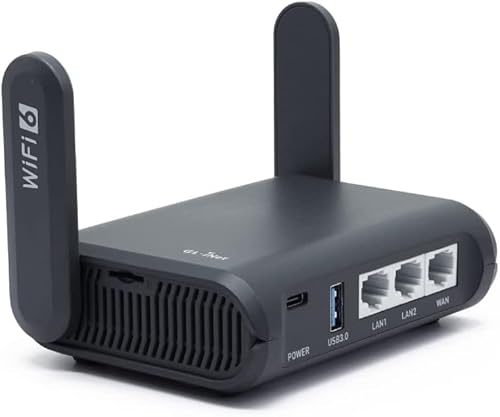
GL.iNet Slate AX (GL-AXT1800) — Stronger step-up
The Slate AX is the Beryl’s bigger sibling for travellers whose road life includes two laptops on video calls at once. Still pocket-sized in spirit — GL.iNet describes it as a pocket Wi-Fi 6 travel router — it steps up to AX1800-class dual-band speeds and a stronger processor, which shows itself in two places RVers feel: VPN throughput when the whole rig rides a tunnel, and composure when several devices pull hard through a repeated connection simultaneously. If the Beryl is the solo traveller’s anchor, the Slate is the working couple’s.
That processor headroom matters because repeating already spends airtime; adding encryption on top is where lesser travel routers begin to wheeze. The Slate holds a steadier line under the combined load of a repeated park feed, a WireGuard tunnel and a pair of work machines. Its flip-out antennas also buy a little more sensitivity toward a distant access point than the Beryl’s internal design, which can be the difference between holding a far pitch’s signal and watching it flap.
The trade is appetite and size. The Slate draws more power than the Beryl and occupies more pouch, and for a traveller whose road workload is one laptop and a television, its extra muscle idles. Judge it by your busiest hour: two remote workers, a child streaming, and a tunnel to the office is a Slate-shaped evening. A retiree’s browsing and nightly film is Beryl-shaped, and the money saved buys campsite nights.
Software is the same GL.iNet blend of guided setup over OpenWrt depth, so skills transfer between the siblings — a household can run a Beryl in a campervan and a Slate in a larger rig and administer both with one set of habits. VPN client and server support, repeater mode, tethering and the rest of the travel toolkit are all present. Choosing between the two GL.iNet picks is therefore blessedly simple: count your simultaneous heavy users, and buy the processor that matches them.
Durability in transit favours the Slate more than photos suggest. Its folding antennas tuck flat, the shell shrugs off life in a bag of cables, and the unit has the slightly overbuilt feel of gear designed to be packed daily. Travellers who treat routers as consumables will still replace them eventually; travellers who buy the Slate tend to report it surviving several seasons of being thrown into the same drawer as the levelling blocks and the dog leads.
The Slate also earns its keep on the shoulder days of a trip — the overnight stops where nobody wants a project. Its stronger radios forgive a lazy placement on the dinette instead of the careful window perch, and its processor shrugs off the whole family reconnecting at once after a driving day. Convenience compounds: the router that tolerates a tired setup is the router that gets used at every stop rather than only the long ones.
- Wireless: Wi-Fi 6 dual-band up to AX1800 class
- Processor: stronger chip for VPN and multi-device loads
- Antennas: fold-out design for reach and tidy packing
- Software: GL.iNet interface over OpenWrt, VPN built in
- Feeds: repeater, tethering and wired WAN options
- Power: USB-C, with a larger appetite than the Beryl
Strengths
- VPN and repeater loads stay smooth with two workers online.
- Fold-out antennas pull in weaker park signals more reliably.
- Same friendly software as the Beryl, nothing new to learn.
Trade-offs
- Costs and consumes more than the Beryl for idle headroom.
- Slightly bulkier in a minimalist tech pouch.
- Still no answer to a park whose backhaul itself is exhausted.
Best for: two remote workers touring together behind one repeated, tunnelled connection.
Not suited for: a minimalist solo traveller whose entire load is a phone and a streaming stick.

TP-Link Roam 6 AX1500 (TL-WR1502X) — Sharing specialist
TP-Link designed the Roam 6 AX1500 with a sign on the drawing board that evidently read ‘hotels and RVs’, and its speciality is in the name of its headline feature: easy public Wi-Fi sharing. Where the GL.iNet pair speak fluent enthusiast, the Roam speaks fluent traveller — a guided app flow that joins the park network, handles the portal, and stands up your private network with the minimum of vocabulary. For RVers who want the repeater benefit without the OpenWrt personality, this is the friendliest door into the category.
Its AX1500 Wi-Fi 6 class is honestly matched to its job. Park feeds rarely exceed what AX1500 radios can carry, and inside the rig the distances are trivial; the Roam’s job is not to win speed tests but to make a shared, dubious network feel like home infrastructure. It performs that job with TP-Link’s characteristic polish — tidy app, clear status, painless firmware — and its compact body mounts or perches anywhere a USB power source lives.
Power comes over USB-C, keeping the Roam compatible with the rig’s chargers and power banks, and its draw is modest. Wired options are travel-scale rather than desk-scale: enough to accept a wired feed where one exists or to plug in a laptop for a big download, not enough to build a wired office around. Travellers whose rig includes a small switch and several wired devices should look at the Opal’s port count or the Beryl’s 2.5G ambition instead.
VPN support is the Roam AX1500’s thinner page compared with its AX3000 sibling and the GL.iNet pair. Basic privacy behind NAT and its own firewall — the big win of any travel router — is fully present. But travellers who specifically want the whole rig inside a WireGuard tunnel should read the next review before ordering, because that capability is precisely where the faster Roam separates itself. Buy this one for effortlessness; buy its sibling for encryption depth.
There is a social virtue to the TP-Link badge worth naming: familiarity. Many RVers already run TP-Link at home, and the app’s habits transfer, which shortens the 9 p.m. setup in a new park to a few recognisable taps. When the person configuring the network is tired, rained on and holding a torch in their teeth, recognisable beats powerful — and the Roam is engineered for exactly that moment.
Grandparents touring with grandchildren are this Roam’s quiet constituency. The app’s plain language turns ‘join the park, share it privately’ into a task a non-technical owner completes without phoning a relative for help, and the grandchildren’s tablets simply find the same network name they used at the last stop. Technology that reduces the support calls in a family is performing emotional labour as well as networking, and the Roam does it without condescension.
- Wireless: Wi-Fi 6 portable class, AX1500 aggregate
- Headline talent: easy public Wi-Fi sharing for hotels and RVs
- Management: TP-Link app with guided traveller flows
- Power: USB-C from rig chargers or power banks
- Role: private network and NAT firewall for all your devices
- Size: compact travel body, perch-anywhere placement
Strengths
- Friendliest repeater setup in this guide for non-technical owners.
- Purpose-built for the hotel and RV sharing scenario.
- TP-Link app polish and painless updates.
Trade-offs
- VPN depth is limited beside its AX3000 sibling.
- Few wired ports for a desk-style rig setup.
- AX1500 ceiling shows when a rare fast feed appears.
Best for: RVers who want park Wi-Fi tamed by an app, not by a networking hobby.
Not suited for: a privacy-focused worker who needs the whole rig inside a WireGuard tunnel.

TP-Link Roam 6 AX3000 (TL-WR3002X) — Faster Roam
The Roam 6 AX3000 takes everything its smaller sibling does politely and gives it a second lung. Dual-band Wi-Fi 6 at the AX3000 class, a multi-gig portable design, and — the listing is explicit — OpenVPN and WireGuard support move this Roam into direct competition with the GL.iNet pair. It is the TP-Link for travellers who read the AX1500 review, nodded at the friendliness, and then asked where the encryption and the headroom were hiding.
On the road, that headroom shows in households rather than in benchmarks. Two laptops, a television and a phone or two behind one repeated feed is a normal evening in a family rig, and the AX3000’s radios and processor keep the queue orderly where the smaller Roam begins to prioritise by luck. WireGuard support means the privacy tunnel runs at speeds that do not punish you for using it — the difference between a VPN you leave on and a VPN you switch off for calls and forget to restore.
The multi-gig wired side suits the growing number of rigs with a wired corner: a small desk where a laptop docks, perhaps a mini PC or a NAS for photo backups from the road. Paired with a fast feed at a home base or a premium site, the Roam AX3000 stops being the bottleneck that travel routers usually are. It remains, despite the numbers, a portable unit — USB-C powered, compact, and content to live on a dinette corner rather than in a rack.
Choosing between this and the Slate AX is the guide’s closest call. The TP-Link offers the tidier app and the more familiar brand for many households; the GL.iNet offers OpenWrt’s deeper customisation for owners who will genuinely use it. Both repeat, both tunnel, both sip USB-C power. Let your temperament decide: guided polish here, open platform there. Either leaves a family rig better connected than any amount of per-device campground logins.
One practical note for tourers crossing many sites: the Roam remembers previous networks gracefully, which shortens repeat visits to favourite parks — the router recognises the feed, the rig’s devices simply wake up at home. It is a small mercy that compounds over a season of touring, and it reflects a design team that has plainly watched real travellers set up in real rain.
Photographers and video creators touring for work should look twice at this Roam. Evening uploads of the day’s footage are exactly the workload its AX3000 headroom and multi-gig wired side were built for, and a WireGuard tunnel to a home server turns the rig into a branch office with wheels. The smaller Roam would carry the files eventually; this one carries them before dinner, which on a working tour is the entire point.
- Wireless: dual-band Wi-Fi 6 at AX3000 class
- VPN kit: OpenVPN and WireGuard support named in listing
- Wired side: multi-gig portable port layout
- Management: TP-Link app, guided and polished
- Power: USB-C for rig and power-bank running
- Memory: smooth handling of previously joined networks
Strengths
- WireGuard and OpenVPN at speeds worth leaving switched on.
- AX3000 headroom keeps family evenings orderly.
- App friendliness of the Roam line, without the compromises.
Trade-offs
- Pricier than the AX1500 for power some rigs never tap.
- No OpenWrt playground for deep customisers.
- Still bound by whatever the park’s backhaul delivers.
Best for: a family rig with several simultaneous users who also want a proper VPN tunnel.
Not suited for: a solo traveller whose whole network is one phone and a kettle.

GL.iNet Opal (GL-SFT1200) — Budget veteran
The Opal is the elder statesman of this guide: AC1200 dual-band Wi-Fi from the generation before Wi-Fi 6, three gigabit Ethernet ports that several newer rivals would envy, and OpenWrt foundations under GL.iNet’s approachable interface. It has been the spare-router recommendation in travel forums for years, and its case in an RV is simple arithmetic — park feeds are usually slow enough that AC1200 radios are not the bottleneck, while its ports and its price solve real problems the newer boxes leave behind.
Those three gigabit ports deserve their own sentence in an RV context. A television that prefers a cable, a laptop dock at the dinette, and a small media drive can all wire into the Opal at once, turning a modest travel router into the rig’s little network hub. Newer pocket routers commonly offer one or two sockets and assume a wireless life; the Opal remembers when travel meant a laptop on a cable and serves both eras at once.
Repeater mode, VPN client support and the rest of the GL.iNet travel toolkit are present, so the Opal performs the essential RV trick — one private network, whatever the feed — with the same security posture as its pricier siblings. Its processor is the honest limit: heavy VPN throughput and many simultaneous streams will find its ceiling sooner than the Slate’s. For a couple browsing, streaming a film and keeping phones current, that ceiling sits comfortably above the evening’s ambitions.
Buy the Opal as a primary router for a modest rig, or — the role its owners praise most — as the household’s second travel router. One lives in the RV permanently, configured and forgotten; if it fails, walks away or gets lent to a neighbour in trouble, the trip continues. At its price, redundancy is a rational strategy rather than an indulgence, and no other pick in this guide makes that argument as cheaply.
Age brings one more advantage: documentation. Years of forum threads, videos and campsite word-of-mouth cover nearly every Opal question an owner will ever type, including the odd repeater quirks of specific park systems. When you are troubleshooting at a picnic table, the router with a thousand answered questions is worth more than the router with the newest radio — a truth this guide is happy to print in a Wi-Fi 6 era.
The Opal also moonlights as the rig’s diplomat. Lend it to the neighbouring pitch whose expensive router has failed, and its simple repeater setup has strangers back online in minutes — campsite goodwill of the highest denomination. Owners joke that the Opal has attended more barbecues than they have. A router cheap enough to lend and good enough to matter is a rare social instrument, and it explains the model’s stubborn refusal to leave bestseller lists.
- Wireless: AC1200 dual-band, previous-generation radios
- Port count: three gigabit Ethernet sockets
- Software: OpenWrt base with GL.iNet’s traveller interface
- Travel kit: repeater mode and VPN client support
- Power: low draw, travel-charger friendly
- Community: years of answered questions online
Strengths
- Three wired ports beat most newer travel routers.
- Price makes it a sensible permanent resident or spare.
- Enormous community knowledge for roadside troubleshooting.
Trade-offs
- AC1200 radios cap fast feeds and busy households.
- Processor limits heavy VPN throughput.
- No Wi-Fi 6 scheduling benefits for crowded device lists.
Best for: a modest rig, a wired little dinette corner, or a permanent spare in the tech drawer.
Not suited for: two remote workers pushing a fast feed through an all-day VPN tunnel.

NETGEAR Nighthawk M7 — Cellular route
The M7 is not a travel router and does not pretend to be. It is a 5G mobile hotspot — unlocked, eSIM-equipped, with Wi-Fi 7 radios and speeds the listing puts at up to 3.6 Gbps — that creates your network from a cellular signal instead of borrowing a park’s. For the boondocker parked beyond the reach of campground infrastructure, the full-timer whose work cannot depend on a site’s hospitality connection, or the traveller crossing regions where parks are scarce and towers are not, the M7 is not an alternative to the five routers above. It is the answer to a different question.
eSIM is the feature that changes the travel rhythm. Rather than hunting a local SIM at every border or committing to one carrier’s map, an eSIM hotspot can provision service digitally and switch plans as geography demands — invaluable for international tourers and for domestic travellers who cross one carrier’s dead zones into another’s stronghold. Combined with the unlocked hardware, it makes the M7 a genuinely borderless piece of kit, the closest thing networking has to a passport that works everywhere.
Performance in covered country is in another class from campground Wi-Fi: a private feed, unshared with two hundred neighbouring rigs, feeding Wi-Fi 7 clients at speeds that support two remote workers and a 4K stream without negotiation. The honest limits are coverage and data economics. Where towers thin, the M7 is a beautiful paperweight; where plans cap or throttle, streaming discipline returns. Its battery and mains flexibility suit vehicle life, but a hotspot feeding a whole rig all day lives happiest with a power plan — rig USB, a dock, or rotation with the house battery.
Many full-timers will run the M7 alongside, not instead of, a travel router: the GL.iNet or Roam repeats free park Wi-Fi for bulk traffic, while the M7 carries work calls and the evenings the park folds. That pairing is the professional setup, and this guide lists the M7 as its premium half. Buy it alone if your map is covered and your plan is generous; buy it as a partner if your income travels with you and cannot afford a campground’s bad night.
NETGEAR’s Nighthawk line brings polish to the hotspot category — a clear display of signal and data state, an app that speaks plainly about usage, and hardware that feels like a flagship phone’s sibling rather than a disposable puck. Data anxiety is the hotspot owner’s constant companion, and an interface that shows consumption honestly, at a glance, prevents the end-of-month surprises that sour travellers on cellular networking altogether.
Data discipline becomes a household skill around the M7. Its clear usage reporting teaches a family quickly which habits are cheap — messaging, browsing, music — and which are feasts, like a games console’s hundred-gigabyte patch or a television left streaming to an empty rig. Most owners settle into a rhythm within one billing cycle: cellular for work and evenings’ chosen viewing, downloads saved for generous park feeds. The hotspot does not impose that discipline; its honest display simply makes the arithmetic visible.
- Feed: 5G cellular, unlocked, with eSIM provisioning
- Wireless: Wi-Fi 7 hotspot, up to 3.6 Gbps per listing
- Coverage logic: works wherever a suitable tower answers
- Independence: no campground network required at all
- Interface: on-device status plus app data visibility
- Role: primary connection or premium failover partner
Strengths
- Private, unshared feed immune to campground evening collapse.
- eSIM freedom suits cross-border and multi-carrier touring.
- Wi-Fi 7 clients get flagship-class local speeds.
Trade-offs
- Data-plan costs govern streaming habits in a way park Wi-Fi never does.
- Useless where cellular coverage itself gives up.
- Premium hardware price atop an ongoing service bill.
Best for: boondockers and full-timers whose work or wanderlust outruns campground infrastructure.
Not suited for: a weekend camper happily inside park Wi-Fi range on a tight data budget.
Feeds, power and purpose at a glance
| Pick | Main feeds | Power style | Wi-Fi class | Defining talent |
|---|---|---|---|---|
| Beryl AX | Repeater, tether, 2.5G wired | USB-C, frugal | Wi-Fi 6 | OpenWrt adaptability |
| Slate AX | Repeater, tether, wired | USB-C, heartier draw | Wi-Fi 6 AX1800 | VPN under load |
| Roam 6 AX1500 | Public Wi-Fi sharing | USB-C | Wi-Fi 6 AX1500 | Guided setup |
| Roam 6 AX3000 | Repeater, wired multi-gig | USB-C | Wi-Fi 6 AX3000 | WireGuard with headroom |
| Opal | Repeater, three wired ports | Low-draw travel power | AC1200 | Ports and price |
| Nighthawk M7 | 5G cellular, eSIM | Battery and mains | Wi-Fi 7 | Total independence |
The table’s real lesson is that these six barely compete with each other. Four philosophies are on offer: adaptable OpenWrt travel routers, guided TP-Link sharing, a wired-friendly budget veteran, and cellular independence. An RVer’s itinerary — park-hopper, worker, boondocker, weekender — selects the philosophy long before specifications select the model.
How do you set up a travel router at a new site?
Arrive, park, level — then, before the awning, do the network while daylight and patience last. Place the router high and near a window on the side of the rig facing the park’s office or access point; signal enters through glass far more willingly than through aluminium siding. Power it from the rig’s most reliable USB source, not the charger that also fights for the kettle’s socket.
Open the router’s app or admin page from your phone and choose repeater (sometimes labelled WISP) mode. Select the park network, enter its password or complete its portal page when prompted — do this from one device only, the router itself — and confirm your own network name reappears. Then walk the rig with a phone: dinette, bed, cab seats. A travel router’s interior distances are kind, but a fridge or a bathroom’s plumbing wall can still shadow a corner; nudging the router a metre often fixes what no setting can.
If the park feed disappoints, switch the router’s source rather than its settings: tether a phone by USB for a cleaner feed, or let the cellular hotspot take over if you carry one. The beauty of the architecture is that your devices notice nothing — the network name, password and each other remain constant while the internet behind the curtain changes actors. Set the VPN client to auto-connect if your model offers it, so a tired evening setup never accidentally leaves the rig exposed on an open park network.
Before leaving a site, there is nothing to undo — another small mercy. Power down or simply unplug, drive, and repeat the ritual at the next stop. Travellers who keep a note of which parks had strong feeds, and where in the rig the router sat for them, build a personal atlas that makes every return visit a two-minute setup.
Which RV networking mistakes strand travellers most often?
Joining every device to the park network directly is the founding error — an hour of portal pages at arrival, strangers on your LAN, and a television that forgets everything at the next stop. The entire travel-router category exists to retire that ritual; buying one and then bypassing it for ‘simplicity’ is the road version of carrying an umbrella and getting wet anyway.
Expecting a router to fix a park’s exhausted backhaul runs second. If every rig on site is streaming through a feed sized for an office, your evening will crawl no matter which pick from this guide you own. The fix is strategic, not technical: download films at midday, let the cellular option carry the important call, and save the heavy syncs for the good parks your notebook remembers.
Power improvisation causes the third class of grief — routers plugged into inverters that switch off with the ignition, USB ports that sleep when the vehicle does, power banks that empty by 3 a.m. Decide the router’s power source as deliberately as its position, test it overnight at home, and let the network be the one system in the rig that never surprises you.
Finally, forgetting the firmware and password basics because ‘it is only the van’s Wi-Fi’. A travel router meets more hostile networks in a month than a home router meets in a lifetime. Change its admin password, keep updates automatic, and treat its VPN toggle as part of the arrival checklist — the road rewards the traveller whose small disciplines are already habits.
Weather writes the last line of many RV networking stories. Rain attenuates a marginal park signal, a crowded holiday weekend multiplies every weakness, and the site that served you beautifully in May may sag in August. Experienced travellers hold their setup loosely — router movable, feeds interchangeable, expectations seasonal — and that flexibility, more than any single product in this guide, is what separates the crews who complain about connectivity from the crews who barely mention it.
There is also a packing discipline worth adopting before the first tour: the router, its cable and its charger live in one labelled pouch, and that pouch has a home. Half the ‘router problems’ reported from the road are actually ‘router is in the other storage bay’ problems. The finest networking hardware in this guide is pocket-sized precisely so it can be findable — honour the design by giving it a pocket of its own in the rig.
Final Recommendation
Buy the Beryl AX unless your life on the road names a specific reason not to. It repeats park networks gracefully, tunnels the whole rig when a network smells wrong, sips USB-C power like it was designed by someone who has watched a battery gauge, and costs little enough that the decision need not survive a committee. Couples working from the road should step up to the Slate AX for its processor and antennas; travellers who want an app to hold their hand should take the Roam AX1500, or the AX3000 if WireGuard and a family-sized load are in the picture. The Opal remains the thinking budget buy and the finest spare in the drawer, and the M7 is the premium escape hatch for country where campgrounds — and their Wi-Fi — simply are not.
Whichever you choose, the purchase is really the same one: a network with your name on it, waiting inside the rig at every stop, indifferent to what feeds it tonight. That constancy — not a speed class — is what turns a vehicle back into a home at the end of a driving day.
A season of touring will also teach you your own pattern — the parks you revisit, the feeds you trust, the hours your household actually spends online — and the router that seemed like a compromise in spring often reveals itself as the correct size by autumn. Buy for the pattern you can already see in your travelling life, and let the upgrade itch wait for evidence rather than anticipation.
Keep the receipt and the firmware current, keep the pouch by the door locker, and let the network be the smallest, calmest and most dependable system in the whole vehicle — the one that simply wakes up wherever you wake up, asks for nothing at all, and quietly gets on with holding the travelling household together, site after site, border after border, and season after season of ordinary travelling life.
Frequently Asked Questions
Can a travel router make slow campground Wi-Fi fast?
No — it can only organise what the park provides. What it removes is friction and exposure: one login instead of seven, your devices behind your own firewall, and a network name that never changes. If the park’s feed is the bottleneck, a cellular option like the M7 is the actual speed answer.
Is it safe to do banking over campground Wi-Fi through one of these?
Behind your own router’s NAT you are already far safer than a device joined directly to the park LAN. For banking and work, enable the router’s VPN client — offered by the GL.iNet pair, the Roam AX3000 and the Opal — so traffic leaves the park inside an encrypted tunnel.
Will these routers run on my RV’s 12-volt system?
The USB-C-powered picks run happily from quality 12V USB outlets and power banks, which is the practical route in most rigs. Check your outlet’s output is stable and sufficient, and test overnight before a long off-grid stretch rather than discovering a sleepy socket at midnight.
Can I use a travel router at home between trips?
Yes — as a small router, a repeater for a weak room, or a VPN gateway for a single desk. Several owners in this category’s community keep the Beryl or Opal working year-round and simply unplug it when the rig rolls. It is one of the quiet economies of buying travel-sized hardware.
Do I need a VPN subscription to use the VPN features?
For client mode — tunnelling your rig’s traffic out through a provider — yes, you need an account with a VPN service, or your own server at home, which OpenWrt-based picks like the Beryl can also connect to. The router supplies the machinery; the endpoint is yours to choose.
Can I mount a travel router permanently in the RV?
Yes, and many full-timers do — high in a locker near a window, powered from a fused USB outlet, forgotten for months. Ventilation is the only real condition; these small units run cool, but a sealed box in summer sun tests any electronics. A strip of hook-and-loop tape is the traditional mount, and it survives roads that rattle crockery loose.
What if the campground charges per device?
This is where a travel router quietly pays for itself. The park sees one connection — the router — while your phones, laptops and television sit behind it on your private network. Check the site’s terms if you are unsure, but the technical arrangement is the standard one travel routers are sold for.
Should I keep the router running while driving?
There is rarely a reason to: no park network exists between stops, and a tethered phone can serve navigation-era needs directly. Most travellers power the router down with the rest of the cabin, saving battery for the systems that matter on the move. The exception is a cellular setup like the M7, which some crews leave running so the rig is online the moment wheels stop.
Related Guides
Road networking touches several neighbouring decisions, and these guides cover the closest of them. best routers with openvpn for tunnelling your whole network best mesh routers wifi 6 for homes that stay in one place best wifi routers for small apartments and compact spaces
Related guides
- Best 4K UHD HDR HDMI Extenders: 4K60, Long-Run and 4K120 Kits Compared
- Best 25–35 Inch Monitors With Lowest Display Lag: An Honest Ranking Without Invented Numbers
- Best Enterprise SATA SSDs: Endurance Classes, Power-Loss Protection and Fleet Sense
- Best Color Product Label Printers: Six Desktop Machines for Short-Run Product Labels


