What's inside
- Where to buy
- Key Takeaways
- Quick Picks
- How did we rank printers when the headline number misleads?
- How does pixel pitch actually work?
- Which resin printers lead the post-4K generation?
- How do the post-4K six compare on the numbers that matter?
- What else decides a resin print’s real detail?
- How should a 4K-generation owner upgrade?
- How do layer height and exposure trade against screen pitch?
- What does a complete resin station actually include?
- How fast is resin printing, really?
- How do you read a resin listing like an engineer?
- What will the next resin generation actually improve?
- How do you photograph resin detail honestly?
- One last resin test before you pay
- What should the first resin print be?
- How do you choose a resin to match the machine?
- How do you verify a resin printer’s detail yourself?
- Which resin buying mistakes does the K number cause?
- Final Recommendation
- Frequently Asked Questions
- Related Guides
As an Amazon Associate I earn from qualifying purchases. This post may contain affiliate links at no extra cost to you.
gizmoverdict.com is reader-supported. When you buy through links on our site, we may earn an affiliate commission.
Where to buy
Each name below links to the exact resin printer listing under review — pay attention to the generation words, because Saturn, Photon and Mars families stack several screen generations under similar names. Resin printers are also sold by the makers’ own stores, and the sensible comparison includes the wash-and-cure station, the first resin order and spare film, since a resin printer without its workflow is a sculpture of a printer. Check bundle contents on the listing rather than assuming the ecosystem pieces are inside.
Start with the honest sentence this entire guide exists to explain: if you go shopping for the best 4k resin printers today, you will barely find a 4K printer at all. The label belongs to an earlier generation of screens. The current desktop resin shelf runs from 9K to 16K, and yet the K number — the figure every listing shouts — is close to the least useful number on the page. What decides the detail in your finished miniature is the size of each pixel on the screen, measured in microns, and that figure depends on the screen’s physical size as much as its pixel count. This guide ranks six current machines while teaching that arithmetic, so the next listing you read cannot dazzle you with a big K stretched over a big screen.
The arithmetic is simple enough to do on any listing. Divide the screen’s width in millimetres by its horizontal pixel count and you have the pixel pitch — the XY resolution that governs how fine a detail the printer can draw on each layer. A 10K screen spread across a huge build plate can land at a coarser pitch than a 9K screen kept small, which is why this guide includes a 7K machine with pride of place in the lesson: Anycubic’s M7 Max stretches its pixels over a 13.6-inch screen to buy enormous build volume, trading a little pitch for a lot of space, openly and rationally.
The six machines divide by intent. Elegoo’s Saturn 4 Ultra appears twice in this batch’s guides in two generations — the 16K flagship and its 12K predecessor — Anycubic answers with the 14K Photon Mono M7 Pro and the giant M7 Max, and the compact class is held by Elegoo’s Mars 5 Ultra 9K and Anycubic’s Photon Mono 4 Ultra 10K. Every one of them would have been called science fiction by the 4K generation. Read for pixel pitch, build volume and workflow manners, in that order, and the ranking becomes a tool rather than a verdict.
Key Takeaways
- ‘4K’ is a legacy label: current resin screens run 9K to 16K, and the K number alone tells you almost nothing about finished detail.
- XY pixel pitch in microns is the figure that matters — a smaller screen with fewer pixels can out-resolve a larger screen with more.
- The Elegoo Saturn 4 Ultra 16K is the flagship expression of the current generation, with smart tank heating for reliability in cool rooms.
- Anycubic’s Photon Mono M7 Max is the teaching example: 7K across 13.6 inches means bigger pixels and a huge build volume — a deliberate, sensible trade.
- Compact machines — Mars 5 Ultra 9K and Photon Mono 4 Ultra 10K — often post the finest effective detail because their screens stay small.
- Never trust an XY micron figure you cannot derive or verify from the listing’s screen size and resolution; this guide prints none it cannot source.
Quick Picks
| Pick | Badge | Why it earns its place |
|---|---|---|
| Elegoo Saturn 4 Ultra 16K | Best Flagship Detail | Ten inches of 16K screen, a flip-up lid and tank heating at 30°C — the current generation’s flagship statement. |
| Elegoo Saturn 4 Ultra 12K | Best Previous-Generation Value | The same Saturn platform at 12K, with smart auto levelling and a slightly larger listed build area — yesterday’s flagship at today’s friendlier tier. |
| Anycubic Photon Mono M7 Pro 14K | Best Heated Versatility | A 10.1-inch 14K screen lit by a COB LighTurbo 3.0 source, with dynamic heating and the largest listed height in its class. |
| Anycubic Photon Mono M7 Max 7K | Best Build Volume | A 13.6-inch 7K screen over an 11.73-inch-wide build area — the guide’s living proof that K and detail are different conversations. |
| Elegoo Mars 5 Ultra 9K | Best Compact Detail | Nine K across just seven inches, with smart levelling, intelligent detection and Wi-Fi transfer — small screen, sharp pixels, modern manners. |
| Anycubic Photon Mono 4 Ultra 10K | Best Compact Alternative | Ten K on a seven-inch screen with a COB light source — Anycubic’s compact answer, a fraction wider than its Elegoo rival. |
How did we rank printers when the headline number misleads?
We began by refusing the K number as a ranking input. Each candidate was assessed on the relationship between its listed screen size, its listed resolution class and its listed build volume — the three figures the listings themselves supply — because pixel pitch lives in that relationship. Machines whose listings hid one leg of the triangle were set aside. What survived are printers whose makers state their geometry plainly enough for a buyer to do the honest arithmetic this guide teaches.
Workflow formed the second filter, because resin quality is a system result. Automatic levelling, tank or resin heating, light-source uniformity and lid design all change how often a theoretically fine screen produces a practically fine print. The Saturn flagships earn credit for tank heating, the M7 Pro for its dynamic heating and COB light source as listed, and the compact machines for the short, stiff light paths that small formats enjoy. A printer is a light engine bolted to a chemistry set; we ranked the whole apparatus.
Finally, we required each pick to represent a distinct intent — flagship detail, previous-generation value, heated versatility, maximum volume, compact sharpness — so the guide reads as a decision map rather than six attempts at the same machine. Where a model’s pitch arithmetic makes it the volume pick rather than the detail pick, its section says so in plain language, because a buyer who understands the M7 Max’s trade will never again be fooled by a headline K.
How does pixel pitch actually work?
Take any listing in this guide and find two numbers: the screen’s diagonal or its build width, and the resolution class. A 10-inch-class screen carrying a 16K pixel count packs its pixels far tighter than a 13.6-inch screen carrying 7K — the bigger screen has more than double the area over which to spread fewer pixels, so each pixel grows, and the smallest printable detail grows with it. Neither machine is lying; they are answering different questions. The flagship answers ‘how fine?’, the giant answers ‘how large?’, and the buyer’s error is asking one machine the other’s question.
This is why the compact class keeps embarrassing flagships in detail tests. The Mars 5 Ultra’s 9K screen is only seven inches across, and the Photon Mono 4 Ultra’s 10K screen matches it, so their pixels stay small and their miniatures stay crisp. It is also why this guide refuses to print XY micron figures beyond what listings support: pitch claims in marketing copy are notoriously creative, while screen size and resolution class, printed in the titles themselves, let you reason correctly. Learn the division once and every future resin listing becomes transparent.
Which resin printers lead the post-4K generation?

Elegoo Saturn 4 Ultra 16K — Best Flagship Detail
The Saturn 4 Ultra 16K is what the shelf looks like when a maker stops competing on the K number and starts competing on the system around it. The listing specifies a ten-inch 16K monochrome screen, a flip-up lid, smart tank heating at 30°C and a build size of 8.33 by 4.66 by 8.66 inches. That build area is generous for resin — army-scale miniature batches, mid-size models, production runs of small parts — while the pixel count across a ten-inch screen keeps pitch in the fine class the flagship label promises.
Tank heating is the feature owners praise in February. Resin thickens as it cools, thick resin releases from the film reluctantly and prints fail at the peel, so holding the tank at a steady warmth converts winter from resin season’s enemy into a non-event. The flip-up lid improves the other daily friction — access without finding a surface for a removed cover, dripping resin managed by design rather than by hope. Together they describe a flagship philosophy: the screen sells the machine, but the handling keeps it.
Buy it as the detail-and-volume summit of the mainstream resin shelf. It asks the standard resin commitments — wash and cure capacity, ventilation, consumables — at a scale matching its build area, and it will expose sloppy workflow more honestly than a forgiving compact machine. For the miniature producer, the Etsy-scale model shop or the hobbyist who simply wants the current generation’s best foot forward, this is the guide’s headline answer.
Production owners develop a telling habit with the Saturn 16K: they stop checking the screen specification and start checking the film’s hours. That is flagship maturity — the hardware’s ceiling is high enough that consumable discipline becomes the quality frontier. Keep the release film fresh, the resin filtered and the tank heating doing its quiet work, and the machine returns plates whose consistency becomes a business asset: customers cannot tell which week a miniature was printed in. For a machine bought on a number, its finest compliment is how completely its owners forget the number. Saturn 16K owners printing for painters should offer one unpainted miniature with every painted commission. The bare print is the machine’s signature — proof of the pitch the customer is paying for — and it converts the flagship’s specification into the most persuasive sample in the studio.
- Screen from listing: 10-inch 16K monochrome
- Build size from listing: 8.33 x 4.66 x 8.66 inches
- Tank: smart heating at 30°C listed
- Lid: flip-up design
- Class: flagship desktop resin
Strengths
- Fine pitch across a genuinely large resin build area
- Tank heating stabilises winter printing
- Lid design respects the mess of the craft
Trade-offs
- Workflow demands scale with build area
- Exposes sloppy resin handling honestly
- Flagship consumables budget applies
Best for: miniature producers and model shops wanting the current flagship.
Not suited for: first-time resin buyers with a tiny, unventilated corner.
Check the Saturn 4 Ultra 16K listing for current film, resin and wash-station bundles.

Elegoo Saturn 4 Ultra 12K — Best Previous-Generation Value
Generations in resin arrive quickly, and the Saturn 4 Ultra 12K is the beneficiary of that pace: a flagship platform one screen generation back, carrying smart automatic levelling, a ten-inch 12K monochrome screen, a listed 150mm/h speed figure and a build size of 8.62 by 4.84 by 8.66 inches — marginally larger on paper than its 16K sibling. Buyers who understand the pitch lesson will already see the shape of the deal: a small step in pixel density exchanged for a friendlier position in the range, on a platform whose handling Elegoo had already proven.
Automatic levelling is the feature that matters most here in daily life. Resin printing punishes a tilted build plate with failed first layers and asymmetric detail, and a machine that levels itself removes the most skill-dependent step in the workflow. Combined with the Saturn line’s established ergonomics, the 12K reads as the pragmatic flagship — the one for buyers who want the platform’s manners and volume, and who have done the arithmetic showing their miniatures will not miss the final increment of pitch.
Position it honestly in your mind: this is not the detail summit, and its section in the flagship’s shadow is deliberate. It is the value summit of the same mountain. Workshops equipping a second resin machine, clubs furnishing a makerspace, and producers whose parts sell on finish rather than microscope photography will find the 12K generation the smartest spend in Elegoo’s half of this guide.
The 12K’s owners include a disproportionate number of second-machine buyers, and their reasoning is instructive: once a workshop’s income depends on resin uptime, a same-platform sibling is worth more than a spec-sheet upgrade, because every profile, spare and habit transfers. Clubs reach the same conclusion for training — one interface to teach, one film size to stock, one set of failure modes to document. If your resin life already has a centre of gravity on the Saturn platform, this previous-generation flagship may be the most rational purchase in the entire guide, headline numbers notwithstanding. The 12K makes an unusually good club machine: auto levelling forgives rotating operators, the platform’s spares are everywhere, and its detail satisfies members who would never fund a flagship individually. Shared resin is a workflow discipline problem, and this machine minimises every variable except the discipline itself.
- Screen from listing: 10-inch 12K monochrome
- Levelling: smart automatic
- Build size from listing: 8.62 x 4.84 x 8.66 inches
- Speed from listing: 150mm/h
- Class: previous-generation flagship platform
Strengths
- Flagship platform manners without flagship positioning
- Auto levelling removes resin’s fiddliest routine
- Slightly larger listed build area than the 16K
Trade-offs
- A step behind the flagship in pixel density
- Platform extras vary by bundle — check contents
- Still demands the full resin workflow at scale
Best for: value-led workshops and second-machine buyers on the Saturn platform.
Not suited for: detail absolutists who want the current summit.
Compare the 12K listing against the 16K side by side — the pitch lesson in this guide prices the difference.

Anycubic Photon Mono M7 Pro 14K — Best Heated Versatility
Anycubic’s M7 Pro competes on light and heat as much as on pixels. Its listing specifies a 10.1-inch 14K screen, a COB LighTurbo 3.0 light source, a dynamic heating function, a listed 170mm/h speed and a build volume of 8.77 by 4.96 by 9.05 inches. The light source deserves the headline it rarely gets: uniform, well-collimated light is what lets a fine screen actually deliver fine detail at the edges of the plate, where lesser engines soften. COB designs concentrate the source to sharpen that delivery, and the M7 Pro’s owners buy the benefit in edge-of-plate miniatures that match the centre’s quality.
Dynamic heating plays the same reliability role as the Saturn’s tank system, managing resin temperature as conditions change rather than holding one blunt setting. Paired with the tallest listed build height in this class, the M7 Pro suits producers whose models run vertical — statues, tall figures, stacked production — and whose rooms do not hold a steady temperature across a long print. Anycubic’s Photon ecosystem supplies the surrounding resin, parts and community depth that a flagship purchase should stand on.
Against the Saturn 16K, the M7 Pro trades a step of headline resolution for its light engine and heating character; against its own M7 Max sibling below, it is unambiguously the detail choice. Buyers who print at plate edges, in cool rooms, at height, will find its particular combination — 14K pitch, COB light, dynamic warmth — the most thoughtfully engineered answer in the guide to the problems resin actually has.
The M7 Pro’s light engine shows its worth on the prints nobody posts: the batch where forty small parts share one plate and the corner pieces must match the centre pieces because a customer is paying for all forty. Uniform exposure is commercial honesty in hardware form. Combined with dynamic heating holding viscosity steady across a long plate’s duration, the Pro is engineered for the unglamorous virtue of sameness — the quality that separates a printer that impresses its owner from a printer that an owner can build a small business on. M7 Pro owners should run one plate deliberately half-filled at the edges only — a light-engine audit disguised as a print run. The corner results, logged beside the centre results from earlier plates, become the owner’s personal evidence for what the COB source actually delivers.
- Screen from listing: 10.1-inch 14K monochrome
- Light source: COB LighTurbo 3.0
- Heating: dynamic heating function listed
- Build volume from listing: 8.77 x 4.96 x 9.05 inches
- Speed from listing: 170mm/h
Strengths
- Light engine quality supports detail at plate edges
- Dynamic heating suits changeable rooms
- Tallest build height in its class here
Trade-offs
- A step behind the 16K flagship on headline resolution
- Flagship-tier workflow and consumables
- Ecosystem depth sits with Anycubic’s conventions
Best for: producers printing tall, edge-to-edge, in rooms that will not stay warm.
Not suited for: buyers who rank headline K above light and heat engineering.
Read the M7 Pro listing’s heating and light-source details closely — they are the machine’s real argument.

Anycubic Photon Mono M7 Max 7K — Best Build Volume
Here is the lesson with a price tag. The M7 Max carries a 13.6-inch 7K screen — the lowest K in this guide — across a build size of 11.73 by 6.46 by 11.81 inches, the largest by a wide margin. Its pixels are therefore the biggest in this guide, and its miniatures will be the least fine. And for a whole class of buyers, it is still the correct machine: cosplay components, architectural models, large display pieces and production parts whose scale makes filament layer lines the alternative. The Max does not fail the detail test; it declines it, in exchange for volume no other pick here approaches.
Anycubic equips the trade properly. The listing cites temperature control and a productivity framing, because large resin prints are long prints, and long prints in cooling resin are where big machines earn or lose their reputations. A vat of this size also changes housekeeping — more resin in circulation, heavier handling, a wash station that must match the plate — and the guide insists those costs be counted as part of the machine, not discovered as surprises.
Buy the Max when your models are measured in tens of centimetres and your detail requirements are honest: surface smoothness at viewing distance, not crispness under a loupe. Read its listing beside the M7 Pro’s and you hold the entire thesis of this guide in two browser tabs — same family, opposite answers, each correct for its question. No machine in the batch teaches the post-4K market better than this deliberate, giant exception.
Max owners reorganise their rooms and their expectations together. The wash station grows, the resin shelf deepens, and print planning acquires a logistics flavour — a plate this size is a commitment of material that deserves a modelled certainty before the lid closes. In return, the machine produces the objects that dominate a portfolio: the architectural centrepiece, the full-size prop, the display piece visible from the doorway. Its 7K badge, properly understood, is not an apology but a declaration of priorities, and this guide respects it more for stating them in the title where buyers can do the division themselves. Max owners develop a pre-flight ritual worth copying at any scale: weigh the resin the job will consume, stage the wash station before the print starts, and confirm the curing capacity fits the largest piece. Big resin fails expensively in the post-processing, not the printing, when the ritual is skipped.
- Screen from listing: 13.6-inch 7K monochrome
- Build size from listing: 11.73 x 6.46 x 11.81 inches
- Temperature: control function listed
- Class: large-format resin
- Pitch character: coarsest in this guide, by design
Strengths
- Build volume dwarfs every other pick here
- Temperature control suits very long prints
- Ideal for large display and architectural work
Trade-offs
- Finest detail is not its brief — pitch is the trade
- Vat scale raises resin and handling costs
- Needs a wash station sized to match
Best for: large-format resin work where scale outranks microscopic detail.
Not suited for: miniature painters chasing the finest possible pitch.
Check the M7 Max listing’s vat and station requirements so the big-machine workflow is budgeted whole.
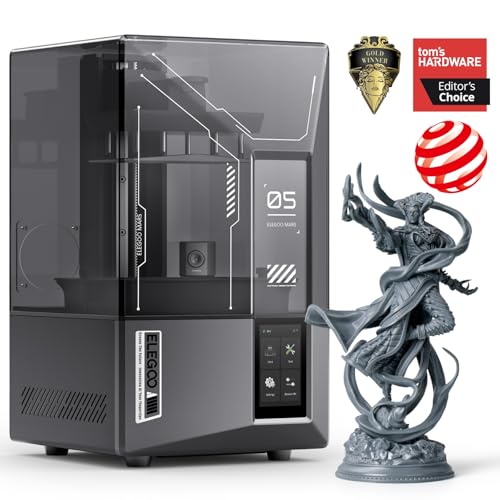
Elegoo Mars 5 Ultra 9K — Best Compact Detail
If the M7 Max teaches that K is not detail, the Mars 5 Ultra teaches the corollary: small screens concentrate pixels. Its seven-inch 9K screen serves a build size of 6.04 by 3.06 by 6.49 inches — true tabletop-miniature territory — and the resulting pitch belongs in the fine class despite the modest headline number. Around that screen, Elegoo wraps smart automatic levelling, intelligent detection and Wi-Fi transfer, making the smallest machine in this guide also one of its most modern to live with.
Compact resin has workflow virtues beyond pitch. Vats are small, so resin stock rotates fresh; prints are quick to wash; the whole station — printer, wash, cure — fits a shelf rather than a bench. For the miniature painter, the D&D producer, the jeweller prototyping at desk scale, that footprint is not a compromise but the correct size of the craft. Intelligent detection adds a safety net for the long, thin supports miniature work depends on, catching failures before they consume an evening’s resin.
The ceiling is literal: parts must fit its modest volume, and batch producers will outgrow its plate. Speed of iteration is its compensation — small machines cycle jobs quickly, and learning resin on a compact, self-levelling, well-detected platform is the gentlest education the current market offers. As the compact detail pick, the Mars 5 Ultra is the machine this guide hands to detail-first beginners without a single caveat about its generation.
The Mars 5 Ultra has become a quiet recommendation among miniature painters for a reason beyond pitch: iteration dignity. A sculpt can be test-printed after breakfast, adjusted by lunch and finalised by evening, on a station that fits beside the painting desk where the finished piece will live. Wi-Fi transfer and detection features serve that rhythm — the machine behaves like a peripheral of the creative desk rather than a tenant of the garage. For artists whose medium is the miniature itself, that placement is not convenience; it is the difference between a tool that joins the practice and one that interrupts it. Mars owners should exploit the small plate’s speed by printing paint-scheme tests — the same miniature at three exposures of effort, brush in hand an hour later. No resin machine in this guide closes the loop between printing and painting faster, and painters feel that loop as creative momentum.
- Screen from listing: 7-inch 9K monochrome
- Levelling: smart automatic
- Detection: intelligent detection listed
- Transfer: Wi-Fi listed
- Build size from listing: 6.04 x 3.06 x 6.49 inches
Strengths
- Fine pitch from a concentrated small screen
- Self-levelling and detection suit beginners and producers alike
- Whole resin station fits a shelf
Trade-offs
- Smallest build area in this guide
- Batch production outgrows the plate
- Compact class caps part height
Best for: miniature makers and detail-first resin beginners.
Not suited for: anyone whose models exceed a small plate.
Confirm the Mars 5 Ultra listing bundle for included station accessories before ordering resin.

Anycubic Photon Mono 4 Ultra 10K — Best Compact Alternative
The Photon Mono 4 Ultra is the compact class’s other accent. Its listing specifies a seven-inch 10K screen, a COB light source, speeds up to 120mm/h, an HD touchscreen with eight languages and a build size of 6.04 by 3.42 by 6.49 inches — a touch wider than the Mars 5 Ultra’s plate, in the same miniature heartland. The COB source is its distinguishing engineering: concentrated light for even, sharp exposure across the small plate, the same philosophy its M7 Pro sibling applies at flagship scale.
Choosing between the two compacts is a temperament and ecosystem decision more than a specification one. Anycubic’s Photon world — its resins, its slicer conventions, its community — suits owners already invested there, and the Ultra’s interface polish flatters shared and educational settings. Detail from its concentrated 10K screen sits in the same fine class as its rival’s; nobody’s miniatures will reveal which badge printed them, and that is precisely the post-4K lesson operating at the small end of the shelf.
As with every compact, volume is the boundary and iteration speed the compensation. The Mono 4 Ultra earns its place as proof that the mainstream resin market now offers two mature compact ecosystems rather than a default and a distant second. Pick your accent — Anycubic’s light engine and interface, or Elegoo’s detection and transfer polish — and print miniatures whose quality would have embarrassed the 4K generation’s flagships.
The Mono 4 Ultra’s strongest constituency is the owner who prints for the table on Friday. Its plate fits a warband, its COB light keeps the whole squadron’s detail even, and its interface — that multilingual HD touchscreen — makes it the compact most easily shared across a household or a club’s mixed membership. It lacks a headline gimmick, and its section is better for it: this is the compact class matured into two complete ecosystems, where the choice is which community’s resin shelf and habits you prefer to join. Join either, and the miniatures will not know the difference. Mono 4 Ultra owners in shared households praise the touchscreen’s language options more than reviewers expect: a machine the whole family can operate safely, with the resin rules posted beside it, gets used by the whole family — and supervised breadth beats solitary expertise for a hobby machine.
- Screen from listing: 7-inch 10K monochrome
- Light source: COB
- Interface: HD touchscreen, 8 languages listed
- Build size from listing: 6.04 x 3.42 x 6.49 inches
- Speed from listing: up to 120mm/h
Strengths
- COB light for even compact-plate exposure
- Fine pitch class matching its compact rival
- Interface polish suits shared settings
Trade-offs
- Compact volume ceiling applies in full
- Detection and transfer polish trail the Mars slightly
- Ecosystem choice locks in resin and parts habits
Best for: Anycubic-ecosystem miniature makers wanting compact sharpness.
Not suited for: buyers needing detection features or larger plates.
Compare the Mono 4 Ultra listing with the Mars 5 Ultra on bundle contents — the hardware argument is nearly tied.
How do the post-4K six compare on the numbers that matter?
Read the screen column and the size column together — never separately. That single habit, applied to this table, is the entire skill this guide exists to teach.
| Pick | Form | Standout trait | Watch out for |
|---|---|---|---|
| Elegoo Saturn 4 Ultra 16K | 10-inch 16K | Flagship pitch at large volume | Full-scale workflow |
| Elegoo Saturn 4 Ultra 12K | 10-inch 12K | Platform value, fine pitch | A step off the summit |
| Anycubic Photon Mono M7 Pro | 10.1-inch 14K | COB light and dynamic heat | Flagship running costs |
| Anycubic Photon Mono M7 Max | 13.6-inch 7K | Maximum volume, coarsest pitch | Big-vat housekeeping |
| Elegoo Mars 5 Ultra | 7-inch 9K | Concentrated compact detail | Small plate ceiling |
| Anycubic Photon Mono 4 Ultra | 7-inch 10K | COB compact alternative | Compact ceiling |
What else decides a resin print’s real detail?
Pitch sets the ceiling; the workflow decides how close you live to it. Layer height, exposure calibration, resin choice and support placement each move finished detail as surely as the screen does, and a well-run 12K machine will out-print a neglected 16K one every week of the year. Anti-aliasing settings smooth pixel edges in software, quality resin holds the detail the screen draws, and a clean, unscratched release film keeps light honest. Buyers seduced by headline numbers and careless with exposure tests are the market’s favourite customers and its most disappointed owners.
The encouraging news is that calibration is a weekend’s skill, not a talent. Run the exposure finder for each new resin, keep a log beside the printer, and treat the first month as tuition. Every machine in this guide rewards that tuition with detail its predecessor generations could not reach at any skill level — the post-4K shelf’s real story is not that numbers grew, but that the floor rose for everyone willing to run the process properly.
How should a 4K-generation owner upgrade?
If you own an actual 4K machine, almost everything here is a generational leap in pitch, speed and manners — but choose by your pain, not by the calendar. Owners whose prints fail in winter should buy heating, which points at the Saturn 16K or M7 Pro. Owners cramped by volume should buy the M7 Max or a Saturn. Owners whose detail satisfies them but whose workflow frustrates should buy manners — auto levelling and detection on the Mars or the 12K. The K number of your new machine is the least informative part of the upgrade; let the failure you are tired of choose the successor.
How do layer height and exposure trade against screen pitch?
A resin printer draws each layer as a picture, and two settings decide how that picture becomes an object. Layer height is the Z dimension of detail: thinner layers render curves and slopes more smoothly regardless of screen, at the cost of more layers and longer prints. Exposure is the picture’s development: too little and fine features wash away in the rinse, too much and light bleeds sideways, thickening details the screen drew thin — a failure that looks exactly like a coarse screen and has ruined many a flagship’s reputation in careless hands. The screen’s pitch merely sets the best case; these two settings decide the usual case.
This is why calibration prints outrank specifications in the how-to section, and why two owners of the same machine can argue honestly about its detail. The disciplined owner of a 12K machine, exposure tuned per resin, will produce miniatures that embarrass a neglected 16K — and both owners will blame or credit the badge. When you read resin forums after finishing this guide, you will hear those arguments differently: as workflow reports wearing specification costumes. Buy the pitch you need, then earn it with exposure discipline.
What does a complete resin station actually include?
Beyond the printer: a wash stage sized to your plate, a curing stage that matches it, nitrile gloves in quantity, eye protection, paper and surface protection, a funnel and filters for returning resin to its bottle, sealable containers for contaminated waste, and ventilation that moves air away from people rather than merely moving it around. Resin itself should be stored closed, labelled and out of sunlight, and the station should live where spills are a nuisance rather than a disaster. None of this is optional garnish; it is the second half of every machine in this guide, and its cost belongs in the purchase comparison.
The encouraging truth is that the station, once built, serves every future machine. Owners upgrading within this guide’s six carry their wash, cure and safety infrastructure with them, which is why experienced resin buyers compare printers almost purely on screen, size and manners. First-time buyers should read the station list as part of each pick’s price — the compact machines need a compact station, the Max needs a facility — and let that honest total, not the printer alone, compete against their budget.
How fast is resin printing, really?
Listings quote vertical speed — the Saturn 12K at 150mm/h, the M7 Pro at 170mm/h, the compacts lower — and the figure misleads newcomers because resin time is governed by height, not by the number of objects. A plate of forty miniatures takes the same time as one miniature of the same height, which inverts filament intuition entirely: resin rewards filling the plate, and punishes tall single objects with the full duration of their height. Producers plan around this ruthlessly, nesting batches by height so the light engine’s hours are never spent on air.
Post-processing belongs in the speed conversation too. A print is not finished when the plate rises; it is finished when it is washed, dried, cured and inspected. Machines with heating and detection shorten the failure rate inside that chain, compact stations shorten the handling, and none of it appears in a mm/h figure. Judge resin speed as finished objects per evening of your actual routine, and the machines here sort themselves by your life rather than by their listings.
How do you read a resin listing like an engineer?
Give every listing the same three-question examination this guide applied. First: what are the screen’s physical size and its resolution class, and what pitch do they imply together? Second: what does the maker say about the light source and the thermal management, in the title itself rather than in lifestyle photography? Third: what are the true build dimensions, and do they describe your models or your wishes? A listing that answers all three plainly — as the six here do — is a listing written for a buyer who will verify, and makers write differently for verifying buyers.
Then read what the listing does not say with equal care. Silence about levelling usually means a manual routine; silence about heating means the resin’s temperature is your problem; silence about the light source means an ordinary one. None of these silences is disqualifying — several fine machines are quiet about their virtues — but each silence is a question to carry into reviews and owner forums before money moves. The post-4K market rewards readers; be one.
What will the next resin generation actually improve?
Probably not the number you are watching. Screens will grow finer at the margins, but the visible frontier has moved to speed of the peel cycle, intelligence of failure detection, thermal management as standard, and light engines that treat the whole plate as one instrument. In other words, the next generation improves the workflow around the picture rather than the picture’s pixel count — the same maturation this guide documented between the 12K and 16K Saturns, where the lid and the tank heating matter as much as the screen.
Buy accordingly: a machine whose workflow is current will age gracefully even as screens inch forward, because its owner’s bottleneck was never really pixels. The six here were chosen with that ageing in mind. Whichever you buy, expect its successor’s headline to shout a bigger number and its real progress to hide in exactly the places this guide taught you to read.
How do you photograph resin detail honestly?
It sounds like a hobbyist’s footnote and functions as a buyer’s instrument: unpainted resin, photographed in diffuse daylight with a coin or a fingertip for scale, tells the truth about a machine that no render survives. Paint hides pitch sins under artistry; bare grey resin under honest light shows layer texture, edge sharpness and surface grain exactly as the screen and the workflow produced them. When you evaluate owner reports for any machine in this guide, weight the bare-resin photographs heavily and the painted galleries lightly — the painters are artists, and their work flatters every printer equally.
Apply the same standard to your own first prints before judging your purchase. Wash, cure and photograph one miniature unpainted, beside the best object your previous setup ever made. That single comparison — not the badge, not the K, not the forum’s opinion — is the verdict on whether the new machine’s pitch is real in your room, with your resin, under your discipline. Every pick here passes that test when the workflow in this guide is followed, and passing it in your own light is worth more than passing it in anyone else’s.
One last resin test before you pay
Take your three favourite models — the files you genuinely intend to print first — and lay them, mentally or in your slicer, across the plates of your shortlist at their real sizes. One will fit the compact with room to batch; one will sprawl across the flagship; one may only exist whole on the Max. That small exercise, done with your own files rather than with catalogue photographs, settles the screen-versus-size question more honestly than any paragraph in this guide, including this one. Then buy the machine your own models chose, and let the K number say whatever it likes on the box.
What should the first resin print be?
A calibration piece and a joy piece, in that order, on the same day. The calibration piece teaches the resin’s exposure in your room; the joy piece — one miniature, washed, cured and held up to the light — teaches you why the whole chemical ceremony exists. Owners who print only tests in week one own a laboratory; owners who print a keeper own a craft. Be the second kind by sundown.
How do you choose a resin to match the machine?
The screen draws the detail; the resin decides whether the detail survives the peel, the wash and the customer’s hands. Standard resins serve display miniatures beautifully and cheaply. Tough and flexible-blend resins trade a whisper of crispness for parts that can be handled, gamed with and dropped without tragedy. Water-washable lines simplify the station while narrowing the chemistry’s forgiveness. Match the bottle to the object’s life, not to the machine’s badge — every printer in this guide runs the whole spectrum, and the flagship screens earn their keep most when the resin is chosen as deliberately as the hardware was.
Keep one house resin: the bottle whose exposure you know by heart, whose behaviour in your room across seasons is mapped, whose results you can promise other people. Experiments belong on the second shelf. Producers in this guide’s class run their businesses on house resins and their curiosity on samples, in that order — and when a print fails at hour six, they know the variable was not the chemistry, because the chemistry is the constant they built the workflow around.
How do you verify a resin printer’s detail yourself?
Listings will not do this for you. The first week with any machine in this guide should include three small rituals that convert marketing into knowledge.
- Print the maker’s exposure calibration matrix for your exact resin and record the setting that resolves its finest features cleanly.
- Print one miniature you know intimately — ideally a model you also printed on your previous machine — and compare under the same light and magnification.
- Print a detail test at the plate’s corner as well as its centre; the difference grades your light engine more honestly than any specification.
- Measure a dimensioned calibration part with calipers and note shrinkage for your resin, so future models can be compensated deliberately.
- Log resin brand, exposure, room temperature and result for every early print; the log becomes your personal pitch-versus-practice reference.
- Only then commit to a long production print — the machine has told you its truth, and you can finally believe your own settings over any listing.
Owners who run these rituals stop arguing about K numbers online, because they hold evidence. That is the graduation this guide wants for every reader.
Which resin buying mistakes does the K number cause?
Ranking by K alone
A 16K badge on a huge screen can resolve less than a 9K badge on a small one. Always read screen size and resolution together, and treat any pitch claim you cannot derive with suspicion.
Ignoring the light source
Screens draw the picture, but light engines deliver it. Uniformity and collimation — the COB argument in the Anycubic picks — decide whether edge detail matches centre detail.
Forgetting the workflow budget
The printer is the middle of the purchase. Wash and cure capacity, ventilation, resin stock and spare film belong in the same basket, sized to the machine’s plate.
Buying volume for miniature work
Large-format machines trade pitch for space. A miniature specialist in a Max-class machine has bought the wrong excellence; match the trade to the catalogue you actually print.
Chasing pitch with cheap resin
A bargain resin with poor detail retention can erase the advantage of a flagship screen in a single layer. Prove the machine on a resin known for holding detail, then economise with your eyes open if the results allow it.
Judging detail from a render
Listing photographs and sample renders flatter every machine equally. Judge from the arithmetic you can verify and, where possible, from physical sample prints or owner photographs of unpainted miniatures, where detail cannot hide behind paint.
Final Recommendation
Choose the flagship Saturn 16K for detail at volume, its 12K sibling for platform value, the M7 Pro for light and heat engineering, the M7 Max when size is the entire brief, and the two compacts — Mars 5 Ultra or Photon Mono 4 Ultra — when concentrated small-screen sharpness and a shelf-sized station suit your craft.
The 4K era taught buyers to chase a number; this generation rewards buyers who do one small division instead — so read the screen, read its size, and let the microns, not the marketing, choose your next resin printer.
Frequently Asked Questions
Are there any true 4K resin printers still worth buying new?
The current mainstream shelf has moved to 9K–16K screens, and remaining 4K listings are older-generation stock. They can still print well, but new buyers are better served by the current machines here, whose pitch, speed and workflow manners all belong to a newer era.
Does 16K always beat 12K in finished detail?
Only when screen sizes match and the workflow is equal. Pitch is resolution divided by screen size, and exposure, resin and light quality all intervene. On the same ten-inch Saturn platform the 16K holds a real edge; across different sizes, do the division before assuming.
Why does the 7K M7 Max belong in a detail guide?
Because it teaches the market’s central lesson and serves large-format buyers honestly. Its pixels are the biggest here by design, trading fineness for a build volume nothing else approaches. Including it — clearly labelled — protects readers from ever misreading a K number again.
What XY micron figure should I look for?
Look for one you can verify: derive pitch from the listed screen dimensions and resolution, or find the figure stated in the maker’s own specifications for that exact model. This guide deliberately prints no micron figure it cannot source from a listing, and your buying should hold the same standard.
Is resin detail wasted without a wash-and-cure station?
Detail survives washing by hand, but consistency does not. A matched station standardises the two steps that most affect finished surfaces, and at these machines’ detail level it is effectively part of the printer. Budget it from the start, sized to your plate.
Should I wait for higher-K screens before buying?
No — the current generation’s pitch already exceeds what most workflows can deliver, and the improvements arriving next concern speed and reliability more than detail. A year of printing on a 9K–16K machine teaches more than a year of waiting for a number.
How do I dispose of resin waste responsibly?
Cure contaminated materials fully before disposal, never pour liquid resin or wash water into drains, and follow your local rules for chemical waste. The station discipline in this guide treats waste handling as part of printing, not an afterthought — build the habit with the first bottle, not the tenth.
Does a bigger screen use more resin per print?
The print consumes what the model contains; the vat, however, must hold enough resin to work safely, so larger machines carry more resin in circulation and lose more to films and filters over time. Factor the working stock, not just the model volume, into a big machine’s running costs.
Can resin printers handle functional parts, or only models?
Engineering resins exist for brackets, fittings and prototypes, and the heated machines here run them well. But filament remains the cheaper, tougher default for most load-bearing household parts. Choose resin for detail-led work and let functional parts argue their way in resin by resin, not by habit.
How long do resin screens and films last?
Both are consumables with working lives measured in prints and care rather than calendar time. Films cloud and scar with use; screens age with exposure hours. Every maker here sells replacements, and the disciplined habits in this guide — clean resin, careful plate work — stretch both considerably.
Related Guides
Continue with the neighbouring printer guides: best 3d printers sub 500 best 3d printers less than 1000 best 3d printers to use with mac Functional parts in fibre-filled nylon are covered by the best 3d printers with reinforced nylon.


