What's inside
- Where to buy
- Key Takeaways
- Quick Picks
- How did we judge heated beds rather than headline speed?
- Why does bed temperature change the fate of a print?
- Which heated-bed printers deserve a place on your bench?
- How do the six beds compare side by side?
- Which plate surface should your heated bed wear?
- How should you set up your first heated-bed prints?
- How does a heated bed behave across seasons?
- What should you print to test a new heated bed?
- When is a heated bed not enough?
- How do you keep a heated plate gripping for years?
- Which bed accessories are actually worth buying?
- How do you rescue a print that keeps lifting at the corners?
- What mistakes do heated-bed buyers keep making?
- Final Recommendation
- Frequently Asked Questions
- Related Guides
As an Amazon Associate I earn from qualifying purchases. This post may contain affiliate links at no extra cost to you.
gizmoverdict.com is reader-supported. When you buy through links on our site, we may earn an affiliate commission.
Where to buy
Every machine ranked here is sold through the linked listing on its name, which lands on the exact configuration described in that section rather than a sibling model with a smaller plate or a missing enclosure panel. Heated-bed printers are also stocked by the makers’ own stores and by electronics chains, and comparing the same model across those shelves is worthwhile because bundle contents — a spare plate, a roll of starter filament, a second nozzle — differ more between sellers than the printer itself does.
A heated bed sounds like a specification you either have or you do not, yet anyone who has peeled a warped PETG bracket off a cold plate knows the detail lives underneath that checkbox. The best 3d printers heated bed buyers can choose today differ in how evenly the plate warms, how honestly the firmware reports its temperature, which surface the plastic actually grips, and how the machine behaves during the long middle hours of a print when nobody is watching. This guide ranks six current machines by those bed-centred qualities first and by everything else second.
Plastic shrinks as it cools, and it shrinks unevenly when the bottom layer sits on a cold surface while the layers above it are still warm. A properly heated plate keeps the first layers near the temperature where the polymer stays relaxed, so corners stay planted instead of curling toward the ceiling. PLA forgives a cool bed and will often print on an unheated one, which is why toy-grade machines skip the heater entirely. PETG asks for real warmth, ABS and ASA demand it plus shelter from drafts, and nylon blends punish any cold spot by lifting mid-print and ruining hours of work.
The six printers below all heat their beds actively, but they arrive there by different roads. Two are open-frame bedslingers that keep the price of admission gentle, three are enclosed CoreXY machines whose chambers trap bed heat and turn it into an advantage for engineering filaments, and one splits the difference with a fast open gantry and a plate that warms quickly. Reading the sections in order will show you which bed behaviour matches the materials on your shelf, because a bed that excels at PLA desk toys and a bed that survives ASA enclosures are related but not identical tools.
Key Takeaways
- A heated bed earns its keep with PETG, ABS and ASA far more than with PLA, so let your filament shelf, not the spec sheet, decide how much bed performance you need to buy.
- The Bambu Lab P1S pairs an actively heated magnetic plate with a sealed chamber, making it the strongest all-material answer in this group.
- Textured PEI spring steel is the surface most owners end up trusting, because parts release with a flex once the plate cools instead of needing a scraper fight.
- The Creality Ender 3 V3 SE proves a modest heater under a flexible plate can still hold PETG reliably when the room itself is not cold.
- Elegoo’s Centauri Carbon lists a 320°C nozzle in its title, and its enclosed build lets bed heat and chamber warmth reinforce each other on long prints.
- Flashforge’s Adventurer 5M swaps nozzles in seconds, which matters on a heated-bed machine because abrasive filaments and fine-detail work rarely want the same tip.
Quick Picks
| Pick | Badge | Why it earns its place |
|---|---|---|
| Bambu Lab A1 | Best Open-Frame Bed | Full-auto calibration and a quick-swap magnetic plate make its heated bed the easiest here to live with daily. |
| Creality Ender 3 V3 SE | Best Budget Heated Bed | CR Touch levelling and a direct-drive Sprite extruder sit over a heated plate at the gentlest entry cost in this group. |
| Anycubic Kobra X | Best Multicolour Bed Route | Native four-colour printing and an AI camera watch over a heated plate sized for family-sized projects. |
| Bambu Lab P1S | Best Enclosed Bed System | An enclosed CoreXY chamber traps its heated bed’s warmth, unlocking ABS and ASA behaviour the open machines cannot match. |
| Elegoo Centauri Carbon | Best Engineering-Lean Bed | A 320°C nozzle, enclosed CoreXY frame and auto calibration give its heated bed an engineering brief the others do not chase. |
| Flashforge Adventurer 5M | Best Quick-Swap Bed Partner | One-click levelling and a three-second nozzle swap keep attention on a heated plate inside a 220mm cubed working space. |
How did we judge heated beds rather than headline speed?
Our first filter was simple: the bed had to be actively heated and large enough for the machine’s stated build volume, with a removable surface an owner can replace after the inevitable gouge from an over-enthusiastic scraper. Listings that hid the bed behind vague language about warm printing were set aside, as were machines whose plates are heated in name but capped so low that ABS remains a gamble. What survived were printers whose bed systems are described plainly enough that a buyer can predict first-layer behaviour before the box arrives.
Next we weighed surface and sensor honesty. A magnetic spring-steel plate with a textured PEI coating forgives small levelling errors and releases finished parts cleanly, while glass demands adhesives and patience. Just as important is where the temperature sensor sits: a thermistor bonded under the heater reads the plate’s real working temperature more truthfully than one sensing the air nearby, and that difference shows up as corners that stay down on a January evening. We favoured machines whose calibration routines — automatic levelling, flow compensation, input shaping — reduce the variables a heated bed cannot fix on its own.
Finally, we matched each machine to a material ladder. Every pick here handles PLA and PETG without drama. The enclosed three climb further, holding chamber warmth that ABS and ASA need before bed temperature alone stops mattering. The open machines stay honest about that ceiling: they will print functional PETG parts all week, and they ask for a enclosure tent or a warmer room before attempting large ABS work. That honesty shaped the ranking more than any speed figure printed on a box.
Why does bed temperature change the fate of a print?
Think of the first layer as a foundation poured onto ground that keeps shifting temperature. When filament lands on a plate held at a steady warmth, the polymer stays slightly pliable while upper layers are deposited, so internal stresses distribute instead of concentrating at the corners. Corners are where geometry concentrates shrinkage, which is why lifting almost always begins there. A bed that warms unevenly — hot in the centre, cool at the edges — produces parts that measure fine in the middle and curl at the extremes, a failure mode that looks like a levelling problem until you map the plate with a long, thin test print.
Material choice sets the target. PLA stays content with gentle warmth or even none, PETG grips best on a plate that feels properly hot to a fingertip, and ABS-class polymers want the plate hotter still, near the point where the plastic’s own softening behaviour keeps the base layer compliant. The catch is that bed heat radiates upward only a few millimetres; tall ABS parts cool at the top no matter how strong the heater is, which is exactly why the enclosed machines in this guide pull ahead for engineering work. The bed starts the job of temperature control, and the chamber finishes it.
Surface chemistry matters alongside raw degrees. Textured PEI gives molten polymer microscopic purchase without any glue, and it lets go politely once the plate returns to room temperature — that release moment, a soft tick as the part frees itself, is the sound of a bed system working as designed. Smooth plates and glass favour glue stick as a release agent rather than an adhesive, a distinction new owners often reverse. Throughout this guide, treat any specific bed-temperature recipe as a starting point for your room and your filament brand, because two spools labelled identically can prefer slightly different warmth.
Which heated-bed printers deserve a place on your bench?

Bambu Lab A1 — Best Open-Frame Bed
The A1 treats its heated bed as part of a calibration ritual rather than a setting you babysit. Before a print, the machine probes the plate, compensates for flow, and settles its own first layer, so the warmth you asked for is paired with a nozzle height that actually matches the surface. Owners coming from manual levelling describe the change as moving from tuning an instrument before every song to simply pressing play. The magnetic plate lifts off for part removal and flexes gently, which suits the household rhythm this printer is built for: print in the evening, pop the part off in the morning, start again.
Bed behaviour in daily use is unremarkable in the best sense. PETG brackets stay planted through multi-hour runs, PLA miniatures release without prying, and the plate returns to temperature quickly between back-to-back jobs because the heater is sized for the plate rather than borrowed from a larger machine. The listing’s emphasis on quiet operation — a figure of ≤48 dB appears in its title — reflects the whole design: this is a printer meant to share a room with people, and a bed that ticks loudly as it cycles would undermine that promise.
Where the A1’s bed story ends is enclosure. Open air carries bed heat away and leaves tall ABS parts exposed to room drafts, so the machine’s comfort zone is PLA, PETG and flexible blends rather than warp-prone engineering stock. Within that zone it is remarkably complete: the MakerWorld library feeds it models, the calibration stack protects beginners from the classic first-layer failures, and the plate system asks for nothing more exotic than an occasional wash with dish soap when fingerprints dull its grip.
Owners discover the A1 bed’s personality through its plate ecosystem. Swapping between textured and smooth surfaces takes seconds thanks to the magnetic mount, so a household can keep one plate for grippy utility work and another for parts whose bottom face shows. The bed also recovers temperature briskly after a plate swap mid-session, which keeps a Saturday queue of small jobs moving without the long thermal pauses older machines imposed. Treat the plate as the consumable it is — a spare on the shelf converts a scratched surface from a cancelled project into a two-minute detour, and the A1’s popularity means those spares are stocked everywhere its filament is sold. One more bed note for A1 shoppers: its plate discipline pairs naturally with a two-plate household, because the swap is genuinely a one-hand operation, and families who keep a labelled smooth plate for presentation pieces report using it far more than they expected.
- Form: open-frame bedslinger with full-auto calibration
- Bed: actively heated, magnetic removable plate
- Ecosystem: MakerWorld model library access
- Noise note: listing cites ≤48 dB operation
- Extrusion: active flow rate compensation
Strengths
- Calibration routine removes the guesswork that makes heated beds frustrating for newcomers
- Plate swaps and flexes off the frame, so finished parts come away without scraper damage
- Quiet enough to run in a shared room while its bed cycles
Trade-offs
- Open frame sheds bed heat, limiting tall ABS and ASA work
- Bed size suits household parts rather than oversized single-piece prints
- Best experience lives inside the maker’s own software ecosystem
Best for: households printing PLA and PETG parts who want the bed to manage itself.
Not suited for: printing large ABS enclosures in a cold workshop without adding shelter.
See how the A1 is currently bundled on its listing before deciding which plate accessories to add.

Creality Ender 3 V3 SE — Best Budget Heated Bed
The Ender 3 V3 SE is the machine that teaches a generation of owners what a heated bed actually does, because its plate is honest rather than fancy. It warms, it holds, and the CR Touch probe maps its surface so the first layer lands evenly across the 8.66 by 8.66 inch footprint the listing specifies. You will learn bed craft on this printer — how a glue-free PEI-style surface behaves, how a cold room changes things, how a brim rescues a narrow part — and those lessons transfer to every machine you own afterwards.
Creality’s choices around the bed are pragmatic. Dual Z-axis screws keep the gantry from sagging toward one corner of the plate, auto filament loading removes one fiddly step from job setup, and the Sprite direct extruder pushes flexible filament more confidently than the Bowden tubes of older Enders. Print speed is quoted at 250mm/s in the listing, but the more meaningful figure for bed work is how steadily the machine lays its first ten layers, and there the V3 SE feels composed rather than hurried.
Expect to participate. The bed’s heater is sized for PLA and PETG comfort rather than ABS ambition, the open frame invites drafts, and the low purchase tier means you are the quality-control department for belt tension and wheel wear. For a first heated-bed printer or a second machine dedicated to PETG utility parts, that trade is fair and even educational. Owners who later upgrade rarely sell their SE; it becomes the reliable spare that prints jigs for the fancier machine’s projects.
The SE’s bed rewards a particular maintenance rhythm: check the plate’s mounting and the eccentric nuts beneath it whenever print quality drifts, because a bed that rocks a fraction of a millimetre prints that fraction into every first layer. Owners who adopt a monthly once-over — wheels, belt, plate surface, probe offset — report a machine that stays boringly dependable for years. The heated plate itself is unglamorous and replaceable, and that is the point of the Ender philosophy: when a part wears, you learn its name, order it cheaply, and understand your printer better for having changed it. Budget a replacement plate into the SE’s second year from the start; treating the surface as a scheduled consumable, rather than a part that failed, keeps the machine’s economics as calm as its purchase price.
- Form: open-frame bedslinger, dual Z-axis
- Bed: heated plate with CR Touch auto levelling
- Extruder: Sprite direct drive
- Print size from listing: 8.66 x 8.66 x 9.84 inch
- Speed from listing: 250mm/s
Strengths
- Lowest-friction way to learn heated-bed technique on a forgiving plate
- Direct drive broadens filament choice beyond stiff PLA
- Huge owner community means every bed problem you meet has a documented fix
Trade-offs
- Heater output suits PLA and PETG far better than ABS-class stock
- Open frame and room drafts set the ceiling on warp-prone materials
- Rewards owners who enjoy checking and adjusting their machine
Best for: first-time buyers and tinkerers who want bed fundamentals without a premium outlay.
Not suited for: set-and-forget ABS production or owners who never want to touch a setting.
Compare the V3 SE listing contents against older Ender variants so the dual-Z version is the one that ships.

Anycubic Kobra X — Best Multicolour Bed Route
Multicolour printing stresses a heated bed in a way single-colour work never does: the plate must hold temperature through hours of tool pauses, purges and resumes, and the first layer cannot shift a fraction while the machine swaps filaments above it. The Kobra X is Anycubic’s answer to that brief, pairing native four-colour capability — expandable far beyond that, per its listing — with a camera that watches the print and a frame intended to set up quickly at home. The bed underneath all that colour work has to be the calm member of the team, and in practice it is: steady warmth, even grip, no theatrics.
The listing quotes 600mm/s and a 45dB noise figure, numbers that describe travel and motion more than the slow, deliberate first layers where beds prove themselves. What matters for this guide is that the Kobra X keeps its plate at temperature during the stop-start rhythm of colour changes, when a weaker heater would sag and let early layers cool unevenly. Families printing signage, game pieces and decorated household items will feel that steadiness as fewer mysteriously lifted corners on the longest, most colourful jobs.
Treat the colour system as the reason to buy and the bed as the enabler. Purge waste accumulates with multicolour work, the ecosystem is younger than Bambu’s or Prusa’s, and a 260mm-class build area — the listing prints it as 260mm³ — still bounds your ambitions. If your projects are single-colour engineering parts, simpler machines below serve you better. If your household measures a printer by the delight of a four-colour dragon printed overnight on a plate that never let go, this is the pick that understands you.
Colour work exposes a heated bed to an unusual duty cycle: long pauses at temperature while the machine purges and swaps, then sudden extrusion again. Plates that cool unevenly during those pauses telegraph the lapse into the part as faint banding near colour boundaries. The Kobra X’s bed holds its composure through that rhythm, which is why its multicolour results look calm rather than improvised. Practical owners help it along by keeping the first layers of a colour print simple — broad, well-supported geometry — and saving fine free-standing detail for higher in the model, where bed behaviour no longer matters. For colour prints that must not lift, Kobra X owners learn to place the model’s broadest face on the first layer and let detail live higher up — a slicing habit that turns the bed’s steadiness into finished, unsplit colour work.
- Form: open-frame multicolour bedslinger
- Colour: native 4-colour, expandable per listing
- Monitoring: AI camera listed
- Speed from listing: 600mm/s; noise cited at 45dB
- Bed: heated plate sized to a 260mm-class build area
Strengths
- Bed holds steady through the pause-heavy rhythm of colour changes
- Camera oversight suits long overnight multicolour jobs
- Setup is pitched at families rather than workshop veterans
Trade-offs
- Multicolour purging creates waste single-colour machines avoid
- Younger software ecosystem than the longest-established rivals
- Open frame still caps ABS and ASA ambitions
Best for: families and hobbyists whose projects are colourful, long and PLA or PETG based.
Not suited for: minimalists who print one colour and resent purge waste on principle.
Open the Kobra X listing to confirm which colour hardware ships in the box versus as later add-ons.

Bambu Lab P1S — Best Enclosed Bed System
The P1S is where this guide’s bed conversation grows up. Its heated plate works inside a closed chamber, so the warmth radiating off the bed preheats the air around the part instead of escaping into the room. That partnership changes which filaments are realistic: ABS brackets keep their corners, ASA outdoor fittings survive their own height, and PETG gains an extra margin on cold evenings. The listing calls it an enclosed CoreXY built for high speed and precision, and the bed system is the quiet reason both claims hold together on real parts rather than test cubes.
Bambu’s calibration stack again does the invisible work — automatic levelling and flow management mean the plate’s temperature map is paired with a first layer that lands where the firmware believes it will. The magnetic textured plate follows the family pattern: flex to release, wash when grip fades, swap when a project wants a smoother finish. Because the chamber holds warmth, the bed also cycles less aggressively during long prints, which steadies the exact layers where colour changes or support interfaces make a part vulnerable.
The compromises are enclosure compromises. The machine occupies its footprint fully, the ecosystem encourages Bambu’s own filament and software path, and owners who love open-frame tinkering will find a tidier, less hackable tool. None of that dents the central verdict for this keyword: judged purely as a heated-bed system — plate, surface, chamber and calibration acting as one — the P1S is the most complete answer here, and the natural upgrade for anyone whose open-frame bed keeps losing arguments with ABS.
Living with the P1S bed means learning chamber etiquette. For PLA, a door left ajar or a top panel vented keeps the enclosure from heat-soaking small parts into softness; for ABS, everything seals and the bed’s warmth becomes the chamber’s climate. That small ritual — configuring the box for the material — replaces the larger ritual of fighting warps, and most owners internalise it within a month. The plate itself follows the family pattern of textured grip and flex release, with the added pleasure that a sealed chamber keeps dust off the surface between prints, extending the interval between washes. P1S owners printing ASA for outdoor use should let finished parts cool inside the closed chamber rather than opening the door at the buzzer; the slow, even cool-down is the final step of the bed’s temperature work.
- Form: enclosed CoreXY
- Bed: actively heated magnetic plate inside a sealed chamber
- Ecosystem: MakerWorld model library access
- Calibration: automatic bed levelling with flow management
- Materials reach: PLA, PETG, ABS and ASA in realistic home use
Strengths
- Chamber and bed heat reinforce each other for warp-prone filaments
- Calibration stack keeps first layers consistent across the whole plate
- Feels like a finished appliance rather than a kit of good intentions
Trade-offs
- Enclosed footprint and ecosystem suit owners who accept the maker’s pathway
- Less open to modification than the classic bedslinger designs
- Cooling and chamber warmth need balancing for small PLA detail work
Best for: makers stepping up to ABS and ASA functional parts at home.
Not suited for: tinkerers who want every component exposed and endlessly modifiable.
Check the P1S listing for the current plate and bundle configuration before ordering spare surfaces.
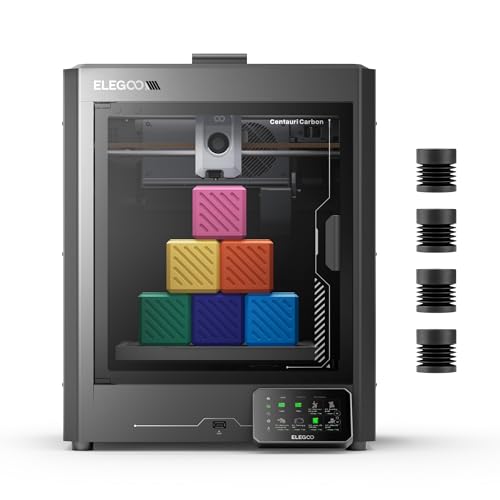
Elegoo Centauri Carbon — Best Engineering-Lean Bed
Elegoo built the Centauri Carbon around a simple observation: once a bed can hold PETG, the next failures happen at the nozzle and in the air, not on the plate. So the listing leads with a 320°C nozzle, a fully enclosed CoreXY frame and a 256x256x256mm build volume, with auto calibration and a built-in camera rounding out the pitch. The heated bed inside that package plays a supporting role it performs well — even warmth under a rigid motion system, inside air that stays warm enough for taller parts to behave.
The CoreXY layout matters to bed work more than marketing suggests. Because the plate stays still in X and Y and only descends slowly, the first layers are never sloshed by a heavy bed swinging back and forth, which helps tall, narrow parts keep their footing at speed. Elegoo quotes 500mm/s in the listing; the honest translation is that the motion system can move quickly without shaking the part loose from the plate, and the bed’s grip is part of that equation rather than a separate feature.
As a heated-bed purchase, the Centauri Carbon suits the reader who has already decided PLA toys are behind them. Its value concentrates in brackets, ducts, enclosures for electronics and other parts that earn their keep. The camera earns its place on long engineering prints, the enclosure keeps bed heat honest, and the remaining cautions are ecosystem ones: Elegoo’s software world is capable but less populated than the oldest communities, and spare-plate shopping is a smaller market. None of that changes the bed verdict — this is a plate inside a system designed to keep parts attached until the job is done.
The Centauri Carbon’s bed sits inside a machine that assumes you will push materials hard, so its supporting details lean industrial: a rigid mounting that shrugs off the CoreXY’s pace, calibration that re-maps the surface rather than trusting yesterday’s mesh, and a chamber that keeps the plate’s edges from becoming the cold frontier where big parts let go. Owners printing moulds, ducts and machine parts will notice the bed mostly by its absence from their troubleshooting — failures migrate upward to supports, orientation and cooling, which is exactly where an engineering printer should send your attention. The Carbon’s bed earns a specific compliment from mould-makers: large flat bases come off the plate flat, which sounds obvious until you have shimmed enough warped bases to know how rare the compliment is.
- Form: enclosed CoreXY, ready to print out of the box
- Nozzle from listing: 320°C maximum
- Build volume from listing: 256x256x256mm
- Monitoring: built-in camera listed
- Calibration: automatic, with a heated bed inside the chamber
Strengths
- Stationary-bed CoreXY motion protects tall parts from first-layer disturbance
- Hot nozzle and enclosure extend the material range beyond the bed’s own work
- Camera oversight fits long functional prints that run unattended
Trade-offs
- Engineering focus is wasted on purely decorative PLA printing
- Smaller owner community than the longest-running brands
- Enclosure warmth asks for door-open judgement on heat-sensitive PLA jobs
Best for: functional-part printers who want one enclosed machine for the workshop shelf.
Not suited for: casual users whose entire catalogue is desk ornaments and fidget toys.
Review the Centauri Carbon listing to see the current nozzle and plate spares offered alongside it.

Flashforge Adventurer 5M — Best Quick-Swap Bed Partner
Flashforge aims the Adventurer 5M at people who want CoreXY manners without CoreXY ceremony. One-click auto levelling handles the plate relationship, the all-metal frame keeps motion honest, and the heated bed sits under a 220x220x220mm build volume that matches the size of most real household and classroom parts. The listing’s 600mm/s figure describes maximum travel, and the machine’s party trick — a nozzle that swaps in three seconds — matters to bed users because swapping between a fine tip for detailed first layers and a hardened tip for abrasive stock no longer means re-levelling the afternoon away.
In classroom and shared-space service, the 5M’s bed behaviour is its credential. Students queue jobs, the plate warms, parts release, and the next group starts without a technician mediating. The 280°C direct-drive extruder from the listing widens filament choice past PLA into PETG and flexibles with confidence, while the bed covers the temperature side of those materials’ needs. It is an enclosed-leaning design philosophy — controlled air, controlled plate, repeatable starts — in the smallest footprint of the enclosed group here.
Limits arrive with size and ecosystem. The build volume trails the 256mm-class machines, Flashforge’s model and software world is less sprawling than Bambu’s, and the fastest travel figures flatter real print times less than owners hope. Judged on the keyword, though, the Adventurer 5M offers a heated bed wrapped in the most approachable CoreXY package here — the one you would hand to a school, a library makerspace or a family that wants engineering manners without engineering rituals.
In shared spaces the 5M’s bed develops a social virtue: it forgives beginners. A student who loads the wrong profile still gets a levelled first layer, a plate that releases without tools, and a part that survives removal by inexperienced hands. The quick nozzle swaps support that environment too, because a clogged or damaged tip — the classic classroom printer killer — becomes a pause rather than a repair ticket. Administrators quietly measure printers by interventions per hundred prints, and the 5M’s bed-and-nozzle combination is engineered to keep that number low enough for one teacher to run a whole bench. Teachers running the 5M in rotation give its bed one job rule — no adhesives without permission — and the textured surface’s grip survives terms of student printing precisely because the rule keeps coatings out of the equation.
- Form: all-metal CoreXY
- Bed: heated plate with one-click auto levelling
- Extruder from listing: 280°C direct drive, 3-second nozzle swap
- Build volume from listing: 220x220x220mm
- Travel figure from listing: 600mm/s maximum
Strengths
- Nozzle swaps do not disturb the levelled bed relationship
- Approachable controls suit classrooms and shared benches
- Direct drive and heated plate cover PETG and flexible filaments together
Trade-offs
- Smaller build volume than the 256mm-class enclosed rivals
- Software and model ecosystem is narrower than the biggest names
- Headline travel speed overstates everyday print pace
Best for: schools, families and small teams wanting CoreXY discipline in a compact footprint.
Not suited for: builders whose parts regularly exceed a 220mm cube.
Look over the Adventurer 5M listing to confirm the spare nozzle sizes bundled for your filaments.
How do the six beds compare side by side?
Tables flatten nuance, so read this one as a map of temperament rather than a league ladder. The open machines trade chamber warmth for price and simplicity; the enclosed three trade money and footprint for material range. Your filament shelf decides which column deserves your attention.
| Pick | Form | Standout trait | Watch out for |
|---|---|---|---|
| Bambu Lab A1 | Open bedslinger | Self-managing heated plate | No chamber for ABS-class work |
| Creality Ender 3 V3 SE | Open bedslinger | Budget plate with probing | Owner stays involved in upkeep |
| Anycubic Kobra X | Open multicolour | Steady bed through colour pauses | Purge waste on colour jobs |
| Bambu Lab P1S | Enclosed CoreXY | Bed plus chamber as one system | Ecosystem-led ownership |
| Elegoo Centauri Carbon | Enclosed CoreXY | Plate under a 320°C brief | Engineering focus may exceed casual needs |
| Flashforge Adventurer 5M | Compact CoreXY | Quick-swap nozzle over levelled plate | 220mm ceiling on part size |
Which plate surface should your heated bed wear?
Textured PEI on spring steel has become the default answer because it solves two problems at once: molten polymer keys into the micro-texture while the bed is hot, and the steel flexes when cool so the part pops free instead of needing a blade. Smooth PEI and glass-style surfaces leave a glossier first-layer finish, which matters for parts whose bottom face is also their show face, but they ask for a release agent with PETG, which can bond aggressively enough to tear coatings. Owning two plates — one textured workhorse, one smooth for presentation faces — is the quiet habit of experienced heated-bed users.
Whatever surface you choose, its enemy is skin oil. A plate that suddenly stops gripping in the middle, after weeks of obedience, is usually carrying fingerprints rather than suffering a heater fault. Warm water, plain dish soap and a thorough dry restore most plates; solvents have their place but are over-prescribed. Heat the bed fully before judging grip, too, because a surface tested during warm-up is a surface tested at the wrong temperature. These small rituals separate owners who call their beds unreliable from owners who quietly print for years on the original plate.
How should you set up your first heated-bed prints?
Begin with the material the machine knows best. Load PLA, run the printer’s own calibration routine end to end, and print something flat and useful — a tray, a bracket, a phone stand — while watching the first layer through the whole first circuit of the plate. You are looking for lines that merge into a continuous sheet without gaps or ridges, corners that stay married to the surface, and a part that releases with a flex or a gentle twist once the plate cools. Change one variable at a time afterwards; heated-bed tuning becomes folklore quickly when three settings move at once.
Move to PETG only after PLA feels boring, and expect to adjust your relationship with the plate: PETG prefers a slightly greater nozzle distance than PLA and grips hard enough that a release layer protects smooth surfaces. Keep a simple log — filament brand, bed setting that worked, room conditions — because the note you write in week one saves a failed print in month three. The how-to sequence later in this guide turns these principles into a repeatable routine you can tape to the wall beside the printer.
How does a heated bed behave across seasons?
A heated bed does not print in a laboratory; it prints in your room, and rooms have seasons. Winter drags plate edges toward the temperature of the window beside the printer, lengthens warm-up, and exposes every weakness in a heater’s coverage — the same PETG part that behaved in September lifts in January, not because the machine changed but because its environment did. Owners in cold climates learn to pre-warm the printer’s corner, keep open machines away from exterior walls, and give larger plates a genuine soak at temperature before judging a print’s first layer.
Summer writes the opposite footnote. A warm room helps beds and hurts overhangs, because the air cooling each new layer arrives pre-heated by the season. Enclosed machines especially can heat-soak during long PLA jobs, softening fine detail; the door-ajar habit mentioned in the P1S section exists for July as much as for any material chart. None of this requires new equipment — it requires reading your printer as a thermal system living in a thermal room, and adjusting the small things: placement, warm-up patience, door position, and the humility to re-run a calibration when the season turns.
What should you print to test a new heated bed?
Before trusting a new machine with a ten-hour part, spend one hour interrogating its plate with three deliberate prints. First, a single-layer sheet covering most of the bed: gaps reveal levelling error, ridges reveal a nozzle riding low, and any corner that refuses to merge exposes a cold zone or contamination. Second, a tall, thin-walled box in PETG, which stresses corner adhesion and shows whether the bed holds its corners when shrinkage accumulates height. Third, a part with a broad flat base in your most-used material, removed only after full cooling, to learn this plate’s release personality while the stakes are zero.
Keep the three test pieces. They are your machine’s birth certificate: six months later, when quality drifts, reprinting the same sheet tells you whether the bed changed or your filament did. Owners who skip the interrogation meet the same information eventually, printed into the bottom of a part they cared about, at hour nine. The hour is cheap. Spend it.
When is a heated bed not enough?
Honesty requires a boundary: bed heat governs the first millimetres of a print and influences perhaps the first centimetre. Above that, a part lives in the room’s air, and no plate — however even, however hot — can protect a tall ABS column from a cold draught or rescue a design whose geometry concentrates stress at one unsupported corner. This is why the guide’s enclosed machines exist, why brims and orientation are slicer skills rather than accessories, and why material choice remains the senior decision. A heated bed is necessary infrastructure for serious printing; it was never the whole building.
Recognising the boundary saves money in both directions. Buyers who expect bed heat alone to deliver ABS will over-invest in plates and under-invest in enclosure. Buyers who dismiss beds because ‘the chamber does the work’ discover their first layers failing inside the finest enclosure. The six machines here were chosen because their beds and their surrounding systems agree with each other — match that agreement to your materials, and the boundary stops being a disappointment and becomes simply the map of where each tool’s job ends.
How do you keep a heated plate gripping for years?
Plate longevity is mostly a story of what does not happen to it. Parts are removed cool, never levered with metal against the coating; the surface is washed with soap and water rather than flooded with solvents; filament changes that risk a nozzle crash are done over a sacrificial corner, not the centre where your parts live. Owners who observe those three abstentions routinely report original plates still gripping after years of weekly printing, while owners who treat the plate as a workbench — cutting, prying, scraping hot — buy replacements quarterly and blame the coating.
When grip does fade unevenly, read the pattern before replacing anything. A dull patch shaped like a hand is contamination. A scarred line is a past nozzle incident. A uniform tiredness across the whole surface after very long service is honest wear, and only then is a new plate the answer. The six beds in this guide all accept replacement surfaces gracefully, because their makers know plates are consumables — your job is simply to make the consumption slow, informed and cheap.
Which bed accessories are actually worth buying?
Two, for most owners: a spare plate, for the reasons this guide keeps returning to, and a simple plastic razor for the day a thin print welds itself down and patience runs out before the cool-down finishes. Everything beyond that pair should be bought against evidence. Glue sticks and adhesion sprays solve problems that a clean, level, properly heated plate mostly prevents; enclosure tents solve a real problem, but only for the open-machine owners actually printing warp-prone stock. The heated bed’s accessory economy is small because the bed itself, run with the rituals in this guide, needs so little help.
How do you rescue a print that keeps lifting at the corners?
Corner lift announces itself quietly — a shadow under one edge, a clicking sound as the nozzle passes, a finished part with a warped footprint. Work this sequence in order before blaming the machine.
- Let the plate reach its working temperature and sit there for several minutes, so the surface temperature matches what the sensor reports underneath.
- Wash the plate with warm water and dish soap, dry it fully, and handle it by the edges while refitting it to the bed.
- Run the printer’s levelling or calibration routine on the warm plate, never on a cold one, and confirm the nozzle gap with a single-layer test patch.
- Add a brim to narrow or sharp-cornered parts in the slicer, widening the footprint that shrinkage has to fight against.
- Shield open-frame machines from room drafts — a door opening across the printer can cool one corner enough to start a lift.
- For ABS and ASA, move the job to an enclosed machine or add a temporary enclosure rather than raising bed heat endlessly.
- Inspect the finished part’s footprint against a straight edge; a gentle curve confirms temperature stress, while a localised lift points at contamination or levelling.
Most lifting problems surrender to one of the first three steps, which is why experienced owners wash plates before they touch settings. Keep the sequence boring and repeatable, and your heated bed becomes infrastructure — noticed only on the rare day it needs attention.
What mistakes do heated-bed buyers keep making?
Buying bed heat for PLA alone
A heated bed transforms PETG and engineering-filament work, but a PLA-only hobby gains little beyond convenience. If your catalogue is decorative PLA, several picks here still delight — just buy them for their calibration and reliability, not for a heater you will barely stress.
Judging grip during warm-up
Owners start a print the second the display shows the target number, while the plate surface still lags behind the sensor underneath. Give the bed a few minutes to equalise, especially on larger plates, before concluding that a filament or a surface has failed you.
Scraping parts off a hot plate
Prying at a warm part tears coatings and warps the piece itself. Patience is a bed feature: as the plate cools, differential contraction does the removal work, and a flex of spring steel finishes it without drama or gouged surfaces.
Ignoring the room the printer lives in
A garage in winter defeats bed heaters that cope easily in a study. Open-frame machines inherit their room, so relocating the printer — or sheltering it — often fixes warping that no setting change could reach.
Heating the bed for a cold-room problem
Raising bed temperature to fight a freezing room attacks the symptom at the wrong end and can bake first layers while upper layers still warp. Warm the room, shelter the machine, or choose the enclosed pick — the bed cannot heat the air your part grows into.
Final Recommendation
Choose by material and temperament together. The A1 is the heated bed most households should start with, the V3 SE is the tutor that costs least, and the Kobra X serves colour-first families. Step up to the P1S when ABS and ASA enter your plans, pick the Centauri Carbon for an engineering-leaning enclosed bench, and let the Adventurer 5M carry classrooms and compact spaces.
A plate that warms evenly, grips honestly and lets go politely turns printing from a negotiation into a routine — pick the machine whose bed behaviour matches your shelf of filament, and the corners of your parts will stay exactly where you drew them.
Frequently Asked Questions
Do all six printers here actually heat their beds?
Yes — active bed heating was the entry ticket for this guide. The difference between them is not whether the plate warms but how the surface, sensor placement and surrounding air work with that warmth. Open machines lose heat to the room; enclosed machines recycle it into chamber temperature that helps tall parts.
Can a heated bed let an open-frame printer handle ABS?
It helps the first layers and small parts, but tall ABS pieces cool unevenly in open air and often split or warp regardless of plate temperature. That is why this guide steers ABS ambitions toward the enclosed P1S and Centauri Carbon rather than promising bed heat alone will conquer the material.
Why do parts stick too well on some plates?
PETG in particular can bond fiercely to smooth PEI and glass-style surfaces, sometimes pulling coating away at removal. A glue-stick film used as a release layer, or a textured plate, keeps that enthusiasm in check. Letting the plate cool fully before removal solves most over-sticking on its own.
How often should a heated plate be replaced?
Treat the plate as a consumable with a long life rather than a lifetime part. A plate that is gouged, warped or stripped of coating in patches deserves replacement; a plate that merely lost grip usually needs washing, not replacing. Owning a spare keeps a damaged plate from cancelling a weekend project.
Does bed size or bed heat matter more?
They solve different problems. Size decides whether the part fits at all; heat decides whether it stays attached and flat. Buy the smallest plate that fits your real projects, then prioritise even heating and a good surface within that size, rather than paying for a huge plate whose edges you never use.
Should I leave a heated bed on between prints?
For back-to-back jobs in one session, a warm plate shortens turnaround and keeps conditions consistent. Across idle hours or overnight, switch off: the heater draws power, ages nothing useful, and a cool plate is the safer resting state. Most owners develop the rhythm of warming the bed while they slice, which makes warm-up invisible inside the normal workflow.
Does a heated bed use much electricity?
Bed heaters are among the hungrier parts of a desktop printer while warming, then cycle modestly to hold temperature — enclosed machines cycle less because the chamber keeps the warmth in. Across a long print the total remains household-appliance modest, but it is a real reason the seasonal and switch-off habits in this guide are worth forming.
Related Guides
Keep reading with these neighbouring guides from the same printers shelf: best 3d printers sub 500 best 3d printers intermediate best 3d printers to use with mac The prosumer ceiling above this class is ranked in the best 3d printers under 2000 dollars.


