What's inside
- Where to buy
- Key Takeaways
- Quick Picks
- How did we choose these 11×17 all-in-ones?
- Which 11×17 all-in-one should you buy first?
- What actually changes when a printer grows to 11×17?
- How do you set up a tabloid all-in-one properly?
- What should you check before ordering a ledger-size machine?
- Which tabloid workload matches which machine?
- How do you keep a wide-format all-in-one healthy?
- What does scanning at ledger size actually unlock?
- How does paper choice change tabloid results?
- How do the six compare side by side?
- What mistakes do tabloid printer buyers keep making?
- Final Recommendation
- Frequently Asked Questions
- Related Guides
As an Amazon Associate I earn from qualifying purchases. This post may contain affiliate links at no extra cost to you.
gizmoverdict.com is reader-supported. When you buy through links on our site, we may earn an affiliate commission.
Where to buy
All six machines in this guide are sold through Amazon’s US store, and that is where the links in this article lead. Large-format all-in-ones ship in big boxes and go in and out of stock more often than ordinary letter-size printers, so if a listing shows a long delivery window, check the other sellers on the same page before giving up on a model you have settled on.
The best 11×17 aio printers solve a problem that ordinary office printers quietly dodge: paperwork does not stop at letter size. Architects mark up ledger drawings, realtors print tabloid flyers, teachers laminate 11×17 posters, bookkeepers spread a full ledger sheet across the desk, and none of that fits through a machine built around 8.5×11 paper. A tabloid all-in-one prints, scans and copies at 11×17, which sounds like a simple size upgrade until you shop for one and discover how few models actually do all three jobs at that size. Several wide printers only print big — their scanners top out at legal or even letter size — and that single detail decides whether the machine replaces your old office printer or merely sits beside it.
This guide separates the genuine ledger all-in-ones from the wide printers wearing an all-in-one badge. Two Brother INKvestment Tank models anchor the list because Brother has owned this niche for years. Epson answers with a WorkForce Pro pair built for volume and an EcoTank model that prints even wider than tabloid. HP’s OfficeJet Pro 9730 rounds out the six with the most polished office software of the group. Every pick below prints at 11×17 or beyond; where a scanner cannot match the print path, we say so plainly in that pick’s section, because discovering it after delivery is exactly the disappointment this article exists to prevent.
Key Takeaways
- Full 11×17 scanning is the dividing line in this class: the Brother pair and the Epson WF-7840 handle ledger originals, while the EcoTank ET-15000 and WF-7310 are wide printers first and narrower scanners second.
- Brother’s INKvestment system is a hybrid — cartridges that hold a reservoir of ink inside the machine — so running costs land between ordinary cartridges and a refillable tank.
- The WF-7840 is the volume pick: twin trays totalling 500 sheets and a 50-sheet document feeder make it the only machine here shaped for a busy shared office.
- HP’s 9730 counters with automatic two-sided scanning and the most guided setup routine of the six, which matters in offices without IT help.
- If ink cost over three years worries you more than scan size, the ET-15000’s refillable tanks change the maths completely, even though its scanner is the compromise.
- Every machine here also prints ordinary letter and legal paper, so a ledger-capable machine replaces a standard office printer rather than adding a second device.
Quick Picks
| Pick | Badge | Why it earns its place |
|---|---|---|
| Brother INKvestment Tank MFC-J6960DW | Best overall | Full ledger print, scan and copy with Brother’s high-capacity in-box ink system and a large colour touchscreen. |
| Brother INKvestment 6560 | Best value Brother | The same 11×17 engine and INKvestment ink as its bigger sibling, trimmed in screen size and frills rather than capability. |
| Epson WorkForce Pro WF-7840 | Best for busy offices | 500-sheet capacity, a 50-sheet feeder and fast PrecisionCore output built for shared daily punishment. |
| HP OfficeJet Pro 9730 | Best two-sided workflow | Duplex printing and scanning at wide format, wrapped in HP’s friendliest setup and app experience. |
| Epson EcoTank ET-15000 | Lowest ink cost | Refillable tanks and prints up to 13×19, for shops that burn through ink and can live with a smaller scan bed. |
| Epson WorkForce Pro WF-7310 | Wide-print specialist | A 500-sheet, 13×19-capable print engine for desks that already own a scanner and just need big pages fast. |
How did we choose these 11×17 all-in-ones?
We started from the constraint that defines the category and eliminates most of the catalogue: the printer must feed genuine 11×17 stock, not merely scale a letter page up. From there we checked three things for every candidate. First, what the scanner actually does — flatbed size, feeder size, and whether ledger originals pass through in one piece. Second, the ink system, because a tabloid page drinks roughly twice the ink of a letter page and running costs double just as fast. Third, paper handling: tray capacity, rear feed options for heavy stock, and automatic two-sided printing, which at ledger size saves real money on paper as well as ink.
Models were cut when their wide-format claim turned out to mean borderless letter photos, when their feeders could not accept ledger sheets at all, or when the ink system was an ordinary small cartridge set that would make tabloid printing punishingly expensive within a month. What survived is a deliberately varied six: two cartridge-tank hybrids from Brother, two cartridge workhorses from Epson’s WorkForce Pro line, one refillable-tank machine, and HP’s software-led entry. If your workload is mostly scanning big originals, mostly printing big pages, or mostly worrying about ink bills, one of these six is shaped for it — and each section below names the workload it is not shaped for, just as plainly.
One more filter deserves naming, because it removed several otherwise tempting machines: driver and app maturity. Wide-format models sell in smaller numbers than letter printers, and neglected software shows it — missing paper-size presets, flaky wireless sleep behaviour, scanning utilities that forget the feeder exists. Every survivor here comes from a current, actively maintained office line, which is why the list leans on familiar badges. In a category this specialised, the boring virtue of a vendor who will still be updating your driver in three years outranks a novel feature you will use twice.
Which 11×17 all-in-one should you buy first?
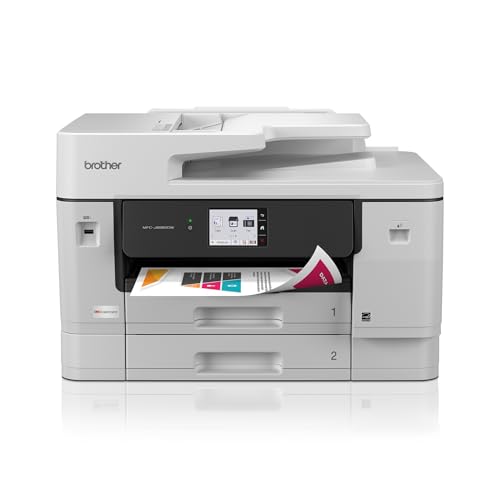
Brother INKvestment Tank MFC-J6960DW — Best overall
The MFC-J6960DW is the machine most people picturing a tabloid all-in-one actually want. It prints, scans and copies at the full 11×17 size, so a ledger drawing goes on the glass, gets copied, and comes out the same size it went in — the complete workflow, no workarounds. Brother’s INKvestment Tank system sits underneath that convenience: the cartridges feed an internal reservoir, which stretches the interval between cartridge changes and keeps the cost per page well below a conventional cartridge printer, without asking you to pour ink from bottles. The 3.5-inch colour touchscreen is the largest control panel in this guide, and at ledger sizes that matters more than it sounds, because copying a tabloid sheet usually involves scaling, paper-source and two-sided settings that are miserable to navigate on a two-line display.
In daily use the Brother behaves like a slightly larger version of the office printers people already trust. Print quality on plain paper is its quiet strength — INKvestment pigment-style output keeps text edges firm on cheap copier stock, and colour graphics hold together without the soaking that turns a tabloid poster wavy. Wireless setup is uneventful, the machine wakes quickly, and the document feeder handles mixed stacks of letter and ledger originals without demanding you pre-sort them. For a small architecture studio, a school office or a real-estate team, this is the pick that asks the fewest questions after installation.
Consider how it handles the two jobs that define this category in practice. The first is the marked-up drawing cycle: print a ledger plan, annotate it by hand, scan it back, and email the result. The Brother closes that loop without a computer middleman, because the touchscreen drives scan-to-email and copy scaling directly. The second is the spreadsheet wall: a budget or schedule that only makes sense read whole, printed at ledger size with gridlines intact. Fine text at small sizes stays legible because the ink system lays pigment-style black down firmly, and the paper path keeps big sheets flat enough that lines do not wobble. Neither job is exotic, yet both are exactly where smaller all-in-ones wave a white flag.
- Print, scan and copy up to 11×17 in.
- Ink system: INKvestment Tank cartridge-reservoir hybrid
- Display: 3.5-inch colour touchscreen
- Connectivity: wireless, Ethernet, USB
- Functions: print, scan, copy, fax
Strengths
- True ledger handling at every stage — print, scan and copy — so no workflow step shrinks your page.
- INKvestment cartridges carry generous ink loads, softening the running-cost shock of big pages.
- The big touchscreen makes tabloid copy settings genuinely quick to dial in.
Trade-offs
- It is a large, heavy box; measure the shelf or stand before it arrives.
- Photo printing on glossy stock is competent rather than beautiful — this is an office engine.
- Cartridge-reservoir ink still costs more per page than a bottle-refilled tank over years of heavy use.
Best for: small offices and studios that scan and copy ledger originals weekly and want one machine that does everything at that size. Not suited for: photo-first buyers, or anyone whose desk cannot spare the footprint.
Brother’s flagship earns its place at the top of this list; see today’s Amazon price for the MFC-J6960DW before you compare it against the step-down model below.

Brother INKvestment 6560 — Best value Brother
The MFC-J6560DW exists for buyers who read the flagship’s spec sheet, nodded at everything, and then wondered which parts they could give up. Brother’s answer is sensible: you give up screen size — 2.7 inches instead of 3.5 — and some finishing polish, and you keep the essentials untouched. The print engine still handles 11×17, the scanner still takes ledger originals, and the INKvestment Tank ink system is the same hybrid arrangement, so the running-cost story that makes the flagship attractive survives intact. In a category where stepping down usually means losing the one feature you came for, that restraint is the whole appeal.
Day to day, the smaller touchscreen is the only compromise you will actually touch. Copy jobs with several settings take a few extra taps, and anyone with larger hands will prefer the flagship’s panel. Everything else — wireless behaviour, feeder manners, output quality on plain paper — feels like the same machine wearing a plainer shirt. If this printer will live in a back office and be driven mostly from computers rather than its own panel, the smaller screen may never bother you at all, and the money saved buys a lot of ink.
There is also a fleet argument for this model. Offices that already run Brother’s smaller INKvestment machines will find the same driver logic, the same menu habits and the same cartridge family behaviour here, so the 6560 slots into an existing routine without retraining anyone. Supplies ordering stays in one brand, the app on everyone’s phone stays the same, and the person who unjams the old printer already knows this one’s paper path. Buying across brands can be the right call, but when the step-down model preserves both the ledger scanner and the household workflow, consistency becomes a feature worth real money.
- Ledger-size print, scan and copy
- Ink system: INKvestment Tank cartridge-reservoir hybrid
- Display: 2.7-inch colour touchscreen
- Network and local links: Wi-Fi, wired Ethernet, USB
- Also faxes, for offices that still need it
Strengths
- Keeps full ledger scanning, which cheaper wide printers almost always sacrifice.
- Same ink economics as the flagship, so the saving is genuinely one-off rather than per-page.
- Identical paper path means tabloid posters and drawings print with the same confidence.
Trade-offs
- The 2.7-inch screen crowds multi-step copy settings into more screens.
- Finish and plastics feel a notch plainer than the model above it.
- Still a physically big machine — the saving is in features, not in size.
Best for: cost-conscious offices that drive the printer from PCs and want ledger scanning without flagship pricing. Not suited for: heavy walk-up copying, where the small panel slows every job.
If the smaller screen does not scare you, check what the MFC-J6560DW costs on Amazon today — it is frequently the smartest money in this category.

Epson WorkForce Pro WF-7840 — Best for busy offices
Where the Brothers are balanced all-rounders, the WF-7840 is a throughput machine that happens to print wide. Its two paper trays hold 500 sheets between them, the automatic document feeder swallows 50 pages at once, and Epson rates output at up to 25 pages per minute — figures that describe a printer built for a corridor of desks, not a corner of one. Crucially, the width did not come at the scanner’s expense: the feeder and flatbed are sized for the large originals this class exists to handle, so a stack of tabloid markups can be digitised in one unattended run.
The PrecisionCore printhead lays down sharp, dry-to-the-touch pages that suit reports and drawings alike, and the cartridge system is built around high-capacity packs sized for offices that print thousands of pages between orders. The WF-7840 is not a subtle machine — it is tall, businesslike and clearly designed by people who expect it to be refilled, emptied and occasionally cursed at by a whole department. If your current letter-size WorkForce is the office’s most reliable citizen and you simply need its bigger sibling, this is the most natural upgrade on the list.
Think about deadline afternoon in a busy office: thirty ledger sets for a bid, each collated, some two-sided, while the same machine is also the department’s scanner. The WF-7840’s feeder capacity and tray depth are what keep that afternoon boring. You load tabloid stock in one tray and letter in the other, queue the sets from your desk, and collect finished stacks instead of babysitting single sheets. Lesser machines turn the same job into an attendance exercise. The Epson also tolerates the mixed reality of office paper — a ream of premium stock for the client copies, bargain paper for internal drafts — without sulking about either.
- Print and scan at wide format, up to 13×19 print
- Paper capacity: 500 sheets across dual trays
- Document feeder: 50 sheets, automatic two-sided printing
- Speed: up to 25 ppm per the listing
- Connectivity: wireless, Ethernet, USB
Strengths
- Paper and feeder capacity dwarf everything else here; refills become a weekly event, not a daily one.
- Fast first page and fast sustained output keep queues short at deadline time.
- Built for shared use, with the duty cycle expectations of a departmental machine.
Trade-offs
- The tallest footprint in this guide — check the vertical clearance where it will live.
- High-capacity cartridges are efficient but each replacement set is a serious purchase order.
- Plain-paper excellence again outruns glossy photo quality.
Best for: shared offices, print rooms and any team whose tabloid printing arrives in batches of fifty. Not suited for: a quiet home study, where its size and fan of activity feel like overkill.
Volume buyers should look at the WF-7840’s current Amazon listing and price the high-capacity cartridges alongside the machine itself.

HP OfficeJet Pro 9730 — Best two-sided workflow
HP’s entry attacks a different pain point: not size, not ink, but friction. The OfficeJet Pro 9730 prints, scans, copies and faxes at up to 11×17, and it is the only machine here that pairs wide-format printing with automatic two-sided scanning, so a double-sided ledger contract goes through the feeder once and emerges as a complete, correctly ordered file. Around that hardware, HP wraps the most hand-holding software in the class — a setup routine that genuinely guides a non-technical owner from box to first print, and an app that makes scan-to-phone and print-from-anywhere feel routine rather than adventurous.
The listing includes a three-month trial of HP’s Instant Ink subscription, which suits buyers who would rather have replacement cartridges arrive automatically than think about ink logistics; those who prefer buying cartridges outright can simply let the trial lapse. Output quality follows the modern OfficeJet pattern — crisp text, confident colour graphics, and presentation pages that look deliberate. For a professional office that prints client-facing tabloid material and scans signed paperwork back in, the 9730’s two-sided, wide-format workflow is the smoothest in this guide.
The scenario that sells this machine is the signed agreement. A two-sided ledger contract comes back from a client covered in signatures; with single-sided scanning you would feed it twice, flip the stack by hand, and then spend ten minutes reordering pages in software. The 9730’s feeder reads both sides in one pass and hands you a tidy file. Multiply that by every lease, change order and signed drawing set in a month, and the HP’s advantage stops being a spec-sheet line and becomes hours returned. Its print side keeps pace with client work too, producing tabloid handouts whose colour blocks and charts look considered rather than merely large.
- Ledger-size print, scan and copy
- Automatic two-sided print and scan
- Ink: cartridge system with an included Instant Ink trial period
- Links: Wi-Fi, wired Ethernet, USB
- Fax included alongside the core trio
Strengths
- Duplex scanning at ledger size removes the manual page-flipping every rival demands.
- Setup and the companion app are the least intimidating here for non-technical staff.
- Colour graphics on presentation paper look polished enough for client handouts.
Trade-offs
- Subscription ink suits some offices and irritates others; decide which camp you are in first.
- Paper capacity is ordinary next to the WF-7840’s twin trays.
- HP’s driver ecosystem rewards staying inside its app, which not everyone enjoys.
Best for: client-facing small offices that scan signed two-sided ledger documents and value an easy setup. Not suited for: high-volume print rooms, or buyers who refuse subscription ink on principle.
The duplex scanner is the reason to choose it, so review the OfficeJet Pro 9730 on Amazon with your own scanning habits in mind.

Epson EcoTank ET-15000 — Lowest ink cost
The ET-15000 changes the question from “which tabloid printer?” to “how much ink will I use in three years?” Its EcoTank reservoirs refill from bottles, and a single fill carries the kind of page counts that cartridge owners measure in dozens of replacements. It also prints beyond tabloid — up to 13×19 — which makes it the surprise poster printer of the group for shops, churches and classrooms that produce big colour sheets regularly. Ethernet joins the usual wireless, and the all-in-one basics of scan, copy and fax are all present.
Now the honesty this pick demands: the scanner does not match the printer. The flatbed is built around smaller originals, so while the ET-15000 prints ledger and larger with ease, scanning an 11×17 original in one pass is not its party trick — the feeder and glass suit letter and legal work. Buyers who mostly print big and scan small will never feel the limitation. Buyers who digitise tabloid artwork will feel it on day one, and for them the Brothers above exist. Judged as a print-led machine with the cheapest ink in the class, though, the ET-15000 has no rival here.
Picture the classroom or community hall that prints a fresh 13×19 poster every week, plus colour worksheets by the hundred. On cartridges, that habit generates a purchasing ritual — someone is always ordering, expensing or emergency-buying ink. The EcoTank turns ink into a background detail: fill the tanks, glance at the windows now and then, and top up from a bottle set that lives in the cupboard. The prints themselves are cheerful and saturated on plain paper, entirely adequate for posters read at arm’s length. What the machine asks in return is patience — it prints at a stroll — and the understanding that its scanner serves the letter-size paperwork, while the big sheets flow in the other direction.
- Print up to 13×19 in.; scan and copy at smaller formats
- Ink system: refillable EcoTank bottles
- Speed: up to 17 ppm per the listing
- Links: Wi-Fi, wired Ethernet, USB
- Full all-in-one set including fax
Strengths
- Bottle ink collapses the per-page cost that makes tabloid colour printing feel extravagant.
- 13×19 printing opens poster and proof sizes beyond the category’s name.
- Generous included ink means the first long stretch of printing asks nothing more of your wallet.
Trade-offs
- The scan bed is the compromise: wide printing, narrower scanning.
- Print speeds are leisurely beside the WorkForce Pro models.
- Refilling tanks is clean when done carefully and memorable when done carelessly.
Best for: classrooms, shops and community groups printing big colour pages constantly on a tight consumables budget. Not suited for: anyone who scans 11×17 originals as a core task.
If ink bills are your main fear, see the ET-15000’s Amazon page and compare its included ink against a year of cartridges.

Epson WorkForce Pro WF-7310 — Wide-print specialist
The WF-7310 is the honest specialist of the six. It shares the WF-7840’s print-first DNA — up to 13×19 output, 500-sheet capacity across its trays, automatic two-sided printing and up to 25 pages per minute — but it is bought for its paper path, not its scanner. Treat it as a dedicated wide-format printer for a desk that already owns a capable scanner, or that never scans anything larger than receipts. In that role it is arguably the best value here, because none of its budget was spent duplicating a scanner you already have.
Studios use machines like this as the big-page sidecar: the everyday all-in-one handles letters and scanning, and the WF-7310 wakes when drawings, spreadsheets and posters come out. Its rear feed takes heavier stock gracefully, the big trays mean tabloid paper is always loaded alongside letter paper, and PrecisionCore output keeps fine lines on plans legible. If the word “all-in-one” in a listing tempts you to assume a matching scanner, let this pick be the reminder to check — and if printing is genuinely all you need at this size, let it also be the bargain.
Studios develop a rhythm around a machine like this. The big printer idles quietly through the morning’s emails and invoices — handled by the small all-in-one across the room — then takes over completely when the real work prints: full-size plans for the workshop wall, ledger proofs a client can annotate without squinting, poster drafts checked at true size before anyone pays a print shop. Because the trays hold both everyday and tabloid stock, nobody performs the paper-swap ritual that makes occasional wide printing feel like an event. It is a narrower talent than the all-in-ones above it, exercised to a higher standard.
- Print up to 13×19 in.
- Paper capacity: 500 sheets
- Automatic two-sided printing; up to 25 ppm per the listing
- Ink: high-capacity cartridge system
- Connectivity: wireless, Ethernet, USB
Strengths
- Every dollar went into the print engine and paper handling, and it shows in throughput.
- Dual trays keep letter and tabloid stock loaded simultaneously — no swapping mid-job.
- Fine-line rendition suits plans, charts and spreadsheets printed at full ledger size.
Trade-offs
- No ledger scanning workflow to speak of; pair it with an existing scanner.
- Cartridge costs per page sit above the EcoTank and INKvestment models.
- As a second printer it needs a second home — the footprint is full-size.
Best for: studios and offices adding wide printing beside an existing scanner or all-in-one. Not suited for: buyers who need one single machine that also scans big originals.
Print-led buyers can check the WF-7310’s price on Amazon and spend the saving on a starter set of high-capacity cartridges.
What actually changes when a printer grows to 11×17?
More than the paper tray. A tabloid page carries twice the area of a letter page, so ink coverage, drying behaviour and paper stiffness all shift. Heavy ink on thin tabloid stock cockles — the page ripples — which is why every machine here offers a rear or straight-through feed for thicker sheets and why choosing a slightly heavier tabloid paper transforms poster results. Two-sided printing, a minor convenience at letter size, becomes a genuine economy at ledger size, halving the cost of the most expensive paper you buy. And scanning at this size changes how you work: a ledger original digitised in one pass preserves fold-outs, spreads and drawings exactly as laid out, while a smaller scanner forces stitching software and patience.
The ink-system decision deserves its own paragraph because it compounds. A cartridge machine printing tabloid colour daily will cycle cartridges at a pace that shocks people used to letter printing. The INKvestment hybrid stretches that cycle; the EcoTank abolishes it. Neither is automatically right: tanks reward steady high volume, while cartridge hybrids suit offices whose tabloid work arrives in bursts, because a tank printer left idle for months can need maintenance a cartridge machine shrugs off. Match the ink system to your calendar, not just your page count.
There is a subtler shift, too: a tabloid printer changes what people bother to print. Teams that once shrank a chart until it was illegible, or paid a print shop for a handful of big sheets each month, start printing at natural size as a reflex — the wall planner, the full-width timeline, the drawing taped above the bench. That behavioural change is the real return on the purchase, and it is also why running costs deserve the sober treatment above: a machine that invites more printing will print more, and the ink system you chose in a hurry becomes the budget line you live with.
How do you set up a tabloid all-in-one properly?
Start with placement. These are wide, heavy machines that need clearance behind for the rear feed and above for the scanner lid; a shelf that fits the footprint exactly will still frustrate you. Load both trays from day one — letter in one, tabloid in the other — and set each tray’s paper size in the driver, because a printer that believes the wide tray holds letter paper will scale your drawings in ways you only notice at the client meeting. Next, create presets: one for ledger drawings at high quality, one for tabloid posters, one for two-sided ledger documents. Presets are what turn a capable machine into a fast one.
Then test the scanner with the largest original you own before the return window closes. Check the corners for cropping, run a two-sided feeder job if your model supports it, and scan a page with fine print to confirm the resolution holds at full size. Finally, print a colour-heavy tabloid page on the paper you will actually use — not the five sample sheets in the box — and look for cockling or banding while the machine is still easy to exchange. Half an hour of deliberate testing finds every weakness this category has; skipping it finds them later, at worse moments.
While you are in the settings, switch on the quiet housekeeping features people usually ignore: automatic cleaning reminders if your model offers them, low-ink alerts pushed to the person who actually orders supplies, and a named location in the driver so shared offices can tell the big printer from the small one at a glance. Naming sounds trivial until three identical print queues appear on a new employee’s laptop; labelling the tabloid machine clearly in every queue prevents the weekly accident of a ledger drawing emerging, miniature and bewildered, from the letter printer across the room.
What should you check before ordering a ledger-size machine?
Begin with the tape measure, and be honest about all three dimensions. A ledger machine is roughly a letter printer scaled by half again in width, and it also needs working room: the scanner lid rises well above the body, the rear feed wants a clear run of space behind for stiff sheets, and the output tray extends toward you. Offices regularly measure the footprint and forget the choreography. Sketch the machine’s full operating envelope — lid open, tray out, rear sheet loaded — and only then commit to a home for it. If the envelope does not fit anywhere sensible, that is a genuine reason to choose a print-led model and keep scanning on a smaller device elsewhere.
Next, audit your own paper reality for one week. How many ledger sheets do you honestly print, and how many do you scan? The two numbers steer everything. Print-heavy, scan-light weeks point at the EcoTank or the WF-7310; balanced weeks point at the Brothers; scan-heavy weeks with two-sided originals point at the HP. People buy this category on a feeling — “we sometimes need big prints” — and sometimes is doing heavy lifting in that sentence. A machine bought for monthly use must also survive monthly use gracefully, which favours cartridge systems that tolerate idleness over tanks that prefer a busier life.
Then price the whole first year, not the box. Add the machine, one full replacement ink set at your expected volume, and two reams of decent tabloid paper. That arithmetic rearranges this list: the ET-15000’s higher shelf appeal grows once its bottle ink enters the ledger, while a cheaper cartridge machine can quietly become the expensive option by autumn. Also check what your existing software expects — some CAD and accounting packages have strong opinions about drivers, and a five-minute compatibility search beats discovering a grudge after installation. None of this is glamorous homework, but tabloid machines are five-year purchases, and five years is a long time to live with a shortcut.
One more check, often skipped: the feeder’s fine print. Automatic document feeders have their own size and weight limits, separate from the flatbed’s. A model may scan ledger on the glass yet restrict the feeder to legal, or accept ledger only at reduced scanning speed. If your big originals arrive as stacks rather than single sheets, the feeder specification — not the headline scan size — decides your afternoons. Read both numbers, glass and feeder, before any of the six earns your money.
Which tabloid workload matches which machine?
Start with the drawing office, because it invented this category. Architects, builders and kitchen designers live on ledger sheets: big enough to read at a glance across a desk, small enough to carry to a site. Their cycle is print, annotate, scan, reprint — which means the scanner matters as much as the printer, and the Brother pair and the WF-7840, with true ledger scanning, are the honest candidates. Between them, choose by volume: a two-person studio will never trouble the Brothers’ feeders, while a practice issuing drawing sets daily will feel the Epson’s 500-sheet depth as a daily mercy. The HP joins this conversation only when the drawings come back signed and two-sided often enough for duplex scanning to pay rent.
Now the poster producers — schools, churches, estate agents, gyms, market stalls. Their work is one-directional: files flow out as big colour sheets, and almost nothing large ever needs scanning back in. For them the ET-15000’s tank economics dominate the argument, because colour coverage at tabloid size is where cartridge budgets go to die. A term of weekly posters on the EcoTank costs a fraction of the same output on cartridges, and the 13×19 ceiling lets a headline poster breathe. The WF-7310 serves a neighbouring tribe — businesses whose posters and plans are designed in-house and printed in runs, where speed and tray capacity matter more than ink pennies because the machine’s output is billable work.
Finally, the spreadsheet-and-forms offices: bookkeepers, logistics teams, clinics with ledger-size intake forms. Their scanning is heavy but their printing is mostly monochrome text, which flips the priorities again — feeder reliability and scan software matter more than colour quality, and ink costs stay modest on any system because text pages sip rather than gulp. Here the HP’s guided scanning and the Brothers’ panel-driven workflows compete head-on, and the decider is usually whether documents arrive two-sided. One size of printer, three genuinely different jobs: the category makes sense only once you name which job is yours.
How do you keep a wide-format all-in-one healthy?
Big printers fail in predictable ways, and nearly all of them are preventable. The printhead is the first concern: inkjet nozzles clog when a machine sits unused for weeks, and the cure is embarrassingly simple — print something small and colourful every week or two, even a test page, so every nozzle fires. Tank models add a second habit: keep ink levels visible and refill before a tank runs dry, because air in the lines turns a two-minute refill into an afternoon of priming. Cartridge hybrids ask only that you keep one spare set in the building, since a tabloid deadline and an empty colour cartridge are a classic pairing.
Paper handling is the second front. Ledger stock stored in a damp room curls, and curled tabloid sheets jam feeders that would swallow flat paper all day; store big paper flat, in its wrapper, away from exterior walls. Dust is the third: a wide scanner glass shows every speck as a streak on a big scan, so wipe the glass and the feeder’s narrow scan strip monthly with a microfibre cloth. Finally, firmware and drivers deserve one update pass after setup — manufacturers quietly fix paper-size bugs in early releases, and tabloid models, selling in smaller numbers, benefit disproportionately from those fixes being applied rather than postponed.
What does scanning at ledger size actually unlock?
People underestimate the scanner half of this category because scanning sounds like filing, and filing sounds dull. Then they meet the artefacts of a paper life that never fit a letter scanner: the fold-out chart bound into an old manual, the hand-drawn site sketch on a ledger pad, the classroom artwork that loses its whole point when cropped, the family-history document a relative will only lend for an afternoon. A ledger flatbed digitises each of these in a single honest pass, at resolutions that survive reprinting at full size. That last clause matters — a scan meant only for email can be humble, but a scan meant to become a new print needs the resolution headroom these machines provide when you set them deliberately rather than accepting defaults.
The feeder tells a second story. Multi-page ledger documents — contracts, drawing sets, bound-report photocopies — are where feeder scanning earns applause, because nobody sane hand-places forty ledger sheets on glass. Watch for two feeder behaviours when you compare the picks: how the feeder treats mixed sizes in one stack, and whether the software assembles the result into a single searchable file without a wrestling match. The Brothers and the HP handle the mixed-stack reality of office paper gracefully; the WF-7840 adds the capacity to simply hold more of it. Whichever you choose, run one deliberately horrible test stack — a crumpled page, a glossy page, a two-sided page — during the first week. Feeders reveal their character under abuse, and it is better theatre in week one than in month six.
And keep one archival habit from the start: scan irreplaceable originals at a higher resolution than today’s purpose demands, and store the master file untouched, exporting smaller copies for email and sharing. Storage is cheap; re-borrowing your aunt’s ledger-size marriage certificate because the first scan was too small is not a conversation anyone wants twice.
How does paper choice change tabloid results?
Paper is the cheapest upgrade in this entire category and the one buyers postpone longest. Start with weight. Standard thin copier stock is engineered for letter pages; at tabloid size its own span works against it, so sheets flex in the tray, skew slightly in the feed and ripple under heavy ink. Moving up one weight class for colour work costs little per sheet and visibly stiffens everything — lines stay straight, posters dry flatter, and the finished page feels like a document rather than a photocopy. For drawings and plans that will be pinned to a wall or folded into a site folder, that stiffness is not vanity; it is durability.
Finish matters next. Plain uncoated stock drinks ink, which softens edges and dulls colour — acceptable for drafts, disappointing for anything a client holds. Inkjet-coated matte paper holds the droplets near the surface, sharpening text and deepening colour on every machine in this guide, with the Brothers’ hybrid ink and the Epsons’ PrecisionCore output both gaining noticeably. Glossy photo paper is the third tier, and here the office machines reach their honest limit: they will produce a respectable glossy tabloid print, but a dedicated photo printer renders skin tones and gradients with a finesse these all-in-ones do not pretend to. Know which tier your work lives in, and buy paper for that tier rather than hoping a setting will compensate.
Finally, respect the rear feed. Every pick here offers a straighter path for thick or delicate sheets, and using it is the difference between a clean poster and a curled one with a faint roller mark. Load single sheets, give the output room to land flat instead of cascading into a tray, and let heavy prints rest a minute before stacking — tabloid ink coverage is generous, and pages stacked wet will offset onto each other. These are small rituals, but at this size the physics are bigger too, and the rituals are what separate a print room’s output from a home office’s.
How do the six compare side by side?
| Model | Prints | Scans at 11×17 | Ink system | Standout trait |
|---|---|---|---|---|
| Brother MFC-J6960DW | 11×17 | Yes | INKvestment hybrid | Biggest touchscreen, complete workflow |
| Brother MFC-J6560DW | 11×17 | Yes | INKvestment hybrid | Flagship engine, smaller screen |
| Epson WF-7840 | 13×19 | Yes | High-capacity cartridges | 500 sheets, 50-sheet feeder |
| HP OfficeJet Pro 9730 | 11×17 | Yes, two-sided | Cartridges, trial subscription | Duplex scanning, guided setup |
| Epson ET-15000 | 13×19 | No — smaller bed | Refillable tanks | Cheapest ink in the class |
| Epson WF-7310 | 13×19 | Print-led model | High-capacity cartridges | 500-sheet wide print engine |
What mistakes do tabloid printer buyers keep making?
The classic error is buying the print size and assuming the scan size followed it. It does not, automatically — as two picks in this very guide demonstrate — and the time to learn your scanner’s true ceiling is before purchase, in the specifications, not with a client’s drawing hanging off the glass. The second error is forgetting the room: tabloid machines need rear clearance for thick stock and elbow room for the lid, and offices regularly discover their chosen nook fits the printer but not the printing. Third, buyers price the machine and ignore the ink arithmetic, then flinch at the first cartridge order; run the per-page numbers for your real volume before choosing between cartridge, hybrid and tank. Finally, people load tabloid paper and leave the driver set to letter, producing beautifully printed, wrongly scaled drawings. Set the tray sizes once, properly, and that whole class of accident disappears.
A fifth mistake is quieter: parking the machine on an unprotected circuit in a building with elderly wiring, then blaming the printer for the odd mid-job reset when a heater or kettle shares the line. Big printers draw real current when their heaters and motors run together. Give the machine a sound outlet, avoid the overloaded power strip behind the filing cabinet, and several ghost faults will never introduce themselves. It is unglamorous advice, and support technicians will tell you it closes a surprising share of “intermittent” cases in small offices.
Final Recommendation
For most buyers, the Brother MFC-J6960DW is the complete answer: ledger printing, scanning and copying in one machine, sensible ink economics and a control panel that respects your time. Its sibling, the MFC-J6560DW, is the same answer with a smaller screen for offices that print from their desks. Choose the WF-7840 when volume rules your office, the HP 9730 when two-sided scanning and easy software matter most, the ET-15000 when ink cost is the whole argument, and the WF-7310 when printing is all you ask. Measure your shelf, check your scanner needs twice, and the tabloid machine you buy will still be earning its desk space when the drawings it was bought for have long since been built.
If you are torn between two finalists, let one practical tiebreak decide: print and scan your single most representative job on paper — the drawing set, the poster, the signed contract — and ask which machine’s compromises you noticed least while doing it. Specifications rank these six in the abstract, but your own recurring job ranks them truthfully. The right tabloid all-in-one is the one whose limitations live in the parts of the workflow you rarely visit, and every pick above has been described with its limitations in the open precisely so that judgement is yours to make.
Frequently Asked Questions
Can an 11×17 all-in-one replace my regular office printer entirely?
Yes, for the four true all-in-ones here. Every model prints letter and legal paper from its standard trays, scans and copies, so the tabloid machine simply becomes the office printer with a bigger reach. The print-led WF-7310 is the exception: keep an existing scanner or smaller all-in-one beside it.
What is the difference between 11×17, tabloid and ledger?
Nothing physical — they are three names for the same 11×17-inch sheet. Tabloid is the newspaper term, ledger the accounting term, and 11×17 the unambiguous one. A printer that accepts any of them accepts all three; just confirm the tray and the scanner both list the size.
Why do some wide printers scan smaller than they print?
Scanner glass and feeder mechanisms are expensive to widen, so manufacturers sometimes pair a wide print engine with a letter or legal scanner to hold the price down. It is a legitimate design for print-heavy users, which is why this guide flags it per model instead of treating it as a defect.
Is a tank printer always cheaper to run than a cartridge one?
Per page, bottle ink wins clearly. But tanks reward regular use and punish long neglect, while cartridge and hybrid systems tolerate bursty schedules. An office printing tabloid pages twice a year may spend less overall — and waste nothing — with the Brother hybrid approach.
How long do these machines take to print a full-colour tabloid page?
Longer than the headline pages-per-minute figure suggests, because that rating is measured on letter pages with light coverage. A colour-dense tabloid poster can take several times as long as a text page, and quality settings stretch it further. For occasional posters the difference is a coffee break; for a run of fifty, it is the difference between the WF-7840’s pace and the ET-15000’s patience — one more reason volume belongs at the centre of the decision.
Do I need special paper for tabloid posters?
Buy a small stock of both sizes when the machine arrives, too. A tabloid printer with no tabloid paper in the building is a letter printer with ambitions, and the first week is when habits form: if the big paper is within reach, people experiment, find the workflows this guide describes, and the machine justifies itself early instead of waiting for a special occasion that keeps postponing itself.
Ordinary tabloid copier paper handles text and line art well. For colour posters, a slightly heavier sheet fed through the rear path prevents the rippling that heavy ink causes on thin stock, and presentation or matte photo paper lifts colour noticeably for client-facing pieces.
Related Guides
Still deciding how wide you really need to go? Compare this class with the best 11 by 17 printers in our print-only roundup, step up to the best 13 x 19 professional printers when photo work enters the picture, or browse the best affordable printers if the budget shrinks back to letter size. Photographers stepping up from office wide format should see the best 16×20 printers for the gallery size. Photo quality at the desk is ranked in the best 5 ink cartridge inkjet printers. Artists on a budget should start with the best affordable art printers.


