What's inside
- Where to buy
- Key Takeaways
- Quick Picks
- How did we rank the best 25 35 inch monitors with lowest display lag without inventing numbers?
- Which panel belongs on a competitive desk? The six, examined
- How do the six compare on the lag-relevant facts?
- What actually creates display lag, stage by stage?
- How do you configure a low-lag setup once the panel arrives?
- What errors do lag-conscious buyers keep making?
- A last word on honesty in this category
- Final Recommendation
- How do independent reviewers actually measure input lag?
- Full HD at 25 inches or QHD at 27 — which serves competitive play better?
- What is backlight strobing, and should you use it?
- How do you grow a system into one of these panels?
- How much lag can a player actually feel?
- What do tournament and professional setups standardise on?
- What should the first week with a flagship panel look like?
- Do cables and ports matter at 240Hz and beyond?
- Frequently Asked Questions
- Related Guides
As an Amazon Associate I earn from qualifying purchases. This post may contain affiliate links at no extra cost to you.
gizmoverdict.com is reader-supported. When you buy through links on our site, we may earn an affiliate commission.
Where to buy
All six panels below are sold through Amazon US listings that were verified model by model during research — a necessary precaution in a segment where a single character in an ASUS or AOC code separates a 240Hz panel from its 310Hz sibling. Match the full model code in the listing to the code in each review before ordering, and be especially careful with the two ASUS TUF models, whose names differ by one letter and whose refresh rates differ by seventy hertz.
Anyone hunting the best 25 35 inch monitors with lowest display lag deserves the truth before the products, so here it is in the first hundred words where it belongs: monitor manufacturers almost never publish input lag. The millisecond figures plastered across every listing in this category — 0.3ms here, 0.03ms there, 1ms on the LG — measure pixel response time, the speed at which a pixel changes colour. Input lag is a different quantity entirely: the delay between a signal arriving at the monitor and the resulting image appearing, governed by the panel’s processing and by how often the screen refreshes. A guide that ranked these six by invented lag numbers would be lying to you with decimals. This one does something more useful — it ranks them by the honest proxies that actually predict low lag in the real world, and it explains the reasoning where you can audit it.
Those proxies are strong ones. Refresh rate is the master variable: a 240Hz panel presents a new frame every four milliseconds or so, and a 320Hz panel faster still, which structurally caps how stale the image on screen can ever be. Gaming panels in this tier also run minimal image processing in their fast modes — no television-style smoothing pipelines standing between the signal and the glass. Add response times fast enough that pixels finish changing well within one refresh cycle, and you have the complete, honest recipe for the lowest-lag monitors money buys at 25 to 27 inches. Note the sizes: although the search that brought you here spans up to 35 inches, the genuinely low-lag frontier currently lives at 24.5 to 27 inches, where the esports panel industry concentrates. The 32 and 35-inch classes offer fine gaming screens, but their fastest models trail the panels below, and this guide follows the performance rather than the label.
Every pick is a flat panel — at these sizes and frame rates, curvature belongs to a different conversation — and every pick runs at 240Hz or beyond. Two are 25-inch-class Full HD esports instruments, four are 27-inch QHD panels, and one of those four is an OLED whose pixel response operates in a different physical regime from every LCD here. What follows sorts them by the work they do best.
Key Takeaways
- Input lag and response time are different measurements, and only response time appears on listings — this guide ranks by refresh rate and panel class, the honest predictors of low lag, and invents no lag figures.
- Refresh rate is the structural ceiling on freshness: 240Hz is the entry ticket here, with the BenQ at 320Hz and one ASUS at 310Hz pressing the current limits.
- The Gigabyte’s 0.03ms figure is OLED grey-to-grey response — genuinely extraordinary as response, and still not an input lag number.
- Two ASUS TUF siblings anchor the 25-inch class: the QMR5A at 310Hz and the QM5A at 240Hz are different models, not a typo, and the reviews keep them separate.
- QHD at 27 inches is the resolution sweet spot for players whose graphics cards cannot feed 4K at competitive rates.
- Every panel here is flat; at 25 to 27 inches with these refresh rates, flat is the competitive standard.
Quick Picks
| Pick | Badge | Why it earns its place |
|---|---|---|
| ASUS TUF Gaming VG259QMR5A | Fastest 25-inch here | A 310Hz Fast IPS esports panel — the highest refresh in this guide at the classic competitive size. |
| ASUS TUF Gaming VG259QM5A | The 240Hz TUF standard | The QMR’s 240Hz sibling, carrying the same Fast IPS, ELMB Sync and G-SYNC-compatible toolkit. |
| AOC Q27G41ZE | QHD speed value | A 27-inch QHD IPS panel at 240Hz native, 260Hz overclocked, with a three-year warranty behind it. |
| BenQ MOBIUZ EX271QM | Highest refresh, period | Three hundred and twenty hertz at QHD — the fastest panel in this entire comparison. |
| GIGABYTE GO27Q24G | The OLED answer | A 27-inch W-OLED QHD panel at 240Hz whose 0.03ms GTG response belongs to another physical world. |
| LG UltraGear 27GR83Q-B | Proven all-rounder | A 240Hz QHD IPS panel with HDMI 2.1 and a fully adjustable stand — the complete, mature package. |
How did we rank the best 25 35 inch monitors with lowest display lag without inventing numbers?
By stating the method in the open. Since manufacturers do not publish input lag for these models, the ranking weighs the factors that independent measurement culture has established as predictive. Refresh rate leads, because it bounds how old a displayed frame can be: the difference between 144Hz and 240Hz is measurable in every serious lag test ever published, and the step to 310 or 320Hz continues the same direction. Panel and processing class follow — esports-line panels from ASUS’s TUF range, BenQ’s MOBIUZ line, LG’s UltraGear family, AOC’s gaming series and Gigabyte’s OLED entry are all engineered with low-latency signal paths as a design brief, unlike general-purpose displays. Response time enters last and in its proper role: fast pixels do not create low lag, but slow pixels can smear motion badly enough to waste it, so every pick’s response figure was checked for adequacy against its refresh cycle.
Verification ran through the site’s product data on each model, confirming refresh rates, resolutions and feature sets against the listings. Two framing rules then governed the writing. No lag figure appears anywhere in this guide that did not come from a listing — and none did, because none exist. And the OLED’s headline response number is labelled as response every time it is mentioned, because conflating it with lag is the single most common dishonesty in this corner of the market.
Size eligibility followed the performance. The brief spans 25 to 35 inches; the panels that genuinely minimise lag cluster at 24.5 to 27 inches, so the guide covers that frontier and says why, rather than padding the list with larger, slower screens to satisfy a number in the title. Readers who need 32 inches or more for immersion should treat these six as the speed benchmark their larger candidates will not quite reach.
Which panel belongs on a competitive desk? The six, examined

ASUS TUF Gaming VG259QMR5A — Fastest 25-inch here
At the classic esports size — a 25-inch class panel, 24.5 inches of viewable Fast IPS — the VG259QMR5A runs 1080p at 310Hz, the highest refresh figure ever fitted to this guide’s 25-inch tier. The lag logic is structural and worth stating plainly: at 310Hz the screen redraws roughly every 3.2 milliseconds, so the image you are aiming at is never more than a few milliseconds old, and the panel’s 0.3ms response figure means pixels complete their transitions in a small fraction of that cycle. That combination — freshness bounded by refresh, clarity guaranteed by response — is what low display lag actually consists of, and this ASUS delivers more of it than any other 25-inch panel here.
Around that core, ASUS wraps the mature TUF toolkit: FreeSync Premium and G-SYNC compatibility so either graphics camp can sync, ELMB Sync for backlight-strobe motion clarity that can run alongside adaptive sync, gaming AI features, the DisplayWidget Center software for settings control from the desktop, and a three-year warranty. The trade-offs are the size class’s own. Full HD at 25 inches is the competitive choice, not the cinematic one — desktop text and sprawling single-player worlds look better on the QHD picks — and feeding 310 frames per second demands a serious PC in lightweight titles and humility in heavy ones. For the ranked-grind player, those are the right sacrifices, made in the right order.
- Panel: 25-inch class Fast IPS, flat
- Picture: 1920 by 1080 at 310Hz
- Response: 0.3ms as listed — response time, not input lag
- Sync and clarity: FreeSync Premium, G-SYNC compatible, ELMB Sync
- Colour and cover: 99% sRGB, three-year warranty
Strengths
- Highest refresh at the size competitive players actually choose.
- Response fast enough to keep every one of those frames clean.
- Sync support for both graphics ecosystems plus strobe clarity on top.
Trade-offs
- Full HD resolution concedes beauty and workspace to the QHD picks.
- Exploiting 310Hz requires a powerful PC and lightweight titles.
- Twenty-five inches feels small for cinematic single-player sessions.
Best for: competitive FPS players who want the freshest image the 25-inch class offers. Not suited for: players prioritising resolution and immersion, or systems that cannot feed high frame rates.

ASUS TUF Gaming VG259QM5A — The 240Hz TUF standard
The VG259QM5A is the QMR’s sibling, and the resemblance is familial rather than accidental: same 25-inch class Fast IPS panel, same 1080p resolution, same ELMB Sync, FreeSync Premium, G-SYNC compatibility, gaming AI features, DisplayWidget Center and three-year warranty — at 240Hz instead of 310. Keeping both in this guide is deliberate, because the pair frames the most useful question in esports monitors: how much refresh is enough? At 240Hz the frame interval is already barely four milliseconds, motion clarity is superb, and the graphics hardware needed to saturate the panel is a full tier more attainable than the 310Hz model’s appetite.
Players upgrading from 144Hz will feel the QM5A’s step immediately and the QMR’s further step mostly in the fastest tracking scenarios; players choosing between them with a mid-range PC should note that an unsyncable 310Hz is a brochure figure, while 240Hz fed properly is a lived experience. The 0.3ms response figure matches its sibling’s, and the same honesty applies — that is pixel speed, keeping frames clean, while the lag story is told by the refresh rate and the panel’s gaming signal path. As the attainable flagship of the 25-inch class, the QM5A may be the most rational purchase in this entire guide.
- Panel: 25-inch class Fast IPS, flat
- Picture: 1920 by 1080 at 240Hz
- Response: 0.3ms as listed — response time, not input lag
- Sync and clarity: FreeSync Premium, G-SYNC compatible, ELMB Sync
- Colour and cover: 99% sRGB, three-year warranty
Strengths
- Elite refresh at a level mainstream gaming PCs can genuinely feed.
- Full TUF toolkit shared with the faster sibling, nothing essential cut.
- Three-year warranty behind a panel built for daily competitive use.
Trade-offs
- Seventy hertz behind its sibling for players who can use them.
- Full HD at 25 inches remains a performance choice, not a beauty choice.
- Model-name similarity with the QMR5A invites ordering mistakes — check the code.
Best for: competitive players with mid-range systems who want elite motion they can actually saturate. Not suited for: players with top-end PCs chasing the ceiling, or QHD-first buyers.

AOC Q27G41ZE — QHD speed value
AOC’s Q27G41ZE moves the conversation to 27 inches and QHD — 2560 by 1440 — without surrendering the speed brief: 240Hz native, overclockable to 260Hz, on an IPS panel with NVIDIA G-SYNC compatibility, HDR support, a 0.3ms response figure and a three-year warranty. The lag reasoning mirrors the ASUS pair at a larger scale. QHD’s extra pixels cost frames, so the honest question is whether your system holds competitive rates at 1440p; where it does, this panel’s refresh keeps the image as fresh as the 25-inch 240Hz model while rendering a visibly finer, more spacious picture.
AOC’s value engineering shows in the right places: the essentials are all present, the overclock offers a small reserve for systems that grow into it, and the warranty matches the premium brands’ term. The economies are the class’s usual — stand and menu polish a step behind the flagship lines, HDR that means signal compatibility rather than high-brightness spectacle. For the player whose desk and GPU have both outgrown 1080p but whose budget has not outgrown sense, the Q27G41ZE is the pivot point of this guide: the least you can spend to have QHD and elite refresh in the same panel, with nothing in the lag chain left to apologise for.
- Panel: 27-inch IPS, flat
- Picture: 2560 by 1440 at 240Hz native, 260Hz overclocked
- Response: 0.3ms as listed — response time, not input lag
- Sync: NVIDIA G-SYNC compatible
- Cover: three-year warranty, VESA mount, audio out
Strengths
- QHD clarity and 240Hz freshness in one attainably priced panel.
- Overclock headroom gives the screen a second gear for future GPUs.
- Warranty term matches the premium competition.
Trade-offs
- Feeding 1440p at 240Hz needs a strong graphics card in modern titles.
- Stand and on-screen polish trail the flagship families.
- HDR support is compatibility, not high-end HDR hardware.
Best for: QHD converts who refuse to trade away competitive refresh. Not suited for: systems that struggle at 1440p, or buyers wanting flagship ergonomics.

BenQ MOBIUZ EX271QM — Highest refresh, period
Three hundred and twenty hertz. The BenQ MOBIUZ EX271QM pairs that figure — the highest refresh rate in this guide — with a 27-inch QHD panel, and in lag terms the arithmetic is the argument: a frame interval of barely three milliseconds means the displayed world is, at its stalest, three milliseconds behind the simulation, a bound no 240Hz panel can beat and no amount of processing cleverness can fake. BenQ’s MOBIUZ line builds around gaming use, with game-art colour tuning that aims to keep competitive clarity from flattening the games’ own look, and the EX271QM sits at the top of that philosophy’s range.
The honest constraints scale with the ambition. Sustaining anything near 320 frames per second at 1440p is the preserve of high-end graphics hardware in esports titles and of reduced settings elsewhere; most owners will live at rates where this panel and the 240Hz picks feel close, with the BenQ’s headroom paying out on the days the hardware and the title align. That is not a criticism — it is the definition of a flagship. Buyers should also note what this guide will not claim: no input lag figure is published for this panel, so its top ranking rests on refresh structure and gaming design intent, the same honest basis as every other pick here. On that basis, nothing in the comparison stands in front of it.
- Panel: 27-inch, flat
- Picture: 2560 by 1440 QHD at 320Hz — the guide’s highest refresh
- Design line: MOBIUZ gaming family, game-art colour tuning
- Response and lag: no lag figure published; ranking rests on refresh and class
- Role: flagship for maximum frame freshness at QHD
Strengths
- Refresh ceiling above everything else here — the freshest possible QHD image.
- BenQ’s gaming line brings mature colour tuning for competitive play.
- Headroom that future graphics upgrades will grow into rather than out of.
Trade-offs
- Demands elite hardware to approach its ceiling in real titles.
- Flagship positioning carries flagship expectations of budget.
- Advantage over 240Hz narrows in games that cannot feed it.
Best for: high-end competitive players who want the fastest QHD panel in the comparison. Not suited for: mid-range systems, or buyers who game mainly in cinematic titles at modest frame rates.
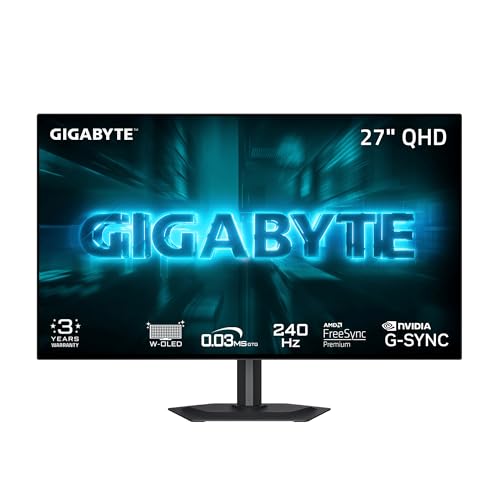
GIGABYTE GO27Q24G — The OLED answer
The Gigabyte GO27Q24G is the panel that breaks the LCD mould: a 27-inch W-OLED screen, flat, running QHD at 240Hz, with a grey-to-grey response figure of 0.03ms. That number needs its label spoken every time — it is response time, the speed of the pixels themselves, and it is not an input lag measurement. What it means in practice is still remarkable. OLED pixels change state almost instantly compared with any LCD, so at 240Hz every frame arrives fully formed, with none of the transition smearing that LCD panels manage rather than eliminate. Combined with OLED’s per-pixel light control — true blacks, no backlight bleed — motion looks clean in a way that has to be seen to be believed at this refresh tier.
The lag chain benefits accordingly: refresh bounds freshness at the same 240Hz as its LCD rivals, and pixel response simply never becomes the weak link. The OLED caveats are the technology’s known ones, stated plainly. Static interface elements displayed for thousands of hours carry a burn-in risk that esports HUDs and desktop taskbars make relevant, so screensaver and pixel-care habits belong in the ownership routine; and peak brightness behaviour differs from LCD, favouring dimmer rooms. Gigabyte fits HDMI, DisplayPort and USB-C connectivity plus height and tilt adjustment, rounding out the most technologically distinct pick in the guide — the one for players who want OLED’s motion purity with their competitive refresh.
- Panel: 27-inch W-OLED, flat
- Picture: 2560 by 1440 at 240Hz
- Response: 0.03ms GTG — response time, explicitly not input lag
- Sync: FreeSync Premium, G-SYNC compatible
- Connections: HDMI, DisplayPort, USB-C; height and tilt stand
Strengths
- Pixel response in a different physical class from every LCD here.
- True blacks and per-pixel contrast transform dark game scenes.
- Full modern connectivity including USB-C, with an adjustable stand.
Trade-offs
- Static-element burn-in risk requires pixel-care habits for mixed desktop use.
- Brightness character suits controlled lighting better than sunlit rooms.
- OLED pricing posture sits above the IPS picks of similar size.
Best for: players who want OLED motion clarity and contrast at competitive refresh. Not suited for: all-day static desktop use without care habits, or bright-room desks.

LG UltraGear 27GR83Q-B — Proven all-rounder
LG’s 27GR83Q-B is the establishment candidate: a 27-inch QHD IPS UltraGear at 240Hz with a 1ms response figure, DisplayHDR 400, G-Sync and FreeSync Premium support, HDMI 2.1 alongside DisplayPort, and a tilt, height and pivot stand. Its lag credentials follow the guide’s method — elite refresh, a gaming line’s signal path, response fast enough to serve the rate — and its 1ms figure, larger on paper than the 0.3ms claims around it, illustrates why response numbers should be read as tiers rather than duels: in independent measurement culture this panel family is respected precisely because its real motion performance matches its billing.
What the LG adds is completeness. HDMI 2.1 makes it the natural home for a high-refresh console alongside the PC. The stand adjusts in every direction a desk can ask. The UltraGear line’s maturity shows in menus, build and the absence of surprises. Against the BenQ it concedes the refresh ceiling; against the OLED it concedes pixel-response purity and true blacks; against the AOC it concedes the value crown. Against the field, it is the panel with the fewest asterisks — the recommendation for a player who wants one QHD screen to do everything at 240Hz without a paragraph of conditions attached.
- Panel: 27-inch IPS, flat
- Picture: 2560 by 1440 at 240Hz, DisplayHDR 400
- Response: 1ms as listed — response time, not input lag
- Sync: G-Sync and FreeSync Premium
- Connections and stand: HDMI 2.1, DisplayPort, tilt/height/pivot
Strengths
- The most complete package here — ports, stand and sync all flagship-grade.
- HDMI 2.1 welcomes high-refresh consoles beside the PC.
- Proven line with mature firmware and predictable behaviour.
Trade-offs
- Refresh ceiling below the BenQ’s 320Hz for ceiling-chasers.
- IPS blacks cannot match the OLED pick in dark scenes.
- HDR 400 is an entry-level HDR tier, not a cinematic one.
Best for: players wanting one mature QHD 240Hz screen for PC and console alike. Not suited for: buyers chasing the absolute refresh ceiling, or OLED contrast.
How do the six compare on the lag-relevant facts?
| Monitor | Size | Resolution | Refresh | Listed response (not lag) |
|---|---|---|---|---|
| ASUS VG259QMR5A | 25-inch class | 1080p | 310Hz | 0.3ms |
| ASUS VG259QM5A | 25-inch class | 1080p | 240Hz | 0.3ms |
| AOC Q27G41ZE | 27-inch | QHD | 240Hz / 260Hz OC | 0.3ms |
| BenQ EX271QM | 27-inch | QHD | 320Hz | Not headlined |
| GIGABYTE GO27Q24G | 27-inch | QHD | 240Hz | 0.03ms GTG (OLED) |
| LG 27GR83Q-B | 27-inch | QHD | 240Hz | 1ms |
Read the last column with the discipline this guide opened with: those are pixel response figures, useful for judging motion clarity within a refresh cycle, and none of them — not even the OLED’s spectacular one — is a measurement of input lag. The refresh column is where the lag story lives.
What actually creates display lag, stage by stage?
Follow a frame on its journey. The game renders it; the graphics card queues it; the cable carries it; the monitor receives it, may process it, and displays it when the panel next refreshes; the pixels then take their response time to change into the new image. Lag accumulates at the queueing and refresh stages most of all, which is why refresh rate dominates honest discussion: a panel refreshing 240 times a second can never show you a frame that waited long, while a 60Hz panel guarantees waits several times longer before processing is even considered. Processing is the second contributor, and it is where gaming panels earn their keep — their fast modes strip out the scaling, smoothing and enhancement pipelines that televisions apply, leaving the signal path short.
Response time enters at the very end of the chain and answers a different question: once the new frame is displayed, how quickly do the pixels finish becoming it? Slow response does not delay the frame; it smears it, trailing ghosts behind moving objects. That is why a panel can have excellent lag and poor clarity, or — in the OLED’s case — response so fast that clarity simply stops being a topic. Competitive players need both ends of the chain short, and the six panels here were chosen because both ends are.
Your own settings operate the chain’s gates. V-Sync choices, frame caps, in-game latency modes, the monitor’s overdrive and processing presets — each adds or removes a slice of delay. The setup section below walks the ones that matter, because a low-lag panel configured carelessly can be beaten by a lesser panel configured well, and no purchase survives contact with a settings menu untouched.
How do you configure a low-lag setup once the panel arrives?
Connect by DisplayPort for PC play where available, set the panel’s maximum refresh in the operating system, and confirm the figure in the monitor’s own readout. In the graphics driver, enable the panel’s adaptive sync, and in games prefer the vendor’s low-latency mode where offered. Set frame caps with intent: with sync active, capping a few frames below the panel’s maximum keeps the system inside the sync window and out of the queueing behaviour that adds delay at the cap.
In the monitor’s menu, select the gaming or fast preset, set overdrive to its middle step — the setting where motion is cleanest without bright overshoot halos — and disable dynamic contrast, eco dimming and any motion-interpolation feature. If the panel offers a dedicated low-lag or instant mode, enable it for competitive titles. Keep the firmware current; gaming lines like UltraGear, TUF and MOBIUZ ship meaningful input-handling refinements in updates, and the five minutes they take is the cheapest performance available.
Finally, simplify the chain. Run one display while competing if your system strains, keep background capture and overlay software lean, and use a wired connection for the peripherals whose delay you can feel. The monitor is the last stage of the pipeline, not the whole of it, and this guide’s picks assume a chain maintained well enough to deserve them.
What errors do lag-conscious buyers keep making?
Quoting response time as input lag heads the list, and the industry’s marketing departments are the repeat offenders — a 0.03ms OLED figure describes pixel physics, not the delay between your mouse and the screen. Second comes buying refresh the system cannot feed, then blaming the panel for a frame rate the GPU never delivered. Third, leaving the operating system at 60Hz after installing a 320Hz panel. Fourth, stacking latency features carelessly — sync, caps and in-game modes fighting each other. And fifth, chasing laboratory lag differences smaller than human perception while neglecting the settings and habits that cost whole frames. The panels are fast; the discipline is the differentiator.
A last word on honesty in this category
This corner of the monitor market runs on numbers, and numbers invite abuse: response figures quoted by the most flattering method, refresh rates that require an overclock the headline forgets to mention, HDR badges on panels that cannot show HDR, and — the abuse this guide was written against — pixel-speed figures dressed in input lag’s clothing. The defence is not cynicism; every panel in this guide is a genuinely excellent instrument, and several are the finest of their kind. The defence is translation. Read every millisecond as response until proven otherwise, every refresh rate as a ceiling your system must feed, every badge as a claim about compatibility rather than capability, and the spec sheet becomes what it should have been all along: a mostly honest document in a dialect you now speak. Buy in that dialect, and the six panels here will not disappoint you — they are, by the only measures anyone can verify, the fastest honest screens their sizes offer.
Final Recommendation
Keep the paperwork discipline equal to the purchase: register the panel, save the invoice where a warranty claim can find it, and keep the box through the first month, because flagship panels change hands and get upgraded more than any other desk item, and a panel shipped in its factory carton survives journeys that a wrapped-in-blankets one may not. The three-year warranties on the ASUS and AOC picks and the support organisations behind BenQ, LG and Gigabyte are part of what your money bought; they only work for owners whose records work.
Choose by the size of your ambition and the strength of your system. Pure competitive freshness at the classic size belongs to the ASUS pair — the 310Hz QMR5A for those who can feed it, the 240Hz QM5A for those honest about their hardware. At QHD, the BenQ’s 320Hz is the ceiling, the Gigabyte OLED is the connoisseur’s alternative with motion purity no LCD matches, the LG is the complete mature package, and the AOC is the value route to the same tier. Every one of them minimises lag by the only honest mechanism available — elite refresh on a gaming signal path — and the fastest panel in this guide is ultimately the one whose frames your own PC can actually deliver, at settings you remembered to set. That is not a deflation of the category — it is its dignity. These are instruments precise enough that the limiting factor moves back to the player and the system, which is exactly where competitive people want it: no excuses left in the glass, no fog left in the numbers, just a fresh image arriving as fast as physics and your hardware jointly allow, waiting on nothing but you. Order the panel your system and your scene describe, verify it in the first week with the checks this guide sets out, configure it once with the discipline the setup section describes, and then do the thing fast monitors exist to enable — forget the equipment entirely and play, for the years of service these panels are built to give, at the speed your skill has earned and your system, honestly measured and properly configured, can sustain through a whole season of play. When the screen disappears beneath the game that completely, the category has done its work and so has this guide. Play well, and may your frames always arrive on time.
How do independent reviewers actually measure input lag?
With hardware, patience and a methodology section longer than most reviews. The standard approach places a photosensor against the screen while a test system flashes a signal, timing the gap between the input event and the light change at a defined point in the refresh cycle; high-speed camera methods film the mouse, the screen and a frame counter together and count the frames between action and result. Both methods report figures at a stated refresh rate and at a stated position on the screen, because lag is not one number — a frame appears at the top of the panel before the bottom, so honest measurements specify where they read.
That rigour is exactly why this guide refuses to summarise lag in a league table of its own. Measured results exist for some of these model families in independent databases, and they consistently confirm the structural story told here — gaming panels at 240Hz and above cluster in a low band, ordered more by refresh than by brand — but model revisions, firmware and settings move individual results, and a figure measured on one firmware is a historical document by the next. The reader who needs a number should go to those databases with the exact model code in hand. The reader who needs a decision can make it from refresh, panel class and signal path, which is the evidence manufacturers actually put in your hands at purchase time.
One more subtlety protects you from forum folklore: total system latency includes the game engine, the GPU queue and the peripherals, and the monitor’s slice — while real — is often not the largest slice in a poorly configured system. Players who optimise the chain described in the setup section routinely gain more than players who swap between two already-fast panels. Buy a panel from this tier, then spend your optimisation energy where the milliseconds actually live.
Full HD at 25 inches or QHD at 27 — which serves competitive play better?
The 25-inch Full HD case is the professional’s orthodoxy, and it is earned. Lower resolution means higher frame rates from the same hardware, which means the refresh ceiling — the thing that actually bounds lag — is reachable in more titles at better settings. The smaller screen keeps the entire tactical picture in central vision, and the panel choice at this size is the deepest in the industry: the two ASUS models here are simply the current crest of a very competitive wave. For ranked play in shooters, this remains the configuration the evidence supports.
The 27-inch QHD case is the all-rounder’s rebuttal, and it has strengthened as graphics hardware has. QHD renders a finer, more informative image — distant targets carry more pixels, interfaces breathe — and 27 inches suits the mixed life of a desk that also edits video, works and watches. Its cost is frame rate: the same GPU that saturates 240Hz at 1080p may deliver two-thirds of that at 1440p, and an unsaturated fast panel is potential rather than performance. The BenQ’s 320Hz sharpens the dilemma to a point: it is the finest QHD instrument here and the most demanding, a panel bought for the system you have at the high end or the one you are building toward.
The OLED complicates the choice beautifully by removing response from the equation entirely — at 27-inch QHD its clarity per frame exceeds the LCDs’, so a player feeding it 180 excellent frames may perceive motion as clean as a rival’s 240 smeared ones. There is no formula that settles this; there is your GPU, your titles and your honest frame counter. Measure those, and the size question answers itself.
What is backlight strobing, and should you use it?
Strobing — ELMB on the ASUS pair, and equivalent technologies elsewhere — attacks motion blur from a direction refresh rate cannot. Between frames, the backlight briefly switches off, so your eyes never see pixels mid-transition; the persistence blur that makes fast pans look smeared largely disappears, at the cost of brightness and, on some implementations, a crosstalk ghost. ELMB Sync’s distinction is that it can run alongside adaptive sync, historically a either-or choice. For competitive clarity in bright, fast titles, strobing at its balanced setting is the closest LCD comes to the OLED’s native purity in this guide — with the Gigabyte waiting as the technology that needs no such trick.
The costs deserve the same clarity. Strobing reduces perceived brightness, which dim-room players may welcome and bright-room players cannot afford; it can introduce flicker sensitivity in a minority of users; and it rewards stable, high frame rates while punishing erratic ones, where the strobe makes judder more visible rather than less. Treat it as a per-title instrument: enable it for the competitive rotation, disable it for cinematic sessions, and judge it at your real brightness in your real room rather than from anyone’s screenshots — including, especially, the manufacturer’s.
How do you grow a system into one of these panels?
Sensibly, in stages, because the panel is the one component here that does not expire on a schedule. A player on a mid-range system today can buy the 240Hz tier — the QM5A at 1080p or the AOC and LG at QHD — and receive its full benefit now, since those rates are attainable, while the panel remains ready for the stronger graphics card that arrives in a later upgrade. The reverse order disappoints: a flagship GPU feeding a 144Hz screen wastes its frames nightly. If a single purchase must lead, let it be the display, chosen at the tier your next system — not merely your current one — can feed.
The exception is the ceiling tier. The 310 and 320Hz panels repay only systems already at the summit or players certain of the climb, because their premium buys frames that lesser hardware cannot render. Even there, the purchase is defensible as a long-lived instrument: panels outlast two or three GPU generations, and the player who buys the BenQ once will not shop this category again for years. Whichever stage you are at, protect the investment with the boring infrastructure — a DisplayPort cable of certified quality and sane length, surge protection, and a desk arrangement that keeps the panel out of elbow range — because at these prices the screen is infrastructure, and it should be treated with the same dull respect as the PC it serves.
How much lag can a player actually feel?
Less than marketing implies and more than sceptics admit — and the honest answer is a range with conditions attached. Controlled studies and measurement culture converge on a rough picture: differences of a full frame at low refresh rates are obvious to almost anyone, while differences of a millisecond or two at the top of the range are the territory of trained players in familiar titles, detected as feel rather than identified as numbers. What every player perceives reliably is inconsistency — a chain that delivers most frames quickly and some slowly feels worse than a slightly slower chain that never varies — which is why this guide keeps returning to configuration discipline as a performance feature in its own right.
There is also a compounding truth the panel cannot fix. Your personal reaction time, the game’s tick rate and network conditions in online play each contribute delays that dwarf the differences between the six panels here. None of that makes the monitor irrelevant — it is the one stage of the chain you fully control, and its freshness shapes the information your reactions work from — but it should calibrate the purchase. Moving from a television or a 60Hz office panel into this tier is a transformation. Moving within this tier is refinement, priced accordingly, and the player who understands which of those two journeys they are on will spend correctly.
What do tournament and professional setups standardise on?
Look at the desks at professional events and a pattern repeats so consistently it amounts to a specification: 24 to 25-inch class panels, 1080p, the highest refresh the title’s competitive scene has standardised, minimal processing, identical settings across every station. The reasoning is partly fairness and partly the geometry this guide has described — central vision, attainable frame rates, a picture every player reads the same way. The ASUS pair in this guide are the consumer descendants of that standard, and their presence at the top of the 25-inch tier is no accident: this is the size where the industry’s competitive R&D money lands first.
The 27-inch QHD tier is where the professional’s home desk increasingly lives — the same player, off duty, wanting the finer picture for everything else in their library, with the BenQ, LG, AOC and Gigabyte serving that migration at descending levels of extremity. Understanding the two tiers as one ecosystem, rather than as rivals, is the mature way to shop it: compete at the size the scene uses, live at the size your room enjoys, and let the lag discipline — refresh, signal path, settings — travel unchanged between them.
What should the first week with a flagship panel look like?
Day one is verification, not admiration. Confirm the refresh rate in the operating system and the panel’s own readout, run the cable that came in the box before substituting your own, and check the full screen in white, black and grey for the uniformity flaws that return windows exist to catch. Then play your main title at your real settings and watch the frame counter through its busiest scene: that number, compared against the panel’s ceiling, tells you which of you is the limiting factor and whether the settings conversation needs to happen before the hardware one resumes.
Across the week, run the comparisons that justify the tier. Toggle between your old rate and the new one if the panel allows it and feel the difference in a tracking drill rather than a menu. Try the strobing mode for one session and native sync for another, at your room’s real brightness, and keep the one your eyes prefer rather than the one forums prefer. If you bought the OLED, set its pixel-care features up now, while the habits are new: hidden taskbar, screensaver, varied content. By day seven the panel should have stopped being a purchase and become a constant — the state in which fast monitors do their work, which is to say, invisibly.
Do cables and ports matter at 240Hz and beyond?
At these rates, yes — the signal is moving fast enough that the physical layer stops being a formality. DisplayPort is the default recommendation for PC play in this tier: it carries the highest combinations of resolution and refresh without negotiation drama, and every pick here provides it. HDMI serves consoles and second machines, with the LG’s HDMI 2.1 the standout for high-refresh console output. Where a panel will not reach its advertised rate, the cable is the first suspect and the port is the second — laptop docks and ageing leads silently cap refresh in a large share of support stories, and the fix is embarrassingly often the cable that came in the box, connected directly.
Length discipline matters too. Keep runs as short as the desk allows, prefer certified cables over decorative ones, and treat any adapter in the chain as a suspect until proven innocent. None of this is exotic; it is the physical hygiene of a signal chain whose entire purpose is speed, and it costs a fraction of what the panel did. The players who never think about cables are the ones who bought the right two cables once.
Frequently Asked Questions
Why won’t this guide just tell me each monitor’s input lag in milliseconds?
Because the manufacturers do not publish those figures for these models, and the numbers that do appear on the listings measure pixel response instead. Independent laboratories measure lag for some monitors, and consulting their databases for a specific model is the legitimate route to a measured figure. Inventing a ranking here would be decoration disguised as data, and this guide declines.
Is 0.03ms on the OLED the same as near-zero input lag?
No — and the distinction is this guide’s central lesson. The 0.03ms is grey-to-grey pixel response: how fast OLED pixels change once told. Input lag also includes signal processing and the wait for the next refresh, which at 240Hz is measured in whole milliseconds. The OLED’s response makes its motion exceptionally clean; its lag is governed by the same refresh arithmetic as the other 240Hz panels.
Does 320Hz feel different from 240Hz?
To practised competitive players in fast titles, yes — motion steps are finer and the image is never as old. To most players in most games, the difference is subtle beside the leap from 144Hz to 240Hz, and it only exists at all when the PC sustains the frame rate. Buy the BenQ for the ceiling if your hardware lives there; otherwise the 240Hz tier is the rational summit.
Why are there no 32 or 35-inch panels in a guide titled 25 to 35?
Because the lowest-lag frontier currently sits at 25 to 27 inches, where esports panel development concentrates. Larger gaming monitors exist and game well, but their fastest models trail these refresh rates, and padding the list with them would have contradicted the guide’s purpose. If screen size outranks the last increment of speed in your priorities, shop the larger class knowingly, using these six as the benchmark.
Can a console use these panels’ low-lag benefits?
Substantially, yes. Current consoles support high-refresh output in compatible titles, and the LG’s HDMI 2.1 makes it the natural console partner here. Console frame rates cap the benefit in many games, but the panels’ gaming signal paths and refresh headroom still deliver a cleaner, fresher picture than a television’s game mode typically manages.
Should I worry about burn-in if I choose the OLED for mixed use?
Worry is the wrong word; habits are the right one. Modern W-OLED panels ship with pixel-refresh cycles, panel-shift and logo-dimming features that materially reduce the risk, and the remaining discipline is yours: hide the taskbar, use a screensaver, vary content, and avoid leaving a static news channel or HUD parked for entire days. Players whose screens show games and varied media will likely never meet the problem; a screen condemned to one static spreadsheet for a decade is a different story, and that user should take an IPS pick instead.
What is the cheapest meaningful upgrade to an already-fast setup?
Almost never another panel. Once a screen from this tier is on the desk, the remaining latency and clarity live in configuration: the correct cable on the correct port, the refresh actually engaged, sync and frame caps in agreement, overdrive at its clean step, firmware current. After those free fixes, the next honest gains come from the frame rate itself — settings discipline in your main title — and from the network path in online play. Players who audit that chain before shopping again routinely discover their flagship was waiting on a five-minute setting, which is the happiest ending this category offers.
How long will a panel from this tier stay competitive?
Historically, longer than the rest of the system around it. Refresh standards at the top move in steps separated by years, connection standards at these rates are settled, and a 240Hz panel bought today will still be a fast, desirable screen when the graphics card feeding it has been replaced twice — at which point it typically begins a second career as a companion display or passes to another player in the household. That longevity is the economic spine of this tier: the premium over mid-range panels divides across an unusually long service life, and the resale market for verified fast panels stays liquid precisely because competitive players trust the category. Buy the tier your ambitions genuinely reach, keep it clean and surge-protected, and it will repay the decision for most of a decade.
Is a higher refresh rate useful outside gaming?
Perceptibly, yes, though the stakes change. Scrolling, window dragging and cursor motion all render more fluidly, and long reading sessions over smoothly scrolling text are gentler than the same text strobing at 60Hz. It will not make a spreadsheet faster to finish, and nobody should buy this tier for office work alone — but as a by-product of a gaming purchase, the desktop dividend is real and daily.
What single setting most often sabotages a fast panel?
Leaving the operating system at a default 60Hz after installation. It silently converts a 240 or 320Hz purchase into a 60Hz experience, and it is discovered, on average, embarrassingly late. Check the advanced display settings on day one, verify the monitor’s own readout agrees, and re-check after any driver update.
Related Guides
Players working to a firmer budget should compare these flagships against best 27 gaming monitors around 300, while small-desk competitors will find the portable end of the spectrum mapped in best 22 inch gaming monitors. The smallest end of the desk spectrum is covered by the best 21 inch monitors for buyers downsizing on purpose.
Related guides
- Best Enterprise SATA SSDs: Endurance Classes, Power-Loss Protection and Fleet Sense
- Best Direct Thermal Printers: Shipping-Label Machines and Professional Label Systems
- Best Printers for Dental Practices
- Best 1440p 165Hz Monitors: One Native 165Hz Pick, Three 180Hz Upgrades, an Overclock Headline and a 160Hz Ultrawide



[…] whose budget stretches beyond this tier should see what the flagship end offers in best 25 35 inch monitors with lowest display lag, and those working with smaller desks can step down a size with best 22 inch gaming monitors […]