What's inside
- Key Takeaways
- Quick Picks
- How We Chose These Picks
- How Did Four Cores Go from Flagship to Entry Tier?
- What Can Four Cores Still Do in 2026 — and Where Do They Run Out?
- Where Does Each Pick Sit Next to the Others?
- What Should You Check Before Buying Any Quad-Core Laptop?
- How Do You Keep an Entry-Tier Laptop Feeling Fast?
- Which Mistakes Do Quad-Core Buyers Make Most Often?
- Should You Consider a Mini PC or a Used Consumer Laptop Instead?
- Three Buyers, Three Different Right Answers
- Final Recommendation
- Frequently Asked Questions
- Related Guides
As an Amazon Associate I earn from qualifying purchases. This post may contain affiliate links at no extra cost to you.
gizmoverdict.com is reader-supported. When you buy through links on our site, we may earn an affiliate commission.
Where to buy: the four linked laptops below are sold on Amazon in the configurations named in the tables. The two remaining picks circulate through refurbished channels, so they are discussed by model name only, with the buying cautions that channel deserves.
There is a sentence that would have sounded like a complaint in 2019 and reads as a specification today: this laptop has four cores. Shoppers searching for the best 4 core laptops are usually doing one of three things — buying the cheapest respectable machine for a defined, light job; replacing a parent’s or a child’s computer without funding a flagship; or checking whether an inexpensive laptop they have already spotted is honest value or a trap wearing a quad-core badge. This guide is written for all three, and it begins with the truth the category deserves in 2026: four cores is the entry tier now. It is not the bargain powerhouse tier it was when quad-core chips first reached cheap laptops. Managed with clear eyes, it still does real work. Bought on a stale assumption, it disappoints within a month.
The second truth is that “four cores” names two very different animals in today’s market, and confusing them is the category’s central mistake. The first family is the performance quad: chips like AMD’s Ryzen 3 7320U, whose four cores are full-size Zen-architecture cores with real clock speeds and competent integrated graphics, designed for laptops that happen to be inexpensive. The second family is the efficiency quad: Intel’s N100 and N150, whose four cores are Gracemont efficiency cores — the small cores from Intel’s hybrid designs, sold alone. They sip power, run cool and handle browser-and-document work gracefully, but they belong to a different performance class entirely, closer to a very good tablet chip than to a small workstation. A listing that shouts “quad-core” without naming the chip is hoping you will price the first family and receive the second. Every pick in this guide names its silicon in the heading, and the reviews keep the two families visibly separate.
A third piece of honesty shapes the linked list. Only four picks here carry purchase links, deliberately: much of the rest of the quad-core shelf on today’s marketplace is refurbished business stock, and rather than pad the guide with renewed listings presented as ordinary picks, we discuss the two most interesting of those machines — a Dell Latitude and a Lenovo ThinkPad — as prose picks with the refurbished-buying discipline spelled out. And one linked pick breaks the category’s own rule in an instructive way: the Acer Aspire Lite’s Core 3 N350 is, as its own listing states, an eight-core efficiency chip. It sits in this guide because quad-core shoppers cross-shop it constantly and its per-core character is the same Gracemont class — it is the efficiency family’s bigger sibling, and comparing it against the true quads teaches the category’s lesson better than any chart.
What can four cores still do well in 2026? The honest list is long: web work with a sane number of tabs, documents and spreadsheets of ordinary size, email, video calls, streaming, schoolwork, point-of-sale and kiosk duties, writing, light photo sorting, and the endless administrative computing that runs small businesses and households. What defeats them is equally definable: heavy multitasking with dozens of tabs plus a call plus a big spreadsheet, modern games beyond the lightest settings, video editing beyond simple cuts, compiling large codebases, and any workload whose software assumes a modern performance chip. Buy a quad for the first list and it will feel adequate for years. Buy it for the second and no discount makes it cheap.
Key Takeaways
- Four cores in 2026 is the entry tier: genuinely capable for browser, document, school and admin work, and the wrong tool for heavy multitasking, modern gaming or serious creation.
- The label hides two families — full-size performance cores (Ryzen 3 7320U) and Gracemont efficiency cores (Intel N100, N150) — and the chip name matters more than the core count.
- The Acer Aspire 3 with the Ryzen 3 is the strongest true quad here; the Chromebook x360 and Vivobook Go are efficiency-quad machines for lighter, cheaper duties.
- The Aspire Lite’s Core 3 N350 is an eight-core efficiency chip per its own listing, included because shoppers cross-shop it against the quads and its character is the same family.
- Only four picks are linked because much of the remaining quad-core shelf is refurbished stock; the Latitude 7310 and ThinkPad X13 Gen 2 are covered as prose picks with buying cautions.
- Memory and storage ceilings bite before core counts do at this tier — several picks carry 4GB of memory or 64GB of storage, which defines their real limits.
Quick Picks
| Pick | Badge | Why it earns its place |
|---|---|---|
| Acer Aspire 3 A315-24P, Ryzen 3 7320U | Best true quad-core | Four full-size Zen cores, a Full HD screen and 8GB of memory — the closest thing here to a small mainstream laptop. |
| HP Chromebook x360 14, Intel N100 | Best for school-managed simplicity | A convertible touchscreen Chromebook whose efficiency quad suits browser-based school and home life. |
| ASUS Vivobook Go 15, Intel N150 | Cheapest honest Windows route | A 15.6-inch Full HD Windows laptop on the efficiency quad, for the lightest duties at the lowest commitment. |
| Acer Aspire Lite, Core 3 N350 | The efficiency family’s bigger sibling | An eight-core Gracemont chip per its listing, with 8GB of memory and a battery-first design for admin work. |
| Dell Latitude 7310 | Refurbished business route | A premium-built older quad-core business laptop circulating as renewed stock; buy the seller’s terms, not just the badge. |
| Lenovo ThinkPad X13 Gen 2 | Refurbished keyboard pick | The ThinkPad keyboard and build in a compact quad-core machine, again through the refurbished channel only. |
How We Chose These Picks
The first filter was identity: a candidate had to state its exact processor in its listing, because in this category the unnamed “quad-core” label is where value goes to hide. Machines whose listings hid the chip behind the core count were excluded regardless of price. The second filter was linkage honesty. We attached purchase links only where the verified listing describes a current, ordinarily-sold configuration; the substantial refurbished corner of this shelf is represented by two prose picks instead, with the channel named, because a renewed business laptop can be an excellent purchase but should never be mistaken for a new consumer one.
Within the linked four, we deliberately kept both families represented and labeled, since a guide that only listed the performance quad would mislead the many buyers whose duties genuinely fit the efficiency chips and whose budgets are better served by them. Configuration floors were applied with the category’s realities in mind: we note plainly where a pick carries 4GB of memory or a 64GB drive, because at this tier those ceilings, more than the core count, decide what the machine can be asked to do. Screens were required to be at least Full HD on the Windows machines, a line the Chromebook meets as well, because a dim low-resolution panel is the other classic economy that turns a bargain into a regret.
How Did Four Cores Go from Flagship to Entry Tier?
A short history explains the psychology this category fights. When quad-core processors first reached ordinary laptops, four cores was the professional specification — the thing video editors and engineers specified while everyone else made do with two. That memory lingers in buyers and, more usefully for sellers, in listing copy. What changed is not the core but everything around it: mainstream laptop chips now carry six, eight, ten or more cores, often mixing performance and efficiency types, while software quietly recalibrated its expectations upward to match. Four cores did not get slower. The world it serves got heavier, and the tier slid from flagship to foundation without the badge changing a single letter.
The efficiency-core era complicated the story further. Intel’s hybrid designs put small Gracemont cores beside large ones, and then the small cores began appearing alone in the N-series chips that power this guide’s cheaper picks. Those chips are genuinely clever engineering — descendants of a line built for fanless tablets and mini PCs — but they inherited a marketing problem: a number, four, that used to mean something it no longer does. AMD’s approach at the entry tier differed, shrinking its mainstream Zen designs down into chips like the 7320U, which is why the performance family in this guide exists at all and why the Aspire 3 feels a class above its shelf-mates. Understanding that divergence — one maker miniaturized its big cores, the other productized its small ones — is the whole technical education this category requires, and it fits in this paragraph because it really is that simple.
None of this makes the modern quad a bad product. It makes it a scoped product, in an era when the average software load is simply honest about wanting more. The buyers who thrive in this category are the ones who scope their job first and let the tier follow; the category’s victims are those who let a nostalgic number scope the job for them.
What Can Four Cores Still Do in 2026 — and Where Do They Run Out?
Start with the working day of the jobs these machines are actually bought for. A home office handling email, invoicing, documents and a browser’s worth of supplier portals will not make a Ryzen-quad Aspire 3 breathe hard, and even the efficiency quads manage it if the tab count stays civilized. A student’s Chromebook workload — browser, classroom platforms, documents, video lessons — is the natural habitat of the N100, which is why schools deploy chips like it by the thousand. A reception desk, a workshop counter, a till: fixed, single-purpose computing is where modest silicon quietly serves for a decade. The pattern in every success case is the same — a defined job, performed by software that was mainstream years ago, at a pace set by a human rather than by a render queue.
The failures share a pattern too, and it is worth naming precisely because “slow” is too vague to shop by. Modern software assumes abundance: browsers hold dozens of live tabs, each a small program; video calls process background blur and noise suppression continuously; office suites index, sync and render in the background; operating systems update, scan and back up on their own schedules. Each demand is small. Their sum is what a four-core machine — especially an efficiency quad with 4GB of memory — experiences as a wall: not a crash, but a spreading hesitation, tabs reloading, calls stuttering when a spreadsheet recalculates. The performance quads postpone that wall considerably; the efficiency quads meet it sooner; more memory postpones it for both, which is why the 8GB configurations in this guide matter more than their modest numbers suggest.
Games and creative work draw the brightest line. Integrated graphics on the Ryzen quad can run older and lighter games at modest settings and edit photos without complaint; the Gracemont machines are for streaming video, not rendering it. Video editing on any pick here should be understood as trimming and simple assemblies, ideally of phone footage, with patience. Buyers whose ambitions live beyond those lines are not bad shoppers — they are shoppers in the wrong category, and the kindest sentence in this guide is the one that says so before money moves.

Acer Aspire 3 A315-24P, Ryzen 3 7320U — Best true quad-core
If you buy one machine from this guide, buy the one whose four cores are the real article. The Ryzen 3 7320U is a Zen-architecture quad with proper clock speeds and Radeon integrated graphics, and in daily use it behaves like what it is: a modest mainstream processor, not an economy experiment. The Aspire 3 around it respects that chip — a 15.6-inch Full HD display rather than the dim panels this price class is famous for, eight gigabytes of LPDDR5 memory, Wi-Fi 6, and a slim chassis that looks like a laptop rather than an apology. For the household’s second computer, the small-business admin machine, the student whose work is documents and research, this is the configuration that will still feel adequate when the others in this guide have begun to negotiate.
The limits are printed in its own specification and should be read without flinching. The 128GB drive is the tightest number here: Windows, an office suite and a couple of years of documents fit, but a photo library or a game collection does not, so this machine presumes cloud storage or an external drive as part of the arrangement. The memory is soldered at eight gigabytes — adequate for the duties described, a ceiling for anything more ambitious, and not upgradeable later. Within those two fences, though, the Aspire 3 is the guide’s clearest value: the only pick whose processor belongs to the performance family, wrapped in the screen and memory the job requires. It is the difference between buying down to a price and buying up to a workload, and it is why this machine leads the list.
- Processor: AMD Ryzen 3 7320U — four full-size Zen cores, Radeon graphics
- Panel: 15.6-inch Full HD display
- Memory and storage: 8GB LPDDR5 (soldered), 128GB NVMe SSD
- Connectivity: Wi-Fi 6 per the listing
- Operating system: Windows 11 Home
- Ownership note: the drive size makes a cloud or external storage plan part of the purchase
Strengths
- The only true performance quad among the linked picks, with graphics to match.
- A proper Full HD screen and eight gigabytes of memory clear the category’s usual traps.
- Mainstream manners: this laptop feels like a smaller normal computer, not a compromise.
Trade-offs
- The 128GB drive is small for anyone with local media or many applications.
- Soldered memory closes the upgrade door permanently.
- The chassis is functional plastic; it will not be mistaken for a premium machine.
Best for: households and small businesses wanting the cheapest laptop that still behaves like a real one. Not suited for: media hoarders, gamers, or anyone whose workload is already heavy.

HP Chromebook x360 14, Intel N100 — Best for school-managed simplicity
The Chromebook in this guide plays by different rules and wins by them. Its Intel N100 is a four-core Gracemont efficiency chip that would be the weakling of a Windows comparison, but ChromeOS asks far less of hardware than Windows does, and the pairing is honest: a light operating system on light silicon, in a 14-inch convertible with a Full HD IPS touchscreen that folds into tablet and tent shapes. For the student whose school life lives in a browser, the family member whose computing is email, video calls and streaming, or the household that wants a second machine nobody has to administer, this x360 is not a cut-down laptop. It is the appropriate tool, with the self-updating, low-maintenance character that makes Chromebooks the default issued device in education.
Read the configuration with the platform’s logic in mind. Four gigabytes of memory and 64GB of eMMC storage would cripple a Windows machine; under ChromeOS, with work stored in the cloud and applications delivered through the browser, they describe a functional, if firmly bounded, computer. The bounds are the point of the warning label: software that requires Windows or macOS does not exist here, local storage fills with downloads and offline files faster than buyers expect, and the machine’s usefulness is welded to an internet connection and a Google account. The Sky Blue finish and the convertible hinge make it the most cheerful object in this guide, and for the right owner — the browser-native student, the grandparent, the kitchen-counter second screen — it will be the most loved. Just do not buy it as a cheap Windows laptop substitute, because that is the one job it refuses.
- Processor: Intel Processor N100 — four Gracemont efficiency cores
- Panel: 14-inch FHD IPS touchscreen, 360-degree convertible
- Memory and storage: 4GB RAM, 64GB eMMC
- Operating system: ChromeOS
- Finish: Sky Blue, per the verified listing
- Ownership character: cloud-first by design; local storage is a waiting room, not a warehouse
Strengths
- ChromeOS on efficiency silicon delivers smooth browser work and minimal maintenance.
- The convertible touchscreen suits classrooms, sofas and video calls equally.
- Strong fit for managed school deployments and low-support home users.
Trade-offs
- No Windows or macOS software, ever — the platform is the limit.
- 64GB of local storage fills quickly with downloads and offline media.
- Usefulness depends on connectivity and a cloud account.
Best for: browser-native students and households wanting a simple, secure second machine. Not suited for: anyone with must-have desktop software or large local files.
ASUS Vivobook Go 15, Intel N150 — Cheapest honest Windows route
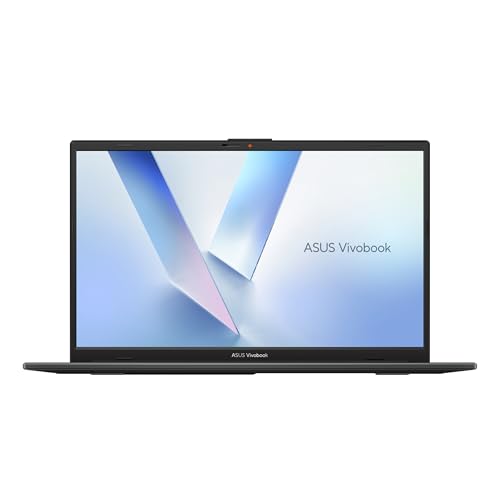
The Vivobook Go 15 answers a narrow question honestly: what is the least committed way to own a full-size Windows laptop? Its Intel N150 is the slightly newer sibling of the Chromebook’s chip — four Gracemont efficiency cores — and ASUS pairs it with a 15.6-inch Full HD screen, which already separates this machine from the bargain-bin tradition of pairing weak processors with worse displays. Windows 11 runs on it, mainstream software installs on it, and the duties it performs respectably are the light administrative canon: email, documents, web portals, streaming, video calls one at a time. As a spare machine, a dedicated writing laptop, a reception or workshop computer, it earns its shelf space.
The configuration’s fences must be stated as plainly as the Chromebook’s were. Four gigabytes of memory is below this guide’s comfort line for Windows, and it shows up as a hard ceiling: a browser with many tabs plus a call plus a document will push this machine into visible hesitation, and no settings ritual repeals arithmetic. The 128GB drive is workable for a cloud-leaning owner and tight for everyone else. None of this makes the Vivobook Go a bad product; it makes it a scoped one, and the scope is printed in its own listing for anyone who reads past the words “quad-core” in search results — the N150’s four cores are efficiency cores, and this laptop should be bought as the lightest-duty Windows machine in the room, priced accordingly, and never as a family’s only computer for a power user. Within its scope, its screen and its honesty are its virtues.
- Processor: Intel Processor N150 — four Gracemont efficiency cores
- Panel: 15.6-inch FHD display, 60Hz
- Memory and storage: 4GB RAM, 128GB SSD
- Graphics: Intel UHD integrated
- Operating system: Windows 11 class, per the listing
- Finish: Mixed Black, per the verified listing
Strengths
- A genuine Full HD 15.6-inch screen at the bottom of the Windows price ladder.
- Full Windows compatibility for the light administrative workload.
- Quiet, cool efficiency silicon suits always-on desk duties.
Trade-offs
- Four gigabytes of memory is the tightest ceiling in this guide.
- Efficiency cores hesitate under combined tab, call and document loads.
- Storage assumes a cloud-leaning owner from day one.
Best for: single-purpose Windows duties — spare, reception, writing, workshop — at minimal commitment. Not suited for: a household’s main computer, heavy multitaskers, or students with growing workloads.

Acer Aspire Lite, Core 3 N350 — The efficiency family’s bigger sibling
This pick requires the guide’s most careful paragraph, because it is the exception that tests the category. The Aspire Lite’s Intel Core 3 N350 is described in its own listing as an 8-core chip — eight Gracemont efficiency cores, double the count of the N100 and N150 machines above. It is included in a quad-core guide not by sleight of hand but because shoppers meet it on the same shelf, at the same prices, wearing the same “for business and everyday use” language, and its character is the efficiency family’s character scaled wider rather than stronger: more parallel threads for background tasks and tab juggling, the same modest per-core pace when a single demanding application asks for speed. Judged as the efficiency class’s multitasking answer, it is a genuinely interesting machine. Judged as an eight-core performance laptop, it would be a misunderstanding, and this guide declines to sell it as one.
The rest of the configuration supports the multitasking brief: eight gigabytes of memory — double the Vivobook Go’s allocation — a 15.6-inch Full HD ComfyView panel, USB-C among its connections, and a design whose listing emphasizes long battery life, which is the efficiency architecture’s home turf. For the admin worker whose day is many small things at once — portals, documents, mail, a call, a spreadsheet — the wider efficiency chip plus adequate memory can feel smoother than a stronger chip starved of RAM, and that is a real, purchasable virtue. The 128GB drive repeats the family’s cloud assumption, and sustained heavy loads remain outside the brief. Think of the Aspire Lite as the answer to a question the quads raise: what if my problem is not speed but simultaneity? If that is your problem, this is your pick in this guide.
- Processor: Intel Core 3 N350 — eight Gracemont efficiency cores, as its listing states
- Panel: 15.6-inch FHD ComfyView display
- Memory and storage: 8GB RAM, 128GB SSD
- Connections: USB Type-C among the ports, per the listing
- Design brief: battery-first business laptop positioning
- Operating system: Windows 11 class, per the listing
Strengths
- Eight efficiency threads plus 8GB of memory suit many-small-tasks multitasking.
- Efficiency architecture delivers the cool, long-battery manners the class promises.
- A Full HD panel keeps it clear of the bargain tier’s worst habit.
Trade-offs
- Per-core pace is efficiency-class; single heavy applications will not feel eight-core fast.
- The 128GB drive again assumes cloud or external storage.
- Its badge invites exactly the misreading this review exists to prevent.
Best for: administrative multitaskers juggling many light applications at once. Not suited for: buyers expecting performance-class eight-core speed, or heavy single-application workloads.
Dell Latitude 7310 — Refurbished business route
The Latitude 7310 represents the road not linked. In its day this was a premium 13-inch business ultraportable: an Intel quad-core processor from the generation when four cores were the professional standard, a metal business chassis, and the port and security furniture that corporate fleets required. Machines like it now circulate through refurbished channels as companies retire them, and a good unit offers something no new pick in this guide can: business-class build quality and a proper keyboard at an entry-tier cost. For a careful buyer, that trade — age and a used battery in exchange for construction and manners — can be the smartest purchase on this page.
The channel is the catch, and it is why this pick has no link: the current listings for this model are renewed stock, and renewed quality is a property of the individual unit and the refurbisher, not of the model name. Buy it only from a seller who states battery-health expectations, cosmetic grading and a return window in writing; confirm the exact processor, memory and storage of the unit being shipped, since fleet machines were configured many ways; and treat any listing that will not answer those questions as a listing to skip. Handled that way, a Latitude of this era serves admirably as a writing, browsing and admin machine. Handled casually, it is how a buyer ends up with a beautiful chassis wrapped around a tired battery and no recourse.
- Class: 13-inch premium business ultraportable of its generation
- Processor family: Intel quad-core business silicon of its era — confirm the exact unit’s configuration
- Current channel: refurbished and renewed listings are the norm
- Listing status in our pool: discussed without a link because current offers are renewed stock
- Ownership note: the refurbisher’s battery, grading and returns terms are the real product being bought
Strengths
- Business-grade construction and keyboard that new entry laptops do not match.
- A proven quad-core platform for documents, browsing and administration.
- Compact size suits it to travel and secondary-machine duties.
Trade-offs
- Unit-to-unit variation in battery health and cosmetic condition.
- An aging platform with a shorter remaining support horizon.
- Warranty depth depends entirely on the refurbisher chosen.
Best for: patient buyers who will vet a refurbisher and value build quality over newness. Not suited for: anyone needing a guaranteed-new machine or a long factory warranty.
Lenovo ThinkPad X13 Gen 2 — Refurbished keyboard pick
The ThinkPad X13 Gen 2 makes the same argument as the Latitude in Lenovo’s dialect. A compact 13-inch business machine from the quad-core professional era, it carries the two assets ThinkPad buyers have prized for decades: a keyboard that remains the reference for laptop typing, and a chassis engineered for service and survival in corporate life. Its quad-core configurations handled the full business workload of their time, and for the writing-and-documents workload this category still serves, a well-kept unit remains a pleasure in a way that new plastic entry laptops rarely are. Writers on a budget, in particular, should understand this pick: it exists because the best keyboard in the quad-core story is attached to a used machine.
Its prose-only status has the same cause as the Dell’s: the listings available today for this model are renewed units, and this guide links only what it can verify as the thing described. The buying discipline mirrors the Latitude’s with one ThinkPad-specific addition — this line shipped in both Intel and AMD configurations and with several display options of very different quality, so the exact unit’s processor and panel must be confirmed in writing, since a dim low-resolution screen option exists in the model’s history and listings do not always volunteer which one a given unit carries. Vet the refurbisher, confirm the configuration, insist on a return window, and the X13 Gen 2 is a connoisseur’s route into this category. Skip any of those steps and the same purchase becomes a lottery ticket with a famous logo on it.
- Class: 13-inch compact business laptop of the quad-core professional era
- Processor family: quad-core Intel or AMD configurations exist — the unit’s exact build must be confirmed
- Defining asset: the ThinkPad keyboard and business chassis
- Current channel: refurbished and renewed listings are the norm
- Listing status in our pool: no link, because current offers are renewed stock with unit-level variation
Strengths
- The finest typing experience available anywhere in this category’s story.
- Compact, serviceable business construction built for years of desks.
- Capable quad-core configurations for the document-and-browser workload.
Trade-offs
- Configuration roulette: processor and panel quality vary across units and listings.
- Renewed batteries and warranties vary with the refurbisher.
- An older platform that will age out of support sooner than a new pick.
Best for: writers and keyboard-first buyers willing to vet a renewed unit carefully. Not suited for: buyers who want a sealed box, a known configuration and a long warranty.
Where Does Each Pick Sit Next to the Others?
| Model | Chip and family | Panel | Memory / Storage | Channel |
|---|---|---|---|---|
| Acer Aspire 3 | Ryzen 3 7320U — performance quad | 15.6″ FHD | 8GB / 128GB | New, linked |
| HP Chromebook x360 14 | Intel N100 — efficiency quad | 14″ FHD touch | 4GB / 64GB | New, linked |
| ASUS Vivobook Go 15 | Intel N150 — efficiency quad | 15.6″ FHD | 4GB / 128GB | New, linked |
| Acer Aspire Lite | Core 3 N350 — 8 efficiency cores | 15.6″ FHD | 8GB / 128GB | New, linked |
| Dell Latitude 7310 | Intel quad of its era | 13″ class | Varies by unit | Renewed |
| ThinkPad X13 Gen 2 | Quad, Intel or AMD by unit | 13″ class, varies | Varies by unit | Renewed |
Two columns decide everything in this table: the chip family, which tells you what the machine feels like, and the channel, which tells you what kind of purchase you are making. A new efficiency quad and a renewed performance-era business machine can cost similar money and be right for opposite buyers — the first wants a warranty and simplicity, the second wants build quality and accepts homework.
What Should You Check Before Buying Any Quad-Core Laptop?
Begin with the chip’s full name and look up which family it belongs to. “Quad-core” alone is marketing; “Ryzen 3 7320U” is information, and “N100” is information of a different kind. Thirty seconds of checking prevents the category’s defining disappointment. Next, read the memory figure as a workload ceiling rather than a statistic: 4GB under Windows means one serious application at a time, 8GB means the ordinary administrative pile-up, and no quad-core in this guide offers more — a buyer who needs more should leave the category, not hope within it. Storage deserves the same realism: 64GB and 128GB configurations presume cloud accounts and streaming habits, and a buyer whose files live locally should budget an external drive into the same purchase or choose differently.
Then match the machine to a named job, in writing if necessary. “The reception desk,” “Grandma’s email and video calls,” “the workshop parts catalog,” “my child’s browser-based schoolwork” — quad-core laptops succeed at named jobs and fail at vague ones like “our main computer, for everything.” Finally, if your shortlist includes the renewed business machines, move the seller’s terms to the top of the checklist: battery-health statement, grading, returns, warranty length. In the renewed channel the terms are not fine print around the product. They are the product, and a famous badge on the lid is no substitute for them.
How Do You Keep an Entry-Tier Laptop Feeling Fast?
Modest hardware rewards tidy habits, and the first habit is tab discipline. A browser on an efficiency quad should be treated as a desk, not a warehouse: bookmark and close rather than hoarding forty live pages, and prefer the dedicated app or a pinned single tab for the one service you use all day. The second habit is startup hygiene — entry laptops accumulate background launchers from every printer, updater and chat tool ever installed, and pruning the startup list to the essentials returns more felt speed than any other free intervention. Third, keep a fifth of the drive empty. Small drives that run full slow everything from updates to everyday saving, and these machines’ drives are small by design.
Two more habits protect the later years. Use the operating system’s own maintenance rather than third-party “optimizer” software, which on modest hardware often costs more performance than it returns and occasionally brings advertising along as a passenger. And set expectations into the machine’s shape: pin the handful of applications the job actually uses to the taskbar, let the cloud handle backups and photo storage so the local drive stays a workspace, and schedule updates for hours when the machine is idle rather than letting them ambush the start of a workday. A quad-core laptop maintained this way feels adequate far longer than its specifications suggest — which is the entire economic argument for buying one carefully instead of buying a stronger machine carelessly.
One habit deserves its own emphasis because it is free and transformative on small drives: move the photo and video library off the machine. Phones sync their media to cloud libraries by default in 2026, and the local copies that accumulate on a 128GB drive are usually duplicates of things that already live elsewhere. Archive the local media folder to an external drive once, confirm the cloud copies are intact, and the workspace you reclaim is the difference between a drive that breathes and one that warns. On an entry-tier laptop, storage housekeeping is not tidiness — it is performance maintenance, as real as any upgrade the sealed chassis forbids.
Which Mistakes Do Quad-Core Buyers Make Most Often?
The expensive mistake is family confusion: paying performance-quad money for an efficiency chip because the listing led with the core count, or — just as common — dismissing an efficiency machine that would have served a light job for years because a forum called its chip weak. Both errors vanish when the chip’s full name becomes the first thing checked. The second mistake is ceiling blindness: buying a 4GB Windows machine for a multitasking household, or a 64GB Chromebook for a user with a large offline media habit, then blaming the processor for limits that were printed in the memory and storage lines all along.
The third mistake belongs to the renewed channel: falling for a famous business badge without interrogating the individual unit. A Latitude or ThinkPad badge certifies what the machine was, not what this example of it is after a fleet life — battery, screen and keyboard condition are unit facts, and the refurbisher’s answers about them are the purchase. Buyers who ask get good machines; buyers who assume get stories. And the final mistake is buying a quad as a hedge — “it will probably handle the video editing course / the new job / the gaming phase” — when the honest sentence is that it probably will not. This category rewards certainty about a modest job and punishes optimism about an ambitious one, every time.
Should You Consider a Mini PC or a Used Consumer Laptop Instead?
Two adjacent options deserve an honest hearing before you commit to this shelf. The mini PC — a small desktop box using many of the same efficiency chips as these laptops — is the right answer when the job never leaves one desk and a monitor, keyboard and mouse already exist there. It removes the battery and screen from the price, usually offers replaceable memory and storage that these sealed laptops deny you, and the N-series chips that feel modest in a laptop feel entirely adequate driving a reception desk. What it cannot do is move, and the buyers in this category who benefit from it are exactly those whose “laptop” was destined to live plugged in beside one monitor forever. If that is your machine’s true life, buy the box and spend the difference on a better screen.
The used consumer laptop is the riskier neighbor. A three-year-old mainstream machine can outrun every pick in this guide, and marketplaces are full of them, but the private-sale channel offers none of the refurbisher discipline this guide demands for the renewed business picks — no grading standard, no battery statement, no return window worth the name. The business renewed route is safer precisely because professional refurbishers have reputations to protect and processes to follow. If you do buy used from an individual, meet the machine running, check the battery’s reported health in the operating system, confirm the charger is the correct one, and pay a price that assumes a battery replacement within the year. Even then, understand what you hold: a bargain with no floor under it. For most readers of this guide, the linked new picks and the vetted renewed picks bracket the sensible options, and the spaces outside them are for enthusiasts who enjoy the risk itself.
Three Buyers, Three Different Right Answers
Abstract tiers become clear at the level of actual shopping trips. Consider the owner of a small repair shop who needs a counter machine for the parts catalog, invoicing and email. His job is fixed, his software is a browser and a spreadsheet, and the machine will sit plugged in for years. The Vivobook Go would serve him; the Aspire Lite, with its wider efficiency chip and double memory, serves him better, because his real load is six small applications open at once all day. He should not buy the Ryzen Aspire 3’s stronger cores he will never stress, and he definitely should not buy a renewed business machine whose battery he does not need and whose warranty homework he has no time for. His correct answer is simultaneity at a desk, and this guide has exactly one pick shaped like it.
Now consider a grandmother whose computing is video calls with grandchildren, email, photos and the news. Her enemies are not slow processors but complexity and maintenance — updates that demand decisions, antivirus rituals, a machine that behaves differently each month. The Chromebook x360 is her pick despite being the weakest hardware here, because ChromeOS removes the administration from her life and the convertible shape suits a sofa and a kitchen table. Her family, who will inevitably provide technical support, should value that simplicity above every benchmark in this guide. And consider finally the freelance bookkeeper replacing a dying laptop on a strict budget, whose work is a browser, two accounting portals and spreadsheets of real size. She is the Aspire 3’s person: the performance quad and eight gigabytes are not luxuries in her day but the difference between a tool and an obstacle, and the renewed ThinkPad is her credible alternative only if she has the time and confidence to vet a unit properly. Three shoppers, one shelf, three different machines — that is what it means for a category to require reading rather than ranking.
Final Recommendation
It is worth pausing on why this category deserves a guide at all, when stronger laptops exist for more money. Because the jobs are real. The reception desk, the grandparent’s kitchen table, the workshop counter, the child’s schoolwork, the bookkeeper’s portals — an enormous fraction of the world’s computing is light, defined and repetitive, and overspending on it helps no one. The quad-core tier, read honestly, is how that computing gets done at a fair price with a machine that lasts. Read dishonestly — through badges, nostalgia and unnamed chips — it is how money gets wasted on the wrong animal. Everything in this guide has been an attempt to move your purchase from the second reading to the first.
Decide which of this guide’s two honest purchases you are making. If you want a new machine with a warranty, take the Aspire 3 with the Ryzen 3 for anything resembling a general workload — it is the only linked pick whose four cores are the performance kind — and take the Chromebook x360 or the Vivobook Go only when the job is provably light and browser-shaped, with the Aspire Lite as the multitasker’s efficiency alternative. If you want build quality and typing pleasure that new entry laptops cannot offer, take the renewed route with your eyes open, vetting the Latitude 7310 or the ThinkPad X13 Gen 2 unit by unit and seller by seller. What you should not do is the thing this category’s marketing invites: buy the words “four cores” and discover later which animal you actually brought home — because in 2026 the core count is the beginning of the specification, and the buyers who read past it are the ones whose cheap laptops turn out to be bargains. Name the job, name the chip, respect the ceilings, and a four-core machine will repay the care for years, quietly doing the ordinary, unglamorous work most computers actually do every single day, in homes, shops, classrooms and offices that never appear in advertisements.
Frequently Asked Questions
Is a quad-core laptop enough for a student?
For browser-based schoolwork, documents and video lessons, yes — that workload is the efficiency quads’ home turf, and the performance-quad Aspire 3 handles it with room to spare. The answer changes if the student’s program involves local software with real demands: engineering tools, media production, large datasets or development environments. Check the program’s own requirements; where they name a stronger machine, believe them, because a quad-core bought against a stated requirement is a purchase made twice.
What is the difference between the Ryzen 3 7320U and Intel’s N100 or N150?
Architecture and intent. The Ryzen’s four cores are full-size Zen cores built for general laptop performance, with integrated graphics to match, so it behaves like a modest mainstream processor. The N-series chips use four small Gracemont efficiency cores — the kind Intel designs for low power — so they excel at cool, quiet, light work and fall behind quickly when a single application demands sustained speed. Same core count, different species, which is why this guide names the chip in every heading.
Why does one pick in this guide have eight cores?
Because the Acer Aspire Lite’s Core 3 N350 — eight efficiency cores, per its own listing — sits on the same shelf at the same prices and gets cross-shopped against every quad here. Its wider efficiency design helps when many light applications run at once, without changing the per-core character that defines the class. We included it labeled, rather than letting readers meet its “8-core” badge unprepared elsewhere.
Can a quad-core laptop run Windows 11 properly?
Yes — three of the linked picks ship with it — but “properly” depends on memory as much as on the processor. On 8GB, Windows 11 with an ordinary office workload runs respectably, especially behind the Ryzen quad. On 4GB, as in the Vivobook Go, it runs within a discipline of one major application at a time. Buyers who multitask heavily should read the memory line before the core line.
Are refurbished business laptops a safe buy?
They are a conditional buy. The models themselves — the Latitude and ThinkPad here — were built to a standard new entry laptops do not attempt, and a well-refurbished unit can serve for years. The condition is the refurbisher: stated battery health, honest grading, a real return window and a warranty with a name behind it. Verified that way, renewed business stock is one of computing’s genuine bargains; bought blind on a badge, it is a gamble.
Can these laptops handle video calls and streaming all day?
Yes, with one discipline: one demanding thing at a time. A video call alone, or a streaming lecture alone, is well within every pick here, including the efficiency machines — that workload is largely network and video decoding, which modern chips handle in dedicated hardware. Trouble starts when the call shares the machine with a heavy browser session and a large spreadsheet recalculating, which is a memory and multitasking test rather than a call test. Close the pile-up before the meeting and even the humblest pick here presents you to the world without a stutter.
Is 8GB of memory enough, or should I insist on more?
At this tier, 8GB is the configuration that makes a quad-core machine feel like a coherent product: the operating system, a browser with a working set of tabs, an office suite and a call can coexist without constant swapping to the drive. It is not generous, and a buyer whose day is heavier should step up a category rather than hunt for a 16GB quad that barely exists. The 4GB configurations in this guide are defensible only where the platform or the job is exceptionally light — ChromeOS, or a single-purpose Windows desk — and should be bought with that limitation understood as the machine’s defining boundary.
How long will a quad-core laptop bought now remain useful?
For the light, defined jobs this guide describes, three to five years is a fair expectation, with battery wear likely to matter before processor adequacy does. The performance quad will age most gracefully; the efficiency machines will feel their limits sooner if your workload grows. The sealed, soldered designs at this tier mean the configuration you buy is the configuration you keep, so the memory and storage lines deserve more of your attention than the core count that brought you here.
Related Guides
Buyers who discover their workload outgrows this tier should look at the value step up in our guide to the best 700 dollar laptops, while those whose real constraint is a strict budget ceiling may prefer the upgrade-focused picks in the best 200 dollar laptops upgradable. And if the quad-core question arose from a child’s school needs, the lighter machines in our guide to the best 3 lb laptops for school solve the same problem from the carrying side.


