What's inside
- Key Takeaways
- Quick Picks
- How Did We Choose These ASUS Picks?
- What Do Dual, Prime and TUF Actually Mean?
- How Do You Choose Between the Three RTX 5070 Versions?
- What Should You Check Before Installing an ASUS Card?
- What Do Axial-tech Fans, 0dB and Dual BIOS Mean in Daily Life?
- Which ASUS Tier Suits Which Monitor?
- How Do the Six ASUS Cards Compare at a Glance?
- What Mistakes Do ASUS Card Buyers Keep Making?
- Final Recommendation
- Frequently Asked Questions
- Related Guides
As an Amazon Associate I earn from qualifying purchases. This post may contain affiliate links at no extra cost to you.
gizmoverdict.com is reader-supported. When you buy through links on our site, we may earn an affiliate commission.
Where to buy: Every card in this guide is an ASUS-branded model verified in this site’s product pool. Note carefully: the RTX 5070 pick is the new retail card from its checked listing — always confirm a listing describes a new card before buying, since renewed units of popular models circulate under similar names.
Shopping for the best ASUS graphics cards is a different exercise from shopping for a GPU. The silicon decision — which chip, how much memory — still comes first, but ASUS buyers are also choosing between the company’s own families, and those families have distinct personalities that have been consistent for years. Dual is the compact, sensible line. Prime is the clean, system-builder line, with small-form-factor readiness in its current generation. TUF Gaming is the durability line, built and marketed around military-grade components and protective construction. This guide ranks six current ASUS cards across those families, spanning NVIDIA’s RTX 5070 and RTX 5060 Ti and — because ASUS builds for both ecosystems — an ASUS Radeon card that earns its place on merit.
The current pool of ASUS cards tells a tidy story about where gaming PCs are. The RTX 5070 trio — Dual, Prime and TUF versions of the same 12GB GDDR7 Blackwell GPU — covers the upper-mainstream and high-end boundary. The RTX 5060 Ti pair brings the same family structure down a tier with 16GB of memory, a configuration this guide particularly approves of. And the ASUS Dual RX 9060 XT 16GB gives the Radeon-curious an ASUS-built route into AMD’s current generation without leaving the brand’s cooler designs and warranty ecosystem behind.
It is also worth saying plainly what an ASUS guide can offer that a general graphics guide cannot: depth on the ownership layer. General guides must spend their length comparing silicon across brands, and the cooler, the BIOS switch, the fan-stop threshold and the support path get a sentence each if they are lucky. Here those details are the subject, because for the ASUS buyer they are the purchase — the silicon having been decided by the tier, everything that will actually be experienced across the card’s life is execution. Readers who find that emphasis excessive are probably not brand buyers; readers who nod have found their guide.
Because three of the six picks share one GPU, this guide can do something most round-ups cannot: isolate what the ASUS family badge itself buys. Same silicon, same memory, three executions — the differences that remain are size, cooling, construction and intended case, and they are exactly the differences an ASUS loyalist is paying to choose between.
Key Takeaways
- ASUS’s families are the real choice: Dual for compact value, Prime for clean SFF-ready builds, TUF Gaming for durability-led construction.
- Three RTX 5070 versions here share the same 12GB GDDR7 Blackwell GPU; they differ in execution, not in silicon.
- Both RTX 5060 Ti picks carry 16GB — the memory configuration to choose at that tier.
- The ASUS Dual RX 9060 XT brings AMD’s RDNA 4 with 16GB into the ASUS range, for buyers loyal to the brand rather than the GPU maker.
- Dual BIOS and 0dB fan technology recur across the ASUS lines and are genuine living-with-it features.
- Buy the new retail listing of the RTX 5070 Dual, and verify “new” in any listing for these popular cards.
Quick Picks
| Pick | Badge | Why it earns its place |
|---|---|---|
| ASUS TUF Gaming RTX 5070 OC | Best ASUS card overall | The durability flagship of the ASUS 5070s: military-grade components, protective PCB coating and a 3.125-slot cooler. |
| ASUS Dual RTX 5070 OC | Best compact 5070 | The same Blackwell GPU in a 2.5-slot Dual design flagged as small-form-factor friendly — the new retail listing. |
| ASUS Prime RTX 5070 OC | Best clean-build 5070 | SFF-Ready Prime execution with Axial-tech fans and Dual BIOS for tidy, smaller systems. |
| ASUS Dual RTX 5060 Ti 16GB | Best ASUS value | The 16GB version of the 5060 Ti in the compact Dual line, with 0dB technology and Dual BIOS. |
| ASUS Prime RTX 5060 Ti 16GB | Best understated 5060 Ti | Prime’s clean design around the same 16GB GPU, for builds that prefer restraint. |
| ASUS Dual RX 9060 XT 16GB | Best ASUS Radeon option | AMD’s RDNA 4 mainstream GPU with 16GB, built by ASUS with Axial-tech fans and 0dB technology. |
How Did We Choose These ASUS Picks?
The constraint was the brand: every pick had to be an ASUS card, verified in the pool, and the six slots were spent covering the decisions an ASUS buyer actually faces — which GPU tier, and then which ASUS family within it. The RTX 5070 receives three slots because it is the tier where the Dual/Prime/TUF distinction matters most and costs most; the 5060 Ti receives two because its 16GB configuration makes it the value heart of the range; the final slot goes to the ASUS Radeon, because a brand guide that ignored ASUS’s AMD line would misdescribe the catalogue.
One further selection note: ASUS’s range is deep, and this pool’s six cards are its current centre of gravity rather than its entirety. Older ASUS generations still circulate at discount, and buyers tempted by them should apply this guide’s logic unchanged — tier first, memory second, family third — while remembering that a previous generation’s card, however well built, does not gain the current generation’s upscaling and features. The TUF construction of a discounted older card can make it a rational buy for the right machine; it cannot make it a current card, and the pricing should be judged accordingly.
Verification discipline mattered more than usual in this guide. Popular ASUS models circulate in renewed form under listings that resemble the retail ones, and the pool’s checks were used to ensure the RTX 5070 Dual recommended here is the new retail card from its listing. That is stated plainly wherever the pick appears, and the FAQ repeats the advice for buyers shopping beyond this page: with high-demand cards, the condition word in the listing is part of the product.
Within families, ranking followed construction and intent rather than invented performance gaps. Cards sharing a GPU perform within a narrow band of each other; what separates a TUF from a Dual is how it is built, how much case it needs and how it is meant to be treated. The sections below argue each card on those terms, which are the terms on which the buyer will actually live with the decision.
What Do Dual, Prime and TUF Actually Mean?
A cross-cutting detail in the current listings is worth noticing: the OC designation. Several cards here are OC Editions, carrying factory overclocks applied by ASUS, while the Prime 5060 Ti’s listing does not claim the badge. Factory overclocks in this class are modest by design — a few percent of clock, applied within the partner’s thermal envelope — and they should be read as a small, free increment rather than as a tier difference. A buyer choosing between an OC and a standard card at the same price takes the OC; a buyer paying a large premium for the letters has misunderstood their weight, which this guide estimates honestly as small.
Dual is ASUS’s compact line, named for its dual-fan designs. Its promise is fit and sufficiency: 2.5-slot footprints in the current listings, Axial-tech fans, and the features that matter daily — including, on several models here, 0dB technology that stops the fans entirely under light loads, and Dual BIOS, which lets the owner choose between a performance mode and a quieter one. Dual cards are the default ASUS answer for ordinary cases and small-form-factor builds that still want current-generation GPUs.
Prime is the line ASUS aims at clean, professional-looking systems — the same Prime name the company uses across its motherboards and cases, with a shared design language. The current Prime graphics listings emphasise SFF-Ready dimensions under NVIDIA’s small-form-factor guidelines, Axial-tech fans and Dual BIOS. A Prime card is chosen by the builder who wants the machine to look composed — a workstation that games, a living-room PC, a creator’s desk — without surrendering current silicon.
One more brand-level observation helps the ASUS buyer: the company also sells the ROG line above TUF, aimed at maximum performance and presentation, which does not appear in this pool. Its absence clarifies the three families that do appear — they are the range’s working body, spanning compact, composed and durable, and for most buyers one of the three is a better-judged purchase than the halo line above them. A guide confined to Dual, Prime and TUF is not a guide to ASUS’s leftovers; it is a guide to the cards ASUS sells in the greatest numbers, to the buyers whose machines must simply work beautifully for years.
TUF Gaming is the durability line. Its listings speak in the vocabulary of endurance: military-grade components, a protective PCB coating against moisture and dust, larger coolers — the RTX 5070 TUF here is a 3.125-slot design — and construction intended for long service in imperfect environments. TUF’s premium over Dual and Prime buys that construction philosophy and the cooling headroom that accompanies it. Whether it is worth buying depends on how long the card will serve and where, which the TUF’s own section below takes up directly.

ASUS TUF Gaming RTX 5070 OC — Best ASUS card overall
The TUF Gaming RTX 5070 is the card ASUS builds when it is not compromising, and its listing reads like a specification of intent: Blackwell architecture with 12GB of GDDR7, a 3.125-slot cooler, military-grade components, a protective PCB coating, and Axial-tech fans, over PCIe 5.0 with current HDMI and DisplayPort 2.1 outputs. This is the ASUS flagship execution of the 5070 tier, and it leads this guide because the buyer choosing TUF is choosing the fullest expression of what the brand does differently.
There is a lineage point behind the TUF badge that long-time builders will recognise: TUF began as a motherboard line built around endurance testing and long warranties, and the graphics cards inherited both the vocabulary and, more importantly, the audience — system builders who spec machines for other people, for offices and studios and family members who will never open the case. For that audience a component’s failure rate across five years matters more than its benchmark position across five reviews, and the TUF card is priced and built for their spreadsheet. Judged by a gamer who upgrades annually it looks overbuilt; judged by its actual constituency it is simply built to the brief.
The construction claims deserve a fair reading. Military-grade components refer to component selection standards — capacitors and chokes rated for endurance — and the PCB coating is a conformal layer that resists the moisture and dust that accumulate inside real cases in real rooms. Neither will ever announce itself in a frame-rate chart. Both address the way graphics cards actually die, which is slowly, thermally and electrically, over years. A TUF card is bought on a five-to-seven-year horizon, and judged on that horizon its premium is an insurance argument rather than a performance one.
The size is the honest price of admission: at over three slots thick with a cooler built for sustained loads, this card needs a case with room and a build that plans around it. In return it runs its flagship silicon with the thermal headroom that keeps clocks high and fan speeds civilised during long sessions. For the builder assembling a machine meant to be opened rarely and upgraded reluctantly, this is the ASUS card that matches the intention.
- GPU: NVIDIA GeForce RTX 5070, Blackwell
- Memory: 12GB GDDR7
- Construction: Military-grade components, protective PCB coating, per listing
- Cooling: 3.125-slot design, Axial-tech fans
- Outputs: HDMI / DisplayPort 2.1, PCIe 5.0
- Edition: OC Edition
Strengths
- Fullest ASUS construction story in the range
- Large cooler gives sustained-load headroom
- Built for a long service life
Trade-offs
- 3.125-slot size excludes compact cases
- Premium over Dual and Prime buys durability, not a higher tier
- 12GB memory is the tier’s allocation, shared with its siblings
Best for: A long-horizon build that values construction and cooling headroom most.
Not suited for: Small-form-factor cases, or buyers who upgrade every generation.

ASUS Dual RTX 5070 OC — Best compact 5070
The Dual RTX 5070 makes the opposite argument from the TUF with the same silicon: Blackwell, 12GB of GDDR7, DLSS 4 among the generation’s features — delivered in a 2.5-slot design its listing flags for small-form-factor suitability, with three DisplayPort 2.1b outputs and HDMI 2.1b. This is the new retail version of the card from its verified listing, and that condition is worth stating in the open, because renewed examples of this exact model circulate; the pick here is the new card, and buyers should hold any listing they use to the same standard.
The small-form-factor context deserves one more paragraph, because it explains why this card exists at all. Compact cases have become a genuine movement within PC building — machines designed as furniture, built around strict volume budgets — and their binding constraint is always the graphics card: its length, its slot thickness, its power draw, its heat. A current-generation 5070 that respects a 2.5-slot envelope is the component that lets such a build aim at high settings instead of apologising for them. The Dual is, in that sense, less a cut-down flagship than an enabling one, and its buyers should judge it by the builds it makes possible.
Compactness at this tier is a genuine engineering achievement rather than a compromise to apologise for. A 2.5-slot, dual-fan card that carries a 5070 opens builds the TUF cannot enter: small-form-factor cases, living-room machines, desks where the PC must disappear. The Axial-tech fan design — ASUS’s blade geometry with a smaller hub for longer blades — is shared with its larger siblings, so the Dual’s cooling is a scaled version of the family technology rather than a lesser substitute.
The buyer for this card is easy to picture: a small case with exacting clearance, a preference for components that fit without negotiation, and no interest in paying for armour they will never stress. They should still verify dimensions against their case, as with every card here, and they should expect the acoustics of a compact cooler working harder than the TUF’s — the physics tax on smallness, paid in a little fan presence under full load. For the build it suits, that tax is trivial against the alternative, which is not building the machine at all.
- GPU: NVIDIA GeForce RTX 5070, Blackwell
- Memory: 12GB GDDR7
- Design: 2.5-slot, small-form-factor friendly per listing
- Outputs: 3x DisplayPort 2.1b, 1x HDMI 2.1b, PCIe 5.0
- Condition: New retail card from the verified listing
- Edition: OC Edition
Strengths
- Flagship-tier silicon in a compact 2.5-slot card
- Current-generation outputs in full
- Axial-tech fans shared with larger ASUS lines
Trade-offs
- Compact cooler works harder under sustained load
- Less thermal headroom than the TUF execution
- Buyers must take care to select the new listing, not renewed stock
Best for: Small-form-factor and living-room builds that still want a 5070.
Not suited for: Silence-first builds in large cases, where the TUF’s cooler serves better.

ASUS Prime RTX 5070 OC — Best clean-build 5070
The Prime RTX 5070 occupies the considered middle of the ASUS trio: the same Blackwell GPU and 12GB of GDDR7, in a 2.5-slot SFF-Ready design with Axial-tech fans and Dual BIOS, presented in the Prime line’s restrained visual language. Its listing’s emphasis — SFF-Ready, PCIe 5.0, HDMI and DisplayPort 2.1 — describes a card designed to be specified into tidy systems, and that is precisely its audience.
The Prime family’s wider context strengthens its case in a way spec sheets hide: ASUS sells Prime motherboards, cases and power supplies under the same design programme, which means the builder who wants a system that looks like one object — consistent lines, consistent lighting behaviour, one software ecosystem — can actually achieve it from a single catalogue. Graphics cards are usually where that coherence dies, because most brands’ card designs shout over the rest of the build. The Prime card’s restraint is therefore not an absence of design but the presence of a system-level one, and for the desks it is aimed at, that is a feature with daily visibility.
SFF-Ready is worth translating, because it is a standard rather than a slogan: NVIDIA’s guidelines define maximum dimensions for cards intended to be guaranteed-compatible with small-form-factor cases that follow the same guidelines. A Prime card and an SFF-Ready case remove the tape-measure anxiety from a compact build. Combined with Dual BIOS — the switchable choice between fuller performance and quieter operation — the Prime reads as the engineer’s version of the 5070: every feature aimed at the build going together cleanly and then being forgotten.
Against its siblings, the Prime’s case is temperament. The Dual is marginally the value-and-fit play, the TUF is the durability play, and the Prime is the coherence play — the card that matches a Prime motherboard and a Prime case in a system designed as a single object. Builders who care about that coherence are not being vain; a machine that looks deliberate tends to be maintained deliberately. For everyone else, the Prime remains a fully specified 5070 whose restraint costs nothing in capability.
- Design: 2.5-slot, SFF-Ready per listing
- GPU: NVIDIA GeForce RTX 5070, Blackwell
- Memory: 12GB GDDR7
- Features: Axial-tech fans, Dual BIOS
- Outputs: HDMI / DisplayPort 2.1, PCIe 5.0
- Edition: OC Edition
Strengths
- SFF-Ready dimensions simplify compact builds
- Dual BIOS lets the owner choose the acoustic character
- Restrained design suits workstations and living rooms
Trade-offs
- Shares its silicon exactly with cheaper-to-find siblings
- Cooler is compact-class, like the Dual’s
- Aesthetic coherence only pays if you build for it
Best for: Clean, compact, design-conscious builds around the 5070 tier.
Not suited for: Buyers who want maximum cooling mass above all else.

ASUS Dual RTX 5060 Ti 16GB — Best ASUS value
If the 5070 trio is the range’s head, this card is its heart. The RTX 5060 Ti exists in two memory configurations, and ASUS’s Dual version here carries the right one: 16GB of GDDR7, stated in its listing alongside the 2.5-slot design, Axial-tech fans, 0dB technology and Dual BIOS. At the mainstream tier, where a card may serve four or five years of releases, that memory figure is the difference between a card that ages and a card that endures — the same argument this site makes for 16GB everywhere it is offered, applied to the tier where it matters most.
Consider who actually buys this tier, because the card fits them precisely. The mainstream buyer keeps a card longest, plays the widest variety of games, and is least served by the review cycle’s obsession with flagship frame rates. What that buyer needs across five years is memory headroom, civilised noise, and a card that never becomes the reason a new game requires an apology. The Dual 5060 Ti 16GB reads as if specified from that buyer’s diary — including the fan-stop feature, which acknowledges that the card’s most common state is not gaming at all but sitting in a working, browsing, writing machine that should be silent while it does so.
The Dual line’s daily-life features suit the card’s likely home. The 0dB technology keeps the fans still and the card silent during desktop work, browsing and video — which, measured honestly, is most of a PC’s life — spinning up only when games ask. Dual BIOS gives the owner the quiet/performance choice without software archaeology. And the 2.5-slot footprint fits the ordinary mid-tower cases these cards actually live in, with none of the clearance drama of the flagship executions.
As a gaming proposition this is the 1080p high-refresh and 1440p card of the ASUS NVIDIA range, with the generation’s DLSS features available to stretch it further. Buyers comparing it against the 5070s should frame the question correctly: the 5070 is a tier up in capability with less memory; the 5060 Ti 16GB is a tier down with more. For the player at 1440p who keeps cards for years, that trade is genuinely arguable in this card’s favour — and it is the only card in the trio’s shadow about which that can be said.
- GPU: NVIDIA GeForce RTX 5060 Ti
- Memory: 16GB GDDR7 — the configuration to choose
- Design: 2.5-slot, Axial-tech fans
- Features: 0dB technology, Dual BIOS
- Outputs: HDMI 2.1b, DisplayPort 2.1b, PCIe 5.0
- Edition: OC Edition
Strengths
- 16GB at the mainstream tier is a longevity decision
- Silent at desktop loads thanks to 0dB fans
- Compact 2.5-slot fit for ordinary cases
Trade-offs
- A tier below the 5070 in raw capability
- The same GPU name exists in an 8GB version — verify the listing
- Compact cooler, flagship expectations do not apply
Best for: 1440p and high-refresh 1080p players who keep cards for years.
Not suited for: Buyers targeting the 5070’s tier of 4K ambition.

ASUS Prime RTX 5060 Ti 16GB — Best understated 5060 Ti
The Prime version of the 5060 Ti 16GB exists for the same reason the Prime 5070 does: some builds are designed, not assembled. The GPU and memory match the Dual pick above — RTX 5060 Ti, 16GB of GDDR7 — and the execution follows the Prime pattern: 2.5-slot design, Axial-tech fans, Dual BIOS, and a visual restraint that suits a creator’s workstation or a shared living space. Its listing omits the OC designation its Dual sibling carries, a reminder to compare the exact listing rather than the family resemblance when clocks matter to you.
A workstation angle belongs to this card as much as a gaming one. The buyer assembling a machine for video editing, design work and occasional gaming faces a familiar budget shape: the GPU must accelerate the work software credibly, hold large project assets in memory, and not dominate the machine’s noise or appearance in a client-facing studio. Sixteen gigabytes of memory serves the first two needs, the Prime design serves the third, and the gaming capability arrives as the machine’s evening personality. Cards that serve two lives are bought differently from cards that serve one, and the Prime 5060 Ti’s balance is calibrated for exactly that dual citizenship.
Choosing between the two ASUS 5060 Ti 16GB cards is the purest partner-line decision in this guide, because nothing about the silicon intervenes. The Dual leans into compact value with its OC edition positioning; the Prime leans into coherence with the wider Prime component family. Performance between them will live within the narrow band that factory clocks and cooler behaviour create, and either card in a well-ventilated case will deliver the tier’s experience faithfully. This is a choice to be made by the build’s character, and it is a pleasant choice to have.
The card’s underlying proposition remains the memory. Sixteen gigabytes at this tier, in a quiet and compact ASUS execution, is a machine that plays the current catalogue at 1440p with sensible settings and does not ask its owner to think about texture budgets for years. For the buyer whose alternative was an 8GB card at a tempting discount, this Prime — like its Dual sibling — is the argument for spending the difference on the specification that cannot be upgraded later. Everything else about a graphics card can be worked around; memory is soldered destiny.
- GPU: NVIDIA GeForce RTX 5060 Ti
- Memory: 16GB GDDR7
- Design: 2.5-slot, Axial-tech fans
- Features: Dual BIOS
- Outputs: HDMI / DisplayPort 2.1, PCIe 5.0
- Line: Prime
Strengths
- The right memory figure in the cleanest ASUS design
- Dual BIOS for acoustic choice
- Matches the wider Prime component family
Trade-offs
- No OC designation on this listing, unlike the Dual sibling
- Indistinguishable silicon from the Dual — the choice is character
- Mainstream tier ceiling applies
Best for: Designed, understated builds that still want the 16GB mainstream card.
Not suited for: Buyers who want the OC edition’s positioning or TUF construction.
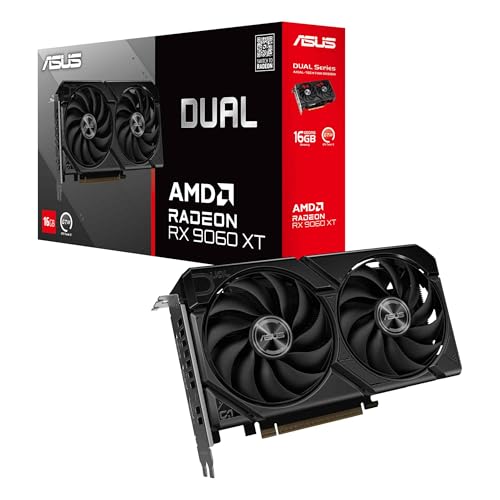
ASUS Dual RX 9060 XT 16GB — Best ASUS Radeon option
ASUS builds for both GPU ecosystems, and this card is the proof inside the current range: a Dual-line Radeon RX 9060 XT with 16GB of GDDR6 on AMD’s RDNA 4 architecture, in a 2.5-slot design with Axial-tech fans and 0dB technology, per its listing. It belongs in an ASUS guide without apology, because a meaningful number of buyers are loyal to the brand’s coolers, software and support rather than to a GPU maker — and for them, this is the current-generation ASUS card at the mainstream tier.
There is a strategic fact about ASUS visible in this card that deserves stating: the company is one of the few partners whose range genuinely spans both GPU makers at every tier, which gives its line a continuity the single-ecosystem partners cannot offer. A household or studio standardised on ASUS — its motherboards, its software, its support channels — can follow its GPU preference in either direction without re-platforming everything else. This Dual Radeon is where that strategy becomes a purchasable object, and its presence in the range is a reason some buyers choose ASUS in the first place, renewed every generation.
The GPU itself is the same mainstream RDNA 4 silicon this site recommends in its AMD guide, in the same correct memory configuration: 16GB, the figure that separates a comfortable 1440p card from a constrained one. ASUS’s contribution is the execution — the Dual cooler design language, the fan-stop behaviour at light loads, and integration with the ASUS software ecosystem the owner of an ASUS motherboard already knows. A buyer cross-shopping this against the XFX and Gigabyte versions in the aftermarket guide is making a pure partner decision, and ASUS’s case rests on exactly those ownership details.
Why choose the Radeon inside an ASUS shortlist that leans NVIDIA? Because the mainstream tier is where the two ecosystems compete most honestly on value, and because a buyer whose monitor, budget or preference points to RDNA 4 should not have to leave a trusted brand to follow it. The Dual RX 9060 XT keeps the ASUS ownership experience — the design, the features, the support path — and changes only the silicon’s allegiance. For brand loyalists, that is not a footnote in the range; it is the range working as intended.
- GPU: AMD Radeon RX 9060 XT, RDNA 4
- Memory: 16GB GDDR6
- Design: 2.5-slot, Axial-tech fans
- Features: 0dB technology
- Outputs: HDMI 2.1b, DisplayPort 2.1a, PCIe 5.0
- Line: Dual
Strengths
- 16GB RDNA 4 mainstream card in ASUS execution
- Fan-stop silence at desktop loads
- Keeps ASUS owners inside one ecosystem
Trade-offs
- Different driver and feature ecosystem from the NVIDIA picks
- Mainstream tier — not a 5070 rival
- DisplayPort version differs slightly from the NVIDIA siblings’ listings
Best for: ASUS loyalists whose GPU preference runs to AMD’s current mainstream.
Not suited for: Buyers committed to NVIDIA’s feature set at this tier.
How Do You Choose Between the Three RTX 5070 Versions?
Strip the shared silicon away and the decision becomes refreshingly concrete. Ask first about the case: if it is small-form-factor, the Dual and the SFF-Ready Prime are the candidates and the TUF’s 3.125 slots remove it from the conversation. Ask second about the horizon: a card kept for two generations of games justifies the TUF’s construction premium in a way a card replaced at the next launch does not. Ask third about temperament: the Prime’s coherence with a designed build, the Dual’s straightforward fit-and-value, the TUF’s armour. There is no wrong answer among the three, only answers matched or mismatched to a build’s actual character.
Price behaviour inside the trio follows a pattern worth knowing before the shopping starts. The Dual typically anchors the tier’s ASUS pricing, the Prime sits close beside it with its premium carried in design rather than hardware theatre, and the TUF commands the clear step up for its construction. Sales cycles move all three, occasionally compressing the gaps to the point where the TUF becomes the obvious buy or stretching them until the Dual is unanswerable. The rational shopper decides the family by the build’s character first, then lets the week’s pricing confirm or — when a gap collapses — pleasantly override the choice.
What should not decide it is a frame-rate chart. Factory overclocks differ modestly between partner cards, and the lived differences — noise under load, heat in the case, the feel of the card in the hand during installation — are the ones that persist for years. Buyers who have handled ASUS cards before will also know their own history with the brand’s support and software, which is a legitimate input no benchmark captures. The tier decision was the performance decision; this one is an ownership decision, and it should be made like one.
What Should You Check Before Installing an ASUS Card?
The universal checks apply — power supply wattage and connectors from the listing, case clearance in length and slots, airflow — and this guide’s AMD sibling covers them in depth. ASUS-specific preparation adds three small items. First, register the card and note the warranty terms in your region while the box is still on the desk; the durability lines in particular are bought on long horizons, and the paperwork should be as durable as the card. Second, install ASUS’s current driver and utility stack from official sources, and decide the Dual BIOS switch position — where fitted — before the side panel goes on, since the switch lives on the card.
Between ordering and installing sits one more ASUS-flavoured task: plan the cable run. The current cards draw power through connectors whose position varies by family — top or end depending on the design — and in compact cases the difference between a graceful bend and a side panel pressing on a power lead is the difference between a build that closes and a build that argues. Check the listing photographs for the connector’s location while the card is in transit, and route accordingly; it is a two-minute act of foresight that small-form-factor builders learn once and never skip again.
Third, verify the purchase itself once more on arrival: the model on the box against the listing, the memory figure in the title against the card’s own label, and the condition — new, as this guide’s 5070 Dual pick specifies — against what was ordered. High-demand cards attract listing confusion in every marketplace, and the two minutes spent checking a delivered card are the cheapest quality control in the entire build. A card that passes those checks, installed in a case that fits it and fed by a supply that suits it, will repay the diligence by disappearing into years of unremarkable service.
What Do Axial-tech Fans, 0dB and Dual BIOS Mean in Daily Life?
ASUS’s recurring feature names deserve one plain-language pass, because they appear across these listings and decide real ownership qualities. Axial-tech is ASUS’s fan design programme: blades shaped to move air efficiently through a barrier ring, on a smaller hub that permits longer blades, with the practical result that a given cooler moves more air at a given noise level than a conventional fan of the same size. It is incremental engineering rather than magic, but cooling is a game of increments, and the design’s presence across Dual, Prime and TUF alike means the compact cards share the flagship’s fan technology even where they cannot share its mass.
Support and software form the third leg of the ownership layer. ASUS’s utility ecosystem — its GPU tuning and monitoring application, its driver delivery, its registration and warranty channels — is the interface through which the card is actually managed across its life, and a buyer already inside that ecosystem on the motherboard side gains a real, if modest, consolidation from staying with the brand’s cards. This guide weights that consolidation lightly, below fit and construction, but not at zero: the tenth time an owner opens one familiar application instead of two, the brand premium has quietly repaid a little more of itself.
The 0dB technology is simpler and, hour for hour, more noticeable: below a temperature threshold — the light loads of desktop work — the fans stop entirely, and the card is silent. Most of a PC’s powered hours are those hours. Dual BIOS, fitted to several cards here, stores two operating profiles and lets the owner switch between a performance tuning and a quieter one; it converts an acoustic preference from a software project into a physical choice made once. None of these features appears in a frame-rate chart, and together they describe most of what distinguishes living with an ASUS card from living with a generic execution of the same GPU.
Which ASUS Tier Suits Which Monitor?
The monitor discipline from this site’s other graphics guides applies unchanged inside the brand. The 5060 Ti 16GB cards are the 1080p high-refresh and 1440p answers, with the memory to keep texture settings honest at the higher resolution. The 5070 trio steps the ambition up: strong 1440p with headroom, and 4K play that leans on the generation’s DLSS upscaling to hold its frame rates — the intended way to use a card of this tier at that resolution. The Dual RX 9060 XT sits with the 5060 Ti cards in role, its 16GB serving the same resolutions from the AMD side.
One more pairing consideration is generational features at 4K. The 5070’s route to comfortable 4K runs through its DLSS generation, including the frame-generation capabilities of the Blackwell line, which reward the player whose games support them and whose tolerance for constructed frames is settled. Buyers should sample that experience — a friend’s machine, a store display, a borrowed evening — before building a 4K plan around it, because it is the one aspect of the tier that divides players by taste rather than by measurement. The 1440p path asks for no such judgement, which is part of why this guide keeps calling it the tier’s home ground.
The error to avoid is symmetrical and common: a 5070 bought for a modest 1080p screen spends its life underemployed, while a mainstream card bought for a large 4K display spends its life apologising. ASUS’s range covers both mistakes’ corrections internally — the brand will happily sell you either tier — which is why the honest guide spends its words on the pairing rather than on pushing every reader toward the flagship. Buy the tier your monitor can display, in the family your case and temperament prefer.
How Do the Six ASUS Cards Compare at a Glance?
| Pick | GPU | Memory | ASUS line | Choose it when |
|---|---|---|---|---|
| TUF Gaming RTX 5070 OC | RTX 5070 | 12GB GDDR7 | TUF Gaming | Durability and cooling headroom lead |
| Dual RTX 5070 OC | RTX 5070 | 12GB GDDR7 | Dual | The case is compact and the card must be new |
| Prime RTX 5070 OC | RTX 5070 | 12GB GDDR7 | Prime | The build is designed and SFF-Ready matters |
| Dual RTX 5060 Ti 16GB | RTX 5060 Ti | 16GB GDDR7 | Dual | Mainstream value with the right memory |
| Prime RTX 5060 Ti 16GB | RTX 5060 Ti | 16GB GDDR7 | Prime | Understated design, same 16GB sense |
| Dual RX 9060 XT 16GB | RX 9060 XT | 16GB GDDR6 | Dual | Your GPU preference is AMD, your brand is ASUS |
Notice what the memory column quietly demonstrates across the brand’s range: ASUS’s current catalogue has standardised on the generous configuration at every tier this guide covers — 16GB at the mainstream in both ecosystems, and the 5070 tier’s 12GB of the faster GDDR7 standard. A buyer comparing this table against rival brands’ will find the industry’s memory argument playing out line by line, and the ASUS rows here land consistently on the side this site’s graphics guides keep recommending, which is part of why the range was easy to recommend as a set.
The table’s structure is the guide’s argument: read down the GPU column for tier, across the line column for character. Three identical GPUs in the first rows prove that at the top of the ASUS range you are buying an execution; two identical GPUs in the next rows prove the same at the mainstream; and the final row proves the brand spans both silicon ecosystems for buyers who want it to.
What Mistakes Do ASUS Card Buyers Keep Making?
Before the mistakes, the meta-lesson of this guide deserves one line: with a brand whose range is this structured, the buyer’s job is mostly taxonomic. Identify the tier, identify the family, verify the fine print, and the purchase has effectively been made well; nearly every ASUS buying regret on record is a failure of one of those three identifications rather than a failure of a card.
The first is condition confusion: ordering a popular model — the Dual RTX 5070 above all — from a listing whose fine print describes renewed stock when a new card was intended. The remedy is the habit this guide models: read the condition in the listing title and description, and buy the verified new listing when new is what you mean. The second mistake is assuming the family badge changes the tier; a TUF 5060 Ti would still be a 5060 Ti, and a Dual 5070 is still a 5070, and buyers who internalise “tier first, family second” stop paying premiums for the wrong variable.
A sixth mistake is subtler and specific to a brand with this many lines: buying the same GPU twice in different families while chasing a review, without noticing. It happens when a buyer reads a glowing assessment of “the ASUS 5070,” orders the first ASUS 5070 listing they find, and receives a different family from the one reviewed — different cooler, different size, different acoustic character. The silicon will not betray them, but the ownership experience they researched is not the one in the box. The defence is the guide’s refrain in miniature: the family name is part of the product’s name, and a listing that omits it has not finished identifying the card.
The third is the 8GB trap in the 5060 Ti’s wider market: the GPU name spans two memory configurations, and only the 16GB cards appear here for the longevity reasons this site repeats across its graphics guides. The fourth is slot-count optimism — falling for the TUF’s construction story in a case that cannot swallow 3.125 slots. And the fifth is leaving the Dual BIOS switch, where fitted, in whatever position it shipped in, then judging the card’s noise character by an accident of packaging rather than by the choice the feature exists to offer.
Final Recommendation
If the guide’s judgements must compress to a single line: the 5060 Ti 16GB cards are the range’s value, the 5070 cards are its ambition, and the family badge is how you decide what kind of owner you intend to be.
Within ASUS, buy the tier first and the family second. At the 5070 tier, the TUF Gaming is the fullest ASUS expression and the pick for long-horizon builds; the Dual is the compact, new-retail route into the same silicon; the Prime is the designed build’s version, with SFF-Ready dimensions as its signature. At the mainstream tier, the two 16GB 5060 Ti cards — Dual for straightforward value, Prime for restraint — are the range’s best-judged purchases, and the Dual RX 9060 XT 16GB completes the catalogue for the ASUS loyalist whose silicon preference is AMD’s.
One closing observation about brand guides generally, offered because this is one: a brand earns a dedicated guide when its internal differences are large enough to deserve one, and ASUS passes that test more clearly than most. The six cards above include three executions of a single GPU that a thoughtful buyer could defend choosing in three different builds — which means the brand decision, properly made, is a real decision with real consequences for noise, fit and longevity, not a sticker applied after the fact. Treat it with that seriousness and the premium the badge carries becomes legible as payment for choices, rather than for a logo.
Whichever badge you choose, hold the line on the two disciplines this guide has repeated: verify the memory figure and the condition in the listing before money moves. An ASUS card bought with its tier, its family and its fine print all read clearly is a card whose ownership will feel as considered as its construction — and that, in the end, is what the brand’s premium has always claimed to buy.
Frequently Asked Questions
What is the difference between ASUS Dual, Prime and TUF cards?
Dual is the compact, value-led line with dual-fan 2.5-slot designs. Prime is the clean, design-led line, currently emphasising SFF-Ready dimensions. TUF Gaming is the durability line, with military-grade components, protective coatings and larger coolers. A shorthand that serves most buyers: Dual answers “will it fit and work well,” Prime answers “will it fit and look composed,” and TUF answers “will it still be working, cool and quiet, in six years.” Cards in different lines may share the same GPU entirely — the family decides construction and character, not tier.
Is the RTX 5070 Dual in this guide a new or renewed card?
New. The pick links the verified retail listing for the new card. This distinction is not pedantry: a renewed card’s warranty, accessories and history differ from a new one’s, and at this tier the price gap between the two conditions is exactly the gap that tempts a hurried buyer into comparing listings that are not selling the same thing. Renewed examples of this model circulate under similar listings, so check the condition wording on any listing you buy from — the distinction matters for warranty and for what arrives in the box.
Why do both 5060 Ti picks have 16GB?
Because the 5060 Ti name covers 8GB and 16GB configurations, and the 16GB is the one that ages well at 1440p and high texture settings. The two versions are otherwise the same product wearing one name, which is why the memory figure has become the single most important line in any 5060 Ti listing — and why a price that looks anomalous for a “5060 Ti” usually resolves itself the moment the memory figure is found. This guide lists only the 16GB ASUS versions, and recommends verifying the memory figure in any listing’s title before purchase.
Does ASUS make AMD cards as well as NVIDIA cards?
Yes. The Dual RX 9060 XT 16GB in this guide is an ASUS-built card on AMD’s RDNA 4 architecture, with ASUS’s cooler design, Axial-tech fans and 0dB technology. The practical consequence for a household standardised on ASUS is that a change of GPU allegiance — for a new monitor’s sync technology, a pricing shift, or a game’s optimisation — does not require abandoning the brand’s support, software and design language along with the silicon. Brand loyalty and GPU preference are separate decisions, and ASUS serves both.
What does Dual BIOS do?
It provides two switchable operating modes on the card, typically a performance mode and a quiet mode with a gentler fan curve. Owners tend to underestimate it until they have lived with both positions: the performance mode for the summer gaming season, the quiet mode for the working year, is a rhythm many Dual and Prime owners settle into, and it costs nothing beyond remembering the switch exists. Owners choose the character they prefer; the switch is on the card itself, so set it during installation rather than after the case is closed.
Will the TUF RTX 5070 fit my case?
Only if the case accepts a 3.125-slot card of its length — check the listing’s dimensions against your case’s GPU clearance and slot spacing. Remember that a card of this thickness also covers the slot beneath it on the motherboard, which matters in builds carrying a capture card, a sound card or a second expansion device; plan the slot map before the TUF’s cooler makes the decision for you. Compact and small-form-factor cases should look to the Dual or Prime 5070 instead, which were designed at 2.5 slots for exactly that constraint.
Related Guides
The ASUS range sits inside two wider conversations on this site: Best Affordable Gaming PC Cases for the enclosure decisions these cards impose, and Best 2 TB SSDs: NVMe Flagships, Honest Value Picks and the SATA Drive That Still Matters for the storage tier of the same build. If the machine is a full refresh rather than a graphics upgrade, see also Best 2.5 SSDs: Six SATA Drives to Wake Up an Old Laptop or Desktop.


