What's inside
- Key Takeaways
- Quick Picks
- How These Picks Were Chosen
- Why Thirteen Inches Became the Default Laptop Size
- Displays in This Class: What the Panels Tell You
- Keyboards, Trackpads and the Daily Feel of Each Machine
- Battery Behaviour Without the Marketing Numbers
- Comparison Table
- MacBook Air M5 or MacBook Neo: Which Apple Laptop Is Which?
- Intel, Snapdragon or Apple Silicon: Does the Chip Family Matter?
- What Separates a Flagship From a Mainstream 13-Inch Laptop?
- Refurbished and Renewed Flagships: A Word of Method
- How Much Memory and Storage Does a 13-Inch Laptop Need?
- Ports and the Dongle Question
- Who Should Buy Which Pick: Four Reader Profiles
- The Zenbook-Shaped Gap in This Round
- Common Mistakes
- Buying Timing and Configuration Traps
- The Second-Monitor Question
- Final Recommendation
- Longevity: Buying a 13-Inch Laptop for the Next Five Years
- Setup Priorities for a New 13-Inch Laptop
- Environmental and Practical Ownership Notes
- FAQ
- Thirteen Inches for Creative Work: An Honest Boundary
- Security and Privacy Features Worth Noticing
- A Short Word on Weight Differences
- What Owners Usually Report After a Year
- One More Distinction: This Class Versus the Gaming Thirteens
- Related Guides
As an Amazon Associate I earn from qualifying purchases. This post may contain affiliate links at no extra cost to you.
gizmoverdict.com is reader-supported. When you buy through links on our site, we may earn an affiliate commission.
Where to buy: Use the links below to reach each laptop’s current Amazon listing. Thirteen-inch models are sold in many configurations under a single name, so confirm the processor, memory and storage of the exact listing before ordering.
The best 13 inch laptops are the machines most people should actually buy, and this guide treats them with the seriousness that status deserves. Thirteen inches is where a laptop stops being a compromise: the screen is large enough for real work, the keyboard is full width, the battery can last a working day, and the whole machine still disappears into a commuter bag or a carry-on. The five linked picks below span the class’s genuine range — Apple’s two distinct answers at two different levels, Dell’s Intel flagship, Microsoft’s Snapdragon machine, and an older HP design that survives as a value reference — plus one current model discussed without a link because its present listings do not meet our standard. This is a mainstream and creator cast, deliberately different from the gaming-focused thirteen-inch coverage elsewhere on this site.
Two distinctions organize everything that follows. The first is Apple’s: the MacBook Air with the M5 chip and the MacBook Neo with the A18 Pro chip are not the same product at different discounts. The Neo uses a processor from Apple’s A-series line — the family that powers iPhones — tuned into a lower-cost laptop, while the Air carries the M-series silicon designed for computers from the start. They serve different budgets and different workloads, and the reviews below keep them separate rather than blurring the Neo into a vague cheaper Air. The second distinction is Dell’s: the XPS 13 linked here is the 9350 with an Intel Core Ultra 7, a specific configuration that should not be confused with the other XPS 13 variants sold under the same name, including the touch and 3K versions that appear in other guides in this batch with different processors.
Expect to choose, in the end, between ecosystems as much as between specifications. macOS, Windows on Intel, and Windows on Snapdragon each carry real consequences for software compatibility, peripheral support and longevity, and the analysis sections after the reviews walk through those consequences in plain terms. What no pick here asks of you is compromise on the fundamentals: every linked machine has at least 8GB of memory and a solid-state drive, a display suited to all-day reading, and a keyboard you can write a novel on — because at thirteen inches, those things are the entry ticket, not the upgrade.
Key Takeaways
- Thirteen inches is the balanced class: full keyboards, all-day batteries and genuine portability in one machine.
- MacBook Air M5 and MacBook Neo A18 Pro are different products, not trim levels; the Neo’s A-series chip defines its lower tier.
- The linked XPS 13 is the Intel Core Ultra 7 9350 configuration — check the exact variant, because the XPS name covers several machines.
- The Surface Laptop’s Snapdragon X Elite brings efficiency and a touchscreen, with an app-compatibility check advised for specialist Windows software.
- The HP OmniBook 7 Aero 13 is discussed without a link because its current listings are renewed; the older Pavilion 13 is the linked value reference.
Quick Picks
- Best overall: Apple MacBook Air 13 with M5 — 16GB of unified memory, 512GB of storage and the class’s most complete all-round package.
- Best Windows flagship: Dell XPS 13 9350 — Intel Core Ultra 7, 16GB of DDR5 and a 1TB SSD in a 13.4-inch FHD+ design with Wi-Fi 7.
- Best value reference: HP Pavilion 13 — an older Core i5 design with 8GB and a 256GB SSD for buyers prioritizing the Windows basics.
- Best Apple value: Apple MacBook Neo 13 — the A18 Pro laptop that brings the Mac experience to a lower rung, with 8GB and 256GB.
- Best touchscreen Windows pick: Microsoft Surface Laptop 2024 — Snapdragon X Elite, 16GB, a 13.8-inch touchscreen and Copilot+ features.
- Best lightweight alternative: HP OmniBook 7 Aero 13 — an appealing ultralight discussed honestly without a link this round.
How These Picks Were Chosen
Linked picks had to be current, clean listings verified through the site’s product data, with titles that describe the configuration accurately. That filter shaped this guide in two visible ways. It kept the cast mainstream — productivity, study and creative work — rather than repeating the gaming-oriented thirteen-inch machines covered in an earlier batch. And it pushed the HP OmniBook 7 Aero 13 into prose-only status: the model is current and attractive, but both of its present listings are renewed, and our rule is that a renewed purchase must never arrive disguised as a standard link. The ASUS Zenbook S 13 receives the same honest treatment in the framing sections, because no clean listing for it was available in this round.
Within the linked five, we weighted the things thirteen-inch buyers actually live with: memory headroom for years of browser growth, storage sized to a real photo and document library, display quality for long reading sessions, keyboard and trackpad feel, and the maturity of each platform. Processor badges matter less than the balance around them, which is why an older Core i5 machine can still earn a place here as a value reference while far more powerful gaming laptops are absent by design.
Why Thirteen Inches Became the Default Laptop Size
The size won because it is the smallest canvas that does not force daily compromises. A 13-inch class display holds a document and a reference side by side at readable sizes, splits the difference between tablet portability and desktop presence, and pairs with a keyboard deck wide enough for full-size keys with proper spacing. Manufacturers know this, so their best engineering concentrates here: the thinnest chassis, the newest processors and the longest battery claims all debut at thirteen inches before they spread to other sizes. For the buyer, that concentration means the fiercest competition and the most mature designs in the industry, which is why this guide can be demanding — the class has earned demanding treatment.
It is also the size where travelling and working stop being different activities. The same machine that runs a presentation in a meeting room runs a film on a train table and a spreadsheet on a kitchen counter, without the owner owning three devices or accepting a phone’s limits. If you are buying one laptop to be your only computer, this is the class to start from, and the picks below are ordered by how completely they fulfil that only-computer brief.

Apple 2026 MacBook Air 13 with M5 — Best Overall
Badge: Best overall
The Apple 2026 MacBook Air 13-inch Laptop with M5 chip leads this guide because it is the most complete answer to the only-computer brief. The configuration linked here pairs the M5 with 16GB of unified memory and a 512GB SSD — the specification level we consider the genuine starting point for a machine expected to serve for years — behind a 13.6-inch Liquid Retina Display, with a 12MP Center Stage camera for calls. Apple’s M-series silicon has set the efficiency standard in this class for several generations, and the Air’s fanless design means the machine is silent in libraries, meetings and bedrooms while still handling photo work, heavy browsing and light video editing without drama.
The honest limitations are the platform’s familiar ones. Memory and storage are fixed at purchase, so the configuration you choose is the configuration you keep; that is precisely why we link the 16GB and 512GB version rather than a leaner one. Ports are minimal, and Windows-only software is not an option. Within the Mac ecosystem, though, nothing else in this guide matches the Air’s combination of screen quality, battery behaviour, build and resale longevity, and buyers who live in Apple’s world should start here and justify moving away rather than the reverse.
Strengths
- M5 performance with silent, fanless operation.
- 16GB of unified memory and 512GB of storage as linked.
- Excellent Liquid Retina display and 12MP Center Stage camera.
Trade-offs
- Memory and storage cannot be upgraded after purchase.
- Minimal port selection means adapters for older peripherals.
- macOS only; Windows-only software is excluded.
Spec box: Display 13.6-inch Liquid Retina · Processor Apple M5 · Memory 16GB unified · Storage 512GB SSD · Camera 12MP Center Stage · Operating system macOS.
Best for: Anyone in Apple’s ecosystem wanting one laptop for everything. Not suited for: Windows-only software users or upgrade tinkerers.

Dell XPS 13 9350 — Best Windows Flagship
Badge: Best Windows flagship
The Dell XPS 13 9350 13.4-inch FHD+ Laptop is the Windows flagship of this guide, and its configuration is generously specified: an Intel Core Ultra 7-256V processor, 16GB of DDR5 RAM, a 1TB NVMe SSD, Intel Arc Graphics, Wi-Fi 7 and Bluetooth, with Thunderbolt connectivity and a webcam in a chassis that has defined the premium Windows ultraportable for years. The 1TB drive deserves emphasis — it is double the storage of most rivals here, and for photographers, students accumulating years of coursework, or anyone whose cloud subscription is lapsing, that space is a daily quality-of-life feature rather than a specification-sheet trophy.
Be precise about which XPS 13 you are buying, because Dell sells several under this name. This linked machine is the Intel Ultra 7 9350 with an FHD+ panel. Other guides in this batch discuss a touch 3K XPS 13 built around a different processor, and Snapdragon variants exist as well; they are different computers with different strengths. The Ultra 7 version here is the choice for buyers who want maximum Windows compatibility — every Windows application, driver and peripheral simply works on Intel — wrapped in the XPS line’s premium build.
Strengths
- Intel Core Ultra 7 with full Windows software compatibility.
- 1TB SSD, double the storage of most picks here.
- Wi-Fi 7 and Thunderbolt in a premium compact chassis.
Trade-offs
- FHD+ panel rather than the higher-resolution XPS options.
- Several XPS 13 variants exist; verify the exact configuration.
- Premium positioning within the Windows class.
Spec box: Display 13.4-inch FHD+ · Processor Intel Core Ultra 7-256V · Memory 16GB DDR5 · Storage 1TB NVMe SSD · Graphics Intel Arc · Connectivity Wi-Fi 7, Bluetooth, Thunderbolt.
Best for: Windows users wanting a flagship with generous storage. Not suited for: Buyers who specifically want a high-resolution or touch XPS panel.
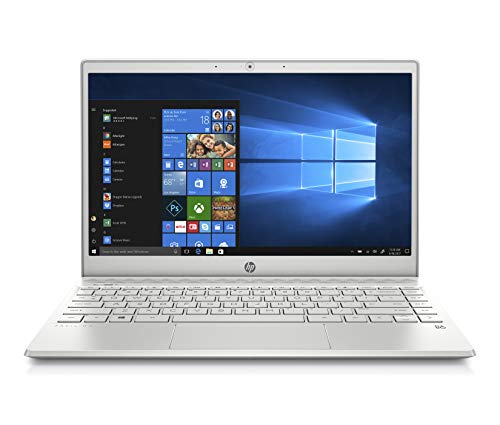
HP Pavilion 13 — Best Value Reference
Badge: Best value reference
The HP Pavilion 13-inch Light and Thin Laptop is the elder statesman of this guide: an Intel Core i5-8265U processor, 8GB of SDRAM memory and a 256GB solid-state drive in a slim 13-inch chassis, originally sold with Windows 10 in the 13-an0010nr Mineral configuration. Its role here is deliberate and honestly labelled. Not every buyer needs a current flagship; a student or home user whose work is browsing, documents, email and streaming is served by this specification today much as they were when the design was new, and the Pavilion represents that value tier with a brand-name machine rather than an unknown badge.
The caveats are equally deliberate. An older processor generation means less headroom for the years ahead, 8GB is the floor rather than a comfort margin, and buyers should confirm the operating system situation on the exact listing, since a design of this vintage predates Windows 11’s arrival. Treat the Pavilion as the sensible floor of the class — the machine that proves how much laptop the basics require — and step up to the XPS or Surface if your workload or your time horizon is more ambitious.
Strengths
- Proven slim design from HP’s mainstream Pavilion line.
- 8GB of memory and a 256GB SSD cover the everyday basics.
- A value reference for buyers who do not need flagship power.
Trade-offs
- Older Core i5 generation with limited future headroom.
- Confirm the operating system version on the exact listing.
- Specification is a floor, not a margin, for heavy multitasking.
Spec box: Display 13-inch class · Processor Intel Core i5-8265U · Memory 8GB SDRAM · Storage 256GB SSD · Configuration 13-an0010nr Mineral.
Best for: Budget-conscious buyers covering everyday computing basics. Not suited for: Anyone expecting many years of growing headroom.

Apple 2026 MacBook Neo 13 — Best Apple Value
Badge: Best Apple value
The Apple 2026 MacBook Neo 13-inch Laptop with A18 Pro chip is the most interesting product decision in this guide, and it must be understood on its own terms. The Neo is not a MacBook Air with pieces removed; it is a laptop built around Apple’s A18 Pro, a chip from the A-series family developed for iPhones, adapted here to bring the Mac experience — the same macOS, the same Liquid Retina Display language, the same Apple Intelligence features named in its title — to a lower rung of the ladder. The linked configuration carries 8GB of unified memory and a 256GB SSD, specifications that define its tier as clearly as the chip does.
For the right buyer, that tier is genuinely sufficient: students and home users whose computing is browsing, writing, media and light photo work will find the Neo responsive and familiar, and its efficiency heritage from phone silicon suits all-day untethered use. For heavier multitasking, large creative projects or a long service horizon, the Air’s M-series chip and doubled memory and storage are worth the step up, and we would rather a buyer understand that boundary clearly than discover it in a year. The Neo is Apple’s answer to the Chromebook-adjacent question of how inexpensive a real Mac can be; judged as that answer, it is a compelling one.
Strengths
- A genuine Mac with macOS at a lower rung than the Air.
- A18 Pro efficiency suited to all-day portable use.
- Liquid Retina Display and Apple Intelligence features.
Trade-offs
- 8GB of memory and 256GB of storage define a lighter tier.
- A-series chip is not M-series performance for heavy work.
- Fixed configuration, like every current Apple laptop.
Spec box: Display 13-inch Liquid Retina · Processor Apple A18 Pro · Memory 8GB unified · Storage 256GB SSD · Operating system macOS.
Best for: Students and home users wanting a real Mac for everyday work. Not suited for: Heavy multitaskers or creative professionals.

Microsoft Surface Laptop 2024 — Best Touchscreen Windows Pick
Badge: Best touchscreen Windows pick
The Microsoft Surface Laptop (2024) represents the other Windows path: a Windows 11 Copilot+ PC built on the Snapdragon X Elite, a 12-core ARM processor, with 16GB of RAM and a 256GB SSD behind a 13.8-inch touchscreen display, in the Sapphire finish among its colours. Microsoft’s own hardware shows the Snapdragon platform at its most polished — the machine is built around efficiency and responsiveness, wakes instantly, and its touchscreen is a native part of the experience rather than an afterthought, which matters for readers who annotate, sketch or simply navigate by touch.
The platform check we advise is compatibility. Windows on Snapdragon runs the mainstream application catalogue well, and emulation covers much of the rest, but specialist software — older peripherals with custom drivers, niche professional tools, some games — can still trip on ARM. A buyer whose workflow depends on a specific unusual program should verify that program’s Snapdragon status before choosing this machine over the Intel XPS. For everyone else, the Surface Laptop is the most forward-looking Windows pick in this guide, and its 16GB of memory gives it proper headroom.
Strengths
- Snapdragon X Elite efficiency with 16GB of memory.
- 13.8-inch touchscreen as a native part of the design.
- Copilot+ PC features on Microsoft’s own hardware.
Trade-offs
- Verify specialist software and drivers for ARM compatibility.
- 256GB of storage is modest beside the XPS’s 1TB.
- Touch adds cost that pure typists may not use.
Spec box: Display 13.8-inch touchscreen · Processor Snapdragon X Elite, 12 core · Memory 16GB · Storage 256GB SSD · Operating system Windows 11, Copilot+ PC.
Best for: Windows users wanting touch and modern efficiency. Not suited for: Dependence on unverified specialist x86 software or drivers.
HP OmniBook 7 Aero 13 — Best Lightweight Alternative
Badge: Best lightweight alternative
The HP OmniBook 7 Aero 13 earns a full discussion and no purchase link, and the contrast between those two facts is the point of our sourcing rules. As a product, an ultralight 13-inch machine from HP’s current OmniBook line is exactly what many travellers in this class are hunting for, and if a clean listing appears in a future round it will compete for a linked place on merit. In this round, however, both of its current Amazon listings are renewed units, and routing a reader into a renewed purchase through a standard recommendation link would break the trust this guide is built on.
Readers who seek the Aero out independently should apply the discipline taught across this batch: read the condition line, weigh the seller’s warranty against a manufacturer’s, and price the machine as the used equipment it is. The same note applies to the ASUS Zenbook S 13, another genuinely appealing ultralight that lacks a clean listing in this round and therefore appears here as context rather than as a pick. Absence from our linked list is a statement about listings, not about the quality of the underlying machines.
Strengths
- Ultralight design aimed squarely at frequent travellers.
- Current OmniBook line with modern positioning.
- A natural rival to the flagships when sold as new.
Trade-offs
- Current listings are renewed; buy only knowingly.
- Warranty is seller-backed rather than manufacturer-standard.
- No verified clean link available in this round.
Spec box: Class 13-inch ultralight · Line HP OmniBook 7 Aero · Status discussed without a link; see listing for exact configuration and condition.
Best for: Travellers willing to shop the renewed channel carefully. Not suited for: Anyone wanting a standard new-machine purchase today.
Displays in This Class: What the Panels Tell You
Thirteen-inch displays have quietly become excellent, and the differences among these picks are about character rather than quality floor. Apple’s Liquid Retina panels in both the Air and the Neo prioritize colour accuracy and brightness consistency, which is why creative workers gravitate to them for photo judgement on the move. The XPS 13’s FHD+ panel trades raw resolution for battery kindness and perfectly sharp text at this size; at 13.4 inches, FHD+ density is high enough that individual pixels disappear at working distance, and the higher-resolution XPS variants elsewhere in this batch serve buyers who specifically want more. The Surface Laptop’s touchscreen adds a layer of interaction the others lack — scrolling documents by hand, annotating PDFs, signing forms — and for some professions that single feature outweighs every specification difference in this guide.
What none of these panels is designed for is competitive gaming or HDR film mastering, and readers with those ambitions should look at the gaming and creator classes rather than asking a mainstream ultraportable to be something else. For the work these machines actually do — text, browsing, calls, photos, presentations — every linked display here is genuinely good, and the choice among them is about touch, ecosystem and taste rather than a hierarchy of adequacy.
Keyboards, Trackpads and the Daily Feel of Each Machine
Specifications cannot capture the thing owners notice most after a month: how the machine feels to write on. Apple’s current keyboards are shallow but precise, and its trackpads remain the reference for size and gesture response. Dell’s XPS line takes a minimalist deck approach that some writers love for its clean expanse and others find sparse; if you type for a living, it is the one design here worth testing in person where possible. Microsoft’s Surface Laptop keeps a conventional, well-judged keyboard and a large trackpad that suits the touchscreen beside it — many owners alternate between the two without thinking. HP’s Pavilion keyboard is unremarkable in the best sense: familiar layout, no learning curve, the baseline against which the premium decks charge extra for refinement rather than function.
Webcams follow a similar pattern. The Air’s 12MP Center Stage camera, which keeps you framed as you move, is the strongest call experience in this guide and a real consideration for remote workers. The others provide competent cameras for meetings. In an era when a laptop’s camera is its owner’s professional face, that difference is worth more than its specification line suggests.
Battery Behaviour Without the Marketing Numbers
We deliberately avoid quoting laboratory battery figures, because they are measured under conditions no worker reproduces. The useful truth is structural: the ARM-based machines here — both Apples and the Surface — are built around efficiency-first silicon and generally deliver the longest untethered days, while the Intel XPS trades a little of that endurance for universal compatibility and still comfortably covers a working day of mixed use. The older Pavilion’s smaller platform and older design make it the most charger-aware pick of the five. Your own mileage will be set by brightness, video calls and background applications more than by which of these machines you choose, so buy battery by platform character rather than by a number printed in an advertisement.
Comparison Table
| Model | Display | Processor | Memory | Storage | System |
|---|---|---|---|---|---|
| MacBook Air 13 M5 | 13.6″ Liquid Retina | Apple M5 | 16GB | 512GB SSD | macOS |
| Dell XPS 13 9350 | 13.4″ FHD+ | Core Ultra 7-256V | 16GB DDR5 | 1TB NVMe SSD | Windows 11 |
| HP Pavilion 13 | 13″ class | Core i5-8265U | 8GB | 256GB SSD | Windows |
| MacBook Neo 13 | 13″ Liquid Retina | Apple A18 Pro | 8GB | 256GB SSD | macOS |
| Surface Laptop 2024 | 13.8″ touch | Snapdragon X Elite | 16GB | 256GB SSD | Windows 11 |
| HP OmniBook 7 Aero 13 | 13″ ultralight | See listing | See listing | See listing | Windows |
MacBook Air M5 or MacBook Neo: Which Apple Laptop Is Which?
This is the comparison readers most need and marketing least clarifies, so here it is plainly. The Air is Apple’s mainstream laptop line, powered by M-series chips designed for computers, and the linked configuration’s 16GB of memory and 512GB of storage make it a multi-year, do-everything machine. The Neo is a newer, lower rung powered by an A-series chip designed originally for phones, with half the memory and storage in its linked configuration. Both run the same macOS and share Apple’s design language, which is why they blur in shoppers’ minds. Choose the Neo for everyday computing at a gentler rung; choose the Air for headroom, longevity and heavier work. Neither choice is a mistake when made with that distinction in view, and either choice can disappoint when made without it.
Intel, Snapdragon or Apple Silicon: Does the Chip Family Matter?
Yes, in three practical ways. Compatibility is the first: Intel Windows runs everything Windows has ever run; Snapdragon Windows runs the modern mainstream and emulates much of the rest, with specialist drivers the remaining risk; Apple silicon runs macOS software only. Efficiency is the second: the ARM-based designs — Apple silicon and Snapdragon — generally deliver their performance with less heat and longer untethered life than comparable Intel machines, which is why the fanless Air exists. Longevity is the third: all three platforms are current and supported, but the safest long-horizon bet is the platform your essential software treats as its home. Decide your software list first and the chip question usually answers itself.
What Separates a Flagship From a Mainstream 13-Inch Laptop?
Stand the XPS or the Air beside the Pavilion and the price gap demands an explanation beyond processor speed. Part of it is materials and tolerances: flagship chassis are machined and finished to standards that survive years of bags and desks without flex or creak. Part is the display pipeline — brighter panels, wider colour, better calibration. Part is the invisible engineering: cooling that stays quiet under load, speakers that fill a room for a call, microphones that reject keyboard noise, Wi-Fi radios that hold weak signals at the edge of a house. And part is time — flagship platforms receive the longest support and the most careful software attention from their makers. None of these items appears as a headline specification, which is why flagship value is so often doubted on paper and so rarely doubted by owners after a year. The mainstream machines are not bad laptops; they are laptops that spend their budgets on the visible numbers and economize on the invisible ones, and buyers who understand that trade can choose either side of it happily.
The practical test is your own sensitivity. If you write, call and travel all day on the machine, the invisible qualities are your working environment and worth paying for. If the laptop lives on a kitchen counter for email and recipes, they are decoration. This guide’s ordering assumes the first reader; the Pavilion’s presence honours the second.
Refurbished and Renewed Flagships: A Word of Method
Thirteen-inch flagships circulate heavily in renewed channels because corporate fleets buy them in volume and retire them on schedule. That market can be rational — a two-year-old XPS with a healthy battery is still a fine machine — but it must be entered with method. Verify the exact configuration rather than the model name, since fleets buy many variants. Ask or check the battery’s cycle count where the platform reports it. Confirm the keyboard layout matches your country, because fleet machines cross borders. And price the unit against the current new entry model in the same line; renewed only makes sense at a clear discount to that anchor. Our linked list avoids the channel so that a first-time buyer cannot wander into it accidentally, but readers who choose it deliberately, eyes open, are making a legitimate decision this guide respects.
How Much Memory and Storage Does a 13-Inch Laptop Need?
Sixteen gigabytes is the comfortable present and the prudent future for a primary computer, because browsers and collaboration tools grow heavier every year and memory cannot be added later in any machine here. Eight gigabytes remains workable for defined light use — the Neo and the Pavilion prove that daily — provided the buyer’s workload is honestly light. On storage, 512GB is the relaxed tier for a mixed library of documents, photos and applications; 256GB works with cloud habits; and the XPS’s 1TB is the choice for anyone who keeps large local archives. Buy the tier above your current need if the machine must serve for many years, because storage regret arrives slowly and then all at once.
Ports and the Dongle Question
Thin thirteen-inch design has a cost, and it is paid at the sides of the machine. The flagships here lean on USB-C and Thunderbolt for charging, displays and data, which is elegant with modern peripherals and mildly annoying with a drawer of older ones. A small USB-C hub — the subject of the companion guide to this one, covering HDMI and card slots — solves the transition for most owners, and we recommend budgeting for one alongside any pick rather than discovering the need during a presentation. The Pavilion’s older design philosophy is more generous with legacy connectivity, one of the quiet reasons older mainstream designs retain loyal followings. None of this should decide the purchase by itself, but it should be priced into it honestly.
Who Should Buy Which Pick: Four Reader Profiles
The remote professional living in video calls and documents should take the MacBook Air M5 for its camera, silence and battery character, or the XPS 13 9350 if their employer’s software estate is Windows — both are complete, no-regret answers. The student choosing a first serious laptop should weigh the Neo seriously: its tier matches a student’s actual workload, and the money saved against the Air buys the hub, the sleeve and the software the student will also need; the same student expecting to edit video or run engineering tools should stretch to the Air or XPS instead. The traveller who works from trains and client sites will feel the Surface Laptop’s touchscreen and efficiency daily, provided their software passes the Snapdragon check, and should treat the unlinked OmniBook Aero as a renewed-channel project only if weight is truly paramount. The home user replacing an ageing family machine on a firm budget is the Pavilion’s natural owner, accepting its horizon in exchange for covering the basics with a known brand.
Notice what these profiles share: none of them is decided by processor benchmarks. At thirteen inches, ecosystem, memory, storage, screen and feel decide satisfaction, and the chip merely needs to be current enough — which every linked pick here is, each in its own tier’s terms.
The Zenbook-Shaped Gap in This Round
Regular readers of this class will notice the ASUS Zenbook S 13 missing from the linked list, and we would rather explain than omit silently. The Zenbook line is a legitimate ultralight contender, but no clean listing for it met our verification standard in this round, so it appears as context only. Product quality and listing quality are different things, and our links certify the second as much as the first. If a verified listing appears in a later round, the Zenbook will be judged against the same flagships on its merits, as the OmniBook Aero will. Until then, treat any too-good offer on either model with the condition-checking discipline this batch of guides keeps teaching.
Common Mistakes
- Confusing the MacBook Neo with a discounted MacBook Air and expecting M-series headroom.
- Ordering the wrong XPS 13 variant because several machines share the name.
- Buying 8GB of memory for a primary computer meant to serve many heavy years.
- Ignoring Snapdragon compatibility checks for one essential specialist program.
- Clicking a renewed ultralight listing without reading its condition line.
- Choosing an ecosystem on price alone, then fighting it for years.
Buying Timing and Configuration Traps
Two traps catch thirteen-inch buyers more than any others. The first is the headline configuration: manufacturers advertise a line from its cheapest variant, and the variant in the advertisement is rarely the one worth owning. A flagship name on 8GB of memory and a small drive is a worse purchase than a mainstream name on 16GB and a generous drive, because your daily experience is set by the configuration, not the badge. Always price the configuration you would actually buy — this guide links configurations we would buy — and compare like against like across brands. The second trap is yesterday’s flagship at a tempting clearance figure, which can be a bargain or a support horizon problem depending on its platform age; check the model year and the maker’s support policy before assuming the badge guarantees longevity.
Timing matters less than configuration. New generations arrive on predictable cycles and mainly shuffle the top of the class; a buyer who needs a laptop for a term or a job starting now loses more by waiting than by choosing a current pick well. The exception is the buyer with no deadline at all, who can reasonably let a known imminent refresh pass. Everyone else should buy the right configuration when they need it and stop shopping — the machines in this guide will not embarrass that decision.
The Second-Monitor Question
Many thirteen-inch owners eventually add a desk monitor, and the picks here handle that future gracefully through their USB-C and Thunderbolt connections: one cable can carry the picture and charge the laptop on a properly equipped display. Plan the desk around that single-cable ideal and the small laptop becomes the heart of a full workstation at home while remaining a featherweight traveller away from it. This dual life is the deepest reason the class dominates: no other size is equally convincing in both roles. If a desk setup is in your future, favour the picks with Thunderbolt and keep the hub purchase for the peripherals that still need it.
Final Recommendation
Most readers should land on the MacBook Air M5 or the Dell XPS 13 9350 according to their ecosystem, and either flagship will serve as a genuine only computer for years. Choose the Neo when the budget is firm and the workload is honestly light, the Surface when touch and the Snapdragon path appeal after a compatibility check, and the Pavilion when the basics at a value rung are the whole brief. Whatever you choose, verify the exact configuration on the listing before ordering — in a class where one name covers many machines, the careful final click is the whole game. And once the machine arrives, give it a fair first week before judging it: migrate properly, update fully, and let the platform’s conveniences — the Air’s silence, the XPS’s storage, the Surface’s touch, the Neo’s lightness of being, the Pavilion’s simplicity — show themselves in daily use rather than in a benchmark. Thirteen-inch laptops earned their dominance by disappearing into people’s working lives, and the right pick here will do exactly that for you: present when needed, invisible the rest of the time, and still earning its place on the desk years after the shopping is forgotten.
Longevity: Buying a 13-Inch Laptop for the Next Five Years
A laptop bought today will meet software that does not yet exist, so longevity is a purchasing discipline rather than a feature. The levers are the ones this guide keeps returning to: memory headroom, because it cannot be added later in this class; storage margin, for the same reason; platform support, because an operating system that stops updating turns good hardware into a liability; and physical care, because hinges and batteries are the parts that actually wear. Judged on those levers, the two flagships here are the five-year purchases, the Surface is a five-year purchase for software estates that fit its platform, and the Neo and Pavilion are better understood as excellent three-year answers to lighter briefs. There is no shame in the shorter horizon — many buyers replace on that cycle by choice — but the horizon should be chosen, not discovered.
Resale and hand-me-down value follow the same logic. Machines with headroom remain useful to a second owner — a student inheriting a parent’s Air or XPS gets a genuinely capable laptop — while machines bought at their specification floor tend to retire entirely. Factoring that second life into the purchase softens the apparent gap between tiers: the flagship’s higher rung is partly recovered in years of additional usefulness, whether in your own hands or someone else’s.
Setup Priorities for a New 13-Inch Laptop
The first hour with any pick here should go to the unglamorous essentials. Run every pending system update before installing your own software, so the machine starts from a clean, current base. Turn on full-disk encryption and confirm your backups actually run — cloud sync for documents, and a real backup for anything irreplaceable. Move your browser profile and password manager across, then spend a week noting which peripherals you actually reach for before buying adapters in a panic; most owners need fewer than they fear. Finally, register the warranty and photograph the serial number and receipt into your records. None of this is exciting, and all of it is the difference between a laptop that is a tool and one that becomes a project.
Environmental and Practical Ownership Notes
A few ownership realities round out the picture. All five linked machines charge over USB-C, which means one good charger can serve the laptop, a phone and a tablet on a trip — pack accordingly and the travel kit shrinks noticeably. Batteries in this class are sealed, so when capacity eventually fades the remedy is a manufacturer or reputable third-party service rather than a user swap; treat the battery gently by avoiding permanent full-charge desk duty where the platform offers a charge limit, and it will repay you in years. Screens this size are the most commonly replaced part after drops, which argues for a padded sleeve as the single accessory every owner should buy regardless of pick. And when the machine eventually retires, its second life — as a family spare, a student’s first laptop, or a trade-in — will be worth more if you kept the original charger and box, a trivial habit with a real return.
None of these notes changes the ranking. They exist because a laptop is owned for years and reviewed for a day, and a guide that only covers the day has done half its job.
FAQ
Is 13 inches big enough as an only computer? For most people, yes. The screen handles documents and split-view work, the keyboard is full size, and an external monitor can join at a desk when wanted. It is the class we recommend first to single-computer households.
What is the difference between the MacBook Neo and the MacBook Air? The Neo uses Apple’s A18 Pro, a chip from the phone family, with lighter memory and storage in its linked configuration. The Air uses the M5, a computer-class chip, with 16GB and 512GB as linked here. Same macOS, different tiers.
Which XPS 13 should I buy? The one whose configuration matches your needs. This guide links the Intel Core Ultra 7 9350 with an FHD+ display and 1TB of storage. Other XPS 13 variants with touch, higher-resolution panels or Snapdragon chips are different machines; compare them deliberately.
Should students buy the Neo or save toward the Air? If the degree involves only writing, research and media, the Neo covers it and the savings are real. If it involves creative suites, engineering tools or four years of growing demands, the Air’s headroom is the safer single purchase. Decide by the heaviest course on the degree plan, not the lightest.
Does the Surface Laptop run all Windows programs? It runs the mainstream catalogue and emulates much of the rest. Specialist software and older device drivers are the exception risk, so verify any essential unusual program before buying.
Why is the HP OmniBook 7 Aero 13 not linked? Because both of its current listings are renewed units. We discuss the machine on its merits but only link listings a reader can buy as a standard, clean offer.
Can a 13-inch laptop replace a desktop? For mainstream work, yes, especially with a USB-C monitor at a desk. The flagships here have the performance and storage for it. Only heavy gaming, large-scale video production or specialized expansion needs still argue for a separate desktop.
Is a touchscreen worth paying for on a 13-inch laptop? It depends on your habits. Readers who annotate documents, work with forms or navigate casually by touch use it daily, which is the Surface Laptop’s appeal. Pure keyboard-and-trackpad workers can skip it without losing anything essential, as the Air and XPS show.
How long should a 13-inch laptop last? A flagship bought with 16GB of memory and adequate storage should serve four to six years of mainstream use. Lighter configurations serve shorter, lighter briefs; match the tier to the horizon.
Thirteen Inches for Creative Work: An Honest Boundary
Photographers and video hobbyists often ask whether this class can be their creative machine, and the answer is a qualified yes that depends on ambition. Photo editing, including large raw files, is comfortable on the Air and the XPS, whose displays and processors were built with that work in view, and the Surface handles it well for mainstream tools. Video editing is pleasant for short-form and family projects and becomes a patience exercise on long timelines with heavy effects, where larger machines with discrete graphics and more cooling take over — the video editing guide in this batch exists for that reader. Music production follows the same curve: tracking and arranging are fine, enormous sample libraries will press against the storage tiers here. The boundary is not a failure of the class; it is the definition of it. Thirteen inches optimizes for the broad middle of computing, and the broad middle is very broad indeed.
If your creative work is growing, buy the flagship tier with the larger storage now rather than planning to replace the machine when the work outgrows it. Creative libraries — photo catalogues, project files, sample packs — are the heaviest things most owners store, and they are the reason the XPS’s terabyte drive earns its emphasis in this guide.
Security and Privacy Features Worth Noticing
Every pick here supports biometric sign-in of some form — fingerprint readers on the Windows machines, Touch ID on the Apples — and in 2026 that should be treated as standard hygiene rather than a premium extra, because a fingerprint unlocks the machine dozens of times a day without tempting its owner toward a weak password. Full-disk encryption is available across all three platforms and should be switched on from the first setup, particularly on machines that travel, since a lost ultraportable is a when rather than an if over a long enough ownership. Firmware and operating system updates deserve the same automatic setting on every platform here; the support windows discussed earlier only protect owners who actually install what the makers ship. These are small decisions made once, and they quietly determine whether an otherwise excellent laptop is also a safe one.
Camera shutters and microphone controls vary by model and are worth a glance for buyers who spend their days in meetings. The Air’s Center Stage camera is the experience leader here, but every pick provides the controls a professional needs. None of the machines in this guide should be bought or rejected on privacy features alone — the platforms have converged — yet the buyer who checks them at purchase is the buyer who never has to think about them again.
A Short Word on Weight Differences
Within this class, the spread between the lightest and heaviest linked picks is measured in hundreds of grams, and whether that matters depends entirely on how the machine is carried. A daily rail commuter with a long walk at each end will feel the difference by Friday; a driver who moves the laptop between house and office car will never notice it. Do not let a small weight gap override memory, storage or ecosystem — the things you will notice every hour — but do respect it if your carry is genuinely long. The ultralight discussed without a link exists for the extreme end of that need, and its renewed status is the only reason it is not competing for your click directly.
What Owners Usually Report After a Year
Patterns from long-term ownership of this class are consistent enough to plan around. Owners praise the machines they chose for ecosystem and feel, and regret the ones they chose against a specification floor — the 8GB primary computer that aged early, the small drive that filled with a photo library, the renewed bargain whose battery faded in year two. Almost nobody regrets buying one tier of memory or storage above their estimate, and almost nobody remembers, a year later, which processor generation their laptop carried. That asymmetry is the most useful purchasing data in this entire guide: spend on the things that cannot be changed and that you will touch daily, save on the things that live in a specification table, and let the chip be whatever the right configuration happens to include.
One More Distinction: This Class Versus the Gaming Thirteens
Readers who browse this site’s gaming coverage will find thirteen-inch machines there too, and the two casts should not be confused. Gaming thirteens spend their budgets on discrete graphics and high-refresh panels, accept louder cooling and shorter untethered life, and serve players first. This guide’s cast spends the same money on displays for reading, quiet operation, battery character and build, and serves workers, students and creators first. A machine can be excellent in one cast and wrong for the other, and the honest question is which life the laptop will actually live. If games are a weekend guest rather than the resident, the mainstream cast here — with cloud gaming or a console covering that guest — is usually the wiser household purchase.
A closing observation for readers still torn between two finalists: in this class, ties are broken by the bag, not the bench. The machine you will actually carry — because it is light enough, tough enough and charged enough — is the machine that gets used, and a used laptop outperforms a theoretically better one left at home on every measure that matters. Pick the finalist that fits your carry, your software and your horizon, and commit. Then close the comparison tabs — the class rewards decisiveness, because every finalist here was chosen to be livable for years, and the weeks spent hesitating between two good laptops are weeks neither of them is carrying your work, your studies or your photographs through the ordinary days that laptops are actually for, in this size class above all others, for mainstream buyers everywhere.
Related Guides
Shoppers weighing ports against portability should read the best 13 inch laptops with hdmi and sd card slots next, step up in size with the best 15.6 inch laptops, or consider folding designs in the best 14 inch convertible laptops. The smaller end of the same ladder is compared in the best 11.6 inch laptops, where Chromebooks rule.



[…] comparing neighbouring sizes and budgets should also read the best 13 inch laptops for lighter machines that travel more easily, the best 14 inch laptops under 500 dollars for the […]