What's inside
- Key Takeaways
- Quick Picks
- How We Chose These Picks
- How Do the Five Smart Platforms Really Differ?
- What Happens to a Smart Platform After Three or Four Years?
- How Do You Set Up Accounts, Privacy and Parental Controls?
- How Do Free Channels and Bundled Extras Change the Value Sum?
- What Should You Check on the Listing Before Buying a Smart TV?
- Which Platform Suits Which Kind of Household?
- How Do Smart TVs Handle Sport, News and Live Television?
- What Does a Smart TV Ask of Your Home Network?
- How Do Accessibility and Ease of Use Compare Across Platforms?
- Platforms and Panels in One Table
- Which Smart-TV Buying Mistakes Cost the Most?
- Final Recommendation
- Frequently Asked Questions
- Related Guides
As an Amazon Associate I earn from qualifying purchases. This post may contain affiliate links at no extra cost to you.
gizmoverdict.com is reader-supported. When you buy through links on our site, we may earn an affiliate commission.
Where to buy: The listings linked from this guide are the exact smart models reviewed below. Because a television’s platform is baked into the hardware, confirm the operating system named on the listing matches the one in the review — the same panel sometimes ships under different smart systems in different ranges, and the software is the one part you cannot change later.
Choosing among the best 1080p smart TVs is really choosing an operating system that happens to have a screen attached. The panels in this class are close cousins: 1080p, 60Hz, modest brightness, adequate everything. The software layered on top is where the daily experience is decided — how fast the set wakes, whether your services are all present, how hard the home screen sells you things, and whether the whole arrangement still works in five years. This guide therefore ranks six televisions by the platform they run, and treats the panel as the entry ticket rather than the contest.
Five ecosystems divide the shelf. Roku offers the plainest, most neutral interface. Google TV offers the deepest catalogue and the smartest recommendations. Fire TV offers Amazon’s catalogue with Alexa woven through it, at the cost of the busiest home screen. Samsung’s Tizen offers polish and a major brand’s support apparatus. Vizio’s SmartCast offers a casting-first minimalism. A sixth name, Hisense’s VIDAA, matters to the category and gets its hearing in the platform section, even though the Hisense pick in this roundup runs Fire TV — a fact that itself teaches the guide’s central lesson, which is to buy the platform in front of you, not the brand above it.
Every pick is a native 1080p set in the smaller sizes, because that is where smart televisions at this resolution live: bedrooms, kitchens, small flats, spare rooms. Buyers who want the same platforms on a large 4K screen will find the software discussion transfers directly, and the panel discussion does not.
A word on method before the rankings: platform behaviour was judged on the current public versions of each system, and platforms change. An interface described here as promotional may calm down; a calm one may discover advertising. The structural judgements — catalogue breadth, business model, support scale — move slowly and are the safer basis for a purchase meant to last years, so this guide weights them above any single season’s menu design.
Key Takeaways
- The operating system, not the panel, is the real purchase in a 1080p smart TV; panels here are near-identical in capability.
- Roku is the neutral, low-friction tier; Google TV is the maximal-catalogue tier; Fire TV is the Amazon tier with the heaviest promotion.
- Tizen buys Samsung’s polish and support; SmartCast buys simplicity for households that mostly cast from phones.
- A platform you dislike cannot be replaced — only bypassed later with a streaming stick in an HDMI port.
- All six picks are verified native 1080p, in a market where small smart sets are frequently 720p underneath.
Quick Picks
| Pick | Badge | Why it earns its place |
|---|---|---|
| Roku 32 Select | Neutral platform pick | Roku’s even-handed interface treats every service alike and asks the least of its owner. |
| TCL 32 S3 | Google TV pick | The full Play Store catalogue, Chromecast and the strongest recommendation engine in the class. |
| Insignia 32 F40 | Fire TV pick | Amazon’s platform with Alexa voice control and Luna cloud gaming on a true 1080p panel. |
| Samsung 32 F6000 | Tizen pick | Samsung’s refined interface, free TV Plus channels and the class’s most assured picture tuning. |
| Vizio 32 D-Series | Casting-first pick | SmartCast keeps the television light and lets phones do the browsing, with an honest Full HD panel. |
| Hisense 32 A4 | Budget Fire TV pick | The same Fire TV platform as the Insignia at a lower typical price, for Amazon households on a budget. |
How We Chose These Picks
The selection began by mapping the platform landscape at 1080p, because a smart-TV guide that recommends three sets running identical software has failed before it starts. Each major ecosystem needed a representative with a native 1920 by 1080 panel, current-enough software support, and a listing clear enough for a buyer to verify what they are getting. That process produced the six above: two Fire TV sets at different prices, and one each for Roku, Google TV, Tizen and SmartCast.
Judging then ran on platform criteria. Catalogue completeness came first — a missing major service is a daily wound, not a footnote. Interface temperament came second: how much of the home screen is yours, how much is advertising, and how quickly a tired person at midnight can reach the next episode. Voice control, casting support and account requirements were weighed, as was each maker’s record of updating sets after sale, because a smart television’s software is a living thing in a way its panel is not.
Panel checks ran in parallel and eliminated more candidates than the platform criteria did. The small smart shelf is thick with 720p sets in 1080p clothing, and each pick here was confirmed at full resolution from its maker’s specification. Picture quality differences among the survivors are real but second-order, and they are reported inside each review rather than allowed to reorder a ranking that is honestly about software.
Support horizon was scored as a platform property in its own right. A smart television is a promise that servers will answer, apps will be maintained and security patches will arrive, and the value of that promise tracks the maker’s scale and track record. The three platform giants and Samsung all publish or demonstrate multi-year support; smaller platforms were marked down for uncertainty rather than for any present failing. Readers should treat that marking as insurance pricing, not as a verdict on today’s experience, which the individual reviews describe on their own terms.
One structural note: Hisense sells televisions under both its own VIDAA system and Amazon’s Fire TV, sometimes in adjacent ranges. The A4 selected here is the Fire TV model, chosen because it is the Hisense 1080p set whose platform and panel could both be verified cleanly for this guide. VIDAA is assessed on its merits in the platform section so that readers considering a VIDAA Hisense elsewhere know what they are looking at.
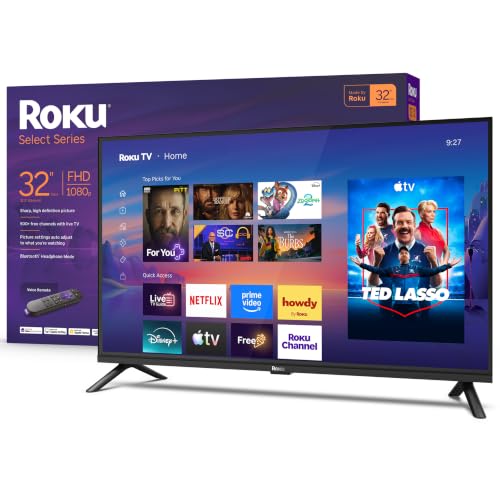
Roku 32 Select — Neutral platform pick
Roku’s founding idea — that a television platform should be a referee rather than a shopkeeper — still defines the Select. The home screen is a grid of your apps in your order, the search queries every major service and shows prices side by side without steering, and the advertising, while present, occupies a corner rather than the conversation. For a household split across Prime, Netflix, a sports service and a broadcaster’s app, that neutrality is not an aesthetic preference; it is the difference between a platform that serves the subscriptions you have and one that lobbies for the subscriptions it sells.
The Select hardware is a current Roku design with a proper 1080p panel, a voice remote, and the company’s mature software underneath. It wakes quickly, resumes reliably, and its free Roku Channel adds a shelf of no-cost programming that suits a second room. The mobile app remains the best phone-companion in the class, offering a keyboard, remote functions and private listening through earbuds. Guest mode, which signs visitors into their own services and signs them out automatically afterwards, is a small masterpiece for spare rooms and rentals.
Roku’s limits are the limits of neutrality. There is no deep smart-home integration, no gaming storefront, and the recommendation intelligence is thinner than Google’s — Roku shows you your apps, not a curated evening. Buyers who want the television to programme their night will find it passive. Buyers who want to programme their own will find every other platform’s helpfulness a tax, and this one a relief.
There is also a longevity argument that suits Roku’s simplicity. A platform with modest ambitions runs acceptably on modest hardware for a long time, and Roku’s history is of sets remaining usable well past the point where richer interfaces begin to strain. For a second-room set that may serve a decade in descending roles, that flat performance curve is worth more than a dazzling first year followed by a sluggish fifth. The Select’s current-generation hardware starts that curve from a good place.
- Panel: 32-inch, 1920 × 1080 native
- Platform: Roku TV — neutral grid interface, cross-service search
- Voice and control: voice remote, Roku app with private listening
- Extras: Guest Mode, The Roku Channel free content
- Smart home: works with Alexa, Google Assistant and HomeKit
Strengths
- Search results that compare services honestly instead of promoting one store.
- The interface a non-technical household member can use without a tutorial.
- Guest Mode solves the spare-room sign-in problem no rival addresses as neatly.
Trade-offs
- Recommendations are passive; the set will not curate your evening for you.
- Smart-home and gaming extras are the thinnest of the major platforms.
- A modest advertising panel sits on the home screen permanently.
Best for: mixed-subscription households that want the platform to stay out of the argument.
Not suited for: a viewer who wants the television itself to act as programme planner.

TCL 32 S3 — Google TV pick
Google TV on the TCL S3 is the maximalist answer: the Play Store’s complete catalogue, a home screen built from recommendation rows tuned to your viewing, Chromecast built in, and Google Assistant answering questions about everything from the weather to an actor’s filmography. If a service exists, it is here; if a niche interest exists, there is probably an app for it. For the household whose viewing ranges across anime, foreign cinema, fitness, faith, sport from three continents and a toddler’s favourite channel, no other platform in this guide keeps up.
The recommendation engine is the genuine differentiator. Google TV watches what you watch across services and assembles rows that, at their best, feel like a knowledgeable friend programming a channel for you. Profiles extend that to each household member, and kids’ profiles carry the most developed parental controls in the group. The panel beneath is TCL’s honest 1080p design with a Game Accelerator for console sessions, so the set doubles as a small-room gaming screen without apology.
The costs are attention and data. The home screen is a shop window as well as a menu, the recommendations are built on viewing data shared with Google, and the interface can feel busy to a viewer who simply wants last night’s programme. Performance on small-set hardware is good rather than instant, with the occasional pause after a cold start. None of this diminishes the catalogue argument; it merely prices it. Households that value breadth above calm should pay it gladly.
Android households gain a further, quieter benefit: continuity. The same Google account carries watchlists between phone, tablet and this television, a programme paused on a commute resumes on the S3, and Google Photos turns the idle screen into a family album without a single extra device. These continuities are easy to dismiss as garnish until a household lives with them, after which rival platforms feel oddly amnesiac. The S3 is the pick most likely to feel smarter the longer it is owned.
- Panel: 32-inch, 1920 × 1080 native
- Platform: Google TV — Play Store catalogue, recommendation rows
- Voice and control: Google Assistant remote, phone casting via Chromecast
- Extras: per-person profiles, developed kids’ profiles, Game Accelerator
- Smart home: Google Home integration, Matter-era compatibility
Strengths
- No mainstream or niche service is missing from the catalogue.
- Recommendations that genuinely learn the household’s taste over time.
- Parental tooling a clear step ahead of every rival here.
Trade-offs
- The home screen promotes as energetically as it organises.
- Viewing-data sharing with Google is the engine’s fuel; privacy purists should look at Roku.
- Cold starts can hesitate on small-set hardware.
Best for: omnivorous viewers whose subscriptions and interests outrun every other catalogue.
Not suited for: a household that treats viewing-data collection as a deal-breaker.

Insignia 32 F40 — Fire TV pick
Fire TV’s proposition on the Insignia F40 is integration with an Amazon life. Prime Video sits at the centre, Alexa answers from the remote and from any Echo in earshot, the Luna app streams games without a console, and the television can display a doorbell camera or run a household routine from the same interface. For the household already paying for Prime and talking to Alexa, the F40 is not one option among six; it is the option that speaks the house’s language.
The panel deserves its own sentence, because Insignia’s range contains the category’s most famous trap: the F20 line at this size is 720p. The F40 is the genuine 1080p model, verified, and its picture is a fair mid-class performance — adequate brightness, honest colour, and the sharpness in menus and text that the resolution promises. Fire TV itself runs briskly on this hardware, and Amazon’s update support for the platform is long and consistent.
The counterweight is the home screen’s commercial intensity. Fire TV promotes Amazon content, partner apps and shopping with an energy no rival matches, and the interface can feel like a storefront that also plays programmes. Owners vary in their tolerance; Amazon households often barely notice, having seen the same design on their streaming sticks for years. Judge the F40 as the Amazon tier’s standard-bearer: superbly integrated, unapologetically commercial.
One household pattern flatters the F40 particularly: the multi-generational Amazon home, where grandparents already ask Alexa for the weather and children already ask it for music. In that house the television’s voice control requires no new habits, the Luna games require no new hardware, and the shared Prime account means the set is fully stocked the day it is unboxed. Platform debates are abstract; habit is concrete, and the F40 is the habit-formed choice.
- Panel: 32-inch, 1920 × 1080 native — the F40, not the 720p F20
- Platform: Amazon Fire TV — Prime-centred home screen
- Voice and control: Alexa voice remote, Echo hands-free control
- Extras: Luna cloud gaming, smart-home camera display
- Smart home: the deepest Alexa integration in this guide
Strengths
- An Amazon household’s services, voice assistant and smart home in one interface.
- Luna gives the set a gaming life with no console attached.
- Platform updates from Amazon are frequent and long-lived.
Trade-offs
- The most promotional home screen of any platform ranked here.
- Model-number vigilance is required against the 720p sibling.
- Outside the Amazon ecosystem, several features lose their point.
Best for: Prime subscribers with Echo speakers who want the television inside the same system.
Not suited for: a viewer who experiences a storefront home screen as a daily provocation.

Samsung 32 F6000 — Tizen pick
Tizen is the platform for buyers who want a major manufacturer’s hand on the tiller. On the F6000 it presents as a refined, quick interface with Samsung TV Plus — a bundle of free live channels — woven in, SmartThings control over the household’s Samsung devices, and an app catalogue covering every mainstream service with the occasional niche absence. The whole product feels administered: updates arrive, menus are consistent with Samsung’s larger sets, and support is a phone call to a company that will exist in a decade.
The picture reinforces the pitch. Samsung’s tuning at this size leads the group for film and sport, with the most believable colours and the most composed motion, so the F6000 is the pick when the small smart TV is also the household’s quality screen — the bedsit main set, the small flat’s only television. Its game mode serves a console competently, and the Gaming Hub ambitions of Samsung’s platform hint at cloud services, though at this size the honest gaming story remains an HDMI cable and a console.
Tizen’s frictions are curation and cost. Samsung promotes its own services and partners in the interface, the app store is a walled garden missing the odd niche player Google TV would carry, and the set typically costs more than the Fire TV picks for the same panel resolution. What the premium buys is finish and institutional support, both tangible, neither visible on a feature chart.
Samsung households should also note the account effect. A viewer signed into the same Samsung account across phone and television gets a consistent watchlist, mirrored notifications and SmartThings scenes that can dim the room’s lights when a film starts, where compatible bulbs exist. It is the most appliance-like vision of the smart TV in this guide — the television as one administered device among many — and for households already administered by Samsung elsewhere, the F6000 completes a set rather than starting an argument.
- Panel: 32-inch, 1920 × 1080 native
- Platform: Samsung Tizen — TV Plus free channels included
- Voice and control: Samsung voice remote, SmartThings app
- Extras: group-leading colour tuning, dedicated game mode
- Smart home: SmartThings hub features for Samsung households
Strengths
- The most polished overall product in the guide, software and picture together.
- Free live channels give the set something to watch with zero subscriptions.
- A manufacturer’s support network that house brands cannot replicate.
Trade-offs
- The app garden has walls; a niche service may simply not exist here.
- Samsung’s own promotions occupy part of the home screen.
- The price premium buys finish rather than capability.
Best for: a small flat’s only television, where platform polish and picture quality share top billing.
Not suited for: a niche-service viewer whose essential app lives outside walled gardens.

Vizio 32 D-Series — Casting-first pick
SmartCast’s philosophy is that the phone is the interface and the television is the screen. The D-Series ships with a deliberately light smart layer, Chromecast and AirPlay built in, and a home screen that functions mostly as a doorway to the major apps and Vizio’s free WatchFree+ channels. Households that already browse on their phones — which is to say, most younger households — find this division of labour natural: find it on the phone, throw it to the big screen, put the phone down.
The panel is the honest Full HD unit this line has sold for years, and its virtues are the panel virtues: respectable evening contrast, a tuner for broadcast, an optical output for older audio gear. In a smart-TV guide it ranks fifth because the contest is software, and SmartCast’s software is the slightest here — the app catalogue is the shortest, the interface the plainest, and the platform’s development pace the slowest. Vizio’s television business has also changed corporate hands in recent years, which introduces a small, real uncertainty about long-term platform investment that the giants do not carry.
None of that prevents the D-Series from being the right buy for its person. A casting household bypasses the native catalogue almost entirely, the free channels cover casual viewing, and the price is habitually gentle. Buy it as a screen with casting and a tuner, and it is a good screen. Buy it as a smart platform to live inside, and the Roku and Google sets above it exist precisely for you.
There is an underappreciated privacy angle to the casting model. A household that browses on its own phones and casts the result shares less of its viewing life with the television’s platform than one that signs into every service on the set itself. SmartCast’s thinness, usually reported as a deficiency, doubles as a smaller data footprint. Owners who think about such things may find the D-Series’ restraint a feature wearing a flaw’s clothing.
- Panel: 32-inch, 1920 × 1080 native
- Software: Vizio’s SmartCast, casting-led, with WatchFree+ built in
- Voice and control: voice remote; phone casting via Chromecast and AirPlay
- Extras: optical audio output, broadcast tuner with guide
- Smart home: works with major voice assistants
Strengths
- Casting from either phone ecosystem is built in and painless.
- The lightest smart layer here, for owners who dislike smart layers.
- Free channels and a proper tuner cover account-free viewing.
Trade-offs
- The shortest native app catalogue of the six picks.
- Platform development is slow, with corporate uncertainty behind it.
- Its menus feel noticeably older than the Roku or Google equivalents.
Best for: phone-first households that cast everything and stream natively almost nothing.
Not suited for: a viewer whose essential services must live on the television itself.

Hisense 32 A4 — Budget Fire TV pick
The A4 answers a specific question: how cheaply can an Amazon household put a proper smart television in a second room? Its platform is the full Fire TV, identical in catalogue and features to the Insignia F40’s, its panel is a verified 1080p unit, and its price undercuts the Insignia with some regularity. For a Prime household equipping a child’s room, a kitchen or a rental, the A4 delivers the ecosystem at the lowest entry cost in this guide.
Differences from the F40 are matters of finish. Hisense’s default colour temperature runs cooler, the cabinet plastics are plainer, and fast sport exposes the least assured motion handling of the six. Fire TV’s own behaviours are unchanged: brisk performance, Alexa in the remote, Luna in the app row, and a home screen that sells. Hisense’s wider range is the other thing to understand — the company also ships VIDAA televisions, assessed separately below, so a Hisense badge alone tells you nothing about the software inside; the listing’s platform line is what counts.
Ranked sixth on polish, the A4 is nonetheless the guide’s efficiency champion, and for multi-room Amazon households efficiency is the criterion that matters. It is also the pick most likely to be bought in pairs, and platform consistency across rooms — the same interface in the kitchen as in the lounge — has a household value that a single-room ranking cannot capture.
Hisense’s own trajectory adds a footnote of reassurance. The company has grown from a budget alternative into one of the world’s largest television makers, its sets are stocked by every major retailer, and its Fire TV models ride Amazon’s update infrastructure rather than a proprietary one. The A4’s buyer is therefore not betting on a fragile startup’s servers; the platform’s fate is Amazon’s, and the panel’s maker has the scale to honour a warranty. At this price, that combination is the whole ballgame.
- Panel: 32-inch, 1920 × 1080 native
- Platform: Amazon Fire TV — full catalogue, Alexa remote
- Voice and control: Alexa voice remote, Echo integration
- Extras: Luna cloud gaming, phone mirroring
- Note: Hisense also sells VIDAA sets; this pick is the Fire TV model
Strengths
- The complete Fire TV platform at the guide’s lowest typical price.
- Platform consistency for Amazon households equipping several rooms.
- A verified Full HD panel where cheaper rivals quietly ship 720p.
Trade-offs
- Cool default colours and plain plastics mark the saving.
- Sports motion is the least composed in the group.
- Fire TV’s promotional home screen is inherited in full.
Best for: Amazon households buying for a second room, or buying two rooms at once.
Not suited for: a picture purist who will watch this screen more than any other in the house.
How Do the Five Smart Platforms Really Differ?
Strip the branding away and the platforms differ on three axes: who the home screen works for, how the catalogue is assembled, and what the system wants from you. Roku’s home screen works for the viewer, presenting owned apps neutrally and monetising quietly at the edges. Google TV’s works for the viewer’s taste, using watch data to programme rows, and monetises through promotion inside those rows. Fire TV’s works for Amazon, with Prime and partner content structurally favoured. Tizen works for Samsung’s ecosystem, and SmartCast barely works at all, preferring to hand the job to your phone. None of these is corrupt; they are business models made visible, and the right choice is the model whose incentives annoy you least.
Catalogues differ less than they once did. Every mainstream service is present on Roku, Google TV and Fire TV; Tizen covers the mainstream fully and the niches partially; SmartCast covers the mainstream through a mixture of native apps and casting. The practical test is personal: list the four services your household actually opens weekly, and check them against the platform, rather than comparing catalogue sizes in the abstract. Niche interests — a specific sports league’s app, a language’s streaming service, a faith or fitness platform — are where Google TV’s open store pulls away and walled gardens show their walls.
VIDAA, Hisense’s own system, deserves its paragraph. It is a fast, lightweight platform covering the major global services, with a cleaner home screen than Fire TV’s and a smaller app universe than Google’s. On Hisense’s larger and international ranges it is a perfectly respectable choice. In this guide it has no pick, because the verified 1080p Hisense available for the roundup runs Fire TV — a neat demonstration that platform follows model, not brand, and that the listing’s software line deserves the same scrutiny as its resolution line.
Voice control divides along ecosystem lines rather than quality lines. Alexa is the most capable inside Fire TV, Google Assistant the most knowledgeable inside Google TV, and Roku and Samsung offer competent assistants of their own. All four major platforms also accept commands from the rival ecosystems’ speakers to varying degrees. Choose by the speakers already in your house; the television will follow.
What Happens to a Smart Platform After Three or Four Years?
The panel will outlast the software’s prime; that is the honest answer for every pick in this guide. App developers eventually drop old operating-system versions, a service’s new app may demand a platform release your set will not receive, and interfaces slow as their ambitions grow. The giants mitigate this differently: Amazon and Roku have strong records of supporting modest hardware for many years, Google TV’s fate is tied to its wider Android ecosystem, and Samsung supports its sets on a published cadence. Vizio’s smaller scale makes its horizon the hardest to promise.
The saving grace is architectural. A smart television is also a monitor with an HDMI port, and when the built-in platform tires, a current streaming stick restores the entire experience for a small sum, often faster than the set ever ran natively. This is why this guide ranks today’s experience rather than pretending to guarantee year seven, and why a modest platform deficit — SmartCast’s thin catalogue, say — is a smaller sin than a panel deficit would be. Software can be bypassed. Pixels cannot be added.
Buyers can tilt the odds with two habits. Prefer the current model year over a discounted older one, because support clocks start at the platform generation, not the purchase date. And keep the set’s software updated automatically, since the updates carry the security patches that a permanently connected television genuinely needs.
How Do You Set Up Accounts, Privacy and Parental Controls?
Setup order matters more than setup speed. Connect the television to your network, let it take its software update before signing into anything, and only then add accounts — updates occasionally change menu layouts, and signing in twice helps nobody. Add the household’s services in order of actual use, arrange the home row to match, and delete or hide the pre-installed apps you will never open; every platform here permits some degree of that tidying, and a calm home screen is worth ten minutes.
Privacy settings deserve the same ten minutes. Every platform offers controls over viewing-data collection and ad personalisation, buried at different depths: Roku’s are under Privacy in Settings, Google TV’s under your account’s data controls, Fire TV’s under Preferences, Tizen’s under its terms-and-privacy menu. Switching off personalised advertising does not remove the advertising; it removes the tracking behind it, which for many households is the part that mattered. Voice remotes also carry microphone settings, and a household that never uses voice can decline the permissions entirely.
Parental controls vary more than any other feature in this guide. Google TV’s kids’ profiles are the most complete, with separate home screens, time limits and content boundaries. Fire TV offers profiles and PIN-protected purchases, Roku offers PIN controls and its Kids & Family zone, and Tizen and SmartCast cover the purchase-PIN basics. A family buying a set for a child’s room should weight this section heavily; a household of adults can skip it entirely and lose nothing.
How Do Free Channels and Bundled Extras Change the Value Sum?
Every platform in this guide now carries a free tier, and for second-room sets the free tier can be the main event. Samsung TV Plus and Vizio’s WatchFree+ offer scheduled live channels in the broadcast style; The Roku Channel mixes live channels with an on-demand library; Fire TV surfaces free ad-supported services through its live guide; Google TV aggregates free channels into its Live tab. A kitchen or spare-room set may spend most of its life on these services, in which case the household’s subscription list matters less than the guide assumes and the free tier’s quality becomes a first-order buying criterion. On that measure Samsung and Roku lead, with Fire TV close behind.
Bundled extras deserve colder assessment. Cloud gaming trials, smart-home dashboards, ambient art modes and fitness apps all appear in platform marketing, and most households use one of them, briefly. The extras that survive contact with real life are unglamorous: a sleep timer that works from the remote, a programme guide that loads instantly, a continue-watching row that remembers across rooms. Judge a platform by its third month, not its launch screen, and the ranking in this guide — built on catalogue, temperament and support — is the ranking that third month tends to confirm.
One more value factor hides in the remote. Voice remotes are standard across these picks, but their microphones, shortcut buttons and finder features differ, and the remote is the part of a smart TV you touch every single day. Roku’s and Amazon’s remotes are the most practised designs here; Samsung’s is the most minimal; all are replaceable, and a lost remote should never orphan a set — check that a replacement is cheap before you need one.
What Should You Check on the Listing Before Buying a Smart TV?
Four lines decide whether the television that arrives is the television reviewed. The platform line names the operating system — and as the Hisense case shows, it cannot be inferred from the brand. The resolution line must state 1920 by 1080 natively, since the small smart shelf is thick with 720p sets. The model year or generation tells you where the set sits in its support life. And the port list should show at least one HDMI socket beyond your current devices, reserved for the streaming stick or console that arrives later.
Then read the maker’s own page for the same model and compare it against the retailer’s. Discrepancies in this category are common and almost always resolve in the less flattering direction: the retailer’s HDR becomes the maker’s HDR-acceptance, the retailer’s smart features become a shorter list. Where the two disagree, believe the maker, and where the maker is silent, believe nobody. That discipline, applied for five minutes, prevents nearly every disappointment this category produces.
Which Platform Suits Which Kind of Household?
Abstract comparisons end where households begin, so consider the archetypes. The subscription juggler, carrying four or five services and churning them quarterly, belongs on Roku, whose neutral search prices every service’s content side by side and whose interface does not sulk when a favoured partner is cancelled. The explorer, who finishes a series and asks what else exists in the world, belongs on Google TV, whose store and recommendations are built for discovery. The Amazon completist, whose deliveries, music, photos and doorbell already live in one account, belongs on Fire TV, where the television becomes another room in a house already built.
The appliance buyer — the person who wants a television the way they want a washing machine, installed once and ignored for years — belongs on the Samsung, with its administered updates and its free channels for subscription-free evenings. The phone-native household, whose members under thirty have never browsed on a television in their lives, belongs on the Vizio or on any set with casting, since their interface of choice is already in their pockets. And the multi-room equiper, furnishing a rental or a family home’s secondary spaces, belongs wherever their main room already lives, because one interface learned once is worth more than three interfaces optimised separately.
Notice what none of these archetypes chooses by: the panel. At 1080p in the small sizes, the panel is the solved part of the problem, and the household is the unsolved part. That is the deepest reason this guide ranks software first, and it is why two televisions with identical screens can be the right and wrong purchases for two different families on the same street.
How Do Smart TVs Handle Sport, News and Live Television?
Live content exposes platform differences that on-demand viewing hides. A good live guide — one that merges broadcast channels, free streaming channels and subscription live services into a single grid — turns a smart TV into a credible replacement for a cable box. Fire TV and Google TV invest most heavily here, Samsung TV Plus builds its free offering around the grid, and Roku’s Live TV zone gathers its channels competently. SmartCast’s guide is the plainest, though its tuner handling for aerial households is straightforward.
Sport adds a picture consideration. Motion processing on these small panels is modest, and fast play can soften on the weakest sets — the Hisense A4’s handling was noted in its review — while the Samsung’s composed processing earns its premium most visibly during matches. News, by contrast, flatters every platform equally and punishes none; a kitchen set on a rolling news channel is the least demanding duty in television. Buyers whose small set will carry live sport weekly should weight the F6000’s tuning accordingly; buyers whose live viewing is news and broadcast drama can safely let the platform decide.
What Does a Smart TV Ask of Your Home Network?
Less than buyers fear, with one exception. Ordinary 1080p streaming runs comfortably on the broadband and Wi-Fi that any household with a streaming habit already has, and all six picks connect over the modern Wi-Fi standards. The exception is placement: a small set tucked into a kitchen corner, a caravan or a bedroom far from the router may sit at the edge of coverage, where buffering gets blamed on the television. Test the room’s signal with a phone before blaming the set, and remember that a wired Ethernet connection, where a port exists and a cable can reach, removes the variable entirely.
Network manners matter in shared houses. A television that wakes and updates itself considerately, that does not demand the router’s best band for a firmware download during a video call, earns its place in a busy network. Automatic updates scheduled overnight — configurable on the major platforms — are the polite default. Households on capped or metered connections, including caravan and rural setups, should also find the data-usage controls each platform offers and set streaming quality deliberately, because a 1080p set left on its highest setting will spend a capped allowance with complete innocence.
Security completes the picture. A smart television is a computer on your network with a microphone in its remote, and it deserves the same hygiene: current software, a unique account password, and a guest network for visitors’ devices where the router supports one. None of the picks here is unusually exposed; all of them reward the five minutes of setup care described earlier in this guide.
How Do Accessibility and Ease of Use Compare Across Platforms?
Smart platforms have quietly become the most accessible televisions ever sold, and the differences between them matter to the households that need them. All five systems here offer screen-reader narration of menus, high-contrast interface options, caption customisation far beyond the broadcast standard, and voice control that can operate the set almost entirely hands-free. For a viewer with limited sight, the voice remote alone transforms a small television from a appliance a relative must operate into one they command themselves.
The implementations differ in polish. Google TV and Fire TV benefit from their parent companies’ wider accessibility engineering, with mature screen readers and voice assistants that understand programme titles reliably. Roku’s audio guide and simple grid are notably easy to learn, which is itself an accessibility property for viewers with cognitive load concerns. Samsung’s accessibility menu is comprehensive and its remote’s simplicity suits arthritic hands, though its small buttons cut the other way. SmartCast trails in native features but inherits whatever the casting phone provides, which for many users is the most familiar accessibility toolkit of all.
Buyers shopping for an elderly relative — a common errand in this size class — should weight these properties above catalogue size. Set the television up before gifting it: accounts signed in, home row arranged, voice control demonstrated, captions sized. A 1080p smart TV configured with that care is one of the most independence-preserving objects in a modern home, and the platform that serves its owner best is the one whose help features they can actually operate at midnight without calling anyone.
Platforms and Panels in One Table
| Television | Platform | Platform character | Panel | Consider instead if |
|---|---|---|---|---|
| Roku 32 Select | Roku TV | Neutral referee, calm grid | 32″ 1080p | You want curated recommendations |
| TCL 32 S3 | Google TV | Maximal catalogue, learning rows | 32″ 1080p | You dislike data-driven home screens |
| Insignia 32 F40 | Fire TV | Amazon-integrated, promotional | 32″ 1080p | You are not an Amazon household |
| Samsung 32 F6000 | Tizen | Polished, manufacturer-administered | 32″ 1080p | Your essential app is niche |
| Vizio 32 D-Series | SmartCast | Casting-first minimalism | 32″ 1080p | You stream natively all evening |
| Hisense 32 A4 | Fire TV | Amazon platform at the lowest price | 32″ 1080p | Picture finish outranks budget |
Which Smart-TV Buying Mistakes Cost the Most?
Buying the brand instead of the platform is the expensive one. A household that loves its Samsung phone may still hate Tizen’s app garden; a Hisense bargain may turn out to run a different system from the Hisense reviewed elsewhere. The software is named on every listing — read that line as carefully as the resolution line, because you will interact with it a thousand times for every once you think about the badge.
Assuming a missing app can be added later is the second. On closed platforms, an absent service stays absent, and sideloading is not a plan for a family television. Check your four essential services against the specific platform before buying, not the brand’s general reputation.
Paying for panel specifications that do not exist at this level is the third. HDR badges, dynamic contrast figures and motion-rate numbers decorate every listing in the class and describe almost nothing; the money they justify is better kept. Finally, overlooking the exit matters: confirm the set has a spare HDMI port for the streaming stick that will eventually refresh it, because that port is the platform’s pension plan.
Final Recommendation
Most households should start with the Roku 32 Select, because neutrality ages best: services rise and fall, and a platform that treats them all alike never picks the losing side for you. Take the TCL S3 instead if your viewing is wide-ranging or your household casts from Android phones, and take either Fire TV set — the Insignia for finish, the Hisense for price — if your house already runs on Prime and Alexa. The Samsung is the connoisseur’s small set, and the Vizio is the caster’s.
Decide by the services on your own list and the speakers already in your rooms, and the platform question answers itself; a smart TV is a subscription to an interface, and the wisest purchase here is the interface your household will still be pleased to live inside when the panel has long stopped being the interesting part.
If the decision still will not settle, use the tiebreaker of the return window: order the platform you believe fits, live with its home screen for a fortnight of real evenings, and judge it by whether you stopped noticing it. The right smart platform disappears into the household’s routines; the wrong one introduces itself every night. All six sets here can be the right one for somebody — the work of this guide has been matching them to the somebodies they suit, and the rest is your household’s honest self-knowledge.
Frequently Asked Questions
Can I change a smart TV’s platform later?
Not the built-in one — the operating system is fixed to the hardware. You can bypass it entirely with a streaming stick or box in an HDMI port, which effectively replaces the interface while keeping the panel. Many owners do exactly this after several years.
Which platform has the most apps?
Google TV, through the Play Store, carries the broadest catalogue, including niche and international services the walled platforms omit. Roku and Fire TV cover the mainstream completely; Tizen covers the mainstream with occasional niche gaps; SmartCast leans on casting for the rest.
Do I need an account to use a smart TV?
Practically, yes: each platform asks for its ecosystem account during setup, and app downloads require it. Broadcast viewing through the tuner works without engaging the smart side, and the Vizio’s casting can be used with minimal account involvement.
Which platform is best for children?
Google TV’s kids’ profiles are the most developed, with separate home screens, content boundaries and time limits. Fire TV is the runner-up with profiles and purchase PINs. Households buying for a child’s room should weight this heavily.
Will these TVs keep getting updates?
For several years, on the major platforms — Amazon, Roku and Google have strong support records, and Samsung publishes its cadence. No maker guarantees a date, which is why the streaming-stick exit in a spare HDMI port matters to the long-term plan.
Do smart TVs show advertising?
All of them do to some degree, from Roku’s restrained side panel to Fire TV’s full promotional rows. Personalised advertising can be limited in each platform’s privacy settings, which removes the tracking rather than the advertisements themselves. Buyers for whom this is decisive should weight Roku and Tizen’s relative restraint.
Which platform is easiest for an elderly relative?
Roku, set up in advance by the family: its grid is the simplest to learn, its audio guide narrates menus clearly, and its remote search spans services so the owner never needs to remember which app holds a programme. Samsung’s Tizen is the runner-up where a relative already knows Samsung phones.
Does a smart TV work without internet?
As a television, yes: the tuner receives broadcast channels and HDMI devices work normally. The smart features, app catalogue and voice control need a connection, and setup itself is far smoother with one. A set bought for an offline room should be judged as a panel, in which case the size-focused guide in this batch is the better read.
Is VIDAA a good smart platform?
Yes, within its limits: it is quick, clean and covers the global mainstream services, with a smaller app universe than Google TV’s. It appears on many Hisense models — just not on this guide’s Hisense pick, which runs Fire TV, so always confirm the platform on the specific listing.
Related Guides
The same six sets ranked for small rooms rather than software are covered in our guide to 1080p 32-inch TVs, and players should consult our 1080p gaming TV roundup for the response-focused verdict. If the desk is where the screen will live, our monitor-substitute guide takes the question seriously.


