What's inside
- Key Takeaways
- Quick Picks
- How Did We Choose These Picks?
- Which 1080p Gaming Laptops Deserve a Detailed Look?
- What About the Step-Up Neighbour, the ROG Strix G16?
- Why Does Graphics Wattage Matter More Than the GPU Name?
- How Should You Set Up a 1080p Gaming Laptop in Its First Week?
- Comparison Table
- What Mistakes Do 1080p Laptop Buyers Keep Making?
- How Long Will a 1080p Gaming Laptop Stay Relevant?
- What Should You Check on Delivery Day?
- How Do These Machines Handle Everyday Life Beyond Games?
- Which Pick Suits Which Player? A Library-First Way to Decide
- What Should You Know About Screens, Colour and Comfort at This Size?
- How Do You Keep a Gaming Laptop Fast After the First Year?
- Should You Add a Monitor, Dock or Second Drive Later?
- Final Recommendation
- Frequently Asked Questions
- Related Guides
As an Amazon Associate I earn from qualifying purchases. This post may contain affiliate links at no extra cost to you.
gizmoverdict.com is reader-supported. When you buy through links on our site, we may earn an affiliate commission.
Where to buy: Each linked laptop below leads to its current Amazon listing, where you should confirm the exact graphics chip, its wattage where the seller states it, the memory configuration and the panel fitted before ordering, because gaming laptop families reuse one chassis name across several quite different builds.
The best 1080p gaming laptops occupy the most honest corner of the gaming market. Full HD at 1920 by 1080 is still where most players actually play: esports titles run fast there, modern story games look sharp on a 15.6-inch panel, and the graphics hardware needed to drive it well costs a fraction of what a high-resolution flagship demands. The six machines in this guide were chosen because each one treats 1080p seriously rather than treating it as a consolation prize, and because together they show every important trade this class asks you to make.
Read the class definition carefully before the rankings. A true 1080p panel is 1920 by 1080 pixels. Screens described as FHD+ are usually 1920 by 1200, a taller 16:10 shape that is lovely to use but is not quite the same thing, and one well-known machine that sits just outside this class gets an honest prose mention later for exactly that reason. Within the class, the standard refresh rate is now 144Hz, with 165Hz panels appearing on newer designs, and that high-refresh pairing matters more to how a game feels than any badge on the lid.
The single most misunderstood number in this entire category is graphics wattage. Two laptops can both advertise the same GeForce RTX chip and deliver noticeably different frame rates because one feeds that chip generously and the other starves it to keep a thin chassis cool. Sellers call this figure TGP, and a responsible buyer checks it in the listing, in reviews of the exact configuration, or in the manufacturer’s specification sheet before assuming that a familiar GPU name guarantees familiar performance. Several sections of this guide return to that point, because at 1080p it decides more purchases than any other specification.
Key Takeaways
- True 1080p means 1920 by 1080. A 1920 by 1200 FHD+ panel is a fine screen, but it belongs to a neighbouring class and should not be sold to you as the same thing.
- Check the graphics wattage, not just the graphics name. The same RTX badge at a low TGP and at a full TGP behaves like two different products once a demanding game loads.
- Sixteen gigabytes of memory is the sensible floor for a new gaming laptop in this class. The one 8GB pick here is included with that shortfall stated plainly, not hidden.
- A 144Hz or 165Hz panel is part of the product, not a garnish. At 1080p the hardware can actually feed those refresh rates in many games, which is the whole point of staying at Full HD.
- The newest graphics generation in this list brings current frame-generation features, but an older, well-fed chip in a well-cooled chassis can still be the smarter buy for the games you actually play.
Quick Picks
| Pick | Badge | Why it earns its place |
|---|---|---|
| MSI Katana 15 | Balanced RTX 4060 choice | A Core i7 paired with an RTX 4060, a terabyte of storage and a 144Hz panel, in the configuration most buyers in this class are really shopping for. |
| HP Victus 15 (RTX 3050, 8GB) | Lowest-friction entry | A current Victus with an RTX 3050 and a 144Hz screen, held back openly by its 8GB of memory, which you should budget to upgrade. |
| Acer Nitro V 15 (RTX 5050) | Newest-generation pick | The current-generation graphics option in this roundup, with a 165Hz panel and modern frame-generation support for players who buy for the next few years. |
| ASUS TUF Gaming A15 | Durability-first pick | A Ryzen-powered TUF with DDR5 memory and a 144Hz display, built for owners who are hard on their hardware and travel with it. |
| Lenovo LOQ (RTX 4050) | Sensible step-up GPU | An RTX 4050 with 16GB of DDR5 and wired Ethernet, for players who want frame generation without climbing to the top of the class. |
| HP Victus 15 (i5-12450H) | Value with full memory | An earlier Victus configuration that keeps 16GB of memory and a 144Hz panel, trading processor generation for a complete out-of-box setup. |
One more name belongs in this conversation even though it is not linked here. The ASUS ROG Strix G16 in its FHD+ form uses a 1920 by 1200 panel, which makes it a step-up neighbour to this class rather than a member of it. It receives a full prose discussion after the six main reviews, because many readers cross-shop it against these machines and deserve to know exactly which specification moves when they step up.
How Did We Choose These Picks?
We began by enforcing the definition of the class. Every linked pick here drives a genuine 1920 by 1080 internal display at 144Hz or faster. That single filter removes a surprising number of machines that marketing places in this conversation: laptops with taller 1200-line panels, laptops with 60Hz screens wearing gaming badges, and laptops whose listings blur panel details in ways that should make any buyer suspicious. If a seller will not state the resolution and refresh rate plainly, that silence is information.
Next we spread the list across the graphics ladder that actually exists at 1080p. The RTX 3050 machines represent the entry rung, where esports and older or lighter games are the honest promise. The RTX 4050 and RTX 5050 picks represent the current mainstream, where frame generation changes what the hardware can attempt. The RTX 4060 pick represents the class ceiling for most buyers, the point beyond which extra graphics spending at 1080p buys diminishing returns for anyone not chasing maximum settings in the heaviest releases. A guide that only listed the ceiling would fail the readers shopping the floor, and a guide that only listed the floor would mislead everyone else.
Memory and storage were treated as first-class criteria rather than footnotes. Sixteen gigabytes is the configuration we recommend without reservation, and the single 8GB machine in this list is labelled with that limitation in its badge, its review and its spec list, because a buyer who discovers the shortfall after purchase has been failed by their guide. Storage follows the same logic: a terabyte drive changes how you live with a games library, while a half-terabyte drive forces deletion decisions within the first year for most players.
Finally, we favoured machines from lines with a track record a buyer can research: Katana, Victus, Nitro, TUF and LOQ are all established families whose cooling behaviour, hinge quality and keyboard feel have been documented across generations. A gaming laptop is a five-year appliance for most households. The name on the lid is not a guarantee, but a family with a history gives you something real to investigate, and that investigability is itself a feature.
Which 1080p Gaming Laptops Deserve a Detailed Look?

MSI Katana 15 — Balanced RTX 4060 choice
The Katana 15 is the machine this guide would hand to a buyer who said “just give me the sensible one” and meant it. Its listing pairs an Intel Core i7-13620H with a GeForce RTX 4060, 16GB of DDR5 memory, a terabyte NVMe drive and a 15.6-inch Full HD panel refreshing at 144Hz. Read that configuration slowly, because every element of it is the element this class asks for: the graphics chip with real headroom at 1080p, enough memory that no game in your library needs an apology, and enough storage that installing three large titles at once is a choice rather than a negotiation.
MSI builds the Katana line as its accessible gaming range, sitting below the company’s flashier families, and the design reflects that station. The chassis is purposeful rather than sculpted, the cooling system — MSI calls it Cooler Boost 5 — uses shared heatpipes across processor and graphics chip, and the port selection includes USB-C with DisplayPort output, which matters if you ever dock this machine to an external monitor for desk play. Nothing about the Katana pretends to be a luxury object. It is a tool specified correctly, and in this class correct specification beats decoration every time.
The ownership question to settle before choosing it is wattage diligence. Katana configurations have historically been tuned for a balance of noise, heat and cost rather than for extracting the last frame from the graphics chip, so check the stated TGP for this exact listing and compare it with the fullest implementations of the same GPU before you decide that all RTX 4060 laptops are equal. They are not, and the difference shows up precisely in the heavy games where buyers most expect the badge to protect them. Even with that homework done, the Katana’s combination of processor strength, memory, storage and panel makes it the reference configuration of this roundup.
- Display: 15.6-inch Full HD 1920 by 1080, 144Hz
- Graphics: GeForce RTX 4060 laptop GPU — verify TGP on the listing
- Processor: Intel Core i7-13620H
- Memory and storage: 16GB DDR5, 1TB NVMe SSD
- Cooling: Cooler Boost 5 shared-pipe design; USB-C with DisplayPort output
Strengths
- The most complete specification in this guide: strong processor, 4060-class graphics, full memory and a terabyte of storage with nothing left to fix on day one.
- The 144Hz panel matches what the hardware can genuinely feed at 1080p in a wide range of games.
- USB-C carrying a display signal makes a desk setup with an external monitor straightforward.
Trade-offs
- Confirm the graphics wattage for this configuration rather than assuming the badge tells the whole story.
- The accessible-line chassis prioritises function; buyers wanting a premium metal feel should look at costlier families.
- Like every 15.6-inch gaming laptop here, it is a desk-and-bag machine, not an all-day unplugged companion.
Best for: buyers who want one correctly specified 1080p machine with no immediate upgrades planned. Not suited for: shoppers who will not do the wattage check, or who want ultrabook portability alongside gaming power.

HP Victus 15 (RTX 3050, 8GB) — Lowest-friction entry
This Victus is the entry door to the roundup, and its review begins with the fact its badge already admits: it ships with 8GB of memory. That is below the floor this guide recommends for a new gaming laptop, full stop. Modern games increasingly treat 8GB of system memory as a constraint to work around rather than a specification to design for, and the buyer who chooses this machine should do so with an upgrade already planned — a second memory stick or a matched pair, fitted early, transforms it from a compromised purchase into a shrewd one. Included without that context, it would be a trap. Included with it, it is an honest budget route.
What the machine gets right is the shape of the rest of the specification. The processor is a current Intel Core i5-13420H, the graphics chip is a GeForce RTX 3050, storage is a 512GB NVMe drive, and the 15.6-inch Full HD panel refreshes at 144Hz, which is the detail cheaper gaming laptops most often sacrifice. A 144Hz screen on an RTX 3050 machine is not wasted: the esports and lighter titles this GPU handles best are exactly the titles that can fill a high-refresh panel, and the desktop itself feels markedly smoother for it every single day.
The memory type deserves one more sentence of honesty. This configuration uses DDR4 memory rather than the DDR5 fitted to most other picks here, a cost decision consistent with its station in the range. In daily gaming the practical difference is smaller than the memory amount itself, which is why the upgrade advice above matters more than the generation: take this machine to 16GB and its remaining compromises are the ones its price fairly asks. Leave it at 8GB and you will meet stutter in places that have nothing to do with its graphics chip.
- Display: 15.6-inch Full HD 1920 by 1080, 144Hz
- Graphics: GeForce RTX 3050 laptop GPU
- Processor: Intel Core i5-13420H
- Memory and storage: 8GB DDR4 — plan an upgrade to 16GB; 512GB NVMe SSD
- Class note: entry configuration of the current Victus line
Strengths
- A 144Hz panel at the entry rung, where many rivals quietly fit slower screens.
- Current-generation Intel processor rather than recycled older silicon.
- A clear, cheap upgrade path: memory is the one shortfall, and it is the fixable kind.
Trade-offs
- 8GB of memory is below this guide’s recommended floor and will limit newer games until upgraded.
- DDR4 memory reflects its budget station next to the DDR5 machines here.
- The RTX 3050 sets a real ceiling: esports and tuned settings, not maximum detail in heavy releases.
Best for: budget buyers willing to fit a memory upgrade early, and esports-focused players. Not suited for: anyone who wants a finished machine out of the box with no tinkering, or players centred on the newest demanding titles.

Acer Nitro V 15 (RTX 5050) — Newest-generation pick
The Nitro V 15 in this configuration is the forward-looking purchase in the roundup: an Intel Core i5-13420H driving a GeForce RTX 5050, the current-generation entry graphics chip, behind a 15.6-inch Full HD IPS panel that refreshes at 165Hz. That refresh figure is the highest in this guide, and it signals who this machine is for — the player who keeps a laptop for years and wants the graphics feature set, driver support and panel speed of the newest generation rather than the mature discounts of the last one.
Frame generation is the substantive reason to care about the generation jump. The current NVIDIA feature set, including its latest DLSS generation, lets supported games construct additional frames and present a smoother image than the raw rendering load would otherwise allow, and at 1080p that technology is particularly effective because the base frame rates start from a healthy position. It is not magic and it does not rescue a game the hardware fundamentally cannot run, but across a four or five year ownership span, buying into the current feature set is a rational bet that the older machines here cannot offer.
Acer’s Nitro line has settled into a recognisable character over its generations: angular, unapologetically plastic in places, and specified by people who understand what the money should buy. This configuration keeps 16GB of memory and a 512GB drive — the drive is the figure to watch, since a modern games library outgrows half a terabyte with embarrassing speed, and Nitro chassis generally allow storage expansion that a buyer should confirm on the listing. The backlit keyboard and Thunderbolt-class connectivity listed for this model round out a machine aimed at players who also live on their laptop for everything else.
- Display: 15.6-inch Full HD IPS, 165Hz — the fastest panel in this guide
- Graphics: GeForce RTX 5050 with current-generation DLSS support
- Processor: Intel Core i5-13420H
- Memory and storage: 16GB RAM, 512GB SSD — check expansion options for the drive
- Extras: backlit keyboard, Thunderbolt connectivity per listing
Strengths
- Newest graphics generation here, with the longest runway of driver and feature support.
- 165Hz IPS panel gives fast-paced games the screen they actually need.
- Full 16GB memory configuration from the start, with no corrective purchase required.
Trade-offs
- 512GB of storage will feel small within a year for players with large libraries.
- Newest-generation silicon rarely carries the mature discounts of the lines it replaces.
- Entry chip of its generation: a well-fed previous-generation part can rival it in raw rendering in some titles.
Best for: buyers purchasing for a long ownership span who value current features and the fastest panel here. Not suited for: bargain hunters, or players whose storage needs are large and immediate.
ASUS TUF Gaming A15 — Durability-first pick
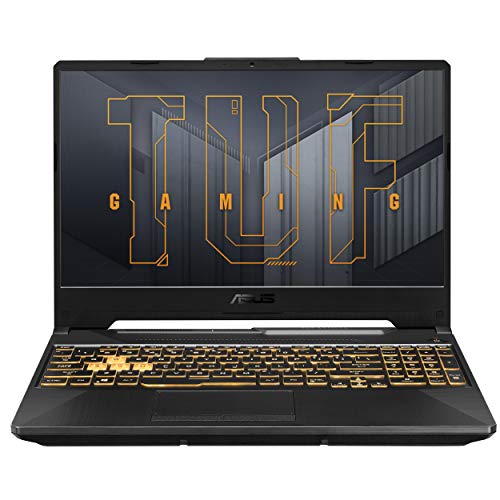
The TUF A15 approaches this class from a different direction: not the fastest badge or the newest chip, but the machine most likely to survive being owned. ASUS builds the TUF family around durability testing and a design language of exposed screws, serviceable internals and cooling that keeps working when a laptop is carried daily between home, work and everywhere else. This configuration pairs an AMD Ryzen 5 7535HS with a GeForce RTX 3050, 16GB of DDR5 memory and a 512GB PCIe drive, behind a 15.6-inch Full HD panel at 144Hz.
The Ryzen processor deserves attention from buyers who split their time between games and everything else. AMD’s HS-series chips have earned a following in this segment for their efficiency behaviour away from the wall socket, and a gaming laptop spends more of its life browsing, writing and streaming than it does gaming. Paired with DDR5 memory — a generation ahead of the DDR4 in the entry Victus — the platform feels current in the ways that show up daily, even though its graphics chip sits on the same rung as that machine’s.
Set expectations for the RTX 3050 exactly where this guide set them for its other appearance: this is the chip for esports titles, for the enormous back catalogue of games from the last decade, and for modern releases played at considered settings rather than maximum ones. What the TUF adds over a bare specification sheet is confidence in the container. If your laptop rides in a backpack five days a week, gets opened and closed constantly, and needs to be serviced rather than replaced when a fan eventually wears, this family’s priorities were written for you.
- Display: 15.6-inch Full HD, 144Hz
- Graphics: GeForce RTX 3050 laptop GPU
- Processor: AMD Ryzen 5 7535HS
- Memory and storage: 16GB DDR5, 512GB PCIe SSD
- Design focus: durability-tested TUF chassis, serviceable layout
Strengths
- Built and tested for rough daily handling, with a service-friendly internal layout.
- DDR5 memory and an efficient Ryzen platform keep everyday behaviour feeling modern.
- Full 16GB configuration means the specification is finished as delivered.
Trade-offs
- The RTX 3050 defines its gaming ceiling regardless of the chassis’s toughness.
- Utilitarian styling will not win a beauty contest against sleeker rivals.
- Storage starts at 512GB, the familiar constraint of this price territory.
Best for: students, commuters and anyone whose gaming laptop also lives a hard daily life. Not suited for: players whose priority is maximum settings in the newest releases.

Lenovo LOQ (RTX 4050) — Sensible step-up GPU
Lenovo’s LOQ line exists because the company’s Legion machines taught it what mainstream buyers actually need, and this configuration shows the lesson applied: a GeForce RTX 4050, an AMD Ryzen 5 7235HS, 16GB of DDR5 memory and a 512GB drive, behind a 15.6-inch Full HD panel at 144Hz. The RTX 4050 is the meaningful step in this roundup. It is the first rung that brings the frame-generation era with it in a mature, widely stocked form, and for many players it is the point where a 1080p machine stops feeling like a compromise and starts feeling like a plan.
Two practical details elevate this pick beyond its specification. The first is wired Ethernet, listed among its connections alongside Wi-Fi 6 and USB-C. Competitive and online players learn eventually that a cable beats a radio for latency stability, and a surprising number of slim modern laptops make that lesson impossible to apply. The second is Lenovo’s restrained design: the LOQ looks like a laptop rather than a spaceship, which matters in shared houses, offices and classrooms more than specification sheets admit.
The processor is the configuration’s modest note. The Ryzen 5 7235HS is a capable design with fewer cores than the strongest rivals here, and heavily threaded work — streaming while gaming, serious video exports, large compilations — will find its edges sooner than on the Katana above. For gaming itself at 1080p, where the graphics chip carries the load in most titles, the pairing is well judged: money spent on the GPU rung and the full memory configuration, saved on processor cores the target games rarely use. That is the LOQ philosophy in one machine, and it is a good one.
- Display: 15.6-inch Full HD, 144Hz
- Graphics: GeForce RTX 4050 with frame-generation support
- Processor: AMD Ryzen 5 7235HS
- Memory and storage: 16GB DDR5, 512GB SSD
- Connections: Ethernet, Wi-Fi 6 and USB-C per listing
Strengths
- The RTX 4050 rung brings frame generation within the mainstream part of this class.
- Wired Ethernet is present, which online players should treat as a genuine feature.
- Understated design suits shared and professional spaces where gaming styling does not.
Trade-offs
- The processor offers fewer cores than the strongest picks here, which heavy multitaskers will notice.
- 512GB storage is the standard constraint at this level.
- Cooling and wattage still deserve a listing check, as with every RTX laptop in this guide.
Best for: mainstream players who want the frame-generation rung, wired networking and a machine that blends in. Not suited for: streamers and creators whose workloads lean hard on processor cores.

HP Victus 15 (i5-12450H) — Value with full memory
The second Victus in this guide tells a useful story about how to shop this class. It is built around an earlier Intel Core i5-12450H and the same RTX 3050 graphics rung as two other picks here, but it keeps the thing the newer entry Victus surrendered: 16GB of memory fitted from the start. For a buyer comparing listings at midnight, that single line is worth more than a processor generation. A machine that arrives complete, with nothing to upgrade before it plays properly, has a value that spec-sheet youth cannot match.
Nothing about its remaining specification embarrasses it. The 15.6-inch Full HD panel refreshes at 144Hz, storage is a 512GB PCIe drive, Wi-Fi 6 handles wireless networking, and the backlit keyboard covers evening play. The i5-12450H is an eight-core design from a recent enough generation that games will not be the thing it limits; the RTX 3050 will reach its ceiling first in nearly every title, which is exactly the balance a value configuration should strike. When the graphics chip is the bottleneck by design, the rest of the machine has been specified honestly.
Choose it as the deliberate value play it is. Its role in this roundup is to prove that an earlier configuration, bought knowingly, can serve a player better than a newer badge carrying a hidden shortfall. If your games are esports, indie titles and the last decade’s catalogue, and your priority is a complete machine at the friendliest end of the class, this Victus makes its case without a single asterisk.
- Display: 15.6-inch Full HD, 144Hz
- Graphics: GeForce RTX 3050 laptop GPU
- Processor: Intel Core i5-12450H
- Memory and storage: 16GB RAM fitted from the start, 512GB PCIe SSD
- Extras: Wi-Fi 6, backlit keyboard per listing
Strengths
- Arrives complete: full memory, fast panel and adequate storage with no corrective spending.
- Processor and graphics are honestly balanced, with the GPU as the intended limiting factor.
- A mature configuration whose behaviour owners have documented thoroughly.
Trade-offs
- Earlier processor generation than the newest Victus configuration in this guide.
- The RTX 3050 ceiling applies here exactly as it does to its siblings.
- Buyers wanting frame generation should step to the RTX 4050 or 5050 picks instead.
Best for: value buyers who want a finished machine for esports and back-catalogue play. Not suited for: players who want the newest graphics features or maximum settings in current releases.
What About the Step-Up Neighbour, the ROG Strix G16?
Readers cross-shopping this class will keep meeting the ASUS ROG Strix G16, and its FHD+ configuration deserves a clear explanation rather than a quiet omission. That machine’s panel is 1920 by 1200: the same width as the screens in this guide, with extra lines of height in a 16:10 shape. Those extra lines are genuinely pleasant — documents show more rows, timelines show more tracks, and games gain a slightly taller view — but they also mean slightly more pixels for the graphics chip to draw and a slightly different product than the one this keyword describes. It is a step-up neighbour, not a member of the class.
The Strix line also sits a rung above most of these families in ASUS’s own hierarchy, with the cooling investment, keyboard attention and chassis finish that position implies. A reader who finds the step-up modest and the taller screen attractive is not making a mistake; they are making a different purchase, knowingly. What this guide insists on is only the knowing part. If a listing or a roundup files a 1200-line panel under plain 1080p without comment, treat that carelessness as a warning about the rest of its claims.
Why Does Graphics Wattage Matter More Than the GPU Name?
A laptop graphics chip is not a fixed performer. It is a design that manufacturers can feed with more or less electrical power, and its speed follows the feeding. A generously powered implementation of a mid-range chip can outrun a starved implementation of a nominally stronger one, and at 1080p — where frame rates are high and differences are felt immediately — that gap is not academic. It is the difference between holding your panel’s refresh rate in a favourite game and watching it fluctuate below it.
Finding the figure takes a few minutes and repays them for years. Start with the listing itself, where responsible sellers state the TGP or a wattage range. Continue to the manufacturer’s specification page for the exact model code, not the family name, because families mix wattages freely. Then read one review of that exact configuration if you can find it. A buyer who does this once understands the category better than most of the marketing written about it, and will never again read a gaming laptop badge at face value.
Cooling is the wattage story’s other half. A chassis can only sustain the power it can shed as heat, which is why thin machines so often carry restrained graphics configurations and why the chunky cooling of the Katana, TUF and Nitro designs is a feature rather than a styling failure. When you compare two listings with the same chip, the one with the larger cooling system and the higher stated wattage is usually telling you the truth about its intentions.
How Should You Set Up a 1080p Gaming Laptop in Its First Week?
Begin with the display, because it is the one this class is named for. Confirm in Windows display settings that the internal panel is actually running at its full 144Hz or 165Hz refresh rate; machines occasionally ship or reset at a lower rate, and owners have played for months on 60Hz panels they paid to exceed. While you are there, decide your scaling and brightness habits, and check the panel for dead pixels and backlight unevenness under a dark screen while returns are still painless.
Next, give the machine its updates in the right order: Windows first, then the graphics driver from NVIDIA’s own channel, then the manufacturer’s utility for fan and power modes. Learn where those modes live before your first demanding game, because the difference between a silent profile and a performance profile on the same hardware can be the difference between a machine that sounds broken and one that sounds composed. Set the performance mode for plugged-in play and stop apologising for the fans; they are doing the job the wattage section described.
Finally, manage the library realistically. A 512GB drive holds a handful of large modern titles alongside Windows and your everyday software, so install an external drive or plan an internal upgrade early if your collection is broad. Store the games you are actively playing on the internal NVMe, keep the archive elsewhere, and your machine will feel as fast in month twelve as it did in week one.
Comparison Table
| Laptop | Graphics | Panel | Watch out for |
|---|---|---|---|
| MSI Katana 15 | RTX 4060 | 15.6-inch FHD 144Hz | Verify the graphics wattage on this configuration |
| HP Victus 15 (RTX 3050, 8GB) | RTX 3050 | 15.6-inch FHD 144Hz | Only 8GB of DDR4 memory as shipped |
| Acer Nitro V 15 (RTX 5050) | RTX 5050 | 15.6-inch FHD IPS 165Hz | 512GB drive fills quickly |
| ASUS TUF Gaming A15 | RTX 3050 | 15.6-inch FHD 144Hz | Graphics ceiling is the entry rung |
| Lenovo LOQ (RTX 4050) | RTX 4050 | 15.6-inch FHD 144Hz | Fewer processor cores than rivals |
| HP Victus 15 (i5-12450H) | RTX 3050 | 15.6-inch FHD 144Hz | Earlier processor generation |
What Mistakes Do 1080p Laptop Buyers Keep Making?
The founding mistake is badge shopping: reading the graphics name, assuming the performance, and never meeting the wattage figure until a demanding game introduces it. It costs nothing to check and everything to skip. The second mistake is accepting 8GB of memory as a finished specification because the listing’s headline led with the processor and the screen. Memory shortfalls announce themselves as stutter that owners misdiagnose as a weak graphics chip for months.
A third mistake is buying resolution pride at the expense of frame rate. Players step up to a higher-resolution panel because the number sounds better, then play every demanding game at reduced settings or rendered below native resolution anyway. At 1080p with a 144Hz panel, the machines in this guide play at their screen’s native sharpness at speeds the screen can actually show, which is the more satisfying combination for most libraries. Choose the experience, not the brochure.
The last mistake is neglecting the unglamorous checks in the first fortnight: refresh rate left at a low default, drivers left at whatever shipped, fan modes never opened, a slightly uneven panel never examined while an exchange is easy. A gaming laptop rewards one attentive evening of setup with years of behaving as advertised. Give it that evening.
How Long Will a 1080p Gaming Laptop Stay Relevant?
Longer than the industry’s upgrade drumbeat suggests, because 1080p is a stable target. Game developers build for the hardware most players own, and Full HD remains the centre of that distribution, so a well-specified machine from this guide — the Katana’s configuration is the model — should play new releases at sensible settings for years, with frame generation extending the runway of the 4050, 5050 and 4060 picks further still. The entry RTX 3050 machines have a shorter runway in brand-new titles but an effectively endless one in esports and the back catalogue, which for many households is the actual library.
The ownership habits that decide longevity are boring and effective. Keep the cooling paths clean, because a dusty gaming laptop throttles itself into feeling old before its time. Treat the battery kindly by using plugged-in performance modes at the desk rather than gaming on battery, which no machine in this class is built to do well. And upgrade the one or two things the chassis lets you upgrade — memory on the 8GB Victus, storage nearly everywhere — at the moment they begin to pinch rather than a year after.
Resist, finally, the comparison trap. Your laptop does not get slower when a newer generation launches; it gets slower only when your games change. A 1080p machine bought against a known library, with its wattage checked and its memory complete, is one of the most durable purchases in gaming hardware, and the readers who buy that way are the ones still content in year four.
What Should You Check on Delivery Day?
Unbox methodically and keep every insert until the machine has proven itself. Photograph the specification label, then verify inside Windows that the processor, graphics chip, memory amount and drive size match the listing you ordered, because gaming laptop families ship near-identical boxes with different contents and mix-ups at warehouses are a documented hazard of this category. Run the panel checks described earlier, test every port with something you own, and plug in a game you know well: your own familiarity with how it should feel is a better benchmark than any number a stranger published.
Register the warranty while the receipt is in your hand, and note the return window’s end date somewhere you will actually see it. If anything in that first week feels wrong — a fan note that was not there in reviews, a hinge that creaks unevenly, heat concentrated in one alarming spot — act inside the window rather than adapting around a defect out of politeness. These are mass-produced machines and the exchange process exists for exactly this week.
How Do These Machines Handle Everyday Life Beyond Games?
A gaming laptop is bought for its best hour and lived with for all the others, so it is worth walking through an ordinary day on these machines. Morning work — documents, spreadsheets, a dozen browser tabs, a video call — is effortless for every pick here, including the entry Victus once its memory is sorted, because none of that work troubles a modern six or eight core processor. The differences that surface are ergonomic rather than computational: keyboard feel over a long writing session, how far the screen leans back, whether the webcam and microphone make you look and sound presentable in a meeting you did not plan to take on a gaming machine.
Heat and noise in ordinary use deserve a specific mention, because buyers often imagine gaming laptops roaring constantly. In truth every machine in this guide can browse and write quietly on its balanced or silent profile, with fans idle or barely turning, because the workload is trivial next to what the cooling was built for. The roar is reserved for games and heavy exports, and even there the larger chassis in this list manage it with a lower, less frantic character than thin machines do. If your laptop shares a room with other people in the evening, play on the balanced profile and accept a few frames in exchange for domestic peace; the performance profiles will still be there for solo sessions.
Battery life should be understood as a bridge, not a destination. Expect these machines to carry you through a lecture, a train journey’s worth of documents, or an evening of browsing away from the desk, and expect gaming on battery to be a brief, throttled experience on all of them — the processors and graphics chips are designed around wall power, and the manufacturers’ gaming figures assume a socket. The Ryzen-based picks here, the TUF and the LOQ, tend to sip more gently in light use, which is a real if modest advantage for students moving between classes. Buy a compact USB-C charger for the bag if your machine supports charging over it, confirm that on the listing, and the daily carry becomes noticeably lighter than hauling the full gaming power brick.
Ports decide the desk experience. Between them these six cover the modern checklist — USB-C on several models, full-size USB for the peripherals you already own, HDMI for the television or monitor, and Ethernet on the LOQ for the players who refuse wireless latency. Before ordering, picture your own desk: which side does your mouse live on, where does the power cable need to arrive, will a dock consolidate everything into one plug? Ten seconds of that visualisation prevents a year of a cable crossing the keyboard deck.
Which Pick Suits Which Player? A Library-First Way to Decide
Forget benchmarks for a moment and list the five games you have actually played most this year. If that list is competitive shooters, a MOBA, a football title and a racing game, then every machine in this guide will serve you, and the honest deciding factors become panel speed, memory completeness and price of entry — which is why the older Victus and the LOQ make such strong cases for esports households. Your library simply does not contain the workloads that separate an RTX 3050 from an RTX 4060 at 1080p, and money saved here buys a better mouse, a headset, or the memory upgrade the entry Victus needs.
If your five games are recent open-world and story titles, the calculus inverts. Those games lean on the graphics chip continuously, reward frame generation, and punish a starved wattage figure, so the Katana’s 4060 rung or the Nitro V’s current-generation silicon earn their premiums in the exact hours you will spend playing. Buy for that library without apology, and treat the wattage check in this guide as part of the purchase rather than homework for its own sake.
If your list mixes games with creation — streaming your play, editing video, recording music — weight the processor and memory columns more heavily than a pure player should. The Katana’s Core i7 and the general 16GB standard across most of this list exist for you, and the LOQ’s fewer cores become a genuine consideration rather than a footnote. And if your library is honestly unknown because this laptop is a gift or a first gaming machine, buy the complete, balanced configuration — the Katana pattern — because a first machine should never teach its owner which specification was quietly missing.
What Should You Know About Screens, Colour and Comfort at This Size?
Panel specifications in listings concentrate on resolution and refresh rate because those are the numbers this class is named for, but two quieter figures shape daily satisfaction. The first is colour coverage: entry gaming panels, including some in this guide’s territory, cover a narrower slice of the standard colour space than creator displays do, which games forgive easily and photo editing does not. If this laptop will also grade photos or cut video for an audience, read the listing for its colour claims and treat an unmentioned figure as a modest one. The second figure is brightness, which decides whether the screen fights a sunlit room or surrenders to it; a panel that is glorious at midnight can look washed out beside a bright window at noon.
Comfort settings repay five minutes. Windows ships with a night light schedule worth enabling for evening play, scaling options that keep text honest at this pixel density, and a variable refresh setting that should be on so the panel and the graphics chip stay in step and tearing stays out of your games. In each game’s own settings, prefer the display’s native 1920 by 1080 with the refresh set to the panel’s maximum, and let DLSS or its equivalents work from that honest base rather than lowering the output resolution, which softens everything including the interface.
Viewing angles on the IPS-class panels fitted to most of these machines are forgiving when a second person watches over your shoulder, and matte finishes — the norm in this class — keep ceiling lights from drawing a mirror across your game. None of this is glamorous, and all of it is what you will actually notice in month six, long after the unboxing comparisons are forgotten.
How Do You Keep a Gaming Laptop Fast After the First Year?
The slowdown owners blame on age is usually housekeeping deferred. Dust mats itself across heatsink fins and fan blades until cooling headroom shrinks and the machine throttles earlier in every session; a soft brush and short bursts of compressed air through the vents, twice a year with the machine off and unplugged, restores most of what was lost. Storage discipline matters nearly as much: an NVMe drive kept nearly full loses its easy speed and leaves Windows no room to breathe, so hold a sensible margin free, uninstall the launchers and trials you never open, and let the games archive live on external storage as this guide suggested at setup.
Software habits finish the job. Keep the graphics driver current through NVIDIA’s channel rather than waiting on Windows, audit what launches at startup once a season, and resist the utility suites that promise one-click miracles while adding their own background load. Once a year, glance at battery health in the manufacturer’s tool and at fan behaviour under a familiar game; changes announce themselves early to an owner who has a baseline. A 1080p machine maintained this way does not merely survive its years — it stays recognisably the laptop you bought, which is the real standard.
Should You Add a Monitor, Dock or Second Drive Later?
One quiet virtue of this class is how gracefully it grows. The USB-C display output on picks like the Katana means a larger external monitor can join the setup when a desk becomes permanent, with the laptop’s own panel promoted to a second screen for chat, guides and streams. A simple dock or hub gathers power, display and peripherals into one connection for owners who move between desk and sofa daily. And because most of these chassis accept a second internal drive or a larger replacement, the storage ceiling that pinches in year one is a purchasing decision, not a life sentence. Buy the machine for the player you are now, knowing the desk around it can mature without replacing it.
Final Recommendation
Buy the MSI Katana 15 if you want this class’s complete answer in one box: the strongest graphics rung here, full memory, a terabyte of storage and the panel the hardware deserves. Choose the Acer Nitro V 15 if you are buying for the longest horizon and want the current graphics generation with the fastest screen in the guide, or the Lenovo LOQ if frame generation at a mainstream rung with wired Ethernet matches your play. The ASUS TUF A15 is the pick for hard daily lives, the older Victus is the honest value buy that arrives complete, and the newer Victus is a fair entry only for a buyer who upgrades its memory promptly and knowingly. Check the wattage, respect the definition of the class, and a 1080p laptop chosen this way will still feel like the right machine long after louder resolutions have had their say.
Frequently Asked Questions
Is 1080p still enough for gaming in a new laptop?
For a 15.6-inch screen, yes. Pixel density at that size is high enough that games look sharp, and the hardware can drive high refresh rates that a higher-resolution panel would force it to abandon. Most players worldwide still play at Full HD, and developers optimise for it accordingly.
What does TGP mean and where do I find it?
TGP is the total power budget given to the graphics chip, and it strongly shapes how fast that chip actually runs. Look for it in the Amazon listing’s specification details, on the manufacturer’s page for the exact model code, or in a review of that specific configuration rather than the family name.
Can an RTX 3050 laptop handle modern games?
It handles esports titles and the last decade’s catalogue comfortably, and modern releases at reduced settings. What it cannot do is maximum settings in the newest demanding games. The picks here that carry it are recommended with that ceiling stated openly.
Should I buy the 8GB Victus and upgrade it, or pay more upfront?
Either route is legitimate if you go in informed. Upgrading is usually the cheaper path and this guide flags exactly which pick needs it. Paying more upfront buys a finished machine and a simpler first month. The only wrong answer is buying 8GB unknowingly and keeping it.
Is a 165Hz panel noticeably better than 144Hz?
The difference is real but modest, and it matters most in fast competitive titles where the hardware can feed it. Treat it as a welcome bonus on the Nitro V rather than a reason by itself to choose one machine over another; panel quality and graphics wattage matter more.
Does frame generation make a weaker GPU equal to a stronger one?
No. Frame generation smooths motion in supported games once the base frame rate is already healthy; it does not create raw rendering power, and it cannot rescue a game running poorly underneath it. Buy the strongest real hardware your budget allows, then enjoy generation as an addition.
How much storage is enough for a games library?
Treat a terabyte as comfortable and 512GB as workable with discipline. Modern headline titles are large enough that a handful of them, plus Windows and everyday software, can crowd a half-terabyte drive within months. If your library is broad, favour the terabyte pick here or confirm that your chosen chassis accepts a second drive before you order, because that confirmation is free now and annoying later.
Related Guides
Continue your research with our companion laptop coverage: best 15.6 inch gaming laptops for a size-first view of this same market, best 8gb ram gaming laptops if your budget centres on entry configurations and their upgrade paths, and best large gaming laptops when you are ready to trade portability for a 17 or 18 inch screen.


