What's inside
- Where to buy
- Key Takeaways
- Quick Picks
- How Did We Rank Tablets in a Tier Where Everything Is a Compromise?
- Why Does the Android Versus Fire OS Line Matter More Than Any Specification?
- What Does a Month of Family Life Ask of These Tablets?
- How Do You Choose a Screen Size Without Regretting It by Winter?
- What About Privacy and Accounts on a Shared Family Tablet?
- How Do You Set Up an Affordable Android Tablet So It Stays Fast?
- What Does the Whole Line-Up Look Like on One Table?
- Which Buying Errors Haunt This Tier Most?
- Why Do Two Tablets With Similar Specifications Feel So Different?
- How Long Will an Affordable Android Tablet Stay Pleasant?
- Which Accessories Are Worth Adding to a Budget Tablet?
- How Does This Tier Serve Older Users and First-Time Tablet Owners?
- What Gaming Can This Tier Honestly Handle?
- How Do Samsung’s and Lenovo’s Software Layers Actually Differ?
- What Should You Load Before a Flight, a Deadline or a Power Cut?
- Final Recommendation
- Frequently Asked Questions
- Related Guides
As an Amazon Associate I earn from qualifying purchases. This post may contain affiliate links at no extra cost to you.
gizmoverdict.com is reader-supported. When you buy through links on our site, we may earn an affiliate commission.
Where to buy
The best affordable android tablets occupy the most honest corner of the tablet market: nobody buying here expects flagship miracles, and the good manufacturers know it, so the competition is fought on screens, speakers, storage and software support rather than on spectacle. “Affordable” in this guide is a position, not a price tag — the tier below the premium Galaxy Tabs and iPads, where a tablet must still stream beautifully, browse without wheezing, hold a library of apps and downloads, and survive several years of updates. Every pick below sits in that tier by design, and the guide compares them by what they do with the tier’s constraints instead of printing figures that expire with the next promotion.
Five of the six picks run true Android with the Google Play store aboard: Samsung’s Galaxy Tab A9+ in its 64GB form and the compact Galaxy Tab A9 8.7, Lenovo’s Tab M11 and the smaller Tab One, and Acer’s Iconia Tab P10 carrying the flag for a maker many shoppers forgot still builds tablets. The sixth pick, Amazon’s Fire HD 10, is here under a flag of its own: it runs Fire OS, Amazon’s Android-derived system without Google Play by default, and it earns its place because its media value is impossible to ignore — provided the buyer understands exactly which ecosystem they are joining. That distinction, Android versus Fire OS, is the single most consequential line in this guide.
Within the true-Android five, the personalities differ more than the tier suggests. Samsung brings the polished software and the longest update habits; Lenovo brings screen-and-speaker value and a stylus-friendly option in the M11; the little Tab One and the A9 8.7 serve readers and travellers who want a tablet that disappears into a bag; Acer’s P10 offers a sharp 2K display from a quieter brand at a quietly competitive position. The reviews below judge each against the jobs affordable tablets actually get hired for — streaming, reading, browsing, light games, video calls, kids’ homework — rather than against flagships they never claimed to be.
Key Takeaways
- Five picks run genuine Android with Google Play; the Fire HD 10 runs Fire OS and is labelled as such everywhere it appears.
- The Galaxy Tab A9+ is the all-round benchmark of the tier, with a big 11-inch screen and Samsung’s update discipline.
- Lenovo’s Tab M11 counters with strong speakers, a sharp display and optional pen input for notes and sketching.
- At the compact end, Samsung’s little A9 and Lenovo’s Tab One trade screen acreage for genuine portability.
- Acer’s Iconia Tab P10 is the quiet value pick, built around a 2K panel from a brand many shoppers overlook.
- At this tier, storage and update support decide long-term satisfaction more than small differences in processor speed.
Quick Picks
| Pick | Badge | Why it earns its place |
|---|---|---|
| Samsung Galaxy Tab A9+ 11 — 64GB | The tier’s all-round benchmark | An 11-inch, 90Hz Galaxy screen with quad speakers and Samsung’s software polish at the affordable tier’s centre. |
| Lenovo Tab M11 | Entertainment with a pen option | An 11-inch slate with punchy speakers and stylus support that moonlights as a notebook and sketchpad. |
| Samsung Galaxy Tab A9 8.7 | The compact Galaxy | Samsung’s ecosystem in an 8.7-inch travel size, on an international listing that rewards a careful read. |
| Lenovo Tab One | The light, simple traveller | An 8.7-inch HD slate for reading, shows and browsing, sized for coat pockets and seat-back pouches. |
| Acer Iconia Tab P10 | The overlooked 2K value | A 10.4-inch 2K display and roomy storage from the brand this category forgot it still had. |
| Amazon Fire HD 10 | Fire OS media specialist | A 10.1-inch streaming machine of real quality, included with its non-Android system clearly flagged. |
How Did We Rank Tablets in a Tier Where Everything Is a Compromise?
Compromises were not counted; they were located. Every affordable tablet gives something up, so the screening asked where each one gives it up and whether the sacrifice lands on a job its buyers actually assign. A modest processor paired with a fine screen is a wise trade for a streaming tablet and a foolish one for a gaming tablet; small storage with a microSD slot is a footnote, while small storage without one is a countdown. Picks ranked highest when their sacrifices sat in the corners their audience visits least.
Displays and speakers were weighted as a pair, because affordable tablets are overwhelmingly media machines. A sharp panel with feeble speakers fails the film test as surely as the reverse, so both halves of the experience were judged together, alongside brightness for kitchen-counter and garden use. Refresh rate counted where it appeared — the A9+’s 90Hz panel genuinely smooths scrolling and browsing — but never outranked the fundamentals of size, clarity and sound.
Software support was treated as a specification, printed or not. Samsung’s update commitments at this tier lead the Android field, Lenovo’s are respectable, and the smaller brands ask for shorter expectations; a tablet abandoned by updates becomes a streaming-only device years before its hardware dies, so the support horizon was priced into every recommendation. Fire OS was judged by its own logic — Amazon supports its tablets for a long span within its own ecosystem — while never being allowed to masquerade as Google Android in any table or heading.
Repairability and warranty practicality were noted in passing — not scored heavily, because at this tier replacement economics dominate repair economics, but recorded: a mainstream Samsung or Lenovo is easier to service through ordinary channels than a grey-import variant, which is one more reason the A9 8.7’s international listing carries its caution label in this guide. A bargain that cannot be warrantied in your country is a smaller bargain than it photographs.
Finally, the ecosystem question was asked of every pick: which store, which services, whose account does this tablet want to live in? Buyers already paying for Google services, Amazon content or Samsung’s phone ecosystem each find a different “best” hiding in the same six names, and the reviews below name the household each pick fits rather than crowning a single winner for a species of buyer that does not exist.
Why Does the Android Versus Fire OS Line Matter More Than Any Specification?
Because it decides which internet the tablet can reach. A true Android tablet opens the Google Play store: every streaming service, every banking and school and smart-home app, every game your household already owns on Android phones. Fire OS opens Amazon’s Appstore instead — a smaller shelf that covers the headline streaming names comfortably but thins out quickly in the long tail, and offers no Google apps by default: no Play store, no official YouTube app experience as Android users know it, no Google services woven underneath. Sideloading workarounds exist and are discussed endlessly online; this guide’s position is that a tablet you must hack to reach your apps was the wrong tablet, bought knowingly or not.
It is worth adding that Fire OS is not a lesser piece of engineering for being a different one. Amazon maintains it actively, secures it within its own model, and designs its interface for exactly the media jobs its tablets are bought for. The objection this guide raises is never to Fire OS’s quality; it is to any shopping experience that lets a buyer believe they are purchasing Google Android and discover otherwise at the setup screen. Labelled honestly — as it is on this page — the system competes on its merits and frequently wins its intended household.
None of that makes the Fire HD 10 a bad device — as a pure streaming and reading machine inside Amazon’s world it is excellent, and its presence here is a compliment with a condition attached. The condition is simply that the buyer chooses Fire OS the way they would choose any ecosystem: because their content already lives there, not because a listing blurred the label. Read every review below with that lens and the six picks sort themselves into a decision most households can make in one sitting.
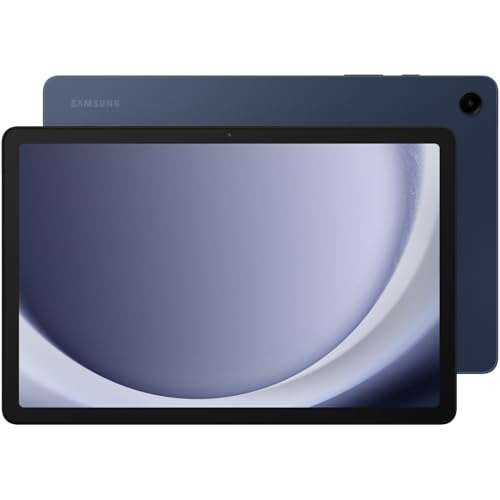
Samsung Galaxy Tab A9+ 11 — 64GB — The tier’s all-round benchmark
The A9+ is the tablet this tier is measured against, and spending time with its spec sheet explains why: an 11-inch screen refreshing at 90Hz, four speakers with Dolby Atmos support, a slim metal body, and Samsung’s One UI software with the update habits that lead this class. For the household jobs — streaming in bed, browsing on the sofa, video calls with grandparents, a child’s homework apps, split-screen recipe-and-timer duty in the kitchen — it simply refuses to be the weak link. The 90Hz panel deserves its sentence: scrolling through news, feeds and documents feels visibly smoother than the 60Hz standard of the tier, a small luxury encountered a hundred times a day.
This listing carries 64GB of storage, which is the pick’s one number to manage with open eyes. Apps and system files claim their share early; the saving grace is the microSD slot, which turns a cheap card into a downloads vault for films and music while the internal space serves apps. Samsung’s software polish also brings DeX-style multitasking ambitions that the hardware mostly honours for light work. Against the tier, the A9+’s argument is completeness: no single feature leads the class by a mile, but no feature is missing, dated or apologetic either — the definition of a benchmark, and the default recommendation for a buyer who wants one tablet to do everything reasonably.
- Display: 11-inch LCD with 90Hz refresh
- Storage: 64GB on this listing, expandable by microSD
- Audio: quad speakers with Dolby Atmos
- System: Android with Samsung One UI and class-leading update support
- Build: slim metal body, face unlock
Strengths
- The 90Hz screen makes everyday scrolling feel a class above the tier.
- Quad speakers give films and calls a fullness rivals rarely match here.
- Samsung’s update runway stretches the tablet’s useful years.
Trade-offs
- 64GB internal storage leans on a microSD card for download-heavy homes.
- It sits at the tier’s upper edge, so the value case must be made on completeness.
- No pen is included, and handwriting is not this model’s party trick.
Best for: households wanting one do-everything Android tablet for streaming, browsing, calls and schoolwork.
Not suited for: heavy gamers chasing flagship frame rates, or buyers who need a pen in the box.

Lenovo Tab M11 — Entertainment with a pen option
Lenovo builds the M11 around a simple observation: at this tier, the tablet is the household television, radio and paperback in one object — so the screen and speakers get the budget. The 11-inch display is sharp and bright enough for garden reading, the speakers are tuned with unusual care for the class, and the whole slate feels assembled by people who watch films on their own products. Where the M11 separates itself from the A9+ is the pen: Lenovo’s stylus support turns the same slab into a notebook for lists and lecture notes and a sketchpad for idle drawing, a second career the Samsung does not offer at this position.
The compromises are the tier’s usual ones, honestly worn. Performance is mid-pack — streaming, browsing and light games glide, demanding games ask for lowered settings — and Lenovo’s update commitment, while respectable, runs shorter than Samsung’s marathon. Storage on this listing is a comfortable 128GB, which quietly removes the download anxiety that shadows the 64GB A9+. Buyers choosing between the two 11-inch names are really choosing a philosophy: Samsung’s polish and longevity, or Lenovo’s entertainment punch, pen option and roomier cupboard. Neither philosophy is wrong; the M11 simply argues its side with speakers you can hear across a kitchen.
- Display: 11-inch panel refreshing at 90Hz
- Storage: a roomy 128GB inside this listing
- Pen: accepts Lenovo stylus input (pen availability varies by bundle)
- Audio: quad speakers with Dolby Atmos
- System: Android with Lenovo’s reading and kids modes
Strengths
- Screen-and-speaker pairing is tuned for films first, and it shows.
- Stylus support adds note-taking and sketching careers to a media tablet.
- 128GB storage swallows downloads without card juggling.
Trade-offs
- Software updates run on a shorter horizon than Samsung’s.
- Mid-range performance asks demanding games to lower their settings.
- The pen may be a separate purchase depending on the bundle offered.
Best for: film-and-series households that also want occasional handwritten notes from the same screen.
Not suited for: buyers who rank a decade of updates above tonight’s entertainment.
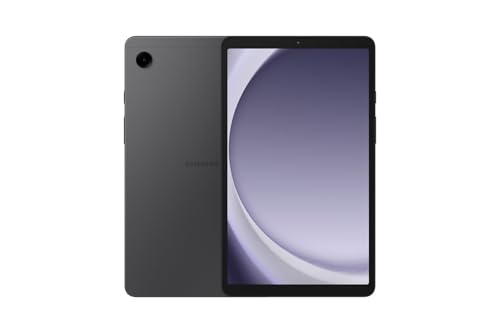
Samsung Galaxy Tab A9 8.7 — The compact Galaxy
Not every tablet job wants eleven inches. The A9 shrinks the Galaxy experience to 8.7 inches — a size that fits one adult hand, a coat pocket, a child’s two hands and the seat-back pouch on a train — and discovers that most reading, browsing and video survives the shrinking happily. For commuters and travellers this is the Samsung to buy: the same One UI software, the same Play store, the same account and apps as a Galaxy phone, in a slate that never asks to be left at home for its bulk. It is also a stealthily good children’s tablet in a decent case, a role this guide explored in its kids roundup and happily repeats here.
Two cautions ride on this listing specifically. It is the international version of the A9 — the pool notes its EU-style title — so buyers should confirm language defaults, warranty handling and charger details suit their region before ordering, a five-minute check that prevents a month of annoyance. And the compact class’s physics apply: a smaller screen crowds split-screen work, the battery is smaller, and 64GB with expansion is a plan rather than an abundance. None of that dents the core proposition for its intended owner, who values the tablet that is present over the tablet that is impressive. Presence wins most days.
- Display: 8.7-inch compact LCD
- Storage: 64GB fitted, with microSD expansion available
- System: Android with Samsung One UI
- Listing note: international version — verify regional and warranty details
- Build: light, one-hand-friendly Galaxy design
Strengths
- Galaxy software and Play access in the most portable size here.
- One-hand weight makes it the reading and commuting pick.
- microSD expansion offsets the modest internal storage.
Trade-offs
- The international listing requires a careful regional check before buying.
- Small screen crowds multitasking and split-screen study.
- Speakers and battery are sized for the frame, not for a living room.
Best for: commuters, travellers and readers who want Samsung’s ecosystem in a tablet that actually travels.
Not suited for: households seeking one shared family screen for films and homework side by side.

Lenovo Tab One — The light, simple traveller
The Tab One is the smallest, simplest idea in this guide executed cleanly: an 8.7-inch HD Android tablet for reading, shows, browsing and calls, with no ambitions it cannot afford. Lenovo pitches it at the everyday end of life — the kitchen-counter recipe screen, the bedside news reader, the grandparent’s video-call window, the child’s supervised streamer — and its modest specification serves those jobs without the cost of pretending otherwise. In a market addicted to overclaiming, a tablet that knows its job description this precisely is almost refreshing.
Its limits are the honest kind, visible from the listing: HD resolution rather than the sharper panels above it in this guide, entry-level memory and storage that suit streaming far better than a hundred installed games, and speakers built for one listener at arm’s length. Buyers should therefore assign it the light duties it advertises and resist the mission creep that turns a bedside reader into the household’s everything screen. Kept in its lane, the Tab One is the pick for a second tablet, a travel spare, or a first Android slate for a family member whose needs begin and end with the joyful basics.
- Display: 8.7-inch HD panel
- Storage: 64GB on this listing with modest memory for light duties
- System: Android with Google Play access
- Design: light, simple, travel-first build
- Role: reading, streaming, browsing and video calls
Strengths
- Straightforward Android in the handiest travel size in the guide.
- Light weight suits bedside reading and older users’ hands.
- Full Play store access keeps every mainstream service available.
Trade-offs
- HD resolution is visibly softer than the sharper screens above.
- Entry performance rules out demanding games and heavy multitasking.
- Storage fills quickly if downloads are not pruned occasionally.
Best for: readers, travellers and grandparents who want the Android basics in a light, pocketable slate.
Not suited for: gamers, film buffs chasing the sharpest panel, or a household’s one and only screen.

Acer Iconia Tab P10 — The overlooked 2K value
Acer’s presence in this guide surprises shoppers who thought the brand left tablets years ago; the Iconia Tab P10 is the evidence that it stayed, and stayed competitive. Its headline is the 10.4-inch 2K display — a resolution tier above most of this category — which flatters text, photos and films alike, paired with 128GB of storage that treats downloads generously. For readers and viewers whose eyes notice pixel softness, the P10 offers the sharpest window in the affordable tier from the brand nobody remembered to check, which is exactly how quiet value usually hides.
The trade-offs are about ecosystem rather than hardware. Acer’s software layer is plainer than Samsung’s, its update cadence less loudly promised, and its accessory shelf — cases, keyboards, pens — thinner than the big names’, so a buyer outfitting the tablet joins a smaller aftermarket. Performance is squarely mid-tier: the daily jobs run well, the heroic ones should not be assigned. Households that buy the screen in front of them rather than the logo above it will find the P10 the connoisseur’s pick of this list; households that value a vast accessory ecosystem and the longest update story should let Samsung’s name outweigh Acer’s panel.
- Display: 10.4-inch 2K LCD — the sharpest panel in this guide
- Storage: a comfortable 128GB built in
- System: Android with a light Acer software layer
- Build: slim metal-style body for its class
- Extras: microSD expansion for media libraries
Strengths
- The 2K display gives text and film a crispness rivals here skip.
- Roomy 128GB storage arrives without card arithmetic.
- A genuinely competitive option from outside the usual two brands.
Trade-offs
- Accessory and case selection trails Samsung and Lenovo noticeably.
- Update commitments are quieter and shorter than the leaders’.
- Brand support networks are thinner in some regions.
Best for: sharp-eyed readers and viewers who buy the panel, not the badge.
Not suited for: households that rank a deep accessory ecosystem and the longest promised update runway first.

Amazon Fire HD 10 — Fire OS media specialist
Begin with the label, because this guide always does with this device: the Fire HD 10 does not run Google’s Android. It runs Fire OS, Amazon’s own system, with Amazon’s Appstore where the Play store would be and Amazon’s services woven where Google’s would sit. Within that world, it is a genuinely strong media tablet — a bright 10.1-inch full-HD screen, performance that streams and browses without complaint, battery life that outlasts most of this list, and an Alexa-powered hands-free mode that turns it into a kitchen and bedside companion. As a Prime Video and Kindle machine, it may be the most coherent device in this entire guide.
The buyer’s question is purely whether Amazon’s world is their world. Households deep in Prime, Kindle and Alexa will feel the integration as convenience; households whose lives run on Google apps, Play purchases and Google services will feel the walls within the first evening. Children inherit the same fork: Amazon’s parental controls are excellent, but the app shelf is Amazon’s to curate. This guide’s verdict is deliberately two-handed — the Fire HD 10 is recommended, warmly, as a Fire OS tablet for Amazon households, and recommended against, just as warmly, for anyone who read this guide’s title and expects Google Android to be waiting inside the box.
- System: Fire OS — not Google Android; no Play store by default
- Display: 10.1-inch full-HD screen
- Store: Amazon Appstore with the major streaming services
- Extras: Alexa hands-free mode, strong battery life
- Content: built around Prime Video, Kindle and Amazon services
Strengths
- Excellent streaming and reading experience inside Amazon’s ecosystem.
- Battery endurance that outlasts most rivals in this guide.
- Hands-free Alexa mode suits kitchens, desks and bedside tables.
Trade-offs
- No Google Play store or Google apps by default — the defining limit.
- The Appstore’s long tail is thinner than Play’s catalogue.
- Workarounds to add Google services are unsupported and fragile.
Best for: Households centred on Amazon wanting a dedicated Prime Video, Kindle and Alexa screen.
Not suited for: households whose apps, purchases or school requirements live in Google Play.
What Does a Month of Family Life Ask of These Tablets?
Benchmarks fade; routines remain. Across a month, the family tablet is a morning news screen, a homework referee, a recipe holder splashed with sauce, a film projector on Friday, a video-call window on Sunday and a pacifier of last resort in every waiting room in between. Scored against that month, raw speed barely registers — what registers is whether the screen washes out under kitchen lights, whether the speakers lose a film’s dialogue to a boiling kettle, whether the battery died before the Sunday call, and whether the storage warning appeared during the Friday download. This is why the guide’s rankings favour the A9+’s speakers and support, the M11’s screen-and-sound pairing, and the compacts’ sheer presence: they are the attributes a month actually audits.
The month also audits the household’s own systems. Tablets that live on a charger shelf stay charged; tablets with a downloads routine stay spacious; tablets whose cases were bought on day one stay uncracked. The affordable tier forgives modest hardware and punishes absent routines, which is oddly hopeful news — most of what decides satisfaction costs nothing but the first evening’s attention. Choose the pick whose strengths match your month’s busiest hours, install the routines in week one, and the tier’s compromises will mostly stay where they belong: in reviews, not in your evenings.
How Do You Choose a Screen Size Without Regretting It by Winter?
Size is the decision buyers feel every day and research the least, so anchor it to furniture rather than feelings. The 11-inch picks belong on sofas, kitchen counters and desks — places with a surface or a lap to share the weight — and they reward that setting with split-screen room and film presence. The 8.7-inch picks belong in hands, bags and beds: one-handed reading, commuting, a child’s grip, a traveller’s personal item. The 10.1 and 10.4-inch middleweights split the difference and suit households that cannot decide, which is a legitimate constituency and exactly who they are built for.
Weight deserves the same furniture test as size, because a tablet’s grams are paid by the hour. A film watched on a propped tablet costs no strength at all; a novel read holding the same tablet costs a wrist tax that compounds by chapter. If your tablet life is mostly held, buy smaller or lighter than your eyes first suggest; if it is mostly propped, buy the largest screen the budget tier allows and never think about weight again. Regret in this category is rarely about resolution — it is about a device whose physical habits fight the rooms it lives in.
What About Privacy and Accounts on a Shared Family Tablet?
Shared tablets accumulate a household’s digital life — accounts signed in “temporarily,” photos synced by default, a browser that remembers everyone’s searches. A few deliberate settings keep the sharing comfortable: separate user profiles where Android offers them, so each person’s apps and files stay their own; a guest mode for the visitor who needs a browser for an evening; and a family decision about which accounts — banking above all — simply never sign in on the shared screen. The Fire HD 10’s profiles draw the same lines inside Amazon’s system, with the added clarity of its child profiles for younger users.
None of this requires paranoia, only the same first-evening attention this guide keeps prescribing. The affordable tier’s tablets are fully capable of holding a family’s accounts safely; they are not capable of deciding the family’s rules. Set the profiles before the first sign-in rather than after the first awkward discovery, and the shared tablet remains what it was bought to be — the household’s most agreeable screen.
How Do You Set Up an Affordable Android Tablet So It Stays Fast?
The first evening decides the third year. Begin by installing only the apps the tablet was bought for; every speculative install becomes background processes, notifications and storage pressure. Move downloads — films, music, podcasts — to the microSD card where a slot exists, reserving internal storage for apps, because Android stays responsive while its home storage breathes and sulks when it suffocates. Turn on automatic updates for both system and apps, then schedule the household’s downloads for overnight charging so the tablet’s waking hours belong to people rather than progress bars.
Monthly, spend the two minutes nobody wants to spend: clear the downloads folder of watched films, evict the games nobody has opened since installation, and check which three apps own the battery report. Affordable hardware has less headroom for clutter than flagships do, and the difference between a three-year-old tablet that feels tired and one that feels fine is usually housekeeping, not silicon. Lenovo and Samsung both bury useful storage and battery dashboards in settings; Acer keeps things plainer; the Fire HD 10 manages much of this itself inside Amazon’s garden. The tools differ — the habit is the whole secret.
What Does the Whole Line-Up Look Like on One Table?
| Pick | System | Screen | Storage story | Personality |
|---|---|---|---|---|
| Galaxy Tab A9+ | Android, One UI | 11-inch, 90Hz | 64GB plus microSD | The complete all-rounder |
| Lenovo Tab M11 | Android | 11-inch, 90Hz | 128GB | Entertainment with a pen option |
| Galaxy Tab A9 8.7 | Android, One UI | 8.7-inch | 64GB plus microSD | The travelling Galaxy (international listing) |
| Lenovo Tab One | Android | 8.7-inch HD | 64GB | The light, simple traveller |
| Acer Iconia Tab P10 | Android | 10.4-inch 2K | 128GB | The sharp-screen value pick |
| Fire HD 10 | Fire OS, not Android | 10.1-inch full HD | Amazon-managed | The Amazon-ecosystem specialist |
Let the system column lead your eye, because it is the only irreversible choice in the table — screens can be lived with, storage can be expanded, but an ecosystem is a citizenship. After citizenship, the screen column sorts by furniture and the storage column by download habits, and most households will find their answer sitting at the intersection of those three honest answers.
Which Buying Errors Haunt This Tier Most?
The flagship error is buying the Fire HD 10 believing it to be an Android tablet, then meeting the missing Play store on the first evening — an error this guide has now warned against often enough that committing it requires determination. Second is storage optimism: choosing the smallest capacity because the tablet is “only for streaming,” then discovering downloads, games and a child’s app collection. Third is its mirror, paying for capacity and power the household’s actual jobs never touch, because a comparison table made restraint feel like failure.
A sixth mistake hides in the compact corner: buying the small tablet for a child or an older parent and forgetting that small screens shrink text as faithfully as they shrink weight. The remedy is in the settings — display size and font controls on every Android pick here can trade a little information density for a lot of legibility — but the buyer should make that trade knowingly, ideally with the eventual reader in the room, rather than discovering it at the first squint.
Fourth comes update blindness — buying the cheapest name on the shelf with no support horizon, and owning a streaming-only relic by year three. Fifth is accessory amnesia for the compact picks: an 8.7-inch tablet bought for travel without a case or a stand lives a shorter, sadder life than its specification promised. Each error shares a shape: a decision made on the headline attribute while the ownership attribute went unexamined. This tier rewards the unglamorous questions — which store, how much room, how long supported, what case — asked before the checkout rather than after the unboxing.
Why Do Two Tablets With Similar Specifications Feel So Different?
Because the specification sheet omits the software’s manners. Touch response tuning, the launcher’s animation discipline, how aggressively the system kills background apps, whether the screen’s colour profile flatters skin tones — these invisible decisions separate a tablet that feels eager from one that feels reluctant, even on comparable processors. It is why this guide leans on brand behaviour: Samsung’s tuning at this tier is consistently careful, Lenovo’s is entertainment-led, Acer’s near-stock plainness avoids sins in both directions, and Amazon’s Fire OS is polished precisely because its garden is small enough to polish completely.
The practical consequence for shoppers is to weight the maker’s track record alongside the numbers, and to distrust any comparison that stops at cores and gigahertz. A slightly slower tablet with well-mannered software outlives, in daily affection, a faster one that stutters through its own interface. The picks above were chosen with that hierarchy in mind — which is also why the guide forgives the Tab One’s modest figures: within its light brief, its manners are good, and manners are what an owner actually meets.
How Long Will an Affordable Android Tablet Stay Pleasant?
Three forces set the lifespan, and only one of them is the processor. Battery ageing is the physical clock: daily-charged media tablets typically feel their capacity fade after a few years, mitigated by the overnight-charging, not-too-hot habits that cost nothing. Software support is the institutional clock, and it is why this guide keeps weighing Samsung’s commitments so heavily — a tablet receiving updates stays compatible with the services it was bought for. Storage pressure is the household clock, ticking faster in homes that never delete anything, and it is the only one of the three entirely within the owner’s control.
One habit stretches all three clocks at once: keeping the battery between the comfortable middle of its range during long plugged-in stretches at a desk or kitchen counter, rather than baking at full charge beside a hot oven or a sunny window. Heat is the silent accelerant of every ageing process in a tablet, and the affordable tier’s plastic-and-glass builds forgive drops better than they forgive summers on a dashboard. Treat the device like the household appliance it is — charged, shaded, updated — and its years accumulate quietly.
Realistically, a well-chosen pick here serves four or more pleasant years as a media and browsing device, longer as a dedicated reader or kitchen screen after its front-line retirement. The afterlife is part of the value: yesterday’s family tablet becomes the recipe display, the smart-home dashboard, the guest-room streamer. Buy the pick whose screen and speakers will still flatter those second careers, and the affordable tier’s arithmetic becomes quietly excellent.
Which Accessories Are Worth Adding to a Budget Tablet?
A case is the only universal accessory, and at this tier it should be bought with the tablet, not after the first drop: a folio for the sofa-bound 11-inch models, a rugged shell for anything a child or a commuter will carry. A simple stand earns its place in kitchens and on desks, holding the screen at reading angle for recipes and calls. Beyond those two, spend with suspicion. Keyboard cases promise laptop transformation that affordable processors only partly honour — fine for email and documents on the A9+ or M11, disappointing as a full work conversion. A stylus makes sense only where the tablet supports a proper one, which in this guide means the M11’s pen option; capacitive rubber-tip pens on the others are drawing crayons, not instruments.
Storage is the accessory disguised as a component: a good microSD card for the Samsung picks converts their one weak number into a non-issue, and it should ride in the same order. Screen protectors divide households — the matte kind that helps readers in bright rooms also softens the sharp panels that justify the Acer — so treat them as a preference, not a default. The pattern across all of this is the tier’s own philosophy: protect the device, expand its one bottleneck, and let everything else prove it is needed before it is bought.
How Does This Tier Serve Older Users and First-Time Tablet Owners?
A remarkable share of affordable Android tablets are bought for parents and grandparents, and the category quietly suits them: large text settings, simple launchers, video calling that works from a contact photo, and screens that turn photo albums into coffee-table books. The A9+ and M11 serve this audience best at home — big, bright, loud enough for a kitchen — while the Tab One’s lightness suits hands that tire. Setup is the family’s real task: font sizes raised, home screen reduced to the dozen icons that matter, updates set to automatic, and the video-call app pinned where a thumb expects it.
Fire OS deserves its sentence in this section too, because Amazon’s tablets are famously gentle for Prime households — the content is simply there — provided the family’s younger generation accepts the role of occasional tech support for an ecosystem they may not use themselves. Whichever system is chosen, the gift succeeds or fails in the first setup hour, not in the specification. This guide’s picks were partly chosen with that hour in mind: mainstream systems, mainstream apps, and nothing that requires a workaround to reach a grandchild’s face on a Sunday call.
What Gaming Can This Tier Honestly Handle?
Gaming marketing for affordable tablets deserves a translator. The honest translation: puzzle games, card games, platformers, strategy titles and the enormous library of casual Android games run beautifully on every pick here, and the bigger screens with stereo speakers genuinely elevate them. The giant competitive shooters and racing flagships also install and play — at reduced settings, with frame rates that serious players will feel in their thumbs within a match. Nobody in this tier is a gaming tablet, and the player whose primary purpose is high-refresh competitive play should save toward a different category entirely rather than ask these screens to be what they are not.
Within those honest bounds, the ranking follows speakers and screens more than chips. The A9+ and M11 make the best gaming impressions of the group — large panels, four speakers, 90Hz smoothness in the titles that support it — while the compact picks serve the train-journey gaming that suits their size: short sessions, lighter titles, a tablet that vanishes into a bag at the destination. Cloud gaming services redraw the map somewhat, since a streamed game asks the tablet only for a good screen, good Wi-Fi and low-latency decoding; on a strong home connection, even the Tab One can display a flagship title handsomely, with the caveat that the experience is rented from the network rather than owned by the hardware.
Parents should note the tier’s quiet gaming virtue: every Android pick here runs under Google’s family controls, so purchases, playtime and age ratings can be governed from a parent’s phone. The Fire HD 10 answers with Amazon’s own well-regarded parental controls inside its ecosystem. Either way, the affordable tier’s games are governable games, which for family households is worth more than a frame-rate chart.
How Do Samsung’s and Lenovo’s Software Layers Actually Differ?
Both sit on Android, but the daily texture differs enough to sway a decision between the guide’s two 11-inch rivals. Samsung’s One UI is the more ambitious layer: a mature split-screen and pop-up window system, a taskbar that makes the A9+ feel faintly like a small computer, deep integration with Galaxy phones for calls, messages and clipboard sharing, and settings organised by years of refinement. Households already carrying Galaxy phones will feel the A9+ as an extension of a familiar country; newcomers will find more features than they use and a settings menu that rewards exploring.
Lenovo’s layer on the M11 is quieter: a cleaner, closer-to-stock Android with a well-judged reading mode, a kids’ space, and entertainment-first touches like its speaker tuning carried into the software’s sound profiles. It asks less learning of its owner and offers less power in return — a fair trade that suits the M11’s media-first brief. Acer’s software is quieter still, nearly stock, which some buyers actively prefer: what you see is Android itself, with updates and behaviour close to Google’s reference. None of the three layers is a mistake; they are three temperaments, and the household that knows its own — power, entertainment or simplicity — will choose correctly among them.
What Should You Load Before a Flight, a Deadline or a Power Cut?
The affordable tablet’s finest hour is the disconnected one, and it is earned the night before. Download films and episodes inside each streaming app rather than trusting hotel Wi-Fi; save offline maps for the destination; pull the documents, boarding passes and reading queue into local storage; and confirm the downloads actually play with Wi-Fi switched off, because licence checks and half-finished downloads choose the worst moments to confess. The microSD-equipped picks shine here — a card loaded at home turns the A9+ or the little A9 into a cinema that owes nothing to any network.
Battery habits complete the preparation. These tablets sip power compared with laptops, and a full charge covers a long-haul day of mixed use for most of them, but screen brightness is the throttle: a film at half brightness can nearly double the endurance of the same film at full blast. A modest power bank in the bag converts the compact picks into all-day travel companions and costs less than the airport coffee beside them. Prepared this way, the affordable tier stops being the budget option and becomes, for travel specifically, the sensible one — light, long-lived and cheap enough to risk the journey.
Final Recommendation
Start with citizenship: Google Android or Amazon’s Fire OS, chosen knowingly. Inside Android, the Galaxy Tab A9+ is the default this guide defends — complete, polished and supported the longest — while the Tab M11 takes the entertainment vote with its speakers, storage and pen option, and the Iconia P10 takes the sharp-screen vote for readers who buy panels rather than logos. Shrink the choice for travel and the A9 8.7 and Tab One divide it by ecosystem loyalty. The Fire HD 10 closes the list as the finest non-Android value here, for the households whose content already lives in Amazon’s house. Pick by the rooms the tablet will live in and the store it will shop in, and this tier will treat you far better than its modest reputation suggests.
Frequently Asked Questions
Is the Fire HD 10 an Android tablet?
Not in the way shoppers mean. Fire OS is built from Android’s open-source foundation, but it has no Google Play store, no Google apps by default and its own Amazon Appstore instead. Treat it as a separate ecosystem that happens to share ancestry with Android, and choose it only if Amazon’s world is where your content lives.
How much storage does an affordable tablet really need?
Streamers who rarely download can live comfortably with 64GB, especially with a microSD slot for films. Households with children, games or offline travel libraries should start at 128GB or confirm expansion exists. Storage is the specification that cannot be upgraded later on most of these devices, so it deserves the benefit of every doubt.
Can these tablets handle schoolwork and homework apps?
The true Android picks can — Google Classroom, Meet and the mainstream education apps all live on the Play store, and the 11-inch models split-screen a document beside a browser comfortably. Fire OS covers many learning services through its own store and the web, but a school that mandates specific Google apps points firmly at the Android picks.
Which pick is best for reading books and news?
Comfort decides it: the compact A9 8.7 and Tab One suit held reading in bed and on trains, while the Iconia P10’s 2K panel flatters long text sessions at a table. Heavy Kindle-library households should also weigh the Fire HD 10, whose reading experience inside Amazon’s ecosystem is seamless — at the cost of that ecosystem’s walls.
Can these tablets replace a laptop for a student or a light worker?
For notes, reading, email, documents and lectures, the 11-inch picks with a Bluetooth keyboard come surprisingly close, and many students run exactly that combination. The honest boundary is specialised software — statistics packages, coding environments, heavy spreadsheets — where a laptop remains the right tool. Treat the tablet as the companion that covers eighty percent of days, and judge whether your remaining twenty percent justifies the second machine.
How do I move my apps and photos from an old tablet to a new one?
Android’s setup flow offers to copy from the old device by cable or Wi-Fi, and Google account backup restores apps, photos and settings for most households without drama. Samsung owners moving within the brand get Smart Switch, which is thorough to a fault. Set aside an unhurried hour, keep both tablets charged, and the migration is the easiest part of the upgrade.
Is Wi-Fi-only enough, or should I look for a cellular model?
For most households, Wi-Fi-only is enough: phones hotspot in emergencies, and home, school and café networks cover the routine. Cellular models in this tier are scarce and often region-specific imports with their own warranty caveats. Buyers who genuinely commute beyond coverage know who they are — everyone else should spend the difference on storage or a better screen.
Do affordable Android tablets get security updates for long?
It varies by brand, and the variation matters. Samsung supports this tier the longest and most predictably; Lenovo’s horizon is shorter but respectable; smaller brands promise less. A tablet that stops receiving updates should retire from banking and sensitive accounts even if it still streams happily.
Should I buy last year’s model or a refurbished flagship instead?
Sometimes that is the smarter money — a discounted previous-generation Galaxy Tab often brings a better screen and longer remaining support than a new budget model. The cautions are battery age on refurbished units and confirming the update horizon that remains. This guide’s picks are the safe new-with-warranty route; the used flagship is the connoisseur’s gamble, best taken with a returns window.
Do these tablets work with a Bluetooth keyboard for writing?
Yes — every pick pairs with ordinary Bluetooth keyboards, and Android’s word processors handle documents comfortably at this tier. The 11-inch models make the most convincing writing desks. Manage expectations for heavy multitasking, and the combination serves students, journallers and email-heavy travellers well.
Can I make video calls and use these for remote work?
Video calls, yes — every pick handles the mainstream calling apps within its ecosystem, and the larger screens flatter family calls. Remote work is a lighter claim: email, documents and browsing are fine, especially on the 11-inch models, but these are companion devices rather than laptop replacements for heavy office suites.
Are extended warranties or protection plans worth it at this tier?
For a tablet that lives on a sofa, usually not — the tier’s modest replacement cost is its own insurance. For a tablet carried daily by a child or a commuter, a plan that covers cracked screens can pay for itself in a single incident. Read what the plan counts as damage before buying it; the honest maths is the probability of a drop in your household, not the salesperson’s.
Related Guides
Keep browsing with our favourite compact tablets for travel, the family-focused picks in tablets that keep children safe and entertained, and the student tablet roundup for notes and reading.


