Our Top Picks




What's inside
- Why a yoke mount matters for EFB flying
- How the mounts in this guide differ
- FlightPro ProAviator EFB and iPad yoke mount
- FlightPro Aviator Plus yoke and suction cup mount
- FlightPro Aviator Plus yoke mount with 360 degree adjustable clamp
- FlightPro 3-in-1 aviation EFB and iPad mount
- RAM Mounts EZ-Roll’r iPad mini yoke mount
- ZUZUXI iPad yoke mount with 360 degree rotation
- woleyi aluminum tablet yoke mount with large clamp
- Yoke, suction, and kneeboard positions compared
- Tablet size, cases, and yoke fit
- Stability, vibration, and readability in flight
- Setup routine and preflight checks
- Which mount suits which pilot
- Care, storage, and longevity
- Check prices on Amazon
- Conclusion
As an Amazon Associate I earn from qualifying purchases. This post may contain affiliate links at no extra cost to you.
For general aviation pilots, the tablet has quietly become the center of the cockpit. Electronic flight bag apps now carry charts, approach plates, weather overlays, traffic displays, checklists, and flight planning tools that once filled a heavy flight bag. None of that information helps if the tablet is sliding around on a knee, balanced on a passenger seat, or held at an awkward angle that forces a pilot to look down and away from the flight path at the busiest moment of a flight. A yoke mount solves that placement problem by attaching the tablet directly to the control yoke, putting the display close to the natural scan, within easy reach, and in roughly the same position on every flight. This guide covers the best yoke mounts for tablets available for GA cockpits, explains how the different designs work, and helps match a mount to a specific tablet, yoke, and flying style.
An honest note about the shape of this market is useful at the start. Four of the seven mounts in this guide come from FlightPro, a specialist maker focused on aviation EFB mounts. That concentration reflects the listings themselves rather than an attempt to pad the list: FlightPro sells a small family of related designs, including the ProAviator, two versions of the Aviator Plus concept, and a versatile three in one system that works as a yoke mount, a suction mount, and a kneeboard. Alongside that family, this guide includes the RAM Mounts EZ-Roll’r yoke mount for iPad mini, the ZUZUXI aluminum yoke mount with full rotation, and the woleyi aluminum yoke mount built around a large, thick case friendly clamp. Together those seven options cover the main choices a GA pilot actually faces: a dedicated yoke only clamp, a dual yoke and suction system, a flexible multi position system, and a device specific cradle from an established mounting brand.
Why a yoke mount matters for EFB flying
The core advantage of a yoke mount is position. In most piston singles and light twins, the yoke sits directly in front of the pilot, moves only a short distance in pitch and roll, and already occupies the space the eyes pass through when scanning between the outside view and the instrument panel. Placing the EFB there shortens the glance needed to check a chart or confirm a frequency, and it keeps both hands close to the controls because a tap or pinch on the screen requires only a short reach. Compared with a kneeboard, a yoke mounted tablet is less likely to shift when the pilot moves a leg, reaches for a checklist, or braces in turbulence. Compared with a suction mount on a side window, it sits closer to the centerline and is easier to read without turning the head far to one side.
Consistency matters just as much as position. When a tablet lives in the same place on every flight, the pilot builds a habit around it: the chart is always in the same corner of the scan and the charging cable can be routed the same way each time. That repeatability reduces workload, especially for instrument flying. A loose tablet breaks that habit and forces the pilot to spend attention on managing the device instead of flying the airplane.
There are tradeoffs, and a good buying decision acknowledges them. A yoke mount adds weight to a control that the pilot moves throughout the flight, and a large tablet can partially obscure instruments or controls behind it depending on cockpit layout. The mount and tablet also move with the yoke, which most pilots adapt to quickly for en route and approach reference but which can feel busy during takeoff, landing, or maneuvering if the display is large. For those reasons, yoke mounts are most popular for cross country and instrument flying in airplanes with generous panel space in front of the pilot, and many pilots pair a yoke mount with a smaller tablet such as an iPad mini for exactly that balance of readability and clearance. The mounts in this guide span that range, from mini focused cradles to holders that accept full size tablets.
best aviation headsets with noise canceling
How the mounts in this guide differ
Although all seven mounts attach a tablet for cockpit use, they differ in three important ways: how they grip the yoke, how they hold the tablet, and what else they can do besides yoke mounting. Yoke attachment is usually a clamp that closes around the yoke shaft or column. Because yoke shafts vary in diameter and shape between aircraft types, clamp range and padding matter, and the one mount in this guide that publishes an explicit clamp range, the RAM Mounts EZ-Roll’r, states that its yoke clamp fits rails from 0.625 inch to 1.25 inches. Other makers describe their clamps in more general terms, so confirming fit against a specific airplane remains an essential step before relying on any mount in flight.
Tablet retention is the second dividing line. Some mounts use an adjustable clamp or holder that expands to grip many different tablets and phones, which suits pilots who change devices or share an airplane. Others, notably the RAM Mounts EZ-Roll’r in this guide, use a cradle shaped for a specific device, in that case the iPad mini 6 and the iPad mini with A17 Pro generation hardware as described in the product title. A device specific cradle can feel more secure and can make insertion and removal faster and more repeatable, but it ties the mount to that tablet size. An adjustable holder is more flexible and often more forgiving of protective cases, at the cost of more moving parts to tighten and check.
Versatility is the third difference. The FlightPro Aviator Plus listing that pairs a yoke mount with a suction cup, and the FlightPro three in one system that adds a kneeboard mode, are designed for pilots who fly more than one airplane or who want a backup placement if a yoke clamp does not suit a particular cockpit. A suction option can move the tablet to a smooth window or panel surface, while a kneeboard mode returns the tablet to the leg for airplanes where yoke mounting is impractical. A dedicated yoke only mount, by contrast, does one job with fewer adapters and fewer joints. Neither approach is inherently better; the right choice depends on whether a pilot flies one familiar airplane or many different ones.
FlightPro ProAviator EFB and iPad yoke mount
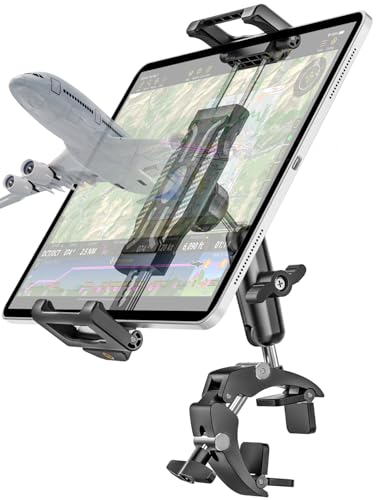
The FlightPro ProAviator is positioned in its listing as an EFB and iPad yoke mount for the Pro, Mini, and phones, and it is described as rock solid for GA cockpit use. Read plainly, that title tells a pilot the essentials: this is the dedicated, aviation first design in the FlightPro family, it is intended to cover the main Apple tablet sizes that GA pilots carry as well as phones used as secondary displays, and stability in a working cockpit is its headline promise. For a pilot who flies one airplane most of the time and wants a mount that does nothing but hold an EFB firmly on the yoke, the ProAviator is the natural starting point in the FlightPro range and the reference against which the more flexible Aviator Plus variants should be compared.
That focus has practical value. A dedicated yoke mount has fewer configuration choices to get wrong, and the pilot can develop a single repeatable routine: clamp on, seat the tablet, set the angle, route the cable, and fly. For owner pilots and pilots who rent the same type repeatedly, that simplicity often outweighs versatility, and the fairest comparison for the ProAviator is against the other dedicated clamps in this guide, the ZUZUXI, the woleyi, and the RAM Mounts cradle.
Because the ProAviator title names iPad Pro, iPad mini, and phones together, it speaks to a common GA reality: many pilots own more than one screen. A full size iPad might serve for flight planning and detailed chart study, a mini for everyday yoke use, and a phone for a traffic or weather app alongside the main display. A holder that can adapt across those sizes lets the pilot standardize on one yoke attachment rather than buying and learning several mounts. Pilots considering the ProAviator should still confirm how their specific tablet, especially in a protective case, seats in the holder, because a title that lists broad compatibility is a starting point for checking, not a substitute for measuring the actual device and case combination that will fly.
FlightPro Aviator Plus yoke and suction cup mount
The FlightPro Aviator Plus listing with ASIN B0DSLT24J3 describes an EFB and iPad mount that works as both a yoke mount and a suction cup mount for pilots, again with language about solid performance for GA cockpit use. The dual mode design is the story here. On an airplane where the yoke clamp fits well and panel clearance is good, the pilot uses the yoke position for the central, close in EFB view described earlier. On an airplane where the yoke shape, yoke travel, or panel layout makes that position awkward, the same tablet holder can move to a suction position on a suitable smooth surface. For renters, club pilots, and instructors who move between airframes, that fallback can be the difference between a mount that works every flight and one that only works in a favorite airplane.
Suction mounting brings its own discipline. A suction cup needs a clean, smooth, non porous surface and a fresh tug check before departure, because temperature and surface texture affect how well it holds. In many GA cockpits the side window is the realistic suction location, which moves the EFB off the centerline. That is still far better than a loose tablet, but it changes the scan, so a pilot who expects to use suction mode often should weigh it against the centered view a yoke only mount provides.
Viewed alongside the other FlightPro models, this Aviator Plus variant occupies the middle ground. It is more adaptable than the dedicated ProAviator, less expansive than the three in one system, and distinct from the other Aviator Plus listing in this guide, which emphasizes the yoke mount itself and its adjustable clamp. A pilot who already knows that yoke mounting works in a primary airplane but wants insurance for occasional flights in other types will find that middle ground appealing. A pilot who never flies anything else may prefer the simpler dedicated design and one less mounting surface to maintain and inspect.
FlightPro Aviator Plus yoke mount with 360 degree adjustable clamp
The second FlightPro Aviator Plus listing, ASIN B086PB51MK, describes a yoke mount and holder for iPad, tablets, and phones, with a 360 degree adjustable clamp and a claim in the title about no vibration in turbulence. Two ideas deserve attention. The first is full rotational adjustment. The ability to rotate the tablet through a complete circle means the pilot is not limited to a fixed landscape or portrait orientation and can fine tune the angle to reduce glare, to match the orientation an app presents best, or to clear an instrument or control that sits close behind the yoke in a particular cockpit. Charts are often most natural in portrait, many moving map displays are designed around landscape, and a mount that allows either, plus small corrections in between, avoids forcing the pilot to choose a mount around a single app layout.
The second idea is stability in turbulence, which the title raises directly. No title claim should be treated as a guarantee for every airplane and every bump, but the emphasis is well placed, because vibration and shake are the everyday enemies of a yoke mounted display. A screen that trembles is hard to read precisely when a pilot needs a fix name, an altitude restriction, or a minimums value at a glance. Clamp tightness, holder grip, arm length, and tablet weight all influence how steady a display feels, and a shorter, tighter setup generally presents a calmer screen than a long, loosely jointed one. Pilots comparing this Aviator Plus variant with the yoke and suction variant should decide which matters more in their flying: the second mounting surface, or the emphasis on rotational adjustment and steadiness in the yoke position itself.
Rotational freedom also helps with glare. GA cockpits are bright, sun angles change through a flight, and a small tilt can move a reflection off a chart without moving the whole mount. Combined with support for tablets and phones in one holder, this Aviator Plus version suits a pilot who expects to experiment during the first few flights to find the exact angle that suits a particular panel.
FlightPro 3-in-1 aviation EFB and iPad mount
The FlightPro three in one system, ASIN B0G1NJGGFZ, combines yoke, suction, and kneeboard mounting in a single aviation EFB and iPad mount, described in its title as rock solid for GA cockpit use. This is the most versatile design in the guide and, logically, the one with the most setup choices. Yoke mode gives the centered position. Suction mode gives an alternative fixed position on a suitable smooth surface. Kneeboard mode puts the tablet on the leg, which remains a familiar and workable position for many pilots, particularly in airplanes with very limited panel space, unusual yoke designs, or control layouts where a yoke mounted tablet would cover something the pilot needs to see or reach without obstruction.
Versatility of this kind is most valuable when a pilot’s flying is genuinely varied. A flight instructor who flies with students in several club airplanes, a renter who takes whatever airframe is available on a Saturday, or a pilot transitioning between types during training can carry one system and adapt it to the airplane of the day. The kneeboard option also provides a graceful fallback: if a clamp does not fit a particular yoke or a suction surface is not available, the flight does not have to revert to a loose tablet on a seat. That resilience has real safety and convenience value, because the worst EFB setup is the improvised one assembled under time pressure before departure.
The counterweight is complexity. More modes mean more parts and more to inspect, so a pilot using a three in one system should build a deliberate preflight habit for whichever mode is in use. Pilots who fly a single airplane should ask honestly whether they will ever use the second and third modes; if not, a dedicated mount will likely feel cleaner.
RAM Mounts EZ-Roll’r iPad mini yoke mount
The RAM Mounts EZ-Roll’r, ASIN B09K4PBSCQ, takes the opposite approach to the adjustable holders above: it is a yoke mount built specifically for the iPad mini 6 and the iPad mini generation identified in the title by its A17 chip, using the EZ-Roll’r cradle concept that RAM Mounts is known for across its product line. The title also provides the most concrete fit information in this guide: the yoke clamp fits rails from 0.625 inch to 1.25 inches, and the system uses a medium arm. For a mini owner, that specificity is valuable. Instead of wondering whether a universal holder will grip a smaller tablet firmly without excessive overhang or awkward padding, the pilot gets a cradle shaped for the device and a published clamp range to measure against the yoke shaft in the airplane.
The iPad mini itself deserves a word, because mount and tablet choices are inseparable. Many GA pilots regard the mini size as the sweet spot for yoke mounting: large enough for charts, plates, and a moving map to remain legible, small enough to limit how much of the panel it covers and how much weight sits on the yoke. A cradle designed for that size leans into those advantages. Insertion and removal in a shaped cradle also tend to be quick and repeatable, which matters during the busy minutes of securing the cockpit after landing or preparing for departure with a passenger waiting. A pilot who has committed to an iPad mini as the long term EFB device is exactly the buyer this mount addresses.
The limitation is the mirror image of the strength. A device specific cradle does not adapt if the pilot later moves to a larger iPad, an Android tablet, or a phone based setup, and it is not the mount to share among pilots carrying different devices. The published rail range also cuts both ways: it allows a precise fit check, and it means yokes outside that range are simply not suitable, no matter how appealing the cradle is. Pilots considering the EZ-Roll’r should measure the yoke shaft diameter at the intended clamp point, confirm the exact mini model against the title, and think about whether the medium arm length places the screen at a comfortable reading distance without crowding the yoke grips or the pilot’s hands through full control movement.
ZUZUXI iPad yoke mount with 360 degree rotation
The ZUZUXI mount, ASIN B0G2BYFYFW, is described as an iPad yoke mount and tablet holder clamp mount for aircraft, with 360 degree rotation, an adjustable aluminum construction, and compatibility spanning iPad Pro 12.9, iPad Air, iPad mini, and phones and tablets from 4.7 inches to 13 inches. That is the widest explicit size range among the adjustable holders in this guide, reaching up to the largest iPad Pro size. For a pilot who flies with a big tablet and has the panel clearance to support it, or who wants one mount that can hold anything from a phone to a full size tablet on different days, the ZUZUXI range is its defining feature. The aluminum construction named in the title will also appeal to pilots who prefer metal hardware for a clamp that will be tightened and adjusted regularly.
Full rotation, as with the Aviator Plus clamp above, gives the pilot control over orientation and glare. With a large tablet that control becomes even more important, because a big screen presents a bigger reflective surface and covers more of the panel in one orientation than the other. Being able to rotate a 12.9 inch class tablet between landscape for a moving map and portrait for a document or plate, and to tilt it away from a sun reflection, helps a large device earn its place on the yoke instead of overwhelming it. Pilots planning to use the upper end of the ZUZUXI range should think carefully about clearance through full yoke travel, including the aft position during a flare or a steep climb, so the tablet does not contact the pilot or restrict movement.
A pilot choosing the ZUZUXI should verify the clamp against the actual yoke, confirm that the holder grips the specific tablet and case combination firmly, and confirm that the rotation joint locks positively at the chosen angle rather than relying on friction alone in a vibrating environment.
woleyi aluminum tablet yoke mount with large clamp
The woleyi mount, ASIN B0FT33PSD6, is an aluminum tablet yoke mount whose title emphasizes a large clamp and thick case friendly design, described as an airplane tablet holder and aviation flight stick clip stand for pilots, covering iPad Pro, Air, and mini, iPhone, Galaxy, and Fire devices from 6 inches to 15.6 inches. Two features stand out. The first is the sheer breadth of the stated device range, which extends beyond even the ZUZUXI at the top end and covers Android and Fire tablets alongside Apple devices. The second, and for many pilots the more important, is the explicit thick case friendly claim. GA tablets often live in rugged or folio cases for protection in flight bags and hangars, and a holder that cannot accommodate the case forces an annoying choice before every flight: strip the protection, or leave the mount unused.
A large clamp speaks to yoke variety as well as tablet variety. Yoke shafts and columns are not standardized across GA types, and a clamp with generous capacity gives the pilot more placement options along the shaft and a better chance of fitting a thicker or less regular section. As always, capacity alone does not guarantee a good fit: the clamp must close securely without slipping or rotating under the weight of the tablet, and any padding should protect the yoke finish. Pilots drawn to the woleyi for a large or unusually shaped yoke should still perform the same ground check recommended throughout this guide, fitting the mount, seating the tablet, and moving the controls through their full range on the ground before any flight relies on the setup.
Within this guide, the woleyi is the cross platform, big device, cased tablet option. A pilot flying with a Galaxy Tab or a Fire tablet, or with a large iPad kept permanently in a thick protective case, has fewer suitable aviation branded choices, and the woleyi title speaks directly to that pilot. The tradeoffs to weigh are the usual ones for a broad range universal holder: more adjustment to set up carefully, and a particular need to confirm that a device near either end of the stated range, very small or very large, is gripped as securely as a mid size tablet in the same holder. A few minutes of ground fitting answers that question far better than any listing can.
best 10 inch tablets with keyboards
Yoke, suction, and kneeboard positions compared
Stepping back from individual products, the choice of cockpit position shapes the whole EFB experience. The yoke position is central, close, and consistent, and it keeps the display near the instrument scan, which is why dedicated yoke mounts from FlightPro, RAM Mounts, ZUZUXI, and woleyi anchor this guide. Its costs are added yoke weight, possible obstruction of items behind the tablet, and movement of the display with the controls. Pilots who fly mostly en route and instrument profiles, and who use mini or mid size tablets, tend to accept those costs gladly. Pilots who fly large tablets in compact cockpits feel them more keenly and should test clearance with particular care.
The suction position, offered by the Aviator Plus yoke and suction variant and by the three in one system, trades centrality for separation from the controls. The tablet does not move with the yoke and adds no weight to it, and in some cockpits a side window position actually improves clearance around the panel. In exchange, the pilot turns the head further to read it, the cup depends entirely on surface quality and a careful seal, and sunlight through a side window can create strong glare at certain headings. Suction works best as a deliberate primary position in an airplane known to offer a good surface, or as a planned alternative position in an unfamiliar airplane, rather than as an afterthought when a yoke clamp disappoints on the ramp.
The kneeboard position, available through the three in one system, keeps the panel completely clear and works in virtually any airplane. Its weaknesses are a downward glance that takes the eyes further from the outside view and the panel, and a greater tendency for the device to shift with leg movement unless the strap and board are well secured.
Tablet size, cases, and yoke fit
Compatibility deserves methodical attention because it is where most mount disappointments originate. Start with the tablet itself: its exact model, its screen size, and whether it will fly in a case. Then match those facts against what each title in this guide actually states. The RAM Mounts EZ-Roll’r states a specific device family and a specific rail range. The ZUZUXI states a device range from 4.7 inches to 13 inches and names the iPad Pro 12.9, Air, and mini. The woleyi states a range from 6 inches to 15.6 inches, names iPad Pro, Air, and mini plus iPhone, Galaxy, and Fire devices, and adds that its holder is friendly to thick cases. The FlightPro titles name iPad and EFB use broadly, with the ProAviator naming Pro, Mini, and phones. Anything beyond those stated facts should be verified by measuring and ground fitting, not assumed.
Yoke fit is the second half of the equation and the half pilots most often guess at. Yoke shafts differ in diameter, some are round and some are not, and the usable straight section for a clamp can be short, especially where cables, push to talk switches, or trim controls share the space. Measure the shaft where the clamp would sit, check for obstructions through full control travel, and consider whether the clamp would interfere with a hand position used in turbulence or during a flare. A mount that fits beautifully with the yoke neutral on the ground but fouls at full aft or full deflection is not a fit at all. Ground fitting with the engine off, moving the controls slowly through their range while watching clearances, is the single most valuable step in the whole buying process.
Cases complicate both halves. A thick case adds width and height that can push a tablet beyond a holder’s comfortable grip and can block charging ports needed on a long flight. The woleyi addresses this directly in its title; for the other mounts, case compatibility should be treated as an open question to resolve during ground fitting. Heat also matters: a tablet in direct sun, working hard on a bright moving map, can overheat and dim, so mount position, shade, and airflow deserve thought.
Stability, vibration, and readability in flight
Every GA cockpit vibrates, and every yoke moves, so a mounted tablet will never be as still as a panel mounted display. The goal is not absolute stillness but reliable readability: a screen steady enough that place names, altitudes, and frequencies can be read in a short glance without squinting or waiting for a calm moment. Several factors work in the pilot’s favor. A clamp tightened firmly on a suitable shaft section, a holder gripping the tablet at solid points, a short distance between the clamp and the screen, and a tablet size proportionate to the mount all reduce shake. Conversely, long arms, loose joints, and oversized tablets amplify it. The Aviator Plus title that raises turbulence directly is a useful prompt to prioritize these basics over cosmetic features when comparing mounts.
Readability is also a workflow matter. Pilots get more from a yoke mount when the EFB app is configured before departure: the route loaded, likely charts favorited, brightness and auto lock set appropriately, and a charging cable routed so it neither pulls on the tablet nor drapes across controls.
Glare deserves separate mention. Reflections change with heading and time of day, and rotational and tilt adjustment, offered explicitly by the ZUZUXI and by the Aviator Plus adjustable clamp variant, gives a practical countermeasure: a small angle change can restore a readable screen. When comparing mounts without stated rotation, check what tilt adjustment the design allows, because a completely fixed angle is a genuine limitation in bright cockpits.
best 10 12 inch tablets with stylus
Setup routine and preflight checks
A yoke mount earns its keep through routine. The most reliable setups are installed the same way every time, ideally while the airplane is still on the ground with no time pressure. Fit the clamp at the chosen shaft position, tighten it fully, and give it a firm twist and pull check. Seat the tablet in the holder or cradle until it is positively retained, then set the orientation and angle. Move the yoke through its full range in pitch and roll and confirm clearance from the panel, from the pilot’s body, and from any control or switch the tablet or mount might approach at the extremes. Route the charging cable, if one is used, so it cannot snag, pull the tablet, or interfere with control movement, and confirm the tablet is charging if the flight depends on it.
Treat the first flights with any new mount as an evaluation period. Note whether the angle still suits at cruise sun angles, whether the screen remains readable in bumpier air, and whether hand positions on the yoke feel natural. Small adjustments to clamp position, angle, or cable routing usually resolve early annoyances.
Which mount suits which pilot
For the owner pilot or regular renter flying one familiar type with an iPad mini, the RAM Mounts EZ-Roll’r is the most precisely defined choice in this guide, provided the mini model matches the title and the yoke shaft falls within the stated 0.625 inch to 1.25 inch clamp range. Its device specific cradle suits a pilot who has settled on the mini as the permanent EFB and values a quick, repeatable fit over adaptability. A pilot with the same single airplane habit but a full size iPad or a mixed set of devices should instead look at the FlightPro ProAviator for a dedicated aviation yoke mount, or at the ZUZUXI for a stated range that reaches the iPad Pro 12.9 in an adjustable aluminum holder with full rotation.
For the pilot who flies several types, the decision shifts toward versatility. The FlightPro three in one system covers yoke, suction, and kneeboard positions in one purchase and provides a fallback for almost any cockpit. The FlightPro Aviator Plus yoke and suction variant covers the two fixed positions for a pilot who does not want a kneeboard mode. Between the two Aviator Plus listings, the adjustable clamp variant with 360 degree rotation is the pick for a pilot whose primary need is orientation and glare control in the yoke position itself, in a known airplane, rather than a second mounting surface.
For the pilot whose tablet lives in a thick protective case, or who flies with a large Android, Galaxy, or Fire tablet rather than an iPad, the woleyi is the listing that speaks most directly to that situation, with its large clamp, its thick case friendly description, and its stated 6 inch to 15.6 inch device range. That pilot should still ground fit carefully, as should every buyer in this guide, because universal holders reward verification. Across all seven mounts, the pattern is the same: the best yoke mount is not the one with the longest feature list, but the one whose stated compatibility matches the actual tablet, case, and yoke, whose position suits the pilot’s typical flying, and whose setup routine the pilot will actually perform, carefully, on every flight.
Care, storage, and longevity
Mounts live a hard life in flight bags, hot cockpits, and cold hangars, and a little care extends their service. Keep clamp pads and holder contact points clean, because grit trapped under a pad can mark a yoke finish and reduce grip. Inspect tightening knobs, joints, and any suction cup for cracks, stiffness, or loss of shape, especially before a long trip that depends on the mount. Store a suction cup protected from distortion, and store a device specific cradle like the EZ-Roll’r where it will not be crushed by heavier gear. A mount that has been dropped onto concrete deserves a close inspection before it is trusted with a tablet in turbulence.
Tablets need parallel care. A yoke mounted device faces sun, vibration, and temperature swings beyond home use, so battery health, case condition, and charging cable integrity all affect EFB reliability, and mount checks and device checks belong in the same preflight habit.
Check prices on Amazon
Live listings for the shortlist in this guide are pulled from Amazon below, so prices and availability are always current at the moment you look.

Conclusion
The best yoke mounts for tablets share a simple purpose: keep the EFB centered, steady, readable, and out of the pilot’s way, flight after flight. The FlightPro family provides the aviation specialist core of this guide, from the dedicated ProAviator through the two Aviator Plus approaches to the three in one system that adds suction and kneeboard flexibility. RAM Mounts offers the device specific answer for iPad mini owners, with a published clamp range that makes fit checking refreshingly concrete. ZUZUXI brings a wide stated size range and full rotation in aluminum, and woleyi brings a large, thick case friendly clamp for big and cross platform tablets. None of these mounts can be chosen responsibly from a listing alone. Measure the tablet and its case, measure the yoke, ground fit the complete setup through full control travel, and build the preflight routine that keeps it secure. Do that, and a yoke mount becomes one of the simplest workload reducers a GA pilot can add to the cockpit.
Affiliate disclosure: This guide contains affiliate links, and a purchase made through those links may earn a commission at no additional cost to the reader. The product information in this guide is based on published manufacturer and seller specifications, product titles, and descriptions, together with general knowledge of EFB and cockpit mounting practice. It is presented as buying information only and does not describe first hand use of any mount listed.