What's inside
- Key Takeaways
- Quick Picks
- How Did We Choose These Picks?
- What Makes a Case a Wall Case Rather Than Just an Open One?
- What Should a Wall Build Weigh, and Who Decides?
- Does an Open-Air Wall PC Suit Every Room?
- How Do the Six Compare on the Questions That Matter?
- How Should You Prepare a Wall Before Hanging a PC on It?
- How Do You Live With an Open-Air Machine Month After Month?
- What Goes Wrong Most Often With Wall-Mounted Builds?
- Final Recommendation
- Frequently Asked Questions
- Related Guides
As an Amazon Associate I earn from qualifying purchases. This post may contain affiliate links at no extra cost to you.
gizmoverdict.com is reader-supported. When you buy through links on our site, we may earn an affiliate commission.
Where to buy: The six products below link to listings taken from this site’s verified pool, and each is described strictly by what its listing title supports. This guide prints no prices and no star ratings. It also invents no load ratings: no title in this pool states a weight capacity for wall mounting, so wherever that figure matters — and it matters enormously — the spec boxes say so instead of guessing.
The best wall mount cases pc builders can actually buy divide into two families that search results cheerfully blur together. The first family is the genuine article: open-air chassis designed from the first sketch to hang on a wall, with the mounting points part of the product. The second family is the open frame or test bench — a skeleton chassis built for access, cooling experiments and frequent hardware swaps, which may or may not be documented for wall duty. A wall-mount bracket for an ordinary tower belongs to neither family; it is an accessory that holds a case rather than being one, and accessories are not picks in this guide.
Why hang a computer at all? The honest reasons are space, dust and display. A wall-mounted machine frees a desk entirely and lifts the hardware out of the under-desk dust layer that chokes filters. It also turns the build into the room’s artwork, which is why nearly every true wall case in this list is open-air: once the machine is on the wall like a picture, enclosing it in a box would defeat the gesture. The counterweights are equally honest. Wall mounting asks for a suitable wall, fixings chosen for the combined weight, cables planned to reach from an unusual position, and a tolerance for hearing fans that no longer hide beneath a desk. The six picks below are ordered to make the distinction between designed-for-wall and merely open as clear as the titles allow.
Key Takeaways
- Three picks are wall-mount cases by name and design: the ABKCA Design open-air case and two ABK Design models, one gaming-oriented and one a plainer ATX frame.
- The Thermaltake Core P3 TG Pro is an open-frame ATX case whose listing title never mentions wall mounting, so that capability is marked not stated and must be confirmed with Thermaltake before any wall is drilled.
- The Luocute ITX frame and the unbranded open-air test bench are access-first chassis; neither title documents wall duty, and both are included as open-air alternatives with that gap stated openly.
- No listing title in this pool states a load rating, a wall-fixing kit, or anchor hardware — verify weight capacity and fixings with the maker for every pick, including the true wall cases.
- Board support differs sharply: the ABKCA spans ATX, Micro-ATX and Mini-ITX, while the Luocute is ITX only with a vertical motherboard orientation.
Quick Picks
| Pick | Badge | Why it earns its place |
|---|---|---|
| ABKCA Design Wall Mount PC Case – Open Air Gaming Computer Case | The genuine article | A wall mount case by name, open-air by design, covering ATX, Micro-ATX and Mini-ITX boards in one frame. |
| ABK Design Wall Mount Gaming PC Case | Gaming-leaning hanger | ABK’s gaming-positioned wall mount case, for a build meant to be seen while it is played on. |
| Thermaltake Core P3 TG Pro Open Frame | Big-brand open frame | An ATX-compatible open frame from an established case maker; its title is silent on wall mounting, so verify before hanging. |
| Luocute ITX Open Air Chassis Frame | Featherweight frame | An aluminium alloy ITX frame with a vertical motherboard layout — the smallest, lightest open-air idea in the list. |
| ABK Design Wall Mount ATX Case | Plain and purposeful | A wall mount ATX case without gaming dressing, suited to a workstation that needs the desk back. |
| Open Air PC Case, PC Test Bench | Bench first | An ATX open frame sold as a test bench and DIY rack; included for open-air builders, with wall duty undocumented in its title. |
How Did We Choose These Picks?
The first cut removed every wall-mount bracket, shelf and VESA arm, however well reviewed, because a bracket is furniture for a case and this guide is about cases. What remained had to be a chassis in its own right. The second cut read the titles literally: a pick could be recommended as a wall case only where its own title says wall mount, and everything else was reclassified as an open-frame alternative with the distinction printed rather than buried. That discipline is why a famous open frame like the Core P3 TG Pro carries a not-stated flag in a wall-mount guide — a small awkwardness that protects a reader from drilling holes on the strength of an assumption.
The final six were kept because they span the real decision space: three documented wall cases of slightly different character, one big-brand open frame, one miniature ITX frame, and one test bench for the builder whose machine is a workbench instrument first and furniture second. Board sizes, materials and orientations below come only from the titles; anything else a buyer needs — load ratings above all — is listed as a verification task with the maker’s name attached.
What Makes a Case a Wall Case Rather Than Just an Open One?
Mounting geometry is the whole difference. A wall case carries its fixing points as part of the structure, positioned so the loaded chassis hangs flat and the weight travels into the wall through points the designer chose. An open frame designed for a bench distributes weight downward through feet or a base; its panels may have holes, but holes are not a mounting system. Hanging the second kind from the first kind’s hardware is improvisation, and improvisation with a heavy, expensive, mains-powered object above head height deserves to be named as such.
The open-air part, by contrast, is shared across both families and is mostly about air and access. With no enclosed volume, there is no case airflow to design: components breathe room air directly, radiators and fans mount in the open, and every connector is reachable without removing panels. Dust settles on components rather than gathering in filters, which trades one maintenance chore for another — a soft brush and occasional blower instead of filter washing. Noise also escapes unimpeded, so an open build’s acoustic character is simply the sum of its fans and coils, undamped. On a wall, at ear height or above, that honesty about noise is worth weighing before the first hole is drilled.
There is also the question of what the wall machine replaces visually. A tower on a desk is an object among objects; a PC on a wall becomes part of the room’s composition, aligned with pictures and shelves, lit by the room’s light. Builders with an eye for interiors often sketch the wall as a whole — frame position against shelving, cable trunking painted to match, the machine’s own lighting treated as one source among several. That holistic treatment is what separates the installations that look designed from those that look merely suspended, and it costs nothing but forethought at the planning stage.
Cable planning is the third leg. A wall machine’s power lead, display cables and peripherals all arrive from below or behind, visibly. The builds that look effortless in photographs hide their runs in trunking or inside the wall itself, and that work belongs in the project plan alongside the chassis choice, not as an afterthought once the machine is hanging and the nearest socket turns out to be two metres from the only sensible position.
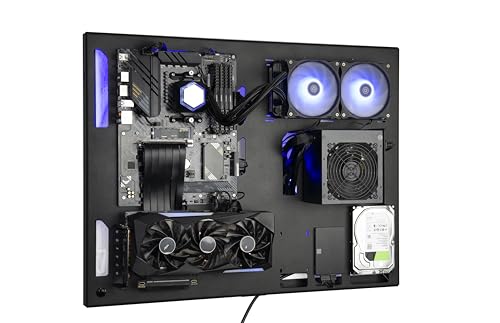
ABKCA Design Wall Mount PC Case – Open Air Gaming Computer Case — The genuine article
If the shortlist could contain only one product that answers the search exactly as typed, this is it. The title says wall mount PC case, says open air, says gaming computer case, and then does something genuinely useful: it lists the board sizes the frame accepts — ATX, Micro-ATX and Mini-ITX. That spread matters more than it might appear, because wall builds are often second machines or relocated machines, assembled from a board already owned. A frame that takes all three mainstream sizes removes the compatibility question from the project entirely and lets the planning move on to the wall itself.
The open-air gaming positioning tells you how ABKCA expects the machine to live. This is a frame for a build with lighting, a substantial graphics card and a cooling arrangement meant to be visible — the wall as display cabinet. Open air also suits the gaming load pattern: long sessions push heat out of components in every direction rather than into an enclosed volume, and there is no side panel to remove when a drive or a cable needs attention between matches. For a buyer seeking one frame that covers the wall brief, the board brief and the display brief simultaneously, nothing else in the pool is as direct.
The verification list, though, is real. The title states no load rating, no fixing hardware and no graphics card or radiator limits, and a wall project lives or dies on exactly those numbers. The combined weight of a gaming build is not trivial, and the frame’s rating plus the wall’s own construction decide the fixings. Treat the ABKCA documentation as part of the purchase: confirm the rated load, the mounting pattern and the card clearance, and choose anchors for your wall type rather than whatever happens to be in a kitchen drawer.
One scenario flatters this frame particularly: the machine that doubles as the room’s light source after dark. An open gaming build on a wall throws its component lighting across a surface rather than trapping it behind glass at desk level, and the effect is closer to a lit shelf or a piece of signage than to a glowing box. Builders furnishing a dedicated games room often discover that this ambient quality, unplanned, becomes the feature guests comment on — a small argument for the open-air route that no specification sheet will ever list.
- Mounting: wall mount case, stated in the listing title
- Layout: open air gaming case, stated in the listing title
- Board support: ATX, Micro-ATX and Mini-ITX, stated in the listing title
- Load rating and fixing hardware: Not stated in the listing title — verify with ABKCA documentation
- Graphics card and radiator limits: Not stated in the listing title — verify with ABKCA documentation
Strengths
- Purpose-designed for the wall, with mounting as the product rather than a possibility.
- The widest board compatibility in this guide, covering all three mainstream sizes.
- Open-air layout keeps components reachable and heat unconfined during long sessions.
Trade-offs
- Every structural number that matters — load, fixings, clearances — sits outside the title and must be confirmed.
- Open air means undamped fan noise at wall height, closer to ear level than a floor tower.
- Dust lands directly on components and becomes a brushing chore instead of a filter chore.
Best for: a builder seeking a documented wall-mount frame that accepts ATX, Micro-ATX or Mini-ITX boards for a display build. Not suited for: a builder requiring published load ratings and fixing hardware confirmed before any purchase is considered.

ABK Design Wall Mount Gaming PC Case — Gaming-leaning hanger
The second ABK entry keeps its title shorter: wall mount gaming PC case, full stop. Where the ABKCA above itemises board sizes, this one leans on its gaming identity, and the honest reading is that it addresses the same wall-display idea with the emphasis on the machine’s role rather than its compatibility chart. A reader choosing between the two ABK frames should treat the board-size question as the deciding errand — this title does not state sizes, so the ABK documentation must confirm that a specific motherboard fits before the frames are compared on any other ground.
There is a sensible reason a maker fields two neighbouring wall cases. Gaming wall builds split into those assembled around an existing ATX machine and those designed fresh as a room feature, and the fresh-design crowd often starts from the look and the card rather than from a board inventory. A gaming-titled frame speaks to that crowd. What the title cannot do is certify the details, and this guide will not pretend otherwise: radiator room, card length, load rating and fixings all sit in the not-stated column, exactly as they do for its sibling.
Judged as a shortlist entry, then, this pick’s value is focus. It is a wall mount case, for gaming, from the same design stable as the plainer ATX frame below, and a reader whose build is a known quantity — standard board, mainstream card, a wall already chosen — may find that the shorter title simply reflects a product with fewer variations to describe. The verification duties are unchanged, and they are listed in the spec box rather than waved past.
It also helps to think about what this frame asks of the room over years rather than on installation day. A gaming wall PC is a commitment to a layout: the desk beneath it stays clear because the machine’s position defines the space, and rearranging the room means re-hanging hardware. Readers who redecorate or move desks seasonally sometimes find a beautiful wall build quietly dictating their furniture. Those who settle a room once and enjoy it for years will never feel the constraint at all.
Renters deserve a specific word here, because wall mounting and tenancy agreements have a complicated relationship. A frame that hangs from a small number of well-placed fixings, in studs or masonry that can be filled and painted at the end of a tenancy, is a very different proposition from a sprawling installation, and the lighter frames in this guide keep the hole count modest. Checking the agreement — or asking the landlord with the plan already drawn — turns a potential deposit dispute into a non-event, and it takes less time than any other step in the project.
- Mounting: wall mount case, stated in the listing title
- Positioning: gaming PC case, stated in the listing title
- Board support: Not stated in the listing title — verify with ABK documentation
- Load rating and fixing hardware: Not stated in the listing title — verify with ABK documentation
- Card and radiator clearance: Not stated in the listing title — verify with ABK documentation
Strengths
- Wall mounting is the product’s stated purpose, with gaming use as its clear brief.
- Shares a maker with two other picks here, simplifying comparison of documentation and support.
- Open wall presentation suits a build intended as the room’s visual centre.
Trade-offs
- The title omits board sizes, so compatibility homework is unavoidable.
- Structural figures are unpublished in the title, as with every pick in this guide.
- Readers wanting a fully itemised listing will find the ABKCA’s longer title easier to shop from.
Best for: a builder seeking a gaming-focused wall mount case whose board and hardware are already known quantities. Not suited for: a builder requiring board sizes and clearances stated in the listing before shortlisting.

Thermaltake Core P3 TG Pro Open Frame ATX Compatible PC Case — Big-brand open frame
The Core P series is the product line that taught a generation of builders what an open-frame case looks like, and the P3 TG Pro is its ATX-compatible representative here, carrying a full model code in its title. The most important point in this section deserves to be said plainly: the listing title describes an open frame case and never mentions wall mounting. Thermaltake’s documentation is the only authority that can promote this chassis from open frame to wall case, and until a buyer has read it, the P3 belongs in the alternatives column of a wall project — however strong its reputation in the wider open-frame world.
Why include it at all? Because many wall projects begin as open-frame projects, and the P3’s virtues are the virtues that matter on a bench or a stand: total access to components, freedom to mount cooling in inventive positions, and the backing of a large maker with manuals, spare parts and a support channel. A builder who swaps hardware constantly, tests loops, or simply enjoys a machine that behaves like laboratory equipment will find the established option easier to live with than a niche frame. The TG in the name signals the tempered-glass side of the design, which tempers the full skeleton aesthetic with one finished surface.
The practical path for a wall-minded reader is sequential. First confirm, in Thermaltake’s own materials, whether this exact model code is documented for wall mounting and with what hardware and load guidance. If it is, the P3 becomes arguably the best-supported pick in the guide. If it is not, the case remains an excellent open frame that should be stood on a surface like the bench tool it is titled as — and the genuine wall cases above should carry the project.
There is a heritage point worth recording, too. The Core P line’s open layout influenced a decade of imitators, which means accessories, community build logs and troubleshooting knowledge exist for it in a depth no niche frame can match. A builder who enjoys learning from other people’s documented mistakes — radiator placements, loop routes, cable tricks — will find a library waiting. That ecosystem never appears in a title, but it is a real component of ownership, and it is the strongest argument for the P3 in any role its documentation supports.
- Layout: open frame case, stated in the listing title
- Compatibility: ATX compatible, stated in the listing title
- Model: Core P3 TG Pro, code CA-1G4-00M1WN-09, stated in the listing title
- Wall mounting: Not stated in the listing title — verify with Thermaltake documentation
- Load rating and mounting hardware: Not stated in the listing title — verify with Thermaltake documentation
Strengths
- An established open-frame design from a major case maker, with documentation and support depth niche frames rarely match.
- ATX compatibility stated outright in the title.
- Complete component access makes it the natural home for frequently changed hardware.
Trade-offs
- Wall mounting is undocumented in the title; hanging it without maker confirmation would be guesswork.
- Open-frame machines collect dust on every surface and offer no noise containment.
- The glass element adds weight and fragility that a pure frame avoids.
Best for: a builder seeking a well-documented open frame from a major brand, with wall use only after Thermaltake confirms it. Not suited for: a builder requiring wall mounting certified in the listing itself, with no documentation step.

Luocute ITX Open Air Chassis Frame, Aluminum Alloy, Vertical Motherboard — Featherweight frame
Scale changes every calculation in this category, and the Luocute is the pick that proves it. Its title describes an ITX open-air chassis frame in aluminium alloy with a vertical motherboard orientation. Aluminium and ITX together mean a finished machine that may weigh less than a single flagship graphics card in a steel tower — and weight, as the rest of this guide keeps insisting, is the governing variable of anything attached to a wall. The title does not claim wall mounting, so this frame is presented as an open-air alternative; but it is not hard to see why a reader planning a light wall piece would stop scrolling here and start reading Luocute’s documentation.
The vertical motherboard detail deserves attention because it shapes the finished object’s silhouette. With the board standing rather than lying flat, the frame presents a tall, narrow face to the room and routes the rear connectors to one edge — a tidier arrangement for a frame that will be viewed from the front and cabled from one side. In a small ITX build with integrated graphics or a modest card, the result can resemble a piece of test equipment or a small sculpture more than a computer, which for some rooms is exactly the ambition.
Limitations follow from the same smallness. ITX means one expansion slot’s worth of ambition, modest cooling volume, and components chosen for fit before performance. The frame is a starting point for a deliberately compact machine — a media box, a light desktop, a network appliance with style — not a shrunken route to a flagship gaming rig. And the wall question remains a documentation question: light weight makes the idea plausible, never proven.
Small frames also travel well between roles. The same ITX machine can serve as a desk object in one flat, a media centre beside a television in the next, and a workshop terminal later, because nothing about its size commits a room to it. In a guide dominated by products that demand permanent installation decisions, the Luocute’s impermanence is a genuine virtue for renters and for readers whose living situation changes faster than their hardware does.
- Form factor: ITX, stated in the listing title
- Construction: aluminium alloy frame, stated in the listing title
- Motherboard orientation: vertical, stated in the listing title
- Layout: open air chassis, stated in the listing title
- Wall mounting: Not stated in the listing title — verify with Luocute documentation
Strengths
- Aluminium ITX construction keeps total weight in a different league from steel ATX frames.
- Vertical motherboard orientation gives the finished frame a clean, narrow profile.
- Open-air access suits a small machine that will be adjusted and admired in equal measure.
Trade-offs
- Wall duty is not claimed in the title and must not be assumed from the low weight.
- ITX confines the build to compact components and modest cooling.
- Documentation from a small brand may be thinner than a major maker’s, raising the value of pre-purchase questions.
Best for: a builder seeking the lightest open-air ITX frame for a compact, design-led machine. Not suited for: a builder requiring documented wall mounting or room for full-size expansion hardware.

ABK Design Wall Mount ATX Case — Plain and purposeful
The plainest title in the guide may be the most useful one for a certain reader: wall mount ATX case. No gaming language, no display rhetoric — just the mounting method and the board size. That restraint points at a different motivation for hanging a computer, one that has nothing to do with showing it off. A wall-mounted workstation in a small office, workshop or studio returns the entire desk or bench surface to work, lifts the machine away from floor dust and kicked cables, and puts its ports at a reachable height. For that reader, the case is infrastructure, and infrastructure should be boring in the best way.
ATX support stated in the title settles the compatibility question that its gaming sibling leaves open, which makes this the easiest ABK to plan around: a standard board, a standard card, a known wall. The rest of the specification follows the pattern of this whole category — the title offers no load rating, no fixing list and no clearance figures — so the same documentation errand applies, and a workstation build with several drives and a heavy cooler deserves the same respect for total weight as any gaming machine.
There is also a small aesthetic argument for the plain frame in professional spaces. A gaming-styled wall PC announces itself in a client-facing room; a straightforward ATX frame reads as equipment. Neither is better in the abstract, but the reader furnishing a space where the computer should disappear into competence rather than glow into conversation has, in this pick, the only entry in the guide designed to do exactly that.
Maintenance access is the workstation argument that closes the sale in real offices. A wall-mounted machine at standing height opens its hardware to a technician without crawling under a desk with a torch, and in a small business or a teaching lab that difference compounds across every upgrade and repair for years. The plain ABK frame will never win a beauty contest against the gaming picks, but judged as workplace equipment — reachable, swappable, out of the way — it may be the most rational product in this entire guide.
- Mounting: wall mount case, stated in the listing title
- Board support: ATX, stated in the listing title
- Load rating and fixing hardware: Not stated in the listing title — verify with ABK documentation
- Graphics card and cooler clearance: Not stated in the listing title — verify with ABK documentation
- Included fans or panels: Not stated in the listing title — verify with ABK documentation
Strengths
- Purpose and board size are both stated in five words of title.
- Understated positioning suits offices and workshops where the machine is equipment, not décor.
- Wall placement returns the whole work surface and lifts hardware out of floor-level dust.
Trade-offs
- Structural and clearance figures still require the documentation check.
- Readers building a display piece will find the presentation deliberately unglamorous.
- Open wall machines remain audible; a quiet-room workstation may prefer an enclosed case.
Best for: a builder seeking a wall-mounted ATX workstation that frees the desk without turning the PC into décor. Not suited for: a builder requiring a showcase presentation or published structural figures in the listing.

Open Air PC Case, PC Test Bench PC Case, ATX Open Frame Computer Case, DIY PC Rack — Bench first
The last pick is the one this guide must be most careful with, because its title is a stack of open-air keywords — open air PC case, test bench, ATX open frame, DIY PC rack — and the word wall appears nowhere in it. It is included for completeness and for a specific reader: the builder whose machine changes weekly. Reviewers, repairers, overclockers and teachers run hardware on benches because a bench turns a twenty-minute component swap into a two-minute one, and an inexpensive unbranded frame is often the rational tool for that job. What it is not, on the evidence of its title, is a wall case.
That distinction is worth a paragraph rather than a footnote, because the failure mode is easy to imagine. A light, open frame looks hangable. It may even hang successfully for a while on improvised fixings. But a test bench’s structure is designed for downward loads on a flat surface, its standoffs and rails arranged for access from above, and neither its materials nor its joints have been asked the questions a wall asks. The guide’s position is simple: improvise with cable routing, never with the thing holding a powered machine above the floor.
As a bench, judged on its title’s own terms, the product makes its case plainly — ATX open frame, DIY rack, a chassis for people who build PCs as an activity rather than an event. Buyers in that world care about standoff layout, radiator improvisation room and price of entry far more than about finish, and an unbranded frame competes exactly there. Just let it be a bench.
For teaching, the virtues multiply further. Students gathered around an open bench can see power delivery, data cabling and cooling as physical things rather than diagram abstractions, and a frame at this end of the market can be risked in hands that a finished tower would not survive. If this product has a natural home beyond the hobbyist’s desk, it is probably a classroom or a repair counter — surfaces, both of them, which is precisely the point this section has been making.
- Intended use: PC test bench and DIY rack, stated in the listing title
- Layout: open air, open frame, stated in the listing title
- Board size: ATX, stated in the listing title
- Wall mounting: Not stated in the listing title — verify with the seller’s documentation before any such use
- Load rating and included hardware: Not stated in the listing title — verify with the seller’s documentation
Strengths
- Unmatched component access for testing, repair and teaching work.
- ATX open frame format accepts standard hardware without adaptation.
- DIY rack positioning invites custom cooling and mounting experiments on the bench.
Trade-offs
- Nothing in the title supports wall use; treating it as a wall case would be pure improvisation.
- Unbranded documentation may be minimal, leaving measurements to the buyer’s own tape.
- As an everyday desk machine it offers no dust or noise management at all.
Best for: a builder seeking an inexpensive ATX test bench for frequently changed hardware. Not suited for: a builder requiring any documented wall-mounting capability whatsoever.
What Should a Wall Build Weigh, and Who Decides?
Every wall project eventually becomes an arithmetic problem, and it is better tackled on paper than on a ladder. Add the components realistically: a motherboard with its cooler, a graphics card that may be the single heaviest object in the machine, a power supply, drives, fans, any radiator with its liquid, and the frame itself. Gaming builds surprise their owners at this stage; a machine assembled casually on a bench can total far more than the same person would happily hang from two fixings without a rating to lean on. This is why the absence of load figures from every title in this pool is treated in this guide as a genuine specification gap rather than a pedantic footnote.
Responsibility for the final number is shared, and pretending otherwise is how accidents get designed. The case maker owns the frame’s rated capacity and the mounting pattern that achieves it. The builder owns the wall assessment, the anchor selection and the honesty of the total weight. A reputable outcome needs both halves: a rated frame on the right anchors, or an unrated frame on nothing at all. Readers who find a maker unable or unwilling to state a capacity have learned something important about that product’s intended use, and the correct response is to believe it.
There is one more weight nobody counts: the cables. A bundle of display, power and peripheral leads hanging from a wall machine pulls steadily on both the connectors and, through them, the frame. Supporting cable runs with their own trunking or clips removes that quiet constant load and keeps ports from working loose — a detail that separates installations that age gracefully from those that develop intermittent faults nobody can reproduce on a bench.
Does an Open-Air Wall PC Suit Every Room?
Rooms push back on this idea in predictable ways. In a child’s room or a house with climbing pets, an exposed, powered, fan-spinning object at reachable height is a poor plan regardless of how handsome it looks, and an enclosed case on a shelf is the grown-up answer. In a workshop, airborne dust and the occasional knock argue the same way. In a home office, studio or gaming room controlled by adults, the objections mostly evaporate and the benefits — space, air, the object itself — dominate.
Acoustics draw a second boundary. An open machine in a room used for calls, recording or a partner’s sleep schedule will be heard exactly as much as its fans deserve, with no panel to soften the account. Builders sensitive to noise can mitigate with large, slow fans and conservative curves, since open air needs less fan effort than an enclosed box for the same temperatures, but silence as a design goal belongs to sealed, damped cases. Choosing a wall frame is therefore also choosing the room’s soundscape, and the honest guide says so before the holes are drilled rather than after.
How Do the Six Compare on the Questions That Matter?
| Case | Wall mounting in title | Boards | Character |
|---|---|---|---|
| ABKCA Design Wall Mount | Yes — wall mount case | ATX, Micro-ATX, Mini-ITX | Open-air gaming display frame |
| ABK Design Wall Mount Gaming | Yes — wall mount case | Not stated in title | Gaming-positioned hanger |
| Thermaltake Core P3 TG Pro | Not stated in title | ATX compatible | Big-brand open frame with glass |
| Luocute ITX Frame | Not stated in title | ITX | Aluminium, vertical motherboard |
| ABK Design Wall Mount ATX | Yes — wall mount case | ATX | Plain workstation frame |
| Open Air Test Bench | Not stated in title | ATX | Bench and DIY rack |
The table compresses the guide’s argument into one screen: exactly half the pool documents wall mounting in its own words. That is not a defect in the pool — it is an accurate picture of a market where open-air products of several kinds surface under one search. The reader’s task is to decide which kind they are actually shopping for before comparing prices or photographs, because an open frame and a wall case solve different problems that merely look similar in a thumbnail.
How Should You Prepare a Wall Before Hanging a PC on It?
Start with the wall, not the case. Identify its construction — solid masonry, studwork, or plasterboard over a cavity — because each demands different fixings and carries weight differently, and a fixing that is generous in brick can be inadequate in board. Locate studs or solid material behind the chosen position, and plan the mounting points to land on structure, not on surface. This is ordinary DIY discipline, but the load here is unusual: a PC is not a static picture, it vibrates gently, it gets touched for power buttons and USB drives, and it may be lifted down and rehung across its life.
Weigh the finished build honestly, including the graphics card, cooler, drives, water in a loop and the cables that will hang from it, then compare that figure against the case maker’s rated capacity once you have obtained it — no title in this pool provides one, so obtaining it is a step in the project, not a detail. Leave margin. A rating is a ceiling under ideal fixings, not a target, and walls in real houses are rarely ideal.
Then rehearse the cable geography at floor level before anything is hung. Power, display, network and peripherals need routes that reach without strain and without crossing the room at ankle height. Builders who plan trunking or in-wall runs at this stage produce the floating, wire-free photographs; builders who skip it produce a hanging PC with a tail of cables undoing the entire point. Finally, leave the machine a removal path: the day a drive fails, the case should come down with two hands and no drama, which argues for mounting positions reachable without standing on furniture.
How Do You Live With an Open-Air Machine Month After Month?
Maintenance rhythm is the difference between an open build that stays handsome and one that slowly furs over. Without filters, dust arrives as a fine film on boards and fan blades rather than as a mat in a mesh, and it responds best to little and often: a soft brush across surfaces monthly, a careful blower session each season, and attention to the fan blades whose balance and noise both suffer as deposits build. The wall position helps here — everything is visible and reachable at standing height, with no panel screws between the owner and the chore, which is why open-air owners often keep cleaner machines than tower owners whose filters hide their state for a year at a time.
Component swaps follow the same pattern of easy access with one caution. Working on a hanging machine is pleasant until a screw is dropped, whereupon gravity files it under the skirting board; a magnetic tray and a habit of removing small parts over a table solve this completely. Heavier work — a motherboard swap, a loop rebuild — should still happen with the frame taken down, which loops back to the earlier advice: mount the case so that two hands and thirty seconds can lift it clear, and every future job becomes simpler.
Finally, expect the machine’s presence in the room to keep evolving. Coil whine inaudible under a desk can announce itself at ear height; a fan bearing that begins to tick will be noticed weeks earlier than it would inside a damped tower. These are not arguments against the format — early notice of a failing fan is arguably a feature — but they reward choosing quality fans and power supplies from the start, because an open frame keeps no secrets on its components’ behalf.
What Goes Wrong Most Often With Wall-Mounted Builds?
The signature mistake is category confusion: buying an open frame or a bench because it photographed like a wall case, then improvising the hanging. The second is fixing into plasterboard alone with hardware meant for pictures, discovered at the worst possible moment. The third is thermal surprise of a different kind — an open build placed high on a wall lives in the warmest layer of the room’s air, since heat rises, and a machine that ran cool on the floor can run warmer near the ceiling. Position and room airflow belong in the plan.
Two more mistakes are quieter. Builders forget that every port on a wall machine is a port reached by standing up and reaching, so daily-use USB and audio migrate awkwardly unless a hub is planned at desk level. And cable runs get underestimated in length almost universally; a display lead that reached a desk tower will not reach a case hung above the desk, and discovering that after mounting turns a finished project back into a shopping trip.
One more planning habit deserves a place in this guide, because it costs nothing and prevents the most expensive category of regret: photograph and measure the intended wall position with the machine’s dimensions taped out in painter’s tape before ordering anything. Live with the outline for a day. Rooms reveal their objections slowly — a door swing, a sightline from the sofa, afternoon sun across the exact rectangle — and tape is infinitely easier to move than a mounted computer. Builders who skip this step and proceed straight to drilling are trusting a mental image that painter’s tape routinely corrects.
Final Recommendation
Begin with the ABKCA Design frame if the project is a gaming display build, because it is the only pick whose title simultaneously promises wall mounting, open air and all three board sizes. Choose the plain ABK Design Wall Mount ATX when the goal is a workstation and a reclaimed desk, and consider its gaming sibling when the build’s components are already settled and confirmed against ABK’s documentation. Let the Thermaltake Core P3 TG Pro into a wall plan only after Thermaltake’s own materials confirm the use; otherwise enjoy it as the excellent bench-and-stand frame it declares itself to be. The Luocute is the light, small, design-led alternative pending the same confirmation, and the test bench should stay on the bench it was titled for. A wall will hold a computer happily for years — provided the case was asked to be there by its maker, and not merely allowed to be there by optimism.
One closing observation for readers still hesitating between the wall and a conventional tower: the deciding factor is rarely the hardware, which is identical in both lives, but the room. Where floor and desk space are genuinely scarce, or where the machine deserves to be the room’s centrepiece, the wall cases above repay their planning effort every single day. Where space is plentiful and the computer is simply a tool, a good tower remains the calmer purchase — and recognising that before drilling is itself a successful outcome of reading this guide, because the only bad wall build is the one planned for a room that never wanted it, hung from fixings nobody verified, in a category nobody stopped to define.
Frequently Asked Questions
Can any open-frame case be hung on a wall?
Not on the evidence of a listing title alone. Open frames are engineered for downward loads on a surface, and wall duty asks different questions of the structure and its fixings. Where a maker’s documentation explicitly covers wall mounting for the exact model, the answer becomes yes for that model. Where it does not — as with the test bench in this guide — the safe and honest answer is to keep the frame on a surface.
What fixings does a wall PC need?
Fixings follow the wall, not the case: masonry, studs and plasterboard each need their own approach, chosen for the total weight of the finished build. No listing title in this pool includes fixing hardware or a load rating, so both must be established before installation day — the rating from the case maker’s documentation, the anchors from the wall’s construction. When in doubt, a local hardware professional’s advice is cheap relative to a falling computer.
Do wall-mounted PCs run hotter?
They can, for a simple physical reason: warm air rises, and a machine mounted high breathes the room’s warmest layer. Open-air designs shed heat freely in every direction, which compensates considerably, but a build that was marginal in a tower deserves temperature checks in its first week on the wall. Position — lower on the wall, away from ceiling pockets and direct sun — does as much for temperatures as any fan choice.
How do cables work on a wall-mounted build?
They need planning rather than luck. Measure routes from the intended position to the power socket, monitor and desk peripherals before mounting, and expect every lead to need more length than the desk setup used. Trunking, in-wall runs or a desk-level hub for daily connections turn the installation from a hanging box with a tail into the clean result most builders pictured. Build the cable plan into the project budget from the start.
Can a wall-mounted PC use liquid cooling?
Open frames are actually hospitable to liquid cooling, because radiators mount in open air without the clearance puzzles of an enclosed tower, and several designs in this category are photographed with loops for exactly that reason. The cautions are weight and gravity: a filled radiator adds real mass to the hanging total, and every fitting sits above other components, so leak discipline during filling and testing matters more than in a floor case. Confirm radiator support and the frame’s capacity from the maker’s documentation — no title in this pool states either — and pressure-test the loop on a bench before the machine goes up.
Is a wall case a good idea for a first build?
It is a demanding first project, because it adds wall work, weight planning and cable geography to the ordinary challenges of assembly. A first-time builder set on the idea should choose a documented wall case such as the ABKCA or the plain ABK ATX frame, confirm every rating in the maker’s materials, and assemble and test the machine on a table before it ever meets the wall. The result can be superb; the shortcut version should be nobody’s first PC.
Related Guides
A wall build touches more of the room than a desk build does, so the neighbouring decisions matter. Readers still choosing the machine’s shape can compare open-frame and test bench cases for the workbench side of this category, those planning the display side should look at panoramic glass cases for showcase builds, and readers whose wall idea began as a space problem may find compact cases for small desks a simpler answer to the same question.


