What's inside
- Key Takeaways
- Quick Picks
- How Did We Choose These Picks?
- Why Does Lying Flat Change a Build So Much?
- How Quiet Can a Machine Under the Television Really Be?
- What Happened to the Disc Drive in the Modern HTPC?
- How Do the Six Compare Where They Will Actually Sit?
- How Do You Measure a Shelf for a Horizontal Case?
- What About the Desk? The Horizontal Case’s Second Career
- How Does a Horizontal Case Age Across a Decade of Upgrades?
- What Mistakes Do Horizontal Builds Keep Making?
- Final Recommendation
- Frequently Asked Questions
- Related Guides
As an Amazon Associate I earn from qualifying purchases. This post may contain affiliate links at no extra cost to you.
gizmoverdict.com is reader-supported. When you buy through links on our site, we may earn an affiliate commission.
Where to buy: The six cases below link to listings drawn from this site’s verified pool, and every feature attributed to them — front panels, radiator support, board sizes, one included power supply — comes from the listing titles themselves. This guide prints no prices and no star ratings, and it gives no case a height in millimetres that its title did not provide; where a dimension matters for fitting a media shelf, the spec boxes route the question to the maker rather than guessing a number.
The best horizontal desktop pc cases exist because the living room and the desk both punish a tower. Under a television, a vertical case blocks sightlines, towers over the soundbar and announces itself as a computer in a room arranged for films. Lying flat in the home-theatre tradition — the HTPC layout that SilverStone’s Grandia and Milo lines have served for years — the same hardware takes the shape of the amplifier and the disc player beside it: wide, low, finished at the front, indifferent to being looked at. On a desk, the horizontal layout earns its place differently, as a monitor stand that happens to contain a computer, or as a shallow machine for a shelf where a tower’s depth simply does not fit.
Five of the six picks here are SilverStone designs, and that concentration is the market telling the truth about itself: the horizontal case is a niche the company never abandoned while rivals chased glass towers. The sixth pick, an InWin slim case, breaks the pattern in an instructive direction — it is the only listing whose title includes a power supply, a 450W TFX unit, which makes it the closest thing here to a complete starting point. Between the five SilverStones the differences are real but specific: radiator support in the Grandia 11, a lockable front panel in one home-theatre model, E-ATX reach in another, and the low Milo ML03B at the compact end. The sections below separate them by the rooms they belong in.
Key Takeaways
- Horizontal cases divide into home-theatre machines that mimic hi-fi separates and slim desktop cases that trade expansion for a shallow footprint; four picks here are explicit HTPC designs.
- The SilverStone Grandia 11 is the performance outlier, a compact ATX HTPC case whose title states 240mm radiator support — liquid cooling in a lying-flat case.
- Front-panel character is the visible fork: faux aluminium on the GD09, real aluminium on the E-ATX model, and a lockable front panel on the security-minded SilverStone.
- The InWin BL040 is the only pick with a power supply in its title — a 450W TFX unit — and the only slim case here spanning Micro-ATX and Mini-ITX.
- Exact heights and depths appear in no title in this pool, so shelf fit must be confirmed against each maker’s published dimensions before ordering.
Quick Picks
| Pick | Badge | Why it earns its place |
|---|---|---|
| SilverStone GD09 Home Theater PC Case | The classic HTPC shape | The Grandia formula in its purest form: a home theatre case with a faux aluminium front that sits naturally among separates. |
| SilverStone Grandia 11 Compact ATX HTPC Case | Liquid-cooled flat | Compact ATX home theatre case with 240mm radiator support stated in the title — the enthusiast’s horizontal build. |
| SilverStone Home Theater Case with Aluminum Front Panel | Big-board living room | An aluminium-fronted HTPC case whose title reaches up to E-ATX and ATX boards, for a full-size machine under the television. |
| SilverStone Home Theater Case with Lockable Front Panel | Lockable front | An ATX home theatre case with a lockable front panel — the pick for shared rooms and curious small hands. |
| SilverStone ML03B Milo Series HTPC Case | The low profile | A Micro-ATX media centre case in aluminium and steel from the Milo line, built for shallow shelves and modest hardware. |
| InWin BL040 Slim Desktop PC Case with 450W TFX Power Supply | PSU in the box | A slim Micro-ATX and Mini-ITX desktop case whose title includes a 450W TFX power supply — the fastest route to a working machine. |
How Did We Choose These Picks?
The pool for this keyword was dominated by one maker, and the selection leaned into that fact rather than disguising it with token alternatives. SilverStone’s horizontal range spans enough internal variety — radiator support, board sizes from Micro-ATX to E-ATX, lockable and plain fronts, the tall Grandia line against the low Milo line — that five of its cases could be compared against each other on documented differences instead of being padded out with towers photographed lying down. The InWin BL040 completes the six because its included power supply and slim desktop brief answer a genuinely different reader: the office or the spare room rather than the home theatre.
Every claim below respects the titles’ limits. Radiator support is discussed only for the Grandia 11, whose title states it. The lockable panel belongs only to the model whose title says so. The InWin’s wattage is the only power figure in the article, because it is the only one a title prints. Dimensions are the pool’s universal silence — no title gives a height — so the guide talks about shelf fit qualitatively and sends every reader to the maker’s dimension table with a tape measure, which is where that question was always going to be settled anyway.
Why Does Lying Flat Change a Build So Much?
Gravity is the first change. In a tower, a heavy graphics card hangs from its slot and bracket; lying flat, the card rests along its length, and the whole sag conversation disappears — one reason horizontal cases suit builds assembled from substantial hardware that will not be touched again for years. The processor cooler faces upward instead of sideways, which favours the low, wide coolers that blow down across the board, and the case’s feet and ventilation pattern are drawn for a machine that breathes through its top and sides rather than front to back.
The second change is social rather than mechanical. A horizontal case is judged by the room it sits in. Under a television it competes with the amplifier’s finish and the console’s silence; on a desk it sits in the sightline all day, often directly beneath the monitor. That is why front-panel materials occupy so much of this guide’s attention — faux aluminium against real, a lock against a clean slab — because the front is the part of the machine the household actually lives with, while the specification inside interests only its builder.
The third change is constraint, and it should be faced squarely. Lying flat caps the cooler’s height, limits the tallest graphics cards in the slimmer models, and turns cable routing into a shallower puzzle than a tower’s deep basement allows. The Grandia 11’s radiator support exists partly as an escape from the cooler-height cap. A reader whose build plan starts with a flagship tower cooler or a triple-fan card at full height should measure twice — the horizontal format rewards hardware chosen for it and punishes hardware merely hoped into it.

SilverStone GD09 Home Theater PC Case — The classic HTPC shape
The GD09 is the reference shape for this entire category: a Grandia home theatre case whose title promises a faux aluminium front panel design. That word faux deserves a fair hearing rather than a smirk. A media-PC front is a styling surface, handled rarely and viewed constantly, and a convincing aluminium-look finish delivers the visual register of a hi-fi separate — brushed, dark, understated — without asking the buyer to fund machined metal on a panel that carries no structural load. In a stack of separates at viewing distance, the GD09’s front is designed to disappear into the ensemble, and disappearance is the highest compliment a living-room case can earn.
As a build platform, the GD09 belongs to the Grandia tradition of full-size horizontal cases: room for a proper home-theatre machine rather than a streaming stick with delusions. The title does not itemise board sizes, drive capacity or cooling, so those belong to SilverStone’s documentation, and a builder planning around a specific board or a tall cooler should take the measurements from there. What the category context supports saying is that Grandia cases exist to hold mainstream ATX-class hardware in the flat orientation, and the GD09 is the line’s straightforward expression of that idea, without the Grandia 11’s radiator ambitions.
The reader this pick suits is building the classic media PC: films and music local and streamed, a television as the display, a remote rather than a keyboard as the primary input, and a shelf of separates as the neighbourhood. For that machine, exotic cooling is wasted and front-panel manners are everything. The GD09’s proposition is that the case should look like it was always part of the hi-fi — and on the evidence of its title’s priorities, that is precisely the product SilverStone set out to sell.
Longevity flatters it further. Home-theatre PCs are upgraded in place for years — a drive here, a quieter fan there — and a standard-shaped, standard-layout case makes each of those small operations unremarkable. The GD09 is not the pick for a builder chasing a specification headline; it is the pick for a household seeking a computer under the television that stops being a topic of conversation, in either direction, for as long as possible.
- Role: home theater PC (HTPC) case, stated in the listing title
- Front panel: faux aluminium design, stated in the listing title
- Line: Grandia series (GD09), stated in the listing title
- Board support and dimensions: Not stated in the listing title — verify with SilverStone documentation
- Cooling and drive capacity: Not stated in the listing title — verify with SilverStone documentation
Strengths
- The category’s classic shape, finished to blend into a stack of hi-fi separates.
- A faux aluminium front delivers the look at the panel where only the look matters.
- Grandia layout tradition suits a full-size media build rather than a mini compromise.
Trade-offs
- The title itemises nothing internal, so board and cooler checks need the documentation.
- Readers wanting machined metal will read faux as a compromise, however sensible.
- No radiator support is claimed, unlike its Grandia 11 sibling.
Best for: a builder seeking the classic home-theatre shape that disappears among separates under a television. Not suited for: a builder requiring documented liquid-cooling support or itemised internal specifications in the listing.
SilverStone Grandia 11 Compact ATX HTPC Case — Liquid-cooled flat
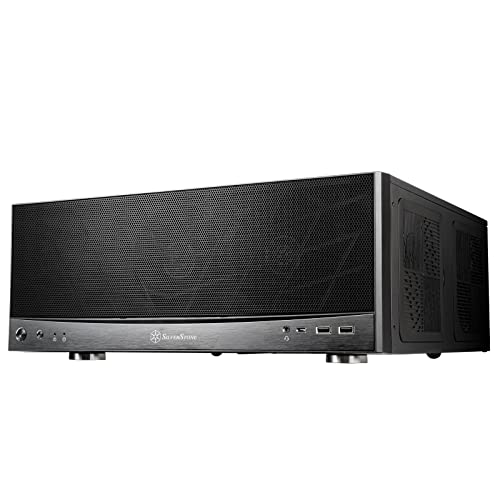
The Grandia 11 takes the flat format seriously as a performance platform. Its title pairs a compact ATX home theatre brief with 240mm radiator support — a combination that answers the horizontal format’s oldest objection. Air cooling in a lying case is capped by the shallow interior height, which historically pushed HTPC builders toward modest processors; a 240mm radiator moves the heat exchange to a fan wall where the case is wide rather than tall, and suddenly the processor budget stops being dictated by the shelf. For a buyer seeking a media machine that is also a genuinely fast computer — game streaming, emulation, a living-room gaming rig in separates clothing — this is the pick the whole guide bends toward.
Compact ATX is the other half of the proposition. The Grandia 11 keeps the standard board size, with its memory slots and expansion room, while trimming the case around it, so the build does not pay the Mini-ITX tax in board prices and limitations. Compactness in a horizontal case is measured in depth and height against the shelf, and the title gives neither figure — the maker’s dimensions remain the authority — but the design intent is legible: full-size platform, flat-case manners.
Radiator support should be read precisely. The title states support for a 240mm radiator; it does not state fan counts, drive capacity or graphics card length, and a liquid-cooled build is exactly the kind whose parts interact — radiator thickness against card length, pump placement against drive cages. SilverStone’s manual is where those interactions are documented, and this build, more than any other in the guide, should be planned on paper against that manual before a single component is ordered. Planned well, the Grandia 11 is the enthusiast’s answer to the tower: same speed, better furniture.
There is a noise dividend to the liquid route that suits the room. A radiator’s fans can turn slowly across a large surface where a low-profile air cooler must work its small fan harder, and in a case sitting metres from the sofa, that difference is the difference between a machine noticed during quiet film passages and one that is not. The Grandia 11 therefore serves two audiences at once — the performance builder and the silence seeker — who usually shop in different aisles entirely.
- Role: compact ATX home theater PC case, stated in the listing title
- Radiator support: 240mm, stated in the listing title
- Line: Grandia 11, stated in the listing title
- Dimensions and card length: Not stated in the listing title — verify with SilverStone documentation
- Fan and drive provision: Not stated in the listing title — verify with SilverStone documentation
Strengths
- Documented 240mm radiator support removes the flat format’s cooler-height ceiling.
- Full ATX board support in a compact horizontal footprint.
- Liquid cooling’s slow-fan character suits a case that lives near the sofa.
Trade-offs
- Radiator, card and drive interactions must be planned against the manual, not assumed.
- A liquid loop adds cost and assembly complexity the air-cooled picks avoid.
- Compact ATX still will not swallow the tallest cards or coolers without checking.
Best for: a builder seeking a liquid-cooled, full-ATX machine in home-theatre clothing. Not suited for: a builder requiring a simple air-cooled assembly with no loop planning.

SilverStone Home Theater Computer Case with Aluminum Front Panel — Big-board living room
This older SilverStone entry states two things in its title and both are about scale and finish: a home theatre computer case with an aluminium front panel, for E-ATX and ATX boards. E-ATX in a horizontal case is a statement of intent — this is a chassis for the builder who wants the big board, with its extra slots and memory capacity, lying flat under the television rather than standing in a tower beside it. Workstation-class hardware in the living room sounds eccentric until the machine’s jobs are listed: a media server that also renders, a single computer serving a house’s screens and its owner’s work, a build assembled from a retired high-end board too good to shelve.
The real aluminium front separates this pick from the GD09’s faux finish, and the difference is tactile as much as visual. Metal feels cold, weights the panel, and ages by patina rather than by peeling; in a case whose front is touched for the power button and the occasional drive tray, that material honesty has a daily, physical presence. A buyer furnishing a room where the separates are genuinely metal — amplifiers with milled fascias — will find the GD09’s imitation the one false note in the stack, and this case the correction.
Age cuts the other way and should be acknowledged. This is a long-running listing, and long-running HTPC cases predate some modern assumptions about front connectivity and internal layout. The title says nothing about ports, drive arrangements or cooling, so the documentation step carries more weight here than for any other pick: confirm the front connections suit the household’s habits, confirm the interior accepts the intended drives, and confirm dimensions against the shelf. A big-board case is a large object, and E-ATX reach makes it larger.
Judged on its own terms, though, the proposition is rare enough to justify the homework. Horizontal cases that accept E-ATX boards are a small club, and for the specific builder migrating a large platform into the living room, this pick may be the only member of the six that fits the board at all. Categories are sometimes decided by a single compatibility line, and this is that kind of pick.
- Role: home theater computer case, stated in the listing title
- Front panel: aluminium, stated in the listing title
- Board support: E-ATX and ATX, stated in the listing title
- Dimensions and front connectivity: Not stated in the listing title — verify with SilverStone documentation
- Cooling and drive capacity: Not stated in the listing title — verify with SilverStone documentation
Strengths
- E-ATX support in a horizontal case is genuinely rare and decides the pick for big-board builds.
- A real aluminium fascia matches genuinely metal hi-fi separates.
- Full-size interior suits a machine that works as well as it entertains.
Trade-offs
- A long-running design whose connectivity and layout must be checked against modern expectations.
- Big-board dimensions demand a generous shelf and a careful tape measure.
- The title leaves cooling and storage entirely to the documentation.
Best for: a builder seeking to lay an E-ATX or ATX platform flat in the living room with a metal front. Not suited for: a builder requiring modern front connectivity confirmed in the listing itself.
SilverStone Home Theater Computer Case with Lockable Front Panel — Lockable front
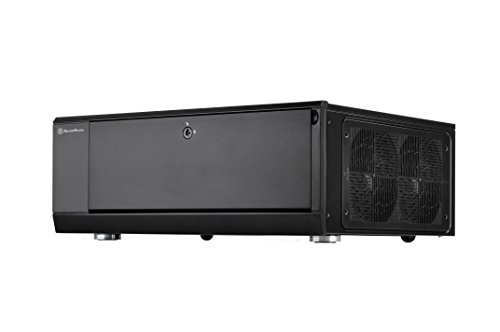
One feature carries this pick, and it is a feature the other five do not have: a lockable front panel, stated in the title of an ATX home theatre case. A lock on a PC case sounds like corporate thinking until the living room it serves is described honestly — toddlers who treat buttons as toys and drive trays as drawers, shared houses where the media PC is everyone’s and therefore no one’s, holiday rentals and small commercial spaces where the machine should play films and resist curiosity. In those rooms, a lockable front converts the HTPC from a temptation into a fixture.
The lock protects more than the power button. Behind a typical HTPC front panel sit optical or storage bays, USB ports and sometimes the machine’s whole control surface; locking the panel puts all of it behind one decision. For a household media server holding the family’s photo archive, that is a modest but real layer of physical security — not against a determined adult, but against the accidents and idle fingers that cause most domestic data mishaps. It is the only security feature claimed anywhere in this guide, because it is the only one a title claims.
Beyond the lock, the title is restrained: ATX home theatre case, and nothing about cooling, drives or dimensions. The same documentation discipline applies — board fit is stated as ATX, everything else is SilverStone’s manual. But the shape of the decision is simple. If the lock answers a real condition of the room, this pick has no rival in the six. If it does not, the lock is a key to lose and a step between the user and the USB ports, and the GD09’s cleaner proposition wins. Features should be bought for the rooms that need them; this section exists so the room that needs this one recognises it.
There is a quieter beneficiary worth naming: the parent or partner who did not build the machine. The builder of a household HTPC becomes its permanent administrator, and every prevented accident — every film night not interrupted by a small hand finding the reset button — is support work that never has to happen. A lockable panel is, in that light, a gift the builder gives their future self, priced at one key kept in a known drawer.
- Role: home theater computer case for ATX, stated in the listing title
- Front panel: lockable, stated in the listing title
- Board support: ATX, stated in the listing title
- Dimensions and cooling: Not stated in the listing title — verify with SilverStone documentation
- Drive capacity and front ports behind the panel: Not stated in the listing title — verify with SilverStone documentation
Strengths
- The only lockable front in the guide, answering real conditions in shared and family rooms.
- ATX platform support keeps the build mainstream and upgradeable.
- Physical protection for bays and ports without any software or accounts.
Trade-offs
- A lock between the user and the front ports is friction when the room never needed it.
- Keys are losable objects, and the household will lose one eventually.
- Internal specifications rest entirely on the documentation check.
Best for: a builder seeking an ATX home theatre case whose front panel locks against curious hands in a shared room. Not suited for: a builder requiring instant daily access to front ports with no barrier at all.
SilverStone ML03B Milo Series HTPC Case — The low profile
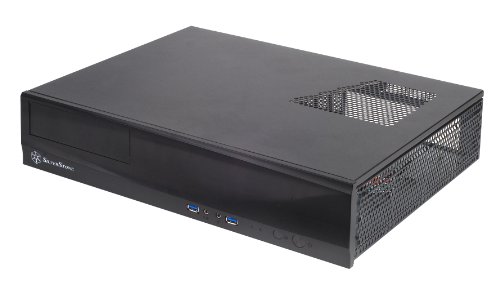
The Milo line is SilverStone’s answer to the shallow shelf. The ML03B’s title describes an aluminium and steel Micro-ATX media centre and HTPC case — the smallest platform in this guide, in the line whose whole identity is lowness. Where the Grandia cases hold full-size hardware in a separates-sized box, the Milo accepts a smaller brief: a media machine built from modest parts, drawing little power, making little noise, and fitting the shelf spaces that defeat deeper cases — the bedroom cabinet, the kitchen counter end, the secondary room where a second screen lives.
Micro-ATX is the right size for that brief and the title states it plainly. The board format keeps a useful expansion slot or two and mainstream prices, while surrendering the multi-card and many-drive ambitions a media centre never had. Aluminium and steel construction splits the difference between finish and cost: the visible surfaces get the better material, the structure gets the sensible one. In a case that will be seen at arm’s length on a shelf rather than across a room, that allocation is well judged.
Constraints are the honest counterweight, and in a low case they are physical law. Cooler height, card length and drive count all live under tighter ceilings than any Grandia offers, and the title quantifies none of them — SilverStone’s dimension table is the shopping document here, consulted with the intended parts list open beside it. The ML03B rewards hardware chosen for it: a modest processor under a low cooler, integrated graphics or a compact card, storage sized to the shelf. Builders who respect those ceilings get the quietest, least obtrusive machine in this guide; builders who fight them get a lesson in millimetres.
The ML03B also suits a pattern the bigger cases serve badly: the satellite machine. Households increasingly run one real computer and several small endpoints — a bedroom player, a workshop screen, a guest-room desktop — and a low Micro-ATX case is the natural enclosure for endpoints that need more dignity than a stick and less presence than a tower. In that role its modesty is the entire point, and its place in this guide is secure.
- Role: media center and HTPC case, stated in the listing title
- Board support: Micro-ATX, stated in the listing title
- Construction: aluminium and steel, stated in the listing title
- Line and finish: Milo series, ML03B, stated in the listing title
- Dimensions, cooler height and card length: Not stated in the listing title — verify with SilverStone documentation
Strengths
- The lowest-profile brief in the guide, for shelves the Grandia cases cannot use.
- Micro-ATX keeps one foot in mainstream parts and prices.
- Materials are allocated sensibly — aluminium where seen, steel where structural.
Trade-offs
- Tight internal ceilings demand hardware chosen for the case, verified by measurement.
- No performance ambitions: this is a media machine’s enclosure, not a gaming rig’s.
- Every dimension that matters must come from the maker’s table.
Best for: a builder seeking a low Micro-ATX media centre for a shallow shelf or a secondary room. Not suited for: a builder requiring room for tall coolers, long cards or multiple drives.
InWin BL040 Slim Desktop PC Case with 450W TFX Power Supply — PSU in the box
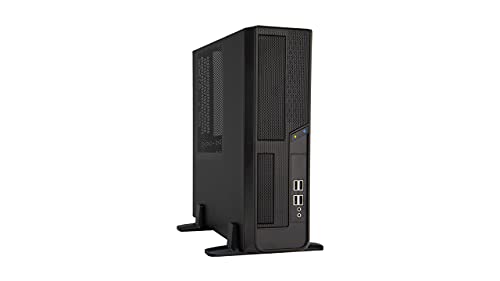
The InWin BL040 breaks the guide’s pattern twice over: it is the only non-SilverStone here, and it is the only case whose title includes a power supply — a 450W TFX unit inside a slim Micro-ATX and Mini-ITX small-form-factor desktop case. That inclusion changes the product’s nature. The five SilverStones are enclosures awaiting a build; the BL040 is most of a computer’s skeleton in one box, aimed at the office desktop, the reception machine, the home’s second PC — builds where the goal is a working, tidy, shallow machine on a desk rather than a hobby assembled over weekends.
The slim desktop format has its own logic distinct from the home theatre’s. Depth, not height, is usually the desk constraint: a slim case can stand its ground under a monitor riser, slide into a credenza, or lie in the shallow zone at a desk’s rear that a tower’s footprint would annex entirely. Supporting both Micro-ATX and Mini-ITX boards widens the parts net for a budget or spares-based build, and the included supply removes the format-matching errand that slim cases usually impose — TFX is a compact standard, and receiving the correct one in the box is worth more than its wattage headline.
That wattage still deserves a sober sentence. A 450W TFX unit, as titled, suits integrated graphics and modest discrete cards, office and media duty, and the general run of desktop work; it is not the foundation for a high-draw gaming build, and the slim case’s cooling and card space would object to one anyway. The title states no card length, cooler height or drive count, so InWin’s documentation governs the parts list. Within its intended territory, though, the BL040’s proposition is completeness — the fewest separate decisions between a reader and a running machine of any pick in this guide.
There is an institutional buyer for this case as well: the person equipping several identical desks. A slim case with its supply included standardises the fleet, simplifies spares, and keeps the visible office uniform. Home readers rarely think in fleets, but the home office that grows into a small business often wishes it had. The BL040 is the one pick here that scales from a single spare-room PC to a row of them without changing its answer.
- Format: slim small-form-factor desktop case, stated in the listing title
- Board support: Micro-ATX and Mini-ITX, stated in the listing title
- Power supply: 450W TFX unit included, stated in the listing title
- Dimensions and card clearance: Not stated in the listing title — verify with InWin documentation
- Drive capacity and front connectivity: Not stated in the listing title — verify with InWin documentation
Strengths
- The included 450W TFX supply removes a format-matching purchase entirely.
- Dual board-size support suits spares-based and budget builds alike.
- Slim depth fits desks and credenzas that a tower’s footprint cannot.
Trade-offs
- The included supply’s capacity suits desktop and media duty, not high-draw gaming hardware.
- Slim interiors cap cooler and card choices; measurements must precede parts orders.
- Its office manner lacks the hi-fi finish the home-theatre picks compete on.
Best for: a builder seeking a slim desktop case with its power supply included for office or second-PC duty. Not suited for: a builder requiring a high-capacity supply or a home-theatre front finish.
How Quiet Can a Machine Under the Television Really Be?
Noise is the specification the living room enforces most strictly, because the case sits metres from listeners during the quietest passages of films. A horizontal machine has two natural advantages. Its fans can be large relative to its volume, turning slowly; and its position among separates, often inside an open-backed media unit, puts furniture between the machine and the sofa. Its disadvantage is symmetric: there is no desk to hide behind and no tower’s mass of steel and glass to muffle coil whine, so component choice carries the whole burden. A modest processor under a generously sized cooler, a graphics solution sized to the actual screen, and drives chosen from the quiet end of their class will make any case in this guide living-room polite.
The Grandia 11’s radiator route deserves a second mention here, because liquid cooling’s acoustic character — large fans, low speeds, heat dumped at a wall of fins — suits the room so well that some builders choose it for silence first and performance second. Conversely, the slim InWin’s desktop brief assumes a room where a keyboard is louder than the machine, a different and easier standard. Matching the case to the room’s actual noise floor, rather than to an abstract ideal, is the judgement this category keeps asking for.
One practical habit completes the picture: measure the finished machine from the sofa, at night, with the television muted. Builders who do this in the first week adjust a fan curve or reseat a vibrating panel while the build is still fresh; builders who skip it discover the same facts during a quiet scene six months later, when the appetite for opening the case has faded. The horizontal format rewards that early honesty because its machines are meant to be forgotten — and a machine that hums is never quite forgotten.
What Happened to the Disc Drive in the Modern HTPC?
The front bays that once defined this category have quietly changed jobs. Streaming retired the optical drive for most households, and the wide, flat fronts of these SilverStone cases now spend their lives as clean fascias rather than as working surfaces — which is precisely why finish and locks, the GD09’s faux aluminium and the lockable model’s panel, have become the fronts’ real specifications. A household still playing physical media should confirm bay provision in the maker’s documentation for whichever pick they favour, since no title in this pool mentions an optical bay at all.
For the streaming household, the freed interior tells its own story: bays that once held a disc drive now hold storage for a local library, or simply air. There is a respectable argument that the modern HTPC is really a small server wearing a hi-fi costume, and the cases in this guide serve that double life well — provided the builder plans storage and network with the same care as the front panel’s finish. The room sees the costume; the household lives with the server.
How Do the Six Compare Where They Will Actually Sit?
| Case | Brief from title | Boards | Distinguishing documented feature |
|---|---|---|---|
| SilverStone GD09 | Home theatre | Not stated | Faux aluminium front design |
| SilverStone Grandia 11 | Compact ATX home theatre | ATX | 240mm radiator support |
| SilverStone Aluminium Front | Home theatre | E-ATX / ATX | Real aluminium front panel |
| SilverStone Lockable Front | Home theatre | ATX | Lockable front panel |
| SilverStone ML03B | Media centre / HTPC | Micro-ATX | Milo low-profile line, aluminium and steel |
| InWin BL040 | Slim desktop | Micro-ATX / Mini-ITX | 450W TFX power supply included |
Read down the last column and the guide’s structure explains itself: in a category this mature, the cases are separated by one documented distinction each. The shopping skill is matching that distinction to the room — radiator for the enthusiast, lock for the shared household, E-ATX for the big board, lowness for the shallow shelf, an included supply for the desk that just needs a computer. A reader who starts from the room rather than from brand loyalty will land on the right row quickly.
How Do You Measure a Shelf for a Horizontal Case?
Measure the space as the case will experience it, not as the furniture catalogue describes it. Width between the uprights, depth from the wall to the shelf’s front edge with cables bending behind the machine, and height to the shelf above with air space left over for the top vents — a horizontal case breathes upward, and a shelf fitted like a glove suffocates it politely over months. Leave the cables their bend radius in the depth figure; the number of builds that fit the shelf but not their own HDMI lead is a standing joke among HTPC owners.
Then measure the hardware against the maker, because no title in this pool prints a dimension. SilverStone and InWin both publish full dimension tables; the intended cooler, card and drives should be checked against the interior figures in the same sitting, with particular care for cooler height in the Milo and card length beside a radiator in the Grandia 11. Ten minutes with two documents prevents the specific misery of a finished build whose side — now its top — will not close.
Finally, rehearse the machine’s daily life in the space: the reach to the power button, the remote’s line of sight to a receiver, the disc or drive access the household will actually use, and the route by which the case comes out for its annual dust removal. A horizontal case is furniture that computes; choosing it with the room’s habits in mind is what separates the installations that feel inevitable from those that feel endured.
What About the Desk? The Horizontal Case’s Second Career
Half the readers of this guide will never put the machine near a television, and their reasons deserve equal respect. On a desk, a horizontal case is a plinth: the monitor sits on it at a raised, ergonomic height, the desk’s vertical space gets used instead of its floor plan, and the machine’s ports sit at hand level rather than under the desk in the cable dark. The slim InWin is the pool’s natural desk candidate, but the smaller SilverStones — the Milo above all — have served as monitor-stand computers for years, and the arrangement suits small desks, student rooms and reception counters where a tower would consume the working surface it exists to serve.
Desk duty changes the priorities in predictable ways. The top panel becomes a load-bearing surface, so its strength and flatness matter in a way the home theatre never tests; the front panel faces its user at reading distance, so finish and button feel are judged more harshly; and noise is measured at arm’s length, the strictest test in computing. A case that passes on the desk will pass anywhere, which is why the humble desktop layout, unfashionable as it is, remains the format’s sternest examiner — and why a case designed for it, like the BL040 with its supply included, deserves its place beside the living-room aristocracy.
How Does a Horizontal Case Age Across a Decade of Upgrades?
Upgrade paths in flat cases follow a different rhythm from towers, and planning for it separates satisfying builds from frustrating ones. The components that change most often in a media machine — storage, memory, the occasional network or capture card — are all easily reached in a lying case once its top lifts, and none of them cares about the format. The components that change least gracefully are the ones the format constrains: the cooler, capped by interior height, and the graphics card, capped by length and by the power budget the room’s noise floor allows. A builder who chooses the first cooler and card with the case’s ceilings in mind will find every later upgrade unremarkable; a builder who begins at the ceilings will re-fight them at every refresh.
There is also the matter of the case outliving the platform, which in this category is a genuine prospect. A horizontal enclosure is bought partly as furniture, and furniture is replaced reluctantly. The ATX-based picks here — the Grandia pair, the aluminium-front and lockable models — can host successive generations of standard boards, so the case bought for one living-room machine can plausibly serve its replacement. The Micro-ATX Milo and the dual-format InWin share that standard-board advantage at smaller scale. Proprietary mini formats age out; standard boards in well-kept flat cases simply continue, which is a quiet economic argument for this whole category that its styling usually shouts over.
What Mistakes Do Horizontal Builds Keep Making?
The first is importing tower assumptions: ordering the tall cooler, the flagship-length card, the ATX supply with cables for a basement that does not exist, and discovering the format’s ceilings at assembly time. The second is shelf suffocation — fitting the case exactly, vents against wood, and then troubleshooting temperatures that were designed in by the furniture. The third is ignoring the front panel’s audience: in the living room, the case’s face is a household object, and a finish that clashes with the separates will be re-litigated at every film night.
A fourth mistake is forgetting the remote and the receiver. An HTPC controlled by infrared needs its receiver’s eye unobstructed, and a beautiful installation that buries the sensor behind a cabinet door has optimised the wrong variable. And a fifth, specific to this pool: assuming the slim InWin’s included supply makes it the automatic budget answer for a gaming build. Its 450W TFX unit and slim interior define a desktop machine; asking them to be a gaming rig misreads a well-aimed product as a weak one.
A further mistake is treating front connectivity as a permanent fixture of life without checking it against the household’s present habits. A long-running case design may offer a port selection from an earlier era of peripherals, and the moment to discover that a needed connection is absent is before the machine is installed into furniture, not after. The same applies to the remote receiver’s position and the headphone socket’s reach: small interfaces, used daily, whose absence is felt daily. Ten minutes comparing the front panel’s documented layout against the household’s actual plugs and habits is the cheapest insurance in the entire build.
Final Recommendation
For the classic living-room build, the GD09 remains the category’s reference shape and the safest first choice. The Grandia 11 is the recommendation whenever performance enters the brief, because its documented radiator support is the one specification in this guide that changes what the machine can be. Choose the aluminium-front SilverStone when the board is E-ATX or the separates demand real metal, the lockable-front model when the room’s smallest residents make their own decisions, and the Milo ML03B when the shelf is shallow and the machine’s ambitions are modest. The InWin BL040 stands apart as the desk answer, power supply included. A horizontal case succeeds when the room forgets it is a computer — pick the one your room will forget fastest.
One last consideration belongs to the undecided, because it resolves most standoffs between these six: count the constraints that cannot change. The shelf’s depth will not grow, the board already owned will not shrink, the toddler will not become careful on a schedule, and the desk will not deepen. Each immovable fact points at one row of the comparison table, and in practice most readers find their decision has quietly been made by their room before their preferences are even consulted. Let the room vote first; the remaining choice, between near neighbours like the GD09 and the lockable-front model, is then a matter of taste — which is exactly where a case purchase ought to end up: a standard platform, a room that suits it, and a front panel nobody in the household ever has to apologise for.
Frequently Asked Questions
Can a horizontal case hold a gaming PC?
Yes, with the hardware chosen for the format. The Grandia 11 is the guide’s clearest gaming route, pairing ATX boards with documented 240mm radiator support, but cooler height and card length ceilings apply across the whole category and must be checked against each maker’s figures. The slim InWin, by contrast, is a desktop machine by design — its included 450W TFX supply and shallow interior define its territory honestly.
Why are most of these cases made by SilverStone?
Because the horizontal format is a niche most makers abandoned when towers took over, and SilverStone’s Grandia and Milo lines simply kept serving it. The pool reflects that history rather than any preference of this guide: five of the six verified listings are SilverStone designs. The useful consequence for buyers is a range with internal variety — the distinctions between these five are real and documented, even under one badge.
Does lying a PC flat harm the components?
No. The components are orientation-agnostic, and the flat layout removes graphics card sag entirely by resting the card along its length. The genuine considerations are thermal and mechanical fit: vents designed for the orientation must stay unobstructed, coolers must fit the interior height, and optical drives or hard drives should be mounted as their makers intend. A horizontal case used as designed is as healthy a home as any tower.
What does a lockable front panel actually protect?
Whatever lives behind the front: power and reset buttons, drive bays, front ports and control surfaces. On the SilverStone pick here, the lock turns those from public access into the household’s decision, which matters in family rooms, shared houses and small commercial settings. It is protection against accidents and curiosity rather than against determination — a childproofing and tidiness measure, honestly understood.
Can a horizontal case sit inside a closed media cabinet?
Only with ventilation treated as part of the installation. A horizontal case breathes through its top and sides, and a closed cabinet traps that breath in a warming pocket of air. Open-backed units, cabinet fans, or a door left ajar during long sessions are the standard answers; the sealed, unventilated cabinet is the one arrangement this format cannot forgive. Measure the cabinet as carefully as the shelf — the case’s dimensions from the maker’s table, the cabinet’s airflow from honest inspection — before the two are introduced.
Do horizontal cases work as monitor stands?
Many do, and the arrangement is one of the format’s oldest tricks: the case raises the screen toward eye level while giving up no extra desk. Two cautions keep it honest. The top panel must be flat and strong enough for the monitor’s stand — a question for the maker’s documentation and a hand pressed firmly on the panel, not for optimism — and the case’s top vents, its main breathing route, must not be smothered by an oversized monitor base. Choose a stand footprint smaller than the vent field, or raise the screen on a separate riser above the case, and the plinth arrangement works exactly as generations of desk users have found it does.
Is the InWin’s included power supply enough?
For the machine the BL040 is designed to be, yes. The title states a 450W TFX unit, a capacity suited to office, media and general desktop builds with integrated or modest discrete graphics. It is not sized for high-draw gaming hardware, and the case’s slim cooling would not suit such a build regardless. Treat the included supply as a well-matched component of a desktop system, and the question answers itself.
Related Guides
Horizontal machines sit at the crossing of several other decisions. Readers furnishing the whole shelf can continue with compact cases for living-room PCs, builders torn between orientations should weigh small form factor cases for desks, and anyone planning the quietest possible media machine will find silent PC cases for home theatre rooms the natural next read.
Whichever direction the build takes next, keep the tape measure and the makers’ dimension tables within reach until the machine is installed and running; in this category more than any other, the last ten millimetres are where good builds are separated from returned parcels, and where a carefully chosen flat case quietly becomes the longest-serving piece of furniture in the entire setup, outlasting screens, sofas and several generations of the hardware humming inside it.


