What's inside
- Where to Buy a Monitor That Turns Sideways for a Reason
- Key Takeaways
- Quick Picks
- How Were These Screens Chosen for Portrait Duty?
- Portrait Lineup Compared: What Each Tall Screen Is Really For
- How Do You Set Up Portrait Mode Properly the First Time?
- Which Mistakes Turn Portrait Owners Back to Landscape?
- Six Desks That Went Tall, and What Each One Learned
- Which Work Actually Belongs on a Tall Screen?
- How Does Portrait Mode Change Posture and Desk Geometry?
- Monitor Arms, VESA Mounts and the Rental-Friendly Portrait Desk
- Students, Streamers and Traders: The Portrait Constituencies Nobody Expected
- How Long Does the Portrait Habit Take to Form, and When Should You Judge It?
- Buying the Second Screen First: A Note on Order of Operations
- Troubleshooting the Tall Desk: Four Small Problems and Their Cures
- The Economics of Going Tall
- What Changes After a Year of Living With a Tall Screen?
- Final Recommendation
- Frequently Asked Questions
- Related Guides
As an Amazon Associate I earn from qualifying purchases. This post may contain affiliate links at no extra cost to you.
gizmoverdict.com is reader-supported. When you buy through links on our site, we may earn an affiliate commission.
Where to Buy a Monitor That Turns Sideways for a Reason
The best vertical monitors begin with a simple observation: most of what knowledge workers read is taller than it is wide. Documents, web pages, code files, chat threads, social feeds, spreadsheets with endless rows — the modern workload scrolls downward, yet the standard monitor is shaped for cinema. Rotating a capable screen ninety degrees into portrait orientation aligns the hardware with the work: more lines of the document visible at once, less scrolling, less losing your place, and a desk that suddenly has room for a second, landscape screen beside the tall one.
This guide contains six picks. Five were verified against live listings in our pool and carry links so you can check price on Amazon when you shop: two Dell UltraSharp 24 inch models, a hub and a non-hub variant; two LG 27 inch 4K models, the established UP850-W and its newer UP850K-W sibling; and ASUS’s ProArt PA278QV, a colour-accurate QHD pivot screen. The sixth, BenQ’s PD2506Q, is covered as a prose-only pick because no clean listing for it was returned in our verification pass — it is discussed honestly, without a link, because its design suits this category too well to omit and our rules forbid inventing a listing that was not confirmed.
A vertical monitor is not a special panel technology. It is an ordinary good monitor with the one mechanical feature that matters — a stand, or a VESA mount, that lets it pivot safely and stay put — plus the resolution and panel quality to make portrait mode genuinely useful rather than a party trick. The reviews below therefore judge the picks as complete monitors first: their colour, their sharpness, their connections, their ergonomics in both orientations. A screen that pivots beautifully but shows mediocre work is a mediocre screen standing sideways.
Read the guide by your dominant vertical: the coder’s column of code, the writer’s page, the analyst’s ledger, the designer’s tall canvas. Each pick below has a natural constituency, and the final sections cover the setup realities — operating-system rotation, desk geometry, pairing with a landscape partner — that decide whether portrait mode becomes a workflow or a novelty.
Key Takeaways
- Dell UltraSharp U2424H is the pivot anchor: a 24 inch FHD screen at 120Hz with 98% DCI-P3 colour and full pivot and height adjustment per its listing.
- Dell U2424HE adds the hub, the same UltraSharp portrait idea with hub-monitor connectivity for one-cable desks.
- LG 27UP850-W brings 4K to portrait work, a 27 inch UHD IPS panel with DisplayHDR 400 and 95% DCI-P3 colour.
- LG 27UP850K-W is the updated sibling, a newer 27 inch 4K model with built-in speakers per its listing.
- ASUS ProArt PA278QV is the colour-accurate pivot, a Calman Verified QHD screen with height adjustment for coding and design stacks.
- BenQ PD2506Q is the prose-only designer option, discussed without a link because no clean listing was verified for it.
Quick Picks
| Pick | Badge | Why it is here |
|---|---|---|
| Dell UltraSharp U2424H 24in | Best Portrait All-Rounder | 120Hz, wide colour and a fully adjustable pivot stand at 24 inches. |
| Dell UltraSharp U2424HE 24in Hub | Best One-Cable Portrait Desk | The hub variant for laptop desks that live on a single connection. |
| LG 27UP850-W 27in 4K | Best 4K Vertical Canvas | UHD sharpness and HDR 400 for tall documents and detailed work. |
| LG 27UP850K-W 27in 4K | Best Updated 4K Pick | The newer UP850 generation with built-in speakers. |
| ASUS ProArt PA278QV 27in QHD | Best Colour-True Pivot | Calman Verified QHD accuracy with a height-adjustable stand. |
| BenQ PD2506Q (prose-only) | Designer Portrait Option | A designer-line pivot monitor covered without a link, as no clean listing was verified. |
How Were These Screens Chosen for Portrait Duty?
The first requirement was mechanical honesty: a stand or mounting arrangement that pivots to portrait and holds the panel there without sag, wobble or slow rotation back toward landscape. Every linked pick here comes from a line whose stands are built for adjustment — Dell’s UltraSharp ergonomics, LG’s pivot-capable 27 inch models, ASUS’s height-adjustable ProArt — because a vertical monitor that cannot stay vertical is a screensaver with ambitions.
The second requirement was that the panel deserve rotation. Portrait mode magnifies a screen’s virtues and its flaws alike: text runs in long columns, so sharpness matters; documents sit open for hours, so viewing angles and comfort matter; and many portrait screens serve as the second monitor, so colour consistency with the primary panel matters. The picks answer with IPS panels throughout, colour claims that range from the Dell’s 98% DCI-P3 to the ProArt’s Calman Verified accuracy, and resolutions from a well-judged Full HD at 24 inches to full 4K at 27.
Third came connections and desk role. Portrait screens often live at the end of a dock or a hub, so the U2424HE’s hub design earns its own pick rather than a footnote, and USB-C appears across the field where the listings promise it. Finally, the guide kept one prose-only chair for the BenQ PD2506Q, because a category guide should tell the whole truth about its market — including the model our verification could not confirm a clean listing for — instead of quietly pretending the market contains only what could be linked.

Dell UltraSharp U2424H 24in — Best Portrait All-Rounder
The U2424H is the monitor this guide would hand to a buyer who said only: I want to try vertical, properly. Its listing describes a 24 inch FHD IPS panel at 120Hz with 5ms response, 98% DCI-P3 colour, dual USB-C and dual DisplayPort connections — a specification that reads like a checklist for the portrait role. The 120Hz rate keeps the endless scrolling of portrait work smooth, the wide colour keeps the screen credible beside a colour-conscious primary monitor, and the UltraSharp stand provides the pivot and height adjustment that the entire category depends on.
At 24 inches in portrait, Full HD resolves into a tall, readable column: a document page at full height with room to spare, a code file showing a generous span of lines, a chat and email stack that stops competing with the main screen. The size also keeps the rotated panel’s height manageable on ordinary desks — a portrait 24 inch screen rises less above the desk than its 27 inch rivals, which matters for sightlines, shelves and the simple feeling of not being towered over by your own equipment.
A technical writer maintaining a documentation site is this Dell’s natural fit. Her portrait U2424H holds the page she is editing at full height while the landscape laptop screen carries the preview and the team chat; the pivot took ten seconds on day one and has not been thought about since, which is the highest compliment a mechanism can earn. For the vertical-curious buyer, this is the lowest-risk first step in the guide — a complete monitor that happens to turn, rather than a turning novelty that happens to display.
- Panel: 24 inch FHD IPS, 1920×1080
- Refresh rate: 120Hz, 5ms response per the listing
- Colour coverage: 98% DCI-P3 per the listing
- Connections: 2x USB-C and 2x DisplayPort per the listing
- Stand role: pivot and height adjustment in the UltraSharp manner
Strengths
- The complete portrait package: smooth rate, wide colour, serious stand.
- Twenty-four inch portrait height suits ordinary desks and shelves.
- Generous modern connectivity serves docked and direct setups alike.
Trade-offs
- Full HD density is the modest end of this guide’s sharpness range.
- Buyers wanting a hub should take its HE sibling instead.
- Its talents are wasted if portrait mode turns out to be a phase.
Best for: first-time vertical buyers, writers, coders and second-screen portrait desks.
Not suited for: single-screen users who need maximum landscape canvas above all.
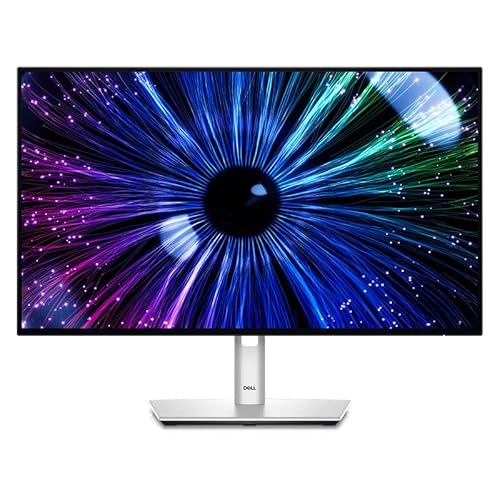
Dell UltraSharp U2424HE 24in Hub — Best One-Cable Portrait Desk
The U2424HE must be distinguished from its sibling by its reason to exist, which is connectivity. Dell lists it as the UltraSharp 24 inch Hub Monitor, and the hub designation means the screen gathers the desk: the laptop connects once, and the monitor distributes the relationship to the peripherals and, in a portrait setup, to the workflow. Where the U2424H is the pivot all-rounder, the HE is the same portrait idea engineered for the one-cable laptop desk that defines modern hybrid work.
That distinction matters more in portrait setups than in ordinary ones, because a rotated screen complicates cable geometry. Cables that were tidy in landscape can strain, dangle or pull when the panel turns; a hub monitor fed by a single lead from the laptop keeps the rotating part of the system nearly cable-free, so the pivot stays a ten-second gesture rather than a rewiring project. Anyone who has abandoned portrait mode because the cables fought back will recognise the HE’s design as the answer to a real, unglamorous problem.
A hybrid consultant who docks at home twice a week and at a client office the other days is this monitor’s constituency. At home, the U2424HE stands in portrait beside her laptop, fed by one cable, holding the contract column while the laptop shows the call. The setup assembles in the time a kettle takes, and disassembles into a bag without a cable audit. Choose the HE over the H when the desk is a docking desk; choose the H when a desktop PC with its own connections does the feeding.
- Class: 24 inch UltraSharp hub monitor
- Desk role: single-connection laptop workstation
- Orientation role: pivot portrait beside the laptop
- Maker line: Dell UltraSharp business displays
- Distinguishing idea: connectivity, not panel, separates it from the U2424H
Strengths
- Hub design keeps the rotating screen nearly cable-free.
- One-cable docking suits hybrid routines perfectly.
- UltraSharp stand and panel discipline match its sibling’s standard.
Trade-offs
- Desktop-PC owners pay for hub features they may never use.
- Full HD at 24 inches remains the sharpness ceiling here.
- Its benefits reveal themselves in routines, not in first impressions.
Best for: laptop-based hybrid workers building a portrait second screen.
Not suited for: fixed desktop towers with abundant ports of their own.

LG 27UP850-W 27in 4K — Best 4K Vertical Canvas
The 27UP850-W scales the portrait idea up to 4K, and the change is not subtle. A 27 inch UHD IPS panel — 3840×2160, with VESA DisplayHDR 400, 95% DCI-P3 colour and USB-C per its listing — rotated into portrait becomes a tall column of exceptional sharpness: a full document page rendered like print, a code file with a hundred lines in view, a design canvas where portrait-format work, from book covers to phone interfaces, displays at near-native presence. This is the pick for readers whose vertical work is also their detailed work.
The three-side virtually borderless design in its listing matters in the dual-screen arrangements portrait buyers favour, because the seam between the tall LG and its landscape partner shrinks to a line rather than a frame. USB-C keeps the connection modern, and the colour story — 95% of DCI-P3 — keeps the screen honest beside the colour-conscious primaries it will accompany. In landscape, it is simply a fine 27 inch 4K monitor; the pivot converts a good screen into a flexible one without costing it anything in its day job.
A magazine designer laying out portrait pages is this LG’s defining user. The cover and the feature spreads stand at full height on the rotated panel, judged at 4K density, while the flatplan and the correspondence live on the landscape screen. When the issue ships, the same monitor swings back to landscape for the web edition’s wide assets. Flexibility of that order is why professionals buy pivot 4K screens rather than dedicating a lesser panel to portrait — the tall screen must be a first-class screen, and the UP850-W is one.
- Panel: 27 inch UHD IPS, 3840×2160
- HDR note: VESA DisplayHDR 400 per the listing
- Colour coverage: DCI-P3 95% per the listing
- Connection centre: USB-C per the listing
- Design: three-side virtually borderless
Strengths
- 4K density makes portrait documents and designs print-sharp.
- Wide P3 colour keeps it credible beside colour-first primaries.
- Borderless design flatters the dual-screen portrait arrangement.
Trade-offs
- A portrait 27 inch panel stands tall; measure shelves and sightlines.
- Its newer sibling below argues the updated-model case.
- Full 4K asks a capable computer output to drive it well.
Best for: designers, editors and detail workers wanting a tall 4K canvas.
Not suited for: low desks under shelves, where its portrait height crowds.

LG 27UP850K-W 27in 4K — Best Updated 4K Pick
The UP850K-W is the newer generation of LG’s 27 inch 4K pivot line, and its listing states the facts this review is built on: a 27 inch UltraFine 4K UHD IPS display at 3840×2160 with DisplayHDR 400 and built-in speakers. Positioned beside its UP850-W sibling, it takes the updated-model role — the pick for buyers who prefer the current revision of a proven design, with the small conveniences, like integrated speakers, that a generation change brings to a desk that also takes calls and watches briefings.
Keeping the two LG reviews distinct matters, because they will be compared by every reader of this guide. The W is the established model with the longer track record and the explicitly listed wide colour and USB-C story. The K is the fresher revision whose listing foregrounds its speakers and its UltraFine 4K identity. In portrait duty both deliver the same essential experience — a tall, sharp, colour-capable column — so the choice between them is properly made on the listing details that matter to the individual desk: speaker needs, connection specifics confirmed at purchase, and the buyer’s preference for proven or current.
A video producer who storyboards in portrait — scripts and shot lists run tall — and reviews cuts in landscape is the K’s plausible owner. The built-in speakers handle the review screenings at desk quality, the pivot serves the script hours, and the 4K panel serves both without fear or favour. Newer is not automatically better in monitors, but a current revision of a strong line, bought with its listing read carefully, is a rational default for buyers without a reason to prefer the elder.
- Panel: 27 inch UltraFine 4K UHD IPS, 3840×2160
- HDR note: DisplayHDR 400 per the listing
- Audio: built-in speakers per the listing
- Generation: newer UP850 revision
- Desk role: pivot portrait and landscape in one panel
Strengths
- Current-generation revision of a proven 4K pivot design.
- Built-in speakers simplify call and review setups.
- The tall 4K canvas serves scripts, documents and designs equally.
Trade-offs
- Its listing states fewer colour specifics than its sibling’s does.
- Track record is shorter simply because the model is newer.
- Speakers are desk-grade, not entertainment-grade.
Best for: buyers who prefer the current model and value integrated speakers.
Not suited for: colour sticklers who want the sibling’s explicitly listed gamut story.

ASUS ProArt PA278QV 27in QHD — Best Colour-True Pivot
The PA278QV occupies the guide’s most interesting middle ground: a 27 inch 1440p QHD ProArt panel, Calman Verified per its listing, with 100% sRGB-class colour discipline and a height-adjustable stand, built by ASUS’s professional line. QHD at 27 inches in portrait is a sweet configuration the 4K picks overshadow too easily — sharp enough that text and interfaces render cleanly in long columns, light enough that any modern laptop drives it without strain, and priced by its line to leave room in the budget for the second screen its owners so often pair it with.
ProArt verification is the differentiator. A portrait screen in a coding-and-design stack spends its life beside the primary colour reference, and a panel whose accuracy is third-party verified does not become the weak witness in the pair. Designers use the PA278QV rotated for the tall assets — the mobile interface, the poster, the long web page — confident that the colour they approve in portrait is the colour the file contains. Coders, its other constituency, get the same panel discipline applied to syntax highlighting that stays legible at small sizes for long sessions.
A front-end developer who also designs is this monitor’s whole biography in one person. Mornings, the ProArt stands in portrait with the component code in one long, accurate column; afternoons, it holds the mobile designs at full height while the landscape primary runs the browser preview. The stand’s height adjustment keeps the tall panel’s centre at her eye line in both orientations. Among the six picks, this is the one whose two constituencies — code and colour — are served by the same feature, which is the definition of a well-aimed product.
- Panel: 27 inch QHD, 1440p
- Verification: Calman Verified per the listing
- Colour discipline: 100% sRGB-class per the listing
- Stand: height adjustable per the listing
- Maker line: ASUS ProArt professional displays
Strengths
- Verified colour accuracy suits design work in portrait orientation.
- QHD density is the portrait sweet spot for mixed code and design.
- Height-adjustable stand serves both orientations ergonomically.
Trade-offs
- QHD cannot match the LG pair’s 4K density for fine detail.
- Its colour story is sRGB-centred rather than wide-gamut theatrical.
- No hub theatrics; connectivity is professional but plain.
Best for: developer-designers and colour-conscious coders building portrait stacks.
Not suited for: desks where maximum 4K density in the tall screen is the whole brief.
BenQ PD2506Q (prose-only) — Designer Portrait Option
The PD2506Q earns its prose-only chair on the strength of its lineage: BenQ’s PD line is the designer series this guide has already praised in larger sizes, and a 25 inch-class QHD designer monitor with the line’s colour discipline and a pivot-capable ergonomic design is, on paper, a natural portrait companion for design and coding desks. Its smaller footprint suits the secondary-screen role particularly well, since a portrait monitor in a dual setup competes for desk width with the primary display, the laptop and the human.
Why no link? Because our verification pass returned no clean listing for this model, and this guide’s rules — the same rules that govern every pick above — forbid attaching a purchase link to an unverified listing or inventing an identifier for it. Readers who find the model through BenQ’s own channels should evaluate it by the PD line’s standards: designer colour modes, QHD-class sharpness for text columns, and stand ergonomics that treat portrait as a first-class orientation. If a verified listing appears in a future pool, this pick will graduate to a full linked review; until then it stands as an honest signpost rather than a recommendation with a button.
Its presence in the guide makes a broader point worth stating once. A roundup that only contains what it can link to is a shop window, not a guide. The PD2506Q’s prose-only treatment — named, described within the limits of what is known, and clearly marked — is how this publication handles the gap between the market as it exists and the market as it could be verified on the day of checking. Readers lose nothing by the honesty and gain a model to research through the maker’s own storefront if the designer-portrait brief is theirs.
- Class: designer-line portrait-capable monitor
- Maker line: BenQ PD designer series
- Link status: prose-only, no verified listing in this pool
- Desk role: compact portrait secondary for design and code
- Evaluation route: maker’s own channels and PD-line standards
Strengths
- Designer-line colour thinking in a portrait-friendly size class.
- Compact footprint suits dual-screen desks where width is scarce.
- BenQ’s ergonomic tradition treats pivot as a designed feature.
Trade-offs
- No verified listing here, so no link and no pool-confirmed details.
- Buyers must confirm current specifications through BenQ directly.
- Linked rivals above offer the certainty this pick cannot today.
Best for: BenQ loyalists researching a compact designer portrait screen through official channels.
Not suited for: anyone ordering from this page today — the five linked picks serve that need.
Portrait Lineup Compared: What Each Tall Screen Is Really For
| Model | Size and resolution | Standout trait | Link status |
|---|---|---|---|
| Dell U2424H | 24 inch FHD | 120Hz and 98% DCI-P3 | Linked |
| Dell U2424HE | 24 inch hub class | One-cable hub design | Linked |
| LG 27UP850-W | 27 inch 4K | HDR 400, 95% DCI-P3 | Linked |
| LG 27UP850K-W | 27 inch 4K | Newer model, speakers | Linked |
| ASUS PA278QV | 27 inch QHD | Calman Verified accuracy | Linked |
| BenQ PD2506Q | Designer class | Compact PD-line option | Prose-only |
The table’s lesson is that portrait is a role, not a ranking. The Dells own the 24 inch, desk-friendly end and split on connectivity; the LGs own density; the ASUS owns verified colour at the middle resolution; the BenQ waits in the wings as the compact designer alternative. A buyer who knows their column — code, documents, designs, data — already knows their row, and the remaining work is measuring the desk and confirming the listing, which is as it should be.
How Do You Set Up Portrait Mode Properly the First Time?
Mechanics first: clear the desk arc the panel will swing through, because a rotating 27 inch screen sweeps more space than intuition suggests, and cables should be given slack before the turn, not discovered during it. Rotate the panel on its stand — most pivot designs turn clockwise into portrait — then tell the operating system what happened: display settings offer a portrait orientation option for that screen, and applying it turns the tall panel from a sideways curiosity into a working canvas. Set the scaling so text matches the primary screen’s apparent size, or window edges will change size as they cross between displays, a small daily irritation with a thirty-second cure.
Geometry second: in portrait, the screen’s centre sits higher relative to its base, so re-check eye level after rotating — the top of a tall 27 inch panel can end up well above the eyes, and the stand’s height adjustment or a lower desk position should bring the working column’s middle to a comfortable gaze. Arrange the portrait screen in the system settings where it physically stands, left or right of the primary, and decide its job permanently: documents and communications on the tall screen, canvas and creation on the wide one. Portrait mode succeeds as a system, and systems are built from decisions made once, deliberately, on the first afternoon.
Which Mistakes Turn Portrait Owners Back to Landscape?
The commonest is buying the pivot without the purpose: a screen rotated because it could be, holding the same wide applications it held before, now awkwardly cropped. Portrait rewards tall content and punishes wide content, so the conversion only sticks when the workflow supplies the tall content — documents, code, feeds, ledgers — in real volume. The second mistake is ergonomic: leaving the rotated screen at landscape height, so its top third lives in the neck-strain zone, then blaming the orientation for what the stand adjustment would have fixed.
The third mistake is cable neglect — rotating against a taut cable until something complains — and the fourth is loneliness: judging portrait as a single-screen experiment on a desk where its natural role is partner to a landscape primary. Most delighted portrait owners run the tall screen second, not solo. Buyers unsure whether the life suits them should borrow the experiment cheaply: rotate any pivot-capable screen already owned, or start with the U2424H’s modest commitment, before building the full two-screen cathedral.
Six Desks That Went Tall, and What Each One Learned
The U2424H beside the novelist’s laptop
A novelist drafting in a small study turned her U2424H on a Tuesday and finished the chapter on Friday without once scrolling to re-read the previous page — the whole scene simply stood in view. Her lesson was about attention: a portrait screen does not merely show more lines, it removes the micro-interruptions that scrolling smuggles into thought, hundreds of them a day. The Dell now holds the manuscript permanently, and the laptop screen, demoted to research and correspondence, has never been missed in its old role.
The U2424HE in the consultant’s two-desk life
A consultant who splits the week between a home study and a client office bought the hub Dell for the home desk and discovered its real talent is arrival. One cable, ten seconds, and the portrait column is awake with the contract where she left it. Her lesson concerned cables rather than panels: every prior portrait experiment in her career had died of cable friction, and the hub design is the first that made rotation a non-event in a life lived between desks.
The UP850-W in the layout studio
A two-person design studio runs the LG tall for page layouts and learned the 4K lesson: density is what makes portrait professional. At 1080p, a rotated page is a convenience; at 4K, it is a proofing surface, with type and image detail judged at the size the reader will meet them. Their second lesson was spatial — the tall LG reorganised the desk around itself, pushing the landscape screen to the dominant position and the laptop off the desk entirely, an arrangement neither partner would now surrender.
The UP850K-W in the producer’s script corner
A documentary producer keeps scripts, transcripts and shot lists on the newer LG, and reviews assemblies in landscape on the same panel. His lesson was about the built-in speakers he nearly dismissed: review screenings at the desk stopped requiring the headphone ceremony, and quick client calls became walk-up events. Small conveniences compound in production work, where the day is a hundred small tasks wearing a trench coat labelled one big task.
The PA278QV in the developer-designer’s stack
A developer who designs her own products runs the ProArt tall and learned the colour lesson: a portrait screen in a design stack must be as trustworthy as the primary, because work crosses between them constantly and any visible disagreement becomes a daily argument about which screen is lying. The Calman Verified panel ended the argument by never starting it. Her code, meanwhile, gained the calm of a column that shows a whole file’s architecture at a glance.
The PD2506Q on the research list
An illustrator furnishing a narrow desk read this guide, noted the BenQ’s prose-only status, and did exactly what the format intends: she researched the model through BenQ’s own channels, compared its confirmed specifications against the linked five, and made her decision with full information. Her case is included because it demonstrates the prose-only mechanism working as designed — the guide widened her shortlist honestly without pretending to a verification it did not have, and the final judgement remained, properly, hers.
Which Work Actually Belongs on a Tall Screen?
Rank your applications by their natural shape and the portrait desk assembles itself. Documents and long-form reading sit at the top: a page displayed whole changes proofreading, contract review and research from a scrolling exercise into a viewing one. Code follows, for the architectural reason already given — vertical context is working memory. Communications form the third tier: email, chat and support queues are infinite columns by design, and exiling them to the tall screen returns the landscape panel to creation. Data with many rows — ledgers, logs, trackers, timelines — forms the fourth, since a portrait screen shows the record’s length the way a landscape screen shows its width.
The wide media should stay wide, and saying so protects the category from its own enthusiasts. Video editing timelines, spreadsheets with many columns, design canvases for landscape formats and films all belong on the landscape primary, and a two-screen desk that assigns each medium its native shape will feel, within a week, less like a setup and more like the way desks were always supposed to work. Portrait is not a replacement for the standard monitor. It is the standard monitor’s oldest colleague — the page — finally given a screen of its own.
How Does Portrait Mode Change Posture and Desk Geometry?
A rotated screen rearranges the body as well as the desk. The reading gaze in portrait travels a longer vertical path, so the panel’s centre should sit slightly lower than a landscape screen’s would, letting the eyes read downward through the column with the neck near neutral. The top of a tall 27 inch panel deserves particular respect: if its upper edge forces a raised chin, lower the stand or the desk shelf until it does not, because a posture tax collected hourly will eventually be blamed on the orientation and the experiment will be abandoned for a furniture reason.
Width is the compensating gift. A portrait 24 inch screen occupies roughly the desk width of a small laptop, which is how crowded desks gain a second display without gaining a second desk. Keyboard position should follow the primary screen, not the tall one — the portrait panel is read more than it is typed at — and the mouse’s travel between screens should be arranged in settings to cross at the height where the two panels actually meet, or the cursor will appear to jump a cliff edge at every crossing. These are ten-minute adjustments, made once, and they separate the portrait desks that last from the ones photographed once and quietly rotated back.
Monitor Arms, VESA Mounts and the Rental-Friendly Portrait Desk
Every linked pick here can also live on a monitor arm, and for some desks the arm is the better pivot. An arm lifts the panel clear of the desk surface, returns the footprint to the papers and notebooks that compete for it, and makes the rotation gesture lighter — the screen floats at the end of a balanced mechanism rather than turning on a stand’s bearing. Renters and hot-deskers benefit most, since a clamp arm leaves no mark and travels between homes in a box. Buyers choosing the arm route should confirm the VESA pattern and the panel’s weight against the arm’s rating, and should keep the stand in its box regardless: stands are what make a monitor lendable, sellable and useful in the next room of life.
The arm also solves the two-screen height problem elegantly. A landscape primary and a portrait secondary rarely agree on a natural centre line from their own stands; on arms, both float to the exact heights the reader’s neck requested, and the seam between them becomes a designed line rather than an accident of two manufacturers’ plastic. Desks that adopt arms rarely return to stands — not because stands are poor, but because floating geometry, once experienced, reads as the correct relationship between a person and a pair of screens.
Students, Streamers and Traders: The Portrait Constituencies Nobody Expected
Three groups adopted portrait screens for reasons their inventors never briefed. Students discovered that a tall second screen holds the paper being cited while the essay grows on the laptop — the two-document workflow of all scholarship, at the price of one modest Dell. Streamers discovered the portrait chat column: a vertical screen of scrolling audience messages beside the game, readable at a glance without turning from the camera, which is why tall screens glow in the background of so many broadcasts. Traders and analysts discovered the ledger column, where watchlists and order books run in their natural direction and a portrait panel shows a market’s depth the way the market itself lists it.
What unites these constituencies is that none of them bought a vertical monitor as such. Each bought the solution to a column-shaped problem and discovered the category afterwards. That is the healthiest way to arrive at this guide’s subject: not as a desk fashion, but as the answer to a specific, recurring, downward-scrolling frustration. Readers who recognise their own frustration in one of these portraits have their recommendation already; the six reviews above merely assign it a model number.
How Long Does the Portrait Habit Take to Form, and When Should You Judge It?
Give the experiment two honest weeks, because the first three days measure novelty rather than fit. Day one is mechanics and delight; day two is the discovery that some applications resent the column and must be assigned back to the wide screen; by the end of the first week, the assignments settle into a constitution — these apps tall, those apps wide, no daily negotiation. The second week is when the benefits stop announcing themselves and start compounding quietly: fewer scrolls, fewer lost places, a communications stack that no longer interrupts the canvas. Owners who judge at day two abandon setups that would have delighted them at day fourteen, which is why this guide prescribes the fortnight before any verdict, including a return.
The judgement criteria should be behavioural, not visual. Count, for one ordinary day, how often the tall screen holds your attention for minutes at a time versus how often it sits as expensive wallpaper. A portrait screen earning its width is read constantly and thought about never. If the fortnight ends with the panel rotated back to landscape and the workflow unbothered, that too is a successful experiment — it cost a fortnight to learn the shape of your own work, and the monitor, every pick here being a complete screen in both orientations, remains in service regardless.
Buying the Second Screen First: A Note on Order of Operations
Most portrait desks are additions, not foundations, and the order of purchase matters. The primary landscape screen should be the best screen the budget allows, because it carries the colour-critical and wide-format work; the portrait partner should then be chosen for compatibility with it — matched height on the desk, compatible colour behaviour, a bezel that does not quarrel with its neighbour. Within this guide, that logic makes the Dells the natural partners for business primaries, the ProArt the partner for colour-led desks, and the LGs the partners that occasionally promote themselves to primary, leaving the older screen to take the tall role. A desk is an ecosystem, and the portrait screen is best bought as its newest citizen rather than its founding monarch.
Troubleshooting the Tall Desk: Four Small Problems and Their Cures
The sideways photograph is the first rite of passage: an image viewer or a legacy application that ignores the system’s rotation and presents its content lying down. Modern operating systems and applications handle portrait correctly; the stragglers are cured by updating the application or by assigning that one programme to the landscape screen permanently, which the two-screen constitution already anticipates. The second problem is the wandering cursor, lost somewhere up the tall column — cured by the display-arrangement settings, where the screens’ relative heights should mirror the furniture so the cursor crosses where the hand expects.
The third problem is text that arrives too small, because a portrait screen inherits scaling chosen for landscape. Raise the scaling for the tall panel alone until documents read at the size your primary screen taught your eyes to expect; consistency of apparent text size across the seam is the whole secret of a two-screen desk that feels like one instrument. The fourth problem is the audience: colleagues on a call, sharing your screen, who see a tall slice of your desktop. Share the application window rather than the whole display during calls, and the portrait advantage stays private while the presentation stays conventional. None of these cures costs money, and together they form the entire known pharmacopoeia of portrait ownership.
The Economics of Going Tall
A portrait second screen is among the cheapest productivity purchases a knowledge worker can make, because its competition is not another monitor but the worker’s own time. Price the experiment honestly: a U2424H-class screen, a cable, and one afternoon of arrangement, set against the scrolling and window-shuffling it removes from every subsequent working day. Even a conservative estimate — a few minutes saved daily, a few lost places avoided weekly — repays the hardware within a season, and the panel then continues paying for years, in the currency of attention that no employer can buy back once spent.
The same arithmetic explains the guide’s shape. It contains no exotic flagship, because the portrait role does not need one; it needs sound panels on honest stands at prices that make the experiment easy to begin. The most expensive pick here, the 4K LG class, justifies itself only where density itself is the work. Everyone else should buy the experiment at the Dell or ASUS level, run the fortnight honestly, and discover — as most column-shaped workers do — that the question was never whether the desk would go tall, but why it waited so long.
One more constituency deserves its sentence before the verdict: the reader. Not the professional reader of contracts or code, but the person whose evenings are long articles, newsletters and book-length journalism consumed at a desk. A portrait screen is the closest a monitor comes to a page, and readers who rotate one for the evening report the same change writers report for the morning — the text stops feeling like a feed and starts feeling like a document, with a beginning that stays visible while the middle is read. If the six reviews above felt like an office argument, let this be the home one: the tall screen is where the internet’s words were always shaped to live.
What Changes After a Year of Living With a Tall Screen?
Owners interviewed by habit rather than by survey tend to report the same three long-term changes. First, the landscape primary becomes calmer: with communications and documents exiled to the column, the main screen holds one project at a time, and the desktop’s chaos concentrates where it can be ignored. Second, reading stamina grows measurably — the long report that used to be postponed until the afternoon gets read in the morning, because the format stopped taxing the reader before the content could. Third, the desk’s other furniture migrates: the laptop closes, the papers thin out, the notebook moves to the portrait screen’s side, and the workspace quietly reorganises around the two shapes of modern work, the canvas and the page.
None of these changes appears in a specification table, and all of them were predictable from the geometry. That is the deepest argument this guide can make for its subject: portrait orientation is not a feature to be marketed but a fit to be recognised, between the shape of information and the shape of the surface that shows it. The six picks above are simply the current, verified ways to buy that fit — five of them from this page, and the sixth, honestly signposted, from the maker’s own door.
Final Recommendation
Start vertical with the U2424H if you are new to portrait and want the complete, low-risk package; take the U2424HE if your desk docks by one cable. Take the LG 27UP850-W for a tall 4K canvas with the established record, or its UP850K-W sibling if the current model and its speakers appeal. Take the ProArt PA278QV when verified colour shares the column with your code. Keep the BenQ PD2506Q on the research list, through BenQ’s own channels, if a compact designer portrait screen is the brief. For the reader most likely holding this guide — a knowledge worker drowning in downward-scrolling work — the U2424H is the first packing choice: turn it once, and the documents you read all day finally stand at the height they were written.
Frequently Asked Questions
Can any monitor be used vertically?
Only safely if its stand pivots or it mounts to a VESA arm that does. Propping a fixed-stand monitor on its side is unstable and can strain the panel and its cables. Every linked pick in this guide was chosen because its design treats portrait as an intended orientation, not an improvisation.
Is a vertical monitor good for coding?
It is one of the strongest use cases in this guide. Code is a tall medium: more lines visible means more context held in view, fewer scrolls hunting for the function definition, and a natural pairing with a landscape screen running the application being built. The ProArt and the two Dells all serve this stack well.
What size works best in portrait?
Twenty-four inches is the manageable classic — tall enough to transform documents, compact enough for ordinary desks. Twenty-seven inches suits detail work and larger desks, provided the rotated height clears shelves and sightlines. Measure the vertical space above your desk before choosing, because portrait height is the dimension buyers forget.
Do I need a special cable or software for portrait mode?
No special cable — the standard video connection carries the same signal, and the operating system’s display settings handle the rotation. Give the cables physical slack for the turn, set the orientation once in settings, and the arrangement persists across restarts.
Does portrait mode work for reading sheet music, recipes and other household paper?
Beautifully, and these domestic uses convert more sceptics than any office argument. A portrait screen in a kitchen-adjacent workspace shows a full recipe page without scrolling with floury hands; a musician’s desk holds two pages of a score at reading size; a family organiser displays the week’s calendar in its natural column. The picks here are office equipment, but the geometry that serves a contract serves a concerto, and households that rotate a screen for work often find it staying tall for the evening’s purposes too.
How do I clean and care for a pivot stand?
Keep the pivot mechanism’s arc free of cables and objects, rotate with two hands at the panel’s edges rather than levering one corner, and dust the stand’s bearing surfaces occasionally so grit does not join the mechanism. If a stand develops play after years of service, a monitor arm through the VESA mount restores the geometry completely — one of the quiet advantages of buying screens, like every linked pick here, whose mounting standards outlive their stands.
Does a portrait screen help with spreadsheets at all?
It depends which dimension of the sheet dominates your work, and most analysts can answer that question from memory once they picture the file they open every single morning and the direction their eyes travel across it during the first minute. Ledgers, trackers, inventories and logs — sheets whose meaning runs downward through hundreds of rows — gain exactly what documents gain: more of the record visible, less scrolling, a truer sense of the whole. Financial models and wide comparison tables, whose meaning runs across dozens of columns, belong on the landscape screen. Most analysts run both shapes daily, which is why the portrait panel so often arrives as the second screen rather than the replacement.
Can a vertical monitor be my only monitor?
It can, for reading-dominant work, and some writers and researchers run exactly that. Most users, though, prefer portrait as the second screen beside a landscape primary, because video, spreadsheets and design canvases remain wide media. Judge by your own week’s content rather than by anyone’s ideology.
Related Guides
Readers building the complete desk may also want our guide to the best eye care monitors for long reading days, our roundup of the best computer monitors with webcam, and our testing of the best external monitors for photo editing.


