What's inside
- Key Takeaways
- Quick Picks
- How Did We Choose the Best Low Capacity SD Cards?
- SD, SDHC and SDXC: Why Is Capacity a Compatibility Question?
- Which Devices Still Run on Small Cards?
- How Do You Check a Device’s Real Card Limit Before Buying?
- What About Devices Older Than SDHC Itself?
- How Do the Six Cards Compare Side by Side?
- How Should You Format and Care for Small Cards in Old Devices?
- Should You Stockpile Small Cards While They Are Easy to Find?
- What Mistakes Do Small-Card Buyers Keep Making?
- Final Recommendation
- Frequently Asked Questions
- Related Guides
As an Amazon Associate I earn from qualifying purchases. This post may contain affiliate links at no extra cost to you.
gizmoverdict.com is reader-supported. When you buy through links on our site, we may earn an affiliate commission.
Where to buy: The six cards below each link to a verified Amazon listing, and every class, speed and pack count quoted comes from those listings’ titles, which you can read at the top of each listing page. In this corner of the card market the titles are short and the differences are small, so this guide reads them closely and flags what each one leaves unsaid.
The best low capacity sd cards exist because of a hard boundary in the SD standard itself. Cards up to 32GB belong to the SDHC generation; anything larger is SDXC, a different generation with a different default file system, and a long list of older devices — trail cameras, point-and-shoot cameras, game cameras, older consoles and handhelds, industrial and medical equipment — were built for SDHC and simply cannot address an SDXC card at any price. Owners of such devices are not being nostalgic or cheap when they shop for 8GB, 16GB and 32GB cards. They are shopping for the only cards their equipment will ever recognise.
That constraint gives this category its unusual shape. Speed matters far less than compatibility, because the host devices are mostly modest: a trail camera writing stills and short clips, a compact camera from the SDHC era, a piece of equipment logging data. Capacity matters differently too — not as hoarding room, but as rotation stock. Trail camera owners in particular think in handfuls of cards, swapped on visits to the woods, which is why two of the six picks here are multipacks and why this guide treats pack count as a headline specification rather than a footnote.
All six picks sit between 8GB and 32GB, all are full-size SD cards in the SDHC family as their titles state, and all come from the small shelf of small cards still made by identifiable manufacturers. The differences that remain — class ratings where stated, SLC flash in one unusual pick, single cards versus multipacks — are exactly the differences the pick sections take seriously.
Key Takeaways
- 32GB is the ceiling of the SDHC generation; larger cards are SDXC and many older devices cannot use them at all.
- Every pick here is a full-size SDHC card between 8GB and 32GB, sized for legacy devices rather than modern cameras.
- Two picks are multipacks — a 2-pack and a 5-pack — because trail camera and rotation workflows consume cards in handfuls.
- One pick, the INDMEM 8GB, uses SLC flash according to its title, a durability-led choice for write-heavy small jobs.
- Speed classes in this set are modest and honestly stated; the host devices rarely ask for more.
- Format small cards as FAT32 and in the device itself, and never assume a bigger card is an upgrade for old hardware.
Quick Picks
| Pick | Badge | Why it earns its place |
|---|---|---|
| SanDisk 16GB SDHC SDSDB-016G | The plain classic | A long-running 16GB SDHC card from the maker that defined the format, for devices that want nothing fancy. |
| SanDisk Ultra 16GB Class 10 | Stated class, small size | Class 10 and UHS-I printed in the title with up to 80MB/s, at the same trail-friendly 16GB. |
| SanDisk 32GB Ultra | Top of the SDHC ceiling | The largest capacity an SDHC-only device can accept, with up to 120MB/s read stated. |
| INLAND 16GB SDHC (2 Pack) | Two-card rotation | A multipack of standard full-size 16GB cards built for swap-in, swap-out field workflows. |
| INDMEM 8GB SLC SDHC | SLC durability pick | SLC flash with U1 Class 10 stated, for small write-heavy jobs in legacy equipment. |
| PNY 32GB Elite (5-Pack) | Five-card fleet | Five 32GB C10 U1 V10 cards in one pack, the trail camera season sorted in a single purchase. |
How Did We Choose the Best Low Capacity SD Cards?
The first rule was the ceiling itself: no card above 32GB, because the entire purpose of the set is serving devices that stop at the SDHC boundary. That single rule discards most of the modern card shelf, which is the point. The second rule was family honesty — each pick had to be a full-size SD card in the SDHC generation as its title states, since the devices in question have full-size slots and SDHC-era controllers, and an adapter-based workaround helps none of them.
A note on the two SanDisk Ultra picks sharing a name at different sizes: they are separate listings with separate titles, and this guide treats them separately because the devices they serve experience them separately — one doubles the other’s interval. Where a household owns both sizes, labelling by capacity on the card itself keeps the rotation honest, since a 16GB and a 32GB card in identical dress are otherwise indistinguishable at a glance in a dark truck cab.
The third rule was maker identifiability. The small-card shelf attracts anonymous products whose stated capacities cannot always be trusted, and a card that misreports its capacity corrupts data in the cruelest way, silently, at the moment it fills. Every pick here carries a name with a business behind it — SanDisk three times, because SanDisk’s small SDHC line is the category’s backbone, plus Inland, INDMEM and PNY — and each title’s claims are reported exactly as printed, including the gaps.
The fourth consideration was workflow shape. Small cards are rarely bought one at a time for the duties that depend on them most; they are bought as rotation stock for trail cameras, as spares for a beloved old compact, as the logging medium for a piece of equipment. The set therefore includes two multipacks alongside the singles, and treats the INDMEM’s SLC flash as a distinct answer for write-heavy legacy duty rather than as a curiosity.
Speed was deliberately ranked last. A trail camera and an SDHC-era compact cannot spend a modern card’s speed, and paying for velocity the host cannot use is the defining waste of this category. Where a title states a class or a read ceiling, it is reported; where it does not, the pick is judged on capacity, format and maker, and the gap is flagged for the documentation check.
Availability shaped the final list as well. Small SDHC cards are a legacy shelf, and some once-common models have quietly vanished from sale; a guide that recommends unobtainable cards helps nobody. The six here are the ones a buyer can actually order today from identifiable sellers, which in a shrinking category is a selection criterion in its own right — and another argument for the modest stockpile discussed later in this guide.
SD, SDHC and SDXC: Why Is Capacity a Compatibility Question?
The SD standard grew in generations, and each generation changed more than the number on the packet. Original SD cards topped out at 2GB. SDHC raised the ceiling to 32GB and standardised the FAT32 file system. SDXC jumped to a theoretical two terabytes and switched the default file system to exFAT. A device’s card controller and firmware were built for one generation’s rules, and a card from a later generation is not a bigger version of the same thing — it is a different conversation the older device was never taught to hold.
That is why the failure mode is so absolute. An SDXC card in an SDHC-only trail camera does not run slowly or partially; it is typically not recognised at all, or is recognised and then mishandled in ways that lose files. Owners misread this as a faulty card and return perfectly good 64GB cards, when the actual fault is a generation mismatch no card could have survived. The device’s manual states its maximum card size in one line, and that line is the most important specification in this entire category.
A wrinkle worth knowing: some devices near the boundary accept 32GB cards formatted in particular ways, and a few tolerate larger cards reformatted to FAT32, but tolerance is not support. For equipment that records things you care about — wildlife footage gathered over weeks, data from an instrument — staying inside the stated generation is the only defensible policy. Buy the largest SDHC card the manual allows, which in practice means 32GB, and let larger capacities serve the devices built for them.
The generations also explain a small mystery of the modern shelf: why a 32GB card and a 64GB card can sit side by side at similar prices while belonging to different worlds. Manufacturing cost follows the silicon, not the standard, so the boundary is nearly invisible in the shop and absolute in the device. That invisibility is exactly why this category traps so many buyers, and why the family name printed on the card — SDHC versus SDXC — deserves more attention than the capacity figure beside it.
The full-size format is part of the same story. SDHC-era devices have full-size slots, and while microSD cards in adapters physically fit, the adapter adds a contact layer and a looseness that weeks of outdoor temperature cycling in a trail camera do not forgive. Every pick in this guide is a native full-size card, because the devices are native full-size devices.
Which Devices Still Run on Small Cards?
Trail cameras lead the list, and they explain the multipacks. A trail camera hangs on a tree for weeks, writing stills and short video clips of whatever passes, and its owner visits periodically to swap the card and review the take at home. That workflow consumes cards the way film cameras consumed rolls: several in rotation, one in the camera, others in the truck, the desk and the wash. Small capacities suit it perfectly because the card is collected long before it fills, and SDHC limits suit it because many trail cameras, including recent budget models, are built to that ceiling.
Older digital cameras form the second population: the point-and-shoots and early interchangeable-lens bodies of the SDHC era, still loved, still working, and hard-capped at 32GB. Beside them stand game and hunting cameras, feeder and property surveillance units, older handheld consoles and media players, car and marine electronics of a certain age, and a long tail of industrial, medical and agricultural equipment whose card slots were specified when SDHC was the present tense. Each of these devices will outlive several generations of the modern card market’s attention, which is precisely why a guide to small cards needs to exist at all.
The common thread is that none of these devices is obsolete to its owner. The trail camera still watches the crossing; the old compact still takes the family photographs it always took. Small SDHC cards are the consumable that keeps that equipment alive, and buying them well — right generation, right format, honest maker — is a form of maintenance, not a compromise.
There is an environmental footnote worth a sentence, because it flatters this category honestly. Every year an existing device stays in service on a fresh small card is a year its replacement is not manufactured, shipped and eventually discarded. Keeping SDHC-era equipment fed is not a grand ecological gesture, but it is a real one, and it costs the owner nothing beyond buying the right card in the first place.
How Do You Check a Device’s Real Card Limit Before Buying?
Start with the manual, which states the answer in one of three dialects: a maximum capacity, a card family name, or a list of tested cards. A stated family is the most useful of the three — SDHC on the page means the 32GB ceiling applies no matter what capacities the shop shelf offers — while a stated maximum should be obeyed exactly, including when it is lower than 32GB, as it is on some early SDHC devices that stop at 16GB or even 8GB. When the manual is long lost, the maker’s support archive usually keeps a copy, and the five minutes spent fetching it are cheaper than a return.
Where no documentation survives, the device’s age is a serviceable guide. Equipment designed before the SDXC era cannot have been built for SDXC rules, and equipment from the transition years deserves the conservative assumption. A practical field test exists as well: borrow or buy the smallest candidate card first, format it in the device, record with it for a full duty cycle, and read the results back before stocking up. In a category where a season’s rotation costs little, testing with one card before buying five is simply good housekeeping.
One trap deserves naming: a device may accept a card, format it, and record happily, yet address only part of its capacity or corrupt files beyond a certain fill level. Partial success is the most dangerous outcome in storage, because it converts a compatibility question into a data-loss schedule. The full-duty-cycle test — fill the card the way real use fills it, then verify the earliest files still read — is what separates a supported pairing from a lucky one.
What About Devices Older Than SDHC Itself?
A generation below this guide’s floor still exists in the wild: devices built for original SD, capped at 2GB, found in early digital cameras, old handhelds, legacy industrial kit and vintage electronics that owners keep alive out of affection or necessity. None of the six picks here serves them directly, because even the 8GB INDMEM belongs to the SDHC generation, and honesty about that boundary is worth more than a forced recommendation. Owners of pre-SDHC devices should hunt the shrinking supply of genuine 2GB standard SD cards from identifiable makers, and treat any listing promising modern capacities for those slots with suspicion.
The same honesty applies at the other edge: a handful of late SDHC-era devices tolerate 64GB cards reformatted to FAT32 through unofficial means. Tolerance varies by firmware and by luck, and the arrangement voids the one thing this category values most, which is predictability. Keep such experiments for devices whose contents do not matter, and let the working equipment run inside its stated generation.
What unites both edges is the principle the whole guide runs on: in legacy storage, the specification is the product. A card is right when its generation, format and capacity all match the host’s design, and merely close is a synonym for wrong that takes a few weeks to introduce itself.

SanDisk Flash 16 GB SDHC Flash Memory Card SDSDB-016G — The plain classic
Some products earn their place by having been the default answer for a very long time, and this is one of them: a 16GB SDHC card from SanDisk’s standard line, model SDSDB-016G, sold for years as the unglamorous card that goes in the trail camera, the old compact, the spare slot. Its title is almost ostentatiously plain — capacity, family, model number, and a note that the label may change — and in this category that plainness is a kind of credential. Nothing here is being oversold.
The working case is reliability of recognition. SDHC-era devices can be particular about media, and a card from the format’s defining maker, in the format’s most standard capacity, is the combination least likely to produce a recognition argument with an old controller. Sixteen gigabytes is also the pragmatic middle of the small range: large enough for a trail camera’s weeks or a compact’s holiday, small enough to stay firmly inside every SDHC device’s comfort.
The title states no speed class and no read ceiling, so this guide claims neither; the card’s duties in its intended devices are gentle, and its documentation carries whatever figures are required. What the pick asks you to value is provenance and fit over specification theatre. For a device that has served a decade, a card from a maker that has served the same decade is the calm choice, and calm is the correct emotion for media purchases.
There is a quiet archival virtue to this card as well. Because the model has been in production so long, its behaviour across thousands of device models is a matter of accumulated public experience; a quick search of any trail camera or camera forum will surface years of owners running exactly this card in exactly your device. Newer cards cannot offer that record at any price, and for a device that cannot be troubleshooted easily in the field, the record is worth real money.
Buy it singly for a single device, or in multiples as rotation stock for a pair of trail cameras — the card’s long production life means the one you buy next season will match the ones already in the drawer, a small continuity that mixed bargain cards never offer.
- Capacity: 16GB
- Family: SDHC, per the title
- Model: SDSDB-016G, per the title
- Speed class: Not stated in the listing title — verify with SanDisk documentation
- Pack count: Single card
Strengths
- Maximum compatibility calm for SDHC-era devices
- Long-running model, easy to match later
- 16GB sits inside every SDHC device’s limits
Trade-offs
- No class or speed figure in the title
- Plain specification for any demanding host
- Sold singly, so rotation stock means multiple purchases
Best for: an older camera or trail camera running on a dependable standard card
Not suited for: a device whose manual demands a stated speed class

SANDISK Ultra 16GB Class 10 SDHC UHS-I Memory Card — Stated class, small size
Step one rung up SanDisk’s own ladder and the title starts making promises: this Ultra card states Class 10, UHS-I and a read ceiling of up to 80MB/s alongside the same trail-friendly 16GB capacity. For an SDHC-era device that records video — an older camcorder, a compact with a real movie mode, a trail camera filming clips rather than stills — a stated Class 10 is the relevant assurance, because that class speaks to the sustained write floor such recording needs, in the modest amounts these devices require.
The Ultra line is SanDisk’s mainstream tier, and its presence at 16GB matters for a practical reason: it is the small card most likely to be found, matched and replaced anywhere, years from now. Owners building a rotation for several trail cameras, or keeping a beloved old camera in service, benefit from a card that behaves identically across every purchase. The UHS-I designation also future-proofs the card’s second life in newer readers and devices, where it will run at its stated pace for quick offloads of a season’s trail footage.
Nothing about the pick is extravagant, which suits its hosts. Eighty megabytes per second of read is brisk for this category and entirely wasted on the devices’ writing, a harmless surplus. The real specification is the pairing of a stated class with a small SDHC capacity, a combination that sounds obvious and is surprisingly rare on the bargain shelf, where small cards often print nothing at all.
Video deserves one more calibration. Class 10 in the SDHC era was the class cameras asked for when recording HD clips, and the legacy devices in this guide were designed against exactly that promise. A compact or trail camera of the period will not ask this card for anything beyond its stated floor, which is a rarer and more comfortable position than modern buyers, forever chasing headroom, ever find themselves in.
For households keeping one older camera alive, this is the single-card answer to reach for first. For trail camera rotations it pairs naturally with its plainer sibling above — Ultras in the cameras that film video, standard cards in the stills-only units — and the drawer stays organised by a logic anyone in the family can follow.
- Capacity: 16GB
- Family: SDHC, per the title
- Classes: Class 10, UHS-I — the title states both
- Read speed: Up to 80MB/s, per the title
- Model: SDSDUNC-016G-GN6IN, per the title
Strengths
- Stated Class 10 suits video-recording legacy devices
- Mainstream line, easy to replace and match
- Read ceiling makes seasonal offloads painless
Trade-offs
- 16GB is short for a video-heavy trail camera
- Speed surplus the host devices cannot spend
- Sold as a single card
Best for: SDHC-era cameras and trail cams that record video clips
Not suited for: a rotation fleet priced around multipacks
SANDISK 32GB Ultra SD Memory Card — Top of the SDHC ceiling
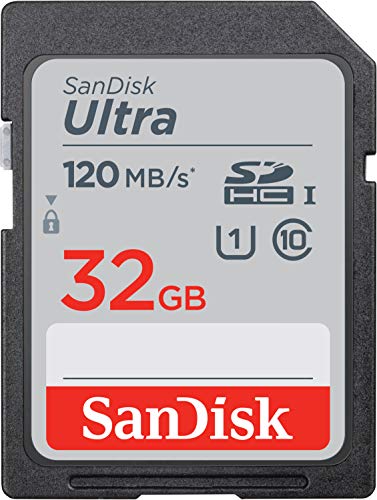
Thirty-two gigabytes is where the SDHC generation ends, and this Ultra card is the way to buy the whole ceiling from the category’s most established name. Its title states up to 120MB/s read on the UHS-I bus, the briskest offload figure among the SanDisk small cards here, which matters more than it first appears: the owner of a 32GB card in a busy trail camera or a well-travelled compact is moving a full card’s worth of memories at every swap, and read pace is the difference between a chore and a moment.
The capacity case is about intervals. Doubling the 16GB picks doubles the time a trail camera can sit between visits, doubles the stills an old compact holds on a trip, and gives video-recording legacy devices their longest leash. For equipment that is checked monthly rather than weekly — a camera on distant land, a relative’s property, a cabin — that interval is the entire product. It is also the largest card that remains legal tender in every SDHC-only device ever made, so it can be bought without a compatibility investigation beyond confirming the host is SDHC-era.
One discipline follows from the size: a 32GB card holds more irreplaceable material than its smaller siblings, so the copy-on-collection habit matters proportionally more. Treat the swap as a delivery, not a chore — card out, contents copied and verified, card formatted in the device, card back in the case — and the ceiling card’s generosity never becomes a larger basket for the same eggs.
Property owners running a single camera on distant land are this card’s emblematic users. The visit is monthly, the drive is long, and the card must simply have kept everything until the truck arrives. Thirty-two gigabytes of SDHC, from a maker whose small cards are the category’s reference, is the specification that visit writes for itself — and the faster stated read speed repays its keep in the driveway afterwards, when a month of footage moves to the laptop in minutes rather than over lunch.
Note what the title does not state: a speed class. The Ultra name and the read figure are printed; a class rating is not, so a device whose manual insists on a stated class should be matched against SanDisk’s documentation before purchase. For the great majority of SDHC hosts, whose demands are modest, the omission is a paperwork detail rather than a practical one.
- Capacity: 32GB, the SDHC maximum
- Bus: UHS-I, per the title
- Read speed: Up to 120MB/s, per the title
- Speed class: Not stated in the listing title — verify with SanDisk documentation
- Pack count: Single card
Strengths
- Largest capacity every SDHC device accepts
- Fastest stated read among these SanDisk picks
- Doubles unattended intervals for trail cameras
Trade-offs
- Class rating absent from the title
- More material at risk if a swap is mishandled
- Single card, no multipack economy
Best for: trail cameras and legacy devices checked at long intervals
Not suited for: a host whose manual requires a printed speed class

INLAND 16GB SDHC Flash Memory Card (2 Pack) — Two-card rotation
This pick is a multipack and is proud of it: two standard full-size 16GB SDHC cards in one purchase, which is the exact shape of the trail camera workflow. One card goes into the camera on the tree; the other rides home with last visit’s footage, gets copied, formatted and carried back next time. The rotation never leaves the camera empty and never leaves the owner copying files in the woods, and it is built from two identical, interchangeable cards rather than a drawer of mismatched singles.
Inland is the house name behind a large American electronics retailer’s own-brand components, a provenance that matters in a category full of anonymous packets: there is a business, a returns desk and a reputation attached to the label. The cards themselves are deliberately standard — the title claims no class and no speed figure — which matches the hosts they serve, since a trail camera writing stills and short clips asks for capacity and recognition, not velocity.
The honest limitation follows from that plainness. A device whose manual specifies a class rating deserves a card whose title states one, and two of the SanDisk picks and the PNY pack in this guide do exactly that. The Inland pair’s case rests on rotation economics and format correctness: two honest SDHC cards, in the right size, from an identifiable seller, bought in the quantity the workflow actually consumes.
The pair also teaches the rotation to households new to trail cameras, because the system is visible: two cards, two envelopes or case slots, one journey each way. Families who start with a matched pair build the copy-and-format habit from the first season, and the habit, once built, protects every card they ever buy afterwards — including the expensive modern ones in their newer cameras.
There is also a redundancy argument hiding in the pack count. Cards get lost in leaf litter, left in readers and lent to relatives; a rotation built on a matched pair degrades gracefully to a single card and a note to reorder, instead of collapsing at the first muddy accident of the season.
- Capacity: 16GB per card
- Pack count: 2 cards, per the title
- Family: SDHC, standard full-size SD, per the title
- Speed class: Not stated in the listing title — verify with Inland documentation
- Read speed: Not stated in the listing title — verify with Inland documentation
Strengths
- Multipack matches the swap-and-carry trail workflow
- Identifiable retailer brand behind the label
- Standard specification suits stills trail cameras
Trade-offs
- No class or speed stated in the title
- Two cards is a rotation, not a fleet
- Plain cards for a video-demanding host
Best for: a trail camera owner starting a clean two-card rotation
Not suited for: a legacy device that requires a stated speed class
INDMEM SD Card 8GB, UHS-I U1 Class 10 SDHC SLC Flash — SLC durability pick
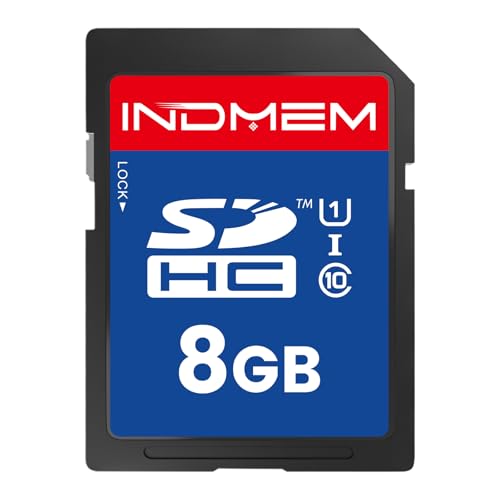
The smallest card in this guide carries its most interesting title: 8GB, one pack, UHS-I with U1 and Class 10 stated, SDHC — and SLC flash. That last phrase is the pick’s whole argument. SLC, single-level cell memory, stores one bit per cell instead of the two, three or four of denser consumer flash, and the trade is famous in industrial storage: far less capacity per chip in exchange for substantially greater write endurance and retention robustness. In a guide about small cards for hard-working old devices, an SLC card is not an oddity; it is the connoisseur’s answer.
Its habitat is the write-heavy small job: data logging in legacy equipment, a trail or security unit that overwrites relentlessly, an older device in a warm or vibrating place whose card is expected to survive years of cycling. Eight gigabytes is ample for logging and for stills-based field cameras, and the stated U1 Class 10 floor covers the modest sustained writing those duties involve. Owners who have watched consumer cards die in such posts will understand exactly what this card is for.
INDMEM is a smaller name than the giants elsewhere in this set, and the pick is made with that acknowledged: the SLC specification in the title is a specific, checkable claim rather than a vague adjective, and the card’s niche is narrow enough that the claim is the reason to buy it. As ever in this guide, figures beyond the title — endurance ratings, temperature behaviour — belong to the maker’s documentation, and a genuinely industrial deployment should read them there first.
A word on why SLC survives in this niche while vanishing from consumer shelves: density economics. Consumer buyers pay for gigabytes, so makers stack more bits into every cell and accept shorter endurance as the trade. Industrial and logging buyers pay for years, so the one-bit-per-cell design persists exactly where the workload is measured in overwrite cycles rather than in photo counts. This little 8GB card is a surviving window into that older, durability-first engineering culture.
Do not buy it as a general-purpose spare. Its value is concentrated in the one job consumer flash does badly, and at 8GB it will frustrate any use that thinks in video files. Bought for the right post, though, it may outlast the device it serves, which is a sentence rarely writable about a memory card.
- Capacity: 8GB
- Flash type: SLC, per the title
- Classes: UHS-I, U1, Class 10 — the title states them
- Family: SDHC, per the title
- Pack count: 1 card, per the title
Strengths
- SLC flash favours endurance over density
- Stated U1 Class 10 floor for logging duty
- Small size suits embedded and legacy posts
Trade-offs
- 8GB fills quickly with any video
- Smaller maker than the category giants
- Poor value as a general-purpose card
Best for: write-heavy logging and field duty in SDHC-era equipment
Not suited for: a camera filling up with video clips

PNY 32GB Elite C10 U1 V10 SDHC Flash Memory Card 5-Pack — Five-card fleet
The final pick is the other multipack, and it scales the idea up: five PNY Elite cards, each 32GB, each stating C10, U1 and V10 classes on the UHS-I bus, in a single purchase. Read that title as a fleet specification. Five identical cards at the SDHC ceiling, with stated classes covering stills and modest video, is a season of trail cameras — or one camera’s year of rotations — bought in one decision and stored in one drawer.
PNY is a long-established memory name, and the Elite line’s stated V10 class deserves a word of calibration: V10 promises a 10MB/s sustained floor, which is honest, modest and entirely sufficient for the trail cameras and legacy devices this guide serves. The value of the print is not the number’s size but its existence — a buyer can match these cards against a device manual’s class requirement without a documentation hunt, which neither of the other multipack-style purchases here fully allows.
Fleet buying changes the maintenance maths as well. With five matched cards, numbering and rotation become trivial, a lost or damaged card is an inconvenience rather than a stock-out, and every camera in a multi-camera property setup runs identical media whose behaviour the owner learns once. The pack also disciplines the household drawer: one model, one capacity, no archaeology of mismatched bargains.
Multi-property owners and hunting clubs running several cameras across a lease will feel the fleet logic immediately: one order equips every camera on the place with identical ceiling-capacity media, one numbering scheme covers the whole estate, and the season’s footage comes home in a single standard format. Clubs that standardise this way stop losing the first month of every season to media improvisation.
The cautions are the multipack cautions. Five cards at 32GB concentrate the household’s small-card budget in a single model, so confirm the class and format against your devices before committing; and a fleet still needs the copy-and-format ritual at every swap, because five cards mishandled lose exactly as much footage as one. Bought against a real multi-camera or rotation need, this is the most efficient purchase in the guide.
- Capacity: 32GB per card, the SDHC maximum
- Pack count: 5 cards, per the title
- Classes: C10, U1, V10, UHS-I — the title states them
- Line: Elite, per the title
- Format: Full-size SDHC
Strengths
- Five matched cards cover a season of rotations
- Stated classes matchable against device manuals
- Ceiling capacity in every card of the fleet
Trade-offs
- Budget concentrated in one model
- V10 is a modest floor for demanding video
- Overkill for a single lightly-used device
Best for: multiple trail cameras or a full season of card rotation
Not suited for: one old compact that needs a single spare card
How Do the Six Cards Compare Side by Side?
| Card | Capacity | Pack | Stated classes | Stated read |
|---|---|---|---|---|
| SanDisk SDSDB-016G | 16GB | 1 | Not in title | Not in title |
| SanDisk Ultra 16GB | 16GB | 1 | Class 10, UHS-I | Up to 80MB/s |
| SanDisk Ultra 32GB | 32GB | 1 | Not in title | Up to 120MB/s |
| INLAND 16GB | 16GB | 2 | Not in title | Not in title |
| INDMEM SLC 8GB | 8GB | 1 | U1, Class 10, UHS-I | Not in title |
| PNY Elite 32GB | 32GB | 5 | C10, U1, V10, UHS-I | Not in title |
The comparison in this category is a matching exercise, not a race: find the row whose capacity fits the device’s interval, whose pack count fits the workflow, and whose stated classes satisfy the manual. Every row is the right answer for some device in a drawer somewhere, which is more than can be said for most card line-ups. If two rows both fit, choose the one whose title states more, because stated figures are the only ones a fussy device manual can be matched against without a second search.
How Should You Format and Care for Small Cards in Old Devices?
Format in the device, always. An SDHC-era controller expects to build its own file structure, and a card formatted by its host starts life speaking the host’s exact dialect of FAT32. If the device offers a format command, that command is the ritual: card in, format, then use. Cards moved between different old devices should be reformatted at each move, because two devices’ ideas of a tidy card are rarely identical and the corruption from a disagreement arrives weeks later, disguised as a faulty card.
Keep the file system boring. SDHC means FAT32; resist utilities offering to convert or optimise a small card into something cleverer, because the host cannot read clever. Likewise, when a larger card has been forced into service somewhere with a custom format, do not let it migrate into a strict SDHC device and poison the troubleshooting. Label cards with their device or rotation number, store them in a hard case rather than loose in a hunting bag or glovebox, and copy their contents before formatting — the oldest rule in this entire subject, and the one whose neglect writes the saddest stories.
Give trail cards a homecoming inspection as well. When a card returns from the field, read a sample of its oldest and newest files before copying the set and formatting; a card beginning to corrupt usually whispers there first, in one bad still among hundreds of good ones. Catching the whisper at the desk costs a replacement card; missing it costs the next month of nights.
Retirement in this category is gentle. Small cards in light duty last for years, but a card that begins producing corrupt stills, or that a device intermittently fails to recognise, should be demoted to non-critical experiments and replaced in its working post. The replacement cost is the smallest in the whole card market; the material on a trail camera’s card, gathered over a month of nights, is not replaceable at any price.
One more care habit pays out of proportion to its effort: eject properly. Pulling a card from a reader while the computer is still writing to it — a thumbnail cache, an import finishing in the background — is a reliable way to corrupt a file table that the trail camera will then be blamed for. Wait for the copy to finish, eject through the operating system, and only then reach for the card. Old devices forgive many things; interrupted writes are not among them.
Should You Stockpile Small Cards While They Are Easy to Find?
A modest stockpile is rational in this category, for a reason that does not apply to modern media: the shelf is shrinking. As the card market’s centre of gravity moves to ever-larger capacities, small SDHC cards from identifiable makers become a legacy product, stocked thinner and refreshed less often. An owner whose trail cameras, equipment or beloved old compact will run for another decade is not hoarding by keeping a sealed spare pack in the drawer; they are doing the same forward provisioning that owners of any discontinued consumable learn to do.
Store the stockpile like the durable good it is. Flash cards keep well in a cool, dry drawer inside their cases, away from heat sources and direct sun. There is no battery to fade and no chemistry with a short fuse; a card bought today and opened in three years should behave exactly like a fresh one. What does expire is availability and price calm, not the silicon. Buy the spares when the buying is easy, and the equipment’s second decade stops depending on the market’s memory.
Balance the instinct with one restraint: stock the cards your devices are proven to accept, in the generation and format already tested in them, rather than speculating across sizes. A drawer of verified spares is an asset; a drawer of hopeful experiments is a museum. The full-duty test described earlier, run once per device model, is what converts a purchase into a verified spare.
What Mistakes Do Small-Card Buyers Keep Making?
The canonical mistake is generosity: handing an old device a big modern card because bigger feels kinder. An SDXC card in an SDHC-only host is not a treat; it is an incompatibility, and the resulting no-card errors have filled returns departments with innocent 64GB cards. The device’s stated maximum is a law, not a suggestion, and 32GB is where this category’s generosity properly ends.
A companion mistake is assuming the newest firmware or a clever utility can repeal that law. Controller hardware sets the ceiling; software can occasionally stretch a boundary case, but stretching is not supporting, and the owner who builds a season of trail coverage on a stretch has scheduled a disappointment for the exact week the card fills past the honest limit.
The second mistake is shopping the anonymous shelf. A small card that misreports its capacity — a common fraud pattern in unbranded media — will accept files happily until its real capacity is reached, then overwrite or corrupt in silence. In a trail camera checked monthly, that silence lasts exactly as long as the footage did. Identifiable makers and honest titles, the standard applied throughout this guide, are the entire defence. A quick capacity verification on a computer, filling the card and reading the first files back, exposes the fraud in minutes for any card whose provenance feels doubtful.
The third mistake is format improvisation: formatting on a computer with the wrong file system, or skipping the in-device format because the card seemed to work. Seeming to work is how small cards fail in week three. Add the adapter habit — microSD cards in loose adapters inside devices that live outdoors — and the list of ways to lose a month of wildlife footage is complete. Every one of them is avoided by the dull ritual this guide keeps repeating: native card, right generation, formatted in the host, copied before reuse.
A fourth mistake is treating all small cards as interchangeable once bought. Cards drift between devices with different formatting expectations, pick up each host’s file structure, and gradually become a drawer of small mysteries. Keep each card married to its device or its rotation, labelled accordingly, and the mysteries never form. The labelling takes a pen and ten seconds; the troubleshooting it prevents takes weekends.
Final Recommendation
Compatibility first, convenience second, price last — that order, applied in the device’s manual before anything else, will serve every legacy device you own long after these particular six cards have been replaced by their successors. With the manual’s vote cast, choose by workflow.
A single older camera or trail camera is honestly served by the SanDisk Ultra 16GB with its stated class, or by the plain SDSDB card where no class is demanded. Devices checked at long intervals deserve the 32GB Ultra and its full SDHC ceiling. Rotation workflows should buy the shape of the workflow itself: the Inland 2-pack for a pair, the PNY 5-pack for a fleet, both at capacities the hosts accept. And the write-heavy legacy post — the logger, the relentless overwriter — is the INDMEM SLC card’s reason to exist.
If the purchase is really a drawer-clearing exercise for several old devices at once, work through them in order of how much their contents matter: the trail camera watching the property first, the family compact second, the curiosities last. Test one card per device model, then stock that model’s rotation. An afternoon spent this way converts a drawer of ageing electronics back into a set of working tools, each with media it trusts.
Small cards are unfashionable, and that is their secret advantage: the engineering is mature, the makers are known, and the prices of honesty in this category are low. Keep the generation right, keep the format native, keep the ritual dull, and the old device on the tree or in the drawer will go on doing its job long after the modern card market has forgotten it exists.
Frequently Asked Questions
Why won’t my trail camera recognise a 64GB card?
Because 64GB is SDXC, a newer generation than the SDHC controller in many trail cameras can address. The card is not faulty; the pairing is. A 32GB SDHC card is the largest the camera was built to accept. Check the camera’s manual for its stated family or maximum; that single line prevents the most common wasted purchase in this whole category.
Is 16GB enough for a trail camera?
For stills and short clips across a typical checking interval, usually yes, which is why so many rotations run on 16GB cards. Video-heavy settings or monthly intervals argue for the 32GB picks instead. The honest way to decide is empirical: run one card through one full interval on your own camera, note how full it returns, and size the rotation from that evidence rather than from anyone’s table.
What does SLC mean on the INDMEM card?
Single-level cell flash: one bit stored per cell instead of several. It holds less per chip but endures far more write cycles, which suits logging and relentlessly overwritten small jobs. It is the flash design industrial storage kept long after consumer cards moved on, and its presence in an 8GB card is a deliberate engineering statement rather than a specification accident.
Can I format a 64GB card to FAT32 and use it in an SDHC device?
Sometimes it appears to work, but the device’s controller was not built for that capacity and the arrangement is unsupported. For footage or data that matters, stay at or below the device’s stated maximum. The failure, when it comes, tends to arrive at high fill levels — precisely where the most valuable material sits — which is why the experiment is worse than a simple refusal would have been.
Why do two picks come as multipacks?
Because small-card workflows consume cards in rotation — one in the device, one travelling home, spares in reserve. A multipack buys matched cards for that rotation in a single purchase. Matched matters more than it sounds: identical cards behave identically in fussy old controllers, so a rotation built from one pack removes media variation from the troubleshooting list entirely.
Does a card reader matter for these small cards?
Only as an offload tool at the computer, where any modern reader handles full-size SD or an adapter serves. No reader changes what the recording device itself accepts; compatibility is decided by the device’s slot and controller. Keep the reader’s role in its place and a whole family of mistaken purchases — readers bought to fix recognition problems — quietly disappears.
Related Guides
Keep the rest of the legacy kit healthy with these companions: best trail cameras for property watching, best rechargeable batteries for trail cameras and best compact cameras still worth using.


