What's inside
- Key Takeaways
- Quick Picks
- How We Chose These Picks
- What Does a Raspberry Pi NAS Actually Need From a Drive?
- What Software Will the Drive End Up Serving?
- Three Roads to the Same Server: Comparing the Builds Side by Side
- What Does a Pi NAS Cost to Run All Year?
- How Do You Set Up a Pi NAS Drive Step by Step?
- Which Mistakes Do First-Time Pi NAS Builders Make?
- Final Recommendation
- Frequently Asked Questions
- Related Guides
As an Amazon Associate I earn from qualifying purchases. This post may contain affiliate links at no extra cost to you.
gizmoverdict.com is reader-supported. When you buy through links on our site, we may earn an affiliate commission.
Where to buy: Each pick below links to its Amazon listing. Read the role notes carefully before ordering: in a Raspberry Pi build, some picks are the storage itself, one pick is the case-and-board kit that holds a drive, and the large 3.5-inch models need a powered enclosure or dock before a Pi can use them at all.
A Raspberry Pi NAS inverts the usual storage problem. The computer costs very little, sips power and fits in a palm, so the hard drive — the part that must spin reliably for years while a household’s files depend on it — becomes the serious purchase. Choosing the best hard drives for raspberry pi NAS builds means thinking in architecture first and terabytes second: the Pi is the server, the drive connects through a board, a case or a USB bridge, and every element in that chain shapes what the finished NAS can honestly do.
Here is the architecture in plain terms, because the six picks only make sense inside it. A Raspberry Pi 4 offers gigabit Ethernet and USB 3.0 ports, so a single attached drive can serve files across a home network at speeds entirely adequate for documents, photos, music and a modest video library. Storage reaches the Pi three ways in this guide: a 2.5-inch drive mounted inside a purpose-built NAS case, a bare internal drive connected through a powered dock or enclosure, or a ready-made USB external drive plugged straight in. The picks cover all three routes, and each review states plainly which route that pick belongs to.
One expectation should be set before the list begins. A Pi NAS is a fileserver for a household, not a miniature data centre: it will not transcode several 4K streams while rebuilding an array, and its single-drive designs carry no redundancy unless the owner deliberately builds a second copy into the routine. Judged on the job it is actually hired for — quiet, cheap, always-on storage for the files a family shares — the right drive makes it a genuinely satisfying machine, and the wrong one makes it a weekend project that never quite ends.
Key Takeaways
- The Pi is the server; the drive is a component. Match the drive’s size, format and power needs carefully to the board, case or dock connecting it.
- The Geekworm NASPi V2.0 in this list is a storage kit for the Raspberry Pi 4 — a case and board that hold a 2.5-inch drive — not a hard drive itself.
- Small 2.5-inch drives suit the Pi best: the Toshiba 1TB notebook drive and any 2.5-inch drive inside the NASPi case draw power the Pi ecosystem handles gracefully.
- The 3.5-inch NAS drives here — WD Red Plus 2TB, IronWolf 4TB and IronWolf 8TB — bring real NAS engineering but demand a powered enclosure, since a Pi cannot feed a 3.5-inch drive from USB alone.
- The 500GB USB external is the zero-fuss route: plug it into the Pi, share it across the home network, and start learning tonight.
- On a Pi, the network and the USB bridge set the speed ceiling long before the drive itself does, so durability and power behaviour outrank rotational speed every single time.
Quick Picks
| Pick | Badge | Why it earns its place |
|---|---|---|
| WD Red Plus 2TB | NAS-grade core | A genuine NAS drive — 5400 RPM, CMR, 64 MB cache — for a Pi build using a powered dock or enclosure. |
| Toshiba 1TB 2.5-inch Notebook Drive | Case-friendly size | A slim 2.5-inch SATA drive in the format Pi NAS cases are built around. |
| Geekworm NASPi V2.0 Kit | The enclosure pick | A Raspberry Pi 4 NAS storage kit with safe shutdown and auto power-on — the home a 2.5-inch drive lives in. |
| Seagate IronWolf 4TB | Room to grow | Four terabytes of CMR NAS storage at 5400 RPM for a docked Pi server with a growing library. |
| 500GB External Hard Drive USB 3.0 and USB-C | Plug-and-share | A ready-made portable drive that turns a Pi into a simple file server in minutes. |
| Seagate IronWolf 8TB | Maximum Pi capacity | Eight terabytes at 7200 RPM with a 256MB cache, for a powered-enclosure build serving a big library. |
How We Chose These Picks
The first question asked of every candidate was mechanical: how does this physically and electrically connect to a Raspberry Pi? That question produced the list’s structure. Bare 3.5-inch drives were only included from NAS product lines, since a docked drive in a Pi build still runs around the clock; 2.5-inch drives were judged on fit for the cases and boards the Pi ecosystem actually uses; and one complete kit and one ready-made external were included because for many builders those are the honest product being bought.
The second filter was specification honesty. Each internal drive’s listing states its interface, rotational speed and cache, and those figures are the only ones used in the spec boxes below. The kit’s listing states its role and its power-management features, and its review describes it as a kit throughout — calling it a drive would mislead exactly the beginners a Pi build attracts. The small external’s listing states its capacity and its two connector types, and nothing beyond that is claimed for it.
The third consideration was workload realism. A Pi NAS serves a household over gigabit Ethernet through a USB bridge, so exotic performance figures would be decoration. What matters is that the drive tolerates continuous operation, behaves predictably under the Pi’s power arrangements, and offers a capacity matched to the files a home server genuinely holds. The spread here — from 500GB to 8TB — reflects the real range of Pi builds, from a documents-and-photos box to a full media library server.
A note on what was deliberately left out: bare 2.5-inch NAS drives and multi-bay USB enclosures both exist, but the verified listings available for this guide pointed to the six products above as the coherent set — two case-route components, three dock-route NAS drives and one direct USB drive — and padding the list with loosely related hardware would have diluted exactly the architectural clarity the topic needs.
What Does a Raspberry Pi NAS Actually Need From a Drive?
Power behaviour comes first, and it is the constraint newcomers most often miss. A 2.5-inch drive can typically run from USB power, which is why the Pi ecosystem’s cases and HAT boards are built around that size. A 3.5-inch drive needs a 12-volt supply that a Pi’s USB ports cannot provide, so every 3.5-inch pick in this guide assumes a powered enclosure or dock between the drive and the Pi. Neither route is superior; they are different builds with different wiring, and choosing the drive before choosing the route is how projects stall on the workbench.
Continuous-duty engineering comes second. A NAS drive idles, serves and syncs at all hours, and the Red Plus and IronWolf models here are built for that pattern, with CMR recording across the internal NAS picks in this list. CMR’s steady write behaviour suits the Pi’s typical chores: nightly backups arriving from the household’s computers, photo sync from phones, and media files copied in large sequential runs. A drive that slows unpredictably during long writes makes a slow computer feel broken; a CMR drive keeps the Pi’s modest pace consistent, which reads to the family as reliability.
Capacity planning comes third, and on a Pi it has a twist: the server’s roles tend to multiply. The box bought to share a photo library becomes the backup target, then the media server, then the download station. Buying one capacity step beyond the first plan is cheap insurance against rebuilding the whole arrangement in a year. The counterweight is power and heat — a single large drive in a ventilated powered enclosure is a calmer build than several small ones stacked in adapters.
Durability evidence is worth seeking in the listings themselves. A stated workload orientation — a drive line built for NAS enclosures, a stated warranty period, a named recovery service — tells the buyer how the maker expects the product to live. The internal NAS picks here carry that kind of evidence in their listings; the notebook drive carries a stated one-year warranty; the small external carries none, which is information of a kind too. On a platform where the computer is deliberately cheap, the drive’s stated service expectations are the closest thing to a reliability promise on offer, and they deserve weight in the decision.
Finally, respect the ceiling. Between gigabit Ethernet and the USB bridge, a Pi NAS delivers file transfers that feel brisk for documents and perfectly adequate for streaming, and no drive upgrade changes that ceiling. Spend on the drive’s durability and capacity, therefore, not on speed the platform cannot use; the reviews below are written to that principle throughout.

WD Red Plus 2TB — NAS-grade core
This is the pick for a build where the storage itself must be beyond reproach. The WD Red Plus 2TB is a proper NAS drive: its listing states 5400 RPM, SATA 6 Gb/s, CMR recording and a 64 MB cache in the 3.5-inch form factor, model WD20EFRX. Red Plus drives are engineered for enclosures that never switch off, which is exactly the life a Pi NAS drive leads even though the computer attached to it costs very little. There is a certain satisfaction in the mismatch — the drive is the most serious component in the whole build, and the files benefit accordingly.
In a Pi arrangement this drive lives in a powered dock or a 3.5-inch enclosure with its own supply, connected to the Pi by USB. That extra box is the honest price of using a full-size NAS drive, and it buys two terabytes of storage designed for continuous service, with CMR write behaviour that keeps the household’s nightly backups arriving at a steady pace. For a library of documents, photographs and music with a modest video shelf, 2TB is a comfortable working size with room to spare.
The limits are the arrangement’s, not the drive’s. The dock adds a cable, a power brick and a failure point between Pi and platter, and the total cost of drive plus enclosure narrows the gap to a small commercial NAS more than builders expect. There is also no redundancy in a single-drive dock: the Pi’s backup routine needs a second destination for anything irreplaceable. Accept those terms and this is the most defensible storage core a Pi can be given.
Worth noting for planners: because this drive is a standard SATA model, it can graduate. If the Pi experiment succeeds and the household later moves to a multi-bay NAS, the Red Plus 2TB can move with the data into a free bay as a secondary volume. Few components in a Pi build offer that kind of second life, and it softens the enclosure investment considerably.
Day to day, this is the quiet achiever of the list. Its 5400 RPM class keeps dock noise low, its NAS firmware background handles the error-recovery behaviour that keeps a USB bridge from timing out during a bad sector event, and its capacity matches the scale at which a Pi build is happiest. Builders sometimes apologise for pairing an inexpensive computer with a serious drive; the apology is backwards. The computer is replaceable in an afternoon. The drive holds the archive, and the archive is the point.
- Capacity: 2TB
- Form factor: 3.5 inch internal
- Interface: SATA 6 Gb/s
- Rotational speed: 5400 RPM (stated in the listing title)
- Cache: 64 MB (stated in the listing title)
- Recording method: CMR (stated in the listing title)
- Connection to a Pi: Powered dock or enclosure required — the Pi cannot power a 3.5-inch drive directly
- Model named in the listing: WD20EFRX
Strengths
- Genuine NAS engineering — continuous-duty design with CMR recording stated in the listing.
- A capacity well matched to a household documents, photo and music server.
- Standard SATA format can graduate into a conventional NAS later.
Trade-offs
- Requires a powered enclosure or dock, adding cost, cables and a power brick.
- Single-drive arrangement offers no redundancy on its own.
- Slower rotational class than the 7200 RPM IronWolf 8TB at the end of this list.
Best for: a buyer seeking NAS-grade storage at the centre of a docked Raspberry Pi build. Not suited for: a case-based build, where the 2.5-inch picks below fit the hardware.
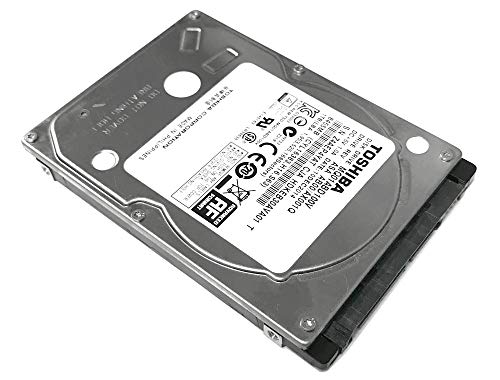
Toshiba 1TB 2.5-inch Notebook Drive — Case-friendly size
The 2.5-inch form factor is the Pi ecosystem’s native storage size, and this Toshiba is its straightforward representative: a 1TB notebook hard drive whose listing states 5400RPM, an 8MB cache and a SATA 3.0Gb/s interface, model MQ01ABD100V, with a one-year warranty named. Drives of this class were built for laptops, which means modest power draw and a slim profile — the two traits a Pi case or HAT board cares about most.
Installed in a NAS case like the Geekworm kit reviewed next, or on a SATA HAT board, this drive becomes the whole storage of a compact Pi server: one terabyte for the family’s documents, the photo archive, the music collection and a shelf of video. The arrangement is mechanically simple and electrically gentle, with the drive powered through the case or board rather than from a separate brick. For a small, silent box on a shelf, this is the most natural drive in the list.
Temper the expectations in two places. One terabyte is the smallest internal capacity here, and the discovery of video archiving fills it with surprising speed. And a notebook drive is not a NAS-rated drive: it was designed for a laptop’s duty pattern rather than a server’s continuous spin, so the backup discipline in this guide’s setup section matters more with this pick than with the Red Plus or IronWolf models. Treat it as the right-sized, right-shaped drive for a light-duty Pi server, with backups arranged accordingly.
The cache figure deserves a word, since 8MB looks small beside the NAS drives’ larger buffers. In a Pi build the practical effect is minimal: the network and USB bridge throttle bulk transfers long before the drive’s cache becomes the constraint, and the small files a home server handles are served from the Pi’s own memory once read. Judge this drive on fit, power and price of entry into the hobby, which are the axes it was chosen on.
There is a second, quieter use for this drive in the Pi world: the starter volume. Many builders begin with a notebook drive salvaged or bought cheaply, learn the software, discover which roles the server actually performs in their household, and only then commit to a NAS-rated drive in a dock. A 1TB notebook unit is the perfect tuition drive for that process — large enough to hold a real library, small enough that migrating away from it later is an evening’s copy rather than a weekend’s.
- Capacity: 1TB
- Form factor: 2.5 inch internal
- Interface: SATA 3.0Gb/s
- Rotational speed: 5400RPM (stated in the listing title)
- Cache: 8MB (stated in the listing title)
- Warranty named in the listing: 1 year
- Model named in the listing: MQ01ABD100V
Strengths
- The native size for Pi NAS cases and HAT boards, with laptop-class power draw.
- Every key figure — speed, cache, interface — is stated in its listing.
- A gentle, inexpensive-feeling entry point for a first Pi storage build.
Trade-offs
- One terabyte fills quickly once video enters the library.
- Notebook duty design rather than NAS continuous-duty engineering.
- Older SATA 3.0Gb/s interface, though the Pi platform cannot use more anyway.
Best for: a buyer seeking a slim drive that drops straight into a Raspberry Pi NAS case. Not suited for: an always-on build expected to hold a large and growing video archive.
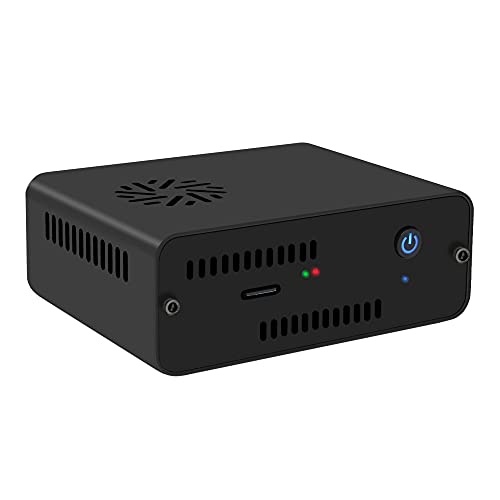
Geekworm NASPi V2.0 Kit — The enclosure pick
Read this pick’s role carefully, because it is the one non-drive in the list and it earns its place honestly: the Geekworm NASPi V2.0 is a 2.5-inch SATA HDD/SSD NAS storage kit for the Raspberry Pi 4. It is the case and board assembly that a 2.5-inch drive — the Toshiba above, or a 2.5-inch SSD — mounts into, turning a bare Pi 4 and a bare drive into a finished little NAS. Its listing names two features that matter in daily service: safe shutdown and auto power-on.
Those two features solve the Pi NAS’s most annoying real-world problems. Safe shutdown means the system can be powered down in an orderly way rather than by pulling the plug, which protects the file system on the drive inside. Auto power-on means that after a household power cut, the NAS returns to service by itself when the power does — a small thing that separates a server the family trusts from a box somebody has to remember to restart. Builders who have run a Pi NAS through one storm season will recognise both features as the opposite of decoration.
What the kit does not do must be equally clear: it contains no storage of its own in this listing’s terms, and it is built for the Raspberry Pi 4 specifically, with a 2.5-inch drive as its payload. The total build therefore costs kit plus Pi plus drive, and the capacity ceiling is whatever 2.5-inch drive the builder chooses. Within those stated bounds, it is the most complete way to give a Pi build the manners of a real appliance, and it pairs naturally with the Toshiba pick above as the value route into this whole category.
Assembly is part of the product’s character and worth stating plainly: this is a kit, aimed at the same hands-on builder the Pi itself attracts. The reward for that assembly is a NAS whose enclosure, board and power behaviour were designed together, instead of a Pi in a generic case with a drive dangling from a USB adapter — an arrangement that works until the first time the cable is knocked during cleaning.
Consider also what the kit does for the drive inside it. A bare drive on a HAT board sits exposed to dust, knocks and curious fingers; the NASPi encloses it, routes its cabling internally and presents the whole build as one object that can be shelved, labelled and forgotten about. Storage hardware that is physically tidy tends to be electrically tidy too, and in a device expected to run unattended for years, tidy is a reliability feature in its own right.
- Product type: NAS storage kit (case and board) — not a hard drive
- Compatibility stated in the listing: Raspberry Pi 4
- Drive bay: 2.5 inch SATA HDD/SSD
- Features named in the listing: Safe shutdown, auto power on
- Storage included: None — a 2.5-inch drive is fitted by the builder
- Version named in the listing: NASPi V2.0
Strengths
- Safe shutdown and auto power-on give a Pi build appliance-grade power manners.
- Purpose-built for the Pi 4 and 2.5-inch drives, so fit and cabling are solved problems.
- Lets the builder choose the exact 2.5-inch drive or SSD the budget allows.
Trade-offs
- It is a kit, not storage: the drive and the Pi are separate purchases.
- Capacity is capped by the 2.5-inch drive market the builder chooses from.
- Tied to the Raspberry Pi 4 generation named in its listing.
Best for: a buyer seeking the finished-appliance route — a Pi 4 and a 2.5-inch drive in a proper NAS case. Not suited for: a build planned around a large 3.5-inch drive.

Seagate IronWolf 4TB — Room to grow
Four terabytes is where a Pi NAS stops being a documents box and becomes the household’s media library, and the IronWolf 4TB brings proper NAS credentials to that role. Its listing states CMR recording, a 3.5-inch SATA 6Gb/s interface, 5400 RPM, a 64MB cache and Rescue Services, model ST4000VNZ06/006. Like the Red Plus, it reaches the Pi through a powered enclosure or dock; unlike the Red Plus at 2TB, it doubles the working room, which changes how the server gets used.
The practical difference shows up in habits. With 4TB attached, the Pi can hold the full photo archive and the music library and a serious shelf of film and television, while also serving as the backup target for the household’s laptops — a combination that overflows 2TB quickly once several machines start sending nightly images. The IronWolf’s NAS tuning keeps those overlapping jobs orderly, and CMR recording keeps the big sequential writes — a laptop image, a season of television — moving at a steady pace through the USB bridge.
The cautions mirror the other 3.5-inch picks. The enclosure and its power supply are part of the true cost and the true desk footprint, and a single drive remains a single point of failure no matter how good its engineering is. Rescue Services in the listing are a recovery attempt after failure, not a promise of one, so the second-copy routine still applies. Within those terms, this is the growth pick: the drive for a Pi server whose library will be bigger than the first plan admits.
There is also a longevity argument for choosing a current NAS model at this size. A Pi build tends to stay in service for years, accumulating roles, and the drive is the component that cannot be casually swapped once the family’s archive lives on it. Starting with a NAS-rated 4TB unit defers the painful migration — the weekend of copying everything to a larger drive while the household’s files are offline — far into the future.
The IronWolf also suits the Pi’s role as a recording and downloading station. A Pi that pulls in broadcast recordings or manages large downloads overnight writes in exactly the long sequential patterns CMR handles best, and the drive’s NAS design brief assumes precisely that always-on rhythm. Pair the two and the little board stops feeling like an experiment; it becomes infrastructure, the kind of household equipment nobody discusses because it simply works every day.
- Capacity: 4TB
- Form factor: 3.5 inch internal
- Interface: SATA 6Gb/s
- Rotational speed: 5400 RPM (stated in the listing title)
- Cache: 64MB (stated in the listing title)
- Recording method: CMR (stated in the listing title)
- Extras named in the listing: Rescue Services; model ST4000VNZ06/006
- Connection to a Pi: Powered dock or enclosure required
Strengths
- NAS-rated CMR storage at a capacity that covers media plus household backups.
- The listing names Rescue Services — a recovery attempt standing behind the drive.
- Defers the outgrowing-the-drive migration that smaller picks invite.
Trade-offs
- Needs powered external housing before a Pi can use it at all.
- Still a single drive; redundancy must come from the owner’s routine.
- More capacity than a documents-only server will use for a long time.
Best for: a buyer seeking a docked Pi media server with genuine growth headroom. Not suited for: a minimal build where the drive must live inside a Pi case.

500GB External Hard Drive USB 3.0 and USB-C — Plug-and-share
Every list needs its simplest answer, and this is it: a ready-made 500GB external hard drive whose listing states USB 3.0 and USB-C connection, a portable slim design, and compatibility spanning PC, Mac, laptop, PS4, Xbox One and phone. Plugged into a Raspberry Pi, it becomes shared network storage the moment the Pi is configured to share it — no case to assemble, no dock to power, no board to fit. For a first Pi NAS built to learn on, that simplicity is the entire argument, and it is a good one.
Half a terabyte suits a specific and common set of jobs: a shared folder for the household’s documents, a sync target for a modest photo collection, a scratch space for moving large files between machines without a cloud account, or a download staging area the Pi manages overnight. The dual connector types in the listing also make the drive useful away from the Pi — it can be unplugged and carried to a laptop or console directly, which a bare internal drive in a dock does far less gracefully.
Honesty about scale is required. Five hundred gigabytes is the smallest capacity in this guide by a wide margin, and a video library will not fit; nor does the listing claim NAS engineering, continuous-duty ratings or any recovery service for the drive inside. It is a portable external being lent to server duty, and it should be bought with that understanding — as the learning build, the light-duty share, or the temporary arrangement while a larger docked setup is planned. Judged as that, it is excellent value in effort: the Pi NAS idea can be tested end-to-end for the cost of one small drive.
One more role suits it well: the off-site copy. A small portable drive is easy to rotate — filled with the Pi server’s most important folders, then stored at a relative’s house or a workplace drawer, swapped with its twin on a monthly rhythm. That rotation gives a Pi build a genuine disaster copy, something the larger docked drives, fixed in their enclosures, rarely get.
Its modesty is also its honesty. Nothing in its listing pretends to server engineering, no recovery service is implied, and its capacity figure is printed plainly for a buyer to judge against a real library. In a category where beginners are routinely oversold, a small drive that does exactly what its label says — and lets a Pi build begin this afternoon — has a charm the bigger hardware cannot match.
- Capacity: 500GB
- Type: Portable external hard drive, slim design
- Interfaces named in the listing: USB 3.0 and USB-C
- Compatibility named in the listing: PC, Mac, laptop, PS4, Xbox One, phone
- Internal drive specifications: Not stated in the listing title — verify with the seller’s documentation
Strengths
- The fastest route from bare Pi to working file server: plug in and share.
- Two connector types make it equally handy away from the Pi.
- Small and portable enough to serve as a rotated off-site backup copy.
Trade-offs
- 500GB excludes any serious video library ambitions.
- No NAS-duty claims are made in its listing, because that is not its design brief.
- Bus-powered portability means it inherits the Pi’s USB power limits like any small external.
Best for: a buyer seeking the simplest possible Pi file share or a first build to learn on. Not suited for: a media library measured in terabytes.

Seagate IronWolf 8TB — Maximum Pi capacity
The IronWolf 8TB closes the list at the opposite pole from the little USB drive: a full-size NAS hard drive whose listing states a 3.5-inch SATA 6Gb/s interface, 7200 RPM and a 256MB cache, model ST8000VN0022. Attached to a Pi through a powered enclosure, it gives the smallest computer in the house the largest library in this guide — eight terabytes of NAS-engineered storage, enough for a full media archive alongside the household’s backups.
The 7200 RPM speed and large cache distinguish it within this list. On a Pi, raw drive speed is capped by the network and USB bridge for ordinary file service, but local operations still benefit: the Pi’s own media indexing, database work, torrent completion moves and backup verification all run against the drive directly, and there the faster spindle and deeper cache shorten real jobs. Owners who use the Pi as a combined server and download station feel this difference more than pure file-sharers do.
The arrangement’s costs are by now familiar and should be weighed without flinching: a powered enclosure, its brick, its fan noise if it has one, and the knowledge that eight terabytes on a single spindle concentrates the household archive in one basket. The mitigation is the same as everywhere in this guide — a second copy of the irreplaceable material, held somewhere else. There is also a power consideration: a 3.5-inch drive plus enclosure draws meaningfully more than a bare Pi, so the build’s total consumption should be measured rather than assumed if it will run in a metered or solar-backed setup.
Why choose this over simply buying a small commercial NAS? Because the Pi’s virtues — silence, tiny power draw, a vast software ecosystem and a computer the owner fully controls — remain, while the storage stops being the compromise. Once a library has outgrown every smaller option in this guide, this drive is the ceiling, and it is a respectable one.
One operational tip belongs with a drive of this size on a Pi: schedule the heavy jobs apart. Let backups land in the small hours, media indexing run after new files arrive rather than continuously, and any whole-drive verification happen on a chosen night rather than during the family’s evening streaming. The Pi’s processor is modest, and staggering the work keeps the server responsive while eight terabytes of housekeeping happens quietly in the background.
- Capacity: 8TB
- Form factor: 3.5 inch internal
- Interface: SATA 6Gb/s
- Rotational speed: 7200 RPM (stated in the listing title)
- Cache: 256MB (stated in the listing title)
- Recording method: Not stated in the listing title — verify with Seagate documentation
- Connection to a Pi: Powered dock or enclosure required
- Model named in the listing: ST8000VN0022
Strengths
- The largest capacity here, with NAS engineering behind it.
- 7200 RPM and a 256MB cache speed the Pi’s own local workloads.
- Turns a Pi into a serious media library server rather than a toy share.
Trade-offs
- The full powered-enclosure arrangement is the bulkiest build in this guide.
- Eight terabytes on one drive demands a disciplined second copy elsewhere.
- Its speed advantage is partly capped by the Pi’s network and USB ceiling.
Best for: a buyer seeking the maximum library a Raspberry Pi can serve from a docked NAS drive. Not suited for: a pocket-sized, bus-powered build.
What Software Will the Drive End Up Serving?
The drive decision is only half the build, and a short tour of what runs on top of it helps size the purchase. The most common Pi NAS arrangements fall into three families. First, a general NAS operating system — the open-source distributions built for exactly this — presents shares to the network, manages users and handles the backup schedules; it asks little of the drive beyond steady, honest storage. Second, a media server application layered on a standard Pi system organises film, television and music into libraries with artwork and watch history; it writes small database and image files constantly while reading very large media files occasionally, a mixed pattern that rewards the drive’s consistency more than its peak speed. Third, a plain file share on a stock Pi system, the minimalist route, where the drive simply appears on the network and the household treats it as a communal folder.
Each family implies a slightly different drive emphasis. The NAS operating systems make scheduled verification and SMART reporting easy, which flatters the NAS-rated drives in this list, since their health data is rich and their firmware cooperates with array-style monitoring even in a single-drive setup. The media-server route grows storage fastest, pushing builders toward the 4TB and 8TB docked picks sooner than they expect. The plain-share route is where the little USB external shines, because the whole software stack is an afternoon’s work and the drive can be repurposed the moment the experiment ends. None of this changes the hardware rankings above, but it explains why two builders can read the same list, choose opposite ends of it, and both be right.
Three Roads to the Same Server: Comparing the Builds Side by Side
The table below compares specifications, but the real comparison is between three architectures. The case route — NASPi kit plus the Toshiba drive — is the integrated appliance. The dock route — Red Plus, IronWolf 4TB or IronWolf 8TB in a powered enclosure — is the serious-storage build. The direct route — the 500GB USB external — is the instant experiment. Choose the architecture first; the pick follows from it.
| Pick | Role | Capacity | Connection to Pi | Key figures from the listing |
|---|---|---|---|---|
| WD Red Plus 2TB | Internal NAS drive | 2TB | Powered dock or enclosure | 5400 RPM, CMR, 64 MB cache |
| Toshiba 1TB | Internal 2.5-inch drive | 1TB | Case or HAT board | 5400RPM, 8MB cache, SATA 3.0Gb/s |
| Geekworm NASPi V2.0 | Storage kit (case and board) | Holds one 2.5-inch drive | Built around the Pi 4 | Safe shutdown, auto power on |
| Seagate IronWolf 4TB | Internal NAS drive | 4TB | Powered dock or enclosure | 5400 RPM, CMR, 64MB cache, Rescue |
| 500GB External | Ready-made USB drive | 500GB | Direct USB | USB 3.0 and USB-C, slim portable |
| Seagate IronWolf 8TB | Internal NAS drive | 8TB | Powered dock or enclosure | 7200 RPM, 256MB cache |
Read the table by constraint. If the build must be one tidy box, only the case route qualifies. If the library already exceeds four terabytes, only the dock route reaches it. If the goal is to learn whether a Pi NAS suits the household at all, the direct route answers the question this weekend. Every pick is the right answer to one of those sentences and the wrong answer to the other two, which is precisely why this list is organised by architecture rather than by a single ranking.
What Does a Pi NAS Cost to Run All Year?
The Pi’s fame rests partly on frugality, and the drive choice decides whether the finished server keeps that virtue. A Pi board itself draws only a few watts. A 2.5-inch drive in a case adds a small amount on top, keeping the whole appliance in the range where a year of continuous running costs less than a single month of a desktop PC left switched on. A 3.5-inch drive in a powered enclosure draws more — the larger motor and its separate supply see to that — and the enclosure’s own electronics add a further share. Even so, the docked builds in this guide remain light drinkers beside any conventional server or repurposed desktop, which is why the Pi route stays attractive even at the IronWolf 8TB end of the list.
Two habits keep the running cost honest. First, let the drive spin down during genuinely idle hours if the household’s usage pattern has them — a family server often sleeps between midnight and morning — while accepting that frequent spin-up cycles carry their own wear, so the idle timeout should be measured in hours, not minutes. Second, measure the real draw once with an inexpensive plug-in meter rather than trusting estimates; the figure tells the owner what the server costs per year to the nearest coin, and it settles arguments about whether the big docked build is still a frugal machine. In most homes it is, comfortably — and knowing the number turns the Pi NAS from a hobbyist’s indulgence into defensible household infrastructure.
How Do You Set Up a Pi NAS Drive Step by Step?
Start with power, the step skipped most often and regretted most reliably. Use the official-class power supply for the Pi itself, and if the drive is a 3.5-inch model, confirm its enclosure has its own supply and is switched on before the Pi boots, so the drive is present when the operating system looks for it. Underpowered Pis produce exactly the symptoms owners misdiagnose as bad drives: disconnects under load, corrupted transfers, a file system that needs repair after every heavy copy.
Next, prepare the drive with a file system the Pi’s Linux system handles natively and can repair — the common choices in the Pi’s own ecosystem are the Linux-native formats, and the setup guides for the major Pi NAS software distributions walk through the partitioning in a few commands. Mount the drive by its permanent identifier rather than its device name, so it returns to the same mount point after every reboot even if other USB devices are attached. Then create the shares deliberately: one for media, one for backups, one for general files, each with its own permissions, rather than a single open folder that every device on the network can rewrite.
Finish with the routines that make it a server rather than a drive on a network. Schedule the household computers’ backups to land on it overnight. Turn on the Pi’s SMART monitoring tools so the drive’s health is checked on a rhythm, and arrange for a digest of warnings to reach an email address. Set the NASPi’s safe-shutdown behaviour up if the kit is in the build, and test one full power-cut recovery before trusting the box with the only copy of anything. A Pi NAS set up this way disappears into the household’s life, which is the highest compliment a fileserver can earn.
One last setup decision deserves emphasis: where the box physically lives. A Pi NAS should sit somewhere with modest airflow, stable temperature and no direct sun, connected to the router by cable rather than Wi-Fi whenever the layout allows — a wired server is noticeably more consistent than a wireless one, and consistency is what makes a household trust a share with real files. Label the enclosure with the date the drive was installed and its model; future-you, diagnosing a problem at midnight, will be grateful for the thirty seconds it took.
Which Mistakes Do First-Time Pi NAS Builders Make?
The founding mistake is powering a 3.5-inch drive from the Pi, or through an unpowered adapter, and then blaming the drive for the resulting disconnects; a full-size drive needs its own 12-volt supply, full stop. Close behind is buying a bare internal drive with no plan for connecting it — the drive, the case or dock, and the cables are one purchase, and discovering the missing middle element after delivery stalls more builds than any software problem.
Software-side, the recurring errors are sharing the entire drive openly to the whole network, skipping the backup of the Pi’s own system card until the card fails and takes the server’s configuration with it, and treating the NAS as a backup while it holds the only copy of the family’s photographs. A Pi NAS is storage; a backup is a second copy somewhere else, and the little 500GB external in this list exists in many households precisely as that rotating second copy. Finally, builders underestimate heat in sealed cases: give the drive air, check its temperature after a day of service, and let the readings — not optimism — decide whether the case needs a fan.
Two further mistakes deserve naming because they are so easy to make. The first is oversizing the computer’s role and undersizing the drive’s: spending on the newest board while reusing a tired old drive of unknown health inverts the build’s priorities, since the data outlives the board in every scenario that matters. The second is forgetting the household in the design — a server that only its builder can restart, re-share or explain will be unplugged the first time it hiccups while the builder is away. Choose the drive and the arrangement the whole household can live with, document the setup in a note taped inside a cupboard door, and the Pi NAS becomes shared infrastructure instead of one person’s fragile project.
Final Recommendation
For most builders, the satisfying centre of this list is the Geekworm NASPi kit housing the Toshiba 1TB drive: a compact, well-mannered appliance that teaches the whole Pi NAS idea in its tidiest form, with safe shutdown and automatic recovery from power cuts. Step to the docked builds when the library outgrows that form — the WD Red Plus 2TB for NAS-grade assurance at a household size, the IronWolf 4TB as the growth pick, and the IronWolf 8TB when the Pi is serving a genuine archive. Take the 500GB external when the goal is to start today, learn the software, and let experience size the permanent build. A Pi NAS rewards the owner who matches drive, housing and power as one decision — get that triangle right, and the smallest computer in the house becomes the one its files can trust through power cuts, growth spurts and years of quiet, unglamorous, exactly-as-promised service.
Frequently Asked Questions
Can a Raspberry Pi really work as a NAS?
Yes, within household scale. A Pi 4 with a drive attached serves documents, photos, music and video to a home network at useful speeds, runs the popular open-source NAS and media-server software, and does it on very little power. Its limits are scale and multitasking: many simultaneous users, heavy transcoding and multi-drive redundancy belong to larger machines.
Why do the 3.5-inch drives in this guide need a powered enclosure?
A 3.5-inch drive requires a 12-volt power feed that a Raspberry Pi’s USB ports do not supply. A powered dock or enclosure provides that feed and the SATA-to-USB bridge in one unit. The 2.5-inch drives and the small USB external avoid the requirement because their power needs fit what USB connections provide.
Is the Geekworm NASPi a hard drive?
No. It is a storage kit — a case and board assembly for the Raspberry Pi 4 that holds a 2.5-inch SATA drive fitted by the builder, adding safe shutdown and auto power-on behaviour. It appears in this guide because a Pi NAS purchase often is this kit plus a drive, and confusing the two would leave a builder with a case and no storage.
Which file system should a Pi NAS drive use?
A Linux-native file system is the practical choice, since the Pi’s operating system can mount, check and repair it without third-party tools, and network sharing makes the format invisible to the Windows and Mac machines connecting to the shares. The Pi NAS software distributions document their preferred layouts; following the chosen distribution’s own guide avoids nearly every formatting pitfall.
How fast will file transfers be?
Transfers are capped by the Pi’s gigabit Ethernet and USB bridge rather than by any drive in this list, and in practice that means large files move at a pace that feels brisk for documents and entirely adequate for streaming media to several rooms. Choosing a faster drive does not raise that ceiling; choosing a NAS-rated drive buys durability under the ceiling.
Should the Pi’s own system card be backed up too?
Yes — it is the cheapest insurance in the whole build. The Pi boots from a small memory card holding the operating system and every share setting, and when that card wears out the server goes dark even though the hard drive is perfectly healthy. Keep an image of the configured card, or a spare cloned card in a drawer, and a dead card becomes a two-minute swap instead of a full rebuild of every setting the household depends on.
Can a Pi NAS hold two drives for redundancy?
It can, with a second USB drive and software mirroring or a scheduled copy between the two, and some builders do exactly that. The arrangement lacks the elegance of a true multi-bay NAS — two enclosures, two power arrangements, and a modest processor supervising the mirror — but as a step up from a single drive it is legitimate. Most households get better value from one good drive plus a rotated off-site copy than from a fragile mirror, which is why this guide’s picks are framed as single-drive builds.
Does a Pi NAS still need a backup?
Absolutely. Every arrangement in this guide is a single drive, and a single drive can fail, be stolen or be encrypted by ransomware arriving through a household computer. Keep a second copy of irreplaceable files on a separate device — a rotated portable drive is the classic Pi-household answer — and the server becomes a convenience instead of a risk.
Related Guides
Builders continuing from here usually need one of three neighbouring topics. The enclosure question for larger machines is covered in our guide to the best NAS enclosures for home servers; the software side is compared in our roundup of home server operating systems; and the second-copy discipline this guide keeps insisting on is planned out in our guide to home backup strategies that actually get followed.


