What's inside
- Key Takeaways
- Quick Picks
- How were these picks chosen?
- Comparison table
- How do you choose a full-size LTE tablet without buying the wrong radio?
- Life with an LTE tablet: our evaluation across a working week
- Common mistakes with cellular tablets
- Data plans, hotspots, and running costs
- Field work, care work, and the other lives of a connected tablet
- Setup day: activating, securing, and settling a cellular tablet
- Reading memory figures and other title arithmetic
- Longevity: updates, batteries, and the three-year view
- Travel and roaming with a tablet-sized SIM
- Final recommendation
- Frequently asked questions
As an Amazon Associate I earn from qualifying purchases. This post may contain affiliate links at no extra cost to you.
gizmoverdict.com is reader-supported. When you buy through links on our site, we may earn an affiliate commission.
Where to buy: Cellular tablets are sold through Amazon, carrier shops, and the manufacturers’ stores, and all six models below appear on Amazon in the configurations their titles describe. Because a SIM-equipped tablet is only half a purchase until a data plan joins it, check the listing and your carrier’s tablet-plan terms in the same sitting, and confirm whether the exact variant on sale carries the modem rather than a Wi-Fi-only twin sold under a similar name. International models in particular deserve a slow read of the network language before money moves.
A big tablet that carries its own connection stops asking permission from other people’s Wi-Fi. That is the appeal behind the search for the best full size tablets with 4glte: a 10-inch-plus screen for maps, documents, films, and video calls, married to a 4G LTE radio that works in a lay-by, a site cabin, a grandparent’s kitchen with no broadband, or a train carriage crossing a coverage map’s pale regions. The combination turns the tablet from a household appliance into a genuinely independent terminal, and for carers, field staff, boat owners, and rural households it is often the only computer that makes sense.
This shelf is smaller and stranger than the Wi-Fi tablet market, and honesty about its composition matters. Two TECLAST models share a 13.4-inch footprint, one of them bundled with a keyboard. A Samsung Galaxy Tab A11 brings a famous badge and an unlocked T-Mobile and GSM claim, though its titled screen is 8.7 inches, which makes it the compact exception in a full-size guide and earns it a clear note rather than silent inclusion. Two white-label Android tablets state their LTE and SIM arrangements in their titles, and a PRITOM model offers SIM-slot telephony whose title speaks of 3G phone calls rather than 4G data — a distinction its review states in plain terms, because the keyword on this page promises LTE and a buyer deserves to know exactly which picks deliver it in writing.
Carrier language is treated strictly throughout. A tablet is credited with a network only where its title names one, with band-level compatibility left to the buyer’s check against their own carrier, because no review can responsibly promise that a given SIM will light up in a given postcode. Read the per-pick verdicts with your own SIM in mind and the lineup resolves into clear roles.
Key Takeaways
- The two TECLAST picks share a 13.4-inch screen and 4G, and are kept distinct in this guide: one is the media-and-music model, the other adds a keyboard bundle.
- Samsung’s Galaxy Tab A11 is titled at 8.7 inches, so it is the portable exception here, with unlocked T-Mobile and GSM language as its headline.
- The PRITOM title states a SIM slot with 3G phone call support and does not claim 4G LTE, so it is reviewed as a telephony tablet rather than an LTE data machine.
- Two white-label picks state 4G LTE directly, one with T-Mobile SIM support named, the other unlocked with a case included.
- Every buyer must verify band compatibility with their own carrier; titles name networks selectively and no listing here covers every band.
- Screen sizes otherwise run from 10 to 13.4 inches, all with GPS appearing in most titles as a travelling bonus.
Quick Picks
| Pick | Badge | Why it earns a place |
|---|---|---|
| 1. TECLAST T65 13.4 | Best big-screen LTE tablet | 13.4-inch 120Hz display, 4G, stereo speakers, and sheet-music positioning in the title. |
| 2. TECLAST 13.4 with Keyboard | Best for work on the move | The same large format with a keyboard and case bundled for work, study, and gaming. |
| 3. Samsung Galaxy Tab A11 4G LTE | Best carrier clarity | Unlocked for T-Mobile and GSM in the title, 90Hz screen, in a compact 8.7-inch body. |
| 4. Android 16 Tablet 11 with 4G LTE | Best SIM flexibility | 11-inch, T-Mobile SIM card support stated, 128GB storage, and 1TB expansion. |
| 5. Android 15 Tablet 10 with SIM | Best unlocked value | Unlocked 4G cellular, dual-band Wi-Fi, GPS, and a case included in the box. |
| 6. PRITOM 10 Inch Tablet | Best for SIM phone calls | A 10-inch phone tablet with SIM slot and 3G call support, reviewed honestly as a non-LTE pick. |
Buyers whose connectivity need is really about navigation in vehicles may also want our road-focused roundup of best tablets with gps, where several cellular models reappear in a different role.
How were these picks chosen?
The gate had two leaves: size and radio. Full-size was defined as a 10-inch-class screen or larger, and the radio had to be cellular with SIM language in the title. One pick, the Samsung, passes the radio test emphatically while falling short on size at a titled 8.7 inches; it is included with that fact declared, because its unlocked carrier language is the clearest in the group and some buyers will trade inches for certainty. Everything else on the page meets both leaves of the gate as titled.
Carrier wording was then graded rather than merely noted. The strongest titles name a network or an unlocked standard: T-Mobile and GSM on the Samsung, T-Mobile SIM support on the 11-inch white-label model, unlocked 4G cellular on the 10-inch Android 15 model, and SIM slot language on the PRITOM. The TECLAST pair state 4G and 4G LTE respectively without naming carriers, which is normal for the class and places the verification duty on the buyer. The PRITOM’s 3G call language was treated as a category boundary: it stays in the guide as a phone-call tablet with full disclosure, not as an LTE pick wearing a disguise.
Screen and stamina criteria followed. At full size, a tablet is a media and documents machine, so the 120Hz panels on the TECLAST pair, the 90Hz Samsung, and the storage and expansion figures across the group all counted. Battery capacities cluster at 6000 to 8000mAh where titled, and an LTE radio spends that charge faster than Wi-Fi does, a reality the how-to section plans around. Keyboards and cases were credited where bundled, since a cellular tablet’s natural habitat includes site cabins and kitchen tables where a keyboard earns its keep.
The final test was role clarity. Each pick had to answer, in one sentence, whose independent terminal it wants to be: the musician’s stand, the travelling worker’s desk, the carer’s compact link, the flexible SIM experiment, the unlocked household spare, or the big-screen telephone. Models that could not answer were left for other guides, and the six that remain are reviewed against those roles rather than against a single imaginary average user.

1. TECLAST T65 13.4 — Best big-screen LTE tablet
The T65 makes the largest claim on this page and backs it with a coherent specification. A 13.4-inch screen at 120Hz with a 1920 by 1200 resolution is a genuinely expansive canvas, and the title aims it at sheet music, a telling detail: a musician reading two pages at stand distance needs exactly the size, clarity, and steadiness this panel describes. Around that screen sit a 4G radio, an octa-core processor, 32GB of memory as titled with 128GB of storage, expansion to 1TB, stereo speakers, GPS, a 3.5mm headphone jack, GMS certification, and an eye-care mention, all powered by an 8000mAh battery on Android 16.
For the independent-terminal role, that combination is formidable. The big display splits a map beside messages without apology, video calls frame a whole family rather than a single face, and documents read at near-paper scale. Stereo speakers serve both the musician’s playback and the film-watching that a 13.4-inch screen invites, while the headphone jack keeps older wired headsets and vehicle aux leads in service. Widevine L1 in the title means streaming services deliver their proper quality to that large panel, a detail budget tablets frequently fumble.
Size exacts its usual tax. A 13.4-inch tablet is a bag device, not a hand device, and long reading sessions belong on a stand or a lap. The title names no carrier, so LTE band checks against the buyer’s network are a personal errand, and no keyboard is bundled with this variant — that is precisely the distinction the next pick exists to make. As a connected media and reading flagship for a home without broadband or a professional on a stand, the T65 leads this guide on merit.
Strengths
- 13.4-inch 120Hz 1920 by 1200 display is the largest and fastest panel here.
- 4G, GPS, stereo speakers, and a headphone jack cover travel and media together.
- 8000mAh battery and 1TB expansion support long independent days.
Trade-offs
- No carrier is named in the title, so band checks fall to the buyer.
- No keyboard is bundled with this configuration.
- The large body needs a stand or lap for extended reading sessions.
Key specs
- Display: 13.4-inch, 1920 by 1200, 120Hz
- Memory and storage: 32GB, 128GB, expandable to 1TB
- Battery: 8000mAh
- Connectivity: 4G, 5G Wi-Fi, GPS
- Audio: stereo speakers, 3.5mm jack
- Operating system: Android 16
Musicians and big-screen readers can inspect the T65 on Amazon and match its bands against their carrier in parallel.
Best for: sheet-music reading and media work on a 13.4-inch screen away from broadband.
Not suited for: one-handed reading on a crowded train across a long commute.
2. TECLAST 13.4 with Keyboard — Best for work on the move
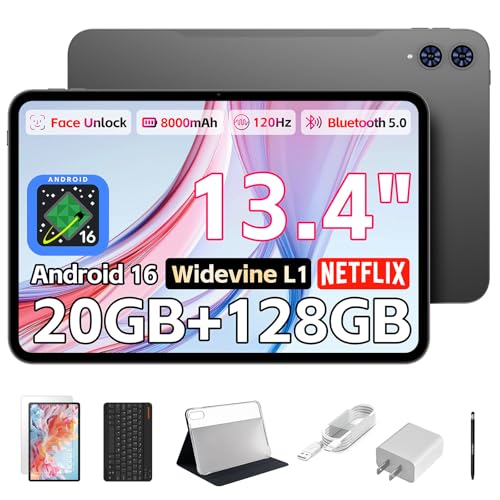
Same footprint, different mission. This second TECLAST pairs the 13.4-inch format with a keyboard and a case in the box, and its title says so in the first line, positioning the bundle for work, study, and gaming. The 4G LTE radio is stated outright here, the display is a 120Hz FHD panel, memory is quoted at 20GB with 128GB of storage expandable to 1TB, and Android 16 runs underneath. Where its sibling courts musicians and film viewers, this one courts the travelling worker whose office is a succession of other people’s tables.
The keyboard changes the tablet’s centre of gravity. Email stops being a thumb exercise, documents become editable rather than merely readable, and a site report can be written in the cabin where the work happened instead of reconstructed at home. The included case protects the large screen in transit and typically doubles as the stand that makes the keyboard usable, so the bundle arrives as a system rather than a screen awaiting accessories. For students in halls with unreliable Wi-Fi, the same system offers an independent connection for research and submission deadlines alike.
Distinguishing the pair honestly matters, because a buyer comparing the two listings side by side will find overlapping numbers and different intentions. This model’s title does not repeat the sibling’s stereo-speaker, GPS, headphone-jack, or battery details, so those features are recorded as unstated here rather than borrowed across listings — a small discipline that prevents the commonest disappointment in tablet buying, which is purchasing one model while remembering another’s specification. Buy the keyboard bundle for the keyboard’s work, and it is the stronger tool; buy it expecting the media model’s exact sheet, and confusion follows.
Strengths
- Keyboard and case bundled, turning the tablet into a mobile workstation.
- 4G LTE stated directly in the title alongside the 120Hz FHD display.
- 128GB storage with expansion to 1TB holds a working document archive.
Trade-offs
- Battery capacity is Not stated in the listing title.
- GPS is Not stated in the listing title for this variant.
- Speaker details are Not stated in the listing title.
Key specs
- Display: 13.4-inch FHD, 120Hz
- Memory and storage: 20GB, 128GB, expandable to 1TB
- Battery capacity: Not stated in the listing title
- Connectivity: 4G LTE
- Bundled items: keyboard and case
- Operating system: Android 16
Travelling workers can review the keyboard bundle on Amazon and picture their own site-cabin desk around it.
Best for: reports, email, and study written on location over an independent LTE link.
Not suited for: media buyers expecting the sibling model’s titled stereo-speaker setup.

3. Samsung Galaxy Tab A11 4G LTE — Best carrier clarity
The Samsung entry requires its size declared before its virtues, so here it is: the title specifies an 8.7-inch screen, which is not full-size by this guide’s definition, and no amount of brand polish changes that measurement. What the Tab A11 offers in exchange is the clearest carrier sentence on the page — a 4G LTE tablet, unlocked for T-Mobile and GSM networks, in an international model finished in silver. If your first question is whether the SIM will work, that sentence is worth more than two extra inches of glass.
The supporting specification suits a communications role. A 90Hz refresh keeps scrolling through message threads and documents pleasant, 4GB of memory with 64GB of storage covers the messaging, browsing, and video-calling workload the device is aimed at, and Samsung’s software support reputation is the strongest on this page by a wide margin. In a carer’s bag, a grandparent’s hand, or a delivery driver’s cab, an 8.7-inch connected tablet that simply works on a named network solves the actual problem, which was never screen acreage.
Buyers should nonetheless shop with both facts in view. The storage is the smallest here, the title gives no expansion or battery figure, and readers set on a 10-inch-plus canvas should pass this pick by for the larger models above and below it. Included for its carrier clarity and brand reliability, reviewed at its true size, the A11 is the guide’s deliberate exception — and exceptions, clearly labelled, serve readers better than silent inconsistencies ever do.
Strengths
- Unlocked for T-Mobile and GSM, stated plainly in the title.
- Samsung software support leads this group by reputation and record.
- 90Hz screen in a genuinely portable 8.7-inch body.
Trade-offs
- At 8.7 inches it is not a full-size tablet by this guide’s definition.
- 64GB storage is the smallest figure in the lineup.
- Battery capacity is Not stated in the listing title.
Key specs
- Display: 8.7-inch, 90Hz
- Memory and storage: 4GB, 64GB
- Battery capacity: Not stated in the listing title
- Connectivity: 4G LTE, Wi-Fi, unlocked for T-Mobile and GSM
- Model: international model, silver
- Operating system: Android
Buyers on T-Mobile or GSM networks can check the Galaxy Tab A11 on Amazon with its unlocked status confirmed in the title.
Best for: a compact, carrier-certain communications tablet for care and family contact.
Not suited for: a 10-inch-plus canvas for split-screen documents and films.

4. Android 16 Tablet 11 with 4G LTE — Best SIM flexibility
This 11-inch white-label model earns its place with one unusually helpful phrase: T-Mobile SIM card support, stated in the title alongside 4G LTE and 5G Wi-Fi with cellular. Named-carrier language is rare at this price level, and it converts the buyer’s compatibility question from a research project into a confirmation. The rest of the sheet supports general service: an octa-core processor on Android 16, 128GB of storage with 20GB of memory as titled, expansion to 1TB, an HD touchscreen, and a 13 plus 8MP dual camera pairing for calls and records.
Eleven inches is the balanced size of this guide — large enough for documents and split views, light enough in spirit for a bag — and a cellular radio at this size creates the classic travelling tablet: maps in the car, messages at the site, a film on the train, all without negotiating anyone’s router password. The dual camera figures are the strongest camera numbers among the white-label picks here, which suits video calls with family or a remote team, the workload that sells more cellular tablets than any benchmark.
The unknowns are the customary ones for the class. Battery capacity goes unstated in the title, sealing is unmentioned, and the brand behind the listing offers no famous support infrastructure, so expectations for long-term updates should be set by the Android version at purchase rather than by promises. None of that undermines the central offer of a named-SIM, full-size, current-Android LTE tablet; it merely asks the buyer to value the device for its first two years of service, which at this end of the market is the honest frame.
Strengths
- T-Mobile SIM card support named directly in the title.
- 13 plus 8MP dual cameras lead the white-label picks for video calls.
- 128GB storage with 1TB expansion on Android 16.
Trade-offs
- Battery capacity is Not stated in the listing title.
- Display resolution beyond HD is Not stated in the listing title.
- Water resistance is Not stated in the listing title.
Key specs
- Display: 11-inch HD touchscreen
- Memory and storage: 20GB, 128GB, expansion to 1TB
- Cameras: 13MP plus 8MP dual camera
- Battery capacity: Not stated in the listing title
- Connectivity: 4G LTE, 5G Wi-Fi, cellular with T-Mobile SIM support
- Operating system: Android 16
T-Mobile customers can view this 11-inch LTE tablet on Amazon and confirm their plan’s tablet terms alongside.
Best for: an 11-inch travelling tablet running on a T-Mobile SIM.
Not suited for: buyers on networks the title never names, without a band check first.

5. Android 15 Tablet 10 with SIM — Best unlocked value
Unlocked is the first word that matters here, and the title builds on it steadily: a 10-inch Android 15 tablet with a SIM card slot, unlocked 4G cellular, an octa-core processor, 12GB of memory with 64GB of storage expandable to 2TB, dual cameras, dual-band Wi-Fi across 2.4G and 5G, GPS, a 6000mAh battery, and a black case included. As a complete sentence of a specification, that is the most self-contained offer in this guide — device, protection, and network freedom in one box.
The unlocked framing suits households and small firms that change carriers, travel across borders, or keep a drawer of local SIMs for work in different regions. Dual-band Wi-Fi keeps the tablet equally useful when a good router is available, GPS supports the travelling roles described elsewhere in this guide, and the included case removes the accessory errand that so often leaves a new tablet unprotected during its most accident-prone first month. Android 15 is a generation behind the newest models here without being old, a reasonable trade at the value end.
Storage is where planning is required: 64GB fills quickly under a film-and-documents workload, so the 2TB expansion should be treated as part of the purchase rather than an optional extra, with a card ordered in the same basket. The cameras are described only as dual, without figures, and no carrier is named, so the unlocked promise still requires the buyer’s own band verification. Within those understood limits, this is the guide’s most straightforward value proposition for an independent household tablet.
Strengths
- Unlocked 4G cellular with SIM slot stated in the title.
- Case included, plus GPS and dual-band Wi-Fi for travel flexibility.
- Expansion to 2TB rescues the modest 64GB starting storage.
Trade-offs
- Camera resolutions are Not stated in the listing title.
- No carrier is named for the unlocked radio.
- Android 15 trails the Android 16 models in this guide.
Key specs
- Display: 10-inch
- Memory and storage: 12GB, 64GB, expandable to 2TB
- Battery: 6000mAh
- Connectivity: unlocked 4G LTE, SIM slot, 2.4G and 5G dual-band Wi-Fi, GPS
- Cameras: dual cameras
- Bundled items: black case included
Carrier-flexible households can look at this unlocked 10-inch tablet on Amazon and add a large memory card in the same order.
Best for: a household or small firm swapping SIMs across carriers and borders.
Not suited for: heavy media archives kept on internal storage alone.

6. PRITOM 10 Inch Tablet — Best for SIM phone calls
The PRITOM review begins with the correction this guide owes every reader. Its title describes a 10-inch Android 13 phone tablet with a SIM slot, 64GB of storage, an IPS touchscreen, an 8MP rear camera, Wi-Fi, GPS, Bluetooth, and USB-C — and the telephony it advertises is support for 3G phone calls, with the device described as unlocked. The title does not claim 4G LTE. On a page whose keyword promises LTE, that makes the PRITOM a different species: a big-screen telephone and Wi-Fi tablet with a SIM slot, included so that readers meeting it in search results understand exactly what it is and is not.
Judged as that species, it has a real constituency. A 10-inch screen with a SIM that handles calls serves an elderly relative who reads messages more easily at large sizes, a small shop counter where one device takes calls and shows a catalogue, or a home seeking a big, simple connected screen without broadband. GPS and Bluetooth broaden its travel and accessory options, USB-C keeps charging modern, and the unlocked description suggests carrier freedom for the telephony it does support, subject to the buyer’s own network check as 3G services are retired in many regions — a further reason to verify before relying on it.
Against the LTE picks, the limitations are plain. Android 13 is the oldest system here, storage sits at 64GB with no expansion figure in the title, memory and battery go unstated, and data-hungry work will run through Wi-Fi or not at all. For genuine 4G data work, choose any of the five models above this one. For a large, simple SIM telephone, the PRITOM may be the honest answer to a different question, and this guide would rather name that question than dress the device in a radio it never claimed.
Strengths
- SIM slot with phone-call support on a full 10-inch screen.
- GPS, Bluetooth, and USB-C cover travel and accessory basics.
- 8MP rear camera stated for records and snapshots.
Trade-offs
- 4G LTE is Not stated in the listing title; telephony is titled as 3G calls.
- Memory figure is Not stated in the listing title.
- Battery capacity is Not stated in the listing title.
Key specs
- Display: 10-inch IPS touchscreen
- Storage: 64GB
- Camera: 8MP rear camera
- Connectivity: SIM slot, 3G phone call support, Wi-Fi, GPS, Bluetooth, USB-C
- Memory: Not stated in the listing title
- Operating system: Android 13
Buyers seeking a big-screen SIM telephone can examine the PRITOM on Amazon with its 3G call framing firmly in mind.
Best for: large-print calls and messages for a relative on a simple SIM setup.
Not suited for: 4G LTE data work, which the listing title never claims.
Comparison table
| Model | Screen | Cellular claim in title | Storage | Standout fact |
|---|---|---|---|---|
| TECLAST T65 | 13.4-inch 120Hz | 4G | 128GB, to 1TB | Stereo speakers, sheet-music focus |
| TECLAST 13.4 Keyboard | 13.4-inch 120Hz FHD | 4G LTE | 128GB, to 1TB | Keyboard and case bundled |
| Samsung Galaxy Tab A11 | 8.7-inch 90Hz | 4G LTE, unlocked T-Mobile and GSM | 64GB | Clearest carrier language here |
| Android 16 Tablet 11 | 11-inch HD | 4G LTE, T-Mobile SIM support | 128GB, to 1TB | 13 plus 8MP dual camera |
| Android 15 Tablet 10 | 10-inch | Unlocked 4G cellular, SIM slot | 64GB, to 2TB | Case included, GPS aboard |
| PRITOM 10 Inch | 10-inch IPS | SIM slot, 3G phone calls | 64GB | No LTE claim in its title |
How do you choose a full-size LTE tablet without buying the wrong radio?
Verify the network before admiring the screen. Take the tablet plan or SIM you actually intend to use, note its carrier, and compare that carrier against the title’s language and the full listing’s band information. Named support, as on the Samsung and the 11-inch white-label model, shortens the errand; an unlocked claim, as on the Android 15 model, widens the options while keeping the duty yours. International models deserve special care, since their band sets are chosen for other markets and may light up on one local carrier while sulking on another.
Size comes second, and it should follow the furniture of your life. The 13.4-inch TECLAST pair belong on stands, desks, and music stands; the 11-inch model splits the difference for bags and laps; the 10-inch pair suit kitchen tables and site cabins; and the Samsung’s 8.7 inches serve hands and coat pockets, at the admitted cost of the full-size premise. Readers building a writing-centred mobile office around the keyboard model may also appreciate our guide to best word processing tablets with office, where keyboard bundles are the entire subject.
Data economics come third. An LTE tablet consumes a plan, and plans differ in tablet allowances, tethering rules, and roaming behaviour more than in headline price. Estimate your real monthly use — video calls and streaming devour allowances that messaging barely sips — and choose the device and plan as one purchase. Battery planning rides along: a radio hunting weak signal spends charge quickly, so the 8000mAh T65 holds an edge in fringe coverage, while any model benefits from a charger kept where the tablet lives.
Accessories close the decision. Keyboards for the models without one, a case for every model that lacks a bundled one, and a stand for the 13.4-inch pair are not extras but completions of the purchase. Price the whole kit before comparing headline numbers, because the bundle that looks dearer frequently finishes cheaper once its box is fully unpacked.
Life with an LTE tablet: our evaluation across a working week
We evaluated this class against a composite week rather than a showroom hour: a rural home office day with no fixed broadband, a site visit with documents and photographs, a long train journey, an evening of family video calls, and a weekend at a relative’s house whose Wi-Fi password nobody alive remembers. The pattern that emerged is that cellular independence is a compounding convenience. Each individual moment — sending the form from the field, joining the call from the train, showing the relative a photograph without a password ritual — is small, yet together they change the tablet’s status from a device that is used at desks to a device that is simply used.
The large screens justified themselves in the document hours. Splitting a specification beside an email on 13.4 inches felt like a desk; on 10 inches it felt like a compromise managed with zooming; on the Samsung’s 8.7 inches it felt like a phone call’s companion rather than a workstation, which matches the role its review assigns. Keyboards divided the week similarly, with the bundled TECLAST converting train-table time into finished work while the touch-only models produced notes to be typed up later — a difference any deadline-driven traveller will feel in the first week.
Signal behaviour taught the week’s sharpest lesson. In strong coverage every LTE pick here felt liberated; in fringe coverage the battery gauges fell visibly faster and the wisest devices were the ones whose owners had downloaded the day’s documents at breakfast. Independence, in other words, is a partnership between a radio and a routine. The evaluation also confirmed the PRITOM’s separate lane: as a big, simple telephone for a relative it was entirely at home, and as a data machine it was never entered in the contest, which is exactly the honesty its listing title asks for.
By the weekend, our notes had reduced the class to a sentence: buy the radio you can verify, the screen your furniture can hold, and the bundle your working day actually touches, and a cellular tablet becomes the least apologetic computer in the house.
Common mistakes with cellular tablets
The costliest mistake is assuming unlocked means universal. Unlocked describes the absence of a carrier lock, not the presence of every band, and a tablet can be honestly unlocked while missing the frequencies a particular network uses in a particular valley. Verify bands, every time, in writing. The second mistake is the mirror image: buying a carrier-named model while planning to use a different network, on the theory that radios are radios. They are not, and the return postage teaches the lesson at the buyer’s expense.
Plan mistakes follow. A tablet added to a phone plan may share an allowance the household already exhausts, and the first month of video calls over LTE can produce a bill that reframes the bargain. Buyers also routinely forget that a cellular tablet used as a hotspot drains like a phone while working like a router, so the battery figures in this guide should be read with that duty in mind. A third error is neglecting the keyboard and case arithmetic, comparing a bare premium tablet against a complete bundle as if the bare one’s accessories were free.
The final mistake is treating the PRITOM class as a bargain LTE tablet rather than as the telephone it declares itself to be. Titles in this category reward slow reading generally: screen sizes hide inside model names, memory figures are expressed in creative arithmetic, and one model’s features migrate in memory onto its sibling. The spec boxes in this guide exist to slow that reading down to the speed of accuracy.
Data plans, hotspots, and running costs
The tablet’s purchase price is the beginning of its cost, not the sum. A dedicated tablet plan buys simplicity and a separate allowance; a shared family plan buys economy and a common pool that one streaming weekend can dent; a prepaid data SIM buys flexibility for seasonal use, such as a caravan tablet that only works summers. None is universally correct, and the right answer follows the calendar of use more than the tariff table. Seasonal users in particular should resist annual commitments sized for a device that hibernates from October to April.
Hotspot duty deserves its own line in the budget. A full-size LTE tablet makes an excellent emergency router for a laptop, and several owners will buy it partly for that insurance. Used that way, data consumption becomes the household’s rather than the tablet’s, and the allowance should be sized accordingly. Used rarely, it is the cheapest broadband backup a rural home can keep in a drawer, provided the drawer routine includes a monthly charge so the insurance is alive on the day the fixed line dies.
Field work, care work, and the other lives of a connected tablet
Step outside the home-office framing and the cellular tablet’s constituency widens quickly. Agricultural workers checking prices and weather from a tractor cab, district nurses completing visit notes between houses, market traders running a card terminal and a stock list from one screen, and site managers photographing progress against a drawing all share the same underlying need: a large, legible screen that files its work immediately, from wherever the work happened. The full-size format matters in those settings because gloves, glare, and ageing eyes all tax small text, and the LTE radio matters because the filing cannot wait for an office that may be forty miles behind the day’s route. Readers equipping that kind of route professionally should also weigh the sealed specialists in our guide to best tablets for surveys data research, since mud and rain eventually arbitrate between a household tablet in a case and a genuinely rugged instrument.
Care work makes the gentlest case and perhaps the strongest. A full-size connected tablet on a relative’s kitchen table, running one video-call application and a large-print messaging screen, can carry a family’s daily contact without the relative ever touching a router setting or a password. The Samsung’s carrier clarity serves that household well, the 10-inch unlocked model serves the family that manages the device across visits and borders, and even the PRITOM’s simple telephony finds its dignity here, provided its limits were understood at purchase. Technology that an eighty-year-old will actually use defeats sophisticated technology that frightens her, every day of the week.
Small businesses occupy the middle ground: a food truck’s ordering screen that keeps working when the market’s Wi-Fi collapses, a tradesperson’s quote pad that emails the estimate before the van door closes, a holiday-let welcome tablet that guides guests without borrowing the owner’s broadband credentials. In each case the buying logic of this guide repeats at small scale — verify the radio against the local network, size the screen to the counter or cab, price the plan beside the device — and the business gains a terminal whose connection it controls rather than rents from circumstance.
Setup day: activating, securing, and settling a cellular tablet
The first hour with an LTE tablet decides whether it becomes infrastructure or clutter. Insert the SIM before the first power-on where the maker’s instructions allow, complete activation on the carrier’s network rather than on Wi-Fi, and then make one test call, one message, and one video call over cellular with the Wi-Fi switched off, so the radio’s competence is proven rather than assumed. Update the system while plugged in, install the handful of applications the device genuinely exists for, and resist the urge to clone an entire phone’s worth of distractions onto a machine bought for a defined job.
Security deserves the same first-day attention. Set a lock the actual user can manage daily — a short PIN or a fingerprint where offered — turn on device-finding services, and record the IMEI and serial in the household or fleet register alongside the purchase date. For a relative’s tablet, configure the home screen down to the few tiles that matter, enlarge the text without apology, and write the charging routine on a card taped near the socket the tablet will live beside. For a business tablet, separate the work profile from personal use from the start, because untangling them later costs an afternoon nobody budgets.
Finish setup with the failure rehearsal. Switch the broadband off and live with the tablet for an evening exactly as it will be used when the line fails or the journey begins; note what breaks, what drains, and what confuses, and fix those three lists while the purchase is young. A cellular tablet that has passed its own rehearsal stops being a gadget and becomes what its buyers actually paid for: a connection that answers to them.
Reading memory figures and other title arithmetic
Cellular tablets at the value end are sold with expressive arithmetic, and a careful buyer learns to translate it calmly. Memory figures in these titles are expressed generously — 32GB on the T65, 24GB-class claims elsewhere in the wider market, 20GB on the keyboard TECLAST and the 11-inch model, 12GB on the Android 15 tablet — and in this class such numbers commonly combine physical memory with a virtual extension drawn from storage. The practical translation is simpler than the marketing: these are tablets for documents, calls, browsing, and media, and their memory, however expressed, is sized for that work rather than for heavy multitasking or large creative projects. Judge them by the jobs named in their own titles and the reviews above, and the arithmetic stops mattering.
Storage arithmetic is kinder, because expansion figures are concrete: a card slot rated to 1TB or 2TB is a verifiable promise, and buyers should treat the card as part of the specification from day one. The 64GB models in this guide become entirely different machines with a large card inside, holding film libraries and document archives that the internal figure alone would refuse within a month. Conversely, if no card will ever be inserted, the internal figure is the whole truth and the 128GB models are the accordingly better choice.
Screen arithmetic also rewards attention. Resolution, refresh rate, and size interact: the T65’s 1920 by 1200 at 120Hz is a genuinely premium sheet of numbers, while an HD claim at 11 inches, as on the white-label model, describes a perfectly serviceable document screen that will look softer beside it. None of these figures is a lie; they are simply different promises, and the comparison table exists so those promises can be weighed side by side instead of absorbed one advertisement at a time.
Longevity: updates, batteries, and the three-year view
A connected tablet should be bought on a three-year horizon, because its radio standards and its software age on different clocks. LTE itself is a mature, durable standard with years of service ahead, so the radios in this guide are not the ageing risk. Software is: the Android 16 models start with the longest runway, the Android 15 model a step behind, and the PRITOM’s Android 13 the shortest, which its telephony role tolerates because calls and messages ask little of an operating system. Samsung’s support record stretches its compact model’s useful life beyond what its specification alone would predict, a reminder that the maker’s habits are a specification too, merely an unwritten one.
Batteries age by cycles, and a cellular tablet that works daily will accumulate them faster than a weekend Wi-Fi slate. Expect the third year to ask for a charger kept closer than the first year did, and regard that as normal wear rather than betrayal. Cases, screen protectors, and a charging routine that avoids permanent heat will stretch the interval. Buyers planning a fleet or a family rollout should standardise on one or two models for exactly this reason: shared chargers, shared cases, shared knowledge, and a spare that fits every hand it may be pressed into.
Travel and roaming with a tablet-sized SIM
Abroad, the full-size LTE tablet comes into a second inheritance. A local prepaid SIM bought at an airport kiosk turns the big screen into the trip’s command centre — maps, translation, bookings, and the video call home — without exposing the main phone’s number or draining its battery. The unlocked models in this guide are the natural travellers, subject always to the band check that this page has repeated deliberately, because a band set chosen for one continent can fall silent on another. Keep the home SIM in a labelled envelope in the tablet case, swap at the border rather than at the departure gate, and the ritual takes two minutes.
Roaming on a home plan is the alternative, and its economics depend on the carrier’s daily charges against the local SIM’s simplicity. For a fortnight, local usually wins; for a weekend, roaming’s zero-effort appeal often does. Either way, download the destination’s maps and documents over the hotel connection each evening, because independence from networks is a habit that travels even better than the radio does. Travellers who build that habit find the tablet’s LTE reserved for the moments that justify it — the rebooking, the rerouting, the message that cannot wait for the lobby.
One caution completes the travel picture: a tablet left visible in a parked car advertises itself in every language. The big screen that serves so well on the move should ride in the boot or the bag when the vehicle is left, and the device-finding services switched on during setup day become the insurance policy nobody enjoys claiming. Independence includes independence from loss, and the routine is cheap.
There is a quieter benefit to this class that specification tables never capture, and it is worth naming before the verdict: a cellular tablet lowers the social cost of asking for help with technology. The relative who will not troubleshoot a router will happily tap a green button on a screen that simply connects; the colleague who dreads the office VPN ritual will file from a site cabin when the filing is one icon deep. Independence, in practice, is often less about geography than about confidence, and the models in this guide that connect without ceremony — the Samsung on its named networks, the unlocked pair on theirs — deliver that confidence as surely as they deliver data. When the buyer’s real problem is a person rather than a place, choose the tablet that asks the fewest questions of its user, even at the price of a few inches.
Final recommendation
For a big, independent screen, the TECLAST T65 leads on display, battery, and completeness, with its keyboard-bundled sibling the better buy when the tablet must also be a workstation. The 11-inch Android 16 model is the flexible middle, especially for T-Mobile SIM users, and the unlocked Android 15 tablet is the value pick for households that swap carriers. Samsung’s Tab A11 earns its exception honestly where named-network certainty and portability outrank size. The PRITOM stands apart as a large SIM telephone, recommended only for that job and with its 3G framing understood.
Frequently asked questions
Will any SIM work in an unlocked LTE tablet?
Unlocked means the tablet is not tied to one carrier, but the SIM’s network still has to use bands the tablet supports. Check the carrier’s bands against the full listing before buying, particularly for international models whose band sets target other markets.
Which picks actually claim 4G LTE in their titles?
The TECLAST keyboard model, the Samsung Tab A11, and the 11-inch Android 16 tablet claim LTE directly, the T65 claims 4G, and the Android 15 model claims unlocked 4G cellular. The PRITOM title claims a SIM slot with 3G phone call support and does not claim LTE.
Is the Samsung Tab A11 really a full-size tablet?
Its title specifies an 8.7-inch screen, so by the 10-inch-plus definition used in this guide it is the compact exception, included for its unusually clear unlocked T-Mobile and GSM language. Buyers set on a large canvas should choose one of the 10 to 13.4-inch models.
Can an LTE tablet replace home broadband?
For a single user with modest streaming habits and a suitable plan, it can carry a household’s essential traffic. Heavy multi-device homes will find allowances and fringe-signal battery drain pushing back, so treat the tablet as independence for one person or as backup rather than as a full router replacement.
What should be budgeted beyond the tablet?
The data plan itself, a case or keyboard where not bundled, a stand for the 13.4-inch models, and a memory card where internal storage is modest. Priced as a kit, the bundles in this guide often finish ahead of bare tablets that look cheaper.
Before the order, one final desk exercise settles most remaining doubt: write down the three places the tablet will work most often, the network available in each, and the person who will charge it there. If those nine answers come easily, the model chosen from this guide will fit the life it is entering; if any answer is a shrug, resolve the shrug first, because a cellular tablet rewards a prepared home and punishes a vague one with the slow neglect that fills drawers with good hardware.
Keep the SIM ejector tool taped inside the tablet’s case, the carrier’s support number saved in the device itself, and a photograph of the SIM’s printed numbers in the owner’s records; when a connection fails far from home, those three preparations turn a crisis into a phone call, and they cost nothing but the minute it takes to arrange them on a quiet evening.
And if the tablet is a gift, give the first month of its data plan with it, set up and tested, because a connected device handed over unconfigured is a promise rather than a present, while one that places a video call from the recipient’s own kitchen table within minutes of unwrapping becomes part of the family’s furniture by the weekend.
Charge it where it lives, keep its plan on the household calendar beside the insurance renewals, and let the big screen do the persuading after that; a connection that renews itself quietly in the background is the difference between a tablet that serves for years and one that lapses into a Wi-Fi ornament by spring.
Finally, tell the person receiving it, in plain words, what its connection can and cannot do in their valley, their village, or their carriage of the train, because honest expectations set at the kitchen table age far better than optimistic ones discovered at a distance from every mast on the map.
The drawer test is the last one any of these devices should have to pass: if, a month after purchase, the tablet is still within arm’s reach of the chair, the stand, or the cab it was bought for, the choice was right, whatever the benchmarks said.
A cellular tablet earns its keep on the first day the Wi-Fi cannot help — the form sent from the field, the call joined from the train, the photograph shown without a password — so verify the radio, size the screen to your furniture, and that day will arrive as a convenience rather than a question.