Our Top Picks
 SALVIMAR One Plus Freediving Watch-Style Wrist ComputerMedium8 x 4 x 1 inches0.1 poundsCheck on Amazon



What's inside
- The distinction that matters: computer, timer, and dive style watch
- The main models in this tier, and what each one is really for
- Decompression algorithms in plain language
- Gas support: air, nitrox, and the limits of multi gas at this tier
- Air integration, and why it mostly lives above this tier
- Compass, navigation, and surface positioning
- Freedive and apnea modes
- Battery strategies: rechargeable cells and user swapped coin cells
- Display readability in low light and under task load
- Logs, phone apps, and desktop software
- Straps, bungee mounting, and fit over exposure suits
- Freshwater and saltwater care
- What a new diver should configure on a first unit
- How to choose among these models without regret
- Check prices on Amazon
- A short buying sequence that works
As an Amazon Associate I earn from qualifying purchases. This post may contain affiliate links at no extra cost to you.
A dive computer watch earns its place on a wrist only when it does work that a depth gauge and a printed table cannot do as well in the moment. It samples depth again and again, tracks elapsed time under water, estimates how much inert gas the body has taken up, and turns that estimate into a live limit that changes as the profile changes. That living calculation is the whole point. A watch that merely looks like a diver, with a rotating bezel, bold markers, and a water resistance rating printed on the dial, tells time and resists a swim. It does not know how long you stayed at thirty metres, it does not warn you as you approach a no decompression limit, and it does not recalculate after a multilevel reef swim that wandered from a wall down to a sandy patch and back up again. Confusing those two categories is the most common buying mistake in this tier, and it is also the easiest one to avoid once you know what to look for.
Affiliate disclosure: some links and product references in guides on this site may support the site through affiliate programmes, and that support does not change the guidance here, which rests on our research into published specifications and manufacturer documentation rather than on any personal use of the units described. Figures for depth limits, gas support, battery life, and operating modes are drawn from the documents each maker publishes for its own model, and readers should confirm the current revision of a manual before relying on a figure for a planned dive.
This guide covers true wrist dive computers that sit in the under four hundred tier when sold through normal channels, with the understanding that street pricing moves with season, region, and bundle. The class is narrower than the wider watch market, and that narrowness helps. At this level you will find single gas and limited multi gas nitrox support, clear monochrome or restrained colour screens, proven decompression models with named conservatism controls, and logbooks that move to a phone or a computer without much fuss. You will mostly not find wireless air integration included, premium metal cases with sapphire lenses at every step, or the wide gas switching freedom of technical units that cost far more.
The distinction that matters: computer, timer, and dive style watch
A true dive computer contains a pressure sensor, a clock, a decompression model in firmware, alarms, and a log. During a dive it displays current depth, elapsed dive time, and the remaining no decompression time or, once that limit is passed, the decompression stops it has calculated. After the dive it records the profile, applies a surface interval, and carries residual gas estimates into a repetitive dive. A bottom timer, by contrast, shows depth and time and leaves the model to the diver and a table or a separate plan. A dive style watch shows neither in any useful diving sense. It may survive immersion to a stated rating, yet it has no sensor driven profile and no model at all. All three can look similar on a product page photograph, which is why the manual, not the photograph, decides what a unit is.
Recreational diving makes the computer model valuable even on easy profiles. A new diver on a guided reef dive may descend to eighteen metres, rise to twelve over a coral head, drop again along a slope, and finish with a long shallow swim back to the boat. A table built on a single maximum depth treats that whole hour as if it were spent at the deepest point. A computer credits the shallower portions as they happen, within the limits of its model, and usually allows a longer safe bottom time while still tracking an ascent rate and a safety stop. That credit is not a licence to push limits. It is a more faithful account of the profile actually dived, and it comes with a duty to ascend slowly, respect alarms, and plan gas with the same care you would bring to any dive.
Watch form matters for daily wear and for travel, yet it should never outrank the diving functions. A compact unit that you wear on the flight, on the boat, and at dinner is more likely to be charged, configured, and present when you need it. A bulky puck style unit may offer larger digits and a simpler button layout with gloves. Both forms can house a sound model. The choice between them turns on readability, strap security, and how the unit fits under a wetsuit sleeve or over a drysuit cuff, not on fashion alone. If you already wear a daily tracker, a passage on best fitness and music smartwatches may help you judge whether a dive capable watch can replace two devices or whether a dedicated dive unit worn only on dive days is the cleaner answer.
The main models in this tier, and what each one is really for
Garmin Descent G1, solar and non solar
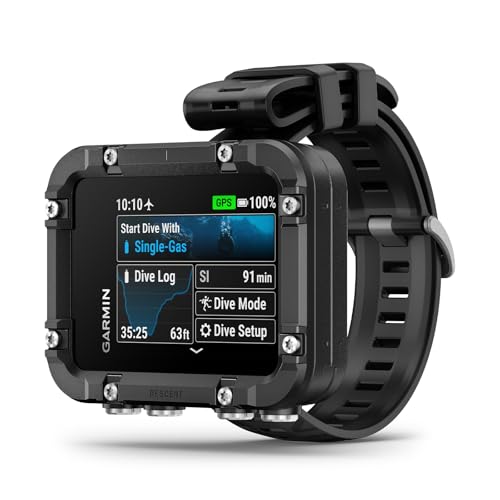
Garmin builds the Descent G1 as a watch first in shape and a dive computer in substance. Manufacturer documentation describes multiple dive modes, including single gas, multi gas, gauge, apnea, and apnea hunt variants, alongside a full multisport feature set that covers running, cycling, swimming, strength work, and navigation away from the water. That breadth is the G1 argument. A diver who trains through the week and dives on weekends can wear one device for both, with a log that lives in the same phone app as the rest of the training record. The solar version adds a solar charging lens that, per Garmin published figures, extends standby and smartwatch endurance under stated light conditions, while dive mode endurance is quoted separately and should be read in the manual for the exact mode and backlight setting you plan to use.
The G1 uses a monochrome memory in pixel display that favours clarity and battery economy over colour richness. In bright surface light it reads cleanly, and its button driven interface avoids the uncertainty of a touch screen with wet hands or gloves. Garmin documentation lists support for nitrox and for multiple gases within recreational limits, a built in three axis compass, and surface GPS that marks entry and exit points rather than tracking a submerged route, since satellite signals do not reach a diver under water. That last point deserves emphasis because marketing photographs can imply more. No wrist dive computer in this guide receives GPS under water. Surface positioning helps a log remember where a shore dive began, and it helps a boat crew narrative after the fact, but navigation under water still rests on a compass, natural references, depth awareness, and a plan agreed before descent.
Suunto D5 and the older D4i line
Suunto brings a long dive heritage to this tier through the D5 and, where remaining stock and refurbished channels still offer it, the earlier D4i family. The D5 presents a colour display, a rechargeable battery, and an interface built around three buttons and clear mode prompts. Suunto documentation describes its Fused RGBM model, a hybrid approach that blends a reduced gradient bubble model view of gas behaviour with continuous decompression calculation, and that offers personal adjustment settings that shift the calculation toward more conservative outcomes. In plain terms, the setting you choose changes how much margin the computer keeps between its estimate and the limit it will display, and a new diver should choose the more careful end of that range and leave it there while experience grows.
Readability is a Suunto strength that shows up in the layout of the dive screen. Depth, time, and the governing limit are separated with intent, and the colour coding is restrained rather than theatrical. Interchangeable straps are part of the D5 design story, with quick release fittings that let an owner move from a silicone dive strap to a textile or leather strap for daily wear, subject to the care guidance in the manual. That swap is cosmetic on land and practical on a boat only if the dive strap is long enough for the exposure suit in use, so check strap length against your thickest cuff rather than assuming the strap in the box covers every suit you own.
Shearwater Peregrine
Shearwater built its reputation with technical divers, and the Peregrine carries that design language into recreational diving without the cost or the gas complexity of the flagship units. Manufacturer documentation lists a large colour display, a rechargeable battery, wireless charging, vibration alerts, and a decompression model based on Buhlmann ZHL-16C with gradient factors. Gradient factors deserve a careful plain language account, given later in this guide, because they let a diver shape where in the water column decompression stress is managed and how conservative the first stop and the final surfacing are set to be. On the Peregrine those controls are presented for recreational modes with sensible defaults, so a new owner can dive the defaults and learn the theory before changing anything.
The Peregrine screen is the readability benchmark many buyers compare others against in this tier. Digits are large, the layout is uncluttered, and vibration adds a private alert channel that does not depend on hearing a beep through a hood or over boat noise on a safety stop. Shearwater documentation describes support for air and nitrox, including multiple gases within the recreational scope of the model, plus gauge and freediving related functions as listed for the current firmware. The case is larger than a daily watch for many wrists, and that size is the trade. If you want a unit that disappears at a desk, look elsewhere. If you want a screen you can read at a glance while holding a line in a current, the size earns its keep. The watch form Teric from the same maker sits above this tier, so its extra features should not be read across to the Peregrine.
Mares Puck Pro and Mares Smart
Mares serves the entry end of the market with a directness that many training agencies appreciate. The Puck Pro line centres on a single button interface and oversized digits on a wide display segment, in a puck form that sits proud on the wrist and reads at a distance. Mares documentation describes an RGBM based model, nitrox support within stated limits, a plan mode, and a logbook, all reached by stepping through menus with that one button. A single button removes ambiguity about which control to press, and it also slows deep menu work, because every move is a step forward through a sequence. Owners learn the rhythm quickly for dive day tasks, while infrequent divers should refresh the sequence at home before a trip rather than on a rocking boat.
The Mares Smart takes a watch form, adds a more conventional multi button layout in a compact case, and keeps the same emphasis on clarity over spectacle. It suits a diver who wants a unit that looks ordinary at work and still covers recreational air and nitrox profiles with alarms for ascent rate and limit approach. Across both Mares models, published figures for battery life and replacement should be read closely, since service routes differ by model and region. A user replaceable arrangement on one variant does not imply the same arrangement on another, and a sealed unit that needs a service centre is not a flaw if the interval is long and the cost is known in advance.
Cressi Leonardo
The Cressi Leonardo is one of the most widely recognised first computers in recreational diving, and its design explains why. A single button steps through a clear menu, the display gives depth and limit information without crowding, and Cressi documentation describes an RGBM model developed with named scientific input, nitrox support, and a battery that the user can swap following the procedure in the manual. That last feature changes ownership. A diver on a remote trip who carries the correct cell and follows the seal care instructions can recover from a low battery warning without hunting for a service centre, provided the O ring is inspected, kept clean, and seated exactly as the manual directs. A careless swap that pinches a seal turns a convenience into a flood, so the skill must be learned calmly at a table, never improvised on a dive deck.
Aqua Lung i series at the entry end, and the Oceanic Geo class
Aqua Lung i series units, including the i100 and i300 class where sold, occupy the straightforward end of the tier. Documentation for the line describes a dual algorithm choice on some models, allowing the diver to select between a Pelagic DSAT based liberal model and a Pelagic Z plus model that tracks closer to a more conservative profile, alongside nitrox support, a backlight, and a user replaceable battery on stated variants. That algorithm choice is educational. It shows a new diver, in a menu, that decompression models are not a single universal truth but a family of estimates with different margins, and it forces an explicit decision that should be made with an instructor rather than by hunting for the longest displayed limit on a shop counter.
Oceanic Geo class watches, where remaining stock still appears, brought a compact watch form, dual algorithm heritage from the wider Oceanic line, and a loyal following among travelling divers who valued a unit that doubled as a travel watch across time zones. Availability is the caveat. A discontinued or thinly stocked model can be a bargain with a fresh battery and a clear service path, or it can become a hunt for straps and cables that costs more time than the saving is worth. Buy the support ecosystem, not only the device. If a strap, battery kit, or download cable for a legacy unit cannot be sourced from a normal channel at the time of buying, the prudent move is to choose a current model whose parts are on the shelf today.
Decompression algorithms in plain language
Every computer in this guide estimates the same physical problem. Under pressure, breathing gas dissolves inert gas, mainly nitrogen on air and nitrox, into blood and tissue. Rise too quickly or stay too long, and that gas can form bubbles as pressure falls, which is the mechanism behind decompression sickness. A model divides the body, on paper, into compartments that load and unload gas at different rates, then limits exposure so that no compartment exceeds a value the model treats as tolerable on ascent. The compartments are mathematics, not anatomy lessons. Fast compartments stand in for well perfused tissue, slow compartments for tissue that takes up gas gradually and releases it gradually, and the displayed limit at any moment reflects whichever compartment is closest to its ceiling.
Buhlmann ZHL-16C, used by Shearwater and by several other makers in adapted forms, is the most openly documented model a recreational buyer will meet. Its coefficients are published, its behaviour has been studied for decades, and gradient factors give the diver two controls over how the ascent is shaped. The low gradient factor influences how deep the first decompression stop, if one is required, will be generated. The high gradient factor influences how close to the model ceiling the diver is allowed to be when surfacing. Lower values in either place mean more margin. Recreational divers who never intend a decompression dive still benefit, because the same factors shape the no decompression limit and the safety margin around it, and because a unit that exposes the controls with clear defaults teaches good habits early.
RGBM family models, used in forms by Suunto and Mares and Cressi, add a bubble aware view. The reasoning is that microscopic gas nuclei and bubble behaviour matter alongside dissolved gas, especially across repetitive dives, multiday diving, and profiles with sawtooth depth changes. Implementations differ, and the exact proprietary steps inside a given firmware are not published in the same open way as Buhlmann coefficients. That does not make them unsound. It does mean a buyer should judge an RGBM unit by the maker record, the clarity of its personal adjustment settings, and how it behaves across repetitive days, rather than by trying to compare equations line by line. Suunto Fused RGBM, for example, is described by Suunto as blending bubble model reasoning with a continuous calculation that behaves differently on a first shallow dive and on a deeper decompression exposure.
Conservatism settings are where the theory becomes a daily decision. Makers name them differently, personal levels, safety factors, gradient factor presets, or algorithm choices between a liberal and a conservative variant, yet the direction is always the same. A more conservative setting shortens the displayed no decompression time, lengthens stops when stops apply, and extends surface intervals the computer advises. A less conservative setting does the reverse. Age, cold, exertion, dehydration, a poor night of sleep, a history that a physician has discussed with you, and diving at altitude all argue for more margin, not less. Set the unit toward care at the start of a trip and leave it there for the whole trip, because changing settings mid series to win back minutes undermines the continuity the log is meant to preserve.
Gas support: air, nitrox, and the limits of multi gas at this tier
Nitrox support is effectively standard across the serious models in this tier, and the details to verify are the oxygen fraction range, the maximum partial pressure setting the unit allows, and how the unit handles a gas switch if it supports more than one gas. Enriched air with a higher oxygen share reduces nitrogen uptake for a given profile and can extend a no decompression limit or add margin at the same limit, while raising oxygen toxicity considerations that training covers in depth. A computer helps by letting the diver set the exact oxygen percentage of the analysed cylinder, computing a maximum operating depth for the chosen partial pressure ceiling, and alarming if that depth is exceeded. The diver still analyses the cylinder, labels it, and sets the unit by hand for each fill. A computer cannot smell a mix, and a setting left over from yesterday dive is a known source of error.
Before every nitrox dive, follow the routine your training gave you. Analyse the gas yourself or witness the analysis, check the percentage against the label, enter that exact percentage into the computer, confirm the partial pressure limit the unit shows, and read back the maximum operating depth it calculates. If any number disagrees with your expectation, stop and resolve it on the surface. That thirty second discipline matters more than any difference between models, because every model in this tier will faithfully calculate from a wrong entry and give a confident, wrong limit.
Multiple gas support at this tier is real but bounded. A unit may allow two or three gases, intended for a bottom gas and a richer decompression mix on a planned technical profile, or for travel contexts covered by training. Recreational divers on a single cylinder of air or nitrox do not need multi gas switching, and an unused menu is not a benefit. It becomes a benefit only when training, planning software, cylinder labelling, and a buddy brief all support a switch at a stated depth. If you are not trained for gas switching, leave extra gas slots disabled where the firmware allows it, so a button press under water cannot offer a change you never intended to make.
Air integration, and why it mostly lives above this tier
Air integration means the computer receives cylinder pressure from a transmitter screwed into the first stage high pressure port, displays that pressure on the wrist, and can calculate gas time remaining from consumption and depth. It is genuinely useful. It removes a console glance, it logs consumption against the profile, and it can alarm on low gas with a precision a needle gauge cannot match. It is also, in this tier, usually an extra cost rather than an included feature, and the transmitter alone often costs a large share of the whole budget under discussion. A bundle that includes a transmitter at a sharp seasonal price can be an exception worth taking, provided the transmitter matches the computer protocol and the pairing is confirmed in the manual for both devices.
Compatibility is not universal. A transmitter speaks a maker specific radio protocol, and a Suunto transmitter does not pair with a Garmin or Shearwater receiver simply because all three use similar frequencies under water. Published compatibility lists decide the matter. Battery state in the transmitter, correct installation with the right spool or flow restrictor where the manual requires one, and a pairing check on the surface before the first dive of a trip are all part of owning the system. A diver who adopts air integration should still carry an analogue submersible pressure gauge or another independent pressure reference as training and local practice advise, because a dead transmitter battery should end a convenience, not a dive day, and never a dive already under way without a plan.
Compass, navigation, and surface positioning
A built in digital compass changes how a wrist unit feels under water. Instead of carrying a separate compass console or a slate mounted unit, the diver tilts the wrist, reads a heading, and can set a reciprocal course for the return leg. Garmin, Suunto, and Shearwater models in this class offer compass functions in varying forms, and the manual for each describes calibration, declination handling where offered, and the tilt limits within which the reading stays reliable. Calibrate on the surface away from steel tanks, boat hulls, and car bonnets, using the figure movement the manual describes, and recalibrate after travel across regions if the maker advises it. A compass swung near a wreck is still affected by the wreck metal, which is a fact of physics no firmware removes.
Good underwater navigation combines the compass with depth discipline and natural references. Note the reef edge orientation on descent, watch where the sand channel runs, keep an eye on surge direction in shallow water, and check the compass at turns rather than staring at it for a whole swim. A computer compass that is easy to reach, ideally one button away from the main dive screen, gets used. A compass buried four menus deep gets ignored, and an ignored compass might as well not be fitted. When comparing models, count the button presses from the dive screen to the compass screen in the manual flow charts. That small number predicts real use better than a feature list does.
Divers who split time between water and trail may also weigh a model against broader outdoor watches, and the comparison set in best android smartwatches fitness trackers under 100 shows how much navigation and training value a modest land focused watch can offer, which sharpens the question of whether one dual purpose unit or two focused units serve a given owner better. There is no universal answer. There is only the pattern of your own weeks, counted honestly.
Freedive and apnea modes
Freediving places different demands on a wrist unit. A freediver needs surface interval timing at least as much as depth, a fast sampling rate that captures a brief descent, alarms at target depths, and a log that records many short dives in a session without treating them as a scuba profile. Dedicated apnea modes on units such as the Garmin Descent line and apnea functions described for several other models in this class serve that need. They time the surface recovery between dives, which is the safety habit experienced freedivers build a session around, and they keep the scuba decompression model out of a discipline where it does not apply in the same way.
Never use a scuba computer gauge reading as a substitute for freedive training, a buddy who watches every dive, and the rule of one up, one down that freediving instruction teaches. A watch can record a dive it cannot make safe. Equally, respect lockout behaviour. Some scuba computers, after a scuba dive, restrict mode changes or treat a subsequent immersion through the lens of residual gas, and some freedive capable units advise against freediving after scuba on the same day in line with common guidance. Read the lockout and warning pages of your manual before a trip that mixes both, so a surface argument with a menu does not replace a decision made calmly in advance.
Speargun and apnea hunt variants, where offered, mainly adjust alarms, sampling, and display fields for a quiet, glanceable session. A buyer who only scuba dives can ignore these modes entirely. A buyer who freedives weekly should weight them heavily, because a scuba only unit that logs a freedive session as a series of alarms and errors will be left in the bag, and a safety tool left in the bag helps no one.
Battery strategies: rechargeable cells and user swapped coin cells
Battery design divides this tier into two ownership styles, and neither is simply better. Rechargeable units, such as the Suunto D5, the Shearwater Peregrine, and the Garmin Descent G1, charge from USB or a charging clip or pad, offer days to weeks of use depending on mode, and remove the need to open the case. Their weakness is time. A lithium cell ages whether it is used or not, a charging cable forgotten before a trip is a single point of failure, and a unit that arrives at a remote dock at low charge needs hours and a power source before it is ready. Published endurance figures from each maker assume stated backlight, mode, and sensor conditions, so read the dive mode figure rather than the smartwatch standby figure when planning a dive week.
User swapped coin cell units, represented in this class by the Cressi Leonardo arrangement and by several Aqua Lung and older Mares and Suunto variants as documented for each model, trade that charging discipline for seal discipline. A common cell can be bought in many towns, a spare can ride in a save a dive kit for years, and a low battery warning the night before a dive can be resolved at a table in minutes. The cost is the O ring. Every opening of the case is a chance to trap a hair, flatten a seal, or seat a cover unevenly. Makers publish the exact cell type, the order of the seal and cover parts, and the warning not to dive until a self check passes. Follow that sequence exactly, work on a clean surface with good light, and pressure test by the means the manual allows, which for most owners means a shallow supervised check or a service centre test rather than an act of faith at depth.
Display readability in low light and under task load
Readability is a safety feature disguised as a design preference. At twenty metres on an overcast day, under a ledge, or inside the shadow of a wreck superstructure, the light reaching a wrist is a fraction of the light on a shop counter where the buying decision was made. Contrast, digit height, and the separation between fields decide whether a diver reads depth and limit in one glance or hunts for them while buoyancy drifts. Colour screens such as those on the D5 and Peregrine use hue as an extra channel, turning a warning amber or red, while monochrome screens such as the G1 and the Leonardo rely on bold segments and backlight strength. Both approaches work when the layout is disciplined. Both fail when a screen crowds secondary fields into the same visual weight as the limit that governs the dive.
Backlight behaviour deserves a manual check. Note how the light is triggered, how long it stays on, whether brightness can be set, and what that setting costs in battery life on a night dive heavy trip. A light that needs a long press with a gloved hand will not be used at the moment it is needed. A light set to maximum for a whole week of night dives can halve the endurance a maker quotes at a moderate setting. Divers who wear corrective lenses should also weigh digit size honestly. A compact watch that is elegant with reading glasses at a desk may be a blur at arm length under water without them, and a mask with prescription lenses or a gauge reader lens changes the calculation again. Choose for the eyes you dive with, not the eyes you shop with.
Logs, phone apps, and desktop software
A dive log is more than a souvenir. It is the record that shows a pattern of depth, time, gas use, and conservatism across a season, and it is the document an instructor or a physician may ask to see after an incident. How a computer moves its log therefore matters out of proportion to the few minutes the transfer takes. Bluetooth transfer to a phone app is the modern default on the Garmin, Suunto, and Shearwater models discussed here, with each maker publishing its own app and pairing process. Garmin Connect and the Garmin Dive functions, the Suunto app, and Shearwater Cloud each present profiles, allow notes and site names to be added while memory is fresh, and back the log up beyond the device. Desktop versions or web views help on a large screen when planning a repetitive series or reviewing a course weekend with an instructor.
Entry models may use a cable, an infrared or USB interface accessory, or a simpler onboard log with limited depth of history. That is acceptable if the owner knows the limit before the trip that will exceed it. Check two numbers in the manual, the number of dives or hours the onboard log holds before the oldest record is overwritten, and the sampling interval that decides how detailed each stored profile will be. A unit that overwrites after twenty dives will lose the first dives of a three week trip unless the owner downloads during the trip. Build the download into the evening routine on any trip longer than the onboard memory, in the same way you rinse kit and charge lights.
Third party log software support is a quiet long term benefit. Many divers keep a lifetime log in an independent application that imports from several brands, so a change of computer in five years does not orphan a decade of records. Before buying, confirm whether the model exports in a form your chosen log accepts, or whether the maker app is the only route. Export a sample file early, while a return is still possible, rather than discovering a closed format after a season of diving. And keep the manual PDF with the log archive. In ten years, the alarm codes and mode names in an old log will make far more sense with the document that defined them.
Runners and multisport divers who already keep a training log may find the overlap discussion in best running smartwatches useful, because a dive watch that also records a morning run removes one charger and one app from a dive trip bag, while a dedicated dive unit keeps the dive log separate from a crowded fitness feed. Either structure works. The failure mode is a log scattered across three apps with no single complete record, so choose one home for the dive history and keep it complete.
Straps, bungee mounting, and fit over exposure suits
A computer that leaves the wrist under water is worse than no computer, because it takes the plan with it. Strap security therefore ranks alongside the model itself. Long silicone or rubber straps with double keepers suit wetsuits, while a strap long enough for a drysuit cuff with thick undergarments should be measured, not guessed. Some units in this class accept bungee mounting through an adapter or through strap slots, where elastic cord loops over the forearm and keeps the unit in place even if one loop fails and even as a suit compresses at depth and a strap loosens. Bungee mounts are popular for a reason. Suit compression at thirty metres is real, neoprene thins under pressure, and a wrist that was snug on the surface can be loose at depth. An elastic mount takes up that change on its own.
Spring bars and quick release pins are the weak points of a daily wear style strap. Inspect them before a trip, replace a bent or corroded bar, and consider a single piece pass through strap for dive days, where the unit stays captured even if one bar fails. Quick release straps on models such as the D5 make that swap simple, which is a genuine safety benefit of a feature often sold as fashion. For puck style units, check how the strap threads and whether a replacement strap is a maker part or a standard width any dive shop stocks. A proprietary strap that tears on day two of a remote trip should have a spare in the bag, bought at the time of the computer, not after the tear.
Fit also affects readability and compass accuracy. A unit worn loose spins to the underside of the wrist and forces a wrestling move with a torch or a camera at the exact moment a reading is needed. Wear it on the forearm side you briefed your buddy to expect, snug enough to stay oriented, loose enough to leave circulation alone, and in the same place on every dive so the glance becomes automatic. Automatic is the goal. Under task load, searching for your own computer is a small failure that invites larger ones.
Freshwater and saltwater care
Salt is patient and it wins against neglect. After every saltwater dive, rinse the computer in fresh water while following the maker guidance on soaking, button pressing under water where the manual allows or forbids it, and drying. Some manuals advise pressing buttons during a rinse to clear salt from around the shafts, others warn against pressing buttons while submerged because pressure on a seal changes its behaviour. Those instructions differ by design, so the manual for your unit governs, not a habit carried over from a previous brand. Dry the unit in shade, never on a hot dashboard or with a hair dryer, since heat ages seals and can fog a lens through a temperature swing.
Pressure sensors need a clear path to the water. A sensor port clogged with dried salt, sunscreen, or sand will read depth late or wrongly, and the error may be small enough to escape notice while large enough to matter across a repetitive day. Inspect ports and the back of the case during the rinse, use a soft flow of water rather than a jet, and never poke a port with a metal tool. Store the unit dry, with the strap loose, away from chemicals such as insect repellent solvents that attack some strap materials, and keep it out of a sealed wet kit bag where a damp, salty atmosphere works on it all week between dives.
Freshwater diving is kinder but not care free. Quarry silt and lake weed foul straps and ports, cold water thickens the demands on battery and on the diver, and altitude at some inland sites changes the model setup, as the next section covers. Rinse after freshwater dives too, if only to remove grit before it scratches a lens in a kit bag, and dry charging contacts fully before connecting a cable, because a damp contact and a charging current make a corrosion pair that shortens the life of an otherwise sound unit.
What a new diver should configure on a first unit
Configuration is where a good computer becomes your computer, and the first setup should happen at a table with the manual open, not on a boat with a brief already running. The steps below are reader instructions for your own unit, in the order most manuals present them, and any conflict between this overview and your manual resolves in favour of the manual for your exact model and firmware.
Units, time, and the basics
Set the measurement units to the system your training used and your buddy will use on the trip, metres and Celsius or feet and Fahrenheit, and then leave them alone for the whole trip. Mixed units between buddies cause real misunderstandings, because a depth called out in one system and heard in the other is a different depth. Set the time and date correctly, including the time zone after travel, since the log timestamps and surface interval calculations depend on a truthful clock. Choose a backlight level and duration that you can read in a dim room at arm length, set the display contrast if the model offers it, and turn on the alarms you intend to respect rather than every alarm the firmware contains.
Alarms worth setting, and alarms to leave alone
Set a maximum depth alarm a little shallower than the planned maximum for the dive, a dive time alarm that prompts a turn toward the exit or the ascent line, and, on nitrox, confirm the oxygen partial pressure alarm that the unit derives from your gas setting. Keep the ascent rate alarm on in every case. That single warning, respected early while the correction is still a gentle finning pause and a breath, prevents the hurried final metres that spoil many otherwise careful profiles. Avoid stacking so many custom alarms that the wrist becomes a slot machine of beeps, because alarm fatigue trains a diver to ignore the one that matters. Three or four meaningful alarms, briefed to a buddy, beat ten alarms nobody can tell apart under water.
Conservatism for the first season
Choose a conservative setting for your first season and write down what you chose and why. On a gradient factor unit, that means accepting the maker recreational preset with more margin, or selecting lower factor values with instructor guidance, rather than copying numbers from an internet thread written for a different diver and a different dive. On a personal adjustment scale, it means the careful end of the scale. On a dual algorithm unit, it means the more conservative of the two models. Then dive that setting for a whole series, including the shallow second dive of the day, and notice how it behaves across a multiday trip. A setting changed daily teaches nothing and protects less than its numbers suggest.
Altitude, fresh and salt settings, and sampling
Check whether your unit adjusts for altitude automatically through its pressure sensor or needs a manual altitude range, and confirm the setting before diving an inland site above sea level, because a computer that assumes sea level at a mountain lake will understate the decompression stress of the dive. Some models also ask for a fresh or salt water selection that refines the depth calculation from pressure, since the same pressure corresponds to a slightly different depth in each. Set it to match the water you are in. Finally, set the sample rate for the log to a reasonably fine interval the memory can support for your trip length, so the stored profile shows the multilevel shape of the dive rather than a coarse sketch, and confirm the log memory will hold the whole trip or plan evening downloads accordingly.
How to choose among these models without regret
Start with the wrist and the eyes. If you have a narrow wrist and wear the unit daily, the Garmin Descent G1 and the Suunto D5 and the Mares Smart class earn attention for their watch form and daily features. If you have any doubt about reading a small screen under water, the Shearwater Peregrine and the Mares Puck Pro class answer that doubt with size, and the size is worth its bulk. Then weigh the battery style against your travel pattern. Frequent short trips with easy charging favour a rechargeable unit. Remote trips with uncertain power and long intervals between dives favour a user swapped cell, provided you are willing to learn the seal procedure properly.
Next, weigh the ecosystem you already live in. A Garmin owner with a training log in that app gains real continuity from a Descent. A diver whose instructor and buddies all dive Suunto gains briefing familiarity from a D5, because a buddy who knows your screen can read it at a glance during a check. A diver drawn to clear decompression theory and a large display gains from the Peregrine even without any other Shearwater kit. None of these reasons is a spec sheet number, and all of them predict satisfaction better than a half percent difference in a published figure. Divers weighing a broader everyday activity watch alongside a dive unit may also scan best activity smartwatches for the land side trade offs before deciding how many devices they actually want to charge.
Finally, price the whole first year, in words rather than in a single headline figure. The complete cost includes the unit, a spare strap or bungee adapter, a screen protector if you favour one, a download cable or interface if the model needs one, a battery kit or spare charging cable, and a first service or battery change if the interval falls inside the year. Compared on that complete basis, models in this tier move closer together, and the cheapest headline can become the dearest kit. Buy from a channel that can service what it sells or direct you to the maker service path, keep the receipt with the log archive, and register the unit if the maker offers registration for firmware notices.
Check prices on Amazon
Live listings for the shortlist in this guide are pulled from Amazon below, so prices and availability are always current at the moment you look.



A short buying sequence that works
List your real diving first, the depths, the gases, the number of dive days in a typical trip, and whether freediving shares the calendar. Cross off any model whose published gas or mode limits do not cover that list with room to spare. Hold the remaining candidates against your wrist size and your eyes, using case dimensions and digit photographs from the manuals. Pick the battery style that matches your travel power reality. Confirm the log route into the app or software you will actually keep. Price the complete first year kit for each finalist, including the strap and cable items you will otherwise buy within a month. Then choose, configure it at a table, and dive it on an easy profile with an instructor or an experienced buddy before the trip that counts.
That sequence sounds slow, and on a single afternoon it is. Across five seasons of diving it is the fastest route there is, because it buys once, learns once, and builds a log and a set of habits on a unit that stays familiar while skills grow around it. The under four hundred tier is generous enough to contain a right answer for almost every recreational diver, from the single button first computer carried on a training weekend to the large screen unit a photographer reads while holding a camera and a line. Match the tool to the diving you truly do, set it with care, rinse it without fail, and let its quiet arithmetic guard the margins while your attention stays on the reef, the wreck, and the buddy beside you, which is where a diver attention has always belonged.