What's inside
- Where to buy
- Key Takeaways
- Quick Picks
- How did we pick these 4TB portables?
- The picks in detail: best 4tb portable hard drives reviewed
- Comparison table
- What changes when a portable drive holds four terabytes?
- How do you look after a 4TB portable?
- What do buyers get wrong about 4TB portables?
- Four terabytes or five: reading the top of the portable range
- A field kit built around one of these drives
- The port transition, and what it means for this shelf
- When the portable becomes the family archive
- A note on buying this class second-hand
- What owners tend to ask a year after buying
- Final Recommendation
- Frequently Asked Questions
- Related Guides
As an Amazon Associate I earn from qualifying purchases. This post may contain affiliate links at no extra cost to you.
gizmoverdict.com is reader-supported. When you buy through links on our site, we may earn an affiliate commission.
Where to buy
Four drives below carry links to their Amazon listings, each checked as this roundup was prepared. The other two — Toshiba’s step-up Canvio and Samsung’s flagship portable SSD — are prose only: one’s listings rotate by colour and region, the other is not a hard drive at all.
Four terabytes is where portable hard drives reach their practical ceiling, and the best 4tb portable hard drives are best understood as the largest library that still travels without a power supply. Go looking for a pocketable spinning drive bigger than this and the shelf essentially ends — the next sizes up belong to desktop boxes with wall adapters — so 4TB is the capacity for the buyer who wants the whole collection, the entire backup, the full game vault, in one bus-powered slab that works on a train table and disappears into a bag. That “slab” word is chosen carefully. These are not the wafer drives of the 1TB era: a 4TB portable mechanism stacks more platters, the enclosure grows thicker and heavier, and the object in your hand feels like a paperback book rather than a phone. It is still genuinely portable. It is just portable the way a book is portable, and this guide treats that distinction as a feature of the category rather than an embarrassment.
The four hard drives on the linked shelf cover the class’s whole personality range. WD’s Elements Portable is the bare vessel, Toshiba’s Canvio Basics the budget vessel, WD’s My Passport the guarded vessel with encryption and backup automation, and Seagate’s newest Expansion Portable the modernised vessel, notable for arriving with a Micro-B to USB-C cable arrangement that speaks to today’s port landscape. Around them, two prose picks mark the exits from the category: the Canvio Advance for buyers who want Toshiba’s version of the guarded formula, and Samsung’s T9 for buyers who discover, reading this, that what they actually want is speed and shockproofing and were only ever shopping hard drives out of habit.
Key Takeaways
- 4TB is the largest portable hard-drive capacity in common production — the ceiling of the bus-powered, 2.5-inch format, and the size with the deepest, most settled choice of models.
- Every 4TB portable is thicker and heavier than its 2TB sibling; plan for a paperback in the bag, not a phone, and give it a pouch and a flat landing spot when it works.
- The WD My Passport 4TB is the guarded pick, with hardware encryption and backup software for archives that travel.
- WD’s Elements Portable and Toshiba’s Canvio Basics are the plain vessels — equal essentials, decided by the day’s price and your brand history.
- Seagate’s new Expansion Portable 4TB modernises the cable story with its Micro-B to USB-C arrangement for current laptops.
- Samsung’s T9, in prose, is the speed exit: if you will work from the drive daily, its premium buys back hours the hard drives cannot.
Quick Picks
| Pick | Badge | Why it is here |
|---|---|---|
| WD 4TB Elements Portable | Best No-Fuss Library | The plain WD vessel at full portable size: mount it, fill it, carry the whole library. |
| WD 4TB My Passport | Best for Travelling Archives | Encryption and scheduled backup wrapped around four terabytes that leave the house. |
| Toshiba Canvio Basics 4TB | Best Value in the Class | The essentials-only drive that makes a two-drive rotation affordable at this size. |
| Seagate 4TB Expansion Portable | Best Modern Connections | Seagate’s new-generation portable with a Micro-B to USB-C cable for today’s laptops. |
| Toshiba Canvio Advance 4TB | The Guarded Alternative — Prose | Toshiba’s answer to the Passport formula: backup software, password protection, colour. |
| Samsung T9 Portable SSD | The Speed Exit — Prose | Not a hard drive: the comparison that decides whether this category is right for you at all. |
How did we pick these 4TB portables?
The first judgement was about the format itself, because at this capacity the format is half the product. We favoured drives whose enclosures handle the thicker mechanism gracefully — shells that feel rigid rather than hollow, that do not flex or creak around the extra platters, and whose weight distribution does not make the drive feel like it is straining its own seams. A 4TB portable will be carried for years and will hold more of its owner’s life than any drive they have owned before; build quality stops being a luxury judgement at exactly this size. Beyond the object, we weighed the familiar portable questions in their 4TB form: protection for a drive that travels with everything on it, software that scales to backups measured in terabytes rather than gigabytes, and pricing honest enough to permit the second copy this capacity demands.
Price discipline ran through the judging as well. Portable drives at this size sit in a band where the guarded models cost meaningfully more than the plain ones, and that gap had to be justified in terms a buyer can act on — protection they will configure, software they will schedule — rather than in adjectives. Where the justification failed for a plausible buyer, we said so in the pick; where it succeeded, we said that too. A guide that recommends the premium model to everyone is a catalogue, not a guide.
We also listened for what owners of the smaller versions complain about, because the 4TB drives inherit those traits amplified. Cable connectors get stressed by heavier drives hanging off laptop ports. Backup software that was charming at 500GB becomes a commitment at 4TB. And the mechanical ceiling on speed, tolerable when copies were short, defines the ownership experience when a first backup runs overnight. Each pick below is read against those realities rather than against a spec sheet.
The picks in detail: best 4tb portable hard drives reviewed

WD 4TB Elements Portable — Best No-Fuss Library
Think of the 4TB Elements as a shelf you can carry. Its role in most households will not be daily backup — though it can serve — but consolidation: the scattered herd of smaller drives, memory cards and laptop overflow gathered into one labelled volume with a single place in the drawer and a single name in the backup software. The Elements formula suits consolidation perfectly because there is nothing to configure and nothing to expire; the drive you fill this winter will mount identically in five winters, on whatever machine the household owns then, and its contents will be readable without a single vendor utility. In a category where features age, featurelessness is a longevity strategy.
The physical reality deserves its paragraph. This is the thick Elements — noticeably deeper than the 2TB version, with a weight that registers in a jacket pocket and belongs properly in a bag. Nothing about that is a defect; it is the honest consequence of stacking platters, and WD’s enclosure handles it with a rigid, matte shell that shrugs off the drawer and the carry-on. What the size does change is behaviour around it: a heavier drive hanging from a short cable off a laptop on a café table is a drive that can be dragged to the floor by a passing sleeve, so give it a flat landing spot and a cable with slack. The library you consolidate onto this drive took years to accumulate; the thirty seconds of placement care is the cheapest protection it will ever get.
- Capacity: 4TB, thick-profile 2.5-inch mechanism, bus-powered
- Connection: USB 3.2 Gen 1 / USB 3.0, cable included
- Software: none — a bare volume for your own system
- Form: matte enclosure, paperback-like hand feel at this capacity
- Compatibility: Windows ready; Mac use after reformat
Strengths
- Consolidation-friendly: nothing about the drive can age, expire or demand an account.
- The rigid shell takes bag and drawer life without drama.
- Price leaves room for the second drive a consolidated library must have.
Trade-offs
- No encryption — the whole library is readable by whoever holds the drive.
- Its heft ends the fiction of pocket carry; this is a bag drive now.
- Any backup routine is yours to design, run and remember.
Best for: consolidators, media librarians and households gathering years of scattered storage into one volume. Not suited for: travellers carrying confidential material, or anyone expecting the drive to manage backups itself.
WD 4TB My Passport — Best for Travelling Archives
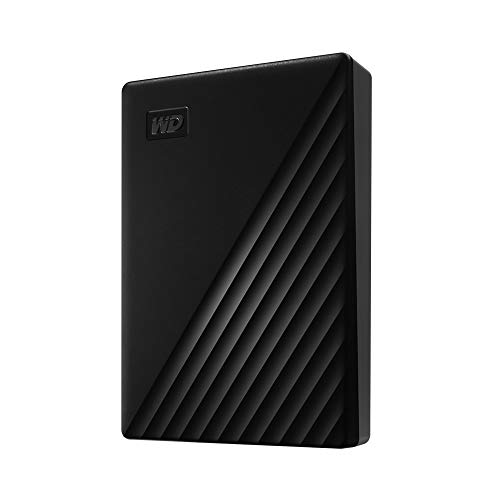
The My Passport’s proposition sharpens at 4TB, because this is the size at which a portable drive stops being an accessory and becomes the archive itself — and archives that travel need guarding. WD’s answer is the pairing this line is known for: password protection standing on 256-bit AES hardware encryption, so a drive lost from a bag is a hardware expense rather than a disclosure, and backup software that maintains scheduled copies with defences against the tampering that ransomware attempts on attached storage. On a 4TB drive, those are not trim items. They are the difference between consolidating your digital life into one travelling object being a convenience and it being a gamble.
The ownership details scale with the capacity too. The first full backup onto this drive is an overnight event, and the Passport’s software earns its keep precisely there — set the schedule once, let the maiden copy run while the house sleeps, and thereafter the increments are small and unremarkable. The password ceremony deserves the same one-time seriousness: set it before the first trip, store it in a password manager, and rehearse unlocking the drive on a second computer if it will ever be used with one. What the Passport asks is a single evening of setup; what it returns is a 4TB archive that can ride in a carry-on, sit in a hotel room and come home from a conference without its owner performing a single act of faith.
- Capacity: 4TB, thick-profile 2.5-inch mechanism, bus-powered
- Connection: USB 3.1 / USB 3.0 compatible, cable included
- Security: password protection with 256-bit AES hardware encryption
- Software: WD backup suite with ransomware-aware copy protection
- Compatibility: Windows ready; reformat required for Mac use
Strengths
- Encryption sized to the stakes — four terabytes of a life, guarded properly.
- Scheduled backups turn an overnight first copy into years of unattended increments.
- The finish and manners suit a drive that will be handled in public, daily.
Trade-offs
- The password is absolute; forget it and the archive stays sealed forever.
- Its premium over the plain drives buys software value only if you complete the setup.
- Thick-profile Passport is a bag item, despite the travel-friendly branding.
Best for: consultants, researchers, photographers and families whose archive genuinely travels. Not suited for: stay-at-home library duty where the encryption premium guards a drive that never leaves a drawer.
Toshiba Canvio Basics 4TB — Best Value in the Class
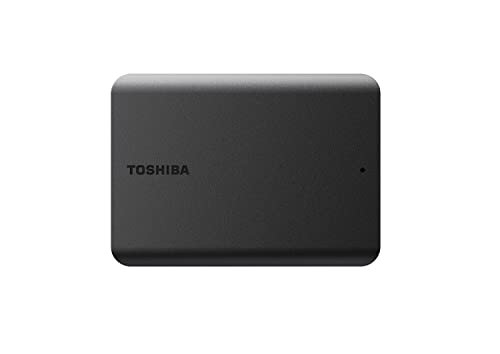
Every class needs the pick that disciplines the others’ pricing, and in 4TB portables that pick is the Canvio Basics. Toshiba offers the format’s essentials — the full capacity, the bus-powered convenience, the plug-and-play mount — in a matte black shell with no software layer at all, and prices the result to make the guarded drives justify themselves in writing. For a large share of real buyers they cannot: if the drive’s destiny is a console’s game vault, a television’s media pool, or the second position in a backup rotation, then encryption and backup suites are features purchased for a job that does not exist, and the Basics is not the cheap option but the correct one.
The rotation point deserves emphasis at this capacity, because 4TB is where the two-drive pattern stops being advice and becomes arithmetic. A single premium drive, however guarded, remains one object in one place; two Basics drives, one at home and one at a trusted relative’s house, each holding the library, survive failures and misfortunes that no single drive of any pedigree can. Toshiba’s quieter ecosystem — no glossy suite, plain support pages — never enters that calculation. What enters it is a mechanism from a maker that has built portable drives for decades, in a shell that hides its scars, at a price that lets the system be the product. Buy one for the library; buy the second when the library starts to matter.
- Capacity: 4TB, thick-profile 2.5-inch mechanism, bus-powered
- Connection: USB 3.0, cable included
- Software: none — plug and play
- Form: matte black shell, wear-forgiving finish
- Compatibility: Windows ready out of the box; Mac after reformat
Strengths
- Makes the two-drive rotation — the genuinely safe pattern — affordable at 4TB.
- Zero software surface: nothing to install, break or be nagged by.
- The matte finish ages gracefully through years of utility duty.
Trade-offs
- Contents are unprotected if the drive is lost; custody is the security model.
- No backup tools included for buyers building their first routine.
- Toshiba’s surrounding ecosystem offers nothing extra to grow into later.
Best for: value-led buyers, console and media duty, and anyone building a rotation. Not suited for: carrying the only copy of confidential work through the world.

Seagate 4TB Expansion Portable — Best Modern Connections
Seagate’s new-generation Expansion Portable is the pick for buyers whose laptop has already moved to USB-C and who are tired of dongle archaeology. The drive itself is a conventional member of this class — a thick-profile 4TB mechanism in a light, travel-minded enclosure, presented for everyday Windows and Mac storage — but its cable arrangement is the headline: a Micro-B to USB-C lead that plugs straight into a modern notebook with no adapter in between. That sounds like a small thing until you have watched a backup fail because a bargain adapter lost contact, or fished through a bag for the one dongle that makes the drive exist. Connection reliability is backup reliability, and Seagate has aimed this generation directly at it.
Beyond the cable, the Expansion keeps the plain-drive faith: no encryption suite, no mandatory software, drag-and-drop manners with Seagate’s backup tools available for those who want them. That positions it as the modern plain vessel — the Elements’ philosophy with a contemporary plug — and for Mac-leaning and USB-C-only households it may be the most natural fit on this entire shelf. Its lightness is also real: among 4TB portables it is one of the easier ones to carry daily, which matters for the student or commuter whose drive genuinely lives in the bag rather than visiting it. Choose it when your ports are new, your files are copies rather than secrets, and your patience for adapters is, reasonably, exhausted.
- Capacity: 4TB, thick-profile 2.5-inch mechanism, bus-powered
- Connection: Micro-B to USB-C cable — direct fit for modern laptops
- Software: none required; Seagate tools available optionally
- Form: lightweight travel enclosure for Windows and macOS
- Character: new-generation Expansion design, everyday storage focus
Strengths
- Native USB-C connection ends the adapter hunt for current laptops.
- Among the lightest carries in a class that trends heavy.
- Plain-drive simplicity with a major maker’s support behind it.
Trade-offs
- No encryption; a lost drive’s contents are open to its finder.
- Households with older USB-A-only machines will need the adapter this drive skips.
- The light enclosure feels less armoured than the WD shells in rough bags.
Best for: USB-C laptop owners who want the plain vessel in modern dress. Not suited for: confidential archives, or desks full of legacy ports where its cable advantage inverts.
Toshiba Canvio Advance 4TB — The Guarded Alternative (Prose Only)
The Canvio Advance is Toshiba’s guarded formula at this capacity: backup software for scheduled copies, password protection for the contents, and a textured shell in colour options that makes the drive identifiable at a glance. It stands in this guide as the considered alternative for the buyer who wants the My Passport’s feature shape without WD’s ecosystem — a legitimate preference, since the software you will actually open every month matters more than the software with the longer feature list. In daily behaviour the Advance is the class standard, a thick-profile 4TB drive with the class’s mechanical pace, and its coloured finish earns genuine affection from owners tired of indistinguishable black rectangles in the storage drawer.
It sits in prose because its listings at 4TB rotate by colour and market more than its Basics sibling’s do, and the specific offer in front of you deserves a check — colour, condition and seller — rather than our blanket link. Two honest qualifications complete the picture. Its password protection is a software arrangement rather than the hardware-encryption story the Passport tells, adequate for personal privacy and casual loss, less absolute for regulated material. And its backup suite, while perfectly serviceable, lacks the ransomware-aware polish of WD’s current offering. Neither disqualifies it; both define it. For the buyer they fit, the Advance is the guarded drive with a personality.
- Capacity: 4TB, thick-profile 2.5-inch mechanism, bus-powered
- Connection: USB 3.0, cable included
- Software: Toshiba backup software; password protection tool
- Form: textured enclosure in colour options
- Status in this guide: prose-only; listings rotate by colour and seller
Strengths
- Guarded features without entering the WD software ecosystem.
- A coloured shell you can identify across a drawer of black drives.
- Backup scheduling covers the set-and-forget routine most owners need.
Trade-offs
- Password protection is software-based, a notch below hardware encryption.
- Finding the exact colour and listing takes a little more shopping care.
- Its suite is functional rather than class-leading in protective features.
Best for: buyers who want the guarded formula in Toshiba’s ecosystem and colours. Not suited for: regulated-data carriers who need the strongest encryption story available.
Samsung T9 Portable SSD — The Speed Exit (Prose Only)
The T9 is the question this whole category must answer at 4TB, so let us ask it at full strength. Samsung’s flagship portable SSD holds the same four terabytes in a fraction of the hard drives’ volume, shrugs off drops that would end a spinning drive’s story, and moves data so much faster that tasks change category: the overnight backup becomes a long lunch, the library you browse becomes the library you work from, the drive you plug in for one folder stays plugged in as your desk’s second workspace. It carries password-protected encryption and a build that feels like equipment. If your relationship with a portable drive is daily and active — editing, developing, transferring in the field — the T9 is not the expensive option. Measured in your own hours across a few years, it is the cheap one.
And yet the four hard drives above this section exist, sell and satisfy, because most portable-drive hours are not active hours. A backup target spends its life waiting; a library spends its life being browsed occasionally; a rotation drive spends its life in a relative’s drawer. In those roles the T9’s speed is a sports car’s top end on a grocery run, and its price — several times a hard drive’s for the same capacity — buys a second hard drive and a third with change. The mature answer, stated in our other guides and repeated here because 4TB is where it bites hardest, is division of labour: the SSD as the working companion if your work demands it, the hard drive as the vault. This guide’s linked shelf is the vault shelf, and the T9 stands in prose as the honest signpost to the other one.
- Capacity: 4TB solid-state storage, no moving parts
- Connection: USB-C, high-speed USB 3.2 Gen 2×2 class interface
- Security: password protection with hardware-based encryption
- Form: compact metal enclosure, drop-resistant design
- Status in this guide: prose-only — included as the category’s speed benchmark
Strengths
- Transfers and working responsiveness in a different league from every hard drive here.
- No mechanism to kill: the travel risks that dominate hard-drive failures barely apply.
- Far smaller and lighter at the same 4TB — the true pocket drive at this capacity.
Trade-offs
- Costs several times the hard drives’ price for identical capacity.
- Its fastest mode needs a host port that supports it; older machines see less of the advantage.
- For backup and vault duty, its talents sit idle while its price does not.
Best for: creators and professionals who work from the drive every day. Not suited for: vault, rotation and library roles where capacity per money is the entire argument.
Comparison table
| Drive | Type | Connection | Encryption | Backup software | Choose it when |
|---|---|---|---|---|---|
| WD Elements Portable 4TB | Hard drive | USB-A cable | None | No | Consolidating a library into one bare, lasting volume |
| WD My Passport 4TB | Hard drive | USB-A cable | Hardware AES | Yes, protective suite | The archive travels and must guard itself |
| Toshiba Canvio Basics 4TB | Hard drive | USB-A cable | None | No | A rotation or console vault at the keenest price |
| Seagate Expansion Portable 4TB | Hard drive | USB-C cable | None | Optional tools | Your laptop is USB-C and adapters are your enemy |
| Toshiba Canvio Advance 4TB | Hard drive | USB-A cable | Password (software) | Yes, Toshiba suite | Guarded features in Toshiba’s ecosystem and colours |
| Samsung T9 4TB | SSD (prose) | USB-C | Password, hardware-based | No | You work from the drive daily and time is money |
What changes when a portable drive holds four terabytes?
How does the extra thickness change daily carry?
More than the millimetres suggest, because carry is about habits, not dimensions. A slim 2TB drive rides in a coat pocket, a clutch, the laptop’s own sleeve; a 4TB drive wants the bag’s main compartment or a dedicated pouch, and its cable — short, stiff, forever trying to escape — wants management of its own. Owners adapt within a week: the drive gets a home in the bag, the cable gets a wrap or a clip, and the routine stabilises. The buyers who struggle are the ones who expected no adaptation, who keep trying to pocket a paperback and bruising their plans against physics. Budget the small accessories — a padded pouch sized for the thicker shell, a spare cable for the desk — and the format’s one real tax is paid in full.
Why do first backups take so long, and how do you survive them?
Because four terabytes through a mechanical drive is a volume of data that respects no deadline: the maiden copy of a full drive is measured in many hours, and there is no setting, cable or curse that changes the arithmetic materially. Survival is a matter of staging. Start the copy in the evening, on mains power, with the laptop’s sleep disabled for the night and the drive on a stable surface with air around it. Use the backup software’s own copy rather than a file-manager drag, because the software verifies and resumes where a drag restarts and guesses. Then leave it alone — the urge to spot-check progress by opening folders on the target adds work to a drive already doing two jobs. Wake to a finished backup and a drive that has passed its first real examination.
Can a 4TB portable be your working drive?
It can hold working material, and for undemanding material — documents, music projects, photo libraries browsed rather than scrubbed — it works without complaint. The ceiling appears with the workloads that made the T9’s prose section necessary: video timelines stutter, large photo catalogues lag on every scroll, virtual machines and game installs load at a pace that re-teaches patience. The honest division is the one this guide keeps returning to: the hard drive as the home of finished and stored things, the computer’s internal storage or an SSD as the home of active things, with the 4TB portable receiving the nightly or weekly copy. Owners who respect that division love these drives for years; owners who demand working speed from them review them unfairly at month two.
What should you check before a long trip with one?
Four things, in order of the disasters they prevent. First, that the backup on it is current and verified — open the newest folder and the oldest, because a drive carried as insurance must actually be insured. Second, that the password, if it has one, is recorded in your password manager and that you can unlock the drive on the machine you are travelling with, not just the one at home. Third, the cable: pack the drive’s own, plus a spare, because a 4TB drive without its cable is a paperweight with memories. Fourth, its place in the luggage — carry-on, padded, away from the bag’s crush zones. None of this takes ten minutes, and together it is the difference between a drive that is a travel asset and one that is a travel anxiety.
How do you look after a 4TB portable?
Give it a landing discipline. Spinning drives are at their most fragile while running, and a 4TB portable’s weight makes its falls harder. Work with it on a flat, stable surface, cable slack arranged so a snag pulls the plug rather than the drive, and never let it dangle from a port — a habit that stresses the connector and courts the one drop that matters.
Eject like you mean it. The bigger the drive, the more likely a copy or an index was still finishing when you decided you were done. The operating system’s eject is not bureaucracy; it is the drive’s chance to park its heads with the filesystem consistent. A 4TB volume with a corrupted directory is a longer repair than a small one, and the two seconds of ejecting are the whole premium on avoiding it.
Store it like an archive, not an accessory. Between uses, the drive belongs in its pouch, in a drawer or on a shelf — not loose in the bag it travels in, where it will spend months being knocked by chargers and keys even on days it never leaves the house. Cool, dry, still: the archive’s three favourite adjectives, and all of them free.
Retire the cable before it retires the backup. Cables are consumables in a portable kit, and the failure mode is insidious: not a clean break but intermittent contact, which produces the mid-copy disconnects that corrupt filesystems and erode trust in a healthy drive. If a backup fails twice with connection errors, replace the cable before suspecting anything else, and keep the known-good spare in the pouch so the test costs nothing. The drive’s own lead, treated as a wear item with a spare standing by, stops being a single point of failure.
Keep its identity paperwork. Photograph the drive’s label — model, serial, capacity — and save the receipt with the household documents. Warranty claims, support calls and insurance conversations all begin with those details, and they are never findable in the moment they are needed unless someone filed them in a calm moment earlier. A 4TB drive is a multi-year appliance; give it the appliance’s paperwork habits.
Audit it on a rhythm. A few times a year, mount the drive, confirm the backup’s latest date, open files from different eras of the library, and glance at the free space against your growth. Four terabytes fills slowly enough to surprise you exactly once — the audit rhythm is how you see the wall coming while there is still time to plan the next drive calmly.
What do buyers get wrong about 4TB portables?
Expecting the 2TB silhouette. The thicker shell is physics, not a design failure, and it is announced by every honest listing. Buyers who check the depth before ordering are never disappointed; buyers who shop by the front photograph sometimes are.
Running it off any port, any hub, any cable. A 4TB mechanism is among the hungrier bus-powered devices, and tired ports, unpowered hubs and bargain cables produce the disconnects and corruption that owners then attribute to the drive. Direct connection, the drive’s own cable, a healthy port: the unglamorous trinity of portable reliability.
Filling it to the last gigabyte. A nearly full drive leaves backup software no room to work, makes every reorganisation a shuffle, and guarantees the next capacity crisis arrives mid-crisis. Treat ninety percent as full and start the succession plan then, while it is still a plan.
Buying the guarded drive and never setting the password. An unconfigured My Passport is an Elements with better marketing. The premium only exists in the setup — one evening’s ceremony that either happens in the first week or, experience says, effectively never.
Treating the included cable as a permanent fixture. It is a wear item in a working kit, and the day it begins failing intermittently it will impersonate a dying drive convincingly enough to waste an evening. A spare in the pouch, bought with the drive, is the whole solution — small, cheap and oddly easy to postpone until it is needed.
Assuming portable means pocketable at every size. At 4TB the format graduates to bag storage, and fighting that fact — forcing it into pockets, sleeves and spaces sized for its smaller siblings — is how enclosures crack and cables fray. Let it be the paperback it is.
Four terabytes or five: reading the top of the portable range
Buyers at this end of the shelf inevitably glance one size up, so the comparison deserves daylight. The 5TB portables exist — our neighbouring guide covers them — and they are built on the same thick-profile idea pushed one platter further: a little more depth, a little more weight, and a price that climbs faster than the capacity does. For the buyer whose library is genuinely pressing against four terabytes today, the step up is rational and the extra room will be used. For the buyer whose library is pressing against two, 4TB already doubles their world, and the 5TB premium buys space that may sit empty for the drive’s whole service life while the money could have founded the rotation’s second drive instead. Capacity decisions at the ceiling should be made from your measured library and its growth rate, never from the anxiety of a size chart — the chart will always have a larger number on it, and the larger number will always be next year’s model as well.
There is a subtler point in the 4TB size’s favour: maturity. This capacity has been the portable ceiling long enough that every maker in this guide has refined its version across multiple generations — enclosures, firmware and software have all had their rough edges sanded by years of owners. The newest, largest sizes are where a format’s teething troubles live. A buyer choosing the settled ceiling over the newest one is not settling; they are buying the version of the idea that has finished being debugged.
A field kit built around one of these drives
Consider how the 4TB portable actually earns its keep in the wild, through the kit of a documentary photographer working a week away from home. The drive is the vault: each evening, the day’s cards are copied to the laptop and then to the Elements or Passport riding in the kit, so by bedtime every frame exists twice, in two bags, under two zips. The drive’s capacity is what makes the discipline effortless — a week’s shooting, even in RAW and 4K, disappears into four terabytes without the nightly triage of deleting borderline frames in a hotel room to make space, which is how good material dies. Its bus power is what makes the discipline possible — no hunting for a second outlet in an unfamiliar room, no adapter left behind in the last one. And its plainness, if she chose the Elements, is what makes it trustworthy — nothing to update, license or coax in a place with no signal.
Her kit around it is three small decisions this guide has already recommended: a padded pouch that fits the thicker shell properly, the drive’s own cable plus a spare coiled beside it, and a label with her name and the drive’s role written where a tired person at midnight cannot misread it. Notice what the kit does not contain — no dock, no power brick, no second device the size of the first. That leanness is the entire argument for the portable hard drive at its ceiling, and it is why, SSDs notwithstanding, the format keeps its place in professional bags: for the vault role, nothing else carries this much, this simply, for this little.
The port transition, and what it means for this shelf
This generation of drives sits astride a changing connector landscape, and buyers feel it as a small daily friction: the computer industry has moved to USB-C while most portable hard drives still present the older Micro-B socket on the drive end and, historically, USB-A on the computer end. The practical consequences sort the shelf. Drives shipping with USB-A cables, like most of this guide’s WD and Toshiba picks, suit the enormous installed base of machines with rectangular ports and ask USB-C laptop owners for one adapter or replacement cable — a trivial cost, but one to order with the drive rather than after it. Seagate’s new Expansion Portable inverts the arrangement with its Micro-B to USB-C lead, suiting the modern laptop natively and asking the legacy desk for the favour instead. Neither is the correct standard; each is a bet about which machines the drive will meet, and the right bet is the one that matches the computers actually in your house.
What does not change across the transition is the drive behind the plug. Interface generations advertise ceilings the spinning mechanism cannot approach, so a drive does not become faster for wearing a newer connector — it becomes more convenient, which is a different and perfectly respectable virtue. Buy the cable story that fits your machines, keep a spare of whichever lead your drive uses, and let the connector question stay the minor, solvable detail it is, rather than the tail wagging a four-terabyte decision.
When the portable becomes the family archive
Something quietly changes when a household’s photographs, videos and documents consolidate onto a single 4TB drive: the drive stops being a gadget and becomes a piece of family infrastructure, closer to the deeds box than to the phone charger. That promotion carries obligations worth naming while the drive is young. Someone should know the password, if it has one, besides the person who set it — recorded in the household’s important-papers place, not whispered. Someone should know what the drive holds and where its twin lives, because archives outlast the arrangements in one person’s memory. And the library itself deserves the librarian’s minimum of order: years as top-level folders, names a relative could navigate, a short text file at the root explaining what this drive is and when it was last verified.
None of this is morbid; it is the ordinary courtesy of keeping shared things well. The families who lose digital history rarely lose it to a failed mechanism — they lose it to a drive nobody could identify, unlock or interpret when it mattered. A 4TB portable bought with this guide’s advice, labelled, guarded and twinned, is one of the most durable gifts a household can give its future selves, and the ten minutes of documentation that completes it are the highest-value minutes in this entire article.
A note on buying this class second-hand
Large portable drives attract a second-hand market, and it deserves a direct warning rather than a shrug. A used hard drive carries three unknowns no photograph can clear: its mechanical age, which its seller may not know and cannot prove; its history of drops, which leaves no external evidence until the symptoms arrive; and its previous contents’ removal, which matters if the drive will be trusted in either direction. The discount on a used 4TB portable is real but modest, and it is being weighed against the entire value of the archive the drive will hold. Buy this class new, from a seller whose returns process you trust, register the warranty on arrival, and let the second-hand market keep its bargains for objects whose failure is an anecdote rather than a loss. The same caution applies with extra force to listings whose condition language is vague — at this capacity, ambiguity is a feature of the listing, not of the drive.
What owners tend to ask a year after buying
The questions that arrive with ownership are rarely the ones asked at purchase, and collecting them here may save a reader a search later. The commonest is the shrinking number: the drive that announced four terabytes reports roughly three and two-thirds in the computer’s units, and the answer — the two rulers of capacity measurement, decimal on the box and binary on the screen — reassures every time, because nothing is missing and every brand behaves identically. The second is the noise question: a faint hum and the occasional soft chatter during heavy copies are the sounds of a healthy mechanism working, while rhythmic clicking or a new buzz that was not there in month one deserve the copy-first, diagnose-second response this guide recommends everywhere. The third is the fullness question, asked when the library’s growth has quietly eaten the headroom: the answer is to begin the succession calmly at ninety percent, migrating to the next drive or founding the archive’s second volume while the old one still works perfectly, rather than in the panic of a failed backup.
The fourth question is the saddest and the most avoidable: the drive is fine, the files are fine, and nobody can remember the password, or which of the household’s three black drives holds the wedding. Everything in this guide’s care sections — the password manager entry, the label, the root-folder note, the filed receipt — exists to make that fourth question never get asked in your house. A 4TB portable is a long relationship with an object; the owners who thrive in it are the ones who spent one organised hour at the beginning.
Final Recommendation
For the majority of buyers, the WD Elements Portable 4TB is the class in its purest form: the whole library, one bare volume, no ceremony — buy it, name it, fill it, and spend the savings on its eventual twin for the rotation. Choose the My Passport instead the moment the drive’s contents become sensitive or its journeys become real, because its encryption and backup automation are priced for exactly that life, and choose Seagate’s Expansion Portable when your laptop speaks only USB-C and you want the plain vessel without the adapter drawer. The Canvio Basics stands as the value conscience of the shelf, and the Advance as the guarded alternative for Toshiba loyalists. And keep the T9’s lesson in view as you decide: four terabytes is a lot of room, and room is what hard drives sell — if what you are actually short of is time, the exit marked SSD is right there, and taking it is not a betrayal of this category but the correct reading of your own needs. Whichever name ends up in your bag, buy it new, label it on arrival, set up its backup or its password in the first evening, and verify the first copy before trusting it — the four habits that separate the owners who praise these drives in year four from the ones who curse them in month two.
Frequently Asked Questions
Is 4TB really the biggest portable hard drive I can buy?
In the mainstream 2.5-inch, bus-powered format, yes — 4TB and the closely related 5TB models are the ceiling of what the major makers produce, and 4TB is the size with the widest, most dependable availability. Beyond it, capacity moves to desktop enclosures with their own power supplies. If your library has outgrown portable entirely, that is the market telling you the library has become a desk archive, and our larger-capacity guides take over from there.
Will a 4TB portable work with my games console?
Yes — consoles accept USB hard drives for game storage, and 4TB is a popular vault size for large libraries. Expect the console to format the drive for itself, and note that current-generation machines restrict which of the newest games can run directly from a mechanical external drive versus merely be stored on it. A plain drive — Elements or Canvio Basics — suits the duty, since console use gains nothing from a PC backup suite.
How heavy is a 4TB portable, really?
Noticeably heavier than the slim drives — roughly the heft of a paperback book rather than a phone, owing to the extra platters in the thicker mechanism. It remains an easy one-hand carry and a trivial bag item, but it is not a forget-it-is-there pocket object. If your carry is genuinely minimal — jacket pockets and small slings — the 2TB class or an SSD matches your life better than this capacity does.
Can I use one drive for both my Windows PC and my Mac?
With the compromise filesystem both systems can read and write, yes, and for a carrying drive that is often the pragmatic answer. The cost is that neither machine’s native backup system will treat the drive as its own. If the drive’s real home is one platform with occasional visits to the other, format it for the home platform and use transfer tools for the visits; if it truly splits its life, accept the compromise format and run backups to a different volume.
Why does my drive click or disconnect when I use a hub?
Power, almost always. A 4TB portable draws close to what a USB port offers, and an unpowered hub divides that offering among everything plugged into it; the drive, starved, spins down or resets, which reads as clicking and disconnection. Plug the drive directly into the computer for any long copy, and if a hub is unavoidable, use a powered one. The drive is reporting a power problem, not developing a mechanical one.
How long should a 4TB portable last?
Years of service is the reasonable expectation for a drive carried carefully, with the standing caveat that portable drives face drops, cable wear and loss that desk drives never meet, so their real-world lives vary more. The protection is never the drive’s predicted lifespan — it is the second copy, the verified backup and the habit of replacing at the first symptom rather than the last. Treat the drive as a vessel with a finite tour of duty and it will rarely surprise you.
Should I keep the drive plugged in all the time at home?
You can, and for scheduled backups it is the convenient arrangement — the software finds its target every night without your involvement. The exposure to weigh is that an always-connected drive shares the computer’s accidents: a deletion or encryption event on the machine reaches the backup in the same moment. Owners who worry about that scenario unplug the drive between runs and accept the small ritual as the price of an air gap. Either pattern works; choose consciously rather than by default, and make sure the rest of the household knows which pattern the drive follows before helpfully tidying it into a drawer.
Is a 4TB portable a good gift or student drive?
It is an excellent one, with the sizing caveat that runs through this guide: for a student whose world is documents, coursework and a photo library, even 2TB is generous, and the money saved buys the laptop sleeve the drive will live in. Where 4TB shines as a gift is for the family’s archivist, the young photographer, or the graduate whose degree generated four years of project files — recipients with a library already pressing on smaller drives. Pair it with the pouch and a note about the second-copy rule, and the gift is a system rather than a gadget.
Related Guides
Comparing across the portable sizes? See the best 2 tb portable hard drives for the slimmer tier, the best 5 terabyte hard drives for the largest pocketable drives of all, and the best 4 tb hard drives if an internal or NAS drive might suit the job better. When a portable drive stops being enough, the best 10tb external hard drives are the desktop step up.
Related guides
- Best 1440p 165Hz Monitors: One Native 165Hz Pick, Three 180Hz Upgrades, an Overclock Headline and a 160Hz Ultrawide
- Best 13×19 Professional Printers
- Best 3rd Party MacBook Chargers: 96W-Class Alternatives, the 100W Cable Rule, and the Apple Benchmark
- Best Built PC: Six Prebuilt Gaming PCs Judged on Parts, Power and Upgrades



[…] Best 4TB Portable Hard Drives: The Biggest Pocketable Drives Compared […]
[…] around this capacity? Our guides to the best 4tb portable hard drives and the best 4 tb hard drives cover the step below in both its branches, and the best 6tb external […]