What's inside
- Where to buy
- Key Takeaways
- Quick Picks
- How did we approach a keyword whose tier has nearly vanished?
- The picks in detail: best android 32gb phones under 200 and the smarter alternatives
- How fast does 32GB actually fill up in 2026?
- When can a 32GB phone still make sense?
- How do you survive on limited storage if you already own one?
- What should you check in any low-storage phone listing?
- Why did the industry abandon 32GB so completely?
- How much do apps really weigh in 2026?
- What is the real difference between internal storage and a memory card?
- How do parents make small-storage phones work for children?
- What happens to a phone’s speed as its storage fills?
- How should you compare a 32GB listing against a modern budget phone?
- How do cloud services change the small-storage equation?
- What size memory card should a budget phone carry?
- Which buyers should ignore this keyword entirely?
- What does the second-hand market teach about storage and value?
- One last check before you order any of these six
- Comparison table
- What mistakes do buyers make with low-storage phones?
- Final Recommendation
- Frequently Asked Questions
- Related Guides
As an Amazon Associate I earn from qualifying purchases. This post may contain affiliate links at no extra cost to you.
gizmoverdict.com is reader-supported. When you buy through links on our site, we may earn an affiliate commission.
Where to buy
Amazon still lists a long tail of low-storage phones, and the renewed market adds more every week, so the discipline in this guide is reading each listing’s storage line twice. A phone advertised by its model name may hide several storage variants, and at this end of the market the difference between them decides whether the phone delights or suffocates.
Here is the truth this keyword deserves: the best android 32gb phones under 200 barely exist as new products any more, and the few that remain are mostly a trap. Thirty-two gigabytes was a respectable storage tier several years ago; today the Android system, its essential apps and a single year of photos and messaging media can consume most of it, leaving the phone permanently negotiating with itself for space. Manufacturers know this, which is why their current budget lines start at 128GB. A guide that simply listed elderly 32GB models and called them bargains would be sending you into a year of storage warnings.
So this guide answers the underlying need instead of the literal number. It explains exactly when a 32GB phone can still work — as a light-duty second phone, a child’s supervised handset, a dedicated device for one job — and then shortlists the phones that actually solve the underlying need: the least expensive Android handsets that fit the under-200 spirit of the search while giving you storage that survives real life, through generous internal capacity or a microSD slot. Every pick below is a phone we can defend in 2026; the 32GB discussion runs through the whole guide so you can judge any listing you find elsewhere against it.
Key Takeaways
- A new 32GB Android phone in 2026 is almost always old stock or an ultra-basic model — the tier has effectively been replaced by 128GB at the same money.
- If you truly need 32GB to work, a microSD slot and disciplined cloud backup are not optional extras; they are the whole strategy.
- The Moto G 2025 and Galaxy A15 5G deliver 128GB plus expansion at under-200 hunting money, making the 32GB compromise unnecessary for most buyers.
- The Pixel 4a shows the one honourable 32GB-era pattern — 128GB was standard even then — while the Galaxy S10e adds card expansion to flagship hardware.
- The TCL 50 XL 5G gives T-Mobile buyers a big screen and large battery in the same budget neighbourhood.
- Judge any 32GB listing by its Android version and update status before its price; storage is only the first of its problems.
Quick Picks
| Pick | Badge | Why it is here |
|---|---|---|
| Motorola Moto G 2025 | The 128GB Answer at 32GB Money | It renders the whole dilemma moot: budget pricing, four times the storage the keyword asks for, a card slot beyond that, and clean software throughout. |
| Samsung Galaxy A15 5G | AMOLED Screen, Room to Breathe | Samsung’s budget formula gives the under-200 hunter a bright AMOLED display, 128GB of storage, card expansion and years of security patches. |
| Samsung Galaxy A25 | Stabilised Camera, Sensible Storage | It adds an optically stabilised camera and a 120Hz screen to the same 128GB-plus-card formula, for buyers whose budget phone is also their camera. |
| Google Pixel 4a | Proof the Old Tier Was Different | Even in the era this keyword remembers, Google shipped 128GB as standard — and the camera processing still outclasses the budget field. |
| Samsung Galaxy S10e | Flagship Storage Habits, Renewed Price | It pairs 128GB of fast storage with a microSD slot and flagship build quality, showing what the same money buys on the renewed market. |
| TCL 50 XL 5G (T-Mobile) | Big Screen Budget for One Network | For T-Mobile households it converts the under-200 budget into the largest screen here, a big battery and storage that respects the user. |
How did we approach a keyword whose tier has nearly vanished?
We started by defining the buyer’s real constraints rather than the literal number. The under-200 frame signals a hard budget ceiling, and the 32GB figure usually signals one of three things: a buyer repeating a specification from their last phone, a parent shopping for a child’s first handset, or someone who assumes less storage means a meaningfully cheaper phone. That last assumption is the one the market has quietly falsified — storage prices fell so far that 128GB became the budget standard, and the saving from hunting 32GB models is now trivial compared with the frustration they include free of charge.
Our filters therefore ran as follows. A pick had to respect the budget spirit of the search, offer either 128GB of internal storage or genuine microSD expansion, run a current enough Android to support today’s essential apps, and come from a maker whose budget software is not an advertising delivery system. We then wrote the 32GB analysis into the guide itself — how the space fills, which use cases survive it, and what to check in a listing — because readers will meet 32GB phones in the wild and deserve a yardstick for judging them, not just a list that pretends they are not there.
The picks in detail: best android 32gb phones under 200 and the smarter alternatives

Motorola Moto G 2025 — The 128GB Answer at 32GB Money
The Moto G 2025 is the clearest evidence that the 32GB tier died of economics rather than fashion. Motorola sells this phone — big screen, 5,000mAh battery, 50-megapixel camera, near-stock Android — in the same budget territory where 32GB models once lived, yet it carries 128GB of storage and a microSD slot for the family archive. A buyer who arrived hunting for the cheapest adequate phone and leaves with four times the storage has not been upsold; they have simply been shopping in a market that moved while their search term stood still.
The ownership experience suits the budget buyer the keyword describes. The software is close to Google’s own with almost no bloatware eating the storage you just gained, the battery stretches light use across two days, and the camera handles family duties willingly. Renewed listings soften the price further still. The honest limits are memory — 4GB means heavy multitaskers watch apps reload — and a shorter update runway than Samsung offers. Neither matters as much as the headline: this is what under-200 money buys now, and it makes the compromises of genuine 32GB phones read like a history lesson.
- Storage: 128GB internal plus microSD expansion
- Display: 6.7-inch LCD, 120Hz
- Battery: 5,000mAh
- Camera: 50MP main camera
- Software: near-stock Android, minimal bloatware
- Extras: headphone jack, side fingerprint reader
Strengths
- Four times the keyword’s storage at budget money
- Clean software wastes none of that space
- Card slot swallows photo and music libraries
Trade-offs
- 4GB of RAM limits busy multitasking
- Update commitment is shorter than Samsung’s
- Renewed units need the usual battery check
Best for: budget buyers whose 32GB search was really a search for the cheapest phone that will not suffocate.
Not suited for: power users running many heavy apps at once.

Samsung Galaxy A15 5G — AMOLED Screen, Room to Breathe
The Galaxy A15 5G answers the keyword from the quality direction: if the budget is fixed, spend it on the things you touch daily. Its Super AMOLED screen is the best display in this guide, with the contrast and daylight legibility that make maps, photos and video feel a class above the LCD crowd. Storage follows the modern budget standard — 128GB inside, microSD expansion beyond — which means the phone’s second year feels like its first rather than a slow negotiation with a full drive. Samsung’s security update support for this generation stretches the useful life further still.
The listing deserves the careful read this guide keeps recommending: it is an international version sold renewed, so verify that its bands match your carrier and run the battery through the first-week routine while returns are painless. Performance is adequate rather than swift, and keen gamers should look elsewhere in Samsung’s range. For the buyer whose alternative was an elderly 32GB handset of unknown history, a checked and patched A15 with a bright screen and room to grow is not a compromise at all — it is the same budget, spent with the lights on.
- Storage: 128GB internal plus microSD expansion
- Display: 6.5-inch Super AMOLED, 90Hz
- Battery: 5,000mAh with fast charging
- Camera: 50MP main with ultrawide companion
- Extras: headphone jack, side fingerprint reader
- Listing note: international version, renewed — verify bands
Strengths
- Best screen in this guide by a clear margin
- Storage headroom plus card expansion
- Samsung patch support extends useful life
Trade-offs
- International version requires a band check
- Renewed battery condition varies
- Processor favours efficiency over speed
Best for: buyers who read, watch and photograph daily and want the budget spent on screen and storage.
Not suited for: gamers, or buyers unwilling to check carrier bands.

Samsung Galaxy A25 — Stabilised Camera, Sensible Storage
The Galaxy A25 exists for the buyer who reads the under-200 frame as a ceiling to furnish well rather than a floor to scrape. The storage story matches the guide’s thesis — 128GB inside and a microSD slot for growth — but the camera is where this model separates itself from the pack. Optical stabilisation on the 50-megapixel main camera is a feature budget phones routinely skip, and it pays out every evening: steadier night streets, cleaner indoor gatherings, less of the blur that makes cheap-phone photos feel cheap.
Everything else here is the A-series formula, executed warmly. A 6.5-inch Super AMOLED screen at 120Hz makes reviewing those photos a pleasure, the 5,000mAh battery lasts the day with room to spare, and Samsung’s update policy keeps the phone patched for years. The renewed listings hold it within this guide’s budget spirit. Its processor is an efficiency design that keen gamers will outgrow, and the secondary cameras are supporting actors. As a single phone that must photograph a family and store the evidence without anxiety, it is the most complete answer here.
- Storage: 128GB internal plus microSD expansion
- Camera: 50MP main with optical stabilisation
- Display: 6.5-inch Super AMOLED, 120Hz
- Battery: 5,000mAh
- Extras: headphone jack, side fingerprint reader
- Software: multi-year Samsung security support
Strengths
- Stabilised camera rare at this money
- Bright, smooth screen for photo review
- Storage and patches suit long ownership
Trade-offs
- Processor is no gaming powerhouse
- Secondary cameras are modest
- Renewed condition needs first-week checks
Best for: families wanting one budget phone that photographs well and stores years of evidence.
Not suited for: mobile gamers chasing frame rates.

Google Pixel 4a — Proof the Old Tier Was Different
The Pixel 4a earns its place here as evidence. When it launched, in the period when 32GB phones still filled shop shelves, Google simply declined to sell a cramped version: 128GB was the only configuration, at a price aimed at exactly the budget buyer this keyword describes. The market’s direction was already written. What keeps the 4a relevant now is its camera — a single twelve-megapixel unit whose processing produces the most reliable photos in this guide — and a small, light body that modern phones have abandoned in favour of slabs.
Its role in a 2026 purchase needs the honesty this guide applies everywhere. The 4a is an older phone sold renewed; its software updates have finished, and its battery was modest when new. It should not become the vault for a family’s banking, and its unit-by-unit condition deserves the first-week inspection. But as a camera-forward phone for light duties, a child’s supervised handset on a home network, or a travel spare with real storage, it demonstrates the guide’s central point beautifully: the good budget phones of every era solved storage properly, and the 32GB models were the compromise even then.
- Storage: 128GB internal — the era’s generous standard
- Camera: single 12.2MP with night mode
- Display: 5.8-inch OLED, compact body
- Extras: headphone jack, rear fingerprint reader
- Listing note: renewed — test battery promptly
- Software: updates finished; light duties advised
Strengths
- Camera reliability unmatched at the money
- Storage was generous even by today’s budget logic
- Small and light for smaller hands
Trade-offs
- Security support has ended
- Ageing, modest battery
- No expansion slot if 128GB ever fills
Best for: light-duty and supervised roles where camera quality matters more than software longevity.
Not suited for: a main phone holding banking and password resets.

Samsung Galaxy S10e — Flagship Storage Habits, Renewed Price
The Galaxy S10e approaches the storage question with flagship manners: 128GB of fast internal storage for apps and active files, plus a microSD slot that swallows a music library or a decade of photos without touching the internal drive. That two-tier arrangement — fast inside, vast on card — remains the most comfortable storage pattern a budget buyer can own, and it arrives here wrapped in a water-resistant glass body with wireless charging and a bright compact AMOLED screen that no new phone at this money attempts to match.
The camera pair — a polished twelve-megapixel main and an ultrawide for groups and landscapes — still produces photos with genuine quality, and the side fingerprint reader is quick and natural. The cautions mirror the Pixel’s: this generation’s updates have ended, renewed batteries vary, and the small battery was sized for a more efficient era, so the first-week routine and light-duty expectations apply. For a buyer choosing between a new 32GB unknown and this known quantity with four times the storage and a card slot, the renewed flagship is the grown-up answer — provided its age is respected rather than ignored.
- Storage: 128GB internal plus microSD expansion
- Cameras: 12MP main plus ultrawide
- Build: IP68 water resistance, glass body
- Extras: wireless charging, headphone jack
- Display: 5.8-inch AMOLED, flat screen
- Software: support finished — light duties advised
Strengths
- Fast storage plus card expansion
- Water resistance and wireless charging included
- Compact flagship feel in the hand
Trade-offs
- No further security updates
- Small battery by modern standards
- Renewed condition varies by unit
Best for: buyers wanting flagship storage habits and build at renewed money, for light-to-moderate duties.
Not suited for: long-term main-phone duty with sensitive accounts.
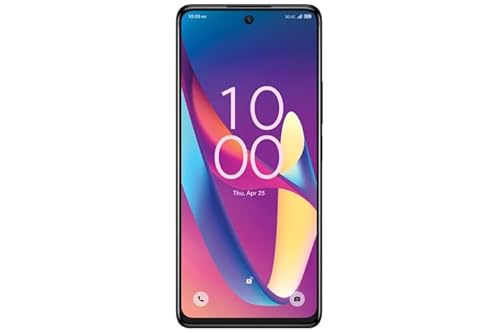
TCL 50 XL 5G (T-Mobile) — Big Screen Budget for One Network
TCL’s 50 XL 5G spends the budget where this particular buyer will feel it: on the screen. At 6.78 inches with a smooth 120Hz refresh and the company’s display tuning, it is the most enjoyable window in this guide for video, reading and reviewing photos, and its internal storage follows the modern budget standard rather than the keyword’s antique tier, with the large 5,010mAh battery sized to feed the panel through a full day. The 50-megapixel camera covers daylight family duties without fuss.
The network condition is absolute and worth repeating in plain language: this model serves T-Mobile and the carriers that run on its network, such as Metro and Mint, and no one else. Within that fence it is a lot of phone for the money; outside it, it is an elegant rectangle. TCL’s update cadence is modest and the processor is a media chip rather than a gaming one, so expectations should be set for communication, browsing and viewing rather than heavy play. For the right household, though, it proves the guide’s thesis from the entertainment side — under-200 money now buys generosity, and settling for a cramped 32GB relic is a choice nobody needs to make.
- Display: 6.78-inch FHD+, 120Hz
- Battery: 5,010mAh
- Camera: 50MP main camera
- Network: T-Mobile and its MVNO networks only
- Storage: modern budget capacity — verify variant in listing
- Extras: stereo speakers, side fingerprint reader
Strengths
- Largest and smoothest screen in the guide
- Battery sized honestly for the display
- Strong media value for the budget
Trade-offs
- One network family only
- Modest update cadence
- Performance tuned for media, not gaming
Best for: T-Mobile, Metro and Mint customers who watch and read on their phones.
Not suited for: AT&T and Verizon customers, or keen gamers.
How fast does 32GB actually fill up in 2026?
Faster than intuition suggests, and the arithmetic is worth doing once, slowly. A current Android installation with its system files and reserved partitions can occupy a third of a 32GB drive before the owner installs anything. The essential app stack — messaging, maps, email, a browser, banking, a couple of social apps — adds several more gigabytes, and those apps grow with every update while their cached data quietly swells between clean-ups. A single messaging app belonging to an active family chat can accumulate gigabytes of photos and video in a year without the owner ever pressing save.
Then come the owner’s own files. A minute of modern phone video can consume a few hundred megabytes; a holiday produces an hour without trying. Music downloads, podcast queues, offline maps for one road trip and the documents apps insist on keeping locally each take their share. The practical result is that a 32GB phone in ordinary family service reaches its warning stage within the first year, after which every update becomes a negotiation and every photo session begins with deleting something. The tier did not become unusable because users grew careless; it became unusable because the software world grew around it.
When can a 32GB phone still make sense?
Honesty cuts both ways, and there are narrow roles where a 32GB phone remains a rational purchase. A dedicated device — a handset that lives in a workshop running one music app, a phone mounted for navigation and calls in a work van, a supervised first phone for a child whose media lives on a family tablet — can thrive on modest storage because its job never grows. A second phone for travel, loaded with maps and a local SIM, asks little of its drive. In each case the pattern is the same: one job, few apps, and media that lives elsewhere.
Even in those roles, two conditions protect the purchase. The phone must run a recent enough Android to support the apps its job requires, since a bargain that cannot install the delivery or banking app it was bought for is not a bargain. And a microSD slot transforms the risk, letting photos and music overflow onto cheap card storage while the internal drive serves the system. A 32GB phone without a card slot, bought for general family duty, is the one configuration this guide will not defend at any price.
How do you survive on limited storage if you already own one?
Start with the audit Android hides in plain sight: the storage screen ranks your apps and files by size, and the top of that list is where the recovery lives. Move photos and video to cloud backup and confirm the backup before deleting the local copies — that confirmation step is the one people skip and regret. Messaging apps deserve a dedicated visit, because their media folders are usually the largest single tenant; set them to stop auto-downloading every video a group chat produces.
Then change the defaults so the problem stops regenerating. Point the camera at the microSD card if the phone allows it, set streaming apps to download only on demand, keep offline maps to your actual region, and clear the cache of the worst offenders monthly rather than in a panic. Keep at least a couple of gigabytes free at all times, because Android needs working room to update apps and run smoothly; a phone run permanently at the red line slows down in ways owners often misdiagnose as age. These habits can give a 32GB phone a respectable second life in a light role — they simply cannot turn it into a modern main phone.
What should you check in any low-storage phone listing?
The storage figure is only the first line to verify. Check the Android version the phone actually ships with, not the version it launched with, and search the maker’s update policy for that model, because a phone abandoned on old software will lose app compatibility long before its hardware fails. Confirm whether the quoted storage is the variant being sold — listings for a model family often headline the largest configuration while the price belongs to the smallest — and confirm the microSD slot exists on that variant, since some regions lose it.
Condition checks matter as much as specification checks at this money. For renewed units, look for a stated battery standard and a return window long enough to run a week of real use. For new ultra-budget units, look for the maker’s name and support pages; a phone whose maker has no visible update history is a phone whose problems will be yours alone. Finally, compare the total against the modern budget standard before buying: when a 128GB phone from Samsung or Motorola sits within a small margin of a 32GB relic, the relic is not the thrifty choice, whatever its price tag claims.
Why did the industry abandon 32GB so completely?
The short answer is that storage became cheap faster than software became small. Flash memory prices fell for a decade, so the cost difference between fitting 32GB and 128GB shrank to a rounding error in a phone’s bill of materials, while app sizes, camera resolutions and system footprints all climbed. Manufacturers discovered that the support costs of cramped phones — the returns, the angry reviews, the customer service calls about full storage — exceeded the tiny saving, and the tier collapsed from the bottom up: first flagships, then mid-range phones, then the budget lines abandoned it.
The second-hand market tells the same story from the other side. The older phones that hold their value and their usefulness — the Pixel and Galaxy models in this guide — are the ones that shipped with generous storage for their era. The 32GB models of the same years are the ones filling drawers, technically functional and practically retired. That is the market’s verdict, delivered without sentiment: storage headroom is not a luxury feature but the difference between a phone that ages and a phone that expires. Buy accordingly, and the under-200 budget in this keyword stretches further than its authors probably expected.
How much do apps really weigh in 2026?
More than their download figures admit, and the gap between the two is where small phones go to die. An app’s store listing describes its installer; its real footprint is the installer plus the data it accumulates — the messaging app’s years of photographs, the social app’s cached video river, the maps app’s quietly downloaded region, the streaming app’s forgotten downloads. On a large phone this growth is invisible. On a 32GB phone it is the entire story, because the system reports the total honestly and the total never stops growing.
The heavyweight champions are predictable. Messaging and social apps lead, because their business is other people’s media arriving daily. Video apps follow, caching aggressively to make the next tap feel instant. Games occupy their own category of enormity, with flagship titles consuming what a 32GB phone cannot spare several times over — a fact worth stating plainly to any parent considering a small phone for a gaming child. Even virtuous apps swell: a podcast queue, an offline playlist, a language course downloaded for a holiday.
The practical consequence shapes this whole guide’s advice. A 32GB phone does not merely hold less; it demands constant administration, and administration is a cost paid in the owner’s attention every week for the phone’s entire life. The modern budget phones in the picks remove that tax for a trivial price difference. When you compare listings, you are not really choosing between storage sizes — you are choosing between a phone that manages itself and a phone that employs you.
What is the real difference between internal storage and a memory card?
They look identical in a settings screen and behave like different species. Internal storage is fast, always present, and trusted by the system: apps live there, the camera writes there first, and updates stage themselves there. A microSD card is vast and cheap but slower, removable, and treated by Android as a guest — excellent for photographs, video, music and documents, unreliable as a home for apps, and one careless ejection away from taking its contents with it. The healthiest budget phones, which is to say most of this guide’s picks, use each for what it is.
That division explains why a card slot rescues a small phone only partly. A 32GB phone with a card can offload its media and survive in a light role, but its apps and system still crowd the internal drive, and the day a major update needs staging room is the day the arrangement is tested. A 128GB phone with a card, by contrast, has solved both problems at once: the internal drive breathes for years while the card absorbs the archive. When you read a listing, therefore, ask both questions — how much inside, and is there a slot — because the answers multiply rather than add.
Card quality deserves its sentence. Buy cards from known makers, sized generously, and rated for the sustained writing a camera demands; the counterfeit and bargain-bin end of the card market is where photographs go to be lost. Format the card in the phone that will use it, let the phone’s backup treat it as a citizen, and replace it every few years as cheap insurance. Storage is the least glamorous component in any phone and the one whose failure is least forgivable, because what it holds cannot be re-downloaded from anyone’s store.
How do parents make small-storage phones work for children?
Children’s phones are where the 32GB question most often becomes real, because the purchase is deliberate: a limited device for a limited role. The pattern that works begins before the phone is switched on. Decide what the phone is for — communication with family, photographs, a handful of approved apps — and let that decision be a feature to explain rather than a limitation to apologise for. A child whose phone does its few jobs well feels equipped; a child whose phone fails at jobs it was never meant for feels punished, and the difference is entirely in the framing and the setup.
The setup itself has three load-bearing pieces. A microSD card goes in on day one, with the camera pointed at it, so photographs — the one thing children produce in industrial quantities — never besiege the internal drive. Cloud backup is configured by the parent and checked occasionally, because a lost phone should not mean a lost year. And the app list is curated jointly, with the honest explanation that space is the budget the phone runs on, which is not a bad first lesson in resource management for anyone.
What parents should avoid is the false economy of the oldest, smallest listing. A phone that cannot run the school’s app, the family’s messaging or the map for the journey home fails its one job — keeping a child reachable and safe — and the saving that bought it evaporates in the replacement. The modern budget picks in this guide cost little more and remove the entire category of failure. A child’s first phone should be boring in every way except the photographs it takes of their world.
What happens to a phone’s speed as its storage fills?
It degrades in a pattern owners consistently misread as the phone getting old. Flash storage needs empty space to work efficiently: the controller constantly rearranges data to spread wear, and when nearly every block is occupied, that housekeeping becomes slow and the whole phone feels it — apps open reluctantly, the camera hesitates, updates stall. Android itself needs working room to cache, to stage updates and to let apps breathe, and a phone run permanently at the edge denies it that room in every operation it performs.
The threshold is not subtle. Owners of full phones describe the same symptoms in the same order: first the storage warnings, then the failed updates, then a general thickening of every interaction, as if the phone were thinking through syrup. The cure, when space can be freed, is equally consistent — remove a few gigabytes and the phone remembers itself. This is why the storage advice in this guide sounds almost moral in tone: keeping headroom is not tidiness, it is maintenance, as real as a battery’s charge cycle.
It is also why the 32GB tier’s retirement was inevitable. A tier whose ordinary use consumes most of its capacity within a year is a tier designed to make its owners miserable on a schedule, whatever its other virtues. The industry did not abandon small storage out of greed for upselling; it abandoned it because support departments could count the cost. Buy the headroom, keep a fifth of it empty, and the phone you bought is the phone you keep.
How should you compare a 32GB listing against a modern budget phone?
Put the two listings side by side and interrogate them in a fixed order, because the small phone’s price is designed to end the conversation early. First, age: what Android version does each run today, and how long will each be patched? Second, the whole storage picture: internal capacity, card slot, and the variant actually being sold at the quoted price. Third, the battery: its size when new and, for renewed units, the seller’s stated standard and return window. A phone that wins those three comparisons is winning the ownership, whatever the screens and cameras promise.
Then price the difference honestly. In most weeks, the gap between a 32GB relic and a modern 128GB phone from Samsung or Motorola is small enough to be measured in a handful of takeaway coffees, while the gap in useful life is measured in years. Divide each price by the years of service you realistically expect — patched, breathing, battery holding — and the modern phone wins the arithmetic almost every time. Cost per year is the only price a budget buyer should ever compare, because it is the only one they actually pay.
Keep one exception in view: the deliberate, narrow purchase. A 32GB phone bought knowingly for one job — the workshop streamer, the van’s navigator, the supervised first handset — is not a failed comparison but a different one, judged on its job alone. This guide’s objection was never to small phones; it is to small phones sold as general answers. Compare in the open, buy for the job, and the under-200 budget in this keyword becomes one of the most satisfying budgets in the whole phone market.
How do cloud services change the small-storage equation?
Cloud backup is the reason a disciplined 32GB phone can survive at all in 2026, and understanding its limits keeps the arrangement honest. Photographs and video — the largest things a phone produces — can live primarily in the cloud, with the phone keeping smaller local copies and fetching originals on demand. For an owner with reliable Wi-Fi at home, that pattern converts the camera from a storage threat into a rounding error, and it protects the archive against the phone’s loss in the same gesture. It is the single most valuable setting on any small phone.
The limits are equally concrete. Cloud offload needs connectivity, so the traveller photographing offline must carry their storage with them until the next network. Apps do not offload; their data waits on the device whatever the settings promise. And the free tiers of the major services fill faster than families expect, turning the cloud from a solution into a small subscription decision. None of this invalidates the pattern — it defines its territory. A small phone at home on good Wi-Fi, in a light role, is a workable tool; the same phone as a travelling main device is a negotiation that never ends.
What size memory card should a budget phone carry?
Bigger than the photographs you expect, smaller than the price that makes you careless — and in practice, for most owners, a card in the 128GB to 256GB class hits the balance. That capacity swallows years of family photographs and a serious music library while costing a small fraction of the phone itself. The rating matters as much as the size: choose a card rated for sustained application and video work from a maker whose name you recognise, because the card market’s cheapest corner is where counterfeit capacities and dying archives live.
Two habits protect the investment. Format the card inside the phone that will use it, so its filing system is exactly what the phone expects, and let the phone’s backup include the card’s contents rather than assuming the card is the backup — a card is storage, not a copy, and it can fail, wander or be left in a drawer during an upgrade. Replace the card when you replace the phone, carrying the archive across deliberately rather than by accident. Storage bought thoughtfully is invisible for years, which is the highest compliment any component can earn.
Which buyers should ignore this keyword entirely?
Some readers should close this guide and open our cheapest-phones coverage instead, and naming them is a service. The buyer whose phone is their only computer — banking, work, photographs, entertainment, the archive of a life — should not entertain any small-storage logic at any price; their phone deserves the largest sensible configuration and the longest support, because everything they own digitally lives inside it. The parent buying a phone meant to last a child through several school years belongs in the same group, since a phone outgrown in year one is the most expensive kind.
The content creator, even an amateur one, should also walk past. Video devours storage at rates that make 32GB a rounding error and 128GB a working minimum, and the frustration of a full phone mid-shoot is the tax this guide exists to help people avoid. For these buyers the keyword’s ceiling is the problem, not the answer. Everyone else — the light user, the second-phone buyer, the deliberate minimalist — can shop here with confidence, because for them the honest analysis in this guide leads to phones that will serve without a murmur.
What does the second-hand market teach about storage and value?
Watch which old phones hold their prices and the storage lesson writes itself. The models that remain desirable years after launch — the Pixels and Galaxies that populate this guide’s picks — share a trait beyond their cameras: they shipped with storage that still functions in the present tense. A phone with 128GB from five years ago remains a usable phone today, while its 32GB contemporaries, identical in every other virtue, have become e-waste with working screens. The market is not sentimental; it prices remaining usefulness, and remaining usefulness is storage wearing a disguise.
That observation converts directly into buying advice for the present. The phone you buy today is the second-hand phone of 2030, and its resale, hand-me-down and spare-drawer value will be decided substantially by the storage decision you make this week. A modern 128GB budget phone bought now will still be a gift worth giving in five years; a 32GB relic bought to save a small sum will be a drawer item by then, its saving long since spent and forgotten. Budget buyers, of all buyers, cannot afford purchases that expire early — which is why this guide keeps returning to the same arithmetic from every direction.
There is a kindness embedded in the arithmetic too. The family that buys storage headroom buys future gifts: the phone that becomes a child’s first, a parent’s upgrade, a spare that saves a holiday. The keyword that brought you here asked about the smallest storage at the smallest price, and the market’s honest answer, delivered across a decade of second-hand evidence, is that the smallest sensible purchase is the one that lasts — and lasting, in a phone, begins with room to breathe.
One last check before you order any of these six
Before ordering, read the listing the way this guide has taught: storage variant first, Android version and update promise second, battery and return terms third. Confirm that the price in front of you belongs to the configuration you believe you are buying, and that any card slot your plan depends on exists on that exact variant. If you are buying for someone else, add the setup session to the plan now — the card fitted, the backup running, the camera pointed at the right storage — because a small-storage strategy succeeds or fails in its first hour, not its first year. And hold the comparison honestly one final time: if a modern 128GB phone sits within a small margin of the listing you are admiring, the margin is the cheapest storage you will ever buy, and the years of headroom it purchases are the real product. Buy the room, set it up kindly, and the phone will repay the decision every day it does not ask you to delete something you love.
Comparison table
| Pick | Badge | Standout trait | Main compromise |
|---|---|---|---|
| Motorola Moto G 2025 | The 128GB Answer at 32GB Money | 128GB plus expansion at floor money | Modest RAM and update window |
| Samsung Galaxy A15 5G | AMOLED Screen, Room to Breathe | AMOLED plus 128GB under the ceiling | Band checks and renewed variance |
| Samsung Galaxy A25 | Stabilised Camera, Sensible Storage | Optical stabilisation with roomy storage | Efficiency-tuned performance |
| Google Pixel 4a | Proof the Old Tier Was Different | 128GB and a superb camera, years early | Finished updates and age |
| Samsung Galaxy S10e | Flagship Storage Habits, Renewed Price | 128GB, card slot and IP68 together | Age and finished support |
| TCL 50 XL 5G (T-Mobile) | Big Screen Budget for One Network | Near-tablet viewing within budget | Network restriction |
What mistakes do buyers make with low-storage phones?
The classic mistake is assuming the storage saving is real. Buyers hunt a 32GB model expecting meaningful money back and find a trivial difference from a modern 128GB phone — then pay the difference many times over in a year of deleting photos and deferring updates. Compare the actual listings before assuming the old tier logic still holds.
A second mistake is trusting the model name instead of the variant. A listing headlined with a familiar phone may be selling its smallest storage configuration, a different region’s version, or a carrier variant with bands that do not suit your network. The storage line, the band list and the return terms are the listing; everything else is decoration.
Third, buyers fill a small phone exactly like a large one, installing every app and auto-downloading every chat video, then conclude the phone is defective when it suffocates. Limited storage demands limited habits — cloud backup on, downloads disciplined, media on a card — and a buyer unwilling to live that way should buy the larger phone instead.
Finally, people overlook the software half of the trap. A 32GB phone is usually also an old phone, with an old Android version and no updates coming. Storage warnings are merely the first symptom; app incompatibility and security exposure follow. Judge the whole age of the device, not the single number in the keyword.
Final Recommendation
If you take one sentence from this guide, take this one: at under-200 money in 2026, buy the modern budget standard — 128GB with a card slot — and let the 32GB tier rest. The Moto G 2025 is the cleanest expression of that advice, the Galaxy A15 5G adds the best screen, the Galaxy A25 adds a stabilised camera, and the renewed Pixel 4a and Galaxy S10e serve light-duty roles with a quality the new floor cannot match. The TCL 50 XL 5G covers T-Mobile households wanting a big screen.
A genuinely cheap phone is one whose second year feels like its first, and storage headroom is the cheapest insurance against the slow suffocation that retires budget handsets early — so spend the budget on room to breathe, and the phone will repay you every single day you do not have to think about it.
Frequently Asked Questions
Can a 32GB phone still work in 2026?
In narrow roles, yes: a dedicated single-job device, a supervised child’s handset, or a travel spare with media stored elsewhere can run happily on 32GB, especially with a microSD slot and cloud backup. As a general main phone for an adult, it will spend its life short of space, because the system and essential apps consume much of the drive before personal files begin.
Why are new 32GB phones so hard to find?
Because flash storage became inexpensive while apps and photos grew. The manufacturing saving from fitting 32GB instead of 128GB shrank below the support cost of unhappy, storage-starved owners, so makers moved the budget floor to 128GB. Remaining 32GB listings are generally old stock, ultra-basic models or older renewed units.
Is a microSD card as good as internal storage?
For photos, video, music and documents, yes — a card is an excellent overflow. For apps, internal storage is faster and more reliable, and some apps refuse to move. The healthiest budget pattern is generous internal storage for the system and apps, with a card absorbing the media library, which is exactly the arrangement most picks here offer.
How much storage do I actually need?
For a main phone in 2026, 128GB is the comfortable minimum for most people, giving the system, apps and several years of photos room to coexist. Light users who stream everything and back up photos diligently can live with less, but the price difference at purchase is now so small that buying headroom is almost always the better economics.
What happens when a phone runs out of storage?
Updates fail first, then apps begin crashing or refusing to save, the camera may decline to take photos, and the whole phone slows as the system loses working room. Owners often misread these symptoms as the phone wearing out. Keeping a few gigabytes free prevents the cascade, which is why the storage screen deserves a monthly glance.
Should I buy a 32GB phone for my child?
Only with a plan: a card installed, cloud backup configured, and expectations set that the phone is for communication and light media. Many parents find a modern 128GB budget phone the calmer purchase, since it removes the storage negotiations entirely — and at current prices the difference is smaller than the value of the peace it buys.
There is a broader lesson folded inside this small keyword, and it applies far beyond one storage tier: specifications age at different speeds, and the wise buyer asks which numbers will still matter when the phone is old. Processors forgive, screens endure, cameras please for years — but storage is the one specification whose shortage compounds daily, silently, until it defines the whole device. Every era of phones has such a number, quietly deciding which models retire with dignity and which retire in drawers. Learning to spot it — in this generation it is storage headroom and update years — is worth more than any single recommendation in this guide, because it protects every purchase that follows this one, at every budget, for as long as phones keep changing their numbers. Keep that lens in your pocket when you read any listing, and the market’s noise falls away, leaving the few honest questions that decide whether a cheap phone becomes a faithful servant or an expensive lesson.
Related Guides
For the wider budget picture, read our guides to the cheapest Android phones worth owning, affordable unlocked handsets and low-RAM budget models: best and cheapest android phones best affordable android phones unlocked best 3gb ram android phones



[…] our neighbouring guides cover the sensible middle of the market and the best-value 5G handsets: best affordable android phones best 5g affordable phones best affordable android phones […]