What's inside
- Key Takeaways
- Quick Picks
- What Should You Expect on the First Night?
- How Did We Rank Stations That Mostly Cannot Fast-Charge?
- How Should You Read the Word “Fast” on a Station Listing?
- What Do Total Watts and Per-Port Ceilings Each Tell You?
- Why Did Six Ports Become the Family Size?
- Which Devices Belong on a Six-Port Station?
- What Cables Does a Six-Port Station Deserve?
- How Do the Six Six-Port Stations Compare?
- What Role Does a Station Play When the Power Goes Out?
- How Do You Set Up a Six-Port Station That Stays Civilized?
- How Does a Six-Port Station Serve a Classroom or a Small Business?
- What About Heat When Six Devices Drink at Once?
- How Do You Handle the Census When a Device Dies or a Child Arrives?
- Which Station Suits a Bedside That Serves Two People?
- How Long Do Six-Port Stations Last in Real Homes?
- What Mistakes Do Six-Port Buyers Make?
- How Should You Think About the Switch on a Station?
- What Do Hotels and Hospitals Teach About Six Ports?
- How Do You Choose Between One Big Station and Two Small Ones?
- Is the Old Anker PowerPort 6 Still Worth Buying New?
- Final Recommendation
- How Do You Keep Children and Stations on Good Terms?
- Frequently Asked Questions
- Related Guides
As an Amazon Associate I earn from qualifying purchases. This post may contain affiliate links at no extra cost to you.
gizmoverdict.com is reader-supported. When you buy through links on our site, we may earn an affiliate commission.
Where to buy: all six stations below link to Amazon listings under the Anker, UGREEN, VHBW, VPSUN and unbranded names shown. Before you compare a single number, read the introduction’s warning about the word “fast” in this category, because five of these six products use it in a sense your phone will not recognize.
The shoppers searching for the best 6 port usb fast chargers deserve a warning before they deserve a ranking, so here it is. In the six-port world, “fast” usually means something modest and specific: a USB-A port offering up to 2.4 amps at five volts, which was brisk in 2015 and is merely adequate now. Only one pick in this guide — UGREEN’s 100W GaN station — offers genuine Power Delivery, the negotiated high-voltage charging that modern phones call fast and laptops require. The other five are traffic managers for crowds of small devices, and several of them are very good at that job. But a buyer who orders a six-port station expecting six simultaneous fast charges for six modern phones will be disappointed by physics, and this guide would rather disappoint an adjective than a reader.
One more piece of scene-setting: six-port stations are where charging stops being a personal accessory and becomes a household utility, with a utility’s concerns — capacity planning, fair division, a place in the home’s geography, and rules everyone can recite. Readers who approach the purchase with a utility mindset, rather than a gadget mindset, consistently choose better and regret less. The gadget mindset asks which station is most impressive. The utility mindset asks which crowd it must serve on the worst evening of the year, and buys exactly that.
Understood correctly, the category is wonderful. Six ports is the size of a real household’s small-device population: two phones, a tablet, a watch, buds, an e-reader, a handheld console, a work light — the census varies, the count converges. A six-port station gathers that census onto one shelf, one cord, one wall socket, and ends the diaspora of chargers across every room. The questions that matter are the total wattage, the ceiling per port, whether any port speaks PD, and how the station behaves when the whole census comes home at once. This guide answers those questions for each pick, in plain numbers, and reserves its enthusiasm for the stations that answer them honestly.
It helps to picture the shelf this category is really about, because it exists in nearly every home now, whether it was planned or not. It holds the family’s second tier of technology: not the phones in pockets, but the things that live at home and die quietly when neglected. A station dignifies that shelf. It says these devices have a place and a power supply, rather than a rotation through whichever charger is free. Households that build the shelf deliberately — one surface, one station, cables that stay — report a disproportionate calm from so small an intervention, because the shelf was where a dozen tiny daily failures used to breed.
Anker’s entry deserves a special note before the ranking begins, because it is the elder statesman here: a 60W, six-port, all-USB-A design from the era when that was the summit of the art. We frame it as what it is — a dependable slow station with an unmatched track record — not as a modern fast charger, because calling it one would repeat the category’s founding fib. Its presence in this guide is a reminder that reliability is a feature, and for the right crowd of devices it may still be the correct purchase.
Key Takeaways
- In this category “fast” mostly means 2.4A per USB-A port at 5V; only the UGREEN station offers true Power Delivery.
- UGREEN’s 100W six-port GaN station is the modern pick, with four USB-C and two USB-A ports sharing a real laptop-class budget.
- Anker’s PowerPort 6 is the legacy benchmark: 60W across six USB-A ports, slow by today’s dialect and famously dependable.
- The unbranded switched station and the VPSUN tower sell capacity and format — a switch, a tower shape — more than speed.
- VHBW’s station adds a phone stand and a trio of USB-C ports to the utility formula, suiting a nightstand that doubles as a dock.
- Judge every station by total watts and per-port ceiling together; either number alone will lie to you by omission.
Quick Picks
| Pick | Badge | Why it earns its place |
|---|---|---|
| UGREEN 100W USB C Charging Station, 6-Port GaN | The Only True Fast Station | Four USB-C and two USB-A ports sharing a hundred watts of real PD power, enough for a laptop and its crowd. |
| Anker Desktop Charger, 60W 6-Port PowerPort 6 | The Dependable Elder | Six USB-A ports at a proven 60W total; the slow station a generation of households learned to trust. |
| USB Charger Station, 6-Port Desktop with Switch | Best Switched Utility | An unbranded six-port desktop unit with a power switch, bought for capacity and control rather than speed. |
| VHBW USB Charging Station, 6-Port with Phone Stand | Best Nightstand Dock | Three USB-A and three USB-C ports plus a stand that turns the station into a bedside dock. |
| VPSUN USB Charger, 6-Port 50W Tower Station | Best Vertical Footprint | A 50W tower that stacks six ports upward, saving desk surface in crowded workspaces. |
| USB Fast Charger, 6-Port Portable Charging Station | Budget Crowd Coverage | A generic six-port station for the widest device census at the gentlest price class in the guide. |
What Should You Expect on the First Night?
A small anticlimax, and then a growing satisfaction. The first night with a six-port station is mostly logistics: cables assigned, devices gathered from their diaspora, one or two discovered to have proprietary leads that need a place in the plan. Speeds will match the dialects — the sippers full by morning, the phones full by morning too, because night is long and even a patient port finishes a sleeping phone. The satisfaction arrives across the following week, in absences: the absence of the dead tablet at the weekend, of the watch forgotten on a bathroom socket, of the argument about whose charger is whose. Judge a station at a fortnight, not at an hour. The one exception to that patience is the buyer who needed speed: if your evenings are short and your phones are flagships, the first night will tell you the utility tier was the wrong tier, and the honest response is to exchange up to the UGREEN while the lesson is fresh rather than to spend a year resenting an adjective.
How Did We Rank Stations That Mostly Cannot Fast-Charge?
By grading each against the job it can actually do. For the five non-PD stations the criteria were total wattage, the per-port ceiling when several ports are busy, format — tower, strip, dock or box — and the honesty of the listing’s own language. A station whose listing says “fast” while specifying plain 5V ports was not disqualified, because that vocabulary is the category’s vernacular, but it earned no credit for speed it cannot deliver. For the UGREEN, the criteria were the PD criteria used elsewhere in this batch of guides: total budget, distribution intelligence, port mix and whether the laptop port keeps its dignity when the crowd arrives.
Format was weighed as a first-class criterion rather than a taste, because at six ports the unit’s shape decides whether it can live where the census gathers. A tower fits the corner nothing else wanted. A dock earns a nightstand. A strip reaches along a bench. A box with a switch belongs where an adult wants authority over the whole arrangement. Listings present format as styling; households experience it as the difference between a station that is used and one that is stored, and stored stations charge nothing at all.
We also weighted the crowd each station will actually meet. Six ports invite six devices, and six devices at once is a different electrical event from the two-device evenings of smaller categories. Stations were judged on their worst evening, not their best: all sockets occupied, several devices hungry, the total dividing itself thin. A station that stays civilized in that scrum — no port collapsing to a trickle, no alarming heat — outranks a station with a prettier solo specification.
How Should You Read the Word “Fast” on a Station Listing?
As a claim about a port’s ceiling in the dialect it speaks, never as a promise about your phone. A 5V port at its 2.4-amp ceiling is delivering everything its dialect allows, and a listing calling that fast is using the vocabulary of a decade ago, when it was. The translation exercise is simple: find the volts. If the specification’s output is five volts and nothing else, the station is a utility, whatever the title says, and it should be priced and judged as one. If the specification lists higher negotiated voltages on its USB-C ports, you are reading about Power Delivery, and the word fast means what your phone means by it. One of the six listings in this guide passes that test. The other five are not lying about their ports; they are merely fluent in an older optimism, and a reader who can translate will never be misled by it again — in this category or any other where the same adjective is asked to cover two different technologies.
What Do Total Watts and Per-Port Ceilings Each Tell You?
The total tells you the size of the reservoir; the per-port ceiling tells you how wide any single tap can open. A 60W station with a 2.4A ceiling per port can fill six small devices respectably, because none of them can drink faster than the tap allows anyway, and the reservoir is deep enough to keep all six taps open together. The same arithmetic turns cruel with modern phones: a phone that could accept several times the tap’s flow will wait at the tap like everyone else, and the station’s total becomes irrelevant to its evening. This is why the UGREEN’s specification reads differently in kind, not just in degree: its USB-C ports negotiate higher voltages, so its taps open wider for the devices that can use them, while its total remains large enough to matter. When you read any station listing, find both numbers. A listing that offers only one is asking you not to do the arithmetic this paragraph just did.
There is a third number worth hunting: what a port delivers when all ports are busy, which honest makers state and others leave you to discover. Small devices forgive any answer. A tablet at a shared trickle does not. The stations below are described with their realistic all-ports behavior in mind, because a six-port product should be judged at six ports.
Why Did Six Ports Become the Family Size?
Because the device census per person quietly tripled while nobody was counting. A person of 2010 carried a phone. A person of today carries a phone, a watch, buds and often a tablet, and a household of three such persons presents nine devices to a charging infrastructure designed by habit for three. Six ports is where the arithmetic of that multiplication first becomes manageable in a single unit: not every device charges nightly, and a six-port station with a spare socket absorbs the rotation of the nine with room for the visiting tenth. Four ports strain at the same census; ten ports exist but belong to classrooms and charging carts. Six is the family size the way a gallon is the family size of milk — not a specification, a settlement between appetite and shelf space. The stations in this guide are that settlement’s current offers, and their differences are differences in how honestly each one feeds the crowd it invites.
Which Devices Belong on a Six-Port Station?
The census, taken honestly, is mostly small. Phones are the aristocracy of the station and the only residents who care about dialects; everything else — watches, buds, e-readers, torches, fans, speakers, handheld consoles, camera batteries, bike lights, the tablet that lives in the kitchen — drinks at 5V contentedly and always has. This is why the legacy stations in this guide remain rational purchases for so many homes: five of their six residents cannot tell the difference between a 2015 station and a 2026 one. The buyer’s task is to count the aristocrats. Zero modern phones in the crowd means the utility tier serves you completely. One or two means a hybrid answer — the UGREEN, or a utility station for the crowd plus a proper PD brick for the phones. Three or more fast-charging phones and laptops means this category’s PD end, full stop, and possibly a second station besides.
Hotels of devices also rotate: a power bank checks in before a trip, a console before a flight, a relative’s phone during a visit. A six-port station absorbs that rotation without displacing residents, which is a quieter virtue than speed and, across a year, a more used one.
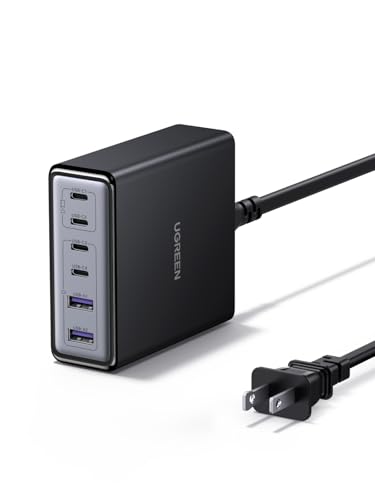
UGREEN 100W USB C Charging Station, 6-Port GaN — The Only True Fast Station
This is the station the category’s marketing wishes it were: six ports — four USB-C, two USB-A — sharing a hundred watts of GaN power with smart distribution, in a desktop format that can run a MacBook-class laptop on its lead port while five companions divide the rest. It is the only pick here that a modern phone will recognize as a fast charger, the only one a laptop will recognize at all, and the only one whose purchase ends the two-tier thinking the rest of this guide requires. For a household whose census includes serious devices, it is not the premium option; it is the correct one, and the others are the compromises.
The distribution intelligence matters at this scale. Six devices negotiate simultaneously, and a dumb split would starve the laptop to feed a watch. UGREEN’s station prioritizes sensibly, protecting the lead port’s usefulness while the small devices — which cannot tell the difference — take what remains. Expect the usual truth that a hundred shared watts is not six hundred; a laptop under load plus two phones will consume most of the budget and leave the sippers to sip slowly. But sippers sip slowly happily, and the aristocrats dine properly, which is all a station can be asked to arrange.
- Ports: four USB-C plus two USB-A, six total
- Total output: 100W shared with smart distribution
- Protocols: Power Delivery on the USB-C ports
- Format: desktop station with a single mains cord
- Fit: laptops, phones, tablets and the whole small census
Strengths
- Real PD at station scale: laptops and fast phones are finally first-class.
- Smart distribution protects the important ports when the crowd gathers.
- One purchase covers the entire census, aristocrats and sippers alike.
Trade-offs
- It costs what a real power supply costs; the utility tier is far cheaper.
- A hundred watts still divides, and two laptops will negotiate hard.
- Households of pure sippers pay for speed nothing they own can drink.
Best for: mixed households with a laptop and fast phones in the nightly census. Not suited for: a drawer of watches and e-readers that would never notice its talent.

Anker Desktop Charger, 60W 6-Port PowerPort 6 — The Dependable Elder
The PowerPort 6 has been charging households since before fast charging was a phone feature, and its specification is a time capsule: six USB-A ports, sixty watts in total, up to 2.4 amps available to a port whose device asks properly. Judged by today’s dialects it is slow. Judged by the devices that fill most stations — the sippers and the patient — it remains entirely adequate, and its enormous installed base has produced something no new station can claim: a decade of evidence that it simply keeps working, on nightstands and desks and classroom shelves, without drama.
That track record is its argument, and it is a strong one for the right buyer. A school, a workshop, a family whose phones are older or whose charging happens overnight — all of them are buying certainty per port at a fair price, from the maker whose name defined this category. What the PowerPort cannot do is hurry a modern flagship or feed a laptop, and buyers in 2026 should purchase it as the legacy instrument it is: the reliable slow station, bought with respect and without illusions.
- Ports: six USB-A, the classic layout
- Total output: 60W shared, up to 2.4A per port
- Protocols: standard 5V charging with per-port intelligence of its era
- Format: desktop unit with a detachable mains cord
- Fit: older phones and the entire small-device census
Strengths
- A decade of household service is evidence no new rival can match.
- Sixty honest watts keep six small devices moving together.
- Anker’s support and consistency stand behind a mature design.
Trade-offs
- No USB-C and no PD: modern fast charging is simply not offered.
- Flagship phones charge at the pace of a gentler era.
- Its virtues are invisible to buyers who shop by specification headlines.
Best for: sippers’ households, classrooms and workshops valuing proven reliability. Not suited for: anyone whose phone advertises a fast-charging tier it expects to use.
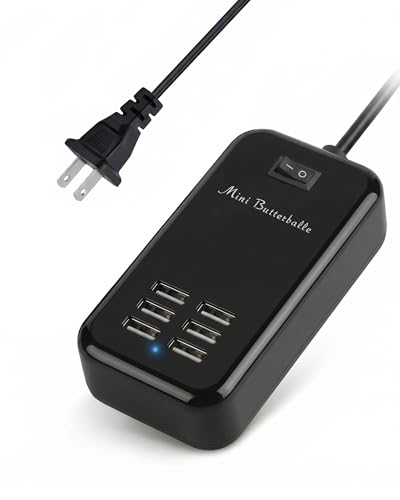
USB Charger Station, 6-Port Desktop with Switch — Best Switched Utility
This unbranded desktop station sells two things the branded picks mostly do not: six ports at a utility price, and a physical switch. The switch sounds trivial until a station lives somewhere its owner wants it truly off — a workshop bench at night, a rental between guests, a child’s room under a parent’s rules — at which point a switch beats unplugging, and beats a smart plug, for sheer directness. The ports themselves are the category’s standard utility offering, aimed at the small-device census and the patient end of phone charging.
Our standing counsel for unbranded electrical goods applies in full: no reputation polices this unit, so let it earn trust in attended places, inspect it on arrival, and retire it at the first sign of heat or odd behavior. Bought as a switched utility for a bench or a spare room, with those terms understood, it fills a genuine gap in the branded ranges — several of our readers will choose it for the switch alone, and we cannot call that choice wrong.
- Ports: six desktop charging ports
- Control: physical power switch on the unit
- Class: utility 5V charging for multiple devices
- Format: desktop station, wall-strip style
- Role: benches, spare rooms and controlled posts
Strengths
- The switch gives the station an off state its rivals lack.
- Six ports at utility pricing cover a census cheaply.
- Desktop format with everything in one place suits a bench perfectly.
Trade-offs
- Unbranded internals carry no reputation and no verified promises.
- Speed is the utility dialect; modern phones should not expect theatre.
- Total and per-port figures deserve a skeptical read of the listing.
Best for: workshops and spare rooms where a switchable utility station is the point. Not suited for: a flagship phone’s nightly post or any laptop’s dinner.

VHBW USB Charging Station, 6-Port with Phone Stand — Best Nightstand Dock
VHBW’s station understands that a nightstand charger is also furniture, and it adds the furniture’s missing piece: a stand that holds a phone upright while it charges, turning the station into the alarm-clock dock phones have wanted to be for a decade. Six ports divide between three USB-A and three USB-C, which gives it a more modern accent than the pure legacy stations, and the listing notes an ETL mark, a detail worth more than adjectives in this tier. The charging itself is utility-class — this is a crowd manager with a dock, not a PD powerhouse — and judged as a bedside institution it is thoughtfully put together.
The stand changes the station’s social life. A phone docked upright is a phone being used as a clock and a morning screen, not a phone face-down in a cable nest, and partners report the docked arrangement ends the nightly excavation of devices from bedding. The remaining ports absorb the watch, the buds and the partner’s phone at the gentle pace the night allows. Buyers wanting speed should look to the top of this guide; buyers wanting a civilized nightstand will find this the most considered design in the utility tier.
- Ports: three USB-A plus three USB-C, six total
- Feature: integrated phone stand for docked charging
- Listing note: ETL mark stated by the maker
- Class: utility charging for multiple devices
- Role: nightstands and bedside device crowds
Strengths
- The stand turns a charger into a proper bedside dock.
- A mixed port set serves old and new cables without adapters.
- Six ports gather the whole bedside census onto one shelf.
Trade-offs
- Utility pace throughout; no PD fast lane for the docked phone.
- The stand fits the phone it fits; oversized cases may sit awkwardly.
- A dock invites the phone to stay visible, which not every sleeper wants.
Best for: nightstands where the phone doubles as the alarm clock. Not suited for: a desk whose laptop expects to be fed by the same unit.

VPSUN USB Charger, 6-Port 50W Tower Station — Best Vertical Footprint
The tower format is this station’s thesis: fifty shared watts and six ports arranged vertically, so the station occupies the footprint of a mug on a desk that has no horizontal mercy left. For crowded workspaces — a bench corner, a kitchen counter’s last square, a dorm desk — that verticality is a genuine solution rather than a styling exercise, and ports distributed around a tower are easier to reach than ports crowded along a strip’s edge. The charging class is the utility standard, with a total that keeps a crowd of small devices and patient phones moving together.
Towers ask one discipline of their owners: cable dressing matters more, because leads leave in every direction and a neglected tower becomes a maypole. Dressed once, with short cables assigned to their regulars, it is the tidiest way to put six ports on a small surface. As with every generic-leaning entry here, let it earn trust in attended service, and do not ask its ports to perform PD feats its specification never promised.
- Ports: six, arranged around a vertical tower
- Total output: 50W shared across the tower
- Class: multi-device utility charging
- Format: tower, minimal desk footprint
- Fit: phones of patient generations plus the small census
Strengths
- Vertical design rescues desks with no horizontal room to spare.
- Fifty shared watts is a healthy reservoir for a small-device crowd.
- Ports on several faces are easy to reach without moving the unit.
Trade-offs
- Cables radiate in all directions and punish lazy dressing.
- Utility pace only; flagship phones will wait like everyone else.
- A tall unit on a busy desk is a unit that can be knocked; place it kindly.
Best for: cramped desks and counters where floor space is the scarce resource. Not suited for: households whose phones demand a genuine fast charge nightly.

USB Fast Charger, 6-Port Portable Charging Station — Budget Crowd Coverage
The final pick is the category in its most generic form: a six-port portable station whose listing promises compatibility with the usual roll of phone and tablet brands and whose honest function is to put six utility ports wherever a crowd of devices lives, at the gentlest price in this guide. We include it because that function is real — classrooms, market stalls, family kitchens and site offices all need exactly this, in quantity — and we describe it in the neutral terms its branding earns. The word “fast” in its name is the category’s vernacular, not a specification, and its ports should be expected to serve the small census and patient phones at the standard 5V pace.
Bought in that spirit, it is a rational tool: cheap enough to deploy in multiples, simple enough to need no instructions, and honest in practice because its owners ask of it only what it can do. Our cautions are the standing ones for unbranded electrical goods — inspect, attend, retire at the first oddity — and one specific to this class: check the total and per-port figures in the listing with the arithmetic from earlier in this guide, because at this end of the market those numbers vary more between listings than the photographs do.
- Ports: six in a portable station format
- Class: utility multi-device charging
- Claimed fit: broad phone and tablet compatibility, generically stated
- Role: bulk coverage for classrooms, kitchens and site offices
- Character: the budget end of the category, plainly framed
Strengths
- Six ports at the guide’s gentlest price class enables multiple stations.
- Portable format moves the crowd’s home wherever the crowd goes.
- Simplicity suits shared and public settings with no instructions needed.
Trade-offs
- No brand accountability stands behind the unit or its figures.
- The name promises a pace the ports were not built to deliver.
- Longevity is unproven; treat it as deployable, not permanent, kit.
Best for: bulk, budget coverage of small-device crowds in shared spaces. Not suited for: any device whose owner uses the words fast charging as a requirement.
What Cables Does a Six-Port Station Deserve?
Six ports multiply the cable question by six, and the answer that works is boring uniformity with two deliberate exceptions. Standardize the census’s cables: same family, sensible lengths matched to resting places, bought in a small surplus so a failure is a swap rather than a shortage. The exceptions are the aristocrats’ cables, which should be the best you own — rated for the full PD load on the UGREEN, kept visibly distinct, and never borrowed for a torch. Labeling helps more than pride expects: a small tag or a colored tie per device class ends the archaeology of tracing a lead through the nest to learn what it feeds. And retire cables by inspection at the season’s turn, because a station concentrates a household’s charging into one place, which means it also concentrates the consequences of the one frayed lead nobody replaced. Six ports, six cables, one spare, no mysteries: that is the whole doctrine, and households that adopt it stop thinking about charging entirely, which was the point of the station in the first place.
How Do the Six Six-Port Stations Compare?
| Station | Ports | Total | PD? | Defining trait |
|---|---|---|---|---|
| UGREEN 100W GaN Station | 4 C + 2 A | 100W shared | Yes | True fast charging at scale |
| Anker PowerPort 6 | 6 × USB-A | 60W shared | No | Proven legacy reliability |
| Generic Station with Switch | 6 | Utility class | No | Physical power switch |
| VHBW Station with Stand | 3 A + 3 C | Utility class | No | Phone stand for nightstands |
| VPSUN Tower | 6 | 50W shared | No | Vertical footprint |
| Generic Portable Station | 6 | Utility class | No | Budget bulk coverage |
One row of this table is playing a different sport, and the table does not hide it. The PD column divides the guide into the station that charges the present and the stations that charge the census. Both are worth money. They are worth it to different households, and the census count from earlier in this guide is how you learn which household is yours.
What Role Does a Station Play When the Power Goes Out?
None while it is out, and a starring one when it returns. After an outage, a household’s devices wake up thirsty at the same moment, and the station becomes the recovery ward: everything plugged in at once, the total dividing itself among the convalescents, the aristocrats prioritized for the first hour because they are the household’s communications. The same scene plays out after long travel days and family gatherings. A station’s worst-evening behavior, which this guide weighted in its ranking, is precisely its behavior in those recovery hours. There is a related habit worth adopting: the power bank lives on the station’s spare port, so the household’s reserve is always full when the grid falters. The station, in that sense, is not only a charger but the place where the home’s small energy resilience is quietly maintained, one ordinary night at a time.
How Do You Set Up a Six-Port Station That Stays Civilized?
Begin with the census, not the cables. Line up the devices that will actually live here, assign the strongest ports to the aristocrats and the rest by size of appetite, and write the assignment down if the household has more than one member — stations fail socially before they fail electrically. Give each resident a cable that stays with the station, in a length matched to its resting place, and route the bundle off the back of the shelf in one bunch. Leave one port empty on purpose. A station with a spare socket welcomes the visiting power bank, the guest’s phone, the new device at a holiday, without evicting a resident; a station at permanent full occupancy teaches its household to unplug each other, which is the original sin this category exists to forgive. Review the census each season, because devices arrive like relatives — gradually, then all at once in December.
How Does a Six-Port Station Serve a Classroom or a Small Business?
Shared workspaces are this category’s second homeland. A classroom’s tablet cart is a census with a timetable; a café’s staff shelf holds phones, card readers and a speaker; a market stall runs a till tablet, a phone and a light from one socket the landlord provided. In those settings the utility tier’s virtues — many ports, low cost per port, no instructions — outweigh speed entirely, because the devices charge between uses rather than during them. The Anker’s track record makes it the institutional favorite where a purchase must survive years of strangers. The budget portable station makes the opposite institutional case: cheap enough to deploy in every room and replace without a meeting. What shared settings should avoid is ambiguity about ownership: label the station, fix its cables to it, and let its rules be as visible as its ports.
What About Heat When Six Devices Drink at Once?
A station at full census is doing the most work it will ever do, and warmth is the honest signature of that work. The disciplines are placement and attention. Place the station on a hard, ventilated surface — never in a drawer, never under a pile of the very devices it feeds, never in a sunbeam that does half the heating before the electronics wake. Attend during the first full-census evening: a new station should be warm and boring, and anything beyond that vocabulary — a sharp hot spot, a smell, a port that browns its cable’s plug — is a retirement conversation held immediately. GaN construction in the UGREEN runs the same total in a smaller, cooler body, one of its quieter advantages. The legacy stations have a decade of thermal behavior behind them, which is its own reassurance. Heat managed by placement is a non-issue; heat discovered by surprise is information, and it should always be acted on the day it arrives.
How Do You Handle the Census When a Device Dies or a Child Arrives?
Households change by addition more than by subtraction, and a six-port station meets both with the same grace: an empty port is not waste, it is readiness. The new baby’s monitor, the grandparent’s phone during a long stay, the replacement tablet, the second console controller — each lands in a socket that was waiting, rather than starting an eviction negotiation. The discipline is to resist filling the spare port permanently with the household’s least important device, because the spare’s value is precisely its availability. When the census genuinely outgrows six — and in a growing family it will — the grown-up answer is a second utility station in a second room rather than a single flagship straining in one, because device crowds, like people, prefer two calm rooms to one crowded one.
Which Station Suits a Bedside That Serves Two People?
Two people’s bedside census is usually four to six devices: two phones, a watch or two, buds, perhaps a reading light or an e-reader. The VHBW was designed into exactly this census, dock and all, and its mixed ports cover the couple’s mixed cables. Where one partner’s phone is a flagship with a fast tier to feed, the honest arrangement is a hybrid the guide has recommended before: the station runs the census, and a proper PD brick on the other side of the bed runs the aristocrat. Couples who insist on one unit for everything should buy the UGREEN and accept its desktop manners on a nightstand. What no couple should do is buy a utility station while both privately expecting flagship speed from it; that expectation, unspoken, is how good stations get blamed for their listings’ adjectives.
How Long Do Six-Port Stations Last in Real Homes?
The Anker in this guide is the evidence: stations are among the longest-lived electronics in a home, because they have no battery, no screen and no software to embarrass them. Their failure points are mechanical and predictable — a port loosening after years of nightly insertions, a mains cord fraying where it bends off a shelf, a switch wearing on the units that have one. The household’s part is small: keep cords strain-free, keep the unit ventilated and dusted like any appliance, and demote rather than discard. A station whose strongest port tires becomes the garage station; a station with two tired ports becomes the guest room’s. Only heat anomalies and physical damage retire a unit outright. Bought once and demoted gracefully, a good six-port station can serve a household in three rooms across a decade, which is a return on a modest purchase that few gadgets in this batch of guides can match.
What Mistakes Do Six-Port Buyers Make?
Believing the adjective is the first, and this guide has spent its length on it. The second is counting ports instead of watts: six ports on a small total is a queue with better furniture. The third is stationing by the wrong census — buying the PD flagship for a drawer of sippers, or a utility tower for two flagship phones and a laptop, both of which end in the same returns window by different roads. The fourth is cable chaos, six mystery leads of six lengths producing the nest the station was bought to abolish. The fifth is placing the station where the devices are not: a perfect setup in the study loses to a mediocre one in the kitchen, because devices gather where people do. Buy for your census, place for your traffic, dress the cables once — and the category delivers exactly what it promised, which was never six fast charges. It was one calm shelf.
How Should You Think About the Switch on a Station?
A switch is a small feature with an outsized philosophy: it says the station has states, and its owner chooses between them. In a workshop it is a safety habit, killing the bench’s small power at the end of the day. In a rental it is a reset between guests. In a child’s room it is a parent’s quiet authority over the hour devices stop drinking. In a green-minded household it ends the standby sip entirely, though honesty requires adding that a modern station’s idle draw is tiny and the switch’s real value is control rather than savings. Buyers choosing between the switched generic and a branded unit without one are really choosing between control and accountability, and the right answer depends on the room: a bench wants the switch, a flagship’s nightstand wants the brand. It is a pity so few makers offer both, and this guide notes the gap because readers keep writing it into their requirements.
What Do Hotels and Hospitals Teach About Six Ports?
That constrained rooms expose charging poverty instantly. A hospital stay assembles a phone, a tablet, a partner’s phone and a long, unstructured day around one reachable socket, and a compact station transforms that socket into a small utility the whole family can live on. Travelers who have done one such stay tend to pack a small station forever afterward, the way one umbrella experience reorganizes a lifetime of weather habits. Hotels teach the milder version: the room’s sockets are where the furniture says, not where the bed is, and a station with a cord relocates power to the pillow. The six-port class is bulkier than a travel brick and earns the space only when the traveling party is a family or the stay is long; for those trips it is the difference between a rota and a rest. Pack it in the case’s lid, with its cables already attached, so arrival is a single plug rather than a small engineering project.
How Do You Choose Between One Big Station and Two Small Ones?
By geography, again. One station concentrates the census where the household gathers, which suits open-plan living and single-floor homes. Two smaller posts — a four-port at the counter, a two-port by the bed, say — distribute the census along the household’s actual path through the day, which suits larger homes and families whose members keep different hours. Concentration wins on tidiness and on the morning certainty of everything in one place. Distribution wins on convenience and on never carrying a device downstairs to its charger. Many households end with a hybrid this guide has quietly been describing all along: a six-port commons for the small nation, a PD brick for the aristocrats, and a travel unit that never leaves the bag. That is not indecision; it is a mature power grid in miniature, and it costs less than one flagship station bought to do everything at once.
Is the Old Anker PowerPort 6 Still Worth Buying New?
For the crowd it was built for, unambiguously yes — and the question deserves a fuller answer than nostalgia. A new buyer in this decade is purchasing a mature design whose weaknesses are all known and whose strengths have been demonstrated in more homes than any rival can claim. If the station’s residents will be small devices, older phones and overnight chargers, that demonstrated calm is worth more than ports speaking dialects nobody on the shelf understands. If the household’s phones advertise fast tiers and its evenings are short, the same purchase would be a category error, and no track record can redeem it. The PowerPort’s continued presence in this guide, a decade into its life, is not sentimentality. It is what a reliability argument looks like when it has had ten years to gather evidence.
Final Recommendation
Count your aristocrats and let them decide. If your census includes a laptop or phones that live by their fast tiers, the UGREEN is the only honest answer in this guide, and its price is simply what real power costs at this scale. If your census is the great small-device nation — watches, buds, readers, lights and patient phones — then choose by furniture and faith: the Anker PowerPort 6 for a decade of proven calm, the VHBW for a nightstand that wants a dock, the VPSUN tower for a desk with no width left, the switched generic for a bench that wants an off switch, and the budget portable for crowds that need coverage in bulk. Whichever you choose, spend the money you saved on cables worthy of it, because six good cables will out-impress six ports every single night.
How Do You Keep Children and Stations on Good Terms?
By making the station the household’s charging law and its geography obvious. Children charge at the station, where devices are findable, cables are the station’s own, and a parent can see at a glance what is plugged in and what is missing. The rule works because the station makes compliance easier than evasion: ports are free, cables reach, and no child has to choose between a dead tablet and a borrowed charger. The utility tier suits this duty perfectly, since the devices involved are the patient kind and the station’s loss or damage would be a lesson rather than a disaster. As children grow into flagship phones of their own, the family’s PD brick joins the arrangement for the morning top-up, and the station remains what it always was — the commons, where the household’s smaller machines live together and nobody’s watch ever dies in a bathroom again.
Frequently Asked Questions
Can a 6-port station fast-charge six phones at once?
In this category, effectively no. Five of the six stations here speak only the 5V dialect, at a per-port ceiling that was brisk years ago. The UGREEN can fast-charge through its USB-C ports, but its hundred watts still divide among six devices. Six simultaneous full-speed flagship charges is a different, larger class of product than anything in this guide.
What does 2.4A per port actually mean for my phone?
It means the port can offer up to 2.4 amps at five volts — roughly the charging pace flagship phones enjoyed before Power Delivery became standard. A modern phone will charge completely, overnight without any difficulty, and slowly by current expectations during a short evening window. It is a patience specification, not a failure.
How many watts should a 6-port station have?
Enough for its census at its busiest. Six small devices are comfortable on the totals in this guide’s utility tier. Add modern phones that will actually draw, and the total needs to grow toward the UGREEN’s class. The error is buying ports and watts separately in your head; they are one budget, and the census spends it.
Can I charge a laptop from a 6-port station?
Only from the UGREEN, whose USB-C ports speak Power Delivery at a laptop-worthy level when the crowd leaves it room. The other stations’ ports are 5V utilities that a laptop will ignore or sip from meaninglessly. Laptop owners should treat the PD row of the comparison table as the entire shortlist.
Should I replace a working older station just because it lacks USB-C?
Not if its census has not changed. A station’s job is to serve the devices on its shelf, and a shelf of sippers gains nothing from new ports. Replace it when a resident arrives that it cannot serve — a laptop, a fast-tier phone that lives there nightly — or when its ports begin to loosen. Technology guilt is a poor reason to retire a working appliance.
Is it safe to leave six devices charging overnight on one station?
That is the routine these stations are designed for, provided the unit is sound, ventilated and fed by a healthy socket. Keep the station on a hard surface with air around it, inspect cables as they age, and retire any unit that runs unusually hot or behaves inconsistently. A station doing its ordinary work should be warm at most, never a concern.
Related Guides
Smaller households should compare the gentler scale of four-port chargers for family counters, while readers whose census is phone-led and speed-hungry may prefer to distribute the load with two-port chargers for each room. If the aristocrat in your census is a laptop, begin instead with 100W chargers that feed a laptop properly.
Related guides
- Best Balancing Stabilizers for Mirrorless Cameras: Payload, Balancing and Native Vertical Shooting
- Best Basic Phones Camera Buyers Can Trust: Flip Phones and Simple Handsets That Still Take a Photograph
- Best Sony Full Frame Cameras for Astrophotography: Sensitivity vs Resolution
- Best Affordable Android Tablets: Five True Android Slates and One Fire OS Specialist, Clearly Labelled



[…] the rest of the desk, so see the best 3rd party iphone chargers for the phone that shares it, the best affordable phone portable chargers for power away from the wall entirely, and the best 18w car chargers for the machine’s […]