What's inside
- Where to buy a 4GB tablet with your eyes open about what 4GB means
- Key Takeaways
- Quick Picks
- How did we sort a class where the headline number is the same on every box?
- What can 4GB of RAM genuinely do in 2026 — and where does it run out?
- How do the six stack up when the RAM figure stops helping?
- When should you walk away from 4GB entirely and buy 6GB or 8GB?
- How do you make a 4GB tablet feel faster than it is?
- What mistakes do buyers in this class keep repeating?
- What does a week with a 4GB tablet actually feel like, hour by hour?
- Why do storage and updates decide the second year more than the chip decides the first?
- Three households, three different right answers
- What should you check in the shop, in the listing and in the first week?
- Does the case matter more than the chip at this level?
- Final Recommendation
- Frequently Asked Questions
- Related Guides
As an Amazon Associate I earn from qualifying purchases. This post may contain affiliate links at no extra cost to you.
gizmoverdict.com is reader-supported. When you buy through links on our site, we may earn an affiliate commission.
Where to buy a 4GB tablet with your eyes open about what 4GB means
The best 4gb ram tablets occupy the most misunderstood shelf in the whole tablet market, because the number in the search phrase sounds like a specification and behaves like a budget. Four gigabytes of RAM was generous in a tablet a decade ago, adequate five years ago, and in 2026 it is the floor — the amount that runs one job well, two jobs carefully, and a modern browser with a dozen tabs like a waiter carrying one plate too many. Shoppers land on this phrase for honourable reasons: the tablet is for a child, a parent, a kitchen counter, a spare room, a point-of-sale stand, and the budget is real. This guide respects the budget and refuses to lie about the physics. Every pick below genuinely ships with 4GB of RAM except one, and that one — a 3GB Lenovo — is included deliberately, labelled in its heading, its table row and its analysis, because it is the machine budget shoppers actually meet at the bottom of the shelf and they deserve to know exactly what stepping below the line costs.
What does 4GB actually buy in daily life? It buys smooth streaming, comfortable reading, video calls that hold, casual games that were designed for modest hardware, school platforms, recipe apps, smart-home dashboards and the whole gentle repertoire of a household tablet — provided one app leads and the others wait their turn. What it does not buy is indifference. A 4GB tablet reloads web pages when you return to them, closes the music app when the camera opens, and treats split-screen as a special occasion rather than a way of life. Buyers who understand that bargain tend to be happy for years; the processor and screen get the credit, but the real hero is expectation management. Buyers who expect a 4GB slate to behave like the 8GB and 12GB machines in the advertising will be back on a returns desk inside a fortnight, and the tablet will be blamed for a mismatch that was really about memory.
The six picks divide by temperament. Samsung’s Galaxy Tab A9+ in its 64GB form and the little 8.7-inch Tab A9 bring the most polished software and the longest update care in the class. Lenovo answers with the Tab M11, the value pick with a bigger screen than its price suggests, and the Tab One, a compact 8.7-inch slate for tight spaces and tighter budgets. Acer’s Iconia Tab P10 is the quiet outsider: a 2K screen at a 4GB price, for readers and film-watchers who care about pixels more than pace. And the Tab M9 stands at the end as the labelled cautionary tale — 3GB, honest about it, suitable for a narrow set of single-purpose jobs and nothing broader. Read the section on when to step up to 6GB or 8GB before ordering; for some readers the most valuable sentence in this guide will be the one that talks them out of the entire category.
Key Takeaways
- Four gigabytes in 2026 runs one main app beautifully and multitasking reluctantly — page reloads and closed background apps are the tax, and every pick here pays it.
- The Galaxy Tab A9+ 64GB is the most complete 4GB tablet in the list: big screen, four speakers, Samsung’s update care, and storage that needs its microSD slot used.
- Lenovo’s Tab M11 is the value centre of the class, an 11-inch screen with pen support in the family of accessories, let down mainly by the same memory ceiling as everything here.
- The Acer Iconia Tab P10 trades speed for a 2K panel — the reader’s and viewer’s pick, not the multitasker’s.
- The Lenovo Tab M9 has 3GB, not 4GB, and is labelled as such everywhere it appears; it suits single-purpose jobs only.
- Students writing beside a browser, anyone keeping many tabs, and buyers planning four years of use should step up to 6GB or 8GB instead — the guide explains where that line falls.
Quick Picks
| Pick | Badge | Why it earns its place |
|---|---|---|
| Samsung Galaxy Tab A9+ 11.0 (64GB) | The complete 4GB all-rounder | Eleven inches, four speakers and Samsung polish make it the easiest 4GB tablet to live with, as long as the memory card slot gets used. |
| Lenovo Tab M11 | Value pick with pen ambitions | A big, pleasant screen and stylus support at the class’s friendliest cost per inch, for notes, schoolwork and streaming. |
| Samsung Galaxy Tab A9 8.7 (international listing) | Compact Samsung for one-hand days | The pocketable Galaxy for reading, rounds and travel, sold as an international model — a labelling point the analysis covers. |
| Lenovo Tab One 8.7 | Small slate, simple jobs | An 8.7-inch HD tablet shaped for dashboards, bedtime reading and kitchen duty where a big slate would be furniture, not a tool. |
| Acer Iconia Tab P10 | The 2K screen outlier | A sharper panel than anything else at this memory class, aimed at eyes that read and watch more than they switch. |
| Lenovo Tab M9 — prose-only, 3GB | Below the line, labelled | Three gigabytes in a guide about four: included so the bottom of the shelf is mapped honestly, for single-purpose use only. |
How did we sort a class where the headline number is the same on every box?
When every pick carries the same RAM figure, the differences that matter hide elsewhere, so the judging here ran on four other rails. The first is memory behaviour rather than memory size: how aggressively the maker’s software keeps apps alive, whether a memory-extension feature borrows storage to soften reloads, and how the tablet feels on the tenth app switch of an evening rather than the first. The second rail is the screen, because a 4GB tablet is mostly a viewing device and its panel is the part owners actually experience — size, sharpness and speakers separate these six more honestly than any benchmark. The third rail is update care: a budget tablet that receives security patches for years is a safer household object than a slightly faster one abandoned at launch software. The fourth rail is storage honesty. Several picks ship with 64GB, of which the system takes its share before the owner adds a single film; a microSD slot is therefore not a footnote in this class, it is the difference between a tablet that ages gracefully and one that starts refusing updates in year two.
Two labelling decisions deserve stating plainly. The Tab A9 8.7 linked here is an international listing, and while that matters enormously for cellular models, this is a WiFi tablet — the practical consequences are warranty routing and regional software details rather than network bands, and the analysis says so rather than borrowing alarm from the cellular world. And the Tab M9 appears without a link, as a prose-only entry, because its 3GB falls below the very number this guide is named for; linking it as though it met the standard would be exactly the quiet dishonesty this category is full of. It is mapped, labelled and fenced into the narrow jobs it can actually do.
What can 4GB of RAM genuinely do in 2026 — and where does it run out?
Picture memory as the desk, and storage as the filing cabinet. A 4GB desk holds the document you are working on, the reference beside it, and perhaps a notebook — and the tablet’s housekeeping sweeps everything else back into the cabinet whenever you turn around. In practice that means a streaming app in full flow is effortless, because one app owns the desk. A video call is fine. A school platform is fine. The strain arrives with the modern browser, which is less an app than a crowd: each tab is a full page of scripts and images, news sites are heavy, and a 4GB tablet juggling eight tabs will start quietly discarding the far ones, so returning to a tab means watching it rebuild itself. Shoppers who browse one or two pages at a time never notice. Researchers, students comparing sources, and anyone who treats tabs as a to-do list will notice within the hour.
The second boundary is split-screen. Android will happily divide an 11-inch display between a document and a browser on these machines, and for light pairs — notes beside a web page, a recipe beside a timer — it works. But each half is living on a share of an already small desk, and the first heavy page or incoming call can evict one side entirely. The third boundary is time. Apps grow heavier each year as surely as web pages do, so a 4GB tablet that feels adequate in 2026 will feel tighter in 2028; the honest planning horizon for this class is two to three years of gentle use, or longer in a fixed single-purpose role where the app never changes. Buyers whose horizon is a child’s whole primary school, or a degree course, should read the step-up section below as addressed personally to them.
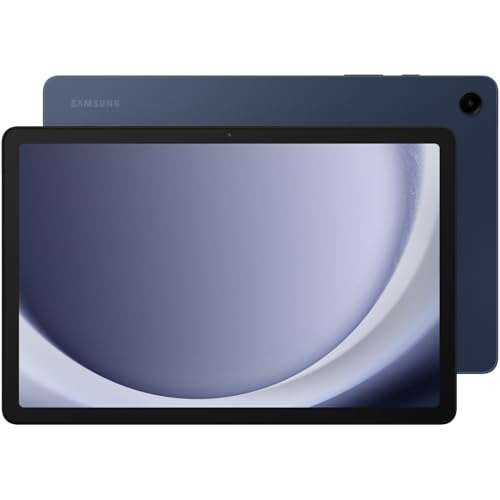
Samsung Galaxy Tab A9+ 11.0 (64GB) — The 4GB tablet that feels least like a compromise
If a household can buy exactly one tablet from this list and stop thinking, this is the one, and the reasons are cumulative rather than spectacular. The 11-inch screen is large enough for films to feel like films and for a recipe to be read from across a counter. Four speakers — still a rarity at this level — give dialogue a clarity that matters more to most owners than any processor chart. Samsung’s software is the most carefully finished in the class, its update commitment for the A-series is the one budget buyers can plan around, and the whole thing feels assembled by a company that expects to sell the same customer a phone later. Within the 4GB ceiling, this is as good as the ceiling gets.
The two honest cautions are storage and appetite. Sixty-four gigabytes, minus the system’s share, minus a few streaming apps’ caches, minus a holiday’s worth of downloaded episodes, arrives at “storage almost full” faster than new owners expect — the microSD slot is the designed answer, and a card should be budgeted as part of the purchase rather than discovered as a remedy. And the big bright screen encourages exactly the multitasking the memory cannot sustain: owners who open the video in a floating window over a heavy browser session will meet the reload tax at its most theatrical. Used as the single-focus screen it is built to be, the A9+ is the class benchmark. Used as a laptop substitute, it will file its objections daily.
- Display: 11.0-inch, high-refresh panel, quad speakers
- Memory: 4GB RAM — single-focus use suits it best
- Storage: 64GB, microSD expansion strongly advised
- Software: Samsung One UI, strongest update care in this list
- Build: slim metal-feel body; a case is wise for younger users
- Extras: face unlock, split-screen support within memory limits
Strengths
- Screen-and-speaker combination no rival here matches for films and calls.
- Samsung’s software polish and patch commitment suit a family hand-me-down life.
- microSD slot turns the small storage figure into a solvable problem.
Trade-offs
- 64GB fills fast without a memory card in the slot from week one.
- The inviting big screen tempts multitasking the 4GB cannot feed.
- No stylus in the box; handwriting fans should look at the Lenovo below.
Best for: the household’s main shared tablet — streaming, calls, browsing and school platforms on one well-made screen.
Not suited for: a student planning to research and write side by side for years; that reader should jump to the step-up advice later in this guide.

Lenovo Tab M11 — The value centre of the class
The Tab M11 is the pick for buyers who did the arithmetic and concluded that the screen is where their money should live. Eleven inches of it, with a smooth high-refresh panel and a body that feels a class above its shelf position, plus stylus support that turns it into a plausible note-taking and sketching surface for school and work when paired with Lenovo’s pen. In classrooms and on kitchen tables, that combination — big legible screen, pen in the ecosystem, price that survives a headteacher’s budget meeting — is why the M11 keeps appearing in education deployments, and why it anchors the value end of this list.
Its compromises are the class compromises wearing Lenovo clothes. The processor is a modest one, chosen for efficiency, and it shows the same reload behaviour as everything here when the browser gets ambitious. Lenovo’s software is clean and close to stock Android, which many buyers prefer, but its long-term update story has historically been shorter and quieter than Samsung’s, so the planning horizon should be set a little tighter. None of that dents its central claim: per inch of good screen and per unit of everyday usefulness, the M11 is the hardest pick on this page to argue against, and for a student whose work is reading, annotating and writing in one app at a time, it may be the smartest purchase here outright.
- Display: 11.0-inch, high-refresh, stylus support
- Memory: 4GB RAM
- Storage: 128GB with microSD expansion — roomier than most here
- Software: near-stock Android, clean and uncluttered
- Build: slim, light for its size; education-friendly bundles exist
- Audio: quad speakers with Dolby tuning
Strengths
- 128GB storage doubles the breathing room of the 64GB picks.
- Pen support opens handwriting and annotation the Samsungs here lack in-box.
- Screen size and quality per unit of cost lead the class.
Trade-offs
- Modest processor; heavy web apps feel their weight.
- Update runway typically shorter than Samsung’s A-series.
- Pen is a separate purchase in most bundles — check the box contents.
Best for: students and readers who want a big annotatable screen and mostly work in one app at a time.
Not suited for: buyers who keep a browser forest open all day and expect every tab to stay exactly where they left it.
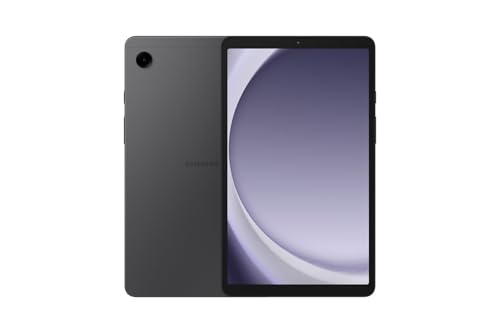
Samsung Galaxy Tab A9 8.7 (international listing) — The small Galaxy for one-hand days
There is a size of tablet that goes places the 11-inch models do not: into a coat pocket, a handbag’s inner sleeve, the gap beside a car seat, one hand while the other holds a rail, a toddler or a coffee. The Tab A9 at 8.7 inches is that size in Samsung’s range, and it carries the family’s software and update care into a body built for reading in bed, navigating from a passenger seat, entertaining a child in a queue and running a market stall’s card reader between customers. Its screen is modest in resolution — this is a slate for text at arm’s length and video at sofa distance, not for pixel inspection — and its speakers and cameras are serviceable rather than memorable. Its charm is entirely about fit.
The listing note: the verified listing for this model is an international one, with a European-flavoured title in the catalogue. For a WiFi tablet the practical meaning is narrow — warranty handling may route differently and regional software details can vary — rather than the network-band drama that surrounds international cellular models elsewhere in this programme. Buyers should still confirm they are ordering the WiFi build they intend, and should set the tablet up on their own accounts and region at first boot. Beyond that paperwork, the A9’s story is simple: it is the pick for people who know a big tablet would spend its life on a shelf, because the best tablet is the one that is actually in the hand when the moment comes.
- Display: 8.7-inch, one-hand body, reading-friendly size
- Memory: 4GB RAM
- Storage: 64GB with microSD expansion
- Listing: international model — check warranty routing and region setup
- Software: Samsung One UI with A-series update care
- Build: light and pocketable; speakers adequate for calls and video
Strengths
- The size that actually gets carried, read and used daily.
- Samsung software and patches in the smallest body on this list.
- microSD support keeps a travel library on board without storage anxiety.
Trade-offs
- Screen resolution is the softest of the Samsung pair here.
- International listing means warranty and region details need a pre-buy check.
- Small screen crowds split-view and dense web pages.
Best for: readers, travellers and stall-holders who value a tablet that fits a pocket and a single hand.
Not suited for: film lovers wanting a living-room screen, or anyone whose main app is a dense desktop-style web dashboard.

Lenovo Tab One 8.7 — The small, simple slate for fixed jobs
The Tab One is best understood not as a shrunken all-rounder but as a screen for a place. On a kitchen wall bracket it is the recipe and timer display that never gets borrowed for a film. On a bedside table it is the reading and podcast machine that nobody fights over. In a small shop it is the loyalty sign-up and menu screen; in a workshop, the manual viewer that lives on the bench. Its 8.7-inch HD panel is unambitious, its processor likewise, and that is precisely the point: Lenovo built a tablet whose entire personality is showing up for one job, cheaply and without drama, and the 4GB inside it is well matched to jobs that never ask for a second app to stay alive in the background.
Judged as a general-purpose tablet it is the most limited linked pick here — the HD screen softens small text, and the modest hardware will not grow into new roles. Judged as a fixed-role screen it is arguably the most honest product on the page, because it never pretends to be anything else. The buying question is therefore unusually clean. If the role is named and narrow — dashboard, reader, menu, monitor — the Tab One is a tidy answer. If the role is “a tablet, for whatever comes up”, the A9 above or the M11’s bigger canvas will repay their extra cost within a month of improvisations.
- Display: 8.7-inch HD — fine for dashboards, soft for fine print
- Memory: 4GB RAM, well matched to single-role use
- Storage: 64GB with microSD expansion
- Software: straightforward Android, light Lenovo additions
- Build: compact, light, bracket-and-stand friendly
- Role fit: fixed-position screens and gentle personal reading
Strengths
- Priced and specced honestly for single-purpose installations.
- Compact body fits mounts, stands and small surfaces big slates cannot.
- Simple software keeps it manageable for less technical households.
Trade-offs
- HD resolution is the weakest for long reading sessions in small type.
- Little headroom if the role grows beyond its first job.
- Speakers and cameras are functional, nothing more.
Best for: a named, narrow job — kitchen display, bedside reader, bench manual viewer, shop counter screen.
Not suited for: a family’s only tablet, where the job description changes by the hour and by the child.

Acer Iconia Tab P10 — The 2K screen that chose pixels over pace
Every class has one product built around a single defiant decision, and in this one it is Acer’s: put a 2K panel — sharper than anything else in this guide — into a 4GB tablet, and let the readers and film-watchers sort themselves from the multitaskers. On the Iconia Tab P10’s 10.4-inch screen, text edges are cleaner, photo detail survives zooming, and subtitled films look the way their makers hoped. For the large tribe of tablet owners whose usage is ninety per cent looking — reading, browsing photographs, watching, video-calling family — that panel is not a luxury; it is the entire experience, and Acer spent the budget where those owners actually live.
The trade is written into the same specification sheet. The processor behind the panel is an efficiency part, the software is close to plain Android with a thinner update tradition than Samsung’s, and 4GB of memory feeding a high-resolution screen means the machine is happiest moving at a reader’s pace: open the book, read the book; open the film, watch the film. Ask it to hurry — big spreadsheets, heavy web apps, game hopping — and it will answer at its own speed. Acer also deserves credit for still selling tablets under its own name at all in a market many PC brands abandoned; support and accessories exist, but buyers should expect a quieter ecosystem than the Samsung and Lenovo shelves. For the right eyes, none of that matters. This is the pick for the person who tried a budget tablet once, forgave its speed and never forgave its blurry text.
- Display: 10.4-inch 2K — the sharpest panel in this guide
- Memory: 4GB RAM
- Storage: 128GB with microSD expansion
- Software: near-stock Android; check update policy before buying
- Build: straightforward slab, stereo speakers
- Character: pace is leisurely; the screen is the whole argument
Strengths
- Text and photo sharpness the rest of the class cannot match.
- 128GB storage gives the viewing library room to live.
- A genuine alternative for buyers underserved by the big two brands.
Trade-offs
- Efficiency processor; hurried multitasking is not its language.
- Thinner accessory and support ecosystem than Samsung or Lenovo.
- High-resolution panel makes the modest battery work harder on bright settings.
Best for: readers, photo browsers and film-watchers whose tablet life is mostly looking at one beautiful thing at a time.
Not suited for: impatient switchers, spreadsheet wrestlers, or anyone who needs a stylus ecosystem.
Lenovo Tab M9 — Prose-only, and labelled plainly: this one has 3GB
The Tab M9 closes the list without a link, and the reason is the guide’s whole thesis in miniature: it has 3GB of RAM in a guide named for 4GB, and presenting it as a peer would mislead exactly the buyers least equipped to absorb the mistake. What 3GB feels like in 2026 is a tablet with a shorter temper — the browser surrenders tabs sooner, the music stops when the camera opens more often, and the whole machine asks its owner to live one app at a time with no exceptions. Its 9-inch HD screen and low cost explain why it fills baskets anyway, and there are drawers, workshops and spare rooms where a single-purpose screen at this level is genuinely sufficient: a permanently mounted photo frame with a clock, a garage manual viewer, a child’s first heavily supervised slate for one streaming app.
The line this guide draws is about naming. As a mapped, labelled, prose-only entry, the M9 is useful information — it is the floor of the market, and knowing the floor helps a buyer judge everything above it. The moment a shopper’s real life includes school platforms plus messaging plus a browser, the floor gives way, and the extra step up to any 4GB pick above is the best-value money in this entire category. If a listing elsewhere presents the M9 as equivalent to the 4GB machines, that listing is selling, not informing. Buy it for a fixed single job with open eyes, or step up one rung and buy a tablet instead of a compromise.
- Display: 9.0-inch HD
- Memory: 3GB RAM — below this guide’s standard, stated in every mention
- Storage: 32GB with microSD expansion
- Software: Android with Lenovo’s light additions
- Role fit: single-app installations and heavily supervised first tablets
- Status: prose-only here because it does not meet the 4GB criterion
Strengths
- The lowest-cost route to a 9-inch Android screen from a known brand.
- Adequate for one fixed app shown all day.
- microSD slot rescues the small internal storage for media.
Trade-offs
- 3GB shows its limits in the first week of ordinary mixed use.
- 32GB storage demands discipline from day one.
- No link here by design — it fails the guide’s own headline test.
Best for: a mounted, single-job screen where the app is chosen once and never changes.
Not suited for: general family use, school use, or any buyer who read this guide’s title and expects it to be honoured.
How do the six stack up when the RAM figure stops helping?
| Pick | Screen | RAM | Storage | Personality in one line |
|---|---|---|---|---|
| Galaxy Tab A9+ 64GB | 11.0-inch, quad speakers | 4GB | 64GB + microSD | The polished all-rounder; feed it a memory card |
| Lenovo Tab M11 | 11.0-inch, pen support | 4GB | 128GB + microSD | Big annotatable value for school and reading |
| Galaxy Tab A9 8.7 (international) | 8.7-inch | 4GB | 64GB + microSD | The carried-everywhere Samsung |
| Lenovo Tab One 8.7 | 8.7-inch HD | 4GB | 64GB + microSD | A screen for a place, not a companion |
| Acer Iconia Tab P10 | 10.4-inch 2K | 4GB | 128GB + microSD | Sharpest eyes, slowest hurry |
| Lenovo Tab M9 (prose-only) | 9.0-inch HD | 3GB | 32GB + microSD | The labelled floor of the market |
The table’s most important column is the one where five rows agree and one does not. RAM being equal, the choice becomes about where the tablet will live — hand, desk, wall or bag — and how much storage headroom its library needs. Notice that the two 128GB picks remove the most common budget-tablet regret without any memory drama at all.
When should you walk away from 4GB entirely and buy 6GB or 8GB?
Three reader profiles should close this guide and shop a shelf up. The first is the studying writer: anyone whose normal hour involves a document open beside a browser, sources in tabs, a messaging app interrupting and a citation manager sulking in the background. That workflow is not heavy by laptop standards, but it is exactly the shape that 4GB handles worst, and no pick here will make it pleasant for a semester, let alone a degree. The second profile is the long keeper: a buyer who replaces a tablet every four or five years is buying for the apps of 2029 as much as today’s, and app weight only ever moves one way. Doubling the memory at purchase is the cheapest year of service life in the whole market. The third profile is the gamer beyond the casual shelf — the big, beautiful, storage-hungry titles that anchor tablet gaming now assume memory headroom this class does not have, and they will close, stutter or refuse in ways no setting can charm away.
Everyone else can buy here with a clear conscience, and the test is simple to run honestly. Describe your tablet’s busiest realistic hour. If one app leads — a film, a book, a call, a class, a dashboard — and the others are supporting cast, 4GB will serve you and the savings are real money kept. If your busiest hour is a juggling act, it will not, and the kindest thing a guide can do is say so before the money moves rather than in the returns queue afterwards. There is also a middle path worth naming: buy the 4GB pick for the fixed role it suits — the kitchen, the child’s supervised hour, the counter — and let a phone or laptop carry the juggling. Role-splitting is how thoughtful households end up with two happy devices instead of one resented one.
How do you make a 4GB tablet feel faster than it is?
Start at setup, because the cheapest speed in this class is subtraction. Decline the preloaded extras you will never open, disable or uninstall the duplicate galleries, stores and assistants that budget software loves to multiply, and keep the home screen to the apps the role actually uses. Turn on the maker’s memory-extension feature if offered — it borrows a slice of storage as slow overflow memory, which does not create speed but does soften the reload cliff, and on a tablet with storage to spare it is a fair trade. Keep a fifth of the storage empty as a rule; a nearly full tablet slows in ways owners misdiagnose as age, because the system needs working room for caches and updates. Restart weekly — a thirty-second ritual that clears the accumulated clutter of a class of machine that never quite puts everything away.
Then adjust habits rather than hardware. Use the lite or web versions of the heaviest social apps, let the browser be a two-tab tool rather than a filing system, download the week’s episodes and playlists on WiFi instead of streaming through a crowded evening, and in split-screen pair one light app with one medium app rather than two heavy ones. For children’s tablets, a curated downloaded library beats an open app store for both speed and sanity. None of these tips will turn 4GB into 8GB, and a guide that promised otherwise would be lying in the friendly direction. What they do is move the ceiling from “met daily” to “met monthly”, and for the roles this class exists to serve, that difference is the difference between a bargain and a regret.
One more habit deserves its own mention because it costs nothing and changes the daily feel of every pick here: teach the tablet one home. Owners who scatter their reading, viewing and listening across five overlapping apps give the memory five masters to serve; owners who settle — one reading app, one streaming app, one browser used sparingly — give it a routine it can actually memorise. The tablet rewards routine the way a small kitchen rewards a tidy cook. It is the least technical advice in this guide and, in week-by-week experience, close to the most effective.
What mistakes do buyers in this class keep repeating?
The first is shopping the processor’s name instead of the memory figure — a famous chip strangled by 4GB will lose more apps than a modest chip with room to breathe, yet headline marketing always leads with the chip. The second is ignoring storage until the “cannot update” message arrives, usually the week a grandchild visits; in this class the memory card is part of the price, and the tablet without one is not finished being bought. The third is buying the 3GB floor for a 4GB life — the saving is small, the frustration is daily, and the M9’s labelled presence in this guide exists to break exactly that spell. The fourth is expecting a child’s tablet needs to grow at adult speed: a supervised seven-year-old’s streaming and reading slate bought at 4GB is rational, while the same purchase for a twelve-year-old heading into secondary-school platforms is a down payment on a replacement. The fifth mistake is subtler — judging the class by its worst hour. Every 4GB tablet has an evening where it reloads something precious; the question is whether that evening is the exception in a year of service or the texture of every day, and only the buyer’s real workflow can answer it.
What does a week with a 4GB tablet actually feel like, hour by hour?
Monday morning it is a kitchen screen: the news streams, a recipe is pinned, a timer runs, and the tablet is flawless because the morning asks one thing at a time. Mid-morning it is a video call with a grandchild, camera and microphone and nothing else, and again the class ceiling is invisible — this is the workload budget tablets were born for. The friction arrives in the afternoon, when the same device is asked to compare three holiday listings in a browser while a messaging thread runs and a document waits half-edited. Tabs begin their quiet disappearing act, the document app has to be reopened rather than resumed, and the owner forms the sentence this class hears most: it was fine this morning. Both experiences are the same tablet telling the truth about its memory; the morning asked for a screen and the afternoon asked for a desk.
The weekend writes the other half of the review. Films download on Friday and play beautifully on Saturday, because playback is a single-app parade and the A9+’s speakers or the Acer’s sharp panel take the applause. A child’s game shelf — the modest, well-behaved titles — runs happily, while the one giant game a cousin recommended either installs and sulks or declines to perform, which is the class boundary announcing itself without malice. Sunday’s photograph sorting is pleasant on the big screens and slow on the small ones, and by Sunday night the household has an accurate instinct for its tablet: loved as a screen, managed as a multitasker. That instinct, formed in a week, is worth more than any benchmark — and buyers who run the thought experiment honestly before purchase, picturing their own Monday and their own Saturday, rarely end up surprised by what arrives in the box.
Why do storage and updates decide the second year more than the chip decides the first?
Open the box and every tablet in this guide is quick enough; the divergence begins around month ten, and it is almost never the processor’s fault. The first force is storage creep. Apps grow, caches accumulate, a messaging app’s media folder quietly becomes a photo archive, and the 64GB picks approach the wall where updates need temporary room the device no longer has. Owners experience this as the tablet “getting old”, when in truth it is getting full — which is why this guide repeats the memory-card advice until it becomes annoying, and why the 128GB M11 and Acer age more gracefully than their specification sheets suggest. The second force is update care. A tablet still receiving security patches in year two is a safer object on a home network than one frozen at its launch software, and the gap between Samsung’s A-series commitment and the quieter schedules elsewhere in this class is the single strongest argument for paying the Samsung premium when the tablet will hold accounts, email and a child’s school login.
The practical routine costs nothing and buys years. Once a quarter, look at the storage screen and evict the three largest things nobody remembers downloading. Keep the memory card as the media library’s home from the first day rather than migrating in a panic later. Let updates install overnight on the charger instead of postponing them into a pile. And when the tablet is eventually handed down — as budget tablets gloriously are, from parent to child to kitchen wall — factory-reset it between owners so the second life starts with an empty desk instead of the first life’s clutter. A 4GB tablet maintained this way does not merely survive its second year; it often becomes the most-used screen in the house, precisely because nobody is precious about it.
Three households, three different right answers
Consider the grandparent household first, because it is this class’s heartland. The tablet’s day is a video call, the news, photographs of grandchildren, a crossword, perhaps a streamed Mass or a favourite serial. Every one of those is a single-app hour, the speakers matter more than the silicon, and the correct purchase is the one with the clearest screen and the most forgiving software: the A9+ for most, the Acer for the reader whose eyes asked for sharper text. Setup help matters more than specifications here — a home screen arranged by a family member, updates set to automatic, storage watched by someone who visits at Christmas. In this household a 4GB tablet is not a compromise at all; it is the correct tool bought at the correct price, and the money saved against a flagship is better spent on the case, the stand and the visit itself.
The young-family household runs the same hardware harder and in more directions: a parent’s browsing, two children’s supervised apps, a school platform, a doorbell camera, a recipe at six and a film at nine. Here the class still works, but the discipline in the earlier sections stops being advice and becomes the operating system of the purchase — memory card fitted, downloads curated, the giant games politely declined, the browser treated as a guest rather than a resident. The M11’s 128GB earns its place in this house, because storage is the pressure that arrives first when five people’s media share one device. And the small-shop household — the café with a loyalty tablet, the salon with a booking screen, the stall with a card reader — should buy like the grandparent in reverse: the role is fixed, the app is chosen once, and the Tab One or the little A9 on a stand will run that single job for years at a cost per day that rounds to nothing. Three households, one memory figure, three different correct tablets — which is why this guide refuses to crown a single winner and insists on the role conversation instead.
There is a fourth household worth a sentence: the one buying a tablet as a gift, sight unseen, for someone whose habits they half-know. Gift buyers should default to the A9+ with a card in the box, because it forgives the widest range of unknown habits — and should resist the floor-priced 3GB temptation hardest of all, since a gift that frustrates daily is remembered daily too.
What should you check in the shop, in the listing and in the first week?
In the listing, check three lines and ignore the rest of the decoration: the RAM figure in the specification table rather than the headline, the storage figure with its expansion note, and the exact model name, because this class is full of near-identical names separated by a letter and a memory size. Screenshots of glamorous multitasking in the gallery are marketing weather; the specification table is the climate. If a bundle is offered, price its parts honestly — a case and a memory card are worth having, a fistful of cables and a stylus that fits nothing are worth approximately the cardboard they arrive in. In a physical shop, the two-minute test that tells the truth is unglamorous: open the browser, load a heavy news page, switch to the camera, take a photograph, switch back, and watch whether the page survives. That round trip is the 4GB experience in miniature, and it separates the picks that manage their memory gracefully from those that simply have less of it.
In the first week, set the tablet up as though you meant it. Fit the memory card before the first download so the library grows in the right place. Arrange the home screen around the role, switch on automatic updates, set the browser free of its default clutter of open tabs, and download the household’s core library — the week’s viewing, the child’s shelf, the offline maps — while the WiFi is fast and nobody is waiting. Then write down, somewhere unglamorous like the box lid, the date of purchase and the memory figure, because in two years someone will ask whether this is “the good tablet or the slow one” and the honest answer will matter for what it gets asked to do next. A class of machine this dependent on expectations rewards owners who set it up deliberately; the first week is where the next two years are decided.
Does the case matter more than the chip at this level?
Uncomfortably often, yes. The leading cause of death among budget tablets is not obsolescence but gravity: a slide off a sofa arm, a knock from a kitchen counter, a child’s grip failing at the top of the stairs. None of the six picks here carries a rugged rating, and their screens are the largest fragile surface their households own. A folio that wakes and sleeps the screen, a bumper case with raised corners for the ones children carry, and a stand that holds the kitchen tablet at reading angle instead of propping it against the olive oil — these unglamorous purchases protect more value than any processor upgrade in this class could add. Budget for them in the same basket, because a tablet bought twice is the most expensive tablet in this guide by a distance.
The same logic governs chargers and cables, the invisible infrastructure of a happy tablet. A budget slate charged nightly on a fraying cable beside a bed will eventually present its owner with a swollen battery or a dead port and a bill that dwarfs the cable’s replacement cost; a decent cable and a charger kept with the tablet, rather than borrowed by the whole house, is fleet management at household scale. None of this appears in specification tables, and all of it appears in the second year of ownership — which is, as this guide has argued from its first page, where 4GB tablets are truly judged.
Final Recommendation
For most households the Galaxy Tab A9+ 64GB, bought together with a memory card, is the 4GB tablet to beat — the screen, speakers and software care carry the class’s ceiling more gracefully than anything else here. Students and annotators should take the Tab M11’s bigger storage and pen support, carriers and readers the little A9, fixed-role buyers the Tab One, and sharp-eyed viewers the Acer’s 2K panel, while the M9 stays where this guide put it: mapped, labelled and reserved for single fixed jobs. Buy 4GB for a named role and it is one of the honest bargains of the tablet world; buy it as a disguised laptop and it will correct the misunderstanding personally, one reloaded tab at a time, until the lesson sticks.
Frequently Asked Questions
Is 4GB of RAM enough for schoolwork?
For reading, class platforms, note-taking in one app and homework documents, yes — the Tab M11 and A9+ handle that day well. For research-heavy work with many sources open beside a document, it becomes a daily friction, and 6GB or 8GB is the wiser school purchase.
Why does my 4GB tablet keep reloading web pages?
Because the browser is the heaviest tenant in the building. When memory runs short, the system evicts background tabs to protect the app in front of you, and returning to an evicted tab means loading it again. Fewer open tabs and a weekly restart reduce it; more RAM removes it.
Does a memory card make a 4GB tablet faster?
Not faster, but roomier. A card holds the films, photos and downloads that would otherwise crowd the internal storage, and a system with breathing room updates and caches more happily. It fixes storage regret, not memory limits.
What is RAM Plus or memory extension, and should I use it?
It borrows a portion of storage to act as slow overflow memory. It will not make apps launch quicker, but it can keep one more app alive in the background. On a tablet with storage to spare, enabling it is a reasonable trade.
Can a 4GB tablet handle video calls and streaming at the same time?
It can hold the call, or it can hold the stream beautifully; asking it to keep both alive while you hop between them is where the ceiling shows. In practice households solve this socially — the call takes the tablet, the stream waits or moves to the television — and that is the correct instinct. The class serves serial attention gracefully and parallel attention grudgingly, and nearly every disappointment in the reviews of these machines is a parallel-attention story told by someone who was never warned.
How long will a 4GB tablet stay pleasant to use?
In a fixed or gentle role, three years or more. As a general family machine facing ever-heavier apps, plan on two to three good years — and if your horizon is longer, that arithmetic is itself the argument for stepping up a class.
Related Guides
From here, browse the tablets we’d pick for students on a budget, compare small Android tablets that still fit a coat pocket, or step up with our favourite tablets for reading and annotating.
Related guides
- Best Basic Phones Camera Buyers Can Trust: Flip Phones and Simple Handsets That Still Take a Photograph
- Best Sony Full Frame Cameras for Astrophotography: Sensitivity vs Resolution
- Best Affordable Android Tablets: Five True Android Slates and One Fire OS Specialist, Clearly Labelled
- Best 400 FPS High Speed Cameras: The Honest Truth About Burst Slow Motion



[…] buyers usually read next about rugged tablets built for field teams, then compare the small Android tablets worth carrying daily, and finish with our roundup of […]